Bollinger Squeeze Breakout Pro
- Indicators
-
Ola Marten Hamberg
 A guy from Sweden using this platform to exist, download indicators and EAs and vibe code my own and selling some of it for free.
- Version: 1.0
Bollinger Squeeze Breakout Pro
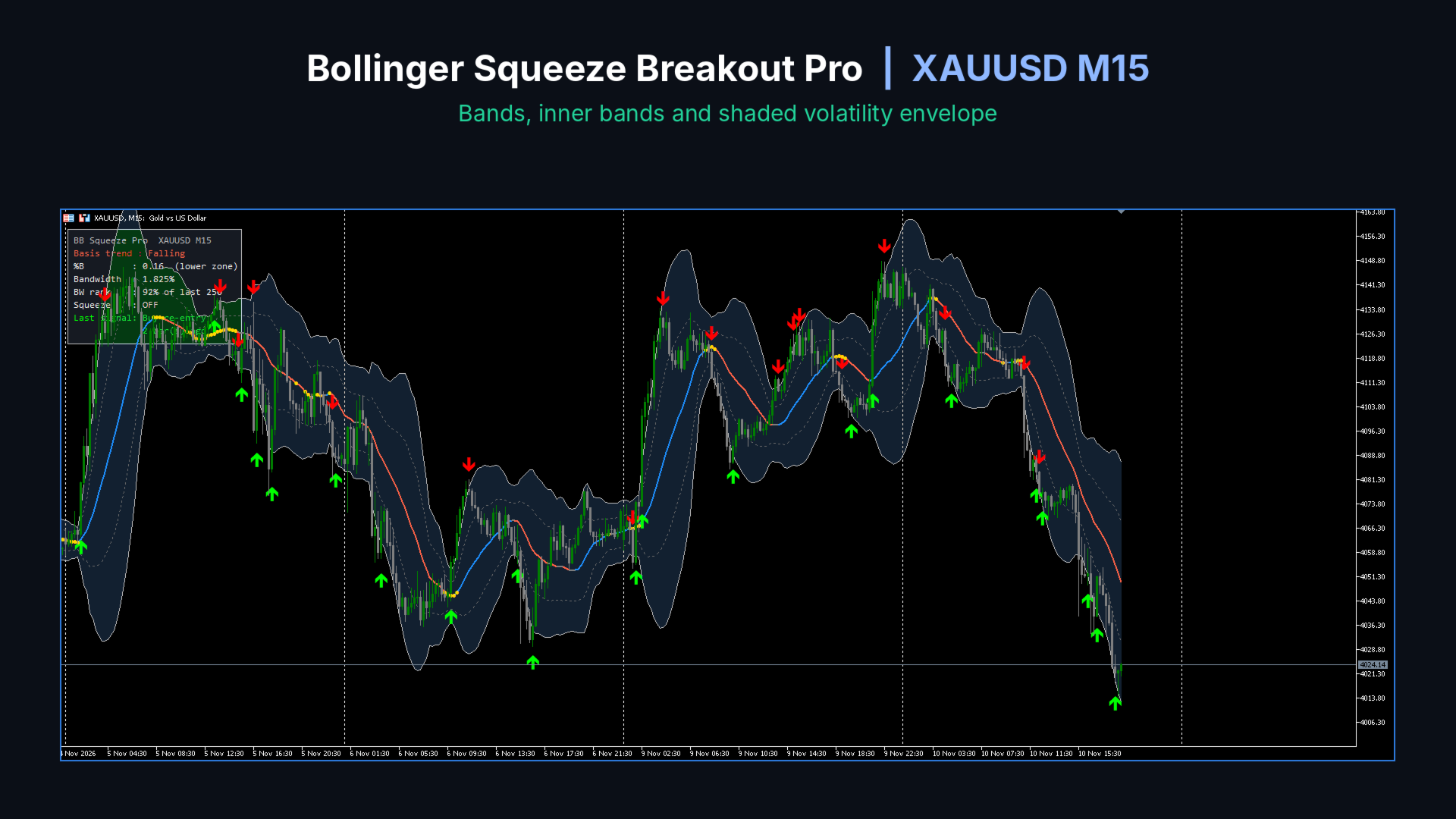
Bollinger Squeeze Breakout Pro is an advanced version of the classic Bollinger Bands for MetaTrader 5. It shows you when volatility is compressing (the squeeze) and marks the moment price breaks out of it. It also gives mean-reversion signals when price returns inside the bands. Everything you need is shown directly on the chart: bands, trend direction, squeeze status, signals and a live info panel.
MAIN FEATURES
Multi-band display
- Main Bollinger Bands (default 2.0 standard deviations)
- Optional inner bands (default 1.0) and outer bands (default 3.0)
- Shaded area between the main bands, with candles kept on top so price stays visible
- Choose the basis moving average type (SMA, EMA, SMMA, LWMA) and the applied price
Trend-coloured basis line
- The middle line changes colour based on its slope: rising, falling or flat
- The flat threshold is based on ATR, so it adapts to any symbol and timeframe
Squeeze detection
- Gold dots on the basis line mark periods of low volatility
- Two detection modes:
1. Keltner mode: the Bollinger Bands move inside a Keltner Channel (the classic squeeze method)
2. Bandwidth mode: Bollinger Bandwidth is at or near its lowest level over a chosen number of bars
Breakout signals
- Buy arrow when price closes above the upper band, sell arrow when price closes below the lower band
- Optional filter: only signal breakouts that follow a recent squeeze
- Optional filter: the breakout must agree with the slope of the basis line
Re-entry signals
- Buy arrow when price closes back above the lower band after being below it
- Sell arrow when price closes back below the upper band after being above it
- Optional trend filter to avoid signals against the basis slope
No repainting
- By default, signals are only confirmed on closed bars, so arrows do not appear and disappear on the current bar
Info panel
- Basis trend (rising, falling, flat)
- %B value and price zone (above upper, upper zone, mid range, lower zone, below lower)
- Bandwidth in percent
- Bandwidth rank: how the current bandwidth compares with recent history
- Squeeze status and how many bars it has lasted
- Last signal and how many bars ago it appeared
- Panel can be placed in any chart corner, with adjustable size and colours
Data Window values
- %B and Bandwidth are shown in the Data Window for every bar
Alerts
- Alerts for buy and sell signals
- Optional alerts when a squeeze starts or is released
- Popup, sound, push notification and email
- No alerts are triggered by historical bars when the indicator is loaded
HOW TO USE
Squeeze breakout: wait for the gold squeeze dots to appear, then watch for a breakout arrow as the bands expand. Squeezes often come before strong moves.
Mean reversion: in ranging markets, re-entry arrows show where price returns inside the bands after an extreme.
Use the basis colour and the info panel to judge trend direction and volatility before acting on a signal.
INPUT PARAMETERS
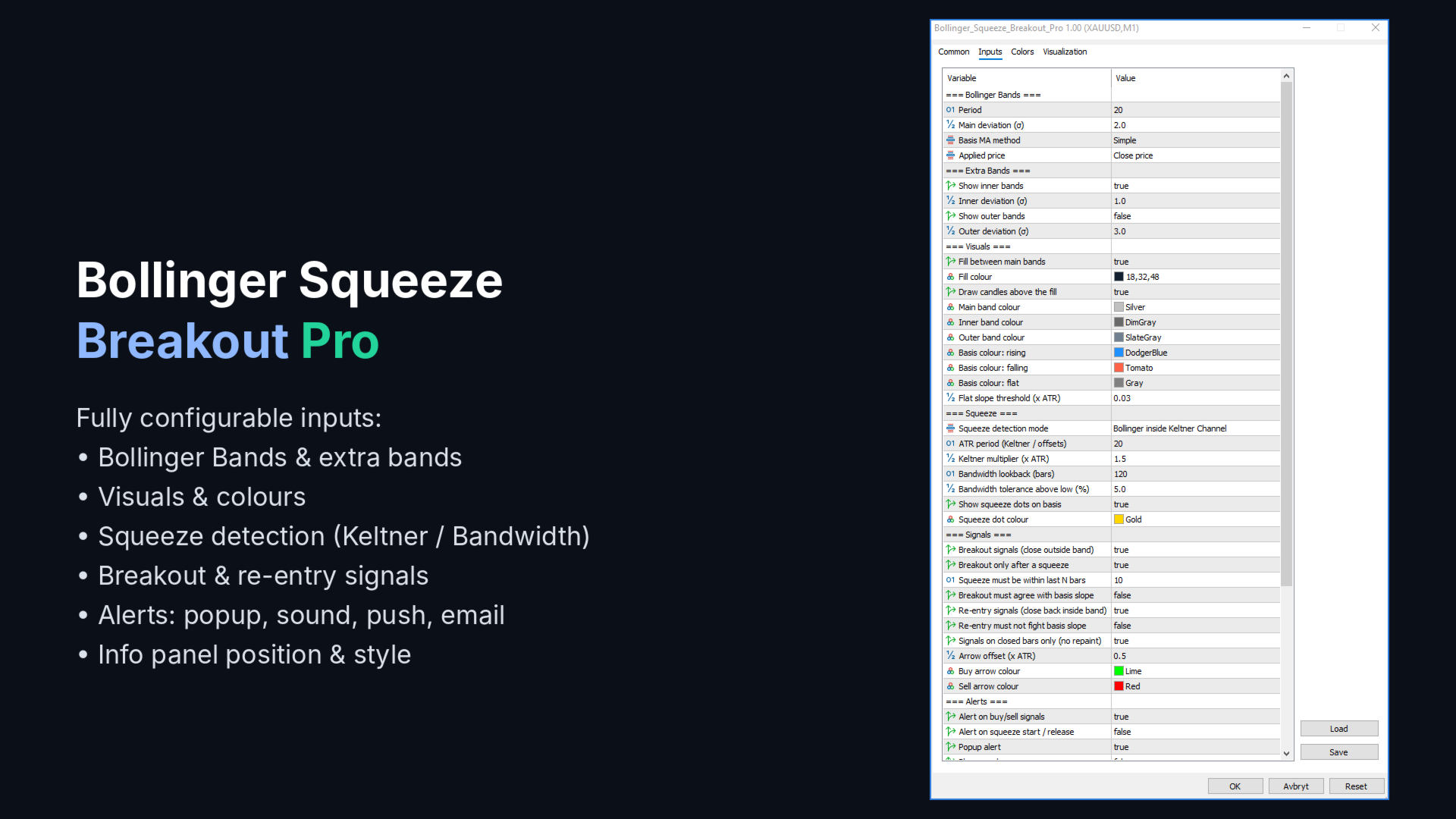
Bollinger Bands
- Period: number of bars for the bands (default 20)
- Main deviation: standard deviation multiplier for the main bands (default 2.0)
- Basis MA method: SMA, EMA, SMMA or LWMA (default SMA)
- Applied price: price used for the calculation (default Close)
Extra Bands
- Show inner bands: show or hide the inner bands (default true)
- Inner deviation: multiplier for the inner bands (default 1.0)
- Show outer bands: show or hide the outer bands (default false)
- Outer deviation: multiplier for the outer bands (default 3.0)
Visuals
- Fill between main bands: show or hide the shaded area (default true)
- Fill colour: colour of the shaded area
- Draw candles above the fill: keeps candles visible above the shading (default true)
- Main, inner and outer band colours
- Basis colours: separate colours for rising, falling and flat
- Flat slope threshold: slope below this value (as a multiple of ATR) counts as flat (default 0.03)
Squeeze
- Squeeze detection mode: Keltner Channel or Bandwidth low
- ATR period: used for the Keltner Channel and arrow placement (default 20)
- Keltner multiplier: ATR multiplier for the Keltner Channel (default 1.5)
- Bandwidth lookback: bars used to find the bandwidth low (default 120)
- Bandwidth tolerance: how close to the low (in percent) still counts as a squeeze (default 5)
- Show squeeze dots and squeeze dot colour
Signals
- Breakout signals: enable or disable breakout arrows (default true)
- Breakout only after a squeeze: require a recent squeeze (default true)
- Squeeze must be within last N bars: how recent the squeeze must be (default 10)
- Breakout must agree with basis slope: trend filter for breakouts (default false)
- Re-entry signals: enable or disable re-entry arrows (default true)
- Re-entry must not fight basis slope: trend filter for re-entries (default false)
- Signals on closed bars only: prevents repainting (default true)
- Arrow offset: distance of arrows from the candle, as a multiple of ATR (default 0.5)
- Buy and sell arrow colours
Alerts
- Alert on buy/sell signals (default true)
- Alert on squeeze start/release (default false)
- Popup, sound, sound file, push notification and email options
Info Panel
- Show info panel (default true)
- Panel corner, X and Y offset, panel width and font size
- Panel background and text colours
- Bandwidth rank lookback: bars used to calculate the bandwidth rank (default 250)
The indicator works on all symbols and timeframes.
Disclaimer: This indicator is a technical analysis tool and does not guarantee profits. Always use proper risk management.