Macro Event Countdown and Caution Zones
- Indicators
-
Kazuma Uezono
 MQL5 / MQL4 / Pine Script v6 developer and active trader.
Seller on the MQL5 Market (indicators for MT4/MT5).
Services:
- TradingView Pine Script to MT5/MT4 conversion (bar-by-bar matching, with tester report)
- MT4 to MT5 migration - Version: 1.1
- Activations: 5
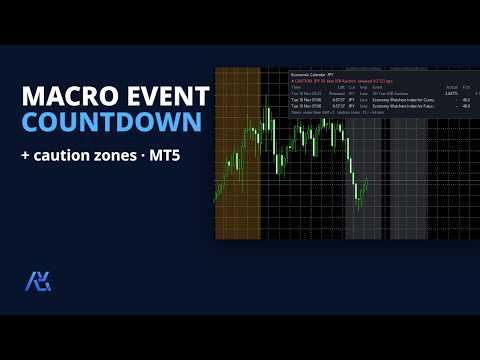
Macro Event Countdown and Caution Zones shows upcoming economic events for the currencies of your chart, taken from the economic calendar built into MetaTrader 5. It lists them with a countdown, draws a vertical line at each release time and shades a caution zone before and after important events, and shows whether the chart is in a caution period right now. It is meant for traders who want to see news times clearly, for example to follow a prop firm's news rule or their own "no new trades around news" routine, and for EA users who want to read the next news time from their own code. It is a display and alert tool: it gives no buy / sell signals and never opens, modifies or closes orders.
WHAT IT SHOWS
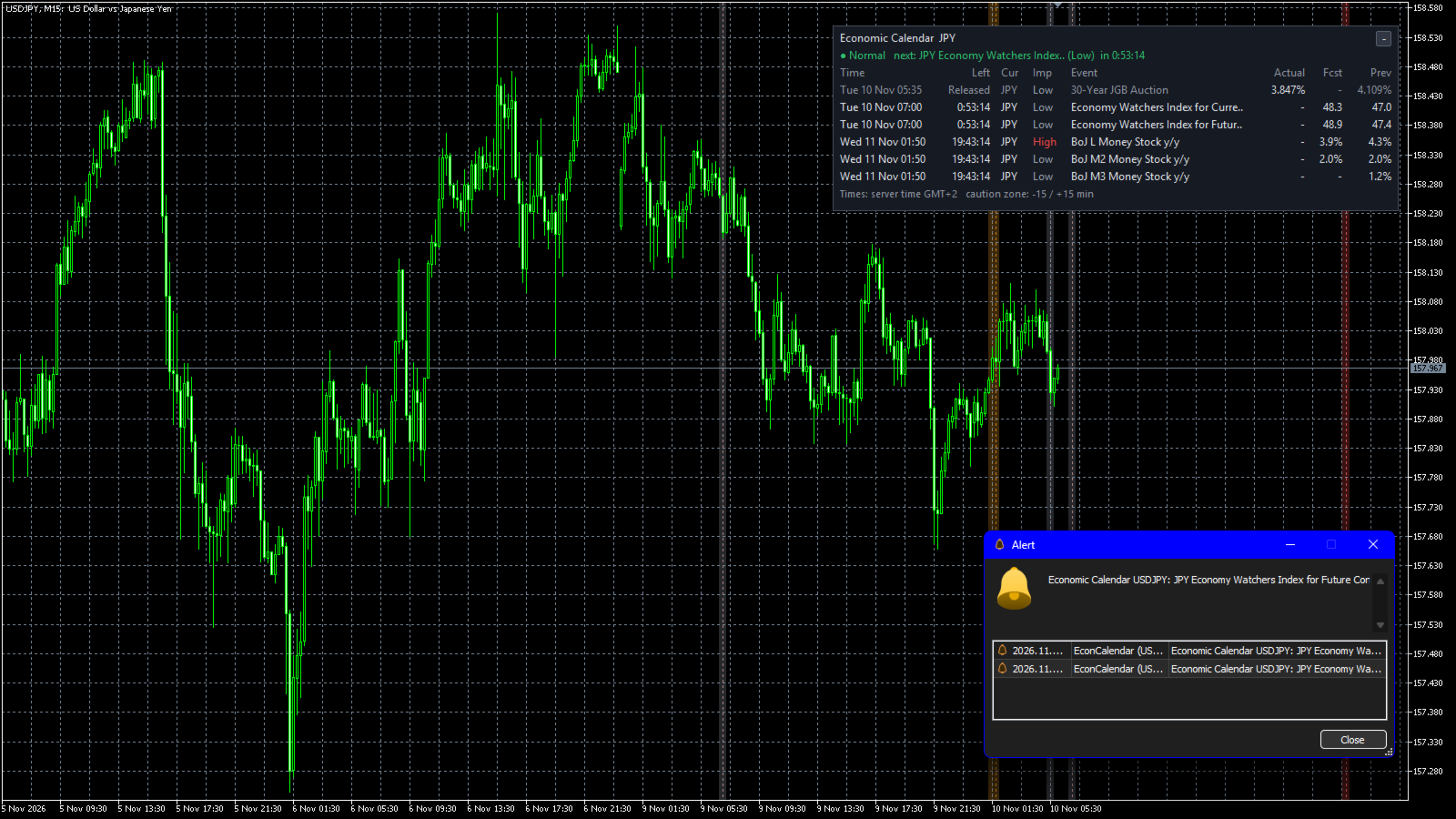
- Panel with the events of the next 24 hours (1-168): date and time, time left, currency, importance (colour coded), event name, and actual / forecast / previous values. Released events stay in the list for 60 minutes (0-1440). Up to 10 rows (1-30).
- Time shown in server time (same as the chart), your local PC time or UTC.
- Vertical lines at event times (dotted by default) and shaded caution zones, 15 minutes before and 15 minutes after an event by default (0-240 each). Past events of the last 3 days (0-10) are also drawn, so you can look back at the chart around them. Lines and zones are drawn up to H4 (can be changed).
- State line at the top of the panel: "Normal" with the next caution event and its countdown, or "CAUTION" with the event and the time to / since its release.
- The colour of an actual value (green / red) is the calendar's own "impact" field supplied by MetaQuotes: whether the figure was better or worse than expected for the event's currency. It is not a buy / sell direction for your chart symbol.
- Collapse button, four corners, three sizes, colours can be changed. Panel text in English or Japanese, chosen automatically from the terminal language (or by hand).
CURRENCIES AND IMPORTANCE
- Automatic: base and profit currency of the chart symbol (EURUSD -> EUR, USD). For gold, indices and crypto the profit currency is used (for example XAUUSD -> USD).
- Or your own list (for example USD,EUR,JPY), or automatic plus your list.
- Importance filter for the list and lines: High + Medium by default. Separate filter for caution zones, caution state and alerts: High only by default.
ALERTS (off by default)
- N minutes before an event (15 by default, 1-240), for the caution importance. Pop-up, sound, push notification and / or e-mail.
- One alert per event in the whole terminal, even when the indicator is on several charts.
- When several events of the same currency are released at the same time (for example a CPI release with several figures), you get one alert for each of them.
- Events whose alert time had already passed when the indicator was loaded, or while the terminal was closed, do not alert.
FOR EA USERS (iCustom)
Two buffers, value on the latest bar (shift 0):
- Buffer 0: minutes until the next High importance event of the chosen currencies. -1 = none within the look-ahead time, -2 = no calendar data (not loaded yet, or Strategy Tester).
- Buffer 1: 1 while in a caution zone, 0 otherwise.
A product bought on the Market is installed in the Indicators\Market folder, so the name to use is "Market\\Macro Event Countdown and Caution Zones". Pass false as the first parameter: the copy then draws nothing on the chart and does not use one of the 8 drawing places of the chart. The other inputs keep their defaults:
int h = iCustom(_Symbol, _Period, "Market\\Macro Event Countdown and Caution Zones", false);
double v[1];
if(CopyBuffer(h, 0, 0, 1, v) == 1) { /* v[0] = minutes to the next High event */ }
If you want to pass more inputs, the parameter list has 46 entries: the 41 inputs plus the 5 input group headers, in the order shown in the Inputs tab.
How your EA reacts to these values is your own decision; the indicator itself does not trade.
LIMITATIONS (please read before buying)
- The MT5 Strategy Tester has no calendar data. In the tester only a notice is shown and buffer 0 returns -2. It cannot be used to backtest a news-avoidance EA.
- Event names come from the terminal's calendar in the terminal's language. With the panel in English on a Japanese terminal, the names are in Japanese.
- Local time and UTC are converted with the current time difference. For events on the other side of a daylight saving change the shown time can be 1 hour off. Server time is not affected.
- All-day and tentative events are listed but have no caution zone and no alert.
- Currencies that the MT5 calendar does not cover (for example CNH, TRY) are not shown.
- Actual values appear with a delay of up to the check interval (30 seconds by default, 10-300). The accuracy and timing of the data depend on the calendar provider (MetaQuotes); this indicator only displays it.
- Your prop firm or broker may use another news source or other rules. This indicator does not decide what is allowed on your account; please check their rules yourself.
- Up to 8 copies with drawing on one chart. When several copies on one chart draw zones, the zone settings of the first copy are used. Copies with drawing off (iCustom) are not counted.
- Buffers hold the value of the latest bar only; older bars are empty.
- If you save a template, the panel objects are saved too, but they are rebuilt when the template is loaded.
IMPORTANT
- Not a buy / sell signal and not a forecast of how price will react to news. It does not promise any profit or result. Trade decisions are your own responsibility.
- Objects whose names start with "ECN" are treated as this indicator's drawings. Temporary terminal global variables starting with "ECN" are used to share alert and panel state between charts.
- Push notifications and e-mail need the terminal's notification / e-mail settings.
OTHER
- MetaTrader 5 only (the MT5 calendar is not available in MetaTrader 4). Works on any symbol and timeframe. Tested on an MT5 demo account.
- No DLLs, no web requests: data comes only from the MT5 built-in calendar.
- Support through MQL5 messages, reply within 3 business days: installation, settings and bug reports only. Questions about market views, how to trade news or trade decisions cannot be answered.