DomDom

DomDom turns MetaTrader 5 into an order-flow workstation: read the book and the tape, trade by click or hotkey, and replay the session after hours.


DomDom is built for exchange-traded instruments such as futures, where the broker streams Depth of Market and real trades. It never invents a book: when the broker sends no size, the size cells stay empty.


The panel at a glance

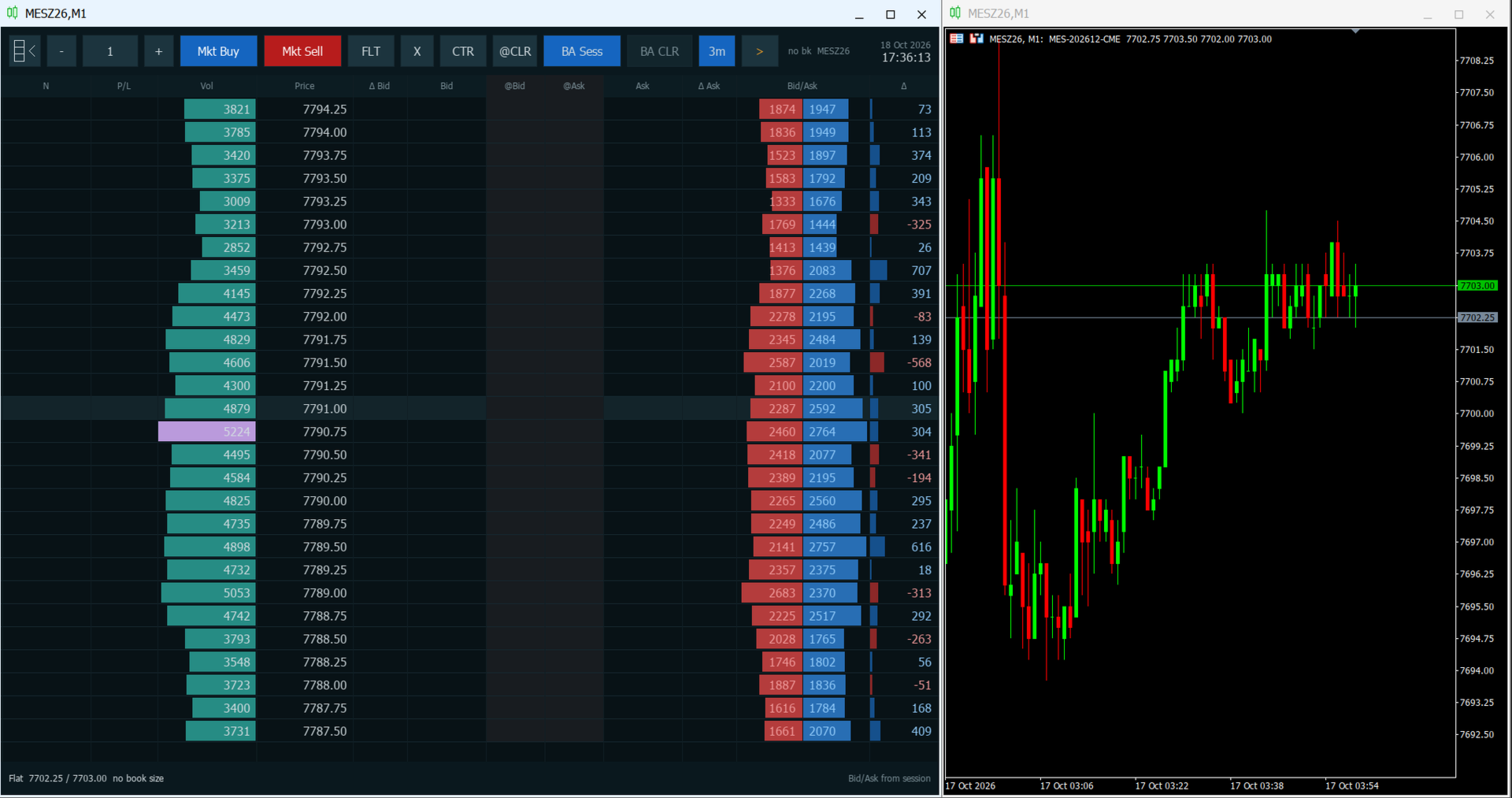
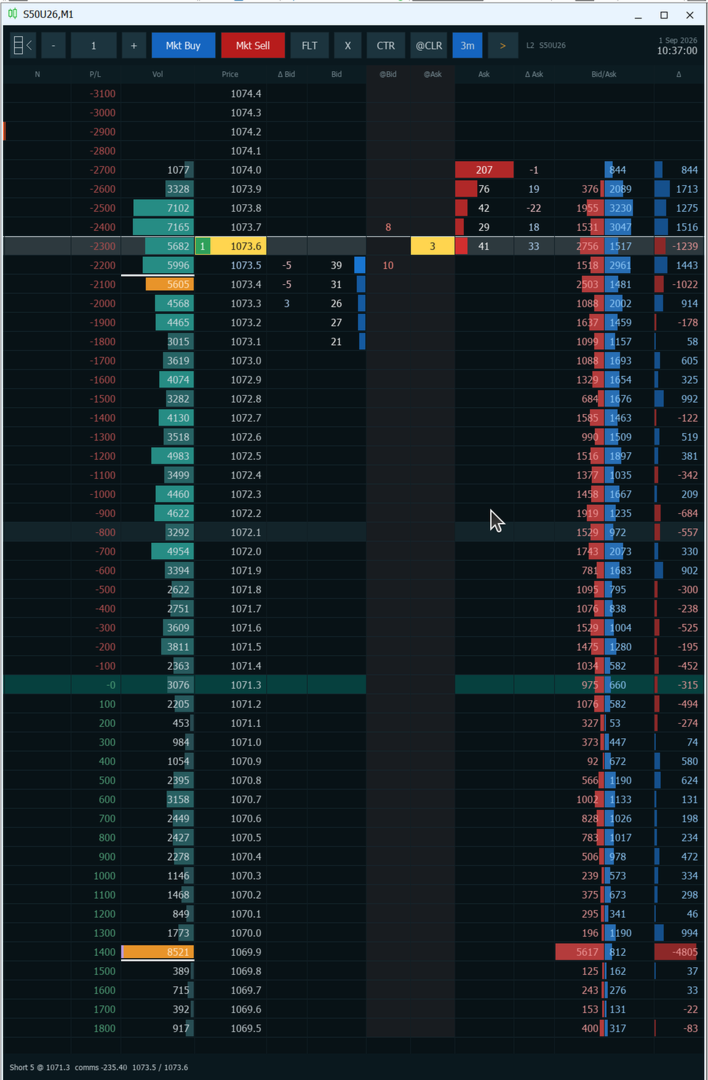
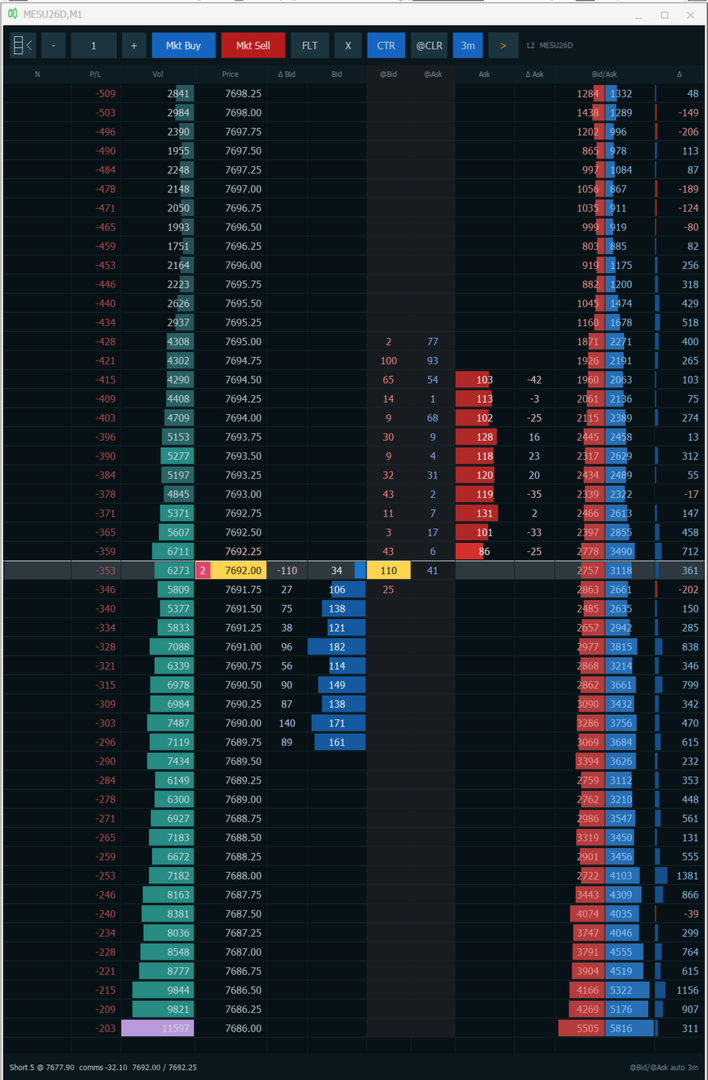
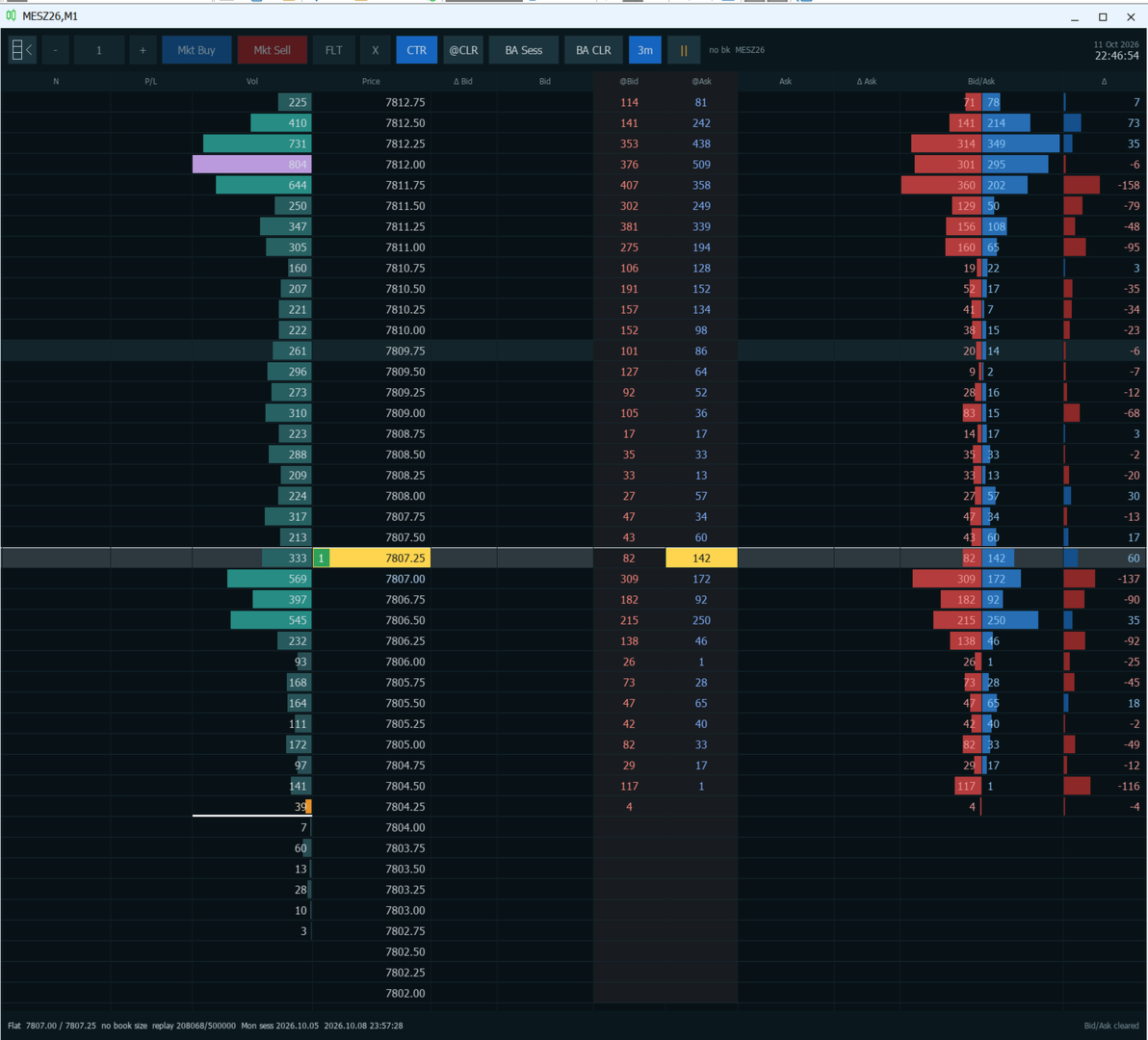
The panel has three parts: the toolbar at the top, the price ladder in the middle and the status line at the bottom. Hover over a toolbar button for a moment to see its tip.

Toolbar, from left to right:
  • Ladder button: hides or shows the panel. Hiding it brings the price chart back, and showing it covers the chart again. Session volume is kept.
  • Minus, quantity, plus: the size of the next order. Minus and plus change it by one volume step.
  • Mkt Buy and Mkt Sell: a market order for the shown quantity. A second click within half a second is ignored.
  • FLT: flatten. Cancels every working order and closes every open position on the symbol.
  • X: cancels the working orders on the symbol. The position stays open.
  • CTR: centers the ladder on the last price and turns auto-center on. It stays lit while auto-center is on.
  • @CLR: clears the @Bid and @Ask columns.
  • BA Sess: when lit, Vol, Bid/Ask and Delta count from the session open (see "Reading order flow").
  • BA CLR: restarts the Bid/Ask count from now. It works only while BA Sess is off.
  • 3m: when lit, @Bid and @Ask clear themselves every three minutes.
  • Play and pause: starts or pauses session replay.
  • Status: "L2" when the broker sends a book with sizes and "no bk" when it does not, followed by the symbol. The broker's server date and time are on the right.

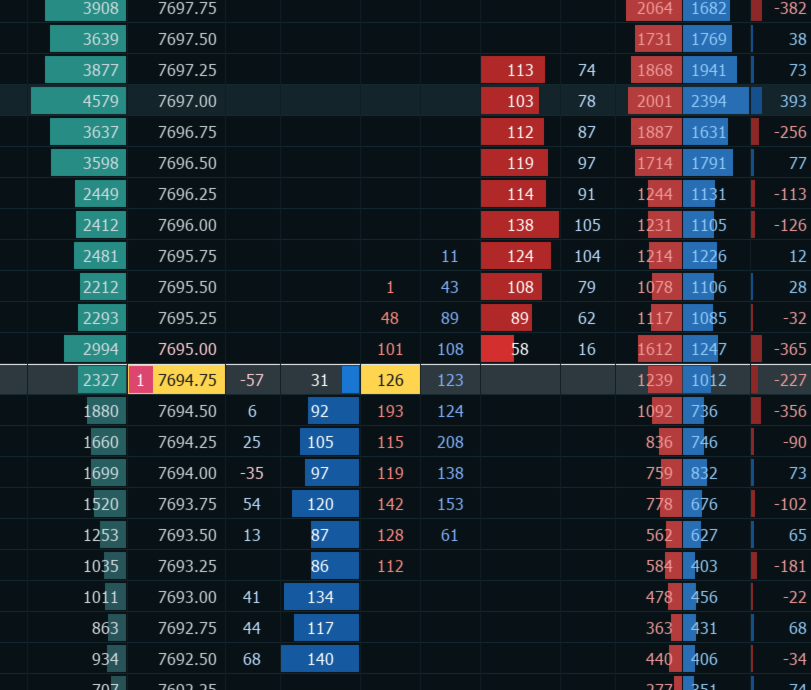
Ladder columns, from left to right:
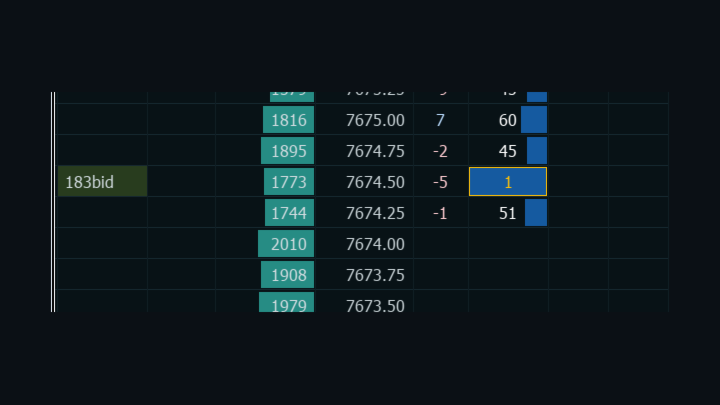
  • N: your note on that price.
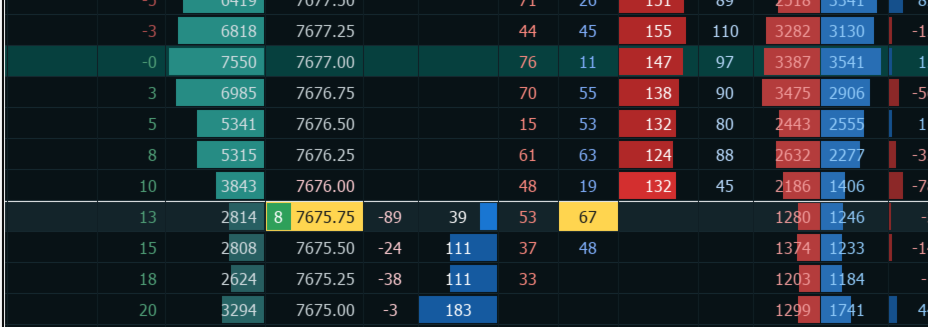
  • P/L: the result of your whole position if price traded at that row, in money or in ticks. Empty while you are flat.
  • Vol: traded volume at each price. The point of control is purple. The 70 percent value area is amber, and its high and low have white edges.
  • Price: the row of the last trade is highlighted, with the size of that print colored by side.
  • Delta Bid and Bid: the change in resting bid size, and the resting bid size from the broker's book.
  • @Bid and @Ask: prints that sold into the bid or bought at the ask since the last clear.
  • Ask and Delta Ask: the resting ask size, and its change.
  • Bid/Ask: volume traded at the bid and at the ask, as two bars.
  • Delta: ask volume minus bid volume at that price.

The status line shows Flat, or your side, size and average price with an estimated commission. Then come the current bid and ask, "no book size" when the broker sends quotes without depth, and in replay the replay position and clock. The last action, such as "Bid/Ask cleared", appears on the right.


Why DomDom

A candle shows where price went. The ladder shows how it got there: who was resting, who pulled, who hit, and where volume built up. DomDom puts that next to your order entry.

  • Watch liquidity being added or pulled at each price as it happens, not after the bar closes.
  • See whether volume traded at the bid or at the ask, and where the session's value sits.
  • Act from the same row: one click for a limit, stop or market order, one more to cancel or protect it.
  • Mark the levels you care about with notes that are still there the next time you attach DomDom.
  • Study the last session after hours with replay.

Who it is for: discretionary day traders and scalpers on futures and other exchange-traded instruments who read the book and the tape and want to trade from a ladder in MetaTrader 5. DomDom does not trade for you, give signals or predict price.

How to use DomDom

  1. Attach DomDom to a chart of the symbol you trade. The ladder fills that chart window.
  2. Optionally, open a second chart of the same symbol on any timeframe, M1 or M5 for example, and place the two windows side by side.
  3. That is all. DomDom works on its own; the second chart only adds context.


Before your first trade

  • Turn on Algo Trading in the MetaTrader 5 toolbar.
  • When you attach DomDom, tick "Allow Algo Trading" on the Common tab.

Without both, every order is rejected. Click the chart once so that it has keyboard focus for the hotkeys.

Reading order flow

Each print is assigned to a side by the exchange's buy or sell flag when the feed has one. Otherwise DomDom compares its price with the quote: at or above the ask is a buy, at or below the bid is a sell. Prints between the bid and the ask count in Vol only. A change of the bid or ask alone is never counted as a trade.

With BA Sess lit, Vol, Bid/Ask and Delta cover the whole session from its open. Turn BA Sess off, or press BA CLR while it is off, and the bid and ask counts start again from that moment: Vol, Bid/Ask, Delta, the point of control and the value area then show what has traded since. Prints between the bid and the ask keep their session totals in Vol. Turn BA Sess on again to reload the full session.

@Bid and @Ask are separate. They build a short-term tape at each price until you clear them or the 3m timer does.

The session starts at the end of the symbol's daily trading break. If the broker defines none, DomDom uses 17:00 Chicago time.

In the book, Bid and Ask show resting size as bars, with the best bid and best ask emphasized and your own working orders framed. Delta Bid and Delta Ask show size added (positive) or pulled (negative) at a price since DomDom first saw it.

DomDom only shows the book your broker sends. It does not estimate resting liquidity from tick volume.

Trading from the ladder

A left click on these columns trades:
  • Bid or @Bid: below the ask a buy limit, at the ask a market buy, above the ask a buy stop.
  • Ask or @Ask: above the bid a sell limit, at the bid a market sell, below the bid a sell stop.
  • Price: sells while you are long and buys while you are short. While you are flat, a row below the ask buys and any other row sells.
  • P/L: sets a stop loss or take profit at that price.

Other columns:
  • N: opens the note editor at that price.
  • Vol, Delta Bid, Delta Ask, Bid/Ask and Delta: no action.

With modifiers:
  • Ctrl+click on Bid, @Bid, Ask, @Ask or Price: a stop order on that side.
  • Shift+click on any column except N: a stop loss or take profit at that price. A price on the profit side of your average, or on the average itself, becomes the target. A price on the loss side becomes the stop. Both need an open position.
  • Click a row that holds your own working order to cancel it: Bid or @Bid for a buy, Ask or @Ask for a sell, or Price for either.

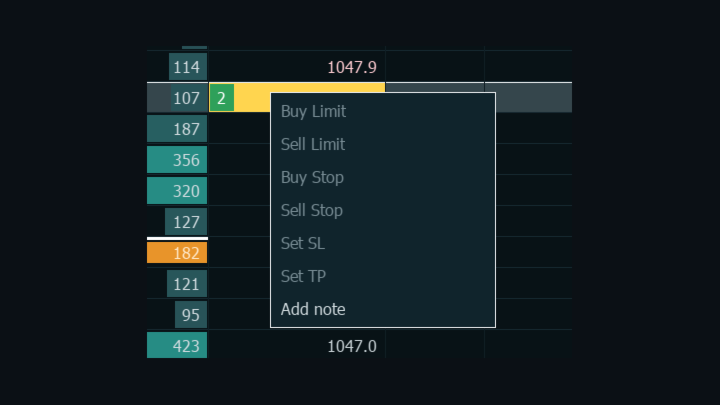
A right-click on a row opens a menu:
  • Buy Limit, Sell Limit, Buy Stop, Sell Stop: at that price.
  • Set SL and Set TP: at that price. On a row that already holds them they read Cancel SL and Cancel TP. Both need an open position.
  • Add note: opens the note editor.

During replay the order items are dimmed and only Add note works.

A stop price that is not valid is corrected rather than rejected. A buy stop below the ask becomes a buy limit, a sell stop above the bid becomes a sell limit, and a stop exactly at the ask or the bid becomes a market order. Before sending, DomDom checks the symbol's volume limits, your free margin and the broker's stop and freeze distances. A request that fails a check is not sent, and the reason is written to the Experts log.


Notes mark a level that mattered, such as a large resting bid, or a point of interest to check later. Click the N cell, or choose Add note, then type up to 80 letters, digits and punctuation. Enter or a click elsewhere saves, Esc cancels, and Backspace or Delete removes the last character. Saving an empty note clears it. Notes are stored per symbol and return when you attach DomDom again.


Keyboard and mouse

The keys work while the chart has focus and are ignored while you type a note.
  • Ctrl+Alt+B: market buy.
  • Ctrl+Alt+S: market sell.
  • Ctrl+Alt+F: flatten.
  • X: cancel all working orders on the symbol.
  • C: center on the last price and turn auto-center on.
  • L: clear @Bid and @Ask.
  • Shift+L: clear Bid/Ask, only while BA Sess is off.
  • Plus and minus, on the main keyboard or the numeric keypad: change the quantity. They repeat while held.
  • Up and Down arrows: move the ladder one price. They repeat while held.
  • Esc: close the right-click menu.

X, C and L do nothing while Ctrl or Alt is held. The mouse wheel moves the ladder three prices. The wheel and the arrows turn auto-center off. While the pointer is over the panel, the chart does not scroll and the terminal's own right-click menu stays closed.


Order types

DomDom sends market, limit and stop orders. Pending orders are good till cancelled and use the toolbar quantity. Stop loss and take profit are written onto the open position rather than placed as separate orders, so one stop and one target apply to the whole position.


Position, P/L and account handling

The row of your average price is tinted teal, and the P/L column shows the result of the whole position at every price. The status line shows the size, the average price and an estimated round-trip commission: the commission and fees per lot already charged on the open position, counted again for the exit.

DomDom reads the account type when it is attached.
  • Netting and exchange accounts: the broker keeps one position per symbol, and a close only changes its size.
  • Hedging accounts: DomDom shows one net position. A close reduces the oldest ticket of that side first. Selling more than your long, or buying more than your short, covers it and opens the remainder the other way in the same click. Opposite tickets on the symbol are paired off with Close By, and stop loss and take profit are copied to every ticket.

Please note: DomDom treats every position on the chart symbol as one net position, including positions opened by hand or by other programs. Flatten closes all of them.

Session replay

When the market is closed, DomDom can replay the latest session from the tick history that MetaTrader 5 has already stored for the chart symbol. The terminal keeps this history in its own tick cache files, and DomDom reads it through the terminal. It does not download or build history itself. Stored ticks hold trades and best prices but no book sizes, so the Bid and Ask columns stay empty in replay.

While replay runs, every button and key that would send, change or cancel an order is disabled, and so are the quantity controls. Notes, centering, the clear buttons, BA Sess and play and pause still work. If replay is required and the symbol has no tick history, DomDom stops and writes the reason to the Experts log.

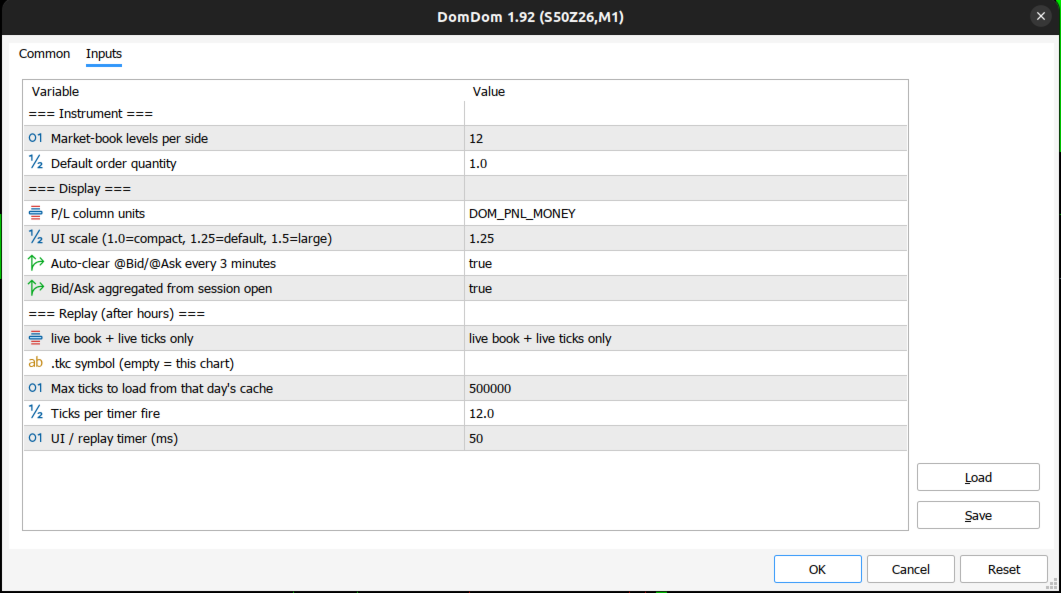
Settings

Instrument:
  • Market-book levels per side (12): reserved. The ladder shows every level the broker sends with a size.
  • Default order quantity (1.0): the starting order size, rounded to the symbol's volume step.

Display:
  • P/L column units (DOM_PNL_MONEY): money, or DOM_PNL_TICKS for ticks.
  • UI scale (1.25): 1.0 is compact and 1.5 is large.
  • Auto-clear @Bid/@Ask every 3 minutes (true): the starting state of the 3m button.
  • Bid/Ask aggregated from session open (true): the starting state of the BA Sess button.

Replay (after hours):
  • Replay mode, shown as "live book + live ticks only" (the default): live data only. "always drive the ladder from cached M1/ticks" always replays, and "replay when the market is quiet / closed" replays when the last quote is more than 15 seconds old or the symbol is not fully tradable. Replay always uses ticks.
  • .tkc symbol (empty = this chart): leave it empty. Replay always uses the chart symbol.
  • Max ticks to load from that day's cache (500000): caps how many ticks of the session are loaded, for replay and for the session recap at attach.
  • Ticks per timer fire (12.0): the replay speed, up to 80.
  • UI / replay timer (ms) (50): the screen refresh and replay step, at least 40.


Requirements and limitations

  • MetaTrader 5 with algorithmic trading allowed (see "Before your first trade").
  • A symbol for which the broker provides Depth of Market with sizes. To check, right-click the symbol in Market Watch and open Depth of Market. If its volume column is empty, DomDom's book columns will be empty too.
  • A feed with real trades. Most forex and CFD symbols have no book and no trade prints, so the book, volume, print and delta columns stay empty.
  • One DomDom per symbol. Other symbols can run on other charts at the same time.

The free demo runs only in the Strategy Tester. The tester has no order book and passes no mouse or keyboard input, and DomDom does not run its session recap, replay or screen refresh there, so the demo cannot show the ladder at work. The one-month rental is the practical way to try DomDom on a live or demo account.


Support

Questions, bug reports and suggestions are welcome in the product comments or by private message on MQL5.

Disclaimer

Trading involves risk. DomDom is a tool for reading the market and entering orders. It does not predict prices or promise any result. The author has done his best to develop DomDom as a high-quality application that is safe to use as part of your trading, but every trading decision and its outcome remain your own. The author is not responsible for any financial loss resulting from the use of DomDom in the real market.
Recommended products
ProEngulfing For MT5
Ashkan Hazegh Nikrou
Pro Engulfing Indicator is professional indicator can detect qualified engulf patterns Free version of ProEngulfing is   QuallifiedEngulfing   By One Signal Limitation per day and less features Join   Koala Trading Solution Channel   in mql5 community to find out the latest news about all koala products, join link is below : https://www.mql5.com/en/channels/koalatradingsolution MT4 Version of this product already downable in link below :  https://www.mql5.com/en/market/product/52023 Introducing
Mine Farm
Maryna Kauzova
Mine Farm is one of the most classic and time-tested scalping strategies based on the breakdown of strong price levels. Mine Farm is the author's modification of the system for determining entry and exit points into the market... Mine Farm - is the combination of great potential with reliability and safety. Why Mine Farm?! - each order has a short dynamic Stop Loss - the advisor does not use any risky methods (averaging, martingale, grid, locking, etc.) - the advisor tries to get the most
Was: $249  Now: $99   Market Profile defines a number of day types that can help the trader to determine market behaviour. A key feature is the Value Area, representing the range of price action where 70% of trading took place. Understanding the Value Area can give traders valuable insight into market direction and establish the higher odds trade. It is an excellent addition to any system you may be using. Inspired by Jim Dalton’s book “Mind Over Markets”, this indicator is designed to suit the
CosmiCLab SMC FIBO CosmiCLab SMC FIBO is a professional trading indicator designed for traders who use Smart Money Concepts (SMC), market structure analysis and Fibonacci retracement levels. The indicator automatically detects market swings and builds Fibonacci levels based on the latest impulse movement. It also identifies market structure changes such as BOS (Break of Structure) and CHOCH (Change of Character), helping traders understand the current market direction. CosmiCLab SMC FIBO also pr
Fabii Half Trend Baseline
Fabien Georges Andre Guillemaud
Stop trading against the higher timeframe trend. Two baselines, one chart. No repaint. Any pair, any timeframe. On your chart in 2 minutes. Free demo in the Strategy Tester. Get more indicators here Baselines, volatility filters and oscillators. No repaint. Why you need it You enter a trade because a line turned green on your chart. Then you open a higher timeframe and see that the bigger trend points the other way. The signal was real. The trend behind it was not on your side. Every trade ta
Money Flow Profile MT4  HERE   Use Guide Here our more valuable tools SMC Trend Trading   ,  Easy SMC Trading  ,  Institutional SMC Architect Volume Analysis Tools  ,  Volume flow Profile  ,  Market volume profile  , FVG with Volume  , Liquidity Heatmap Profile  ,  Volume Spread Analysis  Master Edition is a professional-grade analytical tool designed to visualize market structure through the lens of volume and money flow. Unlike standard volume indicators, this tool displays a Daily Vo
RBreaker
Zhong Long Wu
RBreaker Gold Indicators is a short-term intraday trading strategy for gold futures that combines trend following and intraday reversal approaches. It not only captures profits during trending markets but also enables timely profit-taking and counter-trend trading during market reversals. This strategy has been ranked among the top ten most profitable trading strategies by the American magazine   Futures Truth   for 15 consecutive years. It boasts a long lifecycle and remains widely used and st
Breakout scalp PRO
Cesar Napoleon Guio Martinez
Automated breakout scalper EA trading system with advanced execution filters and built-in risk management. Designed to operate during selected market conditions, combining session control, spread and slippage filtering, and dynamic trade management. Safety First Approach:  This EA does not use grid systems, martingale strategies or other high-risk unlimited recovery strategy. Every position is protected with predefined Stop Loss and Take Profit levels. The strategy is designed to maintain contro
Your Trend Friend
Luigi Nunes Labigalini
5 (1)
The trend is your friend! Look at the color of the indicator and trade on that direction. It does not  repaint. After each candle is closed, that's the color of the trend. You can focus on shorter faster trends or major trends, just test what's most suitable for the symbol and timeframe you trade. Simply change the "Length" parameter and the indicator will automatically adapt. You can also change the color, thickness and style of the lines. Download and give it a try! There are big movements w
HAS RSI Signal — Professional Trend Indicator with SL/TP Calculation HAS RSI Signal is a powerful trading tool that combines time-tested classics with modern noise-filtering algorithms. The indicator analyzes the market through the prism of Heiken Ashi Smoothed candles and the RSI oscillator, providing clear entry signals at trend reversals or when exiting overbought/oversold zones. Key Advantages: Double Filtration: Using Heiken Ashi Smoothed eliminates market "noise," while RSI confirms the mo
Trading Utility for Forex Currency Pairs Only not for Gold  Functions Auto Lot Calculation based on Risk Auto stoploss  Auto TakeProfit Breakeven Auto Close Half % Close in percentage with respect to the PIPs Pending Orders BuyLimit Sell Limit with distances BuyStop Sell Stop    with distances Trading Informations Risk in percentage For Multiple trades Combine Takeprofit and Combine Stoplosses
Passband Filter Pro Passband Filter Pro is a trend and cycle oscillator for MetaTrader 5. It is built on the Ehlers Super Passband Filter, a band pass filter that removes long term trend drift and short term noise so that only the dominant market cycle remains. The result is a clean oscillator with a color cloud that shows overbought and oversold conditions, cycle turns, and momentum on forex, gold, indices, stocks and crypto. Most traders enter too early or too late. Simple moving averages la
Pro Gold System Indicator
PEDRO JOAQUIM GONCALVES GOMES
ADVANCED FUNCTIONALITIES: Trend Score (0-100) with visual bar Intelligent signals with adjustable strength (1-10) Risk management with automatic TP/SL Audible and visual alerts Price zones with smooth filling Multi-indicator analysis (RSI, ATR, BB, EMAs) DESIGN FEATURES Modern Visual: Smooth and well-spaced lines (EMA with 2-3px width) Vibrant and professional colors (Sky Blue, Orange, Gold) Modern arrows (code 233/234) for buy/sell signals Configurable dark/light theme Adjustable transparency f
This indicator is, without a doubt, the best variation of the Gann Angles among others. It allows traders using Gann methods to automatically calculate the Gann angles for the traded instrument. The scale is automatically calculated when the indicator is attached to the chart. When switching timeframes, the indicator recalculates the scale for the current timeframe. Additionally, you can enter your own scales for the Gann angles. You can enter your own scales either for both vectors or for each
LT Rainbow Trend
Thiago Duarte
5 (1)
== LT RAINBOW TREND - THE TREND INDICATOR WITH 36 MOVING AVERAGES == OVERVIEW LT Rainbow Trend is an advanced technical trend analysis indicator that utilizes 36 simultaneous Moving Averages with a smart color system (Rainbow). Developed for traders who want to trade in the direction of the main trend with maximum visual clarity, the indicator transforms the complexity of multi-timeframe analysis into a simple, colorful, and highly intuitive visualization. Ideal for traders who understand that
Noize Absorption Index - is the manual trading system that measures the difference of pressure between bears forces and bulls forces. Green line - is a noize free index that showing curent situation. Zero value of index shows totally choppy/flat market.Values above zero level shows how powerfull bullish wave is and values below zero measures bearish forces.Up arrow appears on bearish market when it's ready to reverse, dn arrow appears on weak bullish market, as a result of reverse expectation.
Gann Time–Price Square Cycles (MT5) This indicator applies the concept of time–price balance introduced by W.D. Gann. It detects price swings on the chart and projects Quarter, Half, and Full cycle time intervals forward, marking them with vertical lines. The tool is designed to help traders study the relationship between swing size and elapsed time directly on MT5 charts. Functions Detects swing highs and lows based on pivot depth and minimum swing size. Projects Quarter, Half, and Full harmon
DAILY OH/OL SDEV QUANT MODEL - STATISTICAL TRADING WITH PRECISION RISK MANAGEMENT TRADE WITH MATHEMATICAL CERTAINTY - KNOW YOUR EXACT STOP-LOSS AND TAKE-PROFIT BEFORE YOU ENTER This indicator analyzes 5,000+ days of price history to give you: Exact entry levels (sigma bands locked at daily open) Exact stop-loss distance (from M
Premium level is a unique indicator with more than 80% accuracy of correct predictions! This indicator has been tested for more than two months by the best Trading Specialists! The author's indicator you will not find anywhere else! From the screenshots you can see for yourself the accuracy of this tool! 1 is great for trading binary options with an expiration time of 1 candle. 2 works on all currency pairs, stocks, commodities, cryptocurrencies Instructions: As soon as the red arrow app
Liquidity Sweep Detector Pro This works only in the live MARKET, not in backtesting, because the strategy tester lacks liquidity data. Liquidity Sweep Detector Pro is an advanced MetaTrader 5 (MT5) indicator built around Smart Money Concepts (SMC) and the AMD (Accumulation, Manipulation, Distribution) model. It detects hidden liquidity pools in real-time and highlights high-probability trading setups triggered by false breakouts (liquidity sweeps). Key Features & Functionality: Asia Session Ran
Volume Profile Multiple — Multi-Block Volume Profiles with Buffers for Algorithmic Trading Tired of drawing Volume Profile block by block, redrawing and recalculating every time you change timeframe? Volume Profile Multiple automatically plots several consecutive volume profiles on the chart, revealing where institutional interest actually sat in each segment of the market — not just in the last visible range. What it does for you The indicator splits the price history into blocks of N candles e
SolarTrade Suite Financial Robot: LaunchPad Market Expert - designed to open trades! This is a trading robot that uses special innovative and advanced algorithms to calculate its values, Your Assistant in the World of Financial Markets. Use our set of indicators from the SolarTrade Suite series to better choose the moment to launch this robot. Check out our other products from the SolarTrade Suite series at the bottom of the description. Do you want to confidently navigate the world of inves
Equity Master Stop v2 MT5
Frank William Jr Colbert
Trading tool combining a sophisticated equity stop-loss, dynamic take-profit management (Breakeven & Trailing), and symbol-group-based closing logic. It is a complete risk management and trade supervision tool. Features: All features of `Equity Master Stop v1` (floating profit/loss limits, exit protection, skip hours). Take-Profit Override: Can force a TP on any order to lock in a `MAX_FLOATING_PROFIT`. Step Breakeven: Locks in increasing amounts of profit as a trade moves favorably (e.g., aft
The indicator builds current quotes, which can be compared with historical ones and on this basis make a price movement forecast. The indicator has a text field for quick navigation to the desired date. Options: Symbol - selection of the symbol that the indicator will display; SymbolPeriod - selection of the period from which the indicator will take data; IndicatorColor - indicator color; Inverse - true reverses quotes, false - original view; Next are the settings of the text field, in w
DRX Market Profile TPO — classic Market Profile (TPO chart) for MetaTrader 5 DRX Market Profile TPO draws real Time Price Opportunity profiles directly on your MT5 chart: TPO letters, Point of Control (POC), Value Area High and Value Area Low (VAH / VAL), Initial Balance, single prints and naked POCs — for every session, on any symbol. Version 5 is a complete rebuild: a lag-free canvas engine instead of thousands of chart objects, correct TPO math, exchange session presets with daylight saving t
STRICTLY FOR BOOM INDEX ONLY!!!!! Here I bring the Maximum Trend Arrows OT1.0 MT5 indicator. This indicator is made up of a combination of different trend indicators for entries and exits, for entries an orange arrow will paint on the chart below the current market and a red flag for closing of trades and it produces buy arrows only. When the orange arrow appears, it will appear along with it's sound to notify you. The 1H timeframe is recommended, don't use it anywhere else than on the 1H timefr
Awesome Oscillator by Bill Williams with the ability to fine-tune and replace the averaging algorithms of the indicator, which significantly expands the possibilities of using this oscillator in algorithmic trading and brings it closer in its properties to such an indicator as the MACD. To reduce price noise, the final indicator is processed with an additional Smooth averaging. The indicator has the ability to give alerts, send mail messages and push signals when the direction of movement of th
Dynasty SMC/ICT Terminal — v3.0 "Neon-Ops Edition" An all-in-one Smart Money Concepts / ICT dashboard for MetaTrader 5. It's an indicator, not an auto-trading EA — it never places, modifies, or closes real orders. It scans price action for Order Blocks, Fair Value Gaps, market structure, harmonic patterns, and multi-timeframe momentum, blends everything into one calibratable Master Signal, and — if enabled — builds a fully automated on-chart trade plan with entry, stop loss, three take-profit ta
Buyers of this product also purchase
================================================================================ POC BREAKOUT - V20.72. Full Professional Grade Toolkit ================================================================================ POC Breakout is a full MetaTrader 5 trading dashboard for discretionary traders who want breakout signals, Point of Control (POC) context, volume profiles, order flow, market structure, news, alerts, and advanced trade planning in one professional workspace. Attached directly to you
FarmedHedge Pair Trading Dashboard
Tanapisit Tepawarapruek
5 (6)
Farmed Hedge Yield Farming | All Markets (Manual - Hybrid - Semi/Automated EA) VERIFIED TRADING RESULTS - Farmed Hedge Yield Axi Copy:  https://www.mql5.com/en/signals/2356376 - Farmed Hedge Yield Exn Copy:   https://www.mql5.com/en/signals/2356404 - Farmed Hedge Yield V Copy:  https://www.mql5.com/en/signals/2357156 IMPORTANT NOTICE: FarmedHedge is a MANUAL-FOCUSED TRADING UTILITY ,not a fully automated EA. Results shown on this Signal include manual trades and overall strategic management.
Master Your Trading Discipline   Stop losing your hard-earned gains to overtrading and emotional decisions. The Discipline Tool is your ultimate trading assistant, ensuring strict risk management in real-time. Key Protection Features: Advanced Drawdown Defense : Automatically halts trading if your daily drawdown exceeds a preset threshold (percentage or dollar amount). Real-Time Equity Lock : Safeguard profits by referencing peak equity, ensuring drawdown stays within control. Hard Profit Target
Power Candles Strategy Scanner - Self-Optimizing Multi-Symbol Setup Finder Self-optimizing settings work one chart at a time, and finding where they pay off right now means opening chart after chart. Power Candles Strategy Scanner runs the same self-optimizing engine as the Power Candles indicator on every symbol in your Market Watch, side by side. One panel ranks where it pays off: the winning strategy per symbol, its optimized Stop Loss and Take Profit. An alert fires the moment a fresh signal
EasyInsight AIO MT5
Alain Verleyen
4.92 (12)
EASY Insight AIO – All-In-One Power for AI-Driven Trading Want to skip the setup and start scanning the entire market – Forex, Gold, Crypto, Indices, and even Stocks – in seconds? EASY Insight AIO is the complete plug-and-play solution for AI-powered trade analysis. It includes all core Stein Investments indicators built-in and automatically exports clean, structured CSV files – perfect for backtesting, AI prompts, and live market decision-making. No need to install or configure indicators manu
The product will copy all telegram signal to MT5 ( which you are member) , also it can work as remote copier.  Easy to set up, copy order instant, can work with almost signal formats, image signal,  s upport to translate other language to English Work with all type of channel or group, even channel have "Restrict Saving Content", work with  multi channel, multi MT5 Work as remote copier: with signal have ticket number, it will copy exactly via ticket number. Support to backtest signal. How to s
The Patch
Mian Rameez Ali
The Patch It never opens a trade. It walks behind the ones that did. Every open position, every pending order — checked twice a second for the one thing that's easy to forget: a stop, a target. Found bare, it doesn't ask. It writes the missing number in, measured in points from wherever the position began, and moves on to the next. No strategy, no opinion on direction. Just the quiet assumption that nothing should ever sit on the market unprotected — not because someone decided it shouldn't,
EA Overfitter
Stephen J Martret
5 (1)
That backtest looks great. But will it still be making money tomorrow, next week, next month? EA Overfitter re-runs your EA on 100 price histories it has never seen. One score tells you if the edge is real. A backtest tells you what an EA did on one price history — the one that happened to occur. What you cannot tell from it is how much of that result was the strategy and how much was the particular path. EA Overfitter answers that. It builds up to 100 synthetic price histories your EA has n
Floor Watch
Syed Tauqeer Hussain Shah
Floor Watch One number, watched every thirty seconds: how far equity has fallen since the day began — or since its highest point, if it's told to trail the peak instead of the open. Cross the line and it doesn't argue. Every open position closes, every pending order vanishes, and anything that slips through afterward gets shut the moment it appears. Not asked. Removed. The floor holds until the clock turns 5 AM Pakistan time — then, and only then, does the day start over. One rule. No except
RETAILBERG FOOTPRINT CHART PRO — Order-Flow Workspace for MetaTrader 5 Version 7.00  |  Professional System  |  31 tools  |  One chart A full 150-page illustrated User Manual is included. Please read the full manual to understand this feature packed footprint chart elements and ui. https://www.mql5.com/en/blogs/post/777982 DEMO / STRATEGY TESTER — PLEASE READ FIRST
Buy once. Get all my MT4 and MT5 indicators - available now and released in the future - at no extra cost. Contact me after purchase for instructions to receive them. The price is planned to rise by 50$ after every 10 purchases, up to 999$. The Market price at checkout applies. Keep the indicator you trust. Automate the work around it. Your signal. Your rules. Your execution. Already have an MT5 indicator you rely on, but still need to watch the chart, wait for a signal, calculate the lot, plac
YuClusters
Yury Kulikov
4.93 (43)
Attention: You can view the program operation in the free version  YuClusters DEMO .  YuClusters is a professional market analysis system. The trader has unique opportunities to analyze the flow of orders, trade volumes, price movements using various charts, profiles, indicators, and graphical objects. YuClusters operates on data based on Time&Sales or ticks information, depending on what is available in the quotes of a financial instrument. YuClusters allows you to build graphs by combining da
Quant AI Agents
Ho Tuan Thang
5 (1)
Quant AI Agents are independent trading Expert Advisors. Instead of trading using a fixed strategy like other conventional EAs, Quant AI Agents   is a   multi-agent AI trading framework   that turns natural-language strategy prompts into live.  WANT THE SAME RESULTS AS MY LIVE SIGNAL?   Use the exact same brokers I do:   IC MARKETS , IC TRADING   .  Unlike the centralized stock market, Forex has no single, unified price feed.  Every broker sources liquidity from different providers, creating un
Daily Trading Limiter
AL MOOSAWI ABDULLAH JAFFER BAQER
5 (8)
• Please test the product in the Strategy Tester before purchasing to understand how it works. • If you face any issues, contact me via private message—I’m always available to help. • After purchase, send me a screenshot of your order to receive a FREE EA as a gift. Daily Trading Limiter — the rule you cannot break Every trader knows the number. Three trades. Two percent. One bad day and stop. And every trader has watched themselves take the fourth trade anyway. The problem was never knowing th
FUTURES ORDERFLOW FOOTPRINT CHART Professional OrderFlow EA for MetaTrader 5 Version 1.01| Professional tool for real traders | Institutional-Grade Visualization STRATEGY TESTER USERS - PLEASE SELECT EVERY REAL TICK WHEN TESTING AND YOU HAVE DOWNLOADED HISTORICAL DATA. IF YOU SEE A WAITING SCREEN AND IT IS NOT DOWNLOADING, IT MEANS YOU HAVE LOW HISTORICAL DATA. TRY 1 MIN AND 5 MIN FIRST ON 1 DAY DATA. ONE DAY DATA SHOULD BE THE NEWEST AND MOST CURRENT DATE. PLEASE WAIT UNTIL THE MARKET HAS ROL
Trading Chaos Expert
Hennadii Stanilevych
5 (11)
This software has no equals in the world and represents a universal trade "console" covering trading signals, automated market entry, setting of Stop Loss and Take Profit, as well as Trailing Profit for multiple trades at the same time in a single open window. Intuitive control of the Expert Advisor in "three clicks" ensures a comprehensive use of all its functions on different computers, including tablets PCs. Interacting with additional signal indicators that mark the chart to give a real mark
Copy your MT5 trades to Interactive Brokers You keep using MT5. Every order you open or close is sent to your IB account. In real time. No coding. No changes to your strategy or EA. Try it first Rent 1 month: $30. Test on a live or paper account. What it does Real-time copying: same direction, reverse, or one side only. Map any MT5 symbol to any IB symbol. Set a lot ratio for each. Forex, Futures, Stocks, CFDs, Metals and Crypto. Position sync: both accounts checked, any difference fixed. Optio
Quant Panel
Kevin Craig E Gittins
Quant Panel is a strategy analysis utility for MetaTrader 5. It helps traders review several Expert Advisors or trading strategies running on the same account. The panel groups closed positions by Expert Advisor comment or magic number and calculates each strategy's results separately. You can compare strategy performance, review individual drawdowns and export detailed reports from one dashboard. Independent strategy analysis Each strategy has its own virtual starting balance and closed-trade b
EA Slipstream
Stephen J Martret
5 (1)
Your backtest filled every order at the price it asked for. Your account does not. EA Slipstream measures what execution costs your EA, using your own fills, slippages and spreads to show you the true performance of your EA. A backtest prices every trade at the level the EA named. In live trading a pending order fills at whatever price is available when it triggers, a stop closes wherever the market is when it is hit, and the spread at that moment is whatever the account was quoting. The differ
Advanced Daily Trading Limiter PRO
AL MOOSAWI ABDULLAH JAFFER BAQER
Advanced Daily Trading Limiter PRO Professional Risk Management. Uncompromising Trading Discipline. One undisciplined trading session can erase weeks of consistent profits. Whether it's overtrading, revenge trading, or exceeding a prop firm's daily risk limits, emotional decisions often become a trader's biggest obstacle—not the market itself. Advanced Daily Trading Limiter PRO is a comprehensive risk management and discipline enforcement utility for MetaTrader 5, designed to help traders stay
VERON LINK MASTER MT5 — Real-time Multi-Account Dashboard & Sync Controller Veron Link Master is a high-performance, centralized monitoring and synchronization control center designed for MetaTrader 5. Built specifically for traders managing multiple accounts, prop firm portfolios, grid/martingale EAs, or client networks, Veron Link Master provides a seamless, ultra-modern dark-themed GUI dashboard directly on your MT5 terminal. Pricing Structure: Take advantage of our early-bird pricing before
Veron Link Slave – Synchronized Grid, Martingale & Breakout Management Short Description Advanced synchronization tool designed to manage Grid, Martingale, and Breakout EAs. Automatically sends close-basket signals to the Master account upon profit target completion, minimizing slippage across different brokers. Full Description Veron Link Slave is a specialized utility developed to enhance the execution efficiency and risk management of multi-account or multi-broker trading setups. It is desig
HINN Lazy Trader
ALGOFLOW OÜ
5 (1)
The core idea: using the user interface, you configure the parameters the chart must meet before entering a position (or positions), choose which entry models to use, and set the rules for when trading and planning should end. Lazy Trader  handles the rest: it  takes over all the routine chart watching and execution! full description  :: 3 key videos [1] ->  [2]   ->  [3] What can it do? - Understands Larry Williams market structure - Understands swing market structure by Michael Huddleston
AI Arbitron — an MT5 Spot vs Future Gold Arbitrage Bot designed to capture price discrepancies between correlated Spot and Future instruments through hedged, non-directional trading. Platform: MT5 Use Swap Free Accounts, many of the regulated broker gives swap free accounts for 7 days, make use of it by only buying lower price asset and selling higher price asset, hold your position for 2-3 days. Asset: Mainly Gold (XAUUSD) using Spot + Future/CFD price feeds. Core strategy: It monitors the p
Mentfx Mmanage mt5
Anton Jere Calmes
4.25 (8)
The added video will showcase all functionality, effectiveness, and uses of the trade manager. Drag and Drop Trade Manager. Draw your entry and have the tool calculate the rest. Advanced targeting and close portions of a trade directly available in tool (manage trades while you sleep). Market order or limit order on either side with factored spread. Just draw the entry, the tool does the rest. Hotkey setup to make it simple. Draw where you want to enter, and the stop loss, the tool calculates al
Features   With MT5 to Interactive Brokers(IB) Trader, you can: 1. Load chart data from IB to MT5, and Analyze with all standard or customer Indicators. 2. Place Orders to IB Account Directly in MT5. 3. Make your Own EAs upon IB Securities by only making minus changes of the trading function. Usage 1) Installation Copy the "Mt5ToIBTraderEn.ex4" and sample files to [MT5 Data Folder]->MQL5->Experts.  2)  MT5 Settings Add the IP Address to the MT5 Allowed URLs in 'Tools->Options->Expert Adviso
MT5 Trading Deck
Manuel Michiels
5 (2)
One button. One trade. MT5 Trading Deck is a hotkey trading panel for MetaTrader 5 that turns the platform into a keyboard-driven execution cockpit. Stop loss, take profit and lot size are pre-calculated for every key; the moment you press, a market order is live on the broker. A complete technical user manual is attached in the product Comments section. It documents every input parameter, the full hotkey map, the recommended Stream Deck XL layout, and the advanced workflows for Pre-Limit orders
Global Investing FX Terminal
Santiago Nicolas Pla Casuriaga
5 (1)
The Global Investing FX Terminal is an all-in-one FX dashboard for MetaTrader 5 — CB policy rates, CFTC COT positioning, carry rankings, economic surprises, options skew, retail sentiment, and correlations, thirteen panels in total — rendered on a single zero-flicker canvas overlay and refreshing every 10 seconds from one attached EA. No external software required. Professional FX analysis requires simultaneous access to data that normally lives in separate platforms: rate derivatives, governmen
Unlimited Trade Copier Pro MT5 is a tool to copy trade remotely to multiple MT4, MT5 and cTrader accounts at different computers/locations over internet. This is an ideal solution for you if you are a signal provider and want to copy your trades to other receivers globally on your own rules. One provider can copy trades to multiple receivers and one receiver can get trade from multiple providers as well. The provider can even set the subscription expiry for each receiver, so that receiver will n
Custom Alerts AIO: All-in-One Market Scanner – No Setup Required Overview Custom Alerts AIO is the fastest and easiest way to monitor multiple markets for real-time trading signals—without any setup or extra licenses. It comes with all required Stein Investments indicators already embedded, making it the perfect plug-and-play solution for traders who value simplicity and performance. Just load it to any chart and start receiving alerts across Forex, Metals, Crypto, and Indices. Shares can be a
More from author
TCandleClose
Wasin Thonkaew
A simple indicator to help showing the remaining time until the candle closes for all pre-defined chart periods with the following formats depending on which timeframe the chart is on. DD:HH:MM:SS - in case of W1, and MN period HH:MM:SS - in case of other periods Included with some of configurations as follows (please see attached inputs screenshot) X/Y distance to the upper right corner of the chart window Text size Text color Show/hide
MarketSchedule displays market sessions' open/close time for each day through out the week, also broker's timezone. It also supports instruments that have more than 1 session per day (maximum of 2 as most instruments don't have more than this) e.g. crypto market such as BTCUSD which usually has a few hours break mid-day thus it spans into 2 market sessions. You don't have to spend time looking for such information on broker's website. It's an on-demand script that you can drop onto the chart to
MarketOpenSessions is an indicator helps as a visual clue for which market session is at the time being. If you consider killzone, market open/close as important factor, this indicator would help you reduce effort in converting from one time zone to another. It has the following features 2 display styles: section (as colored line), and histogram 4 major configurable market sessions i.e. Asia, London, New York, and London-Close session. In additional to end of trading session of the day. Female s
Filter:
No reviews
Reply to review