DomDom

DomDom は MetaTrader 5 を order flow 分析のワークステーションに変えます。 DOM と tape を読み、クリックやホットキーで発注し、取引時間外にはセッションを replay できます。


DomDom は、futures のように、ブローカーが Depth of Market と実際の約定を配信する取引所銘柄向けに作られています。DOM を推測で補うことはありません。ブローカーが数量を送ってこない場合、そのセルは空欄のままです。


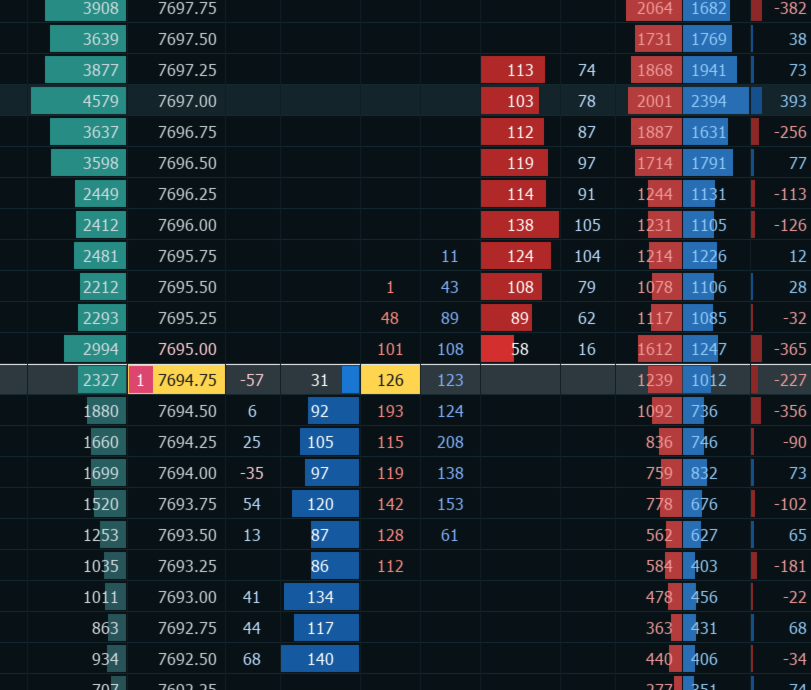
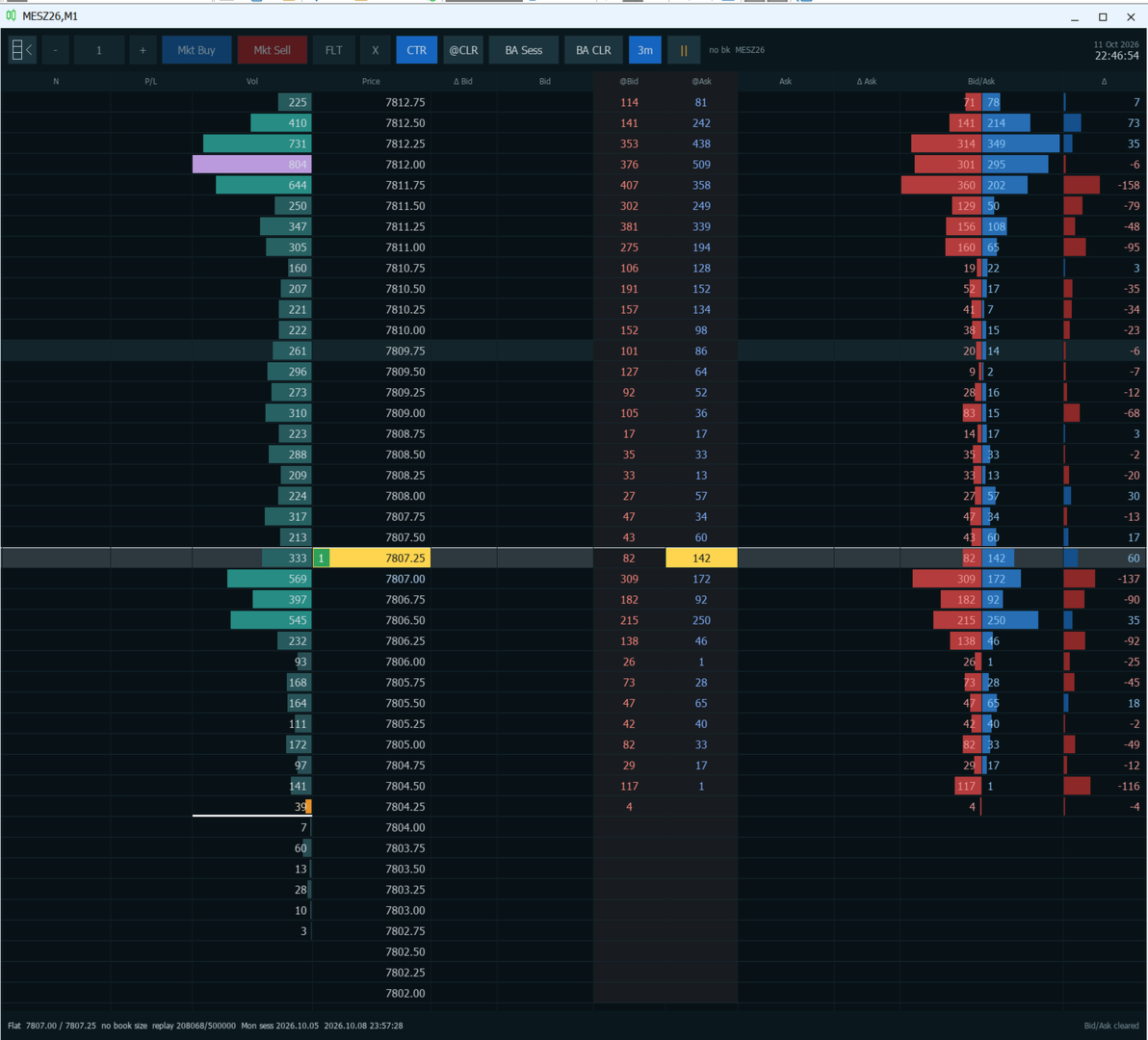
パネルの概要

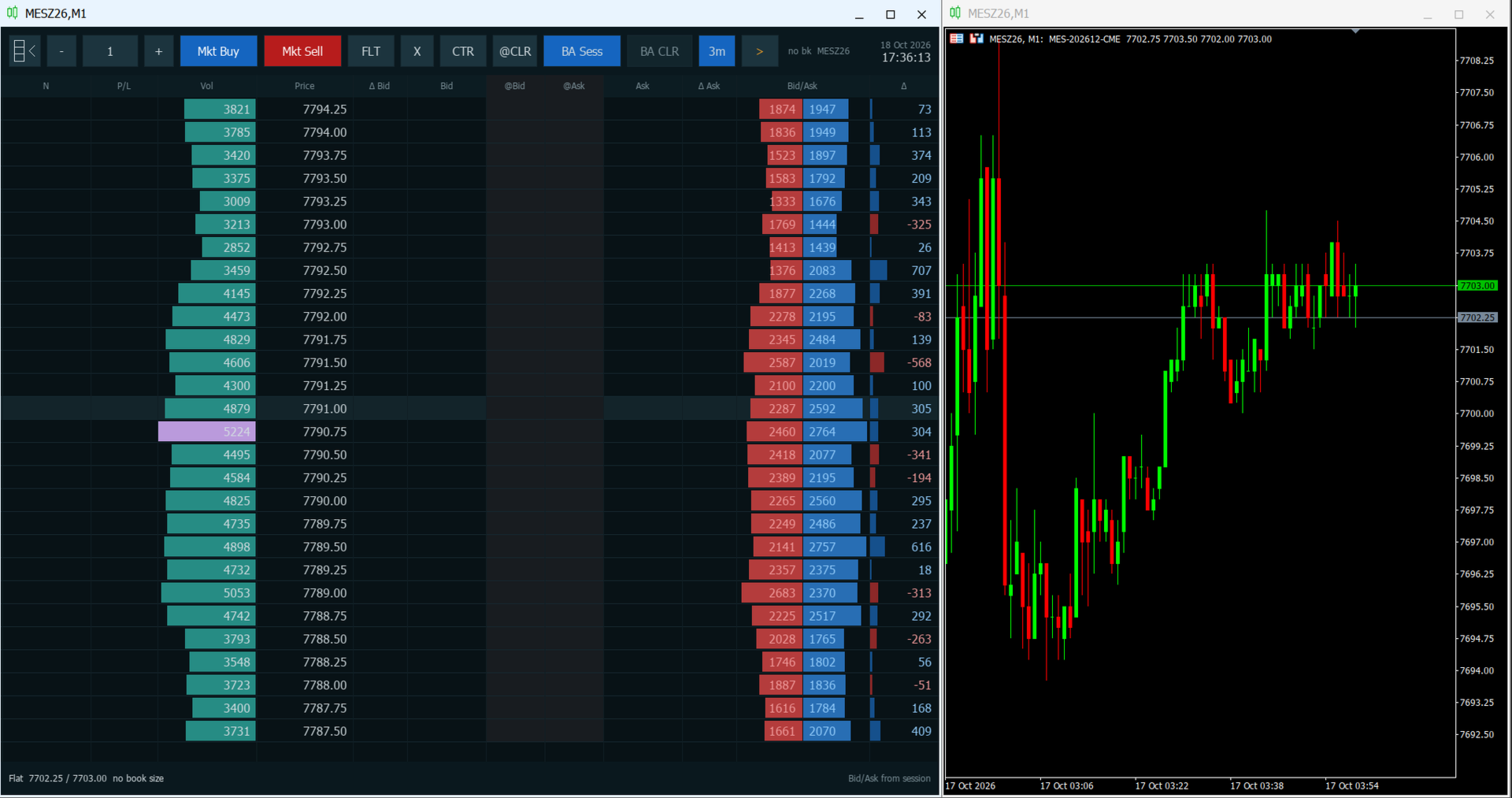
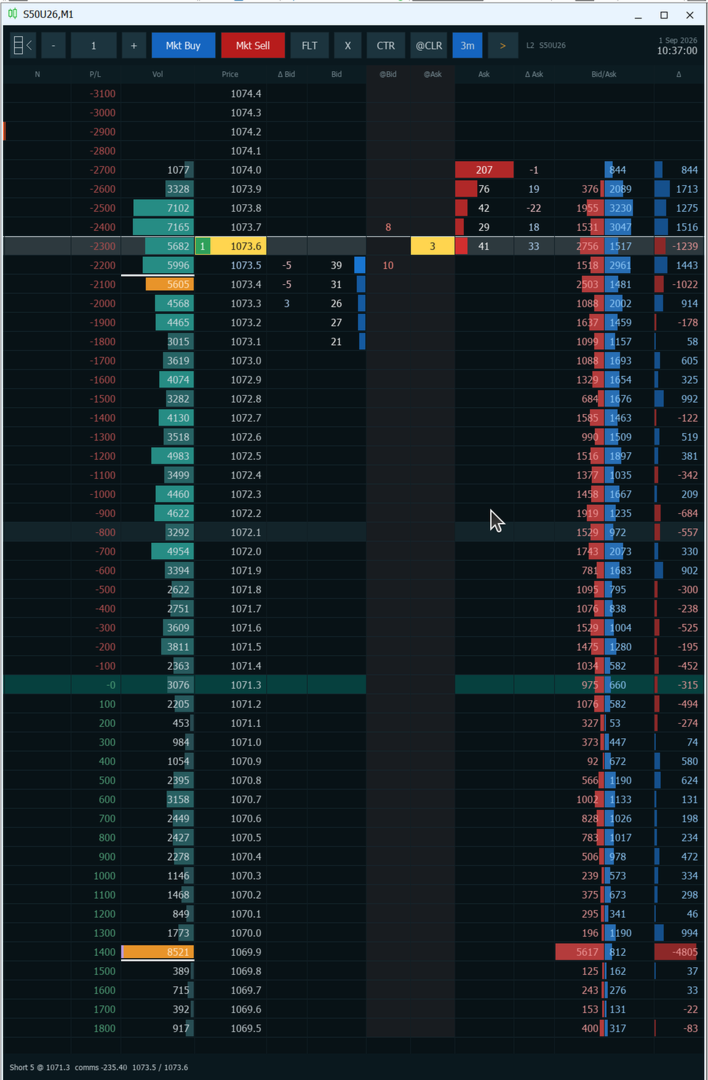
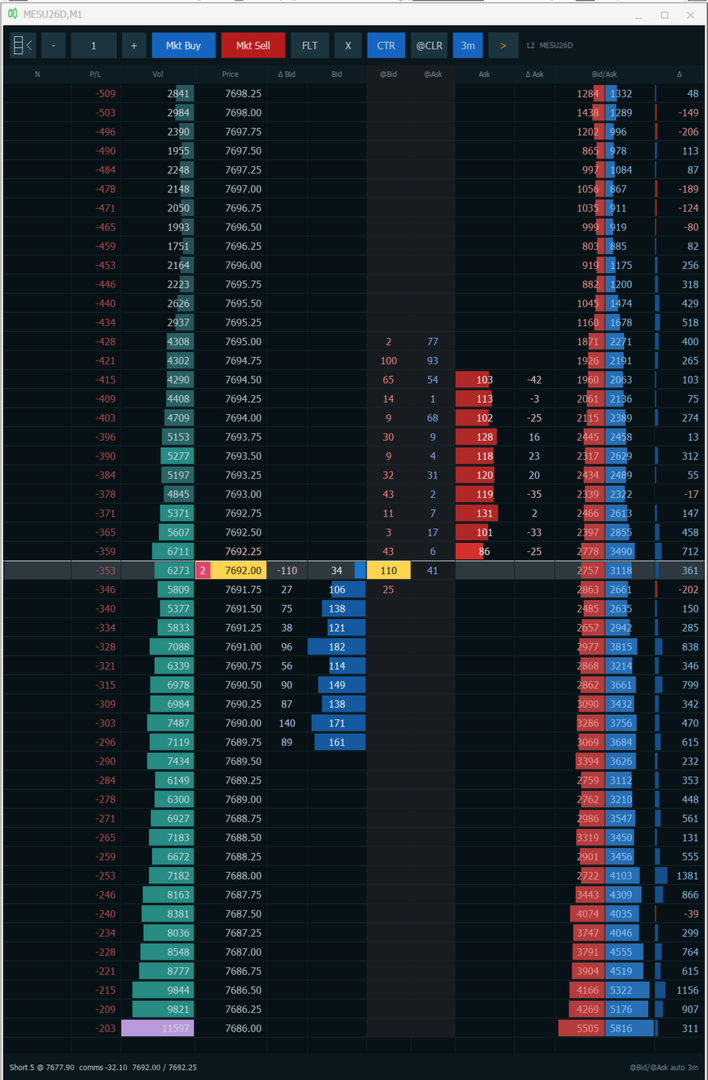
パネルは、上部のツールバー、中央の価格 ladder、下部のステータスラインの 3 つで構成されています。ツールバーのボタンにマウスを少し重ねると、ヒントが表示されます。

ツールバー(左から右):
  • Ladder ボタン:パネルの表示・非表示を切り替えます。非表示にすると価格チャートが戻り、再表示すると再びチャートを覆います。セッションの出来高は保持されます。
  • マイナス・数量・プラス:次の注文の数量です。マイナスとプラスで 1 volume step ずつ増減します。
  • Mkt Buy と Mkt Sell:表示中の数量で market order を発注します。0.5 秒以内の 2 回目のクリックは無視されます。
  • FLT:Flatten。その銘柄のすべての pending order を取り消し、すべてのポジションを決済します。
  • X:その銘柄の pending order を取り消します。ポジションはそのまま残ります。
  • CTR:直近の約定価格を中心に ladder を表示し、自動センタリングをオンにします。オンの間はボタンが点灯します。
  • @CLR:@Bid 列と @Ask 列をクリアします。
  • BA Sess:点灯中は、Vol、Bid/Ask、Delta をセッション開始から集計します(「Order flow の読み方」を参照)。
  • BA CLR:Bid/Ask の集計をこの時点からやり直します。BA Sess がオフのときのみ使えます。
  • 3m:点灯中は、@Bid と @Ask を 3 分ごとに自動でクリアします。
  • 再生・一時停止:セッションの replay を開始または一時停止します。
  • ステータス:ブローカーが数量付きの DOM を送っていれば「L2」、送っていなければ「no bk」と表示され、その後に銘柄名が続きます。右端はブローカーのサーバー日時です。

Ladder の列(左から右):
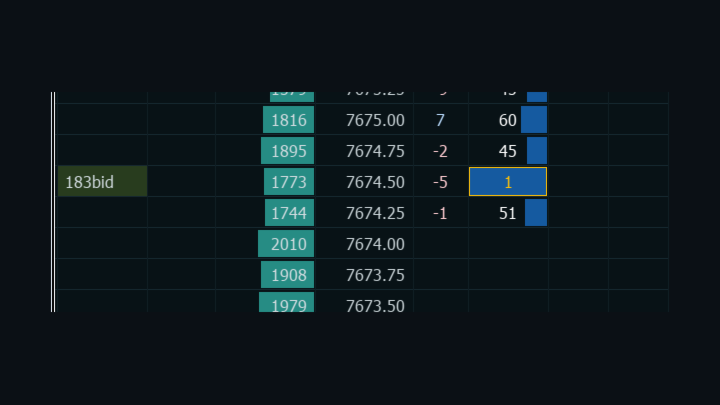
  • N:その価格に付けたメモです。
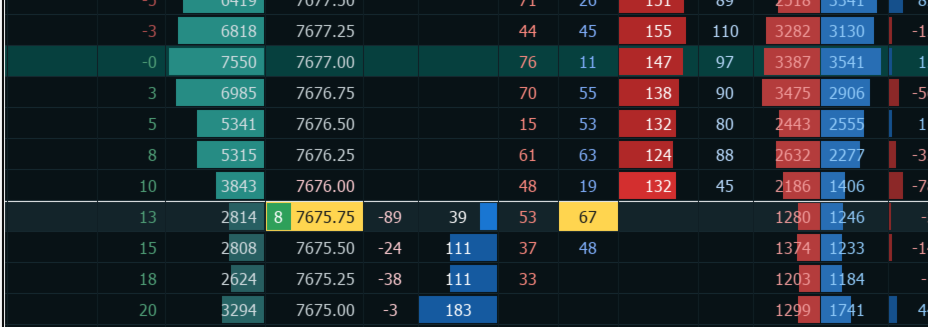
  • P/L:価格がその行に達した場合のポジション全体の損益を、金額または tick で表示します。ポジションがないときは空欄です。
  • Vol:価格ごとの出来高です。POC(point of control)は紫、70% の value area は琥珀色で表示され、その上限と下限には白い縁が付きます。
  • Price:直近の約定の行がハイライトされ、その print の数量が売買方向に応じて色分けされます。
  • Delta Bid と Bid:bid に並ぶ注文数量の変化と、ブローカーの DOM にある bid 側の注文数量です。
  • @Bid と @Ask:前回のクリア以降に、bid に売りをぶつけた print と、ask で買われた print です。
  • Ask と Delta Ask:ask に並ぶ注文数量と、その変化です。
  • Bid/Ask:bid と ask それぞれで約定した出来高を、2 本のバーで表示します。
  • Delta:その価格における ask の出来高から bid の出来高を引いた値です。

ステータスラインには、Flat、またはポジションの方向・数量・平均価格と手数料の見積もりが表示されます。続いて現在の bid と ask、ブローカーが深さのない気配だけを送っている場合は「no book size」、replay 中は再生位置と時刻が並びます。直前の操作(例:「Bid/Ask cleared」)は右端に表示されます。


DomDom を選ぶ理由

ローソク足が示すのは、価格がどこへ動いたかです。Ladder が示すのは、そこへどう動いたか。誰が待ち構え、誰が注文を引き、誰が叩きにいき、どこに出来高が積み上がったのか。DomDom は、その情報を発注のすぐ隣に表示します。

  • 各価格で流動性が積まれたり引かれたりする様子を、足の確定後ではなく、その瞬間に確認できます。
  • 出来高が bid と ask のどちらで約定したのか、セッションの value area がどこにあるのかが分かります。
  • 同じ行からそのまま操作できます。1 クリックで limit order・stop order・market order を発注し、もう 1 クリックで取り消しや SL/TP の設定が可能です。
  • 気になる価格帯にメモを付けておけば、次に DomDom を起動したときもそのまま表示されます。
  • 取引時間外には、replay で直近のセッションを振り返れます。

対象:futures などの取引所銘柄で裁量のデイトレードや scalping を行い、DOM と tape を読みながら MetaTrader 5 の ladder で取引したいトレーダー。DomDom が代わりに取引したり、シグナルを出したり、価格を予測したりすることはありません。

DomDom の使い方

  1. 取引する銘柄のチャートに DomDom を適用します。Ladder がチャートウィンドウ全体に表示されます。
  2. 必要に応じて、同じ銘柄のチャートをもう 1 つ任意の時間足(M1 や M5 など)で開き、2 つのウィンドウを並べて配置します。
  3. 準備はこれだけです。DomDom は単体で使えます。2 つ目のチャートは状況を補足するためのものです。


最初の取引の前に

  • MetaTrader 5 のツールバーで Algo Trading をオンにします。
  • DomDom を適用する際に、Common タブの「Allow Algo Trading」にチェックを入れます。

どちらか一方でも欠けていると、注文はすべて拒否されます。また、ホットキーを使えるよう、チャートを一度クリックしてキーボードフォーカスを合わせてください。

Order flow の読み方

データに取引所の買い・売りフラグが含まれていれば、各 print はそのフラグで売買方向に振り分けられます。フラグがない場合、DomDom は約定価格を気配と比較し、ask 以上なら買い、bid 以下なら売りと判定します。bid と ask の間で約定した print は Vol にのみ集計されます。bid や ask が動いただけで約定として数えられることはありません。

BA Sess が点灯している間、Vol、Bid/Ask、Delta はセッション開始からの全体を集計します。BA Sess をオフにするか、オフの状態で BA CLR を押すと、bid と ask の集計はその時点からやり直しとなり、Vol、Bid/Ask、Delta、POC、value area にはそれ以降の約定だけが反映されます。bid と ask の間で約定した print は、Vol の中でセッション全体の合計を保ちます。BA Sess を再びオンにすると、セッション全体を読み込み直します。

@Bid と @Ask は別に集計されます。手動でクリアするか 3m タイマーでクリアされるまで、価格ごとに短期の tape を積み上げていきます。

セッションは、その銘柄の毎日の取引休止が終わった時点から始まります。ブローカーが休止時間を設定していない場合は、シカゴ時間の 17:00 を使います。

DOM では、Bid と Ask が並んでいる注文数量をバーで表示し、best bid と best ask は強調表示、自分の pending order は枠で囲まれます。Delta Bid と Delta Ask は、DomDom がその価格を初めて捉えてから積まれた数量(プラス)や引かれた数量(マイナス)を示します。

DomDom が表示するのは、ブローカーが送ってくる DOM だけです。 tick volume から板の流動性を推定することはありません。

Ladder からの発注

次の列を左クリックすると発注します:
  • Bid または @Bid:ask より下なら Buy Limit、ask ちょうどなら Market Buy、ask より上なら Buy Stop です。
  • Ask または @Ask:bid より上なら Sell Limit、bid ちょうどなら Market Sell、bid より下なら Sell Stop です。
  • Price:long 保有中は売り、short 保有中は買いになります。ポジションがないときは、ask より下の行が買い、それ以外の行が売りです。
  • P/L:その価格に SL または TP を設定します。

その他の列:
  • N:その価格のメモ編集を開きます。
  • Vol、Delta Bid、Delta Ask、Bid/Ask、Delta:クリックしても何も起きません。

修飾キーとの組み合わせ:
  • Bid、@Bid、Ask、@Ask、Price を Ctrl+クリック:その方向に stop order を発注します。
  • N 以外の列を Shift+クリック:その価格に SL または TP を設定します。平均価格より利益側、または平均価格ちょうどなら TP、損失側なら SL になります。どちらもポジションの保有が必要です。
  • 自分の pending order がある行をクリックすると、その注文を取り消します。買い注文は Bid か @Bid、売り注文は Ask か @Ask で、Price 列はどちらにも使えます。

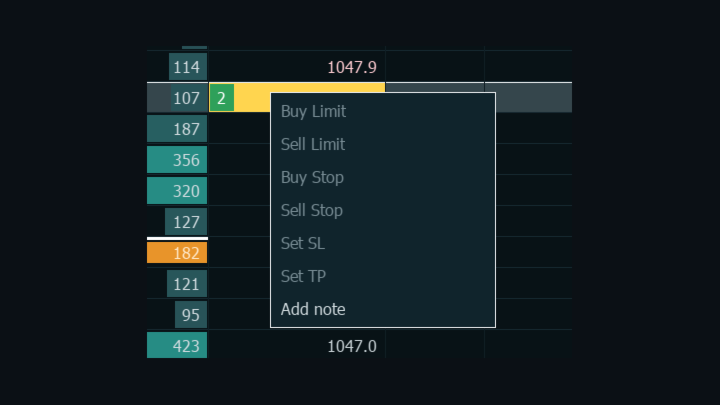
行を右クリックすると、メニューが開きます:
  • Buy Limit、Sell Limit、Buy Stop、Sell Stop:その価格で発注します。
  • Set SL と Set TP:その価格に設定します。すでに設定済みの行では Cancel SL と Cancel TP に変わります。どちらもポジションの保有が必要です。
  • Add note:メモ編集を開きます。

replay 中は発注関連の項目がグレー表示になり、使えるのは Add note だけです。

無効な stop 価格は、拒否されずに補正されます。ask より下の Buy Stop は Buy Limit に、bid より上の Sell Stop は Sell Limit に、ask または bid ちょうどの stop は market order になります。送信前に DomDom は、銘柄の数量制限、free margin、ブローカーの stop level と freeze level を確認します。確認を通らなかった注文は送信されず、理由が Experts ログに記録されます。


メモは、bid 側の大口注文など注目すべきだった価格帯や、後で見直したいポイントを記録するのに使えます。N のセルをクリックするか Add note を選び、半角の英字・数字・記号で 80 文字まで入力します。Enter か別の場所のクリックで保存、Esc で取り消し、Backspace か Delete で最後の 1 文字を削除します。空のまま保存するとメモは消去されます。メモは銘柄ごとに保存され、次に DomDom を適用したときに再び表示されます。


キーボードとマウス

キー操作はチャートにフォーカスがあるときに有効で、メモの入力中は無視されます。
  • Ctrl+Alt+B:Market Buy。
  • Ctrl+Alt+S:Market Sell。
  • Ctrl+Alt+F:Flatten。
  • X:その銘柄の pending order をすべて取り消します。
  • C:直近価格を中心に表示し、自動センタリングをオンにします。
  • L:@Bid と @Ask をクリアします。
  • Shift+L:Bid/Ask をクリアします(BA Sess がオフのときのみ)。
  • メインキーボードまたはテンキーのプラス・マイナス:数量を変更します。押し続けると連続で変わります。
  • 上下の矢印キー:ladder を 1 段(1 価格)ずつ動かします。押し続けると連続で動きます。
  • Esc:右クリックメニューを閉じます。

Ctrl または Alt を押している間は、X、C、L は反応しません。マウスホイールでは ladder が 3 段ずつ動きます。ホイールや矢印キーを使うと、自動センタリングはオフになります。ポインタがパネル上にある間は、チャートはスクロールせず、ターミナル本来の右クリックメニューも開きません。


注文の種類

DomDom が発注するのは market order、limit order、stop order です。pending order は GTC(good till cancelled)で、ツールバーの数量で発注されます。SL と TP は別の注文ではなく保有ポジションに直接設定されるため、ポジション全体に SL と TP が 1 つずつ適用されます。


ポジション、P/L、口座の扱い

平均価格の行はティール色で表示され、P/L 列には各価格でのポジション全体の損益が表示されます。ステータスラインには、数量、平均価格、往復手数料の見積もりが表示されます。この見積もりは、保有ポジションですでに発生した 1 lot あたりの手数料と費用を、決済分としてもう一度計上したものです。

DomDom は、適用時に口座の種類を読み取ります。
  • netting 口座と exchange 口座:ブローカーは銘柄ごとにポジションを 1 つ保持し、決済はその数量を変えるだけです。
  • hedging 口座:DomDom はネットポジション 1 つとして表示します。決済時は、その方向で最も古い ticket から減らします。long を上回る数量を売る、または short を上回る数量を買うと、同じクリックで既存のポジションを決済し、残りを反対方向に建てます。銘柄上の反対方向の ticket 同士は Close By で相殺され、SL と TP はすべての ticket にコピーされます。

ご注意: DomDom は、手動や他のプログラムで建てたものも含め、チャート銘柄のすべてのポジションを 1 つのネットポジションとして扱います。Flatten はそれらをすべて決済します。

セッションの replay

市場が閉まっているとき、DomDom は MetaTrader 5 がチャート銘柄について保存済みの tick 履歴から、直近のセッションを replay できます。この履歴はターミナル自身の tick キャッシュファイルに保存されており、DomDom はターミナル経由で読み込みます。DomDom が履歴をダウンロードしたり作成したりすることはありません。保存された tick には約定と best bid/ask が含まれますが、DOM の数量は含まれないため、replay 中は Bid 列と Ask 列が空欄になります。

replay 中は、注文の送信・変更・取り消しにつながるボタンとキーがすべて無効になり、数量の操作もできません。メモ、センタリング、クリアボタン、BA Sess、再生・一時停止は引き続き使えます。replay が必要なのにその銘柄の tick 履歴がない場合、DomDom は停止し、理由を Experts ログに記録します。

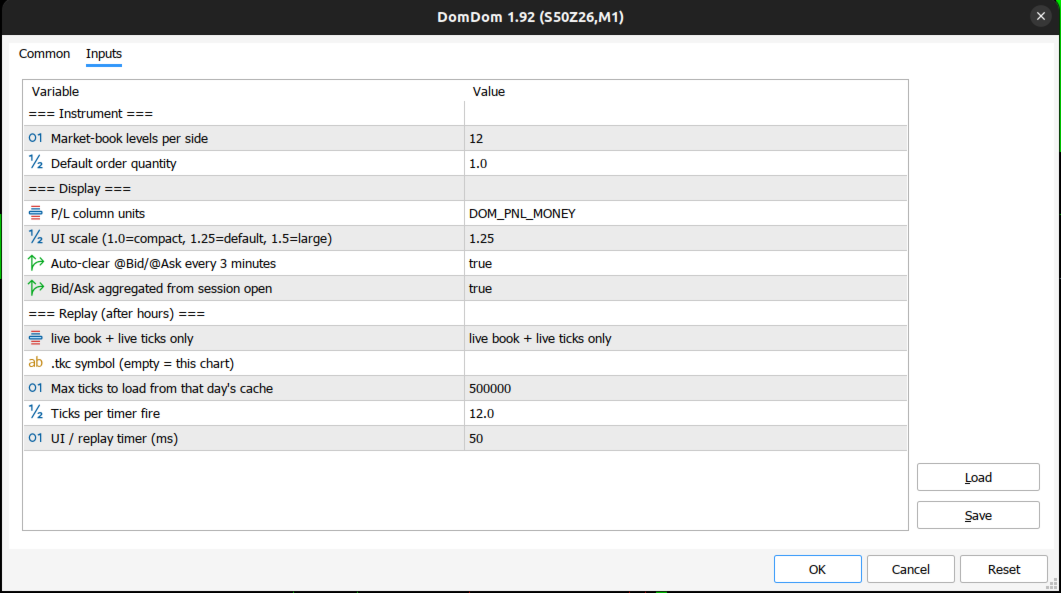
設定

Instrument:
  • Market-book levels per side (12):予約済みの項目です。Ladder には、ブローカーが数量付きで送ってくるすべての価格帯が表示されます。
  • Default order quantity (1.0):初期の注文数量です。銘柄の volume step に合わせて丸められます。

Display:
  • P/L column units (DOM_PNL_MONEY):金額で表示します。DOM_PNL_TICKS にすると tick で表示します。
  • UI scale (1.25):1.0 はコンパクト、1.5 は大きめの表示です。
  • Auto-clear @Bid/@Ask every 3 minutes (true):3m ボタンの初期状態です。
  • Bid/Ask aggregated from session open (true):BA Sess ボタンの初期状態です。

Replay (after hours):
  • Replay モード(ダイアログ上の表示は「live book + live ticks only」、初期値):ライブデータのみを使います。「always drive the ladder from cached M1/ticks」は常に replay し、「replay when the market is quiet / closed」は最後の気配から 15 秒を超えたとき、または銘柄が完全には取引可能でないときに replay します。replay には常に tick を使います。
  • .tkc symbol (empty = this chart):空欄のままにしてください。replay には常にチャートの銘柄が使われます。
  • Max ticks to load from that day's cache (500000):読み込むセッションの tick 数の上限です。replay と、適用時のセッション集計の両方に適用されます。
  • Ticks per timer fire (12.0):replay の速度です。上限は 80 です。
  • UI / replay timer (ms) (50):画面更新と replay の間隔です。下限は 40 です。


動作要件と制限

  • アルゴリズム取引が許可された MetaTrader 5(「最初の取引の前に」を参照)。
  • ブローカーが数量付きの Depth of Market を提供している銘柄。確認するには、Market Watch で銘柄を右クリックし、Depth of Market を開きます。そこで数量の列が空なら、DomDom の DOM 列も空になります。
  • 実際の約定を含むデータ配信。forex や CFD の銘柄の多くは DOM も print もないため、DOM、出来高、print、delta の列は空のままです。
  • DomDom は 1 銘柄につき 1 つです。他の銘柄は別のチャートで同時に動かせます。

無料デモは Strategy Tester でのみ動作します。テスターには DOM がなく、マウスやキーボードの入力も渡されません。また、DomDom はテスター内でセッション集計、replay、画面更新を行わないため、デモでは ladder の動作をお見せできません。ライブ口座やデモ口座で試すなら、1 か月のレンタルが現実的な方法です。


サポート

ご質問、不具合のご報告、ご要望は、製品のコメント欄または MQL5 のプライベートメッセージでお寄せください。

免責事項

取引にはリスクが伴います。DomDom は相場を読み、注文を入力するためのツールであり、価格を予測したり、何らかの結果を約束したりするものではありません。作者は、DomDom を取引の一部として安全に使える高品質なアプリケーションとして開発するため最善を尽くしましたが、すべての取引判断とその結果はご自身に帰属します。作者は、実際の市場で DomDom を使用したことにより生じたいかなる金銭的損失についても責任を負いません。
おすすめのプロダクト
ProEngulfingの無料バージョンは、1日あたり1つのシグナル制限と少ない機能を備えたQualifiedEngulfingです。 mql5コミュニティのKoala Trading Solutionチャンネルに参加して、Koala製品に関する最新情報を確認してください。参加リンクはこちら: https ://www .mql5 .com /en /channels /koalatradingsolution この製品のMT4バージョンは、以下のリンクからダウンロード可能です: https ://www .mql5 .com /en /market /product /52023 ProEngulfing – MT4向けのプロフェッショナルなエンガルフパターンインジケーターの紹介 ProEngulfingは、精密なエンガルフパターンを識別し、強調表示するために設計された最先端のインジケーターで、信頼性の高いシグナルを提供します。MetaTrader 4向けに開発され、取引の意思決定に役立ちます。 ProEngulfingの仕組み: ProEngulfingは、高度なアルゴリズムを使
Mine Farm is one of the most classic and time-tested scalping strategies based on the breakdown of strong price levels. Mine Farm is the author's modification of the system for determining entry and exit points into the market... Mine Farm - is the combination of great potential with reliability and safety. Why Mine Farm?! - each order has a short dynamic Stop Loss - the advisor does not use any risky methods (averaging, martingale, grid, locking, etc.) - the advisor tries to get the most
Was: $249  Now: $99   Market Profile defines a number of day types that can help the trader to determine market behaviour. A key feature is the Value Area, representing the range of price action where 70% of trading took place. Understanding the Value Area can give traders valuable insight into market direction and establish the higher odds trade. It is an excellent addition to any system you may be using. Inspired by Jim Dalton’s book “Mind Over Markets”, this indicator is designed to suit the
CosmiCLab SMC FIBO CosmiCLab SMC FIBO is a professional trading indicator designed for traders who use Smart Money Concepts (SMC), market structure analysis and Fibonacci retracement levels. The indicator automatically detects market swings and builds Fibonacci levels based on the latest impulse movement. It also identifies market structure changes such as BOS (Break of Structure) and CHOCH (Change of Character), helping traders understand the current market direction. CosmiCLab SMC FIBO also pr
Fabii Half Trend Baseline
Fabien Georges Andre Guillemaud
上位足のトレンドに逆らう取引をやめましょう。2本のベースライン、1つのチャート。リペイントなし。 どの通貨ペアでも、どの時間足でも。2分でチャートに表示。Strategy Tester で無料デモを試せます。 Get more indicators here Baselines, volatility filters and oscillators. No repaint. 必要な理由 チャート上のラインが緑になったので、あなたはエントリーします。その後、上位足を開くと、大きなトレンドは逆方向を向いています。シグナルは本物でした。しかし、その背景のトレンドはあなたの味方ではありませんでした。 大きなトレンドに逆らう取引は、そのたびにエントリーの優位性を失わせます。 得られるもの Fabii Half Trend Baseline は、現在の時間足のトレンドと上位足のトレンドを1つのチャートに表示します。ウィンドウを切り替えて全体像を確認する必要がなくなります。 上位足の2本目のベースラインがメインのラインの後ろに描かれるため、別のチャートを開かずに大きなトレンドが分かります。 ベ
Master Editionは、ボリュームとマネーフローの視点を通じて市場構造を可視化するために設計されたプロフェッショナルグレードの分析ツールです。標準のボリュームインジケーターとは異なり、このツールはチャート上に日足ボリュームプロファイルを直接表示し、価格発見がどこで行われたか、そして「スマートマネー」がどこに位置しているかを正確に確認できます。 このMaster Editionは、明確さとスピードを考慮して設計されており、ロード時にチャートレイアウトを即座に美化するユニークな自動テーマ同期システムを備えています。 主な機能: 真のマネーフロー計算: 標準のティックボリュームを超えます。「Use Money Flow」を有効にすると、ボリュームは価格によって重み付けされ、特定の価格レベルでの実際の資本コミットメントが明らかになります。 バリューエリア (VA) の可視化: バリューエリア(デフォルトではボリュームの70%)を自動的に計算します。 VA Fill: コントロールゾーンを即座に識別するために、バリューエリアの背景をシェーディングします。 主要レベル: コントロールポイン
RBreaker Gold Indicatorsは、金先物の短期日内取引戦略であり、トレンドフォローと日内反転の2つの取引手法を組み合わせたものです。トレンド相場での利益を捉えるだけでなく、相場が反転した際には迅速に利確し、その流れに沿ってポジションを反転させることができます。 この戦略は、アメリカの雑誌『Futures Truth』において、15年連続で最も収益性の高い取引戦略トップ10に選ばれた実績を持ち、非常に長いライフサイクルを誇り、現在も国内外で広く使用・研究されています。 本インディケーターは、2026年の金先物の値動きに対応し、14日間のATR指標に基づいて、ブレイクアウト係数A、観察係数B、リバーサル係数Rをより合理的な値で定義しています。非常に優れたインディケーターであり、安定的な年間収益を実現しています。ぜひおすすめします〜
Breakout scalp PRO
Cesar Napoleon Guio Martinez
Automated breakout scalper EA trading system with advanced execution filters and built-in risk management. Designed to operate during selected market conditions, combining session control, spread and slippage filtering, and dynamic trade management. Safety First Approach:  This EA does not use grid systems, martingale strategies or other high-risk unlimited recovery strategy. Every position is protected with predefined Stop Loss and Take Profit levels. The strategy is designed to maintain contro
Your Trend Friend
Luigi Nunes Labigalini
5 (1)
The trend is your friend! Look at the color of the indicator and trade on that direction. It does not  repaint. After each candle is closed, that's the color of the trend. You can focus on shorter faster trends or major trends, just test what's most suitable for the symbol and timeframe you trade. Simply change the "Length" parameter and the indicator will automatically adapt. You can also change the color, thickness and style of the lines. Download and give it a try! There are big movements w
HAS RSI Signal — SL/TP自動計算機能付き プロフェッショナル・トレンドインジケーター HAS RSI Signal は、信頼性の高いクラシックな手法と最新のノイズ除去アルゴリズムを融合させた強力なトレーディングツールです。 平均足スムーズド(Heiken Ashi Smoothed) と RSI を組み合わせることで、トレンドの転換点や買われすぎ・売られすぎ圏からの脱出タイミングを正確に捉え、明確なエントリーシグナルを提示します。 主な特徴: 二重のフィルタリング: 平均足スムーズドで市場の「ノイズ」を除去し、RSIで勢い(モメンタム)の強さを確認します。 損切り・利確ラインの自動計算: 単にシグナルを出すだけでなく、ボラティリティ( ATR )に基づいた最適なストップロス(SL) と テイクプロフィット(TP)を自動で算出します。 視覚的な分かりやすさ: シグナルはチャート上にカラーキャンドルとして表示されるため、一目でトレンドを把握でき、取引画面をスッキリと保てます。 充実の通知機能: アラート、音声、スマートフォンへのプッシュ通知機能を搭載。チャンスを逃すこと
Trading Utility for Forex Currency Pairs Only not for Gold  Functions Auto Lot Calculation based on Risk Auto stoploss  Auto TakeProfit Breakeven Auto Close Half % Close in percentage with respect to the PIPs Pending Orders BuyLimit Sell Limit with distances BuyStop Sell Stop    with distances Trading Informations Risk in percentage For Multiple trades Combine Takeprofit and Combine Stoplosses
Passband Filter Pro Passband Filter Pro is a trend and cycle oscillator for MetaTrader 5. It is built on the Ehlers Super Passband Filter, a band pass filter that removes long term trend drift and short term noise so that only the dominant market cycle remains. The result is a clean oscillator with a color cloud that shows overbought and oversold conditions, cycle turns, and momentum on forex, gold, indices, stocks and crypto. Most traders enter too early or too late. Simple moving averages la
ADVANCED FUNCTIONALITIES: Trend Score (0-100) with visual bar Intelligent signals with adjustable strength (1-10) Risk management with automatic TP/SL Audible and visual alerts Price zones with smooth filling Multi-indicator analysis (RSI, ATR, BB, EMAs) DESIGN FEATURES Modern Visual: Smooth and well-spaced lines (EMA with 2-3px width) Vibrant and professional colors (Sky Blue, Orange, Gold) Modern arrows (code 233/234) for buy/sell signals Configurable dark/light theme Adjustable transparency f
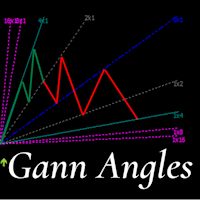
This indicator is, without a doubt, the best variation of the Gann Angles among others. It allows traders using Gann methods to automatically calculate the Gann angles for the traded instrument. The scale is automatically calculated when the indicator is attached to the chart. When switching timeframes, the indicator recalculates the scale for the current timeframe. Additionally, you can enter your own scales for the Gann angles. You can enter your own scales either for both vectors or for each
== LT RAINBOW TREND - 36本の移動平均線を持つトレンドインジケーター == 概要 LT Rainbow Trendは、36本の移動平均線を同時に処理し、スマートなカラーシステム(レインボー)を搭載した先進的なトレンド分析テクニカルインジケーターです。主力のトレンド方向へ最大の視覚的明瞭さをもって取引したいトレーダーのために開発され、マルチタイムフレーム分析の複雑さを、シンプルでカラフル、かつ非常に直感的なビジュアルへと変換します。 「トレンドは友達(The trend is your friend)」であることを理解しているトレーダーに最適です。このインジケーターは、トレンドの強さ、方向、そして潜在的な反転を常に事前に見極めることを可能にします。 仕組み インジケーターは、4つのトレンドゾーンに分散された36本の移動平均線を監視します: 赤(トレンド転換ゾーン) 31〜20番目の移動平均線 トレンドが反転する可能性を示す強いサイン オレンジ(トレンド減速ゾーン) 19〜10番目の移動平均線 トレンドの勢いが失われつつあるが、継続の可能性もあるサ
Noize Absorption Index - is the manual trading system that measures the difference of pressure between bears forces and bulls forces. Green line - is a noize free index that showing curent situation. Zero value of index shows totally choppy/flat market.Values above zero level shows how powerfull bullish wave is and values below zero measures bearish forces.Up arrow appears on bearish market when it's ready to reverse, dn arrow appears on weak bullish market, as a result of reverse expectation.
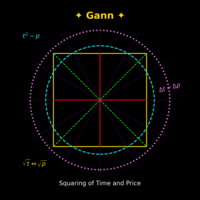
Gann Time–Price Square Cycles (MT5) このインジケーターは、W.D. Gann が提唱した「時間と価格のバランス」という概念を応用しています。 チャート上のスイングを検出し、 Quarter, Half, Full サイクルの時間間隔を将来に向けて投影し、垂直線で表示します。 このツールは、トレーダーがスイングの大きさと経過時間の関係を、MT5チャート上で直接研究できるよう設計されています。 機能 PivotDepth と最小スイングサイズに基づき、スイングの高値・安値を検出。 Quarter, Half, Full の調和的な時間間隔を投影。 計算されたサイクルポイントを示す垂直線を描画。 インジケーターを削除するまで、描画されたラインはチャート操作中も保持。 特徴 Quarter, Half, Full サイクルごとに独立した PivotDepth と MinSwingSize パラメータを設定可能。 新しいバー生成時、シンボル変更、タイムフレーム変更時に自動更新。 最大 5000 本の履歴バーを処理できる設計。 同じチャートに複数インスタンスを
DAILY OH/OL SDEV QUANT MODEL - STATISTICAL TRADING WITH PRECISION RISK MANAGEMENT TRADE WITH MATHEMATICAL CERTAINTY - KNOW YOUR EXACT STOP-LOSS AND TAKE-PROFIT BEFORE YOU ENTER This indicator analyzes 5,000+ days of price history to give you: Exact entry levels (sigma bands locked at daily open) Exact stop-loss distance (from M
プレミアムレベルは、正しい予測の精度が80%を超える独自の指標です。 この指標は、最高のトレーディングスペシャリストによって2か月以上テストされています。 あなたが他のどこにも見つけられない作者の指標! スクリーンショットから、このツールの正確さを自分で確認できます。 1は、1キャンドルの有効期限を持つバイナリーオプションの取引に最適です。 2はすべての通貨ペア、株式、商品、暗号通貨で機能します 手順: 赤い矢印が表示されたらすぐにダウントレードを開き、青い矢印が表示されたら閉じます。青い矢印の後に開くこともできます。 試してテストしてください!推奨設定はデフォルトです! 日足チャートで最高の精度を示します! インディケータは、2600 Pipsの収益性に対して、約10Pipsという非常に小さなマージンを使用します。
Liquidity Sweep Detector Pro This works only in the live MARKET, not in backtesting, because the strategy tester lacks liquidity data. Liquidity Sweep Detector Pro is an advanced MetaTrader 5 (MT5) indicator built around Smart Money Concepts (SMC) and the AMD (Accumulation, Manipulation, Distribution) model. It detects hidden liquidity pools in real-time and highlights high-probability trading setups triggered by false breakouts (liquidity sweeps). Key Features & Functionality: Asia Session Ran
Volume Profile Multiple — アルゴリズム取引対応バッファ付き マルチブロック・ボリュームプロファイル 時間足を変えるたびにボリュームプロファイルを一つずつ描き直し、再計算する手間にうんざりしていませんか? Volume Profile Multiple は、チャート上に複数の連続したボリュームプロファイルを自動的に描画し、直近の表示範囲だけでなく、相場の各区間で機関投資家の関心が実際にどこにあったのかを明らかにします。 この指標が行うこと 本指標は価格履歴をN本のローソク足ごとのブロックに分割し(ブロック数と1ブロックあたりの本数は自由に設定可能)、各ブロックについて完全なボリュームプロファイルを計算します:コントロールポイント(POC)、バリューエリアの上限・下限(VAH/VAL)、高出来高ゾーンと低出来高ゾーン(HVN/LVN)です。結果として、ブロックごとの市場構造を視覚化したマップが得られ、実出来高に基づく蓄積ゾーン、サポート・レジスタンス、バリューエリア間の価格ローテーションの特定に役立ちます。 アルゴリズム取引にも対応 多くのボリュームプロファイル系
SolarTrade Suite 金融ロボット: LaunchPad Market Expert - 取引を開始するために設計されています! これは、革新的で高度なアルゴリズムを使用して値を計算する取引ロボットであり、金融​​市場の世界でのアシスタントです。 SolarTrade Suite シリーズのインジケーター セットを使用して、このロボットを起動するタイミングをより適切に選択してください。 説明の下部にある SolarTrade Suite シリーズの他の製品をご覧ください。 投資と金融市場の世界を自信を持ってナビゲートしたいですか? SolarTrade Suite 金融ロボット: LaunchPad Market Expert は、情報に基づいた投資決定を行い、利益を増やすのに役立つ革新的なソフトウェアです。 SolarTrade Suite 金融ロボット: LaunchPad Market Expert の利点: - 正確な計算: 当社のロボットは、高度なアルゴリズムと分析方法を使用して、市場の動きを正確に予測します。 資産を売買するのに最適なタイミングを
Trading tool combining a sophisticated equity stop-loss, dynamic take-profit management (Breakeven & Trailing), and symbol-group-based closing logic. It is a complete risk management and trade supervision tool. Features: All features of `Equity Master Stop v1` (floating profit/loss limits, exit protection, skip hours). Take-Profit Override: Can force a TP on any order to lock in a `MAX_FLOATING_PROFIT`. Step Breakeven: Locks in increasing amounts of profit as a trade moves favorably (e.g., aft
インディケータは現在のクオートを作成し、これを過去のものと比較して、これに基づいて価格変動予測を行います。インジケータには、目的の日付にすばやく移動するためのテキスト フィールドがあります。 オプション: シンボル - インジケーターが表示するシンボルの選択; SymbolPeriod - 指標がデータを取る期間の選択; IndicatorColor - インジケータの色; HorisontalShift - 指定されたバー数だけインディケータによって描画されたクオートのシフト; Inverse - true は引用符を逆にします。false - 元のビュー。 ChartVerticalShiftStep - チャートを垂直方向にシフトします (キーボードの上下矢印)。 次は日付を入力できるテキストフィールドの設定で、「Enter」を押すとすぐにジャンプできます。
DRX Market Profile Master v4 — MetaTrader 5向け機関投資家レベルのMarket Profile Market ProfileおよびTime Price Opportunity(TPO)分析は、市場の本質的な構造を理解するための最も効果的な手法の一つです。 DRX Market Profile Master v4は、この手法をMetaTrader 5に完全に実装し、プロフェッショナルな取引プラットフォームに匹敵する機能を提供します。 このインジケーターは各セッションごとに、価格が受け入れられたゾーン(Value Area)、最も取引が集中した価格(Point of Control)、そして市場が迅速かつ一方向に通過したゾーン(Single Prints)を自動的に計算します。 これらの情報は、精度の高いエントリーおよびエグジット判断の基盤となります。   How does that work? セッションタイプと履歴表示 このインジケーターは、時間別、日次、週次、月次、およびカスタムの5種類のセッションタイプをサポートしています。最大20の履歴セ
STRICTLY FOR BOOM INDEX ONLY!!!!! Here I bring the Maximum Trend Arrows OT1.0 MT5 indicator. This indicator is made up of a combination of different trend indicators for entries and exits, for entries an orange arrow will paint on the chart below the current market and a red flag for closing of trades and it produces buy arrows only. When the orange arrow appears, it will appear along with it's sound to notify you. The 1H timeframe is recommended, don't use it anywhere else than on the 1H timefr
Awesome Oscillator by Bill Williams with the ability to fine-tune and replace the averaging algorithms of the indicator, which significantly expands the possibilities of using this oscillator in algorithmic trading and brings it closer in its properties to such an indicator as the MACD. To reduce price noise, the final indicator is processed with an additional Smooth averaging. The indicator has the ability to give alerts, send mail messages and push signals when the direction of movement of th
Dynasty SMC/ICT Terminal — v3.0 "Neon-Ops Edition" An all-in-one Smart Money Concepts / ICT dashboard for MetaTrader 5. It's an indicator, not an auto-trading EA — it never places, modifies, or closes real orders. It scans price action for Order Blocks, Fair Value Gaps, market structure, harmonic patterns, and multi-timeframe momentum, blends everything into one calibratable Master Signal, and — if enabled — builds a fully automated on-chart trade plan with entry, stop loss, three take-profit ta
このプロダクトを購入した人は以下も購入しています
================================================================================ POC BREAKOUT - V20.72. Full Professional Grade Toolkit ================================================================================ POC Breakout is a full MetaTrader 5 trading dashboard for discretionary traders who want breakout signals, Point of Control (POC) context, volume profiles, order flow, market structure, news, alerts, and advanced trade planning in one professional workspace. Attached directly to you
Farmed Hedge Yield Farming | All Markets (Manual - Hybrid - Semi/Automated EA) VERIFIED TRADING RESULTS - Farmed Hedge Yield Axi Copy:  https://www.mql5.com/en/signals/2356376 - Farmed Hedge Yield Exn Copy:   https://www.mql5.com/en/signals/2356404 - Farmed Hedge Yield V Copy:  https://www.mql5.com/en/signals/2357156 IMPORTANT NOTICE: FarmedHedge is a MANUAL-FOCUSED TRADING UTILITY ,not a fully automated EA. Results shown on this Signal include manual trades and overall strategic management.
Master Your Trading Discipline   Stop losing your hard-earned gains to overtrading and emotional decisions. The Discipline Tool is your ultimate trading assistant, ensuring strict risk management in real-time. Key Protection Features: Advanced Drawdown Defense : Automatically halts trading if your daily drawdown exceeds a preset threshold (percentage or dollar amount). Real-Time Equity Lock : Safeguard profits by referencing peak equity, ensuring drawdown stays within control. Hard Profit Target
Power Candles Strategy Scanner - 自動最適化型マルチシンボル設定ファインダー パワーキャンドル・ストラテジー・スキャナーは 、パワーキャンドル・インジケーターを駆動するのと全く同じ自己最適化エンジンを、マーケットウォッチに登録されているすべての銘柄に対して並行して実行します。1つのパネルで、現在統計的に取引可能な銘柄、各銘柄で勝率の高い戦略、最適なストップロス/テイクプロフィットの組み合わせが表示され、新たなシグナルが発生した瞬間に通知が届きます。 このツールは、Stein Investmentsのエコシステムの一部です。  18種類以上のツールをすべて閲覧し、AIを活用したセットアップの推奨を受け取り、  https://stein.investments でコミュニティに参加しましょう 市場動向を網羅。銘柄ごとに3,000件以上の自動最適化。2種類のアラート。ワンクリックでチャートを切り替えて即座にアクション。 なぜこれが必要なのか 多くのマルチ銘柄スキャナーは、 価格の動き (ボラティリティ、変動率、銘柄ごとのRSI)を表示するだけです。それ
EASY Insight AIO – スマートで手間いらずな取引のオールインワンソリューション 概要 数秒で市場全体——FX、ゴールド、暗号資産、指数、さらには株式まで——を、手作業のチャート確認や複雑なセットアップ・インジケーター導入なしにスキャンできたらどうでしょうか? EASY Insight AIO はAIトレードのための究極のプラグ&プレイ型エクスポートツールです。市場全体のスナップショットを、クリーンなCSVファイルで一括出力。ChatGPT、Claude、Gemini、Perplexityなど、さまざまなAIプラットフォームで即座に解析できます。 ウィンドウの切り替えやグラフのごちゃごちゃしたオーバーレイはもう不要。自動エクスポートされる純粋で構造化されたインサイトだけで、無駄なチャート監視に悩まされず、スマートなデータ主導の判断に集中できます。 なぜEASY Insight AIOなのか? 本当のオールインワン • セットアップ不要、インジケーターのインストール不要、チャートへのオーバーレイ不要。インストールして起動し、エクスポートするだけです。 マルチアセット対
The product will copy all telegram signal to MT5 ( which you are member) , also it can work as remote copier.  Easy to set up, copy order instant, can work with almost signal formats, image signal,  s upport to translate other language to English Work with all type of channel or group, even channel have "Restrict Saving Content", work with  multi channel, multi MT5 Work as remote copier: with signal have ticket number, it will copy exactly via ticket number. Support to backtest signal. How to s
The Patch It never opens a trade. It walks behind the ones that did. Every open position, every pending order — checked twice a second for the one thing that's easy to forget: a stop, a target. Found bare, it doesn't ask. It writes the missing number in, measured in points from wherever the position began, and moves on to the next. No strategy, no opinion on direction. Just the quiet assumption that nothing should ever sit on the market unprotected — not because someone decided it shouldn't,
EA Overfitter
Stephen J Martret
5 (1)
That backtest looks great. But will it still be making money tomorrow, next week, next month? EA Overfitter re-runs your EA on 100 price histories it has never seen. One score tells you if the edge is real. A backtest tells you what an EA did on one price history — the one that happened to occur. What you cannot tell from it is how much of that result was the strategy and how much was the particular path. EA Overfitter answers that. It builds up to 100 synthetic price histories your EA has n
Floor Watch
Syed Tauqeer Hussain Shah
Floor Watch One number, watched every thirty seconds: how far equity has fallen since the day began — or since its highest point, if it's told to trail the peak instead of the open. Cross the line and it doesn't argue. Every open position closes, every pending order vanishes, and anything that slips through afterward gets shut the moment it appears. Not asked. Removed. The floor holds until the clock turns 5 AM Pakistan time — then, and only then, does the day start over. One rule. No except
RETAILBERG FOOTPRINT CHART PRO — Order-Flow Workspace for MetaTrader 5 Version 7.00  |  Professional System  |  31 tools  |  One chart A full 150-page illustrated User Manual is included. Please read the full manual to understand this feature packed footprint chart elements and ui. https://www.mql5.com/en/blogs/post/777982 DEMO / STRATEGY TESTER — PLEASE READ FIRST
一度の購入で、現在提供中および今後リリースする私のすべての MT4・MT5 インジケーターを追加料金なしで受け取れます。 購入後、受け取り方法について私にお問い合わせください。 10 件の購入ごとに 50$ ずつ、最大 999$ まで値上げする予定です。購入手続き時に Market に表示される価格が適用されます。 信頼するインジケーターをそのままに。周辺の取引作業を自動化。 あなたのシグナル。あなたのルール。あなたの取引執行。 信頼する MT5 インジケーターはあるのに、チャートの監視、シグナル待ち、ロット計算、発注、各ポジションの管理を手作業で行っていませんか? Stratiora Signal Engine MT5 は、これらの作業をつなぎます。対応する買い・売りバッファのシグナルを、エントリー、取引量計算、Stop Loss、Take Profit、フィルター、ポジション管理、口座保護までの自動処理に変換できます。 インジケーターや取引アイデアを変えるたびに別の EA を依頼する代わりに、柔軟な一つのエンジンで各シグナルの取引方法を決められます。 あなたのシグナル。あなたのル
YuClusters
Yury Kulikov
4.93 (43)
Attention: You can view the program operation in the free version  YuClusters DEMO .  YuClusters is a professional market analysis system. The trader has unique opportunities to analyze the flow of orders, trade volumes, price movements using various charts, profiles, indicators, and graphical objects. YuClusters operates on data based on Time&Sales or ticks information, depending on what is available in the quotes of a financial instrument. YuClusters allows you to build graphs by combining da
Quant AI Agents are independent trading Expert Advisors. Instead of trading using a fixed strategy like other conventional EAs, Quant AI Agents   is a   multi-agent AI trading framework   that turns natural-language strategy prompts into live.  WANT THE SAME RESULTS AS MY LIVE SIGNAL?   Use the exact same brokers I do:   IC MARKETS , IC TRADING   .  Unlike the centralized stock market, Forex has no single, unified price feed.  Every broker sources liquidity from different providers, creating un
Daily Trading Limiter
AL MOOSAWI ABDULLAH JAFFER BAQER
5 (8)
• Please test the product in the Strategy Tester before purchasing to understand how it works. • If you face any issues, contact me via private message—I’m always available to help. • After purchase, send me a screenshot of your order to receive a FREE EA as a gift. Daily Trading Limiter — the rule you cannot break Every trader knows the number. Three trades. Two percent. One bad day and stop. And every trader has watched themselves take the fourth trade anyway. The problem was never knowing th
FUTURES ORDERFLOW FOOTPRINT CHART Professional OrderFlow EA for MetaTrader 5 Version 1.01| Professional tool for real traders | Institutional-Grade Visualization STRATEGY TESTER USERS - PLEASE SELECT EVERY REAL TICK WHEN TESTING AND YOU HAVE DOWNLOADED HISTORICAL DATA. IF YOU SEE A WAITING SCREEN AND IT IS NOT DOWNLOADING, IT MEANS YOU HAVE LOW HISTORICAL DATA. TRY 1 MIN AND 5 MIN FIRST ON 1 DAY DATA. ONE DAY DATA SHOULD BE THE NEWEST AND MOST CURRENT DATE. PLEASE WAIT UNTIL THE MARKET HAS ROL
Trading Chaos Expert
Hennadii Stanilevych
5 (11)
This software has no equals in the world and represents a universal trade "console" covering trading signals, automated market entry, setting of Stop Loss and Take Profit, as well as Trailing Profit for multiple trades at the same time in a single open window. Intuitive control of the Expert Advisor in "three clicks" ensures a comprehensive use of all its functions on different computers, including tablets PCs. Interacting with additional signal indicators that mark the chart to give a real mark
Copy your MT5 trades to Interactive Brokers You keep using MT5. Every order you open or close is sent to your IB account. In real time. No coding. No changes to your strategy or EA. Try it first Rent 1 month: $30. Test on a live or paper account. What it does Real-time copying: same direction, reverse, or one side only. Map any MT5 symbol to any IB symbol. Set a lot ratio for each. Forex, Futures, Stocks, CFDs, Metals and Crypto. Position sync: both accounts checked, any difference fixed. Optio
Quant Panel
Kevin Craig E Gittins
Quant Panel is a strategy analysis utility for MetaTrader 5. It helps traders review several Expert Advisors or trading strategies running on the same account. The panel groups closed positions by Expert Advisor comment or magic number and calculates each strategy's results separately. You can compare strategy performance, review individual drawdowns and export detailed reports from one dashboard. Independent strategy analysis Each strategy has its own virtual starting balance and closed-trade b
EA Slipstream
Stephen J Martret
5 (1)
Your backtest filled every order at the price it asked for. Your account does not. EA Slipstream measures what execution costs your EA, using your own fills, slippages and spreads to show you the true performance of your EA. A backtest prices every trade at the level the EA named. In live trading a pending order fills at whatever price is available when it triggers, a stop closes wherever the market is when it is hit, and the spread at that moment is whatever the account was quoting. The differ
Advanced Daily Trading Limiter PRO Professional Risk Management. Uncompromising Trading Discipline. One undisciplined trading session can erase weeks of consistent profits. Whether it's overtrading, revenge trading, or exceeding a prop firm's daily risk limits, emotional decisions often become a trader's biggest obstacle—not the market itself. Advanced Daily Trading Limiter PRO is a comprehensive risk management and discipline enforcement utility for MetaTrader 5, designed to help traders stay
VERON LINK MASTER MT5 — Real-time Multi-Account Dashboard & Sync Controller Veron Link Master is a high-performance, centralized monitoring and synchronization control center designed for MetaTrader 5. Built specifically for traders managing multiple accounts, prop firm portfolios, grid/martingale EAs, or client networks, Veron Link Master provides a seamless, ultra-modern dark-themed GUI dashboard directly on your MT5 terminal. Pricing Structure: Take advantage of our early-bird pricing before
Veron Link Slave – Synchronized Grid, Martingale & Breakout Management Short Description Advanced synchronization tool designed to manage Grid, Martingale, and Breakout EAs. Automatically sends close-basket signals to the Master account upon profit target completion, minimizing slippage across different brokers. Full Description Veron Link Slave is a specialized utility developed to enhance the execution efficiency and risk management of multi-account or multi-broker trading setups. It is desig
The core idea: using the user interface, you configure the parameters the chart must meet before entering a position (or positions), choose which entry models to use, and set the rules for when trading and planning should end. Lazy Trader  handles the rest: it  takes over all the routine chart watching and execution! full description  :: 3 key videos [1] ->  [2]   ->  [3] What can it do? - Understands Larry Williams market structure - Understands swing market structure by Michael Huddleston
AI Arbitron — an MT5 Spot vs Future Gold Arbitrage Bot designed to capture price discrepancies between correlated Spot and Future instruments through hedged, non-directional trading. Platform: MT5 Use Swap Free Accounts, many of the regulated broker gives swap free accounts for 7 days, make use of it by only buying lower price asset and selling higher price asset, hold your position for 2-3 days. Asset: Mainly Gold (XAUUSD) using Spot + Future/CFD price feeds. Core strategy: It monitors the p
Mentfx Mmanage mt5
Anton Jere Calmes
4.25 (8)
The added video will showcase all functionality, effectiveness, and uses of the trade manager. Drag and Drop Trade Manager. Draw your entry and have the tool calculate the rest. Advanced targeting and close portions of a trade directly available in tool (manage trades while you sleep). Market order or limit order on either side with factored spread. Just draw the entry, the tool does the rest. Hotkey setup to make it simple. Draw where you want to enter, and the stop loss, the tool calculates al
Features   With MT5 to Interactive Brokers(IB) Trader, you can: 1. Load chart data from IB to MT5, and Analyze with all standard or customer Indicators. 2. Place Orders to IB Account Directly in MT5. 3. Make your Own EAs upon IB Securities by only making minus changes of the trading function. Usage 1) Installation Copy the "Mt5ToIBTraderEn.ex4" and sample files to [MT5 Data Folder]->MQL5->Experts.  2)  MT5 Settings Add the IP Address to the MT5 Allowed URLs in 'Tools->Options->Expert Adviso
One button. One trade. MT5 Trading Deck is a hotkey trading panel for MetaTrader 5 that turns the platform into a keyboard-driven execution cockpit. Stop loss, take profit and lot size are pre-calculated for every key; the moment you press, a market order is live on the broker. A complete technical user manual is attached in the product Comments section. It documents every input parameter, the full hotkey map, the recommended Stream Deck XL layout, and the advanced workflows for Pre-Limit orders
Global Investing FX Terminal
Santiago Nicolas Pla Casuriaga
5 (1)
Global Investing FX Terminal は、MetaTrader 5 向けのオールインワン FX ダッシュボードです——中央銀行政策金利、CFTC COT ポジション、キャリーランキング、経済サプライズ、オプションスキュー、リテールセンチメント、相関まで、合計 13 のアナリティクスパネルを、ちらつきのない単一キャンバス上に表示し、単一の EA から 10 秒ごとに更新します。外部ソフトウェア不要です。 プロの FX 分析には、通常は別々のプラットフォームに分散しているデータへの同時アクセスが欠かせません。レートデリバティブ、政府統計ポータル、ブローカーのスワップ仕様、オプションデスク——このEAはそれらすべてを、実際に売買判断を下すトレーディングターミナルの単一画面に集約します。 ダッシュボードの表示内容 マーケットオーバービュー FX ペアテーブル — G10 全 28 ペアに加え、ブローカーの Market Watch に NOK/SEK クロスが存在する場合はそれも含めた最大 36 ペアのリアルタイム Bid/Ask。各行にはスプレッド、日次・週次変化、pip
Unlimited Trade Copier Pro MT5 is a tool to copy trade remotely to multiple MT4, MT5 and cTrader accounts at different computers/locations over internet. This is an ideal solution for you if you are a signal provider and want to copy your trades to other receivers globally on your own rules. One provider can copy trades to multiple receivers and one receiver can get trade from multiple providers as well. The provider can even set the subscription expiry for each receiver, so that receiver will n
Custom Alerts AIO:マルチマーケット監視を一括で実現 — 設定不要ですぐに使えるインテリジェントツール 概要 Custom Alerts AIO は、追加のインジケーター設定が不要で、インストール後すぐに利用できる高機能マーケットスキャナーです。FX Power、FX Volume、FX Dynamic、FX Levels、IX Power を内部にすべて統合し、主要なすべての資産クラス(為替、金属、指数、暗号資産)を一括監視できます。MetaTrader の仕様により、株式は個別のシンボルとして追加可能ですが、一般的には利用頻度は低めです。 1. なぜ Custom Alerts AIO を選ぶべきか 追加ライセンス不要 • 必要なすべての Stein Investments インジケーターが内蔵されており、すぐに使用可能です。 • チャートに表示されるグラフィックは省略されており、アラート生成に特化した構成です。 市場を広範囲にカバー • 為替、金属、暗号資産、株価指数に対応(株式は手動追加可能)。 • シンボル名を入力する必要はなく、プロパティで資産クラス
作者のその他のプロダクト
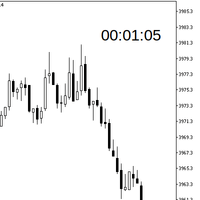
A simple indicator to help showing the remaining time until the candle closes for all pre-defined chart periods with the following formats depending on which timeframe the chart is on. DD:HH:MM:SS - in case of W1, and MN period HH:MM:SS - in case of other periods Included with some of configurations as follows (please see attached inputs screenshot) X/Y distance to the upper right corner of the chart window Text size Text color Show/hide
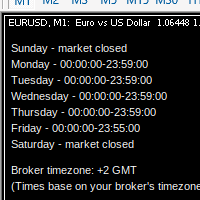
MarketSchedule displays market sessions' open/close time for each day through out the week, also broker's timezone. It also supports instruments that have more than 1 session per day (maximum of 2 as most instruments don't have more than this) e.g. crypto market such as BTCUSD which usually has a few hours break mid-day thus it spans into 2 market sessions. You don't have to spend time looking for such information on broker's website. It's an on-demand script that you can drop onto the chart to
MarketOpenSessions is an indicator helps as a visual clue for which market session is at the time being. If you consider killzone, market open/close as important factor, this indicator would help you reduce effort in converting from one time zone to another. It has the following features 2 display styles: section (as colored line), and histogram 4 major configurable market sessions i.e. Asia, London, New York, and London-Close session. In additional to end of trading session of the day. Female s
フィルタ:
レビューなし
レビューに返信