RMT Visual Trade Planner

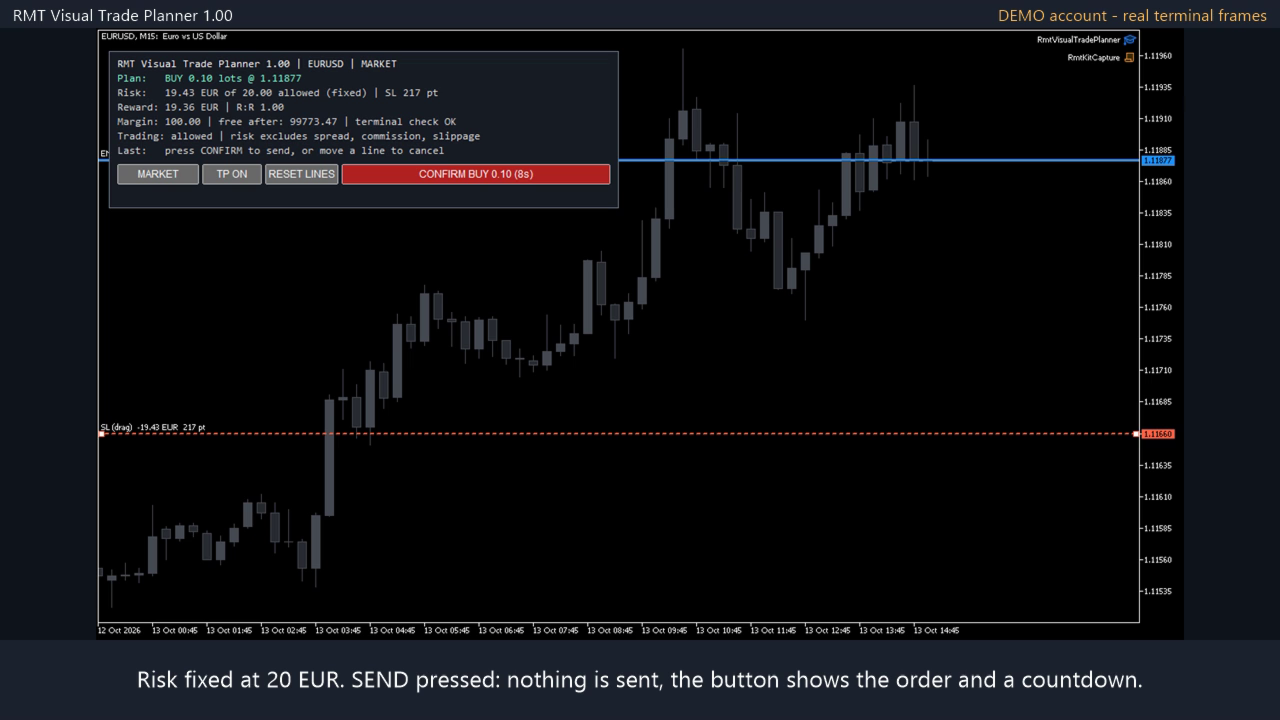
RMT Visual Trade Planner is a position size calculator and order planner for MetaTrader 5: you plan a trade with three lines on the chart. Drag the stop loss and take profit, and it shows the lot size for your risk, the money at risk, the reward and the margin. The order is sent only after you press SEND and then CONFIRM.

The problem it solves

Working out the lot size for a given stop and a given risk takes a calculator, and a mistake there costs more than a bad entry. The order window of MetaTrader does not show the money you are risking. RMT Visual Trade Planner does the arithmetic on the chart, with your broker's own contract data, and shows it before anything is sent.

How it works

  • Attach it to a chart. Three lines appear: ENTRY, SL and TP.
  • Drag SL to where your stop belongs. If it is below the price the plan is a buy; above, a sell.
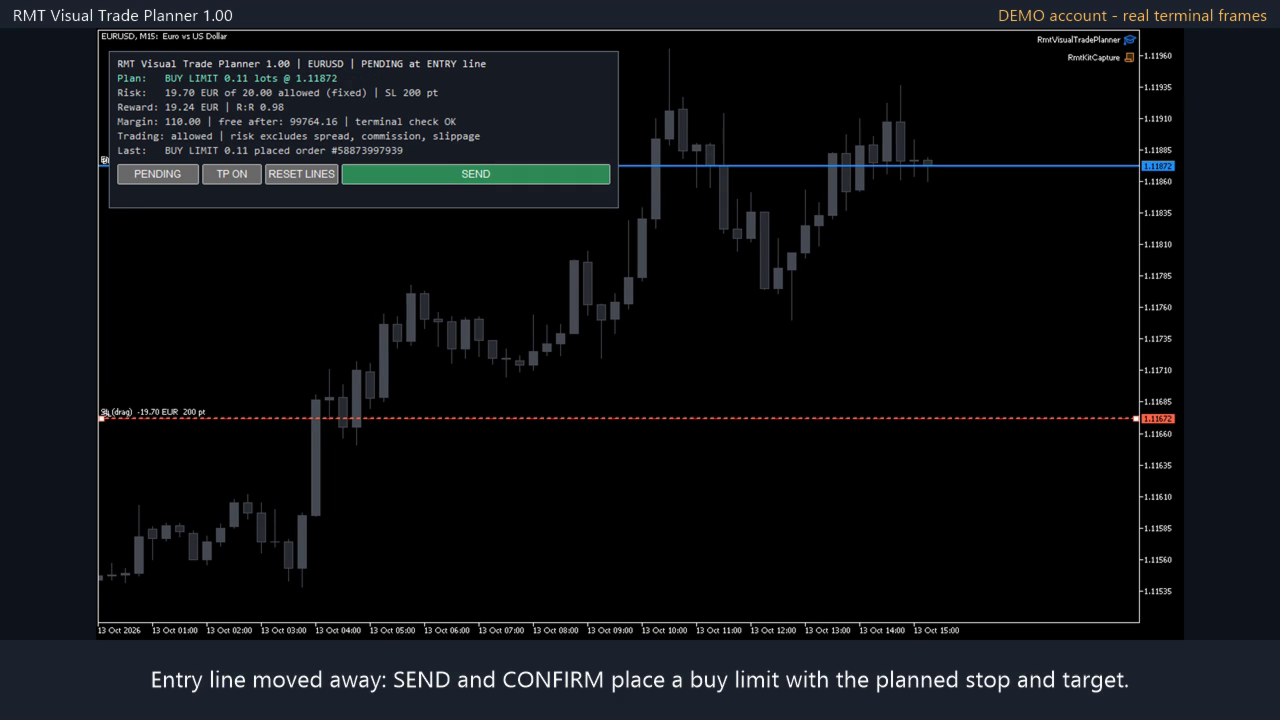
  • The panel shows the volume, the money at risk against the amount you allow, the reward and R:R, and the margin from the terminal's own pre-check.
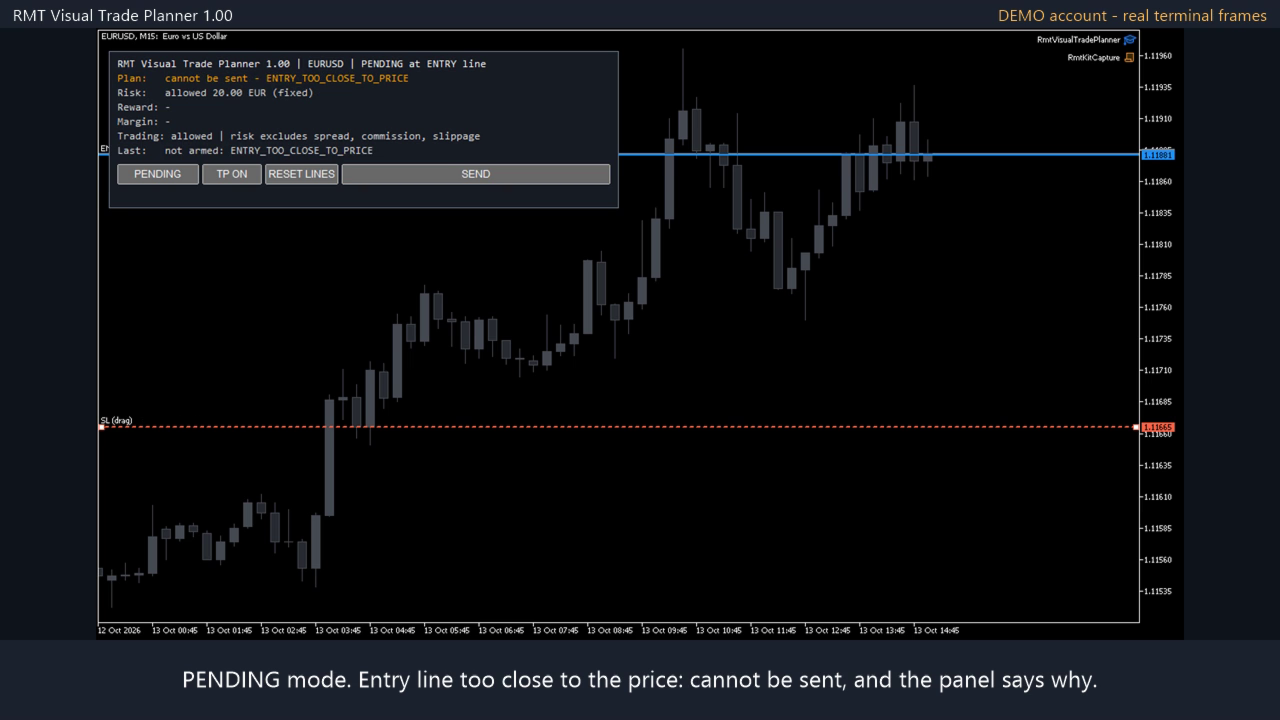
  • Choose MARKET, or PENDING to place the order at the ENTRY line. The type (limit or stop) follows from where the line is.
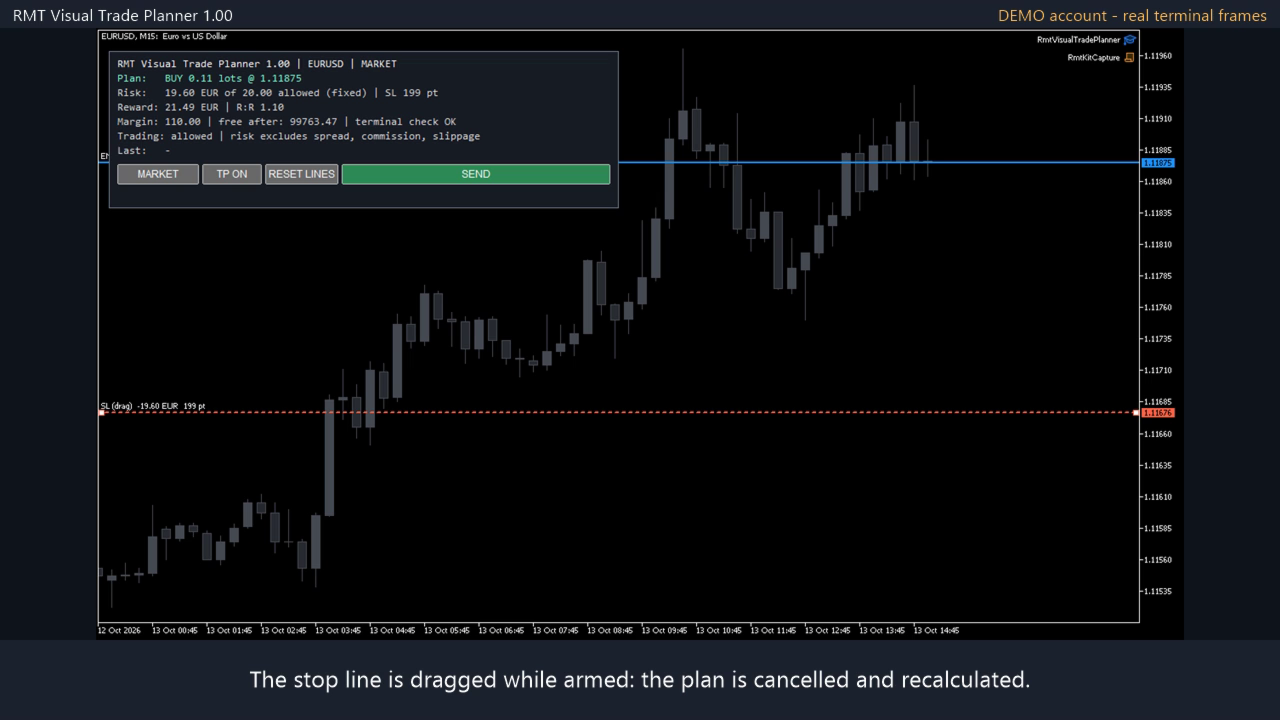
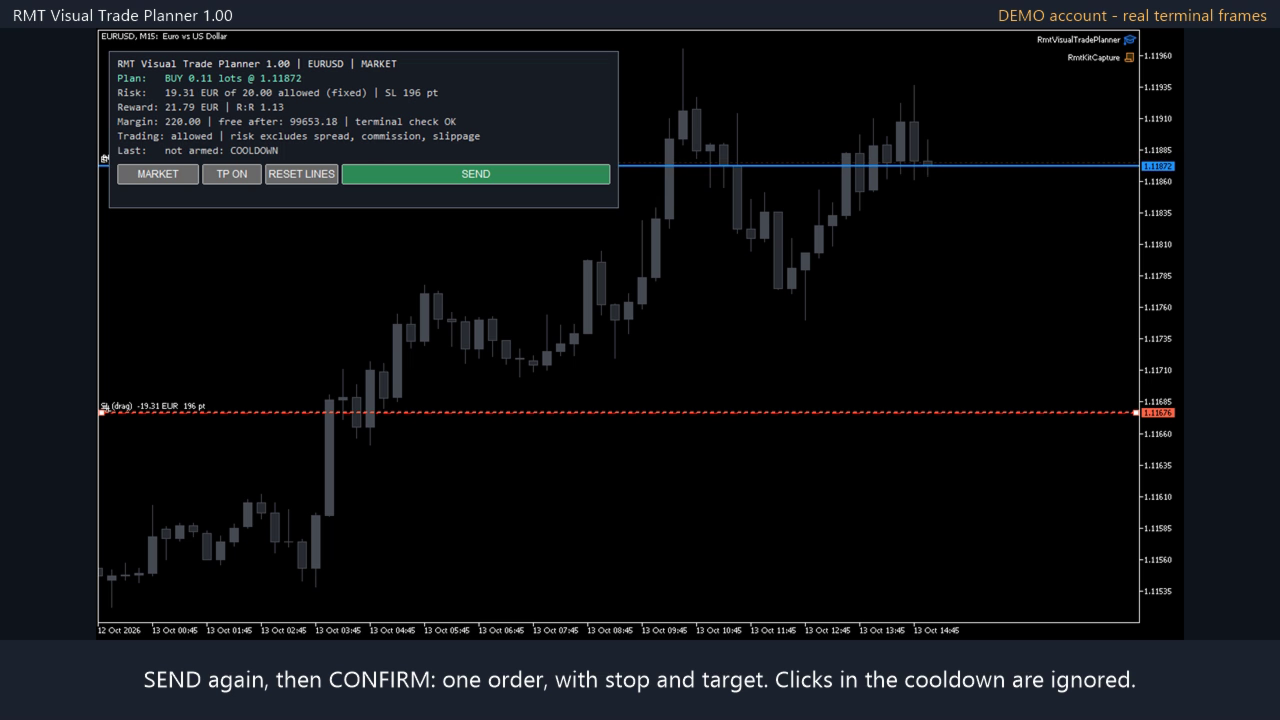
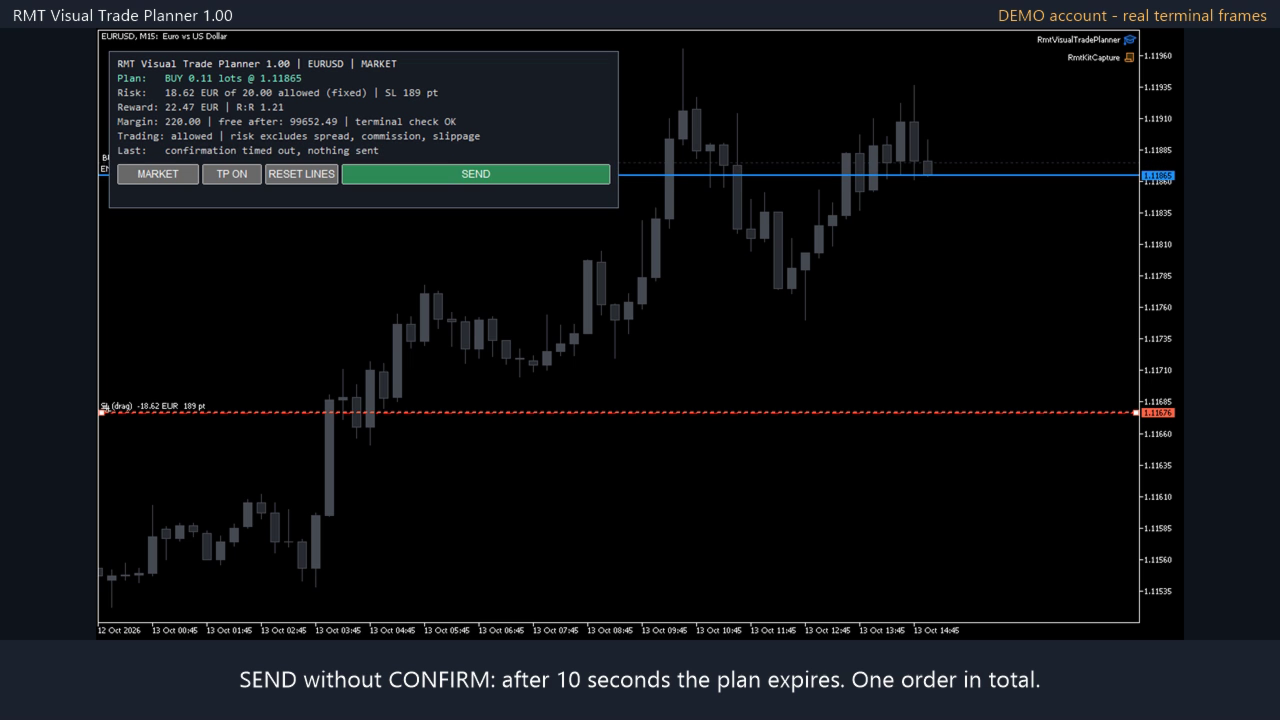
  • Press SEND. The button changes to CONFIRM with the exact order. Press it within 10 seconds to send. Moving a line, changing mode or waiting cancels it.

Sizing rules

  • Risk is a percent of balance, a percent of equity, or a fixed amount, with an optional money cap and volume cap.
  • The volume is the largest one whose loss at the stop fits the risk, rounded down to the broker's lot step. It is never rounded up.
  • If even the minimum lot would lose more than you allow, the plan is refused and the panel shows what the minimum lot would risk.
  • The loss per lot comes from the terminal's profit calculation for your symbol and account currency, so crosses, metals and indices are handled the same way.

Checks before an order can be sent

  • Stop loss on the wrong side, take profit on the wrong side, stop or entry closer than the broker's stop level.
  • Quote older than 30 seconds for market orders.
  • The terminal's order pre-check, including margin.
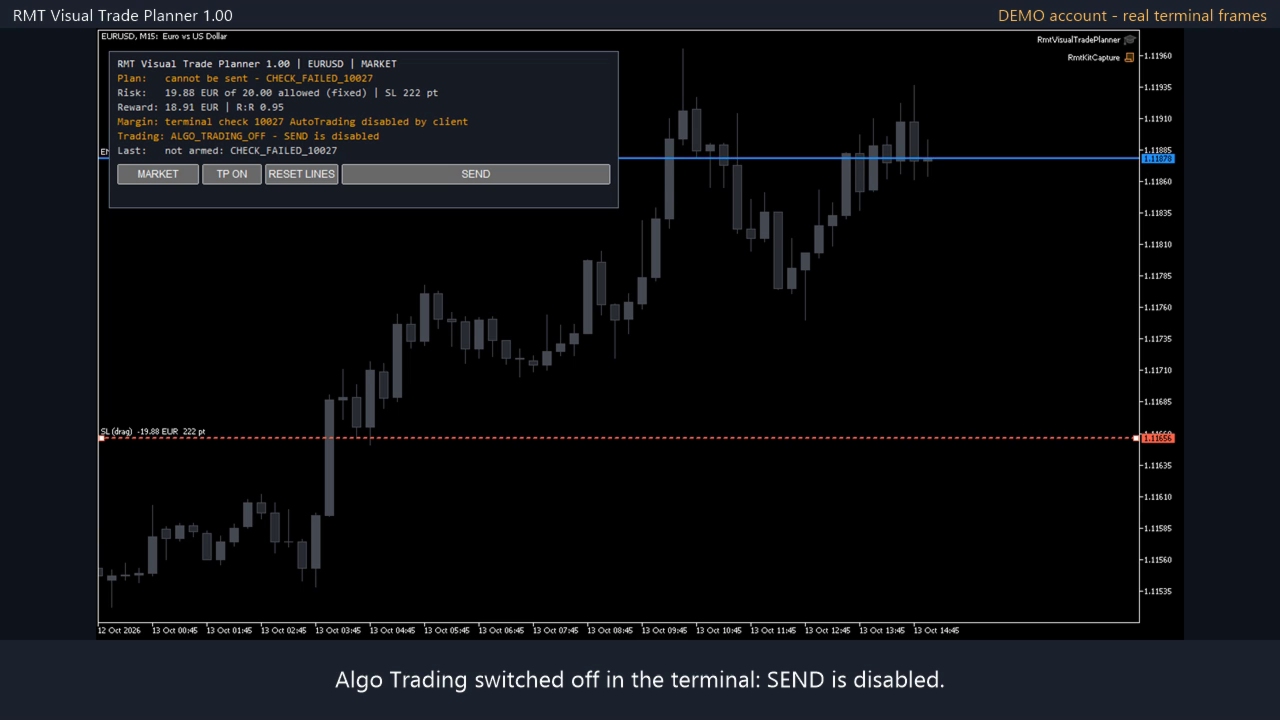
  • Algo Trading and account permissions.
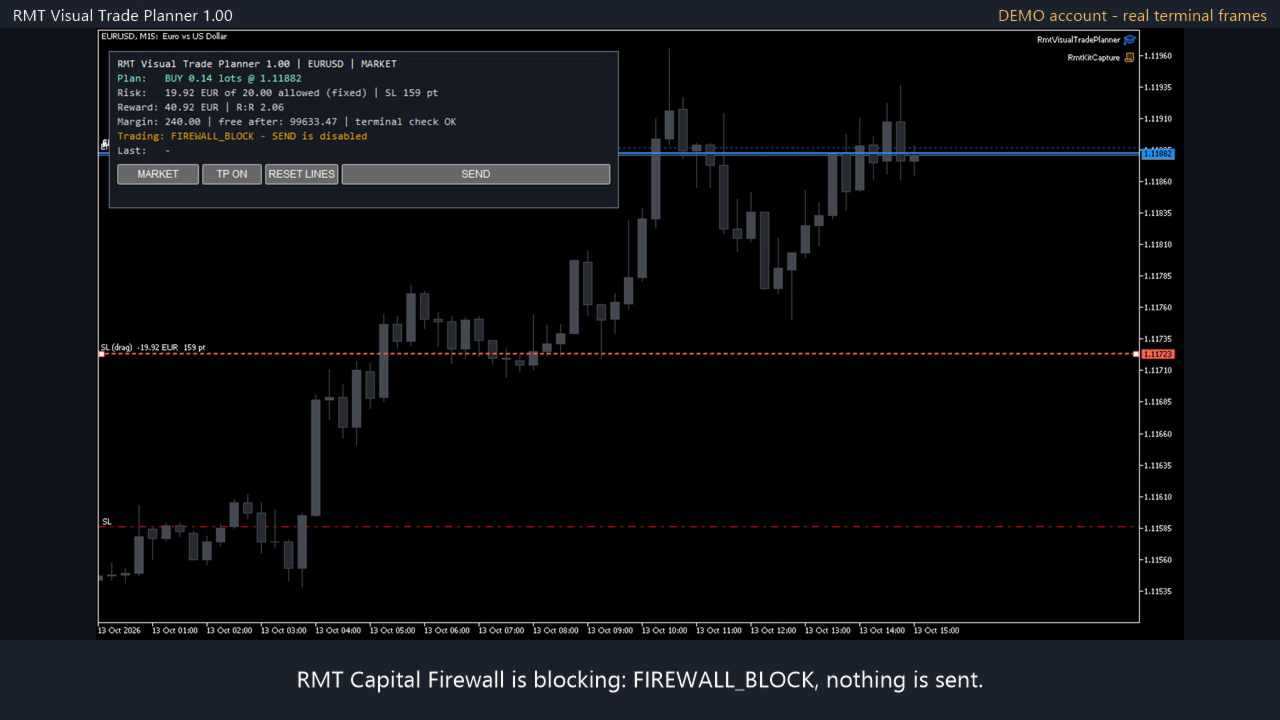
  • A block published by RMT Capital Firewall in the same terminal, if you use it: SEND stays disabled until the Firewall is re-armed.

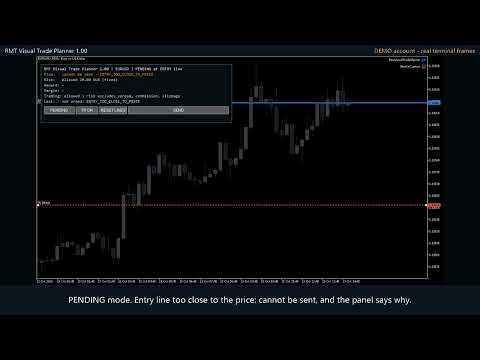
If any check fails the SEND button stays grey and the panel says why.

Why two presses

The first press shows the exact order on the button and sends nothing. The second press sends it only if the lines are where they were; if the price has moved, the order carries at most the volume you confirmed and never more than your risk allows. Clicks during the pause after a send do nothing. This flow was run with the real mouse on a demo terminal with this exact file: one confirmation, one order.

What it does not do

  • A line drag never sends an order. There are no automatic entries and no signals.
  • One confirmation sends one order. A refused order is not retried.
  • It does not manage the position after entry. For breakeven, trailing and partial closes use a position manager.
  • The risk shown is the loss from entry to stop. Spread, commission, swap and slippage are not included, and a stop can be filled at a worse price.
  • It does not promise profit.

Requirements

MetaTrader 5, Algo Trading enabled to send orders. Tested on hedging accounts; netting accounts are not certified. No DLLs, no WebRequest. It needs a live chart: the Strategy Tester does not deliver mouse clicks.

Leveraged trading involves risk of loss. Try it on a demo account first.
Рекомендуем также
Xiao Dan Kuai Pao is a fast and clean one-click order panel for MetaTrader 5. Open and manage your trades instantly, with Stop Loss and Take Profit placed automatically — no more typing TP distances by hand. Key features: - One-click buttons: BUY, SELL, CLOSE, BREAK EVEN - Custom Stop Loss and Take Profit (in points) — set any distance you want - Flexible risk/reward — combine SL and TP freely to build any ratio, such as 1:1, 1:2, 1:3, 1:4 or 1:5 - Real-time price display (Bid) - Bar countdown t
MMTrade
Alexander Martynov
5 (4)
Данный инструмент предназначен для быстрого расчета лота в зависимости от Stop Loss. Управление происходит за счет горячих клавиш По умолчанию: 1 - Уровень цены лимитного ордера 2 - Уровень   Stop Loss 3 - Уровень Take Profit Пробел - Открыть ордер Escape - Отменить все 9 - Отрыть 2 ордера  Маркет ордер Для открытия Маркет ордера нажимаем (2) и мышкой настраиваем  Stop Loss Если хотите поставить  Take Profit -  нажимаем (3) и мышкой настраиваем    Take Profit
FREE
MT5toTLGRM
Fernando Morales
4.2 (5)
MT5toTLGGRM EA отправляет текстовые сообщения только на группу телеграмм или канал по Вашему выбору. Сообщения настраиваются для отображения информации о любой торговой деятельности на счете. Также отображается ежедневный отчет PnL. В одном и том же терминале МТ5 можно использовать несколько экземпляров данного советника для отправки сообщений на разные группы/канал телеграмм, но при этом следить за тем, чтобы каждый из них имел свой номер в настройках [B13]. Ниже перечислены особенности отправ
FREE
SL/TP Mover – The Ultimate Position Manager for MetaTrader 5 Take full control of your stop losses and take profits across all open trades – instantly, visually, and automatically.** The Problems Every Trader Faces - Manually adjusting SL/TP on multiple positions is tedious and error‑prone – especially during fast markets. - New trades often open without any SL/TP unless you remember to set them every time. - Scaling in or adding to a position leaves older and newer trades with inconsistent r
FOX WAVE EXPOSURE COMMAND CENTER MT5 See the Entire Account. Control Every Position. Act with Confidence. FOX WAVE Exposure Command Center MT5 is a premium account-monitoring and position-management utility designed for traders who need a clear, immediate overview of their total market exposure. Instead of switching between charts, searching through the terminal, and calculating exposure manually, the Command Center consolidates the most important account and position information into one profes
Check an MQL5 signal before you subscribe. A signal can look convincing on the provider page and still be a poor fit for your account. Different symbol names, minimum lots, leverage, hedging or netting, copy latency and a fixed monthly fee can materially change what happens on your account. MT5 Signal Sentinel is not a trading robot and not a signal. It does not trade. It analyzes available data and explains technical and historical risks in plain language. Why this tool was created Many problem
This Is Something Useful
Sa No Tsuyoshi Kokorozashi
Description This is a utility tool for MT5, and it displays some useful information on charts for discretionary trading. Some of the information obtained by using indicators that are standardly installed by MT5 or by manual calculation is displayed on the chart from the beginning. Benefits of the This Is Something Useful MT5 The minimum necessary information that needs to be confirmed in discretionary trading can be displayed on the chart at any time. By using this tool, you can quickly access
FREE
Auto Risk Manager Mt5
Mildry Yocasta Feliz Rodriguez
AutoRiskManage v2.3 — Documentation Expert Advisor — MetaTrader 4 & 5 AutoRisk Manage v2.3 Automated risk management EA with interactive graphical panel. Applies SL/TP, Break Even, Trailing Stop, and lot size calculation by risk percentage — for any instrument, any broker. MT4 / MT5 v2.3.0 MQL4 · MQL5 C2C + B2C Time Space Technology Overview AutoRiskManage is an Expert Advisor that acts as a risk management layer on top of any manually opened position. It does not generate trading signals — i
FREE
TradeManager is an automatic stop loss, breakeven and trailing stop utility for MetaTrader 5. It manages the exits on your open positions by fixed rules: auto-breakeven, a fixed or ATR-based trailing stop, and a one-shot partial take-profit. It is not a trading panel - no buttons, no clicking, nothing to babysit. Attach it once and it works on positions opened manually, from your phone, or by another EA. This makes it a set-and-forget trade management tool for traders who want consistent risk ma
Данный продукт — советник поддержки автоматического закрытия, который помогает трейдерам, торгующим по собственному усмотрению, выполнять уже принятые правила закрытия. Вы можете задавать условия закрытия по заданному времени, подтверждению свечи или пересечению/приближению MA, и использовать TIME, CANDLE и MA CROSS по отдельности или одновременно. Также можно отображать MA таймфреймов 1H, 4H, дневного, недельного и месячного на текущем графике. Это не продукт, автоматизирующий торговые решения
Close Manager
ELITE FOREX TRADERS LLC
One-Click Trade Manager for MetaTrader 5 The Close Manager Buttons EA is a powerful utility designed to give you full control of your open positions and pending orders with just one click. Forget about manually closing trades one by one during fast market moves—this EA does it instantly, safely, and efficiently. Key Features Close All Trades – instantly close every open position Close Only Buy Trades – exit only BUY positions while keeping SELL trades running Close Only Sell Trades – exit only
FREE
Breakeven Bot
Gabriel Paul Ange Perrin
Optimize your trading management with Breakeven Bot, the essential tool for active traders managing multiple positions at once. No more wasting time manually adjusting your stops—one click is all it takes to secure your profits! Main Feature: ️ "BREAKEVEN" Button – Instantly set all profitable positions to breakeven and protect your gains quickly. ️ Customization Options: Set breakeven in pips or currency, depending on your preference. Choose whether breakeven should be at the entr
FREE
Order Flow Footprint Workspace is a read-only order-flow and market microstructure workspace for MetaTrader 5. It transforms the tick data provided by your broker into an interactive session-based footprint view with price-level activity, profiles, historical navigation and diagnostics. The workspace automatically adapts to the information actually available in the broker feed and does not invent trade direction when the source data cannot support it. MAIN FEATURES • Footprint candles with S
ATC Alert Manager позволяет устанавливать ценовые оповещения прямо на графике и управлять ими из одной небольшой панели. Каждое оповещение отображается как линия на графике, которую можно перетащить на новую цену. Оповещение срабатывает один раз, в момент, когда цена пересекает ваш уровень, с всплывающим оповещением, звуком и опциональным push-уведомлением на ваш телефон. Цена, которая уже прошла уровень, не запускает его, поэтому вы никогда не получаете повторных оповещений на каждом тике. Эт
FREE
The Trading Control Panel EA let you: - Calculated lot size based on the (% or $ risk) - Place multiple (Market/Limit/Stop) trades at same time - Manage all open trades (move SL to BE, take partial profit, close all trades) This is a handy tool for those who wont to open multiple orders without spending time on lot calculations. When opening multiple orders the first order has the first TP and all other orders get the second TP.
Панель ручной торговли для MetaTrader 5. Утилита помогает открыть сделку в один приём: вы задаёте риск и уровни прямо на графике, а расчёт объёма выполняется автоматически. Что делает утилита Вы перемещаете линии стоп-лосса (SL),  входа (Entry)  и тейк-профита (TP) прямо на графике. Объём позиции рассчитывается автоматически под заданный риск - в процентах от депозита или в валюте счёта. При необходимости можно указать фиксированный лот вручную. Как пользоваться? Задай риск: выбери расчет в (%)
FREE
Quick Exit
Jefferson Judge Metha
This MT5 Utility is designed to simplify the process of managing multiple trades. If you have several open positions, it can be time-consuming to close each one manually. With this tool, you can easily close all profit trades, losing trades, or just the trades that are linked to the chart you're currently viewing. It saves you time and effort by allowing you to manage your trades with just a few clicks, making your trading experience smoother and more efficient. Whether you're focusing on profit
FREE
Telegram Trade Notifier EA Enhanced Utility Expert Advisor Real-time Telegram notifications for new positions AND TP/SL closures on its chart symbol Core Functionality Monitors all new positions (manual/EA/script) on its attached chart Alerts when positions close via Take Profit or Stop Loss Sends Telegram alerts within 0.5-2 seconds Works concurrently with other EAs New Position Alerts Include : • Symbol • Direction (Buy/Sell) • Entry Price • Take Profit Level • Stop Loss Level • Position Tick
SWDM Position Manager EA The SWDM Position Manager EA is a MetaTrader 5 Expert Advisor for automatically managing matching positions on the current chart symbol. It can manage already open positions as well as newly opened positions, as long as they match the configured position filters. It is not a classic entry-signal robot and does not open trades by itself in the default workflow. The EA is designed to protect and manage manual trades or positions opened by other tools using internal risk m
FREE
ATR Stop Loss and Take Profit Calculator. Know your risk before you take the trade! Click any candle and instantly see your stop loss, take profit, and correct lot size, all calculated from ATR, scaled to your account. A useful back-testing and live trading tool.  If you find this indicator useful, please leave a review How It Works Click a candle. The indicator reads ATR at that bar, calculates SL and TP using your configured multipliers, and draws the levels on the chart. An info panel shows
FREE
KS Hotkey Trading Panel Pro — это торговый советник (Expert Advisor) для MetaTrader 5, обеспечивающий возможность быстрой торговли с помощью горячих клавиш, а также оснащенный интерактивной панелью управления, размещаемой прямо на графике. Основные возможности Торговля с помощью горячих клавиш — выполнение действий одним нажатием: Рыночная покупка / продажа (Market Buy / Sell) Buy Limit / Sell Limit Buy Stop / Sell Stop Закрытие всех позиций Закрытие только позиций на покупку / только на
CloseAllPosition
Konstantin Chernov
4 (2)
Скрипт для закрытия позиций Если Вам необходимо быстро закрыть несколько позиций, то этот скрипт избавит Вас от рутинных действий! Входные параметры скрипт не запрашивает. Разрешите авто-торговлю перед запуском скрипта. Использование: Запустите скрипт на графике. Если Вам необходимо указать максимальное отклонение или количество попыток для закрытия, то используйте скрипт с входными параметрами https://www.mql5.com/ru/market/product/625 Версию для MetaTrader 4 можно скачать здесь: https://www.m
FREE
One Click Trade Panel with Risk Manager is an order-entry and trade-management panel for MetaTrader 5. It does not contain a trading strategy and does not open trades by itself on a live or demo account. Trades are opened only when you click BUY or SELL. Position sizing You enter the stop-loss distance and the risk, either as a percentage of balance, equity or free margin, or as a fixed amount in the account currency. The panel calculates the lot from the broker's contract specification (tick
Time Line for MT5 機能: 昨日高値、安値、本日始値、高値、安値の時間から線を引きます。 時間足により表示する時間が変わります。 1分、5分足では1時間ごとの表示 15分、30分足では4時間ごとの表示 1時間、4時間は12時間ごとの表示 日足以降は時間は表示されません。 高値安値は週足より下位足で表示されます。 各ラベルを変更可能になります。 更新頻度を変更できるのでチャート表示が 重くなることはありません。 各パラメータの説明: Server_Time:6 サーバとの時間差を入力 Yesterday_High_Label:昨日高値 Yesterday_Low_Label:昨日安値 Show_Open:true 始値の線を表示するかどうか Today_Open_Label:本日始値 Today_High_Label:本日高値 Today_Low_Label:本日安値 max_bar:true 使用するバーを制限するかどうか Maxbars:1500 制限を使用した場合に1分では5日分 UpdateFrequency:60 更新頻度、ディフォルトは60秒ご
Помогает оставаться в пределах лимитов фандед- или челлендж-счёта. Prop Firm Risk Guardian — это панель дисциплины, которая в реальном времени показывает, насколько именно вы близки к нарушению лимита, и максимальный лот, который прямо сейчас позволяют ваши собственные правила. Она отслеживает три числа, которые заканчивают челленджи: дневной убыток относительно лимита (с оставшимся запасом и обратным отсчётом до сброса), максимальную просадку по трейлинговому high-water mark или статически от
FREE
The EA supports closing orders based on the preset amount. It can close all orders on all pairs, or it can close orders based on Magic ID. Button "Close All" manual Input - Magic Number: Magic Number = 0: Close All pairs Magic Number diffrent 0: Close All with Magic - Money TP: Profitable in money.  the EA will close all orders - Money SL: Loss in money. the EA will close all orders Contact: t.me/nguyenvanbo128
FREE
Advanced Account Dashboard & Risk Monitor (MT5) This script provides a real-time on-chart dashboard for monitoring account performance, risk exposure, and execution conditions in MetaTrader 5. It is designed for traders who want clear visibility of account health and risk awareness during live trading or VPS operation. The script does not open trades and does not interfere with any strategy logic . Key Features Account Metrics Live equity, balance, and floating profit/loss Open position count an
FREE
Этот экспертный советник отслеживает все открытые позиции по всем символам в MetaTrader 5. Как только вручную устанавливается или изменяется уровень Stop Loss (SL) или Take Profit (TP) на любой позиции, советник автоматически применяет это значение ко всем другим открытым позициям , независимо от символа или типа ордера (Buy/Sell). Это обеспечивает синхронизацию уровней SL и TP по всему счёту. Идеально подходит для мобильного трейдинга с планшета или смартфона!
FREE
MT5 to Telegram Informer
Juergen Marcus Wolfgang Rosswinkel
MT5 to Telegram Signal Provider — Real-Time Trade Notifications for MetaTrader 5 Every trade event on your account, delivered to your Telegram chats and channels as a formatted message the moment it happens. OVERVIEW MT5 to Telegram Signal Provider is a utility Expert Advisor for MetaTrader 5 that automatically sends trade notifications to one or more Telegram chats or channels. Every trade event on the account is captured and delivered as a formatted message in real time. The EA runs on an
Automated Timeframe cycling with Symbols centered.  Force every timeframe onto one clock window, so the story you see on Daily is the same story you are slicing on H4, H1, and M1.  Traders usually flip timeframes and lose the span. A Daily chart shows a few weeks, then M15 shows a few hours, and the eye treats them as different markets. TASSERACT locks the window to N bars of the highest enabled timeframe — default 10 Daily — and maps every lower timeframe to that same stretch. You stay inside o
FREE
С этим продуктом покупают
Добро пожаловать в Trade Manager EA — лучший инструмент для управления рисками, предназначенный для упрощения, точности и эффективности торговли. Это не просто инструмент для размещения ордеров; это комплексное решение для удобного планирования торгов, управления позициями и усиленного контроля над рисками. Независимо от того, начинающий вы трейдер, опытный специалист или скальпер, нуждающийся в быстром исполнении, Trade Manager EA адаптируется к вашим потребностям и работает с любыми активами:
Telegram to MT5 Multi-Channel Copier   автоматически копирует торговые сигналы из ваших Telegram- и Discord -каналов прямо в MetaTrader 5. Без ботов, без браузерных расширений, без ручного копирования. Сигнал приходит в Telegram или Discord — и советник открывает сделку в вашем терминале за считанные секунды. А перед тем как копировать канал, встроенный бэктестер покажет, что этот канал сделал бы на вашем счёте. Продукт состоит из двух компонентов: приложения для Windows, которое слушает ваши Te
================================================================================ POC BREAKOUT - V20.72. Full Professional Grade Toolkit ================================================================================ POC Breakout is a full MetaTrader 5 trading dashboard for discretionary traders who want breakout signals, Point of Control (POC) context, volume profiles, order flow, market structure, news, alerts, and advanced trade planning in one professional workspace. Attached directly to you
TradePanel MT5
Alfiya Fazylova
4.88 (170)
Trade Panel — это многофункциональный торговый помощник. Приложение содержит более 50 торговых функций для ручной торговли и позволяет автоматизировать большинство торговых операций. Инструкция к приложению: https://www.mql5.com/ru/blogs/post/756476 Пробная версия приложения для демо-счета: https://www.mql5.com/ru/blogs/post/750864 Как установить приложение: https://www.mql5.com/ru/blogs/post/750096 Как тестировать приложение в визуальном режиме: https://www.mql5.com/ru/blogs/post/770274 Как уст
The Patch
Mian Rameez Ali
The Patch It never opens a trade. It walks behind the ones that did. Every open position, every pending order — checked twice a second for the one thing that's easy to forget: a stop, a target. Found bare, it doesn't ask. It writes the missing number in, measured in points from wherever the position began, and moves on to the next. No strategy, no opinion on direction. Just the quiet assumption that nothing should ever sit on the market unprotected — not because someone decided it shouldn't,
Floor Watch
Syed Tauqeer Hussain Shah
Floor Watch One number, watched every thirty seconds: how far equity has fallen since the day began — or since its highest point, if it's told to trail the peak instead of the open. Cross the line and it doesn't argue. Every open position closes, every pending order vanishes, and anything that slips through afterward gets shut the moment it appears. Not asked. Removed. The floor holds until the clock turns 5 AM Pakistan time — then, and only then, does the day start over. One rule. No except
Копируйте сигналы из Telegram по своим торговым правилам Telegram to MT5 Signal Trader автоматически копирует текстовые торговые сигналы из открытых и закрытых каналов и групп Telegram в MetaTrader 5. Управляйте несколькими поставщиками сигналов и счетами MT5 из одного приложения для компьютера, задавая индивидуальные параметры риска и торговли для каждого поставщика . Для копирования не нужны бот Telegram и настройка API. Просто войдите в свой аккаунт Telegram по номеру телефона или QR-коду и в
Power Candles Strategy Scanner — самооптимизирующийся инструмент для поиска настроек по нескольким инструментам Power Candles Strategy Scanner использует тот же самооптимизирующийся движок, что и индикатор Power Candles — для всех символов в вашем Market Watch, одновременно. На одной панели отображается информация о том, какие символы в данный момент являются статистически торгуемыми, какая стратегия выигрывает на каждом из них, оптимальная пара Stop Loss / Take Profit, а также отправляется увед
The product will copy all telegram signal to MT5 ( which you are member) , also it can work as remote copier.  Easy to set up, copy order instant, can work with almost signal formats, image signal,  s upport to translate other language to English Work with all type of channel or group, even channel have "Restrict Saving Content", work with  multi channel, multi MT5 Work as remote copier: with signal have ticket number, it will copy exactly via ticket number. Support to backtest signal. How to s
Одна покупка — все мои индикаторы для MT4 и MT5, уже доступные и выпущенные в будущем, без дополнительной оплаты. После покупки свяжитесь со мной, чтобы узнать, как их получить. Планируется повышать цену на 50$ после каждых 10 покупок, до 999$. Действует цена Market на момент оформления покупки. Сохраните индикатор, которому доверяете. Автоматизируйте работу с ним. Ваш сигнал. Ваши правила. Ваше исполнение. У вас уже есть надежный индикатор MT5, но приходится следить за графиком, ждать сигнала,
Welcome to ENTRY IN THE ZONE with SMC MULTI TIMEFRAME SPECIAL BENEFIT / FOR OUR MQL5 CUSTOMERS FREE ACCESS TO THE NEW TOOL  — COMING SOON — Learn more on our official website  : https://www.fableedge.net Entry In The Zone with SMC Multi Timeframe is a real-time market analysis tool based on Smart Money Concepts (SMC), designed to analyze market structure, price direction, and key trading zones. It supports both Single-Timeframe and Multi-Timeframe Analysis, providing a clearer view of overall ma
Quant AI Agents
Ho Tuan Thang
5 (1)
Quant AI Agents are independent trading Expert Advisors. Instead of trading using a fixed strategy like other conventional EAs, Quant AI Agents   is a   multi-agent AI trading framework   that turns natural-language strategy prompts into live.  WANT THE SAME RESULTS AS MY LIVE SIGNAL?   Use the exact same brokers I do:   IC MARKETS , IC TRADING   .  Unlike the centralized stock market, Forex has no single, unified price feed.  Every broker sources liquidity from different providers, creating un
Daily Trading Limiter
AL MOOSAWI ABDULLAH JAFFER BAQER
5 (8)
• Please test the product in the Strategy Tester before purchasing to understand how it works. • If you face any issues, contact me via private message—I’m always available to help. • After purchase, send me a screenshot of your order to receive a FREE EA as a gift. Daily Trading Limiter — the rule you cannot break Every trader knows the number. Three trades. Two percent. One bad day and stop. And every trader has watched themselves take the fourth trade anyway. The problem was never knowing th
Grid Manual MT5
Alfiya Fazylova
4.73 (22)
Grid Manual — это торговая панель для работы с сеточными стратегиями. Утилита универсальная, имеет гибкие настройки и понятный интерфейс. Работает с сеткой ордеров не только в сторону усреднения убытков, но и в сторону наращивания прибыли. Трейдеру не нужно создавать и сопровождать сетку ордеров, это сделает утилита. Достаточно открыть ордер и Grid manual автоматически создаст ему сетку ордеров и будет сопровождать его до самого закрытия. Полная инструкция и демо-версия здесь . Основные особенно
VirtualTradePad PRO SE MT5 — профессиональный торговый центр управления для MetaTrader 5 VirtualTradePad PRO SE — это премиальная торговая панель и рабочая среда управления сделками на графике для MetaTrader 5 . Она создана для трейдеров, которым нужны более быстрое исполнение, более понятный контроль позиций, структурированное управление сделками, визуальное планирование уровней и профессиональный рабочий процесс прямо с графика. Это не просто панель BUY / SELL. PRO SE объединяет ручную торговл
FUTURES ORDERFLOW FOOTPRINT CHART Professional OrderFlow EA for MetaTrader 5 Version 1.01| Professional tool for real traders | Institutional-Grade Visualization STRATEGY TESTER USERS - PLEASE SELECT EVERY REAL TICK WHEN TESTING AND YOU HAVE DOWNLOADED HISTORICAL DATA. IF YOU SEE A WAITING SCREEN AND IT IS NOT DOWNLOADING, IT MEANS YOU HAVE LOW HISTORICAL DATA. TRY 1 MIN AND 5 MIN FIRST ON 1 DAY DATA. ONE DAY DATA SHOULD BE THE NEWEST AND MOST CURRENT DATE. PLEASE WAIT UNTIL THE MARKET HAS ROL
Exp COPYLOT CLIENT for MT5
Vladislav Andruschenko
3.97 (35)
Профессиональный копировщик сделок для MetaTrader 5 Быстрый, профессиональный и надежный копировщик сделок для MetaTrader . COPYLOT позволяет копировать сделки Forex между терминалами MT4 и MT5 с поддержкой счетов Hedge и Netting . Версия COPYLOT для MT5 поддерживает: - MT5 Hedge → MT5 Hedge - MT5 Hedge → MT5 Netting - MT5 Netting → MT5 Hedge - MT5 Netting → MT5 Netting - MT4 → MT5 Hedge - MT4 → MT5 Netting Версия MT4 Полное описание + DEMO + PDF Как купить Как установить Как получить файлы жур
Anchor Trade Manager
Kalinskie Gilliam
5 (9)
Your EAs cannot see each other, but Anchor can. Anchor gives you one place to coordinate your EAs, manage risk, and decide when trading is allowed. It works alongside the trading bots you already use without any changes to them. The Problem One EA opens a trade. Then another starts trading. The next thing you know, you wake up to multiple grids built across your account. Each EA may be doing exactly what it was designed to do, but together they can place far more risk on your account than you in
Trade Manager DaneTrades
Levi Dane Benjamin
4.23 (30)
Trade Manager, который поможет вам быстро входить и выходить из сделок, автоматически рассчитывая риск. Включает функции, которые помогут предотвратить чрезмерную торговлю, торговлю из мести и эмоциональную торговлю. Сделками можно управлять автоматически, а показатели эффективности счета можно визуализировать в виде графика. Эти функции делают эту панель идеальной для всех трейдеров, занимающихся ручной торговлей, и помогают улучшить платформу MetaTrader 5. Многоязычная поддержка. Версия для МТ
The News Filter MT5
Leolouiski Gan
4.78 (23)
Этот продукт фильтрует всех экспертных советников и ручные графики во время новостей, так что вам не нужно беспокоиться о внезапных скачках цены, которые могут разрушить ваши ручные торговые настройки или сделки, введенные другими экспертными советниками. Этот продукт также поставляется с полной системой управления ордерами, которая может обрабатывать ваши открытые позиции и ордера на ожидание перед выпуском новостей. После покупки   The News Filter   вам больше не придется полагаться на встроен
Astro Trade MT5
Indra Maulana
5 (8)
25% discount on the release of the tool: only for the next 3 buyers Send a message to receive a demo version. AstroTrade Trading Assistant AstroTrade is a comprehensive multi-functional trading utility developed for the MetaTrader 5 platform. It integrates essential tools for trade execution, risk management, and technical monitoring into a single unified interface. The application is designed to assist traders in managing their daily operations through a visual and structured environment. Vi
Premium Trade Manager - Торговая панель со встроенным коучем Premium Trade Manager помещает торгового коуча прямо в ваш график, а под ним работает полноценный движок исполнения. Настройте сделку так, как вы всегда это делаете, затем позвольте Max, вашему ИИ-наставнику по трейдингу, прочитать именно эту настройку с учётом вашего живого счёта и дать чёткое заключение до того, как вы входите: соответствует ли стоп дисциплинированному подходу, разумен ли риск, не выходит ли высоковолатильный релиз ч
YuClusters
Yury Kulikov
4.93 (43)
Внимание: Ознакомиться с работой программы можно с помощью бесплатной версии  YuClusters DEMO . YuClusters это профессиональная система анализа рынка. Для трейдера открываются уникальные возможности анализа потока ордеров, объемов торговли, движения цены используя различные графики, профили, индикаторы, графические объекты. YuClusters оперирует данными на основе ленты сделок или тиковой информации, в зависимости от того, что доступно в котировках финансового инструмента.  YuClusters позволяет с
Торговая панель для MetaTrader 5 — профессиональная торговля в один клик с графика и клавиатуры Мощная торговая панель для активного ручного трейдинга, которая позволяет открывать, сопровождать и закрывать сделки значительно быстрее и удобнее, чем стандартными средствами MetaTrader. Панель создана для тех, кто хочет получить полный контроль над позициями, ордерами, прибылью и торговыми сценариями в одном рабочем пространстве. Это не просто вспомогательная утилита. Это полноценный торговый интер
Signal TradingView to MT5 Pro Automator Мгновенное профессиональное исполнение между TradingView и MetaTrader 5 Автоматизируйте свою торговую стратегию с помощью самого надежного моста связи между алертами TradingView и реальным исполнением в MT5. Разработанный для трейдеров, которым требуются скорость, гибкость и безупречное управление рисками, этот советник (Expert Advisor) превращает любое сообщение с алертом в точный рыночный или лимитный ордер. ПРЕИМУЩЕСТВА И СИЛЬНЫЕ СТОРОНЫ Универсальный д
MT5 to Telegram Signal Provider — это простой в использовании полностью настраиваемый инструмент, который позволяет отправлять определённые сигналы в чат, канал или группу Telegram, превращая вашу учётную запись в провайдера сигналов . В отличие от большинства конкурирующих продуктов, он не использует импорт DLL. [ Демо ]   [ Руководство ] [ Версия MT4 ] [ Версия для Discord ] [ Канал в Telegram ]  New: [ Telegram To MT5 ] Настройка Доступно пошаговое руководство пользователя . Никаких знаний A
Ultimate Extractor - Professional Trading Analytics for MT5 *****this is the local HTML version of Ultimate Extractor. !!!!!it is not compatible with Cloud!!!! For the online version please reach out to me directly****** Ultimate EA manager also now available when you use cloud pro and above for free!! Ultimate Extractor transforms your MetaTrader 5 trading history into actionable insights with comprehensive analytics, interactive charts, and real-time performance tracking. What It Does Automa
Advanced Daily Trading Limiter PRO
AL MOOSAWI ABDULLAH JAFFER BAQER
Advanced Daily Trading Limiter PRO Professional Risk Management. Uncompromising Trading Discipline. One undisciplined trading session can erase weeks of consistent profits. Whether it's overtrading, revenge trading, or exceeding a prop firm's daily risk limits, emotional decisions often become a trader's biggest obstacle—not the market itself. Advanced Daily Trading Limiter PRO is a comprehensive risk management and discipline enforcement utility for MetaTrader 5, designed to help traders stay
Footprint Chart Pro — Professional OrderFlow EA for MetaTrader 5 Version 6.34 | Professional tool for real traders | Institutional-Grade Visualization DEMO USERS - PLEASE SELECT EVERY TICK / REAL TICK WHEN TESTING AND YOU HAVE DOWNLOADED HISTORICAL DATA. IF YOU SEE A WAITING SCREEN AND IT IS NOT DOWNLOADING, IT MEANS YOU HAVE LOW HISTORICAL DATA. TRY 1 MIN AND 5 MIN FIRST ON 1 DAY DATA. ONE DAY DATA SHOULD BE THE NEWEST AND MOST CURRENT DATE. PLEASE WAIT UNTIL THE MARKET HAS ROLLED OVER PERIOD.
Farmed Hedge Yield Farming | All Markets (Manual - Hybrid - Semi/Automated EA) VERIFIED TRADING RESULTS - Farmed Hedge Yield Axi Copy:  https://www.mql5.com/en/signals/2356376 - Farmed Hedge Yield Exn Copy:   https://www.mql5.com/en/signals/2356404 - Farmed Hedge Yield V Copy:  https://www.mql5.com/en/signals/2357156 IMPORTANT NOTICE: FarmedHedge is a MANUAL-FOCUSED TRADING UTILITY ,not a fully automated EA. Results shown on this Signal include manual trades and overall strategic management.
Другие продукты этого автора
RMT Capital Firewall
Denis David Garcia Camejo
RMT Capital Firewall is a risk guard for MetaTrader 5. It watches daily loss, drawdown, an equity floor, open risk and positions without a stop loss, warns before a limit, and — only if you authorise it — closes the positions in the scope you chose and stays latched until you re-arm. Every decision is recorded as a structured audit line in the Experts journal. The problem it solves A daily-loss or drawdown rule is easy to write down and hard to keep when a position is running against you, or whe
RMT Execution Inspector
Denis David Garcia Camejo
RMT Execution Inspector is a read-only diagnostics tool for MetaTrader 5. For one symbol it shows the broker's trading conditions, an OrderCheck preflight of a reference order, open positions with a missing-stop-loss flag, and recent trading costs — without ever sending an order. The problem it solves Before you trust an EA or a manual setup on a new broker or symbol, you need to know what the broker will actually accept: minimum lot, lot step, stop level, freeze level, spread, margin for your
RMT Exposure & Stress Matrix shows what all the open positions of your account add up to: net and gross exposure per currency and per symbol in your account currency, and what you would lose if every position moved 1, 2 or 3 ATR against you or one currency moved 1 %. It is read-only and never sends an order. The problem it solves Three trades that look independent can be the same bet. Long EURUSD, long GBPUSD and long gold are all short the dollar. The Trade tab lists positions one by one; it d
RMT Strategy Health Monitor reads the closed trades of one EA, or of your manual trading, from the account history and tells you whether the recent run is still consistent with that strategy's own earlier trades. It resamples the baseline inside the terminal and shows where the recent result falls. Read-only. The problem it solves Every strategy has losing runs. The hard question while one is happening is whether it is a normal bad patch or the strategy has stopped working. Looking at the equit
RMT Position Guardian
Denis David Garcia Camejo
RMT Position Guardian is a trade manager for MetaTrader 5 positions that are already open: automatic breakeven, trailing stop and partial close, for manual trades or for one EA's magic number. It opens nothing, never closes a position completely and leaves every position outside the scope you chose untouched. The problem it solves You open a trade by hand, or an EA opens it, and then you have to watch it: move the stop to breakeven, trail it, take part of the profit. Doing it by hand means sitti
Фильтр:
Нет отзывов
Ответ на отзыв