TrendLineSnap Auto Trendlines with Snapshots MT5
- Indicators
-
Naoto Shimoda
 FX.Hamrat - MetaTrader 4/5 indicator and Expert Advisor developer based in Japan.
Over 10 years of trading experience (discretionary and systematic), and 90+ MT4/MT5 programs built so far - including 30+ custom-made projects for individual traders. - Version: 1.1
- Activations: 10
Trendlines drawn for you — and a good shape kept as your basis.
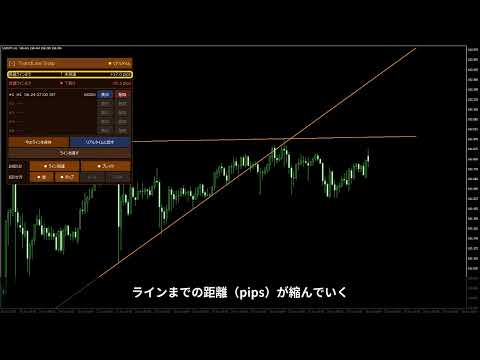
TrendLineSnap finds the swing highs and swing lows on your chart, joins them and draws one high trendline and one low trendline. Triangles, channels, wedges and horizontal levels used in line trading show up as lines.
Automatic trendlines are redrawn whenever a new swing forms. When you see a shape you want to trade, save it. The saved line does not move. When the price comes near it again, show the saved line next to the current lines and check whether the price bounces, stalls and breaks, or comes back and stops there.
Features
- Automatic trendlines: one line across the swing highs, one across the swing lows.
- Touch filter: minimum number of touches and the touch distance in pips (scaled with the timeframe or fixed).
- Converging mark: the panel shows "converging" when the two lines narrow to the right (triangles and wedges).
- Five snapshots: save the current lines with one button, show them later in sky blue next to the current lines. Kept after MetaTrader restarts (per chart and symbol).
- Saved time and age: timeframe, saved time and how long ago (e.g. 8h30m).
- Distance panel: distance in pips from the Bid to each line, with the state: not yet, touching, broke up, broke down.
- Notifications: sound, pop-up, e-mail and push on touch and breakout. Check on the live price or on the close of the last completed bar.
- Your time zone: Tokyo, London, New York and 10 more cities, daylight saving included.
- Movable panel: drag the title to move it, click it to fold. Works on 125% / 150% display scaling.
How the lines are found
A bar higher (lower) than the bars on both sides is a swing high (low). Starting from the newest swing, each one is joined with older swings, and swings close to the line count as touches. The first pair with enough touches is drawn. Lines are extended along the chart's bars, so they stay on the swings across weekends.
Inputs (main)
- Search period, bars on each side for swings, minimum touches, touch distance and its mode
- Extend to the right, colors of the high / low / snapshot lines, line width and style
- Alerts on touch / breakout, sound, pop-up, e-mail, push, price used for checks, touch alert distance, interval, alert texts
- Time zone, panel: show, position, colors, font size, transparent background
It does not give buy or sell signals and does not guarantee profits.