Proton Gold Risk Engine MT5

Proton Gold Risk Engine MT5


OVERVIEW

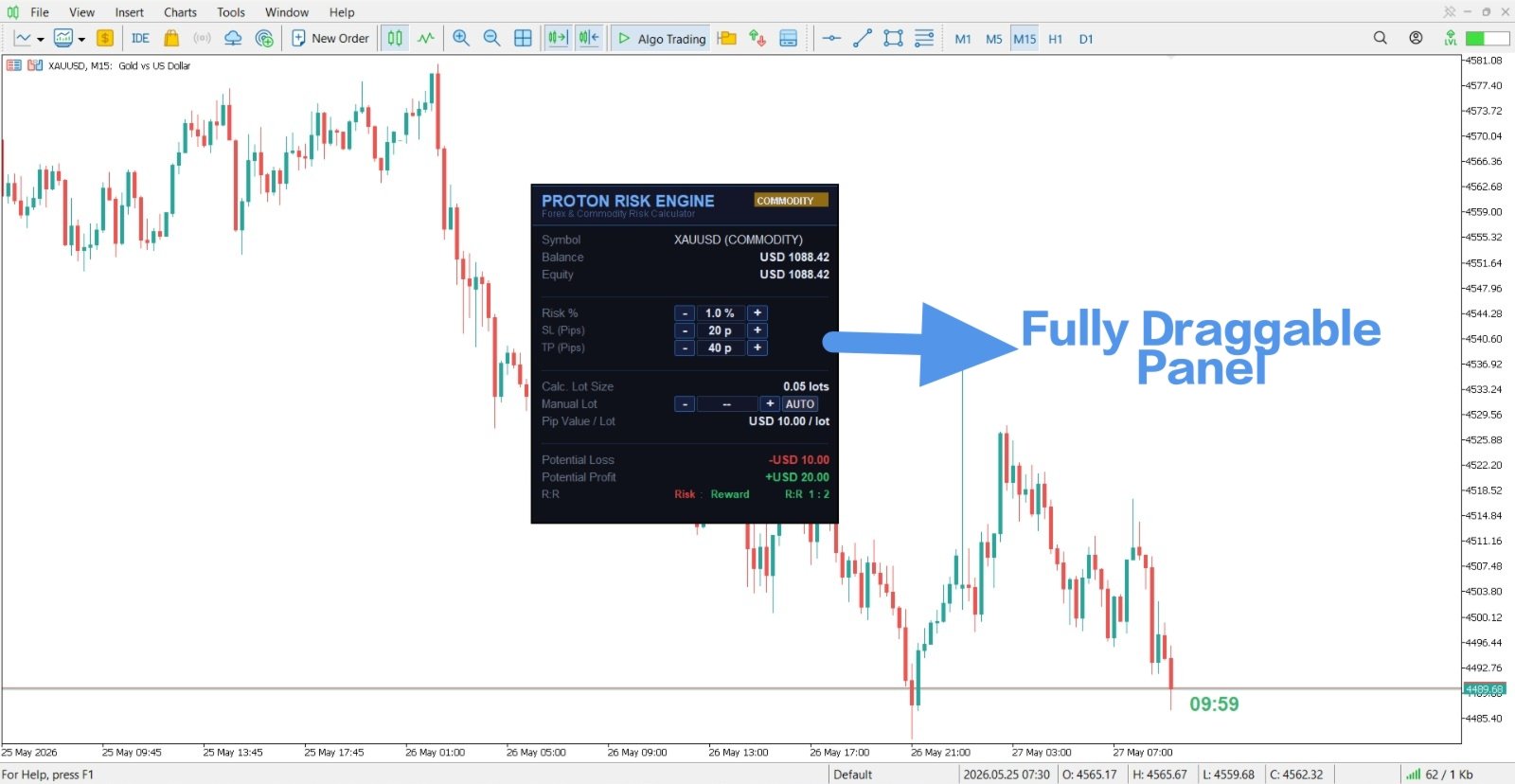
Proton Gold Risk Engine MT5 is a utility for MetaTrader 5 that calculates position size based on user-defined risk parameters. The tool helps traders implement consistent position sizing by calculating required lot size based on account capital, risk percentage, and stop loss distance. This utility is designed for manual traders who manage position sizing themselves.


PRIMARY FUNCTION

The utility provides a calculator interface for determining appropriate position size before opening trades. Based on user inputs of account balance, risk percentage, and stop loss distance, the tool calculates the required lot size. This helps traders maintain consistent risk management across all trades.


HOW POSITION SIZING WORKS


Risk Percentage Method:

Position sizing based on risk percentage works as follows:

- Define maximum risk per trade (example: 2% of account)

- Define stop loss distance in pips

- Calculate: Lot size that will result in exactly your target loss if stopped out

- Example: 5000 account, 2% risk = 100 max loss, 50 pip stop loss = 0.02 lot size


Risk Amount Method:

Position sizing based on risk amount works as follows:

- Define maximum risk in currency (example: 100 dollars)

- Define stop loss distance in pips

- Calculate: Lot size that will result in exactly your target loss if stopped out

- Example: 100 dollar maximum risk, 50 pip stop loss = 0.02 lot size


Reward Calculation:

After calculating position size, calculate potential profit at take profit level:

- Input take profit distance in pips

- Tool calculates: Profit amount if take profit is reached

- Example: 0.02 lot size, 150 pip profit target = 300 dollar profit


TECHNICAL SPECIFICATIONS


Input Parameters:


Account Balance:

User enters total current account balance. This value is multiplied by risk percentage to determine maximum allowable loss per trade.


Risk Percentage:

User enters percentage of account willing to risk per trade. Common values: 1%, 2%, 3%. Determines maximum loss amount.


Risk Amount (Alternative):

User can input maximum loss in dollars instead of percentage. Useful for traders with specific loss limits per trade.


Stop Loss Distance:

User enters distance in pips between entry price and stop loss price. This determines how far price can move before trade stops out.


Take Profit Distance:

User enters distance in pips between entry price and take profit price. Used to calculate potential profit amount if target is reached.


Current Price:

User enters current market price for the symbol being traded. Used for additional calculations.


Output Displays:


Calculated Lot Size:

The required lot size to achieve the specified risk and stop loss distance. This is the primary output the trader uses to enter the trade.


Potential Loss:

The exact amount (in account currency) that will be lost if the stop loss is executed.


Potential Profit:

The exact amount (in account currency) that will be gained if the take profit is executed.


Risk Reward Ratio:

The ratio between potential profit and potential loss. Example: 3:1 ratio means potential profit is 3 times the risk amount.


Technical Features:

- On-chart calculator interface

- Real-time calculations as inputs change

- Instant lot size output

- Works with all symbols

- Supports all broker lot sizing standards

- Customizable input fields


Installation:

1. Download the file to your computer

2. Copy file to MetaTrader 5 installation folder: MQL5/Experts/

3. Restart MetaTrader 5 platform

4. Open any chart in MetaTrader 5

5. Right-click chart > Indicators > Expert Advisors > Proton Gold Risk Engine

6. Tool will attach to chart

7. Calculator is immediately ready for use


Configuration:

- Default settings provide immediate functionality

- Optional: Set default risk percentage in settings

- Optional: Adjust font size for visibility

- Optional: Reposition calculator on chart


HOW TO USE


Step-by-Step Calculation Process:


Step 1 - Determine Account Balance:

Input your current account balance. This might be 5000, 10000, or whatever your actual account size is.


Step 2 - Set Risk Percentage:

Decide what percentage of account you will risk. Conservative: 1%, Moderate: 2%, Aggressive: 3%. Most professional traders use 1-2%.


Step 3 - Identify Stop Loss Distance:

Before opening a trade, determine where you will place your stop loss in pips. Common stops: 20 pips, 30 pips, 50 pips, 100 pips.


Step 4 - Calculate:

Input balance, risk percentage, and stop loss distance into the calculator. The tool instantly outputs required lot size.


Step 5 - Set Take Profit:

Determine your take profit distance. Calculate risk-reward ratio. Example: If risking 50 pips, target 150 pips for 3:1 ratio.


Step 6 - Verify Calculations:

Review the output lot size and potential profit/loss amounts. Verify these numbers are reasonable for your strategy.


Step 7 - Execute Trade:

Open the trade with the calculated lot size. Immediately place stop loss and take profit orders.


PRACTICAL EXAMPLES


Example 1 - Conservative Day Trading:

- Account: 10000

- Risk: 1% per trade = 100 loss maximum

- Stop Loss: 50 pips

- Calculated Lot Size: 0.02 lots

- Take Profit Target: 150 pips = 300 profit


Example 2 - Moderate Risk Trading:

- Account: 5000

- Risk: 2% per trade = 100 loss maximum

- Stop Loss: 40 pips

- Calculated Lot Size: 0.025 lots

- Take Profit Target: 100 pips = 250 profit


Example 3 - Larger Account:

- Account: 50000

- Risk: 2% per trade = 1000 loss maximum

- Stop Loss: 100 pips

- Calculated Lot Size: 0.10 lots

- Take Profit Target: 200 pips = 2000 profit


IMPORTANT NOTES


Calculation Accuracy:

- Calculations assume your stop loss distance is accurate

- Calculations assume you can execute trades at specified prices

- Calculations do not account for spread cost

- Calculations do not account for slippage


Broker Specifications:

- Different brokers have different minimum and maximum lot sizes

- Some brokers require minimum 0.01 lot increments

- Some brokers allow 0.001 or smaller increments

- Always verify your broker's lot size requirements


Spread and Slippage:

- Calculator output does not include spread costs

- In reality, you will lose spread cost in addition to calculated loss

- Slippage may cause actual loss to be larger than calculated

- Account for these costs in your risk calculations


Stop Loss Placement:

- Stop loss distance must be based on your technical analysis

- Do not place stops arbitrarily based on lot size calculation

- First determine technical stop loss location

- Then calculate lot size based on that stop loss distance


Verification:

- Always verify calculated lot size before opening trade

- Check that lot size is within your broker's limits

- Confirm that potential loss matches your risk tolerance

- Review the risk-reward ratio before trading


Testing Recommendations:

- Test calculations on demo account

- Paper trade using calculated lot sizes

- Verify that losses and profits match calculations

- Track accuracy of risk calculations over time


Disclaimer:

This tool provides position sizing calculations based on user inputs. Calculations are mathematical only and do not guarantee profitable trades. Actual trading losses may exceed calculated amounts due to slippage, spreads, and market gaps. The developer is not responsible for trading losses resulting from using this calculator. Always verify calculations independently and use proper risk management practices.
Recommended products
Doji Style
Dimpho Simon
1 (2)
(Feel free to download this at absolutely no cost, if you like it I have a scalping manager here:  https://www.mql5.com/en/market/product/101312 ) [Feel free to suggest on improvements that can be implemented. This EA will forever remain free.] Timeframe: 5 Min upwards (The 1 minute timeframe has very short candles, stoploss cannot be set) Currencies: Multi Settings: Lotsize: the trading volume for the EA How long a position will be held: 900 000 milliseconds for the 5 minute time or an equav
FREE
NEXA Volume Break ADX NEXA Volume Break ADX is an Expert Advisor for MetaTrader 5. The EA works on the M30 timeframe and evaluates market conditions using volume expansion, rising ADX, momentum direction, trend alignment, breakout detection, and retest confirmation. The main purpose of this system is to filter technical conditions where price movement is supported by increased volume and strengthening trend conditions. This product does not use DLL files, WebRequest, external authentication
FREE
CCI Extreme
Avinash Pagadala
XAU CCI Extreme H4 Expert Advisor for MetaTrader 5 — Gold / XAUUSD focus Version: 1.00 What it is XAU CCI Extreme H4 is an Expert Advisor for gold on the H4 chart. CCI extreme reversion style participation on gold H4. Built for structured automated participation — not grid , not martingale . Evaluate on your broker and risk profile before any live use. This product is a technical system . Exact thresholds and entry equations remain internal product design and are not published here. Advantages
FREE
RoboTrader 3 EA
Hisyamuddin Bin Jumain
RoboTrader 3 (RT3) EA – Institutional-Grade Algorithmic Architecture RoboTrader 3 (RT3) is a fully automated, professional-grade Expert Advisor engineered for stability and long-term capital growth. Built on a sophisticated volatility breakout architecture, RT3 dynamically adapts to market conditions using advanced ATR-driven risk management. Designed for serious traders who value empirical data, this EA has been rigorously stress-tested to survive and thrive across diverse market cycles. Pr
FREE
HotKeysMT5
David-andrei Palade
5 (2)
Simple, Reliable, no bugs HOTKEYS!!! The Expert Advisor gives you the permission to use HotKeys for faster buying, selling and getting out of trades! Keys: A- Buy 1 lot S- Sell 1 lot D- Close All Open Trades Extra: Q - Buy 3 lots W - Sell 3 lots Z -Buy 0.5 lots X- Sell 0.5 lots *You can use these hotkeys from your keybord or if you have a device that uses macros like a gaming mouse or a keypad you can create macros for these specific keys and use those buttons as hotkeys.
FREE
Gold Adaptive EA MT5 is an automated Expert Advisor for MetaTrader 5 designed for trading Gold (XAUUSD). The EA uses several internal trading models and market filters to adapt to different phases of Gold price movement. Instead of relying on one fixed entry pattern, Gold Adaptive EA MT5 analyzes market behavior and selects suitable logic for trend continuation, impulse moves, pullbacks and selected recovery conditions. The main goal of the Expert Advisor is to provide a structured Gold tradi
FREE
EURUSD London Breakout Pro Developed with the support of advanced Artificial Intelligence tools, EURUSD London Breakout Pro delivers a clean, efficient codebase optimized for speed and stability. This Expert Advisor applies an institutional-grade risk management framework and avoids high-risk strategies such as martingale, grid averaging, or uncontrolled hedging. Built for traders who demand both precision and safety, the system combines a proven London session breakout concept with powerful en
FREE
Expert Gold Cloud, use 3 position with risk percent when there is signal, If you set 1% , then 3 position x 1 % = 3% risk. 3 Position with 1:1, 1:2, 1:10 RR. BEP and trailing stop will be executed if the first TP reached. This in not always win expert advisor, but if in the right moment, it will give you nice profit, Please stick to Riskpercent 1-3. This expert not using Martingale or dangerous Hedging position. Attributes: Works best on XAUUSD H1 , ( QQQ.NAS H1, TSLA.NAS H1 , AMZN.NAS H1, min.
FREE
Apex Trend Engine
Thiago Balonyi Candal Da Rosa
Apex Trend Engine is a professional Expert Advisor built to trade market structure and directional momentum with a disciplined risk framework. Unlike conventional systems that rely on lagging indicators or risky recovery methods, Apex Trend Engine focuses on identifying high-probability trend conditions and executing trades with precision and control. The system uses a combination of structural price analysis, volatility filtering, and trend validation to avoid low-quality market conditions. Tra
Kiwi Forex Engine MT5
- Nguyen Ngoc Diep
Kiwi Forex Engine MT5 Overview Kiwi Forex Engine MT5 is a multi-currency Expert Advisor designed for traders who prefer one chart to monitor and trade several Forex pairs. Instead of opening trades on every signal, the EA continuously scans all configured symbols, ranks available opportunities, and selects only the strongest setups that satisfy its internal filters. The focus is on portfolio management, controlled exposure, and disciplined trade selection. Main Features • Multi-pair portfolio sc
Trader Panel Alpha
Alvaro Garcia Batelli
Transform Your Manual Trading with the Best Free Order Ticket for MT5! Tired of the default MetaTrader ticket—slow and short on information? Trader Panel Grid Alpha is a professional-grade order panel built to give discretionary traders speed, control, and clarity. This free tool isn’t just another ticket; it’s a command station that puts your most important actions and data right on the chart, letting you focus on what really matters: your analysis. FREE VERSION FEATURES Lightning-Fast Execut
FREE
Breakout Beast Hunter
Mike Wilson Namaru
BREAKOUT HUNTER - Professional Multi-Entry Momentum System Overview: BREAKOUT HUNTER is an advanced automated trading system engineered for traders seeking to capitalize on explosive price movements during periods of market expansion. This EA employs sophisticated multi-position entry strategies to maximize profit potential when market conditions align perfectly. Designed specifically for volatile instruments like XAUUSD (Gold), it excels at identifying and exploiting high-probability explosiv
FREE
Gold Crazy EA MT5
Nguyen Nghiem Duy
Gold Crazy EA   is an Expert Advisor designed specifically for trading Gold H1/ EU M15. It use some indicators to find the good Entry. And you can set SL or you can DCA if you want. It can be an Scalping or an Grid/ Martingale depend yours setting. This EA can Auto lot by Balance, set risk per trade. You also can set TP/ SL for earch trade or for basket of trade. - RSI_PERIOD - if = -1, then the default strategy works, if >0, then the RSI strategy works - MAX_ORDERS - to trade with only 1 order,
input group "General Settings" input long   MagicNumber    = 5000;   // Magic number for this EA input bool   PrintDebugLogs = false;  // Print detailed logs true/false input group "Risk Settings" input double IndexMaxDrawdownInPercentage = 0.45; // 0.45 means 45 percent input double MaxLossLevel = 95000.00; // Maximum loss level in account currency input group "Grid Settings" input long   MinDistance          = 3500;  // Distance to open the next order (points) input double MinDistanceMultip
FREE
Kiritosun EA
Eric John Peter Meissner
Kiritosun EA – Free Edition Kiritosun EA is a free Expert Advisor that demonstrates a session-based breakout trading strategy using clearly defined market levels and strict risk management. The EA calculates the session high and session low during a predefined trading window and opens trades when price breaks these levels after the session has ended . A built-in Fair Value Gap (FVG) filter is used to improve entry quality and reduce false breakouts. Main Features Automatic calculation of session
Fibo any pairs testing
Komila Safarova
1 (1)
Fibo Any Pair ( click here to download set file). Fibo Any Pairs  is a trading EA based on Fibonacci levels. It helps find good entry points and works on any pair, any time, and in any direction. This EA is for testing purpose, it can work on a limited time. Test it on demo live   market, Use cent account at least 50k cent on real money. Use no comission and swap account type like Exness standart cent account.  Testing Instructions Before using on a real account: Test in Strategy Tester or Demo
FREE
This is a simple EA Can only open ONE trade EVER then MUST be reattached to the chart everytime you want to use it. Designed to help manual traders Has lot sizes and stops / targets in pips. For a buy trade the engulfing bar must close above the previous red bars high Includes Alarm and Phone notifications Basically if you find a price zone you like and will take a trade if there is an engulfing bar . use this.
FREE
input group "General Settings" input long   MagicNumber    = 1000;   // Magic number for this EA input bool   PrintDebugLogs = false;  // Print detailed logs true/false input group "Risk Settings" input double IndexMaxDrawdownInPercentage = 0.45; // 0.45 means 45 percent input group "Grid Settings" input long   MinDistance          = 3500;  // Distance to open the next order (points) input double MinDistanceMultiplier = 2.5;  // Distance multiplier for each additional order input group "Targe
FREE
Apex Eagle
Mangukiya Ankush Vitthalbhai
Hello, traders! I am  Apex Eagle ,  fully automated Expert Advisor built for MetaTrader 5 ,    it utilizes a rigorous algorithmic approach to identify high-probability setups. My specialty? gold. My mission? Deliver consistent, precise, intelligent trading results over and over again. I have been working in the Forex market for 6 years. I have developed a bot with my strategy which takes 7-8 trades a month and has partial booking and high accuracy. IMPORTANT! After the purchase please
FREE
USDJPY Classic AI Currency portfolio for USDJPY featuring 5 authentic AI strategies This EA utilizes Machine Learning models (ONNX) to analyze and predict statistical patterns of price movements on the USDJPY 1-hour chart. By incorporating five independent strategies with different characteristics, it overcomes the vulnerabilities of single-logic systems and achieves a diversified portfolio capable of responding to various market conditions. 3 Core Technologies Authentic AI Model (ONNX) Integra
Enhance your trading decisions with the News Analysis Tool—an advanced plugin designed to keep you fully informed about the latest economic events, right from your chart. This expert tool overlays current-week news directly on your charts, so you can stay on top of market-moving events without needing to switch screens. With an intuitive, user-friendly GUI, you can effortlessly browse through news and access comprehensive details such as Actual, Predicted, Last values and the change in percent.
Backtested performance (USDJPY M5, 2020–2026): Win Rate: ~75% Max Drawdown: ~1% This EA is a scalping strategy specialized for the Asian trading session (range market focused). The Asian market is characterized by relatively low volatility and a tendency to form range-bound conditions. This system is designed to take advantage of stable price movements, aiming for consistent entries while minimizing unnecessary risk. Features Optimized entries for the Asian session Simple and stable logic base
FREE
DailyBox2
Lee Han Su
DailyBox2 is an advanced automated trading system designed based on trend-following and hedging strategies. This EA executes up to two trades per day and utilizes a smart recovery feature to minimize losses and maximize profits. Its risk management feature ensures safe trading by aligning with the user’s specified risk levels. When used in conjunction with IAMFX-Agent , it can achieve both risk management and profit maximization. Additionally, when used alongside our BandPulse , it can lead to
FREE
Ict Trend Hunter EA
Mohammed Lamine Kasmi
Trend Hunter EA: Stop Guessing, Start Trend Following Are you tired of entering trades that look perfect, only to have the market reverse strongly against you? The most common reason for this is trading against the dominant, underlying trend. The Trend Hunter EA is meticulously engineered to solve this exact problem by ensuring you are always trading in harmony with the market's primary direction. The Professional Strategy: Power on the High Frame, Precision on the Low Frame The Trend Hunter EA
FREE
Product Name: Daily Gold Breakout A disciplined US Session breakout strategy for XAUUSD (Gold) that focuses on capturing single high-momentum bullish moves. The Daily Gold Breakout EA is a straightforward, automated trading system designed specifically for the XAUUSD (Gold) market on MetaTrader 5. It operates on a strict "Quality over Quantity" philosophy. Instead of over-trading, this EA waits for one specific high-probability setup per day during the volatile US Session open. It identifies co
FREE
Smart Martingale Trader
Mohd Azmi Amirullah A
Smart Martingale Trader MT5 Discounted Price. Price increases $10 every 10 purchases (8 left). EA trade progress channel:  https://www.mql5.com/en/channels/smart-martingale-trader Key Features: 6 Built-in Signal Strategies (MA+RSI, MACD+RSI, Bollinger, etc.) Intelligent Basket Management System Advanced Trailing Stop Protection Customizable Risk Management Multi-timeframe Compatibility Professional Debug System NEW in v2.4 - Advanced Protection System: Cross-Basket Hedging: Automatic hed
SK RandomWalk Monkey EA MT5
Mr Sakkarin Yartfoong
5 (2)
Are You Better than Monkey? Prove it... The trade of this EA is based on random output with customizable lot size (use martingale or not), stop-loss, and take-profit levels. Easy to use and Simple Great for benchmarking tests against other EAs or manual trade. Works for ECN/Non-ECN brokers and 2-3-4-5 digit symbols Support us by open  My recommended broker. Exness Tickmill robot monkey uses Adx trend filter for fair game no-trade unfavorable market ( you can turn off set adx = 0) . EA starts wi
FREE
Dynamic RSI Guardian – Precision Trading with Full Risk Management Dynamic RSI Guardian is a professional algorithmic trading system designed for traders who value consistent performance, strict risk control, and flexibility . Built with advanced pip-based calculations and intelligent RSI-driven filters, it ensures every trade follows strict rules to minimize risk while maximizing opportunities. Key Features: Smart Entry System • RSI-based multi-filter confirmation • Detects high-probability
FREE
Buyers of this product also purchase
Trade Assistant MT5
Evgeniy Kravchenko
4.41 (216)
It helps to calculate the risk per trade, the easy installation of a new order, order management with partial closing functions, trailing stop of 7 types and other useful functions. Additional materials and instructions Installation instructions - Application instructions - Trial version of the application for a demo account Line function -   shows on the chart the Opening line, Stop Loss, Take Profit. With this function it is easy to set a new order and see its additional characteristics bef
Forex Trade Manager MT5
InvestSoft
4.98 (673)
Trade Manager MT5 is an advanced position size calculator and trade management tool for MetaTrader 5, designed to help traders plan trades faster, control risk more precisely, and manage open positions directly from the chart. It combines order placement, risk based lot calculation, Stop Loss and Take Profit management, Break Even, Trailing Stop, Partial Close, Equity Protection, and external trade management in one panel. Whether you trade forex, indices, metals, commodities, crypto, or future
TradePanel MT5
Alfiya Fazylova
4.88 (167)
Trade Panel is a multi-functional trading assistant. The app contains over 50 trading functions for manual trading and allows you to automate most trading tasks. Before making a purchase, you can test the demo version on a demo account. Download the trial version of the application for a demonstration account: https://www.mql5.com/en/blogs/post/750865 . Full instructions here . Trade. Allows you to perform trading operations in one click: Open pending orders and positions with automatic risk cal
Local Trade Copier EA MT5
Juvenille Emperor Limited
4.97 (146)
Experience exceptionally fast trade copying with the   Local Trade Copier EA MT5 . With its easy 1-minute setup, this trade copier allows you to copy trades between multiple MetaTrader terminals on the same Windows computer or Windows VPS with lightning-fast copying speeds of under 0.5 seconds. Whether you're a beginner or a professional trader, the   Local Trade Copier EA MT5   offers a wide range of options to customize it to your specific needs. It's the ultimate solution for anyone looking t
Astro Trade MT5
Indra Maulana
5 (2)
AstroTrade Trading Assistant AstroTrade is a comprehensive multi-functional trading utility developed for the MetaTrader 5 platform. It integrates essential tools for trade execution, risk management, and technical monitoring into a single unified interface. The application is designed to assist traders in managing their daily operations through a visual and structured environment. Visual Trade Execution and Risk Management The application includes a specialized trading panel that assists in c
================================================================================ POC BREAKOUT - V20.72. Full Professional Grade Toolkit ================================================================================ POC Breakout is a full MetaTrader 5 trading dashboard for discretionary traders who want breakout signals, Point of Control (POC) context, volume profiles, order flow, market structure, news, alerts, and advanced trade planning in one professional workspace. Attached directly to you
Beta Release The Telegram to MT5 Signal Trader is nearly at the official alpha release. Some features are still under development and you may encounter minor bugs. If you experience issues, please report them, your feedback helps improve the software for everyone. Telegram to MT5 Signal Trader is a powerful tool that automatically copies trading signals from Telegram channels or groups directly to your MetaTrader 5 account. It supports both public and private Telegram channels, and you can conn
Telegram to MT5 Multi-Channel Copier automatically copies trading signals from your Telegram channels directly into MetaTrader 5. No bots, no browser extensions, no manual copying. You receive a signal on Telegram and the EA opens the trade on your terminal in a few seconds. The product includes two components: a Windows application that listens to your Telegram channels, and this Expert Advisor that executes the signals on your MT5 terminal. An MT4 version is also available. Setup guide and app
HINN MagicEntry Extra
ALGOFLOW OÜ
4.71 (17)
LIMITED SUMMER SALE -40% !   ONLY $30 insead of $50!  Maximum real discount!  ONLY UNTIL 08/22 HINN MAGIC ENTRY – the ultimate tool for entry and position management! SIMPLE. FASTEST. INTUITIVE. MAX AUTOMATED. Place orders by selecting a level directly on the chart! full description   ::  demo-version  :: 60-sec-video-description Key features: - Market, limit, and pending orders - Automatic lot size calculation - Automatic spread and commission accounting - Unlimited partitial take-profits  -
Grid Manual MT5
Alfiya Fazylova
4.73 (22)
Grid Manual is a trading panel for working with grid strategies. The utility is universal, has flexible settings and an intuitive interface. It works with a grid of orders not only in the direction of averaging losses, but also in the direction of increasing profits. The trader does not need to create and maintain a grid of orders, the utility will do it. It is enough to open an order and the "Grid manual" will automatically create a grid of orders for it and will accompany it until the close. F
Trade copier MT5
Alfiya Fazylova
4.58 (52)
Trade Copier is a professional utility designed to copy and synchronize trades between trading accounts. Copying occurs from the account / terminal of the supplier to the account / terminal of the recipient, which are installed on the same computer or VPS . PROMOTION - If you have already purchased the "Trade Copier MT5," you can receive the "Trade Copier MT4" for free (for copying MT4 > MT5 and MT4 < MT5). For more detailed information about the conditions, please contact us via private message
Exp COPYLOT CLIENT for MT5
Vladislav Andruschenko
3.97 (35)
Professional Trade Copier for MetaTrader 5 Fast, professional, and reliable trade copier for MetaTrader . COPYLOT allows you to copy Forex trades between MT4 and MT5 terminals with support for Hedge and Netting accounts. COPYLOT MT5 version supports: - MT5 Hedge to MT5 Hedge - MT5 Hedge to MT5 Netting - MT5 Netting to MT5 Hedge - MT5 Netting to MT5 Netting - MT4 to MT5 Hedge - MT4 to MT5 Netting MT4 version Full Description +DEMO +PDF How To Buy How To Install How to get Log Files H
Telegram To MT5 Ultra
Mirel Daniel Gheonu
5 (4)
Telegram To MT5 — Signal Copier Turn the trading calls from your Telegram channels into real MT5 orders — automatically, on as many accounts as you like, with risk and rules fully under your control. Telegram To MT5 connects the VIP / signal channels you already follow on Telegram to your MetaTrader 5 terminal. A free companion desktop app reads the messages (even from channels that block bots), and this Expert Advisor executes them on your account — applying your own risk settings, symbol mappi
Premium Trade Manager - The Trade Panel With a Coach Built In Premium Trade Manager puts a trading coach inside your chart, with a full execution engine underneath it. Set the trade up the way you always do, then let Max, your AI trading coach, read that exact setup against your live account and give you a straight verdict before you commit: is the stop disciplined, is the risk sane, is a high-impact release minutes away, are you near a prop-firm limit. Below sits the engine that runs everything
Timeless Charts
Samuel Manoel De Souza
5 (8)
Timeless Charts is an all-in-one trading utility for professional traders. It combines custom chart types such as Seconds Charts and Renko with advanced order flow analysis using Footprints , Clusters , Volume Profiles , VWAP studies, and anchored analysis tools for deeper market insight. Trading and position management are handled directly from the chart through an integrated trade management panel , while Market Replay and Virtual Accounts provide environments for practicing trading skills and
Footprint Chart Pro — Professional OrderFlow EA for MetaTrader 5 Version 6.34 | Professional tool for real traders | Institutional-Grade Visualization DEMO USERS - PLEASE SELECT EVERY TICK / REAL TICK WHEN TESTING AND YOU HAVE DOWNLOADED HISTORICAL DATA. IF YOU SEE A WAITING SCREEN AND IT IS NOT DOWNLOADING, IT MEANS YOU HAVE LOW HISTORICAL DATA. TRY 1 MIN AND 5 MIN FIRST ON 1 DAY DATA. ONE DAY DATA SHOULD BE THE NEWEST AND MOST CURRENT DATE. PLEASE WAIT UNTIL THE MARKET HAS ROLLED OVER PERIOD.
Trade Copier Ultimate
Janitha Sandaruwan Amaradasa Wickramasingha Arachchilage
5 (4)
Trade Copier Ultimate - Telegram to MT5 Signal Copier Trade Copier Ultimate automatically copies Telegram trading signals into MetaTrader 5. The EA can read signal messages, detect the symbol, order type, entry price, Stop Loss, Take Profit levels and selected update commands, then execute or manage the trade in MT5 using your lot and risk settings. It is more than a basic Telegram to MT5 copier. TCU also supports Bot API and user-account Bridge workflows, Discord signal routing, local MT5 to MT
FarmedHedge Pair Trading Dashboard
Tanapisit Tepawarapruek
5 (3)
Farmed Hedge Yield Farming | All Markets (Manual - Hybrid - Semi/Automated EA) VERIFIED TRADING RESULTS - Farmed Hedge Yield Axi Copy:  https://www.mql5.com/en/signals/2356376 - Farmed Hedge Yield Exn Copy:   https://www.mql5.com/en/signals/2356404 - Farmed Hedge Yield V Copy:  https://www.mql5.com/en/signals/2357156 * Before purchasing, please feel free to send me a message if you have any questions about the product or setup. ** After purchase,  Contact me via private message to receive t
Global Investing FX Terminal
Santiago Nicolas Pla Casuriaga
The Global Investing FX Terminal is an all-in-one FX dashboard for MetaTrader 5 — CB policy rates, CFTC COT positioning, carry rankings, economic surprises, options skew, retail sentiment, and correlations, thirteen panels in total — rendered on a single zero-flicker canvas overlay and refreshing every 10 seconds from one attached EA. No external software required. Professional FX analysis requires simultaneous access to data that normally lives in separate platforms: rate derivatives, governmen
Signal Trading View to MT5 Pro
Mirel Daniel Gheonu
4.5 (2)
Signal TradingView to MT5 Pro  Instant professional execution between TradingView and MetaTrader 5 Automate your trading strategy with the most robust communication bridge between TradingView alerts and real execution in MT5. Designed for traders who demand speed, flexibility, and impeccable risk management, this Expert Advisor transforms any alert message into a precise market or limit order.   Install and TEST the TRIAL version HERE STRENGTHS AND ADVANTAGES Universal Parsing Engine (Propriet
Trading Chaos Expert
Gennadiy Stanilevych
5 (11)
This software has no equals in the world and represents a universal trade "console" covering trading signals, automated market entry, setting of Stop Loss and Take Profit, as well as Trailing Profit for multiple trades at the same time in a single open window. Intuitive control of the Expert Advisor in "three clicks" ensures a comprehensive use of all its functions on different computers, including tablets PCs. Interacting with additional signal indicators that mark the chart to give a real mark
Power Candles Strategy Scanner - Self-Optimizing Multi-Symbol Setup Finder Power Candles Strategy Scanner runs the same self-optimizing engine that powers the Power Candles indicator - on every symbol in your Market Watch, side by side. One panel tells you which symbols are statistically tradable right now, which strategy wins on each, the optimal Stop Loss / Take Profit pair, and pings you the moment a fresh signal fires. This tool is part of the Stein Investments ecosystem - 18+ tools plus Max
MT5 to Telegram Signal Provider turns your trading account into a signal provider. Every trade action, whether manual, by EA or from your phone, is instantly sent as a message to Telegram. You can fully customize the format or use a ready-made template for quick setup. [ Demo ] [ Manual ] [ MT4 Version ] [ Discord Version ]     New: [ Telegram To MT5 ] Setup A step by step user guide is available. Key Features Ability to customize order details sent to subscribers You can create a tiered subs
Custom Alerts AIO: All-in-One Market Scanner – No Setup Required Overview Custom Alerts AIO is the fastest and easiest way to monitor multiple markets for real-time trading signals—without any setup or extra licenses. It comes with all required Stein Investments indicators already embedded, making it the perfect plug-and-play solution for traders who value simplicity and performance. Just load it to any chart and start receiving alerts across Forex, Metals, Crypto, and Indices. Shares can be a
Welcome to ENTRY IN THE ZONE WITH SMC MULTI TIMEFRAME Entry In The Zone and SMC Multi Timeframe is a real-time market analysis tool based on Smart Money Concepts (SMC), designed to analyze market structure, price direction, and key trading zones. It supports both Single-Timeframe Analysis and Multi-Timeframe Analysis, providing a clearer view of the overall market structure across multiple timeframes, with real-time BUY / SELL signals that do not repaint. It is designed to help filter trading op
Trade Dashboard MT5
Fatemeh Ameri
4.95 (132)
Trade Dashboard simplifies how you open, manage, and control your trades, with built-in lot size calculation. It allows you to execute trades, manage risk, and control positions directly on the chart, with tools such as partial close, breakeven, and trailing stop. Designed to reduce manual work and help you stay focused on your trading decisions. A demo version is available for testing. Detailed explanations of features are provided within the MQL5 platform. Installation instructions are include
Trade Manager DaneTrades
Levi Dane Benjamin
4.23 (30)
DaneTrades Trade Manager is a professional trade panel for MetaTrader 5, designed for fast, accurate execution with built‑in risk control. Place market or pending orders directly from the chart while the panel automatically calculates position size from your chosen risk, helping you stay consistent and avoid emotional decision‑making. The Trade Manager is built for manual traders who want structure: clear risk/reward planning, automation for repeatable management, and safeguards that help reduc
Anchor Trade Manager
Kalinskie Gilliam
5 (7)
Anchor: The EA Manager Your EAs manage their own trades. Anchor manages the account around them. Anchor gives you one place to control your EAs, manage risk and decide when trading is allowed. Any EA, any vendor, any broker or symbol. No source-code changes required. The Problem Most EAs only know what they are doing. They cannot see when another EA is already trading, when several EAs open and are stacking risk or when the account has reached your loss limit. Even using just one EA, it may not
Working Demo Download Copy Cat More Trade Copier MT5 is a local trade copier and a complete risk management and execution framework designed for today’s trading challenges. From prop firm challenges to personal portfolio management, it adapts to every situation with a blend of robust execution, capital protection, flexible configuration, and advanced trade handling. The copier works in both Master (sender) and Slave (receiver) modes, with real-time synchronization of market and pending orders,
VirtualTradePad PRO SE MT5 — professional trading control center for MetaTrader 5 VirtualTradePad PRO SE is a premium chart-based trading panel and trade-management workspace for MetaTrader 5 . It is designed for traders who want faster execution, clearer position control, structured trade management, visual level planning and a professional workflow directly from the chart. This is not only a BUY / SELL panel. PRO SE combines manual trading, pending orders, position management, partial exits, b
More from author
Proton Candle Time MT5 OVERVIEW Proton Candle Time MT5 is an indicator for MetaTrader 5 that displays a real-time countdown timer showing the number of seconds remaining in the current candle. The indicator updates continuously as the candle develops and resets when a new candle opens. This tool is designed for traders who need precise timing information while analyzing price action. PRIMARY FUNCTION The indicator displays the active candle countdown timer directly on the chart. The timer show
FREE
Proton Strength Matrix MT5 OVERVIEW Proton Strength Matrix MT5 is an indicator for MetaTrader 5 that analyzes and displays market strength metrics across multiple timeframes simultaneously. The indicator quantifies buying and selling pressure for the current symbol on selected timeframes and presents this information in a dashboard format on the chart. PRIMARY FUNCTION The indicator analyzes price action patterns and generates strength values representing buying pressure (positive) and sellin
FREE
Proton Market Range MT5 OVERVIEW Proton Market Range MT5 is an indicator for MetaTrader 5 that displays real-time spread information and daily price range data. The indicator shows current bid-ask spread and tracks how much price has moved from daily open to current price. This tool is designed for traders who need to monitor spread conditions and market volatility. PRIMARY FUNCTION The indicator displays current market spread and daily range metrics in a dashboard format on the chart. It upd
FREE
Proton Trade Assistant MT5 OVERVIEW Proton Trade Assistant MT5 is a utility for MetaTrader 5 that provides streamlined position management functions accessible directly from the chart. This tool is designed for traders who manage positions manually and require faster execution of closing and risk management operations. PRIMARY FUNCTION The utility provides one-click access to commonly used position management operations that normally require menu navigation in MetaTrader 5. All operations exe
FREE
Proton Account Dashboard MT5 OVERVIEW Proton Account Dashboard MT5 is a utility for MetaTrader 5 that displays real-time account information on the chart. The dashboard shows key account metrics without requiring navigation to the account settings menu. This tool is designed for traders who want immediate visibility of account status while maintaining focus on price action. PRIMARY FUNCTION The utility displays critical account metrics in a dedicated panel attached to the chart. All values up
FREE
Filter:
No reviews
Reply to review