Proton Gold Risk Engine MT5
- 유틸리티
-
Vijay Singh
 I'm Vijay, a Forex and Gold trader with hands-on experience trading XAUUSD and major currency pairs on MetaTrader 5.
 - 버전: 18.0
- 업데이트됨: 27 5월 2026
Proton Gold Risk Engine MT5
OVERVIEW
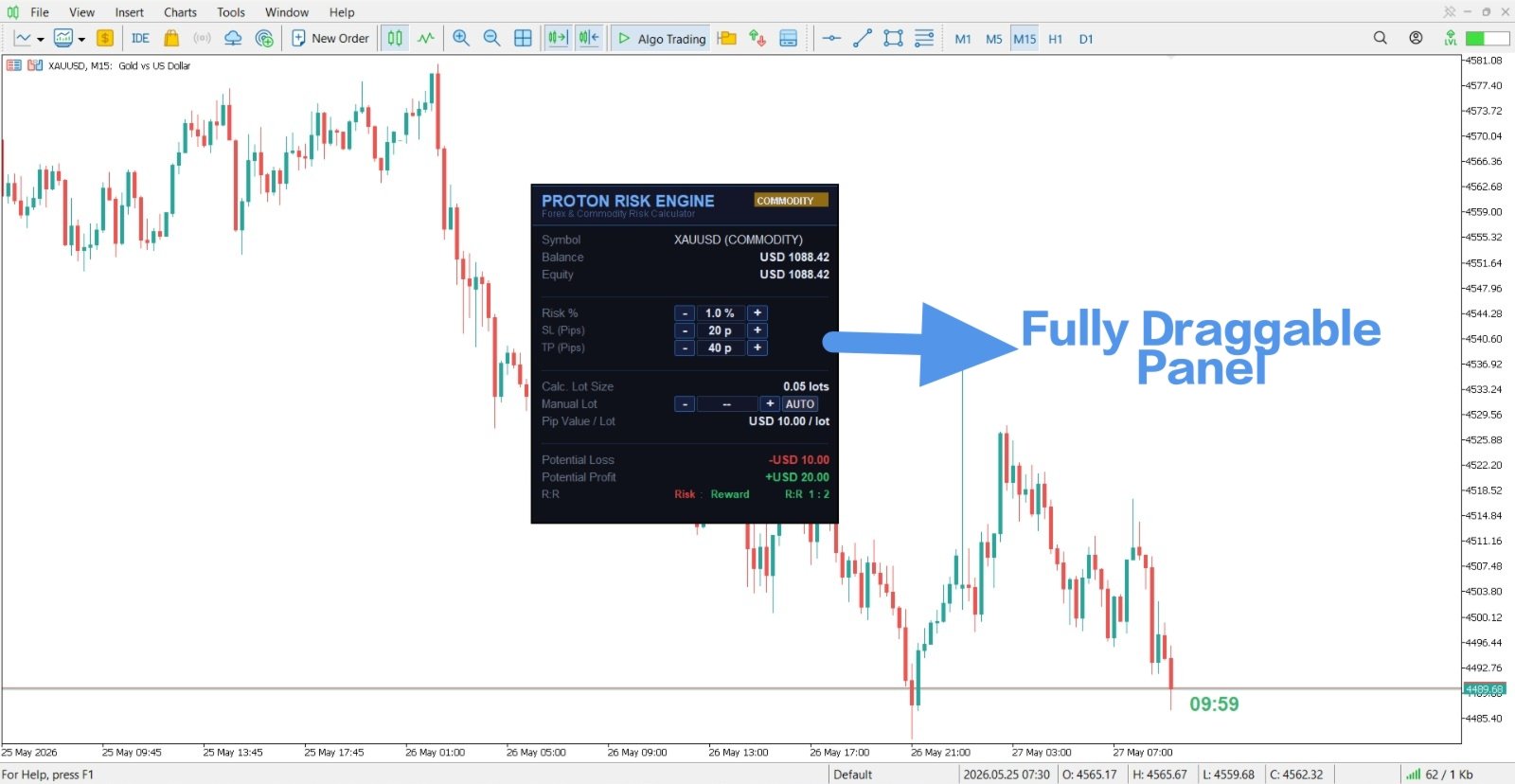
Proton Gold Risk Engine MT5 is a utility for MetaTrader 5 that calculates position size based on user-defined risk parameters. The tool helps traders implement consistent position sizing by calculating required lot size based on account capital, risk percentage, and stop loss distance. This utility is designed for manual traders who manage position sizing themselves.
PRIMARY FUNCTION
The utility provides a calculator interface for determining appropriate position size before opening trades. Based on user inputs of account balance, risk percentage, and stop loss distance, the tool calculates the required lot size. This helps traders maintain consistent risk management across all trades.
HOW POSITION SIZING WORKS
Risk Percentage Method:
Position sizing based on risk percentage works as follows:
- Define maximum risk per trade (example: 2% of account)
- Define stop loss distance in pips
- Calculate: Lot size that will result in exactly your target loss if stopped out
- Example: 5000 account, 2% risk = 100 max loss, 50 pip stop loss = 0.02 lot size
Risk Amount Method:
Position sizing based on risk amount works as follows:
- Define maximum risk in currency (example: 100 dollars)
- Define stop loss distance in pips
- Calculate: Lot size that will result in exactly your target loss if stopped out
- Example: 100 dollar maximum risk, 50 pip stop loss = 0.02 lot size
Reward Calculation:
After calculating position size, calculate potential profit at take profit level:
- Input take profit distance in pips
- Tool calculates: Profit amount if take profit is reached
- Example: 0.02 lot size, 150 pip profit target = 300 dollar profit
TECHNICAL SPECIFICATIONS
Input Parameters:
Account Balance:
User enters total current account balance. This value is multiplied by risk percentage to determine maximum allowable loss per trade.
Risk Percentage:
User enters percentage of account willing to risk per trade. Common values: 1%, 2%, 3%. Determines maximum loss amount.
Risk Amount (Alternative):
User can input maximum loss in dollars instead of percentage. Useful for traders with specific loss limits per trade.
Stop Loss Distance:
User enters distance in pips between entry price and stop loss price. This determines how far price can move before trade stops out.
Take Profit Distance:
User enters distance in pips between entry price and take profit price. Used to calculate potential profit amount if target is reached.
Current Price:
User enters current market price for the symbol being traded. Used for additional calculations.
Output Displays:
Calculated Lot Size:
The required lot size to achieve the specified risk and stop loss distance. This is the primary output the trader uses to enter the trade.
Potential Loss:
The exact amount (in account currency) that will be lost if the stop loss is executed.
Potential Profit:
The exact amount (in account currency) that will be gained if the take profit is executed.
Risk Reward Ratio:
The ratio between potential profit and potential loss. Example: 3:1 ratio means potential profit is 3 times the risk amount.
Technical Features:
- On-chart calculator interface
- Real-time calculations as inputs change
- Instant lot size output
- Works with all symbols
- Supports all broker lot sizing standards
- Customizable input fields
Installation:
1. Download the file to your computer
2. Copy file to MetaTrader 5 installation folder: MQL5/Experts/
3. Restart MetaTrader 5 platform
4. Open any chart in MetaTrader 5
5. Right-click chart > Indicators > Expert Advisors > Proton Gold Risk Engine
6. Tool will attach to chart
7. Calculator is immediately ready for use
Configuration:
- Default settings provide immediate functionality
- Optional: Set default risk percentage in settings
- Optional: Adjust font size for visibility
- Optional: Reposition calculator on chart
HOW TO USE
Step-by-Step Calculation Process:
Step 1 - Determine Account Balance:
Input your current account balance. This might be 5000, 10000, or whatever your actual account size is.
Step 2 - Set Risk Percentage:
Decide what percentage of account you will risk. Conservative: 1%, Moderate: 2%, Aggressive: 3%. Most professional traders use 1-2%.
Step 3 - Identify Stop Loss Distance:
Before opening a trade, determine where you will place your stop loss in pips. Common stops: 20 pips, 30 pips, 50 pips, 100 pips.
Step 4 - Calculate:
Input balance, risk percentage, and stop loss distance into the calculator. The tool instantly outputs required lot size.
Step 5 - Set Take Profit:
Determine your take profit distance. Calculate risk-reward ratio. Example: If risking 50 pips, target 150 pips for 3:1 ratio.
Step 6 - Verify Calculations:
Review the output lot size and potential profit/loss amounts. Verify these numbers are reasonable for your strategy.
Step 7 - Execute Trade:
Open the trade with the calculated lot size. Immediately place stop loss and take profit orders.
PRACTICAL EXAMPLES
Example 1 - Conservative Day Trading:
- Account: 10000
- Risk: 1% per trade = 100 loss maximum
- Stop Loss: 50 pips
- Calculated Lot Size: 0.02 lots
- Take Profit Target: 150 pips = 300 profit
Example 2 - Moderate Risk Trading:
- Account: 5000
- Risk: 2% per trade = 100 loss maximum
- Stop Loss: 40 pips
- Calculated Lot Size: 0.025 lots
- Take Profit Target: 100 pips = 250 profit
Example 3 - Larger Account:
- Account: 50000
- Risk: 2% per trade = 1000 loss maximum
- Stop Loss: 100 pips
- Calculated Lot Size: 0.10 lots
- Take Profit Target: 200 pips = 2000 profit
IMPORTANT NOTES
Calculation Accuracy:
- Calculations assume your stop loss distance is accurate
- Calculations assume you can execute trades at specified prices
- Calculations do not account for spread cost
- Calculations do not account for slippage
Broker Specifications:
- Different brokers have different minimum and maximum lot sizes
- Some brokers require minimum 0.01 lot increments
- Some brokers allow 0.001 or smaller increments
- Always verify your broker's lot size requirements
Spread and Slippage:
- Calculator output does not include spread costs
- In reality, you will lose spread cost in addition to calculated loss
- Slippage may cause actual loss to be larger than calculated
- Account for these costs in your risk calculations
Stop Loss Placement:
- Stop loss distance must be based on your technical analysis
- Do not place stops arbitrarily based on lot size calculation
- First determine technical stop loss location
- Then calculate lot size based on that stop loss distance
Verification:
- Always verify calculated lot size before opening trade
- Check that lot size is within your broker's limits
- Confirm that potential loss matches your risk tolerance
- Review the risk-reward ratio before trading
Testing Recommendations:
- Test calculations on demo account
- Paper trade using calculated lot sizes
- Verify that losses and profits match calculations
- Track accuracy of risk calculations over time
Disclaimer:
This tool provides position sizing calculations based on user inputs. Calculations are mathematical only and do not guarantee profitable trades. Actual trading losses may exceed calculated amounts due to slippage, spreads, and market gaps. The developer is not responsible for trading losses resulting from using this calculator. Always verify calculations independently and use proper risk management practices.