Trade Entry
- Utilities
-
Chacha Ian Maroa
 A financial markets trader and MQL5 developer focused on building practical, professional trading tools for MetaTrader 5.
 - Version: 1.2
- Activations: 14
Trade Entry Tool is a MetaTrader 5 utility designed to make manual trade preparation, position sizing, and order placement more structured and convenient.
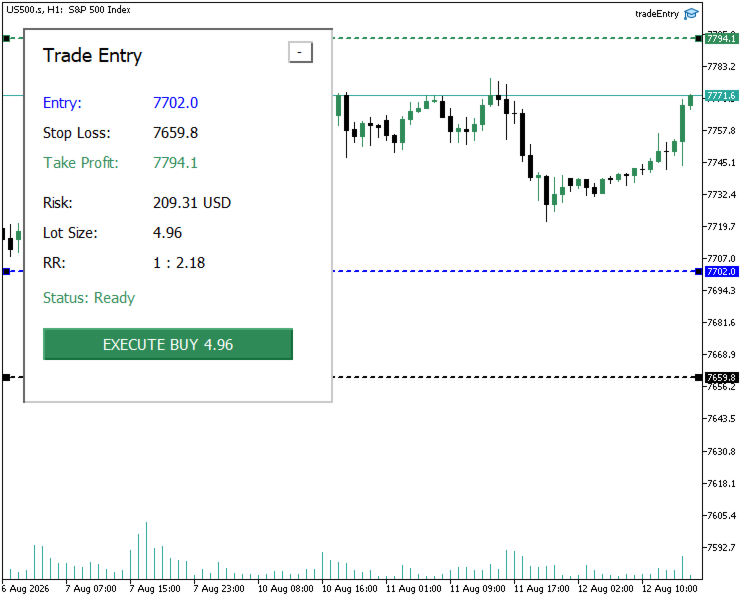
Instead of calculating lot size manually and entering trade levels through the standard order window, the tool provides visual Entry, Stop Loss, and Take Profit levels directly on the chart. You can adjust the levels and let the tool calculate the appropriate trading volume according to your configured risk.
Main Features
Visual Trade Planning
The tool displays Entry, Stop Loss, and Take Profit levels directly on the chart. These levels can be adjusted visually before a trade is executed.
Market and Pending Orders
The tool supports:
- Market Buy
- Market Sell
- Buy Limit
- Sell Limit
- Buy Stop
- Sell Stop
For market orders, the Entry level follows the current executable market price. Pending-order Entry levels remain positioned at the selected price.
Risk-Based Position Sizing
Position size can be calculated using either:
- Percentage of account balance
- Fixed monetary risk
The calculation uses the selected Entry and Stop Loss levels to determine the required trading volume. Broker volume restrictions are taken into account. If the requested risk would require a volume below the broker's minimum allowed volume, the setup is rejected instead of automatically increasing the position size beyond the selected risk. The dashboard displays the actual risk associated with the normalized trading volume.
Take Profit Modes
Three Take Profit modes are available:
- No Take Profit
- Manual Take Profit
- Risk/Reward-based Take Profit
When Risk/Reward mode is selected, the Take Profit level is calculated automatically from the Entry, Stop Loss, and configured Risk/Reward ratio.
Initial Trade Level Placement
Trade levels can be initialized using:
- ATR-based automatic placement
- Manually specified initial prices
ATR placement provides a practical starting structure that can then be adjusted directly on the chart.
Trade Setup Validation
Before execution, the tool checks the current trade structure and broker requirements. Validation includes areas such as:
Entry direction for pending orders
- Stop Loss position
- Take Profit position
- Trading volume limits
- Volume step
- Price tick size
- Minimum broker stop distance
- Trade request validity
If the setup is not valid, the dashboard reports the reason and prevents the trade from being submitted until the issue is corrected.
Trade Dashboard
The on-chart dashboard provides the main information required before placing a trade, including:
- Entry price
- Stop Loss
- Take Profit
- Actual monetary risk
- Calculated lot size
- Risk/Reward ratio
- Current setup status
The panel can also be collapsed when more chart space is required.
Typical Workflow
- Attach Trade Entry Tool to the chart.
- Select the required order type and risk settings.
- Adjust the Entry, Stop Loss, and Take Profit levels.
- Review the calculated risk, lot size, Risk/Reward ratio, and setup status.
- Correct any validation warning shown by the tool.
- Execute the prepared trade from the dashboard.
Trade Entry Tool does not generate trading signals or decide when you should enter the market. It is designed to assist with the preparation and execution of trades that you have already decided to take.
Support and Usage Guidance
After purchasing the tool, you are welcome to contact me through the MQL5 messaging system or the Product comments section if you need guidance with installation, configuration, understanding the available settings, or using the trade-entry workflow.
I will also continue developing and improving the tool through future versions as its functionality evolves.