Fib Smc Pro
- Indicators
-
Gabriel Alejandro Sanchez Lledo
 Programador +20 años de experiencia- Trader profesional - Developer
 - Version: 3.0
- Updated: 3 July 2026
- Activations: 10
Most traders know that Fibonacci levels work best when they line up with something else — an Order Block, a Fair Value Gap, a higher-timeframe structure point. The problem is finding that overlap manually, on chart after chart, timeframe after timeframe, is slow, tedious, and easy to get wrong under pressure.
WarlockAuto Fibonacci SMC Elite does that work for you, in real time, on every chart you open.
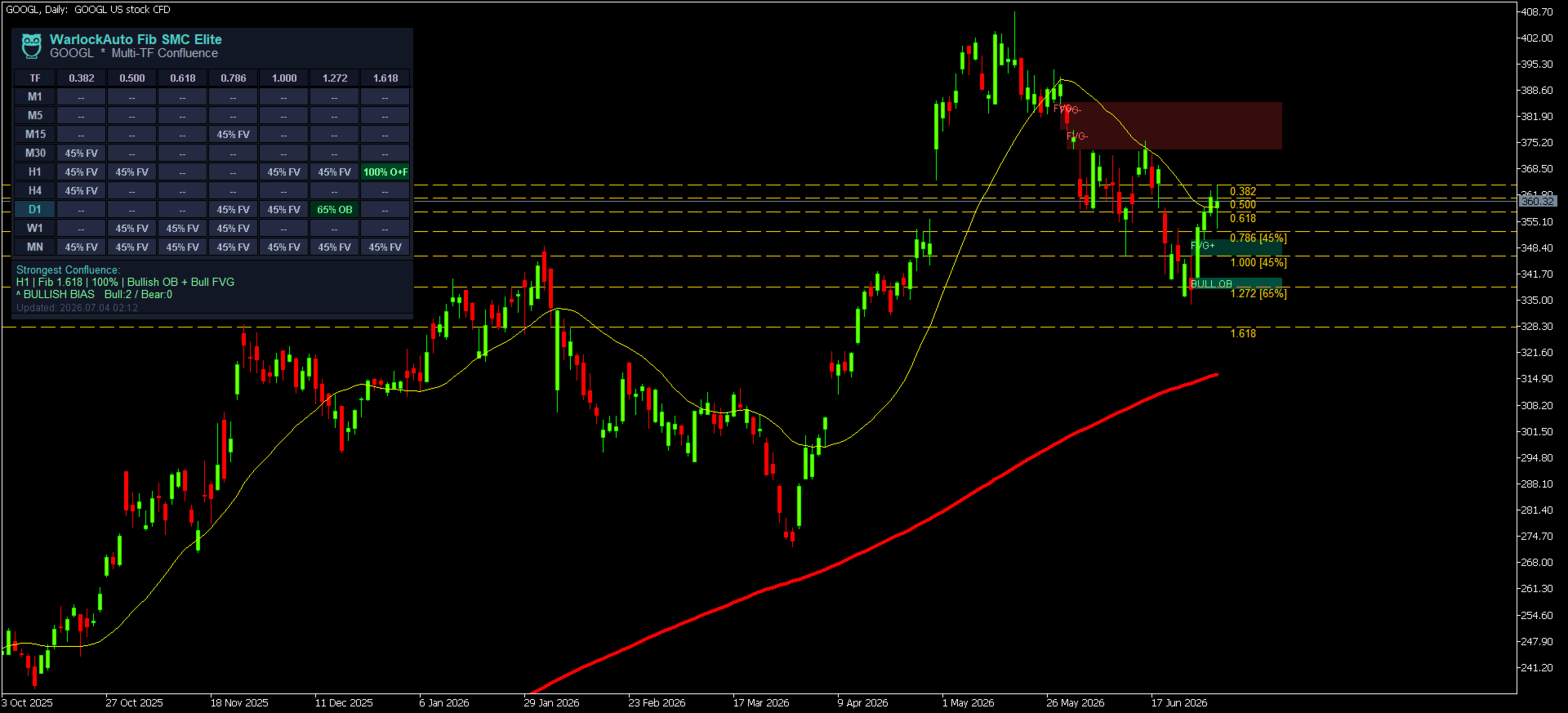
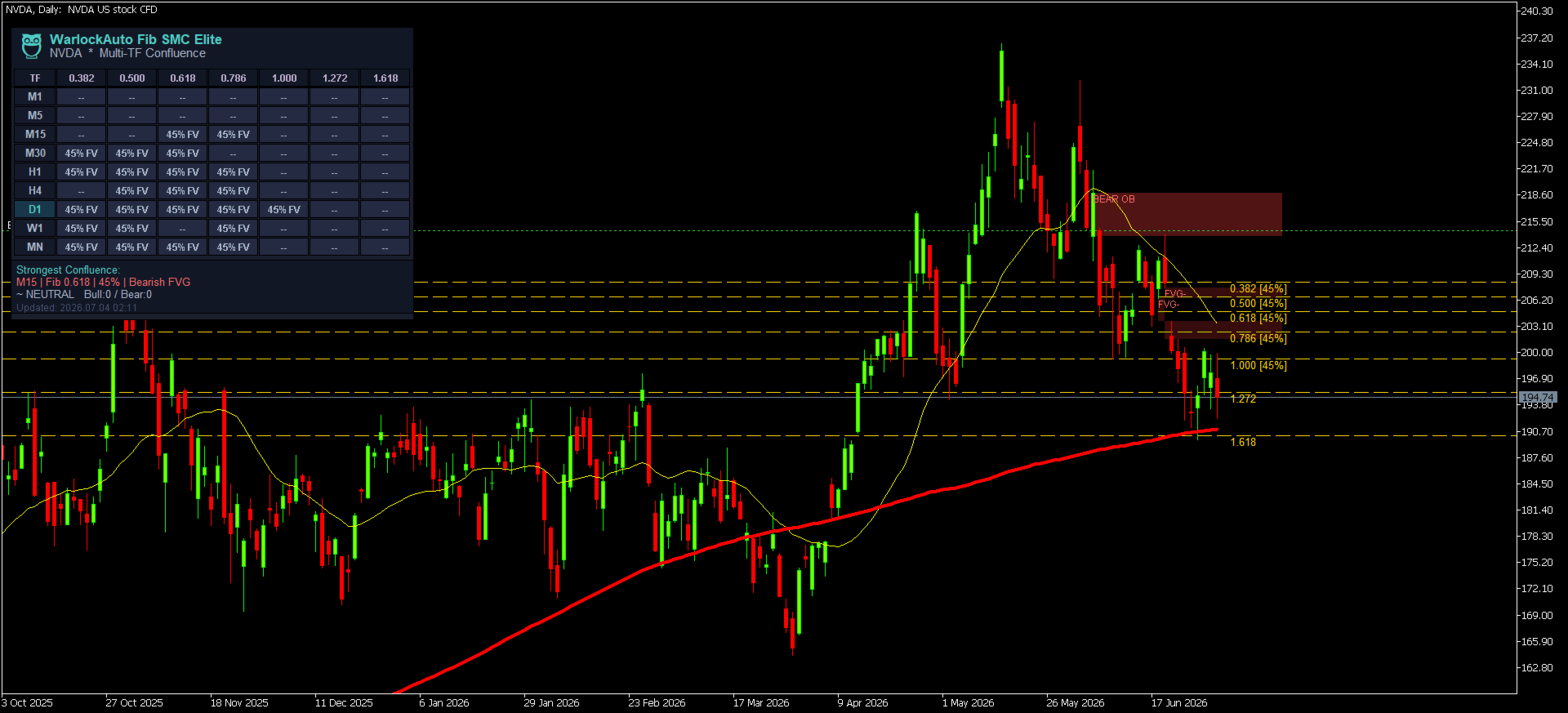
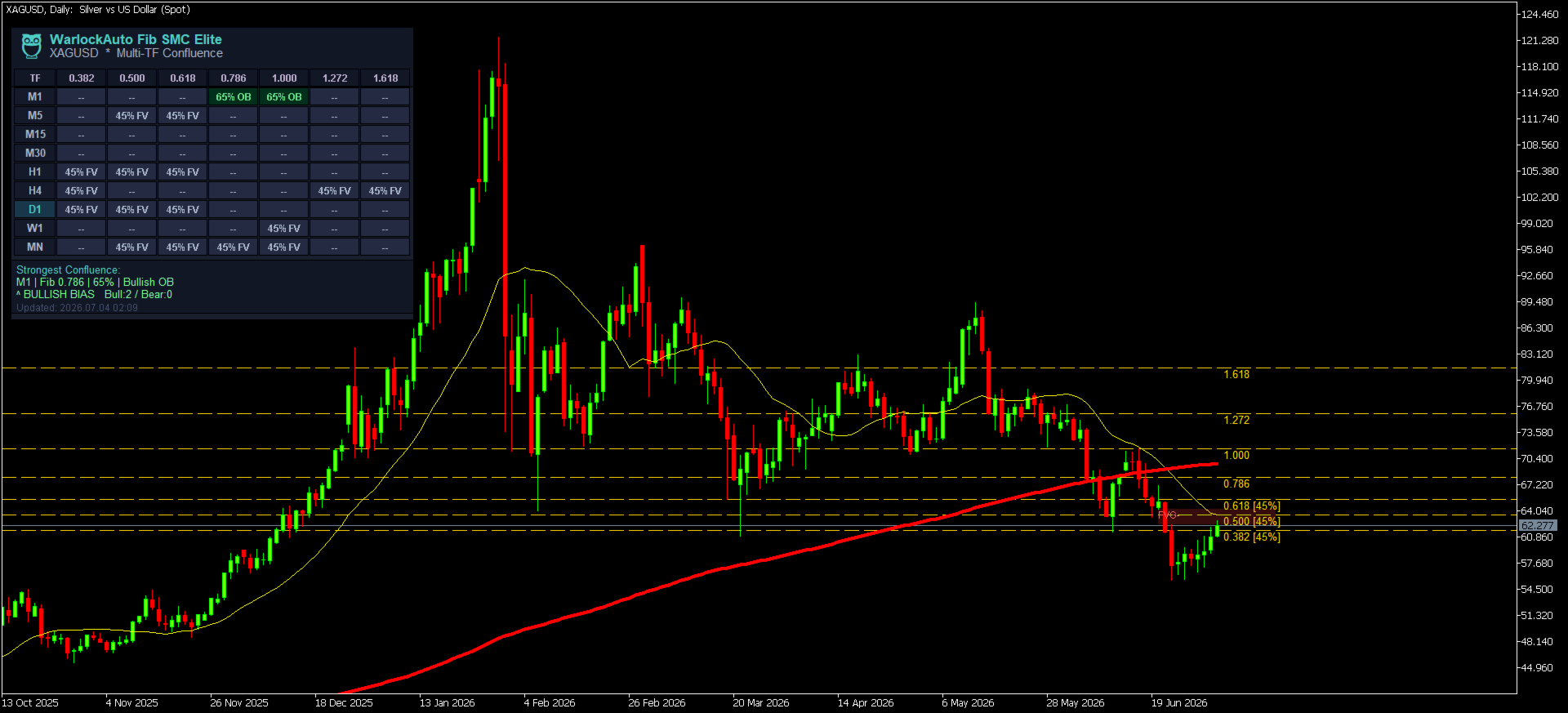
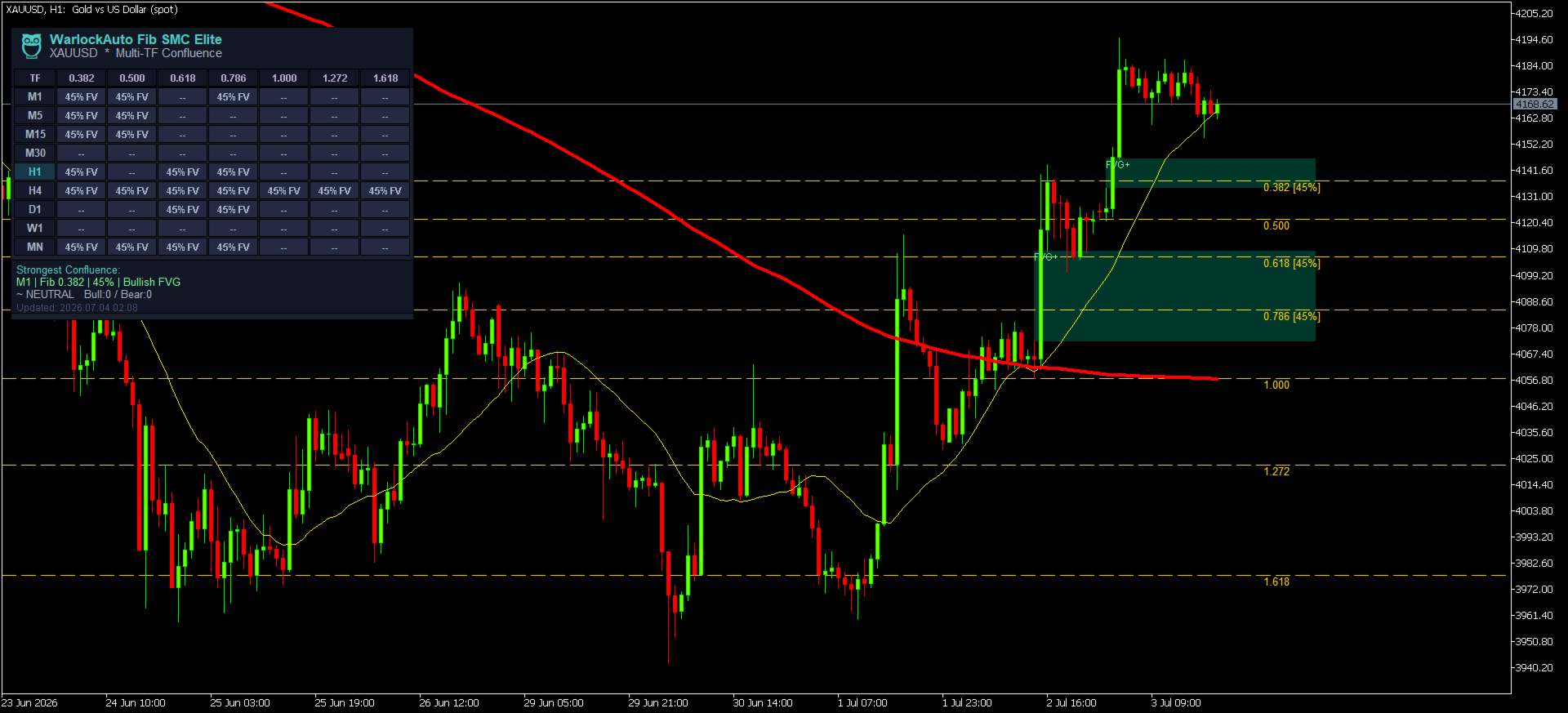
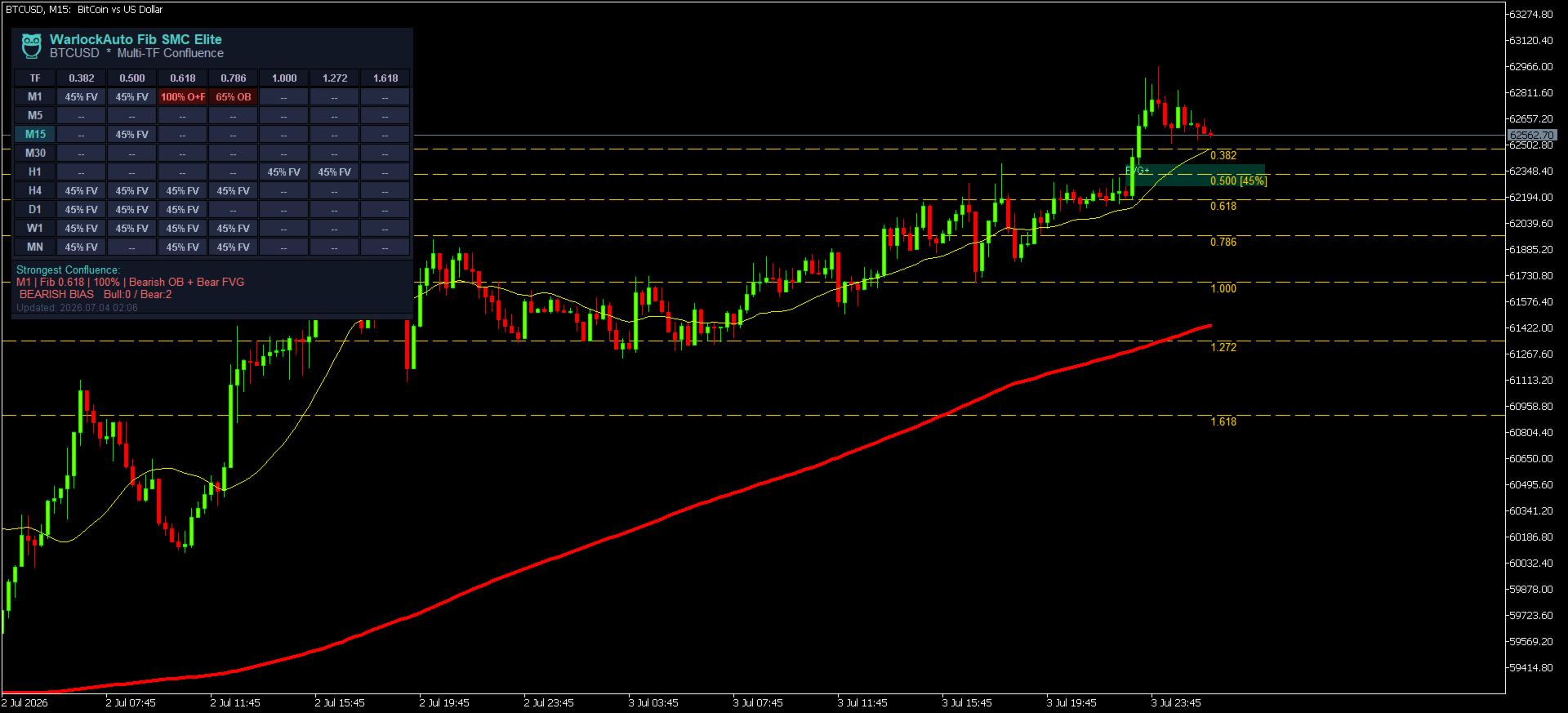
The indicator locates the most recent swing high and low, plots a full set of Fibonacci retracement and extension levels automatically, and then cross-references every single level against live Order Block and Fair Value Gap detection — not just on your current chart, but simultaneously across nine timeframes, from M1 all the way up to the Monthly. The result is displayed on a sleek, fully draggable confluence matrix dashboard that instantly shows you, in plain percentages, exactly where the smart money and the golden ratio agree.
When a level scores high enough on your chart's own timeframe and price reacts there on a fully closed candle, the indicator fires a clean, non-repainting Buy or Sell arrow — with popup, sound, email, and push alerts so you never miss the setup, whether you're watching the screen or not.
Why traders choose WarlockAuto Fibonacci SMC Elite
- Save hours of manual chart work. No more redrawing Fibonacci tools every time price makes a new swing, and no more manually scanning nine charts to check higher-timeframe alignment.
- Trade with confluence, not guesswork. Every signal requires agreement between Fibonacci structure and institutional footprints (Order Blocks + Fair Value Gaps) — the same concepts professional and institutional traders reference, automated and quantified into a single score from 0–100%.
- See the whole picture at a glance. The 9-timeframe × 8-Fibonacci-level dashboard means you never have to flip through charts to check "does this line up on H4? On Daily?" — it's all in front of you, color-coded and updating live.
- Built for real trading, not just backtesting. Signals are evaluated strictly on closed bars only — what you see is what you would have gotten live. No repainting, no hindsight bias.
- One click, any timeframe. Click any cell or timeframe row on the dashboard and your chart jumps straight there — no manual timeframe switching required.
- Never miss a setup. Full alert coverage: on-screen popup, sound, email, and mobile push notifications, with a configurable cooldown so you're informed, not spammed.
- Clean, professional visuals. A dark pastel-themed dashboard designed to be readable at a glance during fast-moving markets, with the WarlockAuto owl 🦉 trademark in the top-left corner.
- Runs light. Zero DLL dependencies, fully Strategy Tester compatible, and built to compile with zero errors and zero warnings — a lightweight, market-ready tool that won't slow down your terminal.
How It Works
- Swing detection — the indicator continuously locates the most recent validated swing high and swing low using a configurable lookback and strength filter.
- Automatic Fibonacci mapping — your chosen Fibonacci ratios (0.382 through 2.618) are plotted automatically between that swing high and low, no manual anchoring required.
- Smart Money analysis, on 9 timeframes at once — for every timeframe from M1 to Monthly, the engine independently detects impulse-validated Order Blocks and unfilled Fair Value Gaps.
- Confluence scoring — each Fibonacci level is scored 0–100% based on how closely it aligns with a detected Order Block (+55) and/or Fair Value Gap (+35), plus an alignment bonus (+10).
- Live dashboard — every score is displayed in the matrix, color-coded bullish (teal/green) or bearish (red), so you can instantly see the strongest confluence anywhere on your symbol.
- Non-repainting signal generation — when your current timeframe's score clears your minimum-confluence threshold and a fully closed candle wicks into the level and closes through it in the expected direction, a Buy or Sell arrow prints — permanently, never repainted — and your configured alerts fire.
What's in the Box
- Auto Fibonacci Engine — retracement and extension levels (0.382, 0.500, 0.618, 0.786, 1.000, 1.272, 1.618, 2.618), fully toggleable.
- Smart Money Concepts Engine — Order Block detection (impulse-strength and ATR-size filtered) and Fair Value Gap detection (minimum-size filtered in pips), both drawn directly on your chart.
- 9-Timeframe Confluence Dashboard — M1, M5, M15, M30, H1, H4, D1, W1, MN, all scored and displayed live, draggable to any position on your chart.
- Info Panel — a summary strip showing the single strongest confluence detected across all timeframes and levels, plus an overall bullish/bearish bias readout.
- Non-Repainting Signal Arrows — Buy/Sell arrows plotted only on closed bars.
- Full Alert Suite — popup, sound, email, and push, with cooldown control.
- The WarlockAuto Owl 🦉 — the trademark logo, top-left of the dashboard.
Recommended Use
- Works on any symbol, any timeframe — the dashboard's 9-TF matrix analyzes the same fixed set of timeframes regardless of which chart you attach the indicator to.
- Swing/position traders: prioritize signals where the higher-timeframe rows (H4/D1/W1) also show strong confluence — that's where the highest-probability alignment tends to live.
- Intraday traders: watch the M15/M30/H1 rows for fast-forming confluence around session highs and lows.
- Combine dashboard confluence readings with your own market structure, news awareness, and risk management — this tool is designed to sharpen your analysis, not replace your trading plan.
Risk Disclosure
Trading foreign exchange, CFDs, and other leveraged instruments carries a high level of risk and may not be suitable for all investors. WarlockAuto Fibonacci SMC Elite is an analysis and alerting tool — it does not place trades, guarantee profits, or eliminate risk. Past performance of any strategy or signal pattern is not indicative of future results. Always test thoroughly on a demo account before live use, and trade only with capital you can afford to lose.
🖥️ Inputs Reference (for the Market listing's parameters section)
Fibonacci Settings
| Input | Description |
|---|---|
| Swing Lookback | Number of bars searched for the most recent swing high/low |
| Swing Strength | Bars required on each side to confirm a swing point (1–20) |
| Show 0.382 / 0.500 / 0.618 / 0.786 / 1.000 / 1.272 / 1.618 / 2.618 | Toggle each Fibonacci level individually |
| Fib Line Color / Style / Width | Visual customization of plotted Fibonacci lines |
Smart Money Concepts
| Input | Description |
|---|---|
| OB Lookback | Bars searched for Order Block formation |
| OB Strength | Impulse candles required to validate an Order Block (1–10) |
| OB Min Size (ATR) | Minimum Order Block size, expressed as an ATR multiple |
| Show Order Blocks / Show FVGs | Toggle on-chart visualization |
| FVG Min Pips | Minimum Fair Value Gap size to qualify (1–50 pips) |
| OB/FVG Colors | Independent bullish/bearish fill colors |
Signal Settings
| Input | Description |
|---|---|
| Min Confluence % | Minimum score required to trigger a Buy/Sell arrow (0–100) |
| Buy/Sell Colors, Arrow Size | Signal arrow appearance |
Alerts
| Input | Description |
|---|---|
| Popup / Sound / Email / Push | Independent alert channel toggles |
| Alert Cooldown | Minimum seconds between repeat alerts |
Dashboard
| Input | Description |
|---|---|
| Show Dashboard | Toggle the entire matrix on/off |
| Dashboard Corner | Initial screen corner on attach |
| X/Y Offset | Initial pixel position |
| Font Size | Dashboard text size (6–14) |
| Show Info Panel | Toggle the strongest-confluence summary strip |
📸 Suggested Screenshots for the Market Listing
- Full-chart view with the dashboard visible, showing several high-confluence cells lit up in green/red, positioned in a corner that doesn't obscure price action.
- A close-up crop of just the dashboard matrix, clearly showing the owl logo, the TF/Fib grid, and the info panel — this is your best "at a glance" marketing image.
- A chart moment where a Buy or Sell arrow has just printed, with the aligned Order Block and/or Fair Value Gap visible nearby, and the corresponding dashboard cell highlighted.
- The Inputs panel (MetaTrader's indicator properties window) showing the organized input groups — signals professionalism and customization depth to prospective buyers.
🗒️ Version History (for the listing's changelog section)
v1.03
- Enlarged the dashboard (taller header, wider Fibonacci columns, taller rows and info panel) so every label is fully readable with no clipping.
- Restored the owl trademark logo using a proper embedded Unicode character with an emoji-capable font (resolving a prior compiler warning caused by an invalid escape sequence).
- Re-centered all dashboard text to match the new dimensions.
v1.02
- (Superseded by v1.03.)
v1.01
- Fixed ATR handles being recreated/released on every call, which could intermittently return 0 and suppress confluence scoring; handles are now created once and cached for the indicator's lifetime.
- Fixed dashboard cell/timeframe clicks not registering when clicking directly on the visible text.
- Removed an unused/dead indicator handle.
v1.00
- Initial release.