Telegram Buddy

Telegram Buddy – Professional Trade Reporting & Alerting Tool


Are you worried about drawdown when you are away from your computer? Do you need to check your account balance frequently, but find it inconvenient to access the mobile MT5 terminal every time?

The Problem with Standard Reports: Most Telegram tools send huge blocks of text listing details of every single trade. Reading such messages on a smartphone is inconvenient, and over time, traders stop paying attention to them, risking missing critical changes in the account.

The Telegram Buddy Solution: Designed for modern traders, Telegram Buddy provides a reliable connection between your MetaTrader 5 terminal and your smartphone. Thanks to the "Simple Mode" feature, you get exactly the information you need — in a clean format. The utility filters out unnecessary data, providing only the facts for effective capital management.

Trade with confidence and easily control your account.


⚠️ Important: Operating Logic

Please Note: This utility is designed for macro-monitoring of the account status.

  • No Excessive Notifications: The bot does not send messages about every tick or order opening. Details like Ticket, Volume, or Open Price are excluded to save your attention.

  • Aggregate Balance Change: It monitors the account over a specified interval (e.g., every 5 minutes) and sends one summary message about the net profit or loss for that period.

  • Focus on Deposit: All notifications (Closed Deals, Drawdown, Reports) are strictly focused on the financial result and deposit safety.


    🚀 Key Features

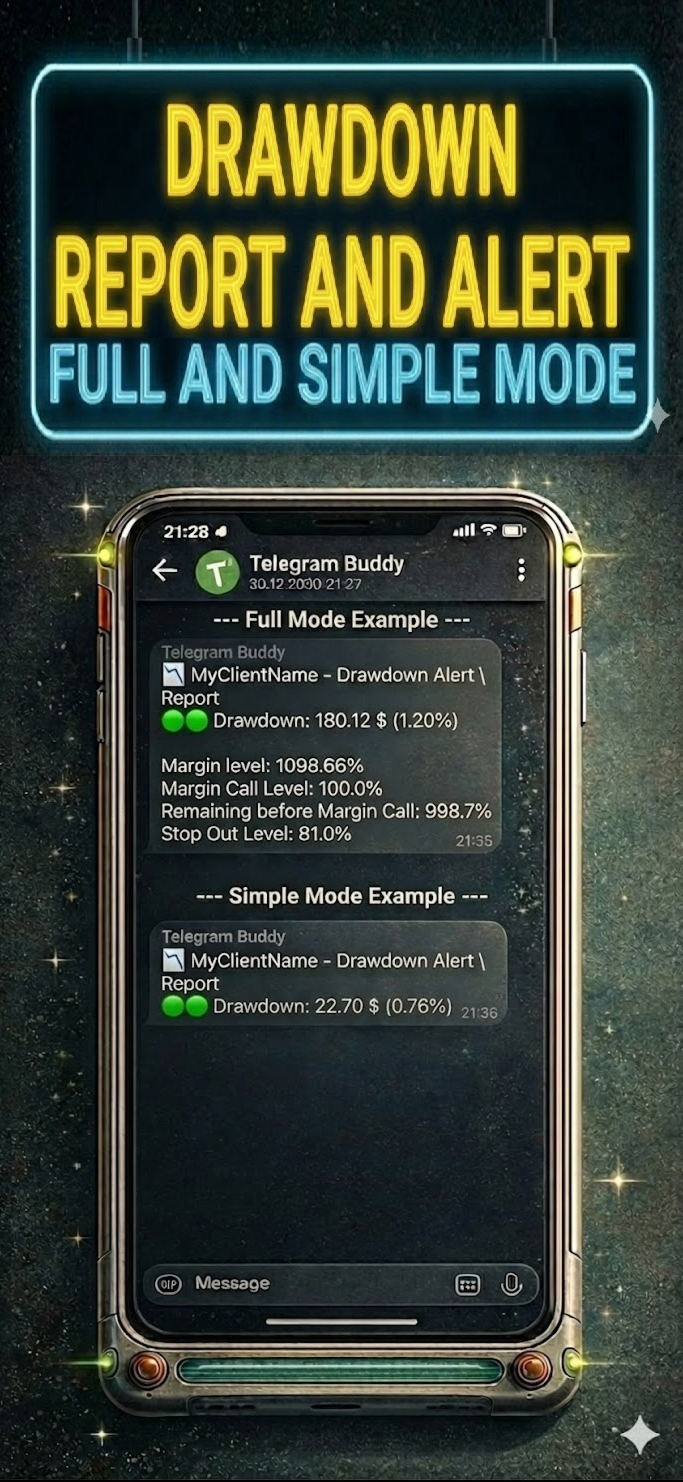
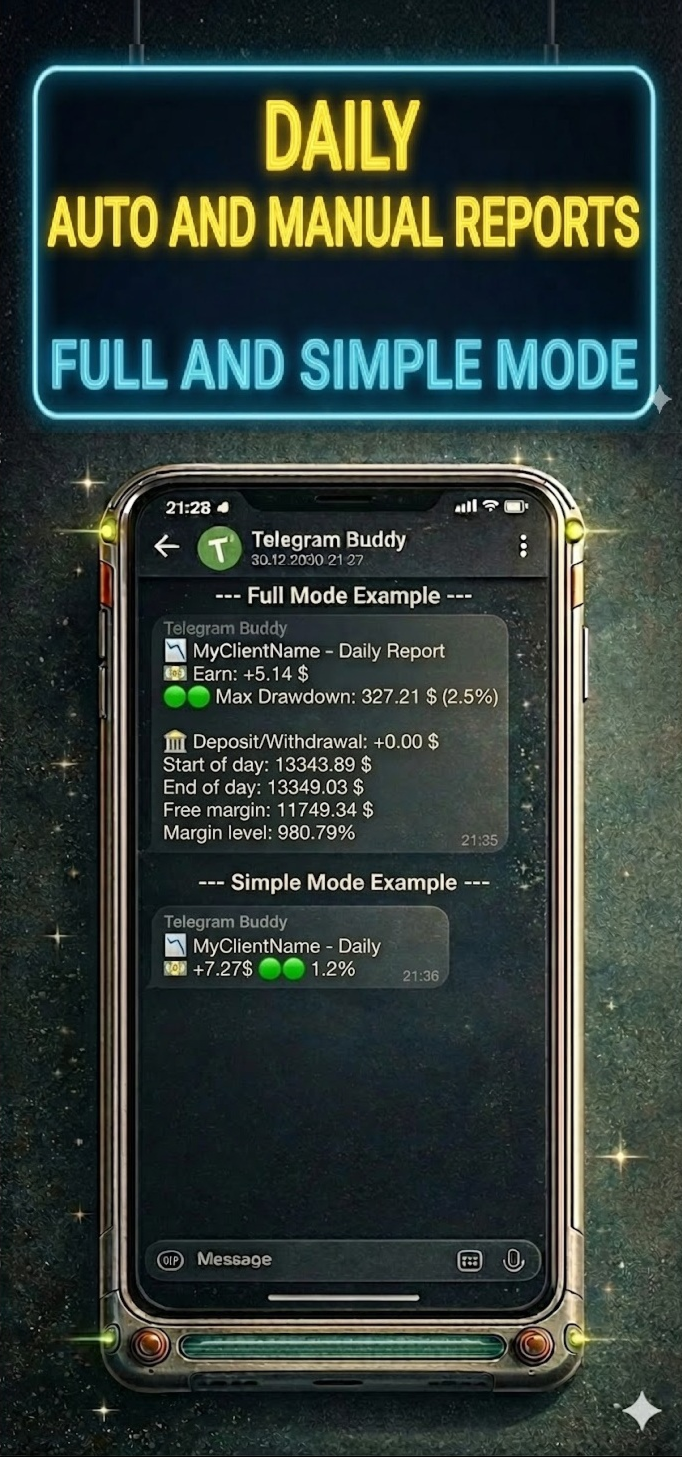
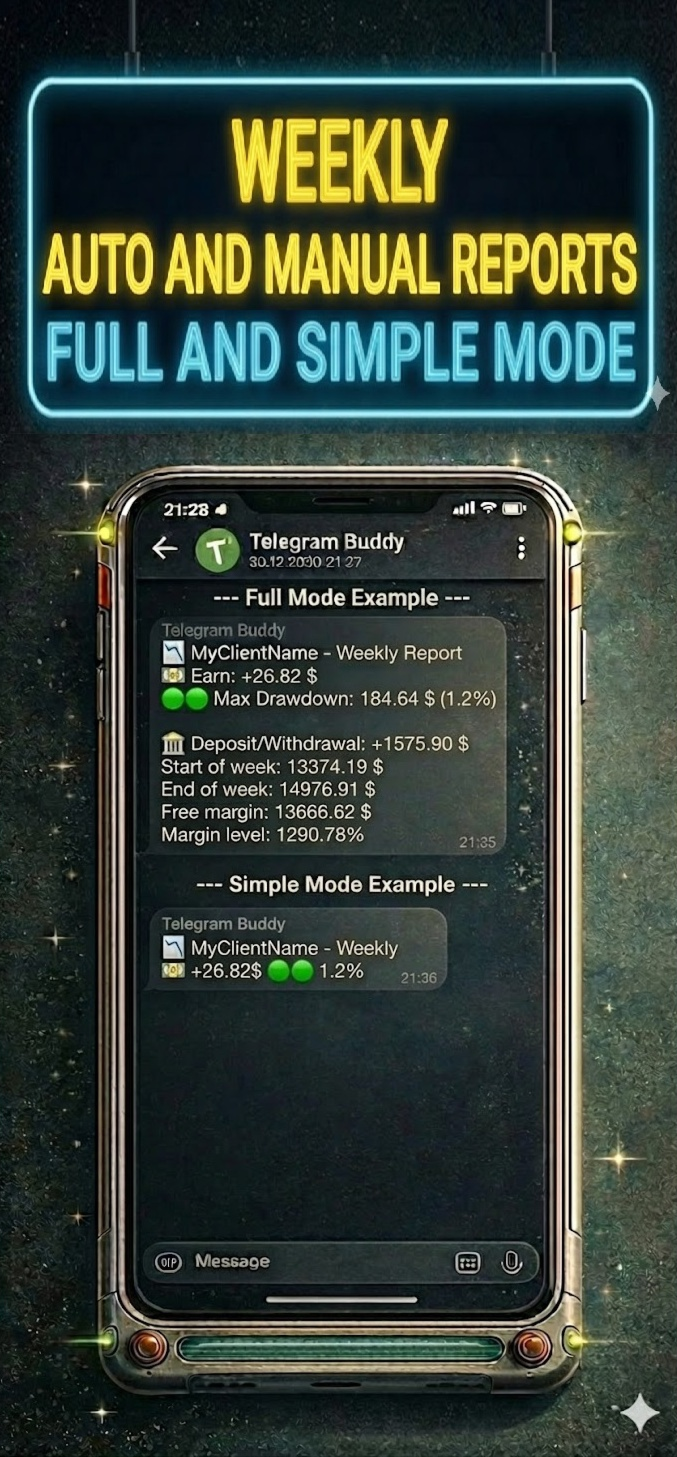
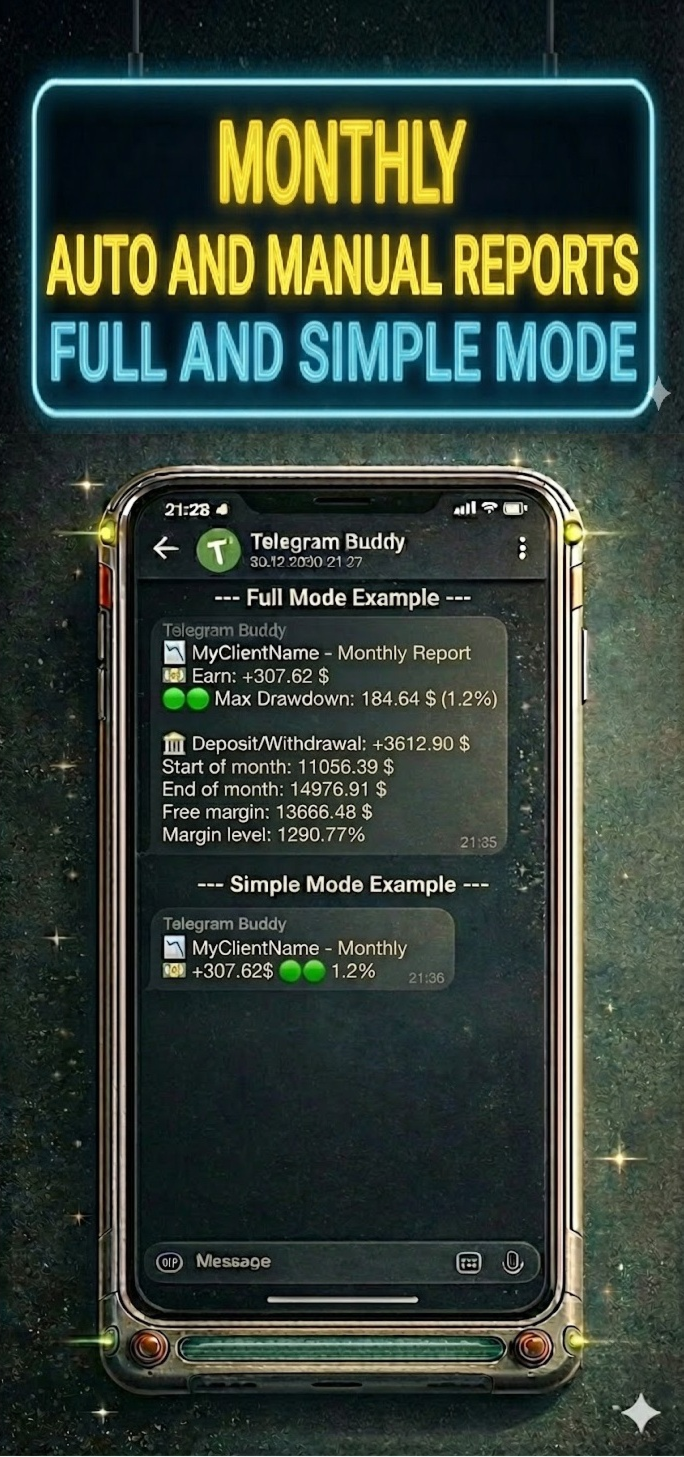
    • Customizable Reporting Detail ("Simple Mode"): Separate mode switches for "Simple" (shortest possible messages) or "Full" (messages with context) for each notification type: Drawdown, Closed Deals, and Reports.

    • Centralized Monitoring: Manage multiple MT5/MT4 terminals via one central bot. Use unique Account Names to instantly understand where the report came from.

    • Smart "Silent Mode": Mutes profit notifications during specified hours (e.g., at night), but if necessary, sends Drawdown notifications if the drawdown reaches a critical level. You will sleep soundly knowing the bot will wake you only in case of a real problem.

    • Group Work: Share notifications with partners and colleagues using the Multi-Chat ID feature.

    • Cent Account & Currency Support: Includes a "Balance Divisor" to convert Cent account values into standard units (e.g., dividing by 100) and allows you to set your own currency symbol.

    • Modular Reporting System: Ability to separately enable/disable Daily, Weekly, and Monthly reports, and Trade reports. You can also disable reports on weekends (non-trading days).


      🛠 Technical Advantages

      Telegram Buddy is designed for high performance. It works on a timer (OnTimer), not on every tick:

      • Update Aggregation: Instead of multiple messages during high-frequency trading, the bot calculates the total balance change for the specified interval.

      • Adjustable Frequency: Set the check interval from 1 second for real-time updates to 3600 seconds (1 hour) for hourly summaries or longer periods.

      • Low Load: By avoiding calculations in the OnTick function, the bot creates significantly less load on your PC or VPS.


        ⚙️ Input Parameters Description

        (Below are the parameter names exactly as they appear in the MT5 terminal)

        1. 🤖 Telegram Connection & Identity

        • Telegram bot token: Paste your bot's API token here (obtained from @BotFather).

        • Bot/Account name (label in reports): Custom label for this account (e.g., "BrokerZXY"). It will appear in the header of every message.

        • true = process user commands, false = only auto reports:

          • true : Interactive mode. The bot responds to commands /start, /daily, /dd. (Enable this on only one terminal if using one bot for multiple accounts).

          • false : Broadcast mode. The bot sends notifications but ignores incoming messages.

        • Multichat IDs list: Comma-separated list of Chat IDs to receive notifications (e.g., 12345678,987654321 ). If using only for yourself — paste only your Chat ID.

          2. 🎨 Message Styling (Visuals)

          • Simple mode: Drawdown alerts: true = compact notifications; false = detailed (with Margin Level and StopOut).

          • Simple mode: Closed deals: true = one line with profit summary; false = detailed with balance.

          • Simple mode: Daily/Weekly/Monthly reports: true = only Profit and Max Drawdown; false = full statistics.

          3. 💰 Currency & Formatting

          • Balance divisor: Value divisor. Set to 100.0 for cent accounts to display standard values. Set to 1.0 for regular accounts.

          • Currency symbol: Currency symbol added to values (e.g., $, €, USD).

          4. ⏱️ Monitoring Intervals

          • Interval for DD check (sec): How often (in seconds) the bot checks for drawdown changes.

          • Interval for Closed deals check (sec): How often (in seconds) the bot checks for new closed trades.

          5. 🔔 Alerts Configuration

          • Enable drawdown alerts: On/Off automatic notifications when drawdown increases.

          • Enable closed trades alerts: On/Off notifications about balance changes.

          6. 📅 Reporting Schedule

          • Weekend days: Select days considered weekends (to skip reports).

          • Enable daily report: Enable daily summaries.

          • Daily report time: Time to send the daily report (Local PC/VPS time).

          • Enable weekly report: Enable weekly summaries.

          • Weekly report day: Day of the week to send the report.

          • Enable monthly report: Enable monthly summaries (sent on the last business day of the month).

          7. 🌙 Silent Mode

          • Silent mode type:

            • SILENT_NONE : Disabled.

            • SILENT_FULL : Full silence during specified hours.

            • SILENT_DRAWDOWN : Only drawdown notifications are received.

          • Silent mode start/end hour: Start and end time of silent mode (Local PC/VPS time).

          8. 🛠️ Advanced

          • Use custom monthly period (manual mode): For manual testing or non-standard reporting periods.


          9! New Remote Emergency Commands (Admin Only): For security reasons, remote terminal control commands have been added. These commands are executed only if your Telegram ID is whitelisted in the InpAdminChatIds parameter.

          • /shut! — Emergency Shutdown. Immediately terminates the MetaTrader terminal. Open positions remain active in the market. Use this to stop EAs quickly while keeping trades open.

          • /stopshut! — PANIC BUTTON (Close All & Shutdown). The bot attempts to close all open market positions and delete pending orders, then forces the terminal to close


          10! New: Bypass Telegram Restrictions (Custom API Mirror) We have added a new InpTelegramApiUrl parameter to help users in regions where Telegram is blocked. Instead of dealing with complex proxy settings or buying a VPS, you can now route the bot's connection through a custom reverse proxy (such as a free Cloudflare Worker). Simply create your mirror, paste the URL into the bot's settings, and enjoy uninterrupted notifications directly in your terminal.


            📥 Installation Guide

            Step 1: Allow WebRequest in MT5 MetaTrader blocks external connections by default. You must allow access to Telegram.

            1. Open MT5, go to Tools -> Options (Ctrl+O).

            2. Go to the Expert Advisors tab.

            3. Check "Allow WebRequest for listed URL".

            4. Double-click "add new URL" and paste: https://api.telegram.org

            5. Click OK.

            Step 2: Get Bot Token

            1. Open Telegram and search for @BotFather.

            2. Send the command /newbot .

            3. Create a name and username for the bot (must end in bot ).

            4. BotFather will give you a Token. Copy and paste it into the Telegram bot token parameter in the advisor settings.

            Step 3: Get Your Chat ID

            1. Install Telegram Buddy on the chart.

            2. Paste the Token obtained in the previous step into the settings. Save, launch the advisor; it will write the status "Online" and its parameters on the chart.

            3. Ensure the advisor is running and send a message (e.g., /start ) to your bot in Telegram.

            4. The bot will automatically reply with a message containing your Chat ID (e.g., Your chatID is: 123456789).

            5. Copy this ID and paste it into the Multichat IDs list parameter.

              • Note: If you want to add other users, ask them to write to the bot. Then they must forward the received ID to you so you can add it to the settings.

            Step 4: Personalization

            1. Identity: Set a unique name in Bot/Account name to distinguish reports.

            2. Intervals: Configure check frequency to suit your trading style.

            3. Visuals: Use Simple mode settings to avoid cluttering the chat.

            4. Schedule: Configure the necessary reports.

            5. Silent Mode: Configure Silent mode hours to rest peacefully.


              Recommended products
              Martingale panel MT5
              Mohammadbagher Ramezan Akbari
              In this article, we would like to introduce the trade panel product with the Martingale panel. This panel is made in such a way that it can meet the needs of traders to a great extent. This trade panel actually consists of two trade panels at the same time, with the first one you can take positions with certain profit and loss limits, and with the second one, you can have positions with profit limits but without loss limits. When positions lose, a new position will be added based on the settings
              Kiwi Multi Pairs Indicator MT5 v1.01 Kiwi Multi Pairs Indicator MT5 is a multi-market and multi-timeframe confirmation dashboard for MetaTrader 5. Instead of opening many charts and checking indicators individually, Kiwi Multi Pairs Indicator brings 9 markets, 5 technical indicators and 7 timeframes together in one easy-to-read dashboard. The indicator is designed to help traders quickly identify bullish, bearish and mixed market conditions and compare confirmation across different symbols and t
              FREE
              Axilgo PipPiper CoPilot
              Theory Y Technologies Pty Ltd
              5 (2)
              Axilgo Pip Piper CoPilot Elevate your trading game with the Axilgo Pip Piper CoPilot, the first in our revolutionary Pip Piper Series. This all-inclusive toolset is meticulously crafted for serious traders, focusing on key areas such as Risk Management, Trade Management, Prop Firm Rule Compliance, and Advanced Account Management . With CoPilot, you’re not just investing in a tool—you’re gaining a strategic partner in the intricate world of trading. Important Notice: To ensure you receive the fu
              FREE
              MACD Sniper Pro
              Noppawat Tumjai
              MACD Sniper Pro is an advanced automated trading system designed for traders seeking high-precision entries and robust risk management. By combining the classic momentum of MACD Crossover with a strict ADX Volatility Filter and Dynamic ATR Management , this EA completely eliminates emotional trading and filters out dangerous flat/sideways markets. Unlike standard MACD indicators that suffer during consolidation, MACD Sniper Pro verifies trend strength before entering and protects your capital us
              Ninja MT5 Doctor
              Atsushi Katayama
              NINJA MT5 DOCTOR OVERVIEW NINJA MT5 Doctor is a free, non-trading MT5 environment-diagnostic utility that captures a one-time snapshot of the terminal, account, open charts, selected history and current host-chart symbol. It is an Expert Advisor-format utility, not a trading EA and not an indicator. The panel and input names are in English. WHAT IT CHECKS It reviews broker-server connection, terminal and account trading permissions, Doctor's own permission, trade mode and published sessions, quo
              FREE
              Free Global Stop Loss and Take Profit Setter with Break Even Free one click Stop Loss and Take Profit tool for manual trading. Apply a fixed SL and TP to every open position on the symbol, or move them all to break even, with a single button. It only modifies Stop Loss and Take Profit levels — it never opens or closes a trade. Set your SL and TP distance in points, click once, and every position on the current symbol is protected. The break even button moves stops to entry (or a configurable num
              FREE
              TRADE COMMANDER ULTIMATE MT5 Professional Trading, Risk Management and Account Protection Panel Trade Commander Ultimate MT5 is an all-in-one utility designed to help manual traders and Expert Advisor users execute, manage and protect trades from one professional black dashboard. It does not provide trading signals. It focuses on disciplined execution, position management and account-level risk control. IMPORTANT BEFORE USING ACCOUNT PROTECTION The Daily Profit Target and Daily Loss Limit must
              FREE
              GOM Trade Manager
              Wannapach Chinnaprapa
              GOM Trade Manager helps you execute trades the way you want it. Works on all instruments Forex, Commodities, & Crypto. It helps you with lot calculations, spread addition and balance calculations so you can just focus on actual trading. For full automatic planned management, stackable triggers and spread widening protection >> check out GOM Trade Manager Pro . ------------------------------------------NOTABLE FEATURES------------------------------------------ You set everything based on bid
              FREE
              ️ Trade Manager oneclick  ( Reverse Trade,  Partial Close,  Breakeven, Close All Running Trade )   control – Smart Manual Trade Control for MT5 Trade Manager oneclick control is a powerful yet lightweight trade management utility built for manual traders who want precise control over their open positions — directly from the MT5 chart. This EA does not open or close trades automatically based on any strategy. It simply provides one-click management tools to handle your running trades efficient
              FREE
              Telegram2MT5 Signal Copier
              Salvador Martinez Ramos
              Telegram2MT5 Signal Copier — Automate Your Telegram Copy Signals Directly in MetaTrader 5 With Telegram2MT5 Signal Copier, every signal you receive on Telegram is executed instantly and automatically in your MetaTrader 5 account. Telegram to MT5  -  Fast, reliable, and fully customizable. Get the Windows Bridge APP File and Tutorial Bridge file are needed to connet de Local Web Panel to the MT5 EA Compatible with Windows 10 & Windows 11 - 64 bits - And Windows Server from 2016 Main Features Ful
              Barak Mega EA
              Jorge Jovanny Hernandez Maldonado
              BARAK MEGA EA  is a fully automated trading Expert Advisor designed for traders who demand total control, strategic flexibility, and advanced risk management within a single system. This EA functions as a true strategy builder , allowing you to combine multiple technical indicators and custom rules to adapt to any market, asset, or timeframe. Unlike traditional robots with fixed logic, BARAK MEGA EA features a modular architecture where every component can be independently enabled, disabled, and
              FREE
              Correlation Matrix Pro - Multi Currency Pairs Hedge Scanner Understand the relationships between currency pairs in real-time! A powerful analysis tool that helps you visualize statistical relationships between up to 6 currency pairs simultaneously. Perfect for portfolio management, risk diversification, and hedging strategies. KEY FEATURES - Real-time Pearson correlation using log returns - Monitor up to 6 currency pairs simultaneously - Automatic timeframe detection - Adjustable lookback
              FREE
              Position Size Tool – Smart Risk Management & Trade Execution Panel The Position Size Tool is a powerful and intuitive MT5 panel that simplifies your trading by combining position sizing , risk calculation , risk/reward visualization , and order placement —all in one place. ️ Clean & Functional Interface The tool features a compact, real-time panel with the following: Balance & Equity display Live Price tracking Customizable Risk % input Auto-calculated Lot Size based on SL and Risk Input for S
              FREE
              ================================================================ MATRIX CONDITION MONITOR Live Trade Condition Panel for MetaTrader 5 Fully Automatic -- Works with ALL Matrix EAs ================================================================ NEVER MISS A TRADE SETUP AGAIN Matrix Condition Monitor is a free utility that attaches to any chart and automatically checks all 10 trade conditions in real time -- showing you exactly why a trade will or will not open, and alerting you the moment ever
              FREE
              CC CopyCopy
              Luiz Eduardo Teodoro De Carvalho
              *** Free Version: Maximum Lot 0.10 *** CopyCopy: Smart Replication Manager for MT5 CopyCopy is the ultimate tool for those who want to replicate trades with complete autonomy. Many signals and EAs operate with minimum lots (0.01) that do not match your account size or your growth strategy. With CopyCopy, you turn this limitation into an opportunity, taking full control over volume and risk. The difference? You don't have to copy "all or nothing." You decide exactly where the orders come from.


              FREE
              Trade Behavior Mirror reads your own account's closed trade history and counts one specific pattern: opening a new position shortly after a loss, at a lot size larger than your own recent normal. It does not predict, and it does not advise. Every number on the panel is something that already happened on this account. How the numbers are built: it reads up to 31 days of closed deals across every symbol and every magic number - this is an account-wide picture, not a chart-specific one. From the 3
              FREE
              This robot sends Telegram notifications based on the coloring rules of PLATINUM Candle indicator. Example message for selling assets: [SPX][M15] PLATINUM TO SELL 11:45. Example message for buying assets : [EURUSD][M15] PLATINUM TO BUY 11:45 AM. Before enable Telegram notifications  you need to create a Telegram bot, get the bot API Key and also get your personal Telegram chatId. It's not possible to send messages to groups or channels. You can only send messages to your user chatId. You should
              FREE
              Smart FVG Stats
              - Md Rashidul Hasan
              5 (1)
              The  Smart FVG Statistics Indicator  is a powerful MetaTrader 5 tool designed to automatically identify, track, and analyze Fair Value Gaps (FVGs) on your charts. Love it? Hate it? Let me know in a review! Feature requests and ideas for new tools are highly appreciated. :) Try "The AUDCAD Trader": https://www.mql5.com/en/market/product/151841 Key Features Advanced  Fair Value Gap  Detection Automatic Identification : Automatically scans for both bullish and bearish FVGs across specified histo
              FREE
              TradeVision Pro
              Ian Nganga Comba
              TradeVisonPro Forex Analyzer Pro MT5 Trading Account Analytics and Monitoring Dashboard TradeVisonPro Forex Analyzer Pro is a trading analytics and account monitoring solution designed for MetaTrader 5 users. The product organizes MT5 trading data in a structured web-based dashboard, allowing traders to review account information, monitor open positions, analyze trading history, track strategies, maintain a trading journal, and review performance statistics. TradeVisonPro Forex Analyzer Pro is d
              FREE
              The Stop Loss Manger - SL Mange With the Stop Loss Manager you can finally sleep peacefully while it effectively manages your risk in stock market trading. Simply set your individual stop loss limits and let the manager trade for you. Never worry about losses again - the Stop Loss Manager takes care of it for you! Get the ultimate support for your trading now and maximize your profits with ease. Join the community of successful traders who swear by Stop Loss Manager today. Function overview: 1.
              Phone Notification Send Information from VPS direct to Phone No TradingOperation only MessageNotification Send Information to your selected Time-Window Configure Time when want to receive the Message  What will be send:-Bull/Bear Candle Bull: 0 Bear: 0 Level that get Touched by Price most Level: 00000.00 any Question or modification ex5 Code write me a Message 
              FREE
              MultiTimeframe Info Feed (MIF) Indicator Description: MultiTimeframe Info Feed (MIF) is a smart MQL5 indicator that displays a dynamic, real-time info panel directly on your chart, offering powerful insight into current market conditions. Key features include: Real-time display of Open, High, Low, Close, and live Tick price Tick Rate (ticks per second) for assessing market activity Auto-calculated Entry Price on new candle formation Signal direction detection (BUY / SELL) Price action pattern re
              FREE
              Product Name: Smart Switch Dashboard STOP WASTING SECONDS. SECONDS COST MONEY. Are you losing trades because you're fumbling through the Market Watch? Is your workspace messy and slowing you down? In trading, Speed is everything. If you aren't organized, you are losing money to traders who are. Smart Switch Dashboard is not just a tool—it is your COMMAND CENTER . Designed for serious Scalpers and Day Traders who demand Speed, Precision, and Zero Lag. DOMINATE YOUR WORKFLOW 1. ULTRA-FAST SY
              NHS Prop Firm Guardian NHS Prop Firm Guardian is a dedicated, single-panel risk monitor and drawdown protection overlay for MetaTrader 5, built around one core idea: watch the account relentlessly, and enforce the limit the moment it's crossed — even if the trader isn't looking . It is a pure risk-monitor companion tool, not an order-entry or trade-management system: it does not place trades, manage stops, or run automation strategies. Its job is tracking Daily drawdown on the current chart symb
              FREE
              Relentless Trade Journal
              Loysean Mappang Bandaay
              Relentless Trade Journal — Free Trade Statistics for MetaTrader 5 Most trade journals flatter you. They add up your closing profits and skip the commission you paid on entry, so they show a rosier number than the truth. You think you are breaking even when you are actually losing to costs. Relentless Trade Journal shows you the honest picture, right on your chart. It is free. If it shows you one cost you were missing, an honest review helps other traders find it. It is a non-trading utility.
              FREE
              Donchian Breakout And Rsi
              Mattia Impicciatore
              4.5 (2)
              General Description This indicator is an enhanced version of the classic Donchian Channel , upgraded with practical trading functions. In addition to the standard three lines (high, low, and middle), the system detects breakouts and displays them visually with arrows on the chart, showing only the line opposite to the current trend direction for a cleaner view. The indicator includes: Visual signals : colored arrows on breakout Automatic notifications : popup, push, and email RSI filter : to val
              FREE
              Show Pips for MT5
              Roman Podpora
              4.48 (31)
              This information indicator will be useful for those who always want to be aware of the current situation on the account. VERSION MT 4 - More useful indicators The indicator displays data such as profit in points, percentage and currency, as well as the spread for the current pair and the time until the bar closes on the current timeframe. There are several options for placing the information line on the chart: - To the right of the price (runs behind the price); - As a comment (in the upper lef
              FREE
              The Dynamic Market Profile allows you to analyze the volume of any specific chart region manually and instantly. No more being restricted to fixed daily or weekly profiles: you choose the exact move, consolidation, or trend leg you want to analyze . The indicator lets you draw up to 5 independent areas at the same time using interactive rectangles . How It Works on a Daily Basis Create the zone: Press keys 1, 2, 3, 4, or 5 on your keyboard (or use the on-screen buttons) to plot a rectangle . A
              FREE
              CV Guardian Service – Professional MT5 Monitoring & Maintenance System CV Guardian Service is a professional background service for MetaTrader 5 designed for continuous monitoring, diagnostics, and technical maintenance of your MT5 environment. The service runs without a chart in the background and monitors key operational conditions including terminal health, broker connectivity, system resources, execution quality, charts, Strategy Tester resources, and potential technical risks. Features Con
              Pattern Recognition EA
              Claudiu-georgian Zavera
              Pattern Recognition EA - From Learn to Earn. The market repeats itself. This EA finds every past repeat of the current candle sequence - and lets history vote the direction. ONE SHAPE. EVERY REPEAT IN HISTORY VOTES. The last N candles on your signal timeframe form a shape. The EA scans the history you choose - a fixed number of bars or everything your broker provides - for the SAME shape, and checks what happened next, every single time. Only when enough repeats exist AND a clear majority of t
              Buyers of this product also purchase
              Trade Assistant MT5
              Evgeniy Kravchenko
              4.41 (216)
              It helps to calculate the risk per trade, the easy installation of a new order, order management with partial closing functions, trailing stop of 7 types and other useful functions. Additional materials and instructions Installation instructions - Application instructions - Trial version of the application for a demo account Line function -   shows on the chart the Opening line, Stop Loss, Take Profit. With this function it is easy to set a new order and see its additional characteristics bef
              Forex Trade Manager MT5
              InvestSoft
              4.98 (673)
              Trade Manager MT5 is an advanced position size calculator and trade management tool for MetaTrader 5, designed to help traders plan trades faster, control risk more precisely, and manage open positions directly from the chart. It combines order placement, risk based lot calculation, Stop Loss and Take Profit management, Break Even, Trailing Stop, Partial Close, Equity Protection, and external trade management in one panel. Whether you trade forex, indices, metals, commodities, crypto, or future
              TradePanel MT5
              Alfiya Fazylova
              4.88 (167)
              Trade Panel is a multi-functional trading assistant. The app contains over 50 trading functions for manual trading and allows you to automate most trading tasks. Before making a purchase, you can test the demo version on a demo account. Download the trial version of the application for a demonstration account: https://www.mql5.com/en/blogs/post/750865 . Full instructions here . Trade. Allows you to perform trading operations in one click: Open pending orders and positions with automatic risk cal
              Beta Release The Telegram to MT5 Signal Trader is nearly at the official alpha release. Some features are still under development and you may encounter minor bugs. If you experience issues, please report them, your feedback helps improve the software for everyone. Telegram to MT5 Signal Trader is a powerful tool that automatically copies trading signals from Telegram channels or groups directly to your MetaTrader 5 account. It supports both public and private Telegram channels, and you can conn
              ================================================================================ POC BREAKOUT - V20.72. Full Professional Grade Toolkit ================================================================================ POC Breakout is a full MetaTrader 5 trading dashboard for discretionary traders who want breakout signals, Point of Control (POC) context, volume profiles, order flow, market structure, news, alerts, and advanced trade planning in one professional workspace. Attached directly to you
              Grid Manual MT5
              Alfiya Fazylova
              4.73 (22)
              Grid Manual is a trading panel for working with grid strategies. The utility is universal, has flexible settings and an intuitive interface. It works with a grid of orders not only in the direction of averaging losses, but also in the direction of increasing profits. The trader does not need to create and maintain a grid of orders, the utility will do it. It is enough to open an order and the "Grid manual" will automatically create a grid of orders for it and will accompany it until the close. F
              The product will copy all telegram signal to MT5 ( which you are member) , also it can work as remote copier.  Easy to set up, copy order instant, can work with almost signal formats, image signal,  s upport to translate other language to English Work with all type of channel or group, even channel have "Restrict Saving Content", work with  multi channel, multi MT5 Work as remote copier: with signal have ticket number, it will copy exactly via ticket number. Support to backtest signal. How to s
              Footprint Chart Pro — Professional OrderFlow EA for MetaTrader 5 Version 6.34 | Professional tool for real traders | Institutional-Grade Visualization DEMO USERS - PLEASE SELECT EVERY TICK / REAL TICK WHEN TESTING AND YOU HAVE DOWNLOADED HISTORICAL DATA. IF YOU SEE A WAITING SCREEN AND IT IS NOT DOWNLOADING, IT MEANS YOU HAVE LOW HISTORICAL DATA. TRY 1 MIN AND 5 MIN FIRST ON 1 DAY DATA. ONE DAY DATA SHOULD BE THE NEWEST AND MOST CURRENT DATE. PLEASE WAIT UNTIL THE MARKET HAS ROLLED OVER PERIOD.
              Global Investing FX Terminal
              Santiago Nicolas Pla Casuriaga
              The Global Investing FX Terminal is an all-in-one FX dashboard for MetaTrader 5 — CB policy rates, CFTC COT positioning, carry rankings, economic surprises, options skew, retail sentiment, and correlations, thirteen panels in total — rendered on a single zero-flicker canvas overlay and refreshing every 10 seconds from one attached EA. No external software required. Professional FX analysis requires simultaneous access to data that normally lives in separate platforms: rate derivatives, governmen
              Premium Trade Manager - The Trade Panel With a Coach Built In Premium Trade Manager puts a trading coach inside your chart, with a full execution engine underneath it. Set the trade up the way you always do, then let Max, your AI trading coach, read that exact setup against your live account and give you a straight verdict before you commit: is the stop disciplined, is the risk sane, is a high-impact release minutes away, are you near a prop-firm limit. Below sits the engine that runs everything
              FarmedHedge Pair Trading Dashboard
              Tanapisit Tepawarapruek
              5 (3)
              Farmed Hedge Yield Farming | All Markets (Manual - Hybrid - Semi/Automated EA) VERIFIED TRADING RESULTS - Farmed Hedge Yield Axi Copy:  https://www.mql5.com/en/signals/2356376 - Farmed Hedge Yield Exn Copy:   https://www.mql5.com/en/signals/2356404 - Farmed Hedge Yield V Copy:  https://www.mql5.com/en/signals/2357156 * Before purchasing, please feel free to send me a message if you have any questions about the product or setup. ** After purchase,  Contact me via private message to receive t
              Trading Chaos Expert
              Gennadiy Stanilevych
              5 (11)
              This software has no equals in the world and represents a universal trade "console" covering trading signals, automated market entry, setting of Stop Loss and Take Profit, as well as Trailing Profit for multiple trades at the same time in a single open window. Intuitive control of the Expert Advisor in "three clicks" ensures a comprehensive use of all its functions on different computers, including tablets PCs. Interacting with additional signal indicators that mark the chart to give a real mark
              Power Candles Strategy Scanner - Self-Optimizing Multi-Symbol Setup Finder Power Candles Strategy Scanner runs the same self-optimizing engine that powers the Power Candles indicator - on every symbol in your Market Watch, side by side. One panel tells you which symbols are statistically tradable right now, which strategy wins on each, the optimal Stop Loss / Take Profit pair, and pings you the moment a fresh signal fires. This tool is part of the Stein Investments ecosystem - 18+ tools plus Max
              YuClusters
              Yury Kulikov
              4.93 (43)
              Attention: You can view the program operation in the free version  YuClusters DEMO .  YuClusters is a professional market analysis system. The trader has unique opportunities to analyze the flow of orders, trade volumes, price movements using various charts, profiles, indicators, and graphical objects. YuClusters operates on data based on Time&Sales or ticks information, depending on what is available in the quotes of a financial instrument. YuClusters allows you to build graphs by combining da
              Welcome to ENTRY IN THE ZONE WITH SMC MULTI TIMEFRAME Entry In The Zone and SMC Multi Timeframe is a real-time market analysis tool based on Smart Money Concepts (SMC), designed to analyze market structure, price direction, and key trading zones. It supports both Single-Timeframe Analysis and Multi-Timeframe Analysis, providing a clearer view of the overall market structure across multiple timeframes, with real-time BUY / SELL signals that do not repaint. It is designed to help filter trading op
              Quant AI Agents
              Ho Tuan Thang
              5 (1)
              Quant AI Agents are independent trading Expert Advisors. Instead of trading using a fixed strategy like other conventional EAs, Quant AI Agents   is a   multi-agent AI trading framework   that turns natural-language strategy prompts into live.  WANT THE SAME RESULTS AS MY LIVE SIGNAL?   Use the exact same brokers I do:   IC MARKETS , IC TRADING   .  Unlike the centralized stock market, Forex has no single, unified price feed.  Every broker sources liquidity from different providers, creating un
              VirtualTradePad PRO SE MT5 — professional trading control center for MetaTrader 5 VirtualTradePad PRO SE is a premium chart-based trading panel and trade-management workspace for MetaTrader 5 . It is designed for traders who want faster execution, clearer position control, structured trade management, visual level planning and a professional workflow directly from the chart. This is not only a BUY / SELL panel. PRO SE combines manual trading, pending orders, position management, partial exits, b
              Trump Shock Guard
              Thomas Christoph Lipka
              TRUMP SHOCK – Real-Time Market Protection for MT5 TRUMP SHOCK is a MetaTrader 5 risk-management utility designed to react to sudden market-moving news and unexpected volatility. Markets such as Gold, Oil and USD-related instruments can move within seconds following major political statements or breaking news. TRUMP SHOCK monitors important Truth Social posts and general breaking news and can automatically trigger predefined protective actions in MetaTrader 5 — helping you reduce unwanted exposur
              AlgoRadar
              Stephen J Martret
              5 (4)
              AlgoRadar is an on-chart analytics dashboard for MT5 that aggregates Expert Advisor performance across multiple accounts, brokers, and platforms, including both MT4 and MT5 data, into a single live view on your MT5 chart. All analysis runs from the chart interface, with no external applications or manual report processing required. EA Analysis and Ranking For traders running multiple Expert Advisors, AlgoRadar provides a consolidated view of each EA's performance across accounts. Active EAs a
              BTMM-PRO — Manual Trading Assistant for the Market Maker Cycle BTMM-PRO is a manual trading dashboard built around Steve Mauro's "Beat The Market Makers" methodology. It is not an auto-trading robot — every trade executes only when you click the on-chart BUY, SELL, or CLOSE ALL buttons. What it does: Detects Tokyo-range stop hunts and BUY/SELL reversal setups in real time Draws strict Mauro NY-anchored session boxes (Asian, London, NY) with live pip ranges Calculates risk-based position sizing a
              EA Auditor
              Stephen J Martret
              5 (5)
              EA Auditor is an independent analysis tool for traders evaluating Expert Advisors and trading signals on MetaTrader 5. It audits backtest reports, reviews posted developer signals, and cross-verifies the two against each other to help traders assess strategies before committing capital. The MQL5 market offers a wide range of Expert Advisors from many developers, with varying approaches, quality, and transparency. EA Auditor provides a consistent, data-driven framework for reviewing them, answer
              AI Agents Supervisor
              Ho Tuan Thang
              5 (1)
              AI Agent Supervisor is NOT an Expert Advisor. AI Agent Supervisor   is a   multi-agent AI risk & portfolio supervisor   that watches every EA on your account and intervenes in real time.  WANT AN AI PORTFOLIO MANAGER WATCHING YOUR FLEET 24/7?   Run your fleet on the same brokers I do:   IC MARKETS , IC TRADING   .  Unlike the centralized stock market, Forex has no single, unified price feed.  Every broker sources liquidity from different providers, creating unique data streams. The Supervisor r
              Trade Copier Pro MT5
              Vu Trung Kien
              3.67 (3)
              Trade Copier Pro MT5 is a tool to copy trade remotely to multiple MT4, MT5 and cTradfer accounts at different computers/locations over internet. This is an ideal solution for you if you are a signal provider and want to copy your trades to other receivers globally on your own rules. One provider can copy trades to multiple receivers and one receiver can get trade from multiple providers as well. The provider can even set the subscription expiry for each receiver, so that receiver will not be abl
              Custom Timeframe Manager Pro: Unlimited Timeframes in MetaTrader 5 Standard terminal settings often hide important price movement details. By limiting analysis to classic periods only, a trader risks missing trend inception points and true volatility levels. Custom Timeframe Manager Pro is a professional utility that expands the boundaries of MetaTrader 5. Create any custom periods, including fractional and exotic ones, and work with them exactly like standard terminal charts. Available period
              Custom Alerts AIO: All-in-One Market Scanner – No Setup Required Overview Custom Alerts AIO is the fastest and easiest way to monitor multiple markets for real-time trading signals—without any setup or extra licenses. It comes with all required Stein Investments indicators already embedded, making it the perfect plug-and-play solution for traders who value simplicity and performance. Just load it to any chart and start receiving alerts across Forex, Metals, Crypto, and Indices. Shares can be a
              Adam FTMO MT5
              Vyacheslav Izvarin
              5 (2)
              ADAM EA Special Version for FTMO Please use ShowInfo= false for backtesting ! Our 1st EA created using ChatGPT technology Trade only GOOD and checked PROP FIRMS  Default parameters for Challenge $100,000 Tested on EURUSD and GBPUSD only  Use 15MIN Time Frame Close all deals and Auto-trading  before Weekend at 12:00 GMT+3  Friday For Prop Firms MUST use special Protector  https://www.mql5.com/en/market/product/94362 --------------------------------------------------------------------------------
              EasyInsight AIO MT5
              Alain Verleyen
              4.92 (12)
              EASY Insight AIO – All-In-One Power for AI-Driven Trading Want to skip the setup and start scanning the entire market – Forex, Gold, Crypto, Indices, and even Stocks – in seconds? EASY Insight AIO is the complete plug-and-play solution for AI-powered trade analysis. It includes all core Stein Investments indicators built-in and automatically exports clean, structured CSV files – perfect for backtesting, AI prompts, and live market decision-making. No need to install or configure indicators manu
              Mt5 To InterativeBrokers Copier allows you to copy deals from MT5 account to Interactive Brokers. With this, you can run your EA strategy on a MT5 Demo/Real Account, then copy all the deals to Interactive Brokers account real time. Features: 1. Copy or Invert-Copy deals Realtime from MT5 to IB Account. 2. Synchronizing positions of both accounts periodicaly, in case any missing copying. 3. You can choose only Buy position or Sell position. Symbols Setup: General Format:  {MT Symbol} -> {IB S
              FUTURES ORDERFLOW FOOTPRINT CHART Professional OrderFlow EA for MetaTrader 5 Version 1.01| Professional tool for real traders | Institutional-Grade Visualization STRATEGY TESTER USERS - PLEASE SELECT EVERY REAL TICK WHEN TESTING AND YOU HAVE DOWNLOADED HISTORICAL DATA. IF YOU SEE A WAITING SCREEN AND IT IS NOT DOWNLOADING, IT MEANS YOU HAVE LOW HISTORICAL DATA. TRY 1 MIN AND 5 MIN FIRST ON 1 DAY DATA. ONE DAY DATA SHOULD BE THE NEWEST AND MOST CURRENT DATE. PLEASE WAIT UNTIL THE MARKET HAS ROL
              Crystal Trade Manager – Advanced MT5 Risk and Trade Control Utility Overview Crystal Trade Manager (CTM) is a professional MetaTrader 5 utility designed for risk management, trade automation, and instant execution control. It provides traders with an integrated system for protecting equity, managing daily drawdowns, controlling lot sizes, and applying automation features such as automatic SL/TP, break-even, and trailing stop. The tool is suitable for manual traders, prop-firm challenge particip
              More from author
              Telegram Buddy – Professional Reporting and Notification Tool Are you worried about losing your balance when you're away from your computer? Do you need to check your account balance frequently, but find it inconvenient to log into the MT5 mobile terminal each time? The problem with standard reports:   Most Telegram tools send huge amounts of text detailing each trade. These messages are difficult to read on a smartphone, and over time, traders stop paying attention to them, risking missing cri
              NTFY Buddy
              Evgenii Kriachkin
              NTFY Buddy: The Ultimate Remote Control & Notification Infrastructure for MT5 Tired of Telegram messaging limits, delayed alerts, and zero interactive control? NTFY Buddy is a next-generation notification system built for professional algorithmic traders, account managers, and signal providers. It is not just an alert bot—it is a remote control panel for your MT5 terminals directly from your smartphone's push notifications. Based on the powerful NTFY protocol, it offers zero latency, ultimate pr
              Filter:
              No reviews
              Reply to review