Telegram Buddy
- Utilità
- Versione: 1.32
- Aggiornato: 17 marzo 2026
- Attivazioni: 20

Telegram Buddy – Professional Trade Reporting & Alerting Tool
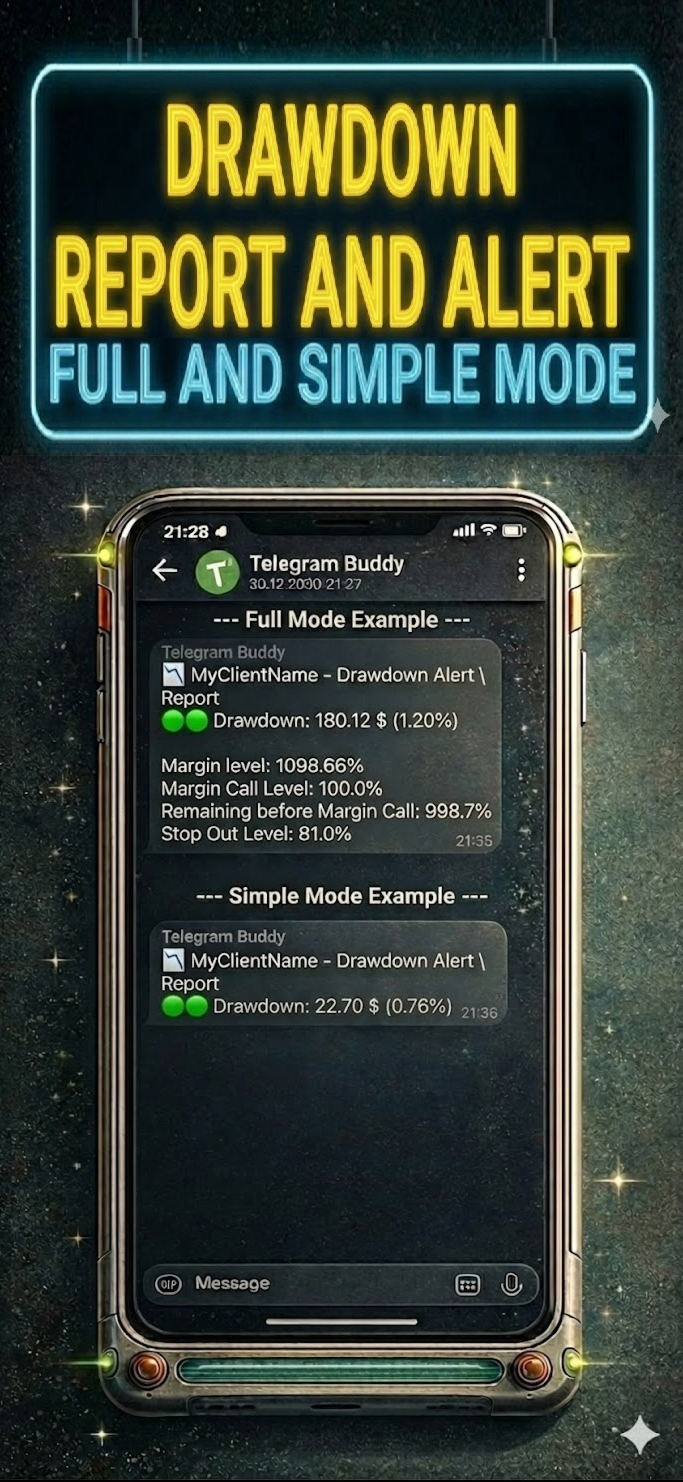
Are you worried about drawdown when you are away from your computer? Do you need to check your account balance frequently, but find it inconvenient to access the mobile MT5 terminal every time?
The Problem with Standard Reports: Most Telegram tools send huge blocks of text listing details of every single trade. Reading such messages on a smartphone is inconvenient, and over time, traders stop paying attention to them, risking missing critical changes in the account.
The Telegram Buddy Solution: Designed for modern traders, Telegram Buddy provides a reliable connection between your MetaTrader 5 terminal and your smartphone. Thanks to the "Simple Mode" feature, you get exactly the information you need — in a clean format. The utility filters out unnecessary data, providing only the facts for effective capital management.
Trade with confidence and easily control your account.
⚠️ Important: Operating Logic
Please Note: This utility is designed for macro-monitoring of the account status.
-
No Excessive Notifications: The bot does not send messages about every tick or order opening. Details like Ticket, Volume, or Open Price are excluded to save your attention.
-
Aggregate Balance Change: It monitors the account over a specified interval (e.g., every 5 minutes) and sends one summary message about the net profit or loss for that period.
-
Focus on Deposit: All notifications (Closed Deals, Drawdown, Reports) are strictly focused on the financial result and deposit safety.
🚀 Key Features
-
Customizable Reporting Detail ("Simple Mode"): Separate mode switches for "Simple" (shortest possible messages) or "Full" (messages with context) for each notification type: Drawdown, Closed Deals, and Reports.
-
Centralized Monitoring: Manage multiple MT5/MT4 terminals via one central bot. Use unique Account Names to instantly understand where the report came from.
-
Smart "Silent Mode": Mutes profit notifications during specified hours (e.g., at night), but if necessary, sends Drawdown notifications if the drawdown reaches a critical level. You will sleep soundly knowing the bot will wake you only in case of a real problem.
-
Group Work: Share notifications with partners and colleagues using the Multi-Chat ID feature.
-
Cent Account & Currency Support: Includes a "Balance Divisor" to convert Cent account values into standard units (e.g., dividing by 100) and allows you to set your own currency symbol.
-
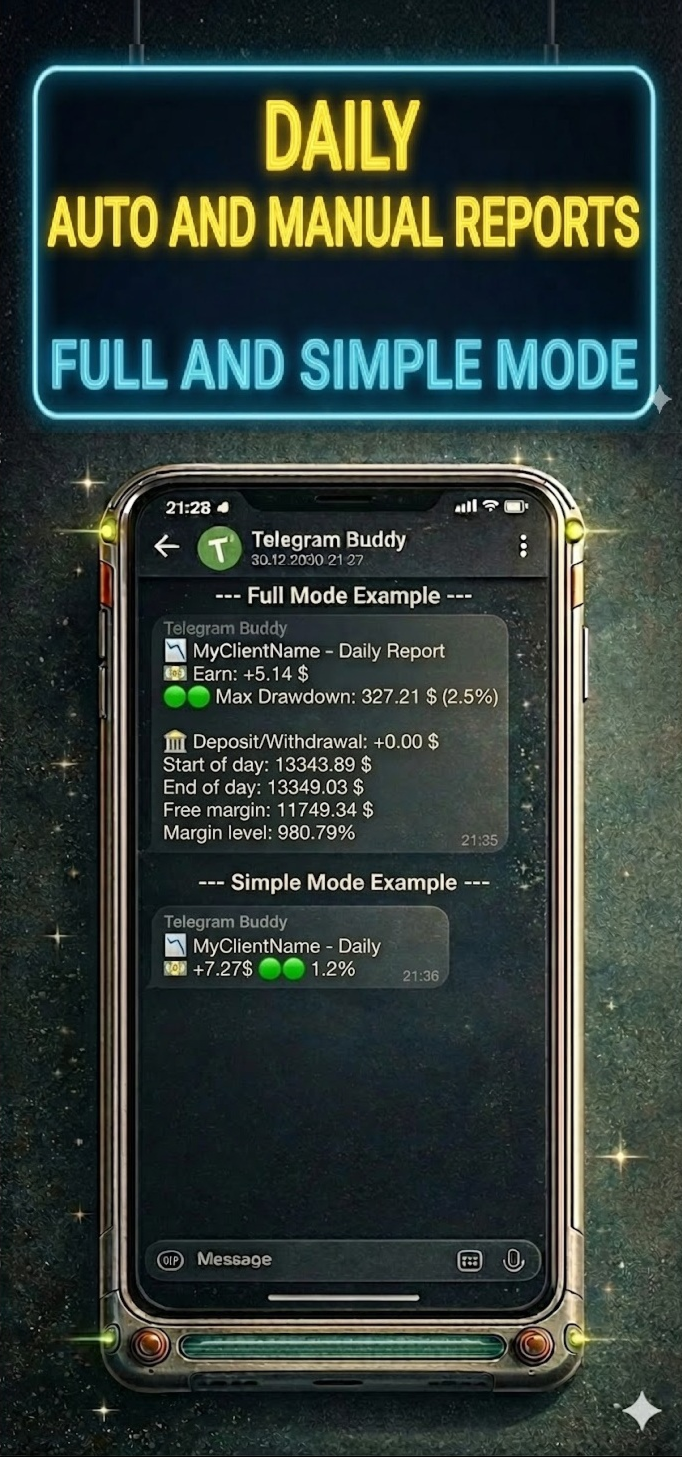
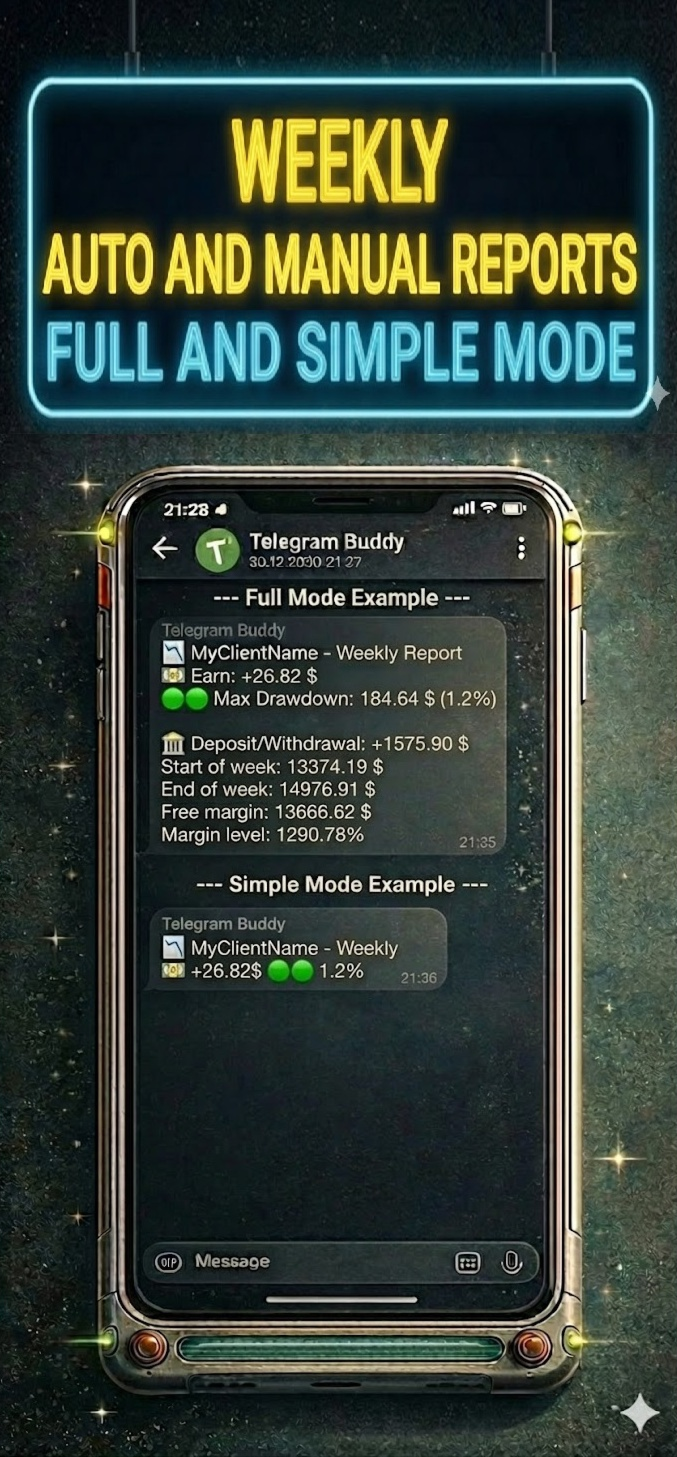
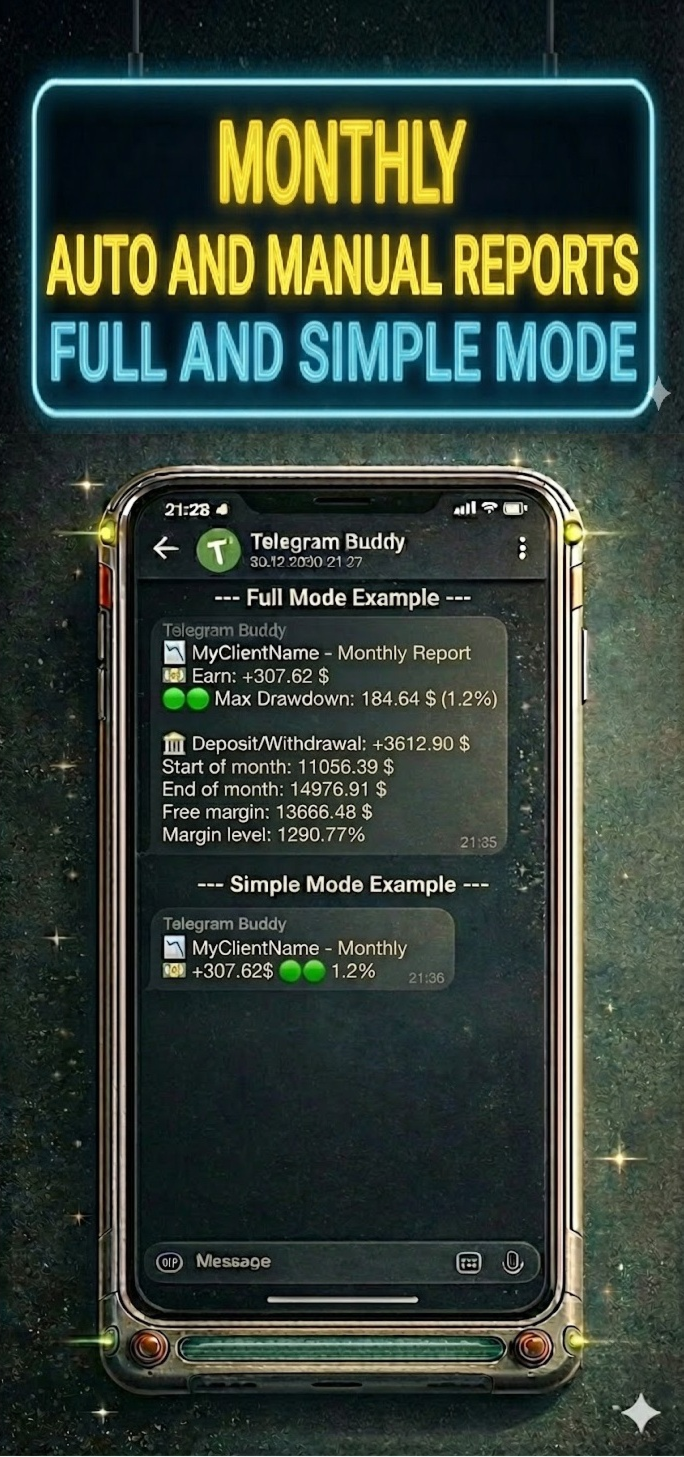
Modular Reporting System: Ability to separately enable/disable Daily, Weekly, and Monthly reports, and Trade reports. You can also disable reports on weekends (non-trading days).
🛠 Technical Advantages
Telegram Buddy is designed for high performance. It works on a timer (OnTimer), not on every tick:
-
Update Aggregation: Instead of multiple messages during high-frequency trading, the bot calculates the total balance change for the specified interval.
-
Adjustable Frequency: Set the check interval from 1 second for real-time updates to 3600 seconds (1 hour) for hourly summaries or longer periods.
-
Low Load: By avoiding calculations in the OnTick function, the bot creates significantly less load on your PC or VPS.
⚙️ Input Parameters Description
(Below are the parameter names exactly as they appear in the MT5 terminal)
1. 🤖 Telegram Connection & Identity
-
Telegram bot token: Paste your bot's API token here (obtained from @BotFather).
-
Bot/Account name (label in reports): Custom label for this account (e.g., "BrokerZXY"). It will appear in the header of every message.
-
true = process user commands, false = only auto reports:
-
true : Interactive mode. The bot responds to commands /start, /daily, /dd. (Enable this on only one terminal if using one bot for multiple accounts).
-
false : Broadcast mode. The bot sends notifications but ignores incoming messages.
-
-
Multichat IDs list: Comma-separated list of Chat IDs to receive notifications (e.g., 12345678,987654321 ). If using only for yourself — paste only your Chat ID.
2. 🎨 Message Styling (Visuals)
-
Simple mode: Drawdown alerts: true = compact notifications; false = detailed (with Margin Level and StopOut).
-
Simple mode: Closed deals: true = one line with profit summary; false = detailed with balance.
-
Simple mode: Daily/Weekly/Monthly reports: true = only Profit and Max Drawdown; false = full statistics.
3. 💰 Currency & Formatting
-
Balance divisor: Value divisor. Set to 100.0 for cent accounts to display standard values. Set to 1.0 for regular accounts.
-
Currency symbol: Currency symbol added to values (e.g., $, €, USD).
4. ⏱️ Monitoring Intervals
-
Interval for DD check (sec): How often (in seconds) the bot checks for drawdown changes.
-
Interval for Closed deals check (sec): How often (in seconds) the bot checks for new closed trades.
5. 🔔 Alerts Configuration
-
Enable drawdown alerts: On/Off automatic notifications when drawdown increases.
-
Enable closed trades alerts: On/Off notifications about balance changes.
6. 📅 Reporting Schedule
-
Weekend days: Select days considered weekends (to skip reports).
-
Enable daily report: Enable daily summaries.
-
Daily report time: Time to send the daily report (Local PC/VPS time).
-
Enable weekly report: Enable weekly summaries.
-
Weekly report day: Day of the week to send the report.
-
Enable monthly report: Enable monthly summaries (sent on the last business day of the month).
7. 🌙 Silent Mode
-
Silent mode type:
-
SILENT_NONE : Disabled.
-
SILENT_FULL : Full silence during specified hours.
-
SILENT_DRAWDOWN : Only drawdown notifications are received.
-
-
Silent mode start/end hour: Start and end time of silent mode (Local PC/VPS time).
8. 🛠️ Advanced
-
Use custom monthly period (manual mode): For manual testing or non-standard reporting periods.
9! New Remote Emergency Commands (Admin Only): For security reasons, remote terminal control commands have been added. These commands are executed only if your Telegram ID is whitelisted in the InpAdminChatIds parameter.
-
/shut! — Emergency Shutdown. Immediately terminates the MetaTrader terminal. Open positions remain active in the market. Use this to stop EAs quickly while keeping trades open.
-
/stopshut! — PANIC BUTTON (Close All & Shutdown). The bot attempts to close all open market positions and delete pending orders, then forces the terminal to close
10! New: Bypass Telegram Restrictions (Custom API Mirror) We have added a new InpTelegramApiUrl parameter to help users in regions where Telegram is blocked. Instead of dealing with complex proxy settings or buying a VPS, you can now route the bot's connection through a custom reverse proxy (such as a free Cloudflare Worker). Simply create your mirror, paste the URL into the bot's settings, and enjoy uninterrupted notifications directly in your terminal.
📥 Installation Guide
Step 1: Allow WebRequest in MT5 MetaTrader blocks external connections by default. You must allow access to Telegram.
-
Open MT5, go to Tools -> Options (Ctrl+O).
-
Go to the Expert Advisors tab.
-
Check "Allow WebRequest for listed URL".
-
Double-click "add new URL" and paste: https://api.telegram.org
-
Click OK.
Step 2: Get Bot Token
-
Open Telegram and search for @BotFather.
-
Send the command /newbot .
-
Create a name and username for the bot (must end in bot ).
-
BotFather will give you a Token. Copy and paste it into the Telegram bot token parameter in the advisor settings.
Step 3: Get Your Chat ID
-
Install Telegram Buddy on the chart.
-
Paste the Token obtained in the previous step into the settings. Save, launch the advisor; it will write the status "Online" and its parameters on the chart.
-
Ensure the advisor is running and send a message (e.g., /start ) to your bot in Telegram.
-
The bot will automatically reply with a message containing your Chat ID (e.g., Your chatID is: 123456789).
-
Copy this ID and paste it into the Multichat IDs list parameter.
-
Note: If you want to add other users, ask them to write to the bot. Then they must forward the received ID to you so you can add it to the settings.
-
Step 4: Personalization
-
Identity: Set a unique name in Bot/Account name to distinguish reports.
-
Intervals: Configure check frequency to suit your trading style.
-
Visuals: Use Simple mode settings to avoid cluttering the chat.
-
Schedule: Configure the necessary reports.
-
Silent Mode: Configure Silent mode hours to rest peacefully.