Telegram Buddy

Telegram Buddy – Professional Trade Reporting & Alerting Tool


Are you worried about drawdown when you are away from your computer? Do you need to check your account balance frequently, but find it inconvenient to access the mobile MT5 terminal every time?

The Problem with Standard Reports: Most Telegram tools send huge blocks of text listing details of every single trade. Reading such messages on a smartphone is inconvenient, and over time, traders stop paying attention to them, risking missing critical changes in the account.

The Telegram Buddy Solution: Designed for modern traders, Telegram Buddy provides a reliable connection between your MetaTrader 5 terminal and your smartphone. Thanks to the "Simple Mode" feature, you get exactly the information you need — in a clean format. The utility filters out unnecessary data, providing only the facts for effective capital management.

Trade with confidence and easily control your account.


⚠️ Important: Operating Logic

Please Note: This utility is designed for macro-monitoring of the account status.

  • No Excessive Notifications: The bot does not send messages about every tick or order opening. Details like Ticket, Volume, or Open Price are excluded to save your attention.

  • Aggregate Balance Change: It monitors the account over a specified interval (e.g., every 5 minutes) and sends one summary message about the net profit or loss for that period.

  • Focus on Deposit: All notifications (Closed Deals, Drawdown, Reports) are strictly focused on the financial result and deposit safety.


    🚀 Key Features

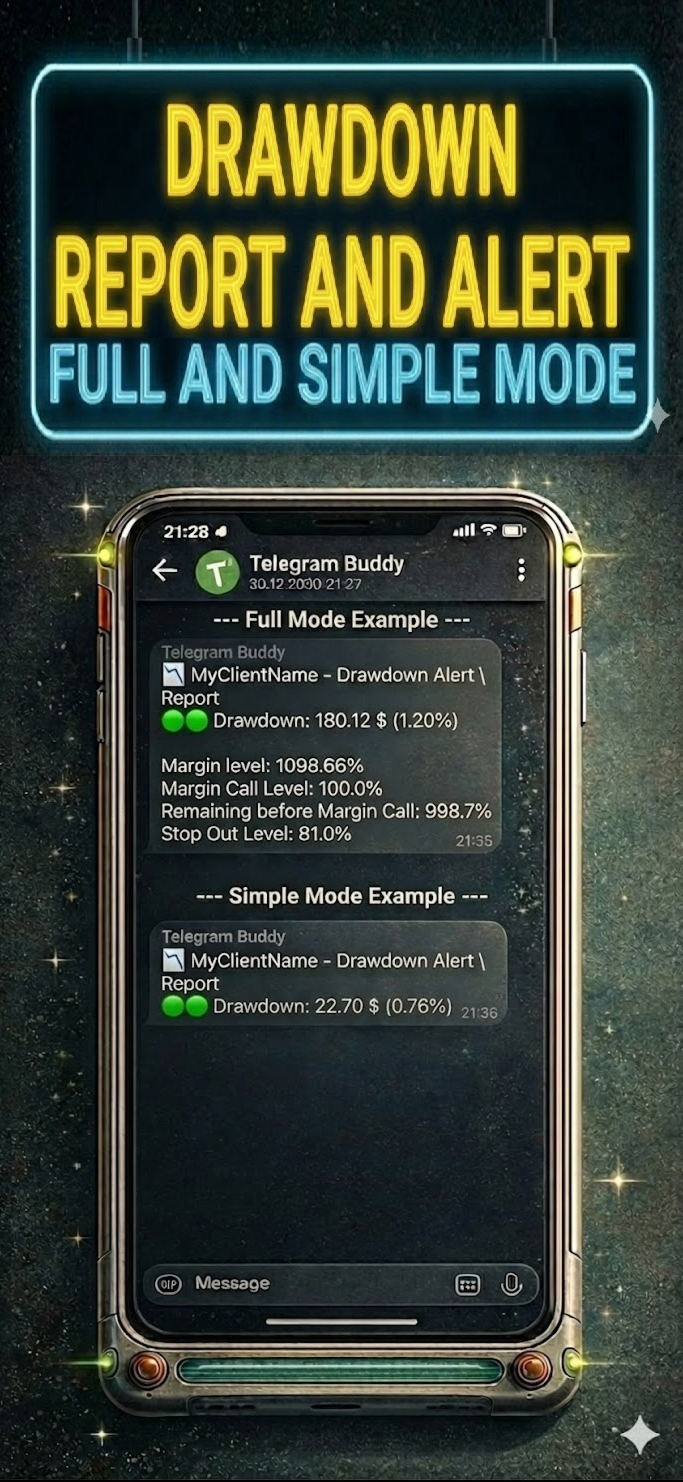
    • Customizable Reporting Detail ("Simple Mode"): Separate mode switches for "Simple" (shortest possible messages) or "Full" (messages with context) for each notification type: Drawdown, Closed Deals, and Reports.

    • Centralized Monitoring: Manage multiple MT5/MT4 terminals via one central bot. Use unique Account Names to instantly understand where the report came from.

    • Smart "Silent Mode": Mutes profit notifications during specified hours (e.g., at night), but if necessary, sends Drawdown notifications if the drawdown reaches a critical level. You will sleep soundly knowing the bot will wake you only in case of a real problem.

    • Group Work: Share notifications with partners and colleagues using the Multi-Chat ID feature.

    • Cent Account & Currency Support: Includes a "Balance Divisor" to convert Cent account values into standard units (e.g., dividing by 100) and allows you to set your own currency symbol.

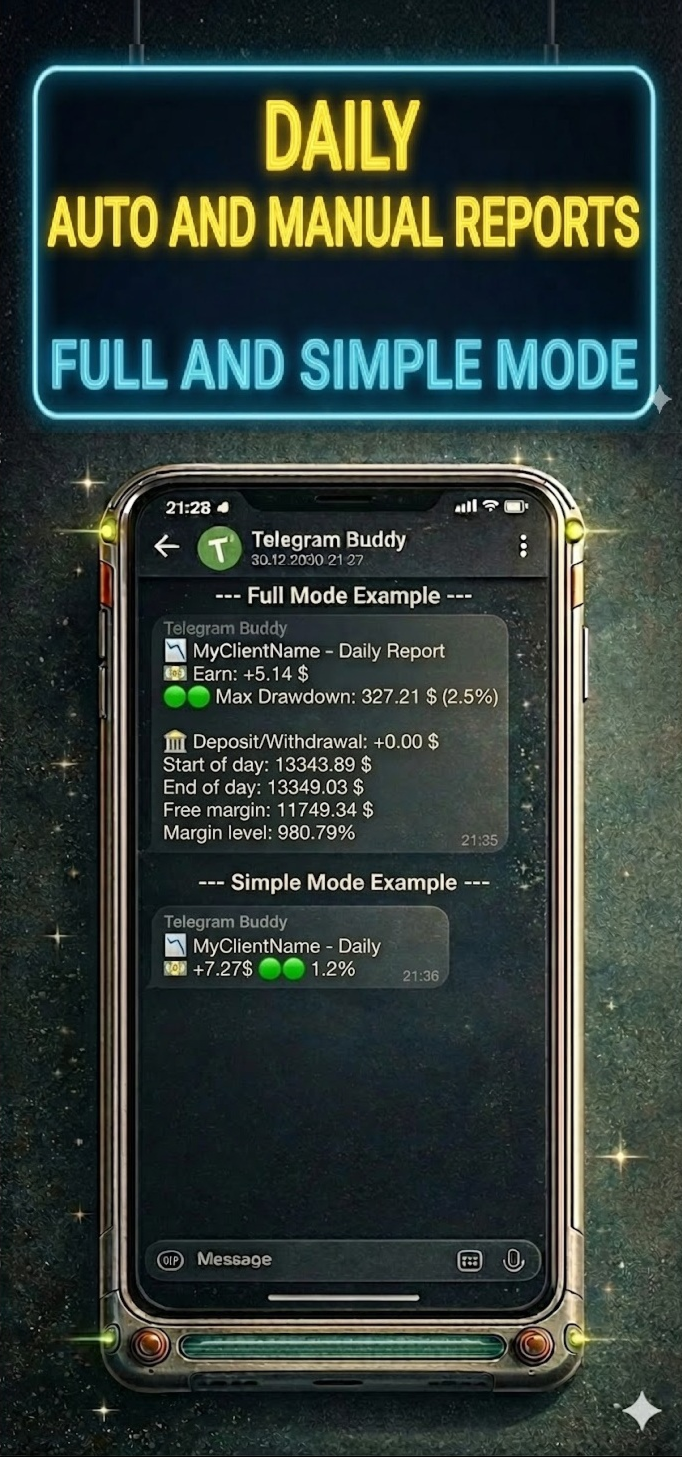
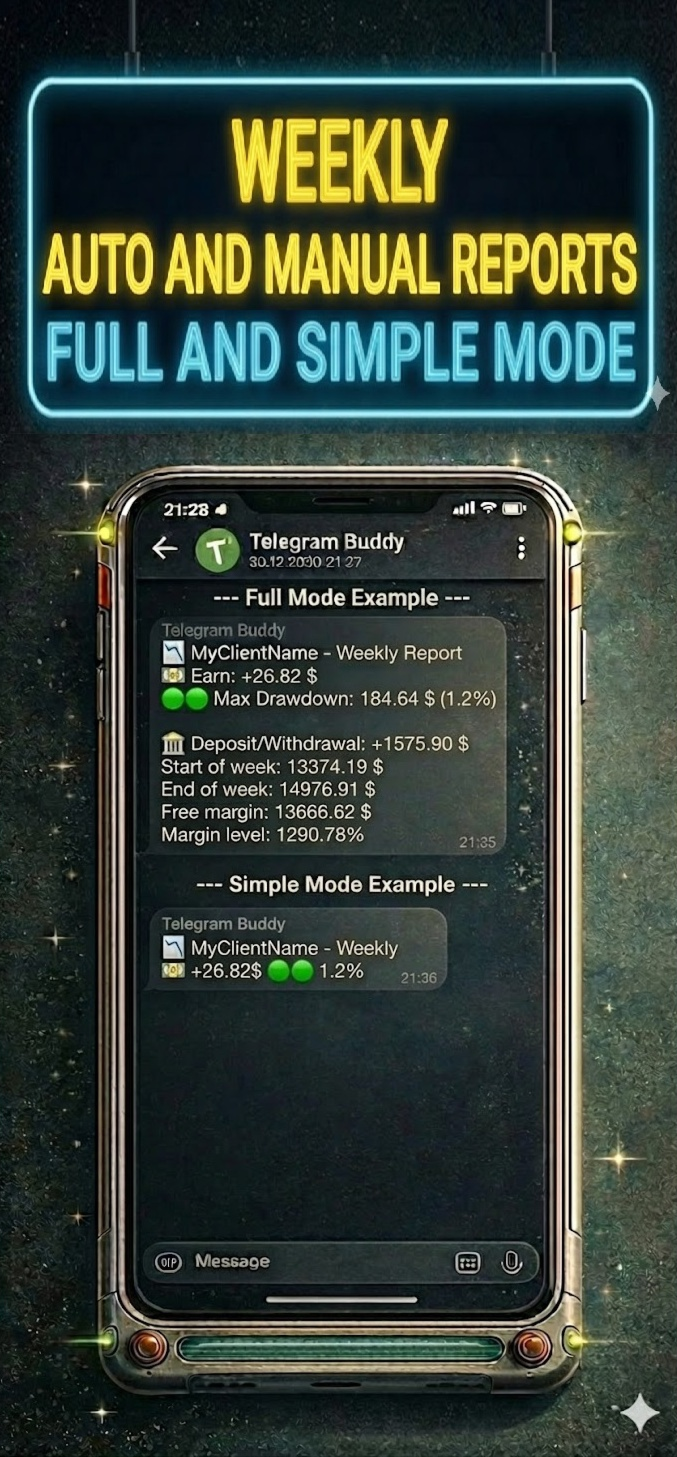
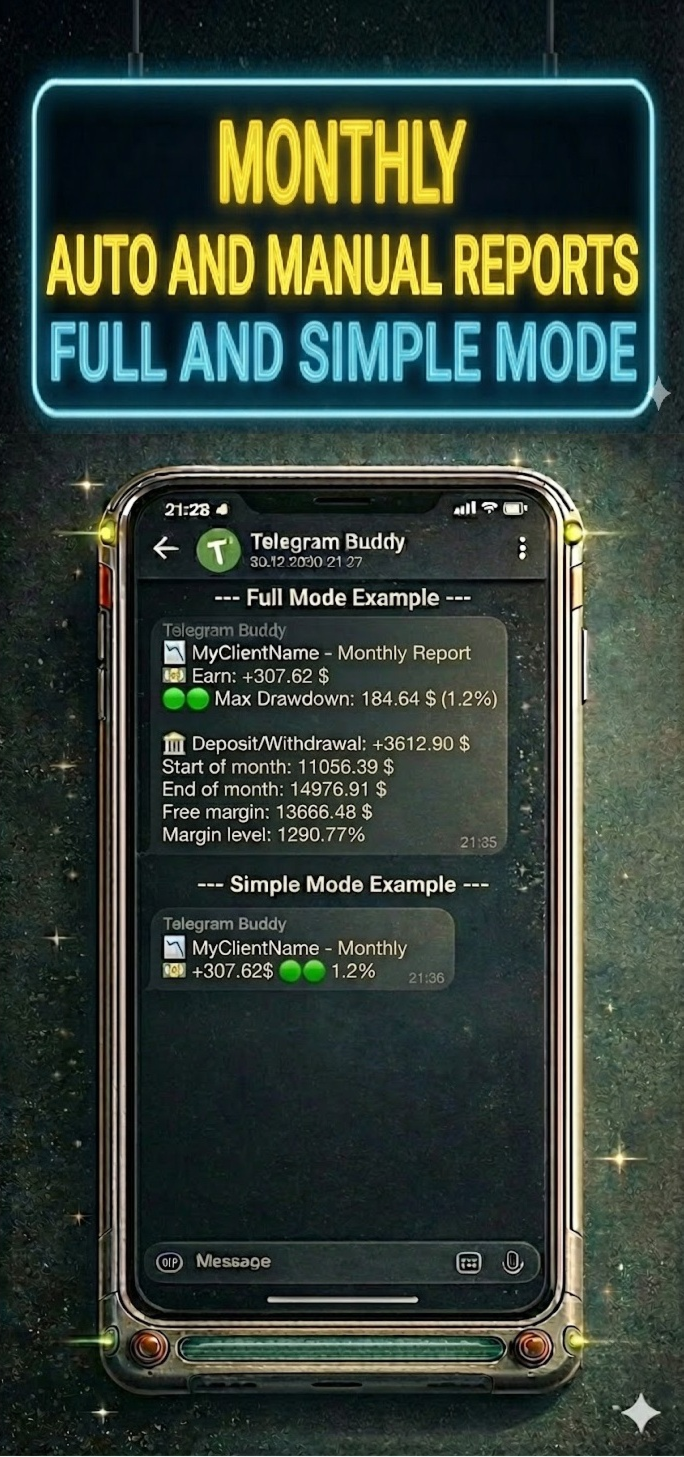
    • Modular Reporting System: Ability to separately enable/disable Daily, Weekly, and Monthly reports, and Trade reports. You can also disable reports on weekends (non-trading days).


      🛠 Technical Advantages

      Telegram Buddy is designed for high performance. It works on a timer (OnTimer), not on every tick:

      • Update Aggregation: Instead of multiple messages during high-frequency trading, the bot calculates the total balance change for the specified interval.

      • Adjustable Frequency: Set the check interval from 1 second for real-time updates to 3600 seconds (1 hour) for hourly summaries or longer periods.

      • Low Load: By avoiding calculations in the OnTick function, the bot creates significantly less load on your PC or VPS.


        ⚙️ Input Parameters Description

        (Below are the parameter names exactly as they appear in the MT5 terminal)

        1. 🤖 Telegram Connection & Identity

        • Telegram bot token: Paste your bot's API token here (obtained from @BotFather).

        • Bot/Account name (label in reports): Custom label for this account (e.g., "BrokerZXY"). It will appear in the header of every message.

        • true = process user commands, false = only auto reports:

          • true : Interactive mode. The bot responds to commands /start, /daily, /dd. (Enable this on only one terminal if using one bot for multiple accounts).

          • false : Broadcast mode. The bot sends notifications but ignores incoming messages.

        • Multichat IDs list: Comma-separated list of Chat IDs to receive notifications (e.g., 12345678,987654321 ). If using only for yourself — paste only your Chat ID.

          2. 🎨 Message Styling (Visuals)

          • Simple mode: Drawdown alerts: true = compact notifications; false = detailed (with Margin Level and StopOut).

          • Simple mode: Closed deals: true = one line with profit summary; false = detailed with balance.

          • Simple mode: Daily/Weekly/Monthly reports: true = only Profit and Max Drawdown; false = full statistics.

          3. 💰 Currency & Formatting

          • Balance divisor: Value divisor. Set to 100.0 for cent accounts to display standard values. Set to 1.0 for regular accounts.

          • Currency symbol: Currency symbol added to values (e.g., $, €, USD).

          4. ⏱️ Monitoring Intervals

          • Interval for DD check (sec): How often (in seconds) the bot checks for drawdown changes.

          • Interval for Closed deals check (sec): How often (in seconds) the bot checks for new closed trades.

          5. 🔔 Alerts Configuration

          • Enable drawdown alerts: On/Off automatic notifications when drawdown increases.

          • Enable closed trades alerts: On/Off notifications about balance changes.

          6. 📅 Reporting Schedule

          • Weekend days: Select days considered weekends (to skip reports).

          • Enable daily report: Enable daily summaries.

          • Daily report time: Time to send the daily report (Local PC/VPS time).

          • Enable weekly report: Enable weekly summaries.

          • Weekly report day: Day of the week to send the report.

          • Enable monthly report: Enable monthly summaries (sent on the last business day of the month).

          7. 🌙 Silent Mode

          • Silent mode type:

            • SILENT_NONE : Disabled.

            • SILENT_FULL : Full silence during specified hours.

            • SILENT_DRAWDOWN : Only drawdown notifications are received.

          • Silent mode start/end hour: Start and end time of silent mode (Local PC/VPS time).

          8. 🛠️ Advanced

          • Use custom monthly period (manual mode): For manual testing or non-standard reporting periods.


          9! New Remote Emergency Commands (Admin Only): For security reasons, remote terminal control commands have been added. These commands are executed only if your Telegram ID is whitelisted in the InpAdminChatIds parameter.

          • /shut! — Emergency Shutdown. Immediately terminates the MetaTrader terminal. Open positions remain active in the market. Use this to stop EAs quickly while keeping trades open.

          • /stopshut! — PANIC BUTTON (Close All & Shutdown). The bot attempts to close all open market positions and delete pending orders, then forces the terminal to close


          10! New: Bypass Telegram Restrictions (Custom API Mirror) We have added a new InpTelegramApiUrl parameter to help users in regions where Telegram is blocked. Instead of dealing with complex proxy settings or buying a VPS, you can now route the bot's connection through a custom reverse proxy (such as a free Cloudflare Worker). Simply create your mirror, paste the URL into the bot's settings, and enjoy uninterrupted notifications directly in your terminal.


            📥 Installation Guide

            Step 1: Allow WebRequest in MT5 MetaTrader blocks external connections by default. You must allow access to Telegram.

            1. Open MT5, go to Tools -> Options (Ctrl+O).

            2. Go to the Expert Advisors tab.

            3. Check "Allow WebRequest for listed URL".

            4. Double-click "add new URL" and paste: https://api.telegram.org

            5. Click OK.

            Step 2: Get Bot Token

            1. Open Telegram and search for @BotFather.

            2. Send the command /newbot .

            3. Create a name and username for the bot (must end in bot ).

            4. BotFather will give you a Token. Copy and paste it into the Telegram bot token parameter in the advisor settings.

            Step 3: Get Your Chat ID

            1. Install Telegram Buddy on the chart.

            2. Paste the Token obtained in the previous step into the settings. Save, launch the advisor; it will write the status "Online" and its parameters on the chart.

            3. Ensure the advisor is running and send a message (e.g., /start ) to your bot in Telegram.

            4. The bot will automatically reply with a message containing your Chat ID (e.g., Your chatID is: 123456789).

            5. Copy this ID and paste it into the Multichat IDs list parameter.

              • Note: If you want to add other users, ask them to write to the bot. Then they must forward the received ID to you so you can add it to the settings.

            Step 4: Personalization

            1. Identity: Set a unique name in Bot/Account name to distinguish reports.

            2. Intervals: Configure check frequency to suit your trading style.

            3. Visuals: Use Simple mode settings to avoid cluttering the chat.

            4. Schedule: Configure the necessary reports.

            5. Silent Mode: Configure Silent mode hours to rest peacefully.


              おすすめのプロダクト
              Martingale panel MT5
              Mohammadbagher Ramezan Akbari
              In this article, we would like to introduce the trade panel product with the Martingale panel. This panel is made in such a way that it can meet the needs of traders to a great extent. This trade panel actually consists of two trade panels at the same time, with the first one you can take positions with certain profit and loss limits, and with the second one, you can have positions with profit limits but without loss limits. When positions lose, a new position will be added based on the settings
              Axilgo PipPiper CoPilot
              Theory Y Technologies Pty Ltd
              5 (2)
              Axilgo Pip Piper CoPilot Elevate your trading game with the Axilgo Pip Piper CoPilot, the first in our revolutionary Pip Piper Series. This all-inclusive toolset is meticulously crafted for serious traders, focusing on key areas such as Risk Management, Trade Management, Prop Firm Rule Compliance, and Advanced Account Management . With CoPilot, you’re not just investing in a tool—you’re gaining a strategic partner in the intricate world of trading. Important Notice: To ensure you receive the fu
              FREE
              ️ Trade Manager oneclick  ( Reverse Trade,  Partial Close,  Breakeven, Close All Running Trade )   control – Smart Manual Trade Control for MT5 Trade Manager oneclick control is a powerful yet lightweight trade management utility built for manual traders who want precise control over their open positions — directly from the MT5 chart. This EA does not open or close trades automatically based on any strategy. It simply provides one-click management tools to handle your running trades efficient
              FREE
              Telegram2MT5 Signal Copier — TelegramのシグナルをMetaTrader 5で自動コピー Telegram2MT5 Signal Copierを使えば、Telegramで受け取ったあらゆるシグナルが、あなたのMetaTrader 5口座で即座に自動執行されます。 高速・信頼性・フルカスタマイズ対応。 Windows Bridge APP ファイルとチュートリアル を入手してください Bridgeファイルは、ローカルWebパネルをMT5 EAに接続するために必要です Windows 10 & Windows 11(64ビット)および Windows Server 2016以降に対応 Main Features 完全な互換性: 公開チャンネル・非公開チャンネルのどちらでも問題なく動作し、制限はありません。 瞬時の執行: ENTRY、STOP LOSS、最大5つのTAKE PROFITレベルをミリ秒単位で検出して発注します。(現時点ではペンディングオーダーを使用) カスタムパターン対応: コーディング不要で、Telegramチャンネルが使っているシグナルの
              Barak Mega EA
              Jorge Jovanny Hernandez Maldonado
              BARAK MEGA EA  is a fully automated trading Expert Advisor designed for traders who demand total control, strategic flexibility, and advanced risk management within a single system. This EA functions as a true strategy builder , allowing you to combine multiple technical indicators and custom rules to adapt to any market, asset, or timeframe. Unlike traditional robots with fixed logic, BARAK MEGA EA features a modular architecture where every component can be independently enabled, disabled, and
              FREE
              Correlation Matrix Pro - マルチ通貨ヘッジスキャナー 通貨ペア間の相関関係をリアルタイムで把握! 最大6つの通貨ペア間の統計的関係を同時に可視化する強力な分析ツールです。ポートフォリオ管理、リスク分散、ヘッジ戦略に最適です。 主な機能 - 対数リターンを使用したリアルタイムピアソン相関 - 最大6通貨ペアを同時監視 - 自動タイムフレーム検出 - 調整可能な遡及期間(5-200本) - ヘッジ機会の自動検出 - ミニマルで折りたたみ可能なパネルデザイン - 即座に解釈できるカラーコード付きマトリックス カラーコード 緑 (+0.70 〜 +1.00) = 強い正の相関 薄緑 (+0.50 〜 +0.69) = 中程度の正の相関 グレー (-0.49 〜 +0.49) = 弱い/相関なし オレンジ (-0.50 〜 -0.69) = 中程度の負の相関 赤 (-0.70 〜 -1.00) = 強い負の相関(ヘッジ) なぜ相関分析が重要? リスク管理 高相関ポジションによるリスクの二重化を回避。 ヘッジ戦略 効果的なヘッジのため、強い負の相関を持つペアを自動検出。
              FREE
              Position Size Tool – Smart Risk Management & Trade Execution Panel The Position Size Tool is a powerful and intuitive MT5 panel that simplifies your trading by combining position sizing , risk calculation , risk/reward visualization , and order placement —all in one place. ️ Clean & Functional Interface The tool features a compact, real-time panel with the following: Balance & Equity display Live Price tracking Customizable Risk % input Auto-calculated Lot Size based on SL and Risk Input for S
              FREE
              CC CopyCopy
              Luiz Eduardo Teodoro De Carvalho
              *** Free Version: Maximum Lot 0.10 *** CopyCopy: Smart Replication Manager for MT5 CopyCopy is the ultimate tool for those who want to replicate trades with complete autonomy. Many signals and EAs operate with minimum lots (0.01) that do not match your account size or your growth strategy. With CopyCopy, you turn this limitation into an opportunity, taking full control over volume and risk. The difference? You don't have to copy "all or nothing." You decide exactly where the orders come from.
              FREE
              This robot sends Telegram notifications based on the coloring rules of PLATINUM Candle indicator. Example message for selling assets: [SPX][M15] PLATINUM TO SELL 11:45. Example message for buying assets : [EURUSD][M15] PLATINUM TO BUY 11:45 AM. Before enable Telegram notifications  you need to create a Telegram bot, get the bot API Key and also get your personal Telegram chatId. It's not possible to send messages to groups or channels. You can only send messages to your user chatId. You should
              FREE
              Smart FVG Stats
              - Md Rashidul Hasan
              5 (1)
              The  Smart FVG Statistics Indicator  is a powerful MetaTrader 5 tool designed to automatically identify, track, and analyze Fair Value Gaps (FVGs) on your charts. Love it? Hate it? Let me know in a review! Feature requests and ideas for new tools are highly appreciated. :) Try "The AUDCAD Trader": https://www.mql5.com/en/market/product/151841 Key Features Advanced  Fair Value Gap  Detection Automatic Identification : Automatically scans for both bullish and bearish FVGs across specified histo
              FREE
              The Stop Loss Manger - SL Mange With the Stop Loss Manager you can finally sleep peacefully while it effectively manages your risk in stock market trading. Simply set your individual stop loss limits and let the manager trade for you. Never worry about losses again - the Stop Loss Manager takes care of it for you! Get the ultimate support for your trading now and maximize your profits with ease. Join the community of successful traders who swear by Stop Loss Manager today. Function overview: 1.
              MultiTimeframe Info Feed (MIF) Indicator Description: MultiTimeframe Info Feed (MIF) is a smart MQL5 indicator that displays a dynamic, real-time info panel directly on your chart, offering powerful insight into current market conditions. Key features include: Real-time display of Open, High, Low, Close, and live Tick price Tick Rate (ticks per second) for assessing market activity Auto-calculated Entry Price on new candle formation Signal direction detection (BUY / SELL) Price action pattern re
              FREE
              Product Name: Smart Switch Dashboard STOP WASTING SECONDS. SECONDS COST MONEY. Are you losing trades because you're fumbling through the Market Watch? Is your workspace messy and slowing you down? In trading, Speed is everything. If you aren't organized, you are losing money to traders who are. Smart Switch Dashboard is not just a tool—it is your COMMAND CENTER . Designed for serious Scalpers and Day Traders who demand Speed, Precision, and Zero Lag. DOMINATE YOUR WORKFLOW 1. ULTRA-FAST SY
              About indicator > The indicator is a function based on one value (open/high prices up to now) and then it is a mathematical representation of the whole function that is totally independent from any else values. So, if you ask yourself will the future be as it is on the graph... I can tell you - as it was the same as the trading function up to the moment "now"... In conclusion, the point of the indicator is  to try to show the future of the trading function into eternity. The graphic is sometime
              概要 このインジケーターは、クラシックな ドンチャンチャネル を強化したバージョンで、実践的なトレード機能を追加しています。 標準の3本線(上限、下限、中央線)に加え、 ブレイクアウト を検出し、チャート上に矢印で視覚的に表示します。また、チャートを見やすくするために、 現在のトレンド方向と逆側のラインのみを表示 します。 インジケーターの機能: 視覚的シグナル :ブレイクアウト時にカラフルな矢印を表示 自動通知 :ポップアップ、プッシュ通知、Eメール RSIフィルター :市場の相対的な強弱に基づいてシグナルを検証 カスタマイズ可能 :色、ラインの太さ、矢印コード、RSI閾値など 動作原理 ドンチャンチャネルは次のように計算します: 上限線 :直近N本のクローズ済みローソク足の最高値 下限線 :直近N本のクローズ済みローソク足の最安値 中央線 :最高値と最安値の平均値 上方ブレイクアウト は終値が上限線を超えたときに発生し、 下方ブレイクアウト は終値が下限線を下回ったときに発生します。 インジケーターは以下を行います: 3本のドンチャンラインを描画 方向転換後の最初のブレイクアウト
              FREE
              実際の資金を危険にさらす前にProp Firmの課題を習得しましょう!   私たちの高度なシミュレーターは、本物のProp Firm取引環境を再現し、自信を持って練習し、戦略を立て、課題を通過するのに役立ちます。当シミュレーターを使用すると、デモまたはライブアカウントを使用してあらゆるProp Firmの課題をシミュレートでき、手動取引戦略とEAを介した自動取引の両方をサポートし、カスタマイズされた期間のパーソナライズされた課題を作成し、一貫した収益性に必要な規律を開発するために自分自身に挑戦できます。 FTMO 10kおよび100K課題セットファイル:   主要なすべてのProp Firmのセットファイルと専用サポートが利用可能 - お問い合わせください! 先着10名様に30%オフ。 主な機能 リアルタイム課題監視 ライブ統計ダッシュボード - 残高、純資産、P&L、ドローダウンのリアルタイム追跡 プロフェッショナル指標 - 確定P&Lと未確定P&L、勝率、取引分析 手動/自動取引サポート: 手動取引戦略とエキスパートアドバイザーによる自動取引の両方 完全なProp Firmルー
              この情報インジケーターは、アカウントの現在の状況を常に把握したい人にとって役立ちます。 VERSION MT 4 -   More useful indicators このインジケーターには、ポイント、パーセンテージ、通貨での利益、現在のペアのスプレッド、現在の時間枠でバーが閉じるまでの時間などのデータが表示されます。 チャート上に情報線を配置するには、いくつかのオプションがあります。 価格の右側 (価格の後ろにあります)。 コメントとして (グラフの左上隅に); 画面の選択した隅。 情報区切り記号を選択することもできます。 | / \ # このインジケーターは使いやすく、非常に有益です。設定で不要な情報項目を無効にすることも可能です。 設定 外観の種類     - 情報行の表示タイプ。次の 3 つのオプションがあります。 価格に従ってください     - 価格に従う。 コメントとして     - コメントとして; 画面の選択した隅に     - 画面の選択した隅にあります。 添付用グラフコーナー     - 表示タイプを選択した場合 画面の選択されたコーナーでは、この項目を使用して
              FREE
              Equitypanel
              Timo Mario Hoffmann
              5 (1)
              Equity Panel for MT5 Equity Panel is a free MT5 indicator that gives you a fast and convenient live overview of your account directly from the chart. Monitor balance, equity, floating P/L, drawdown, daily performance, margin data, and warning levels in one compact dashboard. Built for traders who want better control, faster risk awareness, and clearer account monitoring in live market conditions. Equity Panel is a lightweight and practical account monitoring indicator for MetaTrader 5 that helps
              FREE
              Bohemia Gold MT5
              Vladislav Taska
              4.75 (4)
              Bohemia Gold MT5 is  Trend & Volatility EA trading system designed specifically for Gold (XAUUSD) . It combines higher-timeframe trend filtering , trend detection , volatility-based SL management , and advanced trade management to adapt market conditions. It uses style logic focused on trend strength, volatility, and capital protection. NOTE:   Based on backtests, I found better trading results with the following setup: D1/H4/H2 (Trend/ADX/ATR & trade). The SET file can be downloaded here … bohe
              FREE
              この小さなツールは、チャート上で線をドラッグするだけでリスク管理を定義するのに役立ちます。アカウント%または固定金額に基づいて計算された実際のロットサイズがラインで直接表示されます。 キーボードの「t」キーを押してラインをアクティブにし、ラインをストップロスポイントまでドラッグするだけです。それでおしまい。 設定では、線とテキストの色と幅、行と右側のテキストのスペースを定義でき、リスクを口座または固定金額のパーセントで設定できます。 ご質問やご希望がございましたら、お気軽にお問い合わせください。 この小さなツールは、チャート上で線をドラッグするだけでリスク管理を定義するのに役立ちます。アカウント%または固定金額に基づいて計算された実際のロットサイズがラインで直接表示されます。 キーボードの「t」キーを押してラインをアクティブにし、ラインをストップロスポイントまでドラッグするだけです。それでおしまい。 設定では、線とテキストの色と幅、行と右側のテキストのスペースを定義でき、リスクを口座または固定金額のパーセントで設定できます。 ご質問やご希望がございましたら、お気軽にお問
              FREE
              Trade With Price is a powerful and user-friendly MetaTrader 5 Expert Advisor designed to simplify and accelerate your trading execution. This EA provides a smart one-click trading panel that allows traders to instantly place BUY, SELL, and pending orders directly at the current market price—eliminating the need to calculate distances in pips. Key Features One-click BUY & SELL execution Place pending orders based on market price instead of pips Clean and intuitive trading panel interface
              FREE
              SignalForge – MT5究極のシグナルコピー&トレード管理ツール 1つのEA。すべてのシグナルソース。完全なトレード管理。プロップファーム対応。バックテスター内蔵。9言語対応。ローソク足確認エントリー。 ボーナス:MT4トレードコピーEA無料!購入後にメッセージを送信。MT5↔MT5、MT4↔MT4、MT4→MT5、MT5→MT4対応。 ボーナス:無料TradingView/Webhookブリッジスクリプト(コメント欄)。 SignalForgeはMetaTrader 5で最も完全なシグナルコピー&トレード管理スイートです。Discord、Telegram、ファイルからシグナルをコピー。ブレイクイーブン、トレーリングストップ、アドオン、ニュースフィルターでトレードを管理。 v2.7の新機能 ローソク足確認モード — 盲目的にエントリーしない!EAはシグナルレベルの上
              STAMINA HUD – Advanced Market & Trend Dashboard (MT5) STAMINA HUD   is a professional   market information panel   designed for traders who want   clarity, speed, and control   directly on the chart. It provides a   clean heads-up display (HUD)   with essential market data and   multi-timeframe trend direction , without cluttering the chart or generating trading signals. What STAMINA HUD Shows   Current Price   Spread (in real pips)   Today High–Low range (pips)   Average D
              FREE
              Signalator Lot Size Evaluator MT5 Overview Signalator Lot Size Evaluator MT5 is a free local MetaTrader 5 utility for manual traders who want to estimate position size before placing a trade. It calculates a suggested lot size from the selected symbol, BUY or SELL direction, planned entry price, stop loss, risk percentage, account size and broker symbol settings. The workflow is simple: enter the trade setup, define the risk and check the suggested lot size before opening the trade manually. Pa
              FREE
              Overview Mirror Signals Service EA (Text only)   is a powerful monitoring Expert Advisor that automatically sends   real-time Telegram notifications   for all important trade events on your MetaTrader 5 account. It is engineered specifically for   signal providers ,   trade-copier operators ,   auditors ,   educators , and   professional trading services   that require immediate, detailed, and reliable reporting. Everything from   entries, exits, SL/TP changes, comment changes, trailing sto
              1. 注文を 12 個のマスター アカウントから 100 個のスレーブ アカウントにコピーします。 スレーブ アカウントの数は 12 から 100 までカスタマイズできます。 2.MT4からMT4、MT4からMT5、MT5からMT4、MT5からMT5をサポートします。 3. EURUSD、EURUSDm、EURUSDk など、さまざまなプラットフォームでの取引種類のサフィックスを識別します。 4. カスタム通貨マッチング (XAUUSD=GOLD など)。 5. すべての取引をコピーすることも、買い、売り、決済命令のみをコピーすることもできます 6. ストッププロフィットとストップロスをコピーするかどうかを選択できます 7. マスター口座が買い、スレーブ口座が売り、またはその逆など、逆にコピーできます。 マスター口座がポジションを決済すると、同じ方向にコピーされたか逆にコピーされたかに関係なく、スレーブ口座も同時にポジションを決済します。 8. スレーブ口座が閉鎖されるなどの事故が発生した場合、マスター口座には清算シグナルがありますが、スレーブ口座はそれを時間内にコピーしません。 ス
              ZumikoFX Trading Stats - Professional Account Dashboard Overview ZumikoFX Trading Stats is a comprehensive, real-time account monitoring dashboard designed for serious traders who need complete visibility of their trading performance. This indicator displays all crucial trading statistics in an elegant, easy-to-read panel positioned in the top-right corner of your chart. Key Features Complete Account Monitoring Balance & Equity - Real-time account status with current balance and equity includ
              FREE
              FRATO Smart GEXで、トレーディングを機関投資家レベルへと引き上げましょう。これは、移動平均線や遅行オシレーターに基づく単なるテクニカル指標ではありません。リアルタイムのGEX(ガンマエクスポージャー)と建玉(OI)分析を通して、主要マーケットメーカーのポジションを読み取る定量分析ツールです。 大口投資家が価格を押し上げているポイントを把握し、一般的なローソク足チャートでは見えないサポートラインとレジスタンスラインを特定できます。 主な機能: リアルタイムGEX分析:コールウォール、プットウォール、ガンマフリップレベルを視覚化し、価格の真の磁石または障壁として機能します。 0DTEモジュール:当日満期オプション(0DTE)に特化しており、日中のボラティリティが高いデイトレーダーに最適です。 ディーラーセンチメント:マーケットメーカーがロングかショートかを把握し、加速的な動き(ガンマスクイーズ)を予測できます。 プレミアムミニマリストダッシュボード:画面解像度に合わせて自動的に調整される、洗練されたフローティングダッシュボード。ライトテーマとダークテーマを
              この小さなツールを使用すると、時間カウンターを分単位で定義できます あなたが設定した分数に応じてポジションをクローズするため。 たとえば、30分に設定した場合、ツールはオープンから30分後に各オープンポジションを閉じます。 設定 アクティブ:ツールをアクティブにして、定義された分数後にポジションを閉じるために使用します。 管理:ツールで管理されるシンボルで選択します。 アカウントのすべてのオープンポジションにシステムを適用する場合は、[ALL CURENCY]を選択します 「この通貨のみ」を選択すると、現在の通貨のみで一時的にポジションがクローズされます。 MINUTE DURATION TRADES:取引期間の分数を選択します。 タイムゾーン: タイムゾーンを定義します。 もしあなたが
              FREE
              This Tradepanel is an Utility for Traders Who want ot use Basic MoneyManagement for Calculation of Lotsize  I have created the basic edition only to give an Overview with Limited Functionality Full Features are available with  Auto TradePanel  Pro. (This is Only Because it can not be Tested in Strategy Tester ).  Complete Description is available at  "Auto TradePanel Pro".  in This Version Basic Functionality ( Calculation of Lotsize ) open /close Positions is working in the same way as in Pro
              FREE
              このプロダクトを購入した人は以下も購入しています
              Trade Assistant MT5
              Evgeniy Kravchenko
              4.42 (211)
              取引 ごとのリスクの 計算、新規注文 の 簡単 な 設置、部分的 な 決済機能 を 持 つ 注文管理、 7 種類 のトレーリングストップなど 、便利 な 機能 を 備 えています 。 追加の資料と説明書 インストール手順   -   アプリケーションの手順   -   デモアカウント用アプリケーションの試用版 ライン機能 チャート上にオープニングライン、ストップロス、テイクプロフィットを表示します。この機能により、新規注文を簡単に設定することができ、注文を出す前にその特徴を確認することができます。   リスク計算 リスク計算機能は、設定されたリスクとストップロス注文のサイズを考慮して、新規注文のボリュームを計算します。ストップロスの大きさを自由に設定できると同時に、設定したリスクを守ることができます。 Lot calc ボタン - リスク 計算 を 有効 / 無効 にします 。 Risk フィールドでは 、必要 なリスクの 値 を 0 から 100 までのパーセンテージまたは 預金通貨 で 設定 します 。 設定」 タブで 、 リスク 計算 の 種類 を 選択 します :「 $ 通
              Trade Manager EAへようこそ。これは、取引をより直感的、正確、そして効率的にするために設計された究極の リスク管理ツール です。これは単なるオーダー実行ツールではなく、包括的な取引計画、ポジション管理、リスク管理のためのソリューションです。初心者から上級者、迅速な実行を必要とするスキャルパーまで、Trade Manager EAはあらゆるニーズに対応し、為替、指数、商品、暗号通貨などさまざまな市場で柔軟に対応します。 Trade Manager EAを使用すると、複雑な計算が過去のものになります。市場を分析し、エントリーポイント、ストップロス、テイクプロフィットのレベルをチャート上のラインでマークし、リスクを設定するだけで、Trade Managerが最適なポジションサイズを即座に計算し、SLとTPをピップ、ポイント、口座通貨でリアルタイムに表示します。すべての取引が簡単かつ効果的に管理されます。 主な機能: ポジションサイズ計算機 :定義されたリスクに基づいて取引サイズを瞬時に決定します。 簡単な取引計画 :エントリー、ストップロス、テイクプロフィットを設定するためのド
              Quant AI Agents is NOT AN Expert Advisor. Quant AI Agents   is a   multi-agent AI trading framework   that turns natural-language strategy prompts into live.  WANT THE SAME RESULTS AS MY LIVE SIGNAL?   Use the exact same brokers I do:   IC MARKETS , IC TRADING   .  Unlike the centralized stock market, Forex has no single, unified price feed.  Every broker sources liquidity from different providers, creating unique data streams. Other brokers can only achieve trading performance equivalent to 60
              TradePanel MT5
              Alfiya Fazylova
              4.87 (155)
              Trade Panelは多機能なトレーディングアシスタントです。アプリには手動取引用の50以上のトレーディング機能が搭載されており、ほとんどの取引作業を自動化することができます。 購入前に、デモアカウントでアプリのデモ版をテストすることができます。デモアカウント用のアプリの試用版をダウンロードするには、次のリンクをご利用ください: https://www.mql5.com/en/blogs/post/750865 。 完全な手順 こちら 。 取引。 ワンクリックで取引操作を行うことができます: リスクを自動計算して指値注文やポジションを開く。 複数の注文やポジションをワンクリックで開く。 注文のグリッドを開く。 保留中の注文やポジションをグループごとに閉じる。 ポジションの方向を反転(Buyを閉じてSellを開く、またはSellを閉じてBuyを開く)。 ポジションをブロックする(不足している量のポジションを開くことでBuyとSellのポジション量を等しくする)。 すべてのポジションを部分的にワンクリックで閉じる。 すべてのポジションの利食い(Take Profit)および損切り(Sto
              ベータリリース Telegram to MT5 Signal Trader はまもなく正式なアルファ版をリリースします。いくつかの機能はまだ開発中で、小さな不具合に遭遇する可能性があります。問題が発生した場合はぜひご報告ください。皆さまのフィードバックがソフトウェア改善に役立ちます。 Telegram to MT5 Signal Trader は、 Telegram のチャンネルやグループからの取引シグナルを自動的に MetaTrader 5 にコピーする強力なツールです。 パブリックおよびプライベートの両方のチャネルに対応し、複数のシグナル提供元を複数のMT5口座に接続可能です。ソフトウェアは高速で安定し、すべての取引を細かく制御できます。 インターフェースは直感的で、ダッシュボードとチャートは見やすく設計されており、リアルタイムで動作状況をモニターできます。 必要環境 MQL の制限により、EA は Telegram と通信するためのデスクトップアプリが必要です。 インストーラーは公式の インストールガイド にあります。 主な機能 マルチプロバイダー: 複数の Telegram
              Farmed Hedge Yield Farming | All Markets (Manual - Hybrid - Semi/Automated EA) MULTI-ASSET SUPPORT Trade any asset available on your broker - Forex: Major, Minor, Exotic pairs - Crypto: BTC, ETH, XRP, SOL, BNB - Stocks: Apple, Tesla, Amazon, Google, etc. - Commodities: Gold, Silver, Oil, Gas - Indices: US30, NAS100, SPX500, DAX40 - Any CFD your broker offers VERIFIED TRADING RESULTS - Farmed Hedge Yield Axi Copy:  https://www.mql5.com/en/signals/2356376 - Farmed Hedge Yield Exn Copy:   https:/
              YuClusters
              Yury Kulikov
              4.93 (43)
              Attention: You can view the program operation in the free version  YuClusters DEMO .  YuClusters is a professional market analysis system. The trader has unique opportunities to analyze the flow of orders, trade volumes, price movements using various charts, profiles, indicators, and graphical objects. YuClusters operates on data based on Time&Sales or ticks information, depending on what is available in the quotes of a financial instrument. YuClusters allows you to build graphs by combining da
              Power Candles Strategy Scanner - 自動最適化型マルチシンボル設定ファインダー パワーキャンドル・ストラテジー・スキャナーは 、パワーキャンドル・インジケーターを駆動するのと全く同じ自己最適化エンジンを、マーケットウォッチに登録されているすべての銘柄に対して並行して実行します。1つのパネルで、現在統計的に取引可能な銘柄、各銘柄で勝率の高い戦略、最適なストップロス/テイクプロフィットの組み合わせが表示され、新たなシグナルが発生した瞬間に通知が届きます。 このツールは、Stein Investmentsのエコシステムの一部です。  18種類以上のツールをすべて閲覧し、AIを活用したセットアップの推奨を受け取り、  https://stein.investments でコミュニティに参加しましょう 市場動向を網羅。銘柄ごとに3,000件以上の自動最適化。2種類のアラート。ワンクリックでチャートを切り替えて即座にアクション。 なぜこれが必要なのか 多くのマルチ銘柄スキャナーは、 価格の動き (ボラティリティ、変動率、銘柄ごとのRSI)を表示するだけです。それ
              The product will copy all telegram signal to MT5 ( which you are member) , also it can work as remote copier.  Easy to set up, copy order instant, can work with almost signal formats, image signal,  s upport to translate other language to English Work with all type of channel or group, even channel have "Restrict Saving Content", work with  multi channel, multi MT5 Work as remote copier: with signal have ticket number, it will copy exactly via ticket number. Support to backtest signal. How to s
              Custom Alerts AIO:マルチマーケット監視を一括で実現 — 設定不要ですぐに使えるインテリジェントツール 概要 Custom Alerts AIO は、追加のインジケーター設定が不要で、インストール後すぐに利用できる高機能マーケットスキャナーです。FX Power、FX Volume、FX Dynamic、FX Levels、IX Power を内部にすべて統合し、主要なすべての資産クラス(為替、金属、指数、暗号資産)を一括監視できます。MetaTrader の仕様により、株式は個別のシンボルとして追加可能ですが、一般的には利用頻度は低めです。 1. なぜ Custom Alerts AIO を選ぶべきか 追加ライセンス不要 • 必要なすべての Stein Investments インジケーターが内蔵されており、すぐに使用可能です。 • チャートに表示されるグラフィックは省略されており、アラート生成に特化した構成です。 市場を広範囲にカバー • 為替、金属、暗号資産、株価指数に対応(株式は手動追加可能)。 • シンボル名を入力する必要はなく、プロパティで資産クラス
              EA を買う前に、本当に耐えられるのか、それともバックテストでたまたま良く見えただけなのかを確認してください。 ほとんどのロボットは、見栄えのするバックテストと一緒に売られています。 右肩上がりのカーブ。 良い Profit Factor。 ほとんど疑いのない見た目。 それでも、その多くの EA は、市場がその履歴どおりに動かなくなった瞬間に崩れ始めます。 なぜでしょうか。 それは、バックテストが証明するのは一つだけだからです。 その戦略が、ある特定の価格の流れでは機能したということです。 別の流れでも通用することは証明しません。 頑健であることも証明しません。 もちろん、その EA があなたのお金に値することも証明しません。 なぜなら、あなたが EA を買うのは過去のきれいなカーブを眺めるためではないからです。 変化する市場で使うために買うのです。 AntiOverfit PRO がすること AntiOverfit PRO は、MetaTrader 5 の Expert Advisor が本当にしっかりしているのか、それとも特定の過去データにたまたまうまくはまっているだけなのかを確
              Ultimate Extractor - Professional Trading Analytics for MT5 *****this is the local HTML version of Ultimate Extractor. !!!!!it is not compatible with Cloud!!!! For the online version please reach out to me directly****** Ultimate Extractor transforms your MetaTrader 5 trading history into actionable insights with comprehensive analytics, interactive charts, and real-time performance tracking. What It Does Automatically analyzes your MT5 trading history across all Expert Advisors and generates
              Footprint Chart Pro — Professional OrderFlow EA for MetaTrader 5 Version 6.34 | Professional tool for real traders | Institutional-Grade Visualization DEMO USERS - PLEASE SELECT EVERY TICK / REAL TICK WHEN TESTING AND YOU HAVE DOWNLOADED HISTORICAL DATA. IF YOU SEE A WAITING SCREEN AND IT IS NOT DOWNLOADING, IT MEANS YOU HAVE LOW HISTORICAL DATA. TRY 1 MIN AND 5 MIN FIRST ON 1 DAY DATA. ONE DAY DATA SHOULD BE THE NEWEST AND MOST CURRENT DATE. PLEASE WAIT UNTIL THE MARKET HAS ROLLED OVER PERIOD.
              Timeless Charts
              Samuel Manoel De Souza
              5 (5)
              Timeless Charts is an all-in-one trading utility for professional traders. It combines custom chart types such as Seconds Charts and Renko with advanced order flow analysis using Footprints , Clusters , Volume Profiles , VWAP studies, and anchored analysis tools for deeper market insight. Trading and position management are handled directly from the chart through an integrated trade management panel , while Market Replay and Virtual Accounts provide environments for practicing trading skills and
              これは視覚的な取引パネルであり、取引を簡単に配置および管理し、人為的エラーを回避し、取引活動を強化するのに役立ちます。使いやすい視覚的なインターフェースと、健全なリスクおよび位置管理アプローチを組み合わせています。 [ インストールガイド | 更新ガイド | トラブルシューティング | よくある質問 | すべての製品 ] 驚くほど使いやすい チャートから簡単に取引 正確なリスク管理との取引、手間のかからない 資本の保存が最優先事項です 気をつけずに利益を上げましょう できるだけ早くリスクのない取引をお楽しみください 開かれているすべての取引の自動トレーリングストップ 最初のストップロスは、取引が行われるとすぐに配置されます EAは、取引を行った後に次のタスクを実行します。 最初のストップロス/テイクプロフィットは自動的に配置されます できるだけ早くフリーライドにロックします(オプション) ストップロスを初めて損益分岐点に移動します(オプション) 停止するまで、希望の方法を使用してストップロスを追跡します その他のクールな機能は次のとおりです。 優れたターミナルアクティビティレポート
              AlgoRadar
              Stephen J Martret
              5 (4)
              AlgoRadar is an on-chart analytics dashboard for MT5 that aggregates Expert Advisor performance across multiple accounts, brokers, and platforms, including both MT4 and MT5 data, into a single live view on your MT5 chart. All analysis runs from the chart interface, with no external applications or manual report processing required. EA Analysis and Ranking For traders running multiple Expert Advisors, AlgoRadar provides a consolidated view of each EA's performance across accounts. Active EAs a
              One button. One trade. MT5 Trading Deck is a hotkey trading panel for MetaTrader 5 that turns the platform into a keyboard-driven execution cockpit. Stop loss, take profit and lot size are pre-calculated for every key; the moment you press, a market order is live on the broker. A complete technical user manual is attached in the product Comments section. It documents every input parameter, the full hotkey map, the recommended Stream Deck XL layout, and the advanced workflows for Pre-Limit orders
              FUTURES ORDERFLOW FOOTPRINT CHART Professional OrderFlow EA for MetaTrader 5 Version 1.01| Professional tool for real traders | Institutional-Grade Visualization STRATEGY TESTER USERS - PLEASE SELECT EVERY REAL TICK WHEN TESTING AND YOU HAVE DOWNLOADED HISTORICAL DATA. IF YOU SEE A WAITING SCREEN AND IT IS NOT DOWNLOADING, IT MEANS YOU HAVE LOW HISTORICAL DATA. TRY 1 MIN AND 5 MIN FIRST ON 1 DAY DATA. ONE DAY DATA SHOULD BE THE NEWEST AND MOST CURRENT DATE. PLEASE WAIT UNTIL THE MARKET HAS ROL
              あなたがメンバーである任意のチャネルから(プライベートおよび制限されたものを含む)シグナルを直接あなたのMT5にコピーします。  このツールは、トレードを管理し監視するために必要な多くの機能を提供しながら、ユーザーを考慮して設計されています。 この製品は使いやすく、視覚的に魅力的なグラフィカルインターフェースで提供されています。設定をカスタマイズして、数分で製品を使用を開始できます! ユーザーガイド + デモ  | MT4版 | Discord版 デモを試してみたい場合は、ユーザーガイドにアクセスしてください。 Telegram To MT5 受信機は、ストラテジーテスターで動作しません! Telegram To MT5の特徴 複数のチャネルから一度にシグナルをコピー プライベートおよび制限されたチャネルからシグナルをコピー BotトークンまたはChat IDは必要ありません   (必要に応じて使用することができます) リスク%または固定ロットを使用して取引 特定のシンボルを除外 すべてのシグナルをコピーするか、コピーするシグナルをカスタマイズするかを選択 すべてのシグナルを認
              Telegram to MT5 Pro — 高度なTelegramシグナルコピー機(自動修正・マルチTP・リスク管理・完全トレード管理) Telegram to MT5 Pro — プロフェッショナル Telegram シグナルコピーツール Telegram to MT5 Pro は、TelegramのシグナルをMetaTrader 5アカウントへ自動で直接実行する高性能トレードコピーシステムです。リスク管理、執行、トレード管理を完全に制御できます。 本システムは2つのコンポーネントで構成されています: • MetaTrader 5内で動作するExpert Advisor(EA) • Telegramと接続しシグナルをローカルでEAへ送信するコンパニオンデスクトップアプリ 両方は同じPC上で動作する必要があります。MQL5の制限によりEAはTelegramへ直接接続できません。ブリッジがTelegram処理を担当し、EAが取引を実行します。 サポートとインストール支援 完全なPDFインストール&ユーザーガイドが提供されます。 サポート内容: • 完全PDFユーザーガイド(全設定説明)
              Local Trade Copier EA は、MAMまたはPAMMアカウントを必要とせずに、外部ソースからのトレードシグナルを実行する必要がある、または同時に複数のアカウントを管理する必要がある個々のトレーダーまたはアカウントマネージャー向けのソリューションです。最大8つのマスターアカウントから無制限のスレーブアカウントにコピーします [ インストールガイド | アップデートガイド | トラブルシューティング | FAQ | すべての製品 ] 100%セルフホスト インストールと使用が簡単 インストーラー、構成ファイル、サーバー、メモリパイプ、DLLは使用されていません EAを永久に使用するための1000回のアクティベーション ローカル実行、ネットワーク遅延なし それはあなたがこれまでに必要とするすべての機能を実装します: 最大8つのマスターアカウントと無制限のスレーブアカウント すべてのブローカーおよびDD / NDD / ECN / STP実行で動作します 異なる口座通貨の口座で動作します ライブアカウントとデモアカウントの間で区別なく機能します マスターアカウントとスレーブア
              This is exactly what the name says. Visual strategy builder . One of a kind. Turn your trading strategies and ideas into Expert Advisors without writing single line of code. Generate mql source code files with a few clicks and get your fully functional Expert Advisors, which are ready for live execution, strategy tester and cloud optimization. There are very few options for those who have no programming skills and can not create their trading solutions in the MQL language. Now, with Bots Builde
              ATTENTION For a free trial version, visit my website. Manual QUANTUM RiskGuard Management — Your ultimate ally for uncompromising trading. Lot Calculator — Automatic lot size calculation. Quantum — Automatic risk to maximize profits and reduce drawdowns. Automatic Journal — Included and freely downloadable from my website. Automatic Screenshot — Two screenshots: one at entry and one at exit. Partial Profit — Smartly managed partial exits. Smartphone Trading — Place orders from your mobile, mana
              The core idea: using the user interface, you configure the parameters the chart must meet before entering a position (or positions), choose which entry models to use, and set the rules for when trading and planning should end. Lazy Trader  handles the rest: it  takes over all the routine chart watching and execution! full description  :: 3 key videos [1] ->  [2]   ->  [3] What can it do? - Understands Larry Williams market structure - Understands swing market structure by Michael Huddleston
              アシスタント: トレードアシスタント-MT4 (クリックしてダウンロード) トレードアシスタント-MT5 (クリックしてダウンロード) 取扱説明書をよくお読みください。 基本事項: ポジションの迅速な開設と閉鎖、ワンクリックでのポジションの開設と閉鎖、ワンクリックでの注文の発注 ドローライントレード 自動SL/TP 近くのシンボル 利益保護 SLプロテクトを移動 トレーリングSL アカウントリスクコントロール 秩序の影 注文の自動追加 自動決済注文 閉じる 再開 記号情報 チャット受付中 データ統計 言語選択と切り替えに対応(現在、中国語と英語に対応)         自動言語認識 サポート   ホットキーの開閉   バインディング、ショートカットキーを使用してポジションを素早く開閉します...     ショートカットキーで閉じる。最大30個のホットキーをサポート。 ロック解除はほとんどの機能をサポートしています   リプレイ   操作と   テスト環境で使用される 求人情報(開店・閉店): ワンクリック位置オープン(       (損切り注文の便利な設定、ロットサイズの自
              Prop Guardian Risk Manager MT5 – Daily and Overall Drawdown Protection for Prop Firm Traders Prop Guardian Risk Manager is a professional risk-control utility for MetaTrader 5, created for traders who operate under prop firm rules. It does not open trades and does not implement any trading strategy. Instead, it runs in the background, monitors your account risk and can automatically block trading or close exposure when your own limits are reached. Use it as a safety layer on top of your manual t


              This EA Utility allows you to manage (with advanced filtering) unlimited open orders (manual or EA) with 16 trailing stop methods: fixed, percent, ATR Exit, Chandelier Exit, Moving Average, Candle High Low Exit, Bollinger Bands, Parabolic, Envelope, Fractal, Ichimoku Kijun-Sen, Alligator, Exit After X Minutes or Bars, RSI and Stochastic. The trailing stop can be either real or virtual, and you can exit fully or with a partial close percent on touch or bar close.  Moreover, you can add (override
              このツールを使用すると、「すべて閉じる」をクリックするだけで、開いている注文をすべてワンクリックで閉じることができます。 収益性の高い注文のみをクローズしたい場合は、「収益性の高い注文をクローズする」ボタンをクリックすると、すべての変動注文がクローズされます。 変動損失のある注文のみを決済したい場合は、「損失可能注文を決済する」ボタンをクリックすると、変動損失のあるすべての注文が決済されます。 このツールは1年間テストされています. ワンクリックポジションクローズ機能は非常に完成しています. ポジションクローズはタイムリーであり、遅延範囲は小さいです. もちろん、遅延はあなたの地域やネットワーク環境にも関係します.ご注意ください。 履歴データのバックテスト プロセス中、このツールのパフォーマンスはさらに完璧になり、100 件の注文すべてを閉じるのに最長 0.495 秒しかかかりませんでした。 実際の取引プロセス中、私のポジション注文の最大数はわずか 26 で、すべてのポジションが決済されるまでにかかった時間は 1.28 秒でした。
              EA Auditor
              Stephen J Martret
              5 (2)
              EA Auditor is an independent analysis tool for traders evaluating Expert Advisors and trading signals on MetaTrader 5. It audits backtest reports, reviews posted developer signals, and cross-verifies the two against each other to help traders assess strategies before committing capital. The MQL5 market offers a wide range of Expert Advisors from many developers, with varying approaches, quality, and transparency. EA Auditor provides a consistent, data-driven framework for reviewing them, answer
              TradeMirror は、MT4/MT5プラットフォーム向けに開発されたローカル注文同期ツールで、リアルタイム取引をサポートします。 製品の特長 金融ソフトウェアにおけるセキュリティ・安定性・プライバシー保護の高基準に準拠し、以下の3つの核心領域を最適化しました: 直感的なグラフィカルインターフェースで操作が容易 金融シナリオにおける機密データ分離のための強化されたプライバシー保護 ミリ秒単位の注文同期で信号遅延ゼロを実現 MT4/MT5完全互換、多様な取引環境にシームレス対応 システム監視機能とメール通知による取引安定性管理 主要機能 本製品には以下のプロフェッショナルコピー機能を搭載: 複数アカウント並列接続 リアルタイムメール通知 ロットサイズカスタマイズ 信号フィルタリング機構 逆方向コピーモード テイクプロフィット/ストップロス再設定 無料デモ手順 購入前に以下の手順で全機能を体験可能: ページ内の「無料デモ」ボタンをクリック 「MetaTrader 4/5インストール済み」を確認 ブラウザでMT4/MT5クライアントを起動 プラットフォーム内「エキスパートアドバイザー/マ
              作者のその他のプロダクト
              Telegram Buddy – Professional Reporting and Notification Tool Are you worried about losing your balance when you're away from your computer? Do you need to check your account balance frequently, but find it inconvenient to log into the MT5 mobile terminal each time? The problem with standard reports:   Most Telegram tools send huge amounts of text detailing each trade. These messages are difficult to read on a smartphone, and over time, traders stop paying attention to them, risking missing cri
              NTFY Buddy: The Ultimate Remote Control & Notification Infrastructure for MT5 Tired of Telegram messaging limits, delayed alerts, and zero interactive control? NTFY Buddy is a next-generation notification system built for professional algorithmic traders, account managers, and signal providers. It is not just an alert bot—it is a remote control panel for your MT5 terminals directly from your smartphone's push notifications. Based on the powerful NTFY protocol, it offers zero latency, ultimate pr
              フィルタ:
              レビューなし
              レビューに返信