AP Trade Assistant

  • Utilities
  • Allan Graham Pike
    Allan Graham Pike
    3.6 (3)
    I believe markets deserve specialist tools built with the same discipline and focus as the markets themselves. Too many EAs try to trade everything in every way—and end up doing none of it well. My approach is simple: build single-mission systems that express one clear edge with clarity and control.
  • Version: 1.4
  • Activations: 10
AP Trade Manager — Product Description

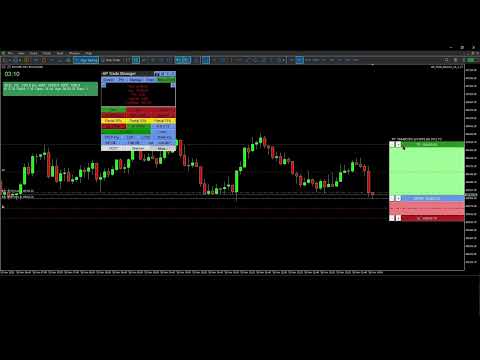
AP Trade Manager is a compact, broker-safe MT5 utility that turns your chart into a fast, disciplined trade workstation. It handles entries, exits, partials, breakeven+, OCO/Bracket logic, trailing stops, and scheduled-style actions from a clean panel you can dock anywhere. It’s pure MQL5 (no DLL, no WebRequest), and designed for live charts.

What it does

  • One-tap execution. Buy/Sell market and all four pending types (Buy/Sell Stop, Buy/Sell Limit). Auto-sizes by fixed lot or % balance risk.

  • Lines Mode trading. Toggle “Lines”, drag Entry/SL/TP on chart, snap to grid/ATR steps, then press PLACE. The EA decides market vs pending, applies clamps, and tags orders.

  • Protection suite. Breakeven+ with offset, unified trailing (Fixed, ATR, MA, SAR, Fractal, Prev-Bar) with hard ratchet, optional Virtual Stops with server fallback and warnings.

  • Position control. Partials (25/50/75 or custom), Close Buys/Sells/All, Delete Pendings, Reverse (with freeze/stop safeguards).

  • OCO / Bracket. From your lines: paired orders cancel the sibling on fill; market fills auto-place TP/SL.

  • Manage workbench. A side drawer listing live tickets (Ticket | Side | Lots | Entry | SL | TP | P/L | Trail | Age). Click any row to select it; act from the main panel while the drawer stays open.

  • Main Display Box (MDB). At-a-glance spread, times (Srv/Loc), symbol P/L, margin badge, mode badges (Lines*, OCO*, Trail…). Page through account and session views.

  • News glance. A minimal news panel with color-coded impact and countdown. Informational only; it never blocks trading.

  • Tools & overlays. Drawing mode (trendline, channel, triangle). Add-ons: Candle Countdown, Session Boxes, AP Multi-Range, MA Cross Alerts, Supertrend, candle hover volume tooltips, and a Screenshot button.

  • Hindsight cards. One-click snapshots + key stats you can export later into a trade journal (CSV).

  • Settings export/import. Save per-symbol/TF presets and panel geometry to JSON; restore on any terminal.


  • Speed without sloppiness. OrderCheck + margin checks on every send. Lots floored to broker step. Stops/freeze level respected.

  • Clarity. Minimal clicks, readable status line, short toasts, clean badges.

  • Persistence. Remembers geometry, tab, risk mode, and overlays per symbol/timeframe.

  • Validator-ready. Timer throttled, logs quiet, no external calls, file ops gated for tester.

What’s included

  • Panel UI (header tools, tabs, trade grid, MDB, Manage/Tools/Info drawers)

  • Risk Manager (fixed lot or % balance, cash risk, R multiple, spread/commission option)

  • Order Router (preflight checks, deviation policy, retry/nudge, tagging)

  • BE/Trail Engine (trigger + offset, multi-strategy trailing, hard ratchet)

  • OCO/Bracket (pairing, cancel-on-fill, bracket from market)

  • Position Book (fast snapshot for rows/filters/partials)

  • Overlays (countdown, sessions, multi-range, MA cross, Supertrend; draw objects)

  • Hindsight & Journal (cards + CSV export)

  • Persistence (GV/Files JSON)

Compatibility

  • Platform: MetaTrader 5 desktop (Windows).
    On macOS use a Windows VM or supported compatibility layer.

  • Category: Utilities (no backtest UI in Strategy Tester).

  • Live use: Designed for live charts. Strategy Tester cannot interact with panel buttons.

Quick Start Guide

1) Install and attach

  1. Copy the compiled EA into MQL5\Experts\ and restart MT5.

  2. Allow Algo Trading globally and on the chart.

  3. Attach AP Trade Manager to a symbol chart (M1–D1). Place the panel where you like.

Note: The Strategy Tester won’t exercise the UI. Use a live chart or demo account chart.

2) First-run checks (60 seconds)

  • Open More → Quick Start to skim basics or More → About for version info.

  • In the header, set theme with T if desired.

  • Confirm risk mode on the trade strip:

    • % for risk-percent sizing (enter Risk % in inputs or via the inline editor).

    • Lot for fixed lots.

  • MDB shows Srv/Loc time, Spread, P/L, and Free Margin badge.

3) Place a trade with Lines Mode

  1. Tap Lines. Three lines appear: ENTRY, SL, TP with handles and labels.

  2. Drag ENTRY/SL/TP where you want. Use step/snap controls if enabled.

  3. Press PLACE:

    • The EA chooses market or pending based on ENTRY vs Bid/Ask.

    • It clamps SL/TP to broker stops/freeze. Status line confirms action.

  4. Toggle OCO for paired pendings, Bracket to auto-attach TP/SL to market fills.

4) Protect and manage

  • BE+: Turn on; set offset points. The EA moves SL to BE+ once the trigger is hit.

  • Trail: Pick mode (Fixed/ATR/MA/SAR/Fractal/Prev-Bar). Ratchet never loosens.

  • Partials: Use 25/50/75 or Custom %. The EA floors to broker lot step.

  • Close controls: Close Buys/Sells/All, Delete Pendings, or Reverse safely.

  • Virtual Stops (VStops). Local SL/TP watcher that closes positions at your thresholds without placing server-side stops. Shows a VStop* badge in the MDB when active. Latency and gaps can cause slippage; for critical risk consider pairing with server SL/TP (Bracket ON) so the server protects you if the terminal is closed.

5) Manage drawer (optional)

  • Click Manage. You’ll see rows for current symbol (or filters).

  • Click a row to select that position. Keep the drawer open and use MCP buttons to partial/BE/Trail the selected trade.

  • Drawer and MCP stay in sync; status shows results and any skips.

6) Tools & overlays

  • Tools → Drawing Mode: trendline, channel, triangle. Draw, move, delete.

  • Add-ons: toggle Candle Countdown, Session Boxes, AP Multi-Range, MA Cross Alerts, Supertrend.
    Overlays render via chart objects or indicators and update on timer.

  • Hover volume: move the mouse over a candle to see its volume tooltip.

7) News glance

  • Click Info → News to view upcoming/active events with impact colors and countdown.
    It’s informational only; the EA never blocks orders because of news.

8) Screenshots & Hindsight

  • Click the camera button to capture the chart into \MQL5\Files\APTA_Shots\ .

  • When you close a trade, tap Hindsight to save a card (chart snapshot + key stats).

  • Export your journal: More → Export Settings / Journal to CSV for later review.

9) Save / load your setup

  • More → Export Settings saves presets, overlays, geometry into JSON (per symbol/TF).

  • More → Import Settings restores them. Useful across terminals or fresh installs.

10) Safety notes

  • The EA runs OrderCheck + OrderCalcMargin before every send.

  • Lots respect broker min/step; stops respect stops/freeze levels.

  • Virtual Stops (optional): the EA watches price and sends a market exit if your local SL/TP is hit. SL/TP still applied server-side if you enable bracket/real stops. You’ll see a warning badge when Virtual is ON.

Troubleshooting

  • Buttons don’t respond in Tester: that’s expected. Use a live chart.

  • “Insufficient margin” or “stops too close”: widen SL/TP or reduce risk; check symbol stop/freeze levels in MDB.

  • No overlays appear: ensure Tools → Add-ons toggles are ON and timeframes are supported.

  • Mac users: use MT5 for Windows via VM/compatibility layer. Native macOS ports can be unreliable with advanced chart objects.

  • Mac users — read before purchase

    MetaTrader 5 is a Windows app. On macOS you must run MT5 under virtualization (Parallels/VMware) or compatibility layers (CrossOver/Wine).

    • Recommended: Parallels on Apple Silicon (M-series) with Windows 11 ARM. Stable UI, full object drawing, normal file paths.

    • Known quirks under Wine/CrossOver:

      • Some hover tooltips and custom labels may not render in window-only screen captures (use “display capture” in OBS).

      • Retina scaling can misplace labels; lower scaling or set MT5 to 100%.

      • File paths differ; keep presets in …/MQL5/Files/ .

    • We do not ship a macOS binary. Support covers MT5 inside a Windows environment only.


    Does not work in the Strategy Tester

    This is a manual trade assistant. It relies on live UI clicks, chart objects, and broker interaction. The MT5 Strategy Tester does not deliver those, so the panel can’t operate.

    Why it won’t run in Tester

    • The tester doesn’t generate OnChartEvent mouse/keyboard events that our panel needs.

    • Many tester runs have trading disabled or restricted; manual OrderSend/modify logic is blocked.

    • Visual mode isn’t a live chart: multi-symbol book, partials, OCO linking, and UI state persistence aren’t simulated.

    • Calendar/screenshots/file I/O are limited or off in tester, so news and utilities won’t load.

    Use on a live or demo chart in the terminal with trading enabled.


Recommended products
Pattern Recognition EA
Claudiu-georgian Zavera
Pattern Recognition EA - From Learn to Earn. The market repeats itself. This EA finds every past repeat of the current candle sequence - and lets history vote the direction. ONE SHAPE. EVERY REPEAT IN HISTORY VOTES. The last N candles on your signal timeframe form a shape. The EA scans the history you choose - a fixed number of bars or everything your broker provides - for the SAME shape, and checks what happened next, every single time. Only when enough repeats exist AND a clear majority of t
Fast Trade Pro
Oezkan Kahveci
https://www.mql5.com/tr/users/bilisimprofesoru/seller This is a highly profitable fully automatic and semi-automatic grid strategy. ======== Usage ======== : Symbol: XAU and any major currency pair Timeframe: M1 or higher, but all timeframes can be tested Note: The grid strategy always involves a certain level of risk due to the accumulation of position sizes. However, its high profit potential ensures that it remains popular regardless of how much the forex market evolves. Semi-automatic tradi
Orphira Gold
Mohammad Reza Rezaei
Orphira Gold is an automated trading system developed specifically for gold trading in MetaTrader 5. It combines adaptive trade management, equity-based position sizing and several layers of portfolio protection in one straightforward Expert Advisor. The system continuously evaluates market conditions and opens trades only when its internal requirements are met. When a position moves against the expected direction, Orphira Gold may use carefully spaced recovery positions. Every additional order
QM gold pattern
Patcharapon Saelim
QM Gold Pattern EA Backtest results from 01/10/2021 to 01/10/2026 QM GOLD – QM HYBRID PRO EA V1.0 MT5 Expert Advisor trading based on the Quasimodo (QM) patternAn EA for MetaTrader 5 that automatically identifies QM patterns. It waits for the price to pull back to the zone before entering a trade. Every order includes a Stop Loss (SL), and lot sizes are automatically calculated based on risk. Why choose this EA? Not Martingale, Not Grid No
Easy EA for closing positions with profit or loss. All positions of chart's symbol are counted separately. Settings: TPforSymbol — set profit amount to indicate when to close every positions for the symbol of the chart. Swap and commission are decreasing your profit. SLforSymbol — set SL amount to indicate SL for every positions for the symbol of the chart. Swap and commission are increasing your loss. SLforSyblol is always below/equal zero.
Equinox Gold
Dmitriq Evgenoeviz Ko
Equinox Gold is a high-tech trading expert advisor (EA) specifically designed for the gold market ( XAUUSD ). The system is based on a unique Market Equilibrium algorithm that identifies areas of imbalance between supply and demand during extreme volatility. Unlike most robots that use dangerous sit-and-wait methods, Equinox Gold relies on mathematical momentum confirmation and strict risk control for every trade. MAIN ADVANTAGES VRP Filter (Volatility Range Filter): The robot automatically ada
BTC Master Pro
Farzad Saadatinia
4.64 (14)
BTC Master Pro – Your trusted partner in disciplined Bitcoin trading. The new version is now enhanced with OpenAI artificial intelligence , delivering smarter execution and improved trade filtering in volatile crypto conditions. This professional Expert Advisor is built specifically for Bitcoin (BTCUSD) trading on MetaTrader 5 , focusing on structured execution, controlled exposure, and intelligent risk management. Price: $699  →  Next: $999  →  Final: $999 LIVE SIGNAL HERE OpenAI-Powered Exec
Breakout scalp PRO
Cesar Napoleon Guio Martinez
Automated breakout scalper EA trading system with advanced execution filters and built-in risk management. Designed to operate during selected market conditions, combining session control, spread and slippage filtering, and dynamic trade management. Safety First Approach:  This EA does not use grid systems, martingale strategies or other high-risk unlimited recovery strategy. Every position is protected with predefined Stop Loss and Take Profit levels. The strategy is designed to maintain contro
Sonic R Pro Enhanced EA - Version 2025 $249 Only for the First 5 Buyers! Live Signal Check the live performance of Sonic R Pro Enhanced: Live Sonic R Trading Strategy Sonic R Pro Enhanced is an upgraded version of the traditional Sonic R strategy, automating trades based on the Dragon Band (EMA 34 and EMA 89) and incorporating advanced algorithms to maximize performance. Timeframes: M15, M30 Supported Pairs: XAUUSD, BTCUSD, AUDJPY, USDJPY Trading Style: Swing Trading - Pullback & Counter-
Gold Trade Manager PRO MT5 is a manual trade management utility for MetaTrader 5. It is designed for traders who want to open, protect and manage positions directly from the chart without switching between multiple terminal windows. Current price: $59 - increases by $10 after every 20 purchases until reaching the final price of $119 . Next price: $69 . Complete Buyer Kit: 40 Professional Resources included at no additional cost. MT5 Presets, PDF Guides, Checklists, Mindmaps, Reference Cards, and
KS PropFirm and Broker Dashboard Pro: Your Ultimate Compliance Guardian for Prop Firm Challenges Elevate Your Prop Firm Journey with Precision Monitoring Tired of juggling spreadsheets, calculators, and manual checks to stay compliant during high-stakes prop firm challenges? KS PropFirm and Broker Dashboard Pro is the all-in-one MT5 utility engineered for serious traders tackling firms like FTMO, MyForexFunds, The5%ers, and beyond. This lightweight dashboard delivers real-time insights into your
Set TP & SL by Price, Auto Order Modifier Automatically set precise TP and SL price levels on any trade Works with all pairs and EAs, filter by symbol or magic number Compatible with MetaTrader 4 and MetaTrader 5, sold as separate products on the Market. This Expert Advisor lets you define and apply exact Take Profit (TP) and Stop Loss (SL) levels to your trades using direct price values (e.g., 1.12345 on EURUSD). No points, no pips. Just clean, accurate trade management across all orders or fil
PropPilot
Joao Bordelo
PropPilot – Prop Firm Risk & Trade Manager PropPilot is a professional risk management and manual trading utility for MetaTrader 5, designed for Prop Firm Challenges, Funded Accounts and Personal Accounts. It helps you calculate risk, execute manual trades, monitor Daily and Maximum Drawdown, manage open positions and keep your account rules visible from one clean dashboard. PropPilot does not automatically choose trade entries. You remain in control of BUY and SELL decisions while PropPilot
Crash300 Pro Trader is a fully automated Expert Advisor designed for trading Crash 300 index using a combination of trend detection, RSI filtering, and recovery-based trade management. Watch Video: 3 Years of Backtest The EA identifies market direction using Parabolic SAR on the Daily timeframe and executes trades only in the direction of the trend. To improve entry accuracy, it uses RSI filtering to avoid overbought and oversold false signals. A built-in recovery system is included to manage
Ignition
Dansie Software Limited
Strategy Overview The Ignition EA tries to take advantage of sudden momentum when the Ignition pattern is detected. The final bar in the ignition pattern has a small opening wick, a very little or no closing wick, is large in comparison to recent bars and must start from the lower end of the current range (for a bullish ignition) Quick Testing Use Symbol EURUSD, Timeframe M2, and remove the GBPUSD symbol from the "Symbols" input (stratergy 1 and stratergy 2) Settings The below settings appe
AlgoDevMT5 Trade Manager Pro
Harry Charles H Westwood
AlgoDevMT5 Trade Manager Pro AlgoDevMT5 Trade Manager Pro is a professional trade management and risk control utility for MetaTrader 5. Designed for discretionary traders and funded account traders, this utility helps traders plan trades visually, calculate position size instantly, and manage risk with precision. Trade Manager Pro does not generate trading signals, open trades automatically, or provide investment advice. It is a trader-assistance utility designed to improve consistency and risk
SPECIAL LAUNCH OFFER: $30 (1-Month Rent) Limited time offer to build our community and gather feedback! AmbM GOLD Institutional Scalper A high-precision M5 algorithm for XAUUSD (Gold) , engineered to trade exclusively at Institutional Liquidity Levels ($5/$10 psychological marks). PERFORMANCE DATA (BUY ONLY) • Win Rate: 87.09%. • Safe Growth: +$4,113 profit on $10k (13.75% Max Drawdown). • Extreme Stress Test: Successfully generated +$22,997 in a 5-year stress test (2020-2026), proving
Kill Zone Hunter
Alex Amuyunzu Raymond
KILL ZONE HUNTER Institutional Kill Zone, Market Structure & Fair Value Gap Trading EA for MT5 Overview KILL ZONE HUNTER is a professional-grade MetaTrader 5 Expert Advisor engineered around Institutional Smart Money Concepts (ICT / SMC) , with a primary focus on Kill Zone trading , Market Structure , and Fair Value Gap (FVG) execution . This EA is designed to systematically hunt high-probability trades during institutional trading windows (Kill Zones) , where liquidity, volatility, and directio
Apex Beyond
Yi Hsiu Tsai
5 (1)
Live Signal https://www.mql5.com/en/users/sagen520/seller Dynamic Pricing (Limited Offer) Launch Price : $49 Price Increase : +$100 per 10 copies sold. Secure your license at the lowest price before the next hike! 15-Year Backtest (2010 - 2026) Proven stability across 15 years of complex market cycles: In-Sample (2010–2020) : Core strategy & risk-return optimization. Out-of-Sample (2020–2026) : Verified equity growth in high-volatility markets. Core Specs Min. Deposit : $500 ($2,000+ recommend
Lot Sizer & Dynamic Risk Management Panel for MT5 Take full control of your trading risk with Lot Sizer & Dynamic Risk Management Panel —an essential, high-speed execution utility designed for discretionary traders, prop firm account evaluators, and scalp/intraday traders. Calculating position size manually during fast-moving market sessions (London/New York opens or news releases) leads to execution delays and costly sizing errors. This interactive panel automates your risk management directly
Kintech Gold
Doan Van Hai
Following our guide, you will gain more than you lose. EA for long-term. Stable profit - min risk. Symbol:  XAUUSD Attach to any timeframe Min deposit:   3000$ - Calculate profit by month Live signal:  https://www.mql5.com/en/signals/2080910?source=Site+Signals+My EA input instruction: 1. With XAU 2 digits (eg: 1843.23) please set - Input   [3. Max spread]: 55 2. With XAU 3 digits (eg: 1843.235) please set - Input   [3. Max spread]: 550 If you want daily trade, this signal maybe not suit with
EA Agulhada do Didi
Devscode Desenvolvimento de Softwares LTDA
This Expert Advisor was developed to automate trading operations in MetaTrader 5 using the Didi Index indicator logic as the basis for identifying market entry points. The EA executes all operations directly on the chart, in an automated manner, following the rules and parameters defined by the user. The concept of the robot is to apply an objective entry and management logic, allowing the trader to monitor trade execution clearly, without the use of external integrations or additional libraries
FREE
Bohemia Gold MT5
Vladislav Taska
4.83 (6)
Bohemia Gold MT5 is  Trend & Volatility EA trading system designed specifically for Gold (XAUUSD) . It combines higher-timeframe trend filtering , trend detection , volatility-based SL management , and advanced trade management to adapt market conditions. It uses style logic focused on trend strength, volatility, and capital protection. NOTE:   Based on backtests, I found better trading results with the following setup: D1/H4/H2 (Trend/ADX/ATR & trade). The SET file can be downloaded here … bohe
FREE
Awesome Oscillator by Bill Williams with the ability to fine-tune and replace the averaging algorithms of the indicator, which significantly expands the possibilities of using this oscillator in algorithmic trading and brings it closer in its properties to such an indicator as the MACD. To reduce price noise, the final indicator is processed with an additional Smooth averaging. The indicator has the ability to give alerts, send mail messages and push signals when the direction of movement of th
Gold Burger
Gayathiri Gopalakrishnan
GOLD BURGER SCAN MODE EA https://www.mql5.com/en/blogs/post/774613 GOLD BURGER is an automated Expert Advisor for MetaTrader 5 designed to analyze market conditions, identify trading opportunities and manage trades automatically. The EA combines price action, candlestick patterns, market structure, chart confirmation and order-flow analysis. Instead of depending on a single signal, GOLD BURGER evaluates multiple market conditions before making a trading decision. The price action engine recogni
Gold Sniper Panel Master Pro High-Precision Manual Trading Terminal for Scalpers Gold Sniper Panel Master Pro is a sophisticated trading utility designed for traders who demand speed, precision, and surgical control over their positions. This all-in-one dashboard streamlines manual execution and introduces an advanced recovery engine to navigate volatile market conditions with confidence. Key Features Dual-Orientation Interface : Instantly toggle between Horizontal and Vertical layouts to perfe
XAU AI Structure Trader PRO (MT5) AI-powered market structure trading for disciplined intraday & swing traders. Designed for traders who prefer waiting for the right setup rather than forcing trades. IMPORTANT! After the purchase please send me a private message to receive the installation manual, license key and the setup instructions. XAU AI Structure Trader PRO is not a high-frequency trading robot and is not designed for aggressive scalping. This Expert Advisor focuses on identifying high-q
Matrix Arrow EA MT5
Juvenille Emperor Limited
5 (7)
Matrix Arrow EA MT5  is a unique expert advisor that can trade the  Matrix Arrow Indicator's MT5   signals with a trade panel on the chart, manually or 100% automatically.  Matrix Arrow Indicator MT5  will determine the current trend at its early stages, gathering information and data from up to 10 standard indicators, which are: Average Directional Movement Index (ADX), Commodity Channel Index (CCI), Classic Heiken Ashi candles, Moving Average, Moving Average Convergence Divergence (MACD), Rela
FULL AUTO RISK MANAGEMENT EA – PRO + ACCOUNTING is an advanced Expert Advisor designed to protect your trading capital through fully automated risk control. Key Features: Progressive Stop Loss adjustment Partial position close at predefined loss levels (50% / 70%) Automatic Break Even at 50% Take Profit Profit Lock system at 50% and 70% of Take Profit Smart accounting of initial risk and saved capital Works with any trading strategy (manual or automated) No entry signals – risk management only T
Gold Sniper AI Pro
Salahaldeen Abedalqader Mah'd Alshaer
Gold Sniper AI – روبوت تداول الأموال الذكية Gold Sniper AI هو مستشار خبير متقدم مصمم خصيصًا لتداول XAUUSD (الذهب) باستخدام مفاهيم المال الذكي وتحليل حركة السعر. يقوم نظام التداول الآلي بتحليل عوامل السوق المتعددة قبل تنفيذ الصفقات للعثور على فرص ذات احتمالية عالية في سوق الذهب. ⸻ منطق الاستراتيجية يجمع برنامج Gold Sniper AI بين العديد من مفاهيم التداول الاحترافية، بما في ذلك: • الكشف عن اتجاهات السوق الأوروبية • تحليل هيكل السوق • عمليات مسح السيولة • كتل الطلبات • فجوات القيمة العادلة (F
Buyers of this product also purchase
FarmedHedge Pair Trading Dashboard
Tanapisit Tepawarapruek
5 (7)
Farmed Hedge Yield Farming | All Markets (Manual - Hybrid - Semi/Automated EA) VERIFIED TRADING RESULTS - Farmed Hedge Yield Axi Copy:  https://www.mql5.com/en/signals/2356376 - Farmed Hedge Yield Exn Copy:   https://www.mql5.com/en/signals/2356404 - Farmed Hedge Yield V Copy:  https://www.mql5.com/en/signals/2357156 IMPORTANT NOTICE: FarmedHedge is a MANUAL-FOCUSED TRADING UTILITY ,not a fully automated EA. Results shown on this Signal include manual trades and overall strategic management.
================================================================================ POC BREAKOUT - V20.72. Full Professional Grade Toolkit ================================================================================ POC Breakout is a full MetaTrader 5 trading dashboard for discretionary traders who want breakout signals, Point of Control (POC) context, volume profiles, order flow, market structure, news, alerts, and advanced trade planning in one professional workspace. Attached directly to you
News Trade EA MT5
Konstantin Kulikov
4.55 (11)
Present to you the useful robot that I have been using for several years. It can be used in both semi-automatic mode and fully automatic mode. >>> Chat <<< The program contains flexible settings for trading on the news of the economic calendar. It cannot be checked in the strategy tester. Only real work. In the terminal settings, you need to add the news site to the list of allowed URLs. Click Tools > Options > Expert Advisors. Check the option "Allow WebRequests for listed URL:". Add this (de
The Patch
Mian Rameez Ali
The Patch It never opens a trade. It walks behind the ones that did. Every open position, every pending order — checked twice a second for the one thing that's easy to forget: a stop, a target. Found bare, it doesn't ask. It writes the missing number in, measured in points from wherever the position began, and moves on to the next. No strategy, no opinion on direction. Just the quiet assumption that nothing should ever sit on the market unprotected — not because someone decided it shouldn't,
The product will copy all telegram signal to MT5 ( which you are member) , also it can work as remote copier.  Easy to set up, copy order instant, can work with almost signal formats, image signal,  s upport to translate other language to English Work with all type of channel or group, even channel have "Restrict Saving Content", work with  multi channel, multi MT5 Work as remote copier: with signal have ticket number, it will copy exactly via ticket number. Support to backtest signal. How to s
RETAILBERG FOOTPRINT CHART PRO — Order-Flow Workspace for MetaTrader 5 Version 7.00  |  Professional System  |  31 tools  |  One chart A full 150-page illustrated User Manual is included. Please read the full manual to understand this feature packed footprint chart elements and ui. https://www.mql5.com/en/blogs/post/777982 DEMO / STRATEGY TESTER — PLEASE READ FIRST
Floor Watch
Syed Tauqeer Hussain Shah
Floor Watch One number, watched every thirty seconds: how far equity has fallen since the day began — or since its highest point, if it's told to trail the peak instead of the open. Cross the line and it doesn't argue. Every open position closes, every pending order vanishes, and anything that slips through afterward gets shut the moment it appears. Not asked. Removed. The floor holds until the clock turns 5 AM Pakistan time — then, and only then, does the day start over. One rule. No except
Power Candles Strategy Scanner - Self-Optimizing Multi-Symbol Setup Finder Self-optimizing settings work one chart at a time, and finding where they pay off right now means opening chart after chart. Power Candles Strategy Scanner runs the same self-optimizing engine as the Power Candles indicator on every symbol in your Market Watch, side by side. One panel ranks where it pays off: the winning strategy per symbol, its optimized Stop Loss and Take Profit. An alert fires the moment a fresh signal
YuClusters
Yury Kulikov
4.93 (43)
Attention: You can view the program operation in the free version  YuClusters DEMO .  YuClusters is a professional market analysis system. The trader has unique opportunities to analyze the flow of orders, trade volumes, price movements using various charts, profiles, indicators, and graphical objects. YuClusters operates on data based on Time&Sales or ticks information, depending on what is available in the quotes of a financial instrument. YuClusters allows you to build graphs by combining da
Buy once. Get all my MT4 and MT5 indicators and trading robots (EAs) - available now and released in the future - at no extra cost. Contact me after purchase for instructions to receive them. The price is planned to rise by 50$ after every 10 purchases, up to 999$. The Market price at checkout applies. Keep the indicator you trust. Automate the work around it. Your signal. Your rules. Your execution. Already have an MT5 indicator you rely on, but still need to watch the chart, wait for a signal
Master Your Trading Discipline   Stop losing your hard-earned gains to overtrading and emotional decisions. The Discipline Tool is your ultimate trading assistant, ensuring strict risk management in real-time. Key Protection Features: Advanced Drawdown Defense : Automatically halts trading if your daily drawdown exceeds a preset threshold (percentage or dollar amount). Real-Time Equity Lock : Safeguard profits by referencing peak equity, ensuring drawdown stays within control. Hard Profit Target
Dealer Panel
Mian Rameez Ali
Dealer's Panel No signal decides anything here — a hand does. One click, and the panel calculates what's underneath: lot size from risk, target from a 30-step balance ladder that remembers exactly how far an account has climbed. Toggle between market and pending without touching an input field. Set a stop, and the take-profit can write itself — a fixed share of the balance, translated into price with no arithmetic left for the trader to get wrong. One trade live at a time; it won't let a seco
EA Overfitter
Stephen J Martret
5 (1)
That backtest looks great. But will it still be making money tomorrow, next week, next month? EA Overfitter re-runs your EA on 100 price histories it has never seen. One score tells you if the edge is real. A backtest tells you what an EA did on one price history — the one that happened to occur. What you cannot tell from it is how much of that result was the strategy and how much was the particular path. EA Overfitter answers that. It builds up to 100 synthetic price histories your EA has n
EasyInsight AIO MT5
Alain Verleyen
4.92 (12)
EASY Insight AIO – All-In-One Power for AI-Driven Trading Want to skip the setup and start scanning the entire market – Forex, Gold, Crypto, Indices, and even Stocks – in seconds? EASY Insight AIO is the complete plug-and-play solution for AI-powered trade analysis. It includes all core Stein Investments indicators built-in and automatically exports clean, structured CSV files – perfect for backtesting, AI prompts, and live market decision-making. No need to install or configure indicators manu
Quant AI Agents
Ho Tuan Thang
5 (1)
Quant AI Agents are independent trading Expert Advisors. Instead of trading using a fixed strategy like other conventional EAs, Quant AI Agents   is a   multi-agent AI trading framework   that turns natural-language strategy prompts into live.  WANT THE SAME RESULTS AS MY LIVE SIGNAL?   Use the exact same brokers I do:   IC MARKETS , IC TRADING   .  Unlike the centralized stock market, Forex has no single, unified price feed.  Every broker sources liquidity from different providers, creating un
Daily Trading Limiter
AL MOOSAWI ABDULLAH JAFFER BAQER
5 (8)
• Please test the product in the Strategy Tester before purchasing to understand how it works. • If you face any issues, contact me via private message—I’m always available to help. • After purchase, send me a screenshot of your order to receive a FREE EA as a gift. Daily Trading Limiter — the rule you cannot break Every trader knows the number. Three trades. Two percent. One bad day and stop. And every trader has watched themselves take the fourth trade anyway. The problem was never knowing th
FUTURES ORDERFLOW FOOTPRINT CHART Professional OrderFlow EA for MetaTrader 5 Version 1.01| Professional tool for real traders | Institutional-Grade Visualization STRATEGY TESTER USERS - PLEASE SELECT EVERY REAL TICK WHEN TESTING AND YOU HAVE DOWNLOADED HISTORICAL DATA. IF YOU SEE A WAITING SCREEN AND IT IS NOT DOWNLOADING, IT MEANS YOU HAVE LOW HISTORICAL DATA. TRY 1 MIN AND 5 MIN FIRST ON 1 DAY DATA. ONE DAY DATA SHOULD BE THE NEWEST AND MOST CURRENT DATE. PLEASE WAIT UNTIL THE MARKET HAS ROL
Trading Chaos Expert
Hennadii Stanilevych
5 (11)
This software has no equals in the world and represents a universal trade "console" covering trading signals, automated market entry, setting of Stop Loss and Take Profit, as well as Trailing Profit for multiple trades at the same time in a single open window. Intuitive control of the Expert Advisor in "three clicks" ensures a comprehensive use of all its functions on different computers, including tablets PCs. Interacting with additional signal indicators that mark the chart to give a real mark
Advanced Daily Trading Limiter PRO
AL MOOSAWI ABDULLAH JAFFER BAQER
Advanced Daily Trading Limiter PRO Professional Risk Management. Uncompromising Trading Discipline. One undisciplined trading session can erase weeks of consistent profits. Whether it's overtrading, revenge trading, or exceeding a prop firm's daily risk limits, emotional decisions often become a trader's biggest obstacle—not the market itself. Advanced Daily Trading Limiter PRO is a comprehensive risk management and discipline enforcement utility for MetaTrader 5, designed to help traders stay
AI Arbitron — an MT5 Spot vs Future Gold Arbitrage Bot designed to capture price discrepancies between correlated Spot and Future instruments through hedged, non-directional trading. Platform: MT5 Use Swap Free Accounts, many of the regulated broker gives swap free accounts for 7 days, make use of it by only buying lower price asset and selling higher price asset, hold your position for 2-3 days. Asset: Mainly Gold (XAUUSD) using Spot + Future/CFD price feeds. Core strategy: It monitors the p
Copy your MT5 trades to Interactive Brokers You keep using MT5. Every order you open or close is sent to your IB account. In real time. No coding. No changes to your strategy or EA. Try it first Rent 1 month: $30. Test on a live or paper account. What it does Real-time copying: same direction, reverse, or one side only. Map any MT5 symbol to any IB symbol. Set a lot ratio for each. Forex, Futures, Stocks, CFDs, Metals and Crypto. Position sync: both accounts checked, any difference fixed. Optio
MT5 Trading Deck
Manuel Michiels
5 (2)
One button. One trade. MT5 Trading Deck is a hotkey trading panel for MetaTrader 5 that turns the platform into a keyboard-driven execution cockpit. Stop loss, take profit and lot size are pre-calculated for every key; the moment you press, a market order is live on the broker. A complete technical user manual is attached in the product Comments section. It documents every input parameter, the full hotkey map, the recommended Stream Deck XL layout, and the advanced workflows for Pre-Limit orders
Easy Strategy Builder 5
Gheis Mohammadi
5 (4)
The  Easy Strategy Builder (ESB)  is a " Do It Yourself " solution that allows you to create a wide range of the automated trading strategies without any line of codes. This is the world’s easiest method to automate your strategies that can be used in STP, ECN and FIFO brokers. No drag and drop is needed. Just by set conditions of your trading strategy and change settings on desired values and let it work in your account. ESB has hundreds of modules to define unlimited possibilities of strategi
EA Slipstream
Stephen J Martret
5 (1)
Your backtest filled every order at the price it asked for. Your account does not. EA Slipstream measures what execution costs your EA, using your own fills, slippages and spreads to show you the true performance of your EA. A backtest prices every trade at the level the EA named. In live trading a pending order fills at whatever price is available when it triggers, a stop closes wherever the market is when it is hit, and the spread at that moment is whatever the account was quoting. The differ
Features   With MT5 to Interactive Brokers(IB) Trader, you can: 1. Load chart data from IB to MT5, and Analyze with all standard or customer Indicators. 2. Place Orders to IB Account Directly in MT5. 3. Make your Own EAs upon IB Securities by only making minus changes of the trading function. Usage 1) Installation Copy the "Mt5ToIBTraderEn.ex4" and sample files to [MT5 Data Folder]->MQL5->Experts.  2)  MT5 Settings Add the IP Address to the MT5 Allowed URLs in 'Tools->Options->Expert Adviso
Unlimited Trade Copier Pro MT5 is a tool to copy trade remotely to multiple MT4, MT5 and cTrader accounts at different computers/locations over internet. This is an ideal solution for you if you are a signal provider and want to copy your trades to other receivers globally on your own rules. One provider can copy trades to multiple receivers and one receiver can get trade from multiple providers as well. The provider can even set the subscription expiry for each receiver, so that receiver will n
Global Investing FX Terminal
Santiago Nicolas Pla Casuriaga
5 (1)
The Global Investing FX Terminal is an all-in-one FX dashboard for MetaTrader 5 — CB policy rates, CFTC COT positioning, carry rankings, economic surprises, options skew, retail sentiment, and correlations, thirteen panels in total — rendered on a single zero-flicker canvas overlay and refreshing every 10 seconds from one attached EA. No external software required. Professional FX analysis requires simultaneous access to data that normally lives in separate platforms: rate derivatives, governmen
Custom Alerts AIO: All-in-One Market Scanner – No Setup Required Overview Custom Alerts AIO is the fastest and easiest way to monitor multiple markets for real-time trading signals—without any setup or extra licenses. It comes with all required Stein Investments indicators already embedded, making it the perfect plug-and-play solution for traders who value simplicity and performance. Just load it to any chart and start receiving alerts across Forex, Metals, Crypto, and Indices. Shares can be a
Adam FTMO MT5
Vyacheslav Izvarin
5 (2)
ADAM EA Special Version for FTMO Please use ShowInfo= false for backtesting ! Our 1st EA created using ChatGPT technology Trade only GOOD and checked PROP FIRMS  Default parameters for Challenge $100,000 Tested on EURUSD and GBPUSD only  Use 15MIN Time Frame Close all deals and Auto-trading  before Weekend at 12:00 GMT+3  Friday For Prop Firms MUST use special Protector  https://www.mql5.com/en/market/product/94362 --------------------------------------------------------------------------------
Quant Panel
Kevin Craig E Gittins
Quant Panel is a strategy analysis utility for MetaTrader 5. It helps traders review several Expert Advisors or trading strategies running on the same account. The panel groups closed positions by Expert Advisor comment or magic number and calculates each strategy's results separately. You can compare strategy performance, review individual drawdowns and export detailed reports from one dashboard. Independent strategy analysis Each strategy has its own virtual starting balance and closed-trade b
More from author
BTC Pro Breakdown Pro MT5
Allan Graham Pike
5 (1)
AP BTC Breakdown – Retest Pro (MT5) Short-only BTC EA: confirms a clean breakdown, then places a SELL LIMIT on the retest of the broken level. No martingale, no grid, one setup at a time. no DLL/WebRequest. What it is A breakdown-and-retest engine for BTC. It waits for a decisive break, checks volume & trend quality, then posts a SELL LIMIT on the pullback to the broken handle. How it works (flow) Auto-level (M15/H1): clusters body lows, requires touches, enforces ATR distance, rounds to $10 h
AP VWAP Bands Pro (MT4) Volume-weighted average price with ±σ bands for clear intraday bias, mean-reversion zones, and dynamic support/resistance. Works on crypto (incl. BTC), FX, indices, and metals. Uses tick-volume when real volume isn’t available. What it shows VWAP line (volume-weighted mean price). Two envelopes around VWAP (default ±1σ and ±2σ) to highlight balance vs. extension. Reset modes: Day, Week, or Anchor Time (HH:MM) to start VWAP where you need it (e.g., exchange open). Why
FREE
AP Fibonacci Retracement PRO (MT5) Overview AP Fibonacci Retracement PRO is a trend-continuation pullback EA. It waits for a confirmed swing, calculates the Fibonacci retracement zone, and looks for entries in the direction of the original move. No grid, no martingale. Strategy logic Detects the last valid swing high/low using Fractals on the selected signal timeframe. Calculates the retracement zone between 38.2% and 61.8% (configurable). On a closed bar, if price is inside the zone (with opti
FREE
AP London Breakout PRO trades the first impulse when Europe hands over and London liquidity hits. It builds a pre-London range (02:00–07:00 server), checks the box height and spread, then posts one clean breakout with fixed risk. No martingale, no grid, no chasing; once filled, it cancels the other side and stands down for the day. Designed for majors and gold on M5–M15, with broker-safe placement (Stops/Freeze aware), lot rounding, and a daily cap. Quick start • Chart: M5 (reads higher TFs inte
AP Day-Week-Month High-Low MT4 Lightweight overlay that draws the prior Day, Week, and Month highs/lows on any chart. Great for session planning, confluence, and alerting when price comes back to important swing levels. What it does Plots 6 lines: Day High/Low, Week High/Low, Month High/Low (from the previous completed sessions). Touch/near alerts when price reaches a selected line (with a user-set tolerance). Works on any symbol and timeframe. Zero external libraries. How to use Drop it o
FREE
AP VWAP Bands Pro (MT5) Volume-weighted average price with ±σ bands for clear intraday bias, mean-reversion zones, and dynamic support/resistance. Works on crypto (incl. BTC) , FX , indices , and metals . Uses tick-volume when real volume isn’t available. What it shows VWAP line (volume-weighted mean price). Two envelopes around VWAP (default ±1σ and ±2σ) to highlight balance vs. extension. Reset modes : Day , Week , or Anchor Time (HH:MM) to start VWAP where you need it (e.g., exchange open).
FREE
AP Day-Week-Month High-Low overlay that draws the prior Day, Week, and Month highs/lows on any chart. Great for session planning, confluence, and alerting when price comes back to important swing levels. What it does Plots 6 lines: Day High/Low , Week High/Low , Month High/Low (from the previous completed sessions). Touch/near alerts when price reaches a selected line (with a user-set tolerance). Works on any symbol and timeframe. Zero external libraries. How to use Drop it on the chart you trad
FREE
AP Session Boxes — Asian / London / NY Range Overlay (MT5 Indicator) Clean session boxes on your chart. This lightweight indicator draws the   Asian ,   London , and   New York   time windows directly on the chart, including each box’s   high   and   low   as dashed lines. It’s perfect for quick context, breakout planning, and clean screenshots. Instant structure:   See where the market ranged during key sessions. Breakout prep:   Use the hi/lo lines as reference for pending orders or alerts fr
FREE
AP DayTrader Impulse Box MT4 What it does Intraday engine that combines a   session “box” range   (M5) with an   impulse filter   (EMA/RSI on M15). When price escapes the box with momentum confirmation, the EA places a single market order in that direction.   One position per symbol. Simple logic, few knobs   Box + impulse confirmation   No martingale, no grid, no averaging Works on   netting   accounts How entries are decided Build a time-window “box” from recent session hours (start/end inputs
AP London Breakout MT4  trades the first impulse when Europe hands over and London liquidity hits. It builds a pre-London range (02:00–07:00 server), checks the box height and spread, then posts one clean breakout with fixed risk. No martingale, no grid, no chasing; once filled, it cancels the other side and stands down for the day. Designed for majors and gold on M5–M15, with broker-safe placement (Stops/Freeze aware), lot rounding, and a daily cap. Quick start • Chart: M5 (reads higher TFs i
AP Oil Navigator PRO (MT4) What it is AP Oil Navigator PRO is a rules-based Expert Advisor designed specifically for energy symbols such as XTIUSD (WTI) and UKOIL (Brent). The EA looks for a directional bias using a higher-timeframe trend filter, then times entries on the working timeframe using a volatility gate and a structure break. Orders are placed with broker-safe checks and fixed risk. No martingale, no grid, and no averaging. How it trades • Bias: EMA alignment and swing structure on the
AP Oil Navigator PRO (MT5) What it is AP Oil Navigator PRO is a rules-based Expert Advisor designed specifically for energy symbols such as XTIUSD (WTI) and UKOIL (Brent). The EA looks for a directional bias using a higher-timeframe trend filter, then times entries on the working timeframe using a volatility gate and a structure break. Orders are placed with broker-safe checks and fixed risk. No martingale, no grid, and no averaging. How it trades • Bias: EMA alignment and swing structure on th
AP BTC Bullish Retest (MT5) Long-only BTC EA. Waits for a decisive close above resistance , confirms trend/volume quality, then places a BUY LIMIT on the pullback to the broken level. One setup at a time. No grid, no martingale. No DLL/WebRequest. What it is A breakout-and-retest engine for BTC. It builds meaningful resistance handles (body-high clusters) on a higher TF, requires a clean close through that handle, then buys the retest with disciplined risk and strict broker-safe checks. How it t
AP DayTrader Impulse Box (MT5) What it does Intraday engine that combines a session “box” range (M5) with an impulse filter (EMA/RSI on M15). When price escapes the box with momentum confirmation, the EA places a single market order in that direction. Simple logic, few knobs   Box + impulse confirmation No martingale, no grid, no averaging Works on netting accounts How entries are decided Build a time-window “box” from recent session hours (start/end inputs). Wait for price to escape the box by
AP Gold Pro MT5
Allan Graham Pike
Intraday engine for XAUUSD (Gold). Builds a time-window “box”, waits for a decisive move beyond it, then places a pending order to participate on the pullback. Tight risk controls, no grid, no martingale. How it operates You define one or more time windows (e.g., London, NY, or custom hours). After a window closes, the EA checks for a clean move beyond the box by a user buffer. Optional gates: EMA trend check and volume impulse filter. Places a pending order near the broken edge with an adapti
Filter:
No reviews
Reply to review