AP Trade Assistant

AP Trade Manager — Product Description

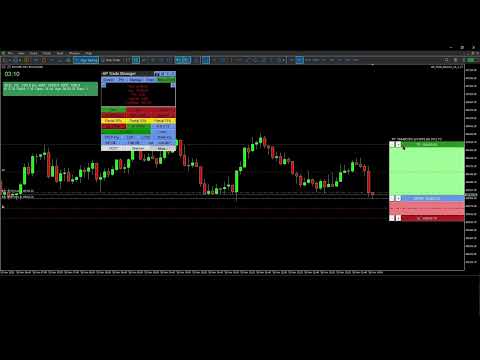
AP Trade Manager is a compact, broker-safe MT5 utility that turns your chart into a fast, disciplined trade workstation. It handles entries, exits, partials, breakeven+, OCO/Bracket logic, trailing stops, and scheduled-style actions from a clean panel you can dock anywhere. It’s pure MQL5 (no DLL, no WebRequest), and designed for live charts.

What it does

  • One-tap execution. Buy/Sell market and all four pending types (Buy/Sell Stop, Buy/Sell Limit). Auto-sizes by fixed lot or % balance risk.

  • Lines Mode trading. Toggle “Lines”, drag Entry/SL/TP on chart, snap to grid/ATR steps, then press PLACE. The EA decides market vs pending, applies clamps, and tags orders.

  • Protection suite. Breakeven+ with offset, unified trailing (Fixed, ATR, MA, SAR, Fractal, Prev-Bar) with hard ratchet, optional Virtual Stops with server fallback and warnings.

  • Position control. Partials (25/50/75 or custom), Close Buys/Sells/All, Delete Pendings, Reverse (with freeze/stop safeguards).

  • OCO / Bracket. From your lines: paired orders cancel the sibling on fill; market fills auto-place TP/SL.

  • Manage workbench. A side drawer listing live tickets (Ticket | Side | Lots | Entry | SL | TP | P/L | Trail | Age). Click any row to select it; act from the main panel while the drawer stays open.

  • Main Display Box (MDB). At-a-glance spread, times (Srv/Loc), symbol P/L, margin badge, mode badges (Lines*, OCO*, Trail…). Page through account and session views.

  • News glance. A minimal news panel with color-coded impact and countdown. Informational only; it never blocks trading.

  • Tools & overlays. Drawing mode (trendline, channel, triangle). Add-ons: Candle Countdown, Session Boxes, AP Multi-Range, MA Cross Alerts, Supertrend, candle hover volume tooltips, and a Screenshot button.

  • Hindsight cards. One-click snapshots + key stats you can export later into a trade journal (CSV).

  • Settings export/import. Save per-symbol/TF presets and panel geometry to JSON; restore on any terminal.


  • Speed without sloppiness. OrderCheck + margin checks on every send. Lots floored to broker step. Stops/freeze level respected.

  • Clarity. Minimal clicks, readable status line, short toasts, clean badges.

  • Persistence. Remembers geometry, tab, risk mode, and overlays per symbol/timeframe.

  • Validator-ready. Timer throttled, logs quiet, no external calls, file ops gated for tester.

What’s included

  • Panel UI (header tools, tabs, trade grid, MDB, Manage/Tools/Info drawers)

  • Risk Manager (fixed lot or % balance, cash risk, R multiple, spread/commission option)

  • Order Router (preflight checks, deviation policy, retry/nudge, tagging)

  • BE/Trail Engine (trigger + offset, multi-strategy trailing, hard ratchet)

  • OCO/Bracket (pairing, cancel-on-fill, bracket from market)

  • Position Book (fast snapshot for rows/filters/partials)

  • Overlays (countdown, sessions, multi-range, MA cross, Supertrend; draw objects)

  • Hindsight & Journal (cards + CSV export)

  • Persistence (GV/Files JSON)

Compatibility

  • Platform: MetaTrader 5 desktop (Windows).
    On macOS use a Windows VM or supported compatibility layer.

  • Category: Utilities (no backtest UI in Strategy Tester).

  • Live use: Designed for live charts. Strategy Tester cannot interact with panel buttons.

Quick Start Guide

1) Install and attach

  1. Copy the compiled EA into MQL5\Experts\ and restart MT5.

  2. Allow Algo Trading globally and on the chart.

  3. Attach AP Trade Manager to a symbol chart (M1–D1). Place the panel where you like.

Note: The Strategy Tester won’t exercise the UI. Use a live chart or demo account chart.

2) First-run checks (60 seconds)

  • Open More → Quick Start to skim basics or More → About for version info.

  • In the header, set theme with T if desired.

  • Confirm risk mode on the trade strip:

    • % for risk-percent sizing (enter Risk % in inputs or via the inline editor).

    • Lot for fixed lots.

  • MDB shows Srv/Loc time, Spread, P/L, and Free Margin badge.

3) Place a trade with Lines Mode

  1. Tap Lines. Three lines appear: ENTRY, SL, TP with handles and labels.

  2. Drag ENTRY/SL/TP where you want. Use step/snap controls if enabled.

  3. Press PLACE:

    • The EA chooses market or pending based on ENTRY vs Bid/Ask.

    • It clamps SL/TP to broker stops/freeze. Status line confirms action.

  4. Toggle OCO for paired pendings, Bracket to auto-attach TP/SL to market fills.

4) Protect and manage

  • BE+: Turn on; set offset points. The EA moves SL to BE+ once the trigger is hit.

  • Trail: Pick mode (Fixed/ATR/MA/SAR/Fractal/Prev-Bar). Ratchet never loosens.

  • Partials: Use 25/50/75 or Custom %. The EA floors to broker lot step.

  • Close controls: Close Buys/Sells/All, Delete Pendings, or Reverse safely.

  • Virtual Stops (VStops). Local SL/TP watcher that closes positions at your thresholds without placing server-side stops. Shows a VStop* badge in the MDB when active. Latency and gaps can cause slippage; for critical risk consider pairing with server SL/TP (Bracket ON) so the server protects you if the terminal is closed.

5) Manage drawer (optional)

  • Click Manage. You’ll see rows for current symbol (or filters).

  • Click a row to select that position. Keep the drawer open and use MCP buttons to partial/BE/Trail the selected trade.

  • Drawer and MCP stay in sync; status shows results and any skips.

6) Tools & overlays

  • Tools → Drawing Mode: trendline, channel, triangle. Draw, move, delete.

  • Add-ons: toggle Candle Countdown, Session Boxes, AP Multi-Range, MA Cross Alerts, Supertrend.
    Overlays render via chart objects or indicators and update on timer.

  • Hover volume: move the mouse over a candle to see its volume tooltip.

7) News glance

  • Click Info → News to view upcoming/active events with impact colors and countdown.
    It’s informational only; the EA never blocks orders because of news.

8) Screenshots & Hindsight

  • Click the camera button to capture the chart into \MQL5\Files\APTA_Shots\ .

  • When you close a trade, tap Hindsight to save a card (chart snapshot + key stats).

  • Export your journal: More → Export Settings / Journal to CSV for later review.

9) Save / load your setup

  • More → Export Settings saves presets, overlays, geometry into JSON (per symbol/TF).

  • More → Import Settings restores them. Useful across terminals or fresh installs.

10) Safety notes

  • The EA runs OrderCheck + OrderCalcMargin before every send.

  • Lots respect broker min/step; stops respect stops/freeze levels.

  • Virtual Stops (optional): the EA watches price and sends a market exit if your local SL/TP is hit. SL/TP still applied server-side if you enable bracket/real stops. You’ll see a warning badge when Virtual is ON.

Troubleshooting

  • Buttons don’t respond in Tester: that’s expected. Use a live chart.

  • “Insufficient margin” or “stops too close”: widen SL/TP or reduce risk; check symbol stop/freeze levels in MDB.

  • No overlays appear: ensure Tools → Add-ons toggles are ON and timeframes are supported.

  • Mac users: use MT5 for Windows via VM/compatibility layer. Native macOS ports can be unreliable with advanced chart objects.

  • Mac users — read before purchase

    MetaTrader 5 is a Windows app. On macOS you must run MT5 under virtualization (Parallels/VMware) or compatibility layers (CrossOver/Wine).

    • Recommended: Parallels on Apple Silicon (M-series) with Windows 11 ARM. Stable UI, full object drawing, normal file paths.

    • Known quirks under Wine/CrossOver:

      • Some hover tooltips and custom labels may not render in window-only screen captures (use “display capture” in OBS).

      • Retina scaling can misplace labels; lower scaling or set MT5 to 100%.

      • File paths differ; keep presets in …/MQL5/Files/ .

    • We do not ship a macOS binary. Support covers MT5 inside a Windows environment only.


    Does not work in the Strategy Tester

    This is a manual trade assistant. It relies on live UI clicks, chart objects, and broker interaction. The MT5 Strategy Tester does not deliver those, so the panel can’t operate.

    Why it won’t run in Tester

    • The tester doesn’t generate OnChartEvent mouse/keyboard events that our panel needs.

    • Many tester runs have trading disabled or restricted; manual OrderSend/modify logic is blocked.

    • Visual mode isn’t a live chart: multi-symbol book, partials, OCO linking, and UI state persistence aren’t simulated.

    • Calendar/screenshots/file I/O are limited or off in tester, so news and utilities won’t load.

    Use on a live or demo chart in the terminal with trading enabled.


추천 제품
BTMNEXT Manager Pro – Smart Trade Manager Open trades manually, let the system handle management, protection, and optimization automatically. ️ Full mobile control (easy SL/TP management) ️ Advanced profit protection system ️ Perfect compatibility with manual trading ️ Real-time push notifications ️A VPS is required for all mobile controls BTMNEXT Manager Pro is an advanced trade management system designed to intelligently manage open positions, control risk, and optimize profits. This s
Quantum Queen MT5
Bogdan Ion Puscasu
4.97 (566)
안녕하세요, 트레이더 여러분! 저는 퀀텀 생태계의 핵심이자 MQL5 역사상 가장 높은 평점과 베스트셀러를 기록한   퀀텀 퀸   입니다. 20개월 이상의 실거래 실적을 바탕으로 XAUUSD의 명실상부한 퀸으로 자리매김했습니다. 제 전문 분야는? 금이에요. 제 임무는? 일관되고 정확하며 지능적인 거래 결과를 반복적으로 제공하는 것입니다. IMPORTANT! After the purchase please send me a private message to receive the installation manual and the setup instructions. 할인된   가격입니다.   10개 구매 시마다 가격이 50달러씩 인상됩니다. 최종 가격은 1999달러입니다. 라이브 시그널 IC 시장:   여기를 클릭하세요 Live Signal VT 시장:   여기를 클릭하세요 Quantum Queen mql5 공개 채널:   여기를 클릭하세요 ***Quantum Queen MT5
Easy EA for closing positions with profit or loss. All positions of chart's symbol are counted separately. Settings: TPforSymbol — set profit amount to indicate when to close every positions for the symbol of the chart. Swap and commission are decreasing your profit. SLforSymbol — set SL amount to indicate SL for every positions for the symbol of the chart. Swap and commission are increasing your loss. SLforSyblol is always below/equal zero.
Equinox Gold
Dmitriq Evgenoeviz Ko
Equinox Gold is a high-tech trading expert advisor (EA) specifically designed for the gold market ( XAUUSD ). The system is based on a unique Market Equilibrium algorithm that identifies areas of imbalance between supply and demand during extreme volatility. Unlike most robots that use dangerous sit-and-wait methods, Equinox Gold relies on mathematical momentum confirmation and strict risk control for every trade. MAIN ADVANTAGES VRP Filter (Volatility Range Filter): The robot automatically ada
가격으로 TP 및 SL 설정 – MT5 자동 주문 수정기 모든 거래에 대해 정확한 TP 및 SL 가격 수준 자동 설정 ️ 모든 통화쌍 및 EA와 호환, 심볼 또는 매직넘버로 필터링 가능 이 EA는 직접 가격 값(예: EURUSD의 1.12345)을 사용하여 거래의 정확한 테이크프로핏(TP)과 스톱로스(SL) 수준을 정의하고 적용합니다. 포인트나 핍 없음. 모든 주문 또는 선택된 심볼/매직넘버에 대해 깔끔하고 정확한 거래 관리가 가능합니다. 주요 기능: 정확한 가격으로 TP 및 SL 즉시 수정 모든 주문, 현재 심볼 또는 특정 매직넘버에 적용 ️ 0을 입력하여 거래의 TP 또는 SL 제거 차트에 연결되면 완전 자동 작동 모든 거래 자산과 호환 적합 대상: 빠른 TP/SL 제어를 원하는 수동 트레이더 기본 종료 로직을 재정의해야 하는 EA 사용자 복잡한 포지션을 관리하는 다중 주문 트레이더 질문이나 제안이 있으신가요?
BTC Master Pro
Farzad Saadatinia
4.58 (12)
BTC Master Pro — 규율 있는 비트코인 트레이딩을 위한 신뢰할 수 있는 파트너. 최신 버전은 OpenAI 인공지능 기술 이 통합되어, 높은 변동성을 가진 암호화폐 시장 환경에서 더욱 정교한 실행과 향상된 거래 필터링을 제공합니다. 이 전문 Expert Advisor는 MetaTrader 5 플랫폼에서 Bitcoin (BTCUSD) 거래를 위해 특별히 설계되었으며, 구조화된 실행, 노출 관리, 그리고 지능적인 리스크 관리에 중점을 두고 있습니다. 가격: $499  →  다음 단계: $699  →  최종 가격: $999 LIVE SIGNAL HERE OpenAI 기반 실행 필터 최신 버전은 OpenAI 기술을 활용하여 실시간 시장 상황을 분석하고, 품질이 낮거나 신뢰도가 부족한 거래 설정을 필터링합니다. AI 안전 레이어: 인공지능 모듈은 거래 실행 전에 작동하는 2단계 승인 시스템으로 설계되었습니다. 이는 예측 도구가 아닌 실행 필터로만 사용됩니다. 모든 거래는 구조화
Sonic R Pro Enhanced EA - 버전 2025 249달러 - 첫 5명만! 실시간 신호 Sonic R Pro Enhanced의 실시간 성과 확인하기: 거래 전략 Sonic R Pro Enhanced는 Dragon Band (EMA 34 및 EMA 89)를 기반으로 한 전통적인 Sonic R 전략의 업그레이드 버전으로, 자동화된 거래 시스템입니다. 타임프레임: M15, M30 지원 통화쌍: XAUUSD, BTCUSD, AUDJPY, USDJPY 거래 스타일: 스윙 트레이딩 - 풀백 및 반대 트렌드 최소 자본: 500 USD 레버리지: 1:200 이상 사용자 가이드 Sonic R Pro Enhanced는 단순함을 위해 최적화되었습니다. 사용자는 RiskAmount 하나의 파라미터만 설정하면 됩니다. RiskAmount < 0일 경우: 계좌 잔액의 백분율로 위험을 계산 RiskAmount > 0일 경우: 거래당 고정 USD 금액으로 위험을 설정 예제:
실행 오류로 인해 손실되는 거래를 멈추세요. 정확한 실행과 완벽한 리스크 관리로 거래하세요. MT5용 수동 트레이딩 패널, 스캘핑 및 인트라데이 트레이딩에 최적화. 원클릭 실행, 엄격한 리스크 관리, 포지션 관리, 그리고 내장된 트레이딩 규율 시스템. 고속 스캘핑을 위해 설계된 이 실행 패널은 정확한 진입, 효율적인 관리, 그리고 일관된 실행을 제공합니다. 더 빠르게 거래하고, 더 정확하게 실행하며, 더 강력하게 통제하세요. 스캘퍼의 관점에서 설계된 이 패널은 거래 실행을 빠르고 구조적이며 통제된 프로세스로 전환하여, 망설임, 실행 오류, 감정적 결정을 제거합니다. 내장된 보호 시스템이 일반적인 트레이딩 실수를 방지하고 규율을 강화합니다. 실제 시장 환경을 위해 설계 고변동성과 빠른 의사결정 환경에 최적화되었습니다. 적합한 환경: 뉴욕 세션 뉴스 기반 움직임 인트라데이 모멘텀 구조화된 기술적 세팅 초고속 실행 (ONE-
SMC Venom Model BPR 지표는 Smart Money(SMC) 개념 내에서 일하는 트레이더를 위한 전문 도구입니다. 가격 차트에서 두 가지 주요 패턴을 자동으로 식별합니다. FVG (공정 가치 갭)는 3개의 캔들의 조합으로, 첫 번째와 세 번째 캔들 사이에 갭이 있습니다. 이는 볼륨 지원이 없는 레벨 사이에 구역을 형성하여 종종 가격 수정으로 이어집니다. BPR (균형 가격 범위)은 두 개의 FVG 패턴의 조합으로, "브리지"를 형성합니다. 이는 가격이 낮은 볼륨 활동으로 움직일 때 브레이크아웃과 레벨로의 복귀 구역으로, 캔들 사이에 갭을 생성합니다. 이러한 패턴은 거래자가 차트에서 거래량과 가격 역학을 분석하여 주요 지지/저항 수준, 돌파 구역 및 진입 지점을 식별하는 데 도움이 되며, 여기서 대형 시장 참여자와 일반 참여자 간의 상호 작용이 발생합니다. 이 지표는 사각형과 화살표 형태로 패턴을 시각화하며 유연한 경고 설정도 지원합니다. 주요 특징: 패턴 표시 모드
One Click Trader Utility MT5
AL MOOSAWI ABDULLAH JAFFER BAQER
One-Click Trader Utility for MT5 Professional Trading at Your Fingertips One-Click Trader Utility is a premium MT5 tool designed for active traders who need lightning-fast execution and real-time performance metrics. For just $30, transform your trading experience with institutional-grade technology previously available only to professional traders. Key Features Ultra-Fast Execution - Open and close positions with a single click, critical for scalpers and news traders Real-Time Market Metrics -
Kintech Gold
Doan Van Hai
Following our guide, you will gain more than you lose. EA for long-term. Stable profit - min risk. Symbol:  XAUUSD Attach to any timeframe Min deposit:   3000$ - Calculate profit by month Live signal:  https://www.mql5.com/en/signals/2080910?source=Site+Signals+My EA input instruction: 1. With XAU 2 digits (eg: 1843.23) please set - Input   [3. Max spread]: 55 - Input   [9. Step point]: 100 2. With XAU 3 digits (eg: 1843.235) please set - Input   [3. Max spread]: 550 - Input   [9. Step point]:
Ignition
Dansie Software Limited
Strategy Overview The Ignition EA tries to take advantage of sudden momentum when the Ignition pattern is detected. The final bar in the ignition pattern has a small opening wick, a very little or no closing wick, is large in comparison to recent bars and must start from the lower end of the current range (for a bullish ignition) Quick Testing Use Symbol EURUSD, Timeframe M2, and remove the GBPUSD symbol from the "Symbols" input (stratergy 1 and stratergy 2) Settings The below settings appe
SPECIAL LAUNCH OFFER: $30 (1-Month Rent) Limited time offer to build our community and gather feedback! AmbM GOLD Institutional Scalper A high-precision M5 algorithm for XAUUSD (Gold) , engineered to trade exclusively at Institutional Liquidity Levels ($5/$10 psychological marks). PERFORMANCE DATA (BUY ONLY) • Win Rate: 87.09%. • Safe Growth: +$4,113 profit on $10k (13.75% Max Drawdown). • Extreme Stress Test: Successfully generated +$22,997 in a 5-year stress test (2020-2026), proving
Kill Zone Hunter
Alex Amuyunzu Raymond
KILL ZONE HUNTER Institutional Kill Zone, Market Structure & Fair Value Gap Trading EA for MT5 Overview KILL ZONE HUNTER is a professional-grade MetaTrader 5 Expert Advisor engineered around Institutional Smart Money Concepts (ICT / SMC) , with a primary focus on Kill Zone trading , Market Structure , and Fair Value Gap (FVG) execution . This EA is designed to systematically hunt high-probability trades during institutional trading windows (Kill Zones) , where liquidity, volatility, and directio
EA Agulhada do Didi
Devscode Desenvolvimento de Softwares LTDA
이 Expert Advisor는 Didi Index 지표의 로직을 기반으로 MetaTrader 5에서 거래를 자동화하기 위해 개발되었습니다. EA는 사용자가 설정한 규칙과 매개변수에 따라 모든 거래를 차트 상에서 자동으로 실행합니다. 이 로봇의 개념은 명확하고 객관적인 진입 및 관리 로직을 적용하여, 외부 연동이나 추가 라이브러리 없이도 트레이더가 거래 실행 상태를 쉽게 확인할 수 있도록 하는 데 있습니다. 주요 기능 자동 거래 Didi Index 지표 로직을 기반으로 거래가 자동 실행됩니다. 거래 시간 설정 EA가 거래를 수행할 수 있는 시간대를 설정할 수 있으며, 설정된 시간 외에는 새로운 거래가 열리지 않습니다. 트레일링 스탑 설정된 조건에 따라 가격 움직임을 따라 자동으로 스탑을 조정합니다. 자동 브레이크이븐 지정된 조건이 충족되면 스탑을 진입 가격으로 자동 이동합니다. 차트 정보 패널 차트 상에 EA의 운영 정보를 표시하여 거래와 로봇 상태를 실시간으로 모니터링할
FREE
Bohemia Gold MT5
Vladislav Taska
4.75 (4)
Bohemia Gold MT5 is  Trend & Volatility EA trading system designed specifically for Gold (XAUUSD) . It combines higher-timeframe trend filtering , trend detection , volatility-based SL management , and advanced trade management to adapt market conditions. It uses style logic focused on trend strength, volatility, and capital protection. NOTE:   Based on backtests, I found better trading results with the following setup: D1/H4/H2 (Trend/ADX/ATR & trade). The SET file can be downloaded here … bohe
FREE
The Simple Bot as the name suggests follows a very simple strategy, which guarantees the bot will work in the long run. The EA uses the below simple philosophy to guarantee profits for the user. 1. Odds of success inversely proportional to size of TP. The EA aims to capture just 250 points in GOLD(XAUUSD) when conditions are met.  2.  Avoids over-trading, takes utmost one trade per day 3. Only one trade managed at a time 4.  Robust risk management, every trade is protected with a tight SL Gue
Exclusive Imperium MT5 — 자동화 거래 시스템 Exclusive Imperium MT5 는 MetaTrader 5용 전문가 어드바이저(EA)로, 시장 분석 알고리즘과 리스크 관리에 기반합니다. EA는 완전히 자동으로 작동하며 트레이더의 개입은 최소화됩니다. 주의! 구매 후 즉시 저에게 연락하세요 — 설정 지침을 받으실 수 있습니다! 중요: 모든 예시, 스크린샷 및 테스트는 데모 목적일 뿐입니다. 특정 통화쌍이 한 브로커에서 좋은 결과를 보여도 다른 브로커에서도 동일하다는 의미는 아닙니다. 각 브로커는 고유한 시세, 스프레드 및 거래 조건을 가지고 있습니다. 따라서 각 통화쌍은 사용자가 개별적으로 최적화해야 합니다 그리고 실제 계좌에서는 단일 통화 모드 로만 실행해야 합니다 — 각 쌍을 별도로 실행하세요. 다중 통화 모드 스크린샷은 단순히 예시입니다. 시장 상황은 변하기 때문에 최적화는 최소 연 1회 반복하는 것이 좋습니다. 중요 정보: EA의 데모 버전은 평가용으로
Multi Symbol Trailing
Vladimir Karputov
5 (1)
"   다중 기호 후행   " 유틸리티는 현재 열려 있는 모든 위치(다중 기호 후행)에 대해 손절매를 이동합니다. 주로 수동 거래를 지원하기 위한 것입니다. 통화 쌍의 이름이나 개별 식별자(매직 번호)에 의한 유틸리티에 대한 제한은 없습니다. 유틸리티는 현재 열려 있는 모든 포지션을 절대적으로 처리합니다. "   Trailing Stop   " 및 "   Trailing Step   " 매개변수의 측정 단위는 포인트입니다(가격 1.00055와 가격 1.00045의 차이는 10포인트입니다). 유틸리티 사용에 대한 일반적인 시나리오(비디오 보기): 처음에는 시장에 열린 포지션이 없습니다. 이 유틸리티는 가장 활동적인 차트(예: "EURUSD")에 연결됩니다. 그런 다음 사용자가 수동으로 포지션을 엽니다(비디오의 예: "GBPUSD", "XAUUSD", "NZDUSD" 및 "AUDCAD"에서 포지션이 열렸습니다). 포지션이 열리자마자 "   Multi Symbol Trailing   "
Awesome Oscillator by Bill Williams with the ability to fine-tune and replace the averaging algorithms of the indicator, which significantly expands the possibilities of using this oscillator in algorithmic trading and brings it closer in its properties to such an indicator as the MACD. To reduce price noise, the final indicator is processed with an additional Smooth averaging. The indicator has the ability to give alerts, send mail messages and push signals when the direction of movement of th
XAU AI Structure Trader PRO (MT5) AI-powered market structure trading for disciplined intraday & swing traders. Designed for traders who prefer waiting for the right setup rather than forcing trades. IMPORTANT! After the purchase please send me a private message to receive the installation manual, license key and the setup instructions. XAU AI Structure Trader PRO is not a high-frequency trading robot and is not designed for aggressive scalping. This Expert Advisor focuses on identifying high-q
Matrix Arrow EA MT5
Juvenille Emperor Limited
5 (7)
Matrix Arrow EA MT5 는  Matrix Arrow Indicator의 MT5  신호를 차트의 거래 패널과 수동 또는 100% 자동으로 거래할 수 있는 고유한 전문가 조언자입니다.  Matrix Arrow Indicator MT5 는 다음과 같은 최대 10개의 표준 지표에서 정보와 데이터를 수집하여 초기 단계에서 현재 추세를 결정합니다. 평균 방향 이동 지수(ADX) ,   상품 채널 지수(CCI) ,   클래식 하이켄 아시 캔들 ,   이동 평균 ,   이동 평균 수렴 발산(MACD) ,   상대 활력 지수(RVI) ,   상대 강도 지수(RSI) ,   포물선 SAR ,   스토캐스틱 오실레이터 ,   윌리엄스의 백분율 범위 . 모든 지표가 유효한 매수 또는 매도 신호를 제공하면 강력한 상승/하락 추세를 나타내는 다음 캔들/막대가 시작될 때 해당 화살표가 차트에 인쇄됩니다. 사용자는 사용할 표시기를 선택하고 각 표시기의 매개변수를 개별적으로 조정할 수 있습니다.  
FULL AUTO RISK MANAGEMENT EA – PRO + ACCOUNTING is an advanced Expert Advisor designed to protect your trading capital through fully automated risk control. Key Features: Progressive Stop Loss adjustment Partial position close at predefined loss levels (50% / 70%) Automatic Break Even at 50% Take Profit Profit Lock system at 50% and 70% of Take Profit Smart accounting of initial risk and saved capital Works with any trading strategy (manual or automated) No entry signals – risk management only T
Gold Sniper AI Pro
Salahaldeen Abedalqader Mah'd Alshaer
Gold Sniper AI – روبوت تداول الأموال الذكية Gold Sniper AI هو مستشار خبير متقدم مصمم خصيصًا لتداول XAUUSD (الذهب) باستخدام مفاهيم المال الذكي وتحليل حركة السعر. يقوم نظام التداول الآلي بتحليل عوامل السوق المتعددة قبل تنفيذ الصفقات للعثور على فرص ذات احتمالية عالية في سوق الذهب. ⸻ منطق الاستراتيجية يجمع برنامج Gold Sniper AI بين العديد من مفاهيم التداول الاحترافية، بما في ذلك: • الكشف عن اتجاهات السوق الأوروبية • تحليل هيكل السوق • عمليات مسح السيولة • كتل الطلبات • فجوات القيمة العادلة (F
This is my first ExpertAdvisor, but it came along with more than 7 years in experience trading Forex , Crypto and Index.                                                                                SHEERAN: The Advanced Multi-Timeframe EA for Dynamic and Adaptive Trading   EA SHEERAN, is designed for traders who demand precision, flexibility, and reliability across multiple timeframes. Whether you’re targeting short-term gains on the M30 chart or looking for sustained moves on the H4, this E
️ LIMITED TIME OFFER To celebrate our launch, OmniSignal Pivot II is 100% FREE until February 11th . Current Price: $0 (Free) Original Price: ~~$170~~ Don't miss out—download your copy today and secure the lifetime license before the price returns to $170! The OmniSignal Pivot II EA is a professional-grade automated trading system designed to capitalize on institutional price levels. By combining classic Pivot Point theory with modern ATR (Average True Range) volatility filters, this EA identi
Universal Volatility Compass (UVC): 모든 자산에서 자신 있게 시장 사이클을 탐색하세요 1993년 출시 이후, CBOE 변동성 지수(VIX)는 주식 시장의 시장 위험과 투자자 공포를 측정하는 기준이 되었습니다. VIX 수치가 높으면 변동성이 증가했음을 나타내며 종종 시장 바닥과 일치하고, 낮은 수치는 자기 만족감과 시장 최고점을 나타냅니다. 하지만 S&P 500, Nasdaq, Dow 외의 광활한 시장은 어떨까요? 상품, 외환, 암호화폐, 심지어 개별 주식까지 – 트레이더는 이러한 다양한 시장에서 공포를 효과적으로 측정하고 잠재적인 전환점을 식별하는 방법을 어떻게 알 수 있을까요? 래리 윌리엄스의 획기적인 "합성 VIX" 또는 "윌리엄스 VIX 픽스"(WVF)에서 영감을 받은 강력한 맞춤형 MT5 지표인 **Universal Volatility Compass (UVC)**를 소개합니다. 이것은 단순히 또 다른 지표가 아닙니다. VIX의 귀중한 통찰력을 거
Prizmal Logic
Vladimir Lekhovitser
5 (1)
실시간 거래 신호 거래 활동의 공개 실시간 모니터링: https://www.mql5.com/ko/signals/2353471 공식 정보 판매자 프로필 공식 채널 사용자 매뉴얼 설정 안내 및 사용 지침: 사용자 매뉴얼 열기 이 전문가 어드바이저는 규칙 기반 거래 전략에 기반하여 설계되었습니다. 이 전략은 시장에 지속적으로 노출되기보다는 특정 시장 조건을 식별하는 데 초점을 둡니다. 시스템은 가격 움직임, 변동성 특성 및 시간 요소를 분석합니다. 이 요소들은 현재 시장 환경이 거래 참여에 적합한지 판단하는 데 사용됩니다. 여러 사전 정의된 기준이 동시에 충족될 때만 거래가 실행됩니다. 조건이 충족되지 않으면 전문가 어드바이저는 비활성 상태를 유지합니다. 그 결과 거래 활동은 일정하지 않습니다. 거래가 전혀 발생하지 않는 기간이 있을 수 있습니다. 이는 포지션이 전혀 없는 하루 전체를 포함할 수 있습니다. 반대로 적절한 시장 국면에서는 비교적 짧은 시간에 여러 거
Expert. Automatic and manual trading. Ready-made trading system based on Elliott waves and Fibonacci retracement levels . It is simple and affordable. Display of the marking of Elliott waves (main or alternative option) on the chart. Construction of horizontal levels, support and resistance lines, a channel. Superposition of Fibonacci levels on waves 1, 3, 5, A Alert system (on-screen, E-Mail, Push notifications).    visual panel for opening orders in manual trading. visual panel for setting up
Net Z
Sugianto
5 (1)
NET Z uses a very well-known trend reversal technique to determine position entry with slight modifications by using virtual trade techniques and virtual pending orders so that position entry is not too early or too late. Why NETZ? NET Z does not require complicated settings and is easy to use because user only need to upload a set file that is already available. Currently there are set files for 20 fx pairs. The best GRID EA with the ability to control risks. I will share my personal daily ro
이 제품의 구매자들이 또한 구매함
Farmed Hedge Yield Farming | All Markets (Manual - Hybrid - Semi/Automated EA) MULTI-ASSET SUPPORT Trade any asset available on your broker - Forex: Major, Minor, Exotic pairs - Crypto: BTC, ETH, XRP, SOL, BNB - Stocks: Apple, Tesla, Amazon, Google, etc. - Commodities: Gold, Silver, Oil, Gas - Indices: US30, NAS100, SPX500, DAX40 - Any CFD your broker offers VERIFIED TRADING RESULTS - Farmed Hedge Yield Axi Copy:  https://www.mql5.com/en/signals/2356376 - Farmed Hedge Yield Exn Copy:   https:/
파워 캔들 전략 스캐너 - 자체 최적화 다중 종목 설정 찾기 도구 파워 캔들 전략 스캐너는 마켓 워치에 등록된 모든 종목에 대해 파워 캔들 지표와 동일한 자체 최적화 엔진을 동시에 실행합니다. 하나의 패널에서 현재 통계적으로 거래 가능한 종목, 각 종목별 최적의 전략, 최적의 손절매/익절 조합을 알려주며, 새로운 신호가 발생하면 즉시 알림을 전송합니다. 이 도구는 Stein Investments 에코시스템의 일부입니다. 18개 이상의 도구와 함께 당신의 1대1 AI 트레이딩 멘토 Max.  항상 대기 중, 모든 인디케이터를 깊이 있게 이해, 무언가를 차근차근 생각해보고 싶은 순간에 도움을 줍니다.  https://stein.investments 에서 만나보세요 완벽한 시장 모니터링. 종목당 3,000건 이상의 자동 최적화. 2가지 알림 유형. 한 번의 클릭으로 차트를 전환하고 바로 거래하세요. 이 도구가 필요한 이유 대부분의 다중 종목 스캐너는 가격 변동만 보여줍니다. 티커별
ABQ Visual Risk Sizer
Cristian David Castillo Arrieta
ABQ Visual Risk Sizer - Institutional Risk & Trade Execution 카테고리: 유틸리티 / 리스크 관리 수동 로트 계산은 시간과 비용을 낭비하게 합니다. 현대 트레이딩, 특히 프랍 펌(Prop Firms) 계좌를 운영할 때 로트 계산 오류나 단 5초의 주문 지연은 일일 드로다운(Daily Drawdown) 규정 위반으로 이어지거나 최적의 진입 가격을 놓치는 원인이 됩니다. ABQ Visual Risk Sizer 는 이 문제를 완벽하게 해결하기 위해 설계된 기관급 도구입니다. 복잡한 리스크 수학 계산을 MetaTrader 5 차트 위에서 직접적이고 빠르며 100% 정확한 시각적 경험으로 변화시킵니다. 이제 외부 계산기나 엑셀 시트는 잊으십시오. 차트 위의 라인을 드래그하고 클릭 한 번으로 거래를 실행하기만 하면 됩니다. 왜 ABQ Visual Risk Sizer가 필요한가요? 프랍 펌을 위한 완벽한 보호: 모든 거래에서 사용자가 설정한 정확한
Footprint Chart Pro — Professional OrderFlow EA for MetaTrader 5 Version 6.34 | Professional tool for real traders | Institutional-Grade Visualization DEMO USERS - PLEASE SELECT EVERY TICK / REAL TICK WHEN TESTING AND YOU HAVE DOWNLOADED HISTORICAL DATA. IF YOU SEE A WAITING SCREEN AND IT IS NOT DOWNLOADING, IT MEANS YOU HAVE LOW HISTORICAL DATA. TRY 1 MIN AND 5 MIN FIRST ON 1 DAY DATA. ONE DAY DATA SHOULD BE THE NEWEST AND MOST CURRENT DATE. PLEASE WAIT UNTIL THE MARKET HAS ROLLED OVER PERIOD.
Custom Alerts AIO: 다중 시장을 동시에 모니터링 – 설정 없이 즉시 사용 가능 개요 Custom Alerts AIO 는 복잡한 설정 없이 즉시 사용할 수 있는 통합 시장 모니터링 도구입니다. FX Power, FX Volume, FX Dynamic, FX Levels, IX Power 등 필요한 모든 지표가 내장되어 있어 별도의 설치나 구성 없이 알림 기능을 바로 사용할 수 있습니다. 차트 그래픽 없이 작동하며, Forex, 금속, 지수, 암호화폐 등 주요 자산군을 모두 지원합니다. 주식(Symbols)은 별도로 입력하여 추가할 수 있으나, MetaTrader에서는 일반적으로 제한적으로만 사용됩니다. 1. 왜 Custom Alerts AIO를 선택해야 하나요? 추가 라이선스가 필요 없습니다 • 모든 Stein Investments 지표가 내장되어 있어 별도 구매가 필요 없습니다. • 즉시 알림 기능을 시작할 수 있어 빠르고 간편합니다. 모든 시장을 하나의 도구로
HINN Lazy Trader
ALGOFLOW OÜ
5 (2)
The core idea: using the user interface, you configure the parameters the chart must meet before entering a position (or positions), choose which entry models to use, and set the rules for when trading and planning should end. Lazy Trader  handles the rest: it  takes over all the routine chart watching and execution! full description  :: 3 key videos [1] ->  [2]   ->  [3] What can it do? - Understands Larry Williams market structure - Understands swing market structure by Michael Huddleston
The product will copy all telegram signal to MT5 ( which you are member) , also it can work as remote copier.  Easy to set up, copy order instant, can work with almost signal formats, image signal,  s upport to translate other language to English Work with all type of channel or group, even channel have "Restrict Saving Content", work with  multi channel, multi MT5 Work as remote copier: with signal have ticket number, it will copy exactly via ticket number. Support to backtest signal. How to s
Bots Builder Pro MT5
Andrey Barinov
4.17 (6)
This is exactly what the name says. Visual strategy builder . One of a kind. Turn your trading strategies and ideas into Expert Advisors without writing single line of code. Generate mql source code files with a few clicks and get your fully functional Expert Advisors, which are ready for live execution, strategy tester and cloud optimization. There are very few options for those who have no programming skills and can not create their trading solutions in the MQL language. Now, with Bots Builde
What Exactly Is A Smart Trading Tool? Smart Trading Tool   was developed for fast and comfortable trading of the financial markets especially for   ORDER BLOCKS TRADERS .   It provides traders functionalities, such as: A Drawing Tool One-Click Trading Panel Automated Lot Sizes Calculation   based on your risk appetite & Money Management ( Watch this video , how this tool can help manage your risk per trade better!) Built in PRICE LEVELS (Fibonacci, Round Numbers, Daily hi-low, etc) Shows Trading
YuClusters
Yury Kulikov
4.93 (43)
Attention: You can view the program operation in the free version  YuClusters DEMO .  YuClusters is a professional market analysis system. The trader has unique opportunities to analyze the flow of orders, trade volumes, price movements using various charts, profiles, indicators, and graphical objects. YuClusters operates on data based on Time&Sales or ticks information, depending on what is available in the quotes of a financial instrument. YuClusters allows you to build graphs by combining da
ManHedger MT5
Peter Mueller
4.83 (6)
THIS EA IS A SEMI-AUTO EA, IT NEEDS USER INPUT. Manual & Test Version Please TEST this product before BUYING  and watch my video about it. The price of the ManHedger will increase to 250$ after 20 copies sold. Contact me for user support or bug reports or if you want the MT4 version! MT4 Version  I do not guarantee any profits or financial success using this EA. With this Expert Advisor, you can: Implement your own Zone Recovery strategy to capitalize on trending markets. Create Grid trading s
Crystal Trade Manager – Advanced MT5 Risk and Trade Control Utility Overview Crystal Trade Manager (CTM) is a professional MetaTrader 5 utility designed for risk management, trade automation, and instant execution control. It provides traders with an integrated system for protecting equity, managing daily drawdowns, controlling lot sizes, and applying automation features such as automatic SL/TP, break-even, and trailing stop. The tool is suitable for manual traders, prop-firm challenge particip
Mt5 To InterativeBrokers Copier allows you to copy deals from MT5 account to Interactive Brokers. With this, you can run your EA strategy on a MT5 Demo/Real Account, then copy all the deals to Interactive Brokers account real time. Features: 1. Copy or Invert-Copy deals Realtime from MT5 to IB Account. 2. Synchronizing positions of both accounts periodicaly, in case any missing copying. 3. You can choose only Buy position or Sell position. Symbols Setup: General Format:  {MT Symbol} -> {IB S
VOLUME BUBBLES ORDERFLOW FOOTPRINT PROFESSIONAL Expert Advisor for MetaTrader 5 Complete Feature Documentation Introduction: Volume Bubbles OrderFlow Footprint Professional is an advanced order flow visualization tool designed for the MetaTrader 5 platform. It provides institutional-grade market analysis through real-time volume bubbles visualization, volume profiling, and sophisticated order flow analysis. This Expert Advisor transforms raw market data into actionable trading intelligence, hel
The product will copy all  Discord  signal   to MT5   ( which you are member  ) , also it can work as remote copier.  Easy to set up. Work with almost signal formats, support to translate other language to English Work with multi channel, multi MT5. Work with Image signal. Copy order instant, auto detect symbol. Work as remote copier: with signal have ticket number, it will copy exactly via ticket number. How to setup and guide: Let read all details about setup and download Discord To MetaTrader
Crypto Charting
Rajesh Kumar Nait
5 (5)
Crypto Charting for MT5 – MetaTrader 5용 암호화폐 차트 통합 도구 개요 Crypto Charting for MT5는 WebSocket을 통해 실시간 OHLC 차트 데이터를 제공합니다. 여러 거래소를 지원하며 MT5에서 자동으로 데이터가 동기화됩니다. 기능 WebSocket을 통한 실시간 차트 자동 역사 데이터 업데이트 네트워크 중단 시 예약된 동기화 모든 MT5 타임프레임 지원 OHLCV 데이터 지원 전략 테스터 지원 자동 재연결 기능 지원 거래소 Binance, Bybit, OKX, KuCoin, MEXC, Gate.io, Bitget, XT.com 추가 정보 Crypto Ticks 라는 별도 제품에서 틱 데이터와 오더북 정보를 제공합니다. 참고 사항 DLL 미사용, VPS 환경에 적합합니다. Strategy Tester에서는 WebRequest 기능이 작동하지 않습니다. 데모가 필요하신 경우 MQL5의 개인 메시지를 통해 문의하십시오. Full
EasyInsight AIO MT5
Alain Verleyen
4.92 (12)
EASY Insight AIO – 스마트하고 손쉬운 트레이딩을 위한 올인원 솔루션 개요 외환, 금, 암호화폐, 지수, 심지어 주식까지 — 전 시장을 몇 초 만에, 수동 차트 확인이나 복잡한 설치, 인디케이터 설정 없이 스캔할 수 있다고 상상해 보세요. EASY Insight AIO 는 AI 기반 트레이딩을 위한 궁극의 플러그 앤 플레이(Plug & Play) 데이터 내보내기 도구입니다. 단 하나의 깔끔한 CSV 파일로 전체 시장 스냅샷을 제공하며, ChatGPT, Claude, Gemini, Perplexity 등 다양한 AI 플랫폼에서 즉시 분석할 수 있습니다. 창 전환, 복잡함, 차트 오버레이는 더 이상 필요 없습니다. 자동으로 내보내지는 순수하고 구조화된 데이터 인사이트만으로, 반복적인 차트 감시 대신 데이터 기반의 스마트한 의사결정에 집중할 수 있습니다. 왜 EASY Insight AIO인가요? 진정한 올인원 • 별도의 설정, 인디케이터 설치, 차트 오버레이가 필요 없습
FuturesGate
Laurent Xavier Richer
MT5 → Futures API Bridge Mirror your MT5 trades into an external futures platform in real time—perfect for running your favorite Expert Advisor (EA) on MT5 while executing on supported external futures accounts. NEW in v2.0: Multi-Symbol Support (Trade Nasdaq, S&P, and Dow from one chart), List-Based Filtering. Click here to read the Full Manual & Setup Guide Key Features Multi-Symbol Control: Manage trades for multiple instruments simultaneously from a single chart instance using the new "
Introduction Our system is more than just a tool—it’s your personal guide in the dynamic trading landscape. Expertly developed and optimized using advanced strategies, this groundbreaking predictor gives traders a powerful edge. It’s not just about the features; it’s about a trading journey that stands out from the crowd. Get ready for an enhanced trading experience like never before! What It Does Next Candle Prediction: Imagine gaining insights into the market’s next move before it happens. Our
ENGLISH VERSION TICK CHART SERVICE - Professional Tick Chart Service
PropFolio Command Manager Pro PropFolio Command Manager Pro is an advanced, multi-symbol execution terminal designed to automate your custom arrow indicators. Simply enter the name of your arrow indicator into the settings, and the Command Manager will monitor up to 30 currency pairs, indices, or metals simultaneously from a single chart. When your indicator generates a signal, the EA verifies the trend using the built-in Higher Timeframe (HTF) algorithm, checks the live spread, and manages the
EA price is reduced to 50% discount for limited time period. Spot vs Future Arbitrage EA for MT5 Spot vs Future Arbitrage EA is an automated Expert Advisor designed for MetaTrader 5 that operates using price differences between Gold spot and Gold futures instruments. The strategy opens positions on both instruments simultaneously to take advantage of temporary differences between spot and futures prices. Requirements The trading account must provide both Gold spot and Gold futures instruments
Reward Multiplier is a semi-automatic trade manager based on pyramid trading that opens additional orders with the running profit of your trades to maximize return exponentially without increasing the risk. Unlike other similar EAs, this tool shows potential profit/loss and reward to risk ratio before even entering the first trade! Download Demo here  (starting lot is fixed at 0.01) Guide + tips here MT4 version   here You only open the first order. When your trade goes into profit RM opens a ne
Mentfx Mmanage mt5
Anton Jere Calmes
4.25 (8)
The added video will showcase all functionality, effectiveness, and uses of the trade manager. Drag and Drop Trade Manager. Draw your entry and have the tool calculate the rest. Advanced targeting and close portions of a trade directly available in tool (manage trades while you sleep). Market order or limit order on either side with factored spread. Just draw the entry, the tool does the rest. Hotkey setup to make it simple. Draw where you want to enter, and the stop loss, the tool calculates al
Unlimited Trade Copier Pro MT5 is a tool to copy trade remotely to multiple MT4, MT5 and cTrader accounts at different computers/locations over internet. This is an ideal solution for you if you are a signal provider and want to copy your trades to other receivers globally on your own rules. One provider can copy trades to multiple receivers and one receiver can get trade from multiple providers as well. The provider can even set the subscription expiry for each receiver, so that receiver will n
GRat Crypto
Ivan Titov
4.5 (2)
Trade on crypto exchanges in MT5! GRat_Crypto is a tool for manual and automated trading , including ANY available EA, ANY  cryptocurrency  on most popular crypto exchanges in the familiar MT5 environment 24/7. Features 1. ALL instruments of the 9 most popular crypto exchanges are available: Binance, BingX, Bybit, Coinbase, CoinEx, Kraken,   KuCoin, MEXC and OKX . 2. The ability to place ANY type of order available in MT5, both market and pending, to modify orders and positions, to delete order
MT5용 바이낸스 거래 도구 1. 이 제품은 웹소켓 실시간 차트, 과거 차트, 그리고 MT5 터미널 재시작 시 자동 업데이트 기능을 제공하여 수동 개입 없이 원활하게 작동하여 바이낸스 거래를 원활하게 진행할 수 있도록 지원합니다. 현물 및 선물 거래, 실시간 차트 및 과거 데이터 제공 차트 기능: 1. 웹소켓(WSS)을 통한 실시간 OHLC 차트 2. API를 통한 과거 데이터 업데이트 3. MT5를 열 때마다 차트에 과거 데이터 자동 업데이트 4. M1부터 MN1까지 모든 시간대 지원 5. 사용 가능한 데이터: 시가 고점, 저점, 종가, 실제 거래량 및 틱 거래량 6. 전략 테스터를 사용하여 암호화폐 데이터를 기반으로 모든 전략을 EA(Expert Advisor)로 백테스트할 수 있습니다. 차트 및 과거 데이터 지침: 1. MT5 옵션에 URL을 추가합니다. 2. 모든 차트에 유틸리티를 로드하고 모드를 라이브로 선택한 후, 거래소(예: 바이낸스 현물)를 선택하고, 최초
Telegram Broadcast MT5
Volodymyr Hrybachov
3.67 (3)
TELEGRAM BROADCAST 유틸리티를 사용하면 거래를 Telegram 채널에 즉시 게시할 수 있습니다. FOREX 신호로 자신의 Telegram 채널을 오랫동안 만들고 싶었다면 이것이 필요한 것입니다. TELEGRAM BROADCAST는 다음과 같은 메시지를 보낼 수 있습니다. 거래 개시 및 종료 대기 중인 주문의 배치 및 삭제 손절매 수정 및 준비금(라스트 오더) 손실을 막고 증명을 발동합니다. 보류 중인 주문의 활성화 및 삭제: 거래 보고서 보내기 입금 및 출금에 대한 메시지 보내기 인출 또는 이익이 N 값에 도달하면 메시지를 보냅니다. 계정 모니터링 - N분마다 통계를 보냅니다. 각 메시지에 자신의 텍스트를 추가하고 몇 분 안에 지연을 게시할 수 있습니다. 모든 메시지는 유연합니다. 유틸리티는 하나의 차트에만 설치되지만 모든 기호에서 메시지를 보냅니다. 설정에서 기호를 숨길 수 있습니다. 유틸리티 구성: 서비스 -> 설정 -> 전문가 자문 -> 다음 URL에
CRT Pro Trading EA Ultimate v10 - 전문 패턴 스캐너 개요 CRT Pro Trading EA Ultimate v10은 Helios Technologies가 개발한 고급 멀티 심볼 Expert Advisor로, 지능형 추세 정렬을 갖춘 CRT(통합-조작-분배) 패턴을 감지하고 거래하는 데 특화되어 있습니다. 이 EA는 기관 거래 개념과 스마트 신호 관리를 결합하여 여러 시장에서 고확률 거래 기회를 제공합니다. 주요 기능 추세 정렬 신호 생성 스마트 추세 분석: 지배적인 시장 추세와 일치하는 신호만 생성 다중 타임프레임 확인: 상위 타임프레임 분석을 사용하여 낮은 확률 설정 필터링 적응형 신호 방향: 강세 추세 = 매수 신호만, 약세 추세 = 매도 신호만, 중립 추세 = 양방향 허용 다중 심볼 시장 스캐너 12개 이상의 상품 지원: EURUSD, GBPUSD, USDJPY, USDCHF, AUDUSD, USDCAD, EURGBP, XAUUSD, US30
************************************************************************************************************************************** GoldMine Train은 Gold를 위한 트렌드 트레이딩 전략 EA입니다. 운영자는 주요 트렌드 방향을 결정하고 Train에 이동을 지시합니다. Train은 해당 방향으로 지속적으로 매수/매도를 합니다. Lot 볼륨은 계정 잔액과 사전 설정된 레버리지 비율에 따라 달라집니다. 운영자가 트렌드 방향을 변경하면 Train이 멈추고 이익을 잠급니다. 사용자는 차트의 버튼을 사용하여 트렌드 방향을 쉽게 선택할 수 있습니다. ******************************* ***************** ********************** ***************** ********************** *********
제작자의 제품 더 보기
AP VWAP Bands Pro (MT4) Volume-weighted average price with ±σ bands for clear intraday bias, mean-reversion zones, and dynamic support/resistance. Works on crypto (incl. BTC), FX, indices, and metals. Uses tick-volume when real volume isn’t available. What it shows VWAP line (volume-weighted mean price). Two envelopes around VWAP (default ±1σ and ±2σ) to highlight balance vs. extension. Reset modes: Day, Week, or Anchor Time (HH:MM) to start VWAP where you need it (e.g., exchange open). Why
FREE
AP Fibonacci Retracement PRO (MT5) Overview AP Fibonacci Retracement PRO is a trend-continuation pullback EA. It waits for a confirmed swing, calculates the Fibonacci retracement zone, and looks for entries in the direction of the original move. No grid, no martingale. Strategy logic Detects the last valid swing high/low using Fractals on the selected signal timeframe. Calculates the retracement zone between 38.2% and 61.8% (configurable). On a closed bar, if price is inside the zone (with opti
FREE
AP VWAP Bands Pro (MT5) Volume-weighted average price with ±σ bands for clear intraday bias, mean-reversion zones, and dynamic support/resistance. Works on crypto (incl. BTC) , FX , indices , and metals . Uses tick-volume when real volume isn’t available. What it shows VWAP line (volume-weighted mean price). Two envelopes around VWAP (default ±1σ and ±2σ) to highlight balance vs. extension. Reset modes : Day , Week , or Anchor Time (HH:MM) to start VWAP where you need it (e.g., exchange open).
FREE
AP Day Week Monthly High Low
Allan Graham Pike
5 (1)
AP Day-Week-Month High-Low overlay that draws the prior Day, Week, and Month highs/lows on any chart. Great for session planning, confluence, and alerting when price comes back to important swing levels. What it does Plots 6 lines: Day High/Low , Week High/Low , Month High/Low (from the previous completed sessions). Touch/near alerts when price reaches a selected line (with a user-set tolerance). Works on any symbol and timeframe. Zero external libraries. How to use Drop it on the chart you trad
FREE
AP London Breakout MT4  trades the first impulse when Europe hands over and London liquidity hits. It builds a pre-London range (02:00–07:00 server), checks the box height and spread, then posts one clean breakout with fixed risk. No martingale, no grid, no chasing; once filled, it cancels the other side and stands down for the day. Designed for majors and gold on M5–M15, with broker-safe placement (Stops/Freeze aware), lot rounding, and a daily cap. Quick start • Chart: M5 (reads higher TFs i
AP London Breakout PRO trades the first impulse when Europe hands over and London liquidity hits. It builds a pre-London range (02:00–07:00 server), checks the box height and spread, then posts one clean breakout with fixed risk. No martingale, no grid, no chasing; once filled, it cancels the other side and stands down for the day. Designed for majors and gold on M5–M15, with broker-safe placement (Stops/Freeze aware), lot rounding, and a daily cap. Quick start • Chart: M5 (reads higher TFs inte
AP Oil Navigator PRO (MT5) What it is AP Oil Navigator PRO is a rules-based Expert Advisor designed specifically for energy symbols such as XTIUSD (WTI) and UKOIL (Brent). The EA looks for a directional bias using a higher-timeframe trend filter, then times entries on the working timeframe using a volatility gate and a structure break. Orders are placed with broker-safe checks and fixed risk. No martingale, no grid, and no averaging. How it trades • Bias: EMA alignment and swing structure on th
AP Session Boxes Pro
Allan Graham Pike
AP Session Boxes — Asian / London / NY Range Overlay (MT5 Indicator) Clean session boxes on your chart. This lightweight indicator draws the   Asian ,   London , and   New York   time windows directly on the chart, including each box’s   high   and   low   as dashed lines. It’s perfect for quick context, breakout planning, and clean screenshots. Instant structure:   See where the market ranged during key sessions. Breakout prep:   Use the hi/lo lines as reference for pending orders or alerts fr
FREE
AP Day-Week-Month High-Low MT4 Lightweight overlay that draws the prior Day, Week, and Month highs/lows on any chart. Great for session planning, confluence, and alerting when price comes back to important swing levels. What it does Plots 6 lines: Day High/Low, Week High/Low, Month High/Low (from the previous completed sessions). Touch/near alerts when price reaches a selected line (with a user-set tolerance). Works on any symbol and timeframe. Zero external libraries. How to use Drop it o
FREE
AP DayTrader Impulse Box MT4 What it does Intraday engine that combines a   session “box” range   (M5) with an   impulse filter   (EMA/RSI on M15). When price escapes the box with momentum confirmation, the EA places a single market order in that direction.   One position per symbol. Simple logic, few knobs   Box + impulse confirmation   No martingale, no grid, no averaging Works on   netting   accounts How entries are decided Build a time-window “box” from recent session hours (start/end inputs
AP Oil Navigator PRO (MT4) What it is AP Oil Navigator PRO is a rules-based Expert Advisor designed specifically for energy symbols such as XTIUSD (WTI) and UKOIL (Brent). The EA looks for a directional bias using a higher-timeframe trend filter, then times entries on the working timeframe using a volatility gate and a structure break. Orders are placed with broker-safe checks and fixed risk. No martingale, no grid, and no averaging. How it trades • Bias: EMA alignment and swing structure on the
BTC Pro Breakdown Pro MT5
Allan Graham Pike
5 (1)
BTC Breakdown Pro MT5 대부분의 EA는 모든 종목과 모든 조건에서 거래하려 하지만, 결국 일관성 없는 결과만 남깁니다. BTC Breakdown Pro MT5는 단 하나의 목표로 만들어졌습니다: 비트코인의 가장 큰 하락 돌파 구간을 명확하고 통제된 방식으로 포착하는 것. 시스템은 고거래량 하락 돌파를 기다린 후, 깨끗한 재테스트가 나올 때 진입합니다. 거래는 추세로 필터링되고, 리스크는 미리 정의된 손절/익절 레벨로 관리되며, 시장이 해당 레벨을 되찾으면 신호는 자동 취소됩니다. 모든 것은 규칙에 따라 실행됩니다 — 망설임도 감정도 없습니다. 주요 기능: BTCUSD 전용 설계 M5 차트에서 작동 거래량 확인이 포함된 돌파 + 재테스트 논리 EMA 기반 추세 필터 재탈환 또는 만료 시 자동 취소되는 대기 주문 고정 로트 또는 달러 기반 리스크 관리 MetaTrader 5 전용 (.ex5 파일, 소스 없음) 이 EA는 강세장과 약세장에서 모두 테스트되었으며, 변동성이
AP BTC Bullish Retest (MT5) Long-only BTC EA. Waits for a decisive close above resistance , confirms trend/volume quality, then places a BUY LIMIT on the pullback to the broken level. One setup at a time. No grid, no martingale. No DLL/WebRequest. What it is A breakout-and-retest engine for BTC. It builds meaningful resistance handles (body-high clusters) on a higher TF, requires a clean close through that handle, then buys the retest with disciplined risk and strict broker-safe checks. How it t
AP DayTrader Impulse Box (MT5) What it does Intraday engine that combines a session “box” range (M5) with an impulse filter (EMA/RSI on M15). When price escapes the box with momentum confirmation, the EA places a single market order in that direction. Simple logic, few knobs   Box + impulse confirmation No martingale, no grid, no averaging Works on netting accounts How entries are decided Build a time-window “box” from recent session hours (start/end inputs). Wait for price to escape the box by
AP Gold Pro MT5
Allan Graham Pike
Intraday engine for XAUUSD (Gold). Builds a time-window “box”, waits for a decisive move beyond it, then places a pending order to participate on the pullback. Tight risk controls, no grid, no martingale. How it operates You define one or more time windows (e.g., London, NY, or custom hours). After a window closes, the EA checks for a clean move beyond the box by a user buffer. Optional gates: EMA trend check and volume impulse filter. Places a pending order near the broken edge with an adapti
필터:
리뷰 없음
리뷰 답변