AP Trade Assistant

  • 实用工具
  • Allan Graham Pike
    Allan Graham Pike
    3.6 (3)
    我相信,比特币应当拥有专门的工具,它们应当具备与市场本身同样的纪律与专注。太多的EA追逐所有货币对和所有行情,结果一无所获。我的重点是打造有一个明确使命的交易系统:在清晰与可控中捕捉比特币最大的走势。

    这种信念塑造了我所构建的一切。我的EA已经在牛市与熊市中经过测试,设计用于应对市场最疯狂的波动。它们并非只是为了在回测中看起来漂亮——而是为了在真实交易中经得起考验。

    如果你同样认为交易应当是稳定的、基于规则的,并且专注于BTC,那么你来对了地方。而在此过程中,我们恰好也打造了优秀的EA。
  • 版本: 1.4
  • 激活: 10
AP Trade Manager — Product Description

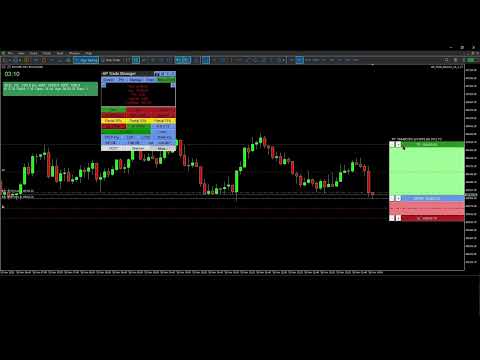
AP Trade Manager is a compact, broker-safe MT5 utility that turns your chart into a fast, disciplined trade workstation. It handles entries, exits, partials, breakeven+, OCO/Bracket logic, trailing stops, and scheduled-style actions from a clean panel you can dock anywhere. It’s pure MQL5 (no DLL, no WebRequest), and designed for live charts.

What it does

  • One-tap execution. Buy/Sell market and all four pending types (Buy/Sell Stop, Buy/Sell Limit). Auto-sizes by fixed lot or % balance risk.

  • Lines Mode trading. Toggle “Lines”, drag Entry/SL/TP on chart, snap to grid/ATR steps, then press PLACE. The EA decides market vs pending, applies clamps, and tags orders.

  • Protection suite. Breakeven+ with offset, unified trailing (Fixed, ATR, MA, SAR, Fractal, Prev-Bar) with hard ratchet, optional Virtual Stops with server fallback and warnings.

  • Position control. Partials (25/50/75 or custom), Close Buys/Sells/All, Delete Pendings, Reverse (with freeze/stop safeguards).

  • OCO / Bracket. From your lines: paired orders cancel the sibling on fill; market fills auto-place TP/SL.

  • Manage workbench. A side drawer listing live tickets (Ticket | Side | Lots | Entry | SL | TP | P/L | Trail | Age). Click any row to select it; act from the main panel while the drawer stays open.

  • Main Display Box (MDB). At-a-glance spread, times (Srv/Loc), symbol P/L, margin badge, mode badges (Lines*, OCO*, Trail…). Page through account and session views.

  • News glance. A minimal news panel with color-coded impact and countdown. Informational only; it never blocks trading.

  • Tools & overlays. Drawing mode (trendline, channel, triangle). Add-ons: Candle Countdown, Session Boxes, AP Multi-Range, MA Cross Alerts, Supertrend, candle hover volume tooltips, and a Screenshot button.

  • Hindsight cards. One-click snapshots + key stats you can export later into a trade journal (CSV).

  • Settings export/import. Save per-symbol/TF presets and panel geometry to JSON; restore on any terminal.


  • Speed without sloppiness. OrderCheck + margin checks on every send. Lots floored to broker step. Stops/freeze level respected.

  • Clarity. Minimal clicks, readable status line, short toasts, clean badges.

  • Persistence. Remembers geometry, tab, risk mode, and overlays per symbol/timeframe.

  • Validator-ready. Timer throttled, logs quiet, no external calls, file ops gated for tester.

What’s included

  • Panel UI (header tools, tabs, trade grid, MDB, Manage/Tools/Info drawers)

  • Risk Manager (fixed lot or % balance, cash risk, R multiple, spread/commission option)

  • Order Router (preflight checks, deviation policy, retry/nudge, tagging)

  • BE/Trail Engine (trigger + offset, multi-strategy trailing, hard ratchet)

  • OCO/Bracket (pairing, cancel-on-fill, bracket from market)

  • Position Book (fast snapshot for rows/filters/partials)

  • Overlays (countdown, sessions, multi-range, MA cross, Supertrend; draw objects)

  • Hindsight & Journal (cards + CSV export)

  • Persistence (GV/Files JSON)

Compatibility

  • Platform: MetaTrader 5 desktop (Windows).
    On macOS use a Windows VM or supported compatibility layer.

  • Category: Utilities (no backtest UI in Strategy Tester).

  • Live use: Designed for live charts. Strategy Tester cannot interact with panel buttons.

Quick Start Guide

1) Install and attach

  1. Copy the compiled EA into MQL5\Experts\ and restart MT5.

  2. Allow Algo Trading globally and on the chart.

  3. Attach AP Trade Manager to a symbol chart (M1–D1). Place the panel where you like.

Note: The Strategy Tester won’t exercise the UI. Use a live chart or demo account chart.

2) First-run checks (60 seconds)

  • Open More → Quick Start to skim basics or More → About for version info.

  • In the header, set theme with T if desired.

  • Confirm risk mode on the trade strip:

    • % for risk-percent sizing (enter Risk % in inputs or via the inline editor).

    • Lot for fixed lots.

  • MDB shows Srv/Loc time, Spread, P/L, and Free Margin badge.

3) Place a trade with Lines Mode

  1. Tap Lines. Three lines appear: ENTRY, SL, TP with handles and labels.

  2. Drag ENTRY/SL/TP where you want. Use step/snap controls if enabled.

  3. Press PLACE:

    • The EA chooses market or pending based on ENTRY vs Bid/Ask.

    • It clamps SL/TP to broker stops/freeze. Status line confirms action.

  4. Toggle OCO for paired pendings, Bracket to auto-attach TP/SL to market fills.

4) Protect and manage

  • BE+: Turn on; set offset points. The EA moves SL to BE+ once the trigger is hit.

  • Trail: Pick mode (Fixed/ATR/MA/SAR/Fractal/Prev-Bar). Ratchet never loosens.

  • Partials: Use 25/50/75 or Custom %. The EA floors to broker lot step.

  • Close controls: Close Buys/Sells/All, Delete Pendings, or Reverse safely.

  • Virtual Stops (VStops). Local SL/TP watcher that closes positions at your thresholds without placing server-side stops. Shows a VStop* badge in the MDB when active. Latency and gaps can cause slippage; for critical risk consider pairing with server SL/TP (Bracket ON) so the server protects you if the terminal is closed.

5) Manage drawer (optional)

  • Click Manage. You’ll see rows for current symbol (or filters).

  • Click a row to select that position. Keep the drawer open and use MCP buttons to partial/BE/Trail the selected trade.

  • Drawer and MCP stay in sync; status shows results and any skips.

6) Tools & overlays

  • Tools → Drawing Mode: trendline, channel, triangle. Draw, move, delete.

  • Add-ons: toggle Candle Countdown, Session Boxes, AP Multi-Range, MA Cross Alerts, Supertrend.
    Overlays render via chart objects or indicators and update on timer.

  • Hover volume: move the mouse over a candle to see its volume tooltip.

7) News glance

  • Click Info → News to view upcoming/active events with impact colors and countdown.
    It’s informational only; the EA never blocks orders because of news.

8) Screenshots & Hindsight

  • Click the camera button to capture the chart into \MQL5\Files\APTA_Shots\ .

  • When you close a trade, tap Hindsight to save a card (chart snapshot + key stats).

  • Export your journal: More → Export Settings / Journal to CSV for later review.

9) Save / load your setup

  • More → Export Settings saves presets, overlays, geometry into JSON (per symbol/TF).

  • More → Import Settings restores them. Useful across terminals or fresh installs.

10) Safety notes

  • The EA runs OrderCheck + OrderCalcMargin before every send.

  • Lots respect broker min/step; stops respect stops/freeze levels.

  • Virtual Stops (optional): the EA watches price and sends a market exit if your local SL/TP is hit. SL/TP still applied server-side if you enable bracket/real stops. You’ll see a warning badge when Virtual is ON.

Troubleshooting

  • Buttons don’t respond in Tester: that’s expected. Use a live chart.

  • “Insufficient margin” or “stops too close”: widen SL/TP or reduce risk; check symbol stop/freeze levels in MDB.

  • No overlays appear: ensure Tools → Add-ons toggles are ON and timeframes are supported.

  • Mac users: use MT5 for Windows via VM/compatibility layer. Native macOS ports can be unreliable with advanced chart objects.

  • Mac users — read before purchase

    MetaTrader 5 is a Windows app. On macOS you must run MT5 under virtualization (Parallels/VMware) or compatibility layers (CrossOver/Wine).

    • Recommended: Parallels on Apple Silicon (M-series) with Windows 11 ARM. Stable UI, full object drawing, normal file paths.

    • Known quirks under Wine/CrossOver:

      • Some hover tooltips and custom labels may not render in window-only screen captures (use “display capture” in OBS).

      • Retina scaling can misplace labels; lower scaling or set MT5 to 100%.

      • File paths differ; keep presets in …/MQL5/Files/ .

    • We do not ship a macOS binary. Support covers MT5 inside a Windows environment only.


    Does not work in the Strategy Tester

    This is a manual trade assistant. It relies on live UI clicks, chart objects, and broker interaction. The MT5 Strategy Tester does not deliver those, so the panel can’t operate.

    Why it won’t run in Tester

    • The tester doesn’t generate OnChartEvent mouse/keyboard events that our panel needs.

    • Many tester runs have trading disabled or restricted; manual OrderSend/modify logic is blocked.

    • Visual mode isn’t a live chart: multi-symbol book, partials, OCO linking, and UI state persistence aren’t simulated.

    • Calendar/screenshots/file I/O are limited or off in tester, so news and utilities won’t load.

    Use on a live or demo chart in the terminal with trading enabled.


推荐产品
Pattern Recognition EA
Claudiu-georgian Zavera
Pattern Recognition EA - From Learn to Earn. The market repeats itself. This EA finds every past repeat of the current candle sequence - and lets history vote the direction. ONE SHAPE. EVERY REPEAT IN HISTORY VOTES. The last N candles on your signal timeframe form a shape. The EA scans the history you choose - a fixed number of bars or everything your broker provides - for the SAME shape, and checks what happened next, every single time. Only when enough repeats exist AND a clear majority of t
Orphira Gold
Mohammad Reza Rezaei
Orphira Gold is an automated trading system developed specifically for gold trading in MetaTrader 5. It combines adaptive trade management, equity-based position sizing and several layers of portfolio protection in one straightforward Expert Advisor. The system continuously evaluates market conditions and opens trades only when its internal requirements are met. When a position moves against the expected direction, Orphira Gold may use carefully spaced recovery positions. Every additional order
Easy EA for closing positions with profit or loss. All positions of chart's symbol are counted separately. Settings: TPforSymbol — set profit amount to indicate when to close every positions for the symbol of the chart. Swap and commission are decreasing your profit. SLforSymbol — set SL amount to indicate SL for every positions for the symbol of the chart. Swap and commission are increasing your loss. SLforSyblol is always below/equal zero.
Equinox Gold
Dmitriq Evgenoeviz Ko
Equinox Gold is a high-tech trading expert advisor (EA) specifically designed for the gold market ( XAUUSD ). The system is based on a unique Market Equilibrium algorithm that identifies areas of imbalance between supply and demand during extreme volatility. Unlike most robots that use dangerous sit-and-wait methods, Equinox Gold relies on mathematical momentum confirmation and strict risk control for every trade. MAIN ADVANTAGES VRP Filter (Volatility Range Filter): The robot automatically ada
BTC Master Pro
Farzad Saadatinia
4.58 (12)
BTC Master Pro —— 您值得信赖的比特币纪律化交易伙伴。 全新版本现已集成 OpenAI 人工智能技术 ,在高波动的加密市场环境中,实现更智能的执行与更精准的交易过滤。 本专业级交易机器人专为 Bitcoin (BTCUSD) 在 MetaTrader 5 平台上的交易而设计,专注于结构化执行、风险暴露控制以及智能化风险管理。 当前价格: $499  →  下一阶段: $699  →  最终价格: $999 LIVE SIGNAL HERE 基于 OpenAI 的执行过滤系统 最新版本集成 OpenAI 技术,用于实时分析市场环境并过滤低质量或弱势交易信号。 AI 安全层(AI Safety Layer): 人工智能模块作为交易执行前的第二层审核机制。其功能严格限定为执行过滤工具(而非市场预测工具)。每一笔交易都必须通过结构化逻辑与智能验证流程,以减少不必要的回撤并避免低质量入场。 为什么选择 BTC Master Pro? 加密货币市场——尤其是比特币——具有高度波动性。情绪化决策往往导致不稳定的交易结果。本系统旨在帮助交易者在快速市场变化中保持结构化、纪律性与
Sonic R Pro Enhanced
Huu Thuong Nguyen
Sonic R Pro Enhanced EA - 2025 版本 $249 仅限前5名购买者! 实时信号 查看 Sonic R Pro Enhanced 的实时表现: 交易策略 Sonic R Pro Enhanced 是经典 Sonic R 策略的升级版,通过 Dragon Band(EMA 34 和 EMA 89)进行自动化交易,并结合先进算法以提高盈利能力。 时间周期:M15, M30 支持货币对:XAUUSD, BTCUSD, AUDJPY, USDJPY 交易风格:回调交易 & 反趋势交易 最低资金要求:500 USD 杠杆比例:1:200 起 用户指南 设置:只需配置一个参数 - RiskAmount 如果 RiskAmount < 0:按账户余额的百分比计算风险 如果 RiskAmount > 0:每笔交易的固定风险金额 (USD) 示例: RiskAmount = -1 : 风险为账户余额的 1% RiskAmount = -2.5 : 风险为账户余额的 2.5% RiskAmount = 50 : 每笔交易固定风险 50 USD RiskAmou
Gold Trade Manager PRO MT5 is a manual trade management utility for MetaTrader 5. It is designed for traders who want to open, protect and manage positions directly from the chart without switching between multiple terminal windows. Current price: $59 - increases by $10 after every 20 purchases until reaching the final price of $119 . Next price: $69 . Complete Buyer Kit: 40 Professional Resources included at no additional cost. MT5 Presets, PDF Guides, Checklists, Mindmaps, Reference Cards, and
KS PropFirm 与 Broker Dashboard Pro:您在自营交易挑战中的终极合规守护者 通过精准监控,助您在自营交易之路上更上一层楼。您是否厌倦了在充满高风险的自营交易挑战中,为了保持合规而不得不费力地在电子表格、计算器和人工检查之间来回切换?KS PropFirm 与 Broker Dashboard Pro 是一款专为专业交易者打造的一站式 MT5 辅助工具,旨在助力您成功应对 FTMO、MyForexFunds、The5%ers 等知名自营交易机构的挑战。这款轻量级仪表板能实时洞察您的账户健康状况,自动执行规则以防止代价高昂的违规行为——且绝不会拖慢您的 EA(智能交易系统)运行速度或终端性能。助您更快通过挑战,更智能地进行交易,并充满信心地解锁实盘资金账户。 为何选择 KS PropFirm 仪表板?解锁专业级交易功能 无缝支持多家机构:预置了针对 14 家以上顶级自营交易机构的模板,并可轻松自定义规则以适配任何经纪商或挑战项目。自动从入金历史中检测您的初始资金余额——无需任何猜测或估算。 坚不可摧的亏损保护:通过清晰直观的图表展示和违规风险预警,实时
按价格设置TP和SL, 自动订单修改器 自动为任意交易设置精确的TP和SL价格 适用于所有货币对和EA,可按符号或魔术号筛选 兼容 MetaTrader 4 和 MetaTrader 5,在 Market 上作为独立产品出售。 此EA允许您通过直接价格值(例如EURUSD的1.12345)来设置和应用精确的止盈(TP)和止损(SL)水平。无需点数或Pips。为所有订单或按图表/魔术号筛选实现干净、精准的交易管理。 主要功能: 通过精确价格即时修改TP和SL 应用于所有订单、当前图表或特定魔术号 输入0以移除TP或SL 连接到任意图表后自动运行 兼容所有交易品种 适用于: 想快速控制TP/SL的手动交易者 需要覆盖默认退出逻辑的EA用户 管理多订单或复杂头寸的交易者 有问题或建议吗? 请留言提出您的问题或功能想法。 Keywords: set TP SL by price , trade manager EA , expert advisor SL TP , set take profit price , set stop loss price , SL TP override ,
Crash300 Pro Trader 是一款完全自动化的专家顾问(EA),专为交易 Crash 300 指数而设计,结合了趋势识别、RSI 过滤以及基于回撤的交易管理系统。 该EA使用日线周期的 Parabolic SAR 来识别市场方向,并且只在趋势方向上执行交易。为了提高入场精度,系统使用 RSI 过滤器,避免在超买或超卖区域出现错误信号。 内置的回撤恢复系统用于管理亏损仓位。当亏损达到设定水平时,会在同一方向上继续开仓,以帮助在趋势行情中逐步恢复浮动亏损。 该系统还包含止盈管理功能,当达到设定利润目标时,会自动平仓盈利订单。 主要功能: - 全自动交易系统 - 使用 Parabolic SAR(D1)进行趋势判断 - RSI 入场过滤 - 回撤恢复交易系统 - 自动止盈管理 - 仅适用于 Crash 300 指数 本EA适用于喜欢系统化交易、控制风险以及使用自动恢复逻辑的交易者。
Ignition
Dansie Software Limited
Strategy Overview The Ignition EA tries to take advantage of sudden momentum when the Ignition pattern is detected. The final bar in the ignition pattern has a small opening wick, a very little or no closing wick, is large in comparison to recent bars and must start from the lower end of the current range (for a bullish ignition) Quick Testing Use Symbol EURUSD, Timeframe M2, and remove the GBPUSD symbol from the "Symbols" input (stratergy 1 and stratergy 2) Settings The below settings appe
AlgoDevMT5 Trade Manager Pro AlgoDevMT5 Trade Manager Pro is a professional trade management and risk control utility for MetaTrader 5. Designed for discretionary traders and funded account traders, this utility helps traders plan trades visually, calculate position size instantly, and manage risk with precision. Trade Manager Pro does not generate trading signals, open trades automatically, or provide investment advice. It is a trader-assistance utility designed to improve consistency and risk
SPECIAL LAUNCH OFFER: $30 (1-Month Rent) Limited time offer to build our community and gather feedback! AmbM GOLD Institutional Scalper A high-precision M5 algorithm for XAUUSD (Gold) , engineered to trade exclusively at Institutional Liquidity Levels ($5/$10 psychological marks). PERFORMANCE DATA (BUY ONLY) • Win Rate: 87.09%. • Safe Growth: +$4,113 profit on $10k (13.75% Max Drawdown). • Extreme Stress Test: Successfully generated +$22,997 in a 5-year stress test (2020-2026), proving
Kill Zone Hunter
Alex Amuyunzu Raymond
KILL ZONE HUNTER Institutional Kill Zone, Market Structure & Fair Value Gap Trading EA for MT5 Overview KILL ZONE HUNTER is a professional-grade MetaTrader 5 Expert Advisor engineered around Institutional Smart Money Concepts (ICT / SMC) , with a primary focus on Kill Zone trading , Market Structure , and Fair Value Gap (FVG) execution . This EA is designed to systematically hunt high-probability trades during institutional trading windows (Kill Zones) , where liquidity, volatility, and directio
Lot Sizer & Dynamic Risk Management Panel for MT5 Take full control of your trading risk with Lot Sizer & Dynamic Risk Management Panel —an essential, high-speed execution utility designed for discretionary traders, prop firm account evaluators, and scalp/intraday traders. Calculating position size manually during fast-moving market sessions (London/New York opens or news releases) leads to execution delays and costly sizing errors. This interactive panel automates your risk management directly
Kintech Gold
Doan Van Hai
Following our guide, you will gain more than you lose. EA for long-term. Stable profit - min risk. Symbol:  XAUUSD Attach to any timeframe Min deposit:   3000$ - Calculate profit by month Live signal:  https://www.mql5.com/en/signals/2080910?source=Site+Signals+My EA input instruction: 1. With XAU 2 digits (eg: 1843.23) please set - Input   [3. Max spread]: 55 2. With XAU 3 digits (eg: 1843.235) please set - Input   [3. Max spread]: 550 If you want daily trade, this signal maybe not suit with
EA Agulhada do Didi
Devscode Desenvolvimento de Softwares LTDA
该智能交易系统(Expert Advisor)旨在通过 Didi Index 指标逻辑,在 MetaTrader 5 平台上实现交易自动化,用于识别市场入场点。 EA 会根据用户设定的规则和参数,在图表上自动执行所有交易操作。 该系统的设计理念是采用清晰、客观的入场与管理逻辑,使交易者能够直观地监控交易执行过程,无需使用任何外部集成或附加库。 主要功能 自动交易 交易基于 Didi Index 指标逻辑自动执行。 可配置交易时间 允许设置 EA 允许交易的时间段,在该时间范围之外不会开启新的交易。 移动止损(Trailing Stop) 止损会根据设定参数自动跟随价格走势。 自动保本(Breakeven) 当满足设定条件时,可自动将止损移动至入场价。 图表信息面板 在图表上显示 EA 的运行信息,便于实时监控交易和系统状态。 兼容性 MetaTrader 5 模拟账户或真实账户 适用于平台支持的所有交易品种 重要说明 本产品仅以编译格式提供,不使用 DLL 调用,不收集用户数据,也不与第三方服务集成,完全符合 MQL5 市场规范。
FREE
Bohemia Gold MT5
Vladislav Taska
4.75 (4)
Bohemia Gold MT5 is  Trend & Volatility EA trading system designed specifically for Gold (XAUUSD) . It combines higher-timeframe trend filtering , trend detection , volatility-based SL management , and advanced trade management to adapt market conditions. It uses style logic focused on trend strength, volatility, and capital protection. NOTE:   Based on backtests, I found better trading results with the following setup: D1/H4/H2 (Trend/ADX/ATR & trade). The SET file can be downloaded here … bohe
FREE
Awesome Oscillator by Bill Williams with the ability to fine-tune and replace the averaging algorithms of the indicator, which significantly expands the possibilities of using this oscillator in algorithmic trading and brings it closer in its properties to such an indicator as the MACD. To reduce price noise, the final indicator is processed with an additional Smooth averaging. The indicator has the ability to give alerts, send mail messages and push signals when the direction of movement of th
CyberTrade TradeStation PRO (Manual Edition) Ultimate Interactive Trade Planner & Risk Management Suite for MT5 CyberTrade TradeStation PRO is a professional-grade, high-performance visual order management panel designed for discretionary traders who demand absolute precision, speed, and strict risk protection. This tool completely eliminates manual calculation errors by transforming your chart into an interactive trading workstation compatible with all asset classes on MT5—including Forex, Gold
Gold Burger
Gayathiri Gopalakrishnan
GOLD BURGER SCAN MODE EA https://www.mql5.com/en/blogs/post/774613 GOLD BURGER is an automated Expert Advisor for MetaTrader 5 designed to analyze market conditions, identify trading opportunities and manage trades automatically. The EA combines price action, candlestick patterns, market structure, chart confirmation and order-flow analysis. Instead of depending on a single signal, GOLD BURGER evaluates multiple market conditions before making a trading decision. The price action engine recogni
Gold Sniper Panel Master Pro High-Precision Manual Trading Terminal for Scalpers Gold Sniper Panel Master Pro is a sophisticated trading utility designed for traders who demand speed, precision, and surgical control over their positions. This all-in-one dashboard streamlines manual execution and introduces an advanced recovery engine to navigate volatile market conditions with confidence. Key Features Dual-Orientation Interface : Instantly toggle between Horizontal and Vertical layouts to perfe
XAU AI Structure Trader PRO (MT5) AI-powered market structure trading for disciplined intraday & swing traders. Designed for traders who prefer waiting for the right setup rather than forcing trades. IMPORTANT! After the purchase please send me a private message to receive the installation manual, license key and the setup instructions. XAU AI Structure Trader PRO is not a high-frequency trading robot and is not designed for aggressive scalping. This Expert Advisor focuses on identifying high-q
Matrix Arrow EA MT5
Juvenille Emperor Limited
5 (7)
Matrix Arrow EA MT5   是一款独特的智能交易系统,可以通过图表上的交易面板手动或 100% 自动交易   Matrix Arrow Indicator 的 MT5   信号。   Matrix Arrow Indicator MT5   将在其早期阶段确定当前趋势,从多达 10 个标准指标中收集信息和数据,它们是:平均定向运动指数 (ADX) , 商品渠道指数 (CCI) , 经典 Heiken Ashi 蜡烛 , 移动平均线 , 移动平均收敛散度 (MACD) , 相对活力指数 (RVI) , 相对强弱指数 (RSI) , 抛物线SAR , 随机振荡器 , 威廉姆斯的百分比范围 。 当所有指标给出有效的买入或卖出信号时,相应的箭头将打印在图表上,在下一个蜡烛/柱线的开盘时表示强劲的上升趋势/下降趋势。用户可以选择使用哪些指标,并可以单独调整每个指标的参数。使用   Matrix Arrow EA MT5 ,您可以直接从图表上的交易面板手动交易   Matrix Arrow Indicator MT5   信号,或使用 100% 算法交易选项   100% 自动交
FULL AUTO RISK MANAGEMENT EA – PRO + ACCOUNTING is an advanced Expert Advisor designed to protect your trading capital through fully automated risk control. Key Features: Progressive Stop Loss adjustment Partial position close at predefined loss levels (50% / 70%) Automatic Break Even at 50% Take Profit Profit Lock system at 50% and 70% of Take Profit Smart accounting of initial risk and saved capital Works with any trading strategy (manual or automated) No entry signals – risk management only T
Gold Sniper AI Pro
Salahaldeen Abedalqader Mah'd Alshaer
Gold Sniper AI – روبوت تداول الأموال الذكية Gold Sniper AI هو مستشار خبير متقدم مصمم خصيصًا لتداول XAUUSD (الذهب) باستخدام مفاهيم المال الذكي وتحليل حركة السعر. يقوم نظام التداول الآلي بتحليل عوامل السوق المتعددة قبل تنفيذ الصفقات للعثور على فرص ذات احتمالية عالية في سوق الذهب. ⸻ منطق الاستراتيجية يجمع برنامج Gold Sniper AI بين العديد من مفاهيم التداول الاحترافية، بما في ذلك: • الكشف عن اتجاهات السوق الأوروبية • تحليل هيكل السوق • عمليات مسح السيولة • كتل الطلبات • فجوات القيمة العادلة (F
Prop Firm Shield Full
Pablo Adolfo Cantos
Prop Firm Shield is a risk management panel for MetaTrader 5, built for prop firm traders who need control over their daily limits. You configure each limit and the tool watches the account around the clock, acting automatically when a limit is reached: closing positions, deleting pending orders and blocking new trading until the next day. Features: - Daily Take Profit - three modes: fixed USD, percent of the day-start balance, or target balance - Daily Stop Loss - three modes: fixed USD, percen
This is my first ExpertAdvisor, but it came along with more than 7 years in experience trading Forex , Crypto and Index.                                                                                SHEERAN: The Advanced Multi-Timeframe EA for Dynamic and Adaptive Trading   EA SHEERAN, is designed for traders who demand precision, flexibility, and reliability across multiple timeframes. Whether you’re targeting short-term gains on the M30 chart or looking for sustained moves on the H4, this E
LIMITED TIME OFFER To celebrate our launch, OmniSignal Pivot II is 100% FREE until February 11th. Current Price: $0 (Free) Original Price: $170 Don't miss out - download your copy today and secure the lifetime license before the price returns to $170! Overview The OmniSignal Pivot II EA is a professional-grade automated trading system designed to capitalize on institutional price levels. By combining classic Pivot Point theory with modern ATR (Average True Range) volatility filters, this EA ide
Market Dominator EA Advanced Support/Resistance Trading System with Adaptive Hedge and Recovery Management Overview Market Dominator EA is an automated trading system designed to operate in both trending and ranging market environments using structured market analysis and controlled recovery logic. The EA combines: Support and resistance analysis Adaptive market condition detection Structured DCA management Controlled hedge execution Basket take-profit synchronization The system focuses on main
该产品的买家也购买
================================================================================ POC BREAKOUT - V20.72. Full Professional Grade Toolkit ================================================================================ POC Breakout is a full MetaTrader 5 trading dashboard for discretionary traders who want breakout signals, Point of Control (POC) context, volume profiles, order flow, market structure, news, alerts, and advanced trade planning in one professional workspace. Attached directly to you
Farmed Hedge Yield Farming | All Markets (Manual - Hybrid - Semi/Automated EA) VERIFIED TRADING RESULTS - Farmed Hedge Yield Axi Copy:  https://www.mql5.com/en/signals/2356376 - Farmed Hedge Yield Exn Copy:   https://www.mql5.com/en/signals/2356404 - Farmed Hedge Yield V Copy:  https://www.mql5.com/en/signals/2357156 IMPORTANT NOTICE: FarmedHedge is a MANUAL-FOCUSED TRADING UTILITY ,not a fully automated EA. Results shown on this Signal include manual trades and overall strategic management.
EA Overfitter
Stephen J Martret
5 (1)
回测看起来很漂亮。但它明天、下周、下个月还能继续赚钱吗? EA Overfitter 让您的 EA 在 100 段它从未见过的价格历史上重新运行。一个分数告诉您这个优势是否真实。 回测告诉您的,是 EA 在某一段价格历史上的表现——那段恰好发生过的历史。您无法从中判断,这个结果有多少来自策略本身,又有多少只是那一条特定路径带来的。 EA Overfitter 回答的正是这个问题。它构建最多 100 段您的 EA 从未交易过的合成价格历史,让策略在全部这些历史上重新运行,并展示它所产生的完整结果区间。您得到的不再是一条幸运或不幸路径上的单个数字,而是一幅真实的图景:策略在陌生数据上多久能赚钱、典型结果是什么样(而不是最好的那一次),以及您的回测离它有多远。 这些世界是由您自己的近期历史重建而成,因此这不是预测——任何从历史数据出发的检验都不可能是预测。它告诉您的是:这个优势是否依赖于价格的某一种特定排列,以及回测数字距离典型结果有多远。在投入资金之前,这才是值得回答的问题。 三个步骤 1. 构建。在图表上选择时间区间和世界数量,然后按 Build。EA Overfitter 会
The product will copy all telegram signal to MT5 ( which you are member) , also it can work as remote copier.  Easy to set up, copy order instant, can work with almost signal formats, image signal,  s upport to translate other language to English Work with all type of channel or group, even channel have "Restrict Saving Content", work with  multi channel, multi MT5 Work as remote copier: with signal have ticket number, it will copy exactly via ticket number. Support to backtest signal. How to s
FUTURES ORDERFLOW FOOTPRINT CHART Professional OrderFlow EA for MetaTrader 5 Version 1.01| Professional tool for real traders | Institutional-Grade Visualization STRATEGY TESTER USERS - PLEASE SELECT EVERY REAL TICK WHEN TESTING AND YOU HAVE DOWNLOADED HISTORICAL DATA. IF YOU SEE A WAITING SCREEN AND IT IS NOT DOWNLOADING, IT MEANS YOU HAVE LOW HISTORICAL DATA. TRY 1 MIN AND 5 MIN FIRST ON 1 DAY DATA. ONE DAY DATA SHOULD BE THE NEWEST AND MOST CURRENT DATE. PLEASE WAIT UNTIL THE MARKET HAS ROL
Footprint Chart Pro — Professional OrderFlow EA for MetaTrader 5 Version 6.34 | Professional tool for real traders | Institutional-Grade Visualization DEMO USERS - PLEASE SELECT EVERY TICK / REAL TICK WHEN TESTING AND YOU HAVE DOWNLOADED HISTORICAL DATA. IF YOU SEE A WAITING SCREEN AND IT IS NOT DOWNLOADING, IT MEANS YOU HAVE LOW HISTORICAL DATA. TRY 1 MIN AND 5 MIN FIRST ON 1 DAY DATA. ONE DAY DATA SHOULD BE THE NEWEST AND MOST CURRENT DATE. PLEASE WAIT UNTIL THE MARKET HAS ROLLED OVER PERIOD.
Power Candles 策略扫描器——自优化多符号设置查找器 Power Candles策略扫描器 采用与Power Candles指标相同的自优化引擎,可同时扫描您“市场观察”中的所有交易品种。一个面板即可显示当前哪些品种在统计上具备交易价值、每种策略的最佳应用方向、最优止损/止盈组合,并在新信号触发时立即向您发送提醒。 本工具是 Stein Investments 生态系统的一部分 - 18+ 款工具,加上 Max,您的一对一 AI 交易导师。  随时在线,深入了解每一款指标,在您需要梳理思路的那一刻就在那里。  立即认识他: https://stein.investments 您的全面市场监控。每个交易品种超过3,000次自动优化。2种警报类型。一键切换图表并采取行动。 为何您需要此工具 大多数多标的扫描器仅展示价格 波动 。每只股票的波动率、百分比变化、RSI。您仍需自行摸索正确的策略、合适的止损位以及理想的入场阈值。Power Candles策略扫描器针对每只股票自动解答这些问题,仅在数学验证过的交易设置中触发实际入场信号时才会向您发出提示。这就是全部卖点。 自动
This Expert Advisor waits a position to be opened, no matter if you open manually or with the EA buttons or eventually via mobile: it creates a Grid in Anti Martingale with pending stop orders in the same direction of the first position. You can specify the number of orders, the size and the distance between the orders. You can also adjust the Monetary Target of the Grid, the monetary Stop Loss, the Intermediate Target (when reached the EA insert an order with opposite direction of the total pos
YuClusters
Yury Kulikov
4.93 (43)
Attention: You can view the program operation in the free version  YuClusters DEMO .  YuClusters is a professional market analysis system. The trader has unique opportunities to analyze the flow of orders, trade volumes, price movements using various charts, profiles, indicators, and graphical objects. YuClusters operates on data based on Time&Sales or ticks information, depending on what is available in the quotes of a financial instrument. YuClusters allows you to build graphs by combining da
AI Agent Supervisor is NOT an Expert Advisor. AI Agent Supervisor   is a   multi-agent AI risk & portfolio supervisor   that watches every EA on your account and intervenes in real time.  WANT AN AI PORTFOLIO MANAGER WATCHING YOUR FLEET 24/7?   Run your fleet on the same brokers I do:   IC MARKETS , IC TRADING   .  Unlike the centralized stock market, Forex has no single, unified price feed.  Every broker sources liquidity from different providers, creating unique data streams. The Supervisor r
Global Investing FX Terminal
Santiago Nicolas Pla Casuriaga
5 (1)
Global Investing FX Terminal 是一款面向 MetaTrader 5 的一体化外汇仪表盘——涵盖央行政策利率、CFTC COT 持仓、利差排名、经济意外指数、期权偏斜、散户情绪与相关性,共十三个分析面板——以单一无闪烁画布呈现,每 10 秒从单个挂载 EA 刷新一次,无需任何外部软件。 专业外汇分析需要同时调取通常分散在不同平台的数据:利率衍生品、政府数据门户、券商掉期规格、期权台。此 EA 将所有这些整合到交易终端内的单一界面中,在您执行决策的地方完成分析。 仪表盘上显示的内容 市场概览 外汇对列表 — 所有 28 个 G10 货币对,加上当券商 Market Watch 中存在 NOK/SEK 交叉盘时显示的交叉盘——最多共 36 个货币对——的实时买卖价。每行显示点差、日度与周度变化、以点数表示的绝对区间,以及 ADR%——当前交易时段区间占 14 日平均日区间的百分比。ADR 达到 95% 的货币对已消耗其统计日内延伸空间;伦敦盘中场 ADR 仅 25% 的货币对仍有运行余地。颜色逐 Tick 实时更新。 货币对详情 — 点击列表中的任意行,即可打开该
Quant AI Agents
Ho Tuan Thang
5 (1)
Quant AI Agents are independent trading Expert Advisors. Instead of trading using a fixed strategy like other conventional EAs, Quant AI Agents   is a   multi-agent AI trading framework   that turns natural-language strategy prompts into live.  WANT THE SAME RESULTS AS MY LIVE SIGNAL?   Use the exact same brokers I do:   IC MARKETS , IC TRADING   .  Unlike the centralized stock market, Forex has no single, unified price feed.  Every broker sources liquidity from different providers, creating un
Copy your MT5 trades to Interactive Brokers You keep using MT5. Every order you open or close is sent to your IB account. In real time. No coding. No changes to your strategy or EA. Try it first Rent 1 month: $30. Test on a live or paper account. What it does Real-time copying: same direction, reverse, or one side only. Map any MT5 symbol to any IB symbol. Set a lot ratio for each. Forex, Futures, Stocks, CFDs, Metals and Crypto. Position sync: both accounts checked, any difference fixed. Optio
Prop Firm Os
Gayathiri Gopalakrishnan
5 (1)
PROP FIRM OS Structured Trading Assistant for MetaTrader 5 PROP FIRM OS is a structured trading assistant designed for MetaTrader 5 users who prefer rule-based market analysis and organized trading workflows. The Expert Advisor combines market analysis tools, scanner functions, dashboard monitoring, alerts, risk-control settings, and trade management features inside one system. PROP FIRM OS is designed to help traders follow selected rules, filters, and monitoring conditions during trading activ
MT5 Trading Deck
Manuel Michiels
5 (2)
One button. One trade. MT5 Trading Deck is a hotkey trading panel for MetaTrader 5 that turns the platform into a keyboard-driven execution cockpit. Stop loss, take profit and lot size are pre-calculated for every key; the moment you press, a market order is live on the broker. A complete technical user manual is attached in the product Comments section. It documents every input parameter, the full hotkey map, the recommended Stream Deck XL layout, and the advanced workflows for Pre-Limit orders
EasyInsight AIO MT5
Alain Verleyen
4.92 (12)
EASY Insight AIO – 全能智能交易一站式解决方案 概述 想象一下,您可以在几秒钟内扫描整个市场——外汇、黄金、加密货币、指数,甚至股票——无需手动筛选图表、繁琐安装或配置指标。 EASY Insight AIO 是您专为 AI 交易打造的即装即用数据导出工具。它将整个市场快照一次性输出为简洁的 CSV 文件,直接支持 ChatGPT、Claude、Gemini、Perplexity 等各类 AI 平台的即时分析。 无需窗口切换,无需图表叠加,也没有任何杂乱。只需纯净、结构化的数据自动导出,让您专注于基于数据的高效决策,无需再盯盘耗时。 为什么选择 EASY Insight AIO? 真正的一体化 • 无需设置,无需安装指标,无图表叠加。只需安装、运行并导出——就是这么简单。 多资产全覆盖 • 扫描分析外汇、金属、加密货币、指数、股票——您的券商所能提供的一切市场。 AI 专属数据导出 • 高度结构化、针对 AI 优化的 CSV 文件,直接适配主流智能工具和平台。 完整导出内容: • 三个可选周期的货币强度分析 • 净多头头寸变化体现市场情绪 • 成交量变化、
Bots Builder Pro MT5
Andrey Barinov
4.17 (6)
This is exactly what the name says. Visual strategy builder . One of a kind. Turn your trading strategies and ideas into Expert Advisors without writing single line of code. Generate mql source code files with a few clicks and get your fully functional Expert Advisors, which are ready for live execution, strategy tester and cloud optimization. There are very few options for those who have no programming skills and can not create their trading solutions in the MQL language. Now, with Bots Builde
The real‑time view of what is happening inside the market. Footprint Secrets brings detailed analysis directly into MetaTrader 5. It shows where volume is trading, how buyers and sellers are interacting, and how liquidity shifts as the market evolves. Designed for traders who want a precise, real‑time understanding of market behavior. Check out the free preview version here:  https://www.mql5.com/en/market/product/172398 Benefits for the Trader See the real activity behind price . Footprint ch
HINN Lazy Trader
ALGOFLOW OÜ
5 (1)
The core idea: using the user interface, you configure the parameters the chart must meet before entering a position (or positions), choose which entry models to use, and set the rules for when trading and planning should end. Lazy Trader  handles the rest: it  takes over all the routine chart watching and execution! full description  :: 3 key videos [1] ->  [2]   ->  [3] What can it do? - Understands Larry Williams market structure - Understands swing market structure by Michael Huddleston
Custom Alerts AIO:多市场智能监控,一键启动,无需设置 概述 Custom Alerts AIO 是一款“开箱即用”的高级市场扫描工具,无需额外安装任何其他指标或进行复杂设置。它内置了 Stein Investments 的所有核心指标(FX Power、FX Volume、FX Dynamic、FX Levels 和 IX Power),可帮助您轻松监控所有主要资产类别,如外汇、黄金、指数和加密货币。如果您的经纪商支持股票,您也可以手动添加个股进行监控。 1. 为什么选择 Custom Alerts AIO? 无需额外购买任何指标 • 所有关键指标均已内置,开箱即用。 • 专注于实时预警,不包含任何图形元素,性能高效,界面简洁。 全面覆盖所有主要市场 • 支持监控外汇、金属、加密货币和指数市场。 • 无需手动输入任何交易品种,只需在设置中勾选资产类别即可启用。 • 股票并不属于默认类别,如有需要可手动通过参数输入添加。 高效、专业、便捷 • 无需图表模板和手动加载,适合自动化或远程交易环境。 • 非常适合 VPS 上长期运行,或作为后台市场预警工具使用。 2
Features   With MT5 to Interactive Brokers(IB) Trader, you can: 1. Load chart data from IB to MT5, and Analyze with all standard or customer Indicators. 2. Place Orders to IB Account Directly in MT5. 3. Make your Own EAs upon IB Securities by only making minus changes of the trading function. Usage 1) Installation Copy the "Mt5ToIBTraderEn.ex4" and sample files to [MT5 Data Folder]->MQL5->Experts.  2)  MT5 Settings Add the IP Address to the MT5 Allowed URLs in 'Tools->Options->Expert Adviso
Telegram to mt5 pro
Janet Abu Khalil
4 (4)
Telegram to MT5 Pro — 高级 Telegram 信号复制器(Auto-Fix,多TP,风险控制,完整交易管理) Telegram to MT5 Pro — 专业 Telegram 信号复制系统 Telegram to MT5 Pro 可将来自 Telegram 的交易信号实时复制到您的 MetaTrader 5 账户,并提供完整的风险控制、执行管理与交易管理功能。 系统由两个组件组成: • 运行在 MetaTrader 5 内的 Expert Advisor(EA) • 连接 Telegram 并将信号发送到 EA 的桌面桥接程序 两个组件必须在同一台电脑运行。由于 MQL5 限制,EA 无法直接连接 Telegram。 支持与安装 提供完整 PDF 安装指南。 支持内容: • 完整 PDF 使用手册 • 分步安装指导 • 在线聊天支持 • 交易商设置帮助(前缀、后缀、符号映射) 功能说明 • 读取任意 Telegram 群组或频道信号 • 自动解析交易品种、方向、入场、止损、止盈 • 秒级执行交易 • 管理交易(移动止损、保本、部分平仓) • 支持多账户与多信号
Check EA performance  https://www.mql5.com/en/signals/2376164?source=Site +Profile+Seller Spot vs Future Arbitrage EA for MT5 Spot vs Future Arbitrage EA is an automated Expert Advisor designed for MetaTrader 5 that operates using price differences between Gold spot and Gold futures instruments. The strategy opens positions on both instruments simultaneously to take advantage of temporary differences between spot and futures prices. Requirements The trading account must provide both Gold spot
TradePad
Ruslan Khasanov
5 (1)
TradePad 是一種既可用於手動交易又可用於演算法交易的工具。我們為您提供一個簡單的解決方案,用於快速交易操作和控制多種交易工具的持股。 注意,該應用程式不適用於策略測試器! 模擬帳戶應用程式的試用版和所有工具的描述 應用程式介面適應高解析度顯示器,簡單直覺。為了方便工作,我們為交易者提供了以下工具: 熱鍵管理器,用於管理交易操作、在主圖表的週期之間切換、在 TradePad 工具之間切換; 標記交易等級的工具,用於在開倉或設定掛單時評估虧損風險並計算潛在利潤; MultiCharts 工具用於直觀地監控多個交易符號,以及接收演算法交易的交易訊號。為了方便起見,您可以組織交易對的集合,這將使您有機會在多個時間範圍內監控價格並進行多幣種交易; 用於查看任何歷史時期的交易統計資料的資訊模組,能夠產生擴展的 HTML 報告、查看交易符號的特徵和有關交易帳戶的資訊; 掛單管理器用於管理掛單 - 設定單一或一組(網路)掛單,可按訂單類型和單一符號或交易帳戶上的所有類型進行分組刪除; 設定賣出停損限價和買入停損限價掛單的工具; 頭寸管理器用於管理一個或多個頭寸(取決於帳戶類型) - 全部
Trade Copier Pro MT5
Vu Trung Kien
3.67 (3)
Trade Copier Pro MT5 is a tool to copy trade remotely to multiple MT4, MT5 and cTradfer accounts at different computers/locations over internet. This is an ideal solution for you if you are a signal provider and want to copy your trades to other receivers globally on your own rules. One provider can copy trades to multiple receivers and one receiver can get trade from multiple providers as well. The provider can even set the subscription expiry for each receiver, so that receiver will not be abl
The product will copy all  Discord  signal   to MT5   ( which you are member  ) , also it can work as remote copier.  Easy to set up. Work with almost signal formats, support to translate other language to English Work with multi channel, multi MT5. Work with Image signal. Copy order instant, auto detect symbol. Work as remote copier: with signal have ticket number, it will copy exactly via ticket number. How to setup and guide: Let read all details about setup and download Discord To MetaTrader
Unlimited Trade Copier Pro MT5 is a tool to copy trade remotely to multiple MT4, MT5 and cTrader accounts at different computers/locations over internet. This is an ideal solution for you if you are a signal provider and want to copy your trades to other receivers globally on your own rules. One provider can copy trades to multiple receivers and one receiver can get trade from multiple providers as well. The provider can even set the subscription expiry for each receiver, so that receiver will n
# 如果您有任何其他需求或對合作感興趣,請聯繫 zion.quantech.london@gmail.com。 Flash Trade (FT) 最友善的手動交易工具。 使用最直觀的操作來確保您的資金。 FT的特點 點擊任意位置快速交易 FT支持市場訂單和掛單 兩次點擊完成訂單並設置SL和TP 三次點擊完成掛單並設置SL和TP 自動將每個訂單的止損金額設置為您設置的餘額百分比或固定金額 下訂單時實時預估利潤 超簡單的界面和操作 支持拆分訂單 使用方式 市場訂單: 點擊圖表決定止損價位 點擊Buy或是Sell鈕 掛單: 點擊圖表決定入場價位 選擇掛單類型 點擊圖表決定止損價位 暫停FT: 點擊右上方的"On/Off"按鈕來切換開關 當按鈕從綠(On)變為紅(Off),代表FT已被停止 點擊"Off"按鈕再次開啟FT 如果有任何疑問、改善建議或是bug回報都可以聯繫e50310@gmail.com或留下評論 功能將持續於未來的版本推出
RiskGuard Management
MONTORIO MICHELE
5 (22)
注意 :要获取免费试用版,请访问我的网站。 使用手册 用户手册 RiskGuard Management — 您进行无妥协交易的终极盟友。 Lot Calculator — 自动计算手数。 Quantum — 自动风险控制,最大化利润并减少回撤。 Automatic Journal — 包含并可从我的网站免费下载。 Automatic Screenshot — 两张截图:开仓时一张,平仓时一张。 Partial Profit — 智能管理的部分平仓功能。 Smartphone Trading — 可通过手机下单,自动管理。 Stop Loss & DD Block — 每日资金的全面保护。 Automatic Break-Even — 轻松降低风险。 Closing Time — 精准控制交易时间。 Automatic Spread — 实时正确设置止损和止盈。 详细的多语言文档以及意大利语和英语的视频教程,可在我的网站上获取。
Adam FTMO MT5
Vyacheslav Izvarin
5 (2)
ADAM EA Special Version for FTMO Please use ShowInfo= false for backtesting ! Our 1st EA created using ChatGPT technology Trade only GOOD and checked PROP FIRMS  Default parameters for Challenge $100,000 Tested on EURUSD and GBPUSD only  Use 15MIN Time Frame Close all deals and Auto-trading  before Weekend at 12:00 GMT+3  Friday For Prop Firms MUST use special Protector  https://www.mql5.com/en/market/product/94362 --------------------------------------------------------------------------------
作者的更多信息
AP VWAP Bands Pro (MT4) Volume-weighted average price with ±σ bands for clear intraday bias, mean-reversion zones, and dynamic support/resistance. Works on crypto (incl. BTC), FX, indices, and metals. Uses tick-volume when real volume isn’t available. What it shows VWAP line (volume-weighted mean price). Two envelopes around VWAP (default ±1σ and ±2σ) to highlight balance vs. extension. Reset modes: Day, Week, or Anchor Time (HH:MM) to start VWAP where you need it (e.g., exchange open). Why
FREE
AP Fibonacci Retracement PRO (MT5) Overview AP Fibonacci Retracement PRO is a trend-continuation pullback EA. It waits for a confirmed swing, calculates the Fibonacci retracement zone, and looks for entries in the direction of the original move. No grid, no martingale. Strategy logic Detects the last valid swing high/low using Fractals on the selected signal timeframe. Calculates the retracement zone between 38.2% and 61.8% (configurable). On a closed bar, if price is inside the zone (with opti
FREE
AP VWAP Bands Pro (MT5) Volume-weighted average price with ±σ bands for clear intraday bias, mean-reversion zones, and dynamic support/resistance. Works on crypto (incl. BTC) , FX , indices , and metals . Uses tick-volume when real volume isn’t available. What it shows VWAP line (volume-weighted mean price). Two envelopes around VWAP (default ±1σ and ±2σ) to highlight balance vs. extension. Reset modes : Day , Week , or Anchor Time (HH:MM) to start VWAP where you need it (e.g., exchange open).
FREE
AP London Breakout PRO trades the first impulse when Europe hands over and London liquidity hits. It builds a pre-London range (02:00–07:00 server), checks the box height and spread, then posts one clean breakout with fixed risk. No martingale, no grid, no chasing; once filled, it cancels the other side and stands down for the day. Designed for majors and gold on M5–M15, with broker-safe placement (Stops/Freeze aware), lot rounding, and a daily cap. Quick start • Chart: M5 (reads higher TFs inte
AP Day-Week-Month High-Low MT4 Lightweight overlay that draws the prior Day, Week, and Month highs/lows on any chart. Great for session planning, confluence, and alerting when price comes back to important swing levels. What it does Plots 6 lines: Day High/Low, Week High/Low, Month High/Low (from the previous completed sessions). Touch/near alerts when price reaches a selected line (with a user-set tolerance). Works on any symbol and timeframe. Zero external libraries. How to use Drop it o
FREE
AP Session Boxes Pro
Allan Graham Pike
AP Session Boxes — Asian / London / NY Range Overlay (MT5 Indicator) Clean session boxes on your chart. This lightweight indicator draws the   Asian ,   London , and   New York   time windows directly on the chart, including each box’s   high   and   low   as dashed lines. It’s perfect for quick context, breakout planning, and clean screenshots. Instant structure:   See where the market ranged during key sessions. Breakout prep:   Use the hi/lo lines as reference for pending orders or alerts fr
FREE
AP Day Week Monthly High Low
Allan Graham Pike
5 (1)
AP Day-Week-Month High-Low overlay that draws the prior Day, Week, and Month highs/lows on any chart. Great for session planning, confluence, and alerting when price comes back to important swing levels. What it does Plots 6 lines: Day High/Low , Week High/Low , Month High/Low (from the previous completed sessions). Touch/near alerts when price reaches a selected line (with a user-set tolerance). Works on any symbol and timeframe. Zero external libraries. How to use Drop it on the chart you trad
FREE
AP DayTrader Impulse Box MT4 What it does Intraday engine that combines a   session “box” range   (M5) with an   impulse filter   (EMA/RSI on M15). When price escapes the box with momentum confirmation, the EA places a single market order in that direction.   One position per symbol. Simple logic, few knobs   Box + impulse confirmation   No martingale, no grid, no averaging Works on   netting   accounts How entries are decided Build a time-window “box” from recent session hours (start/end inputs
AP London Breakout MT4  trades the first impulse when Europe hands over and London liquidity hits. It builds a pre-London range (02:00–07:00 server), checks the box height and spread, then posts one clean breakout with fixed risk. No martingale, no grid, no chasing; once filled, it cancels the other side and stands down for the day. Designed for majors and gold on M5–M15, with broker-safe placement (Stops/Freeze aware), lot rounding, and a daily cap. Quick start • Chart: M5 (reads higher TFs i
AP Oil Navigator PRO (MT4) What it is AP Oil Navigator PRO is a rules-based Expert Advisor designed specifically for energy symbols such as XTIUSD (WTI) and UKOIL (Brent). The EA looks for a directional bias using a higher-timeframe trend filter, then times entries on the working timeframe using a volatility gate and a structure break. Orders are placed with broker-safe checks and fixed risk. No martingale, no grid, and no averaging. How it trades • Bias: EMA alignment and swing structure on the
BTC Pro Breakdown Pro MT5
Allan Graham Pike
5 (1)
BTC Breakdown Pro MT5 大多数EA试图交易所有货币对和所有设置,结果没有任何稳定性。BTC Breakdown Pro MT5 专注于一件事:以清晰和控制捕捉比特币最大的下破行情。 系统会等待高成交量的下破,然后寻找干净的回测再入场。交易由趋势过滤,风险由预设的止损和止盈水平控制,如果市场重新站回关键位,信号会自动取消。一切基于规则 —— 没有犹豫,没有情绪。 主要特点: 专为 BTCUSD 设计 运行于 M5 时间框架 清晰的下破 + 回测逻辑,并结合成交量确认 使用 EMA 的趋势过滤器 挂单在回补或过期时自动取消 固定手数或基于美元的风险管理 适用于 MetaTrader 5 (.ex5 文件,无源码) 该EA在牛市和熊市中均经过测试,表现稳定,即使在高波动时期,胜率也保持在约50%。并且已在真实市场环境中前向测试,验证其稳健性。 价格: 每月 $40 每年 $400 (相当于送2个月) BTC Breakdown Pro MT5 并不是为了什么都追,而是专注于一个方向。在此过程中,它为交易者提供了真正需要的 —— 一个纪律性强、可靠的比特币交易工具。  包含
AP Oil Navigator PRO
Allan Graham Pike
AP Oil Navigator PRO (MT5) What it is AP Oil Navigator PRO is a rules-based Expert Advisor designed specifically for energy symbols such as XTIUSD (WTI) and UKOIL (Brent). The EA looks for a directional bias using a higher-timeframe trend filter, then times entries on the working timeframe using a volatility gate and a structure break. Orders are placed with broker-safe checks and fixed risk. No martingale, no grid, and no averaging. How it trades • Bias: EMA alignment and swing structure on th
AP BTC Bullish Retest (MT5) Long-only BTC EA. Waits for a decisive close above resistance , confirms trend/volume quality, then places a BUY LIMIT on the pullback to the broken level. One setup at a time. No grid, no martingale. No DLL/WebRequest. What it is A breakout-and-retest engine for BTC. It builds meaningful resistance handles (body-high clusters) on a higher TF, requires a clean close through that handle, then buys the retest with disciplined risk and strict broker-safe checks. How it t
AP DayTrader Impulse Box (MT5) What it does Intraday engine that combines a session “box” range (M5) with an impulse filter (EMA/RSI on M15). When price escapes the box with momentum confirmation, the EA places a single market order in that direction. Simple logic, few knobs   Box + impulse confirmation No martingale, no grid, no averaging Works on netting accounts How entries are decided Build a time-window “box” from recent session hours (start/end inputs). Wait for price to escape the box by
AP Gold Pro MT5
Allan Graham Pike
Intraday engine for XAUUSD (Gold). Builds a time-window “box”, waits for a decisive move beyond it, then places a pending order to participate on the pullback. Tight risk controls, no grid, no martingale. How it operates You define one or more time windows (e.g., London, NY, or custom hours). After a window closes, the EA checks for a clean move beyond the box by a user buffer. Optional gates: EMA trend check and volume impulse filter. Places a pending order near the broken edge with an adapti
筛选:
无评论
回复评论