AP Trade Assistant

AP Trade Manager — Product Description

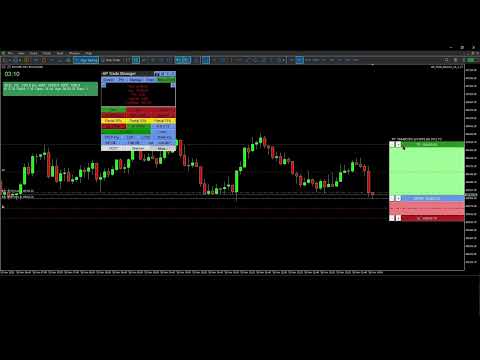
AP Trade Manager is a compact, broker-safe MT5 utility that turns your chart into a fast, disciplined trade workstation. It handles entries, exits, partials, breakeven+, OCO/Bracket logic, trailing stops, and scheduled-style actions from a clean panel you can dock anywhere. It’s pure MQL5 (no DLL, no WebRequest), and designed for live charts.

What it does

  • One-tap execution. Buy/Sell market and all four pending types (Buy/Sell Stop, Buy/Sell Limit). Auto-sizes by fixed lot or % balance risk.

  • Lines Mode trading. Toggle “Lines”, drag Entry/SL/TP on chart, snap to grid/ATR steps, then press PLACE. The EA decides market vs pending, applies clamps, and tags orders.

  • Protection suite. Breakeven+ with offset, unified trailing (Fixed, ATR, MA, SAR, Fractal, Prev-Bar) with hard ratchet, optional Virtual Stops with server fallback and warnings.

  • Position control. Partials (25/50/75 or custom), Close Buys/Sells/All, Delete Pendings, Reverse (with freeze/stop safeguards).

  • OCO / Bracket. From your lines: paired orders cancel the sibling on fill; market fills auto-place TP/SL.

  • Manage workbench. A side drawer listing live tickets (Ticket | Side | Lots | Entry | SL | TP | P/L | Trail | Age). Click any row to select it; act from the main panel while the drawer stays open.

  • Main Display Box (MDB). At-a-glance spread, times (Srv/Loc), symbol P/L, margin badge, mode badges (Lines*, OCO*, Trail…). Page through account and session views.

  • News glance. A minimal news panel with color-coded impact and countdown. Informational only; it never blocks trading.

  • Tools & overlays. Drawing mode (trendline, channel, triangle). Add-ons: Candle Countdown, Session Boxes, AP Multi-Range, MA Cross Alerts, Supertrend, candle hover volume tooltips, and a Screenshot button.

  • Hindsight cards. One-click snapshots + key stats you can export later into a trade journal (CSV).

  • Settings export/import. Save per-symbol/TF presets and panel geometry to JSON; restore on any terminal.


  • Speed without sloppiness. OrderCheck + margin checks on every send. Lots floored to broker step. Stops/freeze level respected.

  • Clarity. Minimal clicks, readable status line, short toasts, clean badges.

  • Persistence. Remembers geometry, tab, risk mode, and overlays per symbol/timeframe.

  • Validator-ready. Timer throttled, logs quiet, no external calls, file ops gated for tester.

What’s included

  • Panel UI (header tools, tabs, trade grid, MDB, Manage/Tools/Info drawers)

  • Risk Manager (fixed lot or % balance, cash risk, R multiple, spread/commission option)

  • Order Router (preflight checks, deviation policy, retry/nudge, tagging)

  • BE/Trail Engine (trigger + offset, multi-strategy trailing, hard ratchet)

  • OCO/Bracket (pairing, cancel-on-fill, bracket from market)

  • Position Book (fast snapshot for rows/filters/partials)

  • Overlays (countdown, sessions, multi-range, MA cross, Supertrend; draw objects)

  • Hindsight & Journal (cards + CSV export)

  • Persistence (GV/Files JSON)

Compatibility

  • Platform: MetaTrader 5 desktop (Windows).
    On macOS use a Windows VM or supported compatibility layer.

  • Category: Utilities (no backtest UI in Strategy Tester).

  • Live use: Designed for live charts. Strategy Tester cannot interact with panel buttons.

Quick Start Guide

1) Install and attach

  1. Copy the compiled EA into MQL5\Experts\ and restart MT5.

  2. Allow Algo Trading globally and on the chart.

  3. Attach AP Trade Manager to a symbol chart (M1–D1). Place the panel where you like.

Note: The Strategy Tester won’t exercise the UI. Use a live chart or demo account chart.

2) First-run checks (60 seconds)

  • Open More → Quick Start to skim basics or More → About for version info.

  • In the header, set theme with T if desired.

  • Confirm risk mode on the trade strip:

    • % for risk-percent sizing (enter Risk % in inputs or via the inline editor).

    • Lot for fixed lots.

  • MDB shows Srv/Loc time, Spread, P/L, and Free Margin badge.

3) Place a trade with Lines Mode

  1. Tap Lines. Three lines appear: ENTRY, SL, TP with handles and labels.

  2. Drag ENTRY/SL/TP where you want. Use step/snap controls if enabled.

  3. Press PLACE:

    • The EA chooses market or pending based on ENTRY vs Bid/Ask.

    • It clamps SL/TP to broker stops/freeze. Status line confirms action.

  4. Toggle OCO for paired pendings, Bracket to auto-attach TP/SL to market fills.

4) Protect and manage

  • BE+: Turn on; set offset points. The EA moves SL to BE+ once the trigger is hit.

  • Trail: Pick mode (Fixed/ATR/MA/SAR/Fractal/Prev-Bar). Ratchet never loosens.

  • Partials: Use 25/50/75 or Custom %. The EA floors to broker lot step.

  • Close controls: Close Buys/Sells/All, Delete Pendings, or Reverse safely.

  • Virtual Stops (VStops). Local SL/TP watcher that closes positions at your thresholds without placing server-side stops. Shows a VStop* badge in the MDB when active. Latency and gaps can cause slippage; for critical risk consider pairing with server SL/TP (Bracket ON) so the server protects you if the terminal is closed.

5) Manage drawer (optional)

  • Click Manage. You’ll see rows for current symbol (or filters).

  • Click a row to select that position. Keep the drawer open and use MCP buttons to partial/BE/Trail the selected trade.

  • Drawer and MCP stay in sync; status shows results and any skips.

6) Tools & overlays

  • Tools → Drawing Mode: trendline, channel, triangle. Draw, move, delete.

  • Add-ons: toggle Candle Countdown, Session Boxes, AP Multi-Range, MA Cross Alerts, Supertrend.
    Overlays render via chart objects or indicators and update on timer.

  • Hover volume: move the mouse over a candle to see its volume tooltip.

7) News glance

  • Click Info → News to view upcoming/active events with impact colors and countdown.
    It’s informational only; the EA never blocks orders because of news.

8) Screenshots & Hindsight

  • Click the camera button to capture the chart into \MQL5\Files\APTA_Shots\ .

  • When you close a trade, tap Hindsight to save a card (chart snapshot + key stats).

  • Export your journal: More → Export Settings / Journal to CSV for later review.

9) Save / load your setup

  • More → Export Settings saves presets, overlays, geometry into JSON (per symbol/TF).

  • More → Import Settings restores them. Useful across terminals or fresh installs.

10) Safety notes

  • The EA runs OrderCheck + OrderCalcMargin before every send.

  • Lots respect broker min/step; stops respect stops/freeze levels.

  • Virtual Stops (optional): the EA watches price and sends a market exit if your local SL/TP is hit. SL/TP still applied server-side if you enable bracket/real stops. You’ll see a warning badge when Virtual is ON.

Troubleshooting

  • Buttons don’t respond in Tester: that’s expected. Use a live chart.

  • “Insufficient margin” or “stops too close”: widen SL/TP or reduce risk; check symbol stop/freeze levels in MDB.

  • No overlays appear: ensure Tools → Add-ons toggles are ON and timeframes are supported.

  • Mac users: use MT5 for Windows via VM/compatibility layer. Native macOS ports can be unreliable with advanced chart objects.

  • Mac users — read before purchase

    MetaTrader 5 is a Windows app. On macOS you must run MT5 under virtualization (Parallels/VMware) or compatibility layers (CrossOver/Wine).

    • Recommended: Parallels on Apple Silicon (M-series) with Windows 11 ARM. Stable UI, full object drawing, normal file paths.

    • Known quirks under Wine/CrossOver:

      • Some hover tooltips and custom labels may not render in window-only screen captures (use “display capture” in OBS).

      • Retina scaling can misplace labels; lower scaling or set MT5 to 100%.

      • File paths differ; keep presets in …/MQL5/Files/ .

    • We do not ship a macOS binary. Support covers MT5 inside a Windows environment only.


    Does not work in the Strategy Tester

    This is a manual trade assistant. It relies on live UI clicks, chart objects, and broker interaction. The MT5 Strategy Tester does not deliver those, so the panel can’t operate.

    Why it won’t run in Tester

    • The tester doesn’t generate OnChartEvent mouse/keyboard events that our panel needs.

    • Many tester runs have trading disabled or restricted; manual OrderSend/modify logic is blocked.

    • Visual mode isn’t a live chart: multi-symbol book, partials, OCO linking, and UI state persistence aren’t simulated.

    • Calendar/screenshots/file I/O are limited or off in tester, so news and utilities won’t load.

    Use on a live or demo chart in the terminal with trading enabled.


おすすめのプロダクト
Easy EA for closing positions with profit or loss. All positions of chart's symbol are counted separately. Settings: TPforSymbol — set profit amount to indicate when to close every positions for the symbol of the chart. Swap and commission are decreasing your profit. SLforSymbol — set SL amount to indicate SL for every positions for the symbol of the chart. Swap and commission are increasing your loss. SLforSyblol is always below/equal zero.
One tool to protect all your EAs — news filter, equity protection, time filter and more — free demo available Take a Break has evolved from a basic news filter into a comprehensive account protection solution. It pauses your other Expert Advisors during news events or based on custom filters. When trading resumes, it automatically restores your entire chart setup , including all EA settings. Typical use cases: One news filter for all your EAs. Pause trading during news or high volatility — and c
Equinox Gold
Dmitriq Evgenoeviz Ko
Equinox Gold is a high-tech trading expert advisor (EA) specifically designed for the gold market ( XAUUSD ). The system is based on a unique Market Equilibrium algorithm that identifies areas of imbalance between supply and demand during extreme volatility. Unlike most robots that use dangerous sit-and-wait methods, Equinox Gold relies on mathematical momentum confirmation and strict risk control for every trade. MAIN ADVANTAGES VRP Filter (Volatility Range Filter): The robot automatically ada
価格でTPとSLを設定 – MT5用自動オーダーモディファイア すべての取引で正確なTPおよびSL価格を自動設定 ️ すべての通貨ペアとEAに対応、シンボルまたはマジックナンバーでフィルタリング可能 このエキスパートアドバイザーは、直接の価格値(例:EURUSDの1.12345)を使用して、取引に正確なテイクプロフィット(TP)とストップロス(SL)レベルを設定および適用します。ポイントもピップスも不要。すべての注文またはシンボル・マジックナンバー別に、シンプルで正確なトレード管理を実現します。 主な機能: 価格を指定して即座にTPおよびSLを変更 すべての注文、現在のシンボル、または特定のマジックナンバーに適用 ️ 0を入力してTPまたはSLを削除 任意のチャートにアタッチすると完全自動で動作 すべての取引商品に対応 おすすめ対象: 素早くTP/SLをコントロールしたい手動トレーダー デフォルトの終了ロジックを上書きしたいEAユーザー 複数のポジションを管理するトレーダー 質問や機能のアイデアはありますか?
ORB Guardian – オープニングレンジブレイクアウト + Prop Firm 保護 プロップファームチャレンジと規律あるデイトレードのために設計された高速・安定型EA。 マーチンなし。グリッドなし。完全ルールベース。 ORB Guardian が選ばれる理由 • 当社のプロフェッショナルトレーディングジャーナルへの取引自動同期 • 自動 Opening Range ブレイクアウト • ワンシグナル / 確認モード • プロップファーム保護(1日 / 週 / 月 / 合計ドローダウン) • 制限値や利益目標到達で自動停止 • トレンド・ボラティリティフィルター • 曜日・時間帯フィルター チャレンジ安定通過のために設計 • シングルオーダー • 固定リスク • 隠れた危険なロジックなし • USDJPY・XAUUSD・US30 など対応 主な機能 • カスタム可能な Opening Range • ブレイクアウト / リバース • プロップファーム安全モジュール • 週次/月次レポート • クリーンなダッシュボード 推奨 • M5〜M15 • 最低 500 USD •
Sonic R Pro Enhanced EA - バージョン 2025 249ドル - 最初の5名様限定! ライブシグナル Sonic R Pro Enhancedのライブパフォーマンスを確認: トレード戦略 Sonic R Pro Enhancedは、Dragon Band (EMA 34とEMA 89) を基にした自動トレード戦略の改良版であり、先進的なアルゴリズムを搭載しています。 タイムフレーム: M15, M30 対応通貨ペア: XAUUSD, BTCUSD, AUDJPY, USDJPY トレードスタイル: スイングトレード - リトレースメント & 逆張り 最低資金: 500 USD レバレッジ: 1:200 以上 ユーザーガイド Sonic R Pro Enhancedはシンプルさを追求しています。設定するのは1つのパラメータ: RiskAmount のみです。 RiskAmount < 0 の場合:口座残高のパーセンテージでリスクを計算 RiskAmount > 0 の場合:1回のトレードあたりの固定リスク金額 (USD) 例: RiskA
SMC Venom Model BPR インジケーターは、スマート マネー (SMC) コンセプトで取引するトレーダー向けのプロフェッショナル ツールです。価格チャート上の 2 つの主要なパターンを自動的に識別します。 FVG   (フェアバリューギャップ) は、3 本のローソク足の組み合わせで、最初のローソク足と 3 番目のローソク足の間にギャップがあります。ボリュームサポートのないレベル間のゾーンを形成し、価格修正につながることがよくあります。 BPR   (バランス価格範囲) は、2 つの FVG パターンの組み合わせで、「ブリッジ」を形成します。これは、価格がボリュームアクティビティの少ない動きで動くときに、ブレイクアウトしてレベルに戻るゾーンで、ローソク足の間にギャップを作成します。 これらのパターンは、大規模な市場プレーヤーと一般参加者の相互作用が発生するチャート上のボリュームと価格動向の分析に基づいて、トレーダーが主要なサポート/レジスタンス レベル、ブレイクアウト ゾーン、エントリ ポイントを識別するのに役立ちます。 インジケーターは、長方形と矢印の形でパターンを視覚
One Click Trader Utility MT5
AL MOOSAWI ABDULLAH JAFFER BAQER
One-Click Trader Utility for MT5 Professional Trading at Your Fingertips One-Click Trader Utility is a premium MT5 tool designed for active traders who need lightning-fast execution and real-time performance metrics. For just $30, transform your trading experience with institutional-grade technology previously available only to professional traders. Key Features Ultra-Fast Execution - Open and close positions with a single click, critical for scalpers and news traders Real-Time Market Metrics -
XAU Steady Gain Pro: Institutional-Grade Neural Trading for XAU/USD Complete Trading Suite: Gain full market transparency. When you buy this EA, you’ll also receive two professional-grade Signal Generation Indicators to help you confirm every entry with institutional precision. MT4 Indicator Nebula Pullback System – Worth $50  : See the Indicator     https://www.mql5.com/en/market/product/162844 MT5 Indicator Quantum Cross Indicator – Worth $50 : See the Indicator     https://www.mql5.com/en/m
Atomic GBP FX
Michael Prescott Burney
Atomic GBP — GBPUSD H1の洗練された取引システム Atomic GBPは、GBPUSD H1チャート専用に設計されたプロフェッショナルグレードのエキスパートアドバイザー(EA)です。深い歴史的分析と複数ブローカーの検証に基づいて構築されています。 この高度な取引システムは、GBPUSD通貨ペア特有のボラティリティと特性をナビゲートするために開発されました。Atomic GBPは、5年間の歴史的マーケットデータを活用した徹底的な研究の成果です。重要ニュースイベント、高ボラティリティ期間、強いトレンドなど多様な市場状況を分析し、GBPUSDの価格アクションに対する強固な理解を獲得しています。 システムの中核は、数百種類の独自取引戦略を活用する動的エンジンです。このマルチストラテジーアプローチにより、Atomic GBPはリアルタイムで最適な手法を選択し、高い勝率を追求しながらリスクを積極的に管理します。主要目標は、安定した一貫した成長を実現しつつ、低ドローダウンを維持してあらゆる市場状況で資本を保護することです。 開発の最も重要な側面は、異なる取引環境での信頼性と一貫性
Ignition
Dansie Software Limited
Strategy Overview The Ignition EA tries to take advantage of sudden momentum when the Ignition pattern is detected. The final bar in the ignition pattern has a small opening wick, a very little or no closing wick, is large in comparison to recent bars and must start from the lower end of the current range (for a bullish ignition) Quick Testing Use Symbol EURUSD, Timeframe M2, and remove the GBPUSD symbol from the "Symbols" input (stratergy 1 and stratergy 2) Settings The below settings appe
KILL ZONE HUNTER Institutional Kill Zone, Market Structure & Fair Value Gap Trading EA for MT5 Overview KILL ZONE HUNTER is a professional-grade MetaTrader 5 Expert Advisor engineered around Institutional Smart Money Concepts (ICT / SMC) , with a primary focus on Kill Zone trading , Market Structure , and Fair Value Gap (FVG) execution . This EA is designed to systematically hunt high-probability trades during institutional trading windows (Kill Zones) , where liquidity, volatility, and directio
Description of Scalping MT5 EA Scalping MT5 EA is a powerful, simple, and user-friendly trading tool designed for traders seeking an effective scalping strategy. This fully automated EA saves you time and maximizes profit opportunities from short-term price movements. Key Features Fully Automated : Scalping MT5 EA handles every stage of trading, from market analysis to order placement and risk management. Easy Setup : With simple input parameters, you can customize the EA to suit your trading st
Following our guide, you will gain more than you lose. EA for long-term. Stable profit - min risk. Symbol:  XAUUSD Attach to any timeframe Min deposit:   3000$ - Calculate profit by month Live signal:  https://www.mql5.com/en/signals/2080910?source=Site+Signals+My EA input instruction: 1. With XAU 2 digits (eg: 1843.23) please set - Input   [3. Max spread]: 55 - Input   [9. Step point]: 100 2. With XAU 3 digits (eg: 1843.235) please set - Input   [3. Max spread]: 550 - Input   [9. Step point]:
EA Agulhada do Didi
Devscode Desenvolvimento de Softwares LTDA
このエキスパートアドバイザーは、 Didi Index インジケーターのロジックを基に、MetaTrader 5 上で取引を自動化するために開発されました。 EA は、ユーザーが設定したルールとパラメータに従い、すべての取引をチャート上で自動的に実行します。 本ロボットは、明確で客観的なエントリーおよび管理ロジックを適用することを目的としており、外部連携や追加ライブラリを使用せずに、取引状況を分かりやすく確認できます。 主な機能 自動取引 Didi Index インジケーターのロジックに基づいて取引を自動で実行します。 取引時間の設定 EA が取引を行う時間帯を指定できます。設定時間外では新規取引は行われません。 トレーリングストップ 設定された条件に従い、価格の動きに合わせてストップを自動調整します。 自動ブレイクイーブン 条件を満たした際に、ストップをエントリー価格へ自動的に移動します。 チャート上の情報パネル EA の稼働状況や取引情報をリアルタイムで表示します。 対応環境 MetaTrader 5 デモ口座およびリアル口座 プラットフォームに対応したすべての銘柄で動作
FREE
Bohemia Gold MT5
Vladislav Taska
4.67 (3)
Bohemia Gold MT5 is  Trend & Volatility EA trading system designed specifically for Gold (XAUUSD) . It combines higher-timeframe trend filtering , trend detection , volatility-based SL management , and advanced trade management to adapt market conditions. It uses style logic focused on trend strength, volatility, and capital protection. NOTE:   Based on backtests, I found better trading results with the following setup: D1/H4/H2 (Trend/ADX/ATR & trade). The SET file can be downloaded here … bohe
FREE
The Simple Bot as the name suggests follows a very simple strategy, which guarantees the bot will work in the long run. The EA uses the below simple philosophy to guarantee profits for the user. 1. Odds of success inversely proportional to size of TP. The EA aims to capture just 250 points in GOLD(XAUUSD) when conditions are met.  2.  Avoids over-trading, takes utmost one trade per day 3. Only one trade managed at a time 4.  Robust risk management, every trade is protected with a tight SL Gue
The Goat Scalper EA — Smart, Fast, and Built for Real Market Performance Overview The Goat Scalper EA is a next-generation trading system built to capture decisive market moves with surgical precision. Unlike typical scalpers that rely on risky methods such as martingale, grid, hedging, or arbitrage, The Goat uses a pure breakout logic based on advanced supply and demand zone detection, ensuring stable and transparent results in any condition. Core Strengths Smart Risk Management Stop Loss on
「   Multi Symbol Trailing   」ユーティリティは、現在オープンしているすべてのポジション (マルチシンボル トレーリング) のストップ ロスを移動します。主に手動取引を支援することを目的としています。ユーティリティには、通貨ペアの名前または個々の識別子 (マジック ナンバー) による制限はありません。ユーティリティは、現在開いているすべてのポジションを完全に処理します。 「 トレーリング ストップ 」および「 トレーリング ステップ 」パラメーターの測定単位はポイントです (価格 1.00055 と価格 1.00045 の差は 10 ポイントです)。 ユーティリティを使用するための典型的なシナリオ (ビデオを見る): 最初は、市場にオープン ポジションはありません。このユーティリティは、最もアクティブなチャート (「EURUSD」など) に関連付けられています。次に、ユーザーは手動でポジションを開きます (ビデオの例: ポジションは「GBPUSD」、「XAUUSD」、「NZDUSD」、および「AUDCAD」で開かれました)。ポジションが開かれるとすぐに、「  
KS PropFirm and Broker Dashboard Pro: Your Ultimate Compliance Guardian for Prop Firm Challenges Elevate Your Prop Firm Journey with Precision Monitoring Tired of juggling spreadsheets, calculators, and manual checks to stay compliant during high-stakes prop firm challenges? KS PropFirm and Broker Dashboard Pro is the all-in-one MT5 utility engineered for serious traders tackling firms like FTMO, MyForexFunds, The5%ers, and beyond. This lightweight dashboard delivers real-time insights into your
Quantum Queen MT5
Bogdan Ion Puscasu
4.96 (455)
トレーダーの皆さん、こんにちは!私は Quantum Queen です。Quantumエコシステム全体の至宝であり、MQL5史上最高評価とベストセラーを誇るエキスパートアドバイザーです。20ヶ月以上のライブトレード実績により、XAUUSDの揺るぎない女王としての地位を確立しました。 私の専門は?ゴールドです。 私の使命は?一貫性があり、正確で、インテリジェントな取引結果を繰り返し提供することです。 IMPORTANT! After the purchase please send me a private message to receive the installation manual and the setup instructions. 割引 価格。10 点購入ごとに50ドルずつ値上がりします。最終価格1999ドル ライブシグナル:   こちらをクリック Quantum Queen mql5 パブリックチャンネル:   こちらをクリック ***Quantum Queen MT5 を購入すると、Quantum StarMan を無料で入手できます!*** 詳細について
Awesome Oscillator by Bill Williams with the ability to fine-tune and replace the averaging algorithms of the indicator, which significantly expands the possibilities of using this oscillator in algorithmic trading and brings it closer in its properties to such an indicator as the MACD. To reduce price noise, the final indicator is processed with an additional Smooth averaging. The indicator has the ability to give alerts, send mail messages and push signals when the direction of movement of th
XAU AI Structure Trader PRO (MT5) AI-powered market structure trading for disciplined intraday & swing traders. Designed for traders who prefer waiting for the right setup rather than forcing trades. IMPORTANT! After the purchase please send me a private message to receive the installation manual, license key and the setup instructions. XAU AI Structure Trader PRO is not a high-frequency trading robot and is not designed for aggressive scalping. This Expert Advisor focuses on identifying high-q
Matrix Arrow EA MT5
Juvenille Emperor Limited
5 (7)
マトリックスアローEAMT4 は、 マトリックスアローインジケーターのMT5 シグナルをチャート上のトレードパネルと手動または100%自動でトレードできるユニークなエキスパートアドバイザーです。 マトリックスアローインジケーターMT5 は、初期段階で現在のトレンドを判断し、最大10の標準インジケーターから情報とデータを収集します。平均方向移動指数(ADX ) 、 商品チャネルインデックス(CCI) 、 クラシック平研アシキャンドル 、 移動平均 、 移動平均収束発散(MACD) 、 相対活力指数(RVI) 、 相対力指数(RSI) 、 放物線SAR 、 ストキャスティクス 、 ウィリアムズのパーセント範囲 。 すべてのインジケーターが有効な買いまたは売りシグナルを与えると、対応する矢印がチャートに印刷され、次のろうそく/バーの開始時に強い上昇トレンド/下降トレンドを示します。ユーザーは、使用するインジケーターを選択し、各インジケーターのパラメーターを個別に調整できます。   Matrix Arrow EA MT5 を使用すると、チャートのトレードパネルから直接、または100%アルゴリ
FULL AUTO RISK MANAGEMENT EA – PRO + ACCOUNTING is an advanced Expert Advisor designed to protect your trading capital through fully automated risk control. Key Features: Progressive Stop Loss adjustment Partial position close at predefined loss levels (50% / 70%) Automatic Break Even at 50% Take Profit Profit Lock system at 50% and 70% of Take Profit Smart accounting of initial risk and saved capital Works with any trading strategy (manual or automated) No entry signals – risk management only T
This is my first ExpertAdvisor, but it came along with more than 7 years in experience trading Forex , Crypto and Index.                                                                                SHEERAN: The Advanced Multi-Timeframe EA for Dynamic and Adaptive Trading   EA SHEERAN, is designed for traders who demand precision, flexibility, and reliability across multiple timeframes. Whether you’re targeting short-term gains on the M30 chart or looking for sustained moves on the H4, this E
Universal Volatility Compass (UVC): あらゆる資産の市場サイクルを自信を持ってナビゲート 1993年の導入以来、CBOEボラティリティ指数(VIX)は、株式市場における市場リスクと投資家心理の恐怖を測る主要な指標となっています。VIXの数値が高いとボラティリティの増大を示し、しばしば市場の底値と一致します。一方、数値が低いと自己満足感と市場の天井を示唆します。 しかし、S&P 500、Nasdaq、Dow以外の広大な市場についてはどうでしょうか?商品、FX、暗号通貨、さらには個別の株式 – これらの多様な市場で、トレーダーはどのようにして恐怖を効果的に測定し、潜在的な転換点を特定できるのでしょうか? ラリー・ウィリアムズの画期的な「合成VIX」または「ウィリアムズVIXフィックス」(WVF)にインスパイアされた強力なカスタムMT5インジケーター、 Universal Volatility Compass (UVC) の登場です。これは単なる別のインジケーターではありません。VIXの貴重な洞察を、あなたが取引する あらゆる資産クラス に拡張する 画期的
Prizmal Logic
Vladimir Lekhovitser
5 (1)
リアルタイム取引シグナル 取引活動の公開リアルタイム監視: https://www.mql5.com/ja/signals/2353471 公式情報 出品者プロフィール 公式チャンネル ユーザーマニュアル セットアップ手順および使用ガイド: ユーザーマニュアルを開く 本エキスパートアドバイザーは、ルールに基づいた取引戦略に基づいて設計されています。 この戦略は、常に市場に参加するのではなく、特定の市場条件を識別することに重点を置いています。 システムは価格の動き、ボラティリティの特性、時間的要因を分析します。 これらの要素は、現在の市場環境が取引に適しているかどうかを判断するために使用されます。 複数の事前定義された条件が同時に満たされた場合にのみ取引が実行されます。 条件が満たされない場合、エキスパートアドバイザーは非アクティブな状態を維持します。 その結果、取引頻度は一定ではありません。 取引がまったく行われない期間が発生することがあります。 これには、ポジションが一切開かれない日も含まれます。 一方で、市場環境が適している場合には、比較的短時間で複数の
Expert. Automatic and manual trading. Ready-made trading system based on Elliott waves and Fibonacci retracement levels . It is simple and affordable. Display of the marking of Elliott waves (main or alternative option) on the chart. Construction of horizontal levels, support and resistance lines, a channel. Superposition of Fibonacci levels on waves 1, 3, 5, A Alert system (on-screen, E-Mail, Push notifications).    visual panel for opening orders in manual trading. visual panel for setting up
NET Z uses a very well-known trend reversal technique to determine position entry with slight modifications by using virtual trade techniques and virtual pending orders so that position entry is not too early or too late. Why NETZ? NET Z does not require complicated settings and is easy to use because user only need to upload a set file that is already available. Currently there are set files for 20 fx pairs. The best GRID EA with the ability to control risks. I will share my personal daily ro
このプロダクトを購入した人は以下も購入しています
Farmed Hedge Yield Farming - Professional Pair Trading Dashboard (Manual - Hybrid - Semi/Automated EA) VERSION 3 - WILD HARVEST UPDATE Trading Approach: - Manual Trading: Primary focus - Auto Pilot: Optional supplementary feature - Full Automation: Not the main purpose Recommended Timeframe: H1-H4 DEMO VERSION Download the free demo to test functionality. Use Strategy Tester with Visual Mode to see how it works. VERIFIED TRADING RESULTS - Farmed Hedge Yield Axi Copy: https://www.mql5.com/en/si
MarketCoach Panel — инструмент дисциплины и контроля риска для трейдера MarketCoach Panel — это вспомогательная панель для MetaTrader 5, разработанная для повышения дисциплины в торговле, контроля риска и принятия более осознанных решений. Приложение не совершает сделки и не является торговым советником. Оно помогает трейдеру анализировать текущую ситуацию и соблюдать собственные правила стратегии. Основные возможности • Расчёт лота по риску Автоматический расчёт объёма позиции на основе: проце
PhantomBreak Radar — индикатор для MetaTrader 5, предназначенный для выявления ложных пробоев уровней (fake breakout) и рыночных ловушек. Инструмент помогает трейдерам находить моменты, когда цена прокалывает экстремум диапазона, но затем возвращается обратно — формируя потенциальную точку входа в противоположном направлении. Индикатор автоматически анализирует ценовой диапазон за выбранный период, отслеживает выход за его границы и фиксирует повторный вход цены внутрь диапазона. В таких ситуаци
Только сейчас вы можете приобрести  TradeOps Command Center с 10% скидкой всего за 630$. Акция действует до 01.04.2026 Для получение инструкции об использование утилиты обратитесь в личные сообщения! TradeOps Command Center — Профессиональный инструмент контроля риска и дисциплины в трейдинге TradeOps Command Center — это многофункциональная утилита для MetaTrader 5, разработанная для трейдеров, которые стремятся к системному и дисциплинированному подходу к торговле. Продукт объединяет в себе у
The product will copy all telegram signal to MT5 ( which you are member) , also it can work as remote copier.  Easy to set up, copy order instant, can work with almost signal formats, image signal,  s upport to translate other language to English Work with all type of channel or group, even channel have "Restrict Saving Content", work with  multi channel, multi MT5 Work as remote copier: with signal have ticket number, it will copy exactly via ticket number. Support to backtest signal. How to s
YuClusters
Yury Kulikov
4.93 (43)
Attention: You can view the program operation in the free version  YuClusters DEMO .  YuClusters is a professional market analysis system. The trader has unique opportunities to analyze the flow of orders, trade volumes, price movements using various charts, profiles, indicators, and graphical objects. YuClusters operates on data based on Time&Sales or ticks information, depending on what is available in the quotes of a financial instrument. YuClusters allows you to build graphs by combining da
Custom Alerts AIO:マルチマーケット監視を一括で実現 — 設定不要ですぐに使えるインテリジェントツール 概要 Custom Alerts AIO は、追加のインジケーター設定が不要で、インストール後すぐに利用できる高機能マーケットスキャナーです。FX Power、FX Volume、FX Dynamic、FX Levels、IX Power を内部にすべて統合し、主要なすべての資産クラス(為替、金属、指数、暗号資産)を一括監視できます。MetaTrader の仕様により、株式は個別のシンボルとして追加可能ですが、一般的には利用頻度は低めです。 1. なぜ Custom Alerts AIO を選ぶべきか 追加ライセンス不要 • 必要なすべての Stein Investments インジケーターが内蔵されており、すぐに使用可能です。 • チャートに表示されるグラフィックは省略されており、アラート生成に特化した構成です。 市場を広範囲にカバー • 為替、金属、暗号資産、株価指数に対応(株式は手動追加可能)。 • シンボル名を入力する必要はなく、プロパティで資産クラス
VOLUME BUBBLES ORDERFLOW FOOTPRINT PROFESSIONAL Expert Advisor for MetaTrader 5 Complete Feature Documentation Introduction: Volume Bubbles OrderFlow Footprint Professional is an advanced order flow visualization tool designed for the MetaTrader 5 platform. It provides institutional-grade market analysis through real-time volume bubbles visualization, volume profiling, and sophisticated order flow analysis. This Expert Advisor transforms raw market data into actionable trading intelligence, hel
Professional Footprint Chart EA - Complete Order Flow Trading Suite DEMO USERS - PLEASE SELECT EVERY TICK WHEN TESTING AND YOU HAVE DOWNLOADED HISTORICAL DATA. IF YOU SEE A WAITING SCREEN AND IT IS NOT DOWNLOADING, IT MEANS YOU HAVE LOW HISTORICAL DATA. TRY 1 MIN AND 5 MIN FIRST ON 1 DAY DATA. ONE DAY DATA SHOULD BE THE NEWEST AND MOST CURRENT DATE. See What Market Makers See! The most comprehensive order flow analysis tool for MetaTrader 5. Get institutional-grade volume analysis, real-time DO
Partial Close Expertは 、多くの機能を1つの自動化システムに統合したツールです。このEAは、リスク管理と潜在的な利益の最大化のための複数のオプションを提供することで、トレーダーがポジションをより効果的に管理するのに役立ちます。 パーシャルクローズエキスパートを使用すると、トレーダーは   部分的な閉鎖   利益を確定するためのレベル、     トレーリングストップ   利益を守り損失を制限するレベル、     とんとん   価格が反対方向に動いた場合でも取引が損益ゼロになることを保証するレベル、およびその他のいくつかの機能。 このオールインワンのエキスパートアドバイザーを使用することで、トレーダーは取引を常に監視する必要がなく、時間と労力を節約できます。EAは市場の状況に基づいて事前に設定された指示を実行するため、トレーダーはより柔軟に取引をコントロールできます。 部分クローズエキスパートを添付し、     キーボードの「p」を押して 設定を変更すれば準備完了です。 部分クローズエキスパート   インストールと入力ガイド EA に関する通知を受け取りたい場合は、U
The product will copy all  Discord  signal   to MT5   ( which you are member  ) , also it can work as remote copier.  Easy to set up. Work with almost signal formats, support to translate other language to English Work with multi channel, multi MT5. Work with Image signal. Copy order instant, auto detect symbol. Work as remote copier: with signal have ticket number, it will copy exactly via ticket number. How to setup and guide: Let read all details about setup and download Discord To MetaTrader
Mentfx Mmanage mt5
Anton Jere Calmes
4.25 (8)
The added video will showcase all functionality, effectiveness, and uses of the trade manager. Drag and Drop Trade Manager. Draw your entry and have the tool calculate the rest. Advanced targeting and close portions of a trade directly available in tool (manage trades while you sleep). Market order or limit order on either side with factored spread. Just draw the entry, the tool does the rest. Hotkey setup to make it simple. Draw where you want to enter, and the stop loss, the tool calculates al
EASY Insight AIO – スマートで手間いらずな取引のオールインワンソリューション 概要 数秒で市場全体——FX、ゴールド、暗号資産、指数、さらには株式まで——を、手作業のチャート確認や複雑なセットアップ・インジケーター導入なしにスキャンできたらどうでしょうか? EASY Insight AIO はAIトレードのための究極のプラグ&プレイ型エクスポートツールです。市場全体のスナップショットを、クリーンなCSVファイルで一括出力。ChatGPT、Claude、Gemini、Perplexityなど、さまざまなAIプラットフォームで即座に解析できます。 ウィンドウの切り替えやグラフのごちゃごちゃしたオーバーレイはもう不要。自動エクスポートされる純粋で構造化されたインサイトだけで、無駄なチャート監視に悩まされず、スマートなデータ主導の判断に集中できます。 なぜEASY Insight AIOなのか? 本当のオールインワン • セットアップ不要、インジケーターのインストール不要、チャートへのオーバーレイ不要。インストールして起動し、エクスポートするだけです。 マルチアセット対
Trade on crypto exchanges in MT5! GRat_Crypto is a tool for manual and automated trading , including ANY available EA, ANY  cryptocurrency  on most popular crypto exchanges in the familiar MT5 environment 24/7. Features 1. ALL instruments of the 9 most popular crypto exchanges are available: Binance, BingX, Bybit, Coinbase, CoinEx, Kraken,   KuCoin, MEXC and OKX . 2. The ability to place ANY type of order available in MT5, both market and pending, to modify orders and positions, to delete order
Lazy Trader is your personal risk management assistant that independently finds the best market entries, manages positions, and helps you extract maximum profit from every trading idea! It monitors charts from M1 to W1 , finds optimal entry points based on your parameters, and manages trades without your involvement: - Got an idea on the daily chart? No need to wait for lower timeframes to form a signal — Lazy Trader will check everything and open all necessary positions while you live your lif
Crystal Trade Manager – Advanced MT5 Risk and Trade Control Utility Overview Crystal Trade Manager (CTM) is a professional MetaTrader 5 utility designed for risk management, trade automation, and instant execution control. It provides traders with an integrated system for protecting equity, managing daily drawdowns, controlling lot sizes, and applying automation features such as automatic SL/TP, break-even, and trailing stop. The tool is suitable for manual traders, prop-firm challenge particip
THIS EA IS A SEMI-AUTO EA, IT NEEDS USER INPUT. Manual & Test Version Please TEST this product before BUYING  and watch my video about it. The price of the ManHedger will increase to 250$ after 20 copies sold. Contact me for user support or bug reports or if you want the MT4 version! MT4 Version  I do not guarantee any profits or financial success using this EA. With this Expert Advisor, you can: Implement your own Zone Recovery strategy to capitalize on trending markets. Create Grid trading s
Online Accounts Manager MT5
Kyra Nickaline Watson-gordon
5 (1)
OneClick Online Account Manager is a powerful utility that helps you to manage all your accounts from a centralized panel. It is suitable for all single account traders and specially for multiple accounts traders. The utility help you to : Monitor status of all accounts on a private web page. Some information such as account connection status, account profit, DD, Balance, Equity, Margin Level, Number of positions and orders, Daily and Weekly profit/loss and also overall summation of all these p
Mt5 To InterativeBrokers Copier allows you to copy deals from MT5 account to Interactive Brokers. With this, you can run your EA strategy on a MT5 Demo/Real Account, then copy all the deals to Interactive Brokers account real time. Features: 1. Copy or Invert-Copy deals Realtime from MT5 to IB Account. 2. Synchronizing positions of both accounts periodicaly, in case any missing copying. 3. You can choose only Buy position or Sell position. Symbols Setup: General Format:  {MT Symbol} -> {IB S
Unlimited Trade Copier Pro MT5 is a tool to copy trade remotely to multiple MT4, MT5 and cTrader accounts at different computers/locations over internet. This is an ideal solution for you if you are a signal provider and want to copy your trades to other receivers globally on your own rules. One provider can copy trades to multiple receivers and one receiver can get trade from multiple providers as well. The provider can even set the subscription expiry for each receiver, so that receiver will n
Crypto Charting for MT5 – MetaTrader 5 向け暗号資産チャートツール 概要 Crypto Charting for MT5 は、WebSocket を介して暗号資産の OHLC チャートデータをリアルタイムで提供します。複数の取引所に対応し、MT5 上で履歴データの自動更新が可能です。 機能 WebSocket によるリアルタイムデータ 自動履歴データ更新 接続障害時のスケジュール更新 全ての MT5 時間足に対応 OHLCV データ構成 ストラテジーテスターに対応 自動再接続機能付き 対応取引所 Binance、Bybit、OKX、KuCoin、MEXC、Gate.io、Bitget、XT.com 補足情報 ティックデータおよび板情報には、別製品の Crypto Ticks をご覧ください。 注意事項 DLL を使用していません。VPS に適しています。 Strategy Tester では WebRequest 機能は動作しません。 デモをご希望の場合は、MQL5 のプライベートメッセージでご連絡ください。 Full Documentati
This is exactly what the name says. Visual strategy builder . One of a kind. Turn your trading strategies and ideas into Expert Advisors without writing single line of code. Generate mql source code files with a few clicks and get your fully functional Expert Advisors, which are ready for live execution, strategy tester and cloud optimization. There are very few options for those who have no programming skills and can not create their trading solutions in the MQL language. Now, with Bots Builde
The  Easy Strategy Builder (ESB)  is a " Do It Yourself " solution that allows you to create a wide range of the automated trading strategies without any line of codes. This is the world’s easiest method to automate your strategies that can be used in STP, ECN and FIFO brokers. No drag and drop is needed. Just by set conditions of your trading strategy and change settings on desired values and let it work in your account. ESB has hundreds of modules to define unlimited possibilities of strategi
What Exactly Is A Smart Trading Tool? Smart Trading Tool   was developed for fast and comfortable trading of the financial markets especially for   ORDER BLOCKS TRADERS .   It provides traders functionalities, such as: A Drawing Tool One-Click Trading Panel Automated Lot Sizes Calculation   based on your risk appetite & Money Management ( Watch this video , how this tool can help manage your risk per trade better!) Built in PRICE LEVELS (Fibonacci, Round Numbers, Daily hi-low, etc) Shows Trading
Remote Trade Copier is an advanced tool designed for efficiently copying trades between accounts in both local and remote modes. It allows for lightning-fast order replication from a master account to a slave account. In local mode, trades are copied instantly, while in remote mode, the copying process takes less than 1 second. MT4 Version (Only Local) MT5 Version (Only Local) MT4 Full Version (Local & Remote) Local mode refers to both MetaTrader platforms being installed on the same system,
HotkeyTrader
Leonardo Andriulli
5 (1)
HotkeyTrader V5 – Your Ultimate Fast Trading Ally! ️ Enter the market, exit in profit – all with one key! Ever dreamed of buying, selling, setting break-even, or closing all trades with a simple keyboard shortcut or Stream Deck button? With HotkeyTrader V5, it's reality. No clicks, no distractions. Just pure speed. Description HotkeyTrader V5 is an advanced utility for manual traders, designed to simplify and execute scaling IN/OUT strategies precisely, quickly, and in a structured way
PROTECT YOUR FTMO Account in a simplest way Must-Have Account Protector for any Prop-trading Account and Challenge MT4 / MT5 Expert Advisor that protects your Forex Prop Trading account from an unexpected drawdown! FTMO Protector  is a Tool that lets you manage trades and control your profit and loss across multiple Robots and currency pairs using a simple parameters and settings. Use as many EAs and Instruments you need, the Protector will: 1.   Calculate your midnight (01:00 System time) Balan
HYT (Help Your Trading) は、主に次の 2 つのテクニックを使用して、損失ポジション を平均化 できるように設計されたツールです。 標準平均化。 トレンドの方向に沿ってポジションをオープンすることでヘッジします。 このツールを使用すると、買いと売りの両方において、異なる方向に開かれた複数のポジションを管理できます。 HYT は、次のポジションのサイズ、注文価格、平均化の方向、指定された利益確定レベルでのポジションのクローズを自動的に計算します。 また、希望する利益確定レベルと初期ロットを指定して、「購入」ボタンと「販売」ボタンを使用してポジションを開くオプションも提供します。 使用を開始する には、ツールをチャートにドラッグし、利益確定レベルを設定して、「平均化を開始」ボタンをクリックするだけです。 初期ポジションが大きすぎない ことを確認し、平均を下げるときにツールによってポジション サイズが拡大されるため、追加費用が発生することを覚悟してください。 HYTは 自動取引 も可能です。自動取引を有効にすると、ツールは指定されたパラメータに従ってポジションを開閉しま
CRT Pro Trading EA Ultimate v10 - プロフェッショナルパターンスキャナー 概要 CRT Pro Trading EA Ultimate v10は、Helios Technologiesが開発した高度なマルチシンボルエキスパートアドバイザーで、インテリジェントなトレンドアライメントを備えたCRT(統合-操作-分配)パターンの検出と取引を専門としています。このEAは、機関投資家の取引コンセプトとスマートシグナル管理を組み合わせ、複数の市場で高確率の取引機会を提供します。 主な機能 トレンドアライメント型シグナル生成 スマートトレンド分析:支配的な市場トレンドに沿ったシグナルのみを生成 マルチタイムフレーム確認:上位タイムフレーム分析を使用して低確率セットアップをフィルタリング アダプティブシグナル方向:強気トレンド = 買いシグナルのみ、弱気トレンド = 売りシグナルのみ、中立トレンド = 両方向許可 マルチシンボル市場スキャナー 12以上の銘柄サポート:EURUSD、GBPUSD、USDJPY、USDCHF、AUDUSD、USDCAD、EURGB
ATTENTION For a free trial version, visit my website. Manual QUANTUM RiskGuard Management — Your ultimate ally for uncompromising trading. Lot Calculator — Automatic lot size calculation. Quantum — Automatic risk to maximize profits and reduce drawdowns. Automatic Journal — Included and freely downloadable from my website. Automatic Screenshot — Two screenshots: one at entry and one at exit. Partial Profit — Smartly managed partial exits. Smartphone Trading — Place orders from your mobile, mana
作者のその他のプロダクト
AP London Breakout MT4  trades the first impulse when Europe hands over and London liquidity hits. It builds a pre-London range (02:00–07:00 server), checks the box height and spread, then posts one clean breakout with fixed risk. No martingale, no grid, no chasing; once filled, it cancels the other side and stands down for the day. Designed for majors and gold on M5–M15, with broker-safe placement (Stops/Freeze aware), lot rounding, and a daily cap. Quick start • Chart: M5 (reads higher TFs i
AP Fibonacci Retracement PRO (MT5) Overview AP Fibonacci Retracement PRO is a trend-continuation pullback EA. It waits for a confirmed swing, calculates the Fibonacci retracement zone, and looks for entries in the direction of the original move. No grid, no martingale. Strategy logic Detects the last valid swing high/low using Fractals on the selected signal timeframe. Calculates the retracement zone between 38.2% and 61.8% (configurable). On a closed bar, if price is inside the zone (with opti
FREE
AP VWAP Bands Pro (MT4) Volume-weighted average price with ±σ bands for clear intraday bias, mean-reversion zones, and dynamic support/resistance. Works on crypto (incl. BTC), FX, indices, and metals. Uses tick-volume when real volume isn’t available. What it shows VWAP line (volume-weighted mean price). Two envelopes around VWAP (default ±1σ and ±2σ) to highlight balance vs. extension. Reset modes: Day, Week, or Anchor Time (HH:MM) to start VWAP where you need it (e.g., exchange open). Why
FREE
AP VWAP Bands Pro (MT5) Volume-weighted average price with ±σ bands for clear intraday bias, mean-reversion zones, and dynamic support/resistance. Works on crypto (incl. BTC) , FX , indices , and metals . Uses tick-volume when real volume isn’t available. What it shows VWAP line (volume-weighted mean price). Two envelopes around VWAP (default ±1σ and ±2σ) to highlight balance vs. extension. Reset modes : Day , Week , or Anchor Time (HH:MM) to start VWAP where you need it (e.g., exchange open).
FREE
AP Day-Week-Month High-Low overlay that draws the prior Day, Week, and Month highs/lows on any chart. Great for session planning, confluence, and alerting when price comes back to important swing levels. What it does Plots 6 lines: Day High/Low , Week High/Low , Month High/Low (from the previous completed sessions). Touch/near alerts when price reaches a selected line (with a user-set tolerance). Works on any symbol and timeframe. Zero external libraries. How to use Drop it on the chart you trad
FREE
BTC Breakdown Pro MT5 多くのEAはすべての通貨ペアやセットアップを取引しようとしますが、結果的に一貫性のない成績しか残せません。BTC Breakdown Pro MT5 はただ一つの目的で作られました:ビットコインの大きなブレイクダウンを明確に、そして確実に捉えること。 このシステムは高出来高での下抜けを待ち、その後クリーンなリテストを確認してからエントリーします。トレードはトレンドでフィルタリングされ、リスクはあらかじめ設定されたSL/TPで管理され、市場がレベルを取り戻せばセットアップはキャンセルされます。すべてはルールベース — 迷いも感情もありません。 主な特徴: BTCUSD専用に設計 M5タイムフレームで動作 出来高確認を伴うブレイクダウン + リテストロジック EMAを用いたトレンドフィルタ リテスト未成立または反転で自動キャンセルされる指値注文 固定ロットまたはドルリスクによるリスク管理 MetaTrader 5対応 (.ex5ファイル、ソースなし) このEAは強気相場・弱気相場の両方でテストされ、ボラティリティが高い局面でも約50%の勝率を維持
AP Session Boxes — Asian / London / NY Range Overlay (MT5 Indicator) Clean session boxes on your chart. This lightweight indicator draws the   Asian ,   London , and   New York   time windows directly on the chart, including each box’s   high   and   low   as dashed lines. It’s perfect for quick context, breakout planning, and clean screenshots. Instant structure:   See where the market ranged during key sessions. Breakout prep:   Use the hi/lo lines as reference for pending orders or alerts fr
FREE
AP Day-Week-Month High-Low MT4 Lightweight overlay that draws the prior Day, Week, and Month highs/lows on any chart. Great for session planning, confluence, and alerting when price comes back to important swing levels. What it does Plots 6 lines: Day High/Low, Week High/Low, Month High/Low (from the previous completed sessions). Touch/near alerts when price reaches a selected line (with a user-set tolerance). Works on any symbol and timeframe. Zero external libraries. How to use Drop it o
FREE
AP Oil Navigator PRO (MT5) What it is AP Oil Navigator PRO is a rules-based Expert Advisor designed specifically for energy symbols such as XTIUSD (WTI) and UKOIL (Brent). The EA looks for a directional bias using a higher-timeframe trend filter, then times entries on the working timeframe using a volatility gate and a structure break. Orders are placed with broker-safe checks and fixed risk. No martingale, no grid, and no averaging. How it trades • Bias: EMA alignment and swing structure on th
AP DayTrader Impulse Box (MT5) What it does Intraday engine that combines a session “box” range (M5) with an impulse filter (EMA/RSI on M15). When price escapes the box with momentum confirmation, the EA places a single market order in that direction. Simple logic, few knobs   Box + impulse confirmation No martingale, no grid, no averaging Works on netting accounts How entries are decided Build a time-window “box” from recent session hours (start/end inputs). Wait for price to escape the box by
AP DayTrader Impulse Box MT4 What it does Intraday engine that combines a   session “box” range   (M5) with an   impulse filter   (EMA/RSI on M15). When price escapes the box with momentum confirmation, the EA places a single market order in that direction.   One position per symbol. Simple logic, few knobs   Box + impulse confirmation   No martingale, no grid, no averaging Works on   netting   accounts How entries are decided Build a time-window “box” from recent session hours (start/end inputs
AP Oil Navigator PRO (MT4) What it is AP Oil Navigator PRO is a rules-based Expert Advisor designed specifically for energy symbols such as XTIUSD (WTI) and UKOIL (Brent). The EA looks for a directional bias using a higher-timeframe trend filter, then times entries on the working timeframe using a volatility gate and a structure break. Orders are placed with broker-safe checks and fixed risk. No martingale, no grid, and no averaging. How it trades • Bias: EMA alignment and swing structure on the
AP London Breakout PRO trades the first impulse when Europe hands over and London liquidity hits. It builds a pre-London range (02:00–07:00 server), checks the box height and spread, then posts one clean breakout with fixed risk. No martingale, no grid, no chasing; once filled, it cancels the other side and stands down for the day. Designed for majors and gold on M5–M15, with broker-safe placement (Stops/Freeze aware), lot rounding, and a daily cap. Quick start • Chart: M5 (reads higher TFs inte
AP BTC Bullish Retest (MT5) Long-only BTC EA. Waits for a decisive close above resistance , confirms trend/volume quality, then places a BUY LIMIT on the pullback to the broken level. One setup at a time. No grid, no martingale. No DLL/WebRequest. What it is A breakout-and-retest engine for BTC. It builds meaningful resistance handles (body-high clusters) on a higher TF, requires a clean close through that handle, then buys the retest with disciplined risk and strict broker-safe checks. How it t
Intraday engine for XAUUSD (Gold). Builds a time-window “box”, waits for a decisive move beyond it, then places a pending order to participate on the pullback. Tight risk controls, no grid, no martingale. How it operates You define one or more time windows (e.g., London, NY, or custom hours). After a window closes, the EA checks for a clean move beyond the box by a user buffer. Optional gates: EMA trend check and volume impulse filter. Places a pending order near the broken edge with an adapti
フィルタ:
レビューなし
レビューに返信