Trade Assistant B90

Trade Assistant B90 is designed for manual trading so that it helps us to manage capital and position well.
This expert has the ability to change the default inputs of the expert as desired before use.
You can see the expert entries in the photo below, each of which we explain below.

1.    Background Color : With this entry, you can change the assistant's background
Color
2.    Font size: You can change the size of the fonts used in the assistant.
3.    Button‌ color: Change the color of assistant buttons.
4.    Button color: Change the text color of assistant buttons.
5.    Line color: Change the color of the lines.
6.    Text color: Changing the color of the texts that will appear on the chart.
7.    Text font size: Changing the font of the texts that will appear on the chart.
8.    Stop loss color: Changing the color of the square that appears on the chart to determine the loss limit.
9.    Take profit color: Changing the color of the square that appears on the chart to determine the profit limit.
10.    SL (pip): set default stop loss based on the currency pair and time frame you are trading.
11.    TP (pip): Set default profit limit based on the currency pair and time frame you are trading.
12.    Risk free (pip): By clicking on the Risk free button, the loss limit will be a few pips higher than the profit entry point (By default, we have considered 2 pips). For example, by clicking on the risk-free button, the loss limit will be moved 2 pips into profit, and by clicking the risk-free button again, 2 pips more than the loss limit will be moved into profit.
13.    One Click Trading: If you set this input to false, a message will appear on the graph before you click on a button from the assistant, asking you if you are sure you want to do this, and by clicking yes or no, you will respond to the desired action. But if you want it to run without asking when you click on the buttons, you can set this entry to true.
After the changes you made on the inputs, the appearance will be adjusted to your taste. For example, as shown below.

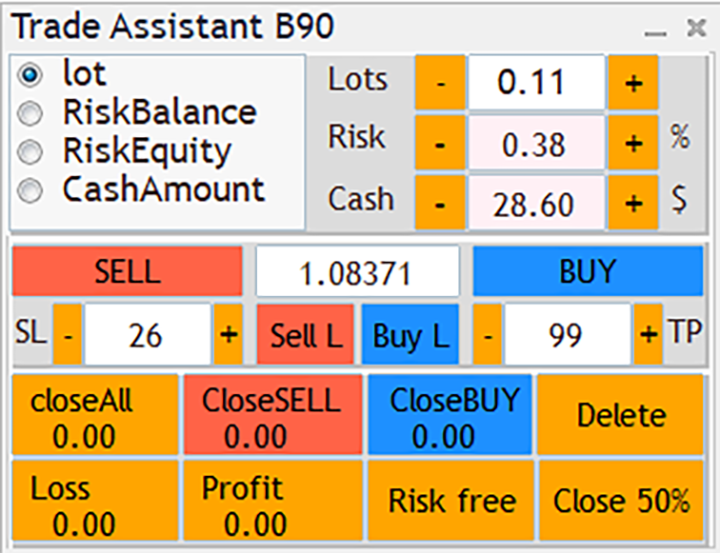
In the following, we explaining each of the components of the assistant.
We can determine the volume of transactions with this assistant in3  ways.
•    Volume based on lot
•    Risk percentage: For the risk percentage, we can consider the account balance or account equity as the basis. When you choose one of these methods, you must have a loss limit. Because for risk percentage calculations, the loss limit distance has a great impact on determining the volume of transactions. The smaller the loss limit is, the larger the trading volume is, and the further the loss limit is from the entry point, the smaller it is.
•    Cash: You can also determine the volume of transactions based on the amount. For example, in this method, you can determine the amount of 100 dollars for your loss limit. Then determine the distance of the stop loss from the entry point.
In this method, the distance between the loss limit and the entry point is important, and the shorter the distance, the higher the transaction volume. And the further it is, the volume of the transaction decreases, but the minimum amount is the same as you set
In this example $100

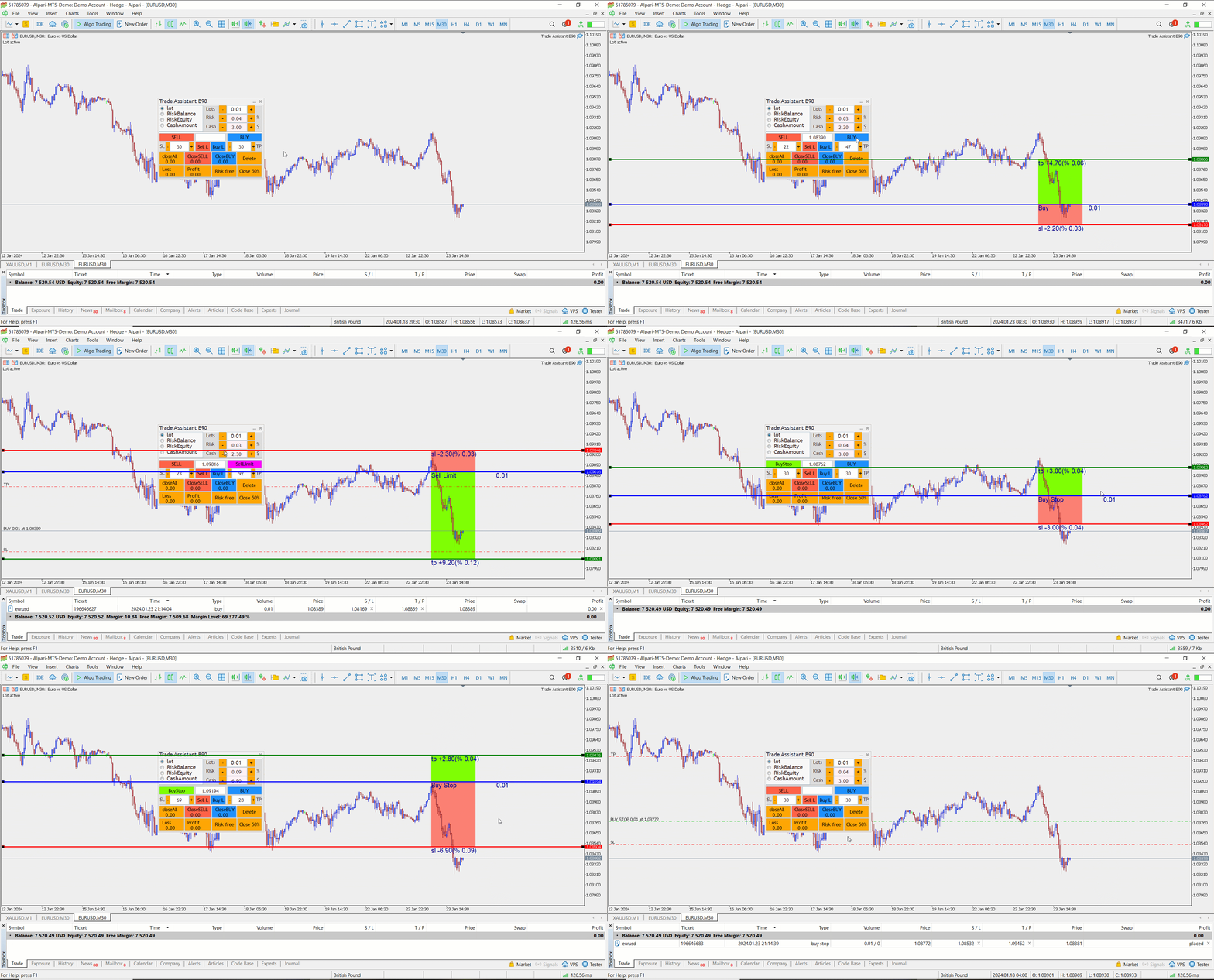
It is recommended that if you want to use methods 2  and 3  to determine the volume of transactions, you must determine the limit using the lines that appear on the chart with this assistant. For this, you can use the line S and line B buttons.

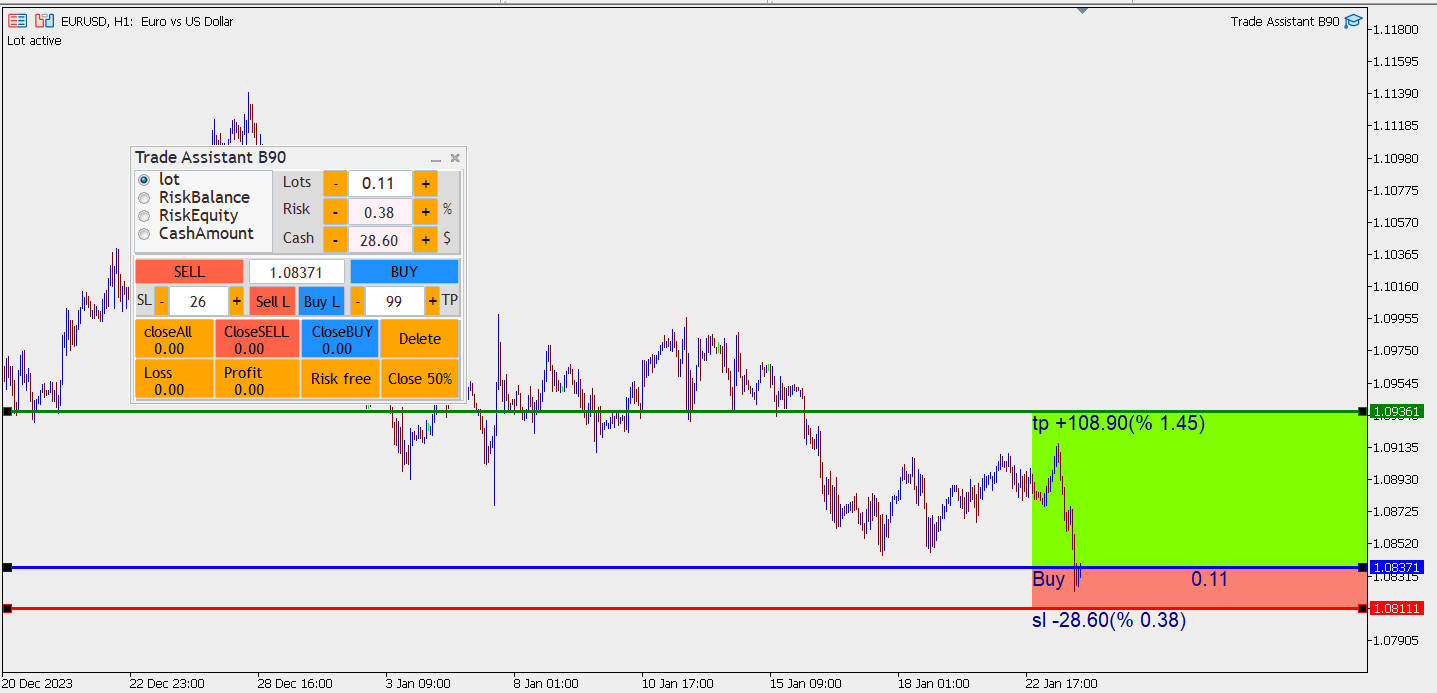
Line B‌: When you click on this button, lines will appear on the chart, which by default specify the entry price as Ask and the profit limit and loss limit based on the profit and loss limit that you set from the expert or assistant entry. Then you can change the profit and loss limits by moving the lines and see the percentage of profit and loss as well as its amount before entering the position.

Line S: This button works like the line B button with the difference that it considers the Bid as the entry price and prepares the profit and loss limit for selling positions by default. But you can provide a buy position by moving the loss limit lower.

SELL: With this button, you can enter the sell position and set the default profit and loss limit. But before pressing this button, it is recommended to see the position of profit and loss limit and the percentage of profit and loss on the chart first, then enter the position knowing this.

You can also enter a buy position with this button, and all the tips we said for the SeIl button apply to it.
In addition to buying and selling, you can also take pending positions, and based on the position of the lines on the chart, the text of the Sell and Buy button changes to Buy Limit, Buy Stop, Sell Limit, and Sell Stop, and you can place an order by clicking on it.
We have determined 8 buttons to manage positions, which we will explain each one below.

Close All: This button shows the amount of profit and loss of all buy and sell positions on the currency pair on which the expert is executed. By clicking on this button, all the positions of the desired currency pair will be closed.
Profit: This button shows the amount of positions that are in profit. By clicking on this button, all positions will be closed in profit.

Loss: This button shows the amount of positions that are in loss. By clicking on this button, all losing positions will be closed.

Delete: If you have a pending position on the currency pair on which the expert has been executed, by clicking on this button, all of them will be deleted from the chart.
Close BUY: This button shows the amount of profit and loss of purchase positions of the desired currency pair. By clicking on this button, all purchase positions will be closed.

Close SELL: This button shows the amount of profit and loss of selling positions of the desired currency pair. By clicking on this button, all sales positions will be closed.

Risk free: If your positions are in profit, by clicking on this button, the loss limit will be on the entry point (Of course, several more pips in profit). You have already determined this amount from the expert inputs. By default, we put 2 pips and by clicking on this button, the loss limit will be 2 pips in profit. Then, if you press this button again, if it is in profit, the loss limit will be moved to profit by another 2 pips.

Close 50%: This button is designed to save profit. So it will only work when your positions are in profit. By clicking on this button, 50% of the position volume will be closed. By pressing the button again, another 50% of the volume of positions in profit will be closed. Note that if the size of the position is reduced to a minimum, for example, 0.01, this button will no longer work.



Recommended products
SmartEntry EA
Saksit Pawapootanont
Overview SmartEntry EA gives traders full control over any trading symbol — Gold (XAUUSD), Indices, Crypto, and Forex — with both manual and automated entry modes. The EA automatically detects the symbol type and adjusts pip/unit calculations accordingly. The built-in panel allows real-time control of every feature without restarting the EA.   Key Features Auto HG Trigger •   Automatically detects bullish M1 candles exceeding a configurable size threshold •   Mode 1 — HG Sure-Fire: Opens BUY an
Net Exposure & Net Average Price is a lightweight utility Expert Advisor for MetaTrader 5 hedge accounts . This tool helps traders instantly understand their true market exposure when multiple Buy and Sell positions are open on the same symbol. What the EA Does The EA displays a clear on-chart panel showing: Total Buy Trades Total Buy Lots Total Sell Trades Total Sell Lots Net Lots (Net Exposure) Net Average Price (hedge-adjusted breakeven) The Net Average Price represents the true breakeven
Auto Trade Copier for MT5
Vu Trung Kien
4.56 (27)
Auto Trade Copier is designed to copy trades to multiple MT4, MT5 and cTrader accounts/terminals with 100% accuracy. The provider and receiver accounts must be on the same PC/VPS. With this tool, you can copy trades to receiver accounts on the same PC/VPS. All trading actions will be copied from provider to receiver perfectly. This version can be used on MT5 accounts only. For MT4 accounts, you must use Auto Trade Copier (for MT4). Reference: - For MT4 receiver, please download Trade Receiver Fr
Currency Exposure Matrix is a currency-level exposure dashboard derived from current open positions. Key functions: - Gross and net currency exposure - Long and short decomposition - Deposit-currency conversion - Concentration warnings - Transparent handling when conversion symbols are unavailable The utility helps users understand aggregated currency exposure across their portfolio. It does not generate entry signals, predict market direction or guarantee trading results. Review broker symbol
Trade Performance Journal — Your Visual Trading Summary Tool Trade smarter by understanding your performance. This Expert Advisor (EA) provides an instant visual summary of your trading results directly on the chart. Whether you’re a scalper, swing trader, or long-term investor, this tool helps you stay on top of your performance metrics with ease. Key Features Flexible Time Analysis View your performance by Quarter, Month, or Half-Year. Easily switch between display modes to analyze your res
FREE
CopyMaster mt5
Evgenii Aksenov
5 (3)
This utility will allow you to copy any trades from one terminal with the Master setting to other terminals with the Slave setting At the same time, you can choose which pairs to copy, set the size of the copied order by several parameters. Set the limit losses by DrawDown or copy only profitable trades You can copy deals from MT4 or MT5 to MT4 or MT5 other brokers Now it will not be difficult to copy the signals of any Expert Advisor working in MT4 to the MT5 terminal or back Use Copy Master to
This is a multi-symbol, multi-timeframe, table-based indicator for MetaTrader 5 that identifies 46 types of candlestick formations. Each formation has its own image for easier recognition. The indicator includes popular patterns such as Engulfing, Hammer, Three Line Strike, Piercing, and Doji-like candles. You can check the full list of patterns in the screenshots below. Also you can not only switch all bearish or bullish patterns from input, but also select formation for a specified symbols and
Indicator shows balance curves based on magic number for portfolio analysis. It allows to visually estimate different strategies performance on a single symbol. Any of magic number can be hidden by clicking on the value in legend. Parameters: HideAllOnStart - all magics are hidden and can be activated by clicking on its value; MAMode - shows average profit from trades; MAPeriod - Moving average period; Magics - a string with magic numbers separated by comma like "1,2,123". If this field is empty
Run one strategy, one hand, across every account you trade. Revanche Miroir mirrors trades between MetaTrader 5 accounts on the same computer, in real time. One master can feed many accounts, or up to eight masters can run side by side, each account following the one you choose. A serious power tool for running the same book across many accounts. Every symbol, every account currency, every broker. Full control over sizing, symbol mapping and how it behaves when something goes wrong. Not a toy co
The utility displays in a convenient form the historical trades made on the account. You can filter trades by magic or comcent, display only profitable or losing trades, and only buy or sell trades. Using this utility, you can see trade entry and exit points, stop loss and take profit levels, trade profit, magic number and comment, order ticket and order size - you only need to run the utility on the chart of the currency pair you want information on get and customize the input parameters. MT4
QuickCopy – Simple MT5 Local Trade Copier with Volume Factor QuickCopy is a lightweight and efficient MT5 local trade copier designed for traders who want to copy trades between accounts on the same computer quickly and reliably. With its simple setup and intuitive interface, QuickCopy makes managing multiple accounts easier than ever. Key Features: Local Account Copying: Instantly copies trades from your master account to one or more client accounts running on the same computer. Volume Factor A
Local Copy Trader Utility - Professional Copy Trading System Overview Local Copy Trader Utility is the complete solution for mirroring trades between MetaTrader 5 accounts. With both Master and Slave functionality in one powerful Expert Advisor, it delivers reliable, lightning-fast trade copying with zero external dependencies. Perfect for managing multiple accounts, following trading signals, or transferring trades between brokers, this system ensures your positions stay perfectly synchronized
Fast copier for sending trades to multiple MT4 / MT5 accounts. MT5 Trade Copier Master EA sends trades instantly from your master account to one or multiple slave accounts. Supports copying to: • MT5 accounts • MT4 accounts Perfect for: • Multi-account traders • Signal providers • Account managers • Personal account mirroring Main Features • Fast local trade copying • Low latency execution • Multiple slave accounts support • Copy open positions on startup • Stable file-based communication • Easy
RSI Currency Strength Meter is a powerful and elegant multi-currency indicator that measures the real-time relative strength of the 8 major currencies using RSI logic. By calculating the smoothed performance of each currency across its major pairs and applying the RSI formula, it delivers clean and responsive strength lines that make it easy to spot which currencies are truly strong or weak at any moment. This indicator is particularly useful for visualizing currency correlations and divergence
CopyIQ
Stephen Sanjeeve Sahayam
CopyIQ mirrors your trades between MetaTrader 5 terminals running on the same Windows PC - one source account feeding as many receiver accounts as you need. Everything happens locally on the one machine: no VPS, no DLLs, and no internet link between terminals to lag or break. A trade on your source account reaches every receiver in milliseconds. CopyIQ was built by studying where other local copiers let traders down - copies that arrive late, lot sizes that ignore the receiving account, symbols
Apex Trade Copier MT5
Asanka Manikgama Arachchilage Don
Apex Trade Copier is a local trade copier for MetaTrader 4 and MetaTrader 5. It copies trades between MT4 and MT5 accounts on the same computer or VPS and works in every combination, including MT4 to MT5 and MT5 to MT4, across different brokers. It runs locally through a shared file, so there is no internet dependency, no DLL, and no monthly fee. One master account can feed any number of client accounts, and a single client can copy from up to eight masters at once. Each client sizes its trades
One EA instead of a dozen tools: trade assistant, risk manager and 17 indicators in a single panel. Drop it on the chart — everything you need is at your fingertips.   Launch price: first 20 copies at $49, then $99. 50% off — right now only.   TRADE IN ONE CLICK Lot size is calculated automatically from your risk % — no more calculators. Fractal stop on any timeframe or manual, take profit by R:R, partial closes TP1/TP2/TP3, one-click breakeven, swing trailing. Pending order? Click the chart — E
Breakevan Utility
Jose Luis Thenier Villa
BreakEvan Utility  Is a simple tool in a panel with this utilities: This utility will draw a Golden Line in the chart applied showing the breakeven price, considering all the positions opened for that specific symbol. Also the information panel shows: Balance Breakeven Price for that chart Force Breakeven (for that symbol) as ON/OFF Force Breakeven Global (takes into account all trades opened) as ON/OFF Total Lots opened for Symbol Total Lots opened Global And two buttons: Force Breakeven: Whe
Trade Copilot - Semi-Automatic Risk Management Panel for Gold (XAUUSD) and any instrument Trade Copilot is a semi-automatic trading panel built for manual traders who want an EA's discipline without giving up control of their own entries. You decide the direction and the level - the panel handles risk sizing, stop-loss placement, take-profit management, and trade protection automatically. KEY FEATURES - Risk-based lot sizing - choose Risk %, Risk $, or Fixed Lot; the panel calculates positio
Recovery Manager Panel MT5 is a manual order management panel for traders who want to manage open positions directly from the chart in a clearer and more organized way. This tool is not a signal robot. It does not predict market direction, generate entry signals, or trade automatically based on market forecasts. Instead, it helps traders work with positions that are already open. You can calculate possible recovery lot sizes, view estimated target levels on the chart, and use available floating
OB FVG Trade Copier: Unified Master & Slave EA Version: 2.00 Type: Trade Copier / Risk Management Utility Compatibility: MetaTrader 4 & MetaTrader 5 (Cross-compatible codebase) Overview The OB FVG Trade Copier is a professional-grade, unified trade copying system designed to mirror trades between Master and Slave accounts seamlessly. Built with a unified architecture, a single EA file serves as both the sender (Master) and receiver (Slave) simply by toggling the EA Mode in the settings. It uti
FREE
Trade Copier Local MT5 is a fast local trade copier for copying trades between multiple MT4 and MT5 accounts. One EA works in both Master and Slave modes. Simply select the required Copier Mode and use the same product on your MetaTrader terminals. Copy trades between: • MT5 → MT5 • MT5 → MT4 • MT4 → MT5 • MT4 → MT4 Perfect for: • Trading multiple accounts at once • Linking multiple trading accounts • Personal account mirroring • Signal providers • Account managers • Prop trading setups #
RRtoolBox
David Ruiz Moreno
RRtoolbox - Professional Tools: Risk:Reward Trading Tool (SL/TP Horizontals + Pending orders + Diagonals), Alerts set on trend lines (for alerts on diagonal levels), SelfManagement (BE, partials...), close/cancelling by time, Statistics, Info and trading on chart. One-Click Trading with Visual Risk:Reward Management RRtoolbox is a comprehensive trading panel that combines one-click order execution,  statistics and  powerful visual Risk:Reward tools, alerts set with trendlines, on chart butt
Trade copier MT5
Alfiya Fazylova
4.61 (56)
Trade Copier is a professional utility designed to copy and synchronize trades between trading accounts. Copying occurs from the account / terminal of the supplier to the account / terminal of the recipient, which are installed on the same computer or VPS . Before buying, you can test the demo version on a demo account. Demo version here . Full instruction here . Main functionality and benefits: Supports copying MT5> MT5, MT4> MT5, MT5> MT4, including MT5 netting accounts. * Supports copying Dem
Best Tested Pairs :-  Step Index (Also can use on other pairs which spread is lowest) How does the Magic Storm work The Magic Storm will commence only if the Initial Trade becomes a losing trade. In case the initial trade is a profitable one, or has been closed by the trader there is no need for the Magic Stormto be initiated. Let’s assume that the initial trade was a 1 lot buy trade with Recovery Zone Range Pips is 50 and Recovery Zone Exit Pips is 150 pips. The take profit for this tr
EA Risk Manager is a professional risk‑management Expert Advisor designed to protect your trading account and enforce disciplined money management. The EA does not open trades by itself – it only monitors and manages all existing positions (manual and automated) on the account. It is especially useful for traders who want to: Hard‑limit daily / weekly / monthly losses and profits. Restrict lot size and the number of open trades. Trade a basket of G7‑related Forex pairs using one centralized
Margin Call Shield – Defend Your Margin on Your Terms Margin Call Shield is a tool for MetaTrader 5 traders who want to decide for themselves which open positions are closed during margin call situations before the platform does so automatically based on its internal rules. By default, the broker or platform decides which positions to close, often using undisclosed algorithms. Margin Call Shield lets you set this order according to your own strategy. Why Was Margin Call Shield Created? In a mar
Multi SAR MT5
Vladimir Pokora
5 (1)
This tool monitors Parabolic SAR indicators on all time frames in the selected markets. Displays a table with signals to open a BUY trade (green) or SELL trade (red). You can easily add or delete market names / symbols. If the conditions for opening a trade on multiple time frames are met, you can be notified by e-mail or phone message (according to the settings in MT5 menu Tools - Options…) You can also set the conditions for sending notifications. The list of symbols/ markets you have entered
HedgeSafe Trade Assistant A risk-first manual trading panel for MetaTrader 5. HedgeSafe helps you prepare, validate and manage a trade directly on the chart before you press BUY or SELL. HedgeSafe is not a signal service, market predictor, AI bot or automatic strategy. It does not choose trade direction and does not promise profit. You remain in control of every trading decision. Main capabilities Lot calculation from a percentage of account balance or a fixed amount in account currency. Stop Lo
Server Link >> h ttps://www.mql5.com/en/market/product/160109 CopyTrade Slave is a lightweight, reliable local trade copier for MetaTrader 5 that mirrors positions from a Master account to one or more Slave accounts using a fast shared-file mechanism. It is designed for signal providers, account managers, and traders who need precise synchronization of trades with flexible delay and lot control. ​ Main concept Role: Works as the Slave side of a local copy trading setup and receives trades fr
Buyers of this product also purchase
Trade Assistant MT5
Evgeniy Kravchenko
4.43 (216)
It helps to calculate the risk per trade, the easy installation of a new order, order management with partial closing functions, trailing stop of 7 types and other useful functions. Additional materials and instructions Installation instructions - Application instructions - Trial version of the application for a demo account Line function -   shows on the chart the Opening line, Stop Loss, Take Profit. With this function it is easy to set a new order and see its additional characteristics bef
Forex Trade Manager MT5
InvestSoft
4.98 (685)
Trade Manager MT5 is an advanced position size calculator and trade management tool for MetaTrader 5, designed to help traders plan trades faster, control risk more precisely, and manage open positions directly from the chart. It combines order placement, risk based lot calculation, Stop Loss and Take Profit management, Break Even, Trailing Stop, Partial Close, Equity Protection, and external trade management in one panel. Whether you trade forex, indices, metals, commodities, crypto, or future
Local Trade Copier EA MT5
Juvenille Emperor Limited
4.94 (149)
Local Trade Copier EA MT5 is a fast and flexible trade copier for copying and managing trades between multiple MetaTrader 5 accounts on the same Windows computer or Windows VPS. It combines local trade synchronization with Receiver-side controls for lot sizing, risk management, trade filtering, symbol mapping, trade management and account protection. Set up your Transmitter and Receiver terminals in about 1 minute and copy manual or EA trades between accounts at the same or different brokers. U
Telegram to MT5 MultiChannel Copier
Sergio Marquez Uroz
4.61 (18)
Telegram to MT5 Multi-Channel Copier   automatically copies trading signals from your Telegram channels straight to MetaTrader 5. No bots, no browser extensions, no manual copying. A signal arrives in Telegram and the EA opens the trade in your terminal within seconds. And before you copy a channel, the built-in backtester shows you what that channel would have done in your account. The product has two components: a Windows application that listens to your Telegram channels, and this Expert Advi
================================================================================ POC BREAKOUT - V20.72. Full Professional Grade Toolkit ================================================================================ POC Breakout is a full MetaTrader 5 trading dashboard for discretionary traders who want breakout signals, Point of Control (POC) context, volume profiles, order flow, market structure, news, alerts, and advanced trade planning in one professional workspace. Attached directly to you
Strategy Ledger Pro
Abdullah Uygar Tuna
5 (8)
Strategy Ledger Pro is a read-only account analysis panel for MetaTrader 5. It separates account results by Expert Advisor, strategy, symbol, and magic number, so you can see what each one really contributes. The panel is available in 11 languages: English, Français, Deutsch, Español, Italiano, Português, Русский, Türkçe, 中文, 日本語 and 한국어. Before you download the demo. The Market runs the demo of any paid product in the Strategy Tester only. This panel analyses the trades on your own account, and
TradePanel MT5
Alfiya Fazylova
4.88 (170)
Trade Panel is a multi-functional trading assistant. The app contains over 50 trading functions for manual trading and allows you to automate most trading tasks. Application instructions: https://www.mql5.com/en/blogs/post/756482 Trial version of the application for a demo account: https://www.mql5.com/en/blogs/post/750865 How to install the application: https://www.mql5.com/en/blogs/post/756239 How to test the application in visual mode: https://www.mql5.com/en/blogs/post/770277 How to install
Copy Telegram signals with your own trading rules Telegram to MT5 Signal Trader automatically copies text-based trading signals from public and private Telegram channels and groups into MetaTrader 5. Manage multiple providers and MT5 accounts from one desktop app, with individual risk and trade settings for each provider . No Telegram bot or API setup needed for copying. Simply sign in with your own Telegram account by phone or QR code and select the channels or groups you have already joined. Y
Grid Manual MT5
Alfiya Fazylova
4.73 (22)
Grid Manual is a trading panel for working with grid strategies. The utility is universal, has flexible settings and an intuitive interface. It works with a grid of orders not only in the direction of averaging losses, but also in the direction of increasing profits. The trader does not need to create and maintain a grid of orders, the utility will do it. It is enough to open an order and the "Grid manual" will automatically create a grid of orders for it and will accompany it until the close. F
MT5 to Telegram Signal Provider turns your trading account into a signal provider. Every trade action, whether manual, by EA or from your phone, is instantly sent as a message to Telegram. You can fully customize the format or use a ready-made template for quick setup. [ Demo ] [ Manual ] [ MT4 Version ] [ Discord Version ]     New: [ Telegram To MT5 ] Setup A step by step user guide is available. Key Features Ability to customize order details sent to subscribers You can create a tiered subs
Power Candles Strategy Scanner - Self-Optimizing Multi-Symbol Setup Finder Self-optimizing settings work one chart at a time, and finding where they pay off right now means opening chart after chart. Power Candles Strategy Scanner runs the same self-optimizing engine as the Power Candles indicator on every symbol in your Market Watch, side by side. One panel ranks where it pays off: the winning strategy per symbol, its optimized Stop Loss and Take Profit. An alert fires the moment a fresh signal
Footprint Chart Pro — Professional OrderFlow EA for MetaTrader 5 Version 6.34 | Professional tool for real traders | Institutional-Grade Visualization DEMO USERS - PLEASE SELECT EVERY TICK / REAL TICK WHEN TESTING AND YOU HAVE DOWNLOADED HISTORICAL DATA. IF YOU SEE A WAITING SCREEN AND IT IS NOT DOWNLOADING, IT MEANS YOU HAVE LOW HISTORICAL DATA. TRY 1 MIN AND 5 MIN FIRST ON 1 DAY DATA. ONE DAY DATA SHOULD BE THE NEWEST AND MOST CURRENT DATE. PLEASE WAIT UNTIL THE MARKET HAS ROLLED OVER PERIOD.
HINN MagicEntry Extra
ALGOFLOW OÜ
4.74 (19)
HINN MAGIC ENTRY – the ultimate tool for entry and position management! SIMPLE. FASTEST. INTUITIVE. MAX AUTOMATED. Place orders by selecting a level directly on the chart! full description   ::  demo-version  :: 60-sec-video-description Key features: - Market, limit, and pending orders - Automatic lot size calculation - Automatic spread and commission accounting - Unlimited partitial take-profits  - Breakeven and trailing stop-loss and take-profit  functions - Invalidation leves - Intuitive, a
Signal Trading View to MT5 Pro
Mirel Daniel Gheonu
4.5 (2)
Signal TradingView to MT5 Pro  Instant professional execution between TradingView and MetaTrader 5 Automate your trading strategy with the most robust communication bridge between TradingView alerts and real execution in MT5. Designed for traders who demand speed, flexibility, and impeccable risk management, this Expert Advisor transforms any alert message into a precise market or limit order.   Install and TEST the TRIAL version HERE STRENGTHS AND ADVANTAGES Universal Parsing Engine (Propriet
Welcome to ENTRY IN THE ZONE AND SMC MULTI TIMEFRAME  SPECIAL BENEFIT / FOR OUR MQL5 CUSTOMERS FREE ACCESS TO THE NEW TOOL  — COMING SOON — Learn more on our official website  : https://www.fableedge.net Entry In The Zone and SMC Multi Timeframe is a real-time market analysis tool based on Smart Money Concepts (SMC), designed to analyze market structure, price direction, and key trading zones. It supports both Single-Timeframe Analysis and Multi-Timeframe Analysis, providing a clearer view of th
Copy your MT5 trades to Interactive Brokers You keep using MT5. Every order you open or close is sent to your IB account. In real time. No coding. No changes to your strategy or EA. Try it first Rent 1 month: $30. Test on a live or paper account. What it does Real-time copying: same direction, reverse, or one side only. Map any MT5 symbol to any IB symbol. Set a lot ratio for each. Forex, Futures, Stocks, CFDs, Metals and Crypto. Position sync: both accounts checked, any difference fixed. Optio
Exp COPYLOT CLIENT for MT5
Vladislav Andruschenko
3.97 (35)
Professional Trade Copier for MetaTrader 5 Fast, professional, and reliable trade copier for MetaTrader . COPYLOT allows you to copy Forex trades between MT4 and MT5 terminals with support for Hedge and Netting accounts. COPYLOT MT5 version supports: - MT5 Hedge to MT5 Hedge - MT5 Hedge to MT5 Netting - MT5 Netting to MT5 Hedge - MT5 Netting to MT5 Netting - MT4 to MT5 Hedge - MT4 to MT5 Netting MT4 version Full Description +DEMO +PDF How To Buy How To Install How to get Log Files H
Trading Chaos Expert
Hennadii Stanilevych
5 (11)
This software has no equals in the world and represents a universal trade "console" covering trading signals, automated market entry, setting of Stop Loss and Take Profit, as well as Trailing Profit for multiple trades at the same time in a single open window. Intuitive control of the Expert Advisor in "three clicks" ensures a comprehensive use of all its functions on different computers, including tablets PCs. Interacting with additional signal indicators that mark the chart to give a real mark
Anchor Trade Manager
Kalinskie Gilliam
5 (9)
Your EAs cannot see each other, but Anchor can. Anchor gives you one place to coordinate your EAs, manage risk, and decide when trading is allowed. It works alongside the trading bots you already use without any changes to them. The Problem One EA opens a trade. Then another starts trading. The next thing you know, you wake up to multiple grids built across your account. Each EA may be doing exactly what it was designed to do, but together they can place far more risk on your account than you in
FarmedHedge Pair Trading Dashboard
Tanapisit Tepawarapruek
5 (5)
Farmed Hedge Yield Farming | All Markets (Manual - Hybrid - Semi/Automated EA) VERIFIED TRADING RESULTS - Farmed Hedge Yield Axi Copy:  https://www.mql5.com/en/signals/2356376 - Farmed Hedge Yield Exn Copy:   https://www.mql5.com/en/signals/2356404 - Farmed Hedge Yield V Copy:  https://www.mql5.com/en/signals/2357156 IMPORTANT NOTICE: FarmedHedge is a MANUAL-FOCUSED TRADING UTILITY ,not a fully automated EA. Results shown on this Signal include manual trades and overall strategic management.
The News Filter MT5
Leolouiski Gan
4.78 (23)
This product filters   all expert advisors and manual charts   during news time.  It is able to remove any of your EA during news and automatically reattach them after news ends. This product also comes with a complete  order management system   that can handle your open positions and pending orders before the release of any news. Once you purchase   The News Filter , you will no longer need to rely on built-in news filters for future expert advisors, as this product can filter them all from her
Keep the indicator you trust. Automate the work around it. Already have an MT5 indicator you rely on, but still need to watch the chart, wait for a signal, calculate the lot, place the order and manage every position by hand? Stratiora Signal Engine MT5 was built to close that gap. It can turn compatible Buy and Sell buffer signals into a complete automated workflow: entry, volume calculation, Stop Loss, Take Profit, filters, position management and account protection. Instead of ordering a dif
Trade Copier Ultimate
Janitha Sandaruwan Amaradasa Wickramasingha Arachchilage
5 (5)
Trade Copier Ultimate - Telegram to MT5 Signal Copier Trade Copier Ultimate automatically copies Telegram trading signals into MetaTrader 5. The EA can read signal messages, detect the symbol, order type, entry price, Stop Loss, Take Profit levels and selected update commands, then execute or manage the trade in MT5 using your lot and risk settings. It is more than a basic Telegram to MT5 copier. TCU also supports Bot API and user-account Bridge workflows, Discord signal routing, local MT5 to MT
Trade Indicator Assistant   is a powerful MT5 utility designed to turn indicators into automated trading systems. Its main feature is the ability to automatically detect an indicator’s   BUY and SELL signal buffers , without requiring you to know the buffer numbers, search through indicator settings, or modify the indicator source code. Bonus Indicator:   After purchasing Trade Indicator Assistant, contact me to receive   Trade Signal Pro   completely free as a bonus indicator. [Download Demo V
EA Overfitter
Stephen J Martret
5 (1)
That backtest looks great. But will it still be making money tomorrow, next week, next month? EA Overfitter re-runs your EA on 100 price histories it has never seen. One score tells you if the edge is real. A backtest tells you what an EA did on one price history — the one that happened to occur. What you cannot tell from it is how much of that result was the strategy and how much was the particular path. EA Overfitter answers that. It builds up to 100 synthetic price histories your EA has n
Telegram To MT5 Ultra
Mirel Daniel Gheonu
5 (5)
Telegram To MT5 — Signal Copier Turn the trading calls from your Telegram channels into real MT5 orders — automatically, on as many accounts as you like, with risk and rules fully under your control. Telegram To MT5 connects the VIP / signal channels you already follow on Telegram to your MetaTrader 5 terminal. A free companion desktop app reads the messages (even from channels that block bots), and this Expert Advisor executes them on your account — applying your own risk settings, symbol mappi
Quant Panel
Kevin Craig E Gittins
QUANT PANEL Independent per-algo analytics, protected MT5 history and professional PDF reporting Quant Panel is built for traders who run several Expert Advisors or strategies on one MT5 account and need to know how each algo is actually performing. Instead of treating the terminal as one combined portfolio, Quant Panel groups closed positions by EA comment or magic number and calculates every strategy independently. It gives you one clear dashboard for comparing algos, finding weak systems and
Trade Manager Panel Pro MT5
VividMind Digital Solutions
5 (6)
Message me after purchase to receive the complete manual kit + 3-day OpenAI API trial to test the AI features + Another bonus gift The current price is a limited discount for August Relaunch Update — secure your edition now before price go up. Next Price: $340 This is completely different from any trading panel you’ve tried or seen on the market. It’s one of the most innovative AI-powered trading panels available in the retail market right now. Imagine connecting   AI directly to your chart   —
YuClusters
Yury Kulikov
4.93 (43)
Attention: You can view the program operation in the free version  YuClusters DEMO .  YuClusters is a professional market analysis system. The trader has unique opportunities to analyze the flow of orders, trade volumes, price movements using various charts, profiles, indicators, and graphical objects. YuClusters operates on data based on Time&Sales or ticks information, depending on what is available in the quotes of a financial instrument. YuClusters allows you to build graphs by combining da
Trade Dashboard MT5
Fatemeh Ameri
4.94 (135)
Trade Dashboard simplifies how you open, manage, and control your trades, with built-in lot size calculation. It allows you to execute trades, manage risk, and control positions directly on the chart, with tools such as partial close, breakeven, and trailing stop. Designed to reduce manual work and help you stay focused on your trading decisions. A demo version is available for testing. Detailed explanations of features are provided within the MQL5 platform. Installation instructions are include
More from author
Trade Assistant B90 MT4
Mohammadbagher Ramezan Akbari
Trade Assistant B90 is designed for manual trading so that it helps us to manage capital and position well. This expert has the ability to change the default inputs of the expert as desired before use. You can see the expert entries in the photo below, each of which we explain below. 1.    Background Color : With this entry, you can change the assistant's background Color 2.    Font size: You can change the size of the fonts used in the assistant. 3.    Button‌ color: Change the color of assis
Martingale panel MT5
Mohammadbagher Ramezan Akbari
In this article, we would like to introduce the trade panel product with the Martingale panel. This panel is made in such a way that it can meet the needs of traders to a great extent. This trade panel actually consists of two trade panels at the same time, with the first one you can take positions with certain profit and loss limits, and with the second one, you can have positions with profit limits but without loss limits. When positions lose, a new position will be added based on the settings
Filter:
No reviews
Reply to review