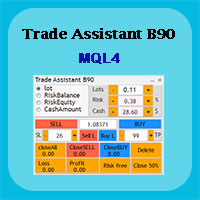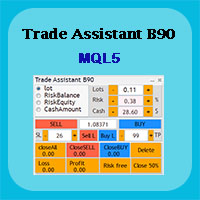
Trade Assistant B90

Trade Assistant B90 is designed for manual trading so that it helps us to manage capital and position well.
This expert has the ability to change the default inputs of the expert as desired before use.
You can see the expert entries in the photo below, each of which we explain below.

1.    Background Color : With this entry, you can change the assistant's background
Color
2.    Font size: You can change the size of the fonts used in the assistant.
3.    Button‌ color: Change the color of assistant buttons.
4.    Button color: Change the text color of assistant buttons.
5.    Line color: Change the color of the lines.
6.    Text color: Changing the color of the texts that will appear on the chart.
7.    Text font size: Changing the font of the texts that will appear on the chart.
8.    Stop loss color: Changing the color of the square that appears on the chart to determine the loss limit.
9.    Take profit color: Changing the color of the square that appears on the chart to determine the profit limit.
10.    SL (pip): set default stop loss based on the currency pair and time frame you are trading.
11.    TP (pip): Set default profit limit based on the currency pair and time frame you are trading.
12.    Risk free (pip): By clicking on the Risk free button, the loss limit will be a few pips higher than the profit entry point (By default, we have considered 2 pips). For example, by clicking on the risk-free button, the loss limit will be moved 2 pips into profit, and by clicking the risk-free button again, 2 pips more than the loss limit will be moved into profit.
13.    One Click Trading: If you set this input to false, a message will appear on the graph before you click on a button from the assistant, asking you if you are sure you want to do this, and by clicking yes or no, you will respond to the desired action. But if you want it to run without asking when you click on the buttons, you can set this entry to true.
After the changes you made on the inputs, the appearance will be adjusted to your taste. For example, as shown below.

In the following, we explaining each of the components of the assistant.
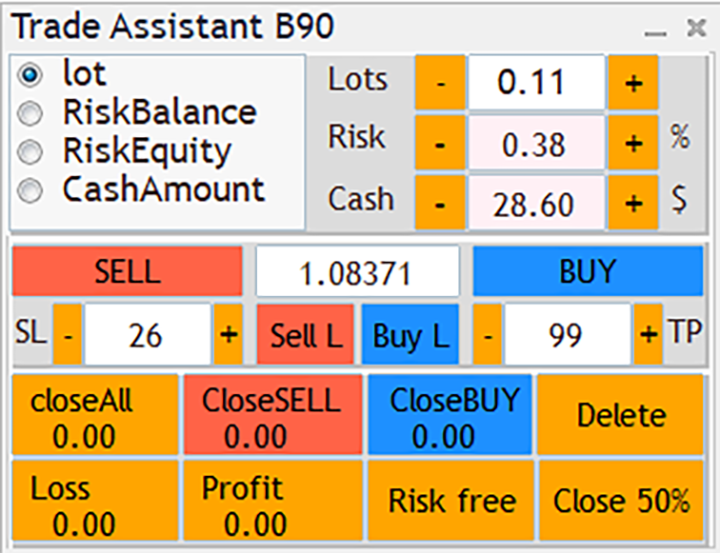
We can determine the volume of transactions with this assistant in3  ways.
•    Volume based on lot
•    Risk percentage: For the risk percentage, we can consider the account balance or account equity as the basis. When you choose one of these methods, you must have a loss limit. Because for risk percentage calculations, the loss limit distance has a great impact on determining the volume of transactions. The smaller the loss limit is, the larger the trading volume is, and the further the loss limit is from the entry point, the smaller it is.
•    Cash: You can also determine the volume of transactions based on the amount. For example, in this method, you can determine the amount of 100 dollars for your loss limit. Then determine the distance of the stop loss from the entry point.
In this method, the distance between the loss limit and the entry point is important, and the shorter the distance, the higher the transaction volume. And the further it is, the volume of the transaction decreases, but the minimum amount is the same as you set
In this example $100

It is recommended that if you want to use methods 2  and 3  to determine the volume of transactions, you must determine the limit using the lines that appear on the chart with this assistant. For this, you can use the line S and line B buttons.

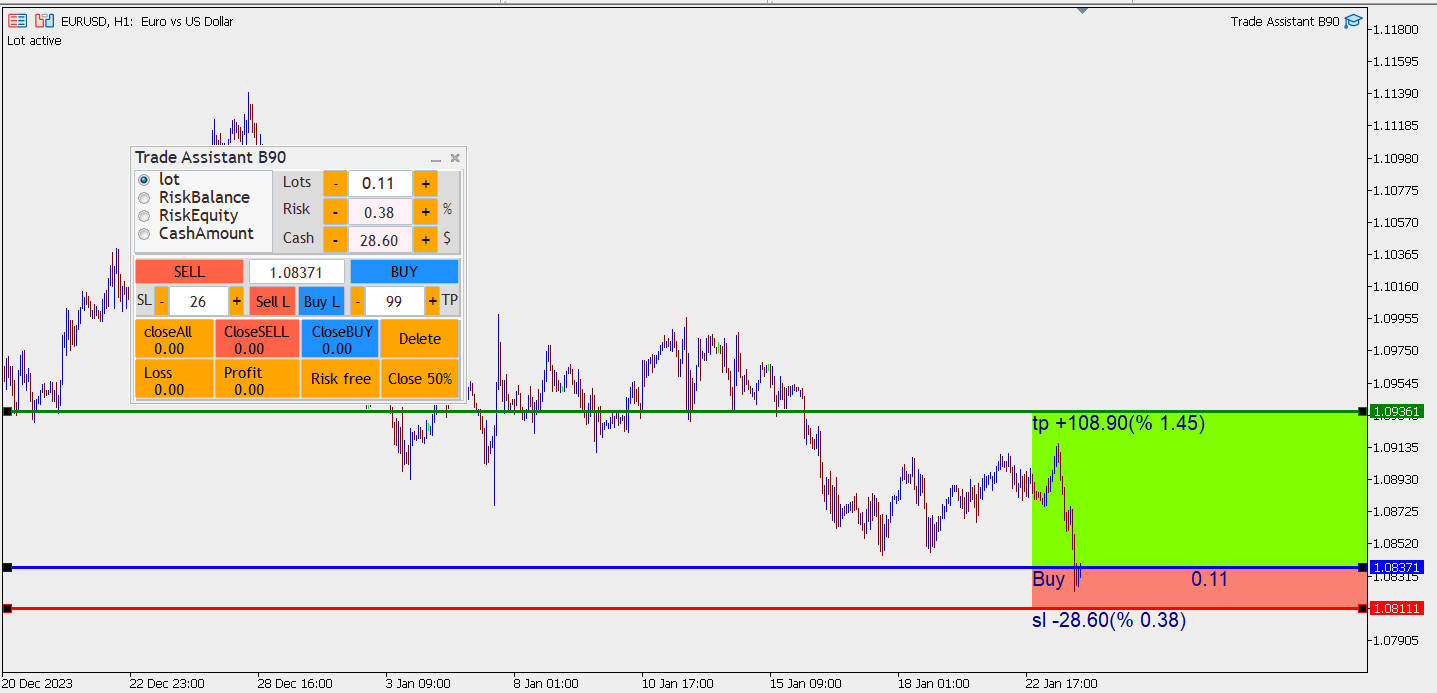
Line B‌: When you click on this button, lines will appear on the chart, which by default specify the entry price as Ask and the profit limit and loss limit based on the profit and loss limit that you set from the expert or assistant entry. Then you can change the profit and loss limits by moving the lines and see the percentage of profit and loss as well as its amount before entering the position.

Line S: This button works like the line B button with the difference that it considers the Bid as the entry price and prepares the profit and loss limit for selling positions by default. But you can provide a buy position by moving the loss limit lower.

SELL: With this button, you can enter the sell position and set the default profit and loss limit. But before pressing this button, it is recommended to see the position of profit and loss limit and the percentage of profit and loss on the chart first, then enter the position knowing this.

You can also enter a buy position with this button, and all the tips we said for the SeIl button apply to it.
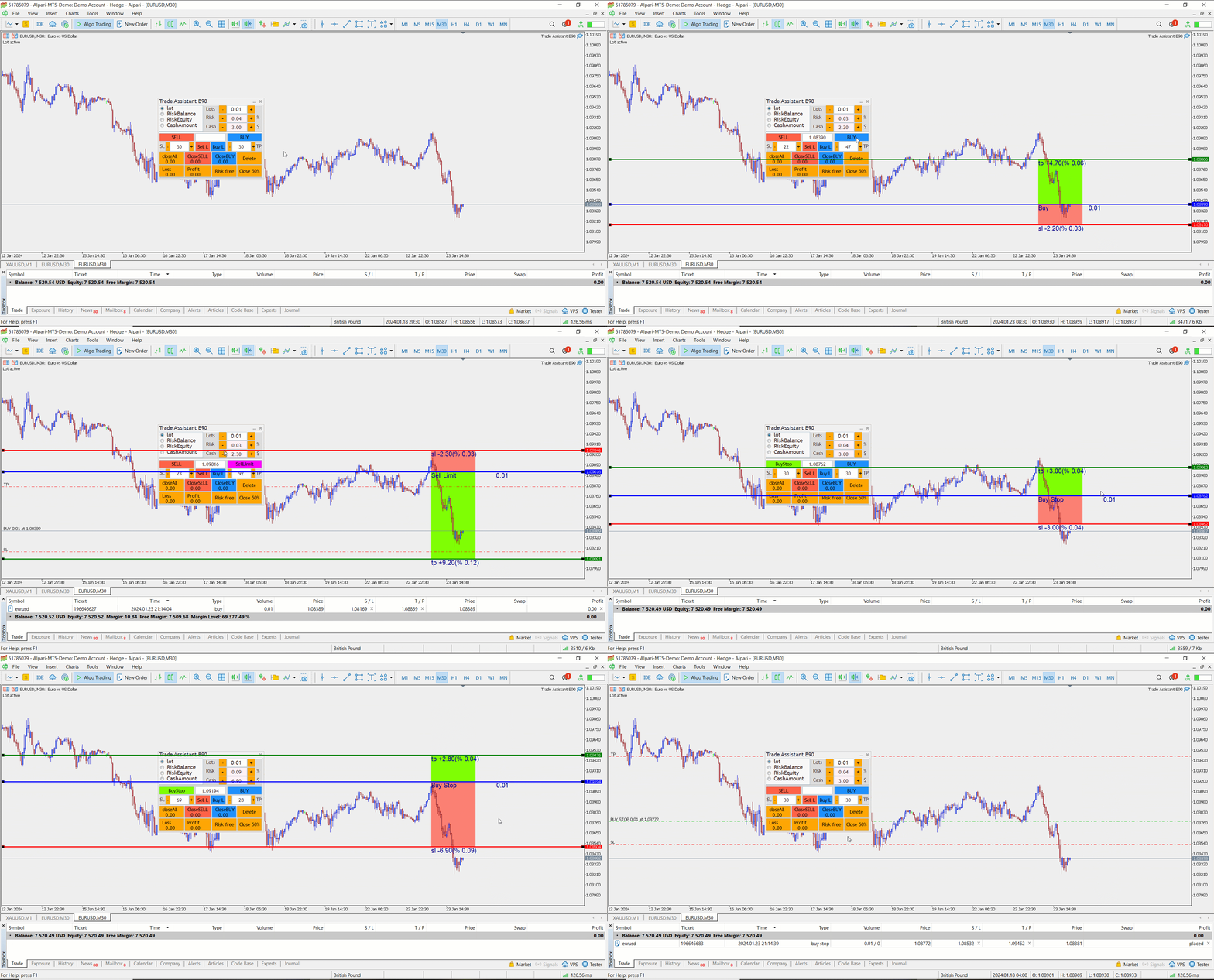
In addition to buying and selling, you can also take pending positions, and based on the position of the lines on the chart, the text of the Sell and Buy button changes to Buy Limit, Buy Stop, Sell Limit, and Sell Stop, and you can place an order by clicking on it.
We have determined 8 buttons to manage positions, which we will explain each one below.

Close All: This button shows the amount of profit and loss of all buy and sell positions on the currency pair on which the expert is executed. By clicking on this button, all the positions of the desired currency pair will be closed.
Profit: This button shows the amount of positions that are in profit. By clicking on this button, all positions will be closed in profit.

Loss: This button shows the amount of positions that are in loss. By clicking on this button, all losing positions will be closed.

Delete: If you have a pending position on the currency pair on which the expert has been executed, by clicking on this button, all of them will be deleted from the chart.
Close BUY: This button shows the amount of profit and loss of purchase positions of the desired currency pair. By clicking on this button, all purchase positions will be closed.

Close SELL: This button shows the amount of profit and loss of selling positions of the desired currency pair. By clicking on this button, all sales positions will be closed.

Risk free: If your positions are in profit, by clicking on this button, the loss limit will be on the entry point (Of course, several more pips in profit). You have already determined this amount from the expert inputs. By default, we put 2 pips and by clicking on this button, the loss limit will be 2 pips in profit. Then, if you press this button again, if it is in profit, the loss limit will be moved to profit by another 2 pips.

Close 50%: This button is designed to save profit. So it will only work when your positions are in profit. By clicking on this button, 50% of the position volume will be closed. By pressing the button again, another 50% of the volume of positions in profit will be closed. Note that if the size of the position is reduced to a minimum, for example, 0.01, this button will no longer work.



Produtos recomendados
SmartEntry EA
Saksit Pawapootanont
Overview SmartEntry EA gives traders full control over any trading symbol — Gold (XAUUSD), Indices, Crypto, and Forex — with both manual and automated entry modes. The EA automatically detects the symbol type and adjusts pip/unit calculations accordingly. The built-in panel allows real-time control of every feature without restarting the EA.   Key Features Auto HG Trigger •   Automatically detects bullish M1 candles exceeding a configurable size threshold •   Mode 1 — HG Sure-Fire: Opens BUY an
Copier Master RAlabs (receiver) and Copier Provider RAlabs (signal source) — a system for local copying of trades between MetaTrader terminals on a single PC/VPS. It consists of two products: Provider (signal source) and Master (receiver/copier with a control panel). Provider is installed on the donor account (the account whose trades are being copied) — it publishes the trades. Master is installed on the recipient account — it reads the donors and opens copies; it hosts the entire copy setting
Net Exposure & Net Average Price is a lightweight utility Expert Advisor for MetaTrader 5 hedge accounts . This tool helps traders instantly understand their true market exposure when multiple Buy and Sell positions are open on the same symbol. What the EA Does The EA displays a clear on-chart panel showing: Total Buy Trades Total Buy Lots Total Sell Trades Total Sell Lots Net Lots (Net Exposure) Net Average Price (hedge-adjusted breakeven) The Net Average Price represents the true breakeven
Auto Trade Copier é projetado para copiar comércios entre contas MT5 / terminais múltiplos com uma precisão absoluta. Com esta ferramenta , você pode agir como quer provedor ( fonte ) ou receptor (destino). Cada ações negociadas será clonado a partir de provedor para o receptor sem demora. A seguir são características de destaque :     Alternar entre Provider ou papel Receiver dentro de uma ferramenta.     Um provedor pode copiar comércios de contas da multi- receptor.     Absoluto compatível
Copy Local Pro
Algori Systems FZ-LLC
Copy Local Pro — Ultra Fast MT5 Local Trade Copier Copy Local Pro is a high-speed local trade copier for MetaTrader 5 that instantly replicates trades between multiple MT5 accounts on the same PC or VPS. Overview Execute trades on one account and automatically copy them to multiple accounts in real time. The copier runs entirely locally, providing ultra-low latency, stable execution, and full control over risk management without external servers. Key Features Fast local trade copying with near-
RSI Currency Strength Meter is a powerful and elegant multi-currency indicator that measures the real-time relative strength of the 8 major currencies using RSI logic. By calculating the smoothed performance of each currency across its major pairs and applying the RSI formula, it delivers clean and responsive strength lines that make it easy to spot which currencies are truly strong or weak at any moment. This indicator is particularly useful for visualizing currency correlations and divergence
Trade Performance Journal — Your Visual Trading Summary Tool Trade smarter by understanding your performance. This Expert Advisor (EA) provides an instant visual summary of your trading results directly on the chart. Whether you’re a scalper, swing trader, or long-term investor, this tool helps you stay on top of your performance metrics with ease. Key Features Flexible Time Analysis View your performance by Quarter, Month, or Half-Year. Easily switch between display modes to analyze your res
FREE
CopyMaster mt5
Evgenii Aksenov
5 (3)
Este utilitário permitir-lhe-á copiar quaisquer transacções de um terminal com a configuração principal para outros terminais com a configuração de escravos Ao mesmo tempo, você pode escolher quais pares para copiar, definir o tamanho da ordem copiada por vários parâmetros. Definir as Perdas-Limite através de levantamentos ou cópias apenas de transacções rentáveis Você pode copiar ofertas de MT4 ou MT5 para MT4 ou MT5 outros corretores Agora não será difícil copiar os sinais de qualquer Expe
Check out my TRADE PLANNER MT5 – strongly recommended to anticipate account scenarios before risking any money. This is a multi-symbol, multi-timeframe, table-based indicator for MetaTrader 5 that identifies 46 types of candlestick formations. Each formation has its own image for easier recognition. The indicator includes popular patterns such as Engulfing, Hammer, Three Line Strike, Piercing, and Doji-like candles. You can check the full list of patterns in the screenshots below. Also you can
Indicator shows balance curves based on magic number for portfolio analysis. It allows to visually estimate different strategies performance on a single symbol. Any of magic number can be hidden by clicking on the value in legend. Parameters: HideAllOnStart - all magics are hidden and can be activated by clicking on its value; MAMode - shows average profit from trades; MAPeriod - Moving average period; Magics - a string with magic numbers separated by comma like "1,2,123". If this field is empty
King Trade Copier
Mohammed Maher Al-sayed Mohammed Ahmed Saleh
KingCopier – Lightning-Fast Local Trade Copier for MetaTrader (Master + Slave) KingCopier is a professional local trade copier that mirrors every trading action from one Master account to unlimited Slave accounts on the same PC or VPS — with an internal copy latency of just a few milliseconds. It was built by a real trader for daily real-money use, with one goal: whatever happens on the Master must happen on the Slave, instantly and without exceptions. Watch the demo video to see the real cop
The utility displays in a convenient form the historical trades made on the account. You can filter trades by magic or comcent, display only profitable or losing trades, and only buy or sell trades. Using this utility, you can see trade entry and exit points, stop loss and take profit levels, trade profit, magic number and comment, order ticket and order size - you only need to run the utility on the chart of the currency pair you want information on get and customize the input parameters. MT4
QuickCopy – Simple MT5 Local Trade Copier with Volume Factor QuickCopy is a lightweight and efficient MT5 local trade copier designed for traders who want to copy trades between accounts on the same computer quickly and reliably. With its simple setup and intuitive interface, QuickCopy makes managing multiple accounts easier than ever. Key Features: Local Account Copying: Instantly copies trades from your master account to one or more client accounts running on the same computer. Volume Factor A
Local Trade Copier EA MT5
Juvenille Emperor Limited
4.96 (142)
Experimente uma cópia de negociação excepcionalmente rápida com o Local Trade Copier EA MT5 . Com sua fácil configuração de 1 minuto, este copiador de negociações permite que você copie negociações entre vários terminais MetaTrader no mesmo computador Windows ou em um Windows VPS com velocidades de cópia ultra rápidas de menos de 0.5 segundos. Seja você um trader iniciante ou profissional, o   Local Trade Copier EA MT5   oferece uma ampla gama de opções para personalizá-lo de acordo com suas ne
Local Copy Trader Utility - Professional Copy Trading System Overview Local Copy Trader Utility is the complete solution for mirroring trades between MetaTrader 5 accounts. With both Master and Slave functionality in one powerful Expert Advisor, it delivers reliable, lightning-fast trade copying with zero external dependencies. Perfect for managing multiple accounts, following trading signals, or transferring trades between brokers, this system ensures your positions stay perfectly synchronized
Fast copier for sending trades to multiple MT4 / MT5 accounts. MT5 Trade Copier Master EA sends trades instantly from your master account to one or multiple slave accounts. Supports copying to: • MT5 accounts • MT4 accounts Perfect for: • Multi-account traders • Signal providers • Account managers • Personal account mirroring Main Features • Fast local trade copying • Low latency execution • Multiple slave accounts support • Copy open positions on startup • Stable file-based communication • Easy
CopyIQ
Stephen Sanjeeve Sahayam
CopyIQ mirrors your trades between MetaTrader 5 terminals running on the same Windows PC - one source account feeding as many receiver accounts as you need. Everything happens locally on the one machine: no VPS, no DLLs, and no internet link between terminals to lag or break. A trade on your source account reaches every receiver in milliseconds. CopyIQ was built by studying where other local copiers let traders down - copies that arrive late, lot sizes that ignore the receiving account, symbols

Trend Pilot Indicator for the mt5 platform, can be used solely for trading, best combined with other indicators    Developed, tested and used with an EA/Algo with no issues. Products on chart arrow for entry signal or setup/entry with retrace Features: Sell and Buy arrows Visual and sound alert Trend continuation / Early trend change signal All time frames, non repaint, fast loading Usage: This Indicator can be used with most asset groups, low spread products can used min 5 timeframe and low
XagusdHamzai85pattern – Visual Pattern Detector for XAGUSD XagusdHamzai85pattern is a purely visual Expert Advisor designed for advanced technical analysis of Silver (XAGUSD) . It does not open any trades : its purpose is to clearly and instantly display price action patterns directly on the chart , making it ideal for backtesting, pattern study, and manual decision support . Detected Patterns The EA automatically detects and draws signals for the following classic patterns: Bullish & Bearish En
Breakevan Utility
Jose Luis Thenier Villa
BreakEvan Utility  Is a simple tool in a panel with this utilities: This utility will draw a Golden Line in the chart applied showing the breakeven price, considering all the positions opened for that specific symbol. Also the information panel shows: Balance Breakeven Price for that chart Force Breakeven (for that symbol) as ON/OFF Force Breakeven Global (takes into account all trades opened) as ON/OFF Total Lots opened for Symbol Total Lots opened Global And two buttons: Force Breakeven: Whe
Trade Copilot - Painel semiautomático de gestão de risco para Ouro (XAUUSD) e qualquer instrumento Trade Copilot é um painel de negociação semiautomático criado para traders manuais que desejam a disciplina de um EA sem abrir mão do controle sobre suas próprias entradas. Você decide a direção e o nível; o painel calcula automaticamente o tamanho do risco, posiciona o stop-loss, gerencia o take-profit e protege a operação. PRINCIPAIS RECURSOS - Cálculo de lote baseado em risco - escolha Risco
Recovery Manager Panel MT5 is a manual order management panel for traders who want to manage open positions directly from the chart in a clearer and more organized way. This tool is not a signal robot. It does not predict market direction, generate entry signals, or trade automatically based on market forecasts. Instead, it helps traders work with positions that are already open. You can calculate possible recovery lot sizes, view estimated target levels on the chart, and use available floating
RRtoolBox
David Ruiz Moreno
RRtoolbox - Professional Tools: Risk:Reward Trading Tool (SL/TP Horizontals + Pending orders + Diagonals), Alerts set on trend lines (for alerts on diagonal levels), SelfManagement (BE, partials...), close/cancelling by time, Statistics, Info and trading on chart. One-Click Trading with Visual Risk:Reward Management RRtoolbox is a comprehensive trading panel that combines one-click order execution,  statistics and  powerful visual Risk:Reward tools, alerts set with trendlines, on chart butt
Best Tested Pairs :-  Step Index (Also can use on other pairs which spread is lowest) How does the Magic Storm work The Magic Storm will commence only if the Initial Trade becomes a losing trade. In case the initial trade is a profitable one, or has been closed by the trader there is no need for the Magic Stormto be initiated. Let’s assume that the initial trade was a 1 lot buy trade with Recovery Zone Range Pips is 50 and Recovery Zone Exit Pips is 150 pips. The take profit for this tr
Trade copier MT5
Alfiya Fazylova
4.59 (49)
Trade Copier é um utilitário profissional projetado para copiar e sincronizar negociações entre contas de negociação. A cópia ocorre da conta / terminal do fornecedor para a conta / terminal do destinatário, instalada no mesmo computador ou vps. PROMOÇÃO - Se você já adquiriu o "Trade copier MT5", pode receber o "Trade copier MT4" gratuitamente (para cópia MT4 > MT5 e MT4 < MT5). Para obter informações mais detalhadas sobre os termos, por favor, entre em contato conosco através de mensagens priv
EA Risk Manager is a professional risk‑management Expert Advisor designed to protect your trading account and enforce disciplined money management. The EA does not open trades by itself – it only monitors and manages all existing positions (manual and automated) on the account. It is especially useful for traders who want to: Hard‑limit daily / weekly / monthly losses and profits. Restrict lot size and the number of open trades. Trade a basket of G7‑related Forex pairs using one centralized
Margin Call Shield – Defend Your Margin on Your Terms Margin Call Shield is a tool for MetaTrader 5 traders who want to decide for themselves which open positions are closed during margin call situations before the platform does so automatically based on its internal rules. By default, the broker or platform decides which positions to close, often using undisclosed algorithms. Margin Call Shield lets you set this order according to your own strategy. Why Was Margin Call Shield Created? In a mar
Multi SAR MT5
Vladimir Pokora
5 (1)
This tool monitors Parabolic SAR indicators on all time frames in the selected markets. Displays a table with signals to open a BUY trade (green) or SELL trade (red). You can easily add or delete market names / symbols. If the conditions for opening a trade on multiple time frames are met, you can be notified by e-mail or phone message (according to the settings in MT5 menu Tools - Options…) You can also set the conditions for sending notifications. The list of symbols/ markets you have entered
HedgeSafe Trade Assistant Painel de negociação manual para MetaTrader 5 com foco no controle de risco. O HedgeSafe ajuda a preparar, validar e gerenciar uma operação diretamente no gráfico antes de clicar em BUY ou SELL. O HedgeSafe não é um serviço de sinais, previsor de mercado, robô de IA ou estratégia automática. Ele não escolhe a direção da operação nem promete lucro. Todas as decisões permanecem sob responsabilidade do trader. Principais recursos Cálculo do lote por percentual do saldo ou
Server Link >> h ttps://www.mql5.com/en/market/product/160109 CopyTrade Slave is a lightweight, reliable local trade copier for MetaTrader 5 that mirrors positions from a Master account to one or more Slave accounts using a fast shared-file mechanism. It is designed for signal providers, account managers, and traders who need precise synchronization of trades with flexible delay and lot control. ​ Main concept Role: Works as the Slave side of a local copy trading setup and receives trades fr
Os compradores deste produto também adquirem
Trade Assistant MT5
Evgeniy Kravchenko
4.43 (214)
Ajuda a calcular o risco por comércio, a fácil instalação de uma nova encomenda, gestão de encomendas com funções de fecho parcial, trailing stop de 7 tipos e outras funções úteis. Materiais e instruções adicionais Instruções de instalação   -   Instruções para a aplicação   -   Versão de teste da aplicação para uma conta de demonstração Função de linha Mostra no gráfico a linha de Abertura, Stop Loss, Take Profit. Com esta função é fácil definir uma nova ordem e ver as suas características ad
Bem-vindo ao Trade Manager EA—uma ferramenta de gestão de risco criada para tornar o trading mais intuitivo, preciso e eficiente. Não é apenas uma ferramenta para executar ordens, mas uma solução abrangente para planejamento de operações, gerenciamento de posições e controle de risco. Seja você um iniciante, trader avançado ou scalper que precisa de execução rápida, o Trade Manager EA adapta-se às suas necessidades, oferecendo flexibilidade em todos os mercados, desde forex e índices até commodi
TradePanel MT5
Alfiya Fazylova
4.88 (162)
Trade Panel é um assistente de negociação multifuncional. O aplicativo contém mais de 50 funções de negociação para trading manual e permite automatizar a maioria das tarefas de negociação. Antes da compra, você pode testar a versão de demonstração em uma conta demo. Baixe a versão experimental do aplicativo para uma conta de demonstração: https://www.mql5.com/pt/blogs/post/762547 . Instruções completas aqui . Comércio. Permite realizar operações de negociação com um clique: Abrir ordens pendent
Versão Beta O Telegram to MT5 Signal Trader está quase no lançamento oficial da versão alfa. Alguns recursos ainda estão em desenvolvimento e você pode encontrar pequenos erros. Se tiver problemas, por favor reporte, seu feedback ajuda a melhorar o software para todos. Telegram to MT5 Signal Trader é uma ferramenta poderosa que copia automaticamente sinais de trading de canais ou grupos do Telegram diretamente para sua conta MetaTrader 5 . Suporta canais públicos e privados do Telegram, e você
Telegram to MT5 Multi-Channel Copier copia automaticamente sinais de trading dos seus canais do Telegram diretamente para o MetaTrader 5. Sem bots, sem extensões de navegador, sem copiar manualmente. Você recebe um sinal no Telegram e o EA abre a operação no seu terminal em poucos segundos. O produto inclui dois componentes: um aplicativo do Windows que escuta seus canais do Telegram, e este Expert Advisor que executa os sinais no seu terminal MT5. Também está disponível uma versão para MT4. Gui
Power Candles Strategy Scanner - Localizador de configurações multissímbolo com auto-otimização O Power Candles Strategy Scanner utiliza o mesmo motor de auto-otimização que alimenta o indicador Power Candles — em todos os símbolos da sua lista de observação, lado a lado. Um painel indica-lhe quais os símbolos que são estatisticamente negociáveis neste momento, qual a estratégia vencedora para cada um, o par ideal de Stop Loss / Take Profit, e avisa-o assim que um novo sinal é emitido. Esta ferr
Exp COPYLOT CLIENT for MT5
Vladislav Andruschenko
3.94 (34)
Copiador profissional de operações para MetaTrader 5 Um copiador de operações rápido, profissional e confiável para MetaTrader . COPYLOT permite copiar operações de Forex entre terminais MT4 e MT5 com suporte para contas Hedge e Netting . A versão MT5 do COPYLOT oferece suporte a: - MT5 Hedge → MT5 Hedge - MT5 Hedge → MT5 Netting - MT5 Netting → MT5 Hedge - MT5 Netting → MT5 Netting - MT4 → MT5 Hedge - MT4 → MT5 Netting Versão MT4 Descrição completa + DEMO + PDF Como comprar Como instalar Como
Anchor Trade Manager
Kalinskie Gilliam
5 (5)
Anchor: The EA Manager Run your full EA portfolio without conflicts, without stacked risk, and without watching every chart yourself. Anchor coordinates up to 64 Expert Advisors on a single account, including daily loss protection built for prop firm rules. Attach Anchor to any chart. Type your EA names and magic numbers in one line. Click OK. Anchor begins coordinating immediately. Built for portfolios. Built for prop firms. Built for discipline. The Problem Running multiple EAs on the same acc
Farmed Hedge Yield Farming | All Markets (Manual - Hybrid - Semi/Automated EA) MULTI-ASSET SUPPORT Trade any asset available on your broker - Forex: Major, Minor, Exotic pairs - Crypto: BTC, ETH, XRP, SOL, BNB - Stocks: Apple, Tesla, Amazon, Google, etc. - Commodities: Gold, Silver, Oil, Gas - Indices: US30, NAS100, SPX500, DAX40 - Any CFD your broker offers VERIFIED TRADING RESULTS - Farmed Hedge Yield Axi Copy:  https://www.mql5.com/en/signals/2356376 - Farmed Hedge Yield Exn Copy:   https:/
EasyInsight AIO MT5
Alain Verleyen
4.92 (12)
EASY Insight AIO – A solução tudo-em-um para trading inteligente e sem esforço Visão geral Imagine analisar todo o mercado — Forex, Ouro, Cripto, Índices e até Ações — em segundos, sem precisar examinar gráficos manualmente, instalar indicadores ou lidar com configurações complicadas. EASY Insight AIO é sua ferramenta definitiva de exportação para trading com IA, pronta para usar. Ela oferece um panorama completo do mercado em um único arquivo CSV limpo — pronto para análise imediata no ChatGP
Quant AI Agents
Ho Tuan Thang
5 (1)
Quant AI Agents are independent trading Expert Advisors. Instead of trading using a fixed strategy like other conventional EAs, Quant AI Agents   is a   multi-agent AI trading framework   that turns natural-language strategy prompts into live.  WANT THE SAME RESULTS AS MY LIVE SIGNAL?   Use the exact same brokers I do:   IC MARKETS , IC TRADING   .  Unlike the centralized stock market, Forex has no single, unified price feed.  Every broker sources liquidity from different providers, creating un
Premium Trade Manager - O Painel de Operações com um Coach Integrado Premium Trade Manager coloca um coach de trading dentro do seu gráfico, com um motor de execução completo por baixo. Configure a operação da forma que sempre faz e deixe o Max, seu coach de trading com IA, ler exatamente esse setup em relação à sua conta ao vivo e dar um veredicto direto antes de confirmar: se o stop é disciplinado, se o risco faz sentido, se há um evento de alto impacto a minutos de distância, se você está pró
Seconds Chart MT5
Boris Sedov
4.61 (18)
Seconds Chart - uma ferramenta exclusiva para criar gráficos de segundos no MetaTrader 5 . Com o Seconds Chart , você pode criar gráficos com períodos definidos em segundos, proporcionando flexibilidade e precisão ideais para análise, indisponíveis em gráficos padrão de minutos ou horas. Por exemplo, o período S15 indica um gráfico com velas de 15 segundos. Você pode usar qualquer indicador ou Expert Advisor com suporte a símbolos personalizados. Trabalhar com eles é tão conveniente quanto negoc
The product will copy all telegram signal to MT5 ( which you are member) , also it can work as remote copier.  Easy to set up, copy order instant, can work with almost signal formats, image signal,  s upport to translate other language to English Work with all type of channel or group, even channel have "Restrict Saving Content", work with  multi channel, multi MT5 Work as remote copier: with signal have ticket number, it will copy exactly via ticket number. Support to backtest signal. How to s
Trade Dashboard MT5
Fatemeh Ameri
4.95 (131)
Trade Dashboard simplifies how you open, manage, and control your trades, with built-in lot size calculation. It allows you to execute trades, manage risk, and control positions directly on the chart, with tools such as partial close, breakeven, and trailing stop. Designed to reduce manual work and help you stay focused on your trading decisions. A demo version is available for testing. Detailed explanations of features are provided within the MQL5 platform. Installation instructions are include
Baixar demo funcional Copy Cat More (Gato Copião) — Copiador de Trades (Trade Copier) MT5 é um copiador local de trades e um completo framework de gerenciamento de risco e execução, projetado para os desafios de trading de hoje. De desafios de prop firm ao gerenciamento de portfólio pessoal, ele se adapta a cada situação com uma combinação de execução robusta, proteção de capital, configuração flexível e manuseio avançado de trades. O copiador funciona em ambos os modos — Mestre (Master, emiss
Trade Manager DaneTrades
Levi Dane Benjamin
4.28 (29)
Trade Manager para ajudá-lo a entrar e sair rapidamente de negociações enquanto calcula automaticamente seu risco. Incluindo recursos para ajudar a evitar negociações excessivas, negociações de vingança e negociações emocionais. As negociações podem ser gerenciadas automaticamente e as métricas de desempenho da conta podem ser visualizadas em um gráfico. Esses recursos tornam este painel ideal para todos os traders manuais e ajudam a aprimorar a plataforma MetaTrader 5. Suporte multilíngue. Vers
EA Performance Tracker
Russell Leeon Tan
5 (2)
EA Performance Tracker (AESTracker) A clean, modern dashboard that shows exactly how your trades and EAs are performing — right on your chart. It reads your full account history automatically and breaks down the numbers by magic number / strategy. Display only — it does not place any trades. What it shows - Account header: live Balance, Equity, and Open (floating) P/L - Profit summary: gross profit, net profit, and the exact commission & swap deducted - Key stats: win rate, profit factor, exp
HINN Lazy Trader
ALGOFLOW OÜ
5 (1)
LIMITED SUMMER SALE -40% ! ONLY $470 insead of $790!  Maximum real discount! The core idea: using the user interface, you configure the parameters the chart must meet before entering a position (or positions), choose which entry models to use, and set the rules for when trading and planning should end. Lazy Trader  handles the rest: it  takes over all the routine chart watching and execution! full description  :: 3 key videos [1] ->  [2]   ->  [3] What can it do? - Understands Larry Williams
================================================================================ POC BREAKOUT - V20.72. Full Professional Grade Toolkit ================================================================================ POC Breakout is a full MetaTrader 5 trading dashboard for discretionary traders who want breakout signals, Point of Control (POC) context, volume profiles, order flow, market structure, news, alerts, and advanced trade planning in one professional workspace. Attached directly to you
Painel de Trading para MetaTrader 5 — controle profissional de trading em um clique a partir do gráfico e do teclado Um painel de trading avançado para traders ativos, criado para abrir, gerenciar e fechar operações muito mais rápido do que com a interface padrão do MetaTrader. Esta solução foi desenvolvida para quem deseja controlar posições, ordens pendentes, lucro total e execução em um único espaço de trabalho profissional. Não se trata apenas de mais um utilitário. É um verdadeiro cockpit
DrawDown Limiter
Haidar Lionel Haj Ali
5 (20)
Drawdown Limiter EA You are in the right place if you were searching for Drawdown control, Drawdown limiter, Balance protection, Equity Protection or Daily Drawdown Limit related to Prop Firm, FTMO, or Funded account trading, or if you want to protect your trading account. Have you suffered from controlling your drawdown when trading funded accounts? This EA is meant for you. Prop firms usually set a rule called “Trader Daily Drawdown”, and if it is not respected, you are disqualified.  I am an
Welcome to ENTRY IN THE ZONE WITH SMC MULTI TIMEFRAME Entry In The Zone with  SMC Multi Timeframe  is a professional trading indicator built on Smart Money Concepts (SMC), combining market structure analysis with a No Repaint BUY / SELL signal system in a single indicator. It helps traders understand market structure more clearly, identify key price zones, and focus on higher-quality trading opportunities. By combining Multi-Timeframe Analysis, Points of Interest (POIs), and real-time signals, t
Timeless Charts
Samuel Manoel De Souza
5 (7)
Timeless Charts é um utilitário de trading tudo-em-um para traders profissionais. Ele combina tipos de gráficos personalizados, como Gráficos por Segundos e Renko , com análise avançada de fluxo de ordens utilizando Footprints , Clusters , Perfis de Volume , estudos VWAP e ferramentas de análise ancorada para uma visão mais profunda do mercado. O gerenciamento de ordens e posições é realizado diretamente no gráfico por meio de um painel integrado de gerenciamento de operações , enquanto o Market
The News Filter MT5
Leolouiski Gan
4.78 (23)
Este produto filtra todos os consultores especializados e gráficos manuais durante o horário das notícias, para que você não precise se preocupar com picos de preços repentinos que possam destruir suas configurações de negociação manuais ou negociações realizadas por outros consultores especializados. Este produto também vem com um sistema de gerenciamento de pedidos completo que pode lidar com suas posições abertas e ordens pendentes antes do lançamento de qualquer notícia. Depois de comprar o
YuClusters
Yury Kulikov
4.93 (43)
Atenção: A versão demo para revisão e teste está aqui . YuClusters é um sistema profissional de análise de mercado. O trader tem oportunidades únicas para analisar o fluxo de pedidos, volumes de negociação, movimentos de preços usando vários gráficos, perfis, indicadores e objetos gráficos. O YuClusters opera com base em dados de Tempos e Negócios ou informações de ticks, dependendo do que está disponível nas cotações de um instrumento financeiro. O YuClusters permite que você crie gráficos com
Chart Copilot
George Angelo Boutselis
O Chart Copilot é um assistente de negociação projetado para ajudar os traders a realizar operações mais rapidamente, gerenciar posições em aberto e configurar alertas de qualquer tipo diretamente do gráfico. Todos esses recursos são acessíveis por meio do painel gráfico, bem como por meio de um chatbot conversacional. Material Adicional e Instruções: Versão de avaliação  - Instruções de configuração Chatbot O Chart Copilot vem com um servidor dedicado executando um modelo de linguagem de grande
EA Auditor
Stephen J Martret
5 (4)
EA Auditor is an independent analysis tool for traders evaluating Expert Advisors and trading signals on MetaTrader 5. It audits backtest reports, reviews posted developer signals, and cross-verifies the two against each other to help traders assess strategies before committing capital. The MQL5 market offers a wide range of Expert Advisors from many developers, with varying approaches, quality, and transparency. EA Auditor provides a consistent, data-driven framework for reviewing them, answer
O Local Trade Copier EA é uma solução para traders individuais ou gerentes de contas que precisam executar sinais de negociação de fontes externas ou que precisam gerenciar várias contas ao mesmo tempo, sem a necessidade de uma conta MAM ou PAMM. Copia de até 8 contas mestras para contas escravas ilimitadas [ Guia de instalação | Guia de atualização | Solução de problemas | Perguntas frequentes | Todos os produtos ] 100% auto-hospedado Fácil de instalar e usar Nenhum instalador, arquivos de con
FUTURES ORDERFLOW FOOTPRINT CHART Professional OrderFlow EA for MetaTrader 5 Version 1.01| Professional tool for real traders | Institutional-Grade Visualization STRATEGY TESTER USERS - PLEASE SELECT EVERY REAL TICK WHEN TESTING AND YOU HAVE DOWNLOADED HISTORICAL DATA. IF YOU SEE A WAITING SCREEN AND IT IS NOT DOWNLOADING, IT MEANS YOU HAVE LOW HISTORICAL DATA. TRY 1 MIN AND 5 MIN FIRST ON 1 DAY DATA. ONE DAY DATA SHOULD BE THE NEWEST AND MOST CURRENT DATE. PLEASE WAIT UNTIL THE MARKET HAS ROL
Mais do autor
Trade Assistant B90 MT4
Mohammadbagher Ramezan Akbari
Trade Assistant B90 is designed for manual trading so that it helps us to manage capital and position well. This expert has the ability to change the default inputs of the expert as desired before use. You can see the expert entries in the photo below, each of which we explain below. 1.    Background Color : With this entry, you can change the assistant's background Color 2.    Font size: You can change the size of the fonts used in the assistant. 3.    Button‌ color: Change the color of assis
Martingale panel MT5
Mohammadbagher Ramezan Akbari
In this article, we would like to introduce the trade panel product with the Martingale panel. This panel is made in such a way that it can meet the needs of traders to a great extent. This trade panel actually consists of two trade panels at the same time, with the first one you can take positions with certain profit and loss limits, and with the second one, you can have positions with profit limits but without loss limits. When positions lose, a new position will be added based on the settings
Filtro:
Sem comentários
Responder ao comentário