

Event-Driven Architecture in MQL5: How to Turn an Expert Advisor into a Full-Fledged Trading System
 2 990
2 990
 6
6

Introduction
When developing an EA in MQL5, many people start with the most obvious solution: they put all the logic into the OnTick method. It really is easier to get started this way. But this approach has a hidden cost. As the project grows, trading rules, condition checking, order processing, data updating, interface, calculations, and logging are all combined into a single handler. As a result, the code grows to a state where it is no longer programmable and in fact is held together by sheer luck. Any change in one place begins to affect completely different parts of the system. You fix the visual panel – and suddenly the trading scenario breaks. You change the entry filter - an error appears in the background check. Such an EA quickly turns into a fragile monolith, where complexity grows faster than the developer's confidence.
MetaTrader 5 is more than just a stream of quotes. It is based on events. The terminal constantly receives ticks, timer signals, user actions, trading status changes, and market depth events. These messages should be handled separately. To achieve this, MQL5 features different handlers, each with its own area of responsibility. OnTick is responsible for market updates. OnTimer — for periodic and background tasks. OnChartEvent — for the reaction to the GUI and user actions. When logic is distributed according to its purpose, the code ceases to be cluttered. It starts to resemble a well-structured engineering system, where each module does its job and does not interfere with its neighbors.
This design is especially important when the EA goes beyond a single symbol and begins to perform multiple functions simultaneously. We need to monitor the market, maintain the interface, respond to button presses, synchronize internal state, transmit signals between components, and sometimes even handle multiple instruments. At this point, event architecture no longer looks like a beautiful theory. It becomes a practical necessity. If we relocate the background work to OnTimer, while the response to user's actions — to OnChartEvent, the main trading circuit is freed from unnecessary load. This makes the system behavior more predictable and significantly simplifies maintenance.
Custom events and services play a separate role in such architecture. Custom events allow us to organize an internal message bus between modules, while services allow us to move auxiliary logic outside of a specific chart. This is no longer just an EA, but a system of components that can exchange commands and signals without mixing everything into one function. This makes it possible to build solutions at the trading application level with control panels, background analytics, inter-module exchange, and a clear separation of roles.
In addition, the event-driven approach significantly improves testability. When logic is distributed across handlers, it is easier to test it in parts. We can analyze the response to the timer, UI events and trading transactions separately. This is especially important in tasks where a mistake can cost time and money. The better the structure, the easier it is to control the system behavior and quickly find the causes of failures.
In this article we will look at how to move from the model of all in OnTick towards a more mature event architecture. Let's look at the roles of predefined handlers and custom events, as well as services that are not tied to a chart. Let's take a closer look at typical errors that break the architecture even before actual work begins. The main idea here is simple: when MQL5 is used for its intended purpose, it allows us to build not only trading robots, but also full-fledged application systems.

Predefined events
Predefined events in MQL5 are the framework the entire logic of the program is based on. This is not just a set of handler functions, but a strictly defined model of response to changes in the environment. And the sooner the developer stops perceiving them as addition to OnTick, the faster the code begins to acquire an architecture.
The life cycle of any program begins with OnInit and ends in OnDeinit. These are sort of entry and exit points. OnInit lays the foundation: timers are set via EventSetTimer, graphical objects are created, internal structures and external components are initialized. It is also convenient to launch service mechanisms and prepare the environment here.
int OnInit()
  {
   EventSetTimer(30); // poll every 30 seconds
   return(INIT_SUCCEEDED);
  }
OnDeinit, in turn, requires discipline. Everything that was created must be released correctly: objects are deleted, the timer is disabled via EventKillTimer, resources are closed. Ignoring this symmetry is a classic mistake that causes polluting the runtime environment and subtle glitches.
void OnDeinit(const int reason)
  {
   EventKillTimer(); // disable the timer when unloading
  }
OnTick is traditionally seen as the heart of the EA. This is partially true. Its purpose is to react to market changes of a specific symbol. This is where you calculate signals, check entry conditions, and manage positions. However, the fundamental point is the presence of OnTick is not mandatory. If the logic is moved to other events, the EA can work without it. Moreover, in mature architecture, OnTick often becomes a lightweight router rather than the center of the universe.
OnTimer is a tool that many underestimate. The terminal generates these events at a specified interval, which allows separating background tasks from market ones. Collecting statistics, updating caches, polling several symbols, recalculating indicators — all of this logically fits into the timer. This approach relieves OnTick and makes the system behavior more stable, especially during periods of high volatility. Remember a simple but important rule: the timer should not only be set in OnInit, but also necessarily removed in OnDeinit.
OnChartEvent opens the door to the world of interactive applications. This is a handler for GUI events: mouse clicks, key strokes, interactions with objects and, most importantly, custom events. Control panels, buttons, and mode switches are built through it. This is where the response to external signals coming from other programs is implemented. In the context of event-driven architecture, this is no longer a simple UI handler but a full-fledged communication channel.
OnTradeTransaction is a point of trading status control. Unlike simplified approaches where only the result of an operation is checked, the entire MqlTradeTransaction structure is available here. This allows for precise tracking of the order lifecycle: from sending to execution and subsequent modifications. This level of detail is especially important in complex position management scenarios, where not only the goal but also the path to it is important.
OnBookEvent is used less frequently, but is irreplaceable in certain tasks. It reacts to changes in the market depth and is activated via MarketBookAdd. This is already the territory of more subtle strategies, where not only price is important, but also the liquidity structure. In high-frequency approaches or when analyzing micro-market movements, this handler becomes a key source of signals.
The key takeaway here is simple: every type of program in MQL5 receives its own set of events, and it is through them that its behavior is formed. Trying to ignore this model and reduce everything to a single handler inevitably leads to complexity. On the contrary, the proper distribution of logic across events creates a clear, predictable, and scalable system — the very foundation, without which it is impossible to move forward.
Custom events
Custom events in MQL5 are one of the most practical tools for building event architecture. With their help, the program is no longer self-contained. It gains the ability to transmit signals between its parts as naturally as the nodes of a single system exchange service messages. This is achieved by the EventChartCustom function, which allows us to programmatically send our own event to a specified chart and then handle it in OnChartEvent. This is an internal message bus. It is especially valuable where a single program should respond to the market, coordinate the work of the interface, service modules and trading logic.
The main advantage of this approach is that it helps to separate responsibilities between modules. One component can be engaged in market analysis. The other - in displaying the panel status. The third - in execution of trading actions. The fourth one - in servicing background calculations. If we try to tie all this together with direct calls and shared global variables, the code will quickly start to unravel. Maintenance will become like repairing a mechanism in which each gear is meshed with all the others. Custom events avoid this confusion: the module does not interfere with someone else's internal logic, but simply sends a neat signal to where it should be received.
The ability of a targeted event transmission is worth noting separately. In EventChartCustom, we can specify not only the current chart, but also chartID of another window. This opens the way for communication between different instances of EAs, indicators and services. This mechanism is especially useful in multi-symbol and multi-chart systems. One component collects or generates information, and the other receives it and performs an action. In this case, the custom event becomes the connecting link that unites disparate parts into a single architecture.
Moreover, the very idea of event exchange is particularly evident at the initialization stage. Sometimes, we need to overload OnInit with preparatory actions: creating internal objects, loading data, building caches, configuring the interface, launching services. If all of this is done immediately within initialization, the method becomes heavy and begins to slow down the program startup. Moreover, if initialization takes too long, there is a risk of running into a time limit or simply getting a slow, clunky startup. It makes much more sense to leave only the minimum amount of preparation in OnInit and immediately create a custom event that will move the labor-intensive part to a separate handler. Then the program starts quickly, and the main preparation is carried out in event mode.
This is also important because in MQL5, long-term operation of a function blocks handling other events. Calling several small functions in a row does not solve the problem: until the chain is complete, nothing can intervene in the flow of events. This is especially noticeable in programs with a user interface. The user interacts with the panel and waits for a response, but the program does not respond because it is executing a long script. There is a feeling of freezing, although in fact the system simply does not have time to transfer control to the event handler. This is precisely why the event model is architecturally necessary here. It allows delegating orchestration to an event handler that runs steps sequentially without blocking the interface or making the program unresponsive.
This flexibility has a downside: custom events cannot be sent without a system. A clear protocol is needed here: what IDs mean what, where the message code is stored, how to determine whether an event belongs to the application. Usually, custom ID ranges are set for this purpose, use clear labels in string parameters and be sure to check that the event is actually intended for this module. Otherwise, we can easily get an unrelated signal throwing the logic into architectural turmoil.
There is another rule that is often underestimated: do not create events too often unless there is a real need. The terminal event queue does not like unnecessary noise. If events are sent too frequently, the message queue becomes overloaded and signal processing degrades. It is better to transmit only significant states: the fact that data is ready, the appearance of a signal, a command to update the interface, action execution confirmation. Then events will function like neat memos, rather than a chaotic stream of telegrams.
This is why custom events are especially valuable in a mature system. They connect modules without rigid coupling, allow building clear interaction protocols and turn MQL5 into an environment for full-fledged event-driven development.
Services
Service in MQL5 is a background terminal service. No chart, no symbol binding, no tick waiting. After the launch, it works on its own, like a neat attendant who does not need reminding what to do.
The entire logic lives in the OnStart function. Most often, a cycle is organized inside: checking the status, performing the task, pause via Sleep followed by the next step. This rhythm is simple and reliable. It does not require market events and does not depend on chart activity. The service sets its own pace.
The practical benefits quickly become apparent. If you need to regularly download data from an external source, the service can handle it. Need to generate ticks for a custom symbol? The service can do that as well. Need to send signals or update the system state every few seconds? Again, this is the job of the service. Everything that is repeated, everything that should not depend on market noise, should logically be brought here.
There is one more detail that makes the service especially convenient. If you do not stop it manually, it will automatically start up the next time you start the terminal. This turns it into a tool for routine operations: checking the state at startup, preparing data, synchronization - all this can be done without user intervention. Once set up, the service works every day like clockwork.
In architecture, this looks very healthy. The EA on the chart reacts to the market. At the same time, the interface is user-oriented. In the meantime, the service does quiet and regular work in the background. No fuss, no OnTick overload. This division of roles relieves the system of unnecessary stress and makes it more stable. When each part does its job, the entire structure begins to work noticeably cleaner.
Communication between programs
When a trading solution consists of multiple components, they need a messaging mechanism. One module can collect data. The second one shows them on the panel. The third one makes a trading decision. The fourth one handles background logic. And if each of them starts living in their own universe, the result will not be an architecture, but a tangle of flags, global variables, and random checks. That is why the event-driven structure works especially well here.
The clean version of event-based architecture is when indicators become the source of signals, albeit not in conventional way (asked a buffer - got a value), but as full-fledged event generators.
The idea is simple. Each indicator is wrapped in a lightweight adapter. Internally, it does exactly one thing: it monitors when a signal occurs and, if the condition is met, it dispatches a custom event. All is set. No constant requests from outside, no unnecessary noise.
int OnCalculate(const int32_t rates_total,
                const int32_t prev_calculated,
                const datetime &time[],
                const double &open[],
                const double &high[],
                const double &low[],
                const double &close[],
                const long &tick_volume[],
                const long &volume[],
                const int32_t &spread[])
  {
   if(prev_calculated==rates_total)
     return prev_calculated;
//---
   if(BarsCalculated(handle) < rates_total)
      return(prev_calculated);
   vector<double> sig, main;
   if(!main.CopyIndicatorBuffer(handle, 0, 1, 2) ||
      !sig.CopyIndicatorBuffer(handle, 1, 1, 2))
      return(prev_calculated);
   if(sig[0] > main[0] && sig[1] <= main[1])
     {
      if(!EventChartCustom(ChartID(), BuyID, MagicNumber, main[0], IndComment))
         return(prev_calculated);
     }
   if(sig[0] < main[0] && sig[1] >= main[1])
     {
      if(!EventChartCustom(ChartID(), SellID, MagicNumber, main[0], IndComment))
         return(prev_calculated);
     }
//--- return value of prev_calculated for the next call
   return(rates_total);
  }
As an example, let's take two classic indicators — MACD and RSI. Each of them works independently on its own timeframe. They only handle a new bar. MACD checks the intersection of the histogram and the signal line. RSI is the intersection of overbought and oversold levels. When a signal occurs, they generate pre-defined custom events. This is a fundamental point: the indicator does not store a signal in the buffer, it registers an event.
Then the EA comes into play, but in a completely different role. It does not poll indicators on every tick. It does not go through history, does not synchronize buffers, does not try to guess whether there was a signal. It simply listens for events in OnChartEvent.
void OnChartEvent(const int32_t id,
                  const long &lparam,
                  const double &dparam,
                  const string &sparam)
  {
//---
   if(lparam != MagicNumber)
      return;
   switch(id - CHARTEVENT_CUSTOM)
     {
      case MACD1Buy:
         indSignals[0] = 1;
         break;
      case MACD1Sell:
         indSignals[0] = -1;
         break;
      case MACD2Buy:
         indSignals[1] = 1;
         CloseSellSignal = true;
         CloseBuySignal = false;
         break;
      case MACD2Sell:
         indSignals[1] = -1;
         CloseBuySignal = true;
         CloseSellSignal = false;
         break;
      case RSI1CrossOverBoughtDown:
         indSignals[2] = -1;
         break;
      case RSI1CrossOverSoldUp:
         indSignals[2] = 1;
         break;
      case RSI2CrossOverBoughtDown:
         indSignals[3] = -1;
         CloseBuySignal = true;
         CloseSellSignal = false;
         break;
      case RSI2CrossOverSoldUp:
         indSignals[3] = 1;
         CloseSellSignal = true;
         CloseBuySignal = false;
         break;
     }
   BuySignal = true;
   SellSignal = true;
   for(uint i = 0; i < indSignals.Size() && (BuySignal || SellSignal); i++)
     {
      BuySignal = BuySignal && (indSignals[i] == 1);
      SellSignal = SellSignal && (indSignals[i] == -1);
     }
  }
The EA registers incoming events. If nothing arrives, it does nothing.
This dramatically changes the nature of the load. In the classic structure with polling of indicators, the same thing happens at every tick - requesting buffers, checking values. Sometimes, we might also need a run through history, so as not to miss the signal. This becomes especially difficult with several indicators and different timeframes. There is always a time gap between signals, and we have to constantly look back to catch it.
The event model simply removes these excess efforts. Each signal is a ready-made event. There is no need to search for it, recalculate it, or reconstruct it retroactively. It comes at the moment of emergence.
The result is a neat and quick diagram:
- the indicator is responsible only for its own calculation and its own signal;
- an event records the moment of change of state;
- the EA aggregates the signals and makes a decision.
This is especially evident in multi-indicator strategies. For example, one signal arrives from M5, the other — from M30. In the classical model, it is necessary to synchronize data, consider lags and check history. Here everything is simpler: each indicator checked in at the right moment, the EA saved the state and waited for the full set of conditions.
In terms of performance, this provides a noticeable benefit. There are no constant references to indicators, no empty checks on every tick. OnTick becomes easy and fast, which means the reaction to the market is faster. In trading, this is not just a theory, but a completely practical advantage: fewer delays, clearer logic, more accurate execution.
void OnTick()
  {
//---
   if(BuySignal)
     {
      cSymbol.Refresh();
      cSymbol.RefreshRates();
      if(!cTrade.Buy(InpLot, cSymbol.Name(), cSymbol.Ask(),
                     cSymbol.Ask() - SL * cSymbol.Point(),
                     cSymbol.Ask() + TP * cSymbol.Point(), "Event Example"))
        {
         PrintFormat("Error open Buy position: %d", GetLastError());
         return;
        }
      BuySignal = false;
      ArrayFill(indSignals, 0, indSignals.Size(), 0);
     }
//---
   if(SellSignal)
     {
      cSymbol.Refresh();
      cSymbol.RefreshRates();
      if(!cTrade.Sell(InpLot, cSymbol.Name(), cSymbol.Bid(),
                      cSymbol.Bid() + SL * cSymbol.Point(),
                      cSymbol.Bid() - TP * cSymbol.Point(), "Event Example"))
        {
         PrintFormat("Error open Sell position: %d", GetLastError());
         return;
        }
      SellSignal = false;
      ArrayFill(indSignals, 0, indSignals.Size(), 0);
     }
//---
   if(CloseBuySignal)
     {
      if(cPosition.SelectByMagic(cSymbol.Name(), MagicNumber) &&
         cPosition.PositionType() == POSITION_TYPE_BUY)
        {
         if(!cTrade.PositionClose(cPosition.Ticket()))
           {
            PrintFormat("Error close Buy position: %d", GetLastError());
            return;
           }
        }
     }
//---
   if(CloseSellSignal)
     {
      if(cPosition.SelectByMagic(cSymbol.Name(), MagicNumber) &&
         cPosition.PositionType() == POSITION_TYPE_SELL)
        {
         if(!cTrade.PositionClose(cPosition.Ticket()))
           {
            PrintFormat("Error close Sell position: %d", GetLastError());
            return;
           }
        }
     }
//---
  }
What is equally important is that the code becomes more transparent. The signal is no longer a buffer value, which needs to be interpreted, and turns into a clear event: happened - registered - handled. This is exactly the case when the architecture directly improves both the readability and the behavior of the system.
Running the EA in the MetaTrader 5 strategy tester showed an interesting picture. We have a system with a definite character – it earns actively, but at the same time keeps risks within reasonable limits.
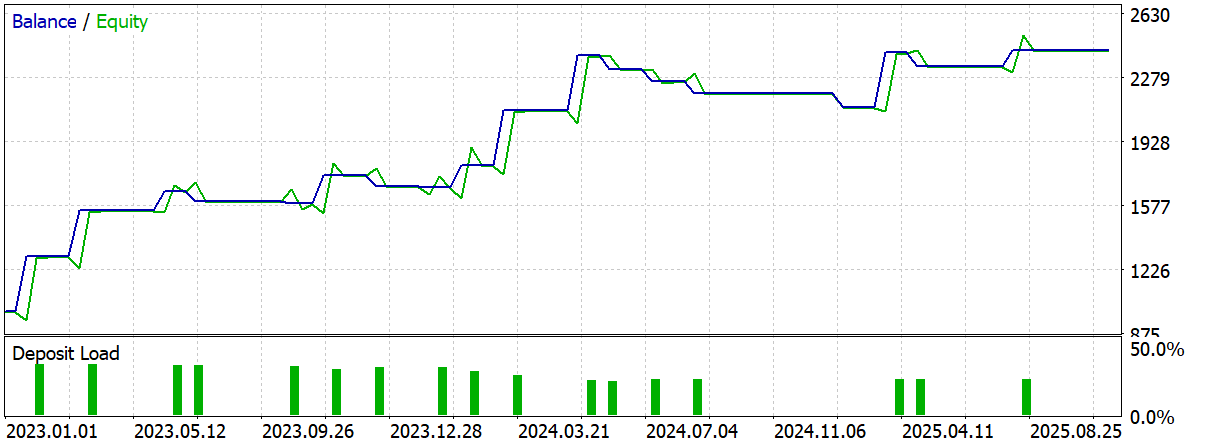
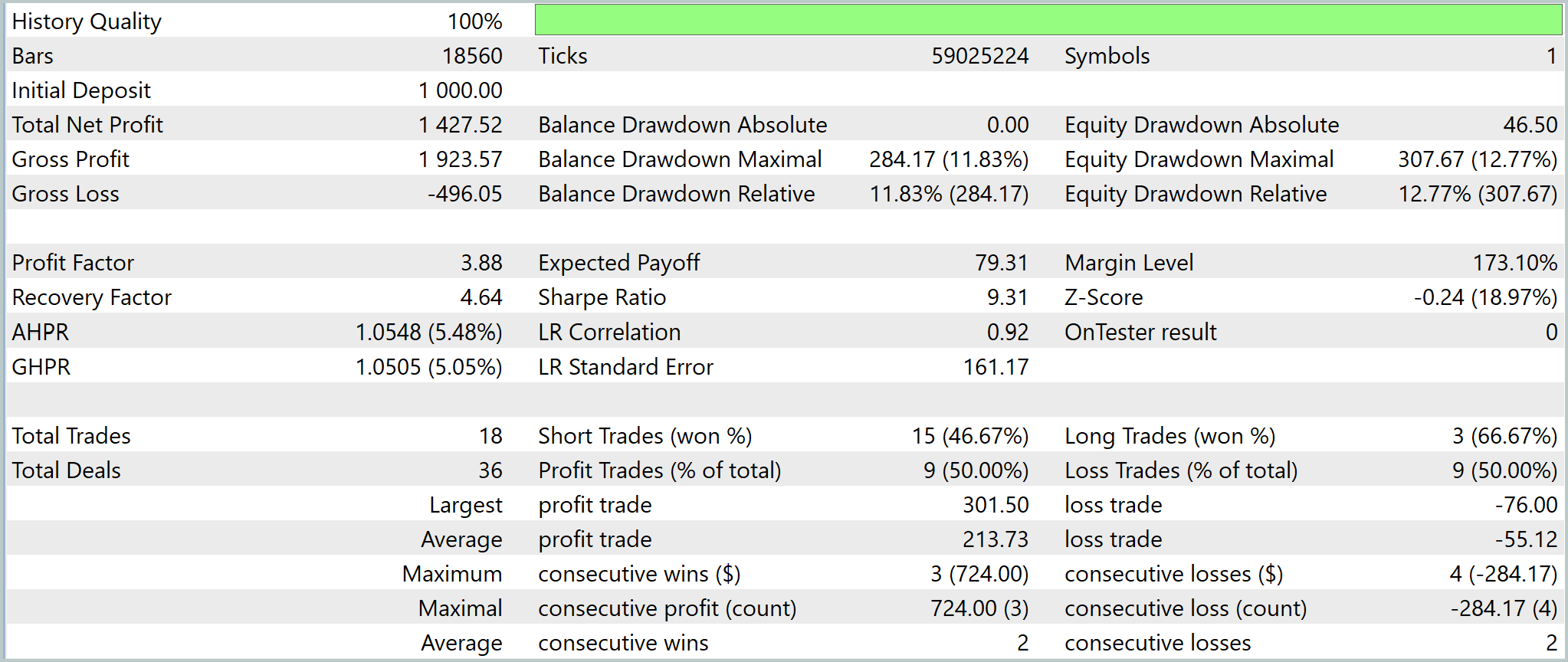
With the deposit of USD 1000.0, the result was USD 2427.52, that is +143% in 3 years. The result is strong, especially considering the moderate drawdown. The equity curve looks neat: growth is stepwise, there are rollbacks, but without prolonged dips. The maximum drawdown is approximately 12–13%, while Recovery Factor is about 4.6 — the system is able to recover from drawdowns without getting stuck in them. This is an important sign of sustainability.
The conventional profit mechanics is working. In total, 18 trades, with winrate of 50%. But the average profit is almost 4 times greater than the average loss. This has allowed Profit Factor reach the level of 3.9. The strategy makes money not from frequency, but from the quality of signals and position holding. But herein lies a limitation. The small number of transactions makes the statistics fragile.
The equity curve is fairly smooth, without any chaotic jumps. This indirectly confirms that the signals are not random.
And here is an important architectural point. The event-driven model eliminates the constant polling of indicators. The EA reacts only to the signal. Fewer unnecessary operations means faster response. In the tester, this is only a nuance, but in live trading it becomes an advantage.
The result is simple. What we have here is a signal model with a good risk/reward ratio and a well-designed architecture. But for now this is a prototype. Out-of-sample testing and expanded statistics are needed.
Typical mistakes
When an architecture becomes event-driven, the code becomes cleaner and faster. But at the same time, the nature of the errors also changes. They no longer lie on the surface, but manifest themselves in the connections between handlers and in the discipline of working with resources.
The first and most pressing problem is the same old overloaded OnTick. Even after getting acquainted with the event model, there is a temptation to leave part of the logic there just in case. The result is a hybrid: there are timers and events, but the bulk of the work is still carried by a single method. This compromise quickly brings us back to square one: heavy, poorly maintained code. Experience shows that if we have already divided the roles, we need to see it through to the end.
The next layer of errors is related to resource management. The event model involves more entities: timers, objects, subscriptions, auxiliary structures. And if they are not managed carefully, the system starts making noise. Forgotten EventKillTimer, unremoved graphical elements, left global variables — all this does not break the program immediately, but gradually reduces its predictability. As a result, we get a classic situation: the error appears in a place other than where it was made.
void OnDeinit(const int reason)
  {
//---
   for(uint i = 0; i < handles.Size(); i++)
      if(handles[i] != INVALID_HANDLE)
         IndicatorRelease(handles[i]);
  }
The very nature of the events requires special attention. Handlers are executed sequentially, and a long operation within one event blocks the others. This is especially noticeable in the interface: the user interacts with the panel, but the program does not respond. It is busy with calculations. Here again, the key idea of the architecture is evident: to break up execution into stages and not keep the thread busy longer than is really necessary.
When multiple event sources appear in a system (indicators, a panel, a service), identification discipline comes to the fore. If we do not introduce clear conventions for object names and event codes, confusion begins: signals overlap, handlers react to wrong things. A simple rule with prefixes and ID ranges seems almost trivial, but it is what keeps the system in order when it begins to grow.
#define  MACD1Buy                   1
#define  MACD1Sell                  2
#define  MACD2Buy                   3
#define  MACD2Sell                  4
#define  RSI1CrossOverBoughtUp      5
#define  RSI1CrossOverBoughtDown    6
#define  RSI1CrossOverSoldUp        7
#define  RSI1CrossOverSoldDown      8
#define  RSI2CrossOverBoughtUp      9
#define  RSI2CrossOverBoughtDown    10
#define  RSI2CrossOverSoldUp        11
#define  RSI2CrossOverSoldDown      12
And finally, the most tricky moment is the start of the program. In an event-driven model, events can arrive almost immediately, even before initialization is fully completed. If the structures are not ready at this point, it is easy to end up accessing empty data or an incorrect state. Therefore, initialization must either be strictly completed before handling begins, or — which is often more convenient — be broken down into stages with readiness control through the same custom events.
As a result, it is clear that events themselves do not make a system reliable. They only provide tools. Reliability comes when engineering discipline is added to these tools. And if it exists, event-driven architecture ceases to be just a convenient technique – it becomes the basis of a stable and predictable trading system.
Conclusion
When program logic is built on events, the platform ceases to be simply an environment for EAs and becomes the basis for full-fledged application solutions. In this model, programming already resembles the development of a classic desktop application: an interface with buttons and panels appears, background services are launched, and separate handlers are created for different types of events. Everything is in its place, and that is why the system is noticeably more stable in maintenance.
The event-based approach is especially valuable when a regular EA can no longer cope with the role of a single file for all occasions. It allows building multi-symbol assistants, flexible control panels, and complex controllers that respond to semantic changes in state. It is easier to add new functionality to this architecture: we just need to introduce another event or another handler without having to rework the entire code.
This is the main advantage of event-driven architecture: it provides order without losing flexibility. Proper separation of handlers, services, and communication channels allows for the creation of reliable, scalable, and truly vibrant trading systems. It is here that MQL5 expands beyond the traditional EA format, namely as an environment for complex trading applications, where not only market response is important, but also the mature engineering organization of the entire program.
Programs used in the article
| # | Name | Type | Description |
|---|---|---|---|
| 1 | EventExample.mq5 | Expert Advisor | Event handling EA |
| 2 | EventMACD.mq5 | Indicator | MACD indicator with generation of events when lines cross |
| 3 | EventRSI.mq5 | Indicator | RSI indicator with event generation when levels cross |
Translated from Russian by MetaQuotes Ltd.
Original article: https://www.mql5.com/ru/articles/22383
Warning: All rights to these materials are reserved by MetaQuotes Ltd. Copying or reprinting of these materials in whole or in part is prohibited.

 MetaTrader 5 Machine Learning Blueprint (Part 15): How to Calibrate Profit-Taking and Stop-Loss Targets from Synthetic Data
 MetaTrader 5 and the MQL5 Economic Calendar: How to Turn News into a Reproducible Trading System
 The MQL5 Standard Library Explorer (Part 11): How to Build a Matrix-Based Market Structure Indicator in MQL5
 MetaTrader 5 Machine Learning Blueprint (Part 14): Transaction Cost Modeling for Triple-Barrier Labels in MQL5

- Free trading apps
- Over 8,000 signals for copying
- Economic news for exploring financial markets
You agree to website policy and terms of use
Working in an Expert Advisor with indicators without buffers is probably fine for an example.
In the example, strict updating of symbol data is done (it would be good to use MQL_TESTER).
But it does not check the relevance of the signal and tick calculated through the events. And this is a real problem.
It can be weakened through asynchronous OrderSend, but not solved. Therefore, even in such an example, in ChartEvent-event we need to additionally pass the data of the tick on which the event generation occurred.