

Algorithmic Trading Without the Routine: Quick Trade Analysis in MetaTrader 5 with SQLite
 6 114
6 114
 1
1

The feedback problem in algorithmic trading
Algorithmic trading requires not only the development of competitive strategies, but also constant monitoring of results. Without feedback, a trading system can become uncontrollable. Until you see how a strategy behaves in real time, you are not managing a system, you are managing a set of guesses.
In modern stock markets and FOREX, the frequency of trades has increased exponentially. Data becomes outdated faster than you can draw conclusions. And as the data becomes stale, so do the conclusions based on it. In addition, repetitive, routine manual actions inevitably create delays and errors. They appear simply because a person is tired, distracted, or in a hurry.
This is where MetaTrader 5 becomes especially valuable. Built-in support for SQLite (a local database) is a game-changer. The database is no longer just external storage but an integral part of the trading process. Queries are executed almost instantly, statistics are updated automatically, and trading analysis takes seconds instead of hours. And the analysis results are available exactly where they are needed — alongside the trading process, not somewhere outside the terminal.
The article examines the "minimum working set" of an algorithmic trader: the structure of a trading journal database, secure, fast data recording, analytical SQL queries, and the display of key statistics on an interactive dashboard in MetaTrader 5. This helps eliminate most routine work and lets the trader focus on the creative side: analyzing and improving the trading system.
Why does an algorithmic trader need a local database?
Developing and testing trading strategies generates colossal amounts of data. Optimization results, trade histories, indicator signals, macroeconomic events — all of this requires not only storage, but also structuring and quick access. A local database solves these problems that any serious algorithmic trader faces.
Saving testing and optimization resultsOptimizing a strategy by enumerating parameters generates hundreds, if not thousands, of parameter variations. Each pass is a set of metrics, parameter values and results. How can we compare them to each other? How to track the evolution of a strategy over time? The database allows storing a complete history of optimizations and analyze it in any context — from simple tables to complex correlations.
Automatic trading journalInstead of routinely keeping a log in a spreadsheet, run an EA in the terminal and get automatic logging of each trade with a full set of attributes: symbol, magic number, volume, price, time, result, and comment. Data is entered into the database in real time and becomes available for analysis instantly — without any additional actions on the part of the trader.
Trading signals analysisSaving and analyzing trading signals opens up opportunities unavailable when working with regular logs. How effective are the signals? Which indicators correlate with each other? Under what conditions are entries and exits optimal? All traders want to know the answers to these questions. SQL queries provide a powerful analysis tool without the need to write additional code.
To get started with SQLite, we only need three functions:
- DatabaseOpen — open the database
- DatabaseExecute — execute a query to the database
- DatabaseClose — close the database
This is enough to solve 90% of the problems an algorithmic trader faces.
Example of opening and closing a database:
int db = DatabaseOpen("trading.sqlite", DATABASE_OPEN_READWRITE | DATABASE_OPEN_CREATE);
if(db == INVALID_HANDLE)
 {
  Print("Error opening Database: ", GetLastError());
  return;
 }
// ... working with the database ...
DatabaseClose(db);     // close the database
The main thing: SQLite is built into the MetaTrader 5 system, so to speak, "out of the box" and works directly with the terminal core. Excel and other spreadsheets are external programs that an MQL5 EA accesses either through outdated methods like OLE automation or through an external CSV file. The difference in favor of SQLite in MetaTrader 5 is colossal - in terms of speed, convenience, and reliability.
Table layout: Trade journal architecture
Database design begins with the question: what exactly needs to be stored? For a trading journal, the answer is obvious: trade history, signals, and events. But why exactly three tables, and not a single "large and universal" one? The division into DEALS, SIGNALS and EVENTS is not a whim, but a necessity. Each entity is stored separately and linked to the others when needed in a query. Do you want to know "all trades after a signal with a confidence level above 80%"? SQLite will handle this easily and elegantly without the need to leave the trading terminal.
DEALS table - trading historyThe table contains complete information about each trade: ID, tickets, symbol, "magic" number (strategy ID), volume, open and close prices, time, financial result and optional commentary. This is the "skeleton" of a trading journal - the basis for any analysis.
SIGNALS table - signal historyThe table stores signals from indicators and trading systems: symbol, timeframe, signal type (buy/sell), price, time of occurrence, and additional parameters. It also allows analyzing the quality of signals and their correlation with real trades — the key to understanding whether your strategy is working.
EVENTS table - news contextThe table contains information about important economic events: name, currency, importance level, forecast, actual value and publication time. It allows finding connections between trading results and the news background — after all, the market does not exist in a vacuum.
The figure below shows an ER diagram (Entity-Relationship Diagram) - a visual representation of the database structure and the relationships between tables:
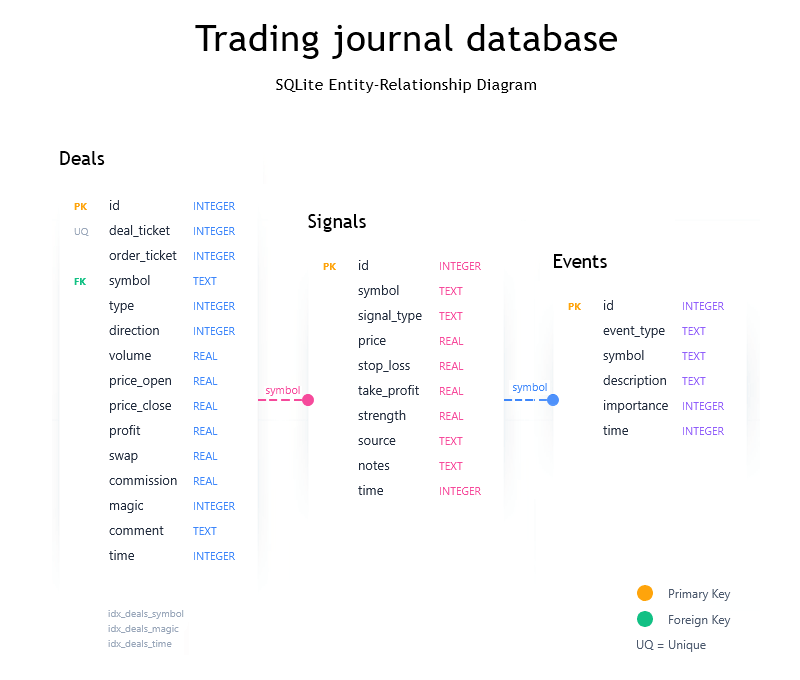
Fig. 1: ER diagram of trade journal tables
Table creation code:
   //  Deal history table - DEALS:
   string createDeals = "CREATE TABLE IF NOT EXISTS DEALS ("
                       "id INTEGER PRIMARY KEY AUTOINCREMENT, "
                       "deal_ticket INTEGER UNIQUE, "
                       "order_ticket INTEGER, "
                       "symbol TEXT NOT NULL, "
                       "type INTEGER, "                // 0=BUY, 1=SELL
                       "direction INTEGER, "           // 0=IN, 1=OUT, 2=IN/OUT
                       "volume REAL, "
                       "price_open REAL, "
                       "price_close REAL, "
                       "profit REAL, "
                       "swap REAL, "
                       "commission REAL, "
                       "sl REAL, "
                       "tp REAL, "
                       "magic INTEGER, "
                       "comment TEXT, "
                       "time INTEGER, "                // Unix timestamp
                       "time_msc INTEGER, "
                       "reason INTEGER"
                       ");";

   //  Trading signals table - SIGNALS:
   string createSignals = "CREATE TABLE IF NOT EXISTS SIGNALS ("
                         "id INTEGER PRIMARY KEY AUTOINCREMENT, "
                         "symbol TEXT NOT NULL, "
                         "signal_type TEXT, "          // 'BUY', 'SELL', 'CLOSE'
                         "price REAL, "
                         "stop_loss REAL, "
                         "take_profit REAL, "
                         "strength REAL, "             // 0.0 - 1.0
                         "source TEXT, "               // Strategy name
                         "notes TEXT, "
                         "time INTEGER"
                         ");";

   //  Events table - EVENTS:
   string createEvents = "CREATE TABLE IF NOT EXISTS EVENTS ("
                        "id INTEGER PRIMARY KEY AUTOINCREMENT, "
                        "event_type TEXT, "            // 'NEWS', 'ERROR', 'NOTE', etc.
                        "symbol TEXT, "
                        "description TEXT, "
                        "importance INTEGER, "         // 1=Low, 2=Medium, 3=High
                        "time INTEGER,"
                        "actual REAL, "
                        "previous REAL, "
                        "forecast REAL "
                        ");";

   //  Indices to speed up search queries:
   string createIndexes[] =
    {
      "CREATE INDEX IF NOT EXISTS idx_deals_symbol ON DEALS(symbol);",
      "CREATE INDEX IF NOT EXISTS idx_deals_magic ON DEALS(magic);",
      "CREATE INDEX IF NOT EXISTS idx_deals_time ON DEALS(time);",
      "CREATE INDEX IF NOT EXISTS idx_signals_symbol ON SIGNALS(symbol);",
      "CREATE INDEX IF NOT EXISTS idx_signals_time ON SIGNALS(time);"
    };

   //  Create tables in the database:
   if(!DatabaseExecute(database, createDeals))
    {
      Print("Error creating DEALS table: ", GetLastError());
      return(false);
    }

   if(!DatabaseExecute(database, createSignals))
    {
      Print("Error creating SIGNALS table: ", GetLastError());
      return(false);
    }

   if(!DatabaseExecute(database, createEvents))
    {
      Print("Error creating EVENTS table: ", GetLastError());
      return(false);
    }

   //  Create indices:
   for(int i = 0; i < ArraySize(createIndexes); i++)
    {
      DatabaseExecute(database, createIndexes[i]);
    }
Pay attention to the indices: idx_deals_symbol, idx_deals_magic, idx_deals_time, idx_signals_symbol and idx_signals_time. They speed up queries on key fields: symbol, magic, time in the DEALS table and symbol, time in SIGNALS. Indices are an investment in performance that pays off with every analytical query.
Data insertion and transactions: Speed matters
MQL5 provides two ways to insert data into tables: directly executing an SQL query and using prepared statements. Which one to choose? The answer is clear: prepared statements are preferable from both a security and performance perspective.
Direct insertion via DatabaseExecute:
string sql = StringFormat(
                         "INSERT INTO DEALS (ticket, symbol, magic, volume, price, time, profit) "
                         "VALUES (%d, '%s', %d, %.2f, %.5f, %I64d, %.2f)",
                         ticket, symbol, magic, volume, price, TimeCurrent(), profit);
DatabaseExecute(db, sql);
Parameterized query via DatabasePrepare:
//  Create a parameterized query:
int request = DatabasePrepare(db,
                             "INSERT INTO DEALS (ticket, symbol, magic, volume, price, time, profit) "
                             "VALUES (?1, ?2, ?3, ?4, ?5, ?6, ?7)");

//  Set the value of the first query parameter - in the DatabaseBind function, the indexing of fields in the entry starts from zero:
DatabaseBind(request, 0, ticket);
DatabaseTransactionBegin(db);

//  Set the values of the remaining parameters before adding the entry:
DatabaseBind(request, 1, symbol);
DatabaseBind(request, 2, magic);
DatabaseBind(request, 3, volume);
DatabaseBind(request, 4, price);
DatabaseBind(request, 5, TimeCurrent());
DatabaseBind(request, 6, profit);

//  Execute a request for inserting the entry:
DatabaseRead(request);
DatabaseFinalize(request);
DatabaseTransactionCommit(db);
Using transactions is not an option, but a necessity. For bulk insert and update operations, transactions speed up performance by hundreds or even thousands of times. Why? Without a transaction, each operation is committed to disk separately. With a transaction, all operations are grouped and recorded in one block.
Our test results are impressive: SQLite performance in MQL5 is comparable to native C++ code (LLVM 9.0). In most tests the difference is less than 5%, and in some scenarios MQL5 even outperforms C++. The diagram below compares the insertion time of 1000 records without transactions versus 25,000 records with transactions - a difference of over 3500 times per record!
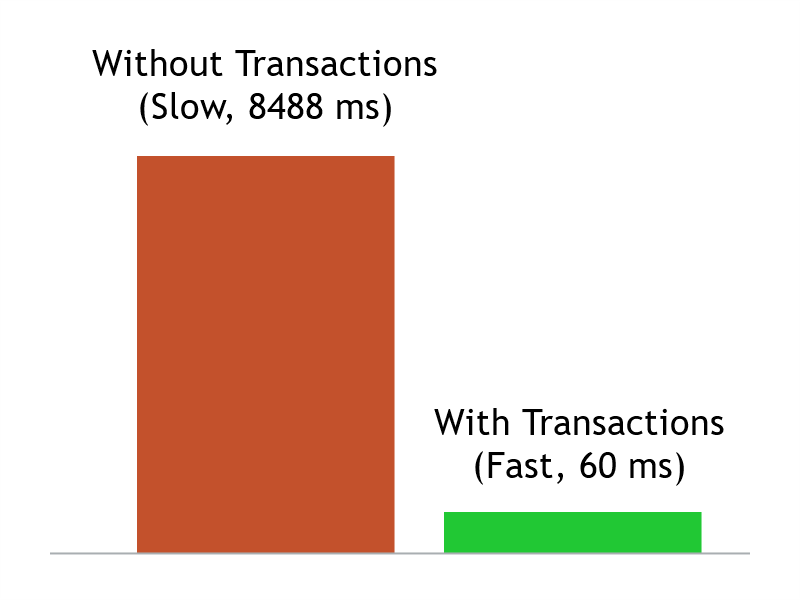
Fig. 2: Insertion speed comparison: without/with transactions
Example of using a transaction for bulk insertion:
DatabaseTransactionBegin(db);
for(int i = 0; i < ArraySize(deals); i++)
 {
  InsertDeal(db, deals[i]);  // inserting the next trade - an element of the array of deals[] structures
 }
DatabaseTransactionCommit(db);
All tests can be studied (and checked out!) in the MQL5 forum section: SQLite in MQL5: new features and performance testing.
SQL queries: Analytics without programming
One of the main advantages of SQL is the ability to obtain complex analytics with a single query. In MetaTrader 5 this feature is directly accessible. No cycles, no conditions, no time variables. One query is sufficient. Let's look at some typical scenarios.
Statistics on trading symbolsWhich instruments generate profit, and which ones quietly "eat away" at your deposit? This question, and the accompanying SQL query, should be the first in any trader's arsenal. It shows summary information for each symbol: number of trades, total profit and average result.
string sql = "SELECT symbol, COUNT(*) as deals, "
             "SUM(profit) as total_profit, "
             "AVG(profit) as avg_profit "
             "FROM DEALS GROUP BY symbol "
             "ORDER BY total_profit DESC";
DatabasePrint(db, sql);
Parsing the query elements:
| Query element | Description |
|---|---|
| SELECT symbol | Selects the column with a symbol name |
| COUNT(*) | Count the number of trades for a symbol |
| SUM(profit) | Sum up the profit for all symbol trades |
| GROUP BY symbol | Group results by symbol |
| ORDER BY total_profit DESC | Sort by total profit descending |
Analysis by strategies (magic numbers)
The magic number is a unique EA ID added to each trade. If several strategies are working on one account, this query will show which one is more efficient. The special feature is the use of a conditional CASE expression to calculate profitable trades.
string sql = "SELECT magic, COUNT(*) as trades, "
             "SUM(CASE WHEN profit > 0 THEN 1 ELSE 0 END) as wins, "
             "SUM(profit) as net_profit "
             "FROM DEALS GROUP BY magic";
DatabasePrint(db, sql);
Parsing the query elements:
| Query element | Description |
|---|---|
| SELECT magic | Select the column with the magic number |
| COUNT(*) | Total number of trades for the selected strategy |
| CASE WHEN profit > 0 | Condition: if the profit is positive |
| THEN 1 ELSE 0 END | Return 1 for profitable trades and 0 for losing ones |
| SUM(wins) | Sum up the units to get the number of profitable trades (wins) |
By dividing the number of profitable trades (wins) by the total number (trades), we obtain the percentage of profitable trades — a key metric for assessing the strategy quality. Did you receive a high percentage with a negative total profit? This is a sign of a risk management problem - losing trades are larger than winning ones.
Distribution of trading by hours
When does the strategy work best? During the European session? Or American? Or maybe during "quiet hours"? The strftime function extracts the hour from the trade open time (format 00--23), allowing us to identify the most and least profitable time intervals.
string sql = "SELECT strftime('%H', time, 'unixepoch') as hour, "
             "COUNT(*) as trades, SUM(profit) as profit "
             "FROM DEALS GROUP BY hour";
DatabasePrint(db, sql);
Important: in MQL5 and SQLite, time is stored as Unix timestamp (seconds since 1970-01-01). Therefore, the 'unixepoch' modifier has been added. Similarly, we can analyze the distribution by day of the week strftime('%w', ...), month strftime('%m', ...) or combinations.
Parsing the query elements:
| Query element | Description |
|---|---|
| strftime('%H', ...) | Extracts the hour from the trade opening time (00-23) |
| time | Column with trade opening time |
| GROUP BY hour | Groups trades by opening hour |
Statistics dashboard: Visualization within the terminal
Dry numbers are good, but clarity is better. The database easily integrates with graphical dashboards inside the terminal, transforming data into understandable visual information. The interactive statistics dashboard works in real time, showing exactly what the trader needs.
The dashboard below displays the total result for a given number of days (SUMMARY), the result broken down by instrument (BY SYMBOL) and the best trading hours (BEST HOURS). To read data into a structure, use the DatabaseReadBind function:
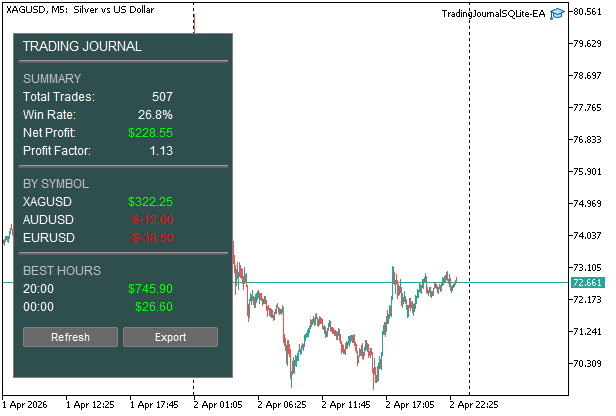
Fig. 3. Interactive statistics dashboard in the terminal
struct DealStats
 {
  string symbol;
  int count;
  double total_profit;
  double avg_profit;
 };

int request = DatabasePrepare(db,
                             "SELECT symbol, COUNT(*) as count, SUM(profit) as total_profit, "
                             "AVG(profit) as avg_profit FROM DEALS GROUP BY symbol");
DealStats stats;
while(DatabaseReadBind(request, stats))
 {
  //  Output to the table on the dashboard:
  AddRowToTable(stats);
 }
DatabaseFinalize(request);
The DatabaseReadBind function automatically matches structure fields to query columns by name. It is enough to declare a structure with fields corresponding to the column names in the SQL query.
Dashboard managementThe [Refresh] button updates the statistics with a full recalculation. The [Export] button outputs calculated data to CSV files from the database tables: the overall work result, trades, events and signals. Export example:
1,XAGUSD,196,322.25,1.64,14,181
2,AUDUSD,196,-12.0,-0.06,82,99
3,EURUSD,58,-38.5,-0.66,23,35
4,GBPUSD,57,-43.2,-0.75,17,40
"Hot" keys for quick control:
- 'A' or 'a' — update analytics,
- 'E' or 'e' — output data to a CSV file,
- 'R' or 'r' — load trade history,
- 'P' or 'p' — enable/disable dashboard display.
EA settings:
- Database file name — name of the database file (default: "TradingJournal.db"),
- Auto-import trade history — automatic loading of history (default: true),
- History depth in days — history depth (default: 30 days),
- Export path — path to CSV files (default: "MQL5/Files"),
- Export to CSV format — export to CSV (default: true),
- Show statistics dashboard on chart — dashboard display (default: true).
MetaEditor: a database tool
MetaEditor, included in MetaTrader 5, has a built-in tool for working with SQLite: opening and editing tables, executing SQL queries, and rolling back changes. Since the SQLite database is stored in a single file on the user's computer, it can be accessed at any time through the MetaEditor navigator — to inspect the structure and contents of tables, and to run debug queries.
This is especially convenient when debugging MQL5 applications that work with a database. Try to see in real time what data is being displayed and adjust the EA's logic.
Let's see how this can be easily done by using a sample database created by TradingJournalSQLite-EA test EA from this article. Let's open the database and the tables in it, run several SQL queries and close it. I can explain all this in words for a long time, but it is better to see it once...
1. Start with the simplest thing - open the database and select the desired table: 
Fig. 4. Open/Select table/Close
The DEALS table is selected by double-clicking the left mouse button on its name. This is equivalent to running an SQL query in the navigator:
SELECT * FROM 'DEALS';2. Set the time format:
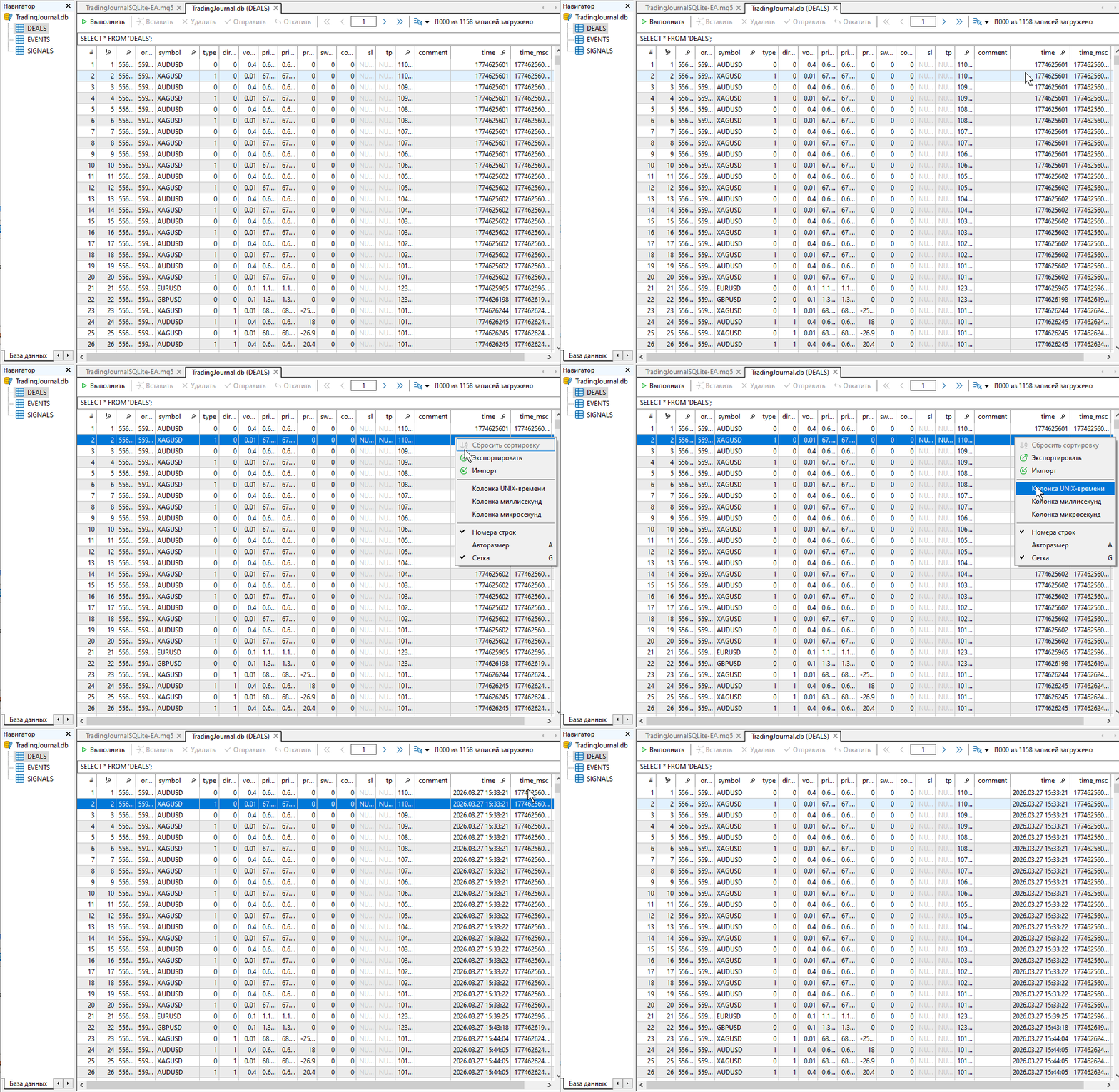
Fig. 5. Time format
3. The main question: Who earns how much? Find out the answer in milliseconds:SELECT symbol, COUNT(*) as count, SUM(profit) as total_profit, AVG(profit) as avg_profit FROM DEALS GROUP BY symbol;
For those who do not like long lines:
SELECT symbol,
COUNT(*) as count,
SUM(profit) as total_profit,
AVG(profit) as avg_profit FROM DEALS GROUP BY symbol;
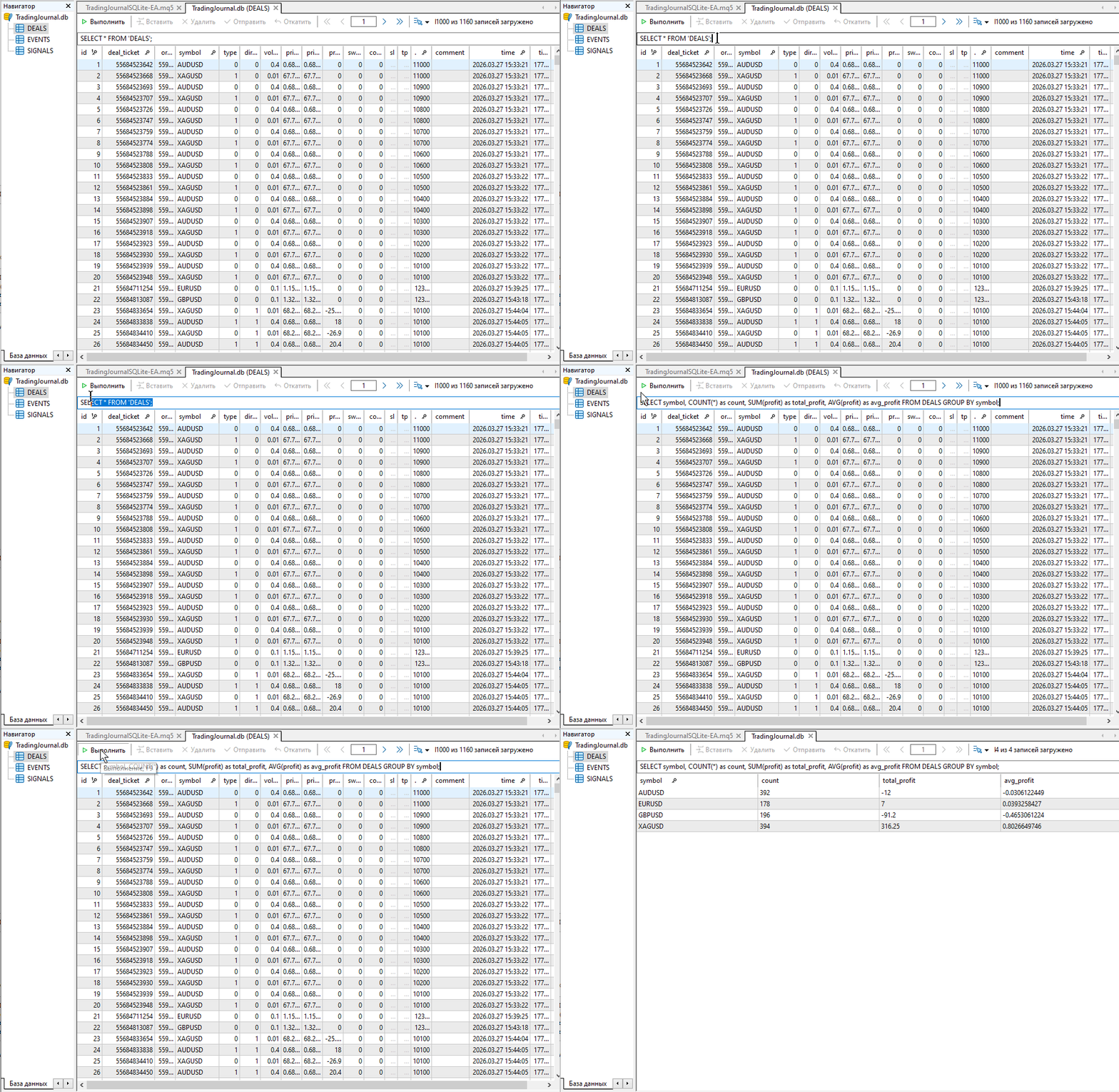
Fig. 6. Who earns how much?
4. Sort by descending earnings:SELECT symbol, COUNT(*) as count, SUM(profit) as total_profit, AVG(profit) as avg_profit FROM DEALS GROUP BY symbol ORDER BY total_profit DESC;
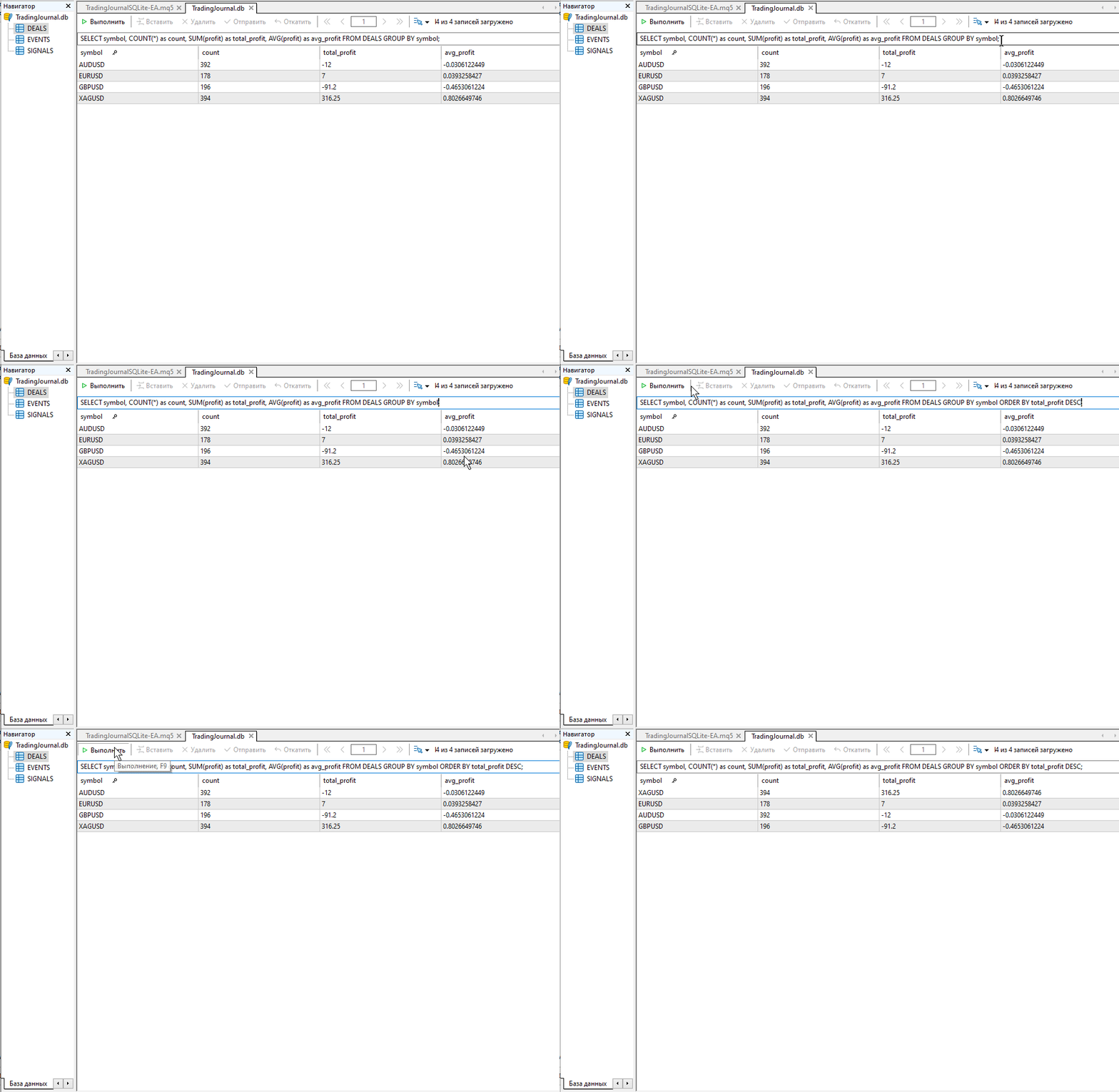
Fig. 7. In descending order of earnings
SELECT SUM(CASE WHEN direction IN (1, 2, 3) THEN profit ELSE 0 END) as net_profit FROM DEALS;
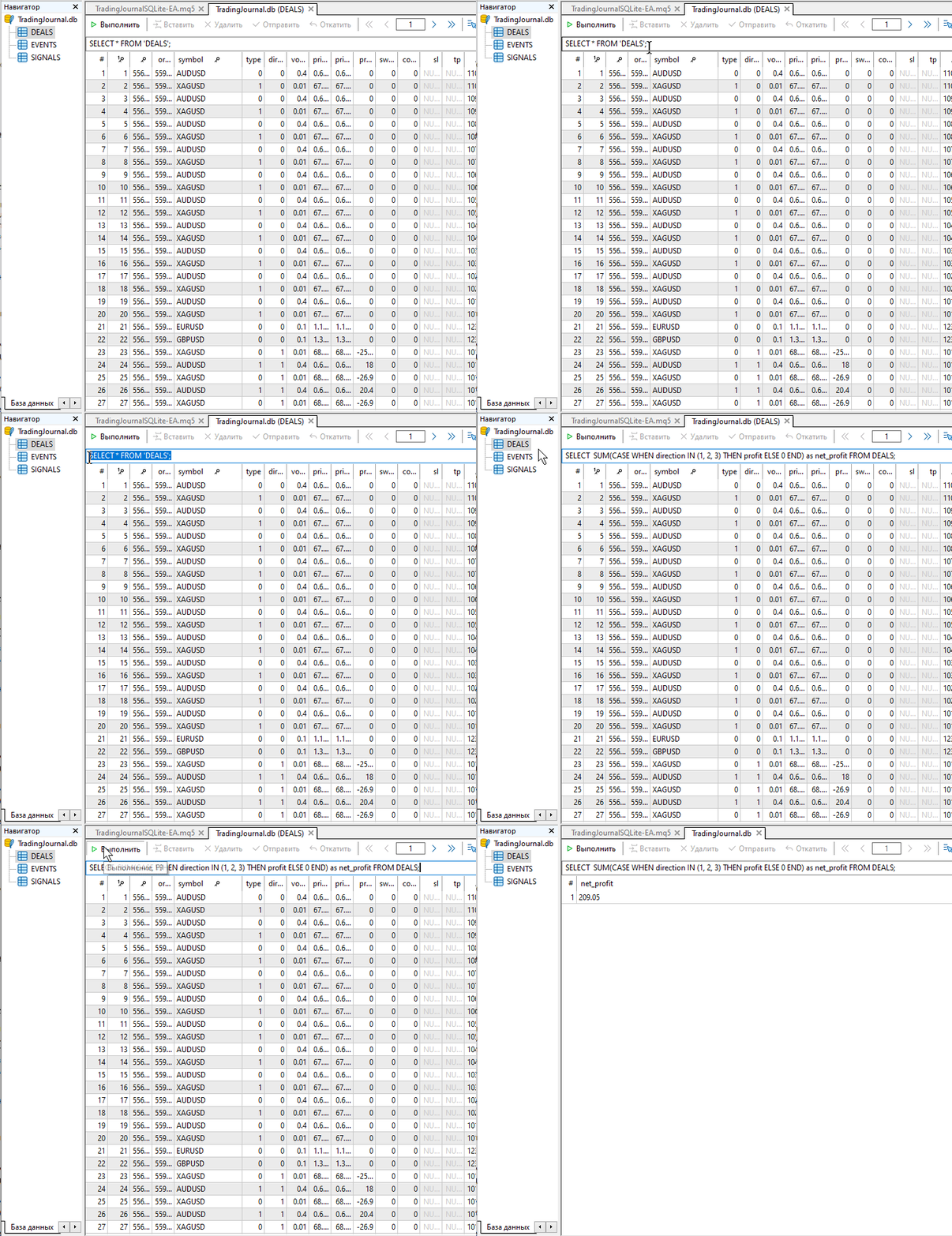
Fig. 8. Total
Do you want to debug a complex query? No problem:
SELECT   COUNT(*) as total_deals,
                SUM(CASE WHEN direction IN (1, 2, 3) THEN 1 ELSE 0 END) as closed_trades,
                SUM(CASE WHEN (profit + swap + commission) > 0 AND direction IN (1, 2, 3) THEN 1 ELSE 0 END) as total_wins,
                SUM(CASE WHEN (profit + swap + commission) < 0 AND direction IN (1, 2, 3) THEN 1 ELSE 0 END) as total_losses,
                ROUND(100.0 * SUM(CASE WHEN (profit + swap + commission) > 0 AND direction IN (1, 2, 3) THEN 1 ELSE 0 END) /
                NULLIF(SUM(CASE WHEN direction IN (1, 2, 3) THEN 1 ELSE 0 END), 0), 2) as overall_win_rate,
                SUM(CASE WHEN direction IN (1, 2, 3) THEN profit ELSE 0 END) as net_profit,
                SUM(CASE WHEN direction IN (1, 2, 3) THEN swap ELSE 0 END) as total_swap,
                SUM(CASE WHEN direction IN (1, 2, 3) THEN commission ELSE 0 END) as total_commission,
                SUM(CASE WHEN direction IN (1, 2, 3) THEN profit + swap + commission ELSE 0 END) as net_result,
                ROUND(AVG(CASE WHEN direction IN (1, 2, 3) THEN profit + swap + commission ELSE NULL END), 2) as avg_profit_per_trade,
                SUM(CASE WHEN (profit + swap + commission) > 0 AND direction IN (1, 2, 3) THEN (profit + swap + commission) ELSE 0 END) as gross_profit,
                SUM(CASE WHEN (profit + swap + commission) < 0 AND direction IN (1, 2, 3) THEN ABS(profit + swap + commission) ELSE 0 END) as gross_loss,
                CASE WHEN SUM(CASE WHEN (profit + swap + commission) < 0 AND direction IN (1, 2, 3) THEN ABS(profit + swap + commission) ELSE 0 END) > 0
                THEN ROUND(SUM(CASE WHEN (profit + swap + commission) > 0 AND direction IN (1, 2, 3) THEN (profit + swap + commission) ELSE 0 END) /
                SUM(CASE WHEN (profit + swap + commission) < 0 AND direction IN (1, 2, 3) THEN ABS(profit + swap + commission) ELSE 0 END), 2)
                ELSE 0 END as profit_factor,
                COUNT(DISTINCT symbol) as symbols_traded,
                COUNT(DISTINCT magic) as strategies_used
                FROM DEALS;
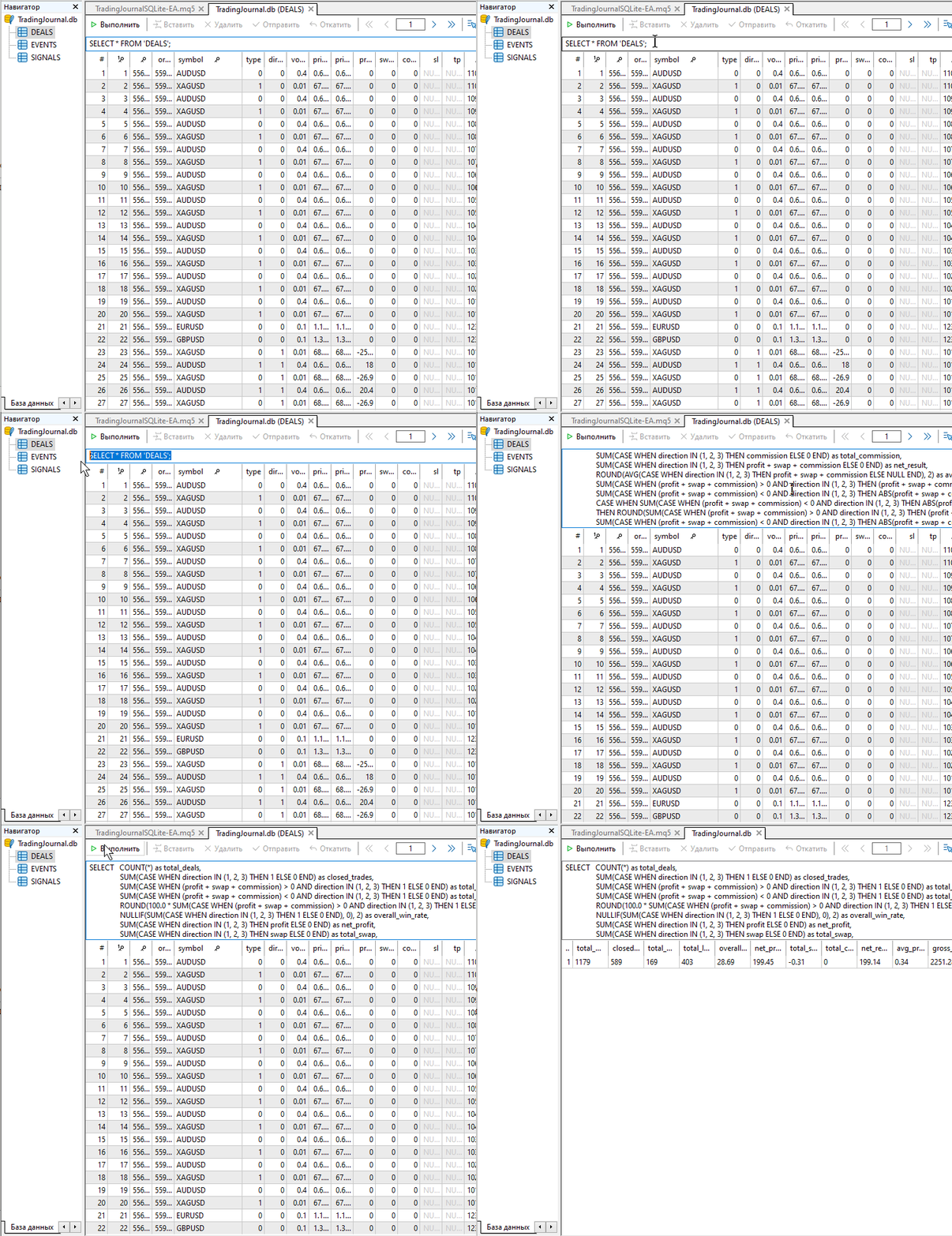
Fig. 9. Complex SQL query
The SQL query is taken without changes from the TradingJournalSQLite-EA test EA attached to the article.
Conclusion: A trading and analytical system right in MetaTrader 5
The trading journal is no longer a static file that needs to be exported, opened in a third-party program, and manually brought to a convenient format. In MetaTrader 5, it has become part of the trading and analytical system — accurate, reliable, and responsive to changes in real time. This is done natively — SQLite is integrated into the MetaTrader 5 terminal at the core level.
This allows us to use MetaTrader 5 as a self-sufficient trading and analytical system and utilize the full power of SQL queries with the possibility of expansion and modification to suit new ideas. This gives traders the following benefits:
- data is saved automatically and is available for analysis immediately after it appears;
- analytical SQL queries can be changed quickly and flexibly, without complicating the EA code;
- the analytics dashboard is available directly on the chart in the terminal, where trading takes place;
- the system can be easily expanded to accommodate new ideas, metrics, and analytical views without resorting to third-party applications.
That is why built-in SQLite support in MetaTrader 5 is more than just a convenient data storage solution, it is a solid foundation for a fully-fledged trading and analytics infrastructure, where trading and analytics operate in a single environment, using a single language and native SQL support.
Recommended resources for in-depth study of SQLite in MQL5:
- Working with databases
- SQLite in MQL5: New features and performance testing
- SQLite: Native handling of SQL databases in MQL5
- MQL5 Cookbook — Macroeconomic events database
- SQLite capabilities in MQL5: Example of a dashboard with trading statistics by symbols and magic numbers
List of files attached to the article:
| File Name | Description |
|---|---|
| TradingJournalSQLite-EA.mq5 | The file containing the code for a test EA that creates a dashboard with trading statistics |
Translated from Russian by MetaQuotes Ltd.
Original article: https://www.mql5.com/ru/articles/22009
Warning: All rights to these materials are reserved by MetaQuotes Ltd. Copying or reprinting of these materials in whole or in part is prohibited.


 From CPU to GPU in MQL5: A Practical OpenCL Framework for Accelerating Research, Optimizations, and Patterns
 Python + MetaTrader 5: Fast Research Framework for Data, Features, and Prototypes
 Feature Engineering for ML (Part 2): Implementing Fixed-Width Fractional Differentiation in MQL5
 Stress Testing Trade Sequences with Monte Carlo in MQL5

- Free trading apps
- Over 8,000 signals for copying
- Economic news for exploring financial markets
You agree to website policy and terms of use