

From CPU to GPU in MQL5: A Practical OpenCL Framework for Accelerating Research, Optimizations, and Patterns
 2 620
2 620
 0
0

Introduction
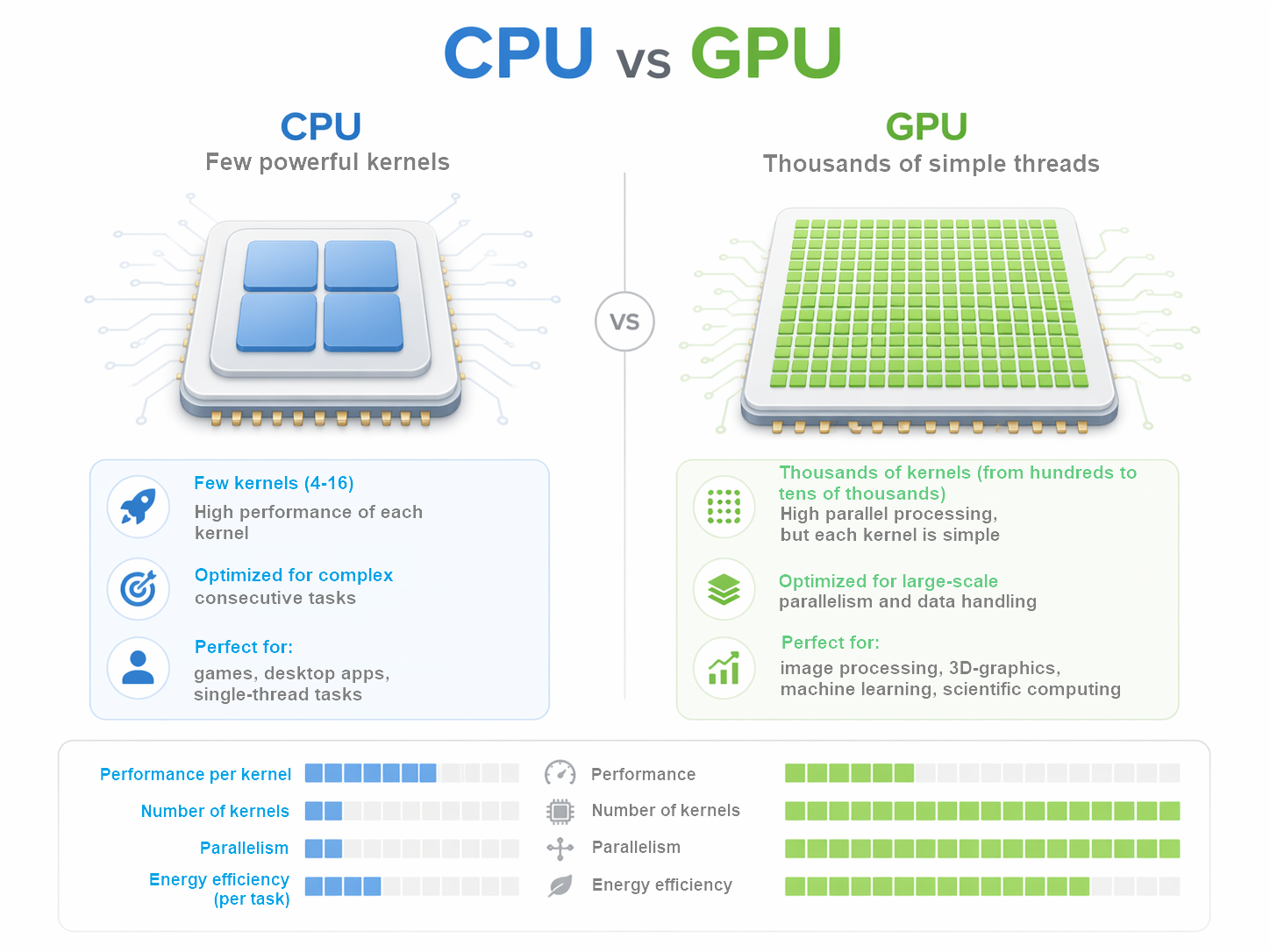
Transition from CPU to GPU in MQL5 often seems like an obvious step: if the graphics processor can compute faster, then trading research should speed up automatically. In reality, everything is much more subtle. GPU is indeed capable of providing significant gains, but only when the task fits well with a parallel computing model. Otherwise, you may not get any acceleration, but only a more complex architecture with the same or even greater costs.
This is especially important for algorithmic trading. Market data analysis, iterating over parameters, large-scale hypothesis testing, and searching for repeating patterns often require large amounts of computation. It is here that GPU reveals its potential. It is strong where the same operation needs to be performed on multiple elements, and the result can be collected after the parallel processing is completed. In such scenarios, a graphics card ceases to be a decorative addition and becomes a fully fledged compute resource.
But GPU has its price. Before starting calculations, we should prepare the data, pass it to the device, wait for the kernel to execute, and return the result back. For compact tasks, this logic may be too heavy. In the areas where CPU works fast and without unnecessary overhead costs, transferring calculations to GPU yields no benefits. Sometimes it even gets in the way, especially if the task changes frequently, requires flexible logic, or is related to small amounts of data.
In the MQL5 environment, OpenCL serves as a link between the application logic and the GPU. This allows us to move the labor-intensive part of the calculations outside the main program and organize batch data handling on GPU. However, OpenCL in itself is not a magic speed-up button. It is only useful when the task architecture takes into account the specifics of parallel computing from the outset and minimizes data exchange between CPU and GPU.
Here GPU is considered as a separate level of the computing circuit, intended for heavy and repetitive operations. This approach is useful in research, optimization, and pattern-finding tasks where the volume of calculations grows faster than the researcher's tolerance for waiting. The practical takeaway here is simple: first we need to understand what exactly is worth transferring to GPU, and only then expect acceleration to have a real effect.
Preparing the environment
Working with OpenCL starts not with calculations, but with preparation. First, the program needs to find an available device, create a working context, prepare kernel and allocate memory for data. This all seems like a technical formality, but it is at this stage that a significant amount of productivity is often lost.
The main mistake is to treat the GPU as if it were an ordinary function call: call it, get the result and move on. In fact, there is a whole chain of actions behind such a call. We need to create or connect a context, prepare a program, compile kernel, allocate memory, transfer data and only then start the calculation. If we do that again and again, GPU will spend too much time for preparations rather than calculations.
Therefore, in a good implementation, almost everything that can be done is done once. The context is created in advance and then reused. Kernel compiles once if the code does not change. It is also better not to recreate memory buffers unless necessary, but to reuse them. This approach reduces overhead and makes working with GPU really useful.
The same applies to data transfer. GPU is not well suited for lots of small tasks that are constantly sent back and forth. With this approach, time is spent not on calculations, but on data exchange. It is much more efficient to collect data in larger batches and run calculations less frequently, but with a higher load. One large execution is almost always better than a series of small ones.
There is another common problem - unnecessary synchronization. If the program stops after each step and waits for GPU completion, the device is idle. This reduces the overall acceleration effect. It is better to structure the work in such a way that GPU receives a task, completes it without unnecessary stops and returns the result only when it is really needed.
This is especially important for MQL5. Trading programs are sensitive to delays, and architectural sloppiness quickly becomes noticeable. If the context is constantly being re-created, memory is allocated chaotically, and kernel is compiled at every calculation, GPU turns into a source of delays rather than an accelerator.
Therefore, the main practical principle here is very simple: everything that can be prepared in advance should be prepared in advance. Anything that can be reused should not be recreated. When the environment is neatly organized, OpenCL really helps speed up heavy calculations. When this discipline is absent, the benefit is easily lost even before the calculations begin.
Handling memory
When it comes to GPUs, many people think primarily about computing power. But in practice, it often comes down not so much to the speed of calculations, but to how exactly the data is supplied. Even a very fast GPU will not give good results if it has difficulty working with memory.
In OpenCL, memory is more than just a place where data is stored. The performance directly depends on how it is used. The GPU has several levels of memory. Some work faster, others slower. Small internal memory areas are accessible quickly, but accessing the device's main memory is significantly more expensive.
This entails an important rule of thumb: data should be organized so that the GPU accesses slow memory as little as possible. The less unnecessary reading and writing, the better. It is especially important not to transfer the same data between the CPU and GPU over and over again unnecessarily. It is the data exchange, rather than the computation itself, that often becomes the main bottleneck.
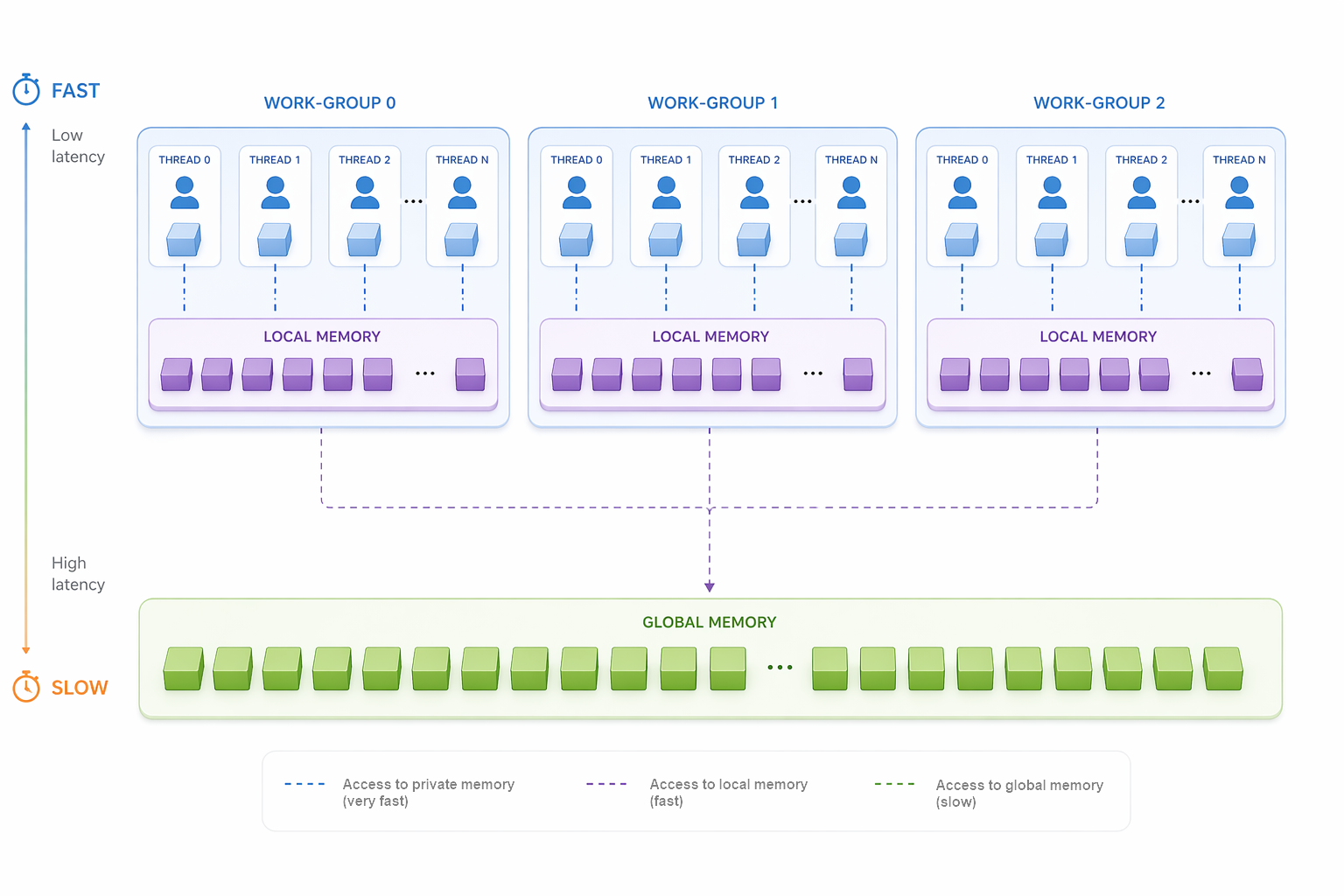
Simply put, GPU likes tasks where you can send a large array of data once, perform many similar operations, and then return the finished result. It does not like the situation where the program constantly sends small pieces of data and waits for a response after each step. In this mode, acceleration quickly disappears.
This is especially sensitive for trading purposes. If a program at each step first prepares data, then transmits it, then waits for the result, then repeats everything again, performance will be unstable. It is much better to collect the necessary data in advance, send it to the device in a single block, perform the calculation, and use the result on the main program side.
It is important to divide the roles correctly here. CPU remains in the role of the control center: it collects data, starts calculations and makes the final decision. GPU takes on the part of the work where we need to quickly repeat the same operation many times. This structure is almost always more reliable and efficient than trying to transfer everything to one device.
There is another typical mistake — too small kernel launches. At first glance, this seems convenient: new data arrives and is immediately sent to GPU. But each launch also costs time. If there are too many launches, the overhead costs begin to eat up all the profit. Therefore, in most cases it is better to run GPU less often, but give it a larger and more straightforward task.
As a result, working with memory is not a minor technical detail, but one of the main factors of performance. If the data is arranged correctly, GPU works like a pipeline. If not, even a powerful device will be idle and waste time on unnecessary requests and transfers.
Conclusion: GPU speeds up calculations only when the data is fed to it correctly. The fewer unnecessary transmissions, requests and small launches, the higher the real effect.
Building a program
In the application program, CPU and GPU do not compete with each other, but work together. CPU remains the control center — it generates the initial data, calls the required method, accepts the result and compares the execution time. GPU takes on only the computing part. This is a classic structure: rather than dragging the entire program to the device, we should give it only the section where there is real parallelism.
The easiest way to understand building a program using OpenCL is to use a specific example. The MQL5 standard library features an illustrative implementation of matrix multiplication. In the main program, two matrices are first created and filled with random values.
void OnStart()
  {
//--- matrix A 1000x2000
   int rows_a = 1000;
   int cols_a = 2000;
//--- matrix B 2000x1000
   int rows_b = cols_a;
   int cols_b = 1000;
//--- matrix C 1000x1000
   int rows_c = rows_a;
   int cols_c = cols_b;
//--- matrix A: size=rows_a*cols_a
   int size_a = rows_a * cols_a;
   int size_b = rows_b * cols_b;
   int size_c = rows_c * cols_c;
//--- prepare matrix A
   float matrix_a[];
   ArrayResize(matrix_a, rows_a * cols_a);
   for(int i = 0; i < rows_a; i++)
      for(int j = 0; j < cols_a; j++)
        {
         matrix_a[i * cols_a + j] = (float)(10 * MathRand() / 32767);
        }
//--- prepare matrix B
   float matrix_b[];
   ArrayResize(matrix_b, rows_b * cols_b);
   for(int i = 0; i < rows_b; i++)
      for(int j = 0; j < cols_b; j++)
        {
         matrix_b[i * cols_b + j] = (float)(10 * MathRand() / 32767);
        }
First, a sequential calculation is called on CPU, and then the same calculation is performed on GPU.
//--- CPU: calculate matrix product matrix_a*matrix_b
   float matrix_c_cpu[];
   ulong time_cpu = 0;
   if(!MatrixMult_CPU(matrix_a, matrix_b, matrix_c_cpu, rows_a, cols_a, cols_b, time_cpu))
     {
      PrintFormat("Error in calculation on CPU. Error code=%d", GetLastError());
      return;
     }
//--- calculate matrix product using GPU
   float matrix_c_gpu_method1[];
   float matrix_c_gpu_method2[];
   ulong time_gpu_method1 = 0;
   ulong time_gpu_method2 = 0;
   if(!MatrixMult_GPU(matrix_a, matrix_b, matrix_c_gpu_method1, matrix_c_gpu_method2,
       rows_a, cols_a, cols_b, size_a, size_b, size_c, time_gpu_method1, time_gpu_method2))
     {
      PrintFormat("Error in calculation on GPU. Error code=%d", GetLastError());
      return;
     }
The calculations themselves are carried out in separate methods. The GPU part is presented in two implementations of the same problem: naive and optimized. This allows us to immediately see the difference not in words, but in the code and in execution time.
Let's look at the CPU version. Here everything is extremely clear: a classic triple cycle. Each element of the resulting matrix is calculated sequentially.
bool MatrixMult_CPU(const float &matrix_a[], const float &matrix_b[], float &matrix_c[],
                    const int rows_a, const int cols_a, const int cols_b, ulong &time_cpu)
  {
   int size = rows_a * cols_b;
   if(ArrayResize(matrix_c, size) != size)
      return(false);
//--- CPU calculation started
   time_cpu = GetMicrosecondCount();
   for(int i = 0; i < rows_a; i++)
     {
      for(int j = 0; j < cols_b; j++)
        {
         float sum = 0.0;
         for(int k = 0; k < cols_a; k++)
           {
            sum += matrix_a[cols_a * i + k] * matrix_b[cols_b * k + j];
           }
         matrix_c[cols_b * i + j] = sum;
        }
     }
//--- CPU calculation finished
   time_cpu = ulong((GetMicrosecondCount() - time_cpu) / 1000);
//---
   return(true);
  }
This code demonstrates the basic idea of the task. There are two matrices. There is a sum of products by row and column. There is a sequential execution. On CPU, this works transparently and without any unnecessary preparation. But this is precisely where the main limitation lies: as soon as the matrix size grows, sequential calculations become increasingly expensive.
Next comes the GPU part. Here it is important to emphasize the main principle: OpenCL in this example is hidden in a separate method. The main program remains clean, and all GPU handling is concentrated in one place.
bool MatrixMult_GPU(const float &matrix_a[], const float &matrix_b[], float &matrix1_c[], float &matrix2_c[],
                    const int rows_a, const int cols_a, const int cols_b, const int size_a, const int size_b,
                    const int size_c, ulong &time1_gpu, ulong &time2_gpu)
  {
   const int task_dimension = 2;
//--- prepare matrices for result
   if(ArrayResize(matrix1_c, size_c) != size_c || ArrayResize(matrix2_c, size_c) != size_c)
      return(false);
   ArrayFill(matrix1_c, 0, size_c, (float)0.0);
   ArrayFill(matrix2_c, 0, size_c, (float)0.0);
Here you can immediately see an important thing: the result matrices for two GPU options are prepared in advance. This prevents us from mixing calculations with memory preparation. At this level the program is already structured in a disciplined manner: first comes the allocation of arrays, then OpenCL.
Next, OpenCL context is created and initialized.
//--- OpenCL
   ulong timei_gpu = GetMicrosecondCount();
   COpenCL OpenCL;
   if(!OpenCL.Initialize(cl_program, true))
     {
      PrintFormat("Error in OpenCL initialization. Error code=%d", GetLastError());
      return(false);
     }
This is where the practical meaning of OpenCL becomes evident. Up until this point, the program was a conventional MQL5 code. Now it is preparing the computing environment for GPU. And what is especially important is that this is not a free operation. We measure the initialization time separately. Before talking about acceleration, we need to take an honest look at how much it costs to launch the environment itself.
Two kernels are created next. The first one is a simple parallel variant. The second is more advanced, with local groups.
//--- create kernels
   OpenCL.SetKernelsCount(2);
   OpenCL.KernelCreate(0, "MatrixMult_GPU1");
   OpenCL.KernelCreate(1, "MatrixMult_GPU2");
It is worth noting here that the execution time largely depends on the quality of the algorithm used in the OpenCL program. We can simply parallelize the calculation, or we can improve the memory management. The example contains both options, which makes it especially clear.
Next, the buffers are prepared. The input matrices are copied to the device, and a separate buffer is created for the result.
//--- create buffers
   OpenCL.SetBuffersCount(3);
//---
   if(!OpenCL.BufferFromArray(0, matrix_a, 0, size_a, CL_MEM_READ_ONLY))
     {
      PrintFormat("Error in BufferFromArray for matrix A. Error code=%d", GetLastError());
      return(false);
     }
   if(!OpenCL.BufferFromArray(1, matrix_b, 0, size_b, CL_MEM_READ_ONLY))
     {
      PrintFormat("Error in BufferFromArray for matrix B. Error code=%d", GetLastError());
      return(false);
     }
   if(!OpenCL.BufferCreate(2, size_c * sizeof(float), CL_MEM_WRITE_ONLY))
     {
      PrintFormat("Error in BufferCreate for matrix C. Error code=%d", GetLastError());
      return(false);
     }
This is already a real working GPU structure. The data is transferred to the device, computed there, and then returned back. It is this order that makes acceleration possible. If we tear it into small pieces, GPU will start spending too much time on preparation and exchange, rather than on the calculation itself.
After this, the arguments of the first kernel are set.
//--- prepare arguments for kernel 0
   int kernel_index = 0;
   OpenCL.SetArgumentBuffer(kernel_index, 0, 0);
   OpenCL.SetArgumentBuffer(kernel_index, 1, 1);
   OpenCL.SetArgumentBuffer(kernel_index, 2, 2);
   OpenCL.SetArgument(kernel_index, 3, rows_a);
   OpenCL.SetArgument(kernel_index, 4, cols_a);
   OpenCL.SetArgument(kernel_index, 5, cols_b);
   timei_gpu = ulong((GetMicrosecondCount() - timei_gpu) / 1000);
   PrintFormat("time of initialization GPU =%d ms", timei_gpu);
The logic here is very simple here: kernel gets data buffers and matrix sizes. Inside the OpenCL kernel, it is decided which thread is responsible for which element. This is an important point: GPU by itself does not know how to interpret arrays. This structure needs to be explicitly conveyed to it.
Then the problem size is set and the first calculation option is launched.
//--- set task dimension a_rows x b_cols
   uint global_work_size[2];
//--- set dimensions
   global_work_size[0] = rows_a;
   global_work_size[1] = cols_b;
   uint global_work_offset[2] = {0, 0};
//--- GPU calculation start kernel 0
   time1_gpu = GetMicrosecondCount();
   if(!OpenCL.Execute(kernel_index, task_dimension, global_work_offset, global_work_size))
     {
      PrintFormat("Error in Execute. Error code=%d", GetLastError());
      return(false);
     }
   if(!OpenCL.BufferRead(2, matrix1_c, 0, 0, size_c))
     {
      PrintFormat("Error in BufferRead for matrix1 C. Error code=%d", GetLastError());
      return(false);
     }
//--- GPU calculation finished
   time1_gpu = ulong((GetMicrosecondCount() - time1_gpu) / 1000);
This is the first GPU option. It shows the basic idea: one thread computes one output element. This structure already provides parallelism, but does not yet utilize all the possibilities of memory optimization. That is why there is a second kernel next to it in the example. Before launching it, the arguments are specified in the same way, but the execution method is different - with a local work group.
//--- prepare arguments for kernel 1
   kernel_index = 1;
//--- set arguments
   OpenCL.SetArgumentBuffer(kernel_index, 0, 0);
   OpenCL.SetArgumentBuffer(kernel_index, 1, 1);
   OpenCL.SetArgumentBuffer(kernel_index, 2, 2);
   OpenCL.SetArgument(kernel_index, 3, rows_a);
   OpenCL.SetArgument(kernel_index, 4, cols_a);
   OpenCL.SetArgument(kernel_index, 5, cols_b);
   uint local_work_size[2];
   local_work_size[0] = BLOCK_SIZE;
   local_work_size[1] = BLOCK_SIZE;
This is where the practical difference appears. The first version simply parallelizes the calculation. The second one already arranges the calculation in blocks. This is more important than it seems at first glance. GPU likes not only parallelism, but also good memory organization. Therefore, blocks and local groups provide significant benefits.
Add the dimension of work groups in the second kernel launch method.
//--- GPU calculation start, kernel1
   time2_gpu = GetMicrosecondCount();
   if(!OpenCL.Execute(kernel_index, task_dimension, global_work_offset, global_work_size, local_work_size))
     {
      PrintFormat("Error in Execute. Error code=%d", GetLastError());
      return(false);
     }
   if(!OpenCL.BufferRead(2, matrix2_c, 0, 0, size_c))
     {
      PrintFormat("Error in BufferRead for matrix2 C. Error code=%d", GetLastError());
      return(false);
     }
//--- GPU calculation finished
   time2_gpu = ulong((GetMicrosecondCount() - time2_gpu) / 1000);
//--- remove OpenCL objects
   OpenCL.Shutdown();
//---
   return(true);
  }
Now the most interesting part is what happens inside the OpenCL code. The first kernel version looks as simple as possible.
__kernel void MatrixMult_GPU1(__global float *matrix_a,
                              __global float *matrix_b,
                              __global float *matrix_c,
                              int rows_a, int cols_a, int cols_b)
  {
   int i = get_global_id(0);
   int j = get_global_id(1);
   float sum = 0.0;
   for(int k = 0; k < cols_a; k++)
     {
      sum += matrix_a[cols_a * i + k] * matrix_b[cols_b * k + j];
     }
   matrix_c[cols_b * i + j] = sum;
  }
This is an almost literal transfer of mathematical logic to GPU. Each thread receives its coordinate and calculates one element of the result matrix.
The second version is already more interesting. It uses local arrays and thread synchronization.
__kernel void MatrixMult_GPU2(__global float *matrix_a,
                              __global float *matrix_b,
                              __global float *matrix_c,
                              int rows_a, int cols_a, int cols_b)
  {
   int group_i = get_group_id(0);
   int group_j = get_group_id(1);
   int i = get_local_id(0);
   int j = get_local_id(1);
   __local float submatrix_a[BLOCK_SIZE][BLOCK_SIZE];
   __local float submatrix_b[BLOCK_SIZE][BLOCK_SIZE];
   int offset_b = BLOCK_SIZE * group_i;
   int offset_a_start = cols_a * BLOCK_SIZE * group_j;
   float sum = (float)0.0;
Here it is already clear that the calculation is constructed differently. Threads are combined into groups, and data is loaded into the block's internal memory. This reduces the number of calls to global memory and makes the device work more efficiently.
Next, the fragments are loaded and the threads are synchronized.
   for(int offset_a = offset_a_start;
       offset_a < offset_a_start + cols_a;
       offset_a += BLOCK_SIZE,
       offset_b += BLOCK_SIZE * cols_b)
     {
      submatrix_a[i][j] = matrix_a[offset_a + cols_a * i + j];
      submatrix_b[i][j] = matrix_b[offset_b + cols_b * i + j];
      barrier(CLK_LOCAL_MEM_FENCE);
      for(int k = 0; k < BLOCK_SIZE; k++)
         sum += submatrix_a[i][k] * submatrix_b[k][j];
      barrier(CLK_LOCAL_MEM_FENCE);
     }
Here is the answer to the question of why there are two GPU implementations. The first one shows parallelization. The second one shows memory optimization. And in practical work, this is precisely what often decides the fate of acceleration.
The resulting output is set back to the output array.
   int offset_c = BLOCK_SIZE * (cols_b * group_j + group_i);
   matrix_c[offset_c + cols_b * i + j] = sum;
  };
These two kernels are compared in the main program by execution time and the accuracy of calculations is controlled in comparison with a CPU option.
//--- calculate CPU/GPU ratio
   double CPU_GPU_ratio1 = 0;
   double CPU_GPU_ratio2 = 0;
   if(time_gpu_method1 != 0)
      CPU_GPU_ratio1 = 1.0 * time_cpu / time_gpu_method1;
   if(time_gpu_method2 != 0)
      CPU_GPU_ratio2 = 1.0 * time_cpu / time_gpu_method2;
   PrintFormat("time CPU=%d ms, time GPU global work groups =%d ms, CPU/GPU ratio: %f",
                                           time_cpu, time_gpu_method1, CPU_GPU_ratio1);
   PrintFormat("time CPU=%d ms, time GPU local work groups  =%d ms, CPU/GPU ratio: %f",
                                           time_cpu, time_gpu_method2, CPU_GPU_ratio2);
   PrintFormat("time matrix CPU=%d ms", time_mat);
For the sake of completeness, let's add the use of built-in matrix operations to the comparison.
//--- matrix
   matrix<float> A, B, C;
   if(!A.Assign(matrix_a) || !B.Assign(matrix_b))
     {
      PrintFormat("Error of copy data to matrices. Error code=%d", GetLastError());
      return;
     }
   if(!A.Reshape(rows_a, cols_a) || !B.Reshape(rows_b, cols_b))
     {
      PrintFormat("Error of copy data to matrices. Error code=%d", GetLastError());
      return;
     }
   ulong time_mat = GetMicrosecondCount();
   C = A.MatMul(B);
   time_mat = ulong((GetMicrosecondCount() - time_mat) / 1000);
In a practical experiment, the matrix multiplication time on a hybrid system was compared: a CPU and two GPUs: NVIDIA GeForce RTX 4060 Laptop GPU and Intel Iris Xe Graphics. The naive CPU implementation was used as a baseline showing a time of about 2056 – 2180 ms. Here, it is worth noting the optimized matrix operations, which showed a stable time of about 32–34 ms, which for a CPU of this class can be considered close to the expected level of performance for vectorized processing.
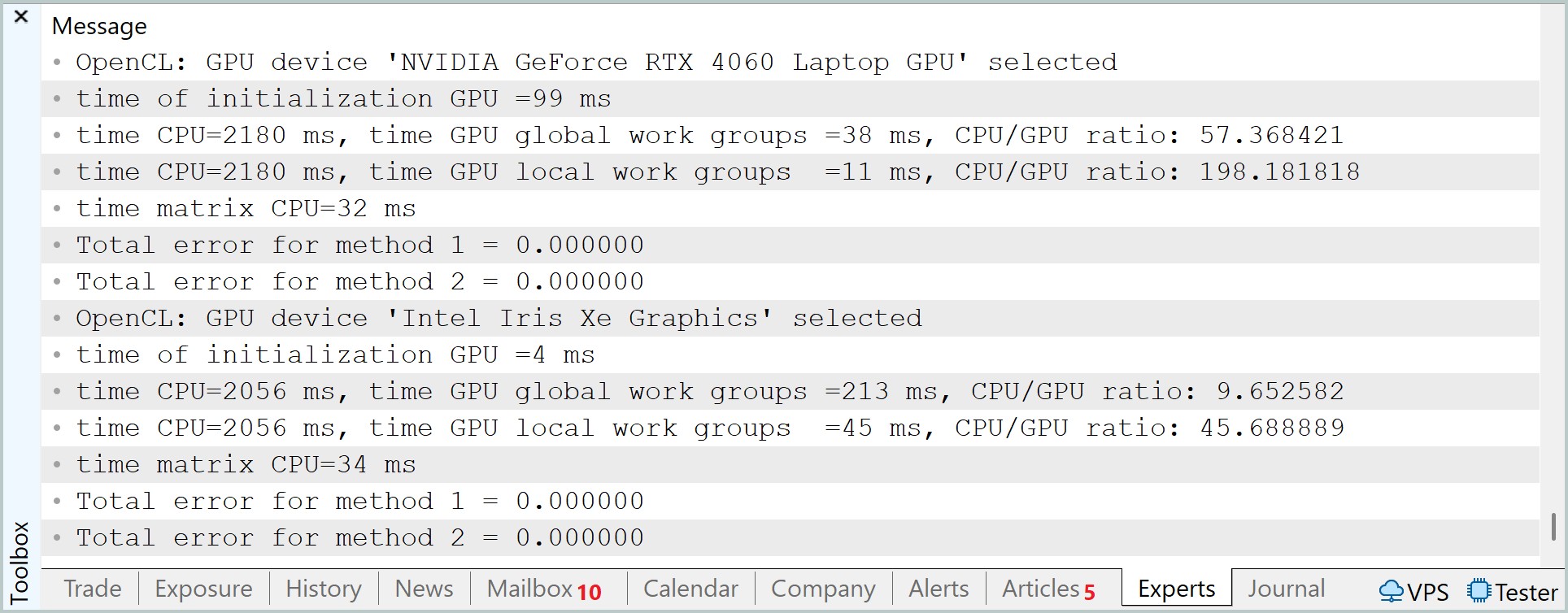
When transferring calculations to GPU, the results were mixed highlighting how strongly OpenCL efficiency depends on the organization of the compute blocks. In the case of the RTX 4060, when using global workgroups, the execution time was about 38 ms, which formally does not provide an advantage relative to CPU matrix operations. However, the transition to local work groups radically changed the situation - the time dropped to 11 ms. This already demonstrates the full-fledged operation of the tiled approach, in which reusing data in local memory reduces pressure on global memory and allows for the use of GPU computational units in a more efficient manner.
A similar, but more noticeable trend is observed in the integrated Intel Iris Xe. In global groups mode, the execution time was 213 ms, while when using local groups it dropped to 45 ms. Despite the persistence of a general lag behind discrete GPU, the relative acceleration is even more noticeable here, which emphasizes the sensitivity of less productive GPU to memory access optimization.
The GPU initialization time deserves special attention. For RTX 4060, it comprised about 99 ms, while for Iris Xe — about 4 ms. This factor cannot be ignored in application scenarios, as it affects the overall efficiency of the computational pipeline.
Overall, the results demonstrate a classic picture of the transition from memory-bound to compute-effective execution mode. CPU remains competitive at the given scale of the task, whereas GPUs reveal their advantage only with the correct organization of local computing units. This is especially clearly visible on RTX 4060, where the difference between a suboptimal and optimized implementation reaches about three to four times, which effectively defines the boundary between inefficient and full-fledged use of the graphics accelerator.
Testing candlestick patterns
The example with matrix multiplication shows well how exactly a GPU can speed up calculations. But this is not sufficient for a trader. It is more important to understand whether this approach can be used in a problem that is truly related to the market. So the next step is to move from abstract math to candlestick pattern analysis.
Candlestick patterns are usually described as ready-made figures with well-known names. They are easy to recognize in a picture, and in books they often look convincing. But if we look at this more strictly, the question arises: to what extent are such models actually supported by statistics? Where are the exact criteria? How do you know if a pattern works not in theory, but on real data?
Instead of looking up familiar figures from textbooks in advance, you can approach the problem differently. Do not force ready-made templates on the market, but look at how it has behaved in similar situations before.
The last few candles are taken - that is, the current market situation. This is our reference pattern. The program then goes through the history and looks for areas that are similar in shape to it. The comparison is not based on the pattern name, but on the actual candle characteristics: the body, the upper shadow, and the lower shadow. Moreover, a slight deviation is allowed, because the market almost never repeats the same pattern perfectly.
If there is a similar section in the history, the program does not make any guesses, but checks the result. For this situation, a trade is simulated by setting Take Profit and Stop Loss levels, as well as a time limit. Then we calculate whether such cases in the past ended in profit or loss.
It is here that OpenCL becomes especially useful. This task consists of a large number of similar checks: we need to go through many sections of history, compare them with the current template, and calculate the trade result for each option. For CPU this is possible, but with a large amount of data the calculations become difficult. For GPU, on the contrary, it is a natural load: many independent calculations that can be performed in parallel.
Moreover, the article tests not just one combination of transaction parameters, but a whole grid of options at once. That is, the program simultaneously considers different values of Take Profit and Stop Loss. This allows us to assess which parameters looked most reasonable in similar market conditions.
Let's start with the logic on the OpenCL side — it is here that the task takes its real form. CPU in this design remains the conductor, but all the hard work - searching, comparing, modeling - goes to GPU.
What we have here is an analysis pipeline.
__kernel void PatternStats3D(__global const float4 *price,
                             __global const float  *tp,
                             __global const float  *sl,
                             __global float        *global_stats,
                             const int bars,
                             const float tolerance,
                             const int horizon)
  {
   const int lid = get_local_id(0);
   const int itp = get_global_id(1);
   const int isl = get_global_id(2);
   const int total_loc = get_local_size(0);
   const int tp_count = get_global_size(1);
   const int sl_count = get_global_size(2);
The source data is organized in an extremely compact manner. The history is passed as the float4 vector array. Each entry is a candle: open, high, low, close. This is important. We do not split data into separate arrays and do not complicate access. GPU works better with dense structures, and this is used to full advantage here.
The tp and sl arrays are passed separately. In this way, we immediately lay down the second and third dimensions of the task. Each thread works not only with its own section of history, but also with a specific combination of trade parameters. As a result, the computational space becomes three-dimensional: history × TP × SL.
Then the work itself begins. Each thread within the group gets its own lid and begins traversing the history with a step equal to the group size.
   __local int buf_stat[BLOCK_SIZE][STAT_DIM];
   int local_stat[STAT_DIM];
   for(int i=0;i<STAT_DIM;i++)
     local_stat[i]=0;
//---
   float4 pattern[PATTERN_SIZE];
   if(bars < (PATTERN_SIZE + horizon))
      return;
   for(int i = 0; i < PATTERN_SIZE; i++)
      pattern[i] = price[bars - 1 - PATTERN_SIZE + i];
//--- border
   for(int i = lid; i < (bars - horizon - PATTERN_SIZE); i += total_loc)
     {
      bool match = true;
      //--- pattern check
      for(int k = 0; k < PATTERN_SIZE ; k++)
        {
         float4 a = price[i + k];
         float body_a  = a.w - a.x;
         float body_b  = pattern[k].w - pattern[k].x;
         if(fabs(body_a - body_b) > tolerance)
           {
            match = false;
            break;
           }
         float upper_a = a.y - fmax(a.w, a.x);
         float upper_b = pattern[k].y - fmax(pattern[k].w, pattern[k].x);
         if(fabs(upper_a - upper_b) > tolerance)
           {
            match = false;
            break;
           }
         float lower_a = fmin(a.w, a.x) - a.z;
         float lower_b = fmin(pattern[k].w, pattern[k].x) - pattern[k].z;
         if(fabs(lower_a - lower_b) > tolerance)
           {
            match = false;
            break;
           }
        }
This is a classic method. We do not create a flow for each bar - that would be too expensive. Instead, each thread handles its own data strip. The load is distributed evenly, without unnecessary kernel launches.
Before the start of the passage, a standard is formed. Let's take the last candles from history. This is the current market that interests us. No external patterns. No guesses. Only the actual price status.
Next comes the key point: comparison. For each position in the history, it is checked whether the section is similar to the standard. Moreover, the comparison is based on the candle structure:
- body;
- upper shadow;
- lower shadow.
And all this is with tolerance. This is a subtle but important nuance. We do not require an exact match. The market does not create perfect copies. We are interested in form, not pixel identity.
If at least one element is outside the tolerance, the match is rejected. Fast and without unnecessary calculations. If a match is found, the second part begins – trade modeling. The entry point is taken at the opening of a new candle after the pattern.
      //--- simulate a trade
      if(match)
        {
         local_stat[0] += 1;
         int open = i + PATTERN_SIZE;
         float4 bar = price[open];
         float entry = bar.x;
         float tp_val = tp[itp];
         float sl_val = sl[isl];
         float buy_tp  = entry + tp_val;
         float buy_sl  = entry - sl_val;
         float sell_tp = entry - tp_val;
         float sell_sl = entry + sl_val;
         bool buy_tp_hit  = 0, buy_sl_hit  = 0;
         bool sell_tp_hit = 0, sell_sl_hit = 0;
         for(int k = 0; k < horizon; k++)
           {
            bar = price[open + k];
            float high = bar.y;
            float low  = bar.z;
            // SL is checked first (worst-case)
            buy_sl_hit  |= (buy_tp_hit  == 0) & (buy_sl_hit  == 0) & (low  <= buy_sl);
            buy_tp_hit  |= (buy_tp_hit  == 0) & (buy_sl_hit  == 0) & (high >= buy_tp);
            sell_sl_hit |= (sell_tp_hit == 0) & (sell_sl_hit == 0) & (high >= sell_sl);
            sell_tp_hit |= (sell_tp_hit == 0) & (sell_sl_hit == 0) & (low  <= sell_tp);
            if((buy_tp_hit | buy_sl_hit) & (sell_tp_hit | sell_sl_hit))
               break;
           }
         // forced closing by time
         buy_sl_hit  |= (buy_tp_hit  == 0) & (buy_sl_hit  == 0) & (entry  > bar.w);
         buy_tp_hit  |= (buy_tp_hit  == 0) & (buy_sl_hit  == 0) & (entry  < bar.w);
         sell_sl_hit |= (sell_tp_hit == 0) & (sell_sl_hit == 0) & (entry  < bar.w);
         sell_tp_hit |= (sell_tp_hit == 0) & (sell_sl_hit == 0) & (entry  > bar.w);
         //---
         local_stat[1] += (int)buy_tp_hit;
         local_stat[2] += (int)buy_sl_hit;
         local_stat[3] += (int)sell_tp_hit;
         local_stat[4] += (int)sell_sl_hit;
        }
     }
Next, the TP and SL levels are calculated for buying and selling. Note the detail: both sides are counted simultaneously. This saves calculations and gives a complete picture of market behavior.
Then a forward pass through history is started with a horizon limitation. At each step the following is checked:
- whether SL has been reached;
- whether TP has been reached.
SL is checked first. This is not an accident, but a deliberate assumption of a worst-case scenario. This approach makes the assessment more conservative – and therefore closer to reality.
Once the outcome is determined for both parties, the loop is broken. No extra work is done.
If neither TP nor SL is reached, the position is closed forcibly according to time. This is another important element. We do not leave open trades — every situation should produce a result.
All results are accumulated in the local_stat private array. This is fundamental. There is no synchronization at this stage. Each thread works independently and quickly.
Next, we move on to the thing everything was built for - local aggregation. The first BLOCK_SIZE threads write their results to buf_stat. This is local memory, it is fast and shared by the group.
//--- write to 'local'
   if(lid < BLOCK_SIZE)
      for(int k = 0; k < STAT_DIM; k++)
         buf_stat[lid][k] = local_stat[k];
   barrier(CLK_LOCAL_MEM_FENCE);
Then comes an additional pass, which compresses data, if there are more threads than the buffer size. This is a neat way to force an arbitrary group size to a fixed reduction window.
   for(int i = BLOCK_SIZE; i < total_loc; i += BLOCK_SIZE)
     {
      if(lid >= i && lid < (i + BLOCK_SIZE))
         for(int k = 0; k < STAT_DIM; k++)
            buf_stat[lid-i][k] += local_stat[k];
      barrier(CLK_LOCAL_MEM_FENCE);
     }
After this, the classical reduction is performed - pairwise summation with step reduction.
//--- reduction
   for(int stride = BLOCK_SIZE / 2; stride > 0; stride >>= 1)
     {
      if(lid < stride)
        {
         for(int k = 0; k < STAT_DIM; k++)
           {
            buf_stat[lid][k] += buf_stat[lid + stride][k];
            buf_stat[lid + stride][k] = 0;
           }
        }
      barrier(CLK_LOCAL_MEM_FENCE);
     }
The output is one stream, which contains aggregated statistics for the entire group. It carries out the final step - recording the result.
//--- write the result
   if(lid == 0)
     {
      int idx = (itp * sl_count + isl) * STAT_DIM;
      int count = buf_stat[0][0];
      global_stats[idx + 0] = count;
      float norm = (count > 0) ? (1.0f / ((float)count)) : 0.0f;
      for(int k = 1; k < STAT_DIM; k++)
         global_stats[idx + k] = buf_stat[0][k] * norm;
     }
  }
An important transformation occurs here:
- the total number of matches is kept as is;
- the remaining values are reduced to probabilities.
Once the calculation is complete, the output is not a set of raw numbers, but ready-made statistics. We can see:
- how many times a similar situation occurred in the historical data;
- how often Take Profit was triggered for buying;
- how often Stop Loss was triggered;
- how sell trades behaved;
- which combinations of parameters looked better.
The main program then makes the decision. It looks at the statistics rather than a pretty pattern. If there is too little data, the signal is ignored. If the sample is sufficient, buy and sell probabilities are compared. Then more suitable values of Take Profit and Stop Loss values are selected. Only after that a position can be opened.
This is an important point. In such a structure, the decision is not based on a guess or a rigid set of rules. It is based on testing how the market usually behaved under similar conditions. This approach does not guarantee profit, but it is much more consistent with the idea of systems data analysis.
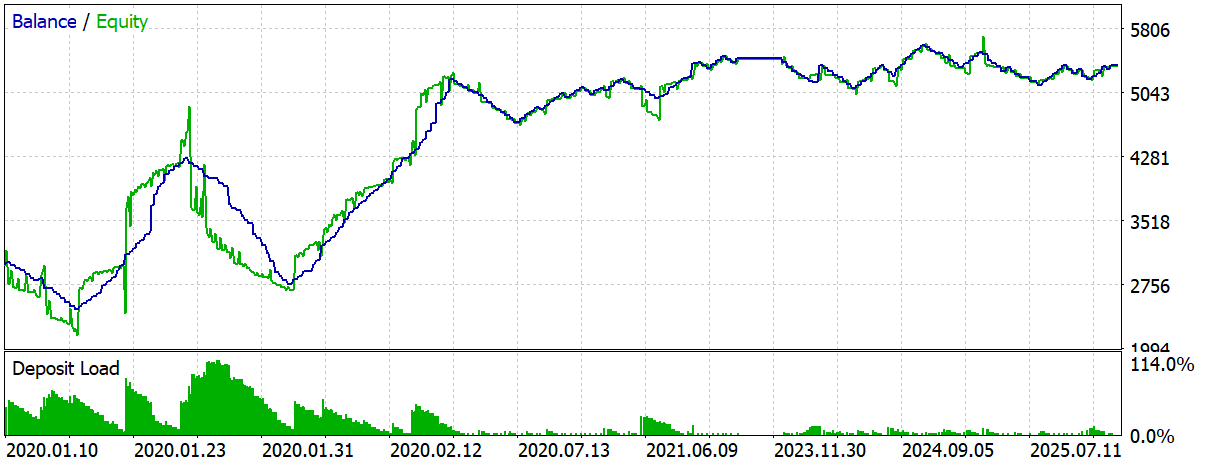
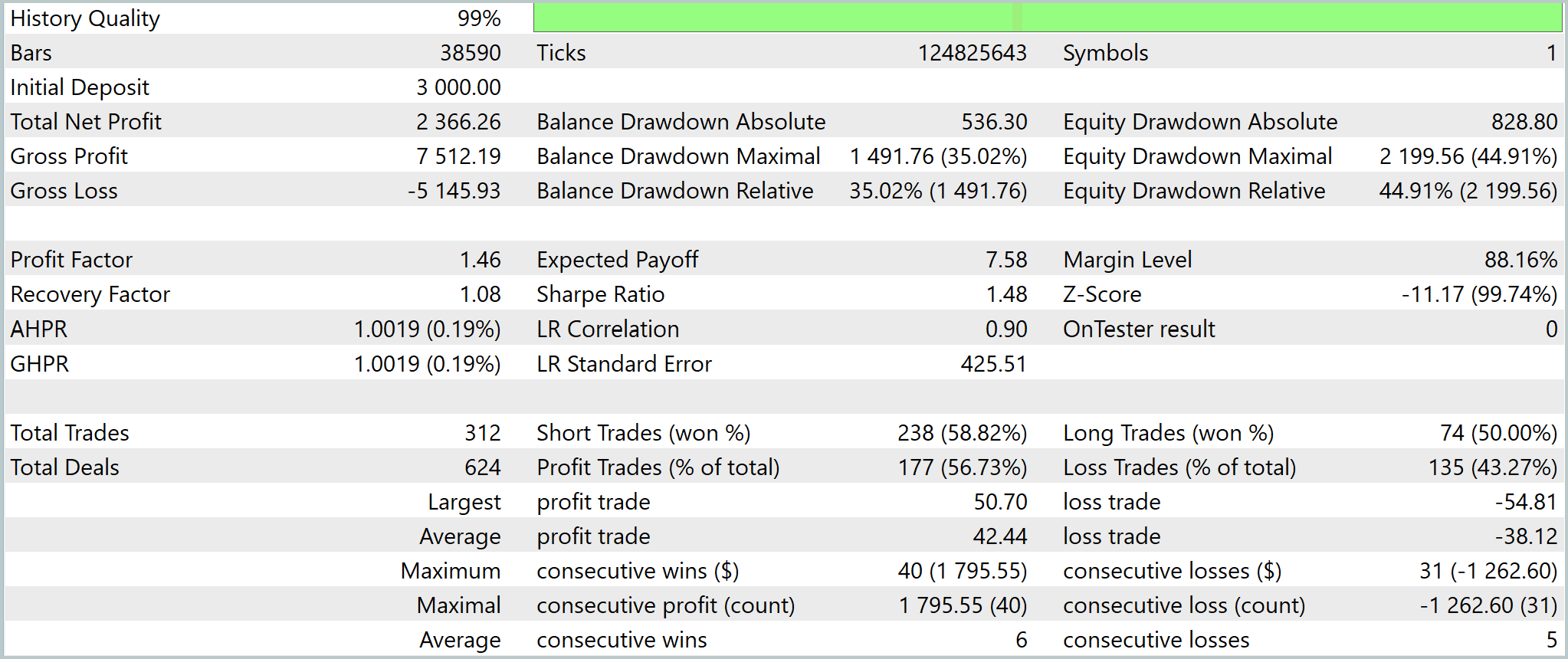
The test results confirm this. The system does not look perfect and does not show a very pretty equity curve. This might even be good - what we have before us is not an overfitted model, but a fairly simple working structure that faces normal market noise, series of losses, and drawdowns. However, it still shows a positive result.
What is especially important here is not that the final profit turned out to be moderate, but that we were able to create a statistically meaningful trading mechanism without relying on classic indicators and predetermined patterns. In this construction, OpenCL plays the role of an accelerator, which makes such an analysis practically feasible in time.
In other words, GPU is needed here not for strategy profitability. It is needed to quickly test a large number of historical matches and turn market data into a measurable hypothesis.
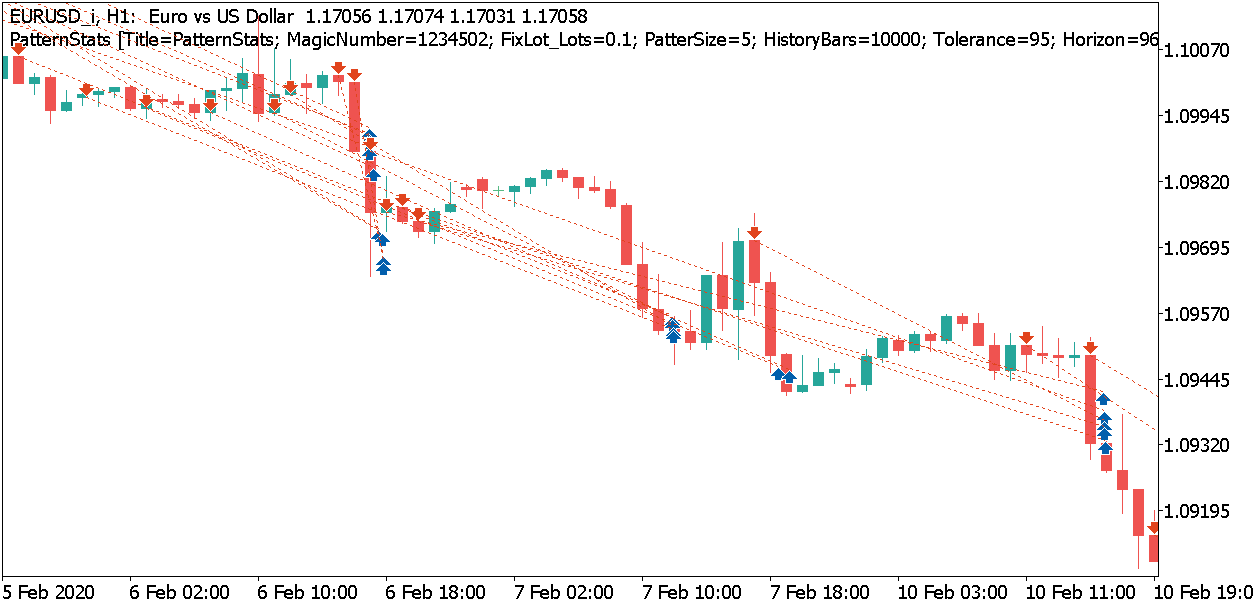
Conclusion: OpenCL is useful for candlestick pattern analysis because it allows us to quickly run through a variety of similar situations, calculate trade results, and rely on statistics rather than visual guessing.
Conclusion
OpenCL in MQL5 should be perceived as a tool for a specific class of tasks. It shows its worth where there is a large array of data, repeated operations and the ability to effectively parallelize calculations. In all other cases, CPU remains the more rational choice: it is simpler, more flexible, and often faster when it comes to small or poorly scalable calculations.
The article goes all the way from understanding the architectural limitations to a practical structure for offloading computations to the GPU. It was shown that the result is determined not only by the GPU capabilities, but also by the quality of the organization of the computing circuit. Frequent initializations, redundant data transfers, and too small tasks easily eat up any gains. On the contrary, when reusing context, working with large arrays and carefully passing data, GPU starts playing on its own territory.
This is particularly clear in the example of matrix multiplication: with a sufficient volume of data, parallel processing provides a multiple increase compared to CPU. But the practical value of the structure is revealed not only in synthetic tests. In a task closer to real trading, GPU allows speeding up research related to mass optimizations, hypothesis testing, and the search for stable patterns in data. This is where it becomes clear that the graphics card is useful not in itself, but as a means of scaling the computing discipline.
The main conclusion remains practical. Transfer to GPU does not make a trading system profitable and does not replace a meaningful market model. Instead, it opens access to the volume of enumeration and analysis that would be too expensive or too slow on CPU. This is its real value: not to promise miracles, but to enable a broader and more systematic research cycle in MQL5.
Programs used in the article
| # | Name | Type | Description |
|---|---|---|---|
| 1 | PatternStats.mq5 | Expert Advisor | Test EA |
| 2 | PatternStats.cl | Code Base | OpenCL program code library |
Translated from Russian by MetaQuotes Ltd.
Original article: https://www.mql5.com/ru/articles/22242
Warning: All rights to these materials are reserved by MetaQuotes Ltd. Copying or reprinting of these materials in whole or in part is prohibited.

 Feature Engineering for ML (Part 2): Implementing Fixed-Width Fractional Differentiation in MQL5
 Algorithmic Trading Without the Routine: Quick Trade Analysis in MetaTrader 5 with SQLite
 Price Action Analysis Toolkit Development (Part 68): Price-Attached RSI Panel in MQL5
 Python + MetaTrader 5: Fast Research Framework for Data, Features, and Prototypes

- Free trading apps
- Over 8,000 signals for copying
- Economic news for exploring financial markets
You agree to website policy and terms of use