

Python + MetaTrader 5: Fast Research Framework for Data, Features, and Prototypes
 13 289
 2
2

Introduction
Python has become one of the most convenient tools for working with data. It offers a wide range of libraries that allow us to quickly perform statistical analysis, test hypotheses, and visually present results without wasting time and resources. This is important for solving problems related to financial markets: here, not only the speed of data processing is valued, but also the ability to quickly move from analysis to practical conclusions.
MetaTrader 5 features direct integration with Python, and this significantly expands the possibilities of practical work with market data. A researcher or developer can use familiar Python toolkit to study price data, build statistical models, and test practical hypotheses without breaking the connection to the trading platform. This approach makes the workflow more flexible and supports a unified cycle: from data to hypothesis, from hypothesis to model, and from model to practical application.

In this article, we will show:
- how Python is integrated with MetaTrader 5;
- how to use it to analyze financial data and test hypotheses;
- how to build and train a small model and then transfer the trained result to an EA using ONNX.
This will allow us to move from a research experiment to practical implementation in a trading system.
1. Installation and connection
Before proceeding to data analysis, it is necessary to consistently prepare the working environment for using Python and MetaTrader 5 together. The task is simple, but it requires accuracy. Correct setup at the start will save you from dozens of minor problems later on.
First of all, let's install the MetaTrader 5 terminal by downloading the distribution from the official website.
Next we will need the current Python version. At the time of writing this article, it is 3.14.3. When installing, be sure to enable the option that adds Python to the PATH environment variable. This will allow working with the interpreter directly from the command line without unnecessary manual settings.
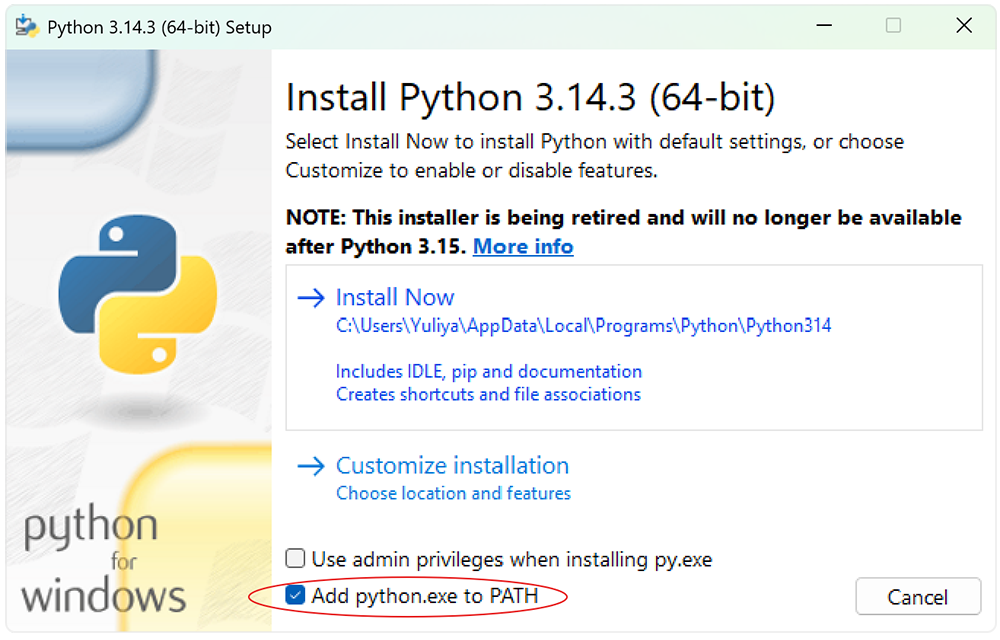
The key point is to isolate the environment. Experience shows that projects that work with data and models quickly become overloaded with dependencies. To maintain order and reproducibility of results, a separate virtual environment is created for each project. In Python, this can be solved with a built-in venv tool.
The workflow is as follows.
- Open the command execution environment. The easiest way is to press Win+R. In the window that appears, enter the cmd command and press Enter. This opens the Windows command prompt. You can use PowerShell if you want — the same principle applies in this case.
- Navigate to the project directory where the environment will be created. This is done with the standard command:
- Create a virtual environment.
- Install the Python module to interact with MetaTrader 5.
- For a full analysis of financial data, it makes sense to immediately deploy a basic, but almost a full-fledged action-ready library stack. It covers key tasks of data handling, model building and technical analysis.
cd /path/to/your/project
python -m venv integration
And activate it.
integration\Scripts\activate
From now on, all installed packages will be isolated within the current project.
pip install MetaTrader5
First of all, install NumPy — the foundation for numerical computing. This is the foundation the entire subsequent stack is based on.
Next we connect Pandas — the main tool for working with tabular data and time series, without which price analysis becomes a torment.
For visualization, we use a connection of Matplotlib and Seaborn. The first gives you full control over your graphs, while the second speeds up the creation of statistically expressive visualizations. While working in tandem, they allow us to see the market, rather than just count it.
For machine learning tasks, we add Scikit-Learn — a time-tested tool for building and validating models. It is well suited for early prototypes and basic strategies.
For applied market analysis, we connect TA — library of technical indicators. This is a convenient way to quickly enrich data with signals without manually implementing classical formulas.
Installation of libraries is performed with a single command.
pip install numpy pandas matplotlib seaborn scikit-learn ta
It is worth adding the pytz library. At first glance, it is auxiliary, but in practice it is critical for working with time zones.
pip install pytz
Financial data is strictly time-sensitive. Exchanges operate in different time zones.
By default, Python relies on the system’s local time when creating the datetime object. This behavior is convenient for everyday tasks, but in a financial context it becomes a source of systemic errors. MetaTrader 5 stores tick and bar times in the UTC format — without displacement and without reference to the local zone.
This creates a classic mismatch. The model operates in one time reference, while the data are in another. In practice, this leads to unpleasant effects.
Therefore, the rule here is strict. All operations related to time must be performed in UTC. The datetime objects should be explicitly created in UTC zone, while any local values should be brought to a single standard. This aligns the data and the model in the same time coordinate system.
It is good practice to use pytz for explicit management of time zones. This eliminates implicit transformations and makes the system behavior predictable.
Data obtained from MetaTrader 5 are already in UTC. They should not be fixed. They should be correctly interpreted and consistent with the model logic. In financial problems, time is not just a marker, but a coordinate axis. Any error in it breaks the entire analysis geometry.
This set looks limited, but in practice it covers up to 80% of typical tasks. This is a classic approach: less redundancy, more efficiency.
If we need to exit the current environment, use the standard command:
deactivate
At this stage, the infrastructure is completely ready. The terminal, interpreter and necessary libraries are installed. The environment is isolated and reproducible. This is the foundation, on which it is convenient and safe to build further analysis, test hypotheses, and gradually move on to developing trading models.
2. Loading data
After setting up the infrastructure, we move on to the first practical step – writing the program. There are no strict limitations here: any familiar editor will do. However, in the context of integration, it is logical to use the built-in MetaTrader 5 editor called MetaEditor, which already supports work with Python and allows you to keep the entire process within a single framework.
To launch Python scripts directly from MetaEditor or the terminal, it is sufficient to specify the path to the interpreter once in the platform settings. This is a basic operation, but there is an important detail here. If you are using a previously created virtual environment, the path should point specifically to its interpreter, not to a global Python installation.
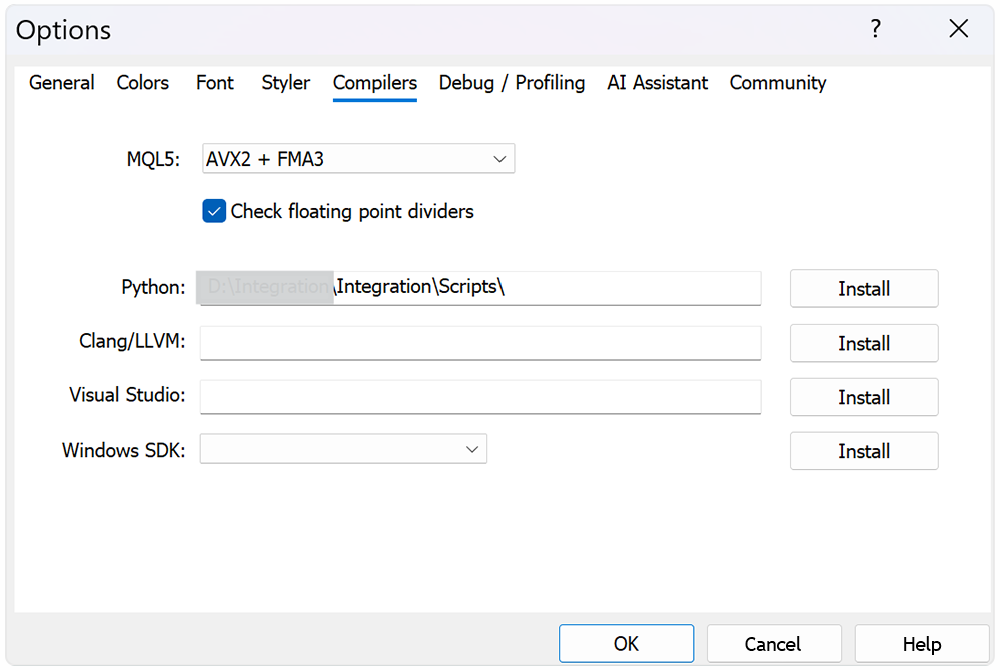
This approach maintains project isolation and ensures that all dependencies remain controlled. Otherwise, you risk getting subtle bugs where the same code behaves differently depending on the running environment. In financial matters, this is an unacceptable luxury.
At the first stage, we build a basic connection: Python → MetaTrader 5 → historical data. The task is simple in formulation and critical in essence: connect to the terminal from a script and obtain price data for a specified instrument and timeframe. It is from this moment that any meaningful analysis begins.
It is logical to build the script structure into blocks. First, we connect the necessary libraries - this forms the working toolset.
from datetime import datetime
import MetaTrader5 as mt5
import pandas as pd
import numpy as np
import pytz
import seaborn as sns
import matplotlib.pyplot as plt
import ta
Next, the connection to the terminal is initialized via the MetaTrader5 module. This is the entry point into the system. If the connection is not established, there is no point in continuing. Therefore, the status check is performed immediately and without compromise.
# Display data on the MetaTrader 5 package
print("MetaTrader5 package author: ", mt5.__author__)
print("MetaTrader5 package version: ", mt5.__version__)

# Connection to MetaTrader 5 terminal
if not mt5.initialize():
    print("initialize() failed, error code =", mt5.last_error())
    quit()
The next step is to set the time interval. Here we use pytz for explicit indication of the UTC zone. This is not a technical detail, but a mandatory requirement. The terminal saves price data in UTC, and any discrepancy on the Python side leads to data bias. The error is silent, but the consequences are systemic.
# Set time zone to UTC
timezone = pytz.timezone("Etc/UTC")
# Create 'datetime' objects in UTC time zone to avoid the implementation of a local time zone offset
utc_from = datetime(2020, 1, 1, tzinfo=timezone)
utc_to = datetime.now(timezone)  # Set to the current date and time
After this, a request for historical data is made. The example uses hourly bars for EURUSD. Here it is worth paying attention to the name of the instrument. It should strictly match the spelling in the terminal, including suffixes and prefixes.
# Get bars from EURUSD H1 (hourly timeframe) within the specified interval
rates = mt5.copy_rates_range("EURUSD", mt5.TIMEFRAME_H1, utc_from, utc_to)
The output is an array of structures with prices and timestamps — raw market without filters and interpretations. This is exactly the type of data that is needed at the first stage.
After that, the connection to the terminal is closed correctly. This is execution discipline: graceful shutdown prevents hidden failures on subsequent starts and makes system behavior predictable.
# Shut down connection to the MetaTrader 5 terminal
mt5.shutdown()
This is followed by a basic check of the result. If data is received, the first records are displayed for quick validation. If not, the script terminates.
# Check if data was retrieved
if rates is None or len(rates) == 0:
    print("No data retrieved. Please check the symbol or date range.")
    quit()
# Print the first 10 raw records for a quick data sanity check
print("Display obtained data 'as is'")
for rate in rates[:10]:
    print(rate)
Additionally, visualization is performed: a chart of closing prices and volumes is constructed. In this case, it is advisable to place the volumes on a separate axis. We will set the maximum value along the volume axis with the margin five times greater than the observed maximum. This method looks simple, but it works flawlessly. The histogram is pressed against the bottom of the chart and stops competing with the price for attention.
As a result, the closing price line remains clean and readable, and the volumes remain informative without overloading the visual presentation. This is a classic balance between data completeness and comprehensibility. A chart should not only contain information, but also allow it to be quickly interpreted without unnecessary stress.
# Create a DataFrame from the retrieved tick data
rates_frame = pd.DataFrame(rates)
# Convert the timestamp column from seconds since epoch to datetime
rates_frame['time'] = pd.to_datetime(rates_frame['time'], unit='s')

# Use datetime as the DataFrame index for time series plotting and analysis
rates_frame.set_index('time', inplace=True)

# Plot closing price and tick volume
fig, ax1 = plt.subplots(figsize=(12, 6))

# Close price on primary y-axis
ax1.set_xlabel('Date')
ax1.set_ylabel('Close Price', color='tab:blue')
ax1.plot(rates_frame.index, rates_frame['close'], color='tab:blue', label='Close Price')
ax1.tick_params(axis='y', labelcolor='tab:blue')

# Tick volume on secondary y-axis
ax2 = ax1.twinx()
ax2.set_ylabel('Tick Volume', color='tab:green')
max_tick = rates_frame['tick_volume'].max()
ax2.set_ylim(0, max_tick * 5)
ax2.plot(rates_frame.index, rates_frame['tick_volume'], color='tab:green', label='Tick Volume')
ax2.tick_params(axis='y', labelcolor='tab:green')

# Show the plot
plt.title('Close Price and Tick Volume Over Time')
fig.tight_layout()
plt.show()
fig.savefig('close_price.png')
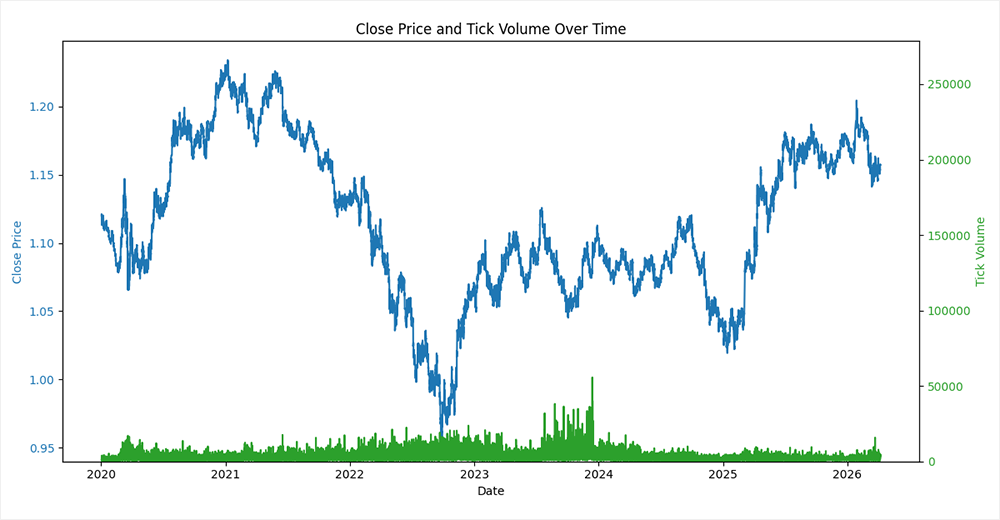
From a practical point of view, the procedure seems elementary. But in fact, this is a key stage of data quality control. You clearly understand what is being fed into the model: format, timestamps, values. This type of initial audit is a classic example of an engineering approach. It saves time, nerves and, what is especially important in trading systems, money.
3. Testing hypothesis and selecting features
Now that we have historical price data at our disposal, let's move on to the initial analysis. Let's start with an extremely simple, an almost almost textbook hypothesis: The market tends to continue the movement of the last bar. Let's check if there is inertia in short-term dynamics.
Python toolkit allows you to test such a hypothesis in just a few lines. The logic is as follows. Take a series of close prices and move on to the price differences from bar to bar. Obtain price dynamics, which is fundamentally important for analysis.
# Correlation analysis between adjacent bar moves
close = rates_frame['close'].to_numpy(dtype=float)
# last and next price move differences
diff = close[1:] - close[:-1]
Next we form two time series: last and next changes. Technically, this is implemented by shifting the array by one element. The result is pairs of values where each observation answers a simple question: if the market was moving up (or down), what happens on the next bar?
diff = np.column_stack((diff[:-1], diff[1:]))
data_matrix = pd.DataFrame(diff, columns=['last', 'next'])
After this, the Pearson correlation ratio between these two series is calculated. A positive correlation indicates a strong inertia, while a negative one - a predominant pullback.
For clarity, the result is visualized using Seaborn — a correlation heat map is constructed. This is a quick way to see the structure of the dependency without going into numerical details.
correlation_matrix = data_matrix.corr('pearson')
plt.subplots(figsize=(3, 2))
sns.heatmap(correlation_matrix, annot=True, cmap='coolwarm')
plt.title('Correlation Bar to Bar')
plt.savefig('bar_to_bar.png')
plt.show()
The key point here is not the strategy itself – it is inherently primitive. The value is elsewhere. We demonstrate a basic hypothesis testing cycle. We have formulated a hypothesis, transformed the data, performed a calculation, and visualized the result. This approach disciplines the analysis and prevents us from drawing conclusions by eye.
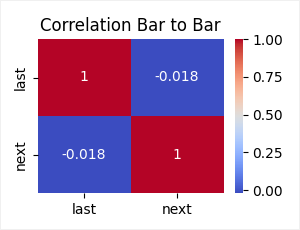
But let us still evaluate the results obtained. The observed correlation is −0.018 — the value close to zero, but with a negative sign.
This means that there is no clear relationship between adjacent bars. Moreover, the weak negative sign indicates a subtle mean reversion effect. After a move in one direction, the next bar is likely to move in the opposite direction. However, the magnitude of the effect is so small that, from a practical point of view, it borders on statistical noise.
The hypothesis of movement continuation is not confirmed. The market on the H1 timeframe behaves closer to a random process than to an inertial system. This is an important observation. It immediately eliminates an entire class of naive strategies and sets a more sober starting point for further analysis.
One candle is too small a scale. Such data is dominated by noise rather than structure. Therefore, we take the next logical step: we enlarge the observations and check not individual changes, but average movements.
Instead of a single bar, we take the average price change over a historical interval from 1 to 23 bars. This smooths out random fluctuations and allows us to isolate the more stable component of the motion. Similarly, we form the future average price change on the horizon from 1 to 9 bars. Thus, we move from point observations to aggregated signals.
The implementation is neatly divided into two blocks. The first one calculates moving averages for past changes.
# Add rolling mean features for the previous and future moves
for period in range(2, 24, 1):
    data_matrix[f'last_mean_{period:02d}'] = data_matrix['last'].rolling(window=period).mean()
The second one - for the future changes, with a mandatory shift to prevent information leakage from the future to the past. This is a critical point: without it, the analysis becomes meaningless.
for period in range(2, 10, 1):
    data_matrix[f'next_mean_{period}'] = data_matrix['next'].rolling(window=period).mean().shift(-(period-1))
After calculation, rows with missing values are removed - an inevitable consequence of windowing operations.
# Remove rows with missing values created by rolling calculations
data_matrix.dropna(inplace=True)
Next, the Pearson correlation matrix is constructed and the necessary submatrix is retrieved from it: dependence of the future from the past. Here is the answer to the main question: does the average movement have predictive power?
correlation_matrix = data_matrix.corr('pearson')
# Match columns that begin with "next"
reg = r'^next.*$'
selected_cols = correlation_matrix.filter(regex=reg).columns
remaining_rows = correlation_matrix.index.difference(selected_cols)
correlation_matrix = correlation_matrix.loc[remaining_rows, selected_cols]
Visualization by means of Seaborn in the form of a heat map is especially appropriate here. It allows us to quickly evaluate the structure of dependencies across the entire parameter grid.
plt.figure(figsize=(12, 7))
plt.subplots_adjust(left=0.15, right=1, bottom=0.16, top=0.95)
sns.heatmap(correlation_matrix, annot=True, cmap='coolwarm')
plt.title('Correlation Means Last to Next Bars')
plt.savefig('mean_to_bar.png')
plt.show()
From a methodological point of view, this is already a more mature experiment. We are moving away from naive bar to bar test and move on to the analysis of aggregate effects. If the market does contain weak patterns, it is at this level that they begin to emerge.
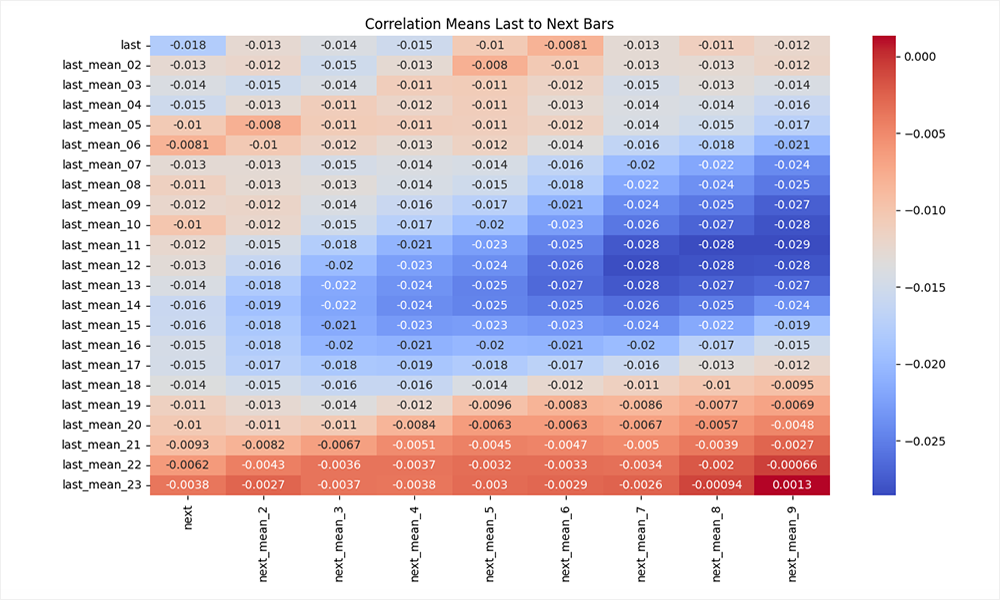
The result obtained looks more interesting, but the overall conclusion remains reserved. We still see negative correlation values. However, now they are structured. In the central region of the matrix (windows of 8–14 bars in history and 5–8 bars in the horizon), the effect intensifies and reaches the values of −0.02…−0.03. This is a weak but consistent mean reversion signal.
The logic reads quite clearly. If the market has been moving in one direction for some time, then there is a higher probability that we will see a partial correction in the following bars. However, the effect is not linear:
- on short windows - it drowns in noise;
- on too long ones it blurs and loses strength;
- the maximum is manifested in the mid-ranges.
The lower right corner of the matrix is worth mentioning separately. There the correlation tends to zero and even becomes positive in some places. This is a classic sign of loss of predictive power with excessive smoothing: the signal disappears along with the data variability.
Visualization by means of Seaborn emphasizes the dependency relief pretty well here. The picture turns out to be quite meaningful.
The conclusion is straightforward: the market does not exhibit strong inertia, but it does show a weak mean-reversion effect. This does not provide a ready-made strategy, but it does set the direction.
Since the obtained correlation values are low, such a signal cannot be scaled directly into trading in a linear setting. But this is where the more interesting part of the job begins. If a simple relationship is weak, we can try to strengthen it through a combination of features — that is, move on to a model.
The key task is to form an informative feature space. A single price series is not enough. Therefore, the next step is to search for additional features that can capture the hidden structure of the market. It makes sense to use classic technical indicators as a basic set. This is a time-tested tool that, despite its simplicity, often provides useful signals.
Next, we apply the same disciplined approach - verification through correlation. We evaluate the relationship between future price movement and the values of various indicators. In this case, the parameters of the indicators vary in the loop. This allows us to immediately cover a wide range of configurations and see where the signal is strongest.
From a practical point of view, the process resembles the enumeration of parameters followed by filtering. But in essence, this is the formation and selection of a feature space. Correlation here acts as a diagnostic tool. We measure which data transformations are associated with future movement. This is a fundamentally different level of thinking: first, understand the structure, then extract profit.
In the code, this approach is implemented quite systematically. On the one hand, simple derivatives of the price are used - moving averages, their first and second differences, deviations from the current value. This is an attempt to capture local dynamics and market acceleration.
# Recreate the base matrix for indicator engineering
data_matrix = pd.DataFrame(diff, columns=['last', 'next'])
# Add 11-period previous move averages and derived momentum features
data_matrix[f'last_mean_11'] = data_matrix['last'].rolling(window=11).mean()
data_matrix[f'Dlast_mean_11'] = data_matrix[f'last_mean_11'].diff()
data_matrix[f'DDlast_mean_11'] = data_matrix[f'Dlast_mean_11'].diff()
# Feature representing the gap between the rolling mean and the current move
data_matrix[f'last_last_11'] = data_matrix[f'last_mean_11'] - data_matrix['last']
data_matrix[f'Dlast_last_11'] = data_matrix[f'last_last_11'].diff()
data_matrix[f'DDlast_last_11'] = data_matrix[f'Dlast_last_11'].diff()
# Add short-term future sum targets for the next bars
for period in range(2, 10, 1):
    data_matrix[f'next_{period}'] = data_matrix['next'].rolling(window=period).sum().shift(-(period-1))
On the other hand, classic indicators from the TA library are added: SMA, RSI, MACD, moreover, in several parameterizations at once. This coverage prevents us from guessing the right period, seeing the behavior across the entire range instead.
# Build additional technical indicators using the close price series
close = pd.DataFrame(close[:-1], columns=['close'])
indicator_cols = {}
for period in [4, 8, 12, 24, 36, 48]:
    sma = ta.trend.sma_indicator(close['close'], window=period, fillna=True)
    dsma = sma.diff()
    ddsma = dsma.diff()
    rsi = ta.momentum.rsi(close['close'], window=period, fillna=True)
    drsi = rsi.diff()
    ddrsi = drsi.diff()
    macd = ta.trend.MACD(
        close['close'],
        window_slow=2 * period,
        window_fast=period,
        window_sign=period * 3 // 4,
        fillna=True,
    )
    macd_main = macd.macd()
    dmacd = macd_main.diff()
    ddmacd = dmacd.diff()
    macd_diff = macd.macd_diff()
    dmacd_diff = macd_diff.diff()
    ddmacd_diff = dmacd_diff.diff()
    macd_signal = macd.macd_signal()
    dmacd_signal = macd_signal.diff()
    ddmacd_signal = dmacd_signal.diff()
    macd_sig_main = macd_signal - macd_main
    dmacd_sig_main = macd_sig_main.diff()
    ddmacd_sig_main = dmacd_sig_main.diff()

    indicator_cols[f'SMA_{period:02d}'] = sma
    indicator_cols[f'DSMA_{period:02d}'] = dsma
    indicator_cols[f'DDSMA_{period:02d}'] = ddsma
    indicator_cols[f'RSI_{period:02d}'] = rsi
    indicator_cols[f'DRSI_{period:02d}'] = drsi
    indicator_cols[f'DDRSI_{period:02d}'] = ddrsi
    indicator_cols[f'MACD_{period:02d},{2*period:02d},{period*3//4:02d}'] = macd_main
    indicator_cols[f'DMACD_{period:02d},{2*period:02d},{period*3//4:02d}'] = dmacd
    indicator_cols[f'DDMACD_{period:02d},{2*period:02d},{period*3//4:02d}'] = ddmacd
    indicator_cols[f'MACD_DIFF_{period:02d},{2*period:02d},{period*3//4:02d}'] = macd_diff
    indicator_cols[f'DMACD_DIFF_{period:02d},{2*period:02d},{period*3//4:02d}'] = dmacd_diff
    indicator_cols[f'DDMACD_DIFF_{period:02d},{2*period:02d},{period*3//4:02d}'] = ddmacd_diff
    indicator_cols[f'MACD_SIGNAL_{period:02d},{2*period:02d},{period*3//4:02d}'] = macd_signal
    indicator_cols[f'DMACD_SIGNAL_{period:02d},{2*period:02d},{period*3//4:02d}'] = dmacd_signal
    indicator_cols[f'DDMACD_SIGNAL_{period:02d},{2*period:02d},{period*3//4:02d}'] = ddmacd_signal
    indicator_cols[f'MACD_Sig_Main{period:02d},{2*period:02d},{period*3//4:02d}'] = macd_sig_main
    indicator_cols[f'DMACD_Sig_Main{period:02d},{2*period:02d},{period*3//4:02d}'] = dmacd_sig_main
    indicator_cols[f'DDMACD_Sig_Main{period:02d},{2*period:02d},{period*3//4:02d}'] = ddmacd_sig_main

# Append all indicator columns to the feature matrix in one operation
# This avoids repeated DataFrame assignment and keeps the DataFrame compact
data_matrix = pd.concat([data_matrix, pd.DataFrame(indicator_cols)], axis=1)
# Remove any rows with NaN values created by indicator calculations
data_matrix.dropna(inplace=True)
The addition of second-order derivatives is especially indicative (diff and diff from diff). This is already an attempt to capture the change in the signal itself - a transition to the analysis of the acceleration and deceleration of market movement. In financial series, such effects often prove more informative than the levels themselves.
Next, filtering is applied. From the entire correlation matrix, only the features whose maximum relationship with the target variable exceeds the specified threshold (in this case, 0.02) remain. This is an important point. We consciously cut off weak and unstable dependencies, leaving only those that stay within the data at least to the minimal possible degree.
correlation_matrix = data_matrix.corr('pearson')
selected_cols = correlation_matrix.filter(regex=reg).columns
remaining_rows = correlation_matrix.index.difference(selected_cols)
correlation_matrix = correlation_matrix.loc[remaining_rows, selected_cols]
# Delete rows with low correlations
correlation_matrix = correlation_matrix[correlation_matrix.abs().max(axis=1) >= 0.02]
Visualization via Seaborn completes the process.
plt.figure(figsize=(12, 7))
plt.subplots_adjust(left=0.2, right=1, bottom=0.05, top=0.95)
sns.heatmap(correlation_matrix, annot=True, cmap='coolwarm')
plt.title('Correlation Indicators to Next Bars')
plt.savefig('trend_to_bar.png')
plt.show()
The heat map no longer looks like chaotic noise, but turns into a signal map. It is clear which groups of indicators are starting to respond to future movements, at what parameters this response increases and where it disappears completely.
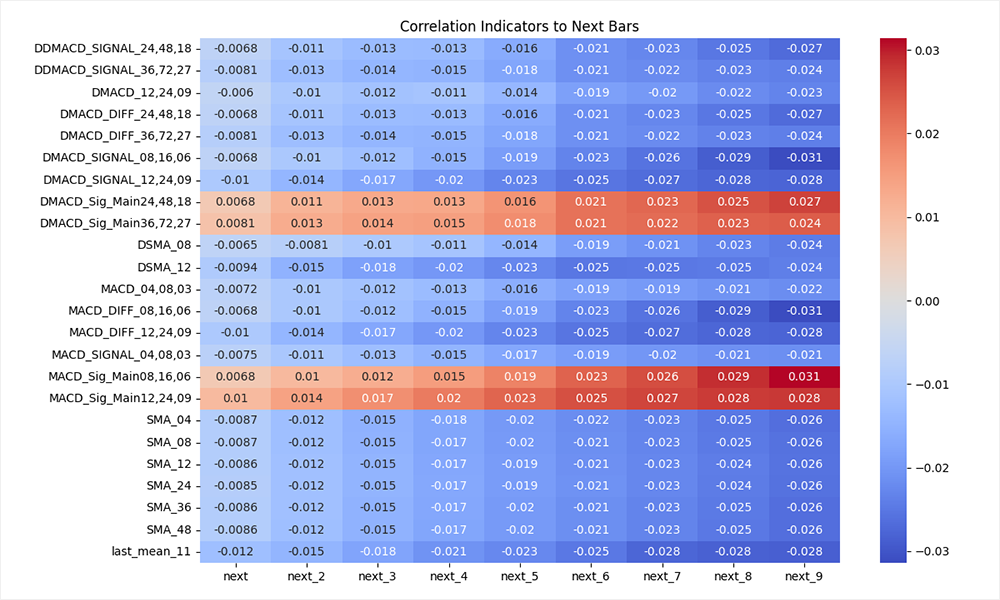
This is where the set of hypotheses begins to take on structure. We are moving from random selection of indicators to conscious formation of features. This is not a model yet, but rather its frame. The next task is to assemble these weak, disparate signals into a single system capable of extracting a stable dependence where, individually, it is almost invisible.
4. Building and training the model
In the previous step, we obtained a correlation map and selected features with the maximum values of direct and inverse correlation. This is a fundamental point: negative correlation is the same signal, just with the opposite sign. In terms of the model, this is not a limitation, but additional information.
Next we move on to training. The Scikit-Learn ecosystem offers a wide range of algorithms - from linear models to ensembles. The article "Regression models of the Scikit-learn Library and their export to ONNX" provides a comparison of 55 regression models. But for solving a practical problem, it makes sense to focus on robust and proven algorithms. In this case, we will use RandomForestRegressor.
Classic forest is a compromise between simplicity and expressiveness. It works well with non-linear dependencies, is robust to noise, and does not require aggressive data normalization. This is exactly what is needed in the first stage of modeling.
The next key step is selecting hyperparameters. Let's use direct enumeration by two parameters: number of trees (n_estimators) and tree depth (max_depth). This is a reasonable choice: the first parameter is responsible for the ensemble strength, while the second one focuses on the degree of immersion of an individual tree into the data and control over overfitting.
For this purpose, we create a new script. The algorithm of connecting to MetaTrader 5 and loading historical price data remains the same, so we will omit its description.
After receiving historical data, the formation of the feature space begins. A basic matrix is constructed: price differences, their smoothed versions and derived features.
macd_settings = [(8,16,6),(12,24,9),(36,72,27),(48,96,36)]
features = []

# Build the base feature matrix from close price changes
close = pd.DataFrame(rates_frame['close'][:-1].to_numpy(dtype=float), columns=['close'])
diff = rates_frame['close'].diff().to_numpy(dtype=float)
# Pair consecutive differences into 'last' and 'next' columns
diff = np.column_stack((diff[:-1], diff[1:]))
data_matrix = pd.DataFrame(diff, columns=['last', 'next'])
features.append('last') # Add to features list for later use
# Add a 11-period rolling mean of the previous bar move
data_matrix['last_11'] = data_matrix['last'].rolling(window=11).mean()
features.append('last_11') # Add to features list for later use
# Add the difference between the rolling mean and current bar move
data_matrix['last_last_11'] = data_matrix['last_11'] - data_matrix['last']
features.append('last_last_11') # Add to features list for later use
Next, technical indicators are added: SMA and a set of MACD configurations.
# Add a 12-period simple moving average as a technical feature
data_matrix['SMA_12'] = ta.trend.sma_indicator(close['close'], window=12, fillna=True)
features.append('SMA_12') # Add to features list for later use

# Add MACD-based technical indicators for the selected parameter sets
for fast, slow, sign in macd_settings:
    macd = ta.trend.MACD(
        close['close'],
        window_slow=slow,
        window_fast=fast,
        window_sign=sign,
        fillna=True,
    )
    macd_main = macd.macd()
    dmacd = macd_main.diff()
    macd_signal = macd.macd_signal()
    dmacd_signal = macd_signal.diff()
    macd_sig_main = macd_signal - macd_main

    sufix = f"{fast:02d},{slow:02d},{sign:02d}"
    data_matrix[f'MACD_MAIN_{sufix}'] = macd_main
    features.append(f'MACD_MAIN_{sufix}') # Add to features list for later use
    data_matrix[f'DMACD_MAIN_{sufix}'] = dmacd
    features.append(f'DMACD_MAIN_{sufix}') # Add to features list for later use
    data_matrix[f'MACD_SIGNAL_{sufix}'] = macd_signal
    features.append(f'MACD_SIGNAL_{sufix}') # Add to features list for later use
    data_matrix[f'DMACD_SIGNAL_{sufix}'] = dmacd_signal
    features.append(f'DMACD_SIGNAL_{sufix}') # Add to features list for later use
    data_matrix[f'MACD_Sig_Main_{sufix}'] = macd_sig_main
    features.append(f'MACD_Sig_Main_{sufix}') # Add to features list for later use
    data_matrix[f'DMACD_Sig_Main_{sufix}'] = macd_sig_main.diff()
    features.append(f'DMACD_Sig_Main_{sufix}') # Add to features list for later use
All features are sequentially accumulated in a single data structure, while their names are set in a separate features list. This simplifies further work and eliminates accidental loss of variables.
At the same step, the target variable is formed - the total price movement over a given horizon (next_9).
# Add a 9-period future return target for the next bars
data_matrix['next_9'] = data_matrix['next'].rolling(window=9).sum().shift(-8)
Thus, the problem is formalized as a regression: based on current indicators, predict future price changes.
The next step is data cleaning. After applying sliding windows and differentiation, missing values inevitably appear. They are removed to ensure correct model training.
data_matrix.dropna(inplace=True)
Next, the data is divided by time: the first 90% is used for training, the remaining 10% for testing. This is a fundamentally important point. Unlike classical machine learning problems, data shuffling is not allowed here. We strictly maintain chronology, simulating a real process: first the past, then the future.
# ===== 1) Data preparation =====
# Copy the raw feature matrix (preserves original data for later reference)
df = data_matrix.copy()

# Keep only features that are actually present in the DataFrame
features = [c for c in features if c in data_matrix.columns]

df = df[features + ["next_9"]]
X = df[features]
y = df["next_9"]

# ===== 2) Time-based split =====
split_idx = int(len(X) * 0.9)

X_train = X.iloc[:split_idx]
X_test = X.iloc[split_idx:]
y_train = y.iloc[:split_idx]
y_test = y.iloc[split_idx:]
After this, a cycle of enumeration of the RandomForestRegressor model hyperparameters is launched. For each combination of parameters, a full cycle is performed:
- the model is trained on a training sample;
# ===== 3) Model =====
results = []
for est in range(60, 111, 5):
    for dep in range(2, 14, 1):
        print(f"\n=== Estimators: {est}, Max Depth: {dep} ===")
        model = RandomForestRegressor(
            n_estimators = est,
            max_depth = dep,
            max_leaf_nodes = None,
            min_samples_split = 6,
            min_samples_leaf = 3,
            bootstrap = True,
            random_state = 42,
            n_jobs = -1
            )

        model.fit(X_train, y_train)
        # ===== 4) Evaluation =====
        pred_train=np.nan_to_num(model.predict(X_train), nan=0.0, posinf=0.0, neginf=0.0)
        pred_test = np.nan_to_num(model.predict(X_test), nan=0.0, posinf=0.0, neginf=0.0)
        pt_corr = np.corrcoef(pred_test, y_test)[0, 1]
        results.append((est, dep, pt_corr))
        print("Train R2:", round(r2_score(y_train, pred_train), 6))
        print("Test  R2:", round(r2_score(y_test, pred_test), 6))
        print("Test MAE:", round(mean_absolute_error(y_test, pred_test), 8))
        print("Pred/Target corr:", round(pt_corr, 6))
The key metric is the correlation between the forecast and the actual value on the test sample. It is this that reflects the model ability to capture the movement direction. R² and MAE are additionally calculated to control the overall quality of the approximation and the error level.
All results are stored in a table, each row of which corresponds to a specific combination of hyperparameters. Next, this table is converted into a matrix form, which allows us to visualize the dependence of the model quality on the parameters.
# --- results -> DataFrame ---
df_results = pd.DataFrame(
    results,
    columns=["Estimators", "Max Depth", "Test Correlation"]
)

# --- pivot table ---
heatmap_data = df_results.pivot(
    index="Estimators",
    columns="Max Depth",
    values="Test Correlation"
).sort_index()
The final step is visualization by means of Seaborn. The heat map clearly shows, in which parameter area the best result is achieved. This allows us not only to select the optimal configuration, but also to evaluate the stability of the model — how much the quality changes with small changes in parameters.
# --- heatmap ---
plt.figure(figsize=(14, 10))
sns.heatmap(
    heatmap_data,
    annot=True,
    fmt=".4f",
    cmap="coolwarm",
    linewidths=0.5,
    cbar_kws={"label": "Test Correlation"}
)

plt.title("Heatmap of Test Correlation by n_estimators and max_leaf_nodes")
plt.xlabel("Max Nodes")
plt.ylabel("Estimators")
plt.tight_layout()
plt.show()
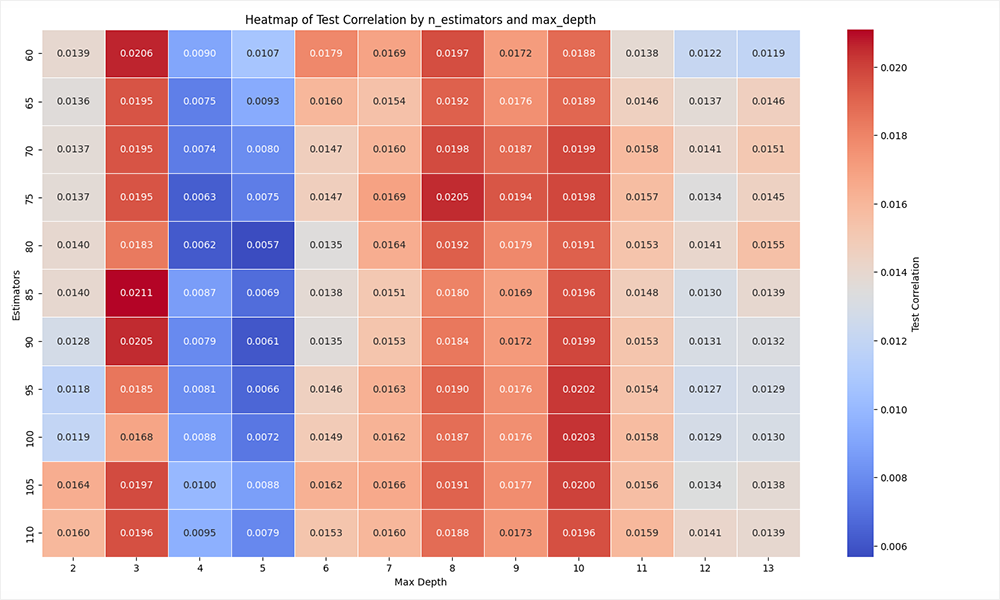
An important point emerges here: the model does not create a signal out of nothing. It only aggregates the weak dependencies found earlier. If there was not even a hint of structure at the analysis stage, no model will save the situation. But if there is a signal, even if it is weak, the ensemble is able to amplify it and make it suitable for practical use.
On the graph of the first iteration of hyperparameter selection, the region with max_depth = 10 is clearly visible. This value demonstrates the most stable balance between the model's ability to capture dependencies and control overfitting. In fact, this is where the operation mode is achieved when the model is no longer primitive, but does not yet begin to fit noise.
Then the logic develops naturally. After defining max_depth, we move on to the second stage — setting up the tree structure via max_leaf_nodes. In parallel, we narrow the range by the number of trees (n_estimators), leaving only the area where stable results were previously observed. This allows us to increase the search resolution: the search step is reduced, and attention is concentrated on the truly significant area of parameters.
This approach is reminiscent of the classical local optimization procedure. First, a rough area of the maximum is determined, then a neat one fine-tuning inside it. As a result, we avoid wasting computing resources on obviously weak configurations and quickly reach a stable combination of parameters.
The changes in the code are of a targeted nature: the range of the search is specified and the second parameter is changed. The script architecture remains the same.
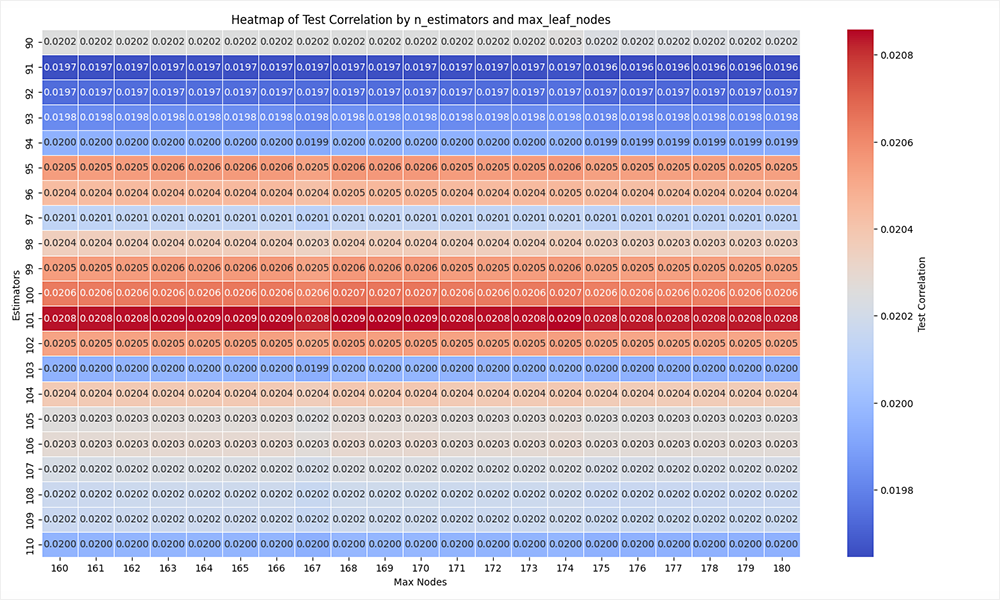
After selection, we fix the optimal hyperparameters and proceed to the final training of the model. Structurally, nothing changes: the iteration loops are removed from the script and parameter values are specified directly when initializing RandomForestRegressor. All other logic — data preparation, sample splitting, training, and basic validation — remains unchanged.
Next, a more subtle but fundamental point appears. The model is not equally confident across its forecasts. In some cases it gives a strong signal, in others the values are close to zero and are actually in the zone of uncertainty. If all forecasts are treated equally, the strategy inevitably begins to trade noise.
This leads to a natural hypothesis: ignore weak signals and work only where the model demonstrates sufficient confidence or the expected movement covers the costs. This is already a transition from the function model to the trading filter model.
The code implements this idea neatly and without unnecessary complexity. Based on the training sample, threshold values of absolute forecasts are calculated.
# ===== 5) Simple PnL prototype =====
# Calculate strategy metrics for a vector of thresholds without an explicit loop
percentiles = np.arange(10, 100, 5)
thresholds = np.percentile(np.abs(pred_train), percentiles)
This is an important point: thresholds are determined on train and are applied to test, which maintains the validity of the experiment.
Next, a matrix of forecasts and corresponding thresholds is formed. For each level, a mask is calculated - which signals pass the filter. The position is determined by the sign of the forecast taking into account the general correlation, which allows the direction of trading to be consistent with the nature of the model.
# Build a matrix where each column repeats the test predictions
pred_matrix = np.tile(pred_test[:, None], (1, thresholds.size))
threshold_matrix = thresholds[None, :]

# Generate a mask per threshold and compute sign positions
mask = np.abs(pred_matrix) >= threshold_matrix
position = np.sign(pred_matrix) * np.sign(pt_corr) * mask.astype(float)
After this, the profitability is formed as the product of the position and the actual movement. Fixed costs (spread/commission) are subtracted and the cumulative capital curve is constructed.
# Broadcast y_check to match the threshold matrix shape
y_check_matrix = np.tile(y_check.values[:, None], (1, thresholds.size))
# Subtracting swap cost from the target to get a more realistic PnL estimate
strategy_ret = position * y_check_matrix - np.abs(position)*(0.00021)

# Compute equity curves for each threshold column
equity = np.cumsum(strategy_ret, axis=0)
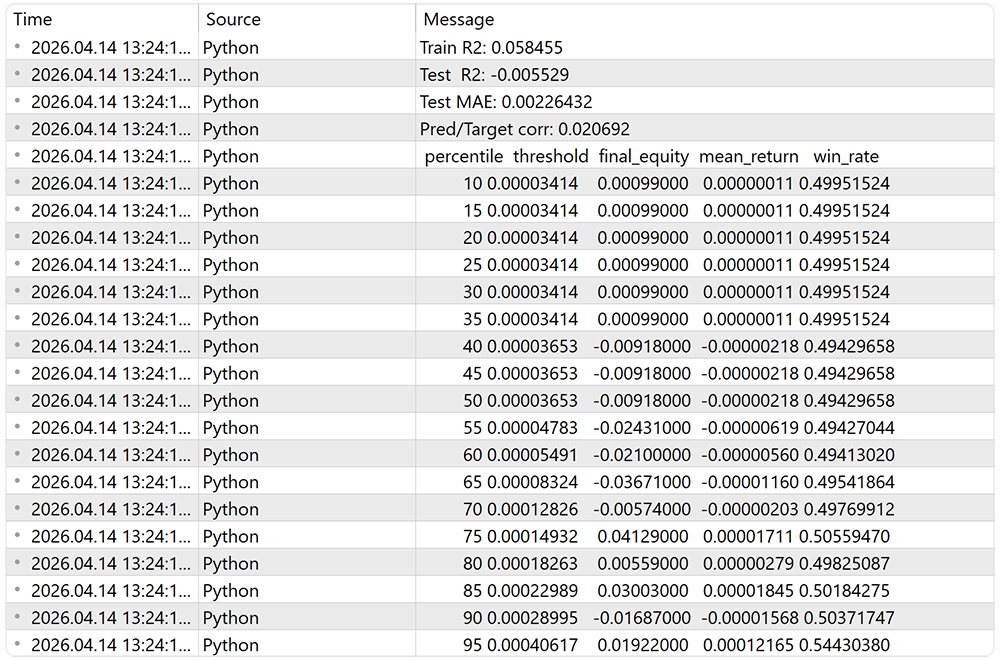
The results are aggregated into a table:
- final_equity — final profitability;
- mean_return — average trade result;
- win_rate — share of profitable entries.
# Aggregate results into a DataFrame
results = pd.DataFrame({
    'percentile': percentiles,
    'threshold': thresholds,
    'final_equity': equity[-1, :],
    'mean_return': np.sum(strategy_ret, axis=0)/(np.sum(strategy_ret != 0, axis=0)+1e-9),
    'win_rate': np.sum(strategy_ret > 0, axis=0)/(np.sum(strategy_ret != 0, axis=0)+1e-9)
})

print(results.to_string(index=False, float_format='%.8f'))
From a practical point of view, this is no longer just an assessment of a model, but the beginnings of a trading system. We not only check the forecast accuracy, but also immediately assess how it is monetized at different sorting levels.
5. Transformation to ONNX
We have trained the model. The next logical step is to remove the person from the decision-making loop. Manual trading based on model signals is almost always inferior to automated trading: there is no continuity, reaction speed is lost, and the psychological factor is added. In real work, this turns into systemic distortions - missed entries, premature exits, distrust of one's own model.
The MetaTrader 5 platform offers two automation paths. The first one is launching the Python script with direct execution of trades. The second one is transferring the model into the ONNX format with subsequent use in the MQL5 EA. In practice, the second option appears more mature.
The ONNX format solves several problems at once. The model is fixed in a compact and independent form. It can be easily transferred between computers – all you need is the terminal itself. It becomes possible to perform full-fledged testing in the strategy tester. And there is no loss of performance: the terminal supports hardware acceleration, including working with GPU (CUDA), which is especially important when using ensemble models.
The conversion is fairly straightforward. First, the input of the model is described — the dimension of the feature space.
# Number of features used for model input
n_features = X_train.shape[1]

# Describe the model input shape for ONNX conversion
initial_type = [("float_input", FloatTensorType([None, n_features]))]
Next, the trained model from Scikit-Learn is transformed into ONNX via the appropriate converter and saved to disk.
# Convert the trained sklearn model to ONNX format
onnx_model = convert_sklearn(model, initial_types=initial_type)

# Save the ONNX model to disk
with open(onnx_model_path, "wb") as f:
    f.write(onnx_model.SerializeToString())
This is followed by the mandatory validation stage. The model is loaded via ONNX Runtime, and the same data are used to calculate predicted values.
# Load the ONNX model for inference
sess = rt.InferenceSession(onnx_model_path)

input_name = sess.get_inputs()[0].name

# ONNX runtime expects float32 input arrays
X_test_np = X_test.astype(np.float32).values

onnx_preds = sess.run(None, {
    input_name: X_test_np
})[0].ravel()
They are then compared with the original results of the Sklearn model.
# Compare ONNX predictions with sklearn predictions
sk_preds = model.predict(X_test)

print("Correlation:", np.corrcoef(sk_preds, onnx_preds)[0, 1])
print("Max diff:", np.max(np.abs(sk_preds - onnx_preds)))
There are two key criteria here:
- the correlation between forecasts should tend to 1;
- the maximum discrepancy is to be negligible.
If these conditions are met, we can assume that the transfer was successful and the model is ready for integration into the trading system.
From a practical point of view, this is the final transition from the Python research environment to practical use. The model ceases to be an experiment and becomes part of the infrastructure – autonomous, reproducible, and suitable for testing and real trading.
6. Testing in the strategy tester
After completing the work on Python side, the logic is transferred to the MetaTrader 5 runtime environment. Here the model ceases to be a research tool and becomes part of a trading algorithm. It is important that the code structure follows the already familiar flow of operations: initialization → data preparation → forecast → trading decision.
Initialization is performed in the OnInit method. At this stage, the ONNX model from the resource is loaded and the runtime environment is created via OnnxCreateFromBuffer.
int OnInit()
  {
//---
   if(!Symb.Name("EURUSD_i"))
      return INIT_FAILED;
   Symb.Refresh();
//---
   if(!Trade.SetTypeFillingBySymbol(Symb.Name()))
      return INIT_FAILED;
//--- load models
   onnx = OnnxCreateFromBuffer(model, ONNX_DEFAULT);
   if(onnx == INVALID_HANDLE)
     {
      Print("OnnxCreateFromBuffer error ", GetLastError());
      return INIT_FAILED;
     }
   const ulong input_state[] = {1, Inputs.Size()};
   if(!OnnxSetInputShape(onnx, 0, input_state))
     {
      Print("OnnxSetInputShape error ", GetLastError());
      OnnxRelease(onnx);
      return INIT_FAILED;
     }
   const ulong output_forecast[] = {1, Forecast.Size()};
   if(!OnnxSetOutputShape(onnx, 0, output_forecast))
     {
      Print("OnnxSetOutputShape error ", GetLastError());
      OnnxRelease(onnx);
      return INIT_FAILED;
     }
Next, the input and output shapes are explicitly set — this is critical, since the model expects a strictly fixed number of features. An error at this stage will result in incorrect inference.
SMA indicator and MACD set with the same parameters that were used during training are initialized in parallel.
//--- Indicators
   if(!ciSMA.Create(Symb.Name(), TimeFrame, 12, 0, MODE_SMA, PRICE_CLOSE))
     {
      Print("SMA create error ", GetLastError());
      OnnxRelease(onnx);
      return INIT_FAILED;
     }
   ciSMA.BufferResize(2);
   for(uint i = 0; i < ciMACD.Size(); i++)
     {
      if(!ciMACD[i].Create(Symb.Name(), TimeFrame, int(macd_set[i, 0]),
                int(macd_set[i, 1]), int(macd_set[i, 2]), PRICE_CLOSE))
        {
         PrintFormat("MACD %d create error %d", i, GetLastError());
         OnnxRelease(onnx);
         return INIT_FAILED;
        }
      ciMACD[i].BufferResize(4);
     }
//---
   return(INIT_SUCCEEDED);
  }
This is a fundamental point: the features in MQL5 should be identical to the ones that were fed into the model during training. Any discrepancy destroys the predictive ability.
The main logic is concentrated in the OnTick method, but with the IsNewBar filter for the new bar opening event. This prevents the model from being recalculated on every tick and synchronizes calculations with the timeframe.
void OnTick()
  {
//---
   if(!IsNewBar())
      return;
Next comes the block for accounting of current positions - a simple aggregation of volumes and profits by direction. This is necessary to control already open trades.
   double buy_value = 0, sell_value = 0, buy_profit = 0, sell_profit = 0;
   int total = PositionsTotal();
   for(int i = 0; i < total; i++)
     {
      if(PositionGetSymbol(i) != Symb.Name())
         continue;
      double profit = PositionGetDouble(POSITION_PROFIT);
      switch((int)PositionGetInteger(POSITION_TYPE))
        {
         case POSITION_TYPE_BUY:
            buy_value += PositionGetDouble(POSITION_VOLUME);
            buy_profit += profit;
            break;
         case POSITION_TYPE_SELL:
            sell_value += PositionGetDouble(POSITION_VOLUME);
            sell_profit += profit;
            break;
        }
     }
The Inputs initial data vector is formed afterwards. Essentially, Feature Engineering from Python is reproduced manually here:
- basic features;
//--- prepare input data
   ciSMA.Refresh();
   for(uint i = 0; i < ciMACD.Size(); i++)
      ciMACD[i].Refresh();
   if(!Rates.CopyRates(Symb.Name(), TimeFrame, COPY_RATES_CLOSE, 1, 12))
     {
      Print("CopyRates error ", GetLastError());
      return;
     }
   Inputs[0] = float(Rates[11] - Rates[10]);
   Inputs[1] = float(Rates[11] - Rates[0]) / 11;
   Inputs[2] = float(Inputs[1] - Inputs[0]);
Inputs[3] = float(ciSMA.Main(1));
   for(uint i = 0; i < ciMACD.Size(); i++)
     {
      Inputs[4 + i * 6] = float(ciMACD[i].Main(1));
      Inputs[5 + i * 6] = float(Inputs[4 + i * 6] - ciMACD[i].Main(2));
      Inputs[6 + i * 6] = float(ciMACD[i].Signal(1));
      Inputs[7 + i * 6] = float(Inputs[6 + i * 6] - ciMACD[i].Signal(2));
      Inputs[8 + i * 6] = Inputs[6 + i * 6] - Inputs[4 + i * 6];
      Inputs[9 + i * 6] = Inputs[7 + i * 6] - Inputs[5 + i * 6];
     }
Please note the indexing: each feature occupies a strictly defined place. This is a contract between model and execution. If the order is violated, the model starts operating on distorted inputs.
After preparing the features, OnnxRun is called.
//--- run the inference
   if(!OnnxRun(onnx, ONNX_LOGLEVEL_INFO, Inputs, Forecast))
     {
      Print("OnnxRun error ", GetLastError());
      return;
     }
The output is a forecast — the expected price movement. Next comes the practical part – signal interpretation.
The code uses simple but efficient logic:
- A threshold value is introduced to cut off weak signals. We take it from the training outcomes.
- The direction of correlation is taken into account, allowing the model to be inverted if necessary.
- If the forecast exceeds the threshold, a position is opened. If the signal disappears, the position is closed.
   Symb.Refresh();
   Symb.RefreshRates();
   double min_lot = Symb.LotsMin();
   double step_lot = Symb.LotsStep();
   double stops = (MathMax(Symb.StopsLevel(), 1) + Symb.Spread()) * Symb.Point();
//--- buy control
   if(Forecast[0]*direction >= threshold)
     {
      double buy_lot = min_lot;
      if(buy_value <= 0)
         Trade.Buy(buy_lot, Symb.Name(), Symb.Ask(), 0, 0);
     }
   else
     {
      if(buy_value > 0)
         CloseByDirection(POSITION_TYPE_BUY);
     }
//--- sell control
   if(Forecast[0]*direction <= -threshold)
     {
      double sell_lot = min_lot;
      if(sell_value <= 0)
         Trade.Sell(sell_lot, Symb.Name(), Symb.Bid(), 0, 0);
     }
   else
     {
      if(sell_value > 0)
         CloseByDirection(POSITION_TYPE_SELL);
     }
  }
Thus, the model is used as a directional motion filter. This is an important distinction: we do not trade every predicted value, but only those that pass the signal strength.
The resulting EA then undergoes a key check - testing in the MetaTrader 5 strategy tester on historical data for the first quarter of 2026. This is no longer an abstract assessment of the model, but an implementation scenario close to reality.
This testing format is fundamentally important. While at Python stage we evaluated the model through metrics, here the entire system is tested — from feature generation to the logic of opening and closing positions. In fact, the strategy takes its first exam in conditions resembling real ones to the closest possible extent.
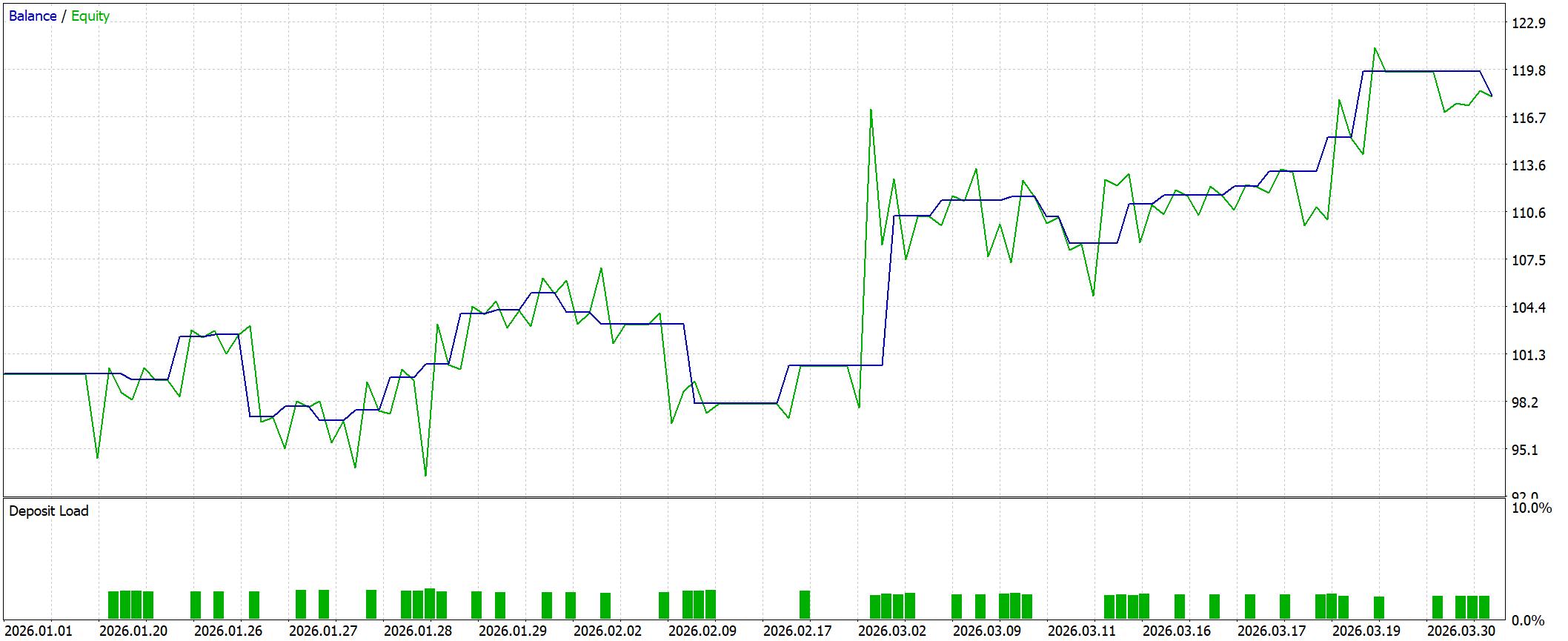
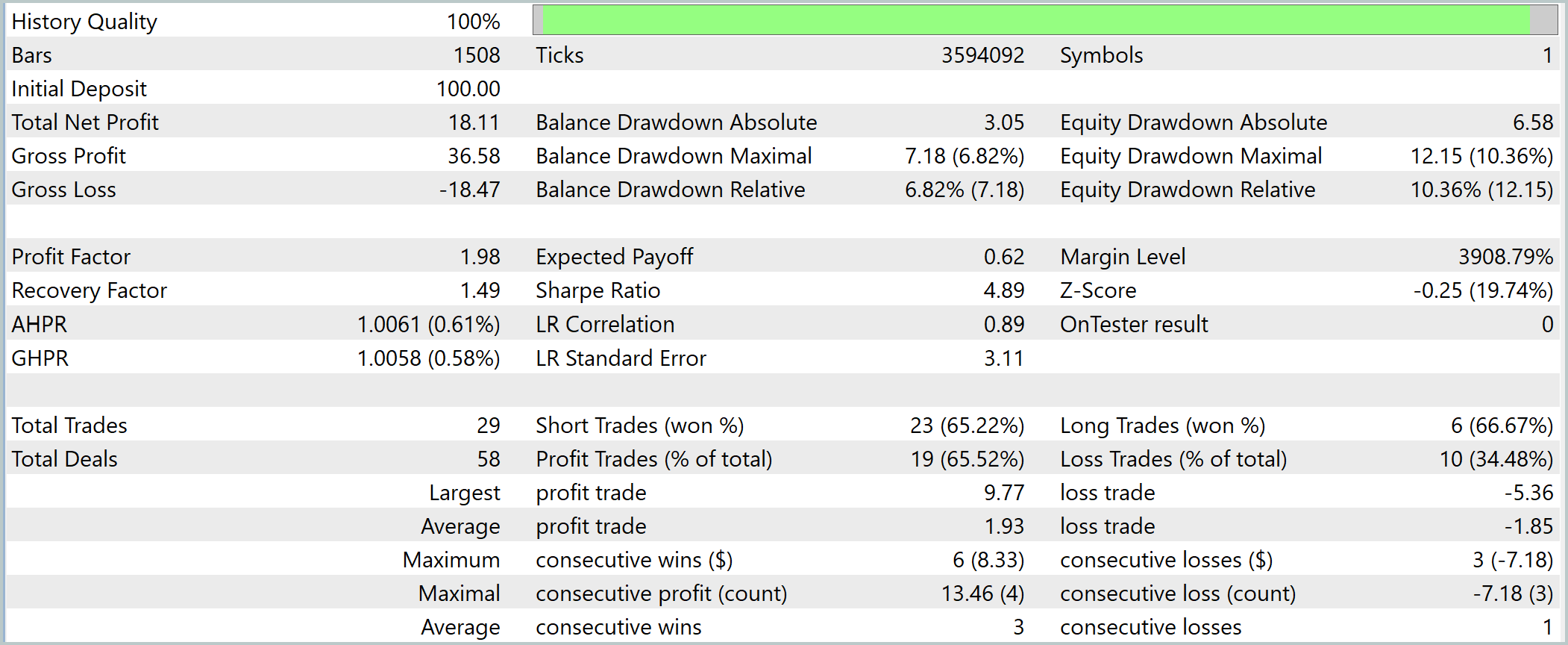
The test phase completes the development loop: from hypothesis and data analysis to a model, then to automation and verification on historical data. This is where it becomes clear whether weak statistical relationships have been successfully transformed into a practical trading tool.
However, integration of the ONNX model into an EA is not the only use case. For manual trading fans, MetaTrader 5 provides the ability to embed a model directly into a custom indicator. In this case, the model does not make decisions for the trader, but acts as an analytical tool, generating signals that the user interprets independently.
From an engineering point of view, there are practically no differences. ONNX model connection mechanics, preparing initial data and inference calling are completely identical to the implementation in the EA. Only the point of application changes: instead of automatically opening positions, the model result is visualized on a chart or used as an additional filter when making decisions.
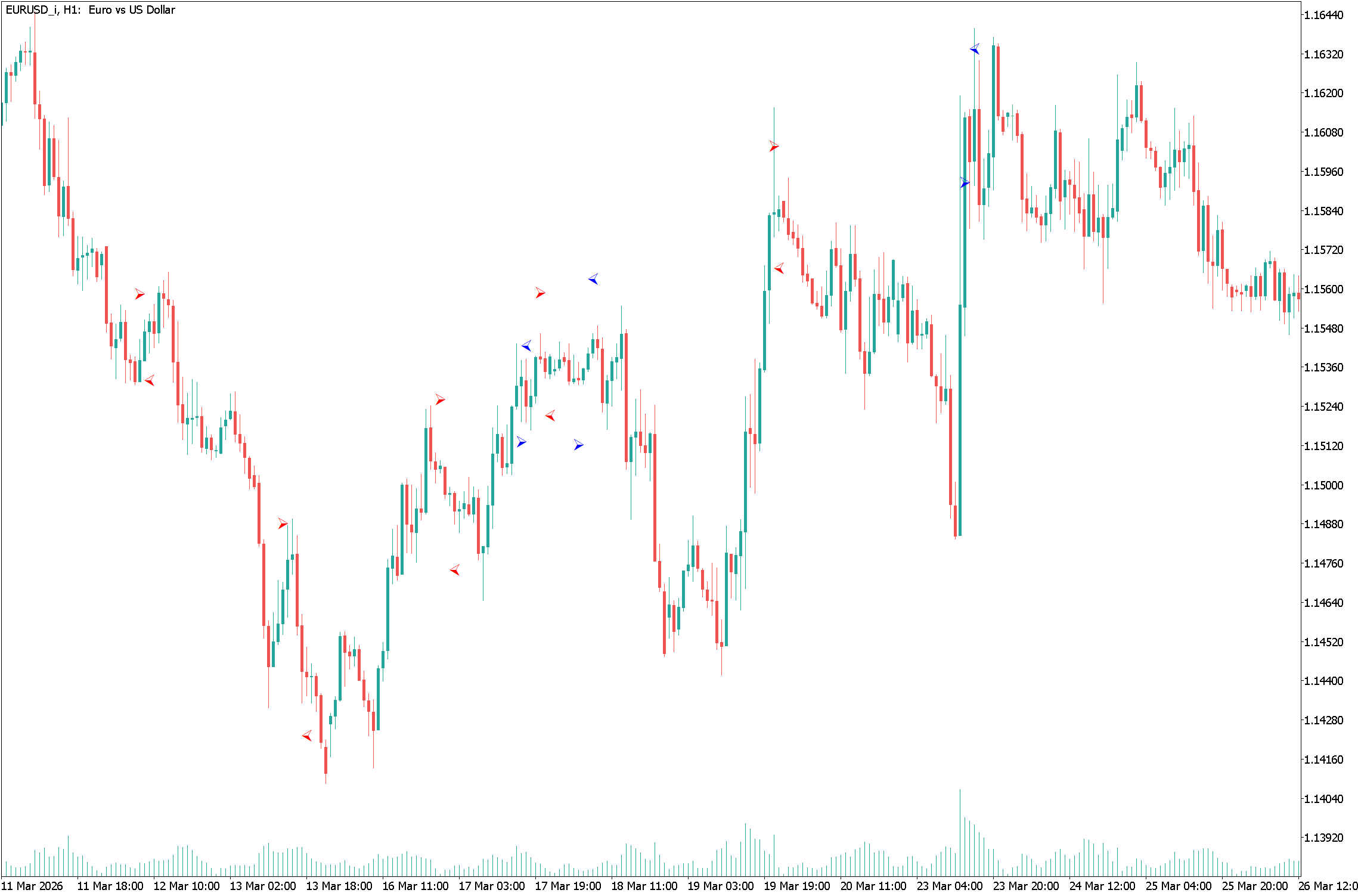
This approach has its advantages. It allows for flexible combination of model signals with classical analysis and reduces the requirements for algorithm reliability — the model becomes an assistant, not the sole source of solutions.
Conclusion
Integrating Python and MetaTrader 5 creates a complete, engineering-tested framework for developing trading solutions — from concept to practical implementation. In this article, we have walked this path sequentially: from data acquisition and analysis, through hypothesis testing and model construction, to its implementation and testing in a real-world execution environment.
The key advantage of this approach is the separation of roles. Python takes on the research part: data processing, feature generation, statistical analysis and model training. MetaTrader 5, in turn, provides execution: access to market data, strategy testing and trading infrastructure. This is a classic combination of lab — production circuit , where each environment is used for its intended purpose.
The use of the ONNX format provides additional value. The model becomes portable, independent of the development environment and ready to be run on any device with an installed terminal. This simplifies scaling, speeds up testing, and reduces the risks associated with incompatibility between environments.
Programs used in the article
| # | Name | Type | Description |
|---|---|---|---|
| 1 | Experts\Integration\Integration.mq5 | Expert Advisor | EA for testing the model in the terminal |
| 2 | Indicators\Integration\Integration.mq5 | Indicator | Indicator for displaying signals on a chart |
| 3 | Scripts\Integration\load_data.py | Script | Data loading script |
| 4 | Scripts\Integration\look_model_param_rf.py | Script | Hyperparameter enumeration script |
| 5 | Scripts\Integration\create_model_rf.py | Script | Script for training the model and exporting it to ONNX |
Translated from Russian by MetaQuotes Ltd.
Original article: https://www.mql5.com/ru/articles/22020
Warning: All rights to these materials are reserved by MetaQuotes Ltd. Copying or reprinting of these materials in whole or in part is prohibited.

 Algorithmic Trading Without the Routine: Quick Trade Analysis in MetaTrader 5 with SQLite
 Stress Testing Trade Sequences with Monte Carlo in MQL5
 From CPU to GPU in MQL5: A Practical OpenCL Framework for Accelerating Research, Optimizations, and Patterns
 CFTC Data Mining in Python and Building an AI Model

- Free trading apps
- Over 8,000 signals for copying
- Economic news for exploring financial markets
You agree to website policy and terms of use
In the script file load_data.py, which is in the archive, there are such lines:
then as in the article itself:
A small thing, but I did not immediately see it when testing.....
Then I had to give up python version 3.14.3. I work with python in VS. Debugging can be done there only in 3.11.