

Developing a multi-currency Expert Advisor (Part 20): Putting in order the conveyor of automatic project optimization stages (I)
 3 288
3 288
 8
8

Introduction
In this series of articles, we are trying to create an automatic optimization system that allows finding good combinations of parameters of one trading strategy without human intervention. These combinations will then be combined into one final EA. The objective is set in more detail in part 9 and part 11. The process of such a search itself will be controlled by one EA (optimizing EA), and all data that will need to be saved during its operation is set in the main database.
In the database, we have tables to store information about several classes of objects. Some have a status field that can take values from a fixed set of values ("Queued", "Process", "Done"), but not all classes use this field. More precisely, for now it is used only for optimization tasks (task). Our optimizing EA searches the task table (tasks) for the Queued tasks to select the next task to run. After each task is completed, its status in the database changes to Completed.
Let's try to implement status auto updates not only for tasks, but also for all other classes of objects (jobs, stages, projects) and arrange automatic execution of all necessary stages up to obtaining the final EA, which can work independently without connecting to the database.
Mapping out the path
First of all, we will take a close look at all classes of objects in the database that have a status, and formulate clear rules for changing the status. If this can be done, then we can implement these rules as calls to additional SQL queries either from the optimizing EA or from the stage EAs. Or it might be possible to implement them as triggers in the database that are activated when certain data change events occur.
Next, we need to agree on a method for determining the order, in which tasks are completed. This was not much of an issue before, since during the development we trained each time on a new database, and added project stages, work and tasks exactly in the order in which they had to be completed. But when moving to storing information on multiple projects in the database, or even automatically adding new projects, it will no longer be possible to rely on this method of determining the order of priority of tasks. So let's spend some time on this issue.
To test the operation of the entire conveyor, where all the tasks of the auto optimization project will be executed in turn, we need to automate a few more actions. Before this, we performed them manually. For example, after completing the second stage of optimization, we have the opportunity to select the best groups for use in the final EA. We performed this operation by running the third stage EA manually, that is, outside the auto optimization conveyor. To set the launch parameters for this EA, we also manually selected the IDs of the second stage passes with the best results using a third-party database access interface in relation to MQL5. We will try to do something about this as well.
So after the changes made, we expect to finally make a fully finished conveyor for performing auto optimization stages to obtain the final EA. Along the way, we will consider some other issues related to increasing the work efficiency. For example, it seems that the second and subsequent stages of the EAs will be the same for different trading strategies. Let's check if this is true. We will also see what is more convenient - to create different smaller projects or to create a larger number of stages or works in a larger project.
Rules for changing statuses
Let's start by formulating the rules for changing statuses. As you might remember, our database contains information about the following objects that have a status field (status):
- Project. Combines one or more stages stored in the projects table;
- Stage. Combines one or more jobs, stored in the stages table;
- Job. Combines one or more tasks, stored in the jobs table;
- Task. Typically combines multiple test passes, stored in the tasks table.
The possible status values are the same for each of these four object classes, and can be one of the following:
- Queued. The object has been queued for processing;
- Process. The object is being processed;
- Done. Object handling has been completed or has not been started.
Let us describe the rules for changing the statuses of objects in the database in accordance with the normal cycle of the project auto optimization conveyor. The cycle begins when a project is queued for optimization, i.e. it is assigned the Queued status.
When a project status changes to Queued:
- set the status of all stages of this project to Queued.
When a stage status changes to Queued:
- set the status of all jobs in this stage to Queued.
When the job status changes to Queued:
- set the status of all tasks of this job to Queued.
When the task status changes to Queued:
- clear the start and end dates.
Thus, changing the project status to Queued will lead to a cascading update of the statuses of all stages, works and tasks of this project to Queued. All these objects will be in this status until the Optimization.ex5 EA is launched.
After the launch, at least one task in the Queued status must be found. Later, we will consider sorting order with multiple tasks. The task status changes to Process. This causes the following actions:
When the task status changes to Process:
- set the start date equal to the current time;
- delete all passes previously performed within the task framework;
- set the job status, associated with this task, to Process.
When the job status changes to Process:
- set the status of the stage, associated with this job, to Process.
When a stage status changes to Process:
- set the status of the project, associated with this stage, to Process.
After this, tasks will be carried out sequentially within the framework of the project stages. Further status changes can only occur after the completion of the next task. At this point, the task status changes to Done and may cause this status to be cascaded to higher-level objects.
When the task status changes to Done:
- set the end date equal to the current time;
- we get a list of all Queued tasks that are part of the job, within which this task is performed. If there are none, then we set the status of the job associated with this task to Done.
When the job status changes to Done:
- get a list of all the Queued jobs that are part of the stage, within which this job is being performed. If there are none, then we set the status of the stage associated with this work to Done.
When a stage status changes to Done:
- we get a list of all Queued stages included in the project, within which this stage is being performed. If there are none, then we set the status of the project associated with this stage to Done.
Thus, when the last task of the last job of the last stage is completed, the project itself will move to the completed state.
Now that all the rules are formulated, we can move on to creating triggers in the database that implement these actions.
Creating triggers
Let's start with the trigger for handling the change of the project status to Queued. Here is one possible way to implement it:
CREATE TRIGGER upd_project_status_queued
         AFTER UPDATE OF status
            ON projects
          WHEN NEW.status = 'Queued'
BEGIN
    UPDATE stages
       SET status = 'Queued'
     WHERE id_project = NEW.id_project;
END;
After its completion, the statuses for the project stages will also be changed to Queued. Thus, we should launch the corresponding triggers for stages, jobs and tasks:
CREATE TRIGGER upd_stage_status_queued
         AFTER UPDATE
            ON stages
          WHEN NEW.status = 'Queued' AND
               OLD.status <> NEW.status
BEGIN
    UPDATE jobs
       SET status = 'Queued'
     WHERE id_stage = NEW.id_stage;
END;

CREATE TRIGGER upd_job_status_queued
         AFTER UPDATE OF status
            ON jobs
          WHEN NEW.status = 'Queued'
BEGIN
    UPDATE tasks
       SET status = 'Queued'
     WHERE id_job = NEW.id_job;
END;

CREATE TRIGGER upd_task_status_queued
         AFTER UPDATE OF status
            ON tasks
          WHEN NEW.status = 'Queued'
BEGIN
    UPDATE tasks
       SET start_date = NULL,
           finish_date = NULL
     WHERE id_task = NEW.id_task;
END;
The task launch will be handled by the following trigger, which sets the task start date, clears the pass data from the previous launch of the task, and updates the job status to Process:
CREATE TRIGGER upd_task_status_process
         AFTER UPDATE OF status
            ON tasks
          WHEN NEW.status = 'Process'
BEGIN
    UPDATE tasks
       SET start_date = DATETIME('NOW')
     WHERE id_task = NEW.id_task;
    DELETE FROM passes
          WHERE id_task = NEW.id_task;
    UPDATE jobs
       SET status = 'Process'
     WHERE id_job = NEW.id_job;
END;
Next, the stage and project statuses, within which this job is being performed, are cascaded to Process:
CREATE TRIGGER upd_job_status_process
         AFTER UPDATE OF status
            ON jobs
          WHEN NEW.status = 'Process'
BEGIN
    UPDATE stages
       SET status = 'Process'
     WHERE id_stage = NEW.id_stage;
END;

CREATE TRIGGER upd_stage_status_process
         AFTER UPDATE OF status
            ON stages
          WHEN NEW.status = 'Process'
BEGIN
    UPDATE projects
       SET status = 'Process'
     WHERE id_project = NEW.id_project;
END;
In the trigger that is activated when the task status is updated to Done, that is, when the task is completed, we update the task completion date and then (depending on the presence or absence of other tasks in the queue for execution within the current task job) we will update the job status to either Process or Done:
CREATE TRIGGER upd_task_status_done
         AFTER UPDATE OF status
            ON tasks
          WHEN NEW.status = 'Done'
BEGIN
    UPDATE tasks
       SET finish_date = DATETIME('NOW')
     WHERE id_task = NEW.id_task;
    UPDATE jobs
       SET status = (
               SELECT CASE WHEN (
                                    SELECT COUNT( * )
                                      FROM tasks t
                                     WHERE t.status = 'Queued' AND
                                           t.id_job = NEW.id_job
                                )
=                         0 THEN 'Done' ELSE 'Process' END
           )
     WHERE id_job = NEW.id_job;
END;
Let's do the same with the stage and project statuses:
CREATE TRIGGER upd_job_status_done
         AFTER UPDATE OF status
            ON jobs
          WHEN NEW.status = 'Done'
BEGIN
    UPDATE stages
       SET status = (
               SELECT CASE WHEN (
                                    SELECT COUNT( * )
                                      FROM jobs j
                                     WHERE j.status = 'Queued' AND
                                           j.id_stage = NEW.id_stage
                                )
=                         0 THEN 'Done' ELSE 'Process' END
           )
     WHERE id_stage = NEW.id_stage;
END;

CREATE TRIGGER upd_stage_status_done
         AFTER UPDATE OF status
            ON stages
          WHEN NEW.status = 'Done'
BEGIN
    UPDATE projects
       SET status = (
               SELECT CASE WHEN (
                                    SELECT COUNT( * )
                                      FROM stages s
                                     WHERE s.status = 'Queued' AND
                                           s.name <> 'Single tester pass' AND
                                           s.id_project = NEW.id_project
                                )
=                         0 THEN 'Done' ELSE 'Process' END
           )
     WHERE id_project = NEW.id_project;
END;
We will also provide the ability to transfer all project objects to the Done state when setting this status to the project itself. We did not include this scenario in the list of rules above, since it is not a mandatory action in the normal course of auto optimization. In this trigger, we set the status of all unexecuted or ongoing tasks to Done, which will result in setting the same status for all project jobs and stages:
CREATE TRIGGER upd_project_status_done
         AFTER UPDATE OF status
            ON projects
          WHEN NEW.status = 'Done'
BEGIN
    UPDATE tasks
       SET status = 'Done'
     WHERE id_task IN (
        SELECT t.id_task
          FROM tasks t
               JOIN
               jobs j ON j.id_job = t.id_job
               JOIN
               stages s ON s.id_stage = j.id_stage
               JOIN
               projects p ON p.id_project = s.id_project
         WHERE p.id_project = NEW.id_project AND
               t.status <> 'Done'
    );
END;
Once all these triggers are created, let's figure out how to determine the task execution order.
Conveyor
So far we have only worked with one project in the database, so let's start by looking at the rules for determining the order of tasks for this case. Once we have an understanding of how to determine the order of tasks for one project, we can think about the order of tasks for several projects launched simultaneously.
Obviously, optimization tasks related to the same job and differing only in the optimization criterion can be performed in any order: sequential launch of genetic optimization on different criteria does not use information from previous optimizations. Different optimization criteria are used to increase the diversity of good parameter combinations found. It has been observed that genetic optimizations with the same ranges of tried inputs, albeit with different criteria, converge to different combinations.
Therefore, there is no need to add any sorting field to the task table. We can use the order, in which the tasks of one job were added to the database, that is, sort them by id_task.
If there is only one task within one job, then the order of execution will depend on the execution order of the jobs. The jobs were conceived to group or, more precisely, divide tasks into different combinations of symbols and timeframes. If we consider an example that we have three symbols (EURGBP, EURUSD, GBPUSD) and two timeframes (H1, M30) and two stages (Stage1, Stage2), then we can choose two possible orders:
- Grouping by symbol and timeframe:
- EURGBP H1 Stage1
- EURGBP H1 Stage2
- EURGBP M30 Stage1
- EURGBP M30 Stage2
- EURUSD H1 Stage1
- EURUSD H1 Stage2
- EURUSD M30 Stage1
- EURUSD M30 Stage2
- GBPUSD H1 Stage1
- GBPUSD H1 Stage2
- GBPUSD M30 Stage1
- GBPUSD M30 Stage2
- Grouping by stage:
- Stage1 EURGBP H1
- Stage1 EURGBP M30
- Stage1 EURUSD H1
- Stage1 EURUSD M30
- Stage1 GBPUSD H1
- Stage1 GBPUSD M30
- Stage2 EURGBP H1
- Stage2 EURGBP M30
- Stage2 EURUSD H1
- Stage2 EURUSD M30
- Stage2 GBPUSD H1
- Stage2 GBPUSD M30
With the first method of grouping (by symbol and timeframe), after each completion of the second stage, we will be able to receive something ready, that is, the final EA. It will include sets of single copies of trading strategies for those symbols and timeframes that have already passed both stages of optimization.
With the second method of grouping (by stage), the final EA will not be able to appear until all the work of the first stage and at least one work of the second stage are completed.
For jobs that only use the results of the previous steps for the same symbol and timeframe, there will be no difference between the two methods. But if we look a little ahead, there will be another stage where the results of the second stages for different symbols and timeframes will be combined. We have not reached its implementation as an automatic optimization stage yet, but we have already prepared a stage EA for it and even launched it, albeit manually. For this stage, the first grouping method is not suitable, so we will use the second one.
It is worth noting that if we still want to use the first method, then perhaps it will be enough for us to create several projects for each combination of symbol and timeframe. But for now the benefits seem unclear.
So, if we have several jobs within one stage, then the order of their execution can be any, and for jobs of different stages, the order will be determined by the order of priority of the stages. In other words, as is the case with tasks, there is no need to add any sorting field to the jobs table. We can use the order, in which the jobs of one stage were added to the database, that is, sort them by id_job.
To determine the order of stages, we can also use the data already available in the table of stages (stages). I have added the parent stage field to this table (id_parent_stage) at the very beginning, but it has not been used yet. Indeed, when we have only two rows in the table for two stages, there is no difficulty in creating them in the right order - first a row for the first stage, and then for the second. When there are more of them, and stages for other projects appear, it becomes more difficult to manually maintain the correct order.
So let's take the opportunity to build a hierarchy of executing stages, where each stage is executed after its parent stage completes. At least one stage should not have a parent in order to occupy the top position in the hierarchy. Let's write a test SQL query that will combine data from the tasks, jobs and stages tables and show all tasks of the current stage. We will add all the fields to the list of columns of this query so that we can see the most complete information.
SELECT t.id_task,
       t.optimization_criterion,
       t.status AS task_status,
       j.id_job,
       j.symbol AS job_symbol,
       j.period AS job_period,
       j.tester_inputs AS job_tester_inputs,
       j.status AS job_status,
       s.id_stage,
       s.name AS stage,
       s.expert AS stage_expert,
       s.status AS stage_status,
       ps.name AS parent_stage,
       ps.status AS parent_stage_status,
       p.id_project,
       p.status AS project_status
  FROM tasks t
       JOIN
       jobs j ON j.id_job = t.id_job
       JOIN
       stages s ON s.id_stage = j.id_stage
       LEFT JOIN
       stages ps ON ps.id_stage = s.id_parent_stage
       JOIN
       projects p ON p.id_project = s.id_project
 WHERE t.id_task > 0 AND
       t.status IN ('Queued', 'Process') AND
       (ps.id_stage IS NULL OR
        ps.status = 'Done')
 ORDER BY j.id_stage,
          j.symbol,
          j.period,
          t.status,
          t.id_task;

Figure 1. Results of a query to get tasks of the current stage after starting one task
Later on, we will reduce the number of columns displayed when we use a similar query to find another task. In the meantime, let's make sure that we correctly receive the next stage (along with its jobs and tasks). The results shown in Figure 1 correspond to the time when the task with id_task=3 was started. This is the task belonging to id_job=10, which is part of id_stage=10. This stage is called "First", belongs to the project with id_project=1 and has no parent stage (parent_stage=NULL). We can see that having one running task leads to the Process status appearing for both the job and the project, within which this job is being performed. But the other job with id_job=5 still has the Queued status, since none of the job task have been started yet.
Let's now try to complete the first task (by simply setting the status field in the table to Done) and look at the results of the same query:

Fig. 2. Results of a query to get tasks of the current stage after the completion of a running task
As you can see, the completed task has disappeared from this list, and the top line is now occupied by another task, which can be launched next. So far everything is correct. Now let's launch and complete the top two tasks from this list, and launch the third task with id_task=7 for execution:

Fig. 3. Results of a query to get tasks of the current stage after completing the tasks of the first job and starting the next task
Now the job with id_job=5 has received the Process status. Next, we will run and complete the three tasks that are now shown in the results of the last query. They will disappear from the query results one by one. After the last one is completed, run the query again and get the following:

Fig. 4. Results of a query to get tasks of the current stage after all tasks of the first stage are completed
Now the query results include tasks from the jobs related to the following stages. id_stage=2 is the clustering of the results of the first stage, while id_stage=3 is the second stage, at which grouping of good examples of trading strategies obtained at the first stage is performed. This stage does not use clustering, so it can be run immediately after the first stage. So, its presence on this list is not a mistake. Both stages have a parent stage named First, which is now in the Done state.
Let's simulate the launch and completion of the first two tasks and look at the query results again:

Fig. 5. Results of a query to get tasks after all clustering stage tasks are completed
The top lines of the results are expectedly occupied by two tasks of the second stage (named "Second"), but the last two lines now contain tasks of the second stage with clustering (named "Second with clustering"). Their appearance is somewhat unexpected, but does not contradict the acceptable order. Indeed, if we have already completed the clustering stage, then we can also launch the stage that will use the clustering results. The two steps shown in the query results are independent of each other, so they can be performed in any order.
Let's run and complete each task again, selecting the top one in the results each time. The list of tasks received after each status change behaved as expected, the statuses of jobs and stages changed correctly. After the last task was completed, the query results were empty, since all assigned tasks of all jobs of all stages were completed, and the project moved to the Done state.
Let's integrate this query into the optimizing EA.
Modification of the optimizing EA
We will need to make changes to the method for getting the ID of the next optimizer task, where there is already an SQL query that performs this task. Let's take the query developed above and remove the extra fields from it, leaving only id_task. We can also replace sorting by a couple of jobs table fields (j.symbol, j.period) with j.id_job, since each job has only one value of these two fields. At the end, we will add a limit on the number of rows returned. We only need to get one line.
Now the GetNextTaskId() method looks like this:
//+------------------------------------------------------------------+
//| Get the ID of the next optimization task from the queue          |
//+------------------------------------------------------------------+
ulong COptimizer::GetNextTaskId() {
// Result
   ulong res = 0;

// Request to get the next optimization task from the queue
   string query = "SELECT t.id_task"
                  "  FROM tasks t "
                  "       JOIN "
                  "       jobs j ON j.id_job = t.id_job "
                  "       JOIN "
                  "       stages s ON s.id_stage = j.id_stage "
                  "       LEFT JOIN "
                  "       stages ps ON ps.id_stage = s.id_parent_stage "
                  "       JOIN "
                  "       projects p ON p.id_project = s.id_project "
                  " WHERE t.id_task > 0 AND "
                  "       t.status IN ('Queued', 'Process') AND "
                  "       (ps.id_stage IS NULL OR "
                  "        ps.status = 'Done') "
                  " ORDER BY j.id_stage, "
                  "          j.id_job, "
                  "          t.status, "
                  "          t.id_task"
                  " LIMIT 1;";

// ... here we get the query result

   return res;
}
Since we have decided to work with this file, let's make another change along the way: remove passing the status via the method parameter from the method for obtaining the number of tasks in the queue. Indeed, we never use this method to get the number of tasks with Queued and Process status, which will then be used individually, not as a sum. Therefore, let;s modify the SQL query in the TotalTasks() method so that it always returns the total number of tasks with these two statuses, and remove the status input of the method:
//+------------------------------------------------------------------+
//| Get the number of tasks with the specified status                |
//+------------------------------------------------------------------+
int COptimizer::TotalTasks() {
// Result
   int res = 0;

// Request to get the number of tasks with the specified status
   string query = "SELECT COUNT(*)"
                  "  FROM tasks t"
                  "       JOIN"
                  "       jobs j ON t.id_job = j.id_job"
                  "       JOIN"
                  "       stages s ON j.id_stage = s.id_stage"
                  " WHERE t.status IN ('Queued', 'Process') "
                  " ORDER BY s.id_stage, j.id_job, t.status LIMIT 1;";

// ... here we get the query result

   return res;
}
Let's save the changes to the Optimizer.mqh file of the current folder.
In addition to these modifications, we will also need to replace the old status name "Processing" with "Process" in several files, since we agreed to use it above.
It would also be useful to provide the ability to obtain some information about errors that may have occurred during the execution of the task that launches the Python program. Now, when such a program terminates abnormally, the optimizing EA simply gets stuck at the stage of waiting for the task to complete, or more precisely, for information about this event to appear in the database. If the program ends with an error, it is unable to update the task status in the database. Therefore, the conveyor will not be able to move further at this stage.
So far, the only way to overcome this obstacle is to manually re-run the Python program with the parameters specified in the task, analyze the causes of errors, eliminate them, and re-run the program.
SimpleVolumesStage3.mq5 modification
Next, we planned to automate the third stage, where for each job of the second stage (which differ in the symbol and timeframe used) we select the best pass for inclusion in the final EA.
So far, the stage 3 EA has been taking a list of stage 2 pass IDs as input, and we have had to manually somehow select those IDs from the database. Apart from that, this EA only performed the creation, drawdown assessment and saving a group of these passes to the library. The final EA did not appear as a result of launching the third stage EA, since it was necessary to perform a number of other actions. We will return to the automation of these actions later, but for now let's work on modifying the third stage EA.
There are different methods that can be used to automatically select pass IDs.
For example, from all the results of the passes obtained within the framework of one work of the second stage, we can select the best one in terms of the indicator of the normalized average annual profit. One such pass in turn will be the result of a group of 16 single instances of trading strategies. Then the final EA will include a group of several groups of instances of single strategies. If we take three symbols and two timeframes, then at the second stage we have 6 jobs. Then, at the third stage, we will get a group that will include 6 * 16 = 96 copies of single strategies. This method is the easiest to implement.
An example of a more complex selection method is this: for each second-stage job, we take a number of the best passes and try different combinations from all the selected passes. This is very similar to what we did in the second stage, only now we will be recruiting a group not from 16 single instances, but from 6 groups, and in the first of the six groups we will take one of the best passes of the first job, in the second - one of the best passes of the second job, and so on. This method is more complicated, but it is impossible to say in advance that it will significantly improve the results.
Therefore, we will first implement the simpler method and postpone the complication until later.
At this stage, we will no longer need to optimize the EA parameters. This will now be a single pass. To do this, we need to specify the appropriate parameters in the stage settings in the database: the optimization column should be 0.

Fig. 6. Contents of the stage table
In the EA code, we will add the optimization task ID to the inputs so that this EA can be launched in the conveyor while correctly saving the results of the pass to the database:
//+------------------------------------------------------------------+
//| Inputs                                                           |
//+------------------------------------------------------------------+
sinput int      idTask_  = 0;       // - Optimization task ID
sinput string fileName_  = "database911.sqlite"; // - File with the main database

input group "::: Selection for the group"
input string     passes_ = "";      // - Comma-separated pass IDs

input group "::: Saving to library"
input string groupName_  = "";      // - Group name (if empty - no saving)
The passes_ parameter can be removed, but I will leave it for now just in case. Let's write an SQL query that gets a list of the best pass IDs for the second stage jobs. If the passes_ parameter is empty, we take the IDs of the best passes. If the passes_ parameter passes on some specific IDs, then we will apply them.
//+------------------------------------------------------------------+
//| Expert initialization function                                   |
//+------------------------------------------------------------------+
int OnInit() {
// Set parameters in the money management class
   CMoney::DepoPart(expectedDrawdown_ / 10.0);
   CMoney::FixedBalance(fixedBalance_);
   CTesterHandler::TesterInit(idTask_, fileName_);

// Initialization string with strategy parameter sets
   string strategiesParams = NULL;

// If the connection to the main database is established,
   if(DB::Connect(fileName_)) {
      // Form a request to receive passes with the specified IDs
      string query = (passes_ == "" ?
                      StringFormat("SELECT DISTINCT FIRST_VALUE(p.params) OVER (PARTITION BY p.id_task ORDER BY custom_ontester DESC) AS params "
                                   "  FROM passes p "
                                   " WHERE p.id_task IN ("
                                   "           SELECT pt.id_task "
                                   "             FROM tasks t "
                                   "                  JOIN "
                                   "                  jobs j ON j.id_job = t.id_job "
                                   "                  JOIN "
                                   "                  stages s ON s.id_stage = j.id_stage "
                                   "                  JOIN "
                                   "                  jobs pj ON pj.id_stage = s.id_parent_stage "
                                   "                  JOIN "
                                   "                  tasks pt ON pt.id_job = pj.id_job "
                                   "            WHERE t.id_task = %d "
                                   " ) ", idTask_)
                      : StringFormat("SELECT params"
                                     "  FROM passes "
                                     " WHERE id_pass IN (%s);", passes_)
                     );

      Print(query);
      int request = DatabasePrepare(DB::Id(), query);

      if(request != INVALID_HANDLE) {
         // Structure for reading results
         struct Row {
            string         params;
         } row;

         // For all query result strings, concatenate initialization rows
         while(DatabaseReadBind(request, row)) {
            strategiesParams += row.params + ",";
         }
      }
      DB::Close();
   }

// ...

// Successful initialization
   return(INIT_SUCCEEDED);
}
Save the changes made to the SimpleVolumesStage3.mq5 file in the current folder.
This completes the modification of the third stage EA. Let's move the project in the database to the Queued state and launch the optimizing EA.
Optimization conveyor results
Despite the fact that we have not yet implemented all the planned stages, we now already have a tool that automatically provides an almost ready final EA. After completing the third stage, we have two entries in the parameter library (strategy_groups table):

The first one contains the ID of the pass, in which the best groups of the second stage are combined without clustering. The second is the ID of the pass, in which the best groups of the second stage with clustering are combined. Accordingly, we can obtain initialization strings from the passes table for these pass IDs and look at the results of these two combinations.
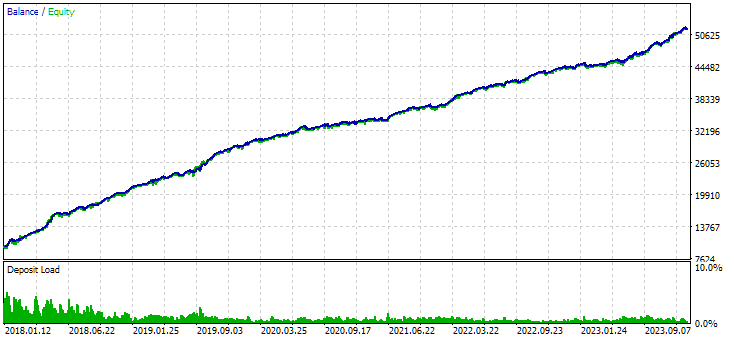
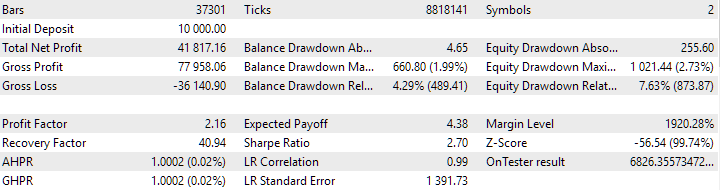
Fig. 7. Results of the combined group of instances obtained without using clustering
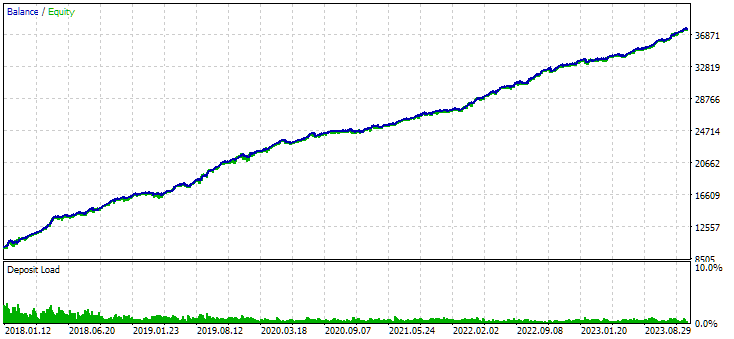
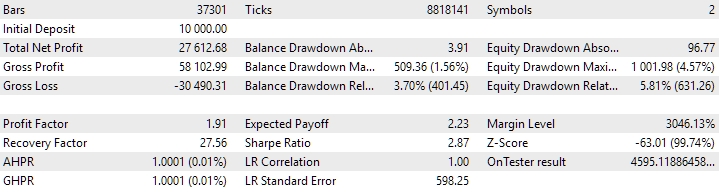
Fig. 8. Results of the combined group of instances obtained using clustering
The variant without clustering shows the higher profit. However, the variant with clustering has higher Sharpe ratio and better linearity. But we will not analyze these results in detail for now, since they are not yet final.
The next step is to add stages for assembling the final EA. We need to export the library to get the ExportedGroupsLibrary.mqh include file in the data folder. Then we should copy this file to the working folder. This operation can be performed either using a Python program or using the system copy functions from the DLL. At the last stage, we just need to compile the final EA and launch the terminal with the new EA version.
All this will require a significant amount of time to implement, so we will continue its description in the next article.
Conclusion
So, let's look at what we have got. We have put in order the auto execution of the first stages of the auto optimization conveyor, achieving their correct operation. We can look at the intermediate results and decide, for example, to abandon the clustering step. Or, on the contrary, leave it and remove the option without clustering.
Having such a tool will help us to conduct experiments in the future and try to answer difficult questions. For example, suppose we perform optimization on different ranges of inputs in the first stage. What is better - to combine them separately or together by the same symbols and timeframes?
By adding stages to the conveyor, we can implement the gradual assembly of increasingly complex EA.
Finally, we can consider the issue of partial re-optimization and even continuous re-optimization by conducting an appropriate experiment. Re-optimization here means repeated optimization at a different time interval. But more about that next time.
Thank you for your attention! See you soon!
Important warning
All results presented in this article and all previous articles in the series are based only on historical testing data and are not a guarantee of any profit in the future. The work within this project is of a research nature. All published results can be used by anyone at their own risk.
Archive contents
| # | Name | Version | Description | Recent changes |
|---|---|---|---|---|
| MQL5/Experts/Article.16134 | ||||
| 1 | Advisor.mqh | 1.04 | EA base class | Part 10 |
| 2 | ClusteringStage1.py | 1.01 | Program for clustering the results of the first stage of optimization | Part 20 |
| 3 | Database.mqh | 1.07 | Class for handling the database | Part 19 |
| 4 | database.sqlite.schema.sql | 1.05 | Database structure | Part 20 |
| 5 | ExpertHistory.mqh | 1.00 | Class for exporting trade history to file | Part 16 |
| 6 | ExportedGroupsLibrary.mqh | — | Generated file listing strategy group names and the array of their initialization strings | Part 17 |
| 7 | Factorable.mqh | 1.02 | Base class of objects created from a string | Part 19 |
| 8 | GroupsLibrary.mqh | 1.01 | Class for working with a library of selected strategy groups | Part 18 |
| 9 | HistoryReceiverExpert.mq5 | 1.00 | EA for replaying the history of deals with the risk manager | Part 16 |
| 10 | HistoryStrategy.mqh | 1.00 | Class of the trading strategy for replaying the history of deals | Part 16 |
| 11 | Interface.mqh | 1.00 | Basic class for visualizing various objects | Part 4 |
| 12 | LibraryExport.mq5 | 1.01 | EA that saves initialization strings of selected passes from the library to the ExportedGroupsLibrary.mqh file | Part 18 |
| 13 | Macros.mqh | 1.02 | Useful macros for array operations | Part 16 |
| 14 | Money.mqh | 1.01 | Basic money management class | Part 12 |
| 15 | NewBarEvent.mqh | 1.00 | Class for defining a new bar for a specific symbol | Part 8 |
| 16 | Optimization.mq5 | 1.03 | EA managing the launch of optimization tasks | Part 19 |
| 17 | Optimizer.mqh | 1.01 | Class for the project auto optimization manager | Part 20 |
| 18 | OptimizerTask.mqh | 1.01 | Optimization task class | Part 20 |
| 19 | Receiver.mqh | 1.04 | Base class for converting open volumes into market positions | Part 12 |
| 20 | SimpleHistoryReceiverExpert.mq5 | 1.00 | Simplified EA for replaying the history of deals | Part 16 |
| 21 | SimpleVolumesExpert.mq5 | 1.20 | EA for parallel operation of several groups of model strategies. The parameters will be taken from the built-in group library. | Part 17 |
| 22 | SimpleVolumesStage1.mq5 | 1.18 | Trading strategy single instance optimization EA (stage 1) | Part 19 |
| 23 | SimpleVolumesStage2.mq5 | 1.02 | Trading strategies instances group optimization EA (stage 2) | Part 19 |
| 24 | SimpleVolumesStage3.mq5 | 1.02 | The EA that saves a generated standardized group of strategies to a library of groups with a given name. | Part 20 |
| 25 | SimpleVolumesStrategy.mqh | 1.09 | Class of trading strategy using tick volumes | Part 15 |
| 26 | Strategy.mqh | 1.04 | Trading strategy base class | Part 10 |
| 27 | TesterHandler.mqh | 1.05 | Optimization event handling class | Part 19 |
| 28 | VirtualAdvisor.mqh | 1.07 | Class of the EA handling virtual positions (orders) | Part 18 |
| 29 | VirtualChartOrder.mqh | 1.01 | Graphical virtual position class | Part 18 |
| 30 | VirtualFactory.mqh | 1.04 | Object factory class | Part 16 |
| 31 | VirtualHistoryAdvisor.mqh | 1.00 | Trade history replay EA class | Part 16 |
| 32 | VirtualInterface.mqh | 1.00 | EA GUI class | Part 4 |
| 33 | VirtualOrder.mqh | 1.07 | Class of virtual orders and positions | Part 19 |
| 34 | VirtualReceiver.mqh | 1.03 | Class for converting open volumes to market positions (receiver) | Part 12 |
| 35 | VirtualRiskManager.mqh | 1.02 | Risk management class (risk manager) | Part 15 |
| 36 | VirtualStrategy.mqh | 1.05 | Class of a trading strategy with virtual positions | Part 15 |
| 37 | VirtualStrategyGroup.mqh | 1.00 | Class of trading strategies group(s) | Part 11 |
| 38 | VirtualSymbolReceiver.mqh | 1.00 | Symbol receiver class | Part 3 |
Translated from Russian by MetaQuotes Ltd.
Original article: https://www.mql5.com/ru/articles/16134
Warning: All rights to these materials are reserved by MetaQuotes Ltd. Copying or reprinting of these materials in whole or in part is prohibited.
This article was written by a user of the site and reflects their personal views. MetaQuotes Ltd is not responsible for the accuracy of the information presented, nor for any consequences resulting from the use of the solutions, strategies or recommendations described.

 Using association rules in Forex data analysis
 Implementing Practical Modules from Other Languages in MQL5 (Part 01): Building the SQLite3 Library, Inspired by Python
 Statistical Arbitrage Through Cointegrated Stocks (Part 1): Engle-Granger and Johansen Cointegration Tests
 Price Action Analysis Toolkit Development (Part 30): Commodity Channel Index (CCI), Zero Line EA

- Free trading apps
- Over 8,000 signals for copying
- Economic news for exploring financial markets
You agree to website policy and terms of use
Hi Yuriy
I have used Google Translate to get me to Part 20. Google "Google Translate" and put it on a new tab in the browser. It will place an icon in the search bar at the far right. Load the page in its native language and press the icon to select the article language and the one to translate into it. Presto,I am at part 20! It does not do a perfect job but the translation is 99% useful.
I loaded your Archive Source into Excel and added a few columns to sort on to arrange the contents. In addition to sorting in Excel, the spreadsheet can be imported into an OutLook database directly
I am having problems identifying the starting article to establish the SQL database. I tried running Simple Volume Stage 1 and got a flat line which indicates to me that I probably need to backtrack and create another SQL data base. It would be extremely helpful to have a table of the order of executions of the necessary programs to get a working system. Perhaps you could add it to the Archive Source table.
Another tiny request is to use the <> option for include file specifications instead of "". I am keeping your system separate in my Experts and Include directories, #include <!!!! MultiCurrency\VirtualAdvisor.mqh>, so this change will make it easier to add the subdirectory specification/.
Thanks for your input
CapeCoddah
Hello.
About the initial filling of the database with information about the project, stages, works and tasks you can see in parts 13, 18, 19. This is not the main topic, so the information you need will be somewhere closer to the end of the articles. For example, in part 18:
Or in part 19:
Or you can wait for the next article, which will be devoted, among other things, to the issue of initial filling of the database with the help of an auxiliary script.
Switching to using the include folder for storing library files is in the plans, but it hasn't come to that yet.
many thanks
Hi Yuriy,
Have you submitted the next article or know when it will be published?