

Developing a multi-currency Expert Advisor (Part 24): Adding a new strategy (I)
 3 258
3 258
 0
0

Introduction
In the previous article, we continued developing a system for automatically optimizing trading strategies in MetaTrader 5. The core of the system is an optimization database containing information about optimization projects. To create projects, a project creation script was written. Despite the fact that the script was written to create a project for optimizing a specific trading strategy (SimpleVolumes), it can be used as a template that can be adapted to other trading strategies.
We created the ability to automatically export selected groups of trading strategies at the final stage of the project. The export was carried out into a separate database, called the EA database. It can be used by the final EA to update the settings of trading systems without recompilation. This allows us to simulate the work of the EA in the tester over a time interval, in which new project optimization results may appear several times.
We have also finally moved to a meaningful structure for organizing project files, dividing all files into two parts. The first part, called the Advisor library, was moved to the MQL5/Include folder, while the rest remained in the working folder inside MQL5/Experts. We have moved all files that support the auto optimization system and are independent of the types of trading strategies being optimized to the library section. The project working folder contains stage EAs, a final EA, and a script for creating an optimization project.
However, I left the SimpleVolumes model trading strategy in the library section since it was more important for us at that time to test how the mechanism for automatically updating strategy parameters would work in the final EA. It did not really matter where exactly the file with the trading strategy source code was connected to during compilation.
Let's now try to imagine that we want to take a new trading strategy and connect it to an auto optimization system, creating stage EA and a final EA for it. What do we need for this?
Mapping out the path
First, let's take some simple strategy and implement it in code for use with our Advisor library. Let's place its code in the project's working folder. Once the strategy is created, a first stage Expert Advisor can be created, which will be used to optimize the parameters of single instances of this trading strategy. Here we will encounter some difficulties associated with the need to separate library and project codes.
We can use practically the same EAs for the second and third stages that were written in the previous part, since the code of their library part does not contain any mention of the classes of trading strategies used. And you will need to add a command to include the new strategy file to the code in the project working folder.
For the new strategy, we will need to make some changes to the project creation EA script in the optimization database. At the very least, the changes will affect the input parameter template for the first stage EA, since the composition of the input parameters in the new trading strategy will differ from that of the previous strategy.
After modifying the project creation EA in the optimization database, we will be able to run it. The optimization database will be created, and the necessary optimization tasks for this project will be added to it. Next, we can run the auto optimization conveyor and wait for it to finish working. This is quite a lengthy process. Its duration depends on the selected optimization time interval (the longer it is, the longer it will take), the complexity of the trading strategy itself (the more complex it is, the longer it will take), and, of course, the number of test agents available for optimization (the more, the faster it will take).
The final step is to run the final EA or test it in the strategy tester to evaluate the optimization results.
Let's get started!
SimpleCandles strategy
Create a new folder for the project in the MQL5/Experts folder. Let's call it, for example, Article.17277. It is probably worth making a disclaimer right away to avoid confusion in the future. I will use the term "project" in two senses. In one case, it will simply mean a folder with files of EAs that will be used to automatically optimize a certain trading strategy. The code for these EAs will use include files from the Advisor library. So in this context, a project is simply a working folder in the terminal's experts folder. In another case, the word "project" will mean a data structure created in the optimization database, describing optimization tasks that must be performed automatically to obtain results that are then used in the final EA intended to work on a trading account. In this context, a project is essentially the filling of an optimization database, before the optimization itself begins.
Now we are talking about a project in the first sense. So, let's create a subfolder named Strategies in the project working folder. We will place files of various trading strategies in it. For now, we will only create one new strategy there.
Let's repeat the path taken in part 1 when developing the SimpleVolumes trading strategy. Let's also start with the formulation of the trading idea.
Let's assume that when several consecutive candles in the same direction occur for a certain symbol, the probability that the next candle will have a different direction becomes slightly higher. Then, if we open a position in the opposite direction after such candles, we might be able to make a profit from it.
Let's try to turn this idea into a strategy. To do this, we need to formulate a set of rules for opening and closing positions that does not contain any unknown parameters. This set of rules should allow us to determine for any moment in time that the strategy is running whether any positions should be opened and, if so, which ones.
First of all, let us specify the concept of candle direction. We will call a candle upward if the closing price of the candle is greater than the opening price. A candle whose closing price is lower than the opening price will be called downward. Since we want to evaluate the direction of several consecutive past candles, we will apply the concept of candle direction only to already closed candles. From this we can conclude that the moment of a possible opening of a position will come with the advent of a new bar, that is, the appearance of a new candle.
So, we have decided on the timing of opening positions, but what about closing them? We will use the simplest option: when opening a position, StopLoss and TakeProfit levels will be set, at which the position will be closed.
Now we can give the following description of our strategy:
A signal to open a position will be a situation when, at the start of a new bar (candle), all of the previous several candles are directed in the same direction (up or down). If the candles are directed upwards, then we open a SELL position. Otherwise, we open a BUY position.
Each position has StopLoss and TakeProfit levels and will be closed only when these levels are reached. If there is already an open position and a signal to open a position is received again, then additional positions can be opened if their number is not too large.
This is a more detailed, but not yet complete description. Therefore, we read it again and highlight all the places where something is not clear. More detailed explanations are required there.
Here are the questions that arose:
- "... of the previous several candles ..." — How much is "several"?
- "... additional positions can be opened... " — How many positions can be open in total?
- "... has StopLoss and TakeProfit levels ..." — How to use that values? How to calculate them?
How much is "several" candles? This is the easiest question. This quantity will simply be one of the strategy parameters that can be changed to find the best value. It can only be an integer and not very large, probably no more than 10, since, judging by the charts, long sequences of unidirectional candles are rare.
How many positions can be open in total? This can also be made a strategy parameter and the best values can be selected during the optimization.
How to use values for StopLoss and TakeProfit? How to calculate them? This is a slightly more complex question, but in the simplest case we can answer it in the same way as the previous ones: StopLoss and TakeProfit in points will be made strategy parameters. When opening a position, we will move away from the opening price by the number of points specified in these parameters in the desired directions. However, a slightly more complex approach can also be used. We might set these parameters not in points, but as a percentage of some average value of the volatility of the trading instrument (symbol) price expressed in points. This raises the next question.
How to find this very volatility value? There are quite a few ways to do this. You can, for example, use the ready-made ATR (Average True Range) volatility indicator or come up with and implement your own method for calculating volatility. But most likely, one of the parameters in such calculations may be the number of periods over which the range of price fluctuations of a trading instrument is considered and the size of one period. If we add these values to the strategy parameters, we can use them to calculate volatility.
Since we do not impose restrictions on the fact that after opening the first position, subsequent ones must be opened in the same direction, situations may arise when the trading strategy will keep positions open in different directions. In a normal implementation, we would be forced to limit the scope of application of such a strategy to working only on accounts with independent position accounting ("hedging"). But with the use of virtual positions, there is no such limitation.
Now that everything is clear, let's list all the values we have already mentioned as strategy parameters. We should take into account that in order to receive a signal to open positions, we need to select which symbol and timeframe we will use to track the candles. Then we get the following description:
The EA is launched on a specific symbol and period (timeframe)
Set the input:
- Symbol
- Timeframe for counting unidirectional candles
- Number of candles in the same direction (signalSeqLen)
- ATR period (periodATR)
- Stop Loss (in points or % ATR) (stopLevel)
- Take Profit (in points or % ATR) (takeLevel)
- Maximum number of simultaneously open positions (maxCountOfOrders)
- Position Sizing
When a new bar arrives, we check the directions of the last closed signalSeqLen candles.
If the directions are the same and the number of open positions is less than maxCountOfOrders, then:
- Calculate StopLoss and TakeProfit. If periodATR = 0, we simply increment the current price by the number of points taken from the stopLevel and takeLevel parameters. If periodATR > 0, we calculate the ATR value using the periodATR parameter for the daily timeframe. We retreat from the current price by the values ATR * stopLevel and ATR * takeLevel.
- We open a SELL position if the candle directions were upwards and a BUY position if the candle directions were downwards. When opening, set the previously calculated StopLoss and TakeProfit levels.
This description is already quite sufficient to begin implementation. We will resolve any issues that arise along the way.
I would also like to draw attention to the fact that when describing the strategy, we did not mention the sizes of the positions opened. Although we formally added such a parameter to the list of parameters, but given the use of the developed strategy in the auto optimization system, we can simply use the minimum lot for testing. During the auto optimization, suitable position size multiplier values will be selected that will ensure a specified drawdown of 10% over the entire test interval. Therefore, we will not have to set the position sizes manually anywhere.
Implementing the strategy
Let's use the existing CSimpleVolumesStrategy class and create the CSimpleCandlesStrategy class based on it. It must be declared the descendant of the CVirtualStrategy class. Let's list the required strategy parameters as class fields, keeping in mind that our new class inherits some more fields and methods from its ancestors.
//+------------------------------------------------------------------+
//| Trading strategy using unidirectional candlesticks               |
//+------------------------------------------------------------------+
class CSimpleCandlesStrategy : public CVirtualStrategy {
protected:
   string            m_symbol;            // Symbol (trading instrument)
   ENUM_TIMEFRAMES   m_timeframe;         // Chart period (timeframe)

   //---  Open signal parameters
   int               m_signalSeqLen;      // Number of unidirectional candles
   int               m_periodATR;         // ATR period

   //---  Position parameters
   double            m_stopLevel;         // Stop Loss (in points or % ATR)
   double            m_takeLevel;         // Take Profit (in points or % ATR)

   //---  Money management parameters
   int               m_maxCountOfOrders;  // Max number of simultaneously open positions

   CSymbolInfo       *m_symbolInfo;       // Object for getting information about the symbol properties

  // ...

public:
   // Constructor
                     CSimpleCandlesStrategy(string p_params);

   virtual string    operator~() override;   // Convert object to string
   virtual void      Tick() override;        // OnTick event handler
};
To centrally obtain information about the properties of a trading instrument (symbol), we will include the pointer to the CSymbolInfo class object into the class fields.
The class of our new trading strategy is a descendant of the CFactorable class. This way we can implement a constructor in the new class that will read values of the parameters from the initialization string using the reading methods implemented in the CFactorable class. If no errors occurred while reading, then the IsValid() method returns 'true'.
To work with virtual positions, in the CVirtualStrategy ancestor, the m_orders array is declared intended to store pointers to the CVirtualOrder class objects, i.e. virtual positions. Therefore, in the constructor we will ask to create as many instances of virtual position objects as specified in the m_maxCountOfOrders parameter and place them into the m_orders array. The CVirtualReceiver::Get() static method will do this work.
Since our strategy will only open positions when a new bar opens on a given timeframe, create an object for checking the event of a new bar occurrence for a given symbol and timeframe.
And the last thing we need to do in the constructor is to ask the symbol monitor create an information object for our CSymbolInfo class.
The complete constructor code will look like this:
//+------------------------------------------------------------------+
//| Constructor                                                      |
//+------------------------------------------------------------------+
CSimpleCandlesStrategy::CSimpleCandlesStrategy(string p_params) {
   // Read parameters from the initialization string
   m_params = p_params;
   m_symbol = ReadString(p_params);
   m_timeframe = (ENUM_TIMEFRAMES) ReadLong(p_params);
   m_signalSeqLen = (int) ReadLong(p_params);
   m_periodATR = (int) ReadLong(p_params);
   m_stopLevel = ReadDouble(p_params);
   m_takeLevel = ReadDouble(p_params);
   m_maxCountOfOrders = (int) ReadLong(p_params);

   if(IsValid()) {
      // Request the required number of objects for virtual positions
      CVirtualReceiver::Get(&this, m_orders, m_maxCountOfOrders);

      // Add tracking a new bar on the required timeframe
      IsNewBar(m_symbol, m_timeframe);

      // Create an information object for the desired symbol
      m_symbolInfo = CSymbolsMonitor::Instance()[m_symbol];
   }
}
Next, we need to implement the abstract virtual tilde (~) operator, which returns the initialization string of the strategy object. Its implementation is standard:
//+------------------------------------------------------------------+
//| Convert an object to a string                                    |
//+------------------------------------------------------------------+
string CSimpleCandlesStrategy::operator~() {
   return StringFormat("%s(%s)", typename(this), m_params);
}
Another required virtual method that needs to be implemented is the Tick() tick handling method. In the method, we check for the onset of a new bar and that the number of open positions has not yet reached the maximum value. If these conditions are met, then we check for the presence of an opening signal. If there is a signal, then we open a position in the corresponding direction. The remaining methods we add to the class play a supporting role.
//+------------------------------------------------------------------+
//| "Tick" event handler function                                    |
//+------------------------------------------------------------------+
void CSimpleCandlesStrategy::Tick() override {
// If a new bar has arrived for a given symbol and timeframe
   if(IsNewBar(m_symbol, m_timeframe)) {
// If the number of open positions is less than the allowed number
      if(m_ordersTotal < m_maxCountOfOrders) {
         // Get an open signal
         int signal = SignalForOpen();

         if(signal == 1) {          // If there is a buy signal, then
            OpenBuy();              // open a BUY position
         } else if(signal == -1) {  // If there is a sell signal, then
            OpenSell();             // open a SELL_STOP position
         }
      }
   }
}
We moved the check for the presence of an opening signal to the separate SignalForOpen() method. In this method, we receive an array of quotes from previous candles and check in turn whether all of them are directed downwards or upwards:
//+------------------------------------------------------------------+
//| Signal for opening pending orders                                |
//+------------------------------------------------------------------+
int CSimpleCandlesStrategy::SignalForOpen() {
// By default, there is no signal
   int signal = 0;

   MqlRates rates[];
// Copy the quote values (candles) to the destination array
   int res = CopyRates(m_symbol, m_timeframe, 1, m_signalSeqLen, rates);

// If the required number of candles has been copied
   if(res == m_signalSeqLen) {
      signal = 1; // buy signal

      // Loop through all the candles
      for(int i = 0; i < m_signalSeqLen; i++) {
         // If at least one upward candle occurs, cancel the signal
         if(rates[i].open < rates[i].close ) {
            signal = 0;
            break;
         }
      }

      if(signal == 0) {
         signal = -1; // otherwise, sell signal

         // Loop through all the candles
         for(int i = 0; i < m_signalSeqLen; i++) {
            // If at least one downward candle occurs, cancel the signal
            if(rates[i].open > rates[i].close ) {
               signal = 0;
               break;
            }
         }
      }

   }

   return signal;
}
The OpenBuy() and OpenSell() created methods are responsible for opening positions . Since they are very similar, we will provide the code for only one of them. The key points in this method are calling the method for updating StopLoss and TakeProfit levels, which updates the values of the two corresponding class fields - m_sl and m_tp, as well as calling the method for opening the first unopened virtual position from the m_orders array.
//+------------------------------------------------------------------+
//| Open BUY order                                                   |
//+------------------------------------------------------------------+
void CSimpleCandlesStrategy::OpenBuy() {
// Retrieve the necessary symbol and price data
   double point = m_symbolInfo.Point();
   int digits = m_symbolInfo.Digits();

// Opening price
   double price = m_symbolInfo.Ask();

// Update SL and TP levels by calculating ATR
   UpdateLevels();

// StopLoss and TakeProfit levels
   double sl = NormalizeDouble(price - m_sl * point, digits);
   double tp = NormalizeDouble(price + m_tp * point, digits);

   bool res = false;
   for(int i = 0; i < m_maxCountOfOrders; i++) {   // Iterate through all virtual positions
      if(!m_orders[i].IsOpen()) {                  // If we find one that is not open, then open it
         // Open a virtual SELL position
         res = m_orders[i].Open(m_symbol, ORDER_TYPE_BUY, m_fixedLot,
                                0,
                                NormalizeDouble(sl, digits),
                                NormalizeDouble(tp, digits));

         break; // and exit
      }
   }

   if(!res) {
      PrintFormat(__FUNCTION__" | ERROR opening BUY virtual order", 0);
   }
}
The level update method first checks if some non-zero value is set for the ATR calculation period. If yes, then the ATR calculation function is called. Its result goes into the channelWidth variable. When the period value is 0, 1 is assigned to this variable. In this case, the values from the m_stopLevel and m_takeLevel inputs are interpreted as values in points and are included in the m_sl and m_tp without changes. Otherwise, they are interpreted as a fraction of the ATR value and multiplied by the calculated ATR value:
//+------------------------------------------------------------------+
//| Update SL and TP levels based on calculated ATR                  |
//+------------------------------------------------------------------+
void CSimpleCandlesStrategy::UpdateLevels() {
// Calculate ATR
   double channelWidth = (m_periodATR > 0 ? ChannelWidth() : 1);

// Update SL and TP levels
   m_sl = m_stopLevel * channelWidth;
   m_tp = m_takeLevel * channelWidth;
}
The last method we will need for our new trading strategy is the ATR calculation method. As already mentioned, it can be implemented in different ways, including using ready-made solutions. For simplicity, we will use one of the possible implementation options from those at hand:
//+------------------------------------------------------------------+
//| Calculate the ATR value (non-standard implementation)            |
//+------------------------------------------------------------------+
double CSimpleCandlesStrategy::ChannelWidth(ENUM_TIMEFRAMES p_tf = PERIOD_D1) {
   int n = m_periodATR; // Number of bars for calculation
   MqlRates rates[];    // Array for quotes

   // Copy quotes from the daily (default) timeframe
   int res = CopyRates(m_symbol, p_tf, 1, n, rates);

   // If the required amount has been copied
   if(res == n) {
      double tr[];         // Array for price ranges
      ArrayResize(tr, n);  // Change its size

      double s = 0;        // Sum for calculating the average
      FOREACH(rates, {
         tr[i] = rates[i].high - rates[i].low; // Remember the bar size
      });

      ArraySort(tr); // Sort the sizes

      // Sum the inner two quarters of the bar sizes
      for(int i = n / 4; i < n * 3 / 4; i++) {
         s += tr[i];
      }

      // Return the average size in points
      return 2 * s / n / m_symbolInfo.Point();
   }

   return 0.0;
}
Save the changes made to the Strategies/SimpleCandlesStrategy.mqh file in the project working folder.
Connecting the strategy
So, the strategy as a whole is ready, and now we need to connect it to the EA file. Let's start with the first stage EA. Let us remind you that its code is now split into two files:
- MQL5/Experts/Article.17277/Stage1.mq5 — file of the current project for researching the SimpleCandles strategy;
- MQL5/Include/antekov/Advisor/Experts/Stage1.mqh — library file common to all projects.
In the current project file, you need to do the following:
- Define the __NAME__ constant by assigning it some unique value that differs from the names in other projects.
- Attach a file with the developed trading strategy class.
- Connect the common part of the first stage EA from the Advisor library.
- List the inputs for the trading strategy.
- Create a function named GetStrategyParams(), which converts the values of the inputs into an initialization string for the strategy object.
// 1. Define a constant with the EA name
#define  __NAME__ "SimpleCandles" + MQLInfoString(MQL_PROGRAM_NAME)

// 2. Connect the required strategy
#include "Strategies/SimpleCandlesStrategy.mqh";

// 3. Connect the general part of the first stage EA from the Advisor library
#include <antekov/Advisor/Experts/Stage1.mqh>

//+------------------------------------------------------------------+
//| 4. Strategy inputs                                               |
//+------------------------------------------------------------------+
sinput string     symbol_              = "GBPUSD";
sinput ENUM_TIMEFRAMES period_         = PERIOD_H1;

input group "===  Opening signal parameters"
input int         signalSeqLen_        = 5;     // Number of unidirectional candles
input int         periodATR_           = 30;    // ATR period

input group "===  Pending order parameters"
input double      stopLevel_           = 3750;  // Stop Loss (in points)
input double      takeLevel_           = 50;    // Take Profit (in points)

input group "===  Money management parameters"
input int         maxCountOfOrders_    = 3;     // Maximum number of simultaneously open orders


//+------------------------------------------------------------------+
//| 5. Strategy initialization string generation function            |
//|    from the inputs                                               |
//+------------------------------------------------------------------+
string GetStrategyParams() {
   return StringFormat(
             "class CSimpleCandlesStrategy(\"%s\",%d,%d,%d,%.3f,%.3f,%d)",
             symbol_, period_,
             signalSeqLen_, periodATR_, stopLevel_, takeLevel_, maxCountOfOrders_
          );
}
//+------------------------------------------------------------------+
However, if we compile the first stage EA file (compilation proceeds without errors), then when running we get the following error in the OnInit() function leading to the EA to stop:
2018.01.01 00:00:00   CVirtualFactory::Create | ERROR: Constructor not found for:
2018.01.01 00:00:00   class CSimpleCandlesStrategy("GBPUSD",16385,5,30,2.95,3.92,3)
The reason for this is that to create objects of all CFactorable descendant classes we use a separate CVirtualFactory::Create() function from the Virtual/VirtualFactory.mqh file. It is called in the NEW(C) and CREATE(C, O, P) macros declared in Base/Factorable.mqh.
This function reads the object class name from the initialization string into the className variable. The read part is removed from the initialization string. This is followed by a simple iteration through all possible class names (CFactorable descendants) until a match is found with the name just read. In this case, a new object of the desired class is created, and the pointer to it through the object variable is returned as a result of the creation function:
// Create an object from the initialization string
   static CFactorable* Create(string p_params) {
      // Read the object class name
      string className = CFactorable::ReadClassName(p_params);

      // Pointer to the object being created
      CFactorable* object = NULL;

      // Call the corresponding constructor  depending on the class name
      if(className == "CVirtualAdvisor") {
         object = new CVirtualAdvisor(p_params);
      } else if(className == "CVirtualRiskManager") {
         object = new CVirtualRiskManager(p_params);
      } else if(className == "CVirtualStrategyGroup") {
         object = new CVirtualStrategyGroup(p_params);
      } else if(className == "CSimpleVolumesStrategy") {
         object = new CSimpleVolumesStrategy(p_params);
      } else if(className == "CHistoryStrategy") {
         object = new CHistoryStrategy(p_params);
      }

      // If the object is not created or is created in the invalid state, report an error
      if(!object) {
         ...
      }

      return object;
   }
When all our code was in one folder, we simply added additional conditional statement branches here for new CFactorable child classes we were using. For example, this is how the part responsible for creating the objects of our first SimpleVolumes model strategy came into being:
} else if(className == "CSimpleVolumesStrategy") {
   object = new CSimpleVolumesStrategy(p_params);
}
Following the previous approach, we should add a similar block here for our new SimpleCandles model strategy:
} else if(className == "CSimpleCandlesStrategy") {
   object = new CSimpleCandlesStrategy(p_params);
}
But now this already violates the principle of separating the code into library and project parts. The library part of the code does not need to know what other new strategies will be created when using it. Now even creation of CSimpleVolumesStrategy this way looks wrong.
Let's try to come up with a way to ensure the creation of all the necessary objects on the one hand, and a clear separation of code on the other.
Improving CFactorable
I must admit this task is not so simple. It forced me to think hard about its solution, and try out more than one implementation option before finally finding the one that will remain in use for now. If the MQL5 language had the ability to execute code from a string in an already compiled program, then everything would be solved very simply. But for security reasons, we do not have the function similar to the eval() function from other programming languages. Therefore, we had to make do with the opportunities at hand.
In general, the idea is this: each CFactorable descendant should have a static function creating an object of the given class. So, we are dealing with a kind of static constructor. In this case, the regular constructor can then be made non-public, and only the static constructor can be used to create objects. Next, we will need to somehow associate the string names of the classes with these functions, so that we can understand which constructor function we need to call based on the class name obtained from the initialization string.
To solve this problem, we will need function pointers. This is a special type of variable that allows us to store a pointer to a function code in a variable and call the function code using that pointer. As you might have noticed, all static constructors of objects of different CFactorable descendant classes can be declared with the following signature:
static CFactorable* Create(string p_params)
Therefore, we can create some static array where we place pointers to such functions for all descendant classes. The classes that form the part of the Advisor library (CVirtualAdvisor, CVirtualStrategyGroup, CVirtualRiskManager) will be somehow added to this array inside the library code. At the same time, the trading strategy classes will be added to this array from the code located in the project working folder. This way the desired code separation will be achieved.
The next question - how do we achieve all this? In which class should this static array be declared and how can it be replenished? How can we preserve the association of a class name with an array element?
At first, it seemed most appropriate to create this static array as part of the CFactorable class. For binding, we can create another static array of strings - class names. If the replenishment simultaneously adds a class name to one array and a pointer to a static constructor of objects of that class to another array, we will get an index relationship between the elements of the two arrays. In other words, having found the index of an element equal to the required class name in one array, we can use this index to obtain the pointer to a constructor function from another array and then call it passing the initialization string.
But how do we fill these arrays? I really did not want to create any functions that would have to be called from OnInit(). Although this approach, as it turns out, is quite workable. But in the end, I came to a different decision.
The basic idea was that we would like to be able to call some code not from OnInit(), but directly from the files describing the classes of CFactorable descendant objects. However, if you simply place the code outside the class definition, it will not be executed. But if you declare a global variable outside the class definition that is an object of some class, then its constructor will be called in this place!
Therefore, let's create a separate class CFactorableCreator specifically for this purpose. Its objects will store the class name and a pointer to the static constructor of objects of the given class. This class will also have a static array of pointers to objects... of the same class. At the same time, the CFactorableCreator constructor will ensure that every object it creates ends up in this array:
// Preliminary class definition
class CFactorable;

// Type declaration - pointer to the function for creating objects of the CFactorable class
typedef CFactorable* (*TCreateFunc)(string);

//+------------------------------------------------------------------+
//| Class of creators that bind names and static                     |
//| constructors of CFactorable descendant classes                   |
//+------------------------------------------------------------------+
class CFactorableCreator {
public:
   string            m_className;   // Class name
   TCreateFunc       m_creator;     // Static constructor for the class

   // Creator constructor
                     CFactorableCreator(string p_className, TCreateFunc p_creator);

   // Static array of all created creator objects
   static CFactorableCreator* creators[];
};

// Static array of all created creator objects
CFactorableCreator* CFactorableCreator::creators[];

//+------------------------------------------------------------------+
//| Creator constructor                                              |
//+------------------------------------------------------------------+
CFactorableCreator::CFactorableCreator(string p_className, TCreateFunc p_creator) :
   m_className(p_className),
   m_creator(p_creator) {
// Add the current creator object to the static array
   APPEND(creators, &this);
}
//+------------------------------------------------------------------+
Let's see how we can organize the replenishment of the CFactorableCreator::creators array using the CVirtualAdvisor class as an example. We will transfer the CVirtualAdvisor constructor to the 'protected' section, add the Create() static constructor function. After describing the class, create the global object of the CFactorableCreator class named CVirtualAdvisorCreator. It is right there, when calling the CFactorableCreator constructor, where the CFactorableCreator::creators array is replenished.
//+------------------------------------------------------------------+
//| Class of the EA handling virtual positions (orders)              |
//+------------------------------------------------------------------+
class CVirtualAdvisor : public CAdvisor {

protected:
   //...
                     CVirtualAdvisor(string p_param);    // Private constructor
public:
                     static CFactorable* Create(string p_params) { return new CVirtualAdvisor(p_params) };
                    //...
};

CFactorableCreator CVirtualAdvisorCreator("CVirtualAdvisor", CVirtualAdvisor::Create);
We will need to make the same three edits to all classes of the CFactorable descendant objects. To make things a little simpler, we will declare two auxiliary macros in the file featuring the CFactorable class:
// Declare a static constructor inside the class
#define STATIC_CONSTRUCTOR(C) static CFactorable* Create(string p) { return new C(p); }

// Add a static constructor for the new CFactorable descendant class
// to a special array by creating a global object of the CFactorableCreator class
#define REGISTER_FACTORABLE_CLASS(C) CFactorableCreator C##Creator(#C, C::Create);
They simply repeat the code template that we have already developed for the CVirtualAdvisor class. Now we can make edits like this:
//+------------------------------------------------------------------+
//| Class of the EA handling virtual positions (orders)              |
//+------------------------------------------------------------------+
class CVirtualAdvisor : public CAdvisor {
protected:
   // ...
                     CVirtualAdvisor(string p_param);    // Constructor
public:
                     STATIC_CONSTRUCTOR(CVirtualAdvisor);
                    // ...
};

REGISTER_FACTORABLE_CLASS(CVirtualAdvisor);
Similar changes need to be made to the three class files in the Advisor library (CVirtualAdvisor, CVirtualStrategyGroup, CVirtualRiskManager), but this had to be done only once. Now that these changes are in the library, we can forget about them.
In the file(s) of the trading strategy class(es) located in the project working folder, such additions are mandatory for each new class. Let's add them to our new strategy, after which its class description code will look like this:
//+------------------------------------------------------------------+
//| Trading strategy using unidirectional candlesticks               |
//+------------------------------------------------------------------+
class CSimpleCandlesStrategy : public CVirtualStrategy {
protected:
   string            m_symbol;            // Symbol (trading instrument)
   ENUM_TIMEFRAMES   m_timeframe;         // Chart period (timeframe)

   //---  Open signal parameters
   int               m_signalSeqLen;      // Number of unidirectional candles
   int               m_periodATR;         // ATR period

   //---  Position parameters
   double            m_stopLevel;         // Stop Loss (in points or % ATR)
   double            m_takeLevel;         // Take Profit (in points or % ATR)

   //---  Money management parameters
   int               m_maxCountOfOrders;  // Max number of simultaneously open positions

   CSymbolInfo       *m_symbolInfo;       // Object for getting information about the symbol properties

   double            m_tp;                // Stop Loss in points
   double            m_sl;                // Take Profit in points

   //--- Methods
   int               SignalForOpen();     // Signal to open a position
   void              OpenBuy();           // Open a BUY position
   void              OpenSell();          // Open a SELL position

   double            ChannelWidth(ENUM_TIMEFRAMES p_tf = PERIOD_D1); // Calculate the ATR value
   void              UpdateLevels();      // Update SL and TP levels

   // Private constructor
                     CSimpleCandlesStrategy(string p_params);

public:
   // Static constructor
                     STATIC_CONSTRUCTOR(CSimpleCandlesStrategy);

   virtual string    operator~() override;   // Convert object to string
   virtual void      Tick() override;        // OnTick event handler
};

// Register the CFactorable descendant class
REGISTER_FACTORABLE_CLASS(CSimpleCandlesStrategy);
Let me emphasize once again that the highlighted parts should be present in any new trading strategy class.
All that remains is to apply the filled array of object creators in the general object creation function from the CVirtualFactory::Create() initialization string . Here we will also change something. As it turns out, we no longer need to place this function in a separate class. Previously, this was done because formally the CFactorable class is not obliged to know the names of all its descendants. After the changes have already been made, we may not know the names of all the descendants, but we can create any of them by accessing static constructors through the elements of a single array CFactorableCreator::creators. So, let's move the code of this function to a new static method of the CFactorable::Create() class:
//+------------------------------------------------------------------+
//| Base class of objects created from a string                      |
//+------------------------------------------------------------------+
class CFactorable {
 // ...

public:
   // ...

   // Create an object from the initialization string
   static CFactorable* Create(string p_params);
};


//+------------------------------------------------------------------+
//| Create an object from the initialization string                  |
//+------------------------------------------------------------------+
CFactorable* CFactorable::Create(string p_params) {
// Pointer to the object being created
   CFactorable* object = NULL;

// Read the object class name
   string className = CFactorable::ReadClassName(p_params);

// Find and call the corresponding constructor depending on the class name
   int i;
   SEARCH(CFactorableCreator::creators, className == CFactorableCreator::creators[i].m_className, i);
   if(i != -1) {
      object = CFactorableCreator::creators[i].m_creator(p_params);
   }

// If the object is not created or is created in the invalid state, report an error
   if(!object) {
      PrintFormat(__FUNCTION__" | ERROR: Constructor not found for:\n%s",
                  p_params);
   } else if(!object.IsValid()) {
      PrintFormat(__FUNCTION__
                  " | ERROR: Created object is invalid for:\n%s",
                  p_params);
      delete object; // Remove the invalid object
      object = NULL;
   }

   return object;
}
As you can see, we also first get the class name from the initialization string, after which we search for the index of the element in the array of creators whose class name matches the required one. The required index is placed into the i variable. If the index is found, then the static constructor of the object of the required class is called via the corresponding pointer to the function. There are no longer any references to the names of the CFactorable descendant classes in this code. The file featuring the CVirtualFactory class has become redundant. It will be excluded from the library.
Checking the first stage EA
Let's compile the first stage EA and run optimization manually (for now). Let's take the optimization interval, for example, from 2018 to 2023 inclusive, the GBPUSD symbol and the H4 timeframe. Optimization starts successfully, and after some time we can look at the results obtained:
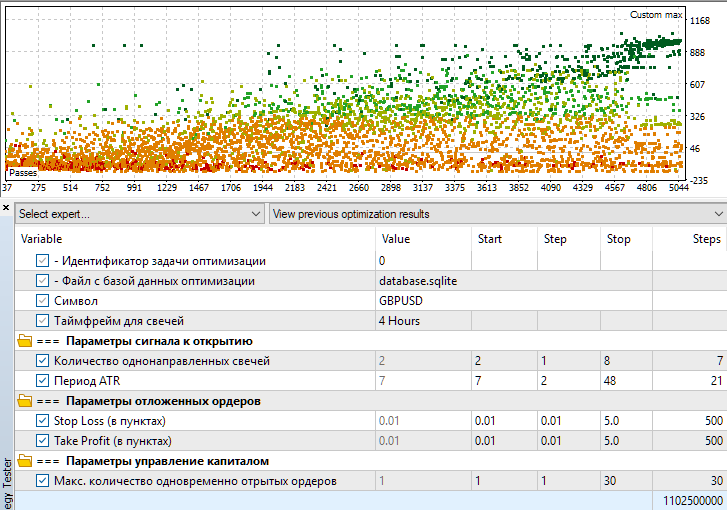
Fig. 1. Optimization settings and visualization of optimization results for the Stage1.mq5 EA
Let's look at a couple of single passes that seemed more or less good.
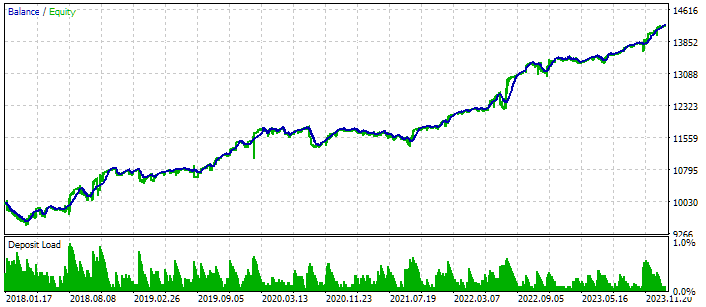
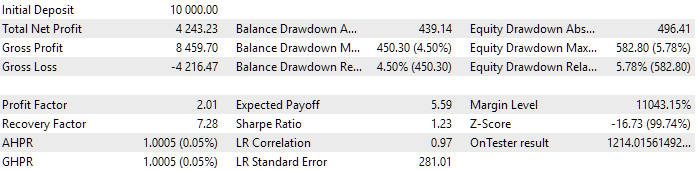
Fig. 2. Results of the pass with the following parameters: class CSimpleCandlesStrategy("GBPUSD",16388,4,23,2.380,4.950,19)
In the results presented in Fig. 2, the opening occurred after four candles in the same direction, and the ratio between StopLoss and TakeProfit levels was approximately 1:2.
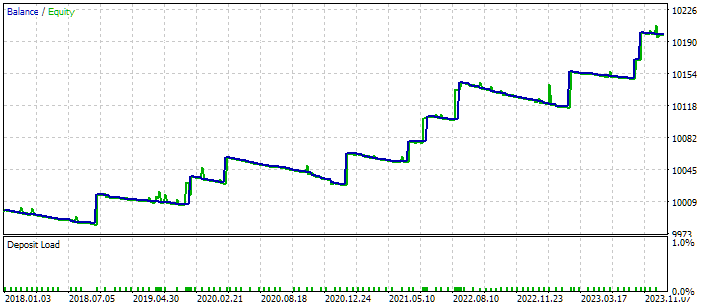
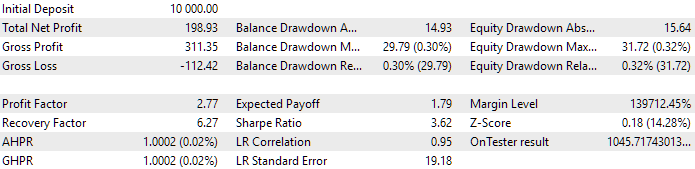
Fig. 3. Results of the pass with the following parameters: class CSimpleCandlesStrategy("GBPUSD",16388,7,9,0.090,3.840,1)
Fig. 3 shows the results of a pass where the opening occurred after seven candles in the same direction. In this case, a very short StopLoss and a large TakeProfit were used. This is clearly visible on the chart, where the vast majority of trades are closed with a small loss, and only a dozen trades over 6 years were closed with a profit, albeit a large one.
So, even though this trading strategy is very simple, you can try to work with it to get better results after combining many instances into one final EA.
Conclusion
We have not yet completed the process of connecting the new strategy to the auto optimization system, but we have taken important steps that will allow us to continue on our intended path. First, we already have a new trading strategy implemented as a separate class that is a descendant of CVirtualStrategy. Second, we were able to connect it to the first-stage EA and verified that it was possible to launch the optimization process of this EA.
The optimization of a single instance of a trading strategy, performed at the first stage, begins when the optimization database does not yet contain the results of any runs. For the second and third stages, it is already necessary to have the optimization results of the first stage passes in the database. Therefore, it is not yet possible to connect and test the strategy on the second and third stage EAs. First, we need to create a project in the optimization database and run it to accumulate the results of the first stage. In the next part, we will continue the work we started by considering the modification of the project creation EA.
Thank you for your attention! See you soon!
Important warning
All results presented in this article and all previous articles in the series are based only on historical testing data and are not a guarantee of any profit in the future. The work within this project is of a research nature. All published results can be used by anyone at their own risk.
Archive contents
| # | Name | Version | Description | Recent changes |
|---|---|---|---|---|
| MQL5/Experts/Article.17277 | Project working folder | |||
| 1 | CreateProject.mq5 | 1.01 | EA script for creating a project with stages, jobs and optimization tasks. | Part 23 |
| 2 | Optimization.mq5 | 1.00 | EA for projects auto optimization | Part 23 |
| 3 | SimpleCandles.mq5 | 1.00 | Final EA for parallel operation of several groups of model strategies. The parameters will be taken from the built-in group library. | Part 24 |
| 4 | Stage1.mq5 | 1.22 | Trading strategy single instance optimization EA (stage 1) | Part 24 |
| 5 | Stage2.mq5 | 1.00 | Trading strategies instances group optimization EA (stage 2) | Part 23 |
| 6 | Stage3.mq5 | 1.00 | The EA that saves a generated standardized group of strategies to an EA database with a given name. | Part 23 |
| MQL5/Experts/Article.17277/Strategies | Project strategies folder | |||
| 7 | SimpleCandlesStrategy.mqh | 1.01 | Part 24 | |
| MQL5/Include/antekov/Advisor/Base | Base classes other project classes inherit from | |||
| 8 | Advisor.mqh | 1.04 | EA base class | Part 10 |
| 9 | Factorable.mqh | 1.05 | Base class of objects created from a string | Part 24 |
| 10 | FactorableCreator.mqh | 1.00 | Part 24 | |
| 11 | Interface.mqh | 1.01 | Basic class for visualizing various objects | Part 4 |
| 12 | Receiver.mqh | 1.04 | Base class for converting open volumes into market positions | Part 12 |
| 13 | Strategy.mqh | 1.04 | Trading strategy base class | Part 10 |
| MQL5/Include/antekov/Advisor/Database | Files for handling all types of databases used by project EAs | |||
| 14 | Database.mqh | 1.10 | Class for handling the database | Part 22 |
| 15 | db.adv.schema.sql | 1.00 | Final EA's database structure | Part 22 |
| 16 | db.cut.schema.sql | 1.00 | Structure of the truncated optimization database | Part 22 |
| 17 | db.opt.schema.sql | 1.05 | Optimization database structure | Part 22 |
| 18 | Storage.mqh | 1.01 | Class for handling the Key-Value storage for the final EA in the EA database | Part 23 |
| MQL5/Include/antekov/Advisor/Experts | Files with common parts of used EAs of different type | |||
| 19 | Expert.mqh | 1.22 | The library file for the final EA. Group parameters can be taken from the EA database | Part 23 |
| 20 | Optimization.mqh | 1.04 | Library file for the EA that manages the launch of optimization tasks | Part 23 |
| 21 | Stage1.mqh | 1.19 | Library file for the single instance trading strategy optimization EA (Stage 1) | Part 23 |
| 22 | Stage2.mqh | 1.04 | Library file for the EA optimizing a group of trading strategy instances (Stage 2) | Part 23 |
| 23 | Stage3.mqh | 1.04 | Library file for the EA saving a generated standardized group of strategies to an EA database with a given name. | Part 23 |
| MQL5/Include/antekov/Advisor/Optimization | Classes responsible for auto optimization | |||
| 24 | Optimizer.mqh | 1.03 | Class for the project auto optimization manager | Part 22 |
| 25 | OptimizerTask.mqh | 1.03 | Optimization task class | Part 22 |
| MQL5/Include/antekov/Advisor/Strategies | Examples of trading strategies used to demonstrate how the project works | |||
| 26 | HistoryStrategy.mqh | 1.00 | Class of the trading strategy for replaying the history of deals | Part 16 |
| 27 | SimpleVolumesStrategy.mqh | 1.11 | Class of trading strategy using tick volumes | Part 22 |
| MQL5/Include/antekov/Advisor/Utils | Auxiliary utilities, macros for code reduction | |||
| 28 | ExpertHistory.mqh | 1.00 | Class for exporting trade history to file | Part 16 |
| 29 | Macros.mqh | 1.05 | Useful macros for array operations | Part 22 |
| 30 | NewBarEvent.mqh | 1.00 | Class for defining a new bar for a specific symbol | Part 8 |
| 31 | SymbolsMonitor.mqh | 1.00 | Class for obtaining information about trading instruments (symbols) | Part 21 |
| MQL5/Include/antekov/Advisor/Virtual | Classes for creating various objects united by the use of a system of virtual trading orders and positions | |||
| 32 | Money.mqh | 1.01 | Basic money management class | Part 12 |
| 33 | TesterHandler.mqh | 1.07 | Optimization event handling class | Part 23 |
| 34 | VirtualAdvisor.mqh | 1.10 | Class of the EA handling virtual positions (orders) | Part 24 |
| 35 | VirtualChartOrder.mqh | 1.01 | Graphical virtual position class | Part 18 |
| 36 | VirtualHistoryAdvisor.mqh | 1.00 | Trade history replay EA class | Part 16 |
| 37 | VirtualInterface.mqh | 1.00 | EA GUI class | Part 4 |
| 38 | VirtualOrder.mqh | 1.09 | Class of virtual orders and positions | Part 22 |
| 39 | VirtualReceiver.mqh | 1.04 | Class for converting open volumes to market positions (receiver) | Part 23 |
| 40 | VirtualRiskManager.mqh | 1.05 | Risk management class (risk manager) | Part 24 |
| 41 | VirtualStrategy.mqh | 1.09 | Class of a trading strategy with virtual positions | Part 23 |
| 42 | VirtualStrategyGroup.mqh | 1.03 | Class of trading strategies group(s) | Part 24 |
| 43 | VirtualSymbolReceiver.mqh | 1.00 | Symbol receiver class | Part 3 |
Translated from Russian by MetaQuotes Ltd.
Original article: https://www.mql5.com/ru/articles/17277
Warning: All rights to these materials are reserved by MetaQuotes Ltd. Copying or reprinting of these materials in whole or in part is prohibited.
This article was written by a user of the site and reflects their personal views. MetaQuotes Ltd is not responsible for the accuracy of the information presented, nor for any consequences resulting from the use of the solutions, strategies or recommendations described.

 Overcoming The Limitation of Machine Learning (Part 9): Correlation-Based Feature Learning in Self-Supervised Finance
 Mastering Kagi Charts in MQL5 (Part 2): Implementing Automated Kagi-Based Trading
 Adaptive Smart Money Architecture (ASMA): Merging SMC Logic With Market Sentiment for Dynamic Strategy Switching
 Fortified Profit Architecture: Multi-Layered Account Protection

- Free trading apps
- Over 8,000 signals for copying
- Economic news for exploring financial markets
You agree to website policy and terms of use