

Componentes View e Controller para tabelas no paradigma MVC em MQL5: Contêineres
 301
301
 3
3

Conteúdo
- Introdução
- Classe singleton como gerenciador de dados compartilhados
- Classes para organizar a repetição automática do pressionamento de botões
- Aperfeiçoamento das classes base
- Classe de lista de objetos
- Classe base do elemento gráfico
- Aperfeiçoamento de elementos de controle simples
- Classes contêiner para posicionamento de elementos de controle
- Classe "Panel"
- Classe de grupo de objetos
- Classes para criação de barras de rolagem
- Classes dos controles deslizantes das barras de rolagem
- Classe da barra de rolagem horizontal
- Classe da barra de rolagem vertical
- Classe "Container"
- Testando o resultado
- Considerações finais
Introdução
Em interfaces de usuário modernas, com bastante frequência surge a necessidade de exibir grandes volumes de diferentes dados de forma compacta e conveniente. Para esses objetivos são utilizados elementos de controle especiais, contêineres com suporte à rolagem de conteúdo. Essa abordagem permite posicionar tabelas e outros elementos gráficos em um espaço limitado da janela, garantindo ao usuário acesso rápido e intuitivo às informações.
No contexto do desenvolvimento do elemento de controle TableView no paradigma MVC (Model-View-Controller), já criamos o componente Model, a modelo da tabela, e iniciamos a criação dos componentes View e Controller. No artigo anterior foram criados elementos de controle simples, porém suficientemente funcionais. A partir desses elementos serão montados elementos de controle mais complexos. Hoje escreveremos as classes dos elementos de controle Panel, GroupBox e Container, os três elementos são contêineres para posicionar diferentes elementos de controle sobre eles.
- O elemento de controle Panel é um painel que permite posicionar sobre si outros elementos de controle em qualquer quantidade. Ao mover o painel para novas coordenadas, todos os elementos de controle posicionados sobre ele também são movidos juntamente com o painel. Dessa forma, o painel é um contêiner para os elementos de controle posicionados nele. No entanto, esse elemento não possui barras de rolagem que permitam rolar o conteúdo do contêiner caso ele ultrapasse os limites do painel. Esse conteúdo simplesmente é recortado pelos limites do contêiner.
- O elemento de controle GroupBox é um conjunto de elementos organizado em um único grupo. Ele é herdado do painel e oferece a possibilidade de agrupar elementos de acordo com algum propósito comum, por exemplo, um grupo de elementos RadioButton, no qual apenas um elemento de todo o grupo pode ser selecionado, enquanto a seleção é removida dos demais elementos do grupo.
- O elemento de controle Container é um contêiner. Ele permite anexar a si apenas um elemento de controle. Se o elemento anexado ultrapassar os limites do contêiner, surgem barras de rolagem que permitem rolar o conteúdo do contêiner. Para posicionar qualquer quantidade de elementos de controle dentro do contêiner, é necessário posicionar nele um painel, e então anexar ao painel a quantidade necessária de elementos de controle. Dessa forma, o contêiner rolará o painel, e o painel deslocará seu próprio conteúdo conforme a rolagem.
Assim, além dos três elementos principais de controle mencionados, será necessário criar classes para a criação das barras de rolagem, a classe do controle deslizante (Thumb) e a classe da barra de rolagem (ScrollBar). Haverá duas versões dessas classes, uma para a barra de rolagem vertical e outra para a horizontal.
Se observarmos atentamente o funcionamento dos botões de rolagem localizados nas extremidades das barras de rolagem, é possível notar que, ao manter o botão pressionado por um período prolongado, a rolagem automática é ativada. Isso significa que o botão começa a enviar automaticamente eventos de pressionamento. Para esse comportamento criaremos ainda duas classes auxiliares, a classe do contador de atraso e a própria classe de repetição automática de eventos.
A classe do contador de atraso poderá ser usada para organizar uma espera sem congelar a execução do programa, enquanto a classe de repetição automática de eventos será implementada de forma que possamos indicar qual evento específico ela deverá enviar. Isso permitirá utilizá-la não apenas para implementar a repetição automática do pressionamento de botões, mas também para outros algoritmos que exijam repetição de eventos após determinado tempo e com determinada periodicidade.
Na etapa final, tabelas serão posicionadas dentro do contêiner universal, e o contêiner fornecerá a rolagem do conteúdo por meio das barras de rolagem. Esse contêiner se tornará a base para a construção de interfaces complexas e flexíveis, permitindo não apenas trabalhar com tabelas, mas também utilizá-lo em outros componentes, por exemplo, na criação de um bloco de páginas múltiplas ou de outros elementos personalizados para o terminal cliente MetaTrader 5.
Vale observar como é organizado o funcionamento dos elementos de controle. Cada elemento de controle possui funcionalidade baseada em eventos, o componente Controller, e reage adequadamente à interação com o cursor do mouse.
Ao realizar determinadas ações, o elemento com o qual ocorre a interação envia para o gráfico um evento que deve ser recebido e processado por outro elemento de controle. No entanto, esses eventos são recebidos por todos os elementos. É necessário determinar qual elemento é o ativo, isto é, aquele sobre o qual o cursor está posicionado no momento, e processar apenas as mensagens recebidas dele. Assim, quando o cursor do mouse passa sobre um elemento de controle, ele deve ser marcado como ativo, enquanto os demais elementos, que não estão ativos, não devem ser processados.
Para organizar a seleção do elemento ativo, é necessário garantir que cada elemento de controle tenha acesso a essa informação. Isso pode ser feito de diferentes maneiras. Por exemplo, pode-se criar uma lista na qual serão registrados os nomes de todos os elementos criados, buscar nessa lista a correspondência com o nome do objeto sobre o qual o cursor está posicionado naquele momento e trabalhar com o objeto encontrado nessa lista.
Essa opção pode existir, porém leva à complexidade adicional do código e do trabalho com ele. É mais simples criar um único objeto que seja globalmente acessível no programa e registrar nele o nome do elemento de controle ativo. Assim, os demais elementos imediatamente, sem necessidade de busca adicional em qualquer base, poderão ver o nome do elemento ativo e decidir se devem processar as mensagens recebidas ou não.
Uma classe desse tipo, acessível globalmente, pode ser uma classe singleton:
Classe singleton (do inglês singleton) é um padrão de projeto que garante a existência de apenas uma instância dessa classe durante todo o tempo de execução do programa e fornece um ponto global de acesso a essa instância.
Para que serve o singleton
O singleton é utilizado quando é necessário que determinado objeto possua apenas uma instância e que essa instância esteja acessível a partir de qualquer parte do programa. Exemplos incluem um gerenciador de configurações, um registrador de eventos (logger), um pool de conexões com banco de dados, um despachante de recursos e outros.
Como o singleton funciona
- Construtor oculto: o construtor da classe é declarado como privado ou protegido para impedir a criação de instâncias externamente.
- Variável estática: dentro da classe é criada uma variável estática que armazena a única instância da classe.
- Método estático de acesso: para obter a instância da classe é utilizado um método estático, por exemplo Instance() ou GetInstance(), que cria o objeto na primeira chamada e o retorna nas chamadas seguintes.
O singleton é uma classe que pode ser criada apenas uma vez, e essa única instância fica disponível globalmente. Isso é conveniente para gerenciar recursos compartilhados ou o estado da aplicação.
Vamos criar essa classe.
Classe singleton como gerenciador de dados compartilhados
No artigo anterior, todos os códigos da biblioteca estavam localizados no caminho \MQL5\Indicators\Tables\Controls. Aqui nos interessam dois arquivos: Base.mqh e Control.mqh. Hoje iremos aperfeiçoá-los.
Abra o arquivo Base.mqh e, no bloco de classes, escreva o seguinte códig:
//+------------------------------------------------------------------+
//| Classes                                                          |
//+------------------------------------------------------------------+
//+------------------------------------------------------------------+
//| Singleton class for common flags and events of graphical elements|
//+------------------------------------------------------------------+
class CCommonManager
  {
private:
   static CCommonManager *m_instance;                          // Class instance
   string            m_element_name;                           // Active element name

//--- Constructor/destructor
                     CCommonManager(void) : m_element_name("") {}
                    ~CCommonManager() {}
public:
//--- Method for getting a Singleton instance
   static CCommonManager *GetInstance(void)
                       {
                        if(m_instance==NULL)
                           m_instance=new CCommonManager();
                        return m_instance;
                       }
//--- Method for destroying a Singleton instance
   static void       DestroyInstance(void)
                       {
                        if(m_instance!=NULL)
                          {
                           delete m_instance;
                           m_instance=NULL;
                          }
                       }
//--- (1) Set and (2) return the name of the active current element
   void              SetElementName(const string name)         { this.m_element_name=name;   }
   string            ElementName(void)                   const { return this.m_element_name; }
  };
//--- Initialize a static instance variable of a class
CCommonManager* CCommonManager::m_instance=NULL;
//+------------------------------------------------------------------+
//| Base class of graphical elements                                 |
//+------------------------------------------------------------------+
O construtor privado da classe e o método estático de acesso à instância da classe garantem a existência de apenas uma instância dentro da aplicação.
- O método static CCommonManager* GetInstance(void) retorna um ponteiro para a única instância da classe, criando-a no primeiro acesso.
- O método static void DestroyInstance(void) destrói a instância da classe e libera a memória.
- O método void SetElementName(const string name) define o nome do elemento gráfico ativo.
- O método string ElementName(void) const retorna o nome do elemento gráfico ativo.
Agora cada um dos elementos gráficos pode acessar a instância dessa classe para ler e escrever o nome do elemento ativo, e cada objeto verá a mesma variável contendo o nome do elemento atualmente ativo. Isso garante que cada um dos diversos objetos irá ler e escrever dados na mesma variável.
Como não podem existir, em um mesmo momento, mais de um elemento de controle ativo, essa implementação do gerenciador de elementos ativos é totalmente suficiente mesmo sem funcionalidade de controle de acesso, que impediria que dois ou mais elementos escrevessem seus dados na variável.
Posteriormente, nessa classe gerenciadora de dados poderão ser adicionados outros dados, por exemplo, flags de permissões do gráfico de trabalho. No momento, cada um dos elementos gráficos, ao ser criado, tenta memorizar os estados das flags do gráfico. Esses dados também poderão ser transferidos para essa classe em variáveis apropriadas.
Classes para organizar a repetição automática do pressionamento de botões
Acima foi mencionado a criação da funcionalidade de repetição automática do envio de eventos pelos botões das barras de rolagem quando o botão é mantido pressionado por um longo período. Esse comportamento é padrão para a maioria dos aplicativos de sistemas operacionais. Por isso, também aqui não há motivo para não implementar o mesmo comportamento. Ao pressionar um botão e mantê-lo pressionado, inicialmente é iniciado um contador de tempo de pressionamento do botão, geralmente esse período fica entre 350 e 500 ms. Em seguida, se o botão não for liberado antes do término desse tempo de pressionamento, é iniciado um segundo contador, o contador do intervalo de envio dos eventos de pressionamento do botão. Esses eventos são enviados com periodicidade de aproximadamente 100 ms até que o botão seja liberado.
Para implementar esse comportamento, escreveremos duas classes auxiliares, a classe do contador de milissegundos e a classe de repetição automática de envio de eventos.
Continuaremos escrevendo o código no mesmo arquivo Base.mqh:
//+------------------------------------------------------------------+
//| Millisecond counter class                                        |
//+------------------------------------------------------------------+
class CCounter : public CBaseObj
  {
private:
   bool              m_launched;                               // Launched countdown flag
//--- Start the countdown
   void              Run(const uint delay)
                       {
                        //--- If the countdown has already started, leave
                        if(this.m_launched)
                           return;
                        //--- If a non-zero delay value is passed, set a new value
                        if(delay!=0)
                           this.m_delay=delay;
                        //--- Save the start time and set a flag that the countdown has already started
                        this.m_start=::GetTickCount64();
                        this.m_launched=true;
                       }
protected:
   ulong             m_start;                                  // Countdown start time
   uint              m_delay;                                  // Delay

public:
//--- (1) Set a delay, start the countdown with the (2) set and (3) specified delay
   void              SetDelay(const uint delay)                { this.m_delay=delay;            }
   void              Start(void)                               { this.Run(0);                   }
   void              Start(const uint delay)                   { this.Run(delay);               }
//--- Return the countdown end flag
   bool              IsDone(void)
                       {
                        //--- If the countdown has not started, return 'false'
                        if(!this.m_launched)
                           return false;
                        //--- If more milliseconds have passed than the timeout
                        if(::GetTickCount64()-this.m_start>this.m_delay)
                          {
                           //--- reset the flag of the launched countdown and return true
                           this.m_launched=false;
                           return true;
                          }
                        //--- The specified time has not yet passed
                        return false;
                       }

//--- Virtual methods of (1) saving to file, (2) loading from file and (3) object type
   virtual bool      Save(const int file_handle);
   virtual bool      Load(const int file_handle);
   virtual int       Type(void)                          const { return(ELEMENT_TYPE_COUNTER);  }

//--- Constructor/destructor
                     CCounter(void) : m_start(0), m_delay(0), m_launched(false) {}
                    ~CCounter(void) {}
  };
//+------------------------------------------------------------------+
//| CCounter::Save to file                                           |
//+------------------------------------------------------------------+
bool CCounter::Save(const int file_handle)
  {
//--- Save the parent object data
   if(!CBaseObj::Save(file_handle))
      return false;

//--- Save the delay value
   if(::FileWriteInteger(file_handle,this.m_delay,INT_VALUE)!=INT_VALUE)
      return false;

//--- All is successful
   return true;
  }
//+------------------------------------------------------------------+
//| CCounter::Load from file                                         |
//+------------------------------------------------------------------+
bool CCounter::Load(const int file_handle)
  {
//--- Load parent object data
   if(!CBaseObj::Load(file_handle))
      return false;

//--- Load the delay value
   this.m_delay=::FileReadInteger(file_handle,INT_VALUE);

//--- All is successful
   return true;
  }
A classe contador de milissegundos é destinada a monitorar o término de um intervalo de tempo definido, atraso, em milissegundos. Ela é herdada da classe base CBaseObj e pode ser utilizada para implementar temporizadores, atrasos e controle do tempo de execução de diversas operações em aplicações em MQL5.
- O método void SetDelay(const uint delay) define o valor do atraso em milissegundos.
- O método void Start(const uint delay) inicia a contagem com um novo atraso.
- O método bool IsDone(void) retorna true se a contagem foi concluída, caso contrário retorna false.
- O método virtual bool Save(const int file_handle) é um método virtual para salvar o estado em um arquivo.
- O método virtual bool Load(const int file_handle) é um método virtual para carregar o estado a partir de um arquivo.
- O método virtual int Type(void) const retorna o tipo do objeto para identificação no sistema.
Com base nessa classe criaremos a classe de repetição automática de eventos:
//+------------------------------------------------------------------+
//| Event auto-repeat class                                          |
//+------------------------------------------------------------------+
class CAutoRepeat : public CBaseObj
  {
private:
   CCounter          m_delay_counter;                          // Counter for delay before auto-repeat
   CCounter          m_repeat_counter;                         // Counter for periodic sending of events
   long              m_chart_id;                               // Chart for sending a custom event
   bool              m_button_pressed;                         // Flag indicating whether the button is pressed
   bool              m_auto_repeat_started;                    // Flag indicating whether auto-repeat has started
   uint              m_delay_before_repeat;                    // Delay before auto-repeat starts (ms)
   uint              m_repeat_interval;                        // Frequency of sending events (ms)
   ushort            m_event_id;                               // Custom event ID
   long              m_event_lparam;                           // long parameter of the user event
   double            m_event_dparam;                           // double parameter of the custom event
   string            m_event_sparam;                           // string parameter of the custom event

//--- Send a custom event
   void              SendEvent() { ::EventChartCustom((this.m_chart_id<=0 ? ::ChartID() : this.m_chart_id), this.m_event_id, this.m_event_lparam, this.m_event_dparam, this.m_event_sparam); }
public:
//--- Object type
   virtual int       Type(void)                          const { return(ELEMENT_TYPE_AUTOREPEAT_CONTROL);   }

//--- Constructors
                     CAutoRepeat(void) :
                        m_button_pressed(false), m_auto_repeat_started(false), m_delay_before_repeat(350), m_repeat_interval(100),
                        m_event_id(0), m_event_lparam(0), m_event_dparam(0), m_event_sparam(""), m_chart_id(::ChartID()) {}

                     CAutoRepeat(long chart_id, int delay_before_repeat=350, int repeat_interval=100, ushort event_id=0, long event_lparam=0, double event_dparam=0, string event_sparam="") :
                        m_button_pressed(false), m_auto_repeat_started(false), m_delay_before_repeat(delay_before_repeat), m_repeat_interval(repeat_interval),
                        m_event_id(event_id), m_event_lparam(event_lparam), m_event_dparam(event_dparam), m_event_sparam(event_sparam), m_chart_id(chart_id) {}

//--- Set the chart ID
   void              SetChartID(const long chart_id)              { this.m_chart_id=chart_id;         }
   void              SetDelay(const uint delay)                   { this.m_delay_before_repeat=delay; }
   void              SetInterval(const uint interval)             { this.m_repeat_interval=interval;  }

//--- Set the ID and parameters of a custom event
   void              SetEvent(ushort event_id, long event_lparam, double event_dparam, string event_sparam)
                       {
                        this.m_event_id=event_id;
                        this.m_event_lparam=event_lparam;
                        this.m_event_dparam=event_dparam;
                        this.m_event_sparam=event_sparam;
                       }

//--- Return flags
   bool              ButtonPressedFlag(void)                const { return this.m_button_pressed;     }
   bool              AutorepeatStartedFlag(void)            const { return this.m_auto_repeat_started;}
   uint              Delay(void)                            const { return this.m_delay_before_repeat;}
   uint              Interval(void)                         const { return this.m_repeat_interval;    }

//--- Handle a button click (starting auto-repeat)
   void              OnButtonPress(void)
                       {
                        if(this.m_button_pressed)
                           return;
                        this.m_button_pressed=true;
                        this.m_auto_repeat_started=false;
                        this.m_delay_counter.Start(this.m_delay_before_repeat);  // Start the delay counter
                       }

//--- Handle button release (stopping auto-repeat)
   void              OnButtonRelease(void)
                       {
                        this.m_button_pressed=false;
                        this.m_auto_repeat_started=false;
                       }

//--- Method for performing auto-repeat (started in the timer)
   void              Process(void)
                       {
                        //--- If the button is held down
                        if(this.m_button_pressed)
                          {
                           //--- Check if the delay before starting the auto-repeat has expired
                           if(!this.m_auto_repeat_started && this.m_delay_counter.IsDone())
                             {
                              this.m_auto_repeat_started=true;
                              this.m_repeat_counter.Start(this.m_repeat_interval); // Start the auto-repeat counter
                             }
                           //--- If auto-repeat has started, check the frequency of sending events
                           if(this.m_auto_repeat_started && this.m_repeat_counter.IsDone())
                             {
                              //--- Send an event and restart the counter
                              this.SendEvent();
                              this.m_repeat_counter.Start(this.m_repeat_interval);
                             }
                          }
                       }
  };
A classe permite enviar automaticamente eventos personalizados com uma periodicidade definida enquanto o botão permanece pressionado. Isso garante um comportamento de interface familiar para o usuário, semelhante ao das barras de rolagem padrão dos sistemas operacionais.
- O método OnButtonPress() é chamado quando o botão é pressionado e inicia a contagem do atraso antes do início da repetição automática.
- O método OnButtonRelease() é chamado quando o botão é liberado e interrompe a repetição automática.
- O método Process() é o método principal que deve ser chamado no timer. Ele garante o envio dos eventos com a periodicidade necessária enquanto o botão permanece pressionado.
- O método SetEvent(...) define os parâmetros do evento personalizado.
- Os métodos SetDelay(...) e SetInterval(...) definem o atraso e o intervalo da repetição automática.
O objeto da classe de repetição automática será declarado na classe base do canvas dos elementos gráficos CCanvasBase. Dessa forma, em qualquer objeto de elementos gráficos será possível utilizar a repetição automática de eventos, bastando definir os parâmetros de atraso e intervalo e iniciar a repetição automática nas situações necessárias.
Aperfeiçoamento das classes base
Foi realizado um grande trabalho de correção de erros e eliminação de imperfeições na biblioteca. As melhorias afetaram praticamente todas as classes. Aqui não iremos descrever cada etapa do trabalho realizado. No entanto, os pontos principais certamente serão mencionados.
No arquivo Base.mqh declararemos todas as classes que serão criadas hoje:
//+------------------------------------------------------------------+
//|                                                         Base.mqh |
//|                                  Copyright 2025, MetaQuotes Ltd. |
//|                                             https://www.mql5.com |
//+------------------------------------------------------------------+
#property copyright "Copyright 2025, MetaQuotes Ltd."
#property link      "https://www.mql5.com"

//+------------------------------------------------------------------+
//| Include libraries                                                |
//+------------------------------------------------------------------+
#include <Canvas\Canvas.mqh>              // CCanvas class
#include <Arrays\List.mqh>                // CList class

//--- Forward declaration of control element classes
class    CCounter;                        // Delay counter class
class    CAutoRepeat;                     // Event auto-repeat class
class    CImagePainter;                   // Image drawing class
class    CLabel;                          // Text label class
class    CButton;                         // Simple button class
class    CButtonTriggered;                // Two-position button class
class    CButtonArrowUp;                  // Up arrow button class
class    CButtonArrowDown;                // Down arrow button class
class    CButtonArrowLeft;                // Left arrow button class
class    CButtonArrowRight;               // Right arrow button class
class    CCheckBox;                       // CheckBox control class
class    CRadioButton;                    // RadioButton control class
class    CScrollBarThumbH;                // Horizontal scrollbar slider class
class    CScrollBarThumbV;                // Vertical scrollbar slider class
class    CScrollBarH;                     // Horizontal scrollbar class
class    CScrollBarV;                     // Vertical scrollbar class
class    CPanel;                          // Panel control class
class    CGroupBox;                       // GroupBox control class
class    CContainer;                      // Container control class
Essa declaração antecipada de classes é necessária para a compilação correta dos arquivos incluídos Base.mqh e Controls.mqh, pois as referências a essas classes aparecem antes de sua declaração efetiva nos arquivos.
Na enumeração dos tipos de elementos gráficos adicionaremos novos tipos e definiremos o intervalo de constantes de tipos de objetos que podem participar da interação interativa com o usuário:
//+------------------------------------------------------------------+
//| Enumerations                                                     |
//+------------------------------------------------------------------+
enum ENUM_ELEMENT_TYPE                    // Enumeration of graphical element types
  {
   ELEMENT_TYPE_BASE = 0x10000,           // Basic object of graphical elements
   ELEMENT_TYPE_COLOR,                    // Color object
   ELEMENT_TYPE_COLORS_ELEMENT,           // Color object of the graphical object element
   ELEMENT_TYPE_RECTANGLE_AREA,           // Rectangular area of the element
   ELEMENT_TYPE_IMAGE_PAINTER,            // Object for drawing images
   ELEMENT_TYPE_COUNTER,                  // Counter object
   ELEMENT_TYPE_AUTOREPEAT_CONTROL,       // Event auto-repeat object
   ELEMENT_TYPE_CANVAS_BASE,              // Basic canvas object for graphical elements
   ELEMENT_TYPE_ELEMENT_BASE,             // Basic object of graphical elements
   ELEMENT_TYPE_LABEL,                    // Text label
   ELEMENT_TYPE_BUTTON,                   // Simple button
   ELEMENT_TYPE_BUTTON_TRIGGERED,         // Two-position button
   ELEMENT_TYPE_BUTTON_ARROW_UP,          // Up arrow button
   ELEMENT_TYPE_BUTTON_ARROW_DOWN,        // Down arrow button
   ELEMENT_TYPE_BUTTON_ARROW_LEFT,        // Left arrow button
   ELEMENT_TYPE_BUTTON_ARROW_RIGHT,       // Right arrow button
   ELEMENT_TYPE_CHECKBOX,                 // CheckBox control
   ELEMENT_TYPE_RADIOBUTTON,              // RadioButton control
   ELEMENT_TYPE_SCROLLBAR_THUMB_H,        // Horizontal scroll bar slider
   ELEMENT_TYPE_SCROLLBAR_THUMB_V,        // Vertical scroll bar slider
   ELEMENT_TYPE_SCROLLBAR_H,              // ScrollBarHorisontal control
   ELEMENT_TYPE_SCROLLBAR_V,              // ScrollBarVertical control
   ELEMENT_TYPE_PANEL,                    // Panel control
   ELEMENT_TYPE_GROUPBOX,                 // GroupBox control
   ELEMENT_TYPE_CONTAINER,                // Container control
  };
#define  ACTIVE_ELEMENT_MIN   ELEMENT_TYPE_LABEL         // Minimum value of the list of active elements
#define  ACTIVE_ELEMENT_MAX   ELEMENT_TYPE_SCROLLBAR_V   // Maximum value of the list of active elements
Durante a interação com o cursor do mouse, cada elemento gráfico, em princípio, é capaz de processar as mensagens de eventos recebidas. No entanto, nem todos os elementos devem fazer isso. Portanto, é necessário verificar o tipo do elemento e, com base nisso, decidir se esse elemento deve processar os eventos ou não. Se seguirmos o caminho de verificar os tipos de objetos, acabaremos com uma longa lista de elementos não processados dentro da condição. Isso não é conveniente. É mais simples adicionar outra propriedade do tipo flag que indique se o elemento é ativo para interação ou se é estático. Assim poderemos verificar apenas essa propriedade para decidir se o evento deve ser processado ou não. Aqui definimos os valores inicial e final das constantes dos tipos de elementos gráficos. Ao decidir sobre o processamento de um evento, basta verificar se o tipo do elemento está dentro desse intervalo de valores e, com base nisso, tomar a decisão.
Adicionaremos uma enumeração de propriedades pelas quais será possível ordenar e buscar objetos base (CBaseObj):
enum ENUM_BASE_COMPARE_BY                 // Compared properties of base objects
  {
   BASE_SORT_BY_ID   =  0,                // Compare base objects by ID
   BASE_SORT_BY_NAME,                     // Compare base objects by name
   BASE_SORT_BY_X,                        // Compare base objects by X coordinate
   BASE_SORT_BY_Y,                        // Compare base objects by Y coordinate
   BASE_SORT_BY_WIDTH,                    // Compare base objects by width
   BASE_SORT_BY_HEIGHT,                   // Compare base objects by height
   BASE_SORT_BY_ZORDER,                   // Compare by objects' Z-order
  };
Agora todos os objetos herdados da classe base poderão ser ordenados pelas propriedades indicadas na enumeração, caso essas propriedades existam no objeto, o que adicionará mais flexibilidade na criação de novas classes derivadas de CBaseObj.
Na função que retorna o tipo do elemento como string, complementaremos a saída das letras "V" e "H" para as formas legíveis "Vertical" e "Horizontal":
//+------------------------------------------------------------------+
//|  Return the element type as a string                             |
//+------------------------------------------------------------------+
string ElementDescription(const ENUM_ELEMENT_TYPE type)
  {
   string array[];
   int total=StringSplit(EnumToString(type),StringGetCharacter("_",0),array);
   if(array[array.Size()-1]=="V")
      array[array.Size()-1]="Vertical";
   if(array[array.Size()-1]=="H")
      array[array.Size()-1]="Horisontal";

   string result="";
   for(int i=2;i<total;i++)
     {
      array[i]+=" ";
      array[i].Lower();
      array[i].SetChar(0,ushort(array[i].GetChar(0)-0x20));
      result+=array[i];
     }
   result.TrimLeft();
   result.TrimRight();
   return result;
  }
Isso tornará as descrições dos elementos mais compreensíveis.
Ao criar novos elementos e adicioná-los à lista de elementos anexados ao contêiner, será necessário gerar nomes de objetos. Faremos uma função que retornará abreviações curtas dos tipos de elementos, pelas quais será possível criar o elemento e posteriormente entender, a partir dessa abreviação no nome do objeto, que tipo de elemento é:
//+------------------------------------------------------------------+
//|  Return the short name of the element by type                    |
//+------------------------------------------------------------------+
string ElementShortName(const ENUM_ELEMENT_TYPE type)
  {
   switch(type)
     {
      case  ELEMENT_TYPE_ELEMENT_BASE     :  return "BASE";    // Basic object of graphical elements
      case  ELEMENT_TYPE_LABEL            :  return "LBL";     // Text label
      case ELEMENT_TYPE_BUTTON            :  return "SBTN";    // Simple button
      case ELEMENT_TYPE_BUTTON_TRIGGERED  :  return "TBTN";    // Toggle button
      case ELEMENT_TYPE_BUTTON_ARROW_UP   :  return "BTARU";   // Up arrow button
      case ELEMENT_TYPE_BUTTON_ARROW_DOWN :  return "BTARD";   // Down arrow button
      case ELEMENT_TYPE_BUTTON_ARROW_LEFT :  return "BTARL";   // Left arrow button
      case ELEMENT_TYPE_BUTTON_ARROW_RIGHT:  return "BTARR";   // Right arrow button
      case ELEMENT_TYPE_CHECKBOX          :  return "CHKB";    // CheckBox control
      case ELEMENT_TYPE_RADIOBUTTON       :  return "RBTN";    // RadioButton control
      case ELEMENT_TYPE_SCROLLBAR_THUMB_H :  return "THMBH";   // Horizontal scroll bar slider
      case ELEMENT_TYPE_SCROLLBAR_THUMB_V :  return "THMBV";   // Vertical scroll bar slider
      case ELEMENT_TYPE_SCROLLBAR_H       :  return "SCBH";    // ScrollBarHorisontal control
      case ELEMENT_TYPE_SCROLLBAR_V       :  return "SCBV";    // ScrollBarVertical control
      case ELEMENT_TYPE_PANEL             :  return "PNL";     // Panel control
      case ELEMENT_TYPE_GROUPBOX          :  return "GRBX";    // GroupBox control
      case ELEMENT_TYPE_CONTAINER         :  return "CNTR";    // Container control
      default                             :  return "Unknown"; // Unknown
     }
  }
Ao anexar elementos ao contêiner, seus nomes serão criados levando em consideração a hierarquia de objetos: "contêiner _ elemento anexado ao contêiner _ elemento anexado ao elemento anexado", e assim por diante.
Os separadores entre os nomes dos elementos na string do nome serão os caracteres de sublinhado ("_"). A partir do nome completo poderemos criar uma lista com todos os nomes da hierarquia de objetos. Para isso escreveremos uma função:
//+------------------------------------------------------------------+
//| Return the array of element hierarchy names                      |
//+------------------------------------------------------------------+
int GetElementNames(string value, string sep, string &array[])
  {
   if(value=="" || value==NULL)
     {
      PrintFormat("%s: Error. Empty string passed");
      return 0;
     }
   ResetLastError();
   int res=StringSplit(value, StringGetCharacter(sep,0),array);
   if(res==WRONG_VALUE)
     {
      PrintFormat("%s: StringSplit() failed. Error %d",__FUNCTION__, GetLastError());
      return WRONG_VALUE;
     }
   return res;
  }
A função retorna a quantidade de objetos na hierarquia e preenche o array com os nomes de todos os elementos.
Na classe da área retangular CBound escreveremos um método de comparação entre dois objetos:
//+------------------------------------------------------------------+
//| CBound::Compare two objects                                      |
//+------------------------------------------------------------------+
int CBound::Compare(const CObject *node,const int mode=0) const
  {
   if(node==NULL)
      return -1;
   const CBound *obj=node;
   switch(mode)
     {
      case BASE_SORT_BY_NAME  :  return(this.Name()   >obj.Name()    ? 1 : this.Name()    <obj.Name()    ? -1 : 0);
      case BASE_SORT_BY_X     :  return(this.X()      >obj.X()       ? 1 : this.X()       <obj.X()       ? -1 : 0);
      case BASE_SORT_BY_Y     :  return(this.Y()      >obj.Y()       ? 1 : this.Y()       <obj.Y()       ? -1 : 0);
      case BASE_SORT_BY_WIDTH :  return(this.Width()  >obj.Width()   ? 1 : this.Width()   <obj.Width()   ? -1 : 0);
      case BASE_SORT_BY_HEIGHT:  return(this.Height() >obj.Height()  ? 1 : this.Height()  <obj.Height()  ? -1 : 0);
      default                 :  return(this.ID()     >obj.ID()      ? 1 : this.ID()      <obj.ID()      ? -1 : 0);
     }
  }
Anteriormente, a comparação era realizada por meio de um método com o mesmo nome da classe pai, o que permitia comparar apenas duas propriedades, o nome e o identificador do objeto.
A maior parte das melhorias afetou a classe base do objeto do canvas dos elementos gráficos CCanvasBase, pois é nela que estão concentradas as propriedades principais de todos os elementos gráficos.
Na seção protegida da classe declararemos novas variáveis e três métodos para trabalhar com o gerenciador de recursos compartilhados:
//+------------------------------------------------------------------+
//| Base class of graphical elements canvas                          |
//+------------------------------------------------------------------+
class CCanvasBase : public CBaseObj
  {
private:
   bool              m_chart_mouse_wheel_flag;                 // Flag for sending mouse wheel scroll messages
   bool              m_chart_mouse_move_flag;                  // Flag for sending mouse cursor movement messages
   bool              m_chart_object_create_flag;               // Flag for sending messages about the graphical object creation event
   bool              m_chart_mouse_scroll_flag;                // Flag for scrolling the chart with the left button and mouse wheel
   bool              m_chart_context_menu_flag;                // Flag of access to the context menu using the right click
   bool              m_chart_crosshair_tool_flag;              // Flag of access to the Crosshair tool using the middle click
   bool              m_flags_state;                            // State of the flags for scrolling the chart with the wheel, the context menu, and the crosshair

//--- Set chart restrictions (wheel scrolling, context menu, and crosshair)
   void              SetFlags(const bool flag);

protected:
   CCanvas           m_background;                             // Background canvas
   CCanvas           m_foreground;                             // Foreground canvas
   CBound            m_bound;                                  // Object boundaries
   CCanvasBase      *m_container;                              // Parent container object
   CColorElement     m_color_background;                       // Background color control object
   CColorElement     m_color_foreground;                       // Foreground color control object
   CColorElement     m_color_border;                           // Border color control object

   CColorElement     m_color_background_act;                   // Activated element background color control object
   CColorElement     m_color_foreground_act;                   // Activated element foreground color control object
   CColorElement     m_color_border_act;                       // Activated element frame color control object

   CAutoRepeat       m_autorepeat;                             // Event auto-repeat control object

   ENUM_ELEMENT_STATE m_state;                                 // Control state (e.g. buttons (on/off))
   long              m_chart_id;                               // Chart ID
   int               m_wnd;                                    // Chart subwindow index
   int               m_wnd_y;                                  // Cursor Y coordinate offset in the subwindow
   int               m_obj_x;                                  // Graphical object X coordinate
   int               m_obj_y;                                  // Graphical object Y coordinate
   uchar             m_alpha_bg;                               // Background transparency
   uchar             m_alpha_fg;                               // Foreground transparency
   uint              m_border_width_lt;                        // Left frame width
   uint              m_border_width_rt;                        // Right frame width
   uint              m_border_width_up;                        // Top frame width
   uint              m_border_width_dn;                        // Bottom frame width
   string            m_program_name;                           // Program name
   bool              m_hidden;                                 // Hidden object flag
   bool              m_blocked;                                // Blocked element flag
   bool              m_movable;                                // Moved element flag
   bool              m_focused;                                // Element flag in focus
   bool              m_main;                                   // Main object flag
   bool              m_autorepeat_flag;                        // Event sending auto-repeat flag
   bool              m_scroll_flag;                            // Flag for scrolling content using scrollbars
   bool              m_trim_flag;                              // Flag for clipping the element to the container borders
   int               m_cursor_delta_x;                         // Distance from the cursor to the left edge of the element
   int               m_cursor_delta_y;                         // Distance from the cursor to the top edge of the element
   int               m_z_order;                                // Graphical object Z-order

//--- (1) Set and (2) return the active element name and (3) flag
   void              SetActiveElementName(const string name)   { CCommonManager::GetInstance().SetElementName(name);                               }
   string            ActiveElementName(void)             const { return CCommonManager::GetInstance().ElementName();                               }
   bool              IsCurrentActiveElement(void)        const { return this.ActiveElementName()==this.NameFG();                                   }

//--- Return the offset of the initial drawing coordinates on the canvas relative to the canvas and the object coordinates
   int               CanvasOffsetX(void)                 const { return(this.ObjectX()-this.X());                                                  }
   int               CanvasOffsetY(void)                 const { return(this.ObjectY()-this.Y());                                                  }
//--- Return the adjusted coordinate of a point on the canvas, taking into account the offset of the canvas relative to the object
   int               AdjX(const int x)                   const { return(x-this.CanvasOffsetX());                                                   }
   int               AdjY(const int y)                   const { return(y-this.CanvasOffsetY());                                                   }

//--- Returns the adjusted chart ID
   long              CorrectChartID(const long chart_id) const { return(chart_id!=0 ? chart_id : ::ChartID());                                     }

public:
- CAutoRepeat m_autorepeat é o objeto de repetição automática de eventos; qualquer elemento gráfico pode possuir a funcionalidade fornecida pela classe desse objeto.
- uint m_border_width_lt é a largura da borda à esquerda; a borda é o limite da área visível do contêiner, e o recuo da área visível em relação à borda do elemento pode ter tamanhos diferentes em cada lado.
- uint m_border_width_rt é a largura da borda à direita.
- uint m_border_width_up é a largura da borda superior.
- uint m_border_width_dn é a largura da borda inferior.
- bool m_movable é a flag que indica se o objeto pode ser movido; por exemplo, um botão é um elemento não movível, enquanto o controle deslizante de uma barra de rolagem é movível.
- bool m_main é a flag do elemento principal; o elemento principal é o primeiro na hierarquia de objetos conectados, por exemplo, o painel no qual outros elementos de controle estão posicionados; normalmente esse é o objeto de formulário.
- bool m_autorepeat_flag é a flag de uso da repetição automática de eventos pelo elemento.
- bool m_scroll_flag é a flag de rolagem do elemento por meio de barras de rolagem.
- bool m_trim_flag é a flag de recorte do elemento pelos limites da área visível do contêiner; por exemplo, as barras de rolagem ficam fora da área visível do contêiner, porém não são recortadas por suas bordas.
- int m_cursor_delta_x é uma variável auxiliar que armazena a distância do cursor até a borda esquerda do elemento.
- int m_cursor_delta_y é uma variável auxiliar que armazena a distância do cursor até a borda superior do elemento.
- int m_z_order é a prioridade do objeto gráfico para receber o evento de clique do mouse no gráfico; quando objetos se sobrepõem, apenas um objeto receberá o evento CHARTEVENT_CLICK, aquele cuja prioridade for maior que a dos demais.
- O método void SetActiveElementName(const string name) define no gerenciador de dados compartilhados o nome do elemento ativo atual.
- O método string ActiveElementName(void) retorna o nome do elemento ativo atual.
- O método bool IsCurrentActiveElement(void) retorna a flag que indica que esse objeto é o elemento ativo no momento.
Ainda na seção protegida da classe adicionaremos manipuladores para o movimento do cursor do mouse e para a alteração do elemento de controle:
//--- Cursor hovering (Focus), (2) button clicks (Press), (3) cursor moving (Move),
//--- (4) wheel scrolling (Wheel), (5) leaving focus (Release) and (6) graphical object creation (Create) event handlers. Redefined in descendants.
   virtual void      OnFocusEvent(const int id, const long lparam, const double dparam, const string sparam);
   virtual void      OnPressEvent(const int id, const long lparam, const double dparam, const string sparam);
   virtual void      OnMoveEvent(const int id, const long lparam, const double dparam, const string sparam);
   virtual void      OnReleaseEvent(const int id, const long lparam, const double dparam, const string sparam);
   virtual void      OnCreateEvent(const int id, const long lparam, const double dparam, const string sparam);
   virtual void      OnWheelEvent(const int id, const long lparam, const double dparam, const string sparam)         { return;   }  // handler is disabled here

//--- Handlers for custom events of the element when hovering, clicking, and scrolling the wheel in the object area, as well as changing it
   virtual void      MouseMoveHandler(const int id, const long lparam, const double dparam, const string sparam)     { return;   }  // handler is disabled here
   virtual void      MousePressHandler(const int id, const long lparam, const double dparam, const string sparam)    { return;   }  // handler is disabled here
   virtual void      MouseWheelHandler(const int id, const long lparam, const double dparam, const string sparam)    { return;   }  // handler is disabled here
   virtual void      ObjectChangeHandler(const int id, const long lparam, const double dparam, const string sparam)  { return;   }  // handler is disabled here
Quando o cursor se move sobre o objeto, esses eventos precisam ser processados, e alguns elementos de controle posteriormente terão a possibilidade de alterar seu tamanho com o mouse. Os manipuladores desses eventos foram declarados aqui.
Na seção pública da classe adicionaremos métodos para trabalhar com algumas variáveis da classe:
public:
//--- Return the pointer to (1) a container and (2) event auto-repeat class object
   CCanvasBase      *GetContainer(void)                  const { return this.m_container;                                                          }
   CAutoRepeat      *GetAutorepeatObj(void)                    { return &this.m_autorepeat;                                                        }
...
//--- (1) Set and (2) return z-order
   bool              ObjectSetZOrder(const int value);
   int               ObjectZOrder(void)                  const { return this.m_z_order;                                                            }

//--- Return (1) the object's belonging to the program, the flag (2) of a hidden element, (3) a blocked element,
//--- (4) moved, (5) main element, (6) in focus, (7) graphical object name (background, text)
   bool              IsBelongsToThis(const string name)  const { return(::ObjectGetString(this.m_chart_id,name,OBJPROP_TEXT)==this.m_program_name);}
   bool              IsHidden(void)                      const { return this.m_hidden;                                                             }
   bool              IsBlocked(void)                     const { return this.m_blocked;                                                            }
   bool              IsMovable(void)                     const { return this.m_movable;                                                            }
   bool              IsMain(void)                        const { return this.m_main;                                                               }
   bool              IsFocused(void)                     const { return this.m_focused;                                                            }
   string            NameBG(void)                        const { return this.m_background.ChartObjectName();                                       }
   string            NameFG(void)                        const { return this.m_foreground.ChartObjectName();                                       }
...
//--- (1) Return and (2) set the left border width
    uint             BorderWidthLeft(void)               const { return this.m_border_width_lt;                                                    }
    void             SetBorderWidthLeft(const uint width)      { this.m_border_width_lt=width;                                                     }

//--- (1) Return and (2) set the right border width
    uint             BorderWidthRight(void)              const { return this.m_border_width_rt;                                                    }
    void             SetBorderWidthRight(const uint width)     { this.m_border_width_rt=width;                                                     }

//--- (1) Return and (2) set the top border width
    uint             BorderWidthTop(void)                const { return this.m_border_width_up;                                                    }
    void             SetBorderWidthTop(const uint width)       { this.m_border_width_up=width;                                                     }

//--- (1) Return and (2) set the bottom border width
    uint             BorderWidthBottom(void)             const { return this.m_border_width_dn;                                                    }
    void             SetBorderWidthBottom(const uint width)    { this.m_border_width_dn=width;                                                     }

//--- Set the same border width on all sides
    void             SetBorderWidth(const uint width)
                       {
                        this.m_border_width_lt=this.m_border_width_rt=this.m_border_width_up=this.m_border_width_dn=width;
                       }

//--- Set the frame width
    void             SetBorderWidth(const uint left,const uint right,const uint top,const uint bottom)
                       {
                        this.m_border_width_lt=left;
                        this.m_border_width_rt=right;
                        this.m_border_width_up=top;
                        this.m_border_width_dn=bottom;
                       }
...
Alguns métodos precisam ser declarados como virtuais, pois em diferentes elementos eles devem funcionar de maneira diferente.
//--- Set (1) movability and (2) main object flag for the object
   void              SetMovable(const bool flag)               { this.m_movable=flag;                                                              }
   void              SetAsMain(void)                           { this.m_main=true;                                                                 }

//--- Limit the graphical object by the container dimensions
   virtual bool      ObjectTrim(void);

//--- Resize the object
   virtual bool      ResizeW(const int w);
   virtual bool      ResizeH(const int h);
   virtual bool      Resize(const int w,const int h);

//--- Set the new (1) X, (2) Y, (3) XY coordinate for the object
   virtual bool      MoveX(const int x);
   virtual bool      MoveY(const int y);
   virtual bool      Move(const int x,const int y);

//--- Shift the object by (1) X, (2) Y, (3) XY xis by the specified offset

   virtual bool      ShiftX(const int dx);
   virtual bool      ShiftY(const int dy);
   virtual bool      Shift(const int dx,const int dy);
...
//--- Event handler
   virtual void      OnChartEvent(const int id,const long& lparam,const double& dparam,const string& sparam);

//--- (1) Timer and (2) timer event handler
   virtual void      OnTimer()                                 { this.TimerEventHandler();         }
   virtual void      TimerEventHandler(void)                   { return;                           }
Nos construtores da classe todas as novas variáveis foram inicializadas com valores padrão:
//--- Constructors/destructor
                     CCanvasBase(void) :
                        m_program_name(::MQLInfoString(MQL_PROGRAM_NAME)), m_chart_id(::ChartID()), m_wnd(0), m_alpha_bg(0), m_alpha_fg(255),
                        m_hidden(false), m_blocked(false), m_focused(false), m_movable(false), m_main(false), m_autorepeat_flag(false), m_trim_flag(true), m_scroll_flag(false),
                        m_border_width_lt(0), m_border_width_rt(0), m_border_width_up(0), m_border_width_dn(0), m_z_order(0),
                        m_state(0), m_wnd_y(0), m_cursor_delta_x(0), m_cursor_delta_y(0) { this.Init(); }
                     CCanvasBase(const string object_name,const long chart_id,const int wnd,const int x,const int y,const int w,const int h);
                    ~CCanvasBase(void);
  };
//+------------------------------------------------------------------+
//| CCanvasBase::Constructor                                         |
//+------------------------------------------------------------------+
CCanvasBase::CCanvasBase(const string object_name,const long chart_id,const int wnd,const int x,const int y,const int w,const int h) :
   m_program_name(::MQLInfoString(MQL_PROGRAM_NAME)), m_wnd(wnd<0 ? 0 : wnd), m_alpha_bg(0), m_alpha_fg(255),
   m_hidden(false), m_blocked(false), m_focused(false), m_movable(false), m_main(false), m_autorepeat_flag(false), m_trim_flag(true), m_scroll_flag(false),
   m_border_width_lt(0), m_border_width_rt(0), m_border_width_up(0), m_border_width_dn(0), m_z_order(0),
   m_state(0), m_cursor_delta_x(0), m_cursor_delta_y(0)
  {
...
Adicionaremos a implementação do método virtual de comparação Compare:
//+------------------------------------------------------------------+
//| CCanvasBase::Compare two objects                                 |
//+------------------------------------------------------------------+
int CCanvasBase::Compare(const CObject *node,const int mode=0) const
  {
   if(node==NULL)
      return -1;
   const CCanvasBase *obj=node;
   switch(mode)
     {
      case BASE_SORT_BY_NAME  :  return(this.Name()         >obj.Name()          ? 1 : this.Name()          <obj.Name()          ? -1 : 0);
      case BASE_SORT_BY_X     :  return(this.X()            >obj.X()             ? 1 : this.X()             <obj.X()             ? -1 : 0);
      case BASE_SORT_BY_Y     :  return(this.Y()            >obj.Y()             ? 1 : this.Y()             <obj.Y()             ? -1 : 0);
      case BASE_SORT_BY_WIDTH :  return(this.Width()        >obj.Width()         ? 1 : this.Width()         <obj.Width()         ? -1 : 0);
      case BASE_SORT_BY_HEIGHT:  return(this.Height()       >obj.Height()        ? 1 : this.Height()        <obj.Height()        ? -1 : 0);
      case BASE_SORT_BY_ZORDER:  return(this.ObjectZOrder() >obj.ObjectZOrder()  ? 1 : this.ObjectZOrder()  <obj.ObjectZOrder()  ? -1 : 0);
      default                 :  return(this.ID()           >obj.ID()            ? 1 : this.ID()            <obj.ID()            ? -1 : 0);
     }
  }
Aprimoraremos o método que realiza o recorte do objeto gráfico pelo contorno do contêiner:
//+-----------------------------------------------------------------------+
//| CCanvasBase::Crop a graphical object to the outline of its container  |
//+-----------------------------------------------------------------------+
bool CCanvasBase::ObjectTrim()
  {
//--- Check the element cropping permission flag and
//--- if the element should not be clipped by the container borders, return 'false'
   if(!this.m_trim_flag)
      return false;
//--- Get the container boundaries
   int container_left   = this.ContainerLimitLeft();
   int container_right  = this.ContainerLimitRight();
   int container_top    = this.ContainerLimitTop();
   int container_bottom = this.ContainerLimitBottom();

//--- Get the current object boundaries
   int object_left   = this.X();
   int object_right  = this.Right();
   int object_top    = this.Y();
   int object_bottom = this.Bottom();

//--- Check if the object is completely outside the container and hide it if it is
   if(object_right <= container_left || object_left >= container_right ||
      object_bottom <= container_top || object_top >= container_bottom)
     {
      this.Hide(true);
      if(this.ObjectResize(this.Width(),this.Height()))
         this.BoundResize(this.Width(),this.Height());
      return false;
     }
//--- The object is fully or partially located within the visible area of the container
   else
     {
      //--- If the element is completely inside the container
      if(object_right<=container_right && object_left>=container_left &&
         object_bottom<=container_bottom && object_top>=container_top)
        {
         //--- If the width or height of the graphical object does not match the width or height of the element,
         //--- modify the graphical object according to the element dimensions and return 'true'
         if(this.ObjectWidth()!=this.Width() || this.ObjectHeight()!=this.Height())
           {
            if(this.ObjectResize(this.Width(),this.Height()))
               return true;
           }
        }
      //--- If the element is partially within the container visible area
      else
        {
         //--- If the element is vertically within the container visible area
         if(object_bottom<=container_bottom && object_top>=container_top)
           {
            //--- If the height of the graphic object does not match the height of the element,
            //--- modify the graphical object by the element height
            if(this.ObjectHeight()!=this.Height())
               this.ObjectResizeH(this.Height());
           }
         else
           {
            //--- If the element is horizontally within the container visible area
            if(object_right<=container_right && object_left>=container_left)
              {
               //--- If the width of the graphic object does not match the width of the element,
               //--- modify the graphical object by the element width
               if(this.ObjectWidth()!=this.Width())
                  this.ObjectResizeW(this.Width());
              }
           }
        }
     }

//--- Check whether the object extends horizontally and vertically beyond the container boundaries
   bool modified_horizontal=false;     // Horizontal change flag
   bool modified_vertical  =false;     // Vertical change flag

//--- Horizontal cropping
   int new_left = object_left;
   int new_width = this.Width();
//--- If the object extends beyond the container left border
   if(object_left<=container_left)
     {
      int crop_left=container_left-object_left;
      new_left=container_left;
      new_width-=crop_left;
      modified_horizontal=true;
     }
//--- If the object extends beyond the container right border
   if(object_right>=container_right)
     {
      int crop_right=object_right-container_right;
      new_width-=crop_right;
      modified_horizontal=true;
     }
//--- If there were changes horizontally
   if(modified_horizontal)
     {
      this.ObjectSetX(new_left);
      this.ObjectResizeW(new_width);
     }

//--- Vertical cropping
   int new_top=object_top;
   int new_height=this.Height();
//--- If the object extends beyond the top edge of the container
   if(object_top<=container_top)
     {
      int crop_top=container_top-object_top;
      new_top=container_top;
      new_height-=crop_top;
      modified_vertical=true;
     }
//--- If the object extends beyond the bottom border of the container
   if(object_bottom>=container_bottom)
     {
      int crop_bottom=object_bottom-container_bottom;
      new_height-=crop_bottom;
      modified_vertical=true;
     }
//--- If there were vertical changes
   if(modified_vertical)
     {
      this.ObjectSetY(new_top);
      this.ObjectResizeH(new_height);
     }

//--- After calculations, the object may be hidden, but is now in the container area - display it
   this.Show(false);

//--- If the object has been changed, redraw it
   if(modified_horizontal || modified_vertical)
     {
      this.Update(false);
      this.Draw(false);
      return true;
     }
   return false;
  }
Primeiramente, o método foi transformado para o tipo bool, para que seja possível, após a execução do método, entender se é necessário redesenhar o gráfico. Em diferentes modos de teste foi identificada uma falha no método que se manifestava no fato de que os elementos recortados não restauravam seus tamanhos. Isso ocorria quando o elemento saía dos limites do contêiner e depois retornava novamente para a área visível do contêiner. O recorte do elemento é realizado por meio da alteração das coordenadas e das dimensões do seu objeto gráfico. Depois que as dimensões eram alteradas, elas não eram restauradas novamente. Agora isso foi corrigido.
Método que define o z-order do objeto gráfico.
//+------------------------------------------------------------------+
//| CCanvasBase::Set the z-order of a graphical object               |
//+------------------------------------------------------------------+
bool CCanvasBase::ObjectSetZOrder(const int value)
  {
//--- If an already set value is passed, return 'true'
   if(this.ObjectZOrder()==value)
      return true;
//--- If failed to set a new value to the background and foreground graphical objects, return 'false'
   if(!::ObjectSetInteger(this.m_chart_id,this.NameBG(),OBJPROP_ZORDER,value) || !::ObjectSetInteger(this.m_chart_id,this.NameFG(),OBJPROP_ZORDER,value))
      return false;
//--- Set the new z-order value to the variable and return 'true'
   this.m_z_order=value;
   return true;
  }
Primeiro, o valor de z-order recebido é definido para os objetos gráficos de fundo e de primeiro plano, e depois é gravado na variável. Se não for possível definir esse valor nos objetos gráficos, o método é encerrado retornando false.
Métodos para alteração das dimensões do elemento gráfico.
//+------------------------------------------------------------------+
//| CCanvasBase::Change the object width                             |
//+------------------------------------------------------------------+
bool CCanvasBase::ResizeW(const int w)
  {
   if(!this.ObjectResizeW(w))
      return false;
   this.BoundResizeW(w);
   if(!this.ObjectTrim())
     {
      this.Update(false);
      this.Draw(false);
     }
   return true;
  }
//+------------------------------------------------------------------+
//| CCanvasBase::Change the object height                            |
//+------------------------------------------------------------------+
bool CCanvasBase::ResizeH(const int h)
  {
   if(!this.ObjectResizeH(h))
      return false;
   this.BoundResizeH(h);
   if(!this.ObjectTrim())
     {
      this.Update(false);
      this.Draw(false);
     }
   return true;
  }
//+------------------------------------------------------------------+
//| CCanvasBase::Resize the object                                   |
//+------------------------------------------------------------------+
bool CCanvasBase::Resize(const int w,const int h)
  {
   if(!this.ObjectResize(w,h))
      return false;
   this.BoundResize(w,h);
   if(!this.ObjectTrim())
     {
      this.Update(false);
      this.Draw(false);
     }
   return true;
  }
Se não for possível alterar o tamanho físico do objeto gráfico, o método retorna false. Quando a alteração do tamanho do objeto gráfico ocorre com sucesso, novos valores são definidos no objeto da área retangular que descreve o tamanho do elemento e é chamado o método de recorte do elemento pelos limites do contêiner. Se o método ObjectTrim retornar false isso significa que ele não alterou nada no objeto ou que esse objeto não pode ser modificado. Nesse caso, o objeto ainda precisa ser atualizado e redesenhado, porém sem redesenhar o gráfico. Como resultado, retornamos true.
Nos métodos de movimentação do elemento, a coordenada que não é alterada deve ser ajustada de acordo com sua posição real em relação ao contêiner, e isso é realizado pelos métodos AdjX e AdjY:
//+------------------------------------------------------------------+
//| CCanvasBase::Set the object new X coordinate                     |
//+------------------------------------------------------------------+
bool CCanvasBase::MoveX(const int x)
  {
   return this.Move(x,this.AdjY(this.ObjectY()));
  }
//+------------------------------------------------------------------+
//| CCanvasBase::Set the object new Y coordinate                     |
//+------------------------------------------------------------------+
bool CCanvasBase::MoveY(const int y)
  {
   return this.Move(this.AdjX(this.ObjectX()),y);
  }
No método de inicialização da classe inicializamos o temporizador em milissegundos:
//+------------------------------------------------------------------+
//| CCanvasBase::Class initialization                                |
//+------------------------------------------------------------------+
void CCanvasBase::Init(void)
  {
//--- Remember permissions for the mouse and chart tools
   this.m_chart_mouse_wheel_flag   = ::ChartGetInteger(this.m_chart_id, CHART_EVENT_MOUSE_WHEEL);
   this.m_chart_mouse_move_flag    = ::ChartGetInteger(this.m_chart_id, CHART_EVENT_MOUSE_MOVE);
   this.m_chart_object_create_flag = ::ChartGetInteger(this.m_chart_id, CHART_EVENT_OBJECT_CREATE);
   this.m_chart_mouse_scroll_flag  = ::ChartGetInteger(this.m_chart_id, CHART_MOUSE_SCROLL);
   this.m_chart_context_menu_flag  = ::ChartGetInteger(this.m_chart_id, CHART_CONTEXT_MENU);
   this.m_chart_crosshair_tool_flag= ::ChartGetInteger(this.m_chart_id, CHART_CROSSHAIR_TOOL);
//--- Set permissions for the mouse and chart
   ::ChartSetInteger(this.m_chart_id, CHART_EVENT_MOUSE_WHEEL, true);
   ::ChartSetInteger(this.m_chart_id, CHART_EVENT_MOUSE_MOVE, true);
   ::ChartSetInteger(this.m_chart_id, CHART_EVENT_OBJECT_CREATE, true);

//--- Initialize the object default colors
   this.InitColors();
//--- Initialize the millisecond timer
   ::EventSetMillisecondTimer(16);
  }
Agora vamos aperfeiçoar o manipulador de eventos da classe. Faremos um comportamento familiar ao usuário, semelhante ao de um sistema operacional. Ao posicionar o cursor sobre o elemento ativo, sua cor deve mudar, e ao remover o cursor ela deve retornar à cor inicial. Ao pressionar o botão do mouse sobre o elemento, sua cor também muda e o elemento fica pronto para interação. Se for um botão simples, ao soltar o botão do mouse dentro da área do botão será gerado um evento de clique. Se, ao manter o botão pressionado, o cursor for movido para fora do objeto, sua cor mudará e, ao soltar o botão, o evento de clique não será gerado. Se for um elemento movível, manter o botão pressionado e mover o cursor fará com que o elemento seja deslocado. Não importa se o cursor está sobre o objeto ou fora dele durante o movimento, o elemento continuará sendo movido até que o botão do mouse seja liberado.
Vamos observar quais melhorias foram feitas no manipulador de eventos da classe:
//+------------------------------------------------------------------+
//| CCanvasBase::Event handler                                       |
//+------------------------------------------------------------------+
void CCanvasBase::OnChartEvent(const int id,const long& lparam,const double& dparam,const string& sparam)
  {
//--- Chart change event
   if(id==CHARTEVENT_CHART_CHANGE)
     {
      //--- adjust the distance between the upper frame of the indicator subwindow and the upper frame of the chart main window
      this.m_wnd_y=(int)::ChartGetInteger(this.m_chart_id,CHART_WINDOW_YDISTANCE,this.m_wnd);
     }

//--- Graphical object creation event
   if(id==CHARTEVENT_OBJECT_CREATE)
     {
      this.OnCreateEvent(id,lparam,dparam,sparam);
     }

//--- If the element is blocked or hidden, leave
   if(this.IsBlocked() || this.IsHidden())
      return;

//--- Mouse cursor coordinates
   int x=(int)lparam;
   int y=(int)dparam-this.m_wnd_y;  // Adjust Y by the height of the indicator window

//--- Cursor move event
   if(id==CHARTEVENT_MOUSE_MOVE)
     {
      //--- Do not handle inactive elements, except for the main one
      if(!this.IsMain() && (this.Type()<ACTIVE_ELEMENT_MIN || this.Type()>ACTIVE_ELEMENT_MAX))
         return;

      //--- Hold down the mouse button
      if(sparam=="1")
        {
         //--- Cursor within the object
         if(this.Contains(x, y))
           {
            //--- If this is the main object, disable the chart tools
            if(this.IsMain())
               this.SetFlags(false);

            //--- If the mouse button was clicked on the chart, there is nothing to handle, leave
            if(this.ActiveElementName()=="Chart")
               return;

            //--- Fix the name of the active element over which the cursor was when the mouse button was clicked
            this.SetActiveElementName(this.ActiveElementName());

            //--- If this is the current active element, handle its movement
            if(this.IsCurrentActiveElement())
              {
               this.OnMoveEvent(id,lparam,dparam,sparam);

               //--- If the element has auto-repeat events active, indicate that the button is clicked
               if(this.m_autorepeat_flag)
                  this.m_autorepeat.OnButtonPress();
              }
           }
         //--- Cursor outside the object
         else
           {
            //--- If this is the active main object, or the mouse button is clicked on the chart, enable the chart tools
            if(this.IsMain() && (this.ActiveElementName()==this.NameFG() || this.ActiveElementName()=="Chart"))
               this.SetFlags(true);

            //--- If this is the current active element
            if(this.IsCurrentActiveElement())
              {
               //--- If the element is not movable
               if(!this.IsMovable())
                 {
                  //--- call the mouse hover handler
                  this.OnFocusEvent(id,lparam,dparam,sparam);
                  //--- If the element has auto-repeat events active, indicate that the button is released
                  if(this.m_autorepeat_flag)
                     this.m_autorepeat.OnButtonRelease();
                 }
               //--- If the element is movable, call the move handler
               else
                  this.OnMoveEvent(id,lparam,dparam,sparam);
              }
           }
        }

      //--- Mouse button not pressed
      else
        {
         //--- Cursor within the object
         if(this.Contains(x, y))
           {
            //--- If this is the main element, disable the chart tools
            if(this.IsMain())
               this.SetFlags(false);

            //--- Call the cursor hover handler and
            //--- set the element as the current active one
            this.OnFocusEvent(id,lparam,dparam,sparam);
            this.SetActiveElementName(this.NameFG());
           }
         //--- Cursor outside the object
         else
           {
            //--- If this is the main object
            if(this.IsMain())
              {
               //--- Enable chart tools and
               //--- set the chart as the currently active element
               this.SetFlags(true);
               this.SetActiveElementName("Chart");
              }
            //--- Call the handler for removing the cursor from focus
            this.OnReleaseEvent(id,lparam,dparam,sparam);
           }
        }
     }

//--- Event of clicking the mouse button on an object (releasing the button)
   if(id==CHARTEVENT_OBJECT_CLICK)
     {
      //--- If the click (releasing the mouse button) was performed on this object
      if(sparam==this.NameFG())
        {
         //--- Call the mouse click handler and release the current active object
         this.OnPressEvent(id, lparam, dparam, sparam);
         this.SetActiveElementName("");

         //--- If the element has auto-repeat events active, indicate that the button is released
         if(this.m_autorepeat_flag)
            this.m_autorepeat.OnButtonRelease();
        }
     }

//--- Mouse wheel scroll event
   if(id==CHARTEVENT_MOUSE_WHEEL)
     {
      if(this.IsCurrentActiveElement())
         this.OnWheelEvent(id,lparam,dparam,sparam);
     }

//--- If a custom chart event has arrived
   if(id>CHARTEVENT_CUSTOM)
     {
      //--- do not handle its own events
      if(sparam==this.NameFG())
         return;

      //--- bring the custom event in line with the standard ones
      ENUM_CHART_EVENT chart_event=ENUM_CHART_EVENT(id-CHARTEVENT_CUSTOM);
      //--- In case of the mouse click on the object, call the user event handler
      if(chart_event==CHARTEVENT_OBJECT_CLICK)
        {
         this.MousePressHandler(chart_event, lparam, dparam, sparam);
        }
      //--- If the mouse cursor is moving, call the user event handler
      if(chart_event==CHARTEVENT_MOUSE_MOVE)
        {
         this.MouseMoveHandler(chart_event, lparam, dparam, sparam);
        }
      //--- In case of scrolling the mouse wheel, call the user event handler
      if(chart_event==CHARTEVENT_MOUSE_WHEEL)
        {
         this.MouseWheelHandler(chart_event, lparam, dparam, sparam);
        }
      //--- If the graphical element changes, call the user event handler
      if(chart_event==CHARTEVENT_OBJECT_CHANGE)
        {
         this.ObjectChangeHandler(chart_event, lparam, dparam, sparam);
        }
     }
  }
Toda a lógica do método está descrita nos comentários do código e, neste momento, corresponde à funcionalidade proposta.
Manipulador de movimentação do cursor.
//+------------------------------------------------------------------+
//| CCanvasBase::Cursor move handler                                 |
//+------------------------------------------------------------------+
void CCanvasBase::OnMoveEvent(const int id,const long lparam,const double dparam,const string sparam)
  {
//--- The element is in focus when clicked on
   this.m_focused=true;
//--- If the object colors are not for Pressed mode
   if(!this.CheckColor(COLOR_STATE_PRESSED))
     {
      //--- set the Pressed colors and redraw the object
      this.ColorChange(COLOR_STATE_PRESSED);
      this.Draw(true);
     }
//--- Calculate the cursor offset from the upper left corner of the element along the X and Y axes
   if(this.m_cursor_delta_x==0)
      this.m_cursor_delta_x=(int)lparam-this.X();
   if(this.m_cursor_delta_y==0)
      this.m_cursor_delta_y=(int)::round(dparam-this.Y());
  }
Ao manter o botão do mouse pressionado sobre o elemento, definimos a flag indicando que o elemento está no estado pressionado. Alteramos a cor do elemento e calculamos a distância do cursor até o canto superior esquerdo do elemento em dois eixos. Esses deslocamentos serão utilizados no processamento do movimento do cursor do mouse, para que o objeto se desloque acompanhando o cursor, não estando vinculado ao ponto de origem das coordenadas, o canto superior esquerdo, mas sim com o deslocamento armazenado nessas variáveis.
Nos manipuladores de foco do cursor, saída de foco e pressionamento do objeto os valores dos deslocamentos são inicializados com zero:
//+------------------------------------------------------------------+
//| CCanvasBase::Out of focus handler                                |
//+------------------------------------------------------------------+
void CCanvasBase::OnReleaseEvent(const int id,const long lparam,const double dparam,const string sparam)
  {
//--- The element is not in focus when the cursor is moved away
   this.m_focused=false;
//--- restore the original colors, reset the Focused flag and redraw the object
   if(!this.CheckColor(COLOR_STATE_DEFAULT))
     {
      this.ColorChange(COLOR_STATE_DEFAULT);
      this.Draw(true);
     }
//--- Initialize the cursor offset from the upper left corner of the element along the X and Y axes
   this.m_cursor_delta_x=0;
   this.m_cursor_delta_y=0;
  }
//+------------------------------------------------------------------+
//| CCanvasBase::Hover positioning handler                           |
//+------------------------------------------------------------------+
void CCanvasBase::OnFocusEvent(const int id,const long lparam,const double dparam,const string sparam)
  {
//--- Element in focus
   this.m_focused=true;
//--- If the object colors are not for Focused mode
   if(!this.CheckColor(COLOR_STATE_FOCUSED))
     {
      //--- set the colors and the Focused flag and redraw the object
      this.ColorChange(COLOR_STATE_FOCUSED);
      this.Draw(true);
     }
//--- Initialize the cursor offset from the upper left corner of the element along the X and Y axes
   this.m_cursor_delta_x=0;
   this.m_cursor_delta_y=0;
  }
//+------------------------------------------------------------------+
//| CCanvasBase::Object click handler                                |
//+------------------------------------------------------------------+
void CCanvasBase::OnPressEvent(const int id,const long lparam,const double dparam,const string sparam)
  {
//--- The element is in focus when clicked on
   this.m_focused=true;
//--- If the object colors are not for Pressed mode
   if(!this.CheckColor(COLOR_STATE_PRESSED))
     {
      //--- set the Pressed colors and redraw the object
      this.ColorChange(COLOR_STATE_PRESSED);
      this.Draw(true);
     }
//--- Initialize the cursor offset from the upper left corner of the element along the X and Y axes
   this.m_cursor_delta_x=0;
   this.m_cursor_delta_y=0;
//--- send a custom event to the chart with the passed values in lparam, dparam, and the object name in sparam
   ::EventChartCustom(this.m_chart_id, (ushort)CHARTEVENT_OBJECT_CLICK, lparam, dparam, this.NameFG());
  }
Além da inicialização das variáveis, no manipulador de pressionamento enviamos ao gráfico um evento personalizado de clique no elemento com o nome do objeto gráfico de primeiro plano.
Essas alterações, juntamente com outras pequenas modificações necessárias, foram aplicadas ao arquivo com as classes dos objetos base.
Agora vamos aperfeiçoar o arquivo das classes dos elementos gráficos Controls.mqh.
Adicionaremos novas substituições de macro e constantes da enumeração de propriedades dos elementos gráficos:
//+------------------------------------------------------------------+
//| Macro substitutions                                              |
//+------------------------------------------------------------------+
#define  DEF_LABEL_W                50          // Text label default width
#define  DEF_LABEL_H                16          // Text label default height
#define  DEF_BUTTON_W               60          // Default button width
#define  DEF_BUTTON_H               16          // Default button height
#define  DEF_PANEL_W                80          // Default panel width
#define  DEF_PANEL_H                80          // Default panel height
#define  DEF_SCROLLBAR_TH           13          // Default scrollbar width
#define  DEF_THUMB_MIN_SIZE         8           // Minimum width of the scrollbar slider
#define  DEF_AUTOREPEAT_DELAY       500         // Delay before launching auto-repeat
#define  DEF_AUTOREPEAT_INTERVAL    100         // Auto-repeat frequency

//+------------------------------------------------------------------+
//| Enumerations                                                     |
//+------------------------------------------------------------------+
enum ENUM_ELEMENT_SORT_BY                       // Compared properties
  {
   ELEMENT_SORT_BY_ID   =  BASE_SORT_BY_ID,     // Comparison by element ID
   ELEMENT_SORT_BY_NAME =  BASE_SORT_BY_NAME,   // Comparison by element name
   ELEMENT_SORT_BY_X    =  BASE_SORT_BY_X,      // Comparison by element X coordinate
   ELEMENT_SORT_BY_Y    =  BASE_SORT_BY_Y,      // Comparison by element Y coordinate
   ELEMENT_SORT_BY_WIDTH=  BASE_SORT_BY_WIDTH,  // Comparison by element width
   ELEMENT_SORT_BY_HEIGHT= BASE_SORT_BY_HEIGHT, // Comparison by element height
   ELEMENT_SORT_BY_ZORDER= BASE_SORT_BY_ZORDER, // Comparison by element Z-order
   ELEMENT_SORT_BY_TEXT,                        // Comparison by element text
   ELEMENT_SORT_BY_COLOR_BG,                    // Comparison by element background color
   ELEMENT_SORT_BY_ALPHA_BG,                    // Comparison by element background transparency
   ELEMENT_SORT_BY_COLOR_FG,                    // Comparison by element foreground color
   ELEMENT_SORT_BY_ALPHA_FG,                    // Comparison by element foreground transparency color
   ELEMENT_SORT_BY_STATE,                       // Comparison by element state
   ELEMENT_SORT_BY_GROUP,                       // Comparison by element group
  };
As primeiras sete constantes correspondem às constantes com o mesmo nome da enumeração de propriedades do objeto base. Dessa forma, essa enumeração continua a lista de propriedades do objeto base.
Na classe de desenho de imagens CImagePainter declararemos um novo método para desenhar bordas de grupos de elementos:
//--- Clear the area
   bool              Clear(const int x,const int y,const int w,const int h,const bool update=true);
//--- Draw a filled (1) up, (2) down, (3) left and (4) right arrow
   bool              ArrowUp(const int x,const int y,const int w,const int h,const color clr,const uchar alpha,const bool update=true);
   bool              ArrowDown(const int x,const int y,const int w,const int h,const color clr,const uchar alpha,const bool update=true);
   bool              ArrowLeft(const int x,const int y,const int w,const int h,const color clr,const uchar alpha,const bool update=true);
   bool              ArrowRight(const int x,const int y,const int w,const int h,const color clr,const uchar alpha,const bool update=true);

//--- Draw (1) checked and (2) unchecked CheckBox
   bool              CheckedBox(const int x,const int y,const int w,const int h,const color clr,const uchar alpha,const bool update=true);
   bool              UncheckedBox(const int x,const int y,const int w,const int h,const color clr,const uchar alpha,const bool update=true);

//--- Draw (1) checked and (2) unchecked RadioButton
   bool              CheckedRadioButton(const int x,const int y,const int w,const int h,const color clr,const uchar alpha,const bool update=true);
   bool              UncheckedRadioButton(const int x,const int y,const int w,const int h,const color clr,const uchar alpha,const bool update=true);

//--- Draw a frame for a group of elements
   bool              FrameGroupElements(const int x,const int y,const int w,const int h,const string text,
                                        const color clr_text,const color clr_dark,const color clr_light,
                                        const uchar alpha,const bool update=true);

//--- Virtual methods of (1) comparing, (2) saving to file, (3) loading from file, (4) object type
E fora do corpo da classe escreveremos sua implementação:
//+------------------------------------------------------------------+
//| Draw a frame for a group of elements                             |
//+------------------------------------------------------------------+
bool CImagePainter::FrameGroupElements(const int x,const int y,const int w,const int h,const string text,
                                       const color clr_text,const color clr_dark,const color clr_light,
                                       const uchar alpha,const bool update=true)
  {
//--- If the image area is not valid, return 'false'
   if(!this.CheckBound())
      return false;

//--- Adjust the Y coordinate
   int tw=0, th=0;
   if(text!="" && text!=NULL)
      this.m_canvas.TextSize(text,tw,th);
   int shift_v=int(th!=0 ? ::ceil(th/2) : 0);

//--- Frame coordinates and size
   int x1=x;                  // Frame region upper left corner, X
   int y1=y+shift_v;          // Frame region upper left corner, Y
   int x2=x+w-1;              // Frame region lower right corner, X
   int y2=y+h-1;              // Frame region lower right corner, Y

//--- Draw the top-left part of the frame
   int arrx[3], arry[3];
   arrx[0]=arrx[1]=x1;
   arrx[2]=x2-1;
   arry[0]=y2;
   arry[1]=arry[2]=y1;
   this.m_canvas.Polyline(arrx, arry, ::ColorToARGB(clr_dark, alpha));
   arrx[0]++;
   arrx[1]++;
   arry[1]++;
   arry[2]++;
   this.m_canvas.Polyline(arrx, arry, ::ColorToARGB(clr_light, alpha));
//--- Draw the right-bottom part of the frame
   arrx[0]=arrx[1]=x2-1;
   arrx[2]=x1+1;
   arry[0]=y1;
   arry[1]=arry[2]=y2-1;
   this.m_canvas.Polyline(arrx, arry, ::ColorToARGB(clr_dark, alpha));
   arrx[0]++;
   arrx[1]++;
   arry[1]++;
   arry[2]++;
   this.m_canvas.Polyline(arrx, arry, ::ColorToARGB(clr_light, alpha));

   if(tw>0)
      this.m_canvas.FillRectangle(x+5,y,x+7+tw,y+th,clrNULL);
   this.m_canvas.TextOut(x+6,y-1,text,::ColorToARGB(clr_text, alpha));

   if(update)
      this.m_canvas.Update(false);
   return true;
  }
O método desenha uma borda em relevo utilizando duas cores transmitidas ao método, uma clara e outra escura. Se for passado um texto vazio, será desenhada apenas a borda ao redor do perímetro do objeto do grupo. Se o texto contiver algum conteúdo, a parte superior da borda será desenhada abaixo do limite superior do grupo, na metade da altura do texto.
Aperfeiçoaremos o método de comparação da classe de desenho de imagens:
//+------------------------------------------------------------------+
//| CImagePainter::Compare two objects                               |
//+------------------------------------------------------------------+
int CImagePainter::Compare(const CObject *node,const int mode=0) const
  {
   if(node==NULL)
      return -1;
   const CImagePainter *obj=node;
   switch(mode)
     {
      case ELEMENT_SORT_BY_NAME     :  return(this.Name()   >obj.Name()    ? 1 : this.Name()    <obj.Name()    ? -1 : 0);
      case ELEMENT_SORT_BY_ALPHA_FG :
      case ELEMENT_SORT_BY_ALPHA_BG :  return(this.Alpha()  >obj.Alpha()   ? 1 : this.Alpha()   <obj.Alpha()   ? -1 : 0);
      case ELEMENT_SORT_BY_X        :  return(this.X()      >obj.X()       ? 1 : this.X()       <obj.X()       ? -1 : 0);
      case ELEMENT_SORT_BY_Y        :  return(this.Y()      >obj.Y()       ? 1 : this.Y()       <obj.Y()       ? -1 : 0);
      case ELEMENT_SORT_BY_WIDTH    :  return(this.Width()  >obj.Width()   ? 1 : this.Width()   <obj.Width()   ? -1 : 0);
      case ELEMENT_SORT_BY_HEIGHT   :  return(this.Height() >obj.Height()  ? 1 : this.Height()  <obj.Height()  ? -1 : 0);
      default                       :  return(this.ID()     >obj.ID()      ? 1 : this.ID()      <obj.ID()      ? -1 : 0);
     }
  }
Agora a ordenação será feita por todas as propriedades disponíveis do objeto.
Classe de lista de objetos
No artigo desta série sobre tabelas "Implementação do modelo de tabela em MQL5: Aplicação do conceito MVC" já discutimos a classe de lista encadeada. Apenas transferiremos essa classe para o arquivo Controls.mqh:
//+------------------------------------------------------------------+
//| Linked object list class                                         |
//+------------------------------------------------------------------+
class CListObj : public CList
  {
protected:
   ENUM_ELEMENT_TYPE m_element_type;   // Created object type in CreateElement()
public:
//--- Set the element type
   void              SetElementType(const ENUM_ELEMENT_TYPE type) { this.m_element_type=type;   }

//--- Virtual method (1) for loading a list from a file, (2) for creating a list element
   virtual bool      Load(const int file_handle);
   virtual CObject  *CreateElement(void);
  };
//+------------------------------------------------------------------+
//| Load a list from the file                                        |
//+------------------------------------------------------------------+
bool CListObj::Load(const int file_handle)
  {
//--- Variables
   CObject *node;
   bool     result=true;
//--- Check the handle
   if(file_handle==INVALID_HANDLE)
      return(false);
//--- Load and check the list start marker - 0xFFFFFFFFFFFFFFFF
   if(::FileReadLong(file_handle)!=MARKER_START_DATA)
      return(false);
//--- Load and check the list type
   if(::FileReadInteger(file_handle,INT_VALUE)!=this.Type())
      return(false);
//--- Read the list size (number of objects)
   uint num=::FileReadInteger(file_handle,INT_VALUE);

//--- Sequentially recreate the list elements by calling the Load() method of node objects
   this.Clear();
   for(uint i=0; i<num; i++)
     {
      //--- Read and check the object data start marker - 0xFFFFFFFFFFFFFFFF
      if(::FileReadLong(file_handle)!=MARKER_START_DATA)
         return false;
      //--- Read the object type
      this.m_element_type=(ENUM_ELEMENT_TYPE)::FileReadInteger(file_handle,INT_VALUE);
      node=this.CreateElement();
      if(node==NULL)
         return false;
      this.Add(node);
      //--- Now the file pointer is offset relative to the beginning of the object marker by 12 bytes (8 - marker, 4 - type)
      //--- Set the pointer to the beginning of the object data and load the object properties from the file using the Load() method of the node element.
      if(!::FileSeek(file_handle,-12,SEEK_CUR))
         return false;
      result &=node.Load(file_handle);
     }
//--- Result
   return result;
  }
//+------------------------------------------------------------------+
//| List element creation method                                     |
//+------------------------------------------------------------------+
CObject *CListObj::CreateElement(void)
  {
//--- Create a new object depending on the object type in m_element_type
   switch(this.m_element_type)
     {
      case ELEMENT_TYPE_BASE              :  return new CBaseObj();           // Basic object of graphical elements
      case ELEMENT_TYPE_COLOR             :  return new CColor();             // Color object
      case ELEMENT_TYPE_COLORS_ELEMENT    :  return new CColorElement();      // Color object of the graphical object element
      case ELEMENT_TYPE_RECTANGLE_AREA    :  return new CBound();             // Rectangular area of the element
      case ELEMENT_TYPE_IMAGE_PAINTER     :  return new CImagePainter();      // Object for drawing images
      case ELEMENT_TYPE_CANVAS_BASE       :  return new CCanvasBase();        // Basic object of graphical elements
      case ELEMENT_TYPE_ELEMENT_BASE      :  return new CElementBase();       // Basic object of graphical elements
      case ELEMENT_TYPE_LABEL             :  return new CLabel();             // Text label
      case ELEMENT_TYPE_BUTTON            :  return new CButton();            // Simple button
      case ELEMENT_TYPE_BUTTON_TRIGGERED  :  return new CButtonTriggered();   // Toggle button
      case ELEMENT_TYPE_BUTTON_ARROW_UP   :  return new CButtonArrowUp();     // Up arrow button
      case ELEMENT_TYPE_BUTTON_ARROW_DOWN :  return new CButtonArrowDown();   // Down arrow button
      case ELEMENT_TYPE_BUTTON_ARROW_LEFT :  return new CButtonArrowLeft();   // Left arrow button
      case ELEMENT_TYPE_BUTTON_ARROW_RIGHT:  return new CButtonArrowRight();  // Right arrow button
      case ELEMENT_TYPE_CHECKBOX          :  return new CCheckBox();          // CheckBox control
      case ELEMENT_TYPE_RADIOBUTTON       :  return new CRadioButton();       // RadioButton control
      case ELEMENT_TYPE_PANEL             :  return new CPanel();             // Panel control
      case ELEMENT_TYPE_GROUPBOX          :  return new CGroupBox();          // GroupBox control
      case ELEMENT_TYPE_CONTAINER         :  return new CContainer();         // GroupBox control
      default                             :  return NULL;
     }
  }
Nos objetos dessa classe armazenaremos elementos gráficos vinculados ao elemento pai, e quando necessário implementaremos listas de diferentes objetos dentro das classes de elementos gráficos. A classe também será necessária nos métodos de carregamento das propriedades dos elementos a partir de arquivos.
Classe base do elemento gráfico
Todos os elementos gráficos possuem propriedades comuns a todos os elementos da lista. Para gerenciar essas propriedades, salvá-las em arquivo e carregá-las a partir de arquivo, iremos separá-las em uma classe específica, da qual todos os elementos gráficos herdarão. Isso simplificará seu desenvolvimento posterior.
Criaremos uma nova classe base para o elemento gráfico:
//+------------------------------------------------------------------+
//| Graphical element base class                                     |
//+------------------------------------------------------------------+
class CElementBase : public CCanvasBase
  {
protected:
   CImagePainter     m_painter;                                // Drawing class
   int               m_group;                                  // Group of elements
public:
//--- Return the pointer to the drawing class
   CImagePainter    *Painter(void)                             { return &this.m_painter;           }

//--- (1) Set the coordinates and (2) change the image area size
   void              SetImageXY(const int x,const int y)       { this.m_painter.SetXY(x,y);        }
   void              SetImageSize(const int w,const int h)     { this.m_painter.SetSize(w,h);      }
//--- Set the area coordinates and image area dimensions
   void              SetImageBound(const int x,const int y,const int w,const int h)
                       {
                        this.SetImageXY(x,y);
                        this.SetImageSize(w,h);
                       }
//--- Return the (1) X, (2) Y coordinate, (3) width, (4) height, (5) right, (6) bottom image area border
   int               ImageX(void)                        const { return this.m_painter.X();        }
   int               ImageY(void)                        const { return this.m_painter.Y();        }
   int               ImageWidth(void)                    const { return this.m_painter.Width();    }
   int               ImageHeight(void)                   const { return this.m_painter.Height();   }
   int               ImageRight(void)                    const { return this.m_painter.Right();    }
   int               ImageBottom(void)                   const { return this.m_painter.Bottom();   }

//--- (1) Set and (2) return the group of elements
   virtual void      SetGroup(const int group)                 { this.m_group=group;               }
   int               Group(void)                         const { return this.m_group;              }

//--- Return the object description
   virtual string    Description(void);

//--- Virtual methods of (1) comparing, (2) saving to file, (3) loading from file, (4) object type
   virtual int       Compare(const CObject *node,const int mode=0) const;
   virtual bool      Save(const int file_handle);
   virtual bool      Load(const int file_handle);
   virtual int       Type(void)                          const { return(ELEMENT_TYPE_ELEMENT_BASE);}

//--- Constructors/destructor
                     CElementBase(void) {}
                     CElementBase(const string object_name, const string text, const long chart_id, const int wnd, const int x, const int y, const int w, const int h);
                    ~CElementBase(void) {}
  };
Construtor parametrizado.
//+-------------------------------------------------------------------------------------------+
//| CElementBase::Parametric constructor. Builds an element in the specified                  |
//| window of the specified chart with the specified text, coordinates and dimensions         |
//+-------------------------------------------------------------------------------------------+
CElementBase::CElementBase(const string object_name,const string text,const long chart_id,const int wnd,const int x,const int y,const int w,const int h) :
   CCanvasBase(object_name,chart_id,wnd,x,y,w,h),m_group(-1)
  {
//--- Assign the foreground canvas to the drawing object and
//--- reset the coordinates and dimensions, which makes it inactive
   this.m_painter.CanvasAssign(this.GetForeground());
   this.m_painter.SetXY(0,0);
   this.m_painter.SetSize(0,0);
  }
Na lista de inicialização, os valores dos parâmetros formais do construtor são passados para o construtor da classe pai e, em seguida, é definido o canvas para o desenho das imagens, cujo tamanho é zerado. Quando for necessário utilizar o objeto de desenho, será preciso definir suas coordenadas e dimensões. Um tamanho zero da área de desenho faz com que ela permaneça inativa.
Método de comparação entre dois objetos.
//+------------------------------------------------------------------+
//| CElementBase::Compare two objects                                |
//+------------------------------------------------------------------+
int CElementBase::Compare(const CObject *node,const int mode=0) const
  {
   if(node==NULL)
      return -1;
   const CElementBase *obj=node;
   switch(mode)
     {
      case ELEMENT_SORT_BY_NAME     :  return(this.Name()         >obj.Name()          ? 1 : this.Name()          <obj.Name()          ? -1 : 0);
      case ELEMENT_SORT_BY_X        :  return(this.X()            >obj.X()             ? 1 : this.X()             <obj.X()             ? -1 : 0);
      case ELEMENT_SORT_BY_Y        :  return(this.Y()            >obj.Y()             ? 1 : this.Y()             <obj.Y()             ? -1 : 0);
      case ELEMENT_SORT_BY_WIDTH    :  return(this.Width()        >obj.Width()         ? 1 : this.Width()         <obj.Width()         ? -1 : 0);
      case ELEMENT_SORT_BY_HEIGHT   :  return(this.Height()       >obj.Height()        ? 1 : this.Height()        <obj.Height()        ? -1 : 0);
      case ELEMENT_SORT_BY_COLOR_BG :  return(this.BackColor()    >obj.BackColor()     ? 1 : this.BackColor()     <obj.BackColor()     ? -1 : 0);
      case ELEMENT_SORT_BY_COLOR_FG :  return(this.ForeColor()    >obj.ForeColor()     ? 1 : this.ForeColor()     <obj.ForeColor()     ? -1 : 0);
      case ELEMENT_SORT_BY_ALPHA_BG :  return(this.AlphaBG()      >obj.AlphaBG()       ? 1 : this.AlphaBG()       <obj.AlphaBG()       ? -1 : 0);
      case ELEMENT_SORT_BY_ALPHA_FG :  return(this.AlphaFG()      >obj.AlphaFG()       ? 1 : this.AlphaFG()       <obj.AlphaFG()       ? -1 : 0);
      case ELEMENT_SORT_BY_STATE    :  return(this.State()        >obj.State()         ? 1 : this.State()         <obj.State()         ? -1 : 0);
      case ELEMENT_SORT_BY_GROUP    :  return(this.Group()        >obj.Group()         ? 1 : this.Group()         <obj.Group()         ? -1 : 0);
      case ELEMENT_SORT_BY_ZORDER   :  return(this.ObjectZOrder() >obj.ObjectZOrder()  ? 1 : this.ObjectZOrder()  <obj.ObjectZOrder()  ? -1 : 0);
      default                       :  return(this.ID()           >obj.ID()            ? 1 : this.ID()            <obj.ID()            ? -1 : 0);
     }
  }
O método compara dois objetos por todas as propriedades disponíveis.
Método que retorna a descrição do objeto.
//+------------------------------------------------------------------+
//| CElementBase::Return the object description                      |
//+------------------------------------------------------------------+
string CElementBase::Description(void)
  {
   string nm=this.Name();
   string name=(nm!="" ? ::StringFormat(" \"%s\"",nm) : nm);
   string area=::StringFormat("x %d, y %d, w %d, h %d",this.X(),this.Y(),this.Width(),this.Height());
   return ::StringFormat("%s%s (%s, %s): ID %d, Group %d, %s",ElementDescription((ENUM_ELEMENT_TYPE)this.Type()),name,this.NameBG(),this.NameFG(),this.ID(),this.Group(),area);
  }
O método cria e retorna uma string composta por algumas propriedades do objeto que são convenientes para depuração, por exemplo:
Container "Main" (ContainerBG, ContainerFG): ID 1, Group -1, x 100, y 40, w 300, h 200
Objeto contêiner com nome personalizado "Main", com nomes do canvas de fundo ContainerBG e de primeiro plano ContainerFG; identificador do objeto 1, grupo -1 (não atribuído), coordenada x 100, y 40, largura 300, altura 200.
Métodos para trabalho com arquivos.
//+------------------------------------------------------------------+
//| CElementBase::Save to file                                       |
//+------------------------------------------------------------------+
bool CElementBase::Save(const int file_handle)
  {
//--- Save the parent object data
   if(!CCanvasBase::Save(file_handle))
      return false;

//--- Save the image object
   if(!this.m_painter.Save(file_handle))
      return false;
//--- Save the group
   if(::FileWriteInteger(file_handle,this.m_group,INT_VALUE)!=INT_VALUE)
      return false;

//--- All is successful
   return true;
  }
//+------------------------------------------------------------------+
//| CElementBase::Load from file                                     |
//+------------------------------------------------------------------+
bool CElementBase::Load(const int file_handle)
  {
//--- Load parent object data
   if(!CCanvasBase::Load(file_handle))
      return false;

//--- Load the image object
   if(!this.m_painter.Load(file_handle))
      return false;
//--- Load the group
   this.m_group=::FileReadInteger(file_handle,INT_VALUE);

//--- All is successful
   return true;
  }
Aperfeiçoamento de elementos de controle simples
Como algumas propriedades agora foram transferidas para o novo objeto base dos elementos gráficos, iremos removê-las da classe do objeto de rótulo de texto:
//+------------------------------------------------------------------+
//| Text label class                                                 |
//+------------------------------------------------------------------+
class CLabel : public CCanvasBase
  {
protected:
   CImagePainter     m_painter;                                // Drawing class
   ushort            m_text[];                                 // Text
   ushort            m_text_prev[];                            // Previous text
   int               m_text_x;                                 // Text X coordinate (offset relative to the object left border)
   int               m_text_y;                                 // Text Y coordinate (offset relative to the object upper border)

//--- (1) Set and (2) return the previous text
   void              SetTextPrev(const string text)            { ::StringToShortArray(text,this.m_text_prev);  }
   string            TextPrev(void)                      const { return ::ShortArrayToString(this.m_text_prev);}

//--- Delete the text
   void              ClearText(void);

public:
//--- Return the pointer to the drawing class
   CImagePainter    *Painter(void)                             { return &this.m_painter;                       }

//--- (1) Set and (2) return the text
   void              SetText(const string text)                { ::StringToShortArray(text,this.m_text);       }
   string            Text(void)                          const { return ::ShortArrayToString(this.m_text);     }

//--- Return the text (1) X and (2) Y coordinate
   int               TextX(void)                         const { return this.m_text_x;                         }
   int               TextY(void)                         const { return this.m_text_y;                         }

//--- Set the text (1) X and (2) Y coordinate
   void              SetTextShiftH(const int x)                { this.m_text_x=x;                              }
   void              SetTextShiftV(const int y)                { this.m_text_y=y;                              }

//--- (1) Set the coordinates and (2) change the image area size
   void              SetImageXY(const int x,const int y)       { this.m_painter.SetXY(x,y);                    }
   void              SetImageSize(const int w,const int h)     { this.m_painter.SetSize(w,h);                  }
//--- Set the area coordinates and image area dimensions
   void              SetImageBound(const int x,const int y,const int w,const int h)
                       {
                        this.SetImageXY(x,y);
                        this.SetImageSize(w,h);
                       }
//--- Return the (1) X, (2) Y coordinate, (3) width, (4) height, (5) right, (6) bottom image area border
   int               ImageX(void)                        const { return this.m_painter.X();                    }
   int               ImageY(void)                        const { return this.m_painter.Y();                    }
   int               ImageWidth(void)                    const { return this.m_painter.Width();                }
   int               ImageHeight(void)                   const { return this.m_painter.Height();               }
   int               ImageRight(void)                    const { return this.m_painter.Right();                }
   int               ImageBottom(void)                   const { return this.m_painter.Bottom();               }

//--- Display the text
   void              DrawText(const int dx, const int dy, const string text, const bool chart_redraw);

//--- Draw the appearance
   virtual void      Draw(const bool chart_redraw);

//--- Virtual methods of (1) comparing, (2) saving to file, (3) loading from file, (4) object type
   virtual int       Compare(const CObject *node,const int mode=0) const;
   virtual bool      Save(const int file_handle);
   virtual bool      Load(const int file_handle);
   virtual int       Type(void)                          const { return(ELEMENT_TYPE_LABEL);                   }

//--- Constructors/destructor
                     CLabel(void);
                     CLabel(const string object_name, const string text, const int x, const int y, const int w, const int h);
                     CLabel(const string object_name, const string text, const int wnd, const int x, const int y, const int w, const int h);
                     CLabel(const string object_name, const long chart_id, const int wnd, const string text, const int x, const int y, const int w, const int h);
                    ~CLabel(void) {}
  };
E para não definir a configuração de parâmetros em cada construtor e em cada objeto, iremos movê-las para métodos separados:
//+------------------------------------------------------------------+
//| Text label class                                                 |
//+------------------------------------------------------------------+
class CLabel : public CElementBase
  {
protected:

   ushort            m_text[];                                 // Text
   ushort            m_text_prev[];                            // Previous text
   int               m_text_x;                                 // Text X coordinate (offset relative to the object left border)
   int               m_text_y;                                 // Text Y coordinate (offset relative to the object upper border)

//--- (1) Set and (2) return the previous text
   void              SetTextPrev(const string text)            { ::StringToShortArray(text,this.m_text_prev);  }
   string            TextPrev(void)                      const { return ::ShortArrayToString(this.m_text_prev);}

//--- Delete the text
   void              ClearText(void);

public:
//--- (1) Set and (2) return the text
   void              SetText(const string text)                { ::StringToShortArray(text,this.m_text);       }
   string            Text(void)                          const { return ::ShortArrayToString(this.m_text);     }

//--- Return the text (1) X and (2) Y coordinate
   int               TextX(void)                         const { return this.m_text_x;                         }
   int               TextY(void)                         const { return this.m_text_y;                         }

//--- Set the text (1) X and (2) Y coordinate
   void              SetTextShiftH(const int x)                { this.ClearText(); this.m_text_x=x;            }
   void              SetTextShiftV(const int y)                { this.ClearText(); this.m_text_y=y;            }

//--- Display the text
   void              DrawText(const int dx, const int dy, const string text, const bool chart_redraw);

//--- Draw the appearance
   virtual void      Draw(const bool chart_redraw);

//--- Virtual methods of (1) comparing, (2) saving to file, (3) loading from file, (4) object type
   virtual int       Compare(const CObject *node,const int mode=0) const;
   virtual bool      Save(const int file_handle);
   virtual bool      Load(const int file_handle);
   virtual int       Type(void)                          const { return(ELEMENT_TYPE_LABEL);                   }

//--- Initialize (1) the class object and (2) default object colors
   void              Init(const string text);
   virtual void      InitColors(void){}

//--- Constructors/destructor
                     CLabel(void);
                     CLabel(const string object_name, const string text, const int x, const int y, const int w, const int h);
                     CLabel(const string object_name, const string text, const int wnd, const int x, const int y, const int w, const int h);
                     CLabel(const string object_name, const string text, const long chart_id, const int wnd, const int x, const int y, const int w, const int h);
                    ~CLabel(void) {}
  };
Agora, em vez de todos os construtores do objeto terem a seguinte forma, como era anteriormente
//+------------------------------------------------------------------+
//| CLabel::Default constructor. Build a label in the main window    |
//| of the current chart at coordinates 0,0 with default dimensions  |
//+------------------------------------------------------------------+
CLabel::CLabel(void) : CCanvasBase("Label",::ChartID(),0,0,0,DEF_LABEL_W,DEF_LABEL_H), m_text_x(0), m_text_y(0)
  {
//--- Assign the foreground canvas to the drawing object and
//--- reset the coordinates and dimensions, which makes it inactive
   this.m_painter.CanvasAssign(this.GetForeground());
   this.m_painter.SetXY(0,0);
   this.m_painter.SetSize(0,0);
//--- Set the current and previous text
   this.SetText("Label");
   this.SetTextPrev("");
//--- Background is transparent, foreground is not
   this.SetAlphaBG(0);
   this.SetAlphaFG(255);
  }
Todos eles passarão a ter a seguinte forma:
//+------------------------------------------------------------------+
//| CLabel::Default constructor. Build a label in the main window    |
//| of the current chart at coordinates 0,0 with default dimensions  |
//+------------------------------------------------------------------+
CLabel::CLabel(void) : CElementBase("Label","Label",::ChartID(),0,0,0,DEF_LABEL_W,DEF_LABEL_H), m_text_x(0), m_text_y(0)
  {
//--- Initialization
   this.Init("Label");
  }
//+-----------------------------------------------------------------------------+
//| CLabel::Parametric constructor. Build a label in the main window            |
//| of the current chart with the specified text, coordinates and dimensions    |
//+-----------------------------------------------------------------------------+
CLabel::CLabel(const string object_name, const string text,const int x,const int y,const int w,const int h) :
   CElementBase(object_name,text,::ChartID(),0,x,y,w,h), m_text_x(0), m_text_y(0)
  {
//--- Initialization
   this.Init(text);
  }
//+-------------------------------------------------------------------------------+
//| CLabel::Parametric constructor. Builds a label in the specified window        |
//| of the current chart with the specified text, coordinates and dimensions      |
//+-------------------------------------------------------------------------------+
CLabel::CLabel(const string object_name, const string text,const int wnd,const int x,const int y,const int w,const int h) :
   CElementBase(object_name,text,::ChartID(),wnd,x,y,w,h), m_text_x(0), m_text_y(0)
  {
//--- Initialization
   this.Init(text);
  }
//+---------------------------------------------------------------------------------------+
//| CLabel::Parametric constructor. Builds a label in the specified window                |
//| of the specified chart with the specified text, coordinates and dimensions            |
//+---------------------------------------------------------------------------------------+
CLabel::CLabel(const string object_name,const string text,const long chart_id,const int wnd,const int x,const int y,const int w,const int h) :
   CElementBase(object_name,text,chart_id,wnd,x,y,w,h), m_text_x(0), m_text_y(0)
  {
//--- Initialization
   this.Init(text);
  }
Escreveremos a implementação do método de inicialização:
//+------------------------------------------------------------------+
//| CLabel::Initialization                                           |
//+------------------------------------------------------------------+
void CLabel::Init(const string text)
  {
//--- Set the current and previous text
   this.SetText(text);
   this.SetTextPrev("");
//--- Background is transparent, foreground is not
   this.SetAlphaBG(0);
   this.SetAlphaFG(255);
  }
Agora, para as classes herdadas da classe CLabel existe a possibilidade de definir o método de definição das cores padrão por meio do método virtual InitColors().
A quantidade de propriedades comparadas no método de comparação agora é máxima, é possível comparar todas as propriedades existentes do elemento gráfico mais o texto do rótulo:
//+------------------------------------------------------------------+
//| CLabel::Compare two objects                                      |
//+------------------------------------------------------------------+
int CLabel::Compare(const CObject *node,const int mode=0) const
  {
   if(node==NULL)
      return -1;
   const CLabel *obj=node;
   switch(mode)
     {
      case ELEMENT_SORT_BY_NAME     :  return(this.Name()         >obj.Name()          ? 1 : this.Name()          <obj.Name()          ? -1 : 0);
      case ELEMENT_SORT_BY_TEXT     :  return(this.Text()         >obj.Text()          ? 1 : this.Text()          <obj.Text()          ? -1 : 0);
      case ELEMENT_SORT_BY_X        :  return(this.X()            >obj.X()             ? 1 : this.X()             <obj.X()             ? -1 : 0);
      case ELEMENT_SORT_BY_Y        :  return(this.Y()            >obj.Y()             ? 1 : this.Y()             <obj.Y()             ? -1 : 0);
      case ELEMENT_SORT_BY_WIDTH    :  return(this.Width()        >obj.Width()         ? 1 : this.Width()         <obj.Width()         ? -1 : 0);
      case ELEMENT_SORT_BY_HEIGHT   :  return(this.Height()       >obj.Height()        ? 1 : this.Height()        <obj.Height()        ? -1 : 0);
      case ELEMENT_SORT_BY_COLOR_BG :  return(this.BackColor()    >obj.BackColor()     ? 1 : this.BackColor()     <obj.BackColor()     ? -1 : 0);
      case ELEMENT_SORT_BY_COLOR_FG :  return(this.ForeColor()    >obj.ForeColor()     ? 1 : this.ForeColor()     <obj.ForeColor()     ? -1 : 0);
      case ELEMENT_SORT_BY_ALPHA_BG :  return(this.AlphaBG()      >obj.AlphaBG()       ? 1 : this.AlphaBG()       <obj.AlphaBG()       ? -1 : 0);
      case ELEMENT_SORT_BY_ALPHA_FG :  return(this.AlphaFG()      >obj.AlphaFG()       ? 1 : this.AlphaFG()       <obj.AlphaFG()       ? -1 : 0);
      case ELEMENT_SORT_BY_STATE    :  return(this.State()        >obj.State()         ? 1 : this.State()         <obj.State()         ? -1 : 0);
      case ELEMENT_SORT_BY_ZORDER   :  return(this.ObjectZOrder() >obj.ObjectZOrder()  ? 1 : this.ObjectZOrder()  <obj.ObjectZOrder()  ? -1 : 0);
      default                       :  return(this.ID()           >obj.ID()            ? 1 : this.ID()            <obj.ID()            ? -1 : 0);
     }
  }
Nos métodos de trabalho com arquivos agora chamamos o método da classe pai não mais de CCanvasBase, mas do novo CElementBase:
//+------------------------------------------------------------------+
//| CLabel::Save to file                                             |
//+------------------------------------------------------------------+
bool CLabel::Save(const int file_handle)
  {
//--- Save the parent object data
   if(!CElementBase::Save(file_handle))
      return false;

//--- Save the text
   if(::FileWriteArray(file_handle,this.m_text)!=sizeof(this.m_text))
      return false;
//--- Save the previous text
   if(::FileWriteArray(file_handle,this.m_text_prev)!=sizeof(this.m_text_prev))
      return false;
//--- Save the text X coordinate
   if(::FileWriteInteger(file_handle,this.m_text_x,INT_VALUE)!=INT_VALUE)
      return false;
//--- Save the text Y coordinate
   if(::FileWriteInteger(file_handle,this.m_text_y,INT_VALUE)!=INT_VALUE)
      return false;

//--- All is successful
   return true;
  }
//+------------------------------------------------------------------+
//| CLabel::Load from file                                           |
//+------------------------------------------------------------------+
bool CLabel::Load(const int file_handle)
  {
//--- Load parent object data
   if(!CElementBase::Load(file_handle))
      return false;

//--- Load the text
   if(::FileReadArray(file_handle,this.m_text)!=sizeof(this.m_text))
      return false;
//--- Load the previous text
   if(::FileReadArray(file_handle,this.m_text_prev)!=sizeof(this.m_text_prev))
      return false;
//--- Load the text X coordinate
   this.m_text_x=::FileReadInteger(file_handle,INT_VALUE);
//--- Load the text Y coordinate
   this.m_text_y=::FileReadInteger(file_handle,INT_VALUE);

//--- All is successful
   return true;
  }
Na classe do botão simples declararemos os mesmos dois métodos de inicialização e o manipulador de eventos do temporizador:
//+------------------------------------------------------------------+
//| Simple button class                                              |
//+------------------------------------------------------------------+
class CButton : public CLabel
  {
public:
//--- Draw the appearance
   virtual void      Draw(const bool chart_redraw);

//--- Virtual methods of (1) comparing, (2) saving to file, (3) loading from file, (4) object type
   virtual int       Compare(const CObject *node,const int mode=0) const;
   virtual bool      Save(const int file_handle)               { return CLabel::Save(file_handle); }
   virtual bool      Load(const int file_handle)               { return CLabel::Load(file_handle); }
   virtual int       Type(void)                          const { return(ELEMENT_TYPE_BUTTON);      }

//--- Initialize (1) the class object and (2) default object colors
   void              Init(const string text);
   virtual void      InitColors(void){}

//--- Timer event handler
   virtual void      TimerEventHandler(void);

//--- Constructors/destructor
                     CButton(void);
                     CButton(const string object_name, const string text, const int x, const int y, const int w, const int h);
                     CButton(const string object_name, const string text, const int wnd, const int x, const int y, const int w, const int h);
                     CButton(const string object_name, const string text, const long chart_id, const int wnd, const int x, const int y, const int w, const int h);
                    ~CButton (void) {}
  };
No manipulador de eventos do temporizador funcionarão os contadores da classe de repetição automática de eventos.
Nos construtores da classe, assim como na classe do rótulo de texto, apenas chamamos o método de inicialização da classe:
//+-------------------------------------------------------------------+
//| CButton::Default constructor. Builds a button in the main window  |
//| of the current chart at coordinates 0,0 with default dimensions   |
//+-------------------------------------------------------------------+
CButton::CButton(void) : CLabel("Button","Button",::ChartID(),0,0,0,DEF_BUTTON_W,DEF_BUTTON_H)
  {
//--- Initialization
   this.Init("");
  }
//+------------------------------------------------------------------------------+
//| CButton::Parametric constructor. Builds a button in the main window          |
//| of the current chart with the specified text, coordinates and dimensions     |
//+------------------------------------------------------------------------------+
CButton::CButton(const string object_name,const string text,const int x,const int y,const int w,const int h) :
   CLabel(object_name,text,::ChartID(),0,x,y,w,h)
  {
//--- Initialization
   this.Init("");
  }
//+-------------------------------------------------------------------------------+
//| CButton::Parametric constructor. Builds a button in the specified window      |
//| of the current chart with the specified text, coordinates and dimensions      |
//+-------------------------------------------------------------------------------+
CButton::CButton(const string object_name,const string text,const int wnd,const int x,const int y,const int w,const int h) :
   CLabel(object_name,text,::ChartID(),wnd,x,y,w,h)
  {
//--- Initialization
   this.Init("");
  }
//+--------------------------------------------------------------------------------+
//| CButton::Parametric constructor. Builds a button in the specified window       |
//| of the specified chart with the specified text, coordinates and dimensions     |
//+--------------------------------------------------------------------------------+
CButton::CButton(const string object_name,const string text,const long chart_id,const int wnd,const int x,const int y,const int w,const int h) :
   CLabel(object_name,text,chart_id,wnd,x,y,w,h)
  {
//--- Initialization
   this.Init("");
  }
Como todos os botões de diferentes tipos são herdados dessa classe de botão simples, basta ativar a flag de uso da repetição automática de eventos e inicializar o objeto da classe de repetição automática de eventos. Assim o botão receberá essa funcionalidade. Aqui, para o botão simples, a flag de uso da repetição automática de eventos é desativada no método de inicialização:
//+------------------------------------------------------------------+
//| CButton::Initialization                                          |
//+------------------------------------------------------------------+
void CButton::Init(const string text)
  {
//--- Set the default state
   this.SetState(ELEMENT_STATE_DEF);
//--- Background and foreground - opaque
   this.SetAlpha(255);
//--- The default text offset from the left edge of the button
   this.m_text_x=2;
//--- Keystroke auto-repeat disabled
   this.m_autorepeat_flag=false;
  }
O método de comparação entre dois objetos retorna o resultado da chamada do método com o mesmo nome da classe pai:
//+------------------------------------------------------------------+
//| CButton::Compare two objects                                     |
//+------------------------------------------------------------------+
int CButton::Compare(const CObject *node,const int mode=0) const
  {
   return CLabel::Compare(node,mode);
  }
Na prática, seria possível simplesmente remover da classe a declaração e a implementação desse método virtual, e tudo funcionaria da mesma forma, pois o método da classe pai seria chamado. No entanto, por enquanto vamos mantê-lo assim, pois a biblioteca ainda está em desenvolvimento e pode ser necessário fazer melhorias nesse método. Ao final do desenvolvimento ficará claro se esse método é realmente necessário aqui, e também nas classes posteriores de elementos simples que ainda serão aperfeiçoadas.
No manipulador do evento do temporizador é iniciado o método principal da classe de repetição automática de eventos caso a flag de uso da repetição automática esteja ativada para a classe:
//+------------------------------------------------------------------+
//| Timer event handler                                              |
//+------------------------------------------------------------------+
void CButton::TimerEventHandler(void)
  {
   if(this.m_autorepeat_flag)
      this.m_autorepeat.Process();
  }
Alterações na classe do botão de duas posições:
//+------------------------------------------------------------------+
//| Toggle button class                                              |
//+------------------------------------------------------------------+
class CButtonTriggered : public CButton
  {
public:
//--- Draw the appearance
   virtual void      Draw(const bool chart_redraw);

//--- Virtual methods of (1) comparing, (2) saving to file, (3) loading from file, (4) object type
   virtual int       Compare(const CObject *node,const int mode=0) const;
   virtual bool      Save(const int file_handle)               { return CButton::Save(file_handle);      }
   virtual bool      Load(const int file_handle)               { return CButton::Load(file_handle);      }
   virtual int       Type(void)                          const { return(ELEMENT_TYPE_BUTTON_TRIGGERED);  }

//--- Mouse button click event handler (Press)
   virtual void      OnPressEvent(const int id, const long lparam, const double dparam, const string sparam);

//--- Initialize (1) the class object and (2) default object colors
   void              Init(const string text);
   virtual void      InitColors(void);

//--- Constructors/destructor
                     CButtonTriggered(void);
                     CButtonTriggered(const string object_name, const string text, const int x, const int y, const int w, const int h);
                     CButtonTriggered(const string object_name, const string text, const int wnd, const int x, const int y, const int w, const int h);
                     CButtonTriggered(const string object_name, const string text, const long chart_id, const int wnd, const int x, const int y, const int w, const int h);
                    ~CButtonTriggered (void) {}
  };
//+------------------------------------------------------------------+
//| CButtonTriggered::Default constructor.                           |
//| Builds a button in the main window of the current chart          |
//| at 0,0 coordinates with default dimensions                       |
//+------------------------------------------------------------------+
CButtonTriggered::CButtonTriggered(void) : CButton("Button","Button",::ChartID(),0,0,0,DEF_BUTTON_W,DEF_BUTTON_H)
  {
//--- Initialization
   this.Init("");
  }
//+------------------------------------------------------------------+
//| CButtonTriggered::Parametric constructor.                        |
//| Builds a button in the main window of the current chart          |
//| with the specified text, coordinates and dimensions              |
//+------------------------------------------------------------------+
CButtonTriggered::CButtonTriggered(const string object_name,const string text,const int x,const int y,const int w,const int h) :
   CButton(object_name,text,::ChartID(),0,x,y,w,h)
  {
//--- Initialization
   this.Init("");
  }
//+------------------------------------------------------------------+
//| CButtonTriggered::Parametric constructor.                        |
//| Builds a button in the specified window of the current chart     |
//| with the specified text, coordinates and dimensions              |
//+------------------------------------------------------------------+
CButtonTriggered::CButtonTriggered(const string object_name,const string text,const int wnd,const int x,const int y,const int w,const int h) :
   CButton(object_name,text,::ChartID(),wnd,x,y,w,h)
  {
//--- Initialization
   this.Init("");
  }
//+------------------------------------------------------------------+
//| CButtonTriggered::Parametric constructor.                        |
//| Builds a button in the specified window of the specified chart   |
//| with the specified text, coordinates and dimensions              |
//+------------------------------------------------------------------+
CButtonTriggered::CButtonTriggered(const string object_name,const string text,const long chart_id,const int wnd,const int x,const int y,const int w,const int h) :
   CButton(object_name,text,chart_id,wnd,x,y,w,h)
  {
//--- Initialization
   this.Init("");
  }
//+------------------------------------------------------------------+
//| CButtonTriggered::Initialization                                 |
//+------------------------------------------------------------------+
void CButtonTriggered::Init(const string text)
  {
//--- Initialize the default colors
   this.InitColors();
  }
De modo geral, aqui apenas foi padronizado o comportamento das classes de elementos simples. No construtor da classe é chamado o método Init(), e dentro dele são descritas as etapas necessárias para a inicialização da classe. Isso agora foi implementado para todas as classes de elementos gráficos simples.
Nas classes dos botões com setas, em seus métodos de inicialização é necessário ativar as flags de uso da repetição automática de eventos e definir os parâmetros do objeto da classe de repetição automática de eventos.
Vamos observar como isso foi implementado no exemplo da classe do botão com seta para cima:
//+------------------------------------------------------------------+
//| Up arrow button class                                            |
//+------------------------------------------------------------------+
class CButtonArrowUp : public CButton
  {
public:
//--- Draw the appearance
   virtual void      Draw(const bool chart_redraw);

//--- Virtual methods of (1) comparing, (2) saving to file, (3) loading from file, (4) object type
   virtual int       Compare(const CObject *node,const int mode=0) const;
   virtual bool      Save(const int file_handle)               { return CButton::Save(file_handle);   }
   virtual bool      Load(const int file_handle)               { return CButton::Load(file_handle);   }
   virtual int       Type(void)                          const { return(ELEMENT_TYPE_BUTTON_ARROW_UP);}

//--- Initialize (1) the class object and (2) default object colors
   void              Init(const string text);
   virtual void      InitColors(void){}

//--- Constructors/destructor
                     CButtonArrowUp(void);
                     CButtonArrowUp(const string object_name, const string text, const int x, const int y, const int w, const int h);
                     CButtonArrowUp(const string object_name, const string text, const int wnd, const int x, const int y, const int w, const int h);
                     CButtonArrowUp(const string object_name, const string text, const long chart_id, const int wnd, const int x, const int y, const int w, const int h);
                    ~CButtonArrowUp (void) {}
  };
//+------------------------------------------------------------------+
//| CButtonArrowUp::Default constructor.                             |
//| Builds a button in the main window of the current chart          |
//| at 0,0 coordinates with default dimensions                       |
//+------------------------------------------------------------------+
CButtonArrowUp::CButtonArrowUp(void) : CButton("Arrow Up Button","",::ChartID(),0,0,0,DEF_BUTTON_W,DEF_BUTTON_H)
  {
//--- Initialization
   this.Init("");
  }
//+------------------------------------------------------------------+
//| CButtonArrowUp::Parametric constructor.                          |
//| Builds a button in the main window of the current chart          |
//| with the specified text, coordinates and dimensions              |
//+------------------------------------------------------------------+
CButtonArrowUp::CButtonArrowUp(const string object_name, const string text,const int x,const int y,const int w,const int h) :
   CButton(object_name,text,::ChartID(),0,x,y,w,h)
  {
//--- Initialization
   this.Init("");
  }
//+------------------------------------------------------------------+
//| CButtonArrowUp::Parametric constructor.                          |
//| Builds a button in the specified window of the current chart     |
//| with the specified text, coordinates and dimensions              |
//+------------------------------------------------------------------+
CButtonArrowUp::CButtonArrowUp(const string object_name,const string text,const int wnd,const int x,const int y,const int w,const int h) :
   CButton(object_name,text,::ChartID(),wnd,x,y,w,h)
  {
//--- Initialization
   this.Init("");
  }
//+------------------------------------------------------------------+
//| CButtonArrowUp::Parametric constructor.                          |
//| Builds a button in the specified window of the specified chart   |
//| with the specified text, coordinates and dimensions              |
//+------------------------------------------------------------------+
CButtonArrowUp::CButtonArrowUp(const string object_name, const string text,const long chart_id,const int wnd,const int x,const int y,const int w,const int h) :
   CButton(object_name,text,chart_id,wnd,x,y,w,h)
  {
//--- Initialization
   this.Init("");
  }
//+------------------------------------------------------------------+
//| CButtonArrowUp::Initialization                                   |
//+------------------------------------------------------------------+
void CButtonArrowUp::Init(const string text)
  {
//--- Initialize the default colors
   this.InitColors();
//--- Set the offset and dimensions of the image area
   this.SetImageBound(1,1,this.Height()-2,this.Height()-2);

//--- Initialize the auto-repeat counters
   this.m_autorepeat_flag=true;

//--- Initialize the properties of the event auto-repeat control object
   this.m_autorepeat.SetChartID(this.m_chart_id);
   this.m_autorepeat.SetID(0);
   this.m_autorepeat.SetName("ButtUpAutorepeatControl");
   this.m_autorepeat.SetDelay(DEF_AUTOREPEAT_DELAY);
   this.m_autorepeat.SetInterval(DEF_AUTOREPEAT_INTERVAL);
   this.m_autorepeat.SetEvent(CHARTEVENT_OBJECT_CLICK,0,0,this.NameFG());
  }
O mesmo foi feito nas classes dos botões com setas para baixo, esquerda e direita.
Classes contêiner para posicionamento de elementos de controle
Todos os elementos criados anteriormente são elementos de controle simples. Eles são bastante funcionais e possuem comportamento configurável para interação com o usuário. Porém, são elementos de controle simples. Agora é necessário desenvolver elementos contêiner, que permitem anexar a si outros componentes gráficos e fornecer gerenciamento conjunto de um grupo de objetos vinculados. E o primeiro elemento da lista de contêineres é a "Panel".
Classe "Panel"
O elemento gráfico Panel é um elemento contêiner básico da interface de usuário, destinado ao agrupamento e organização de outros elementos gráficos dentro do conceito geral da interface gráfica do programa. A panel serve como base para a construção de elementos mais complexos. Sobre ela são posicionados botões, rótulos, campos de entrada e outros elementos de controle. Utilizando a panel é possível estruturar o espaço visual, criar blocos lógicos, grupos de configurações e quaisquer outros elementos compostos da interface. A panel não apenas reúne visualmente elementos relacionados, mas também gerencia sua posição, visibilidade, bloqueio, processamento de eventos e salvamento de estado.
A classe da panel fornecerá a possibilidade de posicionar sobre ela vários elementos de controle diferentes. Todos os elementos que ultrapassarem os limites da panel serão recortados pelas suas bordas. Todas as manipulações realizadas programaticamente com a panel afetarão também todos os elementos de controle que fazem parte dela, como ocultar, exibir, mover e outras operações.
Continuaremos escrevendo o código no arquivo Controls.mqh:
//+------------------------------------------------------------------+
//| Panel class                                                      |
//+------------------------------------------------------------------+
class CPanel : public CLabel
  {
private:
   CElementBase      m_temp_elm;                // Temporary object for element searching
   CBound            m_temp_bound;              // Temporary object for area searching
protected:
   CListObj          m_list_elm;                // List of attached elements
   CListObj          m_list_bounds;             // List of areas
//--- Add a new element to the list
   bool              AddNewElement(CElementBase *element);

public:
//--- Return the pointer to the list of (1) attached elements and (2) areas
   CListObj         *GetListAttachedElements(void)             { return &this.m_list_elm;                         }
   CListObj         *GetListBounds(void)                       { return &this.m_list_bounds;                      }
//--- Return the element by (1) index in the list, (2) ID and (3) specified object name
   CElementBase     *GetAttachedElementAt(const uint index)    { return this.m_list_elm.GetNodeAtIndex(index);    }
   CElementBase     *GetAttachedElementByID(const int id);
   CElementBase     *GetAttachedElementByName(const string name);

//--- Return the area by (1) index in the list, (2) ID and (3) specified area name
   CBound           *GetBoundAt(const uint index)              { return this.m_list_bounds.GetNodeAtIndex(index); }
   CBound           *GetBoundByID(const int id);
   CBound           *GetBoundByName(const string name);

//--- Create and add (1) a new and (2) a previously created element to the list
   virtual CElementBase *InsertNewElement(const ENUM_ELEMENT_TYPE type,const string text,const string user_name,const int dx,const int dy,const int w,const int h);
   virtual CElementBase *InsertElement(CElementBase *element,const int dx,const int dy);

//--- Create and add a new area to the list
   CBound           *InsertNewBound(const string name,const int dx,const int dy,const int w,const int h);

//--- Draw the appearance
   virtual void      Draw(const bool chart_redraw);

//--- Virtual methods of (1) comparing, (2) saving to file, (3) loading from file, (4) object type
   virtual int       Compare(const CObject *node,const int mode=0) const;
   virtual bool      Save(const int file_handle);
   virtual bool      Load(const int file_handle);
   virtual int       Type(void)                          const { return(ELEMENT_TYPE_PANEL);                      }

//--- Initialize (1) the class object and (2) default object colors
   void              Init(void);
   virtual void      InitColors(void);

//--- Set new XY object coordinates
   virtual bool      Move(const int x,const int y);
//--- Shift the object by XY axes by the specified offset
   virtual bool      Shift(const int dx,const int dy);

//--- (1) Hide and (2) display the object on all chart periods,
//--- (3) bring the object to the front, (4) block, (5) unblock the element,
   virtual void      Hide(const bool chart_redraw);
   virtual void      Show(const bool chart_redraw);
   virtual void      BringToTop(const bool chart_redraw);
   virtual void      Block(const bool chart_redraw);
   virtual void      Unblock(const bool chart_redraw);

//--- Display the object description in the journal
   virtual void      Print(void);

//--- Print a list of (1) attached objects and (2) areas
   void              PrintAttached(const uint tab=3);
   void              PrintBounds(void);

//--- Event handler
   virtual void      OnChartEvent(const int id,const long& lparam,const double& dparam,const string& sparam);

//--- Timer event handler
   virtual void      TimerEventHandler(void);

//--- Constructors/destructor
                     CPanel(void);
                     CPanel(const string object_name, const string text, const int x, const int y, const int w, const int h);
                     CPanel(const string object_name, const string text, const int wnd, const int x, const int y, const int w, const int h);
                     CPanel(const string object_name, const string text, const long chart_id, const int wnd, const int x, const int y, const int w, const int h);
                    ~CPanel (void) { this.m_list_elm.Clear(); this.m_list_bounds.Clear(); }
  };
Nos construtores, na linha de inicialização, todos os parâmetros formais são passados para a classe pai e depois é chamado o método de inicialização do objeto:
//+------------------------------------------------------------------+
//| CPanel::Initialization                                           |
//+------------------------------------------------------------------+
void CPanel::Init(void)
  {
//--- Initialize the default colors
   this.InitColors();
//--- Background is transparent, foreground is not
   this.SetAlphaBG(0);
   this.SetAlphaFG(255);
//--- Set the offset and dimensions of the image area
   this.SetImageBound(0,0,this.Width(),this.Height());
//--- Border width
   this.SetBorderWidth(2);
  }
Método de inicialização das cores padrão do objeto.
//+------------------------------------------------------------------+
//| CPanel::Initialize the object default colors                     |
//+------------------------------------------------------------------+
void CPanel::InitColors(void)
  {
//--- Initialize the background colors for the normal and activated states and make it the current background color
   this.InitBackColors(clrWhiteSmoke,clrWhiteSmoke,clrWhiteSmoke,clrWhiteSmoke);
   this.InitBackColorsAct(clrWhiteSmoke,clrWhiteSmoke,clrWhiteSmoke,clrWhiteSmoke);
   this.BackColorToDefault();

//--- Initialize the foreground colors for the normal and activated states and make it the current text color
   this.InitForeColors(clrBlack,clrBlack,clrBlack,clrSilver);
   this.InitForeColorsAct(clrBlack,clrBlack,clrBlack,clrSilver);
   this.ForeColorToDefault();

//--- Initialize the border colors for the normal and activated states and make it the current border color
   this.InitBorderColors(clrNULL,clrNULL,clrNULL,clrNULL);
   this.InitBorderColorsAct(clrNULL,clrNULL,clrNULL,clrNULL);
   this.BorderColorToDefault();

//--- Initialize the border color and foreground color for the disabled element
   this.InitBorderColorBlocked(clrNULL);
   this.InitForeColorBlocked(clrSilver);
  }
No método de comparação entre dois objetos é retornado o resultado do método com o mesmo nome da classe pai:
//+------------------------------------------------------------------+
//| CPanel::Compare two objects                                      |
//+------------------------------------------------------------------+
int CPanel::Compare(const CObject *node,const int mode=0) const
  {
   return CLabel::Compare(node,mode);
  }
Método de desenho da aparência externa da panel.
//+------------------------------------------------------------------+
//| CPanel::Draw the appearance                                      |
//+------------------------------------------------------------------+
void CPanel::Draw(const bool chart_redraw)
  {
//--- Fill the button with the background color
   this.Fill(this.BackColor(),false);

//--- Clear the drawing area
   this.m_painter.Clear(this.AdjX(this.m_painter.X()),this.AdjY(this.m_painter.Y()),this.m_painter.Width(),this.m_painter.Height(),false);
//--- Set the color for the dark and light lines and draw the panel frame
   color clr_dark =(this.BackColor()==clrNULL ? this.BackColor() : this.GetBackColorControl().NewColor(this.BackColor(),-20,-20,-20));
   color clr_light=(this.BackColor()==clrNULL ? this.BackColor() : this.GetBackColorControl().NewColor(this.BackColor(),  6,  6,  6));
   this.m_painter.FrameGroupElements(this.AdjX(this.m_painter.X()),this.AdjY(this.m_painter.Y()),
                                     this.m_painter.Width(),this.m_painter.Height(),this.Text(),
                                     this.ForeColor(),clr_dark,clr_light,this.AlphaFG(),true);

//--- Update the background canvas without redrawing the chart
   this.m_background.Update(false);

//--- Draw the list elements
   for(int i=0;i<this.m_list_elm.Total();i++)
     {
      CElementBase *elm=this.GetAttachedElementAt(i);
      if(elm!=NULL)
         elm.Draw(false);
     }
//--- If specified, update the chart
   if(chart_redraw)
      ::ChartRedraw(this.m_chart_id);
  }
Primeiro a panel é desenhada e depois, em um laço, todos os elementos de controle anexados a ela.
Método que adiciona um novo elemento à lista.
//+------------------------------------------------------------------+
//| CPanel::Add a new element to the list                            |
//+------------------------------------------------------------------+
bool CPanel::AddNewElement(CElementBase *element)
  {
//--- If an empty pointer is passed, report this and return 'false'
   if(element==NULL)
     {
      ::PrintFormat("%s: Error. Empty element passed",__FUNCTION__);
      return false;
     }
//--- Set the sorting flag for the list by ID
   this.m_list_elm.Sort(ELEMENT_SORT_BY_ID);
//--- If such an element is not in the list, return the result of adding it to the list
   if(this.m_list_elm.Search(element)==NULL)
      return(this.m_list_elm.Add(element)>-1);
//--- An element with this ID is already in the list - return 'false'
   return false;
  }
O método recebe um ponteiro para o elemento que deve ser colocado na lista. Se ainda não existir na lista um elemento com o identificador já definido para ele, retornamos o resultado da adição do elemento à lista. Caso contrário retornamos false.
Método que cria e adiciona um novo elemento à lista.
//+------------------------------------------------------------------+
//| CPanel::Create and add a new element to the list                 |
//+------------------------------------------------------------------+
CElementBase *CPanel::InsertNewElement(const ENUM_ELEMENT_TYPE type,const string text,const string user_name,const int dx,const int dy,const int w,const int h)
  {
//--- Create a graphical object name
   int elm_total=this.m_list_elm.Total();
   string obj_name=this.NameFG()+"_"+ElementShortName(type)+(string)elm_total;
//--- Calculate the coordinates
   int x=this.X()+dx;
   int y=this.Y()+dy;
//--- Create a new object depending on the object type
   CElementBase *element=NULL;
   switch(type)
     {
      case ELEMENT_TYPE_LABEL             :  element = new CLabel(obj_name,text,this.m_chart_id,this.m_wnd,x,y,w,h);             break;   // Text label
      case ELEMENT_TYPE_BUTTON            :  element = new CButton(obj_name,text,this.m_chart_id,this.m_wnd,x,y,w,h);            break;   // Simple button
      case ELEMENT_TYPE_BUTTON_TRIGGERED  :  element = new CButtonTriggered(obj_name,text,this.m_chart_id,this.m_wnd,x,y,w,h);   break;   // Toggle button
      case ELEMENT_TYPE_BUTTON_ARROW_UP   :  element = new CButtonArrowUp(obj_name,text,this.m_chart_id,this.m_wnd,x,y,w,h);     break;   // Up arrow button
      case ELEMENT_TYPE_BUTTON_ARROW_DOWN :  element = new CButtonArrowDown(obj_name,text,this.m_chart_id,this.m_wnd,x,y,w,h);   break;   // Down arrow button
      case ELEMENT_TYPE_BUTTON_ARROW_LEFT :  element = new CButtonArrowLeft(obj_name,text,this.m_chart_id,this.m_wnd,x,y,w,h);   break;   // Left arrow button
      case ELEMENT_TYPE_BUTTON_ARROW_RIGHT:  element = new CButtonArrowRight(obj_name,text,this.m_chart_id,this.m_wnd,x,y,w,h);  break;   // Right arrow button
      case ELEMENT_TYPE_CHECKBOX          :  element = new CCheckBox(obj_name,text,this.m_chart_id,this.m_wnd,x,y,w,h);          break;   // CheckBox control
      case ELEMENT_TYPE_RADIOBUTTON       :  element = new CRadioButton(obj_name,text,this.m_chart_id,this.m_wnd,x,y,w,h);       break;   // RadioButton control
      case ELEMENT_TYPE_PANEL             :  element = new CPanel(obj_name,"",this.m_chart_id,this.m_wnd,x,y,w,h);               break;   // Panel control
      case ELEMENT_TYPE_GROUPBOX          :  element = new CGroupBox(obj_name,text,this.m_chart_id,this.m_wnd,x,y,w,h);          break;   // GroupBox control
      case ELEMENT_TYPE_SCROLLBAR_THUMB_H :  element = new CScrollBarThumbH(obj_name,text,this.m_chart_id,this.m_wnd,x,y,w,h);   break;   // Horizontal ScrollBar
      case ELEMENT_TYPE_SCROLLBAR_THUMB_V :  element = new CScrollBarThumbV(obj_name,text,this.m_chart_id,this.m_wnd,x,y,w,h);   break;   // Vertical ScrollBar
      case ELEMENT_TYPE_SCROLLBAR_H       :  element = new CScrollBarH(obj_name,text,this.m_chart_id,this.m_wnd,x,y,w,h);        break;   // Horizontal ScrollBar control
      case ELEMENT_TYPE_SCROLLBAR_V       :  element = new CScrollBarV(obj_name,text,this.m_chart_id,this.m_wnd,x,y,w,h);        break;   // Vertical ScrollBar control
      case ELEMENT_TYPE_CONTAINER         :  element = new CContainer(obj_name,text,this.m_chart_id,this.m_wnd,x,y,w,h);         break;   // Container control
      default                             :  element = NULL;
     }

//--- If the new element is not created, report this and return NULL
   if(element==NULL)
     {
      ::PrintFormat("%s: Error. Failed to create graphic element %s",__FUNCTION__,ElementDescription(type));
      return NULL;
     }
//--- Set the element ID, name, container, and z-order
   element.SetID(elm_total);
   element.SetName(user_name);
   element.SetContainerObj(&this);
   element.ObjectSetZOrder(this.ObjectZOrder()+1);

//--- If the created element is not added to the list, report this, remove the created element and return NULL
   if(!this.AddNewElement(element))
     {
      ::PrintFormat("%s: Error. Failed to add %s element with ID %d to list",__FUNCTION__,ElementDescription(type),element.ID());
      delete element;
      return NULL;
     }
//--- Get the parent element the children ones are attached to
   CElementBase *elm=this.GetContainer();
//--- If the parent element is of Container type, then it has scrollbars
   if(elm!=NULL && elm.Type()==ELEMENT_TYPE_CONTAINER)
     {
      //--- Convert CElementBase to CContainer
      CContainer *container_obj=elm;
      //--- If the horizontal scrollbar is visible,
      if(container_obj.ScrollBarHorIsVisible())
        {
         //--- get the pointer to the horizontal scrollbar and move it to the front
         CScrollBarH *sbh=container_obj.GetScrollBarH();
         if(sbh!=NULL)
            sbh.BringToTop(false);
        }
      //--- If the vertical scrollbar is visible,
      if(container_obj.ScrollBarVerIsVisible())
        {
         //--- get the pointer to the vertical scrollbar and move it to the front
         CScrollBarV *sbv=container_obj.GetScrollBarV();
         if(sbv!=NULL)
            sbv.BringToTop(false);
        }
     }
//--- Return the pointer to the created and attached element
   return element;
  }
Nos comentários do método toda a sua lógica está descrita detalhadamente. Vale observar que, ao criar novas classes de novos elementos de controle, novos tipos de elementos serão adicionados aqui para sua criação.
Método que adiciona o elemento especificado à lista.
//+------------------------------------------------------------------+
//| CPanel::Add the specified item to the list                       |
//+------------------------------------------------------------------+
CElementBase *CPanel::InsertElement(CElementBase *element,const int dx,const int dy)
  {
//--- If empty or invalid pointer to the object is passed, return NULL
   if(::CheckPointer(element)==POINTER_INVALID)
     {
      ::PrintFormat("%s: Error. Empty element passed",__FUNCTION__);
      return NULL;
     }
//--- If a base element is passed, return NULL
   if(element.Type()==ELEMENT_TYPE_BASE)
     {
      ::PrintFormat("%s: Error. The base element cannot be used",__FUNCTION__);
      return NULL;
     }
//--- Remember the element ID and set a new one
   int id=element.ID();
   element.SetID(this.m_list_elm.Total());

//--- Add an element to the list; if adding fails, report it, set the initial ID, and return NULL
   if(!this.AddNewElement(element))
     {
      ::PrintFormat("%s: Error. Failed to add element %s to list",__FUNCTION__,ElementDescription((ENUM_ELEMENT_TYPE)element.Type()));
      element.SetID(id);
      return NULL;
     }
//--- Set new coordinates, container, and z-order of the element
   int x=this.X()+dx;
   int y=this.Y()+dy;
   element.Move(x,y);
   element.SetContainerObj(&this);
   element.ObjectSetZOrder(this.ObjectZOrder()+1);

//--- Return the pointer to the attached element
   return element;
  }
Esse método, diferentemente do anterior, não cria um novo elemento, mas anexa à lista um elemento já existente cujo ponteiro é passado como parâmetro. Se o elemento tiver sido excluído ou o ponteiro do elemento tiver valor NULL, o método é encerrado. Se ainda assim não for possível inserir o elemento na lista, será restaurado para ele o identificador que estava definido antes da tentativa de inserção. Se o elemento for adicionado à lista, então são definidos para ele as novas coordenadas indicadas nos parâmetros formais do método, é atribuído o contêiner e é definido o valor de z-order.
Método que retorna um elemento pelo identificador.
//+------------------------------------------------------------------+
//| CPanel::Returns an element by ID                                 |
//+------------------------------------------------------------------+
CElementBase *CPanel::GetAttachedElementByID(const int id)
  {
   for(int i=0;i<this.m_list_elm.Total();i++)
     {
      CElementBase *elm=this.GetAttachedElementAt(i);
      if(elm!=NULL && elm.ID()==id)
         return elm;
     }
   return NULL;
  }
Em um laço que percorre todos os elementos vinculados, buscamos o elemento com o identificador especificado. Se for encontrado, retornamos um ponteiro para o elemento na lista. Se não for encontrado, retornamos NULL.
Método que retorna um elemento pelo nome do objeto atribuído.
//+------------------------------------------------------------------+
//| CPanel::Return an element by the assigned object name            |
//+------------------------------------------------------------------+
CElementBase *CPanel::GetAttachedElementByName(const string name)
  {
   for(int i=0;i<this.m_list_elm.Total();i++)
     {
      CElementBase *elm=this.GetAttachedElementAt(i);
      if(elm!=NULL && elm.Name()==name)
         return elm;
     }
   return NULL;
  }
Em um laço que percorre todos os elementos vinculados, buscamos o elemento com o nome personalizado especificado. Se for encontrado, retornamos um ponteiro para o elemento na lista. Se não for encontrado, retornamos NULL. O método oferece uma busca conveniente pelo nome atribuído ao elemento gráfico. É mais prático nomear um elemento e acessá-lo pelo seu nome único do que memorizar identificadores sem significado para acessar o elemento.
Método que cria e adiciona uma nova área à lista.
//+------------------------------------------------------------------+
//| Create and add a new area to the list                            |
//+------------------------------------------------------------------+
CBound *CPanel::InsertNewBound(const string name,const int dx,const int dy,const int w,const int h)
  {
//--- Check whether the list contains a region with the specified name and, if it does, report this and return NULL
   this.m_temp_bound.SetName(name);
   if(this.m_list_bounds.Search(&this.m_temp_bound)!=NULL)
     {
      ::PrintFormat("%s: Error. An area named \"%s\" is already in the list",__FUNCTION__,name);
      return NULL;
     }
//--- Create a new area object; if unsuccessful, report it and return NULL
   CBound *bound=new CBound(dx,dy,w,h);
   if(bound==NULL)
     {
      ::PrintFormat("%s: Error. Failed to create CBound object",__FUNCTION__);
      return NULL;
     }
//--- If failed to add the new object to the list, report this, remove the object and return NULL
   if(this.m_list_bounds.Add(bound)==-1)
     {
      ::PrintFormat("%s: Error. Failed to add CBound object to list",__FUNCTION__);
      delete bound;
      return NULL;
     }
//--- Set the area name and ID, and return the pointer to the object
   bound.SetName(name);
   bound.SetID(this.m_list_bounds.Total());
   return bound;
  }
Na panel podem ser definidas várias áreas independentes que podem ser controladas separadamente. O que será colocado em cada área individual fica a critério do programador, porém a presença de áreas separadas adiciona flexibilidade ao planejamento e à construção de interfaces gráficas. Todas as áreas são armazenadas em uma lista, e o método descrito acima cria um novo objeto de área e o adiciona à lista, atribuindo a ele o nome passado nos parâmetros formais do método e um identificador que depende do número total de áreas na lista.
Método que imprime no log a descrição do objeto.
//+------------------------------------------------------------------+
//| Display the object description in the journal                    |
//+------------------------------------------------------------------+
void CPanel::Print(void)
  {
   CBaseObj::Print();
   this.PrintAttached();
  }
Imprimimos no log a descrição do objeto e todos os elementos vinculados.
Método que imprime a lista de objetos anexados.
//+------------------------------------------------------------------+
//| CPanel::Print a list of attached objects                         |
//+------------------------------------------------------------------+
void CPanel::PrintAttached(const uint tab=3)
  {
//--- In the loop by all bound elements
   int total=this.m_list_elm.Total();
   for(int i=0;i<total;i++)
     {
      //--- get the next element
      CElementBase *elm=this.GetAttachedElementAt(i);
      if(elm==NULL)
         continue;
      //--- Get the element type and, if it is a scrollbar, skip it
      ENUM_ELEMENT_TYPE type=(ENUM_ELEMENT_TYPE)elm.Type();
      if(type==ELEMENT_TYPE_SCROLLBAR_H || type==ELEMENT_TYPE_SCROLLBAR_V)
         continue;
      //--- Print the element description in the journal
      ::PrintFormat("%*s[%d]: %s",tab,"",i,elm.Description());
      //--- If the element is a container, print the list of its bound elements to the journal
      if(type==ELEMENT_TYPE_PANEL || type==ELEMENT_TYPE_GROUPBOX || type==ELEMENT_TYPE_CONTAINER)
        {
         CPanel *obj=elm;
         obj.PrintAttached(tab*2);
        }
     }
  }
O método imprime no log as descrições de todos os elementos presentes na lista de objetos anexados.
Método que imprime no log a lista de áreas.
//+------------------------------------------------------------------+
//| CPanel::Print a list of areas                                    |
//+------------------------------------------------------------------+
void CPanel::PrintBounds(void)
  {
//--- In a loop through the list of element areas
   int total=this.m_list_bounds.Total();
   for(int i=0;i<total;i++)
     {
      //--- get the next area and print its description in the journal
      CBound *obj=this.GetBoundAt(i);
      if(obj==NULL)
         continue;
      ::PrintFormat("  [%d]: %s",i,obj.Description());
     }
Método que define novas coordenadas X e Y para o objeto.
//+------------------------------------------------------------------+
//| CPanel::Set new X and Y coordinates for an object                |
//+------------------------------------------------------------------+
bool CPanel::Move(const int x,const int y)
  {
   //--- Calculate the element movement distance
   int delta_x=x-this.X();
   int delta_y=y-this.Y();

   //--- Move the element to the specified coordinates
   bool res=this.ObjectMove(x,y);
   if(!res)
      return false;
   this.BoundMove(x,y);
   this.ObjectTrim();

//--- Move all bound elements by the calculated distance
   int total=this.m_list_elm.Total();
   for(int i=0;i<total;i++)
     {
      //--- Move the bound element taking into account the offset of the parent element
      CElementBase *elm=this.GetAttachedElementAt(i);
      if(elm!=NULL)
         res &=elm.Move(elm.X()+delta_x, elm.Y()+delta_y);
     }
//--- Return the result of moving all bound elements
   return res;
  }
Primeiro é calculada a distância pela qual o elemento será deslocado. Em seguida o elemento é movido para as coordenadas especificadas, após o que todos os elementos vinculados são deslocados pela distância calculada no início.
Método que desloca o objeto ao longo dos eixos X e Y pela distância especificada.
//+-------------------------------------------------------------------------+
//| CPanel::Offset the object along the X and Y axes by the specified offset|
//+-------------------------------------------------------------------------+
bool CPanel::Shift(const int dx,const int dy)
  {
//--- Move the element by the specified distance
   bool res=this.ObjectShift(dx,dy);
   if(!res)
      return false;
   this.BoundShift(dx,dy);
   this.ObjectTrim();

//--- Shift all bound elements
   int total=this.m_list_elm.Total();
   for(int i=0;i<total;i++)
     {
      CElementBase *elm=this.GetAttachedElementAt(i);
      if(elm!=NULL)
         res &=elm.Shift(dx,dy);
     }
//--- Return the result of shifting all bound elements
   return res;
  }
Método que oculta o objeto em todos os períodos do gráfico.
//+------------------------------------------------------------------+
//| CPanel::Hide the object on all chart periods                     |
//+------------------------------------------------------------------+
void CPanel::Hide(const bool chart_redraw)
  {
//--- If the object is already hidden, leave
   if(this.m_hidden)
      return;

//--- Hide the panel
   CCanvasBase::Hide(false);
//--- Hide attached objects
   for(int i=0;i<this.m_list_elm.Total();i++)
     {
      CElementBase *elm=this.GetAttachedElementAt(i);
      if(elm!=NULL)
         elm.Hide(false);
     }
//--- If specified, redraw the chart
   if(chart_redraw)
      ::ChartRedraw(this.m_chart_id);
  }
Método que exibe o objeto em todos os períodos do gráfico.
//+------------------------------------------------------------------+
//| CPanel::Display the object on all chart periods                  |
//+------------------------------------------------------------------+
void CPanel::Show(const bool chart_redraw)
  {
//--- If the object is already visible, leave
   if(!this.m_hidden)
      return;

//--- Display the panel
   CCanvasBase::Show(false);
//--- Display attached objects
   for(int i=0;i<this.m_list_elm.Total();i++)
     {
      CElementBase *elm=this.GetAttachedElementAt(i);
      if(elm!=NULL)
         elm.Show(false);
     }
//--- If specified, redraw the chart
   if(chart_redraw)
      ::ChartRedraw(this.m_chart_id);
  }
Método que coloca o objeto em primeiro plano.
//+------------------------------------------------------------------+
//| CPanel::Bring an object to the foreground                        |
//+------------------------------------------------------------------+
void CPanel::BringToTop(const bool chart_redraw)
  {
//--- Bring the panel to the foreground
   CCanvasBase::BringToTop(false);
//--- Bring attached objects to the foreground
   for(int i=0;i<this.m_list_elm.Total();i++)
     {
      CElementBase *elm=this.GetAttachedElementAt(i);
      if(elm!=NULL)
         elm.BringToTop(false);
     }
//--- If specified, redraw the chart
   if(chart_redraw)
      ::ChartRedraw(this.m_chart_id);
  }
Método que bloqueia o elemento.
//+------------------------------------------------------------------+
//| CPanel::Block the element                                        |
//+------------------------------------------------------------------+
void CPanel::Block(const bool chart_redraw)
  {
//--- If the element has already been blocked, leave
   if(this.m_blocked)
      return;

//--- Block the panel
   CCanvasBase::Block(false);
//--- Block attached objects
   for(int i=0;i<this.m_list_elm.Total();i++)
     {
      CElementBase *elm=this.GetAttachedElementAt(i);
      if(elm!=NULL)
         elm.Block(false);
     }
//--- If specified, redraw the chart
   if(chart_redraw)
      ::ChartRedraw(this.m_chart_id);
  }
Método que desbloqueia o elemento.
//+------------------------------------------------------------------+
//| CPanel::Unblock the element                                      |
//+------------------------------------------------------------------+
void CPanel::Unblock(const bool chart_redraw)
  {
//--- If the element has already been unblocked, leave
   if(!this.m_blocked)
      return;

//--- Unblock the panel
   CCanvasBase::Unblock(false);
//--- Unblock attached objects
   for(int i=0;i<this.m_list_elm.Total();i++)
     {
      CElementBase *elm=this.GetAttachedElementAt(i);
      if(elm!=NULL)
         elm.Unblock(false);
     }
//--- If specified, redraw the chart
   if(chart_redraw)
      ::ChartRedraw(this.m_chart_id);
  }
Métodos para trabalho com arquivos.
//+------------------------------------------------------------------+
//| CPanel::Save to file                                             |
//+------------------------------------------------------------------+
bool CPanel::Save(const int file_handle)
  {
//--- Save the parent object data
   if(!CElementBase::Save(file_handle))
      return false;

//--- Save the list of attached elements
   if(!this.m_list_elm.Save(file_handle))
      return false;
//--- Save the list of areas
   if(!this.m_list_bounds.Save(file_handle))
      return false;

//--- All is successful
   return true;
  }
//+------------------------------------------------------------------+
//| CPanel::Load from file                                           |
//+------------------------------------------------------------------+
bool CPanel::Load(const int file_handle)
  {
//--- Load parent object data
   if(!CElementBase::Load(file_handle))
      return false;

//--- Load the list of attached elements
   if(!this.m_list_elm.Load(file_handle))
      return false;
//--- Load the list of areas
   if(!this.m_list_bounds.Load(file_handle))
      return false;

//--- All is successful
   return true;
  }
Manipulador de eventos.
//+------------------------------------------------------------------+
//| CPanel::Event handler                                            |
//+------------------------------------------------------------------+
void CPanel::OnChartEvent(const int id,const long &lparam,const double &dparam,const string &sparam)
  {
//--- Call the parent class event handler
   CCanvasBase::OnChartEvent(id,lparam,dparam,sparam);
//--- In the loop by all bound elements
   int total=this.m_list_elm.Total();
   for(int i=0;i<total;i++)
     {
      //--- get the next element and call its event handler
      CElementBase *elm=this.GetAttachedElementAt(i);
      if(elm!=NULL)
         elm.OnChartEvent(id,lparam,dparam,sparam);
     }
  }
Primeiro é chamado o manipulador de eventos da panel, depois em um laço que percorre a lista de elementos anexados são chamados os manipuladores dos elementos anexados.
Manipulador do evento do temporizador.
//+------------------------------------------------------------------+
//| CPanel::Timer event handler                                      |
//+------------------------------------------------------------------+
void CPanel::TimerEventHandler(void)
  {
//--- In the loop by all bound elements
   for(int i=0;i<this.m_list_elm.Total();i++)
     {
      //--- get the next element and call its timer event handler
      CElementBase *elm=this.GetAttachedElementAt(i);
      if(elm!=NULL)
         elm.TimerEventHandler();
     }
  }
Primeiro é chamado o manipulador do temporizador da panel, depois em um laço que percorre a lista de elementos anexados são chamados os manipuladores dos elementos anexados. Se para algum elemento o manipulador virtual estiver implementado, ele processará o evento do temporizador. No momento, tais manipuladores estão implementados para os botões.
O próximo elemento de controle será o Grupo de Objetos, GroupBox. Ele pode ser utilizado para criar "molduras de grupo" (group box), frequentemente encontradas em interfaces de programas. São blocos visuais com um título, dentro dos quais ficam posicionados elementos de controle relacionados entre si, por exemplo, um conjunto de botões de opção, caixas de seleção, botões e campos de entrada. Essa abordagem ajuda a estruturar a interface, melhora sua legibilidade e aumenta a conveniência para o usuário. A classe será herdada da classe do objeto Panel, o que permitirá herdar da classe pai todas as capacidades da panel, como adição e remoção de elementos, gerenciamento de suas posições, processamento de eventos e salvamento e carregamento de estado.
Classe de grupo de objetos
Continuaremos escrevendo o código no arquivo Controls.mqh:
//+------------------------------------------------------------------+
//| Object group class                                               |
//+------------------------------------------------------------------+
class CGroupBox : public CPanel
  {
public:
//--- Object type
   virtual int       Type(void)                          const { return(ELEMENT_TYPE_GROUPBOX); }

//--- Initialize a class object
   void              Init(void);

//--- Set a group of elements
   virtual void      SetGroup(const int group);

//--- Create and add (1) a new and (2) a previously created element to the list
   virtual CElementBase *InsertNewElement(const ENUM_ELEMENT_TYPE type,const string text,const string user_name,const int dx,const int dy,const int w,const int h);
   virtual CElementBase *InsertElement(CElementBase *element,const int dx,const int dy);

//--- Constructors/destructor
                     CGroupBox(void);
                     CGroupBox(const string object_name, const string text, const int x, const int y, const int w, const int h);
                     CGroupBox(const string object_name, const string text, const int wnd, const int x, const int y, const int w, const int h);
                     CGroupBox(const string object_name, const string text, const long chart_id, const int wnd, const int x, const int y, const int w, const int h);
                    ~CGroupBox(void) {}
  };
Aqui foi adicionado um novo método para definir o grupo e também serão sobrescritos os métodos de criação e adição de elementos à lista.
Nos construtores da classe, na lista de inicialização, todos os valores recebidos nos parâmetros formais são passados para o construtor da classe pai, e em seguida é chamado o método de inicialização:
//+------------------------------------------------------------------+
//| CGroupBox::Default constructor.                                  |
//| Builds an element in the main window of the current chart        |
//| at 0,0 coordinates with default dimensions                       |
//+------------------------------------------------------------------+
CGroupBox::CGroupBox(void) : CPanel("GroupBox","",::ChartID(),0,0,0,DEF_PANEL_W,DEF_PANEL_H)
  {
//--- Initialization
   this.Init();
  }
//+------------------------------------------------------------------+
//| CGroupBox::Parametric constructor.                               |
//| Builds an element in the main window of the current chart        |
//| with the specified text, coordinates and dimensions              |
//+------------------------------------------------------------------+
CGroupBox::CGroupBox(const string object_name,const string text,const int x,const int y,const int w,const int h) :
   CPanel(object_name,text,::ChartID(),0,x,y,w,h)
  {
//--- Initialization
   this.Init();
  }
//+------------------------------------------------------------------+
//| CGroupBox::Parametric constructor.                               |
//| Builds an element in the specified window of the current chart   |
//| with the specified text, coordinates and dimensions              |
//+------------------------------------------------------------------+
CGroupBox::CGroupBox(const string object_name,const string text,const int wnd,const int x,const int y,const int w,const int h) :
   CPanel(object_name,text,::ChartID(),wnd,x,y,w,h)
  {
//--- Initialization
   this.Init();
  }
//+------------------------------------------------------------------+
//| CGroupBox::Parametric constructor.                               |
//| Builds an element in the specified window of the specified chart |
//| with the specified text, coordinates and dimensions              |
//+------------------------------------------------------------------+
CGroupBox::CGroupBox(const string object_name,const string text,const long chart_id,const int wnd,const int x,const int y,const int w,const int h) :
   CPanel(object_name,text,chart_id,wnd,x,y,w,h)
  {
//--- Initialization
   this.Init();
  }
A inicialização do elemento é realizada por meio da chamada do método de inicialização da classe pai:
//+------------------------------------------------------------------+
//| CGroupBox::Initialization                                        |
//+------------------------------------------------------------------+
void CGroupBox::Init(void)
  {
//--- Initialize using the parent class
   CPanel::Init();
  }
Método que define o grupo de elementos.
//+------------------------------------------------------------------+
//| CGroupBox::Set a group of elements                               |
//+------------------------------------------------------------------+
void CGroupBox::SetGroup(const int group)
  {
//--- Set the group for this element using the parent class method
   CElementBase::SetGroup(group);
//--- In a loop through the list of bound elements,
   for(int i=0;i<this.m_list_elm.Total();i++)
     {
      //--- get the next element and assign a group to it
      CElementBase *elm=this.GetAttachedElementAt(i);
      if(elm!=NULL)
         elm.SetGroup(group);
     }
  }
Após definir o grupo para o elemento, em um laço que percorre a lista de objetos anexados, o grupo é definido para cada elemento subordinado.
Método de criação e adição de um novo elemento à lista.
//+------------------------------------------------------------------+
//| CGroupBox::Create and add a new element to the list              |
//+------------------------------------------------------------------+
CElementBase *CGroupBox::InsertNewElement(const ENUM_ELEMENT_TYPE type,const string text,const string user_name,const int dx,const int dy,const int w,const int h)
  {
//--- Create and add a new element to the list of elements
   CElementBase *element=CPanel::InsertNewElement(type,text,user_name,dx,dy,w,h);
   if(element==NULL)
      return NULL;
//--- Set the created element to a group equal to the group of this object
   element.SetGroup(this.Group());
   return element;
  }
Primeiro, um novo elemento é criado e adicionado à lista de objetos vinculados utilizando o método da classe pai, e depois ao elemento recém-criado é atribuído o grupo desse objeto.
Método que adiciona o elemento especificado à lista.
//+------------------------------------------------------------------+
//| CGroupBox::Add the specified item to the list                    |
//+------------------------------------------------------------------+
CElementBase *CGroupBox::InsertElement(CElementBase *element,const int dx,const int dy)
  {
//--- Add a new element to the list of elements
   if(CPanel::InsertElement(element,dx,dy)==NULL)
      return NULL;
//--- Set the added element's group to be equal to the object group
   element.SetGroup(this.Group());
   return element;
  }
Aqui é aplicado o mesmo princípio do método anterior, porém na lista é adicionado o ponteiro para um elemento que já foi criado anteriormente e que é passado como parâmetro para o método.
Todos os elementos adicionados em CGroupBox recebem automaticamente o mesmo identificador de grupo atribuído à panel. Isso permite implementar uma lógica na qual, por exemplo, apenas um elemento do grupo pode estar ativo, algo comum para botões de opção, ou quando é necessário controlar simultaneamente o estado de vários elementos do grupo. O CGroupBox exibe uma moldura com título, separando sua área do restante da interface. O método SetGroup permite atribuir um novo identificador a todo o grupo, definindo-o automaticamente para todos os elementos vinculados.
O próximo passo é a classe Container, que é utilizada para criar áreas da interface onde o conteúdo pode ultrapassar os limites da área visível. Nesses casos o usuário recebe a possibilidade de rolar o conteúdo por meio de barras de rolagem horizontais e ou verticais. Isso é especialmente útil para implementar listas com rolagem, tabelas, formulários grandes, gráficos e outros elementos cujas dimensões podem exceder as dimensões do contêiner.
A classe do contêiner será herdada da classe panel. Porém, para sua criação, primeiro é necessário desenvolver elementos auxiliares, as classes das barras de rolagem vertical e horizontal.
A barra de rolagem é um elemento da interface de usuário destinado a rolar conteúdo que não cabe na área visível da janela, ou contêiner. As barras de rolagem permitem que o usuário se mova horizontalmente e verticalmente, controlando a exibição de listas grandes, tabelas, formulários e outros elementos. Em interfaces gráficas, as barras de rolagem fornecem uma navegação conveniente e tornam o trabalho com grandes volumes de informação mais intuitivo e familiar para o usuário.
Classes para criação de barras de rolagem
A classe da barra de rolagem é composta por elementos que incluem:
- Dois botões com setas, esquerda e direita ou cima e baixo, para rolagem passo a passo.
- O controle deslizante (thumb), que pode ser arrastado para rolagem rápida.
- O trilho (track), a área ao longo da qual o controle deslizante se move.
O controle deslizante da barra de rolagem será criado a partir do elemento gráfico Button, o trilho será criado a partir do elemento Panel, além dos botões com setas que já estão prontos. Os botões de rolagem e o controle deslizante serão vinculados à panel que representa o trilho.
- Ao pressionar os botões com setas, o controle deslizante será deslocado por um passo fixo, e o conteúdo do contêiner será rolado por um valor calculado proporcionalmente ao deslocamento do controle deslizante em relação ao trilho.
- Ao arrastar o controle deslizante com o mouse ou ao rolar a roda do mouse, sua posição será alterada, e o conteúdo do contêiner será deslocado proporcionalmente.
- A barra de rolagem calculará as dimensões do trilho e do controle deslizante com base no tamanho do conteúdo e da área visível do contêiner.
Classes dos controles deslizantes das barras de rolagem
Continuaremos escrevendo o código no arquivo Controls.mqh.
Classe do controle deslizante da barra de rolagem horizontal.
//+------------------------------------------------------------------+
//| Horizontal scrollbar slider class                                |
//+------------------------------------------------------------------+
class CScrollBarThumbH : public CButton
  {
protected:
   bool              m_chart_redraw;                           // Chart update flag
public:
//--- (1) Sets and (2) return the chart update flag
   void              SetChartRedrawFlag(const bool flag)       { this.m_chart_redraw=flag;               }
   bool              ChartRedrawFlag(void)               const { return this.m_chart_redraw;             }

//--- Virtual methods of (1) saving to file, (2) loading from file and (3) object type
   virtual bool      Save(const int file_handle);
   virtual bool      Load(const int file_handle);
   virtual int       Type(void)                          const { return(ELEMENT_TYPE_SCROLLBAR_THUMB_H); }

//--- Initialize (1) the class object and (2) default object colors
   void              Init(const string text);

//--- (1) Cursor movement and (2) wheel scrolling event handlers
   virtual void      OnMoveEvent(const int id, const long lparam, const double dparam, const string sparam);
   virtual void      OnWheelEvent(const int id, const long lparam, const double dparam, const string sparam);

//--- Constructors/destructor
                     CScrollBarThumbH(void);
                     CScrollBarThumbH(const string object_name, const string text, const long chart_id, const int wnd, const int x, const int y, const int w, const int h);
                    ~CScrollBarThumbH (void) {}
  };
A classe é herdada da classe de botão simples. Consequentemente, ela também herda os manipuladores de eventos. O botão simples não possui processamento para o evento de movimento nem para a rolagem da roda do mouse. Por isso, aqui esses métodos virtuais serão implementados. Também foi adicionada aqui uma flag de atualização independente do gráfico. Para que ela é necessária? Se essa classe for utilizada separadamente do contêiner, por exemplo em elementos de controle com controles deslizantes, ao alterar a posição do controle deslizante será necessário redesenhar o gráfico para exibir imediatamente as mudanças. Para isso essa flag é definida como true. Já quando o elemento faz parte do contêiner, as barras de rolagem são controladas pelo próprio contêiner, assim como o redesenho do gráfico. Nesse caso essa flag deve permanecer desativada, que é o seu valor padrão.
Nos construtores da classe, na linha de inicialização, são definidos no construtor da classe pai os valores recebidos nos parâmetros formais do construtor, e em seguida é chamado o método de inicialização da classe:
//+------------------------------------------------------------------+
//| CScrollBarThumbH::Default constructor.                           |
//| Builds an element in the main window of the current chart        |
//| at 0,0 coordinates with default dimensions                       |
//+------------------------------------------------------------------+
CScrollBarThumbH::CScrollBarThumbH(void) : CButton("SBThumb","",::ChartID(),0,0,0,DEF_PANEL_W,DEF_SCROLLBAR_TH)
  {
//--- Initialization
   this.Init("");
  }
//+------------------------------------------------------------------+
//| CScrollBarThumbH::Parametric constructor.                        |
//| Builds an element in the specified window of the specified chart |
//| with the specified text, coordinates and dimensions              |
//+------------------------------------------------------------------+
CScrollBarThumbH::CScrollBarThumbH(const string object_name,const string text,const long chart_id,const int wnd,const int x,const int y,const int w,const int h) :
   CButton(object_name,text,chart_id,wnd,x,y,w,h)
  {
//--- Initialization
   this.Init("");
  }
Método de inicialização da classe:
//+------------------------------------------------------------------+
//| CScrollBarThumbH::Initialization                                 |
//+------------------------------------------------------------------+
void CScrollBarThumbH::Init(const string text)
  {
//--- Initialize a parent class
   CButton::Init("");
//--- Set the chart relocation and update flags
   this.SetMovable(true);
   this.SetChartRedrawFlag(false);
  }
Esse elemento, quando vinculado a outro elemento, pode ser deslocado. Por isso, para ele é ativada a flag de mobilidade. A flag de redesenho do gráfico permanece desativada por padrão. Quando necessário, ela pode ser ativada a qualquer momento.
Manipulador de movimentação do cursor.
//+------------------------------------------------------------------+
//| CScrollBarThumbH::Cursor movement handler                        |
//+------------------------------------------------------------------+
void CScrollBarThumbH::OnMoveEvent(const int id,const long lparam,const double dparam,const string sparam)
  {
//--- Base object cursor movement handler
   CCanvasBase::OnMoveEvent(id,lparam,dparam,sparam);
//--- Get the pointer to the base object ("horizontal scrollbar" control)
   CCanvasBase *base_obj=this.GetContainer();
//--- If the slider's movability flag is not set, or the pointer to the base object is not received, leave
   if(!this.IsMovable() || base_obj==NULL)
      return;

//--- Get the width of the base object and calculate the boundaries of the space for the slider
   int base_w=base_obj.Width();
   int base_left=base_obj.X()+base_obj.Height();
   int base_right=base_obj.Right()-base_obj.Height()+1;

//--- From the cursor coordinates and the slider size, calculate the movement limits
   int x=(int)lparam-this.m_cursor_delta_x;
   if(x<base_left)
      x=base_left;
   if(x+this.Width()>base_right)
      x=base_right-this.Width();
//--- Move the slider to the calculated X coordinate
   if(!this.MoveX(x))
      return;

//--- Calculate the slider position
   int thumb_pos=this.X()-base_left;

//--- Send a custom event to the chart with the slider position in lparam and the object name in sparam
   ::EventChartCustom(this.m_chart_id, (ushort)CHARTEVENT_MOUSE_MOVE, thumb_pos, dparam, this.NameFG());
//--- Redraw the chart
   if(this.m_chart_redraw)
      ::ChartRedraw(this.m_chart_id);
  }
Aqui, com base nas dimensões do objeto base, são calculadas as dimensões do trilho (Track) dentro do qual o controle deslizante pode se mover. Em seguida o controle deslizante se move acompanhando o cursor, porém respeitando os limites do trilho. Depois disso é calculado o deslocamento do controle deslizante em relação à borda esquerda do trilho, e esse valor é enviado ao gráfico em um evento personalizado, no qual é indicado que se trata de um evento de movimento do mouse e também o nome do objeto controle deslizante. Esses valores são necessários para a barra de rolagem à qual o controle deslizante pertence, para o processamento posterior do deslocamento do conteúdo do contêiner ao qual essa barra de rolagem pertence.
Manipulador de rolagem da roda do mouse.
//+------------------------------------------------------------------+
//| CScrollBarThumbH::Wheel scroll handler                           |
//+------------------------------------------------------------------+
void CScrollBarThumbH::OnWheelEvent(const int id,const long lparam,const double dparam,const string sparam)
  {
//--- Get the pointer to the base object (the "horizontal scroll bar" control)
   CCanvasBase *base_obj=this.GetContainer();
//--- If the slider's movability flag is not set, or the pointer to the base object is not received, leave
   if(!this.IsMovable() || base_obj==NULL)
      return;

//--- Get the width of the base object and calculate the boundaries of the space for the slider
   int base_w=base_obj.Width();
   int base_left=base_obj.X()+base_obj.Height();
   int base_right=base_obj.Right()-base_obj.Height()+1;

//--- Set the offset direction depending on the mouse wheel rotation direction
   int dx=(dparam<0 ? 2 : dparam>0 ? -2 : 0);
   if(dx==0)
      dx=(int)lparam;

//--- If the slider goes beyond the left edge of its area when moving, set it to the left edge
   if(dx<0 && this.X()+dx<=base_left)
      this.MoveX(base_left);
//--- otherwise, if the slider moves beyond the right edge of its area, position it along the right edge
   else if(dx>0 && this.Right()+dx>=base_right)
      this.MoveX(base_right-this.Width());
//--- Otherwise, if the slider is within its area, move it by the offset value
   else if(this.ShiftX(dx))
      this.OnFocusEvent(id,lparam,dparam,sparam);

//--- Calculate the slider position
   int thumb_pos=this.X()-base_left;

//--- Send a custom event to the chart with the slider position in lparam and the object name in sparam
   ::EventChartCustom(this.m_chart_id, (ushort)CHARTEVENT_MOUSE_WHEEL, thumb_pos, dparam, this.NameFG());
//--- Redraw the chart
   if(this.m_chart_redraw)
      ::ChartRedraw(this.m_chart_id);
  }
A lógica é aproximadamente a mesma do método anterior. Porém aqui é enviado o evento de rolagem da roda do mouse.
Métodos para trabalho com arquivos.
//+------------------------------------------------------------------+
//| CScrollBarThumbH::Save to file                                   |
//+------------------------------------------------------------------+
bool CScrollBarThumbH::Save(const int file_handle)
  {
//--- Save the parent object data
   if(!CButton::Save(file_handle))
      return false;

//--- Save the chart update flag
   if(::FileWriteInteger(file_handle,this.m_chart_redraw,INT_VALUE)!=INT_VALUE)
      return false;

//--- All is successful
   return true;
  }
//+------------------------------------------------------------------+
//| CScrollBarThumbH::Load from file                                 |
//+------------------------------------------------------------------+
bool CScrollBarThumbH::Load(const int file_handle)
  {
//--- Load parent object data
   if(!CButton::Load(file_handle))
      return false;

//--- Load the chart update flag
   this.m_chart_redraw=::FileReadInteger(file_handle,INT_VALUE);

//--- All is successful
   return true;
  }
Classe do controle deslizante da barra de rolagem vertical.
//+------------------------------------------------------------------+
//| Vertical scrollbar slider class                                  |
//+------------------------------------------------------------------+
class CScrollBarThumbV : public CButton
  {
protected:
   bool              m_chart_redraw;                           // Chart update flag
public:
//--- (1) Sets and (2) return the chart update flag
   void              SetChartRedrawFlag(const bool flag)       { this.m_chart_redraw=flag;               }
   bool              ChartRedrawFlag(void)               const { return this.m_chart_redraw;             }

//--- Virtual methods of (1) saving to file, (2) loading from file and (3) object type
   virtual bool      Save(const int file_handle);
   virtual bool      Load(const int file_handle);
   virtual int       Type(void)                          const { return(ELEMENT_TYPE_SCROLLBAR_THUMB_V); }

//--- Initialize (1) the class object and (2) default object colors
   void              Init(const string text);

//--- (1) Cursor movement and (2) wheel scrolling event handlers
   virtual void      OnMoveEvent(const int id, const long lparam, const double dparam, const string sparam);
   virtual void      OnWheelEvent(const int id, const long lparam, const double dparam, const string sparam);

//--- Constructors/destructor
                     CScrollBarThumbV(void);
                     CScrollBarThumbV(const string object_name, const string text, const long chart_id, const int wnd, const int x, const int y, const int w, const int h);
                    ~CScrollBarThumbV (void) {}
  };
//+------------------------------------------------------------------+
//| CScrollBarThumbV::Default constructor.                           |
//| Builds an element in the main window of the current chart        |
//| at 0,0 coordinates with default dimensions                       |
//+------------------------------------------------------------------+
CScrollBarThumbV::CScrollBarThumbV(void) : CButton("SBThumb","",::ChartID(),0,0,0,DEF_SCROLLBAR_TH,DEF_PANEL_W)
  {
//--- Initialization
   this.Init("");
  }
//+------------------------------------------------------------------+
//| CScrollBarThumbV::Parametric constructor.                        |
//| Builds an element in the specified window of the specified chart |
//| with the specified text, coordinates and dimensions              |
//+------------------------------------------------------------------+
CScrollBarThumbV::CScrollBarThumbV(const string object_name,const string text,const long chart_id,const int wnd,const int x,const int y,const int w,const int h) :
   CButton(object_name,text,chart_id,wnd,x,y,w,h)
  {
//--- Initialization
   this.Init("");
  }
//+------------------------------------------------------------------+
//| CScrollBarThumbV::Initialization                                 |
//+------------------------------------------------------------------+
void CScrollBarThumbV::Init(const string text)
  {
//--- Initialize a parent class
   CButton::Init("");
//--- Set the chart relocation and update flags
   this.SetMovable(true);
   this.SetChartRedrawFlag(false);
  }
//+------------------------------------------------------------------+
//| CScrollBarThumbV::Cursor movement handler                        |
//+------------------------------------------------------------------+
void CScrollBarThumbV::OnMoveEvent(const int id,const long lparam,const double dparam,const string sparam)
  {
//--- Base object cursor movement handler
   CCanvasBase::OnMoveEvent(id,lparam,dparam,sparam);
//--- Get the pointer to the base object (the "vertical scroll bar" control)
   CCanvasBase *base_obj=this.GetContainer();
//--- If the slider's movability flag is not set, or the pointer to the base object is not received, leave
   if(!this.IsMovable() || base_obj==NULL)
      return;

//--- Get the height of the base object and calculate the boundaries of the space for the slider
   int base_h=base_obj.Height();
   int base_top=base_obj.Y()+base_obj.Width();
   int base_bottom=base_obj.Bottom()-base_obj.Width()+1;

//--- From the cursor coordinates and the slider size, calculate the movement limits
   int y=(int)dparam-this.m_cursor_delta_y;
   if(y<base_top)
      y=base_top;
   if(y+this.Height()>base_bottom)
      y=base_bottom-this.Height();
//--- Move the slider to the calculated Y coordinate
   if(!this.MoveY(y))
      return;

//--- Calculate the slider position
   int thumb_pos=this.Y()-base_top;

//--- Send a custom event to the chart with the slider position in lparam and the object name in sparam
   ::EventChartCustom(this.m_chart_id, (ushort)CHARTEVENT_MOUSE_MOVE, thumb_pos, dparam, this.NameFG());
//--- Redraw the chart
   if(this.m_chart_redraw)
      ::ChartRedraw(this.m_chart_id);
  }
//+------------------------------------------------------------------+
//| CScrollBarThumbV::Wheel scroll handler                           |
//+------------------------------------------------------------------+
void CScrollBarThumbV::OnWheelEvent(const int id,const long lparam,const double dparam,const string sparam)
  {
//--- Get the pointer to the base object (the "vertical scroll bar" control)
   CCanvasBase *base_obj=this.GetContainer();
//--- If the slider's movability flag is not set, or the pointer to the base object is not received, leave
   if(!this.IsMovable() || base_obj==NULL)
      return;

//--- Get the height of the base object and calculate the boundaries of the space for the slider
   int base_h=base_obj.Height();
   int base_top=base_obj.Y()+base_obj.Width();
   int base_bottom=base_obj.Bottom()-base_obj.Width()+1;

//--- Set the offset direction depending on the mouse wheel rotation direction
   int dy=(dparam<0 ? 2 : dparam>0 ? -2 : 0);
   if(dy==0)
      dy=(int)lparam;

//--- If the slider goes beyond the top edge of its area when moving, set it to the top edge
   if(dy<0 && this.Y()+dy<=base_top)
      this.MoveY(base_top);
//--- otherwise, if the slider moves beyond the bottom edge of its area, position it along the bottom edge
   else if(dy>0 && this.Bottom()+dy>=base_bottom)
      this.MoveY(base_bottom-this.Height());
//--- Otherwise, if the slider is within its area, move it by the offset value
   else if(this.ShiftY(dy))
      this.OnFocusEvent(id,lparam,dparam,sparam);

//--- Calculate the slider position
   int thumb_pos=this.Y()-base_top;

//--- Send a custom event to the chart with the slider position in lparam and the object name in sparam
   ::EventChartCustom(this.m_chart_id, (ushort)CHARTEVENT_MOUSE_WHEEL, thumb_pos, dparam, this.NameFG());
//--- Redraw the chart
   if(this.m_chart_redraw)
      ::ChartRedraw(this.m_chart_id);
  }
//+------------------------------------------------------------------+
//| CScrollBarThumbV::Save to file                                   |
//+------------------------------------------------------------------+
bool CScrollBarThumbV::Save(const int file_handle)
  {
//--- Save the parent object data
   if(!CButton::Save(file_handle))
      return false;

//--- Save the chart update flag
   if(::FileWriteInteger(file_handle,this.m_chart_redraw,INT_VALUE)!=INT_VALUE)
      return false;

//--- All is successful
   return true;
  }
//+------------------------------------------------------------------+
//| CScrollBarThumbV::Load from file                                 |
//+------------------------------------------------------------------+
bool CScrollBarThumbV::Load(const int file_handle)
  {
//--- Load parent object data
   if(!CButton::Load(file_handle))
      return false;

//--- Load the chart update flag
   this.m_chart_redraw=::FileReadInteger(file_handle,INT_VALUE);

//--- All is successful
   return true;
  }
A diferença em relação à classe anterior está apenas no cálculo das restrições para o deslocamento do controle deslizante, pois aqui ele se move no eixo vertical. Todo o restante é idêntico à classe do controle deslizante da barra de rolagem horizontal.
As classes CScrollBarThumbH, controle deslizante horizontal, e CScrollBarThumbV, controle deslizante vertical, implementam elementos móveis nas interfaces de usuário. As classes herdam da classe de botão, suportam movimentação com o mouse ao longo do trilho da barra de rolagem ou de outro elemento limitador, e também reagem à rolagem da roda do mouse. Quando a posição do controle deslizante muda, as classes enviam um evento com a nova posição, o que permite sincronizar a exibição do conteúdo do contêiner. Os controles deslizantes têm seu movimento limitado pelas bordas do trilho, podem salvar seu estado em arquivo e carregá-lo a partir de arquivo, e também controlam a necessidade de redesenho do gráfico. Essas classes fornecem uma interação intuitiva e familiar para o usuário ao trabalhar com áreas roláveis da interface.
Nesse contexto, os controles deslizantes funcionarão como parte das classes de barras de rolagem horizontal e vertical.
Classe da barra de rolagem horizontal
Continuaremos escrevendo o código no arquivo Controls.mqh:
//+------------------------------------------------------------------+
//| Horizontal scrollbar class                                       |
//+------------------------------------------------------------------+
class CScrollBarH : public CPanel
  {
protected:
   CButtonArrowLeft *m_butt_left;                              // Left arrow button
   CButtonArrowRight*m_butt_right;                             // Right arrow button
   CScrollBarThumbH *m_thumb;                                  // Scrollbar slider

public:
//--- Return the pointer to the (1) left, (2) right button and (3) slider
   CButtonArrowLeft *GetButtonLeft(void)                       { return this.m_butt_left;                                              }
   CButtonArrowRight*GetButtonRight(void)                      { return this.m_butt_right;                                             }
   CScrollBarThumbH *GetThumb(void)                            { return this.m_thumb;                                                  }

//--- (1) Sets and (2) return the chart update flag
   void              SetChartRedrawFlag(const bool flag)       { if(this.m_thumb!=NULL) this.m_thumb.SetChartRedrawFlag(flag);         }
   bool              ChartRedrawFlag(void)               const { return(this.m_thumb!=NULL ? this.m_thumb.ChartRedrawFlag() : false);  }

//--- Return (1) the track length (2) start and (3) the slider position
   int               TrackLength(void)    const;
   int               TrackBegin(void)     const;
   int               ThumbPosition(void)  const;

//--- Change the slider size
   bool              SetThumbSize(const uint size)       const { return(this.m_thumb!=NULL ? this.m_thumb.ResizeW(size) : false);      }

//--- Change the object width
   virtual bool      ResizeW(const int size);

//--- Draw the appearance
   virtual void      Draw(const bool chart_redraw);

//--- Object type
   virtual int       Type(void)                          const { return(ELEMENT_TYPE_SCROLLBAR_H);                                     }

//--- Initialize (1) the class object and (2) default object colors
   void              Init(void);
   virtual void      InitColors(void);

//--- Wheel scroll handler (Wheel)
   virtual void      OnWheelEvent(const int id, const long lparam, const double dparam, const string sparam);

//--- Constructors/destructor
                     CScrollBarH(void);
                     CScrollBarH(const string object_name, const string text, const long chart_id, const int wnd, const int x, const int y, const int w, const int h);
                    ~CScrollBarH(void) {}
  };
Pelos métodos declarados é possível ver que a classe possui ponteiros para os botões com setas para esquerda e direita e para o objeto controle deslizante. Todos esses objetos são criados no método de inicialização da classe. A classe também implementa métodos que retornam ponteiros para esses objetos. Além disso, foram implementados métodos para definir a flag de atualização do gráfico pelo controle deslizante da barra de rolagem e para obter o estado dessa flag a partir do objeto controle deslizante.
Nos construtores da classe na linha de inicialização, os valores dos parâmetros formais são passados para o construtor da classe pai e em seguida é chamado o método de inicialização da classe:
//+------------------------------------------------------------------+
//| CScrollBarH::Default constructor.                                |
//| Builds an element in the main window of the current chart        |
//| at 0,0 coordinates with default dimensions                       |
//+------------------------------------------------------------------+
CScrollBarH::CScrollBarH(void) : CPanel("ScrollBarH","",::ChartID(),0,0,0,DEF_PANEL_W,DEF_PANEL_H),m_butt_left(NULL),m_butt_right(NULL),m_thumb(NULL)
  {
//--- Initialization
   this.Init();
  }
//+------------------------------------------------------------------+
//| CScrollBarH::Parametric constructor.                             |
//| Builds an element in the specified window of the specified chart |
//| with the specified text, coordinates and dimensions              |
//+------------------------------------------------------------------+
CScrollBarH::CScrollBarH(const string object_name,const string text,const long chart_id,const int wnd,const int x,const int y,const int w,const int h) :
   CPanel(object_name,text,chart_id,wnd,x,y,w,h),m_butt_left(NULL),m_butt_right(NULL),m_thumb(NULL)
  {
//--- Initialization
   this.Init();
  }
Método de inicialização da classe:
//+------------------------------------------------------------------+
//| CScrollBarH::Initialization                                      |
//+------------------------------------------------------------------+
void CScrollBarH::Init(void)
  {
//--- Initialize a parent class
   CPanel::Init();
//--- background - opaque
   this.SetAlphaBG(255);
//--- Frame width and text
   this.SetBorderWidth(0);
   this.SetText("");
//--- The element is not clipped by the container borders
   this.m_trim_flag=false;

//--- Create scroll buttons
   int w=this.Height();
   int h=this.Height();
   this.m_butt_left = this.InsertNewElement(ELEMENT_TYPE_BUTTON_ARROW_LEFT, "","ButtL",0,0,w,h);
   this.m_butt_right= this.InsertNewElement(ELEMENT_TYPE_BUTTON_ARROW_RIGHT,"","ButtR",this.Width()-w,0,w,h);
   if(this.m_butt_left==NULL || this.m_butt_right==NULL)
     {
      ::PrintFormat("%s: Init failed",__FUNCTION__);
      return;
     }
//--- Customize the colors and appearance of the left arrow button
   this.m_butt_left.SetImageBound(1,1,w-2,h-4);
   this.m_butt_left.InitBackColors(this.m_butt_left.BackColorFocused());
   this.m_butt_left.ColorsToDefault();
   this.m_butt_left.InitBorderColors(this.BorderColor(),this.m_butt_left.BackColorFocused(),this.m_butt_left.BackColorPressed(),this.m_butt_left.BackColorBlocked());
   this.m_butt_left.ColorsToDefault();

//--- Customize the colors and appearance of the right arrow button
   this.m_butt_right.SetImageBound(1,1,w-2,h-4);
   this.m_butt_right.InitBackColors(this.m_butt_right.BackColorFocused());
   this.m_butt_right.ColorsToDefault();
   this.m_butt_right.InitBorderColors(this.BorderColor(),this.m_butt_right.BackColorFocused(),this.m_butt_right.BackColorPressed(),this.m_butt_right.BackColorBlocked());
   this.m_butt_right.ColorsToDefault();

//--- Create a slider
   int tsz=this.Width()-w*2;
   this.m_thumb=this.InsertNewElement(ELEMENT_TYPE_SCROLLBAR_THUMB_H,"","ThumbH",w,1,tsz-w*4,h-2);
   if(this.m_thumb==NULL)
     {
      ::PrintFormat("%s: Init failed",__FUNCTION__);
      return;
     }
//--- Set the slider colors and set its movability flag
   this.m_thumb.InitBackColors(this.m_thumb.BackColorFocused());
   this.m_thumb.ColorsToDefault();
   this.m_thumb.InitBorderColors(this.m_thumb.BackColor(),this.m_thumb.BackColorFocused(),this.m_thumb.BackColorPressed(),this.m_thumb.BackColorBlocked());
   this.m_thumb.ColorsToDefault();
   this.m_thumb.SetMovable(true);
//--- prohibit independent chart redrawing
   this.m_thumb.SetChartRedrawFlag(false);
  }
As barras de rolagem ficam posicionadas na parte inferior e à direita do contêiner, fora da área visível onde o conteúdo do contêiner está localizado. Todos os objetos anexados ao contêiner são sempre recortados pelos limites da área visível do contêiner. As barras de rolagem ficam fora dessa área visível do contêiner e, portanto, seriam recortadas e se tornariam invisíveis. Para evitar esse comportamento, todos os objetos possuem uma flag que indica a necessidade de recorte pelos limites do contêiner. Por padrão essa flag está ativada. Aqui ela é definida como false o que significa que o objeto não será recortado pelos limites do contêiner, mas sua visibilidade será controlada pela classe do contêiner.
No método de inicialização são criados e configurados todos os elementos de controle, os botões com setas e o controle deslizante. A flag de controle de redesenho do gráfico pelo objeto controle deslizante é desativada, pois o redesenho será controlado pela classe do contêiner.
Método de inicialização das cores padrão do objeto.
//+------------------------------------------------------------------+
//| CScrollBarH::Initialize the object default colors                |
//+------------------------------------------------------------------+
void CScrollBarH::InitColors(void)
  {
//--- Initialize the background colors for the normal and activated states and make it the current background color
   this.InitBackColors(clrWhiteSmoke,clrWhiteSmoke,clrWhiteSmoke,clrWhiteSmoke);
   this.InitBackColorsAct(clrWhiteSmoke,clrWhiteSmoke,clrWhiteSmoke,clrWhiteSmoke);
   this.BackColorToDefault();

//--- Initialize the foreground colors for the normal and activated states and make it the current text color
   this.InitForeColors(clrBlack,clrBlack,clrBlack,clrSilver);
   this.InitForeColorsAct(clrBlack,clrBlack,clrBlack,clrSilver);
   this.ForeColorToDefault();

//--- Initialize the border colors for the normal and activated states and make it the current border color
   this.InitBorderColors(clrLightGray,clrLightGray,clrLightGray,clrSilver);
   this.InitBorderColorsAct(clrLightGray,clrLightGray,clrLightGray,clrSilver);
   this.BorderColorToDefault();

//--- Initialize the border color and foreground color for the disabled element
   this.InitBorderColorBlocked(clrSilver);
   this.InitForeColorBlocked(clrSilver);
  }
As cores para os diferentes estados são definidas como iguais, para que não ocorra mudança de cor do elemento durante a interação com o mouse.
Método que desenha a aparência externa.
//+------------------------------------------------------------------+
//| CScrollBarH::Draw the appearance                                 |
//+------------------------------------------------------------------+
void CScrollBarH::Draw(const bool chart_redraw)
  {
//--- Fill the button with the background color, draw the frame and update the background canvas
   this.Fill(this.BackColor(),false);
   this.m_background.Rectangle(this.AdjX(0),this.AdjY(0),this.AdjX(this.Width()-1),this.AdjY(this.Height()-1),::ColorToARGB(this.BorderColor(),this.AlphaBG()));
   this.m_background.Update(false);
//--- Update the background canvas without redrawing the chart
   this.m_background.Update(false);

//--- Draw the list elements without redrawing the chart
   for(int i=0;i<this.m_list_elm.Total();i++)
     {
      CElementBase *elm=this.GetAttachedElementAt(i);
      if(elm!=NULL)
         elm.Draw(false);
     }
//--- If specified, update the chart
   if(chart_redraw)
      ::ChartRedraw(this.m_chart_id);
  }
Método que retorna o comprimento do trilho.
//+------------------------------------------------------------------+
//| CScrollBarH::Return the track length                             |
//+------------------------------------------------------------------+
int CScrollBarH::TrackLength(void) const
  {
   if(this.m_butt_left==NULL || this.m_butt_right==NULL)
      return 0;
   return(this.m_butt_right.X()-this.m_butt_left.Right());
  }
Retorna a distância em pixels entre a coordenada X do botão direito e a borda direita do botão esquerdo.
Método que retorna o início do trilho.
//+------------------------------------------------------------------+
//| CScrollBarH::Return the track start                              |
//+------------------------------------------------------------------+
int CScrollBarH::TrackBegin(void) const
  {
   return(this.m_butt_left!=NULL ? this.m_butt_left.Width() : 0);
  }
Retorna o deslocamento equivalente à largura do botão em relação à borda esquerda do elemento.
Método que retorna a posição do controle deslizante.
//+------------------------------------------------------------------+
//| CScrollBarH::Return the slider position                          |
//+------------------------------------------------------------------+
int CScrollBarH::ThumbPosition(void) const
  {
   return(this.m_thumb!=NULL ? this.m_thumb.X()-this.TrackBegin()-this.X() : 0);
  }
Retorna o deslocamento do controle deslizante em relação ao início do trilho.
Método que altera a largura do objeto.
//+------------------------------------------------------------------+
//| CScrollBarH::Change the object width                             |
//+------------------------------------------------------------------+
bool CScrollBarH::ResizeW(const int size)
  {
//--- Get the pointers to the left and right buttons
   if(this.m_butt_left==NULL || this.m_butt_right==NULL)
      return false;
//--- Change the object width
   if(!CCanvasBase::ResizeW(size))
      return false;
//--- Move the buttons to a new location relative to the left and right borders of the resized element
   if(!this.m_butt_left.MoveX(this.X()))
      return false;
   return(this.m_butt_right.MoveX(this.Right()-this.m_butt_right.Width()+1));
  }
A barra de rolagem horizontal pode alterar seu tamanho apenas na largura. Após a alteração do tamanho do elemento, os botões precisam ser deslocados para sua nova posição de modo que permaneçam localizados nas extremidades do elemento.
Manipulador de rolagem da roda do mouse.
//+------------------------------------------------------------------+
//| CScrollBarH::Wheel scroll handler                                |
//+------------------------------------------------------------------+
void CScrollBarH::OnWheelEvent(const int id,const long lparam,const double dparam,const string sparam)
  {
//--- Call the scroll handler for the slider
   if(this.m_thumb!=NULL)
      this.m_thumb.OnWheelEvent(id,this.ThumbPosition(),dparam,this.NameFG());

//--- Send a custom event to the chart with the slider position in lparam and the object name in sparam
   ::EventChartCustom(this.m_chart_id,CHARTEVENT_MOUSE_WHEEL,this.ThumbPosition(),dparam,this.NameFG());
  }
Para que o controle deslizante da barra de rolagem possa se deslocar quando a roda do mouse é rolada com o cursor posicionado entre os botões e o controle deslizante, o método delega o processamento do evento ao objeto controle deslizante e envia o evento de rolagem ao gráfico.
Todos os demais manipuladores são chamados quando o cursor está posicionado sobre os elementos da barra de rolagem, isto é, sobre os botões e sobre o controle deslizante. Nesses objetos os manipuladores de eventos já estão implementados.
Classe da barra de rolagem vertical
A classe da barra de rolagem vertical é idêntica à classe da barra de rolagem horizontal descrita anteriormente. A diferença está apenas nos cálculos do comprimento e do início do trilho, na posição do controle deslizante e também na alteração de tamanho, pois aqui o tamanho é modificado apenas no eixo vertical. Vamos analisar a classe completa:
//+------------------------------------------------------------------+
//| Vertical scrollbar class                                         |
//+------------------------------------------------------------------+
class CScrollBarV : public CPanel
  {
protected:
   CButtonArrowUp   *m_butt_up;                                // Up arrow button
   CButtonArrowDown *m_butt_down;                              // Down arrow button
   CScrollBarThumbV *m_thumb;                                  // Scrollbar slider

public:
//--- Return the pointer to the (1) left, (2) right button and (3) slider
   CButtonArrowUp   *GetButtonUp(void)                         { return this.m_butt_up;      }
   CButtonArrowDown *GetButtonDown(void)                       { return this.m_butt_down;    }
   CScrollBarThumbV *GetThumb(void)                            { return this.m_thumb;        }

//--- (1) Sets and (2) return the chart update flag
   void              SetChartRedrawFlag(const bool flag)       { if(this.m_thumb!=NULL) this.m_thumb.SetChartRedrawFlag(flag);         }
   bool              ChartRedrawFlag(void)               const { return(this.m_thumb!=NULL ? this.m_thumb.ChartRedrawFlag() : false);  }

//--- Return (1) the track length (2) start and (3) the slider position
   int               TrackLength(void)    const;
   int               TrackBegin(void)     const;
   int               ThumbPosition(void)  const;

//--- Change the slider size
   bool              SetThumbSize(const uint size)       const { return(this.m_thumb!=NULL ? this.m_thumb.ResizeH(size) : false);      }

//--- Change the object height
   virtual bool      ResizeH(const int size);

//--- Draw the appearance
   virtual void      Draw(const bool chart_redraw);

//--- Object type
   virtual int       Type(void)                          const { return(ELEMENT_TYPE_SCROLLBAR_V);                                     }

//--- Initialize (1) the class object and (2) default object colors
   void              Init(void);
   virtual void      InitColors(void);

//--- Wheel scroll handler (Wheel)
   virtual void      OnWheelEvent(const int id, const long lparam, const double dparam, const string sparam);

//--- Constructors/destructor
                     CScrollBarV(void);
                     CScrollBarV(const string object_name, const string text, const long chart_id, const int wnd, const int x, const int y, const int w, const int h);
                    ~CScrollBarV(void) {}
  };
//+------------------------------------------------------------------+
//| CScrollBarV::Default constructor.                                |
//| Builds an element in the main window of the current chart        |
//| at 0,0 coordinates with default dimensions                       |
//+------------------------------------------------------------------+
CScrollBarV::CScrollBarV(void) : CPanel("ScrollBarV","",::ChartID(),0,0,0,DEF_PANEL_W,DEF_PANEL_H),m_butt_up(NULL),m_butt_down(NULL),m_thumb(NULL)
  {
//--- Initialization
   this.Init();
  }
//+------------------------------------------------------------------+
//| CScrollBarV::Parametric constructor.                             |
//| Builds an element in the specified window of the specified chart |
//| with the specified text, coordinates and dimensions              |
//+------------------------------------------------------------------+
CScrollBarV::CScrollBarV(const string object_name,const string text,const long chart_id,const int wnd,const int x,const int y,const int w,const int h) :
   CPanel(object_name,text,chart_id,wnd,x,y,w,h),m_butt_up(NULL),m_butt_down(NULL),m_thumb(NULL)
  {
//--- Initialization
   this.Init();
  }
//+------------------------------------------------------------------+
//| CScrollBarV::Initialization                                      |
//+------------------------------------------------------------------+
void CScrollBarV::Init(void)
  {
//--- Initialize a parent class
   CPanel::Init();
//--- background - opaque
   this.SetAlphaBG(255);
//--- Frame width and text
   this.SetBorderWidth(0);
   this.SetText("");
//--- The element is not clipped by the container borders
   this.m_trim_flag=false;

//--- Create scroll buttons
   int w=this.Width();
   int h=this.Width();
   this.m_butt_up = this.InsertNewElement(ELEMENT_TYPE_BUTTON_ARROW_UP, "","ButtU",0,0,w,h);
   this.m_butt_down= this.InsertNewElement(ELEMENT_TYPE_BUTTON_ARROW_DOWN,"","ButtD",0,this.Height()-w,w,h);
   if(this.m_butt_up==NULL || this.m_butt_down==NULL)
     {
      ::PrintFormat("%s: Init failed",__FUNCTION__);
      return;
     }
//--- Customize the colors and appearance of the up arrow button
   this.m_butt_up.SetImageBound(1,0,w-4,h-2);
   this.m_butt_up.InitBackColors(this.m_butt_up.BackColorFocused());
   this.m_butt_up.ColorsToDefault();
   this.m_butt_up.InitBorderColors(this.BorderColor(),this.m_butt_up.BackColorFocused(),this.m_butt_up.BackColorPressed(),this.m_butt_up.BackColorBlocked());
   this.m_butt_up.ColorsToDefault();

//--- Customize the colors and appearance of the down arrow button
   this.m_butt_down.SetImageBound(1,0,w-4,h-2);
   this.m_butt_down.InitBackColors(this.m_butt_down.BackColorFocused());
   this.m_butt_down.ColorsToDefault();
   this.m_butt_down.InitBorderColors(this.BorderColor(),this.m_butt_down.BackColorFocused(),this.m_butt_down.BackColorPressed(),this.m_butt_down.BackColorBlocked());
   this.m_butt_down.ColorsToDefault();

//--- Create a slider
   int tsz=this.Height()-w*2;
   this.m_thumb=this.InsertNewElement(ELEMENT_TYPE_SCROLLBAR_THUMB_V,"","ThumbV",1,w,w-2,tsz/2);
   if(this.m_thumb==NULL)
     {
      ::PrintFormat("%s: Init failed",__FUNCTION__);
      return;
     }
//--- Set the slider colors and set its movability flag
   this.m_thumb.InitBackColors(this.m_thumb.BackColorFocused());
   this.m_thumb.ColorsToDefault();
   this.m_thumb.InitBorderColors(this.m_thumb.BackColor(),this.m_thumb.BackColorFocused(),this.m_thumb.BackColorPressed(),this.m_thumb.BackColorBlocked());
   this.m_thumb.ColorsToDefault();
   this.m_thumb.SetMovable(true);
//--- prohibit independent chart redrawing
   this.m_thumb.SetChartRedrawFlag(false);
  }
//+------------------------------------------------------------------+
//| CScrollBarV::Initialize the object default colors                |
//+------------------------------------------------------------------+
void CScrollBarV::InitColors(void)
  {
//--- Initialize the background colors for the normal and activated states and make it the current background color
   this.InitBackColors(clrWhiteSmoke,clrWhiteSmoke,clrWhiteSmoke,clrWhiteSmoke);
   this.InitBackColorsAct(clrWhiteSmoke,clrWhiteSmoke,clrWhiteSmoke,clrWhiteSmoke);
   this.BackColorToDefault();

//--- Initialize the foreground colors for the normal and activated states and make it the current text color
   this.InitForeColors(clrBlack,clrBlack,clrBlack,clrSilver);
   this.InitForeColorsAct(clrBlack,clrBlack,clrBlack,clrSilver);
   this.ForeColorToDefault();

//--- Initialize the border colors for the normal and activated states and make it the current border color
   this.InitBorderColors(clrLightGray,clrLightGray,clrLightGray,clrSilver);
   this.InitBorderColorsAct(clrLightGray,clrLightGray,clrLightGray,clrSilver);
   this.BorderColorToDefault();

//--- Initialize the border color and foreground color for the disabled element
   this.InitBorderColorBlocked(clrSilver);
   this.InitForeColorBlocked(clrSilver);
  }
//+------------------------------------------------------------------+
//| CScrollBarV::Draw the appearance                                 |
//+------------------------------------------------------------------+
void CScrollBarV::Draw(const bool chart_redraw)
  {
//--- Fill the button with the background color, draw the frame and update the background canvas
   this.Fill(this.BackColor(),false);
   this.m_background.Rectangle(this.AdjX(0),this.AdjY(0),this.AdjX(this.Width()-1),this.AdjY(this.Height()-1),::ColorToARGB(this.BorderColor(),this.AlphaBG()));
   this.m_background.Update(false);
//--- Update the background canvas without redrawing the chart
   this.m_background.Update(false);

//--- Draw the list elements without redrawing the chart
   for(int i=0;i<this.m_list_elm.Total();i++)
     {
      CElementBase *elm=this.GetAttachedElementAt(i);
      if(elm!=NULL)
         elm.Draw(false);
     }
//--- If specified, update the chart
   if(chart_redraw)
      ::ChartRedraw(this.m_chart_id);
  }
//+------------------------------------------------------------------+
//| CScrollBarV::Return the track length                             |
//+------------------------------------------------------------------+
int CScrollBarV::TrackLength(void) const
  {
   if(this.m_butt_up==NULL || this.m_butt_down==NULL)
      return 0;
   return(this.m_butt_down.Y()-this.m_butt_up.Bottom());
  }
//+------------------------------------------------------------------+
//| CScrollBarV::Return the scrollbar start                          |
//+------------------------------------------------------------------+
int CScrollBarV::TrackBegin(void) const
  {
   return(this.m_butt_up!=NULL ? this.m_butt_up.Height() : 0);
  }
//+------------------------------------------------------------------+
//| CScrollBarV::Return the slider position                          |
//+------------------------------------------------------------------+
int CScrollBarV::ThumbPosition(void) const
  {
   return(this.m_thumb!=NULL ? this.m_thumb.Y()-this.TrackBegin()-this.Y() : 0);
  }
//+------------------------------------------------------------------+
//| CScrollBarV::Change the object height                            |
//+------------------------------------------------------------------+
bool CScrollBarV::ResizeH(const int size)
  {
//--- Get the pointers to the upper and lower buttons
   if(this.m_butt_up==NULL || this.m_butt_down==NULL)
      return false;
//--- Change the object height
   if(!CCanvasBase::ResizeH(size))
      return false;
//--- Move the buttons to a new location relative to the top and bottom borders of the resized element
   if(!this.m_butt_up.MoveY(this.Y()))
      return false;
   return(this.m_butt_down.MoveY(this.Bottom()-this.m_butt_down.Height()+1));
  }
//+------------------------------------------------------------------+
//| CScrollBarV::Wheel scroll handler                                |
//+------------------------------------------------------------------+
void CScrollBarV::OnWheelEvent(const int id,const long lparam,const double dparam,const string sparam)
  {
//--- Call the scroll handler for the slider
   if(this.m_thumb!=NULL)
      this.m_thumb.OnWheelEvent(id,this.ThumbPosition(),dparam,this.NameFG());

//--- Send a custom event to the chart with the slider position in lparam and the object name in sparam
   ::EventChartCustom(this.m_chart_id,CHARTEVENT_MOUSE_WHEEL,this.ThumbPosition(),dparam,this.NameFG());
  }
Assim, já temos tudo pronto para criar o elemento gráfico Container. Diferentemente da Panel e do Grupo de Objetos, no contêiner pode ser colocado apenas um elemento de controle, por exemplo, uma Panel. Nesse caso o contêiner irá rolar apenas a panel utilizando as barras de rolagem, enquanto os diversos elementos de controle posicionados sobre a panel se moverão juntamente com ela, sendo corretamente recortados pelos limites da área visível do contêiner. A área visível é definida por quatro valores, a largura da borda superior, inferior, esquerda e direita.
CContainer é um contêiner universal para interfaces de usuário destinado a posicionar um único elemento grande com possibilidade de rolagem automática do conteúdo horizontalmente e ou verticalmente. A classe implementa a lógica de aparecimento e gerenciamento das barras de rolagem, dependendo das dimensões do elemento interno em relação à área visível do contêiner.
Classe "Container"
Continuaremos escrevendo o código no arquivo Controls.mqh:
//+------------------------------------------------------------------+
//| Container class                                                  |
//+------------------------------------------------------------------+
class CContainer : public CPanel
  {
private:
   bool              m_visible_scrollbar_h;                    // Visibility flag for the horizontal scrollbar
   bool              m_visible_scrollbar_v;                    // Vertical scrollbar visibility flag
//--- Return the type of the element that sent the event
   ENUM_ELEMENT_TYPE GetEventElementType(const string name);

protected:
   CScrollBarH      *m_scrollbar_h;                            // Pointer to the horizontal scrollbar
   CScrollBarV      *m_scrollbar_v;                            // Pointer to the vertical scrollbar

//--- Check the dimensions of the element to display scrollbars
   void              CheckElementSizes(CElementBase *element);
//--- Calculate and return the size (1) of the slider, (2) the full size, (3) the working size of the horizontal scrollbar track
   int               ThumbSizeHor(void);
   int               TrackLengthHor(void)                const { return(this.m_scrollbar_h!=NULL ? this.m_scrollbar_h.TrackLength() : 0);       }
   int               TrackEffectiveLengthHor(void)             { return(this.TrackLengthHor()-this.ThumbSizeHor());                             }
//--- Calculate and return the size (1) of the slider, (2) the full size, (3) the working size of the vertical scrollbar track
   int               ThumbSizeVer(void);
   int               TrackLengthVer(void)                const { return(this.m_scrollbar_v!=NULL ? this.m_scrollbar_v.TrackLength() : 0);       }
   int               TrackEffectiveLengthVer(void)             { return(this.TrackLengthVer()-this.ThumbSizeVer());                             }
//--- The size of the visible content area (1) horizontally and (2) vertically
   int               ContentVisibleHor(void)             const { return int(this.Width()-this.BorderWidthLeft()-this.BorderWidthRight());       }
   int               ContentVisibleVer(void)             const { return int(this.Height()-this.BorderWidthTop()-this.BorderWidthBottom());      }

//--- Full content size (1) horizontally and (2) vertically
   int               ContentSizeHor(void);
   int               ContentSizeVer(void);

//--- Content position (1) horizontally and (2) vertically
   int               ContentPositionHor(void);
   int               ContentPositionVer(void);
//--- Calculate and return the amount of content offset (1) horizontally and (2) vertically depending on the slider position
   int               CalculateContentOffsetHor(const uint thumb_position);
   int               CalculateContentOffsetVer(const uint thumb_position);
//--- Calculate and return the slider offset (1) horizontally and (2) vertically depending on the content position
   int               CalculateThumbOffsetHor(const uint content_position);
   int               CalculateThumbOffsetVer(const uint content_position);

//--- Shift the content (1) horizontally and (2) vertically by the specified value
   bool              ContentShiftHor(const int value);
   bool              ContentShiftVer(const int value);

public:
//--- Return pointers to scrollbars, buttons, and scrollbar sliders
   CScrollBarH      *GetScrollBarH(void)                       { return this.m_scrollbar_h;                                                     }
   CScrollBarV      *GetScrollBarV(void)                       { return this.m_scrollbar_v;                                                     }
   CButtonArrowUp   *GetScrollBarButtonUp(void)                { return(this.m_scrollbar_v!=NULL ? this.m_scrollbar_v.GetButtonUp()   : NULL);  }
   CButtonArrowDown *GetScrollBarButtonDown(void)              { return(this.m_scrollbar_v!=NULL ? this.m_scrollbar_v.GetButtonDown() : NULL);  }
   CButtonArrowLeft *GetScrollBarButtonLeft(void)              { return(this.m_scrollbar_h!=NULL ? this.m_scrollbar_h.GetButtonLeft() : NULL);  }
   CButtonArrowRight*GetScrollBarButtonRight(void)             { return(this.m_scrollbar_h!=NULL ? this.m_scrollbar_h.GetButtonRight(): NULL);  }
   CScrollBarThumbH *GetScrollBarThumbH(void)                  { return(this.m_scrollbar_h!=NULL ? this.m_scrollbar_h.GetThumb()      : NULL);  }
   CScrollBarThumbV *GetScrollBarThumbV(void)                  { return(this.m_scrollbar_v!=NULL ? this.m_scrollbar_v.GetThumb()      : NULL);  }

//--- Set the content scrolling flag
   void              SetScrolling(const bool flag)             { this.m_scroll_flag=flag;                                                       }

//--- Return the visibility flag of the (1) horizontal and (2) vertical scrollbar
   bool              ScrollBarHorIsVisible(void)         const { return this.m_visible_scrollbar_h;                                             }
   bool              ScrollBarVerIsVisible(void)         const { return this.m_visible_scrollbar_v;                                             }

//--- Create and add (1) a new and (2) a previously created element to the list
   virtual CElementBase *InsertNewElement(const ENUM_ELEMENT_TYPE type,const string text,const string user_name,const int dx,const int dy,const int w,const int h);
   virtual CElementBase *InsertElement(CElementBase *element,const int dx,const int dy);

//--- Draw the appearance
   virtual void      Draw(const bool chart_redraw);

//--- Object type
   virtual int       Type(void)                          const { return(ELEMENT_TYPE_CONTAINER);                                                }

//--- Handlers for custom events of the element when hovering, clicking, and scrolling the wheel in the object area
   virtual void      MouseMoveHandler(const int id, const long lparam, const double dparam, const string sparam);
   virtual void      MousePressHandler(const int id, const long lparam, const double dparam, const string sparam);
   virtual void      MouseWheelHandler(const int id, const long lparam, const double dparam, const string sparam);

//--- Initialize a class object
   void              Init(void);

//--- Constructors/destructor
                     CContainer(void);
                     CContainer(const string object_name, const string text, const int x, const int y, const int w, const int h);
                     CContainer(const string object_name, const string text, const int wnd, const int x, const int y, const int w, const int h);
                     CContainer(const string object_name, const string text, const long chart_id, const int wnd, const int x, const int y, const int w, const int h);
                    ~CContainer (void) {}
  };
Ao criar o contêiner, as barras de rolagem também são criadas imediatamente. Inicialmente elas permanecem ocultas e podem aparecer caso o tamanho do elemento inserido no contêiner ultrapasse a largura e ou a altura da área visível do contêiner. Após o aparecimento das barras de rolagem, torna-se automaticamente possível controlar a posição do conteúdo do contêiner utilizando as barras de rolagem.
Nos construtores da classe, na lista de inicialização, os valores dos parâmetros formais são passados ao construtor da classe pai e em seguida é chamado o método de inicialização da classe:
//+------------------------------------------------------------------+
//| CContainer::Default constructor.                                 |
//| Builds an element in the main window of the current chart        |
//| at 0,0 coordinates with default dimensions                       |
//+------------------------------------------------------------------+
CContainer::CContainer(void) : CPanel("Container","",::ChartID(),0,0,0,DEF_PANEL_W,DEF_PANEL_H), m_visible_scrollbar_h(false), m_visible_scrollbar_v(false)
  {
//--- Initialization
   this.Init();
  }
//+------------------------------------------------------------------+
//| CContainer::Parametric constructor.                              |
//| Builds an element in the main window of the current chart        |
//| with the specified text, coordinates and dimensions              |
//+------------------------------------------------------------------+
CContainer::CContainer(const string object_name,const string text,const int x,const int y,const int w,const int h) :
   CPanel(object_name,text,::ChartID(),0,x,y,w,h), m_visible_scrollbar_h(false), m_visible_scrollbar_v(false)
  {
//--- Initialization
   this.Init();
  }
//+------------------------------------------------------------------+
//| CContainer::Parametric constructor.                              |
//| Builds an element in the specified window of the current chart   |
//| with the specified text, coordinates and dimensions              |
//+------------------------------------------------------------------+
CContainer::CContainer(const string object_name,const string text,const int wnd,const int x,const int y,const int w,const int h) :
   CPanel(object_name,text,::ChartID(),wnd,x,y,w,h), m_visible_scrollbar_h(false), m_visible_scrollbar_v(false)
  {
//--- Initialization
   this.Init();
  }
//+------------------------------------------------------------------+
//| CContainer::Parametric constructor.                              |
//| Builds an element in the specified window of the specified chart |
//| with the specified text, coordinates and dimensions              |
//+------------------------------------------------------------------+
CContainer::CContainer(const string object_name,const string text,const long chart_id,const int wnd,const int x,const int y,const int w,const int h) :
   CPanel(object_name,text,chart_id,wnd,x,y,w,h), m_visible_scrollbar_h(false), m_visible_scrollbar_v(false)
  {
//--- Initialization
   this.Init();
  }
Método de inicialização da classe:
//+------------------------------------------------------------------+
//| CContainer::Initialization                                       |
//+------------------------------------------------------------------+
void CContainer::Init(void)
  {
//--- Initialize the parent object
   CPanel::Init();
//--- Border width
   this.SetBorderWidth(0);
//--- Create a horizontal scrollbar
   this.m_scrollbar_h=dynamic_cast<CScrollBarH *>(CPanel::InsertNewElement(ELEMENT_TYPE_SCROLLBAR_H,"","ScrollBarH",0,this.Height()-DEF_SCROLLBAR_TH-1,this.Width()-1,DEF_SCROLLBAR_TH));
   if(m_scrollbar_h!=NULL)
     {
      //--- Hide the element and disable independent redrawing of the chart
      this.m_scrollbar_h.Hide(false);
      this.m_scrollbar_h.SetChartRedrawFlag(false);
     }
//--- Create a vertical scrollbar
   this.m_scrollbar_v=dynamic_cast<CScrollBarV *>(CPanel::InsertNewElement(ELEMENT_TYPE_SCROLLBAR_V,"","ScrollBarV",this.Width()-DEF_SCROLLBAR_TH-1,0,DEF_SCROLLBAR_TH,this.Height()-1));
   if(m_scrollbar_v!=NULL)
     {
      //--- Hide the element and disable independent redrawing of the chart
      this.m_scrollbar_v.Hide(false);
      this.m_scrollbar_v.SetChartRedrawFlag(false);
     }
//--- Allow content scrolling
   this.m_scroll_flag=true;
  }
Primeiro inicializamos o objeto utilizando o método de inicialização da classe pai, depois criamos duas barras de rolagem ocultas e ativamos a flag que permite a rolagem do conteúdo do contêiner.
Método de desenho.
//+------------------------------------------------------------------+
//| CContainer::Draw the appearance                                  |
//+------------------------------------------------------------------+
void CContainer::Draw(const bool chart_redraw)
  {
//--- Draw the appearance
   CPanel::Draw(false);

//--- If scrolling is allowed
   if(this.m_scroll_flag)
     {
      //--- If both scrollbars are visible
      if(this.m_visible_scrollbar_h && this.m_visible_scrollbar_v)
        {
         //--- get pointers to two buttons in the lower right corner
         CButtonArrowDown *butt_dn=this.GetScrollBarButtonDown();
         CButtonArrowRight*butt_rt=this.GetScrollBarButtonRight();
         //--- Get the pointer to the horizontal scroll bar and take its background color
         CScrollBarH *scroll_bar=this.GetScrollBarH();
         color clr=(scroll_bar!=NULL ? scroll_bar.BackColor() : clrWhiteSmoke);

         //--- Determine the dimensions of the rectangle in the lower right corner based on the dimensions of the two buttons
         int bw=(butt_rt!=NULL ? butt_rt.Width() : DEF_SCROLLBAR_TH-3);
         int bh=(butt_dn!=NULL ? butt_dn.Height(): DEF_SCROLLBAR_TH-3);

         //--- Set the coordinates where the filled rectangle will be drawn
         int x1=this.Width()-bw-1;
         int y1=this.Height()-bh-1;
         int x2=this.Width()-3;
         int y2=this.Height()-3;

         //--- Draw a rectangle with the scrollbar background color in the lower right corner
         this.m_foreground.FillRectangle(x1,y1,x2,y2,::ColorToARGB(clr));
         this.m_foreground.Update(false);
        }
     }

//--- If specified, update the chart
   if(chart_redraw)
      ::ChartRedraw(this.m_chart_id);
  }
Primeiro desenhamos a panel e depois verificamos as flags de visibilidade das barras de rolagem. Se ambas as barras estiverem visíveis, é necessário desenhar um retângulo preenchido com a cor de fundo da barra de rolagem no canto inferior direito, no ponto de interseção entre a barra de rolagem horizontal e a vertical, para criar uma aparência visual contínua entre elas.
Método que cria e adiciona um novo elemento à lista.
//+------------------------------------------------------------------+
//| CContainer::Create and add a new element to the list             |
//+------------------------------------------------------------------+
CElementBase *CContainer::InsertNewElement(const ENUM_ELEMENT_TYPE type,const string text,const string user_name,const int dx,const int dy,const int w,const int h)
  {
//--- Check that there are no more than three objects in the list - two scroll bars and the one being added
   if(this.m_list_elm.Total()>2)
     {
      ::PrintFormat("%s: Error. You can only add one element to a container\nTo add multiple elements, use the panel",__FUNCTION__);
      return NULL;
     }
//--- Create and add a new element using the parent class method
//--- The element is placed at coordinates 0,0 regardless of the ones set in the parameters
   CElementBase *elm=CPanel::InsertNewElement(type,text,user_name,0,0,w,h);
//--- Check the dimensions of the element to display scrollbars
   this.CheckElementSizes(elm);
//--- Return the pointer to the element
   return elm;
  }
No contêiner não é possível adicionar mais de um elemento, além de 2 barras de rolagem. Todos os elementos adicionados são armazenados em uma única lista. As duas barras de rolagem são adicionadas à lista no momento da criação do contêiner, restando espaço apenas para um elemento gráfico adicional que pode ser inserido no contêiner. Esse elemento será o conteúdo do contêiner e será rolado pelas barras de rolagem caso suas dimensões excedam a largura e ou a altura da área visível do contêiner. Após a adição do elemento, suas dimensões são verificadas para determinar se as barras de rolagem devem ser exibidas quando o elemento for maior que a parte visível do contêiner.
Método que adiciona o elemento especificado à lista.
//+------------------------------------------------------------------+
//| CContainer::Add the specified item to the list                   |
//+------------------------------------------------------------------+
CElementBase *CContainer::InsertElement(CElementBase *element,const int dx,const int dy)
  {
//--- Check that there are no more than three objects in the list - two scroll bars and the one being added
   if(this.m_list_elm.Total()>2)
     {
      ::PrintFormat("%s: Error. You can only add one element to a container\nTo add multiple elements, use the panel",__FUNCTION__);
      return NULL;
     }
//--- Add the specified element using the parent class method
//--- The element is placed at coordinates 0,0 regardless of the ones set in the parameters
   CElementBase *elm=CPanel::InsertElement(element,0,0);
//--- Check the dimensions of the element to display scrollbars
   this.CheckElementSizes(elm);
//--- Return the pointer to the element
   return elm;
  }
Esse método funciona de forma semelhante ao anterior, com a diferença de que aqui é adicionado à lista um elemento que já foi criado anteriormente.
Método que verifica as dimensões do elemento para exibir as barras de rolagem.
//+------------------------------------------------------------------+
//| CContainer::Checks the dimensions of the element                 |
//| to display scrollbars                                            |
//+------------------------------------------------------------------+
void CContainer::CheckElementSizes(CElementBase *element)
  {
//--- If an empty element is passed, or scrolling is prohibited, leave
   if(element==NULL || !this.m_scroll_flag)
      return;

//--- Get the element type and, if it is a scrollbar, leave
   ENUM_ELEMENT_TYPE type=(ENUM_ELEMENT_TYPE)element.Type();
   if(type==ELEMENT_TYPE_SCROLLBAR_H || type==ELEMENT_TYPE_SCROLLBAR_V)
      return;

//--- Initialize the scrollbar display flags
   this.m_visible_scrollbar_h=false;
   this.m_visible_scrollbar_v=false;

//--- If the width of the element is greater than the width of the container visible area,
//--- set the flag for displaying the horizontal scrollbar
   if(element.Width()>this.ContentVisibleHor())
      this.m_visible_scrollbar_h=true;
//--- If the height of the element is greater than the height of the container visible area,
//--- set the flag for displaying the vertical scrollbar
   if(element.Height()>this.ContentVisibleVer())
      this.m_visible_scrollbar_v=true;

//--- If both scrollbars should be displayed
   if(this.m_visible_scrollbar_h && this.m_visible_scrollbar_v)
     {
      //--- Get the pointers to the two scroll buttons in the lower right corner
      CButtonArrowRight *br=this.m_scrollbar_h.GetButtonRight();
      CButtonArrowDown  *bd=this.m_scrollbar_v.GetButtonDown();

      //--- Get the sizes of the scroll buttons in height and width,
      //--- by which the scroll bars need to be reduced, and
      int v=(bd!=NULL ? bd.Height() : DEF_SCROLLBAR_TH);
      int h=(br!=NULL ? br.Width()  : DEF_SCROLLBAR_TH);
      //--- resize both scrollbars to the size of the buttons
      this.m_scrollbar_v.ResizeH(this.m_scrollbar_v.Height()-v);
      this.m_scrollbar_h.ResizeW(this.m_scrollbar_h.Width() -h);
     }
//--- If the horizontal scrollbar should be displayed
   if(this.m_visible_scrollbar_h)
     {
      //--- Reduce the size of the visible container window at the bottom by the scrollbar width + 1 pixel
      this.SetBorderWidthBottom(this.m_scrollbar_h.Height()+1);
      //--- Adjust the size of the slider to the new size of the scroll bar and
      //--- move the scrollbar to the foreground, making it visible
      this.m_scrollbar_h.SetThumbSize(this.ThumbSizeHor());
      this.m_scrollbar_h.BringToTop(false);
     }
//--- If the vertical scrollbar should be displayed
   if(this.m_visible_scrollbar_v)
     {
      //--- Reduce the size of the visible container window to the right by the scrollbar width + 1 pixel
      this.SetBorderWidthRight(this.m_scrollbar_v.Width()+1);
      //--- Adjust the size of the slider to the new size of the scroll bar and
      //--- move the scrollbar to the foreground, making it visible
      this.m_scrollbar_v.SetThumbSize(this.ThumbSizeVer());
      this.m_scrollbar_v.BringToTop(false);
     }
//--- If any of the scrollbars is visible, trim the anchored element to the new dimensions of the visible area
   if(this.m_visible_scrollbar_h || this.m_visible_scrollbar_v)
     {
      CElementBase *elm=this.GetAttachedElementAt(2);
      if(elm!=NULL)
         elm.ObjectTrim();
     }
  }
A lógica do método está completamente descrita nos comentários do código. Esse método é chamado apenas quando um elemento que representa o conteúdo do contêiner é adicionado.
Métodos para cálculo das dimensões dos controles deslizantes das barras de rolagem.
//+-------------------------------------------------------------------+
//|CContainer::Calculate the size of the horizontal scrollbar slider  |
//+-------------------------------------------------------------------+
int CContainer::ThumbSizeHor(void)
  {
   CElementBase *elm=this.GetAttachedElementAt(2);
   if(elm==NULL || elm.Width()==0 || this.TrackLengthHor()==0)
      return 0;
   return int(::round(::fmax(((double)this.ContentVisibleHor() / (double)elm.Width()) * (double)this.TrackLengthHor(), DEF_THUMB_MIN_SIZE)));
  }
//+------------------------------------------------------------------+
//| CContainer::Calculate the size of the vertical scrollbar slider  |
//+------------------------------------------------------------------+
int CContainer::ThumbSizeVer(void)
  {
   CElementBase *elm=this.GetAttachedElementAt(2);
   if(elm==NULL || elm.Height()==0 || this.TrackLengthVer()==0)
      return 0;
   return int(::round(::fmax(((double)this.ContentVisibleVer() / (double)elm.Height()) * (double)this.TrackLengthVer(), DEF_THUMB_MIN_SIZE)));
  }
O método calcula o tamanho do controle deslizante da barra de rolagem de forma que ele seja proporcional à relação entre a área visível do contêiner e o tamanho total do conteúdo, largura ou altura. Quanto maior for a parte visível em relação ao conteúdo total, maior será o controle deslizante. O tamanho mínimo é limitado pela constante DEF_THUMB_MIN_SIZE.
- Se não houver conteúdo, elm == NULL ou largura igual a 0, ou se o trilho da barra de rolagem tiver comprimento zero, o método retorna 0.
- Caso contrário, o método calcula:
(visível do contêiner / tamanho total do conteúdo) * comprimento do trilho da barra de rolagem. - O resultado é arredondado e comparado com o tamanho mínimo do controle deslizante para evitar que ele fique pequeno demais.
Métodos que retornam o tamanho total do conteúdo do contêiner.
//+------------------------------------------------------------------+
//| CContainer::Full content size horizontally                       |
//+------------------------------------------------------------------+
int CContainer::ContentSizeHor(void)
  {
   CElementBase *elm=this.GetAttachedElementAt(2);
   return(elm!=NULL ? elm.Width() : 0);
  }
//+------------------------------------------------------------------+
//| CContainer::Full content size vertically                         |
//+------------------------------------------------------------------+
int CContainer::ContentSizeVer(void)
  {
   CElementBase *elm=this.GetAttachedElementAt(2);
   return(elm!=NULL ? elm.Height() : 0);
  }
Os métodos retornam a largura ou altura do conteúdo do contêiner. Se não for possível obter o conteúdo, o valor retornado será zero.
Métodos que retornam a posição do conteúdo do contêiner na horizontal ou na vertical.
//+--------------------------------------------------------------------+
//|CContainer::Return the horizontal position of the container contents|
//+--------------------------------------------------------------------+
int CContainer::ContentPositionHor(void)
  {
   CElementBase *elm=this.GetAttachedElementAt(2);
   return(elm!=NULL ? elm.X()-this.X() : 0);
  }
//+------------------------------------------------------------------+
//|CContainer::Return the vertical position of the container contents|
//+------------------------------------------------------------------+
int CContainer::ContentPositionVer(void)
  {
   CElementBase *elm=this.GetAttachedElementAt(2);
   return(elm!=NULL ? elm.Y()-this.Y() : 0);
  }
Os métodos retornam o deslocamento da origem das coordenadas do conteúdo do contêiner em relação à origem das coordenadas do próprio contêiner. O ponto de origem considerado é o canto superior esquerdo.
Métodos que calculam e retornam o valor do deslocamento do conteúdo do contêiner com base na posição do controle deslizante.
//+------------------------------------------------------------------+
//| CContainer::Calculate and return the offset value                |
//| of the container contents horizontally based on slider position  |
//+------------------------------------------------------------------+
int CContainer::CalculateContentOffsetHor(const uint thumb_position)
  {
   CElementBase *elm=this.GetAttachedElementAt(2);
   int effective_track_length=this.TrackEffectiveLengthHor();
   if(elm==NULL || effective_track_length==0)
      return 0;
   return (int)::round(((double)thumb_position / (double)effective_track_length) * ((double)elm.Width() - (double)this.ContentVisibleHor()));
  }
//+------------------------------------------------------------------+
//| CContainer::Calculate and return the offset value                |
//| of the container contents vertically based on slider position    |
//+------------------------------------------------------------------+
int CContainer::CalculateContentOffsetVer(const uint thumb_position)
  {
   CElementBase *elm=this.GetAttachedElementAt(2);
   int effective_track_length=this.TrackEffectiveLengthVer();
   if(elm==NULL || effective_track_length==0)
      return 0;
   return (int)::round(((double)thumb_position / (double)effective_track_length) * ((double)elm.Height() - (double)this.ContentVisibleVer()));
  }
Os métodos calculam quantos pixels o conteúdo do contêiner deve ser deslocado dependendo da posição atual do controle deslizante da barra de rolagem.
- Primeiro é determinado o comprimento efetivo do trilho da barra de rolagem, que corresponde ao comprimento do trilho menos o tamanho do controle deslizante.
- Se não houver conteúdo ou se o trilho tiver comprimento zero, o método retorna 0.
- O deslocamento do conteúdo é calculado proporcionalmente à posição do controle deslizante:
- Para a barra de rolagem horizontal:
(posição do controle deslizante / comprimento do trilho) * (largura total do conteúdo menos largura da área visível) - Para a barra de rolagem vertical:
(posição do controle deslizante / comprimento do trilho) * (altura total do conteúdo menos altura da área visível)
- Para a barra de rolagem horizontal:
- O resultado é arredondado para um valor inteiro.
Os métodos garantem a sincronização entre a posição do controle deslizante e a rolagem do conteúdo. Quando o usuário move o controle deslizante, o conteúdo é rolado pela distância correspondente.
Métodos que calculam e retornam o deslocamento do controle deslizante de acordo com a posição do conteúdo.
//+----------------------------------------------------------------------+
//| CContainer::Calculate and return the slider horizontal offset value  |
//| depending on the content position                                    |
//+----------------------------------------------------------------------+
int CContainer::CalculateThumbOffsetHor(const uint content_position)
  {
   CElementBase *elm=this.GetAttachedElementAt(2);
   if(elm==NULL)
      return 0;
   int value=elm.Width()-this.ContentVisibleHor();
   if(value==0)
      return 0;
   return (int)::round(((double)content_position / (double)value) * (double)this.TrackEffectiveLengthHor());
  }
//+------------------------------------------------------------------+
//| CContainer::Calculate and return the slider vertical offset value|
//| depending on the content position                                |
//+------------------------------------------------------------------+
int CContainer::CalculateThumbOffsetVer(const uint content_position)
  {
   CElementBase *elm=this.GetAttachedElementAt(2);
   if(elm==NULL)
      return 0;
   int value=elm.Height()-this.ContentVisibleVer();
   if(value==0)
      return 0;
   return (int)::round(((double)content_position / (double)value) * (double)this.TrackEffectiveLengthVer());
  }
Os métodos calculam a posição do controle deslizante da barra de rolagem, horizontal ou vertical, com base no deslocamento atual do conteúdo do contêiner.
- Primeiro é determinado o deslocamento máximo possível do conteúdo, que corresponde ao tamanho do conteúdo menos o tamanho da área visível.
- Se não houver conteúdo ou se ele estiver completamente contido dentro do contêiner, o método retorna 0.
- A posição do controle deslizante é calculada proporcionalmente ao deslocamento do conteúdo:
- (deslocamento do conteúdo / deslocamento máximo) * comprimento do trilho da barra de rolagem
- O resultado é arredondado para um valor inteiro.
Esses métodos garantem a sincronização. Quando o conteúdo é rolado programaticamente ou manualmente, o controle deslizante da barra de rolagem ocupa automaticamente a posição correspondente no trilho.
Métodos que deslocam o conteúdo do contêiner pelo valor especificado.
//+-------------------------------------------------------------------+
//|CContainer::Shift the content horizontally by the specified value  |
//+-------------------------------------------------------------------+
bool CContainer::ContentShiftHor(const int value)
  {
//--- Get the pointer to the container contents
   CElementBase *elm=this.GetAttachedElementAt(2);
   if(elm==NULL)
      return false;
//--- Calculate the offset value based on the slider position
   int content_offset=this.CalculateContentOffsetHor(value);
//--- Return the result of shifting the content by the calculated value
   return(elm.MoveX(this.X()-content_offset));
  }
//+------------------------------------------------------------------+
//| CContainer::Shift the content vertically by the specified amount |
//+------------------------------------------------------------------+
bool CContainer::ContentShiftVer(const int value)
  {
//--- Get the pointer to the container contents
   CElementBase *elm=this.GetAttachedElementAt(2);
   if(elm==NULL)
      return false;
//--- Calculate the offset value based on the slider position
   int content_offset=this.CalculateContentOffsetVer(value);
//--- Return the result of shifting the content by the calculated value
   return(elm.MoveY(this.Y()-content_offset));
  }
Primeiro obtemos um ponteiro para o conteúdo do contêiner, em seguida calculamos o deslocamento do conteúdo com base na posição do controle deslizante e retornamos o resultado do deslocamento do conteúdo do contêiner pelo valor calculado.
Método que retorna o tipo do elemento da barra de rolagem que enviou o evento.
//+------------------------------------------------------------------+
//| Return the type of the element that sent the event               |
//+------------------------------------------------------------------+
ENUM_ELEMENT_TYPE CContainer::GetEventElementType(const string name)
  {
//--- Get the names of all elements in the hierarchy (if an error occurs, return -1)
   string names[]={};
   int total = GetElementNames(name,"_",names);
   if(total==WRONG_VALUE)
      return WRONG_VALUE;

//--- If the name of the base element in the hierarchy does not match the name of the container, then this is not our event - leave
   string base_name=names[0];
   if(base_name!=this.NameFG())
      return WRONG_VALUE;

//--- Events that do not arrive from scrollbars are skipped
   string check_name=::StringSubstr(names[1],0,4);
   if(check_name!="SCBH" && check_name!="SCBV")
      return WRONG_VALUE;

//--- Get the name of the element the event came from and initialize the element type
   string elm_name=names[names.Size()-1];
   ENUM_ELEMENT_TYPE type=WRONG_VALUE;

//--- Check and write the element type
//--- Up arrow button
   if(::StringFind(elm_name,"BTARU")==0)
      type=ELEMENT_TYPE_BUTTON_ARROW_UP;
//--- Down arrow button
   else if(::StringFind(elm_name,"BTARD")==0)
      type=ELEMENT_TYPE_BUTTON_ARROW_DOWN;
//--- Left arrow button
   else if(::StringFind(elm_name,"BTARL")==0)
      type=ELEMENT_TYPE_BUTTON_ARROW_LEFT;
//--- Right arrow button
   else if(::StringFind(elm_name,"BTARR")==0)
      type=ELEMENT_TYPE_BUTTON_ARROW_RIGHT;
//--- Horizontal scroll bar slider
   else if(::StringFind(elm_name,"THMBH")==0)
      type=ELEMENT_TYPE_SCROLLBAR_THUMB_H;
//--- Vertical scroll bar slider
   else if(::StringFind(elm_name,"THMBV")==0)
      type=ELEMENT_TYPE_SCROLLBAR_THUMB_V;
//--- ScrollBarHorisontal control
   else if(::StringFind(elm_name,"SCBH")==0)
      type=ELEMENT_TYPE_SCROLLBAR_H;
//--- ScrollBarVertical control
   else if(::StringFind(elm_name,"SCBV")==0)
      type=ELEMENT_TYPE_SCROLLBAR_V;

//--- Return the element type
   return type;
  }
O método determina o tipo do elemento, por exemplo botão da barra de rolagem, controle deslizante e outros, que enviou o evento, com base no nome desse elemento.
-
O nome do elemento é dividido em partes utilizando o caractere "_" para obter a hierarquia de objetos.
-
É verificado se o nome base, o primeiro elemento da hierarquia, coincide com o nome do contêiner atual. Caso contrário, o evento não pertence a esse contêiner e é retornado WRONG_VALUE .
-
Em seguida é verificado se o segundo elemento da hierarquia corresponde a uma barra de rolagem, SCBH ou SCBV. Caso contrário, o evento é ignorado.
-
Pela última parte do nome, que corresponde ao nome do próprio elemento, é determinado o tipo do elemento:
- BTARU é o botão com seta para cima.
- BTARD é o botão com seta para baixo.
- BTARL é o botão com seta para a esquerda.
- BTARR é o botão com seta para a direita.
- THMBH é o controle deslizante horizontal.
- THMBV é o controle deslizante vertical.
- SCBH é a barra de rolagem horizontal.
- SCBV é a barra de rolagem vertical.
-
O método retorna o tipo correspondente do elemento, ENUM_ELEMENT_TYPE. Se o tipo não puder ser determinado, é retornado WRONG_VALUE .
Esse método permite que o contêiner identifique de forma rápida e confiável qual elemento da barra de rolagem gerou o evento, permitindo processá-lo corretamente, por exemplo rolando o conteúdo ou deslocando o controle deslizante.
Processador de evento do usuário do elemento ao mover o cursor na área do objeto:
//+------------------------------------------------------------------+
//| CContainer::Element custom event handler                         |
//| when moving the cursor in the object area                        |
//+------------------------------------------------------------------+
void CContainer::MouseMoveHandler(const int id,const long lparam,const double dparam,const string sparam)
  {
   bool res=false;
//--- Get the pointer to the container contents
   CElementBase *elm=this.GetAttachedElementAt(2);
//--- Get the type of the element the event arrived from
   ENUM_ELEMENT_TYPE type=this.GetEventElementType(sparam);
//--- If failed to get the element type or a pointer to the contents, exit
   if(type==WRONG_VALUE || elm==NULL)
      return;

//--- If the event is a horizontal scrollbar slider, shift the content horizontally
   if(type==ELEMENT_TYPE_SCROLLBAR_THUMB_H)
      res=this.ContentShiftHor((int)lparam);

//--- If the event is a vertical scrollbar slider, shift the content vertically
   if(type==ELEMENT_TYPE_SCROLLBAR_THUMB_V)
      res=this.ContentShiftVer((int)lparam);

//--- If the content is successfully shifted, we update the chart
   if(res)
      ::ChartRedraw(this.m_chart_id);
  }
Definimos o tipo de evento e, se o evento vier da barra de rolagem, chamamos o método de deslocamento do conteúdo do contêiner de acordo com o tipo da barra de rolagem — vertical ou horizontal.
Manipulador de evento personalizado do elemento ao clicar dentro da área do objeto.
//+------------------------------------------------------------------+
//| CContainer::Element custom event handler                         |
//| when clicking in the object area                                 |
//+------------------------------------------------------------------+
void CContainer::MousePressHandler(const int id,const long lparam,const double dparam,const string sparam)
  {
   bool res=false;
//--- Get the pointer to the container contents
   CElementBase *elm=this.GetAttachedElementAt(2);
//--- Get the type of the element the event arrived from
   ENUM_ELEMENT_TYPE type=this.GetEventElementType(sparam);
//--- If failed to get the element type or a pointer to the contents, exit
   if(type==WRONG_VALUE || elm==NULL)
      return;

//--- In case of the events of the horizontal scrollbar buttons,
   if(type==ELEMENT_TYPE_BUTTON_ARROW_LEFT || type==ELEMENT_TYPE_BUTTON_ARROW_RIGHT)
     {
      //--- Check the horizontal scrollbar pointer
      if(this.m_scrollbar_h==NULL)
         return;
      //--- get the pointer to the scrollbar slider
      CScrollBarThumbH *obj=this.m_scrollbar_h.GetThumb();
      if(obj==NULL)
         return;
      //--- determine the direction of the slider movement based on the type of button pressed
      int direction=(type==ELEMENT_TYPE_BUTTON_ARROW_LEFT ? 120 : -120);
      //--- Call the scroll handler of the slider object to move the slider in the specified 'direction'
      obj.OnWheelEvent(id,0,direction,this.NameFG());
      //--- Success
      res=true;
     }

//--- In case of the events of the vertical scrollbar buttons,
   if(type==ELEMENT_TYPE_BUTTON_ARROW_UP || type==ELEMENT_TYPE_BUTTON_ARROW_DOWN)
     {
      //--- Check the vertical scrollbar pointer
      if(this.m_scrollbar_v==NULL)
         return;
      //--- get the pointer to the scrollbar slider
      CScrollBarThumbV *obj=this.m_scrollbar_v.GetThumb();
      if(obj==NULL)
         return;
      //--- determine the direction of the slider movement based on the type of button pressed
      int direction=(type==ELEMENT_TYPE_BUTTON_ARROW_UP ? 120 : -120);
      //--- Call the scroll handler of the slider object to move the slider in the specified 'direction'
      obj.OnWheelEvent(id,0,direction,this.NameFG());
      //--- Success
      res=true;
     }

//--- If the click event is on the horizontal scrollbar (between the slider and the scroll buttons),
   if(type==ELEMENT_TYPE_SCROLLBAR_H)
     {
      //--- Check the horizontal scrollbar pointer
      if(this.m_scrollbar_h==NULL)
         return;
      //--- get the pointer to the scrollbar slider
      CScrollBarThumbH *thumb=this.m_scrollbar_h.GetThumb();
      if(thumb==NULL)
         return;
      //--- Slider shift direction
      int direction=(lparam>=thumb.Right() ? 1 : lparam<=thumb.X() ? -1 : 0);

      //--- Check the divisor for zero value
      if(this.ContentSizeHor()-this.ContentVisibleHor()==0)
         return;

      //--- Calculate the slider offset proportional to the content offset by one screen
      int thumb_shift=(int)::round(direction * ((double)this.ContentVisibleHor() / double(this.ContentSizeHor()-this.ContentVisibleHor())) * (double)this.TrackEffectiveLengthHor());
      //--- call the scroll handler of the slider object to move the slider in the direction of the scroll
      thumb.OnWheelEvent(id,thumb_shift,0,this.NameFG());
      //--- Set the result of the container content offset
      res=this.ContentShiftHor(thumb_shift);
     }

//--- If the click event is on the vertical scrollbar (between the slider and the scroll buttons),
   if(type==ELEMENT_TYPE_SCROLLBAR_V)
     {
      //--- Check the vertical scrollbar pointer
      if(this.m_scrollbar_v==NULL)
         return;
      //--- get the pointer to the scrollbar slider
      CScrollBarThumbV *thumb=this.m_scrollbar_v.GetThumb();
      if(thumb==NULL)
         return;
      //--- Slider shift direction
      int cursor=int(dparam-this.m_wnd_y);
      int direction=(cursor>=thumb.Bottom() ? 1 : cursor<=thumb.Y() ? -1 : 0);

      //--- Check the divisor for zero value
      if(this.ContentSizeVer()-this.ContentVisibleVer()==0)
         return;

      //--- Calculate the slider offset proportional to the content offset by one screen
      int thumb_shift=(int)::round(direction * ((double)this.ContentVisibleVer() / double(this.ContentSizeVer()-this.ContentVisibleVer())) * (double)this.TrackEffectiveLengthVer());
      //--- call the scroll handler of the slider object to move the slider in the direction of the scroll
      thumb.OnWheelEvent(id,thumb_shift,0,this.NameFG());
      //--- Set the result of the container content offset
      res=this.ContentShiftVer(thumb_shift);
     }

//--- If all is well, update the chart
   if(res)
      ::ChartRedraw(this.m_chart_id);
  }
O método processa cliques do mouse nos elementos das barras de rolagem, botões, trilho e controles deslizantes.
- Ao clicar nos botões, o processamento do deslocamento do controle deslizante é delegado ao controle deslizante da barra de rolagem, e como resultado o controle deslizante se move e o conteúdo do contêiner é rolado.
- Ao clicar no trilho, entre o controle deslizante e os botões da barra de rolagem, o conteúdo é rolado por uma página. O processamento é delegado ao manipulador de rolagem do controle deslizante da barra de rolagem. Como resultado, o conteúdo do contêiner é rolado por uma página.
O método fornece o comportamento padrão das barras de rolagem:
- Clique na seta produz rolagem passo a passo.
- Clique no trilho produz rolagem por página.
- Tudo permanece sincronizado com o conteúdo do contêiner e com a posição do controle deslizante.
Isso torna o uso da barra de rolagem familiar e conveniente para o usuário.
Manipulador de evento personalizado do elemento ao rolar a roda do mouse na área do controle deslizante da barra de rolagem.
//+------------------------------------------------------------------+
//| CContainer::Element custom event handler                         |
//| when scrolling the wheel in the scrollbar slider area            |
//+------------------------------------------------------------------+
void CContainer::MouseWheelHandler(const int id,const long lparam,const double dparam,const string sparam)
  {
   bool res=false;
//--- Get the pointer to the container contents
   CElementBase *elm=this.GetAttachedElementAt(2);
//--- Get the type of the element the event arrived from
   ENUM_ELEMENT_TYPE type=this.GetEventElementType(sparam);
//--- If failed to get the pointer to the contents or element type, exit
   if(type==WRONG_VALUE || elm==NULL)
      return;

//--- If the event is a horizontal scrollbar slider, shift the content horizontally
   if(type==ELEMENT_TYPE_SCROLLBAR_THUMB_H)
      res=this.ContentShiftHor((int)lparam);

//--- If the event is a vertical scrollbar slider, shift the content vertically
   if(type==ELEMENT_TYPE_SCROLLBAR_THUMB_V)
      res=this.ContentShiftVer((int)lparam);

//--- If the content is successfully shifted, we update the chart
   if(res)
      ::ChartRedraw(this.m_chart_id);
  }
O método processa o evento de rolagem da roda do mouse sobre o controle deslizante da barra de rolagem. Dependendo de qual controle deslizante gerou o evento, horizontal ou vertical, o método desloca o conteúdo do contêiner horizontalmente ou verticalmente pela distância correspondente. Após o deslocamento bem-sucedido do conteúdo, o gráfico é atualizado.
E por hoje isso é tudo o que foi planejado implementar.
Vamos verificar o resultado do que foi desenvolvido. Faremos um indicador em uma subjanela separada do gráfico. Criaremos o elemento gráfico "Container", dentro do qual ficará localizado um "Grupo de Elementos". No grupo de elementos criaremos um conjunto de linhas formadas por elementos "Rótulo de texto". O elemento GroupBox será criado com dimensões maiores que o contêiner para que as barras de rolagem apareçam, e são elas que iremos testar.
Testando o resultado
No diretório do terminal \MQL5\Indicators\ na subpasta Tables\ criaremos um novo arquivo de indicador em uma subjanela do gráfico com o nome iTestContainer.mq5. Conectaremos a biblioteca a ele e declararemos um ponteiro para o elemento gráfico Container:
//+------------------------------------------------------------------+
//|                                               iTestContainer.mq5 |
//|                                  Copyright 2025, MetaQuotes Ltd. |
//|                                             https://www.mql5.com |
//+------------------------------------------------------------------+
#property copyright "Copyright 2025, MetaQuotes Ltd."
#property link      "https://www.mql5.com"
#property version   "1.00"
#property indicator_separate_window
#property indicator_buffers 0
#property indicator_plots   0

//+------------------------------------------------------------------+
//| Include libraries                                                |
//+------------------------------------------------------------------+
#include "Controls\Controls.mqh"    // Controls library

CContainer       *container=NULL;   // Pointer to the Container graphical element

//+------------------------------------------------------------------+
//| Custom indicator initialization function                         |
//+------------------------------------------------------------------+
int OnInit()
  {
//---
   return(INIT_SUCCEEDED);
  }
//+------------------------------------------------------------------+
//| Custom deindicator initialization function                       |
//+------------------------------------------------------------------+
void OnDeinit(const int reason)
  {
  }
//+------------------------------------------------------------------+
//| Custom indicator iteration function                              |
//+------------------------------------------------------------------+
int OnCalculate(const int rates_total,
                const int prev_calculated,
                const datetime &time[],
                const double &open[],
                const double &high[],
                const double &low[],
                const double &close[],
                const long &tick_volume[],
                const long &volume[],
                const int &spread[])
  {
//--- return value of prev_calculated for the next call
   return(rates_total);
  }
//+------------------------------------------------------------------+
//| ChartEvent function                                              |
//+------------------------------------------------------------------+
void OnChartEvent(const int id,
                  const long &lparam,
                  const double &dparam,
                  const string &sparam)
  {
  }
//+------------------------------------------------------------------+
//| Timer                                                            |
//+------------------------------------------------------------------+
void OnTimer(void)
  {
  }
Todos os elementos serão criados no manipulador OnInit() do indicador:
//+------------------------------------------------------------------+
//| Custom indicator initialization function                         |
//+------------------------------------------------------------------+
int OnInit()
  {
//--- Search for the chart subwindow
   int wnd=ChartWindowFind();

//--- Create "Container" graphical element
   container=new CContainer("Container","",0,wnd,100,40,300,200);
   if(container==NULL)
      return INIT_FAILED;
   container.SetID(1);           // ID
   container.SetAsMain();        // The chart should have one main element
   container.SetBorderWidth(1);  // Border width (one pixel margin on each side of the container)

//--- Attach the GroupBox element to the container
   CGroupBox *groupbox=container.InsertNewElement(ELEMENT_TYPE_GROUPBOX,"","Attached Groupbox",4,4,container.Width()*2+20,container.Height()*3+10);
   if(groupbox==NULL)
      return INIT_FAILED;
   groupbox.SetGroup(1);         // Group index

//--- In a loop, create and attach 30 rows of "Text label" elements to the GroupBox element
   for(int i=0;i<30;i++)
     {
      string text=StringFormat("This is test line number %d to demonstrate how scrollbars work when scrolling the contents of the container.",(i+1));
      int len=groupbox.GetForeground().TextWidth(text);
      CLabel *lbl=groupbox.InsertNewElement(ELEMENT_TYPE_LABEL,text,"TextString"+string(i+1),8,8+(20*i),len,20);
      if(lbl==NULL)
         return INIT_FAILED;
     }

//--- Draw all created elements on the chart and display their description in the journal
   container.Draw(true);
   container.Print();

//--- Successful
   return(INIT_SUCCEEDED);
  }
No manipulador OnDeinit() do indicador removeremos o Container criado e o gerenciador de recursos compartilhados da biblioteca:
//+------------------------------------------------------------------+
//| Custom deindicator initialization function                       |
//+------------------------------------------------------------------+
void OnDeinit(const int reason)
  {
//--- Remove the Container element and destroy the library's shared resource manager
   delete container;
   CCommonManager::DestroyInstance();
  }
No manipulador OnChartEvent() chamaremos o manipulador com o mesmo nome do contêiner:
//+------------------------------------------------------------------+
//| ChartEvent function                                              |
//+------------------------------------------------------------------+
void OnChartEvent(const int id,
                  const long &lparam,
                  const double &dparam,
                  const string &sparam)
  {
//--- Call the OnChartEvent handler of the Container element
   container.OnChartEvent(id,lparam,dparam,sparam);
  }
No manipulador OnTimer() do indicador chamaremos OnTimer do contêiner:
//+------------------------------------------------------------------+
//| Timer                                                            |
//+------------------------------------------------------------------+
void OnTimer(void)
  {
//--- Call the OnTimer handler of the Container element
   container.OnTimer();
  }
Compilaremos o indicador e o executaremos no gráfico:
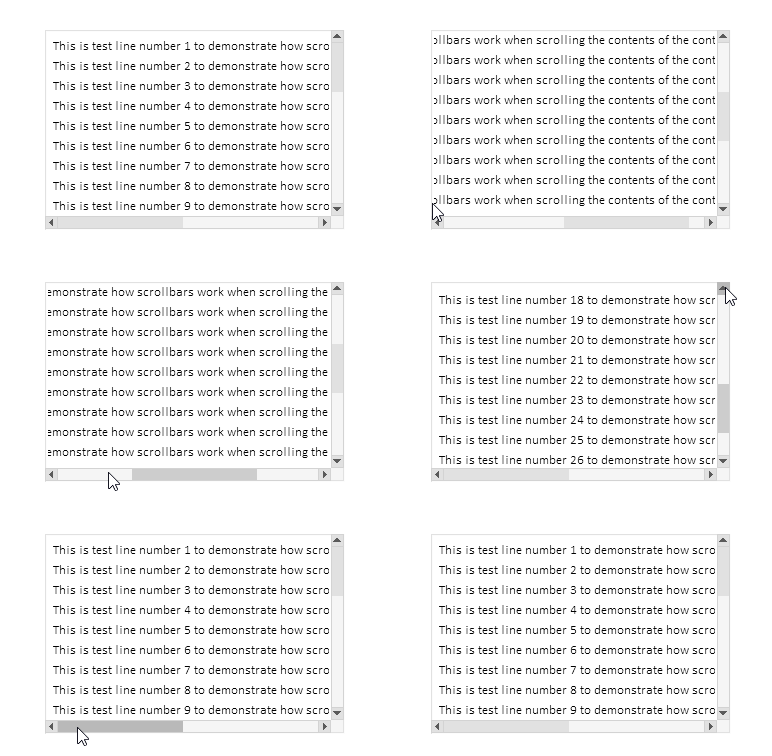
O deslocamento por uma página ao clicar no trilho funciona, o deslocamento ao clicar nos botões funciona, a repetição automática de eventos ao manter os botões pressionados funciona, a rolagem com a roda do mouse funciona.
Após a criação de todos os elementos de controle, as descrições de todos os elementos criados serão impressas no log:
Container (ContainerBG, ContainerFG): ID 1, Group -1, x 100, y 40, w 300, h 200
   [2]: Groupbox "Attached Groupbox" (ContainerFG_GRBX2BG, ContainerFG_GRBX2FG): ID 2, Group 1, x 100, y 40, w 620, h 610
      [0]: Label "TextString1" (ContainerFG_GRBX2FG_LBL0BG, ContainerFG_GRBX2FG_LBL0FG): ID 0, Group 1, x 108, y 48, w 587, h 20
      [1]: Label "TextString2" (ContainerFG_GRBX2FG_LBL1BG, ContainerFG_GRBX2FG_LBL1FG): ID 1, Group 1, x 108, y 68, w 587, h 20
      [2]: Label "TextString3" (ContainerFG_GRBX2FG_LBL2BG, ContainerFG_GRBX2FG_LBL2FG): ID 2, Group 1, x 108, y 88, w 587, h 20
      [3]: Label "TextString4" (ContainerFG_GRBX2FG_LBL3BG, ContainerFG_GRBX2FG_LBL3FG): ID 3, Group 1, x 108, y 108, w 587, h 20
      [4]: Label "TextString5" (ContainerFG_GRBX2FG_LBL4BG, ContainerFG_GRBX2FG_LBL4FG): ID 4, Group 1, x 108, y 128, w 587, h 20
      [5]: Label "TextString6" (ContainerFG_GRBX2FG_LBL5BG, ContainerFG_GRBX2FG_LBL5FG): ID 5, Group 1, x 108, y 148, w 587, h 20
      [6]: Label "TextString7" (ContainerFG_GRBX2FG_LBL6BG, ContainerFG_GRBX2FG_LBL6FG): ID 6, Group 1, x 108, y 168, w 587, h 20
      [7]: Label "TextString8" (ContainerFG_GRBX2FG_LBL7BG, ContainerFG_GRBX2FG_LBL7FG): ID 7, Group 1, x 108, y 188, w 587, h 20
      [8]: Label "TextString9" (ContainerFG_GRBX2FG_LBL8BG, ContainerFG_GRBX2FG_LBL8FG): ID 8, Group 1, x 108, y 208, w 587, h 20
      [9]: Label "TextString10" (ContainerFG_GRBX2FG_LBL9BG, ContainerFG_GRBX2FG_LBL9FG): ID 9, Group 1, x 108, y 228, w 594, h 20
      [10]: Label "TextString11" (ContainerFG_GRBX2FG_LBL10BG, ContainerFG_GRBX2FG_LBL10FG): ID 10, Group 1, x 108, y 248, w 594, h 20
      [11]: Label "TextString12" (ContainerFG_GRBX2FG_LBL11BG, ContainerFG_GRBX2FG_LBL11FG): ID 11, Group 1, x 108, y 268, w 594, h 20
      [12]: Label "TextString13" (ContainerFG_GRBX2FG_LBL12BG, ContainerFG_GRBX2FG_LBL12FG): ID 12, Group 1, x 108, y 288, w 594, h 20
      [13]: Label "TextString14" (ContainerFG_GRBX2FG_LBL13BG, ContainerFG_GRBX2FG_LBL13FG): ID 13, Group 1, x 108, y 308, w 594, h 20
      [14]: Label "TextString15" (ContainerFG_GRBX2FG_LBL14BG, ContainerFG_GRBX2FG_LBL14FG): ID 14, Group 1, x 108, y 328, w 594, h 20
      [15]: Label "TextString16" (ContainerFG_GRBX2FG_LBL15BG, ContainerFG_GRBX2FG_LBL15FG): ID 15, Group 1, x 108, y 348, w 594, h 20
      [16]: Label "TextString17" (ContainerFG_GRBX2FG_LBL16BG, ContainerFG_GRBX2FG_LBL16FG): ID 16, Group 1, x 108, y 368, w 594, h 20
      [17]: Label "TextString18" (ContainerFG_GRBX2FG_LBL17BG, ContainerFG_GRBX2FG_LBL17FG): ID 17, Group 1, x 108, y 388, w 594, h 20
      [18]: Label "TextString19" (ContainerFG_GRBX2FG_LBL18BG, ContainerFG_GRBX2FG_LBL18FG): ID 18, Group 1, x 108, y 408, w 594, h 20
      [19]: Label "TextString20" (ContainerFG_GRBX2FG_LBL19BG, ContainerFG_GRBX2FG_LBL19FG): ID 19, Group 1, x 108, y 428, w 594, h 20
      [20]: Label "TextString21" (ContainerFG_GRBX2FG_LBL20BG, ContainerFG_GRBX2FG_LBL20FG): ID 20, Group 1, x 108, y 448, w 594, h 20
      [21]: Label "TextString22" (ContainerFG_GRBX2FG_LBL21BG, ContainerFG_GRBX2FG_LBL21FG): ID 21, Group 1, x 108, y 468, w 594, h 20
      [22]: Label "TextString23" (ContainerFG_GRBX2FG_LBL22BG, ContainerFG_GRBX2FG_LBL22FG): ID 22, Group 1, x 108, y 488, w 594, h 20
      [23]: Label "TextString24" (ContainerFG_GRBX2FG_LBL23BG, ContainerFG_GRBX2FG_LBL23FG): ID 23, Group 1, x 108, y 508, w 594, h 20
      [24]: Label "TextString25" (ContainerFG_GRBX2FG_LBL24BG, ContainerFG_GRBX2FG_LBL24FG): ID 24, Group 1, x 108, y 528, w 594, h 20
      [25]: Label "TextString26" (ContainerFG_GRBX2FG_LBL25BG, ContainerFG_GRBX2FG_LBL25FG): ID 25, Group 1, x 108, y 548, w 594, h 20
      [26]: Label "TextString27" (ContainerFG_GRBX2FG_LBL26BG, ContainerFG_GRBX2FG_LBL26FG): ID 26, Group 1, x 108, y 568, w 594, h 20
      [27]: Label "TextString28" (ContainerFG_GRBX2FG_LBL27BG, ContainerFG_GRBX2FG_LBL27FG): ID 27, Group 1, x 108, y 588, w 594, h 20
      [28]: Label "TextString29" (ContainerFG_GRBX2FG_LBL28BG, ContainerFG_GRBX2FG_LBL28FG): ID 28, Group 1, x 108, y 608, w 594, h 20
      [29]: Label "TextString30" (ContainerFG_GRBX2FG_LBL29BG, ContainerFG_GRBX2FG_LBL29FG): ID 29, Group 1, x 108, y 628, w 594, h 20
A funcionalidade proposta funciona corretamente. Existem algumas pequenas imperfeições, porém elas serão corrigidas no desenvolvimento posterior do elemento de controle TableView.
Considerações finais
Hoje implementamos um conjunto bastante amplo e necessário de funcionalidades na biblioteca de elementos de controle que está sendo desenvolvida.
A classe CContainer é uma ferramenta poderosa e conveniente para a criação de áreas roláveis em interfaces de usuário. Ela automatiza o trabalho com barras de rolagem, facilita o gerenciamento de conteúdos extensos e fornece uma interação familiar para o usuário ao trabalhar com áreas roláveis. Graças à sua arquitetura flexível e à integração com outros elementos da interface, o contêiner pode ser facilmente utilizado como parte de soluções gráficas complexas.
O próximo passo será criar um cabeçalho que permita posicionar, por exemplo, uma lista de cabeçalhos das colunas de uma tabela, ao mesmo tempo, a funcionalidade permitirá alterar o tamanho de cada célula do cabeçalho, o que automaticamente modificará também o tamanho das colunas da tabela.
Programas utilizados no artigo:
| # | Nome | Tipo | Descrição |
|---|---|---|---|
| 1 | Base.mqh | Biblioteca de classes | Classes para criação do objeto base dos elementos de controle |
| 2 | Controls.mqh | Biblioteca de classes | Classes dos elementos de controle |
| 3 | iTestContainer.mq5 | Indicador de teste | Indicador para testar o funcionamento das classes de elementos de controle |
| 4 | MQL5.zip | Arquivo compactado | Arquivo com os arquivos apresentados acima para extração no diretório MQL5 do terminal cliente |
Traduzido do russo pela MetaQuotes Ltd.
Artigo original: https://www.mql5.com/ru/articles/18658
Aviso: Todos os direitos sobre esses materiais pertencem à MetaQuotes Ltd. É proibida a reimpressão total ou parcial.
Esse artigo foi escrito por um usuário do site e reflete seu ponto de vista pessoal. A MetaQuotes Ltd. não se responsabiliza pela precisão das informações apresentadas nem pelas possíveis consequências decorrentes do uso das soluções, estratégias ou recomendações descritas.

 Desenvolvendo um EA multimoeda (Parte 28): Adicionando um gerenciador de fechamento de posições
 Desenvolvimento do Toolkit de Análise de Price Action (Parte 15): Introduzindo a Teoria dos Quartos (I) — Script Quarters Drawer
 Redes neurais em trading: Previsão probabilística de série temporal (K2VAE)
 Redes neurais em trading: Segmentação periódica adaptativa (Conclusão)

- Aplicativos de negociação gratuitos
- 8 000+ sinais para cópia
- Notícias econômicas para análise dos mercados financeiros
Você concorda com a política do site e com os termos de uso
Não tenho certeza do que aconteceu, mas quando construo o código original e o executo, ele é exibido de forma diferente da descrita na parte inferior do artigo.
Remova o indicador do gráfico. Pressione Ctrl+B, clique em "Todos" na janela da lista de objetos gráficos que se abre e exclua todos os objetos. Em seguida, reinicie o indicador.
Mas seria melhor especificar o que está escrito no registro - provavelmente houve um erro ao criar objetos.