

Die Komponenten View und Controller für Tabellen im MQL5 MVC-Paradigma: Container
 312
312
 3
3

Inhalt
- Einführung
- Singleton-Klasse als gemeinsamer Datenmanager
- Klassen zur Organisation der automatischen Wiederholung von Schaltflächenklicks
- Verfeinerung von Basisklassen
- Objektliste Klasse
- Basisklasse eines Grafikelements
- Verfeinerung einfacher Steuerelemente
- Container-Klassen für die Platzierung von Steuerelementen
- Testen des Ergebnisses
- Schlussfolgerung
Einführung
In modernen Nutzeroberflächen ist es oft notwendig, große Mengen verschiedener Daten kompakt und übersichtlich darzustellen. Für diese Zwecke werden spezielle Steuerelemente, so genannte Container, verwendet, die das Scrollen von Inhalten unterstützen. Dieser Ansatz ermöglicht es, Tabellen und andere grafische Elemente in einem begrenzten Fensterbereich zu platzieren, sodass der Nutzer schnell und intuitiv auf Informationen zugreifen kann.
Im Rahmen der Entwicklung des TableView-Steuerelements im MVC-Paradigma (Model-View-Controller) haben wir bereits die Komponente Model – ein Tabellenmodell – erstellt und mit der Erstellung der Komponenten View und Controller begonnen. Im letzten Artikel wurden einfache, aber recht funktionelle Kontrollen erstellt. Komplexe Steuerungen werden aus solchen Elementen zusammengesetzt. Heute werden wir Steuerelementklassen wie Panel, GroupBox und Container schreiben – alle drei Elemente sind Container, auf denen verschiedene Steuerelemente platziert werden können.
- Das Panel-Steuerelement ist ein Bedienfeld, auf dem eine beliebige Anzahl von anderen Steuerelementen platziert werden kann. Wenn Sie das Bedienfeld zu neuen Koordinaten verschieben, bewegen sich auch alle darauf befindlichen Bedienelemente mit. Das Bedienfeld ist also ein Container für die darauf befindlichen Bedienelemente. Dieses Element verfügt jedoch nicht über Bildlaufleisten, die einen Bildlauf durch den Inhalt des Containers ermöglichen, wenn dieser über die Grenzen des Bereichs hinausgeht. Solche Inhalte werden einfach an den Containergrenzen abgeschnitten.
- Das GroupBox-Steuerelement ist ein Satz von Elementen, die in einer Gruppe organisiert sind. Es wird vom Panel abgeleitet und ermöglicht die Gruppierung von Elementen nach einem gemeinsamen Zweck, z. B. eine Gruppe von RadioButton-Elementen, wobei nur ein Element aus der gesamten Gruppe ausgewählt werden kann und der Rest der Gruppenelemente abgewählt wird.
- Die Containersteuerung. Sie ermöglicht es, nur eine Kontrolle an sich selbst zu befestigen. Wenn das angehängte Element über den Container hinausragt, erscheinen Bildlaufleisten am Container. Sie ermöglichen es, durch den Inhalt des Containers zu blättern. Um eine beliebige Anzahl von Steuerelementen in einem Container zu platzieren, ist es notwendig, ein Paneel darin zu platzieren und die gewünschte Anzahl von Steuerelementen an das Paneel anzuhängen. Der Container blättert also durch das Panel, und letzteres verschiebt seinen Inhalt beim Blättern.
Daher müssen wir zusätzlich zu den drei angegebenen Hauptsteuerelementen Klassen für die Erstellung von Bildlaufleisten erstellen – die Daumen-Klasse (Thumb) und die Scrollbar-Klasse (ScrollBar). Es wird zwei solcher Klassen geben – für vertikale und horizontale Bildlaufleisten.
Wenn Sie sich die Funktion der Bildlauftasten an den Rändern der Bildlaufleisten genau ansehen, werden Sie feststellen, dass der automatische Bildlauf aktiviert wird, wenn Sie die Taste lange gedrückt halten. D. h., die Schaltfläche beginnt automatisch mit dem Senden von Klickereignissen. Für dieses Verhalten werden wir zwei weitere Hilfsklassen erstellen – die Klasse für den Verzögerungszähler und die Klasse für die automatische Ereigniswiederholung.
Die Klasse delay counter kann verwendet werden, um das Warten zu organisieren, ohne den Programmablauf einzufrieren, und die Klasse event auto-repeat wird so implementiert, dass wir ihr vorgeben können, welches Ereignis sie senden soll. Dies ermöglicht nicht nur die Organisation einer automatischen Wiederholung von Schaltflächenklicks, sondern auch andere Algorithmen, die eine Wiederholung von Ereignissen nach einer bestimmten Zeit mit einer bestimmten Häufigkeit erfordern.
In der letzten Phase werden die Tabellen in einem universellen Container platziert, der das Scrollen mit Hilfe von Bildlaufleisten ermöglicht. Ein solcher Container wird die Grundlage für den Aufbau komplexer und flexibler Schnittstellen bilden und nicht nur die Arbeit mit Tabellen ermöglichen, sondern auch die Verwendung in anderen Komponenten, z. B. bei der Erstellung eines mehrseitigen Notizblocks oder anderer Nutzerelemente für das MetaTrader 5 Client-Terminal.
Es ist wichtig zu wissen, wie die Kontrollen funktionieren. Jedes Steuerelement ist mit einer ereignisbasierten Funktionalität ausgestattet (Controller-Komponente) und reagiert entsprechend auf die Interaktion mit dem Mauszeiger.
Bei bestimmten Aktionen sendet das Element, mit dem interagiert wird, ein Ereignis an das Chart. Dieses Ereignis sollte von einem anderen Steuerelement empfangen und verarbeitet werden. Aber alle Elemente erhalten solche Ereignisse. Es muss festgestellt werden, welches Element aktiv ist (über dem sich der Cursor gerade befindet), und nur die von diesem Element stammenden Meldungen müssen verarbeitet werden. Das heißt, wenn Sie mit dem Mauszeiger über ein Steuerelement fahren, sollte es als aktiv markiert werden, während die übrigen – inaktiven Elemente – nicht behandelt werden sollten.
Um die Auswahl eines aktiven Elements zu organisieren, muss sichergestellt werden, dass jede Kontrolle Zugang zu diesen Informationen hat. Es gibt verschiedene Möglichkeiten, dies zu tun. Sie können z. B. eine Liste erstellen, in der die Namen aller erstellten Elemente eingetragen werden, in dieser Liste nach einer Übereinstimmung mit dem Namen des Objekts suchen, auf dem sich der Cursor gerade befindet, und mit dem gefundenen Objekt in dieser Liste arbeiten.
Dieser Ansatz ist möglich, führt aber zu einer Verkomplizierung des Codes und der Arbeit mit ihm. Es ist einfacher, ein einzelnes Objekt zu erstellen, auf das im Programm global zugegriffen werden kann, und den Namen des aktiven Steuerelements in diesem Objekt zu speichern. Die übrigen Elemente sehen sofort den Namen des aktiven Elements und entscheiden, ob sie eingehende Nachrichten bearbeiten oder nicht, ohne zusätzliche Suche in einer Datenbank.
Eine Singleton-Klasse kann eine solche öffentliche Klasse sein:
Eine Singleton-Klasse ist ein Entwurfsmuster, das die Existenz von nur einer Instanz einer bestimmten Klasse während der Programmlaufzeit garantiert und einen globalen Zugriffspunkt auf diese Instanz bietet.
Der Zweck von Singleton
Singleton wird verwendet, wenn es notwendig ist, dass ein Objekt nur eine Instanz hat, und diese Instanz von jedem Teil des Programms aus zugänglich ist. Beispiele: Einstellungsmanager, Logger, Datenbankverbindungspool, Ressourcenmanager, usw.
So funktioniert Singleton
- Ein versteckter Konstruktor: Der Klassenkonstruktor wird als privat oder geschützt deklariert, um die Erstellung von Instanzen von außen zu verhindern.
- Statische Variable: Innerhalb der Klasse wird eine statische Variable erstellt, die eine einzelne Instanz der Klasse speichert.
- Statische Zugriffsmethode: Um eine Instanz einer Klasse zu erhalten, wird eine statische Methode verwendet (z. B. Instance() oder getInstance()), die beim ersten Zugriff ein Objekt erzeugt und es bei späteren Aufrufen zurückgibt.
Singleton ist eine Klasse, die nur einmal erstellt werden kann, und diese einzelne Instanz ist global zugänglich. Dies ist nützlich für die Verwaltung gemeinsam genutzter Ressourcen oder des Anwendungsstatus.
Lassen Sie uns eine solche Klasse implementieren.
Singleton-Klasse als gemeinsamer Datenmanager
Im letzten Artikel befanden sich alle Bibliothekscodes unter \MQL5\Indikatoren\Tabellen\Steuerungen\. Hier sind wir an beiden Dateien interessiert: Base.mqh und Control.mqh. Wir werden sie heute verfeinern.
Öffnen Sie die Datei Base.mqh und schreiben Sie den folgenden Code in den Klassenblock:
//+------------------------------------------------------------------+
//| Classes                                                          |
//+------------------------------------------------------------------+
//+------------------------------------------------------------------+
//| Singleton class for common flags and events of graphical elements|
//+------------------------------------------------------------------+
class CCommonManager
  {
private:
   static CCommonManager *m_instance;                          // Class instance
   string            m_element_name;                           // Active element name

//--- Constructor/destructor
                     CCommonManager(void) : m_element_name("") {}
                    ~CCommonManager() {}
public:
//--- Method for getting a Singleton instance
   static CCommonManager *GetInstance(void)
                       {
                        if(m_instance==NULL)
                           m_instance=new CCommonManager();
                        return m_instance;
                       }
//--- Method for destroying a Singleton instance
   static void       DestroyInstance(void)
                       {
                        if(m_instance!=NULL)
                          {
                           delete m_instance;
                           m_instance=NULL;
                          }
                       }
//--- (1) Set and (2) return the name of the active current element
   void              SetElementName(const string name)         { this.m_element_name=name;   }
   string            ElementName(void)                   const { return this.m_element_name; }
  };
//--- Initialize a static instance variable of a class
CCommonManager* CCommonManager::m_instance=NULL;
//+------------------------------------------------------------------+
//| Base class of graphical elements                                 |
//+------------------------------------------------------------------+
Ein privater Klassenkonstruktor und eine statische Methode für den Zugriff auf eine Instanz der Klasse stellen sicher, dass nur eine Instanz in der Anwendung existiert.
- Die Methode static CCommonManager* GetInstance(void) – gibt einen Zeiger auf eine einzelne Instanz der Klasse zurück und erstellt diese beim ersten Zugriff.
- Die Methode static void DestroyInstance(void) – vernichtet eine Instanz der Klasse und gibt den Speicher frei.
- Die Methode void SetElementName(const string name) – setzt den Namen des aktiven Grafikelements.
- Die Methode string ElementName(void) const – gibt den Namen des aktiven grafischen Elements zurück.
Nun kann jedes der Grafikelemente auf eine Instanz dieser Klasse zugreifen, um den Namen des aktiven Elements zu lesen und zu schreiben. Alle Elemente teilen sich dieselbe Variable. Dadurch wird sichergestellt, dass jedes der mehreren Objekte Daten in dieselbe Variable liest und schreibt.
Da nicht mehr als ein Steuerelement gleichzeitig aktiv sein kann, ist eine solche Implementierung des aktiven Elementmanagers ohne die Zugriffskontrollfunktionalität völlig ausreichend (sodass nicht zwei oder mehr Elemente ihre Daten in eine Variable schreiben können).
Später können dieser Datenmanagerklasse weitere Daten hinzugefügt werden, z. B. Berechtigungs-Flag für das Arbeits-Chart. Im Moment wird jedes der grafischen Elemente erstellt, um sich an die Zustände der Chart-Flags zu erinnern. Diese Daten können auch in den entsprechenden Variablen an diese Klasse übergeben werden.
Klassen zur Organisation der automatischen Wiederholung von Schaltflächenklicks
Oben haben wir über die Erstellung einer Auto-Repeat-Funktionalität für das Senden von Ereignissen von Scrollbar-Schaltflächen gesprochen, wenn die Schaltfläche lange gehalten wird. Dieses Verhalten ist bei den meisten Betriebssystemanwendungen Standard. Daher gibt es meiner Meinung nach keinen Grund, dies nicht auch hier zu tun. Wenn Sie die Taste gedrückt halten, beginnt zunächst der Zeitzähler für das Halten der Taste (normalerweise beträgt dieser Zeitraum 350-500 ms). Wenn die Taste vor Ablauf der Haltezeit nicht losgelassen wurde, wird der zweite Zähler gestartet – der Zähler für das Intervall des Sendens von Tastendruckereignissen. Und solche Ereignisse werden mit einer Frequenz von etwa 100 ms gesendet, bis die Taste losgelassen wird.
Um dieses Verhalten zu implementieren, implementieren wir zwei Hilfsklassen – die Millisekunden-Timer-Klasse und die Klasse für die automatische Ereignisabwicklung.
Schreiben wir den Code weiter in dieselbe Datei Base.mqh:
//+------------------------------------------------------------------+
//| Millisecond counter class                                        |
//+------------------------------------------------------------------+
class CCounter : public CBaseObj
  {
private:
   bool              m_launched;                               // Launched countdown flag
//--- Start the countdown
   void              Run(const uint delay)
                       {
                        //--- If the countdown has already started, leave
                        if(this.m_launched)
                           return;
                        //--- If a non-zero delay value is passed, set a new value
                        if(delay!=0)
                           this.m_delay=delay;
                        //--- Save the start time and set a flag that the countdown has already started
                        this.m_start=::GetTickCount64();
                        this.m_launched=true;
                       }
protected:
   ulong             m_start;                                  // Countdown start time
   uint              m_delay;                                  // Delay

public:
//--- (1) Set a delay, start the countdown with the (2) set and (3) specified delay
   void              SetDelay(const uint delay)                { this.m_delay=delay;            }
   void              Start(void)                               { this.Run(0);                   }
   void              Start(const uint delay)                   { this.Run(delay);               }
//--- Return the countdown end flag
   bool              IsDone(void)
                       {
                        //--- If the countdown has not started, return 'false'
                        if(!this.m_launched)
                           return false;
                        //--- If more milliseconds have passed than the timeout
                        if(::GetTickCount64()-this.m_start>this.m_delay)
                          {
                           //--- reset the flag of the launched countdown and return true
                           this.m_launched=false;
                           return true;
                          }
                        //--- The specified time has not yet passed
                        return false;
                       }

//--- Virtual methods of (1) saving to file, (2) loading from file and (3) object type
   virtual bool      Save(const int file_handle);
   virtual bool      Load(const int file_handle);
   virtual int       Type(void)                          const { return(ELEMENT_TYPE_COUNTER);  }

//--- Constructor/destructor
                     CCounter(void) : m_start(0), m_delay(0), m_launched(false) {}
                    ~CCounter(void) {}
  };
//+------------------------------------------------------------------+
//| CCounter::Save to file                                           |
//+------------------------------------------------------------------+
bool CCounter::Save(const int file_handle)
  {
//--- Save the parent object data
   if(!CBaseObj::Save(file_handle))
      return false;

//--- Save the delay value
   if(::FileWriteInteger(file_handle,this.m_delay,INT_VALUE)!=INT_VALUE)
      return false;

//--- All is successful
   return true;
  }
//+------------------------------------------------------------------+
//| CCounter::Load from file                                         |
//+------------------------------------------------------------------+
bool CCounter::Load(const int file_handle)
  {
//--- Load parent object data
   if(!CBaseObj::Load(file_handle))
      return false;

//--- Load the delay value
   this.m_delay=::FileReadInteger(file_handle,INT_VALUE);

//--- All is successful
   return true;
  }
Die Klasse des Millisekunden-Timers dient dazu, den Ablauf eines bestimmten Zeitintervalls (Verzögerung) in Millisekunden zu verfolgen. Sie wird von der Basisklasse CBaseObj geerbt und kann verwendet werden, um Zeitgeber, Verzögerungen und Zeitsteuerung für verschiedene Operationen in MQL5-Anwendungen zu implementieren.
- Die Methode void SetDelay(const uint delay) setzt den Verzögerungswert (in Millisekunden).
- Die Methode void Start(const uint delay) startet den Countdown mit einer neuen Verzögerung.
- Die Methode bool IsDone(void) gibt true zurück, wenn der Countdown abgeschlossen ist, andernfalls – false.
- Die Methode virtual bool Save(const int file_handle) ist eine virtuelle Methode zum Speichern eines Zustands in einer Datei.
- Die Methode virtual bool Load(const int file_handle) ist eine virtuelle Methode zum Herunterladen eines Zustands aus einer Datei.
- Die Methode virtual int Type(void) const gibt den im System zu identifizierenden Objekttyp zurück.
Erstellen wir auf der Grundlage dieser Klasse eine Klasse zur automatischen Wiederholung von Ereignissen:
//+------------------------------------------------------------------+
//| Event auto-repeat class                                          |
//+------------------------------------------------------------------+
class CAutoRepeat : public CBaseObj
  {
private:
   CCounter          m_delay_counter;                          // Counter for delay before auto-repeat
   CCounter          m_repeat_counter;                         // Counter for periodic sending of events
   long              m_chart_id;                               // Chart for sending a custom event
   bool              m_button_pressed;                         // Flag indicating whether the button is pressed
   bool              m_auto_repeat_started;                    // Flag indicating whether auto-repeat has started
   uint              m_delay_before_repeat;                    // Delay before auto-repeat starts (ms)
   uint              m_repeat_interval;                        // Frequency of sending events (ms)
   ushort            m_event_id;                               // Custom event ID
   long              m_event_lparam;                           // long parameter of the user event
   double            m_event_dparam;                           // double parameter of the custom event
   string            m_event_sparam;                           // string parameter of the custom event

//--- Send a custom event
   void              SendEvent() { ::EventChartCustom((this.m_chart_id<=0 ? ::ChartID() : this.m_chart_id), this.m_event_id, this.m_event_lparam, this.m_event_dparam, this.m_event_sparam); }
public:
//--- Object type
   virtual int       Type(void)                          const { return(ELEMENT_TYPE_AUTOREPEAT_CONTROL);   }

//--- Constructors
                     CAutoRepeat(void) :
                        m_button_pressed(false), m_auto_repeat_started(false), m_delay_before_repeat(350), m_repeat_interval(100),
                        m_event_id(0), m_event_lparam(0), m_event_dparam(0), m_event_sparam(""), m_chart_id(::ChartID()) {}

                     CAutoRepeat(long chart_id, int delay_before_repeat=350, int repeat_interval=100, ushort event_id=0, long event_lparam=0, double event_dparam=0, string event_sparam="") :
                        m_button_pressed(false), m_auto_repeat_started(false), m_delay_before_repeat(delay_before_repeat), m_repeat_interval(repeat_interval),
                        m_event_id(event_id), m_event_lparam(event_lparam), m_event_dparam(event_dparam), m_event_sparam(event_sparam), m_chart_id(chart_id) {}

//--- Set the chart ID
   void              SetChartID(const long chart_id)              { this.m_chart_id=chart_id;         }
   void              SetDelay(const uint delay)                   { this.m_delay_before_repeat=delay; }
   void              SetInterval(const uint interval)             { this.m_repeat_interval=interval;  }

//--- Set the ID and parameters of a custom event
   void              SetEvent(ushort event_id, long event_lparam, double event_dparam, string event_sparam)
                       {
                        this.m_event_id=event_id;
                        this.m_event_lparam=event_lparam;
                        this.m_event_dparam=event_dparam;
                        this.m_event_sparam=event_sparam;
                       }

//--- Return flags
   bool              ButtonPressedFlag(void)                const { return this.m_button_pressed;     }
   bool              AutorepeatStartedFlag(void)            const { return this.m_auto_repeat_started;}
   uint              Delay(void)                            const { return this.m_delay_before_repeat;}
   uint              Interval(void)                         const { return this.m_repeat_interval;    }

//--- Handle a button click (starting auto-repeat)
   void              OnButtonPress(void)
                       {
                        if(this.m_button_pressed)
                           return;
                        this.m_button_pressed=true;
                        this.m_auto_repeat_started=false;
                        this.m_delay_counter.Start(this.m_delay_before_repeat);  // Start the delay counter
                       }

//--- Handle button release (stopping auto-repeat)
   void              OnButtonRelease(void)
                       {
                        this.m_button_pressed=false;
                        this.m_auto_repeat_started=false;
                       }

//--- Method for performing auto-repeat (started in the timer)
   void              Process(void)
                       {
                        //--- If the button is held down
                        if(this.m_button_pressed)
                          {
                           //--- Check if the delay before starting the auto-repeat has expired
                           if(!this.m_auto_repeat_started && this.m_delay_counter.IsDone())
                             {
                              this.m_auto_repeat_started=true;
                              this.m_repeat_counter.Start(this.m_repeat_interval); // Start the auto-repeat counter
                             }
                           //--- If auto-repeat has started, check the frequency of sending events
                           if(this.m_auto_repeat_started && this.m_repeat_counter.IsDone())
                             {
                              //--- Send an event and restart the counter
                              this.SendEvent();
                              this.m_repeat_counter.Start(this.m_repeat_interval);
                             }
                          }
                       }
  };
Mit dieser Klasse können Sie automatisch Nutzerereignisse mit einer bestimmten Häufigkeit senden, solange die Taste gedrückt gehalten wird. Dadurch wird ein nutzerfreundliches Verhalten der Nutzeroberfläche gewährleistet (wie bei den üblichen OS-Scrollbars).
- Die Methode OnButtonPress() wird aufgerufen, wenn die Schaltfläche gedrückt wird; sie beginnt mit der Zählung der Verzögerung vor der automatischen Wiederholung.
- Die Methode OnButtonRelease() wird aufgerufen, wenn die Schaltfläche losgelassen wird; sie beendet die automatische Wiederholung.
- Die Methode Process() ist die Hauptmethode, die im Timer aufgerufen werden sollte. Sie sorgt dafür, dass Ereignisse in der gewünschten Häufigkeit gesendet werden, wenn die Taste gedrückt gehalten wird.
- Die Methode SetEvent(...) – Einstellung der Parameter eines nutzerdefinierten Ereignisses.
- Methoden SetDelay(...), setInterval(...) – Einstellung der Verzögerung und des Intervalls für die automatische Wiederholung.
Deklarieren Sie ein Objekt der Klasse auto-repeat in der Basisklasse des Grafikelements canvas CCanvasBase. Auf diese Weise wird es möglich sein, das Ereignis „auto-repeat“ in jedem Objekt mit grafischen Elementen zu verwenden. Es reicht aus, die Parameter für die Verzögerung und das Intervall einzustellen und die automatische Wiederholung in den gewünschten Situationen zu starten.
Verfeinerung von Basisklassen
Es wurde viel Arbeit in die Bibliothek gesteckt, um Fehler zu beheben. Die Verbesserungen betrafen fast alle Klassen. Wir werden hier nicht jeden einzelnen Arbeitsschritt beschreiben. Aber die wichtigsten Punkte werden natürlich bekannt gegeben.
In Base.mqh deklarieren wir alle Klassen, die wir heute implementieren werden:
//+------------------------------------------------------------------+
//|                                                         Base.mqh |
//|                                  Copyright 2025, MetaQuotes Ltd. |
//|                                             https://www.mql5.com |
//+------------------------------------------------------------------+
#property copyright "Copyright 2025, MetaQuotes Ltd."
#property link      "https://www.mql5.com"

//+------------------------------------------------------------------+
//| Include libraries                                                |
//+------------------------------------------------------------------+
#include <Canvas\Canvas.mqh>              // CCanvas class
#include <Arrays\List.mqh>                // CList class

//--- Forward declaration of control element classes
class    CCounter;                        // Delay counter class
class    CAutoRepeat;                     // Event auto-repeat class
class    CImagePainter;                   // Image drawing class
class    CLabel;                          // Text label class
class    CButton;                         // Simple button class
class    CButtonTriggered;                // Two-position button class
class    CButtonArrowUp;                  // Up arrow button class
class    CButtonArrowDown;                // Down arrow button class
class    CButtonArrowLeft;                // Left arrow button class
class    CButtonArrowRight;               // Right arrow button class
class    CCheckBox;                       // CheckBox control class
class    CRadioButton;                    // RadioButton control class
class    CScrollBarThumbH;                // Horizontal scrollbar slider class
class    CScrollBarThumbV;                // Vertical scrollbar slider class
class    CScrollBarH;                     // Horizontal scrollbar class
class    CScrollBarV;                     // Vertical scrollbar class
class    CPanel;                          // Panel control class
class    CGroupBox;                       // GroupBox control class
class    CContainer;                      // Container control class
Eine solche Vorwärtsdeklaration von Klassen ist für eine fehlerfreie Kompilierung der eingebundenen Dateien Base.mqh und Controls.mqh notwendig, da der Zugriff auf diese Klassen bereits vor ihrer eigentlichen Deklaration in den Dateien erfolgt.
Wir ergänzen neue Typen zur Enumeration der Typen von Grafikelementen und geben den Bereich der Konstanten der Objekttypen an, die an der Interaktion mit dem Nutzer teilnehmen können:
//+------------------------------------------------------------------+
//| Enumerations                                                     |
//+------------------------------------------------------------------+
enum ENUM_ELEMENT_TYPE                    // Enumeration of graphical element types
  {
   ELEMENT_TYPE_BASE = 0x10000,           // Basic object of graphical elements
   ELEMENT_TYPE_COLOR,                    // Color object
   ELEMENT_TYPE_COLORS_ELEMENT,           // Color object of the graphical object element
   ELEMENT_TYPE_RECTANGLE_AREA,           // Rectangular area of the element
   ELEMENT_TYPE_IMAGE_PAINTER,            // Object for drawing images
   ELEMENT_TYPE_COUNTER,                  // Counter object
   ELEMENT_TYPE_AUTOREPEAT_CONTROL,       // Event auto-repeat object
   ELEMENT_TYPE_CANVAS_BASE,              // Basic canvas object for graphical elements
   ELEMENT_TYPE_ELEMENT_BASE,             // Basic object of graphical elements
   ELEMENT_TYPE_LABEL,                    // Text label
   ELEMENT_TYPE_BUTTON,                   // Simple button
   ELEMENT_TYPE_BUTTON_TRIGGERED,         // Two-position button
   ELEMENT_TYPE_BUTTON_ARROW_UP,          // Up arrow button
   ELEMENT_TYPE_BUTTON_ARROW_DOWN,        // Down arrow button
   ELEMENT_TYPE_BUTTON_ARROW_LEFT,        // Left arrow button
   ELEMENT_TYPE_BUTTON_ARROW_RIGHT,       // Right arrow button
   ELEMENT_TYPE_CHECKBOX,                 // CheckBox control
   ELEMENT_TYPE_RADIOBUTTON,              // RadioButton control
   ELEMENT_TYPE_SCROLLBAR_THUMB_H,        // Horizontal scroll bar slider
   ELEMENT_TYPE_SCROLLBAR_THUMB_V,        // Vertical scroll bar slider
   ELEMENT_TYPE_SCROLLBAR_H,              // ScrollBarHorisontal control
   ELEMENT_TYPE_SCROLLBAR_V,              // ScrollBarVertical control
   ELEMENT_TYPE_PANEL,                    // Panel control
   ELEMENT_TYPE_GROUPBOX,                 // GroupBox control
   ELEMENT_TYPE_CONTAINER,                // Container control
  };
#define  ACTIVE_ELEMENT_MIN   ELEMENT_TYPE_LABEL         // Minimum value of the list of active elements
#define  ACTIVE_ELEMENT_MAX   ELEMENT_TYPE_SCROLLBAR_V   // Maximum value of the list of active elements
Bei der Interaktion mit dem Mauszeiger ist jedes grafische Element grundsätzlich in der Lage, eingehende Ereignismeldungen zu verarbeiten. Aber nicht jedes Element sollte dies tun. Mit anderen Worten, es ist notwendig, den Typ des Elements zu prüfen und auf dieser Grundlage zu entscheiden, ob dieses Element Ereignisse verarbeitet oder nicht. Folgt man dem Weg der Überprüfung von Objekttypen, erhält man in der Bedingung eine lange Liste von Elementen, die nicht behandelt werden können. Das ist ungünstig. Es ist einfacher, eine weitere Eigenschaft hinzuzufügen, ein Flag, das angibt, ob dieses Element für die Interaktion aktiv oder statisch ist. Dann können wir nur diese Eigenschaft überprüfen, um zu entscheiden, ob das Ereignis behandelt werden soll oder nicht. Hier haben wir die Anfangs- und Endwerte der Konstanten der Grafikelementtypen angegeben. Bei der Entscheidung über die Ereignisbehandlung reicht es aus, zu prüfen, ob der Elementtyp innerhalb dieses Wertebereichs liegt. Und auf dieser Grundlage kann eine Entscheidung getroffen werden.
Hinzufügen einer Enumeration von Eigenschaften, nach denen wir Basisobjekte sortieren und suchen können (CBaseObj):
enum ENUM_BASE_COMPARE_BY                 // Compared properties of base objects
  {
   BASE_SORT_BY_ID   =  0,                // Compare base objects by ID
   BASE_SORT_BY_NAME,                     // Compare base objects by name
   BASE_SORT_BY_X,                        // Compare base objects by X coordinate
   BASE_SORT_BY_Y,                        // Compare base objects by Y coordinate
   BASE_SORT_BY_WIDTH,                    // Compare base objects by width
   BASE_SORT_BY_HEIGHT,                   // Compare base objects by height
   BASE_SORT_BY_ZORDER,                   // Compare by objects' Z-order
  };
Jetzt können alle von der Basis geerbten Objekte nach den in der Enumeration angegebenen Eigenschaften sortiert werden, wenn ein Objekt solche Eigenschaften hat, was mehr Flexibilität bei der Erstellung neuer Nachfolgeklassen von CBaseObj bietet.
In der Funktion, die den Elementtyp als String zurückgibt, fügen wir die Ausgabe der Buchstaben „V“ und „H“ zu den lesbaren „Vertical“ und „Horizontal“ hinzu:
//+------------------------------------------------------------------+
//|  Return the element type as a string                             |
//+------------------------------------------------------------------+
string ElementDescription(const ENUM_ELEMENT_TYPE type)
  {
   string array[];
   int total=StringSplit(EnumToString(type),StringGetCharacter("_",0),array);
   if(array[array.Size()-1]=="V")
      array[array.Size()-1]="Vertical";
   if(array[array.Size()-1]=="H")
      array[array.Size()-1]="Horisontal";

   string result="";
   for(int i=2;i<total;i++)
     {
      array[i]+=" ";
      array[i].Lower();
      array[i].SetChar(0,ushort(array[i].GetChar(0)-0x20));
      result+=array[i];
     }
   result.TrimLeft();
   result.TrimRight();
   return result;
  }
Dadurch werden die Elementbeschreibungen besser lesbar.
Bei der Erstellung neuer Elemente und ihrer Aufnahme in die Liste der an den Container angehängten Elemente müssen Objektnamen erstellt werden. Wir implementieren eine Funktion, die kurze Abkürzungen der Elementtypen zurückgibt, die zur Erstellung eines Elements verwendet werden können, und verwenden Sie dann diese Abkürzung im Objektnamen, um zu verstehen, um welche Art von Element es sich handelt:
//+------------------------------------------------------------------+
//|  Return the short name of the element by type                    |
//+------------------------------------------------------------------+
string ElementShortName(const ENUM_ELEMENT_TYPE type)
  {
   switch(type)
     {
      case  ELEMENT_TYPE_ELEMENT_BASE     :  return "BASE";    // Basic object of graphical elements
      case  ELEMENT_TYPE_LABEL            :  return "LBL";     // Text label
      case ELEMENT_TYPE_BUTTON            :  return "SBTN";    // Simple button
      case ELEMENT_TYPE_BUTTON_TRIGGERED  :  return "TBTN";    // Toggle button
      case ELEMENT_TYPE_BUTTON_ARROW_UP   :  return "BTARU";   // Up arrow button
      case ELEMENT_TYPE_BUTTON_ARROW_DOWN :  return "BTARD";   // Down arrow button
      case ELEMENT_TYPE_BUTTON_ARROW_LEFT :  return "BTARL";   // Left arrow button
      case ELEMENT_TYPE_BUTTON_ARROW_RIGHT:  return "BTARR";   // Right arrow button
      case ELEMENT_TYPE_CHECKBOX          :  return "CHKB";    // CheckBox control
      case ELEMENT_TYPE_RADIOBUTTON       :  return "RBTN";    // RadioButton control
      case ELEMENT_TYPE_SCROLLBAR_THUMB_H :  return "THMBH";   // Horizontal scroll bar slider
      case ELEMENT_TYPE_SCROLLBAR_THUMB_V :  return "THMBV";   // Vertical scroll bar slider
      case ELEMENT_TYPE_SCROLLBAR_H       :  return "SCBH";    // ScrollBarHorisontal control
      case ELEMENT_TYPE_SCROLLBAR_V       :  return "SCBV";    // ScrollBarVertical control
      case ELEMENT_TYPE_PANEL             :  return "PNL";     // Panel control
      case ELEMENT_TYPE_GROUPBOX          :  return "GRBX";    // GroupBox control
      case ELEMENT_TYPE_CONTAINER         :  return "CNTR";    // Container control
      default                             :  return "Unknown"; // Unknown
     }
  }
Wenn Elemente an einen Container angehängt werden, werden ihre Namen in Abhängigkeit von der Objekthierarchie realisiert: „Container – ein angehängtes Element an den Container – ein angehängtes Element an ein angehängtes Element“, usw.
Die Trennzeichen zwischen den Namen der Elemente in der Namenskette sind Unterstriche (“_“). Wir können den vollständigen Namen verwenden, um eine Liste von Namen für die gesamte Hierarchie der Objekte zu erstellen. Dazu implementieren wie folgende Funktion:
//+------------------------------------------------------------------+
//| Return the array of element hierarchy names                      |
//+------------------------------------------------------------------+
int GetElementNames(string value, string sep, string &array[])
  {
   if(value=="" || value==NULL)
     {
      PrintFormat("%s: Error. Empty string passed");
      return 0;
     }
   ResetLastError();
   int res=StringSplit(value, StringGetCharacter(sep,0),array);
   if(res==WRONG_VALUE)
     {
      PrintFormat("%s: StringSplit() failed. Error %d",__FUNCTION__, GetLastError());
      return WRONG_VALUE;
     }
   return res;
  }
Die Funktion gibt die Anzahl der Objekte in der Hierarchie zurück und füllt das Array mit den Namen aller Elemente aus.
Schreiben wir in der Klasse CBound rectangular area eine Methode zum Vergleich zweier Objekte:
//+------------------------------------------------------------------+
//| CBound::Compare two objects                                      |
//+------------------------------------------------------------------+
int CBound::Compare(const CObject *node,const int mode=0) const
  {
   if(node==NULL)
      return -1;
   const CBound *obj=node;
   switch(mode)
     {
      case BASE_SORT_BY_NAME  :  return(this.Name()   >obj.Name()    ? 1 : this.Name()    <obj.Name()    ? -1 : 0);
      case BASE_SORT_BY_X     :  return(this.X()      >obj.X()       ? 1 : this.X()       <obj.X()       ? -1 : 0);
      case BASE_SORT_BY_Y     :  return(this.Y()      >obj.Y()       ? 1 : this.Y()       <obj.Y()       ? -1 : 0);
      case BASE_SORT_BY_WIDTH :  return(this.Width()  >obj.Width()   ? 1 : this.Width()   <obj.Width()   ? -1 : 0);
      case BASE_SORT_BY_HEIGHT:  return(this.Height() >obj.Height()  ? 1 : this.Height()  <obj.Height()  ? -1 : 0);
      default                 :  return(this.ID()     >obj.ID()      ? 1 : this.ID()      <obj.ID()      ? -1 : 0);
     }
  }
Zuvor wurde der Vergleich mit der gleichnamigen Methode der Elternklasse durchgeführt. Dies ermöglichte es, nur zwei Eigenschaften zu vergleichen: den Namen und den Bezeichner des Objekts.
Der größte Teil der Verbesserungen betraf die Basisklasse CCanvasBase des Grafikelements Canvas-Objekt, da in ihr die wichtigsten Eigenschaften aller Grafikelemente zusammengefasst sind.
Wir deklarieren neue Variablen im geschützten Bereich der Klasse und drei Methoden für die Arbeit mit dem Shared Resource Manager:
//+------------------------------------------------------------------+
//| Base class of graphical elements canvas                          |
//+------------------------------------------------------------------+
class CCanvasBase : public CBaseObj
  {
private:
   bool              m_chart_mouse_wheel_flag;                 // Flag for sending mouse wheel scroll messages
   bool              m_chart_mouse_move_flag;                  // Flag for sending mouse cursor movement messages
   bool              m_chart_object_create_flag;               // Flag for sending messages about the graphical object creation event
   bool              m_chart_mouse_scroll_flag;                // Flag for scrolling the chart with the left button and mouse wheel
   bool              m_chart_context_menu_flag;                // Flag of access to the context menu using the right click
   bool              m_chart_crosshair_tool_flag;              // Flag of access to the Crosshair tool using the middle click
   bool              m_flags_state;                            // State of the flags for scrolling the chart with the wheel, the context menu, and the crosshair

//--- Set chart restrictions (wheel scrolling, context menu, and crosshair)
   void              SetFlags(const bool flag);

protected:
   CCanvas           m_background;                             // Background canvas
   CCanvas           m_foreground;                             // Foreground canvas
   CBound            m_bound;                                  // Object boundaries
   CCanvasBase      *m_container;                              // Parent container object
   CColorElement     m_color_background;                       // Background color control object
   CColorElement     m_color_foreground;                       // Foreground color control object
   CColorElement     m_color_border;                           // Border color control object

   CColorElement     m_color_background_act;                   // Activated element background color control object
   CColorElement     m_color_foreground_act;                   // Activated element foreground color control object
   CColorElement     m_color_border_act;                       // Activated element frame color control object

   CAutoRepeat       m_autorepeat;                             // Event auto-repeat control object

   ENUM_ELEMENT_STATE m_state;                                 // Control state (e.g. buttons (on/off))
   long              m_chart_id;                               // Chart ID
   int               m_wnd;                                    // Chart subwindow index
   int               m_wnd_y;                                  // Cursor Y coordinate offset in the subwindow
   int               m_obj_x;                                  // Graphical object X coordinate
   int               m_obj_y;                                  // Graphical object Y coordinate
   uchar             m_alpha_bg;                               // Background transparency
   uchar             m_alpha_fg;                               // Foreground transparency
   uint              m_border_width_lt;                        // Left frame width
   uint              m_border_width_rt;                        // Right frame width
   uint              m_border_width_up;                        // Top frame width
   uint              m_border_width_dn;                        // Bottom frame width
   string            m_program_name;                           // Program name
   bool              m_hidden;                                 // Hidden object flag
   bool              m_blocked;                                // Blocked element flag
   bool              m_movable;                                // Moved element flag
   bool              m_focused;                                // Element flag in focus
   bool              m_main;                                   // Main object flag
   bool              m_autorepeat_flag;                        // Event sending auto-repeat flag
   bool              m_scroll_flag;                            // Flag for scrolling content using scrollbars
   bool              m_trim_flag;                              // Flag for clipping the element to the container borders
   int               m_cursor_delta_x;                         // Distance from the cursor to the left edge of the element
   int               m_cursor_delta_y;                         // Distance from the cursor to the top edge of the element
   int               m_z_order;                                // Graphical object Z-order

//--- (1) Set and (2) return the active element name and (3) flag
   void              SetActiveElementName(const string name)   { CCommonManager::GetInstance().SetElementName(name);                               }
   string            ActiveElementName(void)             const { return CCommonManager::GetInstance().ElementName();                               }
   bool              IsCurrentActiveElement(void)        const { return this.ActiveElementName()==this.NameFG();                                   }

//--- Return the offset of the initial drawing coordinates on the canvas relative to the canvas and the object coordinates
   int               CanvasOffsetX(void)                 const { return(this.ObjectX()-this.X());                                                  }
   int               CanvasOffsetY(void)                 const { return(this.ObjectY()-this.Y());                                                  }
//--- Return the adjusted coordinate of a point on the canvas, taking into account the offset of the canvas relative to the object
   int               AdjX(const int x)                   const { return(x-this.CanvasOffsetX());                                                   }
   int               AdjY(const int y)                   const { return(y-this.CanvasOffsetY());                                                   }

//--- Returns the adjusted chart ID
   long              CorrectChartID(const long chart_id) const { return(chart_id!=0 ? chart_id : ::ChartID());                                     }

public:
- CAutoRepeat m_autorepeat – ein Event-Auto-Repeat-Objekt; jedes der grafischen Elemente kann eine Funktionalität haben, die von der Klasse dieses Objekts bereitgestellt wird.
- uint m_border_width_lt – Breite des linken Randes; der Rand ist die Begrenzung des sichtbaren Bereichs des Containers, und der Einzug des sichtbaren Bereichs vom Rand des Elements kann auf verschiedenen Seiten unterschiedlich groß sein.
- uint m_border_width_rt – Breite des Rahmens auf der rechten Seite.
- uint m_border_width_up – Breite des Rahmens am oberen Rand.
- uint m_border_width_dn – Breite des Rahmens am unteren Rand.
- bool m_movable – ein Flag für das zu verschiebende Objekt; z. B. ist eine Schaltfläche ein nicht verschiebbares Element, ein Scrollbar-Daumen ein verschiebbares Element usw.
- bool m_main – Flag des Hauptelements; das Hauptelement ist das allererste in der Hierarchie der verknüpften Objekte, z. B. ein Panel, auf dem sich andere Steuerelemente befinden; in der Regel ist dies ein Formularobjekt.
- bool m_autorepeat_flag – das Flag für die Verwendung einer automatischen Ereigniswiederholung durch das Element.
- bool m_scroll_flag – das Flag für das Scrollen eines Elements mit Bildlaufleisten.
- bool m_trim_flag – das Flag für das Beschneiden eines Elements an den Rändern des sichtbaren Bereichs des Containers; z.B. befinden sich Scrollbars außerhalb des sichtbaren Bereichs des Containers, werden aber nicht an den Rändern beschnitten.
- int m_cursor_delta_x – eine Hilfsvariable, die den Abstand des Cursors von der linken Begrenzung des Elements speichert.
- int m_cursor_delta_y – eine Hilfsvariable, die den Abstand des Cursors von der oberen Grenze des Elements speichert.
- int m_z_order – Priorität eines grafischen Objekts, das ein Mausklick-Ereignis auf dem Chart erhalten soll; wenn sich Objekte überschneiden, wird das CHARTEVENT_CLICK-Ereignis nur ein Objekt abrufen, dessen Priorität höher ist als die der anderen.
- Die Methode void SetActiveElementName(const string name) – setzt den Namen des derzeit aktiven Elements im gemeinsamen Datenmanager.
- Die Methode string ActiveElementName(void) – gibt den Namen des aktuell aktiven Elements zurück.
- Die Methode bool IsCurrentActiveElement(void) – gibt ein Flag zurück, das anzeigt, dass dieses Objekt derzeit aktiv ist.
Wir fügen im geschützten Abschnitt der Klasse einen Handler für das Bewegen des Mauszeigers und das Ändern des Steuerelements hinzu:
//--- Cursor hovering (Focus), (2) button clicks (Press), (3) cursor moving (Move),
//--- (4) wheel scrolling (Wheel), (5) leaving focus (Release) and (6) graphical object creation (Create) event handlers. Redefined in descendants.
   virtual void      OnFocusEvent(const int id, const long lparam, const double dparam, const string sparam);
   virtual void      OnPressEvent(const int id, const long lparam, const double dparam, const string sparam);
   virtual void      OnMoveEvent(const int id, const long lparam, const double dparam, const string sparam);
   virtual void      OnReleaseEvent(const int id, const long lparam, const double dparam, const string sparam);
   virtual void      OnCreateEvent(const int id, const long lparam, const double dparam, const string sparam);
   virtual void      OnWheelEvent(const int id, const long lparam, const double dparam, const string sparam)         { return;   }  // handler is disabled here

//--- Handlers for custom events of the element when hovering, clicking, and scrolling the wheel in the object area, as well as changing it
   virtual void      MouseMoveHandler(const int id, const long lparam, const double dparam, const string sparam)     { return;   }  // handler is disabled here
   virtual void      MousePressHandler(const int id, const long lparam, const double dparam, const string sparam)    { return;   }  // handler is disabled here
   virtual void      MouseWheelHandler(const int id, const long lparam, const double dparam, const string sparam)    { return;   }  // handler is disabled here
   virtual void      ObjectChangeHandler(const int id, const long lparam, const double dparam, const string sparam)  { return;   }  // handler is disabled here
Wenn der Mauszeiger über ein Objekt bewegt wird, müssen solche Ereignisse behandelt werden, und einige Steuerelemente werden später in der Lage sein, ihre Größe mit der Maus zu verändern. Wir haben die Handler für solche Ereignisse hier bekannt gegeben.
Wir fügen im öffentlichen Bereich der Klasse Methoden für die Arbeit mit einigen Variablen der Klasse hinzu:
public:
//--- Return the pointer to (1) a container and (2) event auto-repeat class object
   CCanvasBase      *GetContainer(void)                  const { return this.m_container;                                                          }
   CAutoRepeat      *GetAutorepeatObj(void)                    { return &this.m_autorepeat;                                                        }
...
//--- (1) Set and (2) return z-order
   bool              ObjectSetZOrder(const int value);
   int               ObjectZOrder(void)                  const { return this.m_z_order;                                                            }

//--- Return (1) the object's belonging to the program, the flag (2) of a hidden element, (3) a blocked element,
//--- (4) moved, (5) main element, (6) in focus, (7) graphical object name (background, text)
   bool              IsBelongsToThis(const string name)  const { return(::ObjectGetString(this.m_chart_id,name,OBJPROP_TEXT)==this.m_program_name);}
   bool              IsHidden(void)                      const { return this.m_hidden;                                                             }
   bool              IsBlocked(void)                     const { return this.m_blocked;                                                            }
   bool              IsMovable(void)                     const { return this.m_movable;                                                            }
   bool              IsMain(void)                        const { return this.m_main;                                                               }
   bool              IsFocused(void)                     const { return this.m_focused;                                                            }
   string            NameBG(void)                        const { return this.m_background.ChartObjectName();                                       }
   string            NameFG(void)                        const { return this.m_foreground.ChartObjectName();                                       }
...
//--- (1) Return and (2) set the left border width
    uint             BorderWidthLeft(void)               const { return this.m_border_width_lt;                                                    }
    void             SetBorderWidthLeft(const uint width)      { this.m_border_width_lt=width;                                                     }

//--- (1) Return and (2) set the right border width
    uint             BorderWidthRight(void)              const { return this.m_border_width_rt;                                                    }
    void             SetBorderWidthRight(const uint width)     { this.m_border_width_rt=width;                                                     }

//--- (1) Return and (2) set the top border width
    uint             BorderWidthTop(void)                const { return this.m_border_width_up;                                                    }
    void             SetBorderWidthTop(const uint width)       { this.m_border_width_up=width;                                                     }

//--- (1) Return and (2) set the bottom border width
    uint             BorderWidthBottom(void)             const { return this.m_border_width_dn;                                                    }
    void             SetBorderWidthBottom(const uint width)    { this.m_border_width_dn=width;                                                     }

//--- Set the same border width on all sides
    void             SetBorderWidth(const uint width)
                       {
                        this.m_border_width_lt=this.m_border_width_rt=this.m_border_width_up=this.m_border_width_dn=width;
                       }

//--- Set the frame width
    void             SetBorderWidth(const uint left,const uint right,const uint top,const uint bottom)
                       {
                        this.m_border_width_lt=left;
                        this.m_border_width_rt=right;
                        this.m_border_width_up=top;
                        this.m_border_width_dn=bottom;
                       }
...
Einige Methoden sollten virtuell gemacht werden, da sie für verschiedene Elemente unterschiedlich funktionieren müssen.
//--- Set (1) movability and (2) main object flag for the object
   void              SetMovable(const bool flag)               { this.m_movable=flag;                                                              }
   void              SetAsMain(void)                           { this.m_main=true;                                                                 }

//--- Limit the graphical object by the container dimensions
   virtual bool      ObjectTrim(void);

//--- Resize the object
   virtual bool      ResizeW(const int w);
   virtual bool      ResizeH(const int h);
   virtual bool      Resize(const int w,const int h);

//--- Set the new (1) X, (2) Y, (3) XY coordinate for the object
   virtual bool      MoveX(const int x);
   virtual bool      MoveY(const int y);
   virtual bool      Move(const int x,const int y);

//--- Shift the object by (1) X, (2) Y, (3) XY xis by the specified offset

   virtual bool      ShiftX(const int dx);
   virtual bool      ShiftY(const int dy);
   virtual bool      Shift(const int dx,const int dy);
...
//--- Event handler
   virtual void      OnChartEvent(const int id,const long& lparam,const double& dparam,const string& sparam);

//--- (1) Timer and (2) timer event handler
   virtual void      OnTimer()                                 { this.TimerEventHandler();         }
   virtual void      TimerEventHandler(void)                   { return;                           }
In Klassenkonstruktoren werden alle neuen Variablen mit Standardwerten initialisiert:
//--- Constructors/destructor
                     CCanvasBase(void) :
                        m_program_name(::MQLInfoString(MQL_PROGRAM_NAME)), m_chart_id(::ChartID()), m_wnd(0), m_alpha_bg(0), m_alpha_fg(255),
                        m_hidden(false), m_blocked(false), m_focused(false), m_movable(false), m_main(false), m_autorepeat_flag(false), m_trim_flag(true), m_scroll_flag(false),
                        m_border_width_lt(0), m_border_width_rt(0), m_border_width_up(0), m_border_width_dn(0), m_z_order(0),
                        m_state(0), m_wnd_y(0), m_cursor_delta_x(0), m_cursor_delta_y(0) { this.Init(); }
                     CCanvasBase(const string object_name,const long chart_id,const int wnd,const int x,const int y,const int w,const int h);
                    ~CCanvasBase(void);
  };
//+------------------------------------------------------------------+
//| CCanvasBase::Constructor                                         |
//+------------------------------------------------------------------+
CCanvasBase::CCanvasBase(const string object_name,const long chart_id,const int wnd,const int x,const int y,const int w,const int h) :
   m_program_name(::MQLInfoString(MQL_PROGRAM_NAME)), m_wnd(wnd<0 ? 0 : wnd), m_alpha_bg(0), m_alpha_fg(255),
   m_hidden(false), m_blocked(false), m_focused(false), m_movable(false), m_main(false), m_autorepeat_flag(false), m_trim_flag(true), m_scroll_flag(false),
   m_border_width_lt(0), m_border_width_rt(0), m_border_width_up(0), m_border_width_dn(0), m_z_order(0),
   m_state(0), m_cursor_delta_x(0), m_cursor_delta_y(0)
  {
...
Hinzufügen der Implementierung der virtuellen Methode Compare:
//+------------------------------------------------------------------+
//| CCanvasBase::Compare two objects                                 |
//+------------------------------------------------------------------+
int CCanvasBase::Compare(const CObject *node,const int mode=0) const
  {
   if(node==NULL)
      return -1;
   const CCanvasBase *obj=node;
   switch(mode)
     {
      case BASE_SORT_BY_NAME  :  return(this.Name()         >obj.Name()          ? 1 : this.Name()          <obj.Name()          ? -1 : 0);
      case BASE_SORT_BY_X     :  return(this.X()            >obj.X()             ? 1 : this.X()             <obj.X()             ? -1 : 0);
      case BASE_SORT_BY_Y     :  return(this.Y()            >obj.Y()             ? 1 : this.Y()             <obj.Y()             ? -1 : 0);
      case BASE_SORT_BY_WIDTH :  return(this.Width()        >obj.Width()         ? 1 : this.Width()         <obj.Width()         ? -1 : 0);
      case BASE_SORT_BY_HEIGHT:  return(this.Height()       >obj.Height()        ? 1 : this.Height()        <obj.Height()        ? -1 : 0);
      case BASE_SORT_BY_ZORDER:  return(this.ObjectZOrder() >obj.ObjectZOrder()  ? 1 : this.ObjectZOrder()  <obj.ObjectZOrder()  ? -1 : 0);
      default                 :  return(this.ID()           >obj.ID()            ? 1 : this.ID()            <obj.ID()            ? -1 : 0);
     }
  }
Wir verfeinern eine Methode, die ein grafisches Objekt entlang der Containerkontur beschneidet:
//+-----------------------------------------------------------------------+
//| CCanvasBase::Crop a graphical object to the outline of its container  |
//+-----------------------------------------------------------------------+
bool CCanvasBase::ObjectTrim()
  {
//--- Check the element cropping permission flag and
//--- if the element should not be clipped by the container borders, return 'false'
   if(!this.m_trim_flag)
      return false;
//--- Get the container boundaries
   int container_left   = this.ContainerLimitLeft();
   int container_right  = this.ContainerLimitRight();
   int container_top    = this.ContainerLimitTop();
   int container_bottom = this.ContainerLimitBottom();

//--- Get the current object boundaries
   int object_left   = this.X();
   int object_right  = this.Right();
   int object_top    = this.Y();
   int object_bottom = this.Bottom();

//--- Check if the object is completely outside the container and hide it if it is
   if(object_right <= container_left || object_left >= container_right ||
      object_bottom <= container_top || object_top >= container_bottom)
     {
      this.Hide(true);
      if(this.ObjectResize(this.Width(),this.Height()))
         this.BoundResize(this.Width(),this.Height());
      return false;
     }
//--- The object is fully or partially located within the visible area of the container
   else
     {
      //--- If the element is completely inside the container
      if(object_right<=container_right && object_left>=container_left &&
         object_bottom<=container_bottom && object_top>=container_top)
        {
         //--- If the width or height of the graphical object does not match the width or height of the element,
         //--- modify the graphical object according to the element dimensions and return 'true'
         if(this.ObjectWidth()!=this.Width() || this.ObjectHeight()!=this.Height())
           {
            if(this.ObjectResize(this.Width(),this.Height()))
               return true;
           }
        }
      //--- If the element is partially within the container visible area
      else
        {
         //--- If the element is vertically within the container visible area
         if(object_bottom<=container_bottom && object_top>=container_top)
           {
            //--- If the height of the graphic object does not match the height of the element,
            //--- modify the graphical object by the element height
            if(this.ObjectHeight()!=this.Height())
               this.ObjectResizeH(this.Height());
           }
         else
           {
            //--- If the element is horizontally within the container visible area
            if(object_right<=container_right && object_left>=container_left)
              {
               //--- If the width of the graphic object does not match the width of the element,
               //--- modify the graphical object by the element width
               if(this.ObjectWidth()!=this.Width())
                  this.ObjectResizeW(this.Width());
              }
           }
        }
     }

//--- Check whether the object extends horizontally and vertically beyond the container boundaries
   bool modified_horizontal=false;     // Horizontal change flag
   bool modified_vertical  =false;     // Vertical change flag

//--- Horizontal cropping
   int new_left = object_left;
   int new_width = this.Width();
//--- If the object extends beyond the container left border
   if(object_left<=container_left)
     {
      int crop_left=container_left-object_left;
      new_left=container_left;
      new_width-=crop_left;
      modified_horizontal=true;
     }
//--- If the object extends beyond the container right border
   if(object_right>=container_right)
     {
      int crop_right=object_right-container_right;
      new_width-=crop_right;
      modified_horizontal=true;
     }
//--- If there were changes horizontally
   if(modified_horizontal)
     {
      this.ObjectSetX(new_left);
      this.ObjectResizeW(new_width);
     }

//--- Vertical cropping
   int new_top=object_top;
   int new_height=this.Height();
//--- If the object extends beyond the top edge of the container
   if(object_top<=container_top)
     {
      int crop_top=container_top-object_top;
      new_top=container_top;
      new_height-=crop_top;
      modified_vertical=true;
     }
//--- If the object extends beyond the bottom border of the container
   if(object_bottom>=container_bottom)
     {
      int crop_bottom=object_bottom-container_bottom;
      new_height-=crop_bottom;
      modified_vertical=true;
     }
//--- If there were vertical changes
   if(modified_vertical)
     {
      this.ObjectSetY(new_top);
      this.ObjectResizeH(new_height);
     }

//--- After calculations, the object may be hidden, but is now in the container area - display it
   this.Show(false);

//--- If the object has been changed, redraw it
   if(modified_horizontal || modified_vertical)
     {
      this.Update(false);
      this.Draw(false);
      return true;
     }
   return false;
  }
Zunächst einmal wurde die Methode mit dem Typ bool implementiert, um zu verstehen, dass das Chart nach Ausführung der Methode neu gezeichnet werden muss. In verschiedenen Testmodi wurde ein Fehler in der Methode entdeckt. Dies äußerte sich darin, dass die beschnittenen Elemente ihre Abmessungen nicht wiederherstellten. Dies geschah, wenn das Element über die Begrenzungen des Containers hinausging und dann wieder in den sichtbaren Bereich des Containers zurückkehrte. Ein Element wird beschnitten, indem die Koordinaten und Abmessungen seines grafischen Objekts geändert werden. Nachdem die Abmessungen geändert worden waren, wurden sie nie wieder hergestellt. Jetzt ist das Problem behoben.
Eine Methode, die die z-Reihenfolge eines grafischen Objekts festlegt:
//+------------------------------------------------------------------+
//| CCanvasBase::Set the z-order of a graphical object               |
//+------------------------------------------------------------------+
bool CCanvasBase::ObjectSetZOrder(const int value)
  {
//--- If an already set value is passed, return 'true'
   if(this.ObjectZOrder()==value)
      return true;
//--- If failed to set a new value to the background and foreground graphical objects, return 'false'
   if(!::ObjectSetInteger(this.m_chart_id,this.NameBG(),OBJPROP_ZORDER,value) || !::ObjectSetInteger(this.m_chart_id,this.NameFG(),OBJPROP_ZORDER,value))
      return false;
//--- Set the new z-order value to the variable and return 'true'
   this.m_z_order=value;
   return true;
  }
Zunächst wird der übergebene Wert der z-Reihenfolge auf die grafischen Objekte im Hintergrund und im Vordergrund gesetzt, dann auf eine Variable. Konnte der Wert in den grafischen Objekten nicht gesetzt werden, so wird die Methode mit dem Rückgabewert false verlassen.
Die Methoden zur Größenänderung eines grafischen Elements:
//+------------------------------------------------------------------+
//| CCanvasBase::Change the object width                             |
//+------------------------------------------------------------------+
bool CCanvasBase::ResizeW(const int w)
  {
   if(!this.ObjectResizeW(w))
      return false;
   this.BoundResizeW(w);
   if(!this.ObjectTrim())
     {
      this.Update(false);
      this.Draw(false);
     }
   return true;
  }
//+------------------------------------------------------------------+
//| CCanvasBase::Change the object height                            |
//+------------------------------------------------------------------+
bool CCanvasBase::ResizeH(const int h)
  {
   if(!this.ObjectResizeH(h))
      return false;
   this.BoundResizeH(h);
   if(!this.ObjectTrim())
     {
      this.Update(false);
      this.Draw(false);
     }
   return true;
  }
//+------------------------------------------------------------------+
//| CCanvasBase::Resize the object                                   |
//+------------------------------------------------------------------+
bool CCanvasBase::Resize(const int w,const int h)
  {
   if(!this.ObjectResize(w,h))
      return false;
   this.BoundResize(w,h);
   if(!this.ObjectTrim())
     {
      this.Update(false);
      this.Draw(false);
     }
   return true;
  }
Wenn die physische Größe des Grafikobjekts nicht geändert werden konnte, gibt die Methode false zurück. Nach erfolgreicher Größenänderung des grafischen Objekts setzen wir neue Werte für das rechteckige Flächenobjekt, das die Größe des Elements beschreibt, und rufen die Methode zum Beschneiden des Elements entlang der Containergrenzen auf. Wenn die Methode ObjectTri false zurückgibt, bedeutet dies, dass sie entweder nichts am Objekt geändert hat oder dass dieses Objekt nicht veränderbar ist. In diesem Fall sollte das Objekt trotzdem aktualisiert und neu gezeichnet werden, aber ohne das Chart neu zu zeichnen. Schließlich wird true zurückgegeben.
Bei den Methoden zum Verschieben eines Elements muss die unveränderliche Koordinate entsprechend ihrer tatsächlichen Position im Verhältnis zum Container angepasst werden, was mit den Methoden AdjX und AdjY geschieht:
//+------------------------------------------------------------------+
//| CCanvasBase::Set the object new X coordinate                     |
//+------------------------------------------------------------------+
bool CCanvasBase::MoveX(const int x)
  {
   return this.Move(x,this.AdjY(this.ObjectY()));
  }
//+------------------------------------------------------------------+
//| CCanvasBase::Set the object new Y coordinate                     |
//+------------------------------------------------------------------+
bool CCanvasBase::MoveY(const int y)
  {
   return this.Move(this.AdjX(this.ObjectX()),y);
  }
In der Initialisierungsmethode der Klasse wird der Millisekunden-Timer initialisiert:
//+------------------------------------------------------------------+
//| CCanvasBase::Class initialization                                |
//+------------------------------------------------------------------+
void CCanvasBase::Init(void)
  {
//--- Remember permissions for the mouse and chart tools
   this.m_chart_mouse_wheel_flag   = ::ChartGetInteger(this.m_chart_id, CHART_EVENT_MOUSE_WHEEL);
   this.m_chart_mouse_move_flag    = ::ChartGetInteger(this.m_chart_id, CHART_EVENT_MOUSE_MOVE);
   this.m_chart_object_create_flag = ::ChartGetInteger(this.m_chart_id, CHART_EVENT_OBJECT_CREATE);
   this.m_chart_mouse_scroll_flag  = ::ChartGetInteger(this.m_chart_id, CHART_MOUSE_SCROLL);
   this.m_chart_context_menu_flag  = ::ChartGetInteger(this.m_chart_id, CHART_CONTEXT_MENU);
   this.m_chart_crosshair_tool_flag= ::ChartGetInteger(this.m_chart_id, CHART_CROSSHAIR_TOOL);
//--- Set permissions for the mouse and chart
   ::ChartSetInteger(this.m_chart_id, CHART_EVENT_MOUSE_WHEEL, true);
   ::ChartSetInteger(this.m_chart_id, CHART_EVENT_MOUSE_MOVE, true);
   ::ChartSetInteger(this.m_chart_id, CHART_EVENT_OBJECT_CREATE, true);

//--- Initialize the object default colors
   this.InitColors();
//--- Initialize the millisecond timer
   ::EventSetMillisecondTimer(16);
  }
Verfeinern wir nun die Ereignisbehandlung der Klasse. Orientieren wir uns am üblichen Verhalten des Nutzers, wie bei einer normalen Verwendung. Wenn wir mit dem Mauszeiger über das aktive Element fahren, sollte sich dessen Farbe ändern, und wenn wir den Mauszeiger wegbewegen, sollte es wieder seine ursprüngliche Farbe annehmen. Wenn wir auf ein Element klicken, ändert sich auch seine Farbe, und das Element ist zur Interaktion bereit. Wenn es sich um eine einfache Schaltfläche handelt, wird beim Loslassen der Maustaste im Schaltflächenbereich ein Klickereignis ausgelöst. Wenn wir den Cursor von dem Objekt wegbewegen, während die Schaltfläche gedrückt gehalten wird, ändert sich die Farbe des Objekts, und wenn die Schaltfläche losgelassen wird, wird kein Klickereignis erzeugt. Wenn es sich um ein bewegliches Element handelt, wird das festgehaltene Element bewegt, wenn wir die Taste gedrückt halten und den Cursor bewegen. Dabei spielt es keine Rolle, ob sich der Cursor im Moment des Festhaltens auf oder außerhalb des Objekts befindet, das Element wird so lange bewegt, bis die Maustaste losgelassen wird.
Schauen wir uns an, welche Verbesserungen an der Klassen-Ereignishandhabung dafür vorgenommen wurden:
//+------------------------------------------------------------------+
//| CCanvasBase::Event handler                                       |
//+------------------------------------------------------------------+
void CCanvasBase::OnChartEvent(const int id,const long& lparam,const double& dparam,const string& sparam)
  {
//--- Chart change event
   if(id==CHARTEVENT_CHART_CHANGE)
     {
      //--- adjust the distance between the upper frame of the indicator subwindow and the upper frame of the chart main window
      this.m_wnd_y=(int)::ChartGetInteger(this.m_chart_id,CHART_WINDOW_YDISTANCE,this.m_wnd);
     }

//--- Graphical object creation event
   if(id==CHARTEVENT_OBJECT_CREATE)
     {
      this.OnCreateEvent(id,lparam,dparam,sparam);
     }

//--- If the element is blocked or hidden, leave
   if(this.IsBlocked() || this.IsHidden())
      return;

//--- Mouse cursor coordinates
   int x=(int)lparam;
   int y=(int)dparam-this.m_wnd_y;  // Adjust Y by the height of the indicator window

//--- Cursor move event
   if(id==CHARTEVENT_MOUSE_MOVE)
     {
      //--- Do not handle inactive elements, except for the main one
      if(!this.IsMain() && (this.Type()<ACTIVE_ELEMENT_MIN || this.Type()>ACTIVE_ELEMENT_MAX))
         return;

      //--- Hold down the mouse button
      if(sparam=="1")
        {
         //--- Cursor within the object
         if(this.Contains(x, y))
           {
            //--- If this is the main object, disable the chart tools
            if(this.IsMain())
               this.SetFlags(false);

            //--- If the mouse button was clicked on the chart, there is nothing to handle, leave
            if(this.ActiveElementName()=="Chart")
               return;

            //--- Fix the name of the active element over which the cursor was when the mouse button was clicked
            this.SetActiveElementName(this.ActiveElementName());

            //--- If this is the current active element, handle its movement
            if(this.IsCurrentActiveElement())
              {
               this.OnMoveEvent(id,lparam,dparam,sparam);

               //--- If the element has auto-repeat events active, indicate that the button is clicked
               if(this.m_autorepeat_flag)
                  this.m_autorepeat.OnButtonPress();
              }
           }
         //--- Cursor outside the object
         else
           {
            //--- If this is the active main object, or the mouse button is clicked on the chart, enable the chart tools
            if(this.IsMain() && (this.ActiveElementName()==this.NameFG() || this.ActiveElementName()=="Chart"))
               this.SetFlags(true);

            //--- If this is the current active element
            if(this.IsCurrentActiveElement())
              {
               //--- If the element is not movable
               if(!this.IsMovable())
                 {
                  //--- call the mouse hover handler
                  this.OnFocusEvent(id,lparam,dparam,sparam);
                  //--- If the element has auto-repeat events active, indicate that the button is released
                  if(this.m_autorepeat_flag)
                     this.m_autorepeat.OnButtonRelease();
                 }
               //--- If the element is movable, call the move handler
               else
                  this.OnMoveEvent(id,lparam,dparam,sparam);
              }
           }
        }

      //--- Mouse button not pressed
      else
        {
         //--- Cursor within the object
         if(this.Contains(x, y))
           {
            //--- If this is the main element, disable the chart tools
            if(this.IsMain())
               this.SetFlags(false);

            //--- Call the cursor hover handler and
            //--- set the element as the current active one
            this.OnFocusEvent(id,lparam,dparam,sparam);
            this.SetActiveElementName(this.NameFG());
           }
         //--- Cursor outside the object
         else
           {
            //--- If this is the main object
            if(this.IsMain())
              {
               //--- Enable chart tools and
               //--- set the chart as the currently active element
               this.SetFlags(true);
               this.SetActiveElementName("Chart");
              }
            //--- Call the handler for removing the cursor from focus
            this.OnReleaseEvent(id,lparam,dparam,sparam);
           }
        }
     }

//--- Event of clicking the mouse button on an object (releasing the button)
   if(id==CHARTEVENT_OBJECT_CLICK)
     {
      //--- If the click (releasing the mouse button) was performed on this object
      if(sparam==this.NameFG())
        {
         //--- Call the mouse click handler and release the current active object
         this.OnPressEvent(id, lparam, dparam, sparam);
         this.SetActiveElementName("");

         //--- If the element has auto-repeat events active, indicate that the button is released
         if(this.m_autorepeat_flag)
            this.m_autorepeat.OnButtonRelease();
        }
     }

//--- Mouse wheel scroll event
   if(id==CHARTEVENT_MOUSE_WHEEL)
     {
      if(this.IsCurrentActiveElement())
         this.OnWheelEvent(id,lparam,dparam,sparam);
     }

//--- If a custom chart event has arrived
   if(id>CHARTEVENT_CUSTOM)
     {
      //--- do not handle its own events
      if(sparam==this.NameFG())
         return;

      //--- bring the custom event in line with the standard ones
      ENUM_CHART_EVENT chart_event=ENUM_CHART_EVENT(id-CHARTEVENT_CUSTOM);
      //--- In case of the mouse click on the object, call the user event handler
      if(chart_event==CHARTEVENT_OBJECT_CLICK)
        {
         this.MousePressHandler(chart_event, lparam, dparam, sparam);
        }
      //--- If the mouse cursor is moving, call the user event handler
      if(chart_event==CHARTEVENT_MOUSE_MOVE)
        {
         this.MouseMoveHandler(chart_event, lparam, dparam, sparam);
        }
      //--- In case of scrolling the mouse wheel, call the user event handler
      if(chart_event==CHARTEVENT_MOUSE_WHEEL)
        {
         this.MouseWheelHandler(chart_event, lparam, dparam, sparam);
        }
      //--- If the graphical element changes, call the user event handler
      if(chart_event==CHARTEVENT_OBJECT_CHANGE)
        {
         this.ObjectChangeHandler(chart_event, lparam, dparam, sparam);
        }
     }
  }
Die gesamte Logik der Methode ist in den Kommentaren zum Code beschrieben und entspricht derzeit der angegebenen Funktionalität.
Handler für die Cursor-Bewegungen:
//+------------------------------------------------------------------+
//| CCanvasBase::Cursor move handler                                 |
//+------------------------------------------------------------------+
void CCanvasBase::OnMoveEvent(const int id,const long lparam,const double dparam,const string sparam)
  {
//--- The element is in focus when clicked on
   this.m_focused=true;
//--- If the object colors are not for Pressed mode
   if(!this.CheckColor(COLOR_STATE_PRESSED))
     {
      //--- set the Pressed colors and redraw the object
      this.ColorChange(COLOR_STATE_PRESSED);
      this.Draw(true);
     }
//--- Calculate the cursor offset from the upper left corner of the element along the X and Y axes
   if(this.m_cursor_delta_x==0)
      this.m_cursor_delta_x=(int)lparam-this.X();
   if(this.m_cursor_delta_y==0)
      this.m_cursor_delta_y=(int)::round(dparam-this.Y());
  }
Wenn wir die Maustaste auf dem Element gedrückt halten, setzen wir das Flag, dass sich das Element im gedrückten Zustand befindet. Wir ändern die Farbe des Elements und berechnen den Abstand des Cursors von der linken oberen Ecke des Elements mit Bezug zu beiden Achsen. Diese Offsets werden verwendet, wenn die Bewegung des Mauszeigers behandelt wird – sodass sich das Objekt nach dem Mauszeiger verschiebt und nicht mit dem Ursprungspunkt (obere linke Ecke), sondern mit der in diesen Variablen aufgezeichneten Einrückung verankert wird.
In Handlern für den Cursor-Fokus, das Verlassen des Fokus und das Klicken auf ein Objekt werden die Einrückungswerte mit Null initialisiert:
//+------------------------------------------------------------------+
//| CCanvasBase::Out of focus handler                                |
//+------------------------------------------------------------------+
void CCanvasBase::OnReleaseEvent(const int id,const long lparam,const double dparam,const string sparam)
  {
//--- The element is not in focus when the cursor is moved away
   this.m_focused=false;
//--- restore the original colors, reset the Focused flag and redraw the object
   if(!this.CheckColor(COLOR_STATE_DEFAULT))
     {
      this.ColorChange(COLOR_STATE_DEFAULT);
      this.Draw(true);
     }
//--- Initialize the cursor offset from the upper left corner of the element along the X and Y axes
   this.m_cursor_delta_x=0;
   this.m_cursor_delta_y=0;
  }
//+------------------------------------------------------------------+
//| CCanvasBase::Hover positioning handler                           |
//+------------------------------------------------------------------+
void CCanvasBase::OnFocusEvent(const int id,const long lparam,const double dparam,const string sparam)
  {
//--- Element in focus
   this.m_focused=true;
//--- If the object colors are not for Focused mode
   if(!this.CheckColor(COLOR_STATE_FOCUSED))
     {
      //--- set the colors and the Focused flag and redraw the object
      this.ColorChange(COLOR_STATE_FOCUSED);
      this.Draw(true);
     }
//--- Initialize the cursor offset from the upper left corner of the element along the X and Y axes
   this.m_cursor_delta_x=0;
   this.m_cursor_delta_y=0;
  }
//+------------------------------------------------------------------+
//| CCanvasBase::Object click handler                                |
//+------------------------------------------------------------------+
void CCanvasBase::OnPressEvent(const int id,const long lparam,const double dparam,const string sparam)
  {
//--- The element is in focus when clicked on
   this.m_focused=true;
//--- If the object colors are not for Pressed mode
   if(!this.CheckColor(COLOR_STATE_PRESSED))
     {
      //--- set the Pressed colors and redraw the object
      this.ColorChange(COLOR_STATE_PRESSED);
      this.Draw(true);
     }
//--- Initialize the cursor offset from the upper left corner of the element along the X and Y axes
   this.m_cursor_delta_x=0;
   this.m_cursor_delta_y=0;
//--- send a custom event to the chart with the passed values in lparam, dparam, and the object name in sparam
   ::EventChartCustom(this.m_chart_id, (ushort)CHARTEVENT_OBJECT_CLICK, lparam, dparam, this.NameFG());
  }
Zusätzlich zur Initialisierung der Variablen im Click-Handler senden wir ein nutzerdefiniertes Click-Ereignis auf ein Element mit dem Namen des Grafikobjekts im Vordergrund an das Chart.
Diese Änderungen (und einige andere kleinere, aber obligatorische) betrafen die Datei mit den Klassen der Basisobjekte.
Verfeinern wir nun die Datei Controls.mqh der Grafikelementklassen.
Fügen wir neuer Makro-Substitutionen und Konstanten für die Enumeration der Eigenschaften von Grafikelementen hinzu:
//+------------------------------------------------------------------+
//| Macro substitutions                                              |
//+------------------------------------------------------------------+
#define  DEF_LABEL_W                50          // Text label default width
#define  DEF_LABEL_H                16          // Text label default height
#define  DEF_BUTTON_W               60          // Default button width
#define  DEF_BUTTON_H               16          // Default button height
#define  DEF_PANEL_W                80          // Default panel width
#define  DEF_PANEL_H                80          // Default panel height
#define  DEF_SCROLLBAR_TH           13          // Default scrollbar width
#define  DEF_THUMB_MIN_SIZE         8           // Minimum width of the scrollbar slider
#define  DEF_AUTOREPEAT_DELAY       500         // Delay before launching auto-repeat
#define  DEF_AUTOREPEAT_INTERVAL    100         // Auto-repeat frequency

//+------------------------------------------------------------------+
//| Enumerations                                                     |
//+------------------------------------------------------------------+
enum ENUM_ELEMENT_SORT_BY                       // Compared properties
  {
   ELEMENT_SORT_BY_ID   =  BASE_SORT_BY_ID,     // Comparison by element ID
   ELEMENT_SORT_BY_NAME =  BASE_SORT_BY_NAME,   // Comparison by element name
   ELEMENT_SORT_BY_X    =  BASE_SORT_BY_X,      // Comparison by element X coordinate
   ELEMENT_SORT_BY_Y    =  BASE_SORT_BY_Y,      // Comparison by element Y coordinate
   ELEMENT_SORT_BY_WIDTH=  BASE_SORT_BY_WIDTH,  // Comparison by element width
   ELEMENT_SORT_BY_HEIGHT= BASE_SORT_BY_HEIGHT, // Comparison by element height
   ELEMENT_SORT_BY_ZORDER= BASE_SORT_BY_ZORDER, // Comparison by element Z-order
   ELEMENT_SORT_BY_TEXT,                        // Comparison by element text
   ELEMENT_SORT_BY_COLOR_BG,                    // Comparison by element background color
   ELEMENT_SORT_BY_ALPHA_BG,                    // Comparison by element background transparency
   ELEMENT_SORT_BY_COLOR_FG,                    // Comparison by element foreground color
   ELEMENT_SORT_BY_ALPHA_FG,                    // Comparison by element foreground transparency color
   ELEMENT_SORT_BY_STATE,                       // Comparison by element state
   ELEMENT_SORT_BY_GROUP,                       // Comparison by element group
  };
Die ersten sieben Konstanten entsprechen den ähnlichen Konstanten der Enumeration der Eigenschaften des Basisobjekts. Diese Enumeration setzt also die Liste der Eigenschaften des Basisobjekts fort.
In der Bildzeichenklasse CImagePainter deklarieren wir eine neue Methode zum Zeichnen der Ränder einer Gruppe von Elementen:
//--- Clear the area
   bool              Clear(const int x,const int y,const int w,const int h,const bool update=true);
//--- Draw a filled (1) up, (2) down, (3) left and (4) right arrow
   bool              ArrowUp(const int x,const int y,const int w,const int h,const color clr,const uchar alpha,const bool update=true);
   bool              ArrowDown(const int x,const int y,const int w,const int h,const color clr,const uchar alpha,const bool update=true);
   bool              ArrowLeft(const int x,const int y,const int w,const int h,const color clr,const uchar alpha,const bool update=true);
   bool              ArrowRight(const int x,const int y,const int w,const int h,const color clr,const uchar alpha,const bool update=true);

//--- Draw (1) checked and (2) unchecked CheckBox
   bool              CheckedBox(const int x,const int y,const int w,const int h,const color clr,const uchar alpha,const bool update=true);
   bool              UncheckedBox(const int x,const int y,const int w,const int h,const color clr,const uchar alpha,const bool update=true);

//--- Draw (1) checked and (2) unchecked RadioButton
   bool              CheckedRadioButton(const int x,const int y,const int w,const int h,const color clr,const uchar alpha,const bool update=true);
   bool              UncheckedRadioButton(const int x,const int y,const int w,const int h,const color clr,const uchar alpha,const bool update=true);

//--- Draw a frame for a group of elements
   bool              FrameGroupElements(const int x,const int y,const int w,const int h,const string text,
                                        const color clr_text,const color clr_dark,const color clr_light,
                                        const uchar alpha,const bool update=true);

//--- Virtual methods of (1) comparing, (2) saving to file, (3) loading from file, (4) object type
und außerhalb des Klassenkörpers seine Implementierung schreiben wir:
//+------------------------------------------------------------------+
//| Draw a frame for a group of elements                             |
//+------------------------------------------------------------------+
bool CImagePainter::FrameGroupElements(const int x,const int y,const int w,const int h,const string text,
                                       const color clr_text,const color clr_dark,const color clr_light,
                                       const uchar alpha,const bool update=true)
  {
//--- If the image area is not valid, return 'false'
   if(!this.CheckBound())
      return false;

//--- Adjust the Y coordinate
   int tw=0, th=0;
   if(text!="" && text!=NULL)
      this.m_canvas.TextSize(text,tw,th);
   int shift_v=int(th!=0 ? ::ceil(th/2) : 0);

//--- Frame coordinates and size
   int x1=x;                  // Frame region upper left corner, X
   int y1=y+shift_v;          // Frame region upper left corner, Y
   int x2=x+w-1;              // Frame region lower right corner, X
   int y2=y+h-1;              // Frame region lower right corner, Y

//--- Draw the top-left part of the frame
   int arrx[3], arry[3];
   arrx[0]=arrx[1]=x1;
   arrx[2]=x2-1;
   arry[0]=y2;
   arry[1]=arry[2]=y1;
   this.m_canvas.Polyline(arrx, arry, ::ColorToARGB(clr_dark, alpha));
   arrx[0]++;
   arrx[1]++;
   arry[1]++;
   arry[2]++;
   this.m_canvas.Polyline(arrx, arry, ::ColorToARGB(clr_light, alpha));
//--- Draw the right-bottom part of the frame
   arrx[0]=arrx[1]=x2-1;
   arrx[2]=x1+1;
   arry[0]=y1;
   arry[1]=arry[2]=y2-1;
   this.m_canvas.Polyline(arrx, arry, ::ColorToARGB(clr_dark, alpha));
   arrx[0]++;
   arrx[1]++;
   arry[1]++;
   arry[2]++;
   this.m_canvas.Polyline(arrx, arry, ::ColorToARGB(clr_light, alpha));

   if(tw>0)
      this.m_canvas.FillRectangle(x+5,y,x+7+tw,y+th,clrNULL);
   this.m_canvas.TextOut(x+6,y-1,text,::ColorToARGB(clr_text, alpha));

   if(update)
      this.m_canvas.Update(false);
   return true;
  }
Die Methode zeichnet einen geprägten Rand in zwei Farben, die der Methode übergeben werden – hell und dunkel. Wenn ein leerer Text übergeben wird, wird einfach ein Rahmen um den Umfang des Gruppenobjekts gezeichnet. Wenn der Text etwas enthält, wird der obere Teil des Rahmens um die halbe Höhe des Textes unter die obere Begrenzung der Gruppe gezeichnet.
Verfeinern wir die Methode zum Vergleich der Bildzeichenklasse:
//+------------------------------------------------------------------+
//| CImagePainter::Compare two objects                               |
//+------------------------------------------------------------------+
int CImagePainter::Compare(const CObject *node,const int mode=0) const
  {
   if(node==NULL)
      return -1;
   const CImagePainter *obj=node;
   switch(mode)
     {
      case ELEMENT_SORT_BY_NAME     :  return(this.Name()   >obj.Name()    ? 1 : this.Name()    <obj.Name()    ? -1 : 0);
      case ELEMENT_SORT_BY_ALPHA_FG :
      case ELEMENT_SORT_BY_ALPHA_BG :  return(this.Alpha()  >obj.Alpha()   ? 1 : this.Alpha()   <obj.Alpha()   ? -1 : 0);
      case ELEMENT_SORT_BY_X        :  return(this.X()      >obj.X()       ? 1 : this.X()       <obj.X()       ? -1 : 0);
      case ELEMENT_SORT_BY_Y        :  return(this.Y()      >obj.Y()       ? 1 : this.Y()       <obj.Y()       ? -1 : 0);
      case ELEMENT_SORT_BY_WIDTH    :  return(this.Width()  >obj.Width()   ? 1 : this.Width()   <obj.Width()   ? -1 : 0);
      case ELEMENT_SORT_BY_HEIGHT   :  return(this.Height() >obj.Height()  ? 1 : this.Height()  <obj.Height()  ? -1 : 0);
      default                       :  return(this.ID()     >obj.ID()      ? 1 : this.ID()      <obj.ID()      ? -1 : 0);
     }
  }
Jetzt erfolgt die Sortierung auf der Grundlage aller verfügbaren Eigenschaften des Objekts.
Klasse für die Objektliste
In dem Artikel in dieser Serie über Tabellen „Implementierung eines Tabellenmodells in MQL5: Anwendung des MVC-Konzepts“ haben wir bereits die Klasse der verknüpften Liste besprochen. Übertragen wir diese Klasse einfach in die Datei Controls.mqh:
//+------------------------------------------------------------------+
//| Linked object list class                                         |
//+------------------------------------------------------------------+
class CListObj : public CList
  {
protected:
   ENUM_ELEMENT_TYPE m_element_type;   // Created object type in CreateElement()
public:
//--- Set the element type
   void              SetElementType(const ENUM_ELEMENT_TYPE type) { this.m_element_type=type;   }

//--- Virtual method (1) for loading a list from a file, (2) for creating a list element
   virtual bool      Load(const int file_handle);
   virtual CObject  *CreateElement(void);
  };
//+------------------------------------------------------------------+
//| Load a list from the file                                        |
//+------------------------------------------------------------------+
bool CListObj::Load(const int file_handle)
  {
//--- Variables
   CObject *node;
   bool     result=true;
//--- Check the handle
   if(file_handle==INVALID_HANDLE)
      return(false);
//--- Load and check the list start marker - 0xFFFFFFFFFFFFFFFF
   if(::FileReadLong(file_handle)!=MARKER_START_DATA)
      return(false);
//--- Load and check the list type
   if(::FileReadInteger(file_handle,INT_VALUE)!=this.Type())
      return(false);
//--- Read the list size (number of objects)
   uint num=::FileReadInteger(file_handle,INT_VALUE);

//--- Sequentially recreate the list elements by calling the Load() method of node objects
   this.Clear();
   for(uint i=0; i<num; i++)
     {
      //--- Read and check the object data start marker - 0xFFFFFFFFFFFFFFFF
      if(::FileReadLong(file_handle)!=MARKER_START_DATA)
         return false;
      //--- Read the object type
      this.m_element_type=(ENUM_ELEMENT_TYPE)::FileReadInteger(file_handle,INT_VALUE);
      node=this.CreateElement();
      if(node==NULL)
         return false;
      this.Add(node);
      //--- Now the file pointer is offset relative to the beginning of the object marker by 12 bytes (8 - marker, 4 - type)
      //--- Set the pointer to the beginning of the object data and load the object properties from the file using the Load() method of the node element.
      if(!::FileSeek(file_handle,-12,SEEK_CUR))
         return false;
      result &=node.Load(file_handle);
     }
//--- Result
   return result;
  }
//+------------------------------------------------------------------+
//| List element creation method                                     |
//+------------------------------------------------------------------+
CObject *CListObj::CreateElement(void)
  {
//--- Create a new object depending on the object type in m_element_type
   switch(this.m_element_type)
     {
      case ELEMENT_TYPE_BASE              :  return new CBaseObj();           // Basic object of graphical elements
      case ELEMENT_TYPE_COLOR             :  return new CColor();             // Color object
      case ELEMENT_TYPE_COLORS_ELEMENT    :  return new CColorElement();      // Color object of the graphical object element
      case ELEMENT_TYPE_RECTANGLE_AREA    :  return new CBound();             // Rectangular area of the element
      case ELEMENT_TYPE_IMAGE_PAINTER     :  return new CImagePainter();      // Object for drawing images
      case ELEMENT_TYPE_CANVAS_BASE       :  return new CCanvasBase();        // Basic object of graphical elements
      case ELEMENT_TYPE_ELEMENT_BASE      :  return new CElementBase();       // Basic object of graphical elements
      case ELEMENT_TYPE_LABEL             :  return new CLabel();             // Text label
      case ELEMENT_TYPE_BUTTON            :  return new CButton();            // Simple button
      case ELEMENT_TYPE_BUTTON_TRIGGERED  :  return new CButtonTriggered();   // Toggle button
      case ELEMENT_TYPE_BUTTON_ARROW_UP   :  return new CButtonArrowUp();     // Up arrow button
      case ELEMENT_TYPE_BUTTON_ARROW_DOWN :  return new CButtonArrowDown();   // Down arrow button
      case ELEMENT_TYPE_BUTTON_ARROW_LEFT :  return new CButtonArrowLeft();   // Left arrow button
      case ELEMENT_TYPE_BUTTON_ARROW_RIGHT:  return new CButtonArrowRight();  // Right arrow button
      case ELEMENT_TYPE_CHECKBOX          :  return new CCheckBox();          // CheckBox control
      case ELEMENT_TYPE_RADIOBUTTON       :  return new CRadioButton();       // RadioButton control
      case ELEMENT_TYPE_PANEL             :  return new CPanel();             // Panel control
      case ELEMENT_TYPE_GROUPBOX          :  return new CGroupBox();          // GroupBox control
      case ELEMENT_TYPE_CONTAINER         :  return new CContainer();         // GroupBox control
      default                             :  return NULL;
     }
  }
In Objekten dieser Klasse werden wir UI-Elemente speichern, die mit dem übergeordneten Element verknüpft sind, und, falls erforderlich, werden wir Listen verschiedener Objekte als Teil von Klassen grafischer Elemente implementieren. Die Klasse wird auch in den Methoden zum Laden von Elementeigenschaften aus Dateien benötigt.
Basisklasse eines grafischen Elements
Alle grafischen Elemente haben Eigenschaften, die jedem der gesamten Liste der Elemente eigen sind. Um diese Eigenschaften zu verwalten, in einer Datei zu speichern und aus einer Datei zu laden, sollten Sie sie in einer separaten Klasse ablegen, von der alle grafischen Elemente abgeleitet werden. Dies wird ihre weitere Entwicklung vereinfachen.
Implementierung einer neuen Basisklasse für ein grafisches Element:
//+------------------------------------------------------------------+
//| Graphical element base class                                     |
//+------------------------------------------------------------------+
class CElementBase : public CCanvasBase
  {
protected:
   CImagePainter     m_painter;                                // Drawing class
   int               m_group;                                  // Group of elements
public:
//--- Return the pointer to the drawing class
   CImagePainter    *Painter(void)                             { return &this.m_painter;           }

//--- (1) Set the coordinates and (2) change the image area size
   void              SetImageXY(const int x,const int y)       { this.m_painter.SetXY(x,y);        }
   void              SetImageSize(const int w,const int h)     { this.m_painter.SetSize(w,h);      }
//--- Set the area coordinates and image area dimensions
   void              SetImageBound(const int x,const int y,const int w,const int h)
                       {
                        this.SetImageXY(x,y);
                        this.SetImageSize(w,h);
                       }
//--- Return the (1) X, (2) Y coordinate, (3) width, (4) height, (5) right, (6) bottom image area border
   int               ImageX(void)                        const { return this.m_painter.X();        }
   int               ImageY(void)                        const { return this.m_painter.Y();        }
   int               ImageWidth(void)                    const { return this.m_painter.Width();    }
   int               ImageHeight(void)                   const { return this.m_painter.Height();   }
   int               ImageRight(void)                    const { return this.m_painter.Right();    }
   int               ImageBottom(void)                   const { return this.m_painter.Bottom();   }

//--- (1) Set and (2) return the group of elements
   virtual void      SetGroup(const int group)                 { this.m_group=group;               }
   int               Group(void)                         const { return this.m_group;              }

//--- Return the object description
   virtual string    Description(void);

//--- Virtual methods of (1) comparing, (2) saving to file, (3) loading from file, (4) object type
   virtual int       Compare(const CObject *node,const int mode=0) const;
   virtual bool      Save(const int file_handle);
   virtual bool      Load(const int file_handle);
   virtual int       Type(void)                          const { return(ELEMENT_TYPE_ELEMENT_BASE);}

//--- Constructors/destructor
                     CElementBase(void) {}
                     CElementBase(const string object_name, const string text, const long chart_id, const int wnd, const int x, const int y, const int w, const int h);
                    ~CElementBase(void) {}
  };
Der parametrische Konstruktor:
//+-------------------------------------------------------------------------------------------+
//| CElementBase::Parametric constructor. Builds an element in the specified                  |
//| window of the specified chart with the specified text, coordinates and dimensions         |
//+-------------------------------------------------------------------------------------------+
CElementBase::CElementBase(const string object_name,const string text,const long chart_id,const int wnd,const int x,const int y,const int w,const int h) :
   CCanvasBase(object_name,chart_id,wnd,x,y,w,h),m_group(-1)
  {
//--- Assign the foreground canvas to the drawing object and
//--- reset the coordinates and dimensions, which makes it inactive
   this.m_painter.CanvasAssign(this.GetForeground());
   this.m_painter.SetXY(0,0);
   this.m_painter.SetSize(0,0);
  }
In der Initialisierungsliste werden die Werte der formalen Konstruktorparameter an den Konstruktor der übergeordneten Klasse übergeben. Und dann wird eine Leinwand zum Zeichnen von Bildern zugewiesen. Seine Größe wird zurückgesetzt. Wenn es notwendig ist, ein Zeichnungsobjekt zu verwenden, legen wir dessen Koordinaten und Abmessungen fest. Ist die Größe der Zeichenfläche Null, ist diese inaktiv.
Eine Methode zum Vergleich zweier Objekte:
//+------------------------------------------------------------------+
//| CElementBase::Compare two objects                                |
//+------------------------------------------------------------------+
int CElementBase::Compare(const CObject *node,const int mode=0) const
  {
   if(node==NULL)
      return -1;
   const CElementBase *obj=node;
   switch(mode)
     {
      case ELEMENT_SORT_BY_NAME     :  return(this.Name()         >obj.Name()          ? 1 : this.Name()          <obj.Name()          ? -1 : 0);
      case ELEMENT_SORT_BY_X        :  return(this.X()            >obj.X()             ? 1 : this.X()             <obj.X()             ? -1 : 0);
      case ELEMENT_SORT_BY_Y        :  return(this.Y()            >obj.Y()             ? 1 : this.Y()             <obj.Y()             ? -1 : 0);
      case ELEMENT_SORT_BY_WIDTH    :  return(this.Width()        >obj.Width()         ? 1 : this.Width()         <obj.Width()         ? -1 : 0);
      case ELEMENT_SORT_BY_HEIGHT   :  return(this.Height()       >obj.Height()        ? 1 : this.Height()        <obj.Height()        ? -1 : 0);
      case ELEMENT_SORT_BY_COLOR_BG :  return(this.BackColor()    >obj.BackColor()     ? 1 : this.BackColor()     <obj.BackColor()     ? -1 : 0);
      case ELEMENT_SORT_BY_COLOR_FG :  return(this.ForeColor()    >obj.ForeColor()     ? 1 : this.ForeColor()     <obj.ForeColor()     ? -1 : 0);
      case ELEMENT_SORT_BY_ALPHA_BG :  return(this.AlphaBG()      >obj.AlphaBG()       ? 1 : this.AlphaBG()       <obj.AlphaBG()       ? -1 : 0);
      case ELEMENT_SORT_BY_ALPHA_FG :  return(this.AlphaFG()      >obj.AlphaFG()       ? 1 : this.AlphaFG()       <obj.AlphaFG()       ? -1 : 0);
      case ELEMENT_SORT_BY_STATE    :  return(this.State()        >obj.State()         ? 1 : this.State()         <obj.State()         ? -1 : 0);
      case ELEMENT_SORT_BY_GROUP    :  return(this.Group()        >obj.Group()         ? 1 : this.Group()         <obj.Group()         ? -1 : 0);
      case ELEMENT_SORT_BY_ZORDER   :  return(this.ObjectZOrder() >obj.ObjectZOrder()  ? 1 : this.ObjectZOrder()  <obj.ObjectZOrder()  ? -1 : 0);
      default                       :  return(this.ID()           >obj.ID()            ? 1 : this.ID()            <obj.ID()            ? -1 : 0);
     }
  }
Die Methode vergleicht zwei Objekte anhand aller verfügbaren Eigenschaften.
Eine Methode, die eine Beschreibung des Objekts zurückgibt:
//+------------------------------------------------------------------+
//| CElementBase::Return the object description                      |
//+------------------------------------------------------------------+
string CElementBase::Description(void)
  {
   string nm=this.Name();
   string name=(nm!="" ? ::StringFormat(" \"%s\"",nm) : nm);
   string area=::StringFormat("x %d, y %d, w %d, h %d",this.X(),this.Y(),this.Width(),this.Height());
   return ::StringFormat("%s%s (%s, %s): ID %d, Group %d, %s",ElementDescription((ENUM_ELEMENT_TYPE)this.Type()),name,this.NameBG(),this.NameFG(),this.ID(),this.Group(),area);
  }
Die Methode erstellt und gibt eine Zeichenkette aus einigen Objekteigenschaften zurück, die z. B. für die Fehlersuche nützlich sind:
Container "Main" (ContainerBG, ContainerFG): ID 1, Group -1, x 100, y 40, w 300, h 200
Ein Container-Objekt mit dem Nutzernamen „Main“, mit den Namen des Leinwandhintergrunds ContainerBG und des Vordergrunds ContainerFG; Objekt-ID 1, Gruppe -1 (nicht zugewiesen), Koordinaten x 100, y 40, Breite 300, Höhe 200.
Eine Methode zur Bedienung von Dateien:
//+------------------------------------------------------------------+
//| CElementBase::Save to file                                       |
//+------------------------------------------------------------------+
bool CElementBase::Save(const int file_handle)
  {
//--- Save the parent object data
   if(!CCanvasBase::Save(file_handle))
      return false;

//--- Save the image object
   if(!this.m_painter.Save(file_handle))
      return false;
//--- Save the group
   if(::FileWriteInteger(file_handle,this.m_group,INT_VALUE)!=INT_VALUE)
      return false;

//--- All is successful
   return true;
  }
//+------------------------------------------------------------------+
//| CElementBase::Load from file                                     |
//+------------------------------------------------------------------+
bool CElementBase::Load(const int file_handle)
  {
//--- Load parent object data
   if(!CCanvasBase::Load(file_handle))
      return false;

//--- Load the image object
   if(!this.m_painter.Load(file_handle))
      return false;
//--- Load the group
   this.m_group=::FileReadInteger(file_handle,INT_VALUE);

//--- All is successful
   return true;
  }
Verfeinerung einfacher Steuerelemente
Da einige Eigenschaften nun in das neue Basisobjekt der grafischen Elemente verschoben wurden, entfernen wir sie aus der Klasse des Textlabel-Objekts:
//+------------------------------------------------------------------+
//| Text label class                                                 |
//+------------------------------------------------------------------+
class CLabel : public CCanvasBase
  {
protected:
   CImagePainter     m_painter;                                // Drawing class
   ushort            m_text[];                                 // Text
   ushort            m_text_prev[];                            // Previous text
   int               m_text_x;                                 // Text X coordinate (offset relative to the object left border)
   int               m_text_y;                                 // Text Y coordinate (offset relative to the object upper border)

//--- (1) Set and (2) return the previous text
   void              SetTextPrev(const string text)            { ::StringToShortArray(text,this.m_text_prev);  }
   string            TextPrev(void)                      const { return ::ShortArrayToString(this.m_text_prev);}

//--- Delete the text
   void              ClearText(void);

public:
//--- Return the pointer to the drawing class
   CImagePainter    *Painter(void)                             { return &this.m_painter;                       }

//--- (1) Set and (2) return the text
   void              SetText(const string text)                { ::StringToShortArray(text,this.m_text);       }
   string            Text(void)                          const { return ::ShortArrayToString(this.m_text);     }

//--- Return the text (1) X and (2) Y coordinate
   int               TextX(void)                         const { return this.m_text_x;                         }
   int               TextY(void)                         const { return this.m_text_y;                         }

//--- Set the text (1) X and (2) Y coordinate
   void              SetTextShiftH(const int x)                { this.m_text_x=x;                              }
   void              SetTextShiftV(const int y)                { this.m_text_y=y;                              }

//--- (1) Set the coordinates and (2) change the image area size
   void              SetImageXY(const int x,const int y)       { this.m_painter.SetXY(x,y);                    }
   void              SetImageSize(const int w,const int h)     { this.m_painter.SetSize(w,h);                  }
//--- Set the area coordinates and image area dimensions
   void              SetImageBound(const int x,const int y,const int w,const int h)
                       {
                        this.SetImageXY(x,y);
                        this.SetImageSize(w,h);
                       }
//--- Return the (1) X, (2) Y coordinate, (3) width, (4) height, (5) right, (6) bottom image area border
   int               ImageX(void)                        const { return this.m_painter.X();                    }
   int               ImageY(void)                        const { return this.m_painter.Y();                    }
   int               ImageWidth(void)                    const { return this.m_painter.Width();                }
   int               ImageHeight(void)                   const { return this.m_painter.Height();               }
   int               ImageRight(void)                    const { return this.m_painter.Right();                }
   int               ImageBottom(void)                   const { return this.m_painter.Bottom();               }

//--- Display the text
   void              DrawText(const int dx, const int dy, const string text, const bool chart_redraw);

//--- Draw the appearance
   virtual void      Draw(const bool chart_redraw);

//--- Virtual methods of (1) comparing, (2) saving to file, (3) loading from file, (4) object type
   virtual int       Compare(const CObject *node,const int mode=0) const;
   virtual bool      Save(const int file_handle);
   virtual bool      Load(const int file_handle);
   virtual int       Type(void)                          const { return(ELEMENT_TYPE_LABEL);                   }

//--- Constructors/destructor
                     CLabel(void);
                     CLabel(const string object_name, const string text, const int x, const int y, const int w, const int h);
                     CLabel(const string object_name, const string text, const int wnd, const int x, const int y, const int w, const int h);
                     CLabel(const string object_name, const long chart_id, const int wnd, const string text, const int x, const int y, const int w, const int h);
                    ~CLabel(void) {}
  };
Um zu vermeiden, dass die Parametereinstellungen in jedem Konstruktor und in jedem Objekt vorgeschrieben werden, sollten sie in separaten Methoden untergebracht werden:
//+------------------------------------------------------------------+
//| Text label class                                                 |
//+------------------------------------------------------------------+
class CLabel : public CElementBase
  {
protected:

   ushort            m_text[];                                 // Text
   ushort            m_text_prev[];                            // Previous text
   int               m_text_x;                                 // Text X coordinate (offset relative to the object left border)
   int               m_text_y;                                 // Text Y coordinate (offset relative to the object upper border)

//--- (1) Set and (2) return the previous text
   void              SetTextPrev(const string text)            { ::StringToShortArray(text,this.m_text_prev);  }
   string            TextPrev(void)                      const { return ::ShortArrayToString(this.m_text_prev);}

//--- Delete the text
   void              ClearText(void);

public:
//--- (1) Set and (2) return the text
   void              SetText(const string text)                { ::StringToShortArray(text,this.m_text);       }
   string            Text(void)                          const { return ::ShortArrayToString(this.m_text);     }

//--- Return the text (1) X and (2) Y coordinate
   int               TextX(void)                         const { return this.m_text_x;                         }
   int               TextY(void)                         const { return this.m_text_y;                         }

//--- Set the text (1) X and (2) Y coordinate
   void              SetTextShiftH(const int x)                { this.ClearText(); this.m_text_x=x;            }
   void              SetTextShiftV(const int y)                { this.ClearText(); this.m_text_y=y;            }

//--- Display the text
   void              DrawText(const int dx, const int dy, const string text, const bool chart_redraw);

//--- Draw the appearance
   virtual void      Draw(const bool chart_redraw);

//--- Virtual methods of (1) comparing, (2) saving to file, (3) loading from file, (4) object type
   virtual int       Compare(const CObject *node,const int mode=0) const;
   virtual bool      Save(const int file_handle);
   virtual bool      Load(const int file_handle);
   virtual int       Type(void)                          const { return(ELEMENT_TYPE_LABEL);                   }

//--- Initialize (1) the class object and (2) default object colors
   void              Init(const string text);
   virtual void      InitColors(void){}

//--- Constructors/destructor
                     CLabel(void);
                     CLabel(const string object_name, const string text, const int x, const int y, const int w, const int h);
                     CLabel(const string object_name, const string text, const int wnd, const int x, const int y, const int w, const int h);
                     CLabel(const string object_name, const string text, const long chart_id, const int wnd, const int x, const int y, const int w, const int h);
                    ~CLabel(void) {}
  };
Statt wie bei der Verwendung dieses Typs für alle Objektkonstruktoren (wie zuvor)
//+------------------------------------------------------------------+
//| CLabel::Default constructor. Build a label in the main window    |
//| of the current chart at coordinates 0,0 with default dimensions  |
//+------------------------------------------------------------------+
CLabel::CLabel(void) : CCanvasBase("Label",::ChartID(),0,0,0,DEF_LABEL_W,DEF_LABEL_H), m_text_x(0), m_text_y(0)
  {
//--- Assign the foreground canvas to the drawing object and
//--- reset the coordinates and dimensions, which makes it inactive
   this.m_painter.CanvasAssign(this.GetForeground());
   this.m_painter.SetXY(0,0);
   this.m_painter.SetSize(0,0);
//--- Set the current and previous text
   this.SetText("Label");
   this.SetTextPrev("");
//--- Background is transparent, foreground is not
   this.SetAlphaBG(0);
   this.SetAlphaFG(255);
  }
werden nun alle wie folgt aussehen:
//+------------------------------------------------------------------+
//| CLabel::Default constructor. Build a label in the main window    |
//| of the current chart at coordinates 0,0 with default dimensions  |
//+------------------------------------------------------------------+
CLabel::CLabel(void) : CElementBase("Label","Label",::ChartID(),0,0,0,DEF_LABEL_W,DEF_LABEL_H), m_text_x(0), m_text_y(0)
  {
//--- Initialization
   this.Init("Label");
  }
//+-----------------------------------------------------------------------------+
//| CLabel::Parametric constructor. Build a label in the main window            |
//| of the current chart with the specified text, coordinates and dimensions    |
//+-----------------------------------------------------------------------------+
CLabel::CLabel(const string object_name, const string text,const int x,const int y,const int w,const int h) :
   CElementBase(object_name,text,::ChartID(),0,x,y,w,h), m_text_x(0), m_text_y(0)
  {
//--- Initialization
   this.Init(text);
  }
//+-------------------------------------------------------------------------------+
//| CLabel::Parametric constructor. Builds a label in the specified window        |
//| of the current chart with the specified text, coordinates and dimensions      |
//+-------------------------------------------------------------------------------+
CLabel::CLabel(const string object_name, const string text,const int wnd,const int x,const int y,const int w,const int h) :
   CElementBase(object_name,text,::ChartID(),wnd,x,y,w,h), m_text_x(0), m_text_y(0)
  {
//--- Initialization
   this.Init(text);
  }
//+---------------------------------------------------------------------------------------+
//| CLabel::Parametric constructor. Builds a label in the specified window                |
//| of the specified chart with the specified text, coordinates and dimensions            |
//+---------------------------------------------------------------------------------------+
CLabel::CLabel(const string object_name,const string text,const long chart_id,const int wnd,const int x,const int y,const int w,const int h) :
   CElementBase(object_name,text,chart_id,wnd,x,y,w,h), m_text_x(0), m_text_y(0)
  {
//--- Initialization
   this.Init(text);
  }
Implementieren wir die Initialisierungsmethode:
//+------------------------------------------------------------------+
//| CLabel::Initialization                                           |
//+------------------------------------------------------------------+
void CLabel::Init(const string text)
  {
//--- Set the current and previous text
   this.SetText(text);
   this.SetTextPrev("");
//--- Background is transparent, foreground is not
   this.SetAlphaBG(0);
   this.SetAlphaFG(255);
  }
Für Klassen, die von der Klasse CLabel geerbt wurden, ist es nun möglich, eine Methode zum Setzen von Standardfarben mit Hilfe einer virtuellen Methode InitColors() zuzuweisen.
Die Anzahl der zu vergleichenden Eigenschaften in der Vergleichsmethode ist nun maximiert. Sie können nach allen verfügbaren Eigenschaften eines grafischen Elements + Beschriftungstext vergleichen:
//+------------------------------------------------------------------+
//| CLabel::Compare two objects                                      |
//+------------------------------------------------------------------+
int CLabel::Compare(const CObject *node,const int mode=0) const
  {
   if(node==NULL)
      return -1;
   const CLabel *obj=node;
   switch(mode)
     {
      case ELEMENT_SORT_BY_NAME     :  return(this.Name()         >obj.Name()          ? 1 : this.Name()          <obj.Name()          ? -1 : 0);
      case ELEMENT_SORT_BY_TEXT     :  return(this.Text()         >obj.Text()          ? 1 : this.Text()          <obj.Text()          ? -1 : 0);
      case ELEMENT_SORT_BY_X        :  return(this.X()            >obj.X()             ? 1 : this.X()             <obj.X()             ? -1 : 0);
      case ELEMENT_SORT_BY_Y        :  return(this.Y()            >obj.Y()             ? 1 : this.Y()             <obj.Y()             ? -1 : 0);
      case ELEMENT_SORT_BY_WIDTH    :  return(this.Width()        >obj.Width()         ? 1 : this.Width()         <obj.Width()         ? -1 : 0);
      case ELEMENT_SORT_BY_HEIGHT   :  return(this.Height()       >obj.Height()        ? 1 : this.Height()        <obj.Height()        ? -1 : 0);
      case ELEMENT_SORT_BY_COLOR_BG :  return(this.BackColor()    >obj.BackColor()     ? 1 : this.BackColor()     <obj.BackColor()     ? -1 : 0);
      case ELEMENT_SORT_BY_COLOR_FG :  return(this.ForeColor()    >obj.ForeColor()     ? 1 : this.ForeColor()     <obj.ForeColor()     ? -1 : 0);
      case ELEMENT_SORT_BY_ALPHA_BG :  return(this.AlphaBG()      >obj.AlphaBG()       ? 1 : this.AlphaBG()       <obj.AlphaBG()       ? -1 : 0);
      case ELEMENT_SORT_BY_ALPHA_FG :  return(this.AlphaFG()      >obj.AlphaFG()       ? 1 : this.AlphaFG()       <obj.AlphaFG()       ? -1 : 0);
      case ELEMENT_SORT_BY_STATE    :  return(this.State()        >obj.State()         ? 1 : this.State()         <obj.State()         ? -1 : 0);
      case ELEMENT_SORT_BY_ZORDER   :  return(this.ObjectZOrder() >obj.ObjectZOrder()  ? 1 : this.ObjectZOrder()  <obj.ObjectZOrder()  ? -1 : 0);
      default                       :  return(this.ID()           >obj.ID()            ? 1 : this.ID()            <obj.ID()            ? -1 : 0);
     }
  }
In den Methoden für die Arbeit mit Dateien verweisen wir jetzt auf eine Methode der übergeordneten Klasse nicht von CCanvasBase, sondern auf eine neue – CElementBase:
//+------------------------------------------------------------------+
//| CLabel::Save to file                                             |
//+------------------------------------------------------------------+
bool CLabel::Save(const int file_handle)
  {
//--- Save the parent object data
   if(!CElementBase::Save(file_handle))
      return false;

//--- Save the text
   if(::FileWriteArray(file_handle,this.m_text)!=sizeof(this.m_text))
      return false;
//--- Save the previous text
   if(::FileWriteArray(file_handle,this.m_text_prev)!=sizeof(this.m_text_prev))
      return false;
//--- Save the text X coordinate
   if(::FileWriteInteger(file_handle,this.m_text_x,INT_VALUE)!=INT_VALUE)
      return false;
//--- Save the text Y coordinate
   if(::FileWriteInteger(file_handle,this.m_text_y,INT_VALUE)!=INT_VALUE)
      return false;

//--- All is successful
   return true;
  }
//+------------------------------------------------------------------+
//| CLabel::Load from file                                           |
//+------------------------------------------------------------------+
bool CLabel::Load(const int file_handle)
  {
//--- Load parent object data
   if(!CElementBase::Load(file_handle))
      return false;

//--- Load the text
   if(::FileReadArray(file_handle,this.m_text)!=sizeof(this.m_text))
      return false;
//--- Load the previous text
   if(::FileReadArray(file_handle,this.m_text_prev)!=sizeof(this.m_text_prev))
      return false;
//--- Load the text X coordinate
   this.m_text_x=::FileReadInteger(file_handle,INT_VALUE);
//--- Load the text Y coordinate
   this.m_text_y=::FileReadInteger(file_handle,INT_VALUE);

//--- All is successful
   return true;
  }
In der einfachen Schaltflächenklasse werden dieselben zwei Initialisierungsmethoden und ein Timer-Ereignishandler deklariert:
//+------------------------------------------------------------------+
//| Simple button class                                              |
//+------------------------------------------------------------------+
class CButton : public CLabel
  {
public:
//--- Draw the appearance
   virtual void      Draw(const bool chart_redraw);

//--- Virtual methods of (1) comparing, (2) saving to file, (3) loading from file, (4) object type
   virtual int       Compare(const CObject *node,const int mode=0) const;
   virtual bool      Save(const int file_handle)               { return CLabel::Save(file_handle); }
   virtual bool      Load(const int file_handle)               { return CLabel::Load(file_handle); }
   virtual int       Type(void)                          const { return(ELEMENT_TYPE_BUTTON);      }

//--- Initialize (1) the class object and (2) default object colors
   void              Init(const string text);
   virtual void      InitColors(void){}

//--- Timer event handler
   virtual void      TimerEventHandler(void);

//--- Constructors/destructor
                     CButton(void);
                     CButton(const string object_name, const string text, const int x, const int y, const int w, const int h);
                     CButton(const string object_name, const string text, const int wnd, const int x, const int y, const int w, const int h);
                     CButton(const string object_name, const string text, const long chart_id, const int wnd, const int x, const int y, const int w, const int h);
                    ~CButton (void) {}
  };
Die Ereignisbehandlung des Timers, der die Zähler der Auto-Repeat-Event-Klasse ausführt.
In Klassenkonstruktoren, genau wie in der Klasse Textlabel, rufen wir einfach die Initialisierungsmethode der Klasse auf:
//+-------------------------------------------------------------------+
//| CButton::Default constructor. Builds a button in the main window  |
//| of the current chart at coordinates 0,0 with default dimensions   |
//+-------------------------------------------------------------------+
CButton::CButton(void) : CLabel("Button","Button",::ChartID(),0,0,0,DEF_BUTTON_W,DEF_BUTTON_H)
  {
//--- Initialization
   this.Init("");
  }
//+------------------------------------------------------------------------------+
//| CButton::Parametric constructor. Builds a button in the main window          |
//| of the current chart with the specified text, coordinates and dimensions     |
//+------------------------------------------------------------------------------+
CButton::CButton(const string object_name,const string text,const int x,const int y,const int w,const int h) :
   CLabel(object_name,text,::ChartID(),0,x,y,w,h)
  {
//--- Initialization
   this.Init("");
  }
//+-------------------------------------------------------------------------------+
//| CButton::Parametric constructor. Builds a button in the specified window      |
//| of the current chart with the specified text, coordinates and dimensions      |
//+-------------------------------------------------------------------------------+
CButton::CButton(const string object_name,const string text,const int wnd,const int x,const int y,const int w,const int h) :
   CLabel(object_name,text,::ChartID(),wnd,x,y,w,h)
  {
//--- Initialization
   this.Init("");
  }
//+--------------------------------------------------------------------------------+
//| CButton::Parametric constructor. Builds a button in the specified window       |
//| of the specified chart with the specified text, coordinates and dimensions     |
//+--------------------------------------------------------------------------------+
CButton::CButton(const string object_name,const string text,const long chart_id,const int wnd,const int x,const int y,const int w,const int h) :
   CLabel(object_name,text,chart_id,wnd,x,y,w,h)
  {
//--- Initialization
   this.Init("");
  }
Da alle Schaltflächen unterschiedlichen Typs von dieser einfachen Schaltflächenklasse geerbt werden, genügt es, das Flag für das Ereignis auto-repeat zu setzen und ein Objekt der Klasse auto-repeat zu initialisieren. Und dann wird die Schaltfläche mit dieser Funktionalität ausgestattet. Hier wird in der Initialisierungsmethode für eine einfache Schaltfläche das Flag für die automatische Wiederholung zurückgesetzt:
//+------------------------------------------------------------------+
//| CButton::Initialization                                          |
//+------------------------------------------------------------------+
void CButton::Init(const string text)
  {
//--- Set the default state
   this.SetState(ELEMENT_STATE_DEF);
//--- Background and foreground - opaque
   this.SetAlpha(255);
//--- The default text offset from the left edge of the button
   this.m_text_x=2;
//--- Keystroke auto-repeat disabled
   this.m_autorepeat_flag=false;
  }
Die Methode zum Vergleich zweier Objekte gibt das Ergebnis des Aufrufs der ähnlichen Methode der Elternklasse zurück:
//+------------------------------------------------------------------+
//| CButton::Compare two objects                                     |
//+------------------------------------------------------------------+
int CButton::Compare(const CObject *node,const int mode=0) const
  {
   return CLabel::Compare(node,mode);
  }
Sie können einfach die Deklaration und Implementierung dieser virtuellen Methode aus dieser Klasse entfernen. Und genau so wird es auch funktionieren – die Methode der übergeordneten Klasse wird aufgerufen. Aber belassen wir es vorerst dabei, denn die Bibliothek befindet sich noch in der Entwicklung, und es kann notwendig sein, diese Methode hier zu verfeinern. Daher wird die Notwendigkeit dieser Methode am Ende der Entwicklung hier (und in späteren Klassen einfacher Elemente, die weiterentwickelt werden) sichtbar werden.
In der Ereignisbehandlung des Timers wird die Hauptmethode der Klasse event auto-repeat ausgelöst, wenn für die Klasse das Flag event auto-repeat gesetzt ist:
//+------------------------------------------------------------------+
//| Timer event handler                                              |
//+------------------------------------------------------------------+
void CButton::TimerEventHandler(void)
  {
   if(this.m_autorepeat_flag)
      this.m_autorepeat.Process();
  }
Änderungen an der Klasse der zweistufigen Tasten:
//+------------------------------------------------------------------+
//| Toggle button class                                              |
//+------------------------------------------------------------------+
class CButtonTriggered : public CButton
  {
public:
//--- Draw the appearance
   virtual void      Draw(const bool chart_redraw);

//--- Virtual methods of (1) comparing, (2) saving to file, (3) loading from file, (4) object type
   virtual int       Compare(const CObject *node,const int mode=0) const;
   virtual bool      Save(const int file_handle)               { return CButton::Save(file_handle);      }
   virtual bool      Load(const int file_handle)               { return CButton::Load(file_handle);      }
   virtual int       Type(void)                          const { return(ELEMENT_TYPE_BUTTON_TRIGGERED);  }

//--- Mouse button click event handler (Press)
   virtual void      OnPressEvent(const int id, const long lparam, const double dparam, const string sparam);

//--- Initialize (1) the class object and (2) default object colors
   void              Init(const string text);
   virtual void      InitColors(void);

//--- Constructors/destructor
                     CButtonTriggered(void);
                     CButtonTriggered(const string object_name, const string text, const int x, const int y, const int w, const int h);
                     CButtonTriggered(const string object_name, const string text, const int wnd, const int x, const int y, const int w, const int h);
                     CButtonTriggered(const string object_name, const string text, const long chart_id, const int wnd, const int x, const int y, const int w, const int h);
                    ~CButtonTriggered (void) {}
  };
//+------------------------------------------------------------------+
//| CButtonTriggered::Default constructor.                           |
//| Builds a button in the main window of the current chart          |
//| at 0,0 coordinates with default dimensions                       |
//+------------------------------------------------------------------+
CButtonTriggered::CButtonTriggered(void) : CButton("Button","Button",::ChartID(),0,0,0,DEF_BUTTON_W,DEF_BUTTON_H)
  {
//--- Initialization
   this.Init("");
  }
//+------------------------------------------------------------------+
//| CButtonTriggered::Parametric constructor.                        |
//| Builds a button in the main window of the current chart          |
//| with the specified text, coordinates and dimensions              |
//+------------------------------------------------------------------+
CButtonTriggered::CButtonTriggered(const string object_name,const string text,const int x,const int y,const int w,const int h) :
   CButton(object_name,text,::ChartID(),0,x,y,w,h)
  {
//--- Initialization
   this.Init("");
  }
//+------------------------------------------------------------------+
//| CButtonTriggered::Parametric constructor.                        |
//| Builds a button in the specified window of the current chart     |
//| with the specified text, coordinates and dimensions              |
//+------------------------------------------------------------------+
CButtonTriggered::CButtonTriggered(const string object_name,const string text,const int wnd,const int x,const int y,const int w,const int h) :
   CButton(object_name,text,::ChartID(),wnd,x,y,w,h)
  {
//--- Initialization
   this.Init("");
  }
//+------------------------------------------------------------------+
//| CButtonTriggered::Parametric constructor.                        |
//| Builds a button in the specified window of the specified chart   |
//| with the specified text, coordinates and dimensions              |
//+------------------------------------------------------------------+
CButtonTriggered::CButtonTriggered(const string object_name,const string text,const long chart_id,const int wnd,const int x,const int y,const int w,const int h) :
   CButton(object_name,text,chart_id,wnd,x,y,w,h)
  {
//--- Initialization
   this.Init("");
  }
//+------------------------------------------------------------------+
//| CButtonTriggered::Initialization                                 |
//+------------------------------------------------------------------+
void CButtonTriggered::Init(const string text)
  {
//--- Initialize the default colors
   this.InitColors();
  }
Im Allgemeinen wird hier einfach alles auf einen gemeinsamen Standard für Klassen einfacher Elemente gebracht: Rufen wir die Methode Init() im Klassenkonstruktor auf, und schreiben dort die notwendigen Schritte zur Initialisierung der Klasse vor. Dies ist nun für alle Klassen von einfachen UI-Elementen geschehen.
In den Klassen der Pfeilschaltflächen müssen in ihren Initialisierungsmethoden Flags für die Verwendung des Ereignisses auto-repeat gesetzt und Parameter für das Objekt der Klasse event auto-repeat festgelegt werden.
Anhand eines Beispiels für die Klasse der Pfeil-nach-oben-Schaltfläche sehen wir, wie das geht:
//+------------------------------------------------------------------+
//| Up arrow button class                                            |
//+------------------------------------------------------------------+
class CButtonArrowUp : public CButton
  {
public:
//--- Draw the appearance
   virtual void      Draw(const bool chart_redraw);

//--- Virtual methods of (1) comparing, (2) saving to file, (3) loading from file, (4) object type
   virtual int       Compare(const CObject *node,const int mode=0) const;
   virtual bool      Save(const int file_handle)               { return CButton::Save(file_handle);   }
   virtual bool      Load(const int file_handle)               { return CButton::Load(file_handle);   }
   virtual int       Type(void)                          const { return(ELEMENT_TYPE_BUTTON_ARROW_UP);}

//--- Initialize (1) the class object and (2) default object colors
   void              Init(const string text);
   virtual void      InitColors(void){}

//--- Constructors/destructor
                     CButtonArrowUp(void);
                     CButtonArrowUp(const string object_name, const string text, const int x, const int y, const int w, const int h);
                     CButtonArrowUp(const string object_name, const string text, const int wnd, const int x, const int y, const int w, const int h);
                     CButtonArrowUp(const string object_name, const string text, const long chart_id, const int wnd, const int x, const int y, const int w, const int h);
                    ~CButtonArrowUp (void) {}
  };
//+------------------------------------------------------------------+
//| CButtonArrowUp::Default constructor.                             |
//| Builds a button in the main window of the current chart          |
//| at 0,0 coordinates with default dimensions                       |
//+------------------------------------------------------------------+
CButtonArrowUp::CButtonArrowUp(void) : CButton("Arrow Up Button","",::ChartID(),0,0,0,DEF_BUTTON_W,DEF_BUTTON_H)
  {
//--- Initialization
   this.Init("");
  }
//+------------------------------------------------------------------+
//| CButtonArrowUp::Parametric constructor.                          |
//| Builds a button in the main window of the current chart          |
//| with the specified text, coordinates and dimensions              |
//+------------------------------------------------------------------+
CButtonArrowUp::CButtonArrowUp(const string object_name, const string text,const int x,const int y,const int w,const int h) :
   CButton(object_name,text,::ChartID(),0,x,y,w,h)
  {
//--- Initialization
   this.Init("");
  }
//+------------------------------------------------------------------+
//| CButtonArrowUp::Parametric constructor.                          |
//| Builds a button in the specified window of the current chart     |
//| with the specified text, coordinates and dimensions              |
//+------------------------------------------------------------------+
CButtonArrowUp::CButtonArrowUp(const string object_name,const string text,const int wnd,const int x,const int y,const int w,const int h) :
   CButton(object_name,text,::ChartID(),wnd,x,y,w,h)
  {
//--- Initialization
   this.Init("");
  }
//+------------------------------------------------------------------+
//| CButtonArrowUp::Parametric constructor.                          |
//| Builds a button in the specified window of the specified chart   |
//| with the specified text, coordinates and dimensions              |
//+------------------------------------------------------------------+
CButtonArrowUp::CButtonArrowUp(const string object_name, const string text,const long chart_id,const int wnd,const int x,const int y,const int w,const int h) :
   CButton(object_name,text,chart_id,wnd,x,y,w,h)
  {
//--- Initialization
   this.Init("");
  }
//+------------------------------------------------------------------+
//| CButtonArrowUp::Initialization                                   |
//+------------------------------------------------------------------+
void CButtonArrowUp::Init(const string text)
  {
//--- Initialize the default colors
   this.InitColors();
//--- Set the offset and dimensions of the image area
   this.SetImageBound(1,1,this.Height()-2,this.Height()-2);

//--- Initialize the auto-repeat counters
   this.m_autorepeat_flag=true;

//--- Initialize the properties of the event auto-repeat control object
   this.m_autorepeat.SetChartID(this.m_chart_id);
   this.m_autorepeat.SetID(0);
   this.m_autorepeat.SetName("ButtUpAutorepeatControl");
   this.m_autorepeat.SetDelay(DEF_AUTOREPEAT_DELAY);
   this.m_autorepeat.SetInterval(DEF_AUTOREPEAT_INTERVAL);
   this.m_autorepeat.SetEvent(CHARTEVENT_OBJECT_CLICK,0,0,this.NameFG());
  }
Dasselbe gilt für die Klassen der Abwärts-, Links- und Rechtspfeiltasten.
Container-Klassen für die Platzierung von Steuerelementen
Alle zuvor erstellten Elemente sind einfache Steuerelemente. Sie sind sehr funktionell und haben ein anpassbares Verhalten für die Nutzerinteraktion. Aber..., das sind einfache Kontrollen. Jetzt ist es notwendig, Containerelemente zu entwickeln, die es ermöglichen, andere grafische Komponenten an sich selbst zu binden und eine gemeinsame Verwaltung einer verknüpften Gruppe von Objekten zu ermöglichen. Und das allererste Element aus der Liste der Container ist das „Panel“.
Die Klasse „Panel“
Das grafische Element Panel ist ein grundlegendes Containerelement der Nutzeroberfläche. Sie dient dazu, andere grafische Elemente im allgemeinen Konzept der grafischen Oberfläche eines Programms zu gruppieren und zu organisieren. Das Panel dient als Basis für den Aufbau komplexer Elemente: Schaltflächen, Kennzeichnungen, Eingabefelder und andere Steuerelemente werden darauf platziert. Mit Hilfe des Panels können Sie den visuellen Bereich strukturieren, logische Blöcke, Gruppen von Einstellungen und andere Elemente der Nutzeroberfläche erstellen. Das Panel kombiniert nicht nur verknüpfte Elemente visuell, sondern steuert auch deren Position, Sichtbarkeit, Sperrung, Ereignisbehandlung und zustandsabhängiges Verhalten.
Die Panel-Klasse ermöglicht es, viele verschiedene Steuerelemente auf ihr zu platzieren. Alle Elemente, die über die Panel-Grenzen hinausgehen, werden an den Rändern abgeschnitten. Alle Manipulationen, die programmatisch mit dem Panel durchgeführt werden, wirken sich auch auf alle im Panel enthaltenen Steuerelemente aus – Ausblenden, Anzeigen, Verschieben usw.
Fahren wir mit dem Schreiben des Codes in der Datei Controls.mqh fort:
//+------------------------------------------------------------------+
//| Panel class                                                      |
//+------------------------------------------------------------------+
class CPanel : public CLabel
  {
private:
   CElementBase      m_temp_elm;                // Temporary object for element searching
   CBound            m_temp_bound;              // Temporary object for area searching
protected:
   CListObj          m_list_elm;                // List of attached elements
   CListObj          m_list_bounds;             // List of areas
//--- Add a new element to the list
   bool              AddNewElement(CElementBase *element);

public:
//--- Return the pointer to the list of (1) attached elements and (2) areas
   CListObj         *GetListAttachedElements(void)             { return &this.m_list_elm;                         }
   CListObj         *GetListBounds(void)                       { return &this.m_list_bounds;                      }
//--- Return the element by (1) index in the list, (2) ID and (3) specified object name
   CElementBase     *GetAttachedElementAt(const uint index)    { return this.m_list_elm.GetNodeAtIndex(index);    }
   CElementBase     *GetAttachedElementByID(const int id);
   CElementBase     *GetAttachedElementByName(const string name);

//--- Return the area by (1) index in the list, (2) ID and (3) specified area name
   CBound           *GetBoundAt(const uint index)              { return this.m_list_bounds.GetNodeAtIndex(index); }
   CBound           *GetBoundByID(const int id);
   CBound           *GetBoundByName(const string name);

//--- Create and add (1) a new and (2) a previously created element to the list
   virtual CElementBase *InsertNewElement(const ENUM_ELEMENT_TYPE type,const string text,const string user_name,const int dx,const int dy,const int w,const int h);
   virtual CElementBase *InsertElement(CElementBase *element,const int dx,const int dy);

//--- Create and add a new area to the list
   CBound           *InsertNewBound(const string name,const int dx,const int dy,const int w,const int h);

//--- Draw the appearance
   virtual void      Draw(const bool chart_redraw);

//--- Virtual methods of (1) comparing, (2) saving to file, (3) loading from file, (4) object type
   virtual int       Compare(const CObject *node,const int mode=0) const;
   virtual bool      Save(const int file_handle);
   virtual bool      Load(const int file_handle);
   virtual int       Type(void)                          const { return(ELEMENT_TYPE_PANEL);                      }

//--- Initialize (1) the class object and (2) default object colors
   void              Init(void);
   virtual void      InitColors(void);

//--- Set new XY object coordinates
   virtual bool      Move(const int x,const int y);
//--- Shift the object by XY axes by the specified offset
   virtual bool      Shift(const int dx,const int dy);

//--- (1) Hide and (2) display the object on all chart periods,
//--- (3) bring the object to the front, (4) block, (5) unblock the element,
   virtual void      Hide(const bool chart_redraw);
   virtual void      Show(const bool chart_redraw);
   virtual void      BringToTop(const bool chart_redraw);
   virtual void      Block(const bool chart_redraw);
   virtual void      Unblock(const bool chart_redraw);

//--- Display the object description in the journal
   virtual void      Print(void);

//--- Print a list of (1) attached objects and (2) areas
   void              PrintAttached(const uint tab=3);
   void              PrintBounds(void);

//--- Event handler
   virtual void      OnChartEvent(const int id,const long& lparam,const double& dparam,const string& sparam);

//--- Timer event handler
   virtual void      TimerEventHandler(void);

//--- Constructors/destructor
                     CPanel(void);
                     CPanel(const string object_name, const string text, const int x, const int y, const int w, const int h);
                     CPanel(const string object_name, const string text, const int wnd, const int x, const int y, const int w, const int h);
                     CPanel(const string object_name, const string text, const long chart_id, const int wnd, const int x, const int y, const int w, const int h);
                    ~CPanel (void) { this.m_list_elm.Clear(); this.m_list_bounds.Clear(); }
  };
In Konstruktoren werden im Initialisierungsstring alle formalen Parameter an die übergeordnete Klasse übergeben, und dann wird die Objektinitialisierungsmethode aufgerufen:
//+------------------------------------------------------------------+
//| CPanel::Initialization                                           |
//+------------------------------------------------------------------+
void CPanel::Init(void)
  {
//--- Initialize the default colors
   this.InitColors();
//--- Background is transparent, foreground is not
   this.SetAlphaBG(0);
   this.SetAlphaFG(255);
//--- Set the offset and dimensions of the image area
   this.SetImageBound(0,0,this.Width(),this.Height());
//--- Border width
   this.SetBorderWidth(2);
  }
Initialisierungsmethode für die Standardobjektfarbe:
//+------------------------------------------------------------------+
//| CPanel::Initialize the object default colors                     |
//+------------------------------------------------------------------+
void CPanel::InitColors(void)
  {
//--- Initialize the background colors for the normal and activated states and make it the current background color
   this.InitBackColors(clrWhiteSmoke,clrWhiteSmoke,clrWhiteSmoke,clrWhiteSmoke);
   this.InitBackColorsAct(clrWhiteSmoke,clrWhiteSmoke,clrWhiteSmoke,clrWhiteSmoke);
   this.BackColorToDefault();

//--- Initialize the foreground colors for the normal and activated states and make it the current text color
   this.InitForeColors(clrBlack,clrBlack,clrBlack,clrSilver);
   this.InitForeColorsAct(clrBlack,clrBlack,clrBlack,clrSilver);
   this.ForeColorToDefault();

//--- Initialize the border colors for the normal and activated states and make it the current border color
   this.InitBorderColors(clrNULL,clrNULL,clrNULL,clrNULL);
   this.InitBorderColorsAct(clrNULL,clrNULL,clrNULL,clrNULL);
   this.BorderColorToDefault();

//--- Initialize the border color and foreground color for the disabled element
   this.InitBorderColorBlocked(clrNULL);
   this.InitForeColorBlocked(clrSilver);
  }
In der Methode zum Vergleich zweier Objekte wird das Ergebnis der Ausführung der ähnlichen Methode der Elternklasse zurückgegeben:
//+------------------------------------------------------------------+
//| CPanel::Compare two objects                                      |
//+------------------------------------------------------------------+
int CPanel::Compare(const CObject *node,const int mode=0) const
  {
   return CLabel::Compare(node,mode);
  }
Die Methode zum Zeichnen des Erscheinungsbildes der Tafel:
//+------------------------------------------------------------------+
//| CPanel::Draw the appearance                                      |
//+------------------------------------------------------------------+
void CPanel::Draw(const bool chart_redraw)
  {
//--- Fill the button with the background color
   this.Fill(this.BackColor(),false);

//--- Clear the drawing area
   this.m_painter.Clear(this.AdjX(this.m_painter.X()),this.AdjY(this.m_painter.Y()),this.m_painter.Width(),this.m_painter.Height(),false);
//--- Set the color for the dark and light lines and draw the panel frame
   color clr_dark =(this.BackColor()==clrNULL ? this.BackColor() : this.GetBackColorControl().NewColor(this.BackColor(),-20,-20,-20));
   color clr_light=(this.BackColor()==clrNULL ? this.BackColor() : this.GetBackColorControl().NewColor(this.BackColor(),  6,  6,  6));
   this.m_painter.FrameGroupElements(this.AdjX(this.m_painter.X()),this.AdjY(this.m_painter.Y()),
                                     this.m_painter.Width(),this.m_painter.Height(),this.Text(),
                                     this.ForeColor(),clr_dark,clr_light,this.AlphaFG(),true);

//--- Update the background canvas without redrawing the chart
   this.m_background.Update(false);

//--- Draw the list elements
   for(int i=0;i<this.m_list_elm.Total();i++)
     {
      CElementBase *elm=this.GetAttachedElementAt(i);
      if(elm!=NULL)
         elm.Draw(false);
     }
//--- If specified, update the chart
   if(chart_redraw)
      ::ChartRedraw(this.m_chart_id);
  }
Zunächst wird das Bedienfeld gezeichnet, und dann werden alle damit verbundenen Steuerelemente in einer Schleife angeordnet.
Eine Methode, die der Liste ein neues Element hinzufügt:
//+------------------------------------------------------------------+
//| CPanel::Add a new element to the list                            |
//+------------------------------------------------------------------+
bool CPanel::AddNewElement(CElementBase *element)
  {
//--- If an empty pointer is passed, report this and return 'false'
   if(element==NULL)
     {
      ::PrintFormat("%s: Error. Empty element passed",__FUNCTION__);
      return false;
     }
//--- Set the sorting flag for the list by ID
   this.m_list_elm.Sort(ELEMENT_SORT_BY_ID);
//--- If such an element is not in the list, return the result of adding it to the list
   if(this.m_list_elm.Search(element)==NULL)
      return(this.m_list_elm.Add(element)>-1);
//--- An element with this ID is already in the list - return 'false'
   return false;
  }
Der Methode wird ein Zeiger auf das Element übergeben, das in die Liste eingefügt werden soll. Wenn das Element mit der ihm zugewiesenen ID noch nicht in der Liste enthalten ist, wird das Ergebnis des Hinzufügens des Elements zur Liste zurückgegeben. Andernfalls wird false zurückgegeben.
Eine Methode, die ein neues Element implementiert und zur Liste hinzufügt:
//+------------------------------------------------------------------+
//| CPanel::Create and add a new element to the list                 |
//+------------------------------------------------------------------+
CElementBase *CPanel::InsertNewElement(const ENUM_ELEMENT_TYPE type,const string text,const string user_name,const int dx,const int dy,const int w,const int h)
  {
//--- Create a graphical object name
   int elm_total=this.m_list_elm.Total();
   string obj_name=this.NameFG()+"_"+ElementShortName(type)+(string)elm_total;
//--- Calculate the coordinates
   int x=this.X()+dx;
   int y=this.Y()+dy;
//--- Create a new object depending on the object type
   CElementBase *element=NULL;
   switch(type)
     {
      case ELEMENT_TYPE_LABEL             :  element = new CLabel(obj_name,text,this.m_chart_id,this.m_wnd,x,y,w,h);             break;   // Text label
      case ELEMENT_TYPE_BUTTON            :  element = new CButton(obj_name,text,this.m_chart_id,this.m_wnd,x,y,w,h);            break;   // Simple button
      case ELEMENT_TYPE_BUTTON_TRIGGERED  :  element = new CButtonTriggered(obj_name,text,this.m_chart_id,this.m_wnd,x,y,w,h);   break;   // Toggle button
      case ELEMENT_TYPE_BUTTON_ARROW_UP   :  element = new CButtonArrowUp(obj_name,text,this.m_chart_id,this.m_wnd,x,y,w,h);     break;   // Up arrow button
      case ELEMENT_TYPE_BUTTON_ARROW_DOWN :  element = new CButtonArrowDown(obj_name,text,this.m_chart_id,this.m_wnd,x,y,w,h);   break;   // Down arrow button
      case ELEMENT_TYPE_BUTTON_ARROW_LEFT :  element = new CButtonArrowLeft(obj_name,text,this.m_chart_id,this.m_wnd,x,y,w,h);   break;   // Left arrow button
      case ELEMENT_TYPE_BUTTON_ARROW_RIGHT:  element = new CButtonArrowRight(obj_name,text,this.m_chart_id,this.m_wnd,x,y,w,h);  break;   // Right arrow button
      case ELEMENT_TYPE_CHECKBOX          :  element = new CCheckBox(obj_name,text,this.m_chart_id,this.m_wnd,x,y,w,h);          break;   // CheckBox control
      case ELEMENT_TYPE_RADIOBUTTON       :  element = new CRadioButton(obj_name,text,this.m_chart_id,this.m_wnd,x,y,w,h);       break;   // RadioButton control
      case ELEMENT_TYPE_PANEL             :  element = new CPanel(obj_name,"",this.m_chart_id,this.m_wnd,x,y,w,h);               break;   // Panel control
      case ELEMENT_TYPE_GROUPBOX          :  element = new CGroupBox(obj_name,text,this.m_chart_id,this.m_wnd,x,y,w,h);          break;   // GroupBox control
      case ELEMENT_TYPE_SCROLLBAR_THUMB_H :  element = new CScrollBarThumbH(obj_name,text,this.m_chart_id,this.m_wnd,x,y,w,h);   break;   // Horizontal ScrollBar
      case ELEMENT_TYPE_SCROLLBAR_THUMB_V :  element = new CScrollBarThumbV(obj_name,text,this.m_chart_id,this.m_wnd,x,y,w,h);   break;   // Vertical ScrollBar
      case ELEMENT_TYPE_SCROLLBAR_H       :  element = new CScrollBarH(obj_name,text,this.m_chart_id,this.m_wnd,x,y,w,h);        break;   // Horizontal ScrollBar control
      case ELEMENT_TYPE_SCROLLBAR_V       :  element = new CScrollBarV(obj_name,text,this.m_chart_id,this.m_wnd,x,y,w,h);        break;   // Vertical ScrollBar control
      case ELEMENT_TYPE_CONTAINER         :  element = new CContainer(obj_name,text,this.m_chart_id,this.m_wnd,x,y,w,h);         break;   // Container control
      default                             :  element = NULL;
     }

//--- If the new element is not created, report this and return NULL
   if(element==NULL)
     {
      ::PrintFormat("%s: Error. Failed to create graphic element %s",__FUNCTION__,ElementDescription(type));
      return NULL;
     }
//--- Set the element ID, name, container, and z-order
   element.SetID(elm_total);
   element.SetName(user_name);
   element.SetContainerObj(&this);
   element.ObjectSetZOrder(this.ObjectZOrder()+1);

//--- If the created element is not added to the list, report this, remove the created element and return NULL
   if(!this.AddNewElement(element))
     {
      ::PrintFormat("%s: Error. Failed to add %s element with ID %d to list",__FUNCTION__,ElementDescription(type),element.ID());
      delete element;
      return NULL;
     }
//--- Get the parent element the children ones are attached to
   CElementBase *elm=this.GetContainer();
//--- If the parent element is of Container type, then it has scrollbars
   if(elm!=NULL && elm.Type()==ELEMENT_TYPE_CONTAINER)
     {
      //--- Convert CElementBase to CContainer
      CContainer *container_obj=elm;
      //--- If the horizontal scrollbar is visible,
      if(container_obj.ScrollBarHorIsVisible())
        {
         //--- get the pointer to the horizontal scrollbar and move it to the front
         CScrollBarH *sbh=container_obj.GetScrollBarH();
         if(sbh!=NULL)
            sbh.BringToTop(false);
        }
      //--- If the vertical scrollbar is visible,
      if(container_obj.ScrollBarVerIsVisible())
        {
         //--- get the pointer to the vertical scrollbar and move it to the front
         CScrollBarV *sbv=container_obj.GetScrollBarV();
         if(sbv!=NULL)
            sbv.BringToTop(false);
        }
     }
//--- Return the pointer to the created and attached element
   return element;
  }
In Kommentaren zur Methode wird ihre gesamte Logik ausführlich beschrieben. Ich möchte darauf hinweisen, dass wir bei der Erstellung neuer Klassen neuer Steuerelemente neue Elementtypen aufnehmen werden, um sie zu erstellen.
Eine Methode, die der Liste ein bestimmtes Element hinzufügt:
//+------------------------------------------------------------------+
//| CPanel::Add the specified item to the list                       |
//+------------------------------------------------------------------+
CElementBase *CPanel::InsertElement(CElementBase *element,const int dx,const int dy)
  {
//--- If empty or invalid pointer to the object is passed, return NULL
   if(::CheckPointer(element)==POINTER_INVALID)
     {
      ::PrintFormat("%s: Error. Empty element passed",__FUNCTION__);
      return NULL;
     }
//--- If a base element is passed, return NULL
   if(element.Type()==ELEMENT_TYPE_BASE)
     {
      ::PrintFormat("%s: Error. The base element cannot be used",__FUNCTION__);
      return NULL;
     }
//--- Remember the element ID and set a new one
   int id=element.ID();
   element.SetID(this.m_list_elm.Total());

//--- Add an element to the list; if adding fails, report it, set the initial ID, and return NULL
   if(!this.AddNewElement(element))
     {
      ::PrintFormat("%s: Error. Failed to add element %s to list",__FUNCTION__,ElementDescription((ENUM_ELEMENT_TYPE)element.Type()));
      element.SetID(id);
      return NULL;
     }
//--- Set new coordinates, container, and z-order of the element
   int x=this.X()+dx;
   int y=this.Y()+dy;
   element.Move(x,y);
   element.SetContainerObj(&this);
   element.ObjectSetZOrder(this.ObjectZOrder()+1);

//--- Return the pointer to the attached element
   return element;
  }
Im Gegensatz zur vorherigen Methode wird hier kein neues Element erstellt, sondern ein bereits vorhandenes Element der Liste hinzugefügt, auf das der Methode ein Zeiger übergeben wird. Wenn das Element gelöscht wurde oder der Zeiger auf das Element NULL ist, kehrt die Methode zurück. Kann ein Element immer noch nicht in die Liste eingefügt werden, wird seine Kennung, die ihm vor dem Versuch, sich der Liste anzuschließen, zugewiesen wurde, an es zurückgegeben. Wird der Liste ein Element hinzugefügt, erhält es neue Koordinaten, die in den formalen Methodenparametern angegeben sind, sowie einen Container und einen Wert für die z-Ordnung.
Eine Methode, die ein Element nach ID zurückgibt:
//+------------------------------------------------------------------+
//| CPanel::Returns an element by ID                                 |
//+------------------------------------------------------------------+
CElementBase *CPanel::GetAttachedElementByID(const int id)
  {
   for(int i=0;i<this.m_list_elm.Total();i++)
     {
      CElementBase *elm=this.GetAttachedElementAt(i);
      if(elm!=NULL && elm.ID()==id)
         return elm;
     }
   return NULL;
  }
Suchen wir in einer Schleife durch alle verknüpften Elemente nach einem Element mit dem angegebenen Bezeichner. Falls gefunden, wird der Zeiger auf das Element in der Liste zurückgegeben. Wenn nicht gefunden, wird NULL zurückgegeben.
Eine Methode, die ein ein Element nach zugewiesenem Objektnamen:
//+------------------------------------------------------------------+
//| CPanel::Return an element by the assigned object name            |
//+------------------------------------------------------------------+
CElementBase *CPanel::GetAttachedElementByName(const string name)
  {
   for(int i=0;i<this.m_list_elm.Total();i++)
     {
      CElementBase *elm=this.GetAttachedElementAt(i);
      if(elm!=NULL && elm.Name()==name)
         return elm;
     }
   return NULL;
  }
Suchen wir in einer Schleife durch alle verknüpften Elemente nach einem Element mit dem angegebenen Nutzernamen. Falls gefunden, wird der Zeiger auf das Element in der Liste zurückgegeben. Wenn nicht gefunden, wird NULL zurückgegeben. Die Methode bietet eine bequeme Suche nach dem Namen, der dem grafischen Element zugeordnet ist. Es ist bequemer, ein Element zu benennen und über seinen eindeutigen Namen darauf zu verweisen, als sich unpersönliche Bezeichner zu merken, um auf das Element zu verweisen.
Eine Methode, die einen neuen Bereich implementiert und zur Liste hinzufügt:
//+------------------------------------------------------------------+
//| Create and add a new area to the list                            |
//+------------------------------------------------------------------+
CBound *CPanel::InsertNewBound(const string name,const int dx,const int dy,const int w,const int h)
  {
//--- Check whether the list contains a region with the specified name and, if it does, report this and return NULL
   this.m_temp_bound.SetName(name);
   if(this.m_list_bounds.Search(&this.m_temp_bound)!=NULL)
     {
      ::PrintFormat("%s: Error. An area named \"%s\" is already in the list",__FUNCTION__,name);
      return NULL;
     }
//--- Create a new area object; if unsuccessful, report it and return NULL
   CBound *bound=new CBound(dx,dy,w,h);
   if(bound==NULL)
     {
      ::PrintFormat("%s: Error. Failed to create CBound object",__FUNCTION__);
      return NULL;
     }
//--- If failed to add the new object to the list, report this, remove the object and return NULL
   if(this.m_list_bounds.Add(bound)==-1)
     {
      ::PrintFormat("%s: Error. Failed to add CBound object to list",__FUNCTION__);
      delete bound;
      return NULL;
     }
//--- Set the area name and ID, and return the pointer to the object
   bound.SetName(name);
   bound.SetID(this.m_list_bounds.Total());
   return bound;
  }
Auf der Tafel können mehrere unabhängige Bereiche markiert werden. Sie können separat gesteuert werden. Was in den einzelnen Bereichen platziert werden soll, bleibt dem Programmierer überlassen, aber getrennte Bereiche bieten mehr Flexibilität bei der Planung und Erstellung grafischer Oberflächen. Alle Gebiete werden in einer Liste gespeichert, und die obige Methode erzeugt ein neues Gebietsobjekt und fügt es der Liste hinzu, wobei sie ihm einen Namen zuweist, der in den formalen Parametern der Methode übergeben wird, sowie einen Bezeichner, der von der Gesamtzahl der Gebiete in der Liste abhängt.
Eine Methode, die eine Objektbeschreibung in das Protokoll ausgibt:
//+------------------------------------------------------------------+
//| Display the object description in the journal                    |
//+------------------------------------------------------------------+
void CPanel::Print(void)
  {
   CBaseObj::Print();
   this.PrintAttached();
  }
Druckt die Beschreibung des Objekts und aller zugehörigen Elemente im Protokoll aus.
Eine Methode, die eine Liste von angehängten Objekten ausdruckt:
//+------------------------------------------------------------------+
//| CPanel::Print a list of attached objects                         |
//+------------------------------------------------------------------+
void CPanel::PrintAttached(const uint tab=3)
  {
//--- In the loop by all bound elements
   int total=this.m_list_elm.Total();
   for(int i=0;i<total;i++)
     {
      //--- get the next element
      CElementBase *elm=this.GetAttachedElementAt(i);
      if(elm==NULL)
         continue;
      //--- Get the element type and, if it is a scrollbar, skip it
      ENUM_ELEMENT_TYPE type=(ENUM_ELEMENT_TYPE)elm.Type();
      if(type==ELEMENT_TYPE_SCROLLBAR_H || type==ELEMENT_TYPE_SCROLLBAR_V)
         continue;
      //--- Print the element description in the journal
      ::PrintFormat("%*s[%d]: %s",tab,"",i,elm.Description());
      //--- If the element is a container, print the list of its bound elements to the journal
      if(type==ELEMENT_TYPE_PANEL || type==ELEMENT_TYPE_GROUPBOX || type==ELEMENT_TYPE_CONTAINER)
        {
         CPanel *obj=elm;
         obj.PrintAttached(tab*2);
        }
     }
  }
Die Methode protokolliert die Beschreibungen aller Elemente, die sich in der Liste der angehängten Objekte befinden.
Eine Methode, die die Liste der Bereiche in das Protokoll ausdruckt:
//+------------------------------------------------------------------+
//| CPanel::Print a list of areas                                    |
//+------------------------------------------------------------------+
void CPanel::PrintBounds(void)
  {
//--- In a loop through the list of element areas
   int total=this.m_list_bounds.Total();
   for(int i=0;i<total;i++)
     {
      //--- get the next area and print its description in the journal
      CBound *obj=this.GetBoundAt(i);
      if(obj==NULL)
         continue;
      ::PrintFormat("  [%d]: %s",i,obj.Description());
     }
Eine Methode, die neue X- und Y-Koordinaten für ein Objekt festlegt:
//+------------------------------------------------------------------+
//| CPanel::Set new X and Y coordinates for an object                |
//+------------------------------------------------------------------+
bool CPanel::Move(const int x,const int y)
  {
   //--- Calculate the element movement distance
   int delta_x=x-this.X();
   int delta_y=y-this.Y();

   //--- Move the element to the specified coordinates
   bool res=this.ObjectMove(x,y);
   if(!res)
      return false;
   this.BoundMove(x,y);
   this.ObjectTrim();

//--- Move all bound elements by the calculated distance
   int total=this.m_list_elm.Total();
   for(int i=0;i<total;i++)
     {
      //--- Move the bound element taking into account the offset of the parent element
      CElementBase *elm=this.GetAttachedElementAt(i);
      if(elm!=NULL)
         res &=elm.Move(elm.X()+delta_x, elm.Y()+delta_y);
     }
//--- Return the result of moving all bound elements
   return res;
  }
Zunächst wird der Abstand berechnet, um den das Element verschoben werden soll. Dann wird das Element zu den angegebenen Koordinaten verschoben. Danach werden alle angeschlossenen Elemente um den zu Beginn berechneten Abstand verschoben.
Eine Methode, die ein Objekt entlang der X- und Y-Achse um einen bestimmten Verschiebungsabstand verschiebt:
//+-------------------------------------------------------------------------+
//| CPanel::Offset the object along the X and Y axes by the specified offset|
//+-------------------------------------------------------------------------+
bool CPanel::Shift(const int dx,const int dy)
  {
//--- Move the element by the specified distance
   bool res=this.ObjectShift(dx,dy);
   if(!res)
      return false;
   this.BoundShift(dx,dy);
   this.ObjectTrim();

//--- Shift all bound elements
   int total=this.m_list_elm.Total();
   for(int i=0;i<total;i++)
     {
      CElementBase *elm=this.GetAttachedElementAt(i);
      if(elm!=NULL)
         res &=elm.Shift(dx,dy);
     }
//--- Return the result of shifting all bound elements
   return res;
  }
Eine Methode, die ein Objekt in allen Chart-Pperioden ausblendet:
//+------------------------------------------------------------------+
//| CPanel::Hide the object on all chart periods                     |
//+------------------------------------------------------------------+
void CPanel::Hide(const bool chart_redraw)
  {
//--- If the object is already hidden, leave
   if(this.m_hidden)
      return;

//--- Hide the panel
   CCanvasBase::Hide(false);
//--- Hide attached objects
   for(int i=0;i<this.m_list_elm.Total();i++)
     {
      CElementBase *elm=this.GetAttachedElementAt(i);
      if(elm!=NULL)
         elm.Hide(false);
     }
//--- If specified, redraw the chart
   if(chart_redraw)
      ::ChartRedraw(this.m_chart_id);
  }
Eine Methode, die ein Objekt in allen Chart-Perioden anzeigt:
//+------------------------------------------------------------------+
//| CPanel::Display the object on all chart periods                  |
//+------------------------------------------------------------------+
void CPanel::Show(const bool chart_redraw)
  {
//--- If the object is already visible, leave
   if(!this.m_hidden)
      return;

//--- Display the panel
   CCanvasBase::Show(false);
//--- Display attached objects
   for(int i=0;i<this.m_list_elm.Total();i++)
     {
      CElementBase *elm=this.GetAttachedElementAt(i);
      if(elm!=NULL)
         elm.Show(false);
     }
//--- If specified, redraw the chart
   if(chart_redraw)
      ::ChartRedraw(this.m_chart_id);
  }
Eine Methode, die ein Objekt in den Vordergrund rückt:
//+------------------------------------------------------------------+
//| CPanel::Bring an object to the foreground                        |
//+------------------------------------------------------------------+
void CPanel::BringToTop(const bool chart_redraw)
  {
//--- Bring the panel to the foreground
   CCanvasBase::BringToTop(false);
//--- Bring attached objects to the foreground
   for(int i=0;i<this.m_list_elm.Total();i++)
     {
      CElementBase *elm=this.GetAttachedElementAt(i);
      if(elm!=NULL)
         elm.BringToTop(false);
     }
//--- If specified, redraw the chart
   if(chart_redraw)
      ::ChartRedraw(this.m_chart_id);
  }
Eine Methode, die das Element blockiert:
//+------------------------------------------------------------------+
//| CPanel::Block the element                                        |
//+------------------------------------------------------------------+
void CPanel::Block(const bool chart_redraw)
  {
//--- If the element has already been blocked, leave
   if(this.m_blocked)
      return;

//--- Block the panel
   CCanvasBase::Block(false);
//--- Block attached objects
   for(int i=0;i<this.m_list_elm.Total();i++)
     {
      CElementBase *elm=this.GetAttachedElementAt(i);
      if(elm!=NULL)
         elm.Block(false);
     }
//--- If specified, redraw the chart
   if(chart_redraw)
      ::ChartRedraw(this.m_chart_id);
  }
Eine Methode, die das Element entblockiert:
//+------------------------------------------------------------------+
//| CPanel::Unblock the element                                      |
//+------------------------------------------------------------------+
void CPanel::Unblock(const bool chart_redraw)
  {
//--- If the element has already been unblocked, leave
   if(!this.m_blocked)
      return;

//--- Unblock the panel
   CCanvasBase::Unblock(false);
//--- Unblock attached objects
   for(int i=0;i<this.m_list_elm.Total();i++)
     {
      CElementBase *elm=this.GetAttachedElementAt(i);
      if(elm!=NULL)
         elm.Unblock(false);
     }
//--- If specified, redraw the chart
   if(chart_redraw)
      ::ChartRedraw(this.m_chart_id);
  }
Eine Methode zur Bedienung von Dateien:
//+------------------------------------------------------------------+
//| CPanel::Save to file                                             |
//+------------------------------------------------------------------+
bool CPanel::Save(const int file_handle)
  {
//--- Save the parent object data
   if(!CElementBase::Save(file_handle))
      return false;

//--- Save the list of attached elements
   if(!this.m_list_elm.Save(file_handle))
      return false;
//--- Save the list of areas
   if(!this.m_list_bounds.Save(file_handle))
      return false;

//--- All is successful
   return true;
  }
//+------------------------------------------------------------------+
//| CPanel::Load from file                                           |
//+------------------------------------------------------------------+
bool CPanel::Load(const int file_handle)
  {
//--- Load parent object data
   if(!CElementBase::Load(file_handle))
      return false;

//--- Load the list of attached elements
   if(!this.m_list_elm.Load(file_handle))
      return false;
//--- Load the list of areas
   if(!this.m_list_bounds.Load(file_handle))
      return false;

//--- All is successful
   return true;
  }
Ereignisbehandlung:
//+------------------------------------------------------------------+
//| CPanel::Event handler                                            |
//+------------------------------------------------------------------+
void CPanel::OnChartEvent(const int id,const long &lparam,const double &dparam,const string &sparam)
  {
//--- Call the parent class event handler
   CCanvasBase::OnChartEvent(id,lparam,dparam,sparam);
//--- In the loop by all bound elements
   int total=this.m_list_elm.Total();
   for(int i=0;i<total;i++)
     {
      //--- get the next element and call its event handler
      CElementBase *elm=this.GetAttachedElementAt(i);
      if(elm!=NULL)
         elm.OnChartEvent(id,lparam,dparam,sparam);
     }
  }
Zuerst wird der Panel-Event-Handler aufgerufen, dann werden die Handler der angehängten Elemente in einer Schleife durch die Liste der angehängten Elemente aufgerufen.
Ereignishandler durch den Timer:
//+------------------------------------------------------------------+
//| CPanel::Timer event handler                                      |
//+------------------------------------------------------------------+
void CPanel::TimerEventHandler(void)
  {
//--- In the loop by all bound elements
   for(int i=0;i<this.m_list_elm.Total();i++)
     {
      //--- get the next element and call its timer event handler
      CElementBase *elm=this.GetAttachedElementAt(i);
      if(elm!=NULL)
         elm.TimerEventHandler();
     }
  }
Zuerst wird der Panel-Timer-Handler aufgerufen, dann werden die Handler der angeschlossenen Elemente in einer Schleife durch die Liste der angeschlossenen Elemente aufgerufen. Wenn ein virtueller Handler für ein beliebiges Element implementiert ist, wird er das Timer-Ereignis behandeln. Zurzeit sind solche Handler für Schaltflächen implementiert.
Das nächste Steuerelement ist eine Gruppe von Objekten – GroupBox. Es kann zur Erstellung von „group boxes“ verwendet werden, die häufig in Programmoberflächen zu finden sind: Es handelt sich um visuelle Blöcke mit einer Kopfzeile, innerhalb derer sich zugehörige Steuerelemente befinden (z. B. eine Reihe von Optionsfeldern, Kontrollkästchen, Schaltflächen, Eingabefeldern usw.). Ein solcher Ansatz hilft, die Schnittstelle zu strukturieren und ihre Lesbarkeit und Nutzerfreundlichkeit zu verbessern. Die Klasse wird von der Panel-Objektklasse geerbt, sodass Sie alle Funktionen des Panels von der übergeordneten Klasse übernehmen können: Hinzufügen/Entfernen von Elementen, Verwaltung ihrer Position, Ereignisbehandlung, Speichern/Laden des Status usw.
GroupBox-Klasse
Fahren wir mit dem Schreiben des Codes in der Datei Controls.mqh fort:
//+------------------------------------------------------------------+
//| Object group class                                               |
//+------------------------------------------------------------------+
class CGroupBox : public CPanel
  {
public:
//--- Object type
   virtual int       Type(void)                          const { return(ELEMENT_TYPE_GROUPBOX); }

//--- Initialize a class object
   void              Init(void);

//--- Set a group of elements
   virtual void      SetGroup(const int group);

//--- Create and add (1) a new and (2) a previously created element to the list
   virtual CElementBase *InsertNewElement(const ENUM_ELEMENT_TYPE type,const string text,const string user_name,const int dx,const int dy,const int w,const int h);
   virtual CElementBase *InsertElement(CElementBase *element,const int dx,const int dy);

//--- Constructors/destructor
                     CGroupBox(void);
                     CGroupBox(const string object_name, const string text, const int x, const int y, const int w, const int h);
                     CGroupBox(const string object_name, const string text, const int wnd, const int x, const int y, const int w, const int h);
                     CGroupBox(const string object_name, const string text, const long chart_id, const int wnd, const int x, const int y, const int w, const int h);
                    ~CGroupBox(void) {}
  };
Hier wurde eine neue Methode zum Setzen einer Gruppe hinzugefügt, und die Methoden zum Erstellen und Hinzufügen von Elementen zur Liste werden neu definiert.
In den Klassenkonstruktoren werden in der Initialisierungsliste alle in formalen Parametern übergebenen Werte an den übergeordneten Klassenkonstruktor weitergegeben. Dann wird die Initialisierungsmethode aufgerufen:
//+------------------------------------------------------------------+
//| CGroupBox::Default constructor.                                  |
//| Builds an element in the main window of the current chart        |
//| at 0,0 coordinates with default dimensions                       |
//+------------------------------------------------------------------+
CGroupBox::CGroupBox(void) : CPanel("GroupBox","",::ChartID(),0,0,0,DEF_PANEL_W,DEF_PANEL_H)
  {
//--- Initialization
   this.Init();
  }
//+------------------------------------------------------------------+
//| CGroupBox::Parametric constructor.                               |
//| Builds an element in the main window of the current chart        |
//| with the specified text, coordinates and dimensions              |
//+------------------------------------------------------------------+
CGroupBox::CGroupBox(const string object_name,const string text,const int x,const int y,const int w,const int h) :
   CPanel(object_name,text,::ChartID(),0,x,y,w,h)
  {
//--- Initialization
   this.Init();
  }
//+------------------------------------------------------------------+
//| CGroupBox::Parametric constructor.                               |
//| Builds an element in the specified window of the current chart   |
//| with the specified text, coordinates and dimensions              |
//+------------------------------------------------------------------+
CGroupBox::CGroupBox(const string object_name,const string text,const int wnd,const int x,const int y,const int w,const int h) :
   CPanel(object_name,text,::ChartID(),wnd,x,y,w,h)
  {
//--- Initialization
   this.Init();
  }
//+------------------------------------------------------------------+
//| CGroupBox::Parametric constructor.                               |
//| Builds an element in the specified window of the specified chart |
//| with the specified text, coordinates and dimensions              |
//+------------------------------------------------------------------+
CGroupBox::CGroupBox(const string object_name,const string text,const long chart_id,const int wnd,const int x,const int y,const int w,const int h) :
   CPanel(object_name,text,chart_id,wnd,x,y,w,h)
  {
//--- Initialization
   this.Init();
  }
Die Initialisierung des Element erfolgt durch den Aufruf der Initialisierungsmethode der übergeordneten Klasse:
//+------------------------------------------------------------------+
//| CGroupBox::Initialization                                        |
//+------------------------------------------------------------------+
void CGroupBox::Init(void)
  {
//--- Initialize using the parent class
   CPanel::Init();
  }
Eine Methode, die eine Gruppe von Elementen festlegt:
//+------------------------------------------------------------------+
//| CGroupBox::Set a group of elements                               |
//+------------------------------------------------------------------+
void CGroupBox::SetGroup(const int group)
  {
//--- Set the group for this element using the parent class method
   CElementBase::SetGroup(group);
//--- In a loop through the list of bound elements,
   for(int i=0;i<this.m_list_elm.Total();i++)
     {
      //--- get the next element and assign a group to it
      CElementBase *elm=this.GetAttachedElementAt(i);
      if(elm!=NULL)
         elm.SetGroup(group);
     }
  }
Nachdem eine Gruppe für ein Element festgelegt wurde, wird eine Gruppe für jedes untergeordnete Steuerelement in einer Schleife durch die Liste der angehängten Objekte festgelegt.
Eine Methode, die ein neues Element erstellt und der Liste hinzufügt:
//+------------------------------------------------------------------+
//| CGroupBox::Create and add a new element to the list              |
//+------------------------------------------------------------------+
CElementBase *CGroupBox::InsertNewElement(const ENUM_ELEMENT_TYPE type,const string text,const string user_name,const int dx,const int dy,const int w,const int h)
  {
//--- Create and add a new element to the list of elements
   CElementBase *element=CPanel::InsertNewElement(type,text,user_name,dx,dy,w,h);
   if(element==NULL)
      return NULL;
//--- Set the created element to a group equal to the group of this object
   element.SetGroup(this.Group());
   return element;
  }
Zunächst wird ein neues Element erstellt und mit der Methode der Elternklasse zur Liste der verknüpften Objekte hinzugefügt. Dann wird das neu erstellte Element einer Gruppe dieses Objekts zugeordnet.
Eine Methode, die der Liste ein bestimmtes Element hinzufügt:
//+------------------------------------------------------------------+
//| CGroupBox::Add the specified item to the list                    |
//+------------------------------------------------------------------+
CElementBase *CGroupBox::InsertElement(CElementBase *element,const int dx,const int dy)
  {
//--- Add a new element to the list of elements
   if(CPanel::InsertElement(element,dx,dy)==NULL)
      return NULL;
//--- Set the added element's group to be equal to the object group
   element.SetGroup(this.Group());
   return element;
  }
Hier wird ähnlich wie bei der vorherigen Methode vorgegangen, aber der Zeiger, der an die Methode für ein zuvor erstelltes Element übergeben wird, wird der Liste hinzugefügt.
Alle Elemente, die der CGroupBox hinzugefügt werden, erhalten automatisch dieselbe Gruppen-ID, die auch dem Panel zugewiesen ist. So können wir eine Logik implementieren, wenn z. B. nur ein Element aus einer Gruppe aktiv sein kann (relevant für Optionsschaltflächen), oder wenn eine massive Kontrolle des Zustands einer Gruppe von Elementen erforderlich ist. CGroupBox zeigt einen Rahmen mit einer Kopfzeile an, der seinen Bereich vom Rest der Oberfläche trennt. Mit der Methode SetGroup können wir der gesamten Gruppe einen neuen Bezeichner zuweisen, der automatisch auf alle verknüpften Elemente angewendet wird.
Als Nächstes folgt die Klasse Container, die zur Erstellung von Schnittstellenbereichen verwendet wird, deren Inhalt über den sichtbaren Bereich hinausgehen kann. In solchen Fällen hat der Nutzer die Möglichkeit, mit Hilfe einer horizontalen und/oder vertikalen Bildlaufleiste durch den Inhalt zu blättern. Dies ist besonders wichtig für die Implementierung von scrollbaren Listen, Tabellen, großen Formularen, Charts und anderen Elementen, die die Containergröße überschreiten können.
Die Container-Klasse wird von der Panel-Klasse ebgeleitet. Aber um sie zu erstellen, müssen wir zunächst Hilfselemente erstellen: Klassen von vertikalen und horizontalen Bildlaufleisten.
Eine Bildlaufleiste ist ein Element der Nutzeroberfläche, das dazu dient, durch Inhalte zu blättern, die nicht in den sichtbaren Bereich des Fensters (Container) passen. Bildlaufleisten ermöglichen dem Nutzer die horizontale und vertikale Navigation und steuern die Anzeige von großen Listen, Tabellen, Formularen und anderen Elementen. Bei grafischen Oberflächen sorgen Bildlaufleisten für eine einfache Navigation und machen die Arbeit mit einer großen Menge an Informationen nutzerfreundlich und dem Nutzer vertraut.
Klassen zum Erstellen von Bildlaufleisten
Die Scrollbar-Klasse ist ein zusammengesetztes Element, das Folgendes umfasst:
- Zwei Pfeiltasten (links/rechts oder oben/unten) für schrittweises Blättern.
- Ein Daumen (thumpb), der zum schnellen Scrollen gezogen werden kann.
- Eine Leiste (track) – der Bereich, in dem sich der Daumen bewegt.
Der Daumen der Bildlaufleiste wird aus dem grafischen Element Button, die Leiste aus dem Element Panel und fertige Pfeiltasten erstellt. Die Schaltflächen zum Blättern und ein Schieberegler werden an der Tafel (Leiste) angebracht.
- Wenn Sie auf die Pfeilschaltflächen klicken, bewegt sich der Daumen um einen festen Abstand, und der Inhalt des Containers wird um einen berechneten Wert gescrollt, der proportional zur Verschiebung des Schiebereglers gegenüber der Leiste ist.
- Wenn Sie den Daumen mit der Maus ziehen oder mit dem Rad scrollen, ändert sich seine Position und der Inhalt des Containers verschiebt sich entsprechend.
- Die Bildlaufleiste berechnet die Größe der Leiste und des Daumens in Abhängigkeit von der Größe des sichtbaren Bereichs des Inhalts und des Containers.
Scrollbar-Daumen-Klassen
Fahren wir mit dem Schreiben des Codes in der Datei Controls.mqh fort.
Horizontale Bildlaufleiste der Daumen-Kasse
//+------------------------------------------------------------------+
//| Horizontal scrollbar slider class                                |
//+------------------------------------------------------------------+
class CScrollBarThumbH : public CButton
  {
protected:
   bool              m_chart_redraw;                           // Chart update flag
public:
//--- (1) Sets and (2) return the chart update flag
   void              SetChartRedrawFlag(const bool flag)       { this.m_chart_redraw=flag;               }
   bool              ChartRedrawFlag(void)               const { return this.m_chart_redraw;             }

//--- Virtual methods of (1) saving to file, (2) loading from file and (3) object type
   virtual bool      Save(const int file_handle);
   virtual bool      Load(const int file_handle);
   virtual int       Type(void)                          const { return(ELEMENT_TYPE_SCROLLBAR_THUMB_H); }

//--- Initialize (1) the class object and (2) default object colors
   void              Init(const string text);

//--- (1) Cursor movement and (2) wheel scrolling event handlers
   virtual void      OnMoveEvent(const int id, const long lparam, const double dparam, const string sparam);
   virtual void      OnWheelEvent(const int id, const long lparam, const double dparam, const string sparam);

//--- Constructors/destructor
                     CScrollBarThumbH(void);
                     CScrollBarThumbH(const string object_name, const string text, const long chart_id, const int wnd, const int x, const int y, const int w, const int h);
                    ~CScrollBarThumbH (void) {}
  };
Die Klasse wird von einer einfachen Schaltfläche abgeleitet. Dementsprechend erbt sie von ihm die Ereignisbehandlung. Eine einfache Schaltfläche kann die Mausradbewegung und die Bildlaufereignisse nicht verarbeiten. Daher werden diese virtuellen Methoden hier implementiert. Außerdem wurde hier das Flag für die Selbstaktualisierung dem Chart hinzugefügt. Was ist der Zweck der Maßnahme? Wenn Sie diese Klasse getrennt vom Container verwenden (z. B. für Steuerelemente mit Daumen), muss das Chart neu gezeichnet werden, wenn sich die Daumenposition ändert, um die Änderungen sofort anzuzeigen. Zu diesem Zweck wird dieses Flag auf true gesetzt. Als Teil des Containers werden Bildlaufleisten und das Neuzeichnen von Charts durch den Container gesteuert. In diesem Fall sollte dieses Flag hier zurückgesetzt werden (dies ist der Standardwert).
In den Klassenkonstruktoren werden im Initialisierungsstring des übergeordneten Klassenkonstruktors die in den formalen Konstruktorparametern übergebenen Werte gesetzt, und dann wird die Klasseninitialisierungsmethode aufgerufen:
//+------------------------------------------------------------------+
//| CScrollBarThumbH::Default constructor.                           |
//| Builds an element in the main window of the current chart        |
//| at 0,0 coordinates with default dimensions                       |
//+------------------------------------------------------------------+
CScrollBarThumbH::CScrollBarThumbH(void) : CButton("SBThumb","",::ChartID(),0,0,0,DEF_PANEL_W,DEF_SCROLLBAR_TH)
  {
//--- Initialization
   this.Init("");
  }
//+------------------------------------------------------------------+
//| CScrollBarThumbH::Parametric constructor.                        |
//| Builds an element in the specified window of the specified chart |
//| with the specified text, coordinates and dimensions              |
//+------------------------------------------------------------------+
CScrollBarThumbH::CScrollBarThumbH(const string object_name,const string text,const long chart_id,const int wnd,const int x,const int y,const int w,const int h) :
   CButton(object_name,text,chart_id,wnd,x,y,w,h)
  {
//--- Initialization
   this.Init("");
  }
Die Initialisierungsmethode der Klasse:
//+------------------------------------------------------------------+
//| CScrollBarThumbH::Initialization                                 |
//+------------------------------------------------------------------+
void CScrollBarThumbH::Init(const string text)
  {
//--- Initialize a parent class
   CButton::Init("");
//--- Set the chart relocation and update flags
   this.SetMovable(true);
   this.SetChartRedrawFlag(false);
  }
Dieses Element, das mit einem anderen Element verbunden ist, kann sich verschieben. Daher wird für sie das Flag der Verlagerung gesetzt. Das Flag zum Neuzeichnen von Charts wird standardmäßig zurückgesetzt. Sie kann bei Bedarf jederzeit installiert werden.
Handler für die Cursor-Bewegungen:
//+------------------------------------------------------------------+
//| CScrollBarThumbH::Cursor movement handler                        |
//+------------------------------------------------------------------+
void CScrollBarThumbH::OnMoveEvent(const int id,const long lparam,const double dparam,const string sparam)
  {
//--- Base object cursor movement handler
   CCanvasBase::OnMoveEvent(id,lparam,dparam,sparam);
//--- Get the pointer to the base object ("horizontal scrollbar" control)
   CCanvasBase *base_obj=this.GetContainer();
//--- If the slider's movability flag is not set, or the pointer to the base object is not received, leave
   if(!this.IsMovable() || base_obj==NULL)
      return;

//--- Get the width of the base object and calculate the boundaries of the space for the slider
   int base_w=base_obj.Width();
   int base_left=base_obj.X()+base_obj.Height();
   int base_right=base_obj.Right()-base_obj.Height()+1;

//--- From the cursor coordinates and the slider size, calculate the movement limits
   int x=(int)lparam-this.m_cursor_delta_x;
   if(x<base_left)
      x=base_left;
   if(x+this.Width()>base_right)
      x=base_right-this.Width();
//--- Move the slider to the calculated X coordinate
   if(!this.MoveX(x))
      return;

//--- Calculate the slider position
   int thumb_pos=this.X()-base_left;

//--- Send a custom event to the chart with the slider position in lparam and the object name in sparam
   ::EventChartCustom(this.m_chart_id, (ushort)CHARTEVENT_MOUSE_MOVE, thumb_pos, dparam, this.NameFG());
//--- Redraw the chart
   if(this.m_chart_redraw)
      ::ChartRedraw(this.m_chart_id);
  }
Hier werden die Abmessungen der Leiste, innerhalb derer sich der Daumen bewegen kann, auf der Grundlage der Größe des Basisobjekts berechnet. Als Nächstes bewegt sich der Daumen hinter dem Cursor her, unterliegt aber den Einschränkungen der Leiste. Danach wird der Abstand des Daumens relativ zum linken Rand der Leiste berechnet und dieser Wert im Nutzerereignis an das Chart gesendet, wobei angegeben wird, dass es sich um das Mausbewegungsereignis und den Namen des Daumenobjekts handelt. Diese Werte werden für die Bildlaufleiste, der der Daumen gehört, benötigt, um den Inhalt des Containers, dem die Bildlaufleiste gehört, weiter zu verschieben.
Handler des Scroll-Rads:
//+------------------------------------------------------------------+
//| CScrollBarThumbH::Wheel scroll handler                           |
//+------------------------------------------------------------------+
void CScrollBarThumbH::OnWheelEvent(const int id,const long lparam,const double dparam,const string sparam)
  {
//--- Get the pointer to the base object (the "horizontal scroll bar" control)
   CCanvasBase *base_obj=this.GetContainer();
//--- If the slider's movability flag is not set, or the pointer to the base object is not received, leave
   if(!this.IsMovable() || base_obj==NULL)
      return;

//--- Get the width of the base object and calculate the boundaries of the space for the slider
   int base_w=base_obj.Width();
   int base_left=base_obj.X()+base_obj.Height();
   int base_right=base_obj.Right()-base_obj.Height()+1;

//--- Set the offset direction depending on the mouse wheel rotation direction
   int dx=(dparam<0 ? 2 : dparam>0 ? -2 : 0);
   if(dx==0)
      dx=(int)lparam;

//--- If the slider goes beyond the left edge of its area when moving, set it to the left edge
   if(dx<0 && this.X()+dx<=base_left)
      this.MoveX(base_left);
//--- otherwise, if the slider moves beyond the right edge of its area, position it along the right edge
   else if(dx>0 && this.Right()+dx>=base_right)
      this.MoveX(base_right-this.Width());
//--- Otherwise, if the slider is within its area, move it by the offset value
   else if(this.ShiftX(dx))
      this.OnFocusEvent(id,lparam,dparam,sparam);

//--- Calculate the slider position
   int thumb_pos=this.X()-base_left;

//--- Send a custom event to the chart with the slider position in lparam and the object name in sparam
   ::EventChartCustom(this.m_chart_id, (ushort)CHARTEVENT_MOUSE_WHEEL, thumb_pos, dparam, this.NameFG());
//--- Redraw the chart
   if(this.m_chart_redraw)
      ::ChartRedraw(this.m_chart_id);
  }
Die Logik ist in etwa die gleiche wie bei der vorherigen Methode. Aber das Scroll-Ereignis für das Rad wird gesendet.
Methoden der Manipulation mit Dateien:
//+------------------------------------------------------------------+
//| CScrollBarThumbH::Save to file                                   |
//+------------------------------------------------------------------+
bool CScrollBarThumbH::Save(const int file_handle)
  {
//--- Save the parent object data
   if(!CButton::Save(file_handle))
      return false;

//--- Save the chart update flag
   if(::FileWriteInteger(file_handle,this.m_chart_redraw,INT_VALUE)!=INT_VALUE)
      return false;

//--- All is successful
   return true;
  }
//+------------------------------------------------------------------+
//| CScrollBarThumbH::Load from file                                 |
//+------------------------------------------------------------------+
bool CScrollBarThumbH::Load(const int file_handle)
  {
//--- Load parent object data
   if(!CButton::Load(file_handle))
      return false;

//--- Load the chart update flag
   this.m_chart_redraw=::FileReadInteger(file_handle,INT_VALUE);

//--- All is successful
   return true;
  }
Vertikale Bildlaufleiste Daumen-Klasse:
//+------------------------------------------------------------------+
//| Vertical scrollbar slider class                                  |
//+------------------------------------------------------------------+
class CScrollBarThumbV : public CButton
  {
protected:
   bool              m_chart_redraw;                           // Chart update flag
public:
//--- (1) Sets and (2) return the chart update flag
   void              SetChartRedrawFlag(const bool flag)       { this.m_chart_redraw=flag;               }
   bool              ChartRedrawFlag(void)               const { return this.m_chart_redraw;             }

//--- Virtual methods of (1) saving to file, (2) loading from file and (3) object type
   virtual bool      Save(const int file_handle);
   virtual bool      Load(const int file_handle);
   virtual int       Type(void)                          const { return(ELEMENT_TYPE_SCROLLBAR_THUMB_V); }

//--- Initialize (1) the class object and (2) default object colors
   void              Init(const string text);

//--- (1) Cursor movement and (2) wheel scrolling event handlers
   virtual void      OnMoveEvent(const int id, const long lparam, const double dparam, const string sparam);
   virtual void      OnWheelEvent(const int id, const long lparam, const double dparam, const string sparam);

//--- Constructors/destructor
                     CScrollBarThumbV(void);
                     CScrollBarThumbV(const string object_name, const string text, const long chart_id, const int wnd, const int x, const int y, const int w, const int h);
                    ~CScrollBarThumbV (void) {}
  };
//+------------------------------------------------------------------+
//| CScrollBarThumbV::Default constructor.                           |
//| Builds an element in the main window of the current chart        |
//| at 0,0 coordinates with default dimensions                       |
//+------------------------------------------------------------------+
CScrollBarThumbV::CScrollBarThumbV(void) : CButton("SBThumb","",::ChartID(),0,0,0,DEF_SCROLLBAR_TH,DEF_PANEL_W)
  {
//--- Initialization
   this.Init("");
  }
//+------------------------------------------------------------------+
//| CScrollBarThumbV::Parametric constructor.                        |
//| Builds an element in the specified window of the specified chart |
//| with the specified text, coordinates and dimensions              |
//+------------------------------------------------------------------+
CScrollBarThumbV::CScrollBarThumbV(const string object_name,const string text,const long chart_id,const int wnd,const int x,const int y,const int w,const int h) :
   CButton(object_name,text,chart_id,wnd,x,y,w,h)
  {
//--- Initialization
   this.Init("");
  }
//+------------------------------------------------------------------+
//| CScrollBarThumbV::Initialization                                 |
//+------------------------------------------------------------------+
void CScrollBarThumbV::Init(const string text)
  {
//--- Initialize a parent class
   CButton::Init("");
//--- Set the chart relocation and update flags
   this.SetMovable(true);
   this.SetChartRedrawFlag(false);
  }
//+------------------------------------------------------------------+
//| CScrollBarThumbV::Cursor movement handler                        |
//+------------------------------------------------------------------+
void CScrollBarThumbV::OnMoveEvent(const int id,const long lparam,const double dparam,const string sparam)
  {
//--- Base object cursor movement handler
   CCanvasBase::OnMoveEvent(id,lparam,dparam,sparam);
//--- Get the pointer to the base object (the "vertical scroll bar" control)
   CCanvasBase *base_obj=this.GetContainer();
//--- If the slider's movability flag is not set, or the pointer to the base object is not received, leave
   if(!this.IsMovable() || base_obj==NULL)
      return;

//--- Get the height of the base object and calculate the boundaries of the space for the slider
   int base_h=base_obj.Height();
   int base_top=base_obj.Y()+base_obj.Width();
   int base_bottom=base_obj.Bottom()-base_obj.Width()+1;

//--- From the cursor coordinates and the slider size, calculate the movement limits
   int y=(int)dparam-this.m_cursor_delta_y;
   if(y<base_top)
      y=base_top;
   if(y+this.Height()>base_bottom)
      y=base_bottom-this.Height();
//--- Move the slider to the calculated Y coordinate
   if(!this.MoveY(y))
      return;

//--- Calculate the slider position
   int thumb_pos=this.Y()-base_top;

//--- Send a custom event to the chart with the slider position in lparam and the object name in sparam
   ::EventChartCustom(this.m_chart_id, (ushort)CHARTEVENT_MOUSE_MOVE, thumb_pos, dparam, this.NameFG());
//--- Redraw the chart
   if(this.m_chart_redraw)
      ::ChartRedraw(this.m_chart_id);
  }
//+------------------------------------------------------------------+
//| CScrollBarThumbV::Wheel scroll handler                           |
//+------------------------------------------------------------------+
void CScrollBarThumbV::OnWheelEvent(const int id,const long lparam,const double dparam,const string sparam)
  {
//--- Get the pointer to the base object (the "vertical scroll bar" control)
   CCanvasBase *base_obj=this.GetContainer();
//--- If the slider's movability flag is not set, or the pointer to the base object is not received, leave
   if(!this.IsMovable() || base_obj==NULL)
      return;

//--- Get the height of the base object and calculate the boundaries of the space for the slider
   int base_h=base_obj.Height();
   int base_top=base_obj.Y()+base_obj.Width();
   int base_bottom=base_obj.Bottom()-base_obj.Width()+1;

//--- Set the offset direction depending on the mouse wheel rotation direction
   int dy=(dparam<0 ? 2 : dparam>0 ? -2 : 0);
   if(dy==0)
      dy=(int)lparam;

//--- If the slider goes beyond the top edge of its area when moving, set it to the top edge
   if(dy<0 && this.Y()+dy<=base_top)
      this.MoveY(base_top);
//--- otherwise, if the slider moves beyond the bottom edge of its area, position it along the bottom edge
   else if(dy>0 && this.Bottom()+dy>=base_bottom)
      this.MoveY(base_bottom-this.Height());
//--- Otherwise, if the slider is within its area, move it by the offset value
   else if(this.ShiftY(dy))
      this.OnFocusEvent(id,lparam,dparam,sparam);

//--- Calculate the slider position
   int thumb_pos=this.Y()-base_top;

//--- Send a custom event to the chart with the slider position in lparam and the object name in sparam
   ::EventChartCustom(this.m_chart_id, (ushort)CHARTEVENT_MOUSE_WHEEL, thumb_pos, dparam, this.NameFG());
//--- Redraw the chart
   if(this.m_chart_redraw)
      ::ChartRedraw(this.m_chart_id);
  }
//+------------------------------------------------------------------+
//| CScrollBarThumbV::Save to file                                   |
//+------------------------------------------------------------------+
bool CScrollBarThumbV::Save(const int file_handle)
  {
//--- Save the parent object data
   if(!CButton::Save(file_handle))
      return false;

//--- Save the chart update flag
   if(::FileWriteInteger(file_handle,this.m_chart_redraw,INT_VALUE)!=INT_VALUE)
      return false;

//--- All is successful
   return true;
  }
//+------------------------------------------------------------------+
//| CScrollBarThumbV::Load from file                                 |
//+------------------------------------------------------------------+
bool CScrollBarThumbV::Load(const int file_handle)
  {
//--- Load parent object data
   if(!CButton::Load(file_handle))
      return false;

//--- Load the chart update flag
   this.m_chart_redraw=::FileReadInteger(file_handle,INT_VALUE);

//--- All is successful
   return true;
  }
Der Unterschied zur vorhergehenden Klasse besteht nur in der Berechnung der Einschränkungen für den Daumenabstand, da dieser hier vertikal verschoben ist. Der Rest ist identisch mit der Klasse der horizontalen Bildlaufleiste.
Die Klassen CScrollBarThumbH (horizontaler Daumen) und CScrollBarThumbV (vertikaler Daumen) implementieren bewegliche Elemente in Nutzeroberflächen. Die Klassen werden von der Button-Klasse geerbt, unterstützen das Bewegen der Maus entlang der Scrollbar-Leiste oder eines anderen Begrenzungselements und reagieren auch auf das Scrollen mit dem Mausrad. Wenn die Position des Daumens geändert wird, senden die Klassen ein Ereignis mit der neuen Position, wodurch die Anzeige des Containerinhalts synchronisiert werden kann. Die Daumen sind in ihrer Bewegung durch die Leistenbegrenzungen eingeschränkt, sie können ihren Zustand in einer Datei speichern und aus einer Datei herunterladen und kontrollieren, ob das Chart neu gezeichnet werden muss. Diese Klassen sorgen für eine intuitive und vertraute Nutzerinteraktion mit scrollbaren Oberflächenbereichen.
In diesem Zusammenhang werden die Daumen als Teil der horizontalen und vertikalen Bildlaufleistenklassen funktionieren.
Horizontale Bildlaufleiste Klasse
Fahren wir mit dem Schreiben des Codes in der Datei Controls.mqh fort:
//+------------------------------------------------------------------+
//| Horizontal scrollbar class                                       |
//+------------------------------------------------------------------+
class CScrollBarH : public CPanel
  {
protected:
   CButtonArrowLeft *m_butt_left;                              // Left arrow button
   CButtonArrowRight*m_butt_right;                             // Right arrow button
   CScrollBarThumbH *m_thumb;                                  // Scrollbar slider

public:
//--- Return the pointer to the (1) left, (2) right button and (3) slider
   CButtonArrowLeft *GetButtonLeft(void)                       { return this.m_butt_left;                                              }
   CButtonArrowRight*GetButtonRight(void)                      { return this.m_butt_right;                                             }
   CScrollBarThumbH *GetThumb(void)                            { return this.m_thumb;                                                  }

//--- (1) Sets and (2) return the chart update flag
   void              SetChartRedrawFlag(const bool flag)       { if(this.m_thumb!=NULL) this.m_thumb.SetChartRedrawFlag(flag);         }
   bool              ChartRedrawFlag(void)               const { return(this.m_thumb!=NULL ? this.m_thumb.ChartRedrawFlag() : false);  }

//--- Return (1) the track length (2) start and (3) the slider position
   int               TrackLength(void)    const;
   int               TrackBegin(void)     const;
   int               ThumbPosition(void)  const;

//--- Change the slider size
   bool              SetThumbSize(const uint size)       const { return(this.m_thumb!=NULL ? this.m_thumb.ResizeW(size) : false);      }

//--- Change the object width
   virtual bool      ResizeW(const int size);

//--- Draw the appearance
   virtual void      Draw(const bool chart_redraw);

//--- Object type
   virtual int       Type(void)                          const { return(ELEMENT_TYPE_SCROLLBAR_H);                                     }

//--- Initialize (1) the class object and (2) default object colors
   void              Init(void);
   virtual void      InitColors(void);

//--- Wheel scroll handler (Wheel)
   virtual void      OnWheelEvent(const int id, const long lparam, const double dparam, const string sparam);

//--- Constructors/destructor
                     CScrollBarH(void);
                     CScrollBarH(const string object_name, const string text, const long chart_id, const int wnd, const int x, const int y, const int w, const int h);
                    ~CScrollBarH(void) {}
  };
Die deklarierten Methoden zeigen, dass die Klasse Zeiger auf Links-/Rechts-Pfeiltasten und ein Daumenobjekt hat. Alle diese Objekte werden in der Initialisierungsmethode der Klasse implementiert. Die Klasse implementiert Methoden, die Zeiger auf diese Objekte zurückgeben. Methoden zum Setzen des Flags für die Aktualisierung des Charts mit dem Scrollbar-Daumen und zum Abrufen des Status dieses Flags aus dem Daumen-Objekt sind ebenfalls implementiert.
In den Klassenkonstruktoren werden im Initialisierungsstring die Werte der Formalparameter an den übergeordneten Klassenkonstruktor übergeben. Und dann wird die Initialisierungsmethode der Klasse aufgerufen:
//+------------------------------------------------------------------+
//| CScrollBarH::Default constructor.                                |
//| Builds an element in the main window of the current chart        |
//| at 0,0 coordinates with default dimensions                       |
//+------------------------------------------------------------------+
CScrollBarH::CScrollBarH(void) : CPanel("ScrollBarH","",::ChartID(),0,0,0,DEF_PANEL_W,DEF_PANEL_H),m_butt_left(NULL),m_butt_right(NULL),m_thumb(NULL)
  {
//--- Initialization
   this.Init();
  }
//+------------------------------------------------------------------+
//| CScrollBarH::Parametric constructor.                             |
//| Builds an element in the specified window of the specified chart |
//| with the specified text, coordinates and dimensions              |
//+------------------------------------------------------------------+
CScrollBarH::CScrollBarH(const string object_name,const string text,const long chart_id,const int wnd,const int x,const int y,const int w,const int h) :
   CPanel(object_name,text,chart_id,wnd,x,y,w,h),m_butt_left(NULL),m_butt_right(NULL),m_thumb(NULL)
  {
//--- Initialization
   this.Init();
  }
Die Initialisierungsmethode der Klasse:
//+------------------------------------------------------------------+
//| CScrollBarH::Initialization                                      |
//+------------------------------------------------------------------+
void CScrollBarH::Init(void)
  {
//--- Initialize a parent class
   CPanel::Init();
//--- background - opaque
   this.SetAlphaBG(255);
//--- Frame width and text
   this.SetBorderWidth(0);
   this.SetText("");
//--- The element is not clipped by the container borders
   this.m_trim_flag=false;

//--- Create scroll buttons
   int w=this.Height();
   int h=this.Height();
   this.m_butt_left = this.InsertNewElement(ELEMENT_TYPE_BUTTON_ARROW_LEFT, "","ButtL",0,0,w,h);
   this.m_butt_right= this.InsertNewElement(ELEMENT_TYPE_BUTTON_ARROW_RIGHT,"","ButtR",this.Width()-w,0,w,h);
   if(this.m_butt_left==NULL || this.m_butt_right==NULL)
     {
      ::PrintFormat("%s: Init failed",__FUNCTION__);
      return;
     }
//--- Customize the colors and appearance of the left arrow button
   this.m_butt_left.SetImageBound(1,1,w-2,h-4);
   this.m_butt_left.InitBackColors(this.m_butt_left.BackColorFocused());
   this.m_butt_left.ColorsToDefault();
   this.m_butt_left.InitBorderColors(this.BorderColor(),this.m_butt_left.BackColorFocused(),this.m_butt_left.BackColorPressed(),this.m_butt_left.BackColorBlocked());
   this.m_butt_left.ColorsToDefault();

//--- Customize the colors and appearance of the right arrow button
   this.m_butt_right.SetImageBound(1,1,w-2,h-4);
   this.m_butt_right.InitBackColors(this.m_butt_right.BackColorFocused());
   this.m_butt_right.ColorsToDefault();
   this.m_butt_right.InitBorderColors(this.BorderColor(),this.m_butt_right.BackColorFocused(),this.m_butt_right.BackColorPressed(),this.m_butt_right.BackColorBlocked());
   this.m_butt_right.ColorsToDefault();

//--- Create a slider
   int tsz=this.Width()-w*2;
   this.m_thumb=this.InsertNewElement(ELEMENT_TYPE_SCROLLBAR_THUMB_H,"","ThumbH",w,1,tsz-w*4,h-2);
   if(this.m_thumb==NULL)
     {
      ::PrintFormat("%s: Init failed",__FUNCTION__);
      return;
     }
//--- Set the slider colors and set its movability flag
   this.m_thumb.InitBackColors(this.m_thumb.BackColorFocused());
   this.m_thumb.ColorsToDefault();
   this.m_thumb.InitBorderColors(this.m_thumb.BackColor(),this.m_thumb.BackColorFocused(),this.m_thumb.BackColorPressed(),this.m_thumb.BackColorBlocked());
   this.m_thumb.ColorsToDefault();
   this.m_thumb.SetMovable(true);
//--- prohibit independent chart redrawing
   this.m_thumb.SetChartRedrawFlag(false);
  }
Bildlaufleisten befinden sich am unteren und rechten Rand des Containers außerhalb des Sichtfeldes, wo sich der Containerinhalt befindet. Alle mit dem Container verbundenen Objekte werden immer entlang der Grenzen des sichtbaren Bereichs des Containers beschnitten. Bildlaufleisten befinden sich außerhalb des sichtbaren Bereichs des Containers, d. h. sie werden abgeschnitten und sind nicht mehr sichtbar. Um dieses Verhalten zu vermeiden, haben alle Objekte eine Markierung, die anzeigt, dass sie entlang der Containergrenzen beschnitten werden müssen. Dieses Flag ist standardmäßig gesetzt. Hier setzen wir dieses Flag auf false, d.h. das Objekt wird nicht entlang der Containergrenzen beschnitten, sondern seine Sichtbarkeit wird von der Container-Klasse gesteuert.
In der Initialisierungsmethode werden alle Steuerelemente erstellt und konfiguriert – Pfeiltasten und ein Daumen. Das Flag für die Steuerung des Neuzeichnens des Charts mit dem Daumen-Objekt wird zurückgesetzt – die Container-Klasse wird das Neuzeichnen steuern.
Initialisierungsmethode für die Standardobjektfarbe:
//+------------------------------------------------------------------+
//| CScrollBarH::Initialize the object default colors                |
//+------------------------------------------------------------------+
void CScrollBarH::InitColors(void)
  {
//--- Initialize the background colors for the normal and activated states and make it the current background color
   this.InitBackColors(clrWhiteSmoke,clrWhiteSmoke,clrWhiteSmoke,clrWhiteSmoke);
   this.InitBackColorsAct(clrWhiteSmoke,clrWhiteSmoke,clrWhiteSmoke,clrWhiteSmoke);
   this.BackColorToDefault();

//--- Initialize the foreground colors for the normal and activated states and make it the current text color
   this.InitForeColors(clrBlack,clrBlack,clrBlack,clrSilver);
   this.InitForeColorsAct(clrBlack,clrBlack,clrBlack,clrSilver);
   this.ForeColorToDefault();

//--- Initialize the border colors for the normal and activated states and make it the current border color
   this.InitBorderColors(clrLightGray,clrLightGray,clrLightGray,clrSilver);
   this.InitBorderColorsAct(clrLightGray,clrLightGray,clrLightGray,clrSilver);
   this.BorderColorToDefault();

//--- Initialize the border color and foreground color for the disabled element
   this.InitBorderColorBlocked(clrSilver);
   this.InitForeColorBlocked(clrSilver);
  }
Die Farben der verschiedenen Zustände sind gleich eingestellt, sodass sich die Farbe des Elements bei der Interaktion mit der Maus nicht ändert.
Eine Methode, die das Aussehen zeichnet:
//+------------------------------------------------------------------+
//| CScrollBarH::Draw the appearance                                 |
//+------------------------------------------------------------------+
void CScrollBarH::Draw(const bool chart_redraw)
  {
//--- Fill the button with the background color, draw the frame and update the background canvas
   this.Fill(this.BackColor(),false);
   this.m_background.Rectangle(this.AdjX(0),this.AdjY(0),this.AdjX(this.Width()-1),this.AdjY(this.Height()-1),::ColorToARGB(this.BorderColor(),this.AlphaBG()));
   this.m_background.Update(false);
//--- Update the background canvas without redrawing the chart
   this.m_background.Update(false);

//--- Draw the list elements without redrawing the chart
   for(int i=0;i<this.m_list_elm.Total();i++)
     {
      CElementBase *elm=this.GetAttachedElementAt(i);
      if(elm!=NULL)
         elm.Draw(false);
     }
//--- If specified, update the chart
   if(chart_redraw)
      ::ChartRedraw(this.m_chart_id);
  }
Eine Methode, die die Länge der Leiste (track) zurückgibt:
//+------------------------------------------------------------------+
//| CScrollBarH::Return the track length                             |
//+------------------------------------------------------------------+
int CScrollBarH::TrackLength(void) const
  {
   if(this.m_butt_left==NULL || this.m_butt_right==NULL)
      return 0;
   return(this.m_butt_right.X()-this.m_butt_left.Right());
  }
Sie gibt den Abstand in Pixeln zwischen der X-Koordinate der rechten Schaltfläche und dem rechten Rand der linken Schaltfläche zurück.
Eine Methode, die den Anfang des Tracks zurückgibt:
//+------------------------------------------------------------------+
//| CScrollBarH::Return the track start                              |
//+------------------------------------------------------------------+
int CScrollBarH::TrackBegin(void) const
  {
   return(this.m_butt_left!=NULL ? this.m_butt_left.Width() : 0);
  }
Sie gibt den Abstand um die Breite der Schaltfläche über den linken Rand des Elements zurück.
Eine Methode, die Daumen-Position zurückgibt:
//+------------------------------------------------------------------+
//| CScrollBarH::Return the slider position                          |
//+------------------------------------------------------------------+
int CScrollBarH::ThumbPosition(void) const
  {
   return(this.m_thumb!=NULL ? this.m_thumb.X()-this.TrackBegin()-this.X() : 0);
  }
Sie gibt den Abstand des Daumens gegenüber dem Anfang einer Leiste zurück.
Eine Methode, die die Objektbreite ändert:
//+------------------------------------------------------------------+
//| CScrollBarH::Change the object width                             |
//+------------------------------------------------------------------+
bool CScrollBarH::ResizeW(const int size)
  {
//--- Get the pointers to the left and right buttons
   if(this.m_butt_left==NULL || this.m_butt_right==NULL)
      return false;
//--- Change the object width
   if(!CCanvasBase::ResizeW(size))
      return false;
//--- Move the buttons to a new location relative to the left and right borders of the resized element
   if(!this.m_butt_left.MoveX(this.X()))
      return false;
   return(this.m_butt_right.MoveX(this.Right()-this.m_butt_right.Width()+1));
  }
Die horizontale Bildlaufleiste kann ihre Größe nur in der Breite ändern. Nachdem die Größe des Elements geändert wurde, sollten die Schaltflächen an ihre neue Position verschoben werden, sodass sie sich an den Rändern des Elements befinden.
Handler des Scroll-Rads:
//+------------------------------------------------------------------+
//| CScrollBarH::Wheel scroll handler                                |
//+------------------------------------------------------------------+
void CScrollBarH::OnWheelEvent(const int id,const long lparam,const double dparam,const string sparam)
  {
//--- Call the scroll handler for the slider
   if(this.m_thumb!=NULL)
      this.m_thumb.OnWheelEvent(id,this.ThumbPosition(),dparam,this.NameFG());

//--- Send a custom event to the chart with the slider position in lparam and the object name in sparam
   ::EventChartCustom(this.m_chart_id,CHARTEVENT_MOUSE_WHEEL,this.ThumbPosition(),dparam,this.NameFG());
  }
Damit sich der Daumen der Bildlaufleiste verschiebt, wenn der Cursor zwischen den Schaltflächen und dem Daumen steht, delegiert die Methode die Ereignisbehandlung an das Daumenobjekt und sendet das Bildlaufereignis an das Chart.
Alle anderen Handler werden aufgerufen, wenn sich der Cursor über den Elementen der Bildlaufleiste befindet – über den Schaltflächen und über dem Daumen. Diese Objekte enthalten bereits die Ereignisbehandlung.
Die Klasse der vertikalen Bildlaufleiste
Die Klasse der vertikalen Bildlaufleiste ist identisch mit der obigen Klasse der horizontalen Bildlaufleiste. Der einzige Unterschied besteht in der Berechnung der Länge und des Beginns der Leiste und der Daumenposition sowie in der Größenänderung – hier ändert sich die Größe nur vertikal. Betrachten wir die gesamte Klasse:
//+------------------------------------------------------------------+
//| Vertical scrollbar class                                         |
//+------------------------------------------------------------------+
class CScrollBarV : public CPanel
  {
protected:
   CButtonArrowUp   *m_butt_up;                                // Up arrow button
   CButtonArrowDown *m_butt_down;                              // Down arrow button
   CScrollBarThumbV *m_thumb;                                  // Scrollbar slider

public:
//--- Return the pointer to the (1) left, (2) right button and (3) slider
   CButtonArrowUp   *GetButtonUp(void)                         { return this.m_butt_up;      }
   CButtonArrowDown *GetButtonDown(void)                       { return this.m_butt_down;    }
   CScrollBarThumbV *GetThumb(void)                            { return this.m_thumb;        }

//--- (1) Sets and (2) return the chart update flag
   void              SetChartRedrawFlag(const bool flag)       { if(this.m_thumb!=NULL) this.m_thumb.SetChartRedrawFlag(flag);         }
   bool              ChartRedrawFlag(void)               const { return(this.m_thumb!=NULL ? this.m_thumb.ChartRedrawFlag() : false);  }

//--- Return (1) the track length (2) start and (3) the slider position
   int               TrackLength(void)    const;
   int               TrackBegin(void)     const;
   int               ThumbPosition(void)  const;

//--- Change the slider size
   bool              SetThumbSize(const uint size)       const { return(this.m_thumb!=NULL ? this.m_thumb.ResizeH(size) : false);      }

//--- Change the object height
   virtual bool      ResizeH(const int size);

//--- Draw the appearance
   virtual void      Draw(const bool chart_redraw);

//--- Object type
   virtual int       Type(void)                          const { return(ELEMENT_TYPE_SCROLLBAR_V);                                     }

//--- Initialize (1) the class object and (2) default object colors
   void              Init(void);
   virtual void      InitColors(void);

//--- Wheel scroll handler (Wheel)
   virtual void      OnWheelEvent(const int id, const long lparam, const double dparam, const string sparam);

//--- Constructors/destructor
                     CScrollBarV(void);
                     CScrollBarV(const string object_name, const string text, const long chart_id, const int wnd, const int x, const int y, const int w, const int h);
                    ~CScrollBarV(void) {}
  };
//+------------------------------------------------------------------+
//| CScrollBarV::Default constructor.                                |
//| Builds an element in the main window of the current chart        |
//| at 0,0 coordinates with default dimensions                       |
//+------------------------------------------------------------------+
CScrollBarV::CScrollBarV(void) : CPanel("ScrollBarV","",::ChartID(),0,0,0,DEF_PANEL_W,DEF_PANEL_H),m_butt_up(NULL),m_butt_down(NULL),m_thumb(NULL)
  {
//--- Initialization
   this.Init();
  }
//+------------------------------------------------------------------+
//| CScrollBarV::Parametric constructor.                             |
//| Builds an element in the specified window of the specified chart |
//| with the specified text, coordinates and dimensions              |
//+------------------------------------------------------------------+
CScrollBarV::CScrollBarV(const string object_name,const string text,const long chart_id,const int wnd,const int x,const int y,const int w,const int h) :
   CPanel(object_name,text,chart_id,wnd,x,y,w,h),m_butt_up(NULL),m_butt_down(NULL),m_thumb(NULL)
  {
//--- Initialization
   this.Init();
  }
//+------------------------------------------------------------------+
//| CScrollBarV::Initialization                                      |
//+------------------------------------------------------------------+
void CScrollBarV::Init(void)
  {
//--- Initialize a parent class
   CPanel::Init();
//--- background - opaque
   this.SetAlphaBG(255);
//--- Frame width and text
   this.SetBorderWidth(0);
   this.SetText("");
//--- The element is not clipped by the container borders
   this.m_trim_flag=false;

//--- Create scroll buttons
   int w=this.Width();
   int h=this.Width();
   this.m_butt_up = this.InsertNewElement(ELEMENT_TYPE_BUTTON_ARROW_UP, "","ButtU",0,0,w,h);
   this.m_butt_down= this.InsertNewElement(ELEMENT_TYPE_BUTTON_ARROW_DOWN,"","ButtD",0,this.Height()-w,w,h);
   if(this.m_butt_up==NULL || this.m_butt_down==NULL)
     {
      ::PrintFormat("%s: Init failed",__FUNCTION__);
      return;
     }
//--- Customize the colors and appearance of the up arrow button
   this.m_butt_up.SetImageBound(1,0,w-4,h-2);
   this.m_butt_up.InitBackColors(this.m_butt_up.BackColorFocused());
   this.m_butt_up.ColorsToDefault();
   this.m_butt_up.InitBorderColors(this.BorderColor(),this.m_butt_up.BackColorFocused(),this.m_butt_up.BackColorPressed(),this.m_butt_up.BackColorBlocked());
   this.m_butt_up.ColorsToDefault();

//--- Customize the colors and appearance of the down arrow button
   this.m_butt_down.SetImageBound(1,0,w-4,h-2);
   this.m_butt_down.InitBackColors(this.m_butt_down.BackColorFocused());
   this.m_butt_down.ColorsToDefault();
   this.m_butt_down.InitBorderColors(this.BorderColor(),this.m_butt_down.BackColorFocused(),this.m_butt_down.BackColorPressed(),this.m_butt_down.BackColorBlocked());
   this.m_butt_down.ColorsToDefault();

//--- Create a slider
   int tsz=this.Height()-w*2;
   this.m_thumb=this.InsertNewElement(ELEMENT_TYPE_SCROLLBAR_THUMB_V,"","ThumbV",1,w,w-2,tsz/2);
   if(this.m_thumb==NULL)
     {
      ::PrintFormat("%s: Init failed",__FUNCTION__);
      return;
     }
//--- Set the slider colors and set its movability flag
   this.m_thumb.InitBackColors(this.m_thumb.BackColorFocused());
   this.m_thumb.ColorsToDefault();
   this.m_thumb.InitBorderColors(this.m_thumb.BackColor(),this.m_thumb.BackColorFocused(),this.m_thumb.BackColorPressed(),this.m_thumb.BackColorBlocked());
   this.m_thumb.ColorsToDefault();
   this.m_thumb.SetMovable(true);
//--- prohibit independent chart redrawing
   this.m_thumb.SetChartRedrawFlag(false);
  }
//+------------------------------------------------------------------+
//| CScrollBarV::Initialize the object default colors                |
//+------------------------------------------------------------------+
void CScrollBarV::InitColors(void)
  {
//--- Initialize the background colors for the normal and activated states and make it the current background color
   this.InitBackColors(clrWhiteSmoke,clrWhiteSmoke,clrWhiteSmoke,clrWhiteSmoke);
   this.InitBackColorsAct(clrWhiteSmoke,clrWhiteSmoke,clrWhiteSmoke,clrWhiteSmoke);
   this.BackColorToDefault();

//--- Initialize the foreground colors for the normal and activated states and make it the current text color
   this.InitForeColors(clrBlack,clrBlack,clrBlack,clrSilver);
   this.InitForeColorsAct(clrBlack,clrBlack,clrBlack,clrSilver);
   this.ForeColorToDefault();

//--- Initialize the border colors for the normal and activated states and make it the current border color
   this.InitBorderColors(clrLightGray,clrLightGray,clrLightGray,clrSilver);
   this.InitBorderColorsAct(clrLightGray,clrLightGray,clrLightGray,clrSilver);
   this.BorderColorToDefault();

//--- Initialize the border color and foreground color for the disabled element
   this.InitBorderColorBlocked(clrSilver);
   this.InitForeColorBlocked(clrSilver);
  }
//+------------------------------------------------------------------+
//| CScrollBarV::Draw the appearance                                 |
//+------------------------------------------------------------------+
void CScrollBarV::Draw(const bool chart_redraw)
  {
//--- Fill the button with the background color, draw the frame and update the background canvas
   this.Fill(this.BackColor(),false);
   this.m_background.Rectangle(this.AdjX(0),this.AdjY(0),this.AdjX(this.Width()-1),this.AdjY(this.Height()-1),::ColorToARGB(this.BorderColor(),this.AlphaBG()));
   this.m_background.Update(false);
//--- Update the background canvas without redrawing the chart
   this.m_background.Update(false);

//--- Draw the list elements without redrawing the chart
   for(int i=0;i<this.m_list_elm.Total();i++)
     {
      CElementBase *elm=this.GetAttachedElementAt(i);
      if(elm!=NULL)
         elm.Draw(false);
     }
//--- If specified, update the chart
   if(chart_redraw)
      ::ChartRedraw(this.m_chart_id);
  }
//+------------------------------------------------------------------+
//| CScrollBarV::Return the track length                             |
//+------------------------------------------------------------------+
int CScrollBarV::TrackLength(void) const
  {
   if(this.m_butt_up==NULL || this.m_butt_down==NULL)
      return 0;
   return(this.m_butt_down.Y()-this.m_butt_up.Bottom());
  }
//+------------------------------------------------------------------+
//| CScrollBarV::Return the scrollbar start                          |
//+------------------------------------------------------------------+
int CScrollBarV::TrackBegin(void) const
  {
   return(this.m_butt_up!=NULL ? this.m_butt_up.Height() : 0);
  }
//+------------------------------------------------------------------+
//| CScrollBarV::Return the slider position                          |
//+------------------------------------------------------------------+
int CScrollBarV::ThumbPosition(void) const
  {
   return(this.m_thumb!=NULL ? this.m_thumb.Y()-this.TrackBegin()-this.Y() : 0);
  }
//+------------------------------------------------------------------+
//| CScrollBarV::Change the object height                            |
//+------------------------------------------------------------------+
bool CScrollBarV::ResizeH(const int size)
  {
//--- Get the pointers to the upper and lower buttons
   if(this.m_butt_up==NULL || this.m_butt_down==NULL)
      return false;
//--- Change the object height
   if(!CCanvasBase::ResizeH(size))
      return false;
//--- Move the buttons to a new location relative to the top and bottom borders of the resized element
   if(!this.m_butt_up.MoveY(this.Y()))
      return false;
   return(this.m_butt_down.MoveY(this.Bottom()-this.m_butt_down.Height()+1));
  }
//+------------------------------------------------------------------+
//| CScrollBarV::Wheel scroll handler                                |
//+------------------------------------------------------------------+
void CScrollBarV::OnWheelEvent(const int id,const long lparam,const double dparam,const string sparam)
  {
//--- Call the scroll handler for the slider
   if(this.m_thumb!=NULL)
      this.m_thumb.OnWheelEvent(id,this.ThumbPosition(),dparam,this.NameFG());

//--- Send a custom event to the chart with the slider position in lparam and the object name in sparam
   ::EventChartCustom(this.m_chart_id,CHARTEVENT_MOUSE_WHEEL,this.ThumbPosition(),dparam,this.NameFG());
  }
Wir haben also alles vorbereitet, um das grafische Element Container zu erstellen. Im Gegensatz zu einem Panel und einer Elementgruppe kann nur ein Steuerelement im Container platziert werden, zum Beispiel ein Panel. Dann wird der Container nur das Panel mit den Bildlaufleisten verschieben, und die verschiedenen Steuerelemente auf dem Panel werden mit ihm verschoben, wobei die Grenzen des sichtbaren Bereichs des Containers korrekt beschnitten werden. Der sichtbare Bereich wird durch vier Werte festgelegt: die Breite des oberen, unteren, linken und rechten Randes.
CContainer ist ein universeller Container für Nutzeroberflächen, der ein einzelnes großes Element aufnehmen kann und die Möglichkeit bietet, den Inhalt automatisch horizontal und/oder vertikal zu verschieben. Die Klasse implementiert die Logik des Erscheinungsbildes und der Steuerung von Bildlaufleisten in Abhängigkeit von der Größe eines verschachtelten Elements im sichtbaren Bereich des Containers.
Die Klasse „Container“
Fahren wir mit dem Schreiben des Codes in der Datei Controls.mqh fort:
//+------------------------------------------------------------------+
//| Container class                                                  |
//+------------------------------------------------------------------+
class CContainer : public CPanel
  {
private:
   bool              m_visible_scrollbar_h;                    // Visibility flag for the horizontal scrollbar
   bool              m_visible_scrollbar_v;                    // Vertical scrollbar visibility flag
//--- Return the type of the element that sent the event
   ENUM_ELEMENT_TYPE GetEventElementType(const string name);

protected:
   CScrollBarH      *m_scrollbar_h;                            // Pointer to the horizontal scrollbar
   CScrollBarV      *m_scrollbar_v;                            // Pointer to the vertical scrollbar

//--- Check the dimensions of the element to display scrollbars
   void              CheckElementSizes(CElementBase *element);
//--- Calculate and return the size (1) of the slider, (2) the full size, (3) the working size of the horizontal scrollbar track
   int               ThumbSizeHor(void);
   int               TrackLengthHor(void)                const { return(this.m_scrollbar_h!=NULL ? this.m_scrollbar_h.TrackLength() : 0);       }
   int               TrackEffectiveLengthHor(void)             { return(this.TrackLengthHor()-this.ThumbSizeHor());                             }
//--- Calculate and return the size (1) of the slider, (2) the full size, (3) the working size of the vertical scrollbar track
   int               ThumbSizeVer(void);
   int               TrackLengthVer(void)                const { return(this.m_scrollbar_v!=NULL ? this.m_scrollbar_v.TrackLength() : 0);       }
   int               TrackEffectiveLengthVer(void)             { return(this.TrackLengthVer()-this.ThumbSizeVer());                             }
//--- The size of the visible content area (1) horizontally and (2) vertically
   int               ContentVisibleHor(void)             const { return int(this.Width()-this.BorderWidthLeft()-this.BorderWidthRight());       }
   int               ContentVisibleVer(void)             const { return int(this.Height()-this.BorderWidthTop()-this.BorderWidthBottom());      }

//--- Full content size (1) horizontally and (2) vertically
   int               ContentSizeHor(void);
   int               ContentSizeVer(void);

//--- Content position (1) horizontally and (2) vertically
   int               ContentPositionHor(void);
   int               ContentPositionVer(void);
//--- Calculate and return the amount of content offset (1) horizontally and (2) vertically depending on the slider position
   int               CalculateContentOffsetHor(const uint thumb_position);
   int               CalculateContentOffsetVer(const uint thumb_position);
//--- Calculate and return the slider offset (1) horizontally and (2) vertically depending on the content position
   int               CalculateThumbOffsetHor(const uint content_position);
   int               CalculateThumbOffsetVer(const uint content_position);

//--- Shift the content (1) horizontally and (2) vertically by the specified value
   bool              ContentShiftHor(const int value);
   bool              ContentShiftVer(const int value);

public:
//--- Return pointers to scrollbars, buttons, and scrollbar sliders
   CScrollBarH      *GetScrollBarH(void)                       { return this.m_scrollbar_h;                                                     }
   CScrollBarV      *GetScrollBarV(void)                       { return this.m_scrollbar_v;                                                     }
   CButtonArrowUp   *GetScrollBarButtonUp(void)                { return(this.m_scrollbar_v!=NULL ? this.m_scrollbar_v.GetButtonUp()   : NULL);  }
   CButtonArrowDown *GetScrollBarButtonDown(void)              { return(this.m_scrollbar_v!=NULL ? this.m_scrollbar_v.GetButtonDown() : NULL);  }
   CButtonArrowLeft *GetScrollBarButtonLeft(void)              { return(this.m_scrollbar_h!=NULL ? this.m_scrollbar_h.GetButtonLeft() : NULL);  }
   CButtonArrowRight*GetScrollBarButtonRight(void)             { return(this.m_scrollbar_h!=NULL ? this.m_scrollbar_h.GetButtonRight(): NULL);  }
   CScrollBarThumbH *GetScrollBarThumbH(void)                  { return(this.m_scrollbar_h!=NULL ? this.m_scrollbar_h.GetThumb()      : NULL);  }
   CScrollBarThumbV *GetScrollBarThumbV(void)                  { return(this.m_scrollbar_v!=NULL ? this.m_scrollbar_v.GetThumb()      : NULL);  }

//--- Set the content scrolling flag
   void              SetScrolling(const bool flag)             { this.m_scroll_flag=flag;                                                       }

//--- Return the visibility flag of the (1) horizontal and (2) vertical scrollbar
   bool              ScrollBarHorIsVisible(void)         const { return this.m_visible_scrollbar_h;                                             }
   bool              ScrollBarVerIsVisible(void)         const { return this.m_visible_scrollbar_v;                                             }

//--- Create and add (1) a new and (2) a previously created element to the list
   virtual CElementBase *InsertNewElement(const ENUM_ELEMENT_TYPE type,const string text,const string user_name,const int dx,const int dy,const int w,const int h);
   virtual CElementBase *InsertElement(CElementBase *element,const int dx,const int dy);

//--- Draw the appearance
   virtual void      Draw(const bool chart_redraw);

//--- Object type
   virtual int       Type(void)                          const { return(ELEMENT_TYPE_CONTAINER);                                                }

//--- Handlers for custom events of the element when hovering, clicking, and scrolling the wheel in the object area
   virtual void      MouseMoveHandler(const int id, const long lparam, const double dparam, const string sparam);
   virtual void      MousePressHandler(const int id, const long lparam, const double dparam, const string sparam);
   virtual void      MouseWheelHandler(const int id, const long lparam, const double dparam, const string sparam);

//--- Initialize a class object
   void              Init(void);

//--- Constructors/destructor
                     CContainer(void);
                     CContainer(const string object_name, const string text, const int x, const int y, const int w, const int h);
                     CContainer(const string object_name, const string text, const int wnd, const int x, const int y, const int w, const int h);
                     CContainer(const string object_name, const string text, const long chart_id, const int wnd, const int x, const int y, const int w, const int h);
                    ~CContainer (void) {}
  };
Beim Erstellen eines Containers werden auch sofort Bildlaufleisten erstellt. Sie sind zunächst ausgeblendet und können erscheinen, wenn die Größe des im Container verschachtelten Elements die Breite und/oder Höhe des sichtbaren Bereichs des Containers überschreitet. Nach dem Erscheinen von Bildlaufleisten wird die Position des Containerinhalts automatisch durch Bildlaufleisten gesteuert.
In den Klassenkonstruktoren werden in der Initialisierungsliste die Werte der Formalparameter des Konstruktors an den übergeordneten Klassenkonstruktor übergeben. Und dann wird die Initialisierungsmethode der Klasse aufgerufen:
//+------------------------------------------------------------------+
//| CContainer::Default constructor.                                 |
//| Builds an element in the main window of the current chart        |
//| at 0,0 coordinates with default dimensions                       |
//+------------------------------------------------------------------+
CContainer::CContainer(void) : CPanel("Container","",::ChartID(),0,0,0,DEF_PANEL_W,DEF_PANEL_H), m_visible_scrollbar_h(false), m_visible_scrollbar_v(false)
  {
//--- Initialization
   this.Init();
  }
//+------------------------------------------------------------------+
//| CContainer::Parametric constructor.                              |
//| Builds an element in the main window of the current chart        |
//| with the specified text, coordinates and dimensions              |
//+------------------------------------------------------------------+
CContainer::CContainer(const string object_name,const string text,const int x,const int y,const int w,const int h) :
   CPanel(object_name,text,::ChartID(),0,x,y,w,h), m_visible_scrollbar_h(false), m_visible_scrollbar_v(false)
  {
//--- Initialization
   this.Init();
  }
//+------------------------------------------------------------------+
//| CContainer::Parametric constructor.                              |
//| Builds an element in the specified window of the current chart   |
//| with the specified text, coordinates and dimensions              |
//+------------------------------------------------------------------+
CContainer::CContainer(const string object_name,const string text,const int wnd,const int x,const int y,const int w,const int h) :
   CPanel(object_name,text,::ChartID(),wnd,x,y,w,h), m_visible_scrollbar_h(false), m_visible_scrollbar_v(false)
  {
//--- Initialization
   this.Init();
  }
//+------------------------------------------------------------------+
//| CContainer::Parametric constructor.                              |
//| Builds an element in the specified window of the specified chart |
//| with the specified text, coordinates and dimensions              |
//+------------------------------------------------------------------+
CContainer::CContainer(const string object_name,const string text,const long chart_id,const int wnd,const int x,const int y,const int w,const int h) :
   CPanel(object_name,text,chart_id,wnd,x,y,w,h), m_visible_scrollbar_h(false), m_visible_scrollbar_v(false)
  {
//--- Initialization
   this.Init();
  }
Die Initialisierungsmethode der Klasse:
//+------------------------------------------------------------------+
//| CContainer::Initialization                                       |
//+------------------------------------------------------------------+
void CContainer::Init(void)
  {
//--- Initialize the parent object
   CPanel::Init();
//--- Border width
   this.SetBorderWidth(0);
//--- Create a horizontal scrollbar
   this.m_scrollbar_h=dynamic_cast<CScrollBarH *>(CPanel::InsertNewElement(ELEMENT_TYPE_SCROLLBAR_H,"","ScrollBarH",0,this.Height()-DEF_SCROLLBAR_TH-1,this.Width()-1,DEF_SCROLLBAR_TH));
   if(m_scrollbar_h!=NULL)
     {
      //--- Hide the element and disable independent redrawing of the chart
      this.m_scrollbar_h.Hide(false);
      this.m_scrollbar_h.SetChartRedrawFlag(false);
     }
//--- Create a vertical scrollbar
   this.m_scrollbar_v=dynamic_cast<CScrollBarV *>(CPanel::InsertNewElement(ELEMENT_TYPE_SCROLLBAR_V,"","ScrollBarV",this.Width()-DEF_SCROLLBAR_TH-1,0,DEF_SCROLLBAR_TH,this.Height()-1));
   if(m_scrollbar_v!=NULL)
     {
      //--- Hide the element and disable independent redrawing of the chart
      this.m_scrollbar_v.Hide(false);
      this.m_scrollbar_v.SetChartRedrawFlag(false);
     }
//--- Allow content scrolling
   this.m_scroll_flag=true;
  }
Initialisieren wir zunächst das Objekt mit der Initialisierungsmethode der übergeordneten Klasse, erstellen wir dann zwei verborgene Bildlaufleisten und setzen das Flag, das das Blättern des Containerinhalts erlaubt.
Zeichnungsmethode:
//+------------------------------------------------------------------+
//| CContainer::Draw the appearance                                  |
//+------------------------------------------------------------------+
void CContainer::Draw(const bool chart_redraw)
  {
//--- Draw the appearance
   CPanel::Draw(false);

//--- If scrolling is allowed
   if(this.m_scroll_flag)
     {
      //--- If both scrollbars are visible
      if(this.m_visible_scrollbar_h && this.m_visible_scrollbar_v)
        {
         //--- get pointers to two buttons in the lower right corner
         CButtonArrowDown *butt_dn=this.GetScrollBarButtonDown();
         CButtonArrowRight*butt_rt=this.GetScrollBarButtonRight();
         //--- Get the pointer to the horizontal scroll bar and take its background color
         CScrollBarH *scroll_bar=this.GetScrollBarH();
         color clr=(scroll_bar!=NULL ? scroll_bar.BackColor() : clrWhiteSmoke);

         //--- Determine the dimensions of the rectangle in the lower right corner based on the dimensions of the two buttons
         int bw=(butt_rt!=NULL ? butt_rt.Width() : DEF_SCROLLBAR_TH-3);
         int bh=(butt_dn!=NULL ? butt_dn.Height(): DEF_SCROLLBAR_TH-3);

         //--- Set the coordinates where the filled rectangle will be drawn
         int x1=this.Width()-bw-1;
         int y1=this.Height()-bh-1;
         int x2=this.Width()-3;
         int y2=this.Height()-3;

         //--- Draw a rectangle with the scrollbar background color in the lower right corner
         this.m_foreground.FillRectangle(x1,y1,x2,y2,::ColorToARGB(clr));
         this.m_foreground.Update(false);
        }
     }

//--- If specified, update the chart
   if(chart_redraw)
      ::ChartRedraw(this.m_chart_id);
  }
Zeichnen wir zunächst das Bedienfeld und überprüfen wir dann das Sichtbarkeits-Flag der Bildlaufleiste. Wenn beide Bildlaufleisten sichtbar sind, muss in der unteren rechten Ecke am Schnittpunkt der horizontalen und vertikalen Bildlaufleisten ein gefülltes Rechteck mit der Hintergrundfarbe der Bildlaufleiste gezeichnet werden, um die Integrität ihrer Anzeige zu gewährleisten.
Eine Methode, die ein neues Element implementiert und zur Liste hinzufügt:
//+------------------------------------------------------------------+
//| CContainer::Create and add a new element to the list             |
//+------------------------------------------------------------------+
CElementBase *CContainer::InsertNewElement(const ENUM_ELEMENT_TYPE type,const string text,const string user_name,const int dx,const int dy,const int w,const int h)
  {
//--- Check that there are no more than three objects in the list - two scroll bars and the one being added
   if(this.m_list_elm.Total()>2)
     {
      ::PrintFormat("%s: Error. You can only add one element to a container\nTo add multiple elements, use the panel",__FUNCTION__);
      return NULL;
     }
//--- Create and add a new element using the parent class method
//--- The element is placed at coordinates 0,0 regardless of the ones set in the parameters
   CElementBase *elm=CPanel::InsertNewElement(type,text,user_name,0,0,w,h);
//--- Check the dimensions of the element to display scrollbars
   this.CheckElementSizes(elm);
//--- Return the pointer to the element
   return elm;
  }
Sie können nicht mehr als ein Element + 2 Bildlaufleisten zu einem Container hinzufügen. Alle hinzugefügten Elemente sind in einer einzigen Liste enthalten. Bei der Erstellung des Containers werden der Liste zwei Scrollbars hinzugefügt, und es ist nur Platz für ein grafisches Element, das dem Container hinzugefügt werden kann. Dieses Element stellt den Inhalt des Containers dar und rollt mit Bildlaufleisten, wenn seine Abmessungen die Breite und/oder Höhe des sichtbaren Bereichs des Containers überschreiten. Nach dem Hinzufügen eines Elements werden seine Abmessungen überprüft, um Bildlaufleisten anzuzeigen, wenn das Element größer ist als der sichtbare Teil des Containers.
Eine Methode, die ein angegebenes Element zur Liste hinzufügt:
//+------------------------------------------------------------------+
//| CContainer::Add the specified item to the list                   |
//+------------------------------------------------------------------+
CElementBase *CContainer::InsertElement(CElementBase *element,const int dx,const int dy)
  {
//--- Check that there are no more than three objects in the list - two scroll bars and the one being added
   if(this.m_list_elm.Total()>2)
     {
      ::PrintFormat("%s: Error. You can only add one element to a container\nTo add multiple elements, use the panel",__FUNCTION__);
      return NULL;
     }
//--- Add the specified element using the parent class method
//--- The element is placed at coordinates 0,0 regardless of the ones set in the parameters
   CElementBase *elm=CPanel::InsertElement(element,0,0);
//--- Check the dimensions of the element to display scrollbars
   this.CheckElementSizes(elm);
//--- Return the pointer to the element
   return elm;
  }
Die Methode funktioniert ähnlich wie die vorherige, mit dem einzigen Unterschied, dass der Liste ein Element hinzugefügt wird, das bereits zuvor erstellt wurde.
Eine Methode, die die Elementgröße prüft, um Rollbalken anzuzeigen:
//+------------------------------------------------------------------+
//| CContainer::Checks the dimensions of the element                 |
//| to display scrollbars                                            |
//+------------------------------------------------------------------+
void CContainer::CheckElementSizes(CElementBase *element)
  {
//--- If an empty element is passed, or scrolling is prohibited, leave
   if(element==NULL || !this.m_scroll_flag)
      return;

//--- Get the element type and, if it is a scrollbar, leave
   ENUM_ELEMENT_TYPE type=(ENUM_ELEMENT_TYPE)element.Type();
   if(type==ELEMENT_TYPE_SCROLLBAR_H || type==ELEMENT_TYPE_SCROLLBAR_V)
      return;

//--- Initialize the scrollbar display flags
   this.m_visible_scrollbar_h=false;
   this.m_visible_scrollbar_v=false;

//--- If the width of the element is greater than the width of the container visible area,
//--- set the flag for displaying the horizontal scrollbar
   if(element.Width()>this.ContentVisibleHor())
      this.m_visible_scrollbar_h=true;
//--- If the height of the element is greater than the height of the container visible area,
//--- set the flag for displaying the vertical scrollbar
   if(element.Height()>this.ContentVisibleVer())
      this.m_visible_scrollbar_v=true;

//--- If both scrollbars should be displayed
   if(this.m_visible_scrollbar_h && this.m_visible_scrollbar_v)
     {
      //--- Get the pointers to the two scroll buttons in the lower right corner
      CButtonArrowRight *br=this.m_scrollbar_h.GetButtonRight();
      CButtonArrowDown  *bd=this.m_scrollbar_v.GetButtonDown();

      //--- Get the sizes of the scroll buttons in height and width,
      //--- by which the scroll bars need to be reduced, and
      int v=(bd!=NULL ? bd.Height() : DEF_SCROLLBAR_TH);
      int h=(br!=NULL ? br.Width()  : DEF_SCROLLBAR_TH);
      //--- resize both scrollbars to the size of the buttons
      this.m_scrollbar_v.ResizeH(this.m_scrollbar_v.Height()-v);
      this.m_scrollbar_h.ResizeW(this.m_scrollbar_h.Width() -h);
     }
//--- If the horizontal scrollbar should be displayed
   if(this.m_visible_scrollbar_h)
     {
      //--- Reduce the size of the visible container window at the bottom by the scrollbar width + 1 pixel
      this.SetBorderWidthBottom(this.m_scrollbar_h.Height()+1);
      //--- Adjust the size of the slider to the new size of the scroll bar and
      //--- move the scrollbar to the foreground, making it visible
      this.m_scrollbar_h.SetThumbSize(this.ThumbSizeHor());
      this.m_scrollbar_h.BringToTop(false);
     }
//--- If the vertical scrollbar should be displayed
   if(this.m_visible_scrollbar_v)
     {
      //--- Reduce the size of the visible container window to the right by the scrollbar width + 1 pixel
      this.SetBorderWidthRight(this.m_scrollbar_v.Width()+1);
      //--- Adjust the size of the slider to the new size of the scroll bar and
      //--- move the scrollbar to the foreground, making it visible
      this.m_scrollbar_v.SetThumbSize(this.ThumbSizeVer());
      this.m_scrollbar_v.BringToTop(false);
     }
//--- If any of the scrollbars is visible, trim the anchored element to the new dimensions of the visible area
   if(this.m_visible_scrollbar_h || this.m_visible_scrollbar_v)
     {
      CElementBase *elm=this.GetAttachedElementAt(2);
      if(elm!=NULL)
         elm.ObjectTrim();
     }
  }
Die Logik der Methode wird in den Kommentaren zum Code erläutert. Die Methode wird nur aufgerufen, wenn dem Container ein Element hinzugefügt wird, das seinen Inhalt darstellt.
Methoden zur Berechnung der Größe von Bildlaufleisten:
//+-------------------------------------------------------------------+
//|CContainer::Calculate the size of the horizontal scrollbar slider  |
//+-------------------------------------------------------------------+
int CContainer::ThumbSizeHor(void)
  {
   CElementBase *elm=this.GetAttachedElementAt(2);
   if(elm==NULL || elm.Width()==0 || this.TrackLengthHor()==0)
      return 0;
   return int(::round(::fmax(((double)this.ContentVisibleHor() / (double)elm.Width()) * (double)this.TrackLengthHor(), DEF_THUMB_MIN_SIZE)));
  }
//+------------------------------------------------------------------+
//| CContainer::Calculate the size of the vertical scrollbar slider  |
//+------------------------------------------------------------------+
int CContainer::ThumbSizeVer(void)
  {
   CElementBase *elm=this.GetAttachedElementAt(2);
   if(elm==NULL || elm.Height()==0 || this.TrackLengthVer()==0)
      return 0;
   return int(::round(::fmax(((double)this.ContentVisibleVer() / (double)elm.Height()) * (double)this.TrackLengthVer(), DEF_THUMB_MIN_SIZE)));
  }
Die Methode berechnet die Größe des Daumens der Bildlaufleiste so, dass sie proportional zum Verhältnis des sichtbaren Bereichs des Containers zur Gesamtgröße (Breite/Höhe) des Inhalts ist. Je größer der sichtbare Teil über dem gesamten Inhalt ist, desto größer ist der Daumen. Die Mindestgröße wird durch die Konstante DEF_THUMB_MIN_SIZE begrenzt.
- Wenn kein Inhalt vorhanden ist ( elm==NULL oder width ist 0) oder die Scrollbar-Leiste die Länge Null hat, gibt die Methode 0 zurück.
- Andernfalls berechnet die Methode:
(sichtbare Containergröße / volle Inhaltsgröße) * Länge der Bildlaufleiste. - Das Ergebnis wird gerundet und mit der Mindestgröße des Daumens verglichen, damit es nicht zu klein ist.
Methoden, die die volle Größe des Containerinhalts zurückgeben:
//+------------------------------------------------------------------+
//| CContainer::Full content size horizontally                       |
//+------------------------------------------------------------------+
int CContainer::ContentSizeHor(void)
  {
   CElementBase *elm=this.GetAttachedElementAt(2);
   return(elm!=NULL ? elm.Width() : 0);
  }
//+------------------------------------------------------------------+
//| CContainer::Full content size vertically                         |
//+------------------------------------------------------------------+
int CContainer::ContentSizeVer(void)
  {
   CElementBase *elm=this.GetAttachedElementAt(2);
   return(elm!=NULL ? elm.Height() : 0);
  }
Die Methoden geben die Breite/Höhe des Containerinhalts zurück. Konnte der Inhalt nicht abgerufen werden, wird Null zurückgegeben.
Methoden, die die horizontale/vertikale Position des Containerinhalts zurückgeben:
//+--------------------------------------------------------------------+
//|CContainer::Return the horizontal position of the container contents|
//+--------------------------------------------------------------------+
int CContainer::ContentPositionHor(void)
  {
   CElementBase *elm=this.GetAttachedElementAt(2);
   return(elm!=NULL ? elm.X()-this.X() : 0);
  }
//+------------------------------------------------------------------+
//|CContainer::Return the vertical position of the container contents|
//+------------------------------------------------------------------+
int CContainer::ContentPositionVer(void)
  {
   CElementBase *elm=this.GetAttachedElementAt(2);
   return(elm!=NULL ? elm.Y()-this.Y() : 0);
  }
Die Methoden geben den Abstand des Anfangs des Containerinhalts gegenüber dem Anfang des Containers zurück. Die linke obere Ecke wird als Ursprung genommen.
Methoden, die den Wert der Verschiebung des Containerinhalts basierend auf der Daumenposition berechnen und zurückgeben:
//+------------------------------------------------------------------+
//| CContainer::Calculate and return the offset value                |
//| of the container contents horizontally based on slider position  |
//+------------------------------------------------------------------+
int CContainer::CalculateContentOffsetHor(const uint thumb_position)
  {
   CElementBase *elm=this.GetAttachedElementAt(2);
   int effective_track_length=this.TrackEffectiveLengthHor();
   if(elm==NULL || effective_track_length==0)
      return 0;
   return (int)::round(((double)thumb_position / (double)effective_track_length) * ((double)elm.Width() - (double)this.ContentVisibleHor()));
  }
//+------------------------------------------------------------------+
//| CContainer::Calculate and return the offset value                |
//| of the container contents vertically based on slider position    |
//+------------------------------------------------------------------+
int CContainer::CalculateContentOffsetVer(const uint thumb_position)
  {
   CElementBase *elm=this.GetAttachedElementAt(2);
   int effective_track_length=this.TrackEffectiveLengthVer();
   if(elm==NULL || effective_track_length==0)
      return 0;
   return (int)::round(((double)thumb_position / (double)effective_track_length) * ((double)elm.Height() - (double)this.ContentVisibleVer()));
  }
Die Methoden berechnen, um wie viele Pixel der Inhalt des Containers in Abhängigkeit von der aktuellen Position des Scrollbar-Daumens verschoben werden soll.
- Die effektive Länge der Scrollbar-Leiste wird ermittelt (Länge der Leiste abzüglich der Daumengröße).
- Wenn kein Inhalt vorhanden ist oder die Leiste keine Länge hat, wird 0 zurückgegeben.
- Der Abstand des Inhalts wird im Verhältnis zur Position des Daumens berechnet:
- Horizontale Bildlaufleiste:
(Daumenposition / Leistenlänge) * (Gesamtbreite des Inhalts ist die Breite des sichtbaren Bereichs) - Vertikale Bildlaufleiste:
(Daumenposition / Leistenlänge) * (Gesamthöhe des Inhalts ist die Höhe des sichtbaren Bereichs)
- Horizontale Bildlaufleiste:
- Das Ergebnis wird auf die ganze Zahl gerundet.
Die Methoden synchronisieren die Position des Daumens und das Scrollen des Inhalts: Wenn der Nutzer den Daumen bewegt, scrollt der Inhalt um den entsprechenden Abstand.
Methoden zum Berechnen und Zurückgeben des Werts der Daumenverschiebung in Abhängigkeit von der Position des Inhalts:
//+----------------------------------------------------------------------+
//| CContainer::Calculate and return the slider horizontal offset value  |
//| depending on the content position                                    |
//+----------------------------------------------------------------------+
int CContainer::CalculateThumbOffsetHor(const uint content_position)
  {
   CElementBase *elm=this.GetAttachedElementAt(2);
   if(elm==NULL)
      return 0;
   int value=elm.Width()-this.ContentVisibleHor();
   if(value==0)
      return 0;
   return (int)::round(((double)content_position / (double)value) * (double)this.TrackEffectiveLengthHor());
  }
//+------------------------------------------------------------------+
//| CContainer::Calculate and return the slider vertical offset value|
//| depending on the content position                                |
//+------------------------------------------------------------------+
int CContainer::CalculateThumbOffsetVer(const uint content_position)
  {
   CElementBase *elm=this.GetAttachedElementAt(2);
   if(elm==NULL)
      return 0;
   int value=elm.Height()-this.ContentVisibleVer();
   if(value==0)
      return 0;
   return (int)::round(((double)content_position / (double)value) * (double)this.TrackEffectiveLengthVer());
  }
Die Methoden berechnen die Position des Daumens der Bildlaufleiste (horizontal oder vertikal) in Abhängigkeit vom aktuellen Offset des Containerinhalts.
- Der maximal mögliche Abstand des Inhalts wird ermittelt (Größe des Inhalts minus Größe des sichtbaren Bereichs).
- Wenn kein Inhalt vorhanden ist oder er vollständig in den Container passt, wird 0 zurückgegeben.
- Die Daumenposition wird proportional zum Abstand des Inhalts berechnet:
- (Offset des Inhalts / maximaler Offset) * Länge der Bildlaufspur
- Das Ergebnis wird auf die ganze Zahl gerundet.
Die Methoden gewährleisten die Synchronisation: Wenn der Inhalt programmatisch oder manuell gescrollt wird, nimmt der Daumen der Bildlaufleiste automatisch die entsprechende Position auf der Leiste ein.
Methoden, die den Inhalt des Containers für den angegebenen Wert verschieben:
//+-------------------------------------------------------------------+
//|CContainer::Shift the content horizontally by the specified value  |
//+-------------------------------------------------------------------+
bool CContainer::ContentShiftHor(const int value)
  {
//--- Get the pointer to the container contents
   CElementBase *elm=this.GetAttachedElementAt(2);
   if(elm==NULL)
      return false;
//--- Calculate the offset value based on the slider position
   int content_offset=this.CalculateContentOffsetHor(value);
//--- Return the result of shifting the content by the calculated value
   return(elm.MoveX(this.X()-content_offset));
  }
//+------------------------------------------------------------------+
//| CContainer::Shift the content vertically by the specified amount |
//+------------------------------------------------------------------+
bool CContainer::ContentShiftVer(const int value)
  {
//--- Get the pointer to the container contents
   CElementBase *elm=this.GetAttachedElementAt(2);
   if(elm==NULL)
      return false;
//--- Calculate the offset value based on the slider position
   int content_offset=this.CalculateContentOffsetVer(value);
//--- Return the result of shifting the content by the calculated value
   return(elm.MoveY(this.Y()-content_offset));
  }
Holt einen Zeiger auf den Containerinhalt, berechnet anhand der Daumenposition die Verschiebung des Inhalts und gibt das Ergebnis der Verschiebung des Containerinhalts für den resultierenden Betrag zurück.
Eine Methode, die den Typ des Scrollbar-Elements zurückgibt, das das Ereignis gesendet hat:
//+------------------------------------------------------------------+
//| Return the type of the element that sent the event               |
//+------------------------------------------------------------------+
ENUM_ELEMENT_TYPE CContainer::GetEventElementType(const string name)
  {
//--- Get the names of all elements in the hierarchy (if an error occurs, return -1)
   string names[]={};
   int total = GetElementNames(name,"_",names);
   if(total==WRONG_VALUE)
      return WRONG_VALUE;

//--- If the name of the base element in the hierarchy does not match the name of the container, then this is not our event - leave
   string base_name=names[0];
   if(base_name!=this.NameFG())
      return WRONG_VALUE;

//--- Events that do not arrive from scrollbars are skipped
   string check_name=::StringSubstr(names[1],0,4);
   if(check_name!="SCBH" && check_name!="SCBV")
      return WRONG_VALUE;

//--- Get the name of the element the event came from and initialize the element type
   string elm_name=names[names.Size()-1];
   ENUM_ELEMENT_TYPE type=WRONG_VALUE;

//--- Check and write the element type
//--- Up arrow button
   if(::StringFind(elm_name,"BTARU")==0)
      type=ELEMENT_TYPE_BUTTON_ARROW_UP;
//--- Down arrow button
   else if(::StringFind(elm_name,"BTARD")==0)
      type=ELEMENT_TYPE_BUTTON_ARROW_DOWN;
//--- Left arrow button
   else if(::StringFind(elm_name,"BTARL")==0)
      type=ELEMENT_TYPE_BUTTON_ARROW_LEFT;
//--- Right arrow button
   else if(::StringFind(elm_name,"BTARR")==0)
      type=ELEMENT_TYPE_BUTTON_ARROW_RIGHT;
//--- Horizontal scroll bar slider
   else if(::StringFind(elm_name,"THMBH")==0)
      type=ELEMENT_TYPE_SCROLLBAR_THUMB_H;
//--- Vertical scroll bar slider
   else if(::StringFind(elm_name,"THMBV")==0)
      type=ELEMENT_TYPE_SCROLLBAR_THUMB_V;
//--- ScrollBarHorisontal control
   else if(::StringFind(elm_name,"SCBH")==0)
      type=ELEMENT_TYPE_SCROLLBAR_H;
//--- ScrollBarVertical control
   else if(::StringFind(elm_name,"SCBV")==0)
      type=ELEMENT_TYPE_SCROLLBAR_V;

//--- Return the element type
   return type;
  }
Die Methode bestimmt den Typ des Elements (z. B. eine Scrollbar-Schaltfläche, ein Daumen usw.), das das Ereignis gesendet hat, anhand des Namens dieses Elements.
-
Der Elementname wird durch das Zeichen „_“ in Teile zerlegt, um eine Hierarchie von verschachtelten Objekten zu erhalten.
-
Es wird geprüft, ob der Basisname (das erste Element in der Hierarchie) mit dem Namen des aktuellen Containers übereinstimmt. Wenn nicht, gilt das Ereignis nicht für diesen Container: WRONG_VALUE.
-
Anschließend wird geprüft, ob das zweite Element in der Hierarchie eine Bildlaufleiste ist (SCBH oder SCBV). Wenn nicht, wird das Ereignis ignoriert.
-
Der letzte Teil des Namens (der Name des Elements selbst) bestimmt den Elementtyp:
- BTARU – nach oben Pfeiltaste
- BTARD – nach unten Pfeiltaste
- BTARL – linke Pfeiltaste
- BTARR – rechte Pfeiltaste
- THMBH – horizontaler Daumen
- THMBV – vertikaler Daumen
- SCBH – horizontale Bildlaufleiste
- SCBV – vertikale Bildlaufleiste
-
Der entsprechende Elementtyp wird zurückgegeben ( ENUM_ELEMENT_TYPE ). Wenn der Typ nicht definiert ist, wird WRONG_VALUE zurückgegeben.
Diese Methode ermöglicht es dem Container, schnell und zuverlässig zu erkennen, welches Element der Bildlaufleiste das Ereignis ausgelöst hat, um es korrekt zu verarbeiten (z. B. durch den Inhalt blättern oder den Daumen verschieben).
Der Handler eines nutzerdefinierten Elementereignisses beim Bewegen des Cursors im Objektbereich:
//+------------------------------------------------------------------+
//| CContainer::Element custom event handler                         |
//| when moving the cursor in the object area                        |
//+------------------------------------------------------------------+
void CContainer::MouseMoveHandler(const int id,const long lparam,const double dparam,const string sparam)
  {
   bool res=false;
//--- Get the pointer to the container contents
   CElementBase *elm=this.GetAttachedElementAt(2);
//--- Get the type of the element the event arrived from
   ENUM_ELEMENT_TYPE type=this.GetEventElementType(sparam);
//--- If failed to get the element type or a pointer to the contents, exit
   if(type==WRONG_VALUE || elm==NULL)
      return;

//--- If the event is a horizontal scrollbar slider, shift the content horizontally
   if(type==ELEMENT_TYPE_SCROLLBAR_THUMB_H)
      res=this.ContentShiftHor((int)lparam);

//--- If the event is a vertical scrollbar slider, shift the content vertically
   if(type==ELEMENT_TYPE_SCROLLBAR_THUMB_V)
      res=this.ContentShiftVer((int)lparam);

//--- If the content is successfully shifted, we update the chart
   if(res)
      ::ChartRedraw(this.m_chart_id);
  }
Bestimmen wir den Ereignistyp und rufen, wenn das Ereignis von der Bildlaufleiste stammt, die Methode zum Verschieben des Containerinhalts entsprechend dem Typ der Bildlaufleiste – vertikal oder horizontal – auf.
Der Handler für ein nutzerdefiniertes Element-Ereignis beim Klicken in den Objektbereich:
//+------------------------------------------------------------------+
//| CContainer::Element custom event handler                         |
//| when clicking in the object area                                 |
//+------------------------------------------------------------------+
void CContainer::MousePressHandler(const int id,const long lparam,const double dparam,const string sparam)
  {
   bool res=false;
//--- Get the pointer to the container contents
   CElementBase *elm=this.GetAttachedElementAt(2);
//--- Get the type of the element the event arrived from
   ENUM_ELEMENT_TYPE type=this.GetEventElementType(sparam);
//--- If failed to get the element type or a pointer to the contents, exit
   if(type==WRONG_VALUE || elm==NULL)
      return;

//--- In case of the events of the horizontal scrollbar buttons,
   if(type==ELEMENT_TYPE_BUTTON_ARROW_LEFT || type==ELEMENT_TYPE_BUTTON_ARROW_RIGHT)
     {
      //--- Check the horizontal scrollbar pointer
      if(this.m_scrollbar_h==NULL)
         return;
      //--- get the pointer to the scrollbar slider
      CScrollBarThumbH *obj=this.m_scrollbar_h.GetThumb();
      if(obj==NULL)
         return;
      //--- determine the direction of the slider movement based on the type of button pressed
      int direction=(type==ELEMENT_TYPE_BUTTON_ARROW_LEFT ? 120 : -120);
      //--- Call the scroll handler of the slider object to move the slider in the specified 'direction'
      obj.OnWheelEvent(id,0,direction,this.NameFG());
      //--- Success
      res=true;
     }

//--- In case of the events of the vertical scrollbar buttons,
   if(type==ELEMENT_TYPE_BUTTON_ARROW_UP || type==ELEMENT_TYPE_BUTTON_ARROW_DOWN)
     {
      //--- Check the vertical scrollbar pointer
      if(this.m_scrollbar_v==NULL)
         return;
      //--- get the pointer to the scrollbar slider
      CScrollBarThumbV *obj=this.m_scrollbar_v.GetThumb();
      if(obj==NULL)
         return;
      //--- determine the direction of the slider movement based on the type of button pressed
      int direction=(type==ELEMENT_TYPE_BUTTON_ARROW_UP ? 120 : -120);
      //--- Call the scroll handler of the slider object to move the slider in the specified 'direction'
      obj.OnWheelEvent(id,0,direction,this.NameFG());
      //--- Success
      res=true;
     }

//--- If the click event is on the horizontal scrollbar (between the slider and the scroll buttons),
   if(type==ELEMENT_TYPE_SCROLLBAR_H)
     {
      //--- Check the horizontal scrollbar pointer
      if(this.m_scrollbar_h==NULL)
         return;
      //--- get the pointer to the scrollbar slider
      CScrollBarThumbH *thumb=this.m_scrollbar_h.GetThumb();
      if(thumb==NULL)
         return;
      //--- Slider shift direction
      int direction=(lparam>=thumb.Right() ? 1 : lparam<=thumb.X() ? -1 : 0);

      //--- Check the divisor for zero value
      if(this.ContentSizeHor()-this.ContentVisibleHor()==0)
         return;

      //--- Calculate the slider offset proportional to the content offset by one screen
      int thumb_shift=(int)::round(direction * ((double)this.ContentVisibleHor() / double(this.ContentSizeHor()-this.ContentVisibleHor())) * (double)this.TrackEffectiveLengthHor());
      //--- call the scroll handler of the slider object to move the slider in the direction of the scroll
      thumb.OnWheelEvent(id,thumb_shift,0,this.NameFG());
      //--- Set the result of the container content offset
      res=this.ContentShiftHor(thumb_shift);
     }

//--- If the click event is on the vertical scrollbar (between the slider and the scroll buttons),
   if(type==ELEMENT_TYPE_SCROLLBAR_V)
     {
      //--- Check the vertical scrollbar pointer
      if(this.m_scrollbar_v==NULL)
         return;
      //--- get the pointer to the scrollbar slider
      CScrollBarThumbV *thumb=this.m_scrollbar_v.GetThumb();
      if(thumb==NULL)
         return;
      //--- Slider shift direction
      int cursor=int(dparam-this.m_wnd_y);
      int direction=(cursor>=thumb.Bottom() ? 1 : cursor<=thumb.Y() ? -1 : 0);

      //--- Check the divisor for zero value
      if(this.ContentSizeVer()-this.ContentVisibleVer()==0)
         return;

      //--- Calculate the slider offset proportional to the content offset by one screen
      int thumb_shift=(int)::round(direction * ((double)this.ContentVisibleVer() / double(this.ContentSizeVer()-this.ContentVisibleVer())) * (double)this.TrackEffectiveLengthVer());
      //--- call the scroll handler of the slider object to move the slider in the direction of the scroll
      thumb.OnWheelEvent(id,thumb_shift,0,this.NameFG());
      //--- Set the result of the container content offset
      res=this.ContentShiftVer(thumb_shift);
     }

//--- If all is well, update the chart
   if(res)
      ::ChartRedraw(this.m_chart_id);
  }
Die Methode behandelt Mausklicks auf Elemente der Bildlaufleiste (Schaltflächen, Leiste, Daumen).
- Wenn die Schaltflächen angeklickt werden, wird die Handhabung der Daumenverschiebung an den Daumen der Bildlaufleiste delegiert. Dadurch wird der Daumen verschoben und der Inhalt des Containers wird verschoben.
- Wenn Sie auf eine Leiste klicken (zwischen den Schaltflächen für den Daumen und die Bildlaufleiste), wird der Inhalt auf einen Bildschirm gerollt. Die Handhabung wird an den Scroll-Handler des Scrollbar-Daumens delegiert. Dadurch wird der Inhalt des Containers auf ein Bild gerollt.
Diese Methode sorgt für das Standardverhalten von Bildlaufleisten:
- Wenn Sie auf den Pfeil klicken, blättern Sie Schritt für Schritt.
- Wenn Sie auf einen Titel klicken, wechseln Sie zur entsprechenden Seite.
- Alles wird mit dem Inhalt des Containers und der Position des Daumens synchronisiert.
Das macht die Arbeit mit der Bildlaufleiste vertraut und nutzerfreundlich.
Der Handler eines nutzerdefinierten Elementereignisses beim Scrollen des Rads im Daumenbereich der Bildlaufleiste:
//+------------------------------------------------------------------+
//| CContainer::Element custom event handler                         |
//| when scrolling the wheel in the scrollbar slider area            |
//+------------------------------------------------------------------+
void CContainer::MouseWheelHandler(const int id,const long lparam,const double dparam,const string sparam)
  {
   bool res=false;
//--- Get the pointer to the container contents
   CElementBase *elm=this.GetAttachedElementAt(2);
//--- Get the type of the element the event arrived from
   ENUM_ELEMENT_TYPE type=this.GetEventElementType(sparam);
//--- If failed to get the pointer to the contents or element type, exit
   if(type==WRONG_VALUE || elm==NULL)
      return;

//--- If the event is a horizontal scrollbar slider, shift the content horizontally
   if(type==ELEMENT_TYPE_SCROLLBAR_THUMB_H)
      res=this.ContentShiftHor((int)lparam);

//--- If the event is a vertical scrollbar slider, shift the content vertically
   if(type==ELEMENT_TYPE_SCROLLBAR_THUMB_V)
      res=this.ContentShiftVer((int)lparam);

//--- If the content is successfully shifted, we update the chart
   if(res)
      ::ChartRedraw(this.m_chart_id);
  }
Die Methode behandelt das Ereignis, wenn das Mausrad über den Daumen der Bildlaufleiste rollt. Je nachdem, welcher Daumen das Ereignis ausgelöst hat – ein horizontaler oder ein vertikaler – verschiebt die Methode den Inhalt des Containers horizontal oder vertikal um den entsprechenden Abstand. Nachdem der Inhalt erfolgreich verschoben wurde, wird das Chart aktualisiert.
Und das ist alles, was wir für heute geplant haben.
Schauen wir nach, was wir haben. Erstellen wir einen Indikator in einem separaten Fenster des Charts. Wir implementieren ein grafisches Element „Container“, das eine „Gruppe von Elementen“ enthält. Erstellen wir in der Gruppe der Elemente eine Reihe von Zeichenfolgen aus den Elementen „Textbeschriftung“. Machen wir das GroupBox-Element größer als den Container, um Scrollbalken anzuzeigen. Wir werden sie testen.
Testen des Ergebnisses
Erstellen wir im Terminalverzeichnis \MQL5\Indicators\ im Unterordner Tables\ eine neue Indikatordatei im Teilfenster Chart mit dem Namen iTestContainer.mq5. Binden wir die Bibliothek ein und deklarieren einen Zeiger auf das grafische Element Container:
//+------------------------------------------------------------------+
//|                                               iTestContainer.mq5 |
//|                                  Copyright 2025, MetaQuotes Ltd. |
//|                                             https://www.mql5.com |
//+------------------------------------------------------------------+
#property copyright "Copyright 2025, MetaQuotes Ltd."
#property link      "https://www.mql5.com"
#property version   "1.00"
#property indicator_separate_window
#property indicator_buffers 0
#property indicator_plots   0

//+------------------------------------------------------------------+
//| Include libraries                                                |
//+------------------------------------------------------------------+
#include "Controls\Controls.mqh"    // Controls library

CContainer       *container=NULL;   // Pointer to the Container graphical element

//+------------------------------------------------------------------+
//| Custom indicator initialization function                         |
//+------------------------------------------------------------------+
int OnInit()
  {
//---
   return(INIT_SUCCEEDED);
  }
//+------------------------------------------------------------------+
//| Custom deindicator initialization function                       |
//+------------------------------------------------------------------+
void OnDeinit(const int reason)
  {
  }
//+------------------------------------------------------------------+
//| Custom indicator iteration function                              |
//+------------------------------------------------------------------+
int OnCalculate(const int rates_total,
                const int prev_calculated,
                const datetime &time[],
                const double &open[],
                const double &high[],
                const double &low[],
                const double &close[],
                const long &tick_volume[],
                const long &volume[],
                const int &spread[])
  {
//--- return value of prev_calculated for the next call
   return(rates_total);
  }
//+------------------------------------------------------------------+
//| ChartEvent function                                              |
//+------------------------------------------------------------------+
void OnChartEvent(const int id,
                  const long &lparam,
                  const double &dparam,
                  const string &sparam)
  {
  }
//+------------------------------------------------------------------+
//| Timer                                                            |
//+------------------------------------------------------------------+
void OnTimer(void)
  {
  }
Wir erstellen alle Elemente im Handler OnInit() des Indikators:
//+------------------------------------------------------------------+
//| Custom indicator initialization function                         |
//+------------------------------------------------------------------+
int OnInit()
  {
//--- Search for the chart subwindow
   int wnd=ChartWindowFind();

//--- Create "Container" graphical element
   container=new CContainer("Container","",0,wnd,100,40,300,200);
   if(container==NULL)
      return INIT_FAILED;
   container.SetID(1);           // ID
   container.SetAsMain();        // The chart should have one main element
   container.SetBorderWidth(1);  // Border width (one pixel margin on each side of the container)

//--- Attach the GroupBox element to the container
   CGroupBox *groupbox=container.InsertNewElement(ELEMENT_TYPE_GROUPBOX,"","Attached Groupbox",4,4,container.Width()*2+20,container.Height()*3+10);
   if(groupbox==NULL)
      return INIT_FAILED;
   groupbox.SetGroup(1);         // Group index

//--- In a loop, create and attach 30 rows of "Text label" elements to the GroupBox element
   for(int i=0;i<30;i++)
     {
      string text=StringFormat("This is test line number %d to demonstrate how scrollbars work when scrolling the contents of the container.",(i+1));
      int len=groupbox.GetForeground().TextWidth(text);
      CLabel *lbl=groupbox.InsertNewElement(ELEMENT_TYPE_LABEL,text,"TextString"+string(i+1),8,8+(20*i),len,20);
      if(lbl==NULL)
         return INIT_FAILED;
     }

//--- Draw all created elements on the chart and display their description in the journal
   container.Draw(true);
   container.Print();

//--- Successful
   return(INIT_SUCCEEDED);
  }
In OnDeinit() des Indikators löschen wir den erstellten Container und den gemeinsamen Ressourcenmanager der Bibliothek:
//+------------------------------------------------------------------+
//| Custom deindicator initialization function                       |
//+------------------------------------------------------------------+
void OnDeinit(const int reason)
  {
//--- Remove the Container element and destroy the library's shared resource manager
   delete container;
   CCommonManager::DestroyInstance();
  }
In OnChartEvent() rufen wir den vergleichbaren Container-Handler auf:
//+------------------------------------------------------------------+
//| ChartEvent function                                              |
//+------------------------------------------------------------------+
void OnChartEvent(const int id,
                  const long &lparam,
                  const double &dparam,
                  const string &sparam)
  {
//--- Call the OnChartEvent handler of the Container element
   container.OnChartEvent(id,lparam,dparam,sparam);
  }
In OnTimer() des Indikators rufe wir OnTimer des Containers auf:
//+------------------------------------------------------------------+
//| Timer                                                            |
//+------------------------------------------------------------------+
void OnTimer(void)
  {
//--- Call the OnTimer handler of the Container element
   container.OnTimer();
  }
Kompilieren qir den Indikator und lassen ihn auf dem Chart laufen:
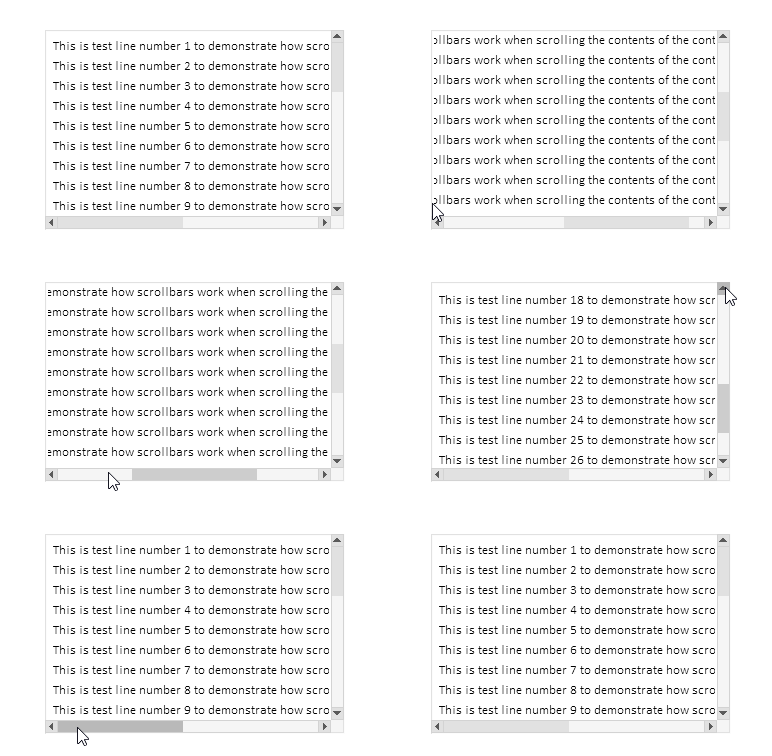
Das Umschalten auf Vollbild beim Klicken auf einen Track funktioniert, das Umschalten beim Klicken auf Schaltflächen funktioniert, die automatische Ereigniswiederholung beim Halten von Schaltflächen funktioniert, das Scrollen mit dem Rad funktioniert.
Nachdem alle Steuerelemente erstellt wurden, werden die Beschreibungen aller erstellten Elemente im Protokoll ausgedruckt:
Container (ContainerBG, ContainerFG): ID 1, Group -1, x 100, y 40, w 300, h 200
   [2]: Groupbox "Attached Groupbox" (ContainerFG_GRBX2BG, ContainerFG_GRBX2FG): ID 2, Group 1, x 100, y 40, w 620, h 610
      [0]: Label "TextString1" (ContainerFG_GRBX2FG_LBL0BG, ContainerFG_GRBX2FG_LBL0FG): ID 0, Group 1, x 108, y 48, w 587, h 20
      [1]: Label "TextString2" (ContainerFG_GRBX2FG_LBL1BG, ContainerFG_GRBX2FG_LBL1FG): ID 1, Group 1, x 108, y 68, w 587, h 20
      [2]: Label "TextString3" (ContainerFG_GRBX2FG_LBL2BG, ContainerFG_GRBX2FG_LBL2FG): ID 2, Group 1, x 108, y 88, w 587, h 20
      [3]: Label "TextString4" (ContainerFG_GRBX2FG_LBL3BG, ContainerFG_GRBX2FG_LBL3FG): ID 3, Group 1, x 108, y 108, w 587, h 20
      [4]: Label "TextString5" (ContainerFG_GRBX2FG_LBL4BG, ContainerFG_GRBX2FG_LBL4FG): ID 4, Group 1, x 108, y 128, w 587, h 20
      [5]: Label "TextString6" (ContainerFG_GRBX2FG_LBL5BG, ContainerFG_GRBX2FG_LBL5FG): ID 5, Group 1, x 108, y 148, w 587, h 20
      [6]: Label "TextString7" (ContainerFG_GRBX2FG_LBL6BG, ContainerFG_GRBX2FG_LBL6FG): ID 6, Group 1, x 108, y 168, w 587, h 20
      [7]: Label "TextString8" (ContainerFG_GRBX2FG_LBL7BG, ContainerFG_GRBX2FG_LBL7FG): ID 7, Group 1, x 108, y 188, w 587, h 20
      [8]: Label "TextString9" (ContainerFG_GRBX2FG_LBL8BG, ContainerFG_GRBX2FG_LBL8FG): ID 8, Group 1, x 108, y 208, w 587, h 20
      [9]: Label "TextString10" (ContainerFG_GRBX2FG_LBL9BG, ContainerFG_GRBX2FG_LBL9FG): ID 9, Group 1, x 108, y 228, w 594, h 20
      [10]: Label "TextString11" (ContainerFG_GRBX2FG_LBL10BG, ContainerFG_GRBX2FG_LBL10FG): ID 10, Group 1, x 108, y 248, w 594, h 20
      [11]: Label "TextString12" (ContainerFG_GRBX2FG_LBL11BG, ContainerFG_GRBX2FG_LBL11FG): ID 11, Group 1, x 108, y 268, w 594, h 20
      [12]: Label "TextString13" (ContainerFG_GRBX2FG_LBL12BG, ContainerFG_GRBX2FG_LBL12FG): ID 12, Group 1, x 108, y 288, w 594, h 20
      [13]: Label "TextString14" (ContainerFG_GRBX2FG_LBL13BG, ContainerFG_GRBX2FG_LBL13FG): ID 13, Group 1, x 108, y 308, w 594, h 20
      [14]: Label "TextString15" (ContainerFG_GRBX2FG_LBL14BG, ContainerFG_GRBX2FG_LBL14FG): ID 14, Group 1, x 108, y 328, w 594, h 20
      [15]: Label "TextString16" (ContainerFG_GRBX2FG_LBL15BG, ContainerFG_GRBX2FG_LBL15FG): ID 15, Group 1, x 108, y 348, w 594, h 20
      [16]: Label "TextString17" (ContainerFG_GRBX2FG_LBL16BG, ContainerFG_GRBX2FG_LBL16FG): ID 16, Group 1, x 108, y 368, w 594, h 20
      [17]: Label "TextString18" (ContainerFG_GRBX2FG_LBL17BG, ContainerFG_GRBX2FG_LBL17FG): ID 17, Group 1, x 108, y 388, w 594, h 20
      [18]: Label "TextString19" (ContainerFG_GRBX2FG_LBL18BG, ContainerFG_GRBX2FG_LBL18FG): ID 18, Group 1, x 108, y 408, w 594, h 20
      [19]: Label "TextString20" (ContainerFG_GRBX2FG_LBL19BG, ContainerFG_GRBX2FG_LBL19FG): ID 19, Group 1, x 108, y 428, w 594, h 20
      [20]: Label "TextString21" (ContainerFG_GRBX2FG_LBL20BG, ContainerFG_GRBX2FG_LBL20FG): ID 20, Group 1, x 108, y 448, w 594, h 20
      [21]: Label "TextString22" (ContainerFG_GRBX2FG_LBL21BG, ContainerFG_GRBX2FG_LBL21FG): ID 21, Group 1, x 108, y 468, w 594, h 20
      [22]: Label "TextString23" (ContainerFG_GRBX2FG_LBL22BG, ContainerFG_GRBX2FG_LBL22FG): ID 22, Group 1, x 108, y 488, w 594, h 20
      [23]: Label "TextString24" (ContainerFG_GRBX2FG_LBL23BG, ContainerFG_GRBX2FG_LBL23FG): ID 23, Group 1, x 108, y 508, w 594, h 20
      [24]: Label "TextString25" (ContainerFG_GRBX2FG_LBL24BG, ContainerFG_GRBX2FG_LBL24FG): ID 24, Group 1, x 108, y 528, w 594, h 20
      [25]: Label "TextString26" (ContainerFG_GRBX2FG_LBL25BG, ContainerFG_GRBX2FG_LBL25FG): ID 25, Group 1, x 108, y 548, w 594, h 20
      [26]: Label "TextString27" (ContainerFG_GRBX2FG_LBL26BG, ContainerFG_GRBX2FG_LBL26FG): ID 26, Group 1, x 108, y 568, w 594, h 20
      [27]: Label "TextString28" (ContainerFG_GRBX2FG_LBL27BG, ContainerFG_GRBX2FG_LBL27FG): ID 27, Group 1, x 108, y 588, w 594, h 20
      [28]: Label "TextString29" (ContainerFG_GRBX2FG_LBL28BG, ContainerFG_GRBX2FG_LBL28FG): ID 28, Group 1, x 108, y 608, w 594, h 20
      [29]: Label "TextString30" (ContainerFG_GRBX2FG_LBL29BG, ContainerFG_GRBX2FG_LBL29FG): ID 29, Group 1, x 108, y 628, w 594, h 20
Die angegebene Funktionalität funktioniert korrekt. Es gibt einige kleinere Mängel, die aber mit der weiteren Entwicklung des TableView-Steuerelements behoben werden sollen.
Schlussfolgerung
Heute haben wir eine ziemlich umfangreiche und notwendige Funktionalität in die zu entwickelnde Steuerelementbibliothek implementiert.
Die Klasse CContainer ist ein leistungsfähiges und praktisches Werkzeug zur Erstellung von scrollbaren Bereichen in Nutzeroberflächen. Es automatisiert die Bedienung von Bildlaufleisten, erleichtert die Verwaltung umfangreicher Inhalte und bietet eine nutzerfreundliche Interaktion mit scrollbaren Bereichen. Aufgrund seiner flexiblen Architektur und der Integration mit anderen Schnittstellenelementen lässt sich der Container leicht als Teil komplexer grafischer Lösungen einsetzen.
Unser nächster Schritt wird sein, eine Kopfzeile zu erstellen, die es ermöglicht, z. B. eine Liste von Tabellenspaltenüberschriften zu platzieren, während die Funktionalität die Größenänderung jeder Kopfzelle ermöglicht. Dadurch wird die Größe der Tabellenspalten automatisch angepasst.
Die Programme dieses Artikels:
| # | Name | Typ | Beschreibung |
|---|---|---|---|
| 1 | Base.mqh | Klassenbibliothek | Klassen zur Erstellung eines Basisobjekts von Steuerelementen |
| 2 | Controls.mqh | Klassenbibliothek | Kontrollklassen |
| 3 | iTestContainer.mq5 | Testindikator | Indikator für das Testen von Manipulationen mit Klassen von Kontrollen |
| 4 | MQL5.zip | Archive | Ein Archiv mit den oben genannten Dateien zum Entpacken in das MQL5-Verzeichnis des Client-Terminals |
Übersetzt aus dem Russischen von MetaQuotes Ltd.
Originalartikel: https://www.mql5.com/ru/articles/18658
Warnung: Alle Rechte sind von MetaQuotes Ltd. vorbehalten. Kopieren oder Vervielfältigen untersagt.
Dieser Artikel wurde von einem Nutzer der Website verfasst und gibt dessen persönliche Meinung wieder. MetaQuotes Ltd übernimmt keine Verantwortung für die Richtigkeit der dargestellten Informationen oder für Folgen, die sich aus der Anwendung der beschriebenen Lösungen, Strategien oder Empfehlungen ergeben.

 Neuronale Netze im Handel: Hybride Graphsequenzmodelle (letzter Teil)
 Erforschung des maschinellen Lernens im unidirektionalen Trendhandel am Beispiel von Gold
 Von der Grundstufe bis zur Mittelstufe: Indikator (I)
 Integration von Computer Vision in den Handel in MQL5 (Teil 1): Erstellen von Grundfunktionen

- Freie Handelsapplikationen
- Über 8.000 Signale zum Kopieren
- Wirtschaftsnachrichten für die Lage an den Finanzmärkte
Sie stimmen der Website-Richtlinie und den Nutzungsbedingungen zu.
Ich bin mir nicht sicher, was passiert ist, aber wenn ich den ursprünglichen Code baue und ihn ausführe, zeigt er etwas anderes an als das, was unten im Artikel beschrieben ist.
Entfernen Sie den Indikator aus dem Chart. Drücken Sie Strg+B, klicken Sie in dem sich öffnenden Fenster mit der Liste der grafischen Objekte auf "Alle" und löschen Sie alle Objekte. Starten Sie dann den Indikator erneut.
Es wäre jedoch besser, zu spezifizieren, was im Protokoll steht - höchstwahrscheinlich gab es einen Fehler beim Erstellen der Objekte.