

MQL5 MVCパラダイムにおけるテーブルのビューおよびコントローラーコンポーネント:コンテナ
 269
269
 3
3

内容
- はじめに
- 共有データマネージャとしてのシングルトンクラス
- ボタンクリックの自動繰り返しを整理するためのクラス
- 基底クラスの改良
- オブジェクトリストクラス
- グラフィック要素の基底クラス
- シンプルコントロールの改良
- コントロール配置用のコンテナ(Container)クラス
- 動作確認
- 結論
はじめに
現代のユーザーインターフェースでは、さまざまな大量のデータをコンパクトかつ利便性高く表示する必要が頻繁にあります。その目的のために、コンテンツのスクロールをサポートする「コンテナ」と呼ばれる特別なコントロールが使用されます。このアプローチにより、テーブルやその他のグラフィック要素を限られたウィンドウ領域に配置し、ユーザーが情報に迅速かつ直感的にアクセスできるようにします。
MVC (Model-View-Controller)パラダイムにおけるTableViewコントロールの開発の一環として、テーブルモデル(モデルコンポーネント)を作成し、ビューおよびコントローラーコンポーネントの作成を開始しました。前回の記事では、シンプルながら十分に機能するコントロールを作成しました。複雑なコントロールは、こうした要素を組み合わせて構築されます。本記事では、Panel、GroupBox、Containerの3つのコントロールクラスを作成します。これらはいずれもコントロール配置用のコンテナです。
- Panelコントロールは、任意の数のコントロールを配置できるパネルです。Panelを新しい座標に移動すると、その上に配置されたすべてのコントロールも一緒に移動します。このように、Panelは配置されたコントロールのコンテナとなります。ただし、Panelにはコンテンツが境界を超えた場合にスクロールするためのスクロールバーはありません。超過部分はコンテナの枠に合わせて切り取られます
- GroupBoxコントロールは、複数の要素を1つのグループにまとめるコントロールです。Panelを継承しており、たとえばラジオボタンのグループのように、特定の目的で要素をまとめることができます。ラジオボタンのグループ内では1つの要素のみが選択され、残りは非選択状態になります。
- Containerコントロールは、1つのコントロールのみを自身に追加できます。追加した要素がContainerの範囲を超える場合、スクロールバーが表示され、コンテンツをスクロールできるようになります。コンテナのコンテンツをスクロールできるようになります。任意の数のコントロールをContainerに配置するには、まずPanelをContainer内に置き、そのPanelに必要な数のコントロールを追加します。こうすることで、ContainerがPanelをスクロールし、Panelがスクロールに応じて内部コンテンツを移動します。
このため、前述の3つの主要コントロールに加えて、スクロールバー作成用のクラス(ThumbクラスとScrollBarクラス)も作成する必要があります。スクロールバーは縦横それぞれのクラスを用意します。
また、スクロールバーの端にあるスクロールボタンの動作に注目してください。ボタンを長押しすると、自動スクロールが作動し、ボタンクリックイベントが自動で送信されます。この動作を実現するために、さらに2つのヘルパークラス(遅延カウンタクラスと実際のイベント自動繰り返しクラス)を作成します。
遅延カウンタクラスは、プログラムの実行を停止させることなく待機処理を整理するために使用できます。また、イベント自動繰り返しクラスは、どのイベントを送信するかを指定できるように実装されます。これにより、ボタンのクリックの自動繰り返しを実現するだけでなく、一定時間後に一定の頻度でイベントを繰り返す必要がある他のアルゴリズムにも利用できるようになります。
最終段階では、テーブルは汎用コンテナ内に配置され、このコンテナがスクロールバーによるスクロール機能を提供します。このようなコンテナは、複雑で柔軟なインターフェースを構築するための基盤となり、テーブルの操作だけでなく、たとえば複数ページのノートパッドや、MetaTrader 5クライアントターミナル向けのその他のユーザー要素を作成する際にも使用できます。
コントロールの動作方法についても注目すべき点があります。各コントロール要素はイベントベースの機能(Controllerコンポーネント)を備えており、マウスカーソルとのインタラクションに応じて適切に反応します。
特定の操作がおこなわれると、操作対象の要素はチャートにイベントを送信します。そのイベントは別のコントロールによって受信および処理される必要があります。しかし、すべての要素がそのようなイベントを受信します。そのため、どの要素がアクティブであるか(現在カーソルが位置している要素)を判定し、その要素から送られてきたメッセージのみを処理する必要があります。つまり、マウスカーソルをコントロール上に移動させると、そのコントロールはアクティブとしてマークされ、その他の非アクティブな要素は処理の対象にならないようにする必要があります。
アクティブ要素の選択を整理するためには、各コントロールがその情報にアクセスできるようにする必要があります。これを実現する方法はいくつかあります。たとえば、作成されたすべての要素の名前を登録するリストを作成し、現在カーソルが乗っているオブジェクト名と一致するものを検索し、そのリスト内で見つかったオブジェクトを操作する方法があります。
この方法も可能ですが、コードが複雑になり、扱いにくくなります。より簡単なのは、プログラム内でグローバルにアクセス可能な単一のオブジェクトを作成し、そこにアクティブなコントロールの名前を記録することです。残りの要素は即座にそのアクティブ要素の名前を参照でき、追加の検索処理をおこなうことなく、受信メッセージを処理するかどうかを判断できます。
このようなpublicクラスとして、シングルトンクラスを使用できます。
シングルトンクラスとは、プログラムの実行期間中にそのクラスのインスタンスが1つだけ存在することを保証し、そのインスタンスへのグローバルなアクセスポイントを提供するデザインパターンです。
シングルトンの目的
シングルトンは、あるオブジェクトのインスタンスが1つだけ存在する必要があり、そのインスタンスにプログラムのどの部分からでもアクセスできるようにする場合に使用されます。例としては、設定マネージャ、ロガー、データベース接続プール、リソースマネージャなどがあります。
シングルトンの仕組み
- 隠しコンストラクタ:クラスのコンストラクタはprivateまたはprotectedとして宣言され、外部からインスタンスを作成できないようにします。
- 静的変数:クラス内部に静的変数を作成し、クラスの単一インスタンスを保持します。
- 静的アクセスメソッド:クラスのインスタンスを取得するために、静的メソッド(たとえばInstance()やgetInstance())を使用します。このメソッドは最初のアクセス時にオブジェクトを生成し、それ以降の呼び出しでは同じインスタンスを返します。
シングルトンとは、1回だけ生成でき、その唯一のインスタンスにグローバルにアクセス可能なクラスです。これは、共有リソースやアプリケーションの状態を管理するのに役立ちます。
それでは、このようなクラスを実装してみましょう。
共有データマネージャとしてのシングルトンクラス
前回の記事では、すべてのライブラリコードは\MQL5\Indicators\Tables\Controls\にありました。ここでは、Base.mqhとControl.mqhの両方のファイルに興味があります。今日はそれらを改良します。
Base.mqhファイルを開き、クラスブロックに次のコードを記述します。
//+------------------------------------------------------------------+
//| Classes                                                          |
//+------------------------------------------------------------------+
//+------------------------------------------------------------------+
//| Singleton class for common flags and events of graphical elements|
//+------------------------------------------------------------------+
class CCommonManager
  {
private:
   static CCommonManager *m_instance;                          // Class instance
   string            m_element_name;                           // Active element name

//--- Constructor/destructor
                     CCommonManager(void) : m_element_name("") {}
                    ~CCommonManager() {}
public:
//--- Method for getting a Singleton instance
   static CCommonManager *GetInstance(void)
                       {
                        if(m_instance==NULL)
                           m_instance=new CCommonManager();
                        return m_instance;
                       }
//--- Method for destroying a Singleton instance
   static void       DestroyInstance(void)
                       {
                        if(m_instance!=NULL)
                          {
                           delete m_instance;
                           m_instance=NULL;
                          }
                       }
//--- (1) Set and (2) return the name of the active current element
   void              SetElementName(const string name)         { this.m_element_name=name;   }
   string            ElementName(void)                   const { return this.m_element_name; }
  };
//--- Initialize a static instance variable of a class
CCommonManager* CCommonManager::m_instance=NULL;
//+------------------------------------------------------------------+
//| Base class of graphical elements                                 |
//+------------------------------------------------------------------+
非公開のクラスコンストラクタと、クラスのインスタンスにアクセスするための静的メソッドにより、アプリケーション内でインスタンスが1つしか存在しないことが保証されます。
- static CCommonManager GetInstance(void):クラスの単一インスタンスへのポインタを返します。最初にアクセスされたときにインスタンスを生成します。
- static void DestroyInstance(void):クラスのインスタンスを破棄し、メモリを解放します。
- void SetElementName(const string name):アクティブなグラフィック要素の名前を設定します。
- string ElementName(void) const:アクティブなグラフィック要素の名前を返します。
これにより、各グラフィック要素はこのクラスのインスタンスにアクセスして、アクティブ要素の名前を読み書きできるようになります。すべての要素は同じ変数を共有するため、複数のオブジェクトが同じ変数にデータを書き込み、読み取ることが保証されます。
同時に複数のコントロールがアクティブになることはないため、このアクティブ要素マネージャの実装は、アクセス制御機能(2つ以上の要素が同時に変数に書き込めないようにする機能)なしでも十分です。
将来的には、このデータマネージャクラスに、たとえば、チャート上での操作許可フラグなどの他のデータを追加することも可能です。現在、各グラフィック要素はチャートフラグの状態を記憶しようとしていますが、これらのデータも適切な変数にこのクラスへ移すことができます。
ボタンクリックの自動繰り返しを整理するためのクラス
前述のとおり、スクロールバーのボタンからイベントを送信する際に、ボタンを長押ししたときに自動で繰り返し送信する機能を作成する話をしました。この動作はほとんどのOSアプリケーションで標準的におこなわれているため、ここでも同じことをおこなわない理由はないと考えられます。ボタンを押して保持すると、まずボタン保持用の時間カウンタがスタートします(通常、この期間は350〜500ミリ秒です)。さらに、保持時間の終了前にボタンが離されなかった場合、2つ目のカウンタ(ボタン押下イベント送信用の間隔カウンタ)が開始されます。そして、このようなイベントはボタンが離されるまで、約100ミリ秒ごとの頻度で送信されます。
この動作を実装するには、ミリ秒タイマークラスと自動イベント送信クラスの、2つのヘルパークラスを作成します。
同じファイルBase.mqhにコードの記述を進めていきます。
//+------------------------------------------------------------------+
//| Millisecond counter class                                        |
//+------------------------------------------------------------------+
class CCounter : public CBaseObj
  {
private:
   bool              m_launched;                               // Launched countdown flag
//--- Start the countdown
   void              Run(const uint delay)
                       {
                        //--- If the countdown has already started, leave
                        if(this.m_launched)
                           return;
                        //--- If a non-zero delay value is passed, set a new value
                        if(delay!=0)
                           this.m_delay=delay;
                        //--- Save the start time and set a flag that the countdown has already started
                        this.m_start=::GetTickCount64();
                        this.m_launched=true;
                       }
protected:
   ulong             m_start;                                  // Countdown start time
   uint              m_delay;                                  // Delay

public:
//--- (1) Set a delay, start the countdown with the (2) set and (3) specified delay
   void              SetDelay(const uint delay)                { this.m_delay=delay;            }
   void              Start(void)                               { this.Run(0);                   }
   void              Start(const uint delay)                   { this.Run(delay);               }
//--- Return the countdown end flag
   bool              IsDone(void)
                       {
                        //--- If the countdown has not started, return 'false'
                        if(!this.m_launched)
                           return false;
                        //--- If more milliseconds have passed than the timeout
                        if(::GetTickCount64()-this.m_start>this.m_delay)
                          {
                           //--- reset the flag of the launched countdown and return true
                           this.m_launched=false;
                           return true;
                          }
                        //--- The specified time has not yet passed
                        return false;
                       }

//--- Virtual methods of (1) saving to file, (2) loading from file and (3) object type
   virtual bool      Save(const int file_handle);
   virtual bool      Load(const int file_handle);
   virtual int       Type(void)                          const { return(ELEMENT_TYPE_COUNTER);  }

//--- Constructor/destructor
                     CCounter(void) : m_start(0), m_delay(0), m_launched(false) {}
                    ~CCounter(void) {}
  };
//+------------------------------------------------------------------+
//| CCounter::Save to file                                           |
//+------------------------------------------------------------------+
bool CCounter::Save(const int file_handle)
  {
//--- Save the parent object data
   if(!CBaseObj::Save(file_handle))
      return false;

//--- Save the delay value
   if(::FileWriteInteger(file_handle,this.m_delay,INT_VALUE)!=INT_VALUE)
      return false;

//--- All is successful
   return true;
  }
//+------------------------------------------------------------------+
//| CCounter::Load from file                                         |
//+------------------------------------------------------------------+
bool CCounter::Load(const int file_handle)
  {
//--- Load parent object data
   if(!CBaseObj::Load(file_handle))
      return false;

//--- Load the delay value
   this.m_delay=::FileReadInteger(file_handle,INT_VALUE);

//--- All is successful
   return true;
  }
ミリ秒タイマークラスは、指定された時間間隔(遅延)が経過したかどうかを追跡するために設計されています。このクラスはCBaseObj基底クラスを継承しており、MQL5アプリケーション内でのタイマー、遅延、さまざまな操作の時間制御に利用できます
- void SetDelay(const uint delay):遅延値(ミリ秒)を設定します。
- void Start(const uint delay):新しい遅延でカウントダウンを開始します。
- bool IsDone(void):カウントダウンが完了していればtrue、そうでなければfalseを返します。
- virtual bool Save(const int file_handle):状態をファイルに保存するための仮想メソッドです。
- virtual bool Load(const int file_handle):ファイルから状態を読み込むための仮想メソッドです。
- virtual int Type(void) const :システム内でオブジェクトを識別するためのオブジェクトタイプを返します。
このクラスを基にして、イベントの自動繰り返しクラスを作成します。
//+------------------------------------------------------------------+
//| Event auto-repeat class                                          |
//+------------------------------------------------------------------+
class CAutoRepeat : public CBaseObj
  {
private:
   CCounter          m_delay_counter;                          // Counter for delay before auto-repeat
   CCounter          m_repeat_counter;                         // Counter for periodic sending of events
   long              m_chart_id;                               // Chart for sending a custom event
   bool              m_button_pressed;                         // Flag indicating whether the button is pressed
   bool              m_auto_repeat_started;                    // Flag indicating whether auto-repeat has started
   uint              m_delay_before_repeat;                    // Delay before auto-repeat starts (ms)
   uint              m_repeat_interval;                        // Frequency of sending events (ms)
   ushort            m_event_id;                               // Custom event ID
   long              m_event_lparam;                           // long parameter of the user event
   double            m_event_dparam;                           // double parameter of the custom event
   string            m_event_sparam;                           // string parameter of the custom event

//--- Send a custom event
   void              SendEvent() { ::EventChartCustom((this.m_chart_id<=0 ? ::ChartID() : this.m_chart_id), this.m_event_id, this.m_event_lparam, this.m_event_dparam, this.m_event_sparam); }
public:
//--- Object type
   virtual int       Type(void)                          const { return(ELEMENT_TYPE_AUTOREPEAT_CONTROL);   }

//--- Constructors
                     CAutoRepeat(void) :
                        m_button_pressed(false), m_auto_repeat_started(false), m_delay_before_repeat(350), m_repeat_interval(100),
                        m_event_id(0), m_event_lparam(0), m_event_dparam(0), m_event_sparam(""), m_chart_id(::ChartID()) {}

                     CAutoRepeat(long chart_id, int delay_before_repeat=350, int repeat_interval=100, ushort event_id=0, long event_lparam=0, double event_dparam=0, string event_sparam="") :
                        m_button_pressed(false), m_auto_repeat_started(false), m_delay_before_repeat(delay_before_repeat), m_repeat_interval(repeat_interval),
                        m_event_id(event_id), m_event_lparam(event_lparam), m_event_dparam(event_dparam), m_event_sparam(event_sparam), m_chart_id(chart_id) {}

//--- Set the chart ID
   void              SetChartID(const long chart_id)              { this.m_chart_id=chart_id;         }
   void              SetDelay(const uint delay)                   { this.m_delay_before_repeat=delay; }
   void              SetInterval(const uint interval)             { this.m_repeat_interval=interval;  }

//--- Set the ID and parameters of a custom event
   void              SetEvent(ushort event_id, long event_lparam, double event_dparam, string event_sparam)
                       {
                        this.m_event_id=event_id;
                        this.m_event_lparam=event_lparam;
                        this.m_event_dparam=event_dparam;
                        this.m_event_sparam=event_sparam;
                       }

//--- Return flags
   bool              ButtonPressedFlag(void)                const { return this.m_button_pressed;     }
   bool              AutorepeatStartedFlag(void)            const { return this.m_auto_repeat_started;}
   uint              Delay(void)                            const { return this.m_delay_before_repeat;}
   uint              Interval(void)                         const { return this.m_repeat_interval;    }

//--- Handle a button click (starting auto-repeat)
   void              OnButtonPress(void)
                       {
                        if(this.m_button_pressed)
                           return;
                        this.m_button_pressed=true;
                        this.m_auto_repeat_started=false;
                        this.m_delay_counter.Start(this.m_delay_before_repeat);  // Start the delay counter
                       }

//--- Handle button release (stopping auto-repeat)
   void              OnButtonRelease(void)
                       {
                        this.m_button_pressed=false;
                        this.m_auto_repeat_started=false;
                       }

//--- Method for performing auto-repeat (started in the timer)
   void              Process(void)
                       {
                        //--- If the button is held down
                        if(this.m_button_pressed)
                          {
                           //--- Check if the delay before starting the auto-repeat has expired
                           if(!this.m_auto_repeat_started && this.m_delay_counter.IsDone())
                             {
                              this.m_auto_repeat_started=true;
                              this.m_repeat_counter.Start(this.m_repeat_interval); // Start the auto-repeat counter
                             }
                           //--- If auto-repeat has started, check the frequency of sending events
                           if(this.m_auto_repeat_started && this.m_repeat_counter.IsDone())
                             {
                              //--- Send an event and restart the counter
                              this.SendEvent();
                              this.m_repeat_counter.Start(this.m_repeat_interval);
                             }
                          }
                       }
  };
このクラスは、ボタンを押し続けている間にユーザーイベントを設定した頻度で自動的に送信できるようにします。これにより、標準OSのスクロールバーのように、使いやすいインターフェース動作が実現されます。
- OnButtonPress():ボタンが押されたときに呼び出され、自動繰り返し開始前の遅延のカウントを開始します。
- OnButtonRelease():ボタンが離されたときに呼び出され、自動繰り返しを停止します。
- Process():タイマーで呼び出すべきメインのメソッドです。ボタンが押され続けている場合に、イベントを所定の頻度で送信します。
- SetEvent(...):カスタムイベントのパラメータを設定します。
- SetDelay(...)、setInterval(...):遅延および自動繰り返し間隔を設定します。
グラフィック要素キャンバスの基底クラスCCanvasBaseに、この自動繰り返しクラスのオブジェクトを宣言します。これにより、グラフィック要素の任意のオブジェクトでイベントの自動繰り返しを使用できるようになります。必要な状況で、遅延と間隔のパラメータを設定し、自動繰り返しを開始するだけで済みます。
基底クラスの改良
ライブラリのバグや不具合を修正するために、多くの作業がおこなわれました。改善はほぼすべてのクラスに影響しています。ここですべての作業手順を説明することはしませんが、重要なポイントはもちろん紹介します。
Base.mqhでは、今日実装するすべてのクラスを宣言します。
//+------------------------------------------------------------------+
//|                                                         Base.mqh |
//|                                  Copyright 2025, MetaQuotes Ltd. |
//|                                             https://www.mql5.com |
//+------------------------------------------------------------------+
#property copyright "Copyright 2025, MetaQuotes Ltd."
#property link      "https://www.mql5.com"

//+------------------------------------------------------------------+
//| Include libraries                                                |
//+------------------------------------------------------------------+
#include <Canvas\Canvas.mqh>              // CCanvas class
#include <Arrays\List.mqh>                // CList class

//--- Forward declaration of control element classes
class    CCounter;                        // Delay counter class
class    CAutoRepeat;                     // Event auto-repeat class
class    CImagePainter;                   // Image drawing class
class    CLabel;                          // Text label class
class    CButton;                         // Simple button class
class    CButtonTriggered;                // Two-position button class
class    CButtonArrowUp;                  // Up arrow button class
class    CButtonArrowDown;                // Down arrow button class
class    CButtonArrowLeft;                // Left arrow button class
class    CButtonArrowRight;               // Right arrow button class
class    CCheckBox;                       // CheckBox control class
class    CRadioButton;                    // RadioButton control class
class    CScrollBarThumbH;                // Horizontal scrollbar slider class
class    CScrollBarThumbV;                // Vertical scrollbar slider class
class    CScrollBarH;                     // Horizontal scrollbar class
class    CScrollBarV;                     // Vertical scrollbar class
class    CPanel;                          // Panel control class
class    CGroupBox;                       // GroupBox control class
class    CContainer;                      // Container control class
このようなクラスの前方宣言は、Base.mqhとControls.mqhのインクルードファイルをエラーなくコンパイルするために必要です。というのも、これらのクラスへのアクセスが、ファイル内で実際に宣言される前に行われる場合があるためです。
グラフィック要素の型の列挙型に新しい型を追加し、ユーザーとのインタラクションに参加できるオブジェクトの型の定数範囲を指定します。
//+------------------------------------------------------------------+
//| Enumerations                                                     |
//+------------------------------------------------------------------+
enum ENUM_ELEMENT_TYPE                    // Enumeration of graphical element types
  {
   ELEMENT_TYPE_BASE = 0x10000,           // Basic object of graphical elements
   ELEMENT_TYPE_COLOR,                    // Color object
   ELEMENT_TYPE_COLORS_ELEMENT,           // Color object of the graphical object element
   ELEMENT_TYPE_RECTANGLE_AREA,           // Rectangular area of the element
   ELEMENT_TYPE_IMAGE_PAINTER,            // Object for drawing images
   ELEMENT_TYPE_COUNTER,                  // Counter object
   ELEMENT_TYPE_AUTOREPEAT_CONTROL,       // Event auto-repeat object
   ELEMENT_TYPE_CANVAS_BASE,              // Basic canvas object for graphical elements
   ELEMENT_TYPE_ELEMENT_BASE,             // Basic object of graphical elements
   ELEMENT_TYPE_LABEL,                    // Text label
   ELEMENT_TYPE_BUTTON,                   // Simple button
   ELEMENT_TYPE_BUTTON_TRIGGERED,         // Two-position button
   ELEMENT_TYPE_BUTTON_ARROW_UP,          // Up arrow button
   ELEMENT_TYPE_BUTTON_ARROW_DOWN,        // Down arrow button
   ELEMENT_TYPE_BUTTON_ARROW_LEFT,        // Left arrow button
   ELEMENT_TYPE_BUTTON_ARROW_RIGHT,       // Right arrow button
   ELEMENT_TYPE_CHECKBOX,                 // CheckBox control
   ELEMENT_TYPE_RADIOBUTTON,              // RadioButton control
   ELEMENT_TYPE_SCROLLBAR_THUMB_H,        // Horizontal scroll bar slider
   ELEMENT_TYPE_SCROLLBAR_THUMB_V,        // Vertical scroll bar slider
   ELEMENT_TYPE_SCROLLBAR_H,              // ScrollBarHorisontal control
   ELEMENT_TYPE_SCROLLBAR_V,              // ScrollBarVertical control
   ELEMENT_TYPE_PANEL,                    // Panel control
   ELEMENT_TYPE_GROUPBOX,                 // GroupBox control
   ELEMENT_TYPE_CONTAINER,                // Container control
  };
#define  ACTIVE_ELEMENT_MIN   ELEMENT_TYPE_LABEL         // Minimum value of the list of active elements
#define  ACTIVE_ELEMENT_MAX   ELEMENT_TYPE_SCROLLBAR_V   // Maximum value of the list of active elements
マウスカーソルとのインタラクション時、各グラフィック要素は基本的に受信イベントメッセージを処理することができます。しかし、すべての要素がこれをおこなう必要はありません。言い換えると、要素の型を確認し、それに基づいてこの要素がイベントを処理するかどうかを判断する必要があります。オブジェクトの型を一つずつ確認する方法を取ったとすると、処理できない要素のリストが条件文の中で長くなってしまい、とても不便です。より簡単な方法として、もう一つのプロパティ、つまり、この要素がインタラクションに対してアクティブか静的かを示すフラグを追加します。こうすれば、このプロパティを確認するだけで、イベントを処理すべきかどうかを判断できます。ここでは、グラフィック要素の型の定数の初期値と最終値を指定しています。イベント処理の判断をおこなう際には、この範囲内に要素の型が含まれているかどうかを確認するだけで十分です。そして、この情報に基づいて処理の可否を決定できます。
次に、基底オブジェクト(CBaseObj)をソートしたり検索したりするためのプロパティの列挙を追加します。
enum ENUM_BASE_COMPARE_BY                 // Compared properties of base objects
  {
   BASE_SORT_BY_ID   =  0,                // Compare base objects by ID
   BASE_SORT_BY_NAME,                     // Compare base objects by name
   BASE_SORT_BY_X,                        // Compare base objects by X coordinate
   BASE_SORT_BY_Y,                        // Compare base objects by Y coordinate
   BASE_SORT_BY_WIDTH,                    // Compare base objects by width
   BASE_SORT_BY_HEIGHT,                   // Compare base objects by height
   BASE_SORT_BY_ZORDER,                   // Compare by objects' Z-order
  };
これで、基底クラスから継承されたすべてのオブジェクトは、列挙型で指定されたプロパティによってソートできるようになります。オブジェクトがこれらのプロパティを持っていれば、CBaseObjの新しい派生クラスを作成する際に、より柔軟性が増します。
要素の型を文字列として返す関数では、可読性のある「Vertical」と「Horizontal」に加えて、文字VとHを出力するようにします。
//+------------------------------------------------------------------+
//|  Return the element type as a string                             |
//+------------------------------------------------------------------+
string ElementDescription(const ENUM_ELEMENT_TYPE type)
  {
   string array[];
   int total=StringSplit(EnumToString(type),StringGetCharacter("_",0),array);
   if(array[array.Size()-1]=="V")
      array[array.Size()-1]="Vertical";
   if(array[array.Size()-1]=="H")
      array[array.Size()-1]="Horisontal";

   string result="";
   for(int i=2;i<total;i++)
     {
      array[i]+=" ";
      array[i].Lower();
      array[i].SetChar(0,ushort(array[i].GetChar(0)-0x20));
      result+=array[i];
     }
   result.TrimLeft();
   result.TrimRight();
   return result;
  }
これにより、要素の説明がより読みやすくなります。
新しい要素を作成してコンテナに追加された要素のリストに追加する際には、オブジェクト名を作成する必要があります。要素を作成する際に使用できる要素の型の短縮形を返す関数を実装し、その略称をオブジェクト名に使用することで、どの種類の要素であるかを簡単に判別できるようにします。
//+------------------------------------------------------------------+
//|  Return the short name of the element by type                    |
//+------------------------------------------------------------------+
string ElementShortName(const ENUM_ELEMENT_TYPE type)
  {
   switch(type)
     {
      case  ELEMENT_TYPE_ELEMENT_BASE     :  return "BASE";    // Basic object of graphical elements
      case  ELEMENT_TYPE_LABEL            :  return "LBL";     // Text label
      case ELEMENT_TYPE_BUTTON            :  return "SBTN";    // Simple button
      case ELEMENT_TYPE_BUTTON_TRIGGERED  :  return "TBTN";    // Toggle button
      case ELEMENT_TYPE_BUTTON_ARROW_UP   :  return "BTARU";   // Up arrow button
      case ELEMENT_TYPE_BUTTON_ARROW_DOWN :  return "BTARD";   // Down arrow button
      case ELEMENT_TYPE_BUTTON_ARROW_LEFT :  return "BTARL";   // Left arrow button
      case ELEMENT_TYPE_BUTTON_ARROW_RIGHT:  return "BTARR";   // Right arrow button
      case ELEMENT_TYPE_CHECKBOX          :  return "CHKB";    // CheckBox control
      case ELEMENT_TYPE_RADIOBUTTON       :  return "RBTN";    // RadioButton control
      case ELEMENT_TYPE_SCROLLBAR_THUMB_H :  return "THMBH";   // Horizontal scroll bar slider
      case ELEMENT_TYPE_SCROLLBAR_THUMB_V :  return "THMBV";   // Vertical scroll bar slider
      case ELEMENT_TYPE_SCROLLBAR_H       :  return "SCBH";    // ScrollBarHorisontal control
      case ELEMENT_TYPE_SCROLLBAR_V       :  return "SCBV";    // ScrollBarVertical control
      case ELEMENT_TYPE_PANEL             :  return "PNL";     // Panel control
      case ELEMENT_TYPE_GROUPBOX          :  return "GRBX";    // GroupBox control
      case ELEMENT_TYPE_CONTAINER         :  return "CNTR";    // Container control
      default                             :  return "Unknown"; // Unknown
     }
  }
要素をコンテナに追加する際には、その名前はオブジェクトの階層に従って作成されます。「コンテナ - コンテナに追加された要素 - 追加された要素にさらに追加された要素」…といった形です。
名前文字列内の要素名の区切りにはアンダースコア(「_」)を使用します。この完全な名前を使うことで、オブジェクト階層全体の名前リストを作成することができます。そのために、次の関数を実装します。
//+------------------------------------------------------------------+
//| Return the array of element hierarchy names                      |
//+------------------------------------------------------------------+
int GetElementNames(string value, string sep, string &array[])
  {
   if(value=="" || value==NULL)
     {
      PrintFormat("%s: Error. Empty string passed");
      return 0;
     }
   ResetLastError();
   int res=StringSplit(value, StringGetCharacter(sep,0),array);
   if(res==WRONG_VALUE)
     {
      PrintFormat("%s: StringSplit() failed. Error %d",__FUNCTION__, GetLastError());
      return WRONG_VALUE;
     }
   return res;
  }
この関数は、階層内のオブジェクトの数を返し、すべての要素の名前を格納する配列を埋めます。
CBound長方形領域クラスでは、2つのオブジェクトを比較するためのメソッドを作成します。
//+------------------------------------------------------------------+
//| CBound::Compare two objects                                      |
//+------------------------------------------------------------------+
int CBound::Compare(const CObject *node,const int mode=0) const
  {
   if(node==NULL)
      return -1;
   const CBound *obj=node;
   switch(mode)
     {
      case BASE_SORT_BY_NAME  :  return(this.Name()   >obj.Name()    ? 1 : this.Name()    <obj.Name()    ? -1 : 0);
      case BASE_SORT_BY_X     :  return(this.X()      >obj.X()       ? 1 : this.X()       <obj.X()       ? -1 : 0);
      case BASE_SORT_BY_Y     :  return(this.Y()      >obj.Y()       ? 1 : this.Y()       <obj.Y()       ? -1 : 0);
      case BASE_SORT_BY_WIDTH :  return(this.Width()  >obj.Width()   ? 1 : this.Width()   <obj.Width()   ? -1 : 0);
      case BASE_SORT_BY_HEIGHT:  return(this.Height() >obj.Height()  ? 1 : this.Height()  <obj.Height()  ? -1 : 0);
      default                 :  return(this.ID()     >obj.ID()      ? 1 : this.ID()      <obj.ID()      ? -1 : 0);
     }
  }
以前は、同名の親クラスのメソッドを使用して比較がおこなわれていました。これにより、比較できるのはオブジェクトの名前と識別子の2つのプロパティだけでした。
改善の大部分は、CCanvasBaseグラフィック要素キャンバスオブジェクトの基底クラスに関するものでした。なぜなら、このクラスがすべてのグラフィック要素の主要なプロパティを蓄積しているからです。
クラスのprotectedセクションには、共有リソースマネージャを操作するための新しい変数と3つのメソッドを宣言します。
//+------------------------------------------------------------------+
//| Base class of graphical elements canvas                          |
//+------------------------------------------------------------------+
class CCanvasBase : public CBaseObj
  {
private:
   bool              m_chart_mouse_wheel_flag;                 // Flag for sending mouse wheel scroll messages
   bool              m_chart_mouse_move_flag;                  // Flag for sending mouse cursor movement messages
   bool              m_chart_object_create_flag;               // Flag for sending messages about the graphical object creation event
   bool              m_chart_mouse_scroll_flag;                // Flag for scrolling the chart with the left button and mouse wheel
   bool              m_chart_context_menu_flag;                // Flag of access to the context menu using the right click
   bool              m_chart_crosshair_tool_flag;              // Flag of access to the Crosshair tool using the middle click
   bool              m_flags_state;                            // State of the flags for scrolling the chart with the wheel, the context menu, and the crosshair

//--- Set chart restrictions (wheel scrolling, context menu, and crosshair)
   void              SetFlags(const bool flag);

protected:
   CCanvas           m_background;                             // Background canvas
   CCanvas           m_foreground;                             // Foreground canvas
   CBound            m_bound;                                  // Object boundaries
   CCanvasBase      *m_container;                              // Parent container object
   CColorElement     m_color_background;                       // Background color control object
   CColorElement     m_color_foreground;                       // Foreground color control object
   CColorElement     m_color_border;                           // Border color control object

   CColorElement     m_color_background_act;                   // Activated element background color control object
   CColorElement     m_color_foreground_act;                   // Activated element foreground color control object
   CColorElement     m_color_border_act;                       // Activated element frame color control object

   CAutoRepeat       m_autorepeat;                             // Event auto-repeat control object

   ENUM_ELEMENT_STATE m_state;                                 // Control state (e.g. buttons (on/off))
   long              m_chart_id;                               // Chart ID
   int               m_wnd;                                    // Chart subwindow index
   int               m_wnd_y;                                  // Cursor Y coordinate offset in the subwindow
   int               m_obj_x;                                  // Graphical object X coordinate
   int               m_obj_y;                                  // Graphical object Y coordinate
   uchar             m_alpha_bg;                               // Background transparency
   uchar             m_alpha_fg;                               // Foreground transparency
   uint              m_border_width_lt;                        // Left frame width
   uint              m_border_width_rt;                        // Right frame width
   uint              m_border_width_up;                        // Top frame width
   uint              m_border_width_dn;                        // Bottom frame width
   string            m_program_name;                           // Program name
   bool              m_hidden;                                 // Hidden object flag
   bool              m_blocked;                                // Blocked element flag
   bool              m_movable;                                // Moved element flag
   bool              m_focused;                                // Element flag in focus
   bool              m_main;                                   // Main object flag
   bool              m_autorepeat_flag;                        // Event sending auto-repeat flag
   bool              m_scroll_flag;                            // Flag for scrolling content using scrollbars
   bool              m_trim_flag;                              // Flag for clipping the element to the container borders
   int               m_cursor_delta_x;                         // Distance from the cursor to the left edge of the element
   int               m_cursor_delta_y;                         // Distance from the cursor to the top edge of the element
   int               m_z_order;                                // Graphical object Z-order

//--- (1) Set and (2) return the active element name and (3) flag
   void              SetActiveElementName(const string name)   { CCommonManager::GetInstance().SetElementName(name);                               }
   string            ActiveElementName(void)             const { return CCommonManager::GetInstance().ElementName();                               }
   bool              IsCurrentActiveElement(void)        const { return this.ActiveElementName()==this.NameFG();                                   }

//--- Return the offset of the initial drawing coordinates on the canvas relative to the canvas and the object coordinates
   int               CanvasOffsetX(void)                 const { return(this.ObjectX()-this.X());                                                  }
   int               CanvasOffsetY(void)                 const { return(this.ObjectY()-this.Y());                                                  }
//--- Return the adjusted coordinate of a point on the canvas, taking into account the offset of the canvas relative to the object
   int               AdjX(const int x)                   const { return(x-this.CanvasOffsetX());                                                   }
   int               AdjY(const int y)                   const { return(y-this.CanvasOffsetY());                                                   }

//--- Returns the adjusted chart ID
   long              CorrectChartID(const long chart_id) const { return(chart_id!=0 ? chart_id : ::ChartID());                                     }

public:
- CAutoRepeat m_autorepeat:イベント自動繰り返しオブジェクト。任意のグラフィック要素は、このオブジェクトのクラスによって提供される機能を持つことができます。
- uint m_border_width_lt:左側のボーダー幅。ボーダーはコンテナの表示領域の境界であり、表示領域の要素端からの余白は各辺で異なる場合があります。
- uint m_border_width_rt:右側のボーダー幅。
- uint m_border_width_up:上側のボーダー幅。
- uint m_border_width_dn:下側のボーダー幅。
- bool m_movable:オブジェクトを移動可能にするフラグ。たとえば、ボタンは移動不可要素、スクロールバーのサムは移動可能要素などです。
- bool m_main:メイン要素のフラグ。メイン要素はリンクされたオブジェクト階層の最初の要素で、たとえば他のコントロールが配置されるパネルなどです。通常、フォームオブジェクトになります。
- bool m_autorepeat_flag:要素によるイベント自動繰り返しの使用フラグ。
- bool m_scroll_flag:スクロールバーによる要素のスクロールフラグ。
- bool m_trim_flag:コンテナの表示領域の端で要素を切り取るフラグ。たとえば、スクロールバーはコンテナの表示領域外にありますが、端で切り取られません。
- int m_cursor_delta_x:カーソルの要素左端からの距離を格納する補助変数。
- int m_cursor_delta_y:カーソルの要素上端からの距離を格納する補助変数。
- int m_z_order:グラフィックオブジェクトがチャート上でマウスクリックイベントを受け取る優先度。オブジェクトが重なった場合、CHARTEVENT_CLICKイベントは優先度が最も高い1つのオブジェクトのみを取得します。
- void SetActiveElementName( const string name):共有データマネージャに現在アクティブな要素の名前を設定します。
- string ActiveElementName(void):現在アクティブな要素の名前を返します。
- bool IsCurrentActiveElement(void):このオブジェクトが現在アクティブかどうかを示すフラグを返します。
クラスのprotectedセクションには、マウスカーソルの移動やコントロール変更を処理するハンドラを追加します。
//--- Cursor hovering (Focus), (2) button clicks (Press), (3) cursor moving (Move),
//--- (4) wheel scrolling (Wheel), (5) leaving focus (Release) and (6) graphical object creation (Create) event handlers. Redefined in descendants.
   virtual void      OnFocusEvent(const int id, const long lparam, const double dparam, const string sparam);
   virtual void      OnPressEvent(const int id, const long lparam, const double dparam, const string sparam);
   virtual void      OnMoveEvent(const int id, const long lparam, const double dparam, const string sparam);
   virtual void      OnReleaseEvent(const int id, const long lparam, const double dparam, const string sparam);
   virtual void      OnCreateEvent(const int id, const long lparam, const double dparam, const string sparam);
   virtual void      OnWheelEvent(const int id, const long lparam, const double dparam, const string sparam)         { return;   }  // handler is disabled here

//--- Handlers for custom events of the element when hovering, clicking, and scrolling the wheel in the object area, as well as changing it
   virtual void      MouseMoveHandler(const int id, const long lparam, const double dparam, const string sparam)     { return;   }  // handler is disabled here
   virtual void      MousePressHandler(const int id, const long lparam, const double dparam, const string sparam)    { return;   }  // handler is disabled here
   virtual void      MouseWheelHandler(const int id, const long lparam, const double dparam, const string sparam)    { return;   }  // handler is disabled here
   virtual void      ObjectChangeHandler(const int id, const long lparam, const double dparam, const string sparam)  { return;   }  // handler is disabled here
オブジェクト上でカーソルを移動させたとき、そのようなイベントを処理する必要があります。また、後で一部のコントロールはマウスでサイズ変更できるようになります。ここでは、そのようなイベントのハンドラを宣言しました。
クラスのpublicセクションに、クラスのいくつかの変数を操作するためのメソッドを追加します。
public:
//--- Return the pointer to (1) a container and (2) event auto-repeat class object
   CCanvasBase      *GetContainer(void)                  const { return this.m_container;                                                          }
   CAutoRepeat      *GetAutorepeatObj(void)                    { return &this.m_autorepeat;                                                        }
...
//--- (1) Set and (2) return z-order
   bool              ObjectSetZOrder(const int value);
   int               ObjectZOrder(void)                  const { return this.m_z_order;                                                            }

//--- Return (1) the object's belonging to the program, the flag (2) of a hidden element, (3) a blocked element,
//--- (4) moved, (5) main element, (6) in focus, (7) graphical object name (background, text)
   bool              IsBelongsToThis(const string name)  const { return(::ObjectGetString(this.m_chart_id,name,OBJPROP_TEXT)==this.m_program_name);}
   bool              IsHidden(void)                      const { return this.m_hidden;                                                             }
   bool              IsBlocked(void)                     const { return this.m_blocked;                                                            }
   bool              IsMovable(void)                     const { return this.m_movable;                                                            }
   bool              IsMain(void)                        const { return this.m_main;                                                               }
   bool              IsFocused(void)                     const { return this.m_focused;                                                            }
   string            NameBG(void)                        const { return this.m_background.ChartObjectName();                                       }
   string            NameFG(void)                        const { return this.m_foreground.ChartObjectName();                                       }
...
//--- (1) Return and (2) set the left border width
    uint             BorderWidthLeft(void)               const { return this.m_border_width_lt;                                                    }
    void             SetBorderWidthLeft(const uint width)      { this.m_border_width_lt=width;                                                     }

//--- (1) Return and (2) set the right border width
    uint             BorderWidthRight(void)              const { return this.m_border_width_rt;                                                    }
    void             SetBorderWidthRight(const uint width)     { this.m_border_width_rt=width;                                                     }

//--- (1) Return and (2) set the top border width
    uint             BorderWidthTop(void)                const { return this.m_border_width_up;                                                    }
    void             SetBorderWidthTop(const uint width)       { this.m_border_width_up=width;                                                     }

//--- (1) Return and (2) set the bottom border width
    uint             BorderWidthBottom(void)             const { return this.m_border_width_dn;                                                    }
    void             SetBorderWidthBottom(const uint width)    { this.m_border_width_dn=width;                                                     }

//--- Set the same border width on all sides
    void             SetBorderWidth(const uint width)
                       {
                        this.m_border_width_lt=this.m_border_width_rt=this.m_border_width_up=this.m_border_width_dn=width;
                       }

//--- Set the frame width
    void             SetBorderWidth(const uint left,const uint right,const uint top,const uint bottom)
                       {
                        this.m_border_width_lt=left;
                        this.m_border_width_rt=right;
                        this.m_border_width_up=top;
                        this.m_border_width_dn=bottom;
                       }
...
一部のメソッドは、要素ごとに異なる動作をする必要があるため、仮想メソッドにする必要があります。
//--- Set (1) movability and (2) main object flag for the object
   void              SetMovable(const bool flag)               { this.m_movable=flag;                                                              }
   void              SetAsMain(void)                           { this.m_main=true;                                                                 }

//--- Limit the graphical object by the container dimensions
   virtual bool      ObjectTrim(void);

//--- Resize the object
   virtual bool      ResizeW(const int w);
   virtual bool      ResizeH(const int h);
   virtual bool      Resize(const int w,const int h);

//--- Set the new (1) X, (2) Y, (3) XY coordinate for the object
   virtual bool      MoveX(const int x);
   virtual bool      MoveY(const int y);
   virtual bool      Move(const int x,const int y);

//--- Shift the object by (1) X, (2) Y, (3) XY xis by the specified offset

   virtual bool      ShiftX(const int dx);
   virtual bool      ShiftY(const int dy);
   virtual bool      Shift(const int dx,const int dy);
...
//--- Event handler
   virtual void      OnChartEvent(const int id,const long& lparam,const double& dparam,const string& sparam);

//--- (1) Timer and (2) timer event handler
   virtual void      OnTimer()                                 { this.TimerEventHandler();         }
   virtual void      TimerEventHandler(void)                   { return;                           }
クラスコンストラクタでは、すべての新しい変数はデフォルト値で初期化されます。
//--- Constructors/destructor
                     CCanvasBase(void) :
                        m_program_name(::MQLInfoString(MQL_PROGRAM_NAME)), m_chart_id(::ChartID()), m_wnd(0), m_alpha_bg(0), m_alpha_fg(255),
                        m_hidden(false), m_blocked(false), m_focused(false), m_movable(false), m_main(false), m_autorepeat_flag(false), m_trim_flag(true), m_scroll_flag(false),
                        m_border_width_lt(0), m_border_width_rt(0), m_border_width_up(0), m_border_width_dn(0), m_z_order(0),
                        m_state(0), m_wnd_y(0), m_cursor_delta_x(0), m_cursor_delta_y(0) { this.Init(); }
                     CCanvasBase(const string object_name,const long chart_id,const int wnd,const int x,const int y,const int w,const int h);
                    ~CCanvasBase(void);
  };
//+------------------------------------------------------------------+
//| CCanvasBase::Constructor                                         |
//+------------------------------------------------------------------+
CCanvasBase::CCanvasBase(const string object_name,const long chart_id,const int wnd,const int x,const int y,const int w,const int h) :
   m_program_name(::MQLInfoString(MQL_PROGRAM_NAME)), m_wnd(wnd<0 ? 0 : wnd), m_alpha_bg(0), m_alpha_fg(255),
   m_hidden(false), m_blocked(false), m_focused(false), m_movable(false), m_main(false), m_autorepeat_flag(false), m_trim_flag(true), m_scroll_flag(false),
   m_border_width_lt(0), m_border_width_rt(0), m_border_width_up(0), m_border_width_dn(0), m_z_order(0),
   m_state(0), m_cursor_delta_x(0), m_cursor_delta_y(0)
  {
...
Compare仮想メソッドの実装を追加します。
//+------------------------------------------------------------------+
//| CCanvasBase::Compare two objects                                 |
//+------------------------------------------------------------------+
int CCanvasBase::Compare(const CObject *node,const int mode=0) const
  {
   if(node==NULL)
      return -1;
   const CCanvasBase *obj=node;
   switch(mode)
     {
      case BASE_SORT_BY_NAME  :  return(this.Name()         >obj.Name()          ? 1 : this.Name()          <obj.Name()          ? -1 : 0);
      case BASE_SORT_BY_X     :  return(this.X()            >obj.X()             ? 1 : this.X()             <obj.X()             ? -1 : 0);
      case BASE_SORT_BY_Y     :  return(this.Y()            >obj.Y()             ? 1 : this.Y()             <obj.Y()             ? -1 : 0);
      case BASE_SORT_BY_WIDTH :  return(this.Width()        >obj.Width()         ? 1 : this.Width()         <obj.Width()         ? -1 : 0);
      case BASE_SORT_BY_HEIGHT:  return(this.Height()       >obj.Height()        ? 1 : this.Height()        <obj.Height()        ? -1 : 0);
      case BASE_SORT_BY_ZORDER:  return(this.ObjectZOrder() >obj.ObjectZOrder()  ? 1 : this.ObjectZOrder()  <obj.ObjectZOrder()  ? -1 : 0);
      default                 :  return(this.ID()           >obj.ID()            ? 1 : this.ID()            <obj.ID()            ? -1 : 0);
     }
  }
グラフィックオブジェクトをコンテナの輪郭に沿ってトリミングするメソッドを改良します。
//+-----------------------------------------------------------------------+
//| CCanvasBase::Crop a graphical object to the outline of its container  |
//+-----------------------------------------------------------------------+
bool CCanvasBase::ObjectTrim()
  {
//--- Check the element cropping permission flag and
//--- if the element should not be clipped by the container borders, return 'false'
   if(!this.m_trim_flag)
      return false;
//--- Get the container boundaries
   int container_left   = this.ContainerLimitLeft();
   int container_right  = this.ContainerLimitRight();
   int container_top    = this.ContainerLimitTop();
   int container_bottom = this.ContainerLimitBottom();

//--- Get the current object boundaries
   int object_left   = this.X();
   int object_right  = this.Right();
   int object_top    = this.Y();
   int object_bottom = this.Bottom();

//--- Check if the object is completely outside the container and hide it if it is
   if(object_right <= container_left || object_left >= container_right ||
      object_bottom <= container_top || object_top >= container_bottom)
     {
      this.Hide(true);
      if(this.ObjectResize(this.Width(),this.Height()))
         this.BoundResize(this.Width(),this.Height());
      return false;
     }
//--- The object is fully or partially located within the visible area of the container
   else
     {
      //--- If the element is completely inside the container
      if(object_right<=container_right && object_left>=container_left &&
         object_bottom<=container_bottom && object_top>=container_top)
        {
         //--- If the width or height of the graphical object does not match the width or height of the element,
         //--- modify the graphical object according to the element dimensions and return 'true'
         if(this.ObjectWidth()!=this.Width() || this.ObjectHeight()!=this.Height())
           {
            if(this.ObjectResize(this.Width(),this.Height()))
               return true;
           }
        }
      //--- If the element is partially within the container visible area
      else
        {
         //--- If the element is vertically within the container visible area
         if(object_bottom<=container_bottom && object_top>=container_top)
           {
            //--- If the height of the graphic object does not match the height of the element,
            //--- modify the graphical object by the element height
            if(this.ObjectHeight()!=this.Height())
               this.ObjectResizeH(this.Height());
           }
         else
           {
            //--- If the element is horizontally within the container visible area
            if(object_right<=container_right && object_left>=container_left)
              {
               //--- If the width of the graphic object does not match the width of the element,
               //--- modify the graphical object by the element width
               if(this.ObjectWidth()!=this.Width())
                  this.ObjectResizeW(this.Width());
              }
           }
        }
     }

//--- Check whether the object extends horizontally and vertically beyond the container boundaries
   bool modified_horizontal=false;     // Horizontal change flag
   bool modified_vertical  =false;     // Vertical change flag

//--- Horizontal cropping
   int new_left = object_left;
   int new_width = this.Width();
//--- If the object extends beyond the container left border
   if(object_left<=container_left)
     {
      int crop_left=container_left-object_left;
      new_left=container_left;
      new_width-=crop_left;
      modified_horizontal=true;
     }
//--- If the object extends beyond the container right border
   if(object_right>=container_right)
     {
      int crop_right=object_right-container_right;
      new_width-=crop_right;
      modified_horizontal=true;
     }
//--- If there were changes horizontally
   if(modified_horizontal)
     {
      this.ObjectSetX(new_left);
      this.ObjectResizeW(new_width);
     }

//--- Vertical cropping
   int new_top=object_top;
   int new_height=this.Height();
//--- If the object extends beyond the top edge of the container
   if(object_top<=container_top)
     {
      int crop_top=container_top-object_top;
      new_top=container_top;
      new_height-=crop_top;
      modified_vertical=true;
     }
//--- If the object extends beyond the bottom border of the container
   if(object_bottom>=container_bottom)
     {
      int crop_bottom=object_bottom-container_bottom;
      new_height-=crop_bottom;
      modified_vertical=true;
     }
//--- If there were vertical changes
   if(modified_vertical)
     {
      this.ObjectSetY(new_top);
      this.ObjectResizeH(new_height);
     }

//--- After calculations, the object may be hidden, but is now in the container area - display it
   this.Show(false);

//--- If the object has been changed, redraw it
   if(modified_horizontal || modified_vertical)
     {
      this.Update(false);
      this.Draw(false);
      return true;
     }
   return false;
  }
まず、このメソッドはbool型で実装されました。これは、メソッド実行後にチャートを再描画する必要があるかどうかを判断できるようにするためです。さまざまなテストモードで、このメソッドに欠陥があることが発見されました。その欠陥は、トリミングされた要素が元のサイズを復元しないという形で現れました。これは、要素がコンテナの境界を超えた後に再びコンテナの表示領域に戻る場合に発生しました。要素は、そのグラフィックオブジェクトの座標とサイズを変更することでトリミングされます。サイズが変更された後、以前のサイズに戻ることはありませんでした。現在、この問題は修正されています。
以下は、グラフィックオブジェクトのZオーダーを設定するメソッドです。
//+------------------------------------------------------------------+
//| CCanvasBase::Set the z-order of a graphical object               |
//+------------------------------------------------------------------+
bool CCanvasBase::ObjectSetZOrder(const int value)
  {
//--- If an already set value is passed, return 'true'
   if(this.ObjectZOrder()==value)
      return true;
//--- If failed to set a new value to the background and foreground graphical objects, return 'false'
   if(!::ObjectSetInteger(this.m_chart_id,this.NameBG(),OBJPROP_ZORDER,value) || !::ObjectSetInteger(this.m_chart_id,this.NameFG(),OBJPROP_ZORDER,value))
      return false;
//--- Set the new z-order value to the variable and return 'true'
   this.m_z_order=value;
   return true;
  }
まず、渡されたZオーダ背景および前景のグラフィックオブジェクトに設定され、その後、クラスの変数に格納されます。グラフィックオブジェクトに値を設定できなかった場合は、falseを返してメソッドを終了します。
以下は、グラフィック要素のサイズを変更するメソッドです。
//+------------------------------------------------------------------+
//| CCanvasBase::Change the object width                             |
//+------------------------------------------------------------------+
bool CCanvasBase::ResizeW(const int w)
  {
   if(!this.ObjectResizeW(w))
      return false;
   this.BoundResizeW(w);
   if(!this.ObjectTrim())
     {
      this.Update(false);
      this.Draw(false);
     }
   return true;
  }
//+------------------------------------------------------------------+
//| CCanvasBase::Change the object height                            |
//+------------------------------------------------------------------+
bool CCanvasBase::ResizeH(const int h)
  {
   if(!this.ObjectResizeH(h))
      return false;
   this.BoundResizeH(h);
   if(!this.ObjectTrim())
     {
      this.Update(false);
      this.Draw(false);
     }
   return true;
  }
//+------------------------------------------------------------------+
//| CCanvasBase::Resize the object                                   |
//+------------------------------------------------------------------+
bool CCanvasBase::Resize(const int w,const int h)
  {
   if(!this.ObjectResize(w,h))
      return false;
   this.BoundResize(w,h);
   if(!this.ObjectTrim())
     {
      this.Update(false);
      this.Draw(false);
     }
   return true;
  }
グラフィックオブジェクトの物理サイズを変更できなかった場合、メソッドはfalseを返します。グラフィックオブジェクトのサイズ変更に成功した場合、要素のサイズを表す矩形領域オブジェクトに新しい値を設定し、コンテナ境界に沿って要素をトリミングするメソッドを呼び出します。ObjectTrimメソッドがfalseを返した場合、それはオブジェクト内で何も変更がおこなわれなかったか、もしくはそのオブジェクトが変更不可能であることを意味します。この場合でも、オブジェクトは更新され再描画されるべきですが、チャート自体は再描画されません。最後に、メソッドはtrueを返します。
要素を移動するメソッドでは、変更不可の座標をコンテナに対する実際の位置に応じて調整する必要があります。これをおこなうのがAdjXおよびAdjYメソッドです。
//+------------------------------------------------------------------+
//| CCanvasBase::Set the object new X coordinate                     |
//+------------------------------------------------------------------+
bool CCanvasBase::MoveX(const int x)
  {
   return this.Move(x,this.AdjY(this.ObjectY()));
  }
//+------------------------------------------------------------------+
//| CCanvasBase::Set the object new Y coordinate                     |
//+------------------------------------------------------------------+
bool CCanvasBase::MoveY(const int y)
  {
   return this.Move(this.AdjX(this.ObjectX()),y);
  }
クラス初期化メソッドでミリ秒タイマーを初期化します。
//+------------------------------------------------------------------+
//| CCanvasBase::Class initialization                                |
//+------------------------------------------------------------------+
void CCanvasBase::Init(void)
  {
//--- Remember permissions for the mouse and chart tools
   this.m_chart_mouse_wheel_flag   = ::ChartGetInteger(this.m_chart_id, CHART_EVENT_MOUSE_WHEEL);
   this.m_chart_mouse_move_flag    = ::ChartGetInteger(this.m_chart_id, CHART_EVENT_MOUSE_MOVE);
   this.m_chart_object_create_flag = ::ChartGetInteger(this.m_chart_id, CHART_EVENT_OBJECT_CREATE);
   this.m_chart_mouse_scroll_flag  = ::ChartGetInteger(this.m_chart_id, CHART_MOUSE_SCROLL);
   this.m_chart_context_menu_flag  = ::ChartGetInteger(this.m_chart_id, CHART_CONTEXT_MENU);
   this.m_chart_crosshair_tool_flag= ::ChartGetInteger(this.m_chart_id, CHART_CROSSHAIR_TOOL);
//--- Set permissions for the mouse and chart
   ::ChartSetInteger(this.m_chart_id, CHART_EVENT_MOUSE_WHEEL, true);
   ::ChartSetInteger(this.m_chart_id, CHART_EVENT_MOUSE_MOVE, true);
   ::ChartSetInteger(this.m_chart_id, CHART_EVENT_OBJECT_CREATE, true);

//--- Initialize the object default colors
   this.InitColors();
//--- Initialize the millisecond timer
   ::EventSetMillisecondTimer(16);
  }
次に、クラスのイベントハンドラを改良します。ユーザーの通常の操作挙動を、OSのように再現します。アクティブな要素上にカーソルを乗せると、その要素の色が変わり、カーソルを離すと元の色に戻ります。要素をクリックすると色が変わり、その要素は操作可能な状態になります。単純なボタンの場合、マウスボタンをボタン領域で離すとクリックイベントが生成されます。ボタンを押したままカーソルをオブジェクトの外に移動すると、色が変わり、ボタンを離してもクリックイベントは生成されません。移動可能な要素の場合、ボタンを押したままカーソルを動かすと、押されている要素が移動します。このとき、カーソルがオブジェクト上か外かは関係なく、マウスボタンが離されるまで要素は移動します。
では、このクラスのイベントハンドラに対してどのような改善が行われたかを見てみましょう。
//+------------------------------------------------------------------+
//| CCanvasBase::Event handler                                       |
//+------------------------------------------------------------------+
void CCanvasBase::OnChartEvent(const int id,const long& lparam,const double& dparam,const string& sparam)
  {
//--- Chart change event
   if(id==CHARTEVENT_CHART_CHANGE)
     {
      //--- adjust the distance between the upper frame of the indicator subwindow and the upper frame of the chart main window
      this.m_wnd_y=(int)::ChartGetInteger(this.m_chart_id,CHART_WINDOW_YDISTANCE,this.m_wnd);
     }

//--- Graphical object creation event
   if(id==CHARTEVENT_OBJECT_CREATE)
     {
      this.OnCreateEvent(id,lparam,dparam,sparam);
     }

//--- If the element is blocked or hidden, leave
   if(this.IsBlocked() || this.IsHidden())
      return;

//--- Mouse cursor coordinates
   int x=(int)lparam;
   int y=(int)dparam-this.m_wnd_y;  // Adjust Y by the height of the indicator window

//--- Cursor move event
   if(id==CHARTEVENT_MOUSE_MOVE)
     {
      //--- Do not handle inactive elements, except for the main one
      if(!this.IsMain() && (this.Type()<ACTIVE_ELEMENT_MIN || this.Type()>ACTIVE_ELEMENT_MAX))
         return;

      //--- Hold down the mouse button
      if(sparam=="1")
        {
         //--- Cursor within the object
         if(this.Contains(x, y))
           {
            //--- If this is the main object, disable the chart tools
            if(this.IsMain())
               this.SetFlags(false);

            //--- If the mouse button was clicked on the chart, there is nothing to handle, leave
            if(this.ActiveElementName()=="Chart")
               return;

            //--- Fix the name of the active element over which the cursor was when the mouse button was clicked
            this.SetActiveElementName(this.ActiveElementName());

            //--- If this is the current active element, handle its movement
            if(this.IsCurrentActiveElement())
              {
               this.OnMoveEvent(id,lparam,dparam,sparam);

               //--- If the element has auto-repeat events active, indicate that the button is clicked
               if(this.m_autorepeat_flag)
                  this.m_autorepeat.OnButtonPress();
              }
           }
         //--- Cursor outside the object
         else
           {
            //--- If this is the active main object, or the mouse button is clicked on the chart, enable the chart tools
            if(this.IsMain() && (this.ActiveElementName()==this.NameFG() || this.ActiveElementName()=="Chart"))
               this.SetFlags(true);

            //--- If this is the current active element
            if(this.IsCurrentActiveElement())
              {
               //--- If the element is not movable
               if(!this.IsMovable())
                 {
                  //--- call the mouse hover handler
                  this.OnFocusEvent(id,lparam,dparam,sparam);
                  //--- If the element has auto-repeat events active, indicate that the button is released
                  if(this.m_autorepeat_flag)
                     this.m_autorepeat.OnButtonRelease();
                 }
               //--- If the element is movable, call the move handler
               else
                  this.OnMoveEvent(id,lparam,dparam,sparam);
              }
           }
        }

      //--- Mouse button not pressed
      else
        {
         //--- Cursor within the object
         if(this.Contains(x, y))
           {
            //--- If this is the main element, disable the chart tools
            if(this.IsMain())
               this.SetFlags(false);

            //--- Call the cursor hover handler and
            //--- set the element as the current active one
            this.OnFocusEvent(id,lparam,dparam,sparam);
            this.SetActiveElementName(this.NameFG());
           }
         //--- Cursor outside the object
         else
           {
            //--- If this is the main object
            if(this.IsMain())
              {
               //--- Enable chart tools and
               //--- set the chart as the currently active element
               this.SetFlags(true);
               this.SetActiveElementName("Chart");
              }
            //--- Call the handler for removing the cursor from focus
            this.OnReleaseEvent(id,lparam,dparam,sparam);
           }
        }
     }

//--- Event of clicking the mouse button on an object (releasing the button)
   if(id==CHARTEVENT_OBJECT_CLICK)
     {
      //--- If the click (releasing the mouse button) was performed on this object
      if(sparam==this.NameFG())
        {
         //--- Call the mouse click handler and release the current active object
         this.OnPressEvent(id, lparam, dparam, sparam);
         this.SetActiveElementName("");

         //--- If the element has auto-repeat events active, indicate that the button is released
         if(this.m_autorepeat_flag)
            this.m_autorepeat.OnButtonRelease();
        }
     }

//--- Mouse wheel scroll event
   if(id==CHARTEVENT_MOUSE_WHEEL)
     {
      if(this.IsCurrentActiveElement())
         this.OnWheelEvent(id,lparam,dparam,sparam);
     }

//--- If a custom chart event has arrived
   if(id>CHARTEVENT_CUSTOM)
     {
      //--- do not handle its own events
      if(sparam==this.NameFG())
         return;

      //--- bring the custom event in line with the standard ones
      ENUM_CHART_EVENT chart_event=ENUM_CHART_EVENT(id-CHARTEVENT_CUSTOM);
      //--- In case of the mouse click on the object, call the user event handler
      if(chart_event==CHARTEVENT_OBJECT_CLICK)
        {
         this.MousePressHandler(chart_event, lparam, dparam, sparam);
        }
      //--- If the mouse cursor is moving, call the user event handler
      if(chart_event==CHARTEVENT_MOUSE_MOVE)
        {
         this.MouseMoveHandler(chart_event, lparam, dparam, sparam);
        }
      //--- In case of scrolling the mouse wheel, call the user event handler
      if(chart_event==CHARTEVENT_MOUSE_WHEEL)
        {
         this.MouseWheelHandler(chart_event, lparam, dparam, sparam);
        }
      //--- If the graphical element changes, call the user event handler
      if(chart_event==CHARTEVENT_OBJECT_CHANGE)
        {
         this.ObjectChangeHandler(chart_event, lparam, dparam, sparam);
        }
     }
  }
メソッド全体のロジックはコード内のコメントで説明されており、現在は述べた機能に対応しています。
以下は、カーソル移動ハンドラです。
//+------------------------------------------------------------------+
//| CCanvasBase::Cursor move handler                                 |
//+------------------------------------------------------------------+
void CCanvasBase::OnMoveEvent(const int id,const long lparam,const double dparam,const string sparam)
  {
//--- The element is in focus when clicked on
   this.m_focused=true;
//--- If the object colors are not for Pressed mode
   if(!this.CheckColor(COLOR_STATE_PRESSED))
     {
      //--- set the Pressed colors and redraw the object
      this.ColorChange(COLOR_STATE_PRESSED);
      this.Draw(true);
     }
//--- Calculate the cursor offset from the upper left corner of the element along the X and Y axes
   if(this.m_cursor_delta_x==0)
      this.m_cursor_delta_x=(int)lparam-this.X();
   if(this.m_cursor_delta_y==0)
      this.m_cursor_delta_y=(int)::round(dparam-this.Y());
  }
要素上でマウスボタンを押し続けた場合、その要素が押下状態にあることを示すフラグを設定します。要素の色を変更し、カーソルと要素左上隅との距離(X軸・Y軸)を計算します。このオフセットは、マウスカーソルの移動を処理する際に使用されます。つまり、オブジェクトはカーソルの後に移動しますが、原点(左上隅)ではなく、これらの変数に記録された余白に基づいてカーソルに固定されます。
また、カーソルが要素に入ったとき、要素から離れたとき、あるいは要素をクリックしたときのハンドラでは、インデントの値を0で初期化します。
//+------------------------------------------------------------------+
//| CCanvasBase::Out of focus handler                                |
//+------------------------------------------------------------------+
void CCanvasBase::OnReleaseEvent(const int id,const long lparam,const double dparam,const string sparam)
  {
//--- The element is not in focus when the cursor is moved away
   this.m_focused=false;
//--- restore the original colors, reset the Focused flag and redraw the object
   if(!this.CheckColor(COLOR_STATE_DEFAULT))
     {
      this.ColorChange(COLOR_STATE_DEFAULT);
      this.Draw(true);
     }
//--- Initialize the cursor offset from the upper left corner of the element along the X and Y axes
   this.m_cursor_delta_x=0;
   this.m_cursor_delta_y=0;
  }
//+------------------------------------------------------------------+
//| CCanvasBase::Hover positioning handler                           |
//+------------------------------------------------------------------+
void CCanvasBase::OnFocusEvent(const int id,const long lparam,const double dparam,const string sparam)
  {
//--- Element in focus
   this.m_focused=true;
//--- If the object colors are not for Focused mode
   if(!this.CheckColor(COLOR_STATE_FOCUSED))
     {
      //--- set the colors and the Focused flag and redraw the object
      this.ColorChange(COLOR_STATE_FOCUSED);
      this.Draw(true);
     }
//--- Initialize the cursor offset from the upper left corner of the element along the X and Y axes
   this.m_cursor_delta_x=0;
   this.m_cursor_delta_y=0;
  }
//+------------------------------------------------------------------+
//| CCanvasBase::Object click handler                                |
//+------------------------------------------------------------------+
void CCanvasBase::OnPressEvent(const int id,const long lparam,const double dparam,const string sparam)
  {
//--- The element is in focus when clicked on
   this.m_focused=true;
//--- If the object colors are not for Pressed mode
   if(!this.CheckColor(COLOR_STATE_PRESSED))
     {
      //--- set the Pressed colors and redraw the object
      this.ColorChange(COLOR_STATE_PRESSED);
      this.Draw(true);
     }
//--- Initialize the cursor offset from the upper left corner of the element along the X and Y axes
   this.m_cursor_delta_x=0;
   this.m_cursor_delta_y=0;
//--- send a custom event to the chart with the passed values in lparam, dparam, and the object name in sparam
   ::EventChartCustom(this.m_chart_id, (ushort)CHARTEVENT_OBJECT_CLICK, lparam, dparam, this.NameFG());
  }
変数の初期化に加えて、クリックハンドラでは、チャートに対して、前景のグラフィックオブジェクトの名前を持つ要素のカスタムクリックイベントを送信します。
このような変更(およびその他いくつかの小さな必須変更)は、基底オブジェクトのクラスをまとめたファイルに影響を与えました。
次に、グラフィック要素クラスのControls.mqhファイルを改良します。
グラフィック要素プロパティの列挙型の新しいマクロ置換と定数を追加します。
//+------------------------------------------------------------------+
//| Macro substitutions                                              |
//+------------------------------------------------------------------+
#define  DEF_LABEL_W                50          // Text label default width
#define  DEF_LABEL_H                16          // Text label default height
#define  DEF_BUTTON_W               60          // Default button width
#define  DEF_BUTTON_H               16          // Default button height
#define  DEF_PANEL_W                80          // Default panel width
#define  DEF_PANEL_H                80          // Default panel height
#define  DEF_SCROLLBAR_TH           13          // Default scrollbar width
#define  DEF_THUMB_MIN_SIZE         8           // Minimum width of the scrollbar slider
#define  DEF_AUTOREPEAT_DELAY       500         // Delay before launching auto-repeat
#define  DEF_AUTOREPEAT_INTERVAL    100         // Auto-repeat frequency

//+------------------------------------------------------------------+
//| Enumerations                                                     |
//+------------------------------------------------------------------+
enum ENUM_ELEMENT_SORT_BY                       // Compared properties
  {
   ELEMENT_SORT_BY_ID   =  BASE_SORT_BY_ID,     // Comparison by element ID
   ELEMENT_SORT_BY_NAME =  BASE_SORT_BY_NAME,   // Comparison by element name
   ELEMENT_SORT_BY_X    =  BASE_SORT_BY_X,      // Comparison by element X coordinate
   ELEMENT_SORT_BY_Y    =  BASE_SORT_BY_Y,      // Comparison by element Y coordinate
   ELEMENT_SORT_BY_WIDTH=  BASE_SORT_BY_WIDTH,  // Comparison by element width
   ELEMENT_SORT_BY_HEIGHT= BASE_SORT_BY_HEIGHT, // Comparison by element height
   ELEMENT_SORT_BY_ZORDER= BASE_SORT_BY_ZORDER, // Comparison by element Z-order
   ELEMENT_SORT_BY_TEXT,                        // Comparison by element text
   ELEMENT_SORT_BY_COLOR_BG,                    // Comparison by element background color
   ELEMENT_SORT_BY_ALPHA_BG,                    // Comparison by element background transparency
   ELEMENT_SORT_BY_COLOR_FG,                    // Comparison by element foreground color
   ELEMENT_SORT_BY_ALPHA_FG,                    // Comparison by element foreground transparency color
   ELEMENT_SORT_BY_STATE,                       // Comparison by element state
   ELEMENT_SORT_BY_GROUP,                       // Comparison by element group
  };
最初の7つの定数は、基底オブジェクトプロパティの列挙型定数に対応しています。つまり、この列挙型は基底オブジェクトのプロパティリストを拡張するものです。
CImagePainter画像描画クラスでは、要素群の境界線を描画するための新しいメソッドを宣言します。
//--- Clear the area
   bool              Clear(const int x,const int y,const int w,const int h,const bool update=true);
//--- Draw a filled (1) up, (2) down, (3) left and (4) right arrow
   bool              ArrowUp(const int x,const int y,const int w,const int h,const color clr,const uchar alpha,const bool update=true);
   bool              ArrowDown(const int x,const int y,const int w,const int h,const color clr,const uchar alpha,const bool update=true);
   bool              ArrowLeft(const int x,const int y,const int w,const int h,const color clr,const uchar alpha,const bool update=true);
   bool              ArrowRight(const int x,const int y,const int w,const int h,const color clr,const uchar alpha,const bool update=true);

//--- Draw (1) checked and (2) unchecked CheckBox
   bool              CheckedBox(const int x,const int y,const int w,const int h,const color clr,const uchar alpha,const bool update=true);
   bool              UncheckedBox(const int x,const int y,const int w,const int h,const color clr,const uchar alpha,const bool update=true);

//--- Draw (1) checked and (2) unchecked RadioButton
   bool              CheckedRadioButton(const int x,const int y,const int w,const int h,const color clr,const uchar alpha,const bool update=true);
   bool              UncheckedRadioButton(const int x,const int y,const int w,const int h,const color clr,const uchar alpha,const bool update=true);

//--- Draw a frame for a group of elements
   bool              FrameGroupElements(const int x,const int y,const int w,const int h,const string text,
                                        const color clr_text,const color clr_dark,const color clr_light,
                                        const uchar alpha,const bool update=true);

//--- Virtual methods of (1) comparing, (2) saving to file, (3) loading from file, (4) object type
クラス本体外で実装します。
//+------------------------------------------------------------------+
//| Draw a frame for a group of elements                             |
//+------------------------------------------------------------------+
bool CImagePainter::FrameGroupElements(const int x,const int y,const int w,const int h,const string text,
                                       const color clr_text,const color clr_dark,const color clr_light,
                                       const uchar alpha,const bool update=true)
  {
//--- If the image area is not valid, return 'false'
   if(!this.CheckBound())
      return false;

//--- Adjust the Y coordinate
   int tw=0, th=0;
   if(text!="" && text!=NULL)
      this.m_canvas.TextSize(text,tw,th);
   int shift_v=int(th!=0 ? ::ceil(th/2) : 0);

//--- Frame coordinates and size
   int x1=x;                  // Frame region upper left corner, X
   int y1=y+shift_v;          // Frame region upper left corner, Y
   int x2=x+w-1;              // Frame region lower right corner, X
   int y2=y+h-1;              // Frame region lower right corner, Y

//--- Draw the top-left part of the frame
   int arrx[3], arry[3];
   arrx[0]=arrx[1]=x1;
   arrx[2]=x2-1;
   arry[0]=y2;
   arry[1]=arry[2]=y1;
   this.m_canvas.Polyline(arrx, arry, ::ColorToARGB(clr_dark, alpha));
   arrx[0]++;
   arrx[1]++;
   arry[1]++;
   arry[2]++;
   this.m_canvas.Polyline(arrx, arry, ::ColorToARGB(clr_light, alpha));
//--- Draw the right-bottom part of the frame
   arrx[0]=arrx[1]=x2-1;
   arrx[2]=x1+1;
   arry[0]=y1;
   arry[1]=arry[2]=y2-1;
   this.m_canvas.Polyline(arrx, arry, ::ColorToARGB(clr_dark, alpha));
   arrx[0]++;
   arrx[1]++;
   arry[1]++;
   arry[2]++;
   this.m_canvas.Polyline(arrx, arry, ::ColorToARGB(clr_light, alpha));

   if(tw>0)
      this.m_canvas.FillRectangle(x+5,y,x+7+tw,y+th,clrNULL);
   this.m_canvas.TextOut(x+6,y-1,text,::ColorToARGB(clr_text, alpha));

   if(update)
      this.m_canvas.Update(false);
   return true;
  }
このメソッドは、メソッドに渡される2色(明色と暗色)で浮き彫りの境界線を描画します。空の文字列が渡された場合は、単にグループオブジェクトの周囲に境界線が描かれます。文字列が含まれている場合は、境界線の上部がグループの上端から文字の高さの半分だけ下に描画されます。
画像描画クラスの比較方法を改良します。
//+------------------------------------------------------------------+
//| CImagePainter::Compare two objects                               |
//+------------------------------------------------------------------+
int CImagePainter::Compare(const CObject *node,const int mode=0) const
  {
   if(node==NULL)
      return -1;
   const CImagePainter *obj=node;
   switch(mode)
     {
      case ELEMENT_SORT_BY_NAME     :  return(this.Name()   >obj.Name()    ? 1 : this.Name()    <obj.Name()    ? -1 : 0);
      case ELEMENT_SORT_BY_ALPHA_FG :
      case ELEMENT_SORT_BY_ALPHA_BG :  return(this.Alpha()  >obj.Alpha()   ? 1 : this.Alpha()   <obj.Alpha()   ? -1 : 0);
      case ELEMENT_SORT_BY_X        :  return(this.X()      >obj.X()       ? 1 : this.X()       <obj.X()       ? -1 : 0);
      case ELEMENT_SORT_BY_Y        :  return(this.Y()      >obj.Y()       ? 1 : this.Y()       <obj.Y()       ? -1 : 0);
      case ELEMENT_SORT_BY_WIDTH    :  return(this.Width()  >obj.Width()   ? 1 : this.Width()   <obj.Width()   ? -1 : 0);
      case ELEMENT_SORT_BY_HEIGHT   :  return(this.Height() >obj.Height()  ? 1 : this.Height()  <obj.Height()  ? -1 : 0);
      default                       :  return(this.ID()     >obj.ID()      ? 1 : this.ID()      <obj.ID()      ? -1 : 0);
     }
  }
これで、ソートはオブジェクトの利用可能なすべてのプロパティに基づいておこなわれるようになります。
オブジェクトリストクラス
本連載のテーブルに関する記事、「MQL5でのテーブルモデルの実装:MVCコンセプトの適用」では、すでにリンクリストクラスについて説明しました。このクラスをControls.mqhファイルにそのまま移動します。
//+------------------------------------------------------------------+
//| Linked object list class                                         |
//+------------------------------------------------------------------+
class CListObj : public CList
  {
protected:
   ENUM_ELEMENT_TYPE m_element_type;   // Created object type in CreateElement()
public:
//--- Set the element type
   void              SetElementType(const ENUM_ELEMENT_TYPE type) { this.m_element_type=type;   }

//--- Virtual method (1) for loading a list from a file, (2) for creating a list element
   virtual bool      Load(const int file_handle);
   virtual CObject  *CreateElement(void);
  };
//+------------------------------------------------------------------+
//| Load a list from the file                                        |
//+------------------------------------------------------------------+
bool CListObj::Load(const int file_handle)
  {
//--- Variables
   CObject *node;
   bool     result=true;
//--- Check the handle
   if(file_handle==INVALID_HANDLE)
      return(false);
//--- Load and check the list start marker - 0xFFFFFFFFFFFFFFFF
   if(::FileReadLong(file_handle)!=MARKER_START_DATA)
      return(false);
//--- Load and check the list type
   if(::FileReadInteger(file_handle,INT_VALUE)!=this.Type())
      return(false);
//--- Read the list size (number of objects)
   uint num=::FileReadInteger(file_handle,INT_VALUE);

//--- Sequentially recreate the list elements by calling the Load() method of node objects
   this.Clear();
   for(uint i=0; i<num; i++)
     {
      //--- Read and check the object data start marker - 0xFFFFFFFFFFFFFFFF
      if(::FileReadLong(file_handle)!=MARKER_START_DATA)
         return false;
      //--- Read the object type
      this.m_element_type=(ENUM_ELEMENT_TYPE)::FileReadInteger(file_handle,INT_VALUE);
      node=this.CreateElement();
      if(node==NULL)
         return false;
      this.Add(node);
      //--- Now the file pointer is offset relative to the beginning of the object marker by 12 bytes (8 - marker, 4 - type)
      //--- Set the pointer to the beginning of the object data and load the object properties from the file using the Load() method of the node element.
      if(!::FileSeek(file_handle,-12,SEEK_CUR))
         return false;
      result &=node.Load(file_handle);
     }
//--- Result
   return result;
  }
//+------------------------------------------------------------------+
//| List element creation method                                     |
//+------------------------------------------------------------------+
CObject *CListObj::CreateElement(void)
  {
//--- Create a new object depending on the object type in m_element_type
   switch(this.m_element_type)
     {
      case ELEMENT_TYPE_BASE              :  return new CBaseObj();           // Basic object of graphical elements
      case ELEMENT_TYPE_COLOR             :  return new CColor();             // Color object
      case ELEMENT_TYPE_COLORS_ELEMENT    :  return new CColorElement();      // Color object of the graphical object element
      case ELEMENT_TYPE_RECTANGLE_AREA    :  return new CBound();             // Rectangular area of the element
      case ELEMENT_TYPE_IMAGE_PAINTER     :  return new CImagePainter();      // Object for drawing images
      case ELEMENT_TYPE_CANVAS_BASE       :  return new CCanvasBase();        // Basic object of graphical elements
      case ELEMENT_TYPE_ELEMENT_BASE      :  return new CElementBase();       // Basic object of graphical elements
      case ELEMENT_TYPE_LABEL             :  return new CLabel();             // Text label
      case ELEMENT_TYPE_BUTTON            :  return new CButton();            // Simple button
      case ELEMENT_TYPE_BUTTON_TRIGGERED  :  return new CButtonTriggered();   // Toggle button
      case ELEMENT_TYPE_BUTTON_ARROW_UP   :  return new CButtonArrowUp();     // Up arrow button
      case ELEMENT_TYPE_BUTTON_ARROW_DOWN :  return new CButtonArrowDown();   // Down arrow button
      case ELEMENT_TYPE_BUTTON_ARROW_LEFT :  return new CButtonArrowLeft();   // Left arrow button
      case ELEMENT_TYPE_BUTTON_ARROW_RIGHT:  return new CButtonArrowRight();  // Right arrow button
      case ELEMENT_TYPE_CHECKBOX          :  return new CCheckBox();          // CheckBox control
      case ELEMENT_TYPE_RADIOBUTTON       :  return new CRadioButton();       // RadioButton control
      case ELEMENT_TYPE_PANEL             :  return new CPanel();             // Panel control
      case ELEMENT_TYPE_GROUPBOX          :  return new CGroupBox();          // GroupBox control
      case ELEMENT_TYPE_CONTAINER         :  return new CContainer();         // GroupBox control
      default                             :  return NULL;
     }
  }
このクラスのオブジェクト内には、親要素にリンクされたUI要素を格納します。必要に応じて、グラフィック要素クラス内でさまざまなオブジェクトのリストを実装することもできます。また、このクラスは、要素のプロパティをファイルから読み込むメソッドでも使用されます。
グラフィック要素の基本クラス
すべてのグラフィック要素は、要素リスト全体に共通する固有のプロパティを持っています。これらのプロパティを管理し、ファイルに保存したり、ファイルから読み込んだりするために、別のクラスにまとめ、すべてのグラフィック要素がこのクラスを継承するようにします。これにより、グラフィック要素の今後の開発が簡単になります。
新しいグラフィック要素の基底クラスを実装します。
//+------------------------------------------------------------------+
//| Graphical element base class                                     |
//+------------------------------------------------------------------+
class CElementBase : public CCanvasBase
  {
protected:
   CImagePainter     m_painter;                                // Drawing class
   int               m_group;                                  // Group of elements
public:
//--- Return the pointer to the drawing class
   CImagePainter    *Painter(void)                             { return &this.m_painter;           }

//--- (1) Set the coordinates and (2) change the image area size
   void              SetImageXY(const int x,const int y)       { this.m_painter.SetXY(x,y);        }
   void              SetImageSize(const int w,const int h)     { this.m_painter.SetSize(w,h);      }
//--- Set the area coordinates and image area dimensions
   void              SetImageBound(const int x,const int y,const int w,const int h)
                       {
                        this.SetImageXY(x,y);
                        this.SetImageSize(w,h);
                       }
//--- Return the (1) X, (2) Y coordinate, (3) width, (4) height, (5) right, (6) bottom image area border
   int               ImageX(void)                        const { return this.m_painter.X();        }
   int               ImageY(void)                        const { return this.m_painter.Y();        }
   int               ImageWidth(void)                    const { return this.m_painter.Width();    }
   int               ImageHeight(void)                   const { return this.m_painter.Height();   }
   int               ImageRight(void)                    const { return this.m_painter.Right();    }
   int               ImageBottom(void)                   const { return this.m_painter.Bottom();   }

//--- (1) Set and (2) return the group of elements
   virtual void      SetGroup(const int group)                 { this.m_group=group;               }
   int               Group(void)                         const { return this.m_group;              }

//--- Return the object description
   virtual string    Description(void);

//--- Virtual methods of (1) comparing, (2) saving to file, (3) loading from file, (4) object type
   virtual int       Compare(const CObject *node,const int mode=0) const;
   virtual bool      Save(const int file_handle);
   virtual bool      Load(const int file_handle);
   virtual int       Type(void)                          const { return(ELEMENT_TYPE_ELEMENT_BASE);}

//--- Constructors/destructor
                     CElementBase(void) {}
                     CElementBase(const string object_name, const string text, const long chart_id, const int wnd, const int x, const int y, const int w, const int h);
                    ~CElementBase(void) {}
  };
以下は、パラメトリックコンストラクタです。
//+-------------------------------------------------------------------------------------------+
//| CElementBase::Parametric constructor. Builds an element in the specified                  |
//| window of the specified chart with the specified text, coordinates and dimensions         |
//+-------------------------------------------------------------------------------------------+
CElementBase::CElementBase(const string object_name,const string text,const long chart_id,const int wnd,const int x,const int y,const int w,const int h) :
   CCanvasBase(object_name,chart_id,wnd,x,y,w,h),m_group(-1)
  {
//--- Assign the foreground canvas to the drawing object and
//--- reset the coordinates and dimensions, which makes it inactive
   this.m_painter.CanvasAssign(this.GetForeground());
   this.m_painter.SetXY(0,0);
   this.m_painter.SetSize(0,0);
  }
初期化リストでは、コンストラクタの仮パラメータの値が親クラスのコンストラクタに渡されます。その後、画像描画用のキャンバスが割り当てられます。キャンバスのサイズはリセットされます。描画オブジェクトを使用する必要がある場合は、その座標とサイズを設定します。描画領域のサイズが0の場合、そのオブジェクトは非アクティブになります。
以下は、2つのオブジェクトを比較するメソッドです。
//+------------------------------------------------------------------+
//| CElementBase::Compare two objects                                |
//+------------------------------------------------------------------+
int CElementBase::Compare(const CObject *node,const int mode=0) const
  {
   if(node==NULL)
      return -1;
   const CElementBase *obj=node;
   switch(mode)
     {
      case ELEMENT_SORT_BY_NAME     :  return(this.Name()         >obj.Name()          ? 1 : this.Name()          <obj.Name()          ? -1 : 0);
      case ELEMENT_SORT_BY_X        :  return(this.X()            >obj.X()             ? 1 : this.X()             <obj.X()             ? -1 : 0);
      case ELEMENT_SORT_BY_Y        :  return(this.Y()            >obj.Y()             ? 1 : this.Y()             <obj.Y()             ? -1 : 0);
      case ELEMENT_SORT_BY_WIDTH    :  return(this.Width()        >obj.Width()         ? 1 : this.Width()         <obj.Width()         ? -1 : 0);
      case ELEMENT_SORT_BY_HEIGHT   :  return(this.Height()       >obj.Height()        ? 1 : this.Height()        <obj.Height()        ? -1 : 0);
      case ELEMENT_SORT_BY_COLOR_BG :  return(this.BackColor()    >obj.BackColor()     ? 1 : this.BackColor()     <obj.BackColor()     ? -1 : 0);
      case ELEMENT_SORT_BY_COLOR_FG :  return(this.ForeColor()    >obj.ForeColor()     ? 1 : this.ForeColor()     <obj.ForeColor()     ? -1 : 0);
      case ELEMENT_SORT_BY_ALPHA_BG :  return(this.AlphaBG()      >obj.AlphaBG()       ? 1 : this.AlphaBG()       <obj.AlphaBG()       ? -1 : 0);
      case ELEMENT_SORT_BY_ALPHA_FG :  return(this.AlphaFG()      >obj.AlphaFG()       ? 1 : this.AlphaFG()       <obj.AlphaFG()       ? -1 : 0);
      case ELEMENT_SORT_BY_STATE    :  return(this.State()        >obj.State()         ? 1 : this.State()         <obj.State()         ? -1 : 0);
      case ELEMENT_SORT_BY_GROUP    :  return(this.Group()        >obj.Group()         ? 1 : this.Group()         <obj.Group()         ? -1 : 0);
      case ELEMENT_SORT_BY_ZORDER   :  return(this.ObjectZOrder() >obj.ObjectZOrder()  ? 1 : this.ObjectZOrder()  <obj.ObjectZOrder()  ? -1 : 0);
      default                       :  return(this.ID()           >obj.ID()            ? 1 : this.ID()            <obj.ID()            ? -1 : 0);
     }
  }
このメソッドは、利用可能なすべてのプロパティに基づいて、2つのオブジェクトを比較します。
以下は、オブジェクトの説明を返すメソッドです。
//+------------------------------------------------------------------+
//| CElementBase::Return the object description                      |
//+------------------------------------------------------------------+
string CElementBase::Description(void)
  {
   string nm=this.Name();
   string name=(nm!="" ? ::StringFormat(" \"%s\"",nm) : nm);
   string area=::StringFormat("x %d, y %d, w %d, h %d",this.X(),this.Y(),this.Width(),this.Height());
   return ::StringFormat("%s%s (%s, %s): ID %d, Group %d, %s",ElementDescription((ENUM_ELEMENT_TYPE)this.Type()),name,this.NameBG(),this.NameFG(),this.ID(),this.Group(),area);
  }
このメソッドは、デバッグに便利なオブジェクトのいくつかのプロパティから文字列を作成して返します。以下は例です。
Container "Main" (ContainerBG, ContainerFG): ID 1, Group -1, x 100, y 40, w 300, h 200
ここでは、ユーザー名が「Main」のコンテナオブジェクト、キャンバスの背景がContainerBG、前景がContainerFG、オブジェクトIDは1、グループは-1(未割り当て)、座標x=100、y=40、幅300、高さ200です。
以下は、ファイルを操作するメソッドです。
//+------------------------------------------------------------------+
//| CElementBase::Save to file                                       |
//+------------------------------------------------------------------+
bool CElementBase::Save(const int file_handle)
  {
//--- Save the parent object data
   if(!CCanvasBase::Save(file_handle))
      return false;

//--- Save the image object
   if(!this.m_painter.Save(file_handle))
      return false;
//--- Save the group
   if(::FileWriteInteger(file_handle,this.m_group,INT_VALUE)!=INT_VALUE)
      return false;

//--- All is successful
   return true;
  }
//+------------------------------------------------------------------+
//| CElementBase::Load from file                                     |
//+------------------------------------------------------------------+
bool CElementBase::Load(const int file_handle)
  {
//--- Load parent object data
   if(!CCanvasBase::Load(file_handle))
      return false;

//--- Load the image object
   if(!this.m_painter.Load(file_handle))
      return false;
//--- Load the group
   this.m_group=::FileReadInteger(file_handle,INT_VALUE);

//--- All is successful
   return true;
  }
シンプルコントロールの改良
いくつかのプロパティが現在グラフィック要素の新しい基底オブジェクトに移動されたため、これらのプロパティをテキストラベルオブジェクトのクラスから削除します。
//+------------------------------------------------------------------+
//| Text label class                                                 |
//+------------------------------------------------------------------+
class CLabel : public CCanvasBase
  {
protected:
   CImagePainter     m_painter;                                // Drawing class
   ushort            m_text[];                                 // Text
   ushort            m_text_prev[];                            // Previous text
   int               m_text_x;                                 // Text X coordinate (offset relative to the object left border)
   int               m_text_y;                                 // Text Y coordinate (offset relative to the object upper border)

//--- (1) Set and (2) return the previous text
   void              SetTextPrev(const string text)            { ::StringToShortArray(text,this.m_text_prev);  }
   string            TextPrev(void)                      const { return ::ShortArrayToString(this.m_text_prev);}

//--- Delete the text
   void              ClearText(void);

public:
//--- Return the pointer to the drawing class
   CImagePainter    *Painter(void)                             { return &this.m_painter;                       }

//--- (1) Set and (2) return the text
   void              SetText(const string text)                { ::StringToShortArray(text,this.m_text);       }
   string            Text(void)                          const { return ::ShortArrayToString(this.m_text);     }

//--- Return the text (1) X and (2) Y coordinate
   int               TextX(void)                         const { return this.m_text_x;                         }
   int               TextY(void)                         const { return this.m_text_y;                         }

//--- Set the text (1) X and (2) Y coordinate
   void              SetTextShiftH(const int x)                { this.m_text_x=x;                              }
   void              SetTextShiftV(const int y)                { this.m_text_y=y;                              }

//--- (1) Set the coordinates and (2) change the image area size
   void              SetImageXY(const int x,const int y)       { this.m_painter.SetXY(x,y);                    }
   void              SetImageSize(const int w,const int h)     { this.m_painter.SetSize(w,h);                  }
//--- Set the area coordinates and image area dimensions
   void              SetImageBound(const int x,const int y,const int w,const int h)
                       {
                        this.SetImageXY(x,y);
                        this.SetImageSize(w,h);
                       }
//--- Return the (1) X, (2) Y coordinate, (3) width, (4) height, (5) right, (6) bottom image area border
   int               ImageX(void)                        const { return this.m_painter.X();                    }
   int               ImageY(void)                        const { return this.m_painter.Y();                    }
   int               ImageWidth(void)                    const { return this.m_painter.Width();                }
   int               ImageHeight(void)                   const { return this.m_painter.Height();               }
   int               ImageRight(void)                    const { return this.m_painter.Right();                }
   int               ImageBottom(void)                   const { return this.m_painter.Bottom();               }

//--- Display the text
   void              DrawText(const int dx, const int dy, const string text, const bool chart_redraw);

//--- Draw the appearance
   virtual void      Draw(const bool chart_redraw);

//--- Virtual methods of (1) comparing, (2) saving to file, (3) loading from file, (4) object type
   virtual int       Compare(const CObject *node,const int mode=0) const;
   virtual bool      Save(const int file_handle);
   virtual bool      Load(const int file_handle);
   virtual int       Type(void)                          const { return(ELEMENT_TYPE_LABEL);                   }

//--- Constructors/destructor
                     CLabel(void);
                     CLabel(const string object_name, const string text, const int x, const int y, const int w, const int h);
                     CLabel(const string object_name, const string text, const int wnd, const int x, const int y, const int w, const int h);
                     CLabel(const string object_name, const long chart_id, const int wnd, const string text, const int x, const int y, const int w, const int h);
                    ~CLabel(void) {}
  };
また、各コンストラクタや各オブジェクトでパラメータ設定を記述しないように、それらを別のメソッドにまとめます。
//+------------------------------------------------------------------+
//| Text label class                                                 |
//+------------------------------------------------------------------+
class CLabel : public CElementBase
  {
protected:

   ushort            m_text[];                                 // Text
   ushort            m_text_prev[];                            // Previous text
   int               m_text_x;                                 // Text X coordinate (offset relative to the object left border)
   int               m_text_y;                                 // Text Y coordinate (offset relative to the object upper border)

//--- (1) Set and (2) return the previous text
   void              SetTextPrev(const string text)            { ::StringToShortArray(text,this.m_text_prev);  }
   string            TextPrev(void)                      const { return ::ShortArrayToString(this.m_text_prev);}

//--- Delete the text
   void              ClearText(void);

public:
//--- (1) Set and (2) return the text
   void              SetText(const string text)                { ::StringToShortArray(text,this.m_text);       }
   string            Text(void)                          const { return ::ShortArrayToString(this.m_text);     }

//--- Return the text (1) X and (2) Y coordinate
   int               TextX(void)                         const { return this.m_text_x;                         }
   int               TextY(void)                         const { return this.m_text_y;                         }

//--- Set the text (1) X and (2) Y coordinate
   void              SetTextShiftH(const int x)                { this.ClearText(); this.m_text_x=x;            }
   void              SetTextShiftV(const int y)                { this.ClearText(); this.m_text_y=y;            }

//--- Display the text
   void              DrawText(const int dx, const int dy, const string text, const bool chart_redraw);

//--- Draw the appearance
   virtual void      Draw(const bool chart_redraw);

//--- Virtual methods of (1) comparing, (2) saving to file, (3) loading from file, (4) object type
   virtual int       Compare(const CObject *node,const int mode=0) const;
   virtual bool      Save(const int file_handle);
   virtual bool      Load(const int file_handle);
   virtual int       Type(void)                          const { return(ELEMENT_TYPE_LABEL);                   }

//--- Initialize (1) the class object and (2) default object colors
   void              Init(const string text);
   virtual void      InitColors(void){}

//--- Constructors/destructor
                     CLabel(void);
                     CLabel(const string object_name, const string text, const int x, const int y, const int w, const int h);
                     CLabel(const string object_name, const string text, const int wnd, const int x, const int y, const int w, const int h);
                     CLabel(const string object_name, const string text, const long chart_id, const int wnd, const int x, const int y, const int w, const int h);
                    ~CLabel(void) {}
  };
これで、以前のようにすべてのオブジェクトのコンストラクタでこの型を使用する代わりに、
//+------------------------------------------------------------------+
//| CLabel::Default constructor. Build a label in the main window    |
//| of the current chart at coordinates 0,0 with default dimensions  |
//+------------------------------------------------------------------+
CLabel::CLabel(void) : CCanvasBase("Label",::ChartID(),0,0,0,DEF_LABEL_W,DEF_LABEL_H), m_text_x(0), m_text_y(0)
  {
//--- Assign the foreground canvas to the drawing object and
//--- reset the coordinates and dimensions, which makes it inactive
   this.m_painter.CanvasAssign(this.GetForeground());
   this.m_painter.SetXY(0,0);
   this.m_painter.SetSize(0,0);
//--- Set the current and previous text
   this.SetText("Label");
   this.SetTextPrev("");
//--- Background is transparent, foreground is not
   this.SetAlphaBG(0);
   this.SetAlphaFG(255);
  }
それらはすべて次のようになります。
//+------------------------------------------------------------------+
//| CLabel::Default constructor. Build a label in the main window    |
//| of the current chart at coordinates 0,0 with default dimensions  |
//+------------------------------------------------------------------+
CLabel::CLabel(void) : CElementBase("Label","Label",::ChartID(),0,0,0,DEF_LABEL_W,DEF_LABEL_H), m_text_x(0), m_text_y(0)
  {
//--- Initialization
   this.Init("Label");
  }
//+-----------------------------------------------------------------------------+
//| CLabel::Parametric constructor. Build a label in the main window            |
//| of the current chart with the specified text, coordinates and dimensions    |
//+-----------------------------------------------------------------------------+
CLabel::CLabel(const string object_name, const string text,const int x,const int y,const int w,const int h) :
   CElementBase(object_name,text,::ChartID(),0,x,y,w,h), m_text_x(0), m_text_y(0)
  {
//--- Initialization
   this.Init(text);
  }
//+-------------------------------------------------------------------------------+
//| CLabel::Parametric constructor. Builds a label in the specified window        |
//| of the current chart with the specified text, coordinates and dimensions      |
//+-------------------------------------------------------------------------------+
CLabel::CLabel(const string object_name, const string text,const int wnd,const int x,const int y,const int w,const int h) :
   CElementBase(object_name,text,::ChartID(),wnd,x,y,w,h), m_text_x(0), m_text_y(0)
  {
//--- Initialization
   this.Init(text);
  }
//+---------------------------------------------------------------------------------------+
//| CLabel::Parametric constructor. Builds a label in the specified window                |
//| of the specified chart with the specified text, coordinates and dimensions            |
//+---------------------------------------------------------------------------------------+
CLabel::CLabel(const string object_name,const string text,const long chart_id,const int wnd,const int x,const int y,const int w,const int h) :
   CElementBase(object_name,text,chart_id,wnd,x,y,w,h), m_text_x(0), m_text_y(0)
  {
//--- Initialization
   this.Init(text);
  }
初期化メソッドを実装します。
//+------------------------------------------------------------------+
//| CLabel::Initialization                                           |
//+------------------------------------------------------------------+
void CLabel::Init(const string text)
  {
//--- Set the current and previous text
   this.SetText(text);
   this.SetTextPrev("");
//--- Background is transparent, foreground is not
   this.SetAlphaBG(0);
   this.SetAlphaFG(255);
  }
これで、CLabelクラスを継承したクラスに対して、仮想メソッドInitColors()を使ってデフォルトの色を設定するメソッドを割り当てることが可能になりました。
比較メソッドで比較するプロパティの数も最大化されました。グラフィック要素のすべての利用可能なプロパティに加えて、ラベルのテキストでも比較できるようになっています。
//+------------------------------------------------------------------+
//| CLabel::Compare two objects                                      |
//+------------------------------------------------------------------+
int CLabel::Compare(const CObject *node,const int mode=0) const
  {
   if(node==NULL)
      return -1;
   const CLabel *obj=node;
   switch(mode)
     {
      case ELEMENT_SORT_BY_NAME     :  return(this.Name()         >obj.Name()          ? 1 : this.Name()          <obj.Name()          ? -1 : 0);
      case ELEMENT_SORT_BY_TEXT     :  return(this.Text()         >obj.Text()          ? 1 : this.Text()          <obj.Text()          ? -1 : 0);
      case ELEMENT_SORT_BY_X        :  return(this.X()            >obj.X()             ? 1 : this.X()             <obj.X()             ? -1 : 0);
      case ELEMENT_SORT_BY_Y        :  return(this.Y()            >obj.Y()             ? 1 : this.Y()             <obj.Y()             ? -1 : 0);
      case ELEMENT_SORT_BY_WIDTH    :  return(this.Width()        >obj.Width()         ? 1 : this.Width()         <obj.Width()         ? -1 : 0);
      case ELEMENT_SORT_BY_HEIGHT   :  return(this.Height()       >obj.Height()        ? 1 : this.Height()        <obj.Height()        ? -1 : 0);
      case ELEMENT_SORT_BY_COLOR_BG :  return(this.BackColor()    >obj.BackColor()     ? 1 : this.BackColor()     <obj.BackColor()     ? -1 : 0);
      case ELEMENT_SORT_BY_COLOR_FG :  return(this.ForeColor()    >obj.ForeColor()     ? 1 : this.ForeColor()     <obj.ForeColor()     ? -1 : 0);
      case ELEMENT_SORT_BY_ALPHA_BG :  return(this.AlphaBG()      >obj.AlphaBG()       ? 1 : this.AlphaBG()       <obj.AlphaBG()       ? -1 : 0);
      case ELEMENT_SORT_BY_ALPHA_FG :  return(this.AlphaFG()      >obj.AlphaFG()       ? 1 : this.AlphaFG()       <obj.AlphaFG()       ? -1 : 0);
      case ELEMENT_SORT_BY_STATE    :  return(this.State()        >obj.State()         ? 1 : this.State()         <obj.State()         ? -1 : 0);
      case ELEMENT_SORT_BY_ZORDER   :  return(this.ObjectZOrder() >obj.ObjectZOrder()  ? 1 : this.ObjectZOrder()  <obj.ObjectZOrder()  ? -1 : 0);
      default                       :  return(this.ID()           >obj.ID()            ? 1 : this.ID()            <obj.ID()            ? -1 : 0);
     }
  }
ファイル操作用のメソッドでは、これまで参照していたCCanvasBaseの親クラスのメソッドの代わりに、新しい基底クラスCElementBaseのメソッドを参照するようになっています。
//+------------------------------------------------------------------+
//| CLabel::Save to file                                             |
//+------------------------------------------------------------------+
bool CLabel::Save(const int file_handle)
  {
//--- Save the parent object data
   if(!CElementBase::Save(file_handle))
      return false;

//--- Save the text
   if(::FileWriteArray(file_handle,this.m_text)!=sizeof(this.m_text))
      return false;
//--- Save the previous text
   if(::FileWriteArray(file_handle,this.m_text_prev)!=sizeof(this.m_text_prev))
      return false;
//--- Save the text X coordinate
   if(::FileWriteInteger(file_handle,this.m_text_x,INT_VALUE)!=INT_VALUE)
      return false;
//--- Save the text Y coordinate
   if(::FileWriteInteger(file_handle,this.m_text_y,INT_VALUE)!=INT_VALUE)
      return false;

//--- All is successful
   return true;
  }
//+------------------------------------------------------------------+
//| CLabel::Load from file                                           |
//+------------------------------------------------------------------+
bool CLabel::Load(const int file_handle)
  {
//--- Load parent object data
   if(!CElementBase::Load(file_handle))
      return false;

//--- Load the text
   if(::FileReadArray(file_handle,this.m_text)!=sizeof(this.m_text))
      return false;
//--- Load the previous text
   if(::FileReadArray(file_handle,this.m_text_prev)!=sizeof(this.m_text_prev))
      return false;
//--- Load the text X coordinate
   this.m_text_x=::FileReadInteger(file_handle,INT_VALUE);
//--- Load the text Y coordinate
   this.m_text_y=::FileReadInteger(file_handle,INT_VALUE);

//--- All is successful
   return true;
  }
シンプルボタンクラスでは、同じ2つの初期化メソッドとタイマーイベントハンドラを宣言します。
//+------------------------------------------------------------------+
//| Simple button class                                              |
//+------------------------------------------------------------------+
class CButton : public CLabel
  {
public:
//--- Draw the appearance
   virtual void      Draw(const bool chart_redraw);

//--- Virtual methods of (1) comparing, (2) saving to file, (3) loading from file, (4) object type
   virtual int       Compare(const CObject *node,const int mode=0) const;
   virtual bool      Save(const int file_handle)               { return CLabel::Save(file_handle); }
   virtual bool      Load(const int file_handle)               { return CLabel::Load(file_handle); }
   virtual int       Type(void)                          const { return(ELEMENT_TYPE_BUTTON);      }

//--- Initialize (1) the class object and (2) default object colors
   void              Init(const string text);
   virtual void      InitColors(void){}

//--- Timer event handler
   virtual void      TimerEventHandler(void);

//--- Constructors/destructor
                     CButton(void);
                     CButton(const string object_name, const string text, const int x, const int y, const int w, const int h);
                     CButton(const string object_name, const string text, const int wnd, const int x, const int y, const int w, const int h);
                     CButton(const string object_name, const string text, const long chart_id, const int wnd, const int x, const int y, const int w, const int h);
                    ~CButton (void) {}
  };
タイマーイベントハンドラでは、自動繰り返しイベントクラスのカウンタが動作します。
クラスのコンストラクタでは、テキストラベルクラスと同様に、クラス初期化メソッドを呼び出すだけです。
//+-------------------------------------------------------------------+
//| CButton::Default constructor. Builds a button in the main window  |
//| of the current chart at coordinates 0,0 with default dimensions   |
//+-------------------------------------------------------------------+
CButton::CButton(void) : CLabel("Button","Button",::ChartID(),0,0,0,DEF_BUTTON_W,DEF_BUTTON_H)
  {
//--- Initialization
   this.Init("");
  }
//+------------------------------------------------------------------------------+
//| CButton::Parametric constructor. Builds a button in the main window          |
//| of the current chart with the specified text, coordinates and dimensions     |
//+------------------------------------------------------------------------------+
CButton::CButton(const string object_name,const string text,const int x,const int y,const int w,const int h) :
   CLabel(object_name,text,::ChartID(),0,x,y,w,h)
  {
//--- Initialization
   this.Init("");
  }
//+-------------------------------------------------------------------------------+
//| CButton::Parametric constructor. Builds a button in the specified window      |
//| of the current chart with the specified text, coordinates and dimensions      |
//+-------------------------------------------------------------------------------+
CButton::CButton(const string object_name,const string text,const int wnd,const int x,const int y,const int w,const int h) :
   CLabel(object_name,text,::ChartID(),wnd,x,y,w,h)
  {
//--- Initialization
   this.Init("");
  }
//+--------------------------------------------------------------------------------+
//| CButton::Parametric constructor. Builds a button in the specified window       |
//| of the specified chart with the specified text, coordinates and dimensions     |
//+--------------------------------------------------------------------------------+
CButton::CButton(const string object_name,const string text,const long chart_id,const int wnd,const int x,const int y,const int w,const int h) :
   CLabel(object_name,text,chart_id,wnd,x,y,w,h)
  {
//--- Initialization
   this.Init("");
  }
異なる種類のすべてのボタンはこのシンプルボタンクラスを継承しているため、自動繰り返しイベントのフラグを設定し、自動繰り返しイベントクラスのオブジェクトを初期化するだけで十分です。これにより、ボタンにこの機能が付与されます。初期化メソッド内で自動繰り返しイベントのフラグがリセットされます。
//+------------------------------------------------------------------+
//| CButton::Initialization                                          |
//+------------------------------------------------------------------+
void CButton::Init(const string text)
  {
//--- Set the default state
   this.SetState(ELEMENT_STATE_DEF);
//--- Background and foreground - opaque
   this.SetAlpha(255);
//--- The default text offset from the left edge of the button
   this.m_text_x=2;
//--- Keystroke auto-repeat disabled
   this.m_autorepeat_flag=false;
  }
2つのオブジェクトを比較するメソッドは、親クラスの同様のメソッドを呼び出した結果を返します。
//+------------------------------------------------------------------+
//| CButton::Compare two objects                                     |
//+------------------------------------------------------------------+
int CButton::Compare(const CObject *node,const int mode=0) const
  {
   return CLabel::Compare(node,mode);
  }
実際には、このクラスからこの仮想メソッドの宣言と実装を単純に削除しても、動作はまったく同じになります。つまり、親クラスのメソッドが呼び出されます。しかし、ライブラリはまだ開発途中であり、このメソッドをここで改良する必要が出るかもしれないため、当面はこのままにしておきます。その結果、開発の最終段階で、このメソッドの必要性がここ(および今後改良されるシンプル要素のクラス)で明確に見えてくるでしょう。
タイマーイベントハンドラでは、クラスに自動繰り返しイベントフラグが設定されている場合、イベント自動繰り返しクラスのメインメソッドが実行されます。
//+------------------------------------------------------------------+
//| Timer event handler                                              |
//+------------------------------------------------------------------+
void CButton::TimerEventHandler(void)
  {
   if(this.m_autorepeat_flag)
      this.m_autorepeat.Process();
  }
2ポジションボタンクラスを変更します。
//+------------------------------------------------------------------+
//| Toggle button class                                              |
//+------------------------------------------------------------------+
class CButtonTriggered : public CButton
  {
public:
//--- Draw the appearance
   virtual void      Draw(const bool chart_redraw);

//--- Virtual methods of (1) comparing, (2) saving to file, (3) loading from file, (4) object type
   virtual int       Compare(const CObject *node,const int mode=0) const;
   virtual bool      Save(const int file_handle)               { return CButton::Save(file_handle);      }
   virtual bool      Load(const int file_handle)               { return CButton::Load(file_handle);      }
   virtual int       Type(void)                          const { return(ELEMENT_TYPE_BUTTON_TRIGGERED);  }

//--- Mouse button click event handler (Press)
   virtual void      OnPressEvent(const int id, const long lparam, const double dparam, const string sparam);

//--- Initialize (1) the class object and (2) default object colors
   void              Init(const string text);
   virtual void      InitColors(void);

//--- Constructors/destructor
                     CButtonTriggered(void);
                     CButtonTriggered(const string object_name, const string text, const int x, const int y, const int w, const int h);
                     CButtonTriggered(const string object_name, const string text, const int wnd, const int x, const int y, const int w, const int h);
                     CButtonTriggered(const string object_name, const string text, const long chart_id, const int wnd, const int x, const int y, const int w, const int h);
                    ~CButtonTriggered (void) {}
  };
//+------------------------------------------------------------------+
//| CButtonTriggered::Default constructor.                           |
//| Builds a button in the main window of the current chart          |
//| at 0,0 coordinates with default dimensions                       |
//+------------------------------------------------------------------+
CButtonTriggered::CButtonTriggered(void) : CButton("Button","Button",::ChartID(),0,0,0,DEF_BUTTON_W,DEF_BUTTON_H)
  {
//--- Initialization
   this.Init("");
  }
//+------------------------------------------------------------------+
//| CButtonTriggered::Parametric constructor.                        |
//| Builds a button in the main window of the current chart          |
//| with the specified text, coordinates and dimensions              |
//+------------------------------------------------------------------+
CButtonTriggered::CButtonTriggered(const string object_name,const string text,const int x,const int y,const int w,const int h) :
   CButton(object_name,text,::ChartID(),0,x,y,w,h)
  {
//--- Initialization
   this.Init("");
  }
//+------------------------------------------------------------------+
//| CButtonTriggered::Parametric constructor.                        |
//| Builds a button in the specified window of the current chart     |
//| with the specified text, coordinates and dimensions              |
//+------------------------------------------------------------------+
CButtonTriggered::CButtonTriggered(const string object_name,const string text,const int wnd,const int x,const int y,const int w,const int h) :
   CButton(object_name,text,::ChartID(),wnd,x,y,w,h)
  {
//--- Initialization
   this.Init("");
  }
//+------------------------------------------------------------------+
//| CButtonTriggered::Parametric constructor.                        |
//| Builds a button in the specified window of the specified chart   |
//| with the specified text, coordinates and dimensions              |
//+------------------------------------------------------------------+
CButtonTriggered::CButtonTriggered(const string object_name,const string text,const long chart_id,const int wnd,const int x,const int y,const int w,const int h) :
   CButton(object_name,text,chart_id,wnd,x,y,w,h)
  {
//--- Initialization
   this.Init("");
  }
//+------------------------------------------------------------------+
//| CButtonTriggered::Initialization                                 |
//+------------------------------------------------------------------+
void CButtonTriggered::Init(const string text)
  {
//--- Initialize the default colors
   this.InitColors();
  }
概して、ここでおこなわれていることは、シンプル要素クラスのすべてを共通の標準に統一しただけです。クラスコンストラクタ内でInit()メソッドを呼び出し、その中でクラス初期化に必要な手順を記述します。シンプルなUI要素のすべてのクラスでこれがおこなわれるようになっています。
矢印ボタンクラスでは、初期化メソッド内で、自動繰り返しイベントの使用フラグを設定し、自動繰り返しイベントクラスのオブジェクトのパラメータを設定する必要があります。
次に、上矢印ボタンクラスの例で、これがどのようにおこなわれているかを示します。
//+------------------------------------------------------------------+
//| Up arrow button class                                            |
//+------------------------------------------------------------------+
class CButtonArrowUp : public CButton
  {
public:
//--- Draw the appearance
   virtual void      Draw(const bool chart_redraw);

//--- Virtual methods of (1) comparing, (2) saving to file, (3) loading from file, (4) object type
   virtual int       Compare(const CObject *node,const int mode=0) const;
   virtual bool      Save(const int file_handle)               { return CButton::Save(file_handle);   }
   virtual bool      Load(const int file_handle)               { return CButton::Load(file_handle);   }
   virtual int       Type(void)                          const { return(ELEMENT_TYPE_BUTTON_ARROW_UP);}

//--- Initialize (1) the class object and (2) default object colors
   void              Init(const string text);
   virtual void      InitColors(void){}

//--- Constructors/destructor
                     CButtonArrowUp(void);
                     CButtonArrowUp(const string object_name, const string text, const int x, const int y, const int w, const int h);
                     CButtonArrowUp(const string object_name, const string text, const int wnd, const int x, const int y, const int w, const int h);
                     CButtonArrowUp(const string object_name, const string text, const long chart_id, const int wnd, const int x, const int y, const int w, const int h);
                    ~CButtonArrowUp (void) {}
  };
//+------------------------------------------------------------------+
//| CButtonArrowUp::Default constructor.                             |
//| Builds a button in the main window of the current chart          |
//| at 0,0 coordinates with default dimensions                       |
//+------------------------------------------------------------------+
CButtonArrowUp::CButtonArrowUp(void) : CButton("Arrow Up Button","",::ChartID(),0,0,0,DEF_BUTTON_W,DEF_BUTTON_H)
  {
//--- Initialization
   this.Init("");
  }
//+------------------------------------------------------------------+
//| CButtonArrowUp::Parametric constructor.                          |
//| Builds a button in the main window of the current chart          |
//| with the specified text, coordinates and dimensions              |
//+------------------------------------------------------------------+
CButtonArrowUp::CButtonArrowUp(const string object_name, const string text,const int x,const int y,const int w,const int h) :
   CButton(object_name,text,::ChartID(),0,x,y,w,h)
  {
//--- Initialization
   this.Init("");
  }
//+------------------------------------------------------------------+
//| CButtonArrowUp::Parametric constructor.                          |
//| Builds a button in the specified window of the current chart     |
//| with the specified text, coordinates and dimensions              |
//+------------------------------------------------------------------+
CButtonArrowUp::CButtonArrowUp(const string object_name,const string text,const int wnd,const int x,const int y,const int w,const int h) :
   CButton(object_name,text,::ChartID(),wnd,x,y,w,h)
  {
//--- Initialization
   this.Init("");
  }
//+------------------------------------------------------------------+
//| CButtonArrowUp::Parametric constructor.                          |
//| Builds a button in the specified window of the specified chart   |
//| with the specified text, coordinates and dimensions              |
//+------------------------------------------------------------------+
CButtonArrowUp::CButtonArrowUp(const string object_name, const string text,const long chart_id,const int wnd,const int x,const int y,const int w,const int h) :
   CButton(object_name,text,chart_id,wnd,x,y,w,h)
  {
//--- Initialization
   this.Init("");
  }
//+------------------------------------------------------------------+
//| CButtonArrowUp::Initialization                                   |
//+------------------------------------------------------------------+
void CButtonArrowUp::Init(const string text)
  {
//--- Initialize the default colors
   this.InitColors();
//--- Set the offset and dimensions of the image area
   this.SetImageBound(1,1,this.Height()-2,this.Height()-2);

//--- Initialize the auto-repeat counters
   this.m_autorepeat_flag=true;

//--- Initialize the properties of the event auto-repeat control object
   this.m_autorepeat.SetChartID(this.m_chart_id);
   this.m_autorepeat.SetID(0);
   this.m_autorepeat.SetName("ButtUpAutorepeatControl");
   this.m_autorepeat.SetDelay(DEF_AUTOREPEAT_DELAY);
   this.m_autorepeat.SetInterval(DEF_AUTOREPEAT_INTERVAL);
   this.m_autorepeat.SetEvent(CHARTEVENT_OBJECT_CLICK,0,0,this.NameFG());
  }
下矢印ボタン、左矢印ボタン、右矢印ボタンのクラスでも同じことがおこなわれます。
コントロール配置用のコンテナ(Container)クラス
これまで作成してきた要素はすべてシンプルなコントロールです。これらは十分に機能的で、ユーザーとのインタラクションに応じた動作をカスタマイズできます。しかし、あくまでシンプルなコントロールです。ここで、他のグラフィック要素を自身に追加でき、リンクされたオブジェクトをまとめて管理できるコンテナ要素を開発する必要があります。そして、コンテナのリストの中で最初の要素はPanelです。
パネル(Panel)クラス
Panelは、ユーザーインターフェースの基底コンテナ要素です。プログラムのグラフィックインターフェースの一般概念に沿って、他のグラフィック要素をまとめて整理するために設計されています。パネルは、ボタン、ラベル、入力フィールド、その他のコントロールを配置する複雑な要素を構築するための基盤として機能します。パネルを利用することで、視覚的空間を構造化し、論理的なブロックや設定グループ、その他のUIコンポーネントを作成できます。パネルはリンクされた要素を視覚的にまとめるだけでなく、位置、表示/非表示、ロック、イベント処理、状態管理も制御します。
このパネルクラスにより、多種多様なコントロールを配置できるようになります。パネルの境界を超える要素は、その端で切り取られます。また、プログラムでパネルに対しておこなう操作(非表示、表示、移動など)は、パネルに含まれるすべてのコントロールにも適用されます。
Controls.mqhファイル内でコードの記述を続けます。
//+------------------------------------------------------------------+
//| Panel class                                                      |
//+------------------------------------------------------------------+
class CPanel : public CLabel
  {
private:
   CElementBase      m_temp_elm;                // Temporary object for element searching
   CBound            m_temp_bound;              // Temporary object for area searching
protected:
   CListObj          m_list_elm;                // List of attached elements
   CListObj          m_list_bounds;             // List of areas
//--- Add a new element to the list
   bool              AddNewElement(CElementBase *element);

public:
//--- Return the pointer to the list of (1) attached elements and (2) areas
   CListObj         *GetListAttachedElements(void)             { return &this.m_list_elm;                         }
   CListObj         *GetListBounds(void)                       { return &this.m_list_bounds;                      }
//--- Return the element by (1) index in the list, (2) ID and (3) specified object name
   CElementBase     *GetAttachedElementAt(const uint index)    { return this.m_list_elm.GetNodeAtIndex(index);    }
   CElementBase     *GetAttachedElementByID(const int id);
   CElementBase     *GetAttachedElementByName(const string name);

//--- Return the area by (1) index in the list, (2) ID and (3) specified area name
   CBound           *GetBoundAt(const uint index)              { return this.m_list_bounds.GetNodeAtIndex(index); }
   CBound           *GetBoundByID(const int id);
   CBound           *GetBoundByName(const string name);

//--- Create and add (1) a new and (2) a previously created element to the list
   virtual CElementBase *InsertNewElement(const ENUM_ELEMENT_TYPE type,const string text,const string user_name,const int dx,const int dy,const int w,const int h);
   virtual CElementBase *InsertElement(CElementBase *element,const int dx,const int dy);

//--- Create and add a new area to the list
   CBound           *InsertNewBound(const string name,const int dx,const int dy,const int w,const int h);

//--- Draw the appearance
   virtual void      Draw(const bool chart_redraw);

//--- Virtual methods of (1) comparing, (2) saving to file, (3) loading from file, (4) object type
   virtual int       Compare(const CObject *node,const int mode=0) const;
   virtual bool      Save(const int file_handle);
   virtual bool      Load(const int file_handle);
   virtual int       Type(void)                          const { return(ELEMENT_TYPE_PANEL);                      }

//--- Initialize (1) the class object and (2) default object colors
   void              Init(void);
   virtual void      InitColors(void);

//--- Set new XY object coordinates
   virtual bool      Move(const int x,const int y);
//--- Shift the object by XY axes by the specified offset
   virtual bool      Shift(const int dx,const int dy);

//--- (1) Hide and (2) display the object on all chart periods,
//--- (3) bring the object to the front, (4) block, (5) unblock the element,
   virtual void      Hide(const bool chart_redraw);
   virtual void      Show(const bool chart_redraw);
   virtual void      BringToTop(const bool chart_redraw);
   virtual void      Block(const bool chart_redraw);
   virtual void      Unblock(const bool chart_redraw);

//--- Display the object description in the journal
   virtual void      Print(void);

//--- Print a list of (1) attached objects and (2) areas
   void              PrintAttached(const uint tab=3);
   void              PrintBounds(void);

//--- Event handler
   virtual void      OnChartEvent(const int id,const long& lparam,const double& dparam,const string& sparam);

//--- Timer event handler
   virtual void      TimerEventHandler(void);

//--- Constructors/destructor
                     CPanel(void);
                     CPanel(const string object_name, const string text, const int x, const int y, const int w, const int h);
                     CPanel(const string object_name, const string text, const int wnd, const int x, const int y, const int w, const int h);
                     CPanel(const string object_name, const string text, const long chart_id, const int wnd, const int x, const int y, const int w, const int h);
                    ~CPanel (void) { this.m_list_elm.Clear(); this.m_list_bounds.Clear(); }
  };
コンストラクタでは、初期化リストにおいてすべての仮パラメータが親クラスに渡され、その後、オブジェクト初期化メソッドが呼び出されます。
//+------------------------------------------------------------------+
//| CPanel::Initialization                                           |
//+------------------------------------------------------------------+
void CPanel::Init(void)
  {
//--- Initialize the default colors
   this.InitColors();
//--- Background is transparent, foreground is not
   this.SetAlphaBG(0);
   this.SetAlphaFG(255);
//--- Set the offset and dimensions of the image area
   this.SetImageBound(0,0,this.Width(),this.Height());
//--- Border width
   this.SetBorderWidth(2);
  }
以下は、デフォルトオブジェクト色初期化メソッドです。
//+------------------------------------------------------------------+
//| CPanel::Initialize the object default colors                     |
//+------------------------------------------------------------------+
void CPanel::InitColors(void)
  {
//--- Initialize the background colors for the normal and activated states and make it the current background color
   this.InitBackColors(clrWhiteSmoke,clrWhiteSmoke,clrWhiteSmoke,clrWhiteSmoke);
   this.InitBackColorsAct(clrWhiteSmoke,clrWhiteSmoke,clrWhiteSmoke,clrWhiteSmoke);
   this.BackColorToDefault();

//--- Initialize the foreground colors for the normal and activated states and make it the current text color
   this.InitForeColors(clrBlack,clrBlack,clrBlack,clrSilver);
   this.InitForeColorsAct(clrBlack,clrBlack,clrBlack,clrSilver);
   this.ForeColorToDefault();

//--- Initialize the border colors for the normal and activated states and make it the current border color
   this.InitBorderColors(clrNULL,clrNULL,clrNULL,clrNULL);
   this.InitBorderColorsAct(clrNULL,clrNULL,clrNULL,clrNULL);
   this.BorderColorToDefault();

//--- Initialize the border color and foreground color for the disabled element
   this.InitBorderColorBlocked(clrNULL);
   this.InitForeColorBlocked(clrSilver);
  }
2つのオブジェクトを比較するメソッドでは、親クラスの同様のメソッドを実行した結果が返されます。
//+------------------------------------------------------------------+
//| CPanel::Compare two objects                                      |
//+------------------------------------------------------------------+
int CPanel::Compare(const CObject *node,const int mode=0) const
  {
   return CLabel::Compare(node,mode);
  }
以下は、パネルの外観を描画するメソッドです。
//+------------------------------------------------------------------+
//| CPanel::Draw the appearance                                      |
//+------------------------------------------------------------------+
void CPanel::Draw(const bool chart_redraw)
  {
//--- Fill the button with the background color
   this.Fill(this.BackColor(),false);

//--- Clear the drawing area
   this.m_painter.Clear(this.AdjX(this.m_painter.X()),this.AdjY(this.m_painter.Y()),this.m_painter.Width(),this.m_painter.Height(),false);
//--- Set the color for the dark and light lines and draw the panel frame
   color clr_dark =(this.BackColor()==clrNULL ? this.BackColor() : this.GetBackColorControl().NewColor(this.BackColor(),-20,-20,-20));
   color clr_light=(this.BackColor()==clrNULL ? this.BackColor() : this.GetBackColorControl().NewColor(this.BackColor(),  6,  6,  6));
   this.m_painter.FrameGroupElements(this.AdjX(this.m_painter.X()),this.AdjY(this.m_painter.Y()),
                                     this.m_painter.Width(),this.m_painter.Height(),this.Text(),
                                     this.ForeColor(),clr_dark,clr_light,this.AlphaFG(),true);

//--- Update the background canvas without redrawing the chart
   this.m_background.Update(false);

//--- Draw the list elements
   for(int i=0;i<this.m_list_elm.Total();i++)
     {
      CElementBase *elm=this.GetAttachedElementAt(i);
      if(elm!=NULL)
         elm.Draw(false);
     }
//--- If specified, update the chart
   if(chart_redraw)
      ::ChartRedraw(this.m_chart_id);
  }
まずパネルが描画され、その後、それに追加されているすべてのコントロールがループ処理されます。
以下は、リストに新しい要素を追加するメソッドです。
//+------------------------------------------------------------------+
//| CPanel::Add a new element to the list                            |
//+------------------------------------------------------------------+
bool CPanel::AddNewElement(CElementBase *element)
  {
//--- If an empty pointer is passed, report this and return 'false'
   if(element==NULL)
     {
      ::PrintFormat("%s: Error. Empty element passed",__FUNCTION__);
      return false;
     }
//--- Set the sorting flag for the list by ID
   this.m_list_elm.Sort(ELEMENT_SORT_BY_ID);
//--- If such an element is not in the list, return the result of adding it to the list
   if(this.m_list_elm.Search(element)==NULL)
      return(this.m_list_elm.Add(element)>-1);
//--- An element with this ID is already in the list - return 'false'
   return false;
  }
リストに追加する要素へのポインタが、メソッドに渡されます。割り当てられたIDを持つ項目がまだリストにない場合は、要素をリストに追加した結果を返します。それ以外の場合は、falseを返します。
以下は、新しい要素を実装してリストに追加するメソッドです。
//+------------------------------------------------------------------+
//| CPanel::Create and add a new element to the list                 |
//+------------------------------------------------------------------+
CElementBase *CPanel::InsertNewElement(const ENUM_ELEMENT_TYPE type,const string text,const string user_name,const int dx,const int dy,const int w,const int h)
  {
//--- Create a graphical object name
   int elm_total=this.m_list_elm.Total();
   string obj_name=this.NameFG()+"_"+ElementShortName(type)+(string)elm_total;
//--- Calculate the coordinates
   int x=this.X()+dx;
   int y=this.Y()+dy;
//--- Create a new object depending on the object type
   CElementBase *element=NULL;
   switch(type)
     {
      case ELEMENT_TYPE_LABEL             :  element = new CLabel(obj_name,text,this.m_chart_id,this.m_wnd,x,y,w,h);             break;   // Text label
      case ELEMENT_TYPE_BUTTON            :  element = new CButton(obj_name,text,this.m_chart_id,this.m_wnd,x,y,w,h);            break;   // Simple button
      case ELEMENT_TYPE_BUTTON_TRIGGERED  :  element = new CButtonTriggered(obj_name,text,this.m_chart_id,this.m_wnd,x,y,w,h);   break;   // Toggle button
      case ELEMENT_TYPE_BUTTON_ARROW_UP   :  element = new CButtonArrowUp(obj_name,text,this.m_chart_id,this.m_wnd,x,y,w,h);     break;   // Up arrow button
      case ELEMENT_TYPE_BUTTON_ARROW_DOWN :  element = new CButtonArrowDown(obj_name,text,this.m_chart_id,this.m_wnd,x,y,w,h);   break;   // Down arrow button
      case ELEMENT_TYPE_BUTTON_ARROW_LEFT :  element = new CButtonArrowLeft(obj_name,text,this.m_chart_id,this.m_wnd,x,y,w,h);   break;   // Left arrow button
      case ELEMENT_TYPE_BUTTON_ARROW_RIGHT:  element = new CButtonArrowRight(obj_name,text,this.m_chart_id,this.m_wnd,x,y,w,h);  break;   // Right arrow button
      case ELEMENT_TYPE_CHECKBOX          :  element = new CCheckBox(obj_name,text,this.m_chart_id,this.m_wnd,x,y,w,h);          break;   // CheckBox control
      case ELEMENT_TYPE_RADIOBUTTON       :  element = new CRadioButton(obj_name,text,this.m_chart_id,this.m_wnd,x,y,w,h);       break;   // RadioButton control
      case ELEMENT_TYPE_PANEL             :  element = new CPanel(obj_name,"",this.m_chart_id,this.m_wnd,x,y,w,h);               break;   // Panel control
      case ELEMENT_TYPE_GROUPBOX          :  element = new CGroupBox(obj_name,text,this.m_chart_id,this.m_wnd,x,y,w,h);          break;   // GroupBox control
      case ELEMENT_TYPE_SCROLLBAR_THUMB_H :  element = new CScrollBarThumbH(obj_name,text,this.m_chart_id,this.m_wnd,x,y,w,h);   break;   // Horizontal ScrollBar
      case ELEMENT_TYPE_SCROLLBAR_THUMB_V :  element = new CScrollBarThumbV(obj_name,text,this.m_chart_id,this.m_wnd,x,y,w,h);   break;   // Vertical ScrollBar
      case ELEMENT_TYPE_SCROLLBAR_H       :  element = new CScrollBarH(obj_name,text,this.m_chart_id,this.m_wnd,x,y,w,h);        break;   // Horizontal ScrollBar control
      case ELEMENT_TYPE_SCROLLBAR_V       :  element = new CScrollBarV(obj_name,text,this.m_chart_id,this.m_wnd,x,y,w,h);        break;   // Vertical ScrollBar control
      case ELEMENT_TYPE_CONTAINER         :  element = new CContainer(obj_name,text,this.m_chart_id,this.m_wnd,x,y,w,h);         break;   // Container control
      default                             :  element = NULL;
     }

//--- If the new element is not created, report this and return NULL
   if(element==NULL)
     {
      ::PrintFormat("%s: Error. Failed to create graphic element %s",__FUNCTION__,ElementDescription(type));
      return NULL;
     }
//--- Set the element ID, name, container, and z-order
   element.SetID(elm_total);
   element.SetName(user_name);
   element.SetContainerObj(&this);
   element.ObjectSetZOrder(this.ObjectZOrder()+1);

//--- If the created element is not added to the list, report this, remove the created element and return NULL
   if(!this.AddNewElement(element))
     {
      ::PrintFormat("%s: Error. Failed to add %s element with ID %d to list",__FUNCTION__,ElementDescription(type),element.ID());
      delete element;
      return NULL;
     }
//--- Get the parent element the children ones are attached to
   CElementBase *elm=this.GetContainer();
//--- If the parent element is of Container type, then it has scrollbars
   if(elm!=NULL && elm.Type()==ELEMENT_TYPE_CONTAINER)
     {
      //--- Convert CElementBase to CContainer
      CContainer *container_obj=elm;
      //--- If the horizontal scrollbar is visible,
      if(container_obj.ScrollBarHorIsVisible())
        {
         //--- get the pointer to the horizontal scrollbar and move it to the front
         CScrollBarH *sbh=container_obj.GetScrollBarH();
         if(sbh!=NULL)
            sbh.BringToTop(false);
        }
      //--- If the vertical scrollbar is visible,
      if(container_obj.ScrollBarVerIsVisible())
        {
         //--- get the pointer to the vertical scrollbar and move it to the front
         CScrollBarV *sbv=container_obj.GetScrollBarV();
         if(sbv!=NULL)
            sbv.BringToTop(false);
        }
     }
//--- Return the pointer to the created and attached element
   return element;
  }
このメソッドでは、そのすべてのロジックがコメントに記述されています。ここで補足しておきますが、新しいコントロールのクラスを作成する際には、ここにそれらを生成するための新しい要素タイプを記録していきます。
以下は、リストに指定された要素を追加するメソッドです。
//+------------------------------------------------------------------+
//| CPanel::Add the specified item to the list                       |
//+------------------------------------------------------------------+
CElementBase *CPanel::InsertElement(CElementBase *element,const int dx,const int dy)
  {
//--- If empty or invalid pointer to the object is passed, return NULL
   if(::CheckPointer(element)==POINTER_INVALID)
     {
      ::PrintFormat("%s: Error. Empty element passed",__FUNCTION__);
      return NULL;
     }
//--- If a base element is passed, return NULL
   if(element.Type()==ELEMENT_TYPE_BASE)
     {
      ::PrintFormat("%s: Error. The base element cannot be used",__FUNCTION__);
      return NULL;
     }
//--- Remember the element ID and set a new one
   int id=element.ID();
   element.SetID(this.m_list_elm.Total());

//--- Add an element to the list; if adding fails, report it, set the initial ID, and return NULL
   if(!this.AddNewElement(element))
     {
      ::PrintFormat("%s: Error. Failed to add element %s to list",__FUNCTION__,ElementDescription((ENUM_ELEMENT_TYPE)element.Type()));
      element.SetID(id);
      return NULL;
     }
//--- Set new coordinates, container, and z-order of the element
   int x=this.X()+dx;
   int y=this.Y()+dy;
   element.Move(x,y);
   element.SetContainerObj(&this);
   element.ObjectSetZOrder(this.ObjectZOrder()+1);

//--- Return the pointer to the attached element
   return element;
  }
このメソッドは、前のメソッドのように新しい要素を作成するのではなく、既存の要素をリストに追加します。メソッドにはその要素へのポインタが渡されます。要素が削除されている場合、または要素へのポインタがNULLの場合、メソッドは終了します。要素をリストに追加できなかった場合は、リストへ追加を試みる前にその要素に設定されていた識別子が元に戻されます。要素がリストに正常に追加された場合は、メソッドの仮パラメータで指定された新しい座標が設定され、さらにコンテナとZオーダーの値も割り当てられます。
以下は、IDによって要素を返すメソッドです。
//+------------------------------------------------------------------+
//| CPanel::Returns an element by ID                                 |
//+------------------------------------------------------------------+
CElementBase *CPanel::GetAttachedElementByID(const int id)
  {
   for(int i=0;i<this.m_list_elm.Total();i++)
     {
      CElementBase *elm=this.GetAttachedElementAt(i);
      if(elm!=NULL && elm.ID()==id)
         return elm;
     }
   return NULL;
  }
リンクされているすべての要素をループ処理し、指定された識別子を持つ要素を検索します。見つかった場合は、その要素へのポインタを返します。見つからなかった場合は、NULLを返します。
以下は、割り当てられたオブジェクト名によって要素を返すメソッドです。
//+------------------------------------------------------------------+
//| CPanel::Return an element by the assigned object name            |
//+------------------------------------------------------------------+
CElementBase *CPanel::GetAttachedElementByName(const string name)
  {
   for(int i=0;i<this.m_list_elm.Total();i++)
     {
      CElementBase *elm=this.GetAttachedElementAt(i);
      if(elm!=NULL && elm.Name()==name)
         return elm;
     }
   return NULL;
  }
リンクされているすべての要素をループ処理し、指定されたユーザー名を持つ要素を検索します。見つかった場合は、その要素へのポインタを返します。見つからなかった場合は、NULLを返します。このメソッドは、グラフィック要素に割り当てられた名前による便利な検索機能を提供します。要素を一意の名前で参照できる方が、無機質な識別子を覚えて参照するよりも便利です。
以下は、新しい領域を実装してリストに追加するメソッドです。
//+------------------------------------------------------------------+
//| Create and add a new area to the list                            |
//+------------------------------------------------------------------+
CBound *CPanel::InsertNewBound(const string name,const int dx,const int dy,const int w,const int h)
  {
//--- Check whether the list contains a region with the specified name and, if it does, report this and return NULL
   this.m_temp_bound.SetName(name);
   if(this.m_list_bounds.Search(&this.m_temp_bound)!=NULL)
     {
      ::PrintFormat("%s: Error. An area named \"%s\" is already in the list",__FUNCTION__,name);
      return NULL;
     }
//--- Create a new area object; if unsuccessful, report it and return NULL
   CBound *bound=new CBound(dx,dy,w,h);
   if(bound==NULL)
     {
      ::PrintFormat("%s: Error. Failed to create CBound object",__FUNCTION__);
      return NULL;
     }
//--- If failed to add the new object to the list, report this, remove the object and return NULL
   if(this.m_list_bounds.Add(bound)==-1)
     {
      ::PrintFormat("%s: Error. Failed to add CBound object to list",__FUNCTION__);
      delete bound;
      return NULL;
     }
//--- Set the area name and ID, and return the pointer to the object
   bound.SetName(name);
   bound.SetID(this.m_list_bounds.Total());
   return bound;
  }
パネル上には、複数の独立した領域を設定することができます。これらは個別に制御することが可能です。各領域に何を配置するかはプログラマの判断に委ねられますが、領域を分けることで、グラフィカルインターフェースの設計および構築に柔軟性が生まれます。すべての領域はリストに保存されます。上記のメソッドは新しい領域オブジェクトを作成し、それをリストに追加します。その際、メソッドの仮パラメータで渡された名前と、リスト内の領域総数に基づいた識別子が割り当てられます。
以下は、オブジェクトの説明をログに出力するメソッドです。
//+------------------------------------------------------------------+
//| Display the object description in the journal                    |
//+------------------------------------------------------------------+
void CPanel::Print(void)
  {
   CBaseObj::Print();
   this.PrintAttached();
  }
オブジェクトの説明とそれに関連するすべての要素をログに出力します。
以下は、アタッチされたオブジェクトのリストを出力するメソッドです。
//+------------------------------------------------------------------+
//| CPanel::Print a list of attached objects                         |
//+------------------------------------------------------------------+
void CPanel::PrintAttached(const uint tab=3)
  {
//--- In the loop by all bound elements
   int total=this.m_list_elm.Total();
   for(int i=0;i<total;i++)
     {
      //--- get the next element
      CElementBase *elm=this.GetAttachedElementAt(i);
      if(elm==NULL)
         continue;
      //--- Get the element type and, if it is a scrollbar, skip it
      ENUM_ELEMENT_TYPE type=(ENUM_ELEMENT_TYPE)elm.Type();
      if(type==ELEMENT_TYPE_SCROLLBAR_H || type==ELEMENT_TYPE_SCROLLBAR_V)
         continue;
      //--- Print the element description in the journal
      ::PrintFormat("%*s[%d]: %s",tab,"",i,elm.Description());
      //--- If the element is a container, print the list of its bound elements to the journal
      if(type==ELEMENT_TYPE_PANEL || type==ELEMENT_TYPE_GROUPBOX || type==ELEMENT_TYPE_CONTAINER)
        {
         CPanel *obj=elm;
         obj.PrintAttached(tab*2);
        }
     }
  }
このメソッドは、追加されているオブジェクトのリストに含まれているすべての要素の説明をログに出力します。
以下は、領域のリストをログに出力するメソッドです。
//+------------------------------------------------------------------+
//| CPanel::Print a list of areas                                    |
//+------------------------------------------------------------------+
void CPanel::PrintBounds(void)
  {
//--- In a loop through the list of element areas
   int total=this.m_list_bounds.Total();
   for(int i=0;i<total;i++)
     {
      //--- get the next area and print its description in the journal
      CBound *obj=this.GetBoundAt(i);
      if(obj==NULL)
         continue;
      ::PrintFormat("  [%d]: %s",i,obj.Description());
     }
以下は、オブジェクトの新しいX座標とY座標を設定するメソッドです。
//+------------------------------------------------------------------+
//| CPanel::Set new X and Y coordinates for an object                |
//+------------------------------------------------------------------+
bool CPanel::Move(const int x,const int y)
  {
   //--- Calculate the element movement distance
   int delta_x=x-this.X();
   int delta_y=y-this.Y();

   //--- Move the element to the specified coordinates
   bool res=this.ObjectMove(x,y);
   if(!res)
      return false;
   this.BoundMove(x,y);
   this.ObjectTrim();

//--- Move all bound elements by the calculated distance
   int total=this.m_list_elm.Total();
   for(int i=0;i<total;i++)
     {
      //--- Move the bound element taking into account the offset of the parent element
      CElementBase *elm=this.GetAttachedElementAt(i);
      if(elm!=NULL)
         res &=elm.Move(elm.X()+delta_x, elm.Y()+delta_y);
     }
//--- Return the result of moving all bound elements
   return res;
  }
まず、要素を移動させる距離を計算します。次に、その要素を指定された座標へ移動させます。その後、最初に計算した距離だけ、すべての追加要素を移動させます。
以下は、オブジェクトをX軸とY軸に沿って指定された距離だけシフトするメソッドです。
//+-------------------------------------------------------------------------+
//| CPanel::Offset the object along the X and Y axes by the specified offset|
//+-------------------------------------------------------------------------+
bool CPanel::Shift(const int dx,const int dy)
  {
//--- Move the element by the specified distance
   bool res=this.ObjectShift(dx,dy);
   if(!res)
      return false;
   this.BoundShift(dx,dy);
   this.ObjectTrim();

//--- Shift all bound elements
   int total=this.m_list_elm.Total();
   for(int i=0;i<total;i++)
     {
      CElementBase *elm=this.GetAttachedElementAt(i);
      if(elm!=NULL)
         res &=elm.Shift(dx,dy);
     }
//--- Return the result of shifting all bound elements
   return res;
  }
以下は、すべてのチャート期間でオブジェクトを非表示にするメソッドです。
//+------------------------------------------------------------------+
//| CPanel::Hide the object on all chart periods                     |
//+------------------------------------------------------------------+
void CPanel::Hide(const bool chart_redraw)
  {
//--- If the object is already hidden, leave
   if(this.m_hidden)
      return;

//--- Hide the panel
   CCanvasBase::Hide(false);
//--- Hide attached objects
   for(int i=0;i<this.m_list_elm.Total();i++)
     {
      CElementBase *elm=this.GetAttachedElementAt(i);
      if(elm!=NULL)
         elm.Hide(false);
     }
//--- If specified, redraw the chart
   if(chart_redraw)
      ::ChartRedraw(this.m_chart_id);
  }
以下は、すべてのチャート期間でオブジェクトを表示するメソッドです。
//+------------------------------------------------------------------+
//| CPanel::Display the object on all chart periods                  |
//+------------------------------------------------------------------+
void CPanel::Show(const bool chart_redraw)
  {
//--- If the object is already visible, leave
   if(!this.m_hidden)
      return;

//--- Display the panel
   CCanvasBase::Show(false);
//--- Display attached objects
   for(int i=0;i<this.m_list_elm.Total();i++)
     {
      CElementBase *elm=this.GetAttachedElementAt(i);
      if(elm!=NULL)
         elm.Show(false);
     }
//--- If specified, redraw the chart
   if(chart_redraw)
      ::ChartRedraw(this.m_chart_id);
  }
以下は、オブジェクトを前景に配置するメソッドです。
//+------------------------------------------------------------------+
//| CPanel::Bring an object to the foreground                        |
//+------------------------------------------------------------------+
void CPanel::BringToTop(const bool chart_redraw)
  {
//--- Bring the panel to the foreground
   CCanvasBase::BringToTop(false);
//--- Bring attached objects to the foreground
   for(int i=0;i<this.m_list_elm.Total();i++)
     {
      CElementBase *elm=this.GetAttachedElementAt(i);
      if(elm!=NULL)
         elm.BringToTop(false);
     }
//--- If specified, redraw the chart
   if(chart_redraw)
      ::ChartRedraw(this.m_chart_id);
  }
以下は、要素をブロックするメソッドです。
//+------------------------------------------------------------------+
//| CPanel::Block the element                                        |
//+------------------------------------------------------------------+
void CPanel::Block(const bool chart_redraw)
  {
//--- If the element has already been blocked, leave
   if(this.m_blocked)
      return;

//--- Block the panel
   CCanvasBase::Block(false);
//--- Block attached objects
   for(int i=0;i<this.m_list_elm.Total();i++)
     {
      CElementBase *elm=this.GetAttachedElementAt(i);
      if(elm!=NULL)
         elm.Block(false);
     }
//--- If specified, redraw the chart
   if(chart_redraw)
      ::ChartRedraw(this.m_chart_id);
  }
以下は、要素のブロックを解除するメソッドです。
//+------------------------------------------------------------------+
//| CPanel::Unblock the element                                      |
//+------------------------------------------------------------------+
void CPanel::Unblock(const bool chart_redraw)
  {
//--- If the element has already been unblocked, leave
   if(!this.m_blocked)
      return;

//--- Unblock the panel
   CCanvasBase::Unblock(false);
//--- Unblock attached objects
   for(int i=0;i<this.m_list_elm.Total();i++)
     {
      CElementBase *elm=this.GetAttachedElementAt(i);
      if(elm!=NULL)
         elm.Unblock(false);
     }
//--- If specified, redraw the chart
   if(chart_redraw)
      ::ChartRedraw(this.m_chart_id);
  }
以下は、ファイルを操作するメソッドです。
//+------------------------------------------------------------------+
//| CPanel::Save to file                                             |
//+------------------------------------------------------------------+
bool CPanel::Save(const int file_handle)
  {
//--- Save the parent object data
   if(!CElementBase::Save(file_handle))
      return false;

//--- Save the list of attached elements
   if(!this.m_list_elm.Save(file_handle))
      return false;
//--- Save the list of areas
   if(!this.m_list_bounds.Save(file_handle))
      return false;

//--- All is successful
   return true;
  }
//+------------------------------------------------------------------+
//| CPanel::Load from file                                           |
//+------------------------------------------------------------------+
bool CPanel::Load(const int file_handle)
  {
//--- Load parent object data
   if(!CElementBase::Load(file_handle))
      return false;

//--- Load the list of attached elements
   if(!this.m_list_elm.Load(file_handle))
      return false;
//--- Load the list of areas
   if(!this.m_list_bounds.Load(file_handle))
      return false;

//--- All is successful
   return true;
  }
以下は、イベントハンドラです。
//+------------------------------------------------------------------+
//| CPanel::Event handler                                            |
//+------------------------------------------------------------------+
void CPanel::OnChartEvent(const int id,const long &lparam,const double &dparam,const string &sparam)
  {
//--- Call the parent class event handler
   CCanvasBase::OnChartEvent(id,lparam,dparam,sparam);
//--- In the loop by all bound elements
   int total=this.m_list_elm.Total();
   for(int i=0;i<total;i++)
     {
      //--- get the next element and call its event handler
      CElementBase *elm=this.GetAttachedElementAt(i);
      if(elm!=NULL)
         elm.OnChartEvent(id,lparam,dparam,sparam);
     }
  }
まずパネルのイベントハンドラが呼び出され、その後、追加された要素のリストをループしながら、それぞれの要素のイベントハンドラが呼び出されます。
以下は、タイマーのイベントハンドラです。
//+------------------------------------------------------------------+
//| CPanel::Timer event handler                                      |
//+------------------------------------------------------------------+
void CPanel::TimerEventHandler(void)
  {
//--- In the loop by all bound elements
   for(int i=0;i<this.m_list_elm.Total();i++)
     {
      //--- get the next element and call its timer event handler
      CElementBase *elm=this.GetAttachedElementAt(i);
      if(elm!=NULL)
         elm.TimerEventHandler();
     }
  }
まずパネルのタイマーハンドラが呼び出され、その後、追加された要素のリストをループしながら、それぞれの要素のイベントハンドラが呼び出されます。 任意の要素に仮想ハンドラが実装されている場合、その要素がタイマーイベントを処理します。現時点では、こうしたハンドラはボタンに対して実装されています。
次のコントロールはオブジェクトのグループ(GroupBox)です。 これは、プログラムのインターフェースによく見られる「グループボックス」を作成するために使用できます。グループボックスとは、ヘッダ付きの視覚的なブロックで、その内部に関連するコントロール(ラジオボタン、チェックボックス、ボタン、入力フィールドなどのセット)が配置されているものです。このアプローチにより、インターフェースの構造化が可能となり、可読性と使いやすさが向上します。このクラスはPanelオブジェクトクラスを継承するため、親クラスからパネルのすべての機能(要素の追加/削除、位置管理、イベント処理、状態の保存/読み込みなど)を利用できます。
GroupBoxクラス
Controls.mqhファイル内でコードの記述を続けます。
//+------------------------------------------------------------------+
//| Object group class                                               |
//+------------------------------------------------------------------+
class CGroupBox : public CPanel
  {
public:
//--- Object type
   virtual int       Type(void)                          const { return(ELEMENT_TYPE_GROUPBOX); }

//--- Initialize a class object
   void              Init(void);

//--- Set a group of elements
   virtual void      SetGroup(const int group);

//--- Create and add (1) a new and (2) a previously created element to the list
   virtual CElementBase *InsertNewElement(const ENUM_ELEMENT_TYPE type,const string text,const string user_name,const int dx,const int dy,const int w,const int h);
   virtual CElementBase *InsertElement(CElementBase *element,const int dx,const int dy);

//--- Constructors/destructor
                     CGroupBox(void);
                     CGroupBox(const string object_name, const string text, const int x, const int y, const int w, const int h);
                     CGroupBox(const string object_name, const string text, const int wnd, const int x, const int y, const int w, const int h);
                     CGroupBox(const string object_name, const string text, const long chart_id, const int wnd, const int x, const int y, const int w, const int h);
                    ~CGroupBox(void) {}
  };
ここでは、新しいグループを設定するためのメソッドが追加され、要素を作成してリストに追加するメソッドも再定義されます。
クラスのコンストラクタでは、初期化リストにおいて、仮パラメータで渡されたすべての値を親クラスのコンストラクタに渡します。その後、初期化メソッドが呼び出されます。
//+------------------------------------------------------------------+
//| CGroupBox::Default constructor.                                  |
//| Builds an element in the main window of the current chart        |
//| at 0,0 coordinates with default dimensions                       |
//+------------------------------------------------------------------+
CGroupBox::CGroupBox(void) : CPanel("GroupBox","",::ChartID(),0,0,0,DEF_PANEL_W,DEF_PANEL_H)
  {
//--- Initialization
   this.Init();
  }
//+------------------------------------------------------------------+
//| CGroupBox::Parametric constructor.                               |
//| Builds an element in the main window of the current chart        |
//| with the specified text, coordinates and dimensions              |
//+------------------------------------------------------------------+
CGroupBox::CGroupBox(const string object_name,const string text,const int x,const int y,const int w,const int h) :
   CPanel(object_name,text,::ChartID(),0,x,y,w,h)
  {
//--- Initialization
   this.Init();
  }
//+------------------------------------------------------------------+
//| CGroupBox::Parametric constructor.                               |
//| Builds an element in the specified window of the current chart   |
//| with the specified text, coordinates and dimensions              |
//+------------------------------------------------------------------+
CGroupBox::CGroupBox(const string object_name,const string text,const int wnd,const int x,const int y,const int w,const int h) :
   CPanel(object_name,text,::ChartID(),wnd,x,y,w,h)
  {
//--- Initialization
   this.Init();
  }
//+------------------------------------------------------------------+
//| CGroupBox::Parametric constructor.                               |
//| Builds an element in the specified window of the specified chart |
//| with the specified text, coordinates and dimensions              |
//+------------------------------------------------------------------+
CGroupBox::CGroupBox(const string object_name,const string text,const long chart_id,const int wnd,const int x,const int y,const int w,const int h) :
   CPanel(object_name,text,chart_id,wnd,x,y,w,h)
  {
//--- Initialization
   this.Init();
  }
親クラスの初期化メソッドを呼び出すことによって要素が初期化されます。
//+------------------------------------------------------------------+
//| CGroupBox::Initialization                                        |
//+------------------------------------------------------------------+
void CGroupBox::Init(void)
  {
//--- Initialize using the parent class
   CPanel::Init();
  }
以下は、要素のグループ(Group of Elements)を設定するメソッドです。
//+------------------------------------------------------------------+
//| CGroupBox::Set a group of elements                               |
//+------------------------------------------------------------------+
void CGroupBox::SetGroup(const int group)
  {
//--- Set the group for this element using the parent class method
   CElementBase::SetGroup(group);
//--- In a loop through the list of bound elements,
   for(int i=0;i<this.m_list_elm.Total();i++)
     {
      //--- get the next element and assign a group to it
      CElementBase *elm=this.GetAttachedElementAt(i);
      if(elm!=NULL)
         elm.SetGroup(group);
     }
  }
要素にグループを設定した後、追加されたオブジェクトのリストをループしながら、各下位コントロールにも同じグループを設定します。
以下は、新しい要素を作成してリストに追加するメソッドです。
//+------------------------------------------------------------------+
//| CGroupBox::Create and add a new element to the list              |
//+------------------------------------------------------------------+
CElementBase *CGroupBox::InsertNewElement(const ENUM_ELEMENT_TYPE type,const string text,const string user_name,const int dx,const int dy,const int w,const int h)
  {
//--- Create and add a new element to the list of elements
   CElementBase *element=CPanel::InsertNewElement(type,text,user_name,dx,dy,w,h);
   if(element==NULL)
      return NULL;
//--- Set the created element to a group equal to the group of this object
   element.SetGroup(this.Group());
   return element;
  }
まず、新しい要素を作成し、親クラスのメソッドを使ってリンクされたオブジェクトのリストに追加します。その後、作成された新しい要素に、このオブジェクトのグループが割り当てられます。
以下は、リストに指定された要素を追加するメソッドです。
//+------------------------------------------------------------------+
//| CGroupBox::Add the specified item to the list                    |
//+------------------------------------------------------------------+
CElementBase *CGroupBox::InsertElement(CElementBase *element,const int dx,const int dy)
  {
//--- Add a new element to the list of elements
   if(CPanel::InsertElement(element,dx,dy)==NULL)
      return NULL;
//--- Set the added element's group to be equal to the object group
   element.SetGroup(this.Group());
   return element;
  }
ここでは、前のメソッドと同様ですが、メソッドに渡された、あらかじめ作成された要素へのポインタをリストに追加します。
CGroupBoxに追加されたすべての要素は、自動的にパネルと同じグループIDが割り当てられます。これにより、たとえばグループ内で1つの要素のみがアクティブである必要がある場合(ラジオボタンなど)や、グループ内の要素の状態をまとめて制御する場合のロジックを実装できます。CGroupBoxはヘッダ付きの境界線を表示し、その領域をインターフェースの他の部分と区別します。SetGroupメソッドを使うと、グループ全体に新しい識別子を割り当てることができ、リンクされたすべての要素に自動的に設定されます。
次はContainerクラスです。このクラスは、表示領域を超えてコンテンツが配置されるインターフェース領域を作成するために使用されます。そのような場合、ユーザーは縦/横スクロールバーを使ってコンテンツをスクロールできるようになります。これは、スクロール可能なリスト、テーブル、大きなフォーム、チャート、その他コンテナサイズを超える可能性のある要素を実装する際に特に重要です。
コンテナクラスはパネルクラスを継承します。ただし、作成する前に、補助要素として縦と横のスクロールバーのクラスを先に作成する必要があります。
スクロールバーは、ウィンドウの表示領域(コンテナ)に収まらないコンテンツをスクロールするためのユーザーインターフェース要素です。スクロールバーにより、ユーザーは縦・横方向にナビゲートでき、大きなリスト、テーブル、フォーム、その他の要素の表示を制御できます。グラフィカルインターフェースにおいて、スクロールバーは容易なナビゲーションを提供し、大量の情報を扱う際の操作性を向上させ、ユーザーにとって馴染みのある操作感を実現します。
スクロールバー作成用クラス
スクロールバークラスは、以下の要素を含む複合要素です。
- ステップ単位でスクロールするための2つの矢印ボタン(左右または上下)
- 高速スクロール用にドラッグ可能なサム(つまみ)
- サムが移動する領域であるトラック
スクロールバーのサムはButtonグラフィック要素から作られ、スクロールトラック(トラック)はPanel要素から作られ、矢印ボタンは既製のものを使用します。スクロールボタンとスライダー(サム)は、パネル(トラック)に追加されます。
- 矢印ボタンをクリックすると、サムが一定ピッチで移動し、コンテナ内のコンテンツは、サムのトラック上での移動量に比例してスクロールされます。
- マウスでサムをドラッグしたり、ホイールでスクロールしたりすると、サムの位置が変化し、コンテナ内のコンテンツも比例して移動します。
- スクロールバーは、コンテンツサイズとコンテナの表示領域に応じて、トラックとサムのサイズを計算します。
スクロールバーサム(Thumb)クラス
Controls.mqhファイル内でコードの記述を続けます。
以下は、横スクロールバーのサムクラスです。
//+------------------------------------------------------------------+
//| Horizontal scrollbar slider class                                |
//+------------------------------------------------------------------+
class CScrollBarThumbH : public CButton
  {
protected:
   bool              m_chart_redraw;                           // Chart update flag
public:
//--- (1) Sets and (2) return the chart update flag
   void              SetChartRedrawFlag(const bool flag)       { this.m_chart_redraw=flag;               }
   bool              ChartRedrawFlag(void)               const { return this.m_chart_redraw;             }

//--- Virtual methods of (1) saving to file, (2) loading from file and (3) object type
   virtual bool      Save(const int file_handle);
   virtual bool      Load(const int file_handle);
   virtual int       Type(void)                          const { return(ELEMENT_TYPE_SCROLLBAR_THUMB_H); }

//--- Initialize (1) the class object and (2) default object colors
   void              Init(const string text);

//--- (1) Cursor movement and (2) wheel scrolling event handlers
   virtual void      OnMoveEvent(const int id, const long lparam, const double dparam, const string sparam);
   virtual void      OnWheelEvent(const int id, const long lparam, const double dparam, const string sparam);

//--- Constructors/destructor
                     CScrollBarThumbH(void);
                     CScrollBarThumbH(const string object_name, const string text, const long chart_id, const int wnd, const int x, const int y, const int w, const int h);
                    ~CScrollBarThumbH (void) {}
  };
このクラスはシンプルボタンから継承されています。そのため、シンプルボタンのイベントハンドラも継承します。しかし、シンプルボタンはマウスホイールの動きやスクロールイベントを処理しません。そこで、これらの仮想メソッドはこのクラスで実装されます。また、チャートの自動更新フラグがここに追加されました。それの目的は何でしょうか。このクラスをコンテナとは別に単独で使用する場合(たとえば、サム付きのコントロールとして使用する場合)、サムの位置が変わったときに、チャートを再描画して変更を即座に表示する必要があります。そのため、このフラグはtrueに設定されます。一方、コンテナの一部として使用する場合、スクロールバーやチャートの再描画はコンテナが制御します。この場合、このフラグはここでリセットされるべきです(これがデフォルト値です)。
クラスのコンストラクタでは、初期化リストで形式コンストラクタパラメータで渡された値を親クラスのコンストラクタに渡し、その後、クラス初期化メソッドが呼び出されます。
//+------------------------------------------------------------------+
//| CScrollBarThumbH::Default constructor.                           |
//| Builds an element in the main window of the current chart        |
//| at 0,0 coordinates with default dimensions                       |
//+------------------------------------------------------------------+
CScrollBarThumbH::CScrollBarThumbH(void) : CButton("SBThumb","",::ChartID(),0,0,0,DEF_PANEL_W,DEF_SCROLLBAR_TH)
  {
//--- Initialization
   this.Init("");
  }
//+------------------------------------------------------------------+
//| CScrollBarThumbH::Parametric constructor.                        |
//| Builds an element in the specified window of the specified chart |
//| with the specified text, coordinates and dimensions              |
//+------------------------------------------------------------------+
CScrollBarThumbH::CScrollBarThumbH(const string object_name,const string text,const long chart_id,const int wnd,const int x,const int y,const int w,const int h) :
   CButton(object_name,text,chart_id,wnd,x,y,w,h)
  {
//--- Initialization
   this.Init("");
  }
以下は、クラスの初期化メソッドです。
//+------------------------------------------------------------------+
//| CScrollBarThumbH::Initialization                                 |
//+------------------------------------------------------------------+
void CScrollBarThumbH::Init(const string text)
  {
//--- Initialize a parent class
   CButton::Init("");
//--- Set the chart relocation and update flags
   this.SetMovable(true);
   this.SetChartRedrawFlag(false);
  }
この要素は、他の要素に追加されているため、位置が変わることがあります。そのため、再配置フラグが設定されています。チャート再描画フラグはデフォルトでリセットされています。必要に応じて、いつでも設定することができます。
以下は、カーソル移動ハンドラです。
//+------------------------------------------------------------------+
//| CScrollBarThumbH::Cursor movement handler                        |
//+------------------------------------------------------------------+
void CScrollBarThumbH::OnMoveEvent(const int id,const long lparam,const double dparam,const string sparam)
  {
//--- Base object cursor movement handler
   CCanvasBase::OnMoveEvent(id,lparam,dparam,sparam);
//--- Get the pointer to the base object ("horizontal scrollbar" control)
   CCanvasBase *base_obj=this.GetContainer();
//--- If the slider's movability flag is not set, or the pointer to the base object is not received, leave
   if(!this.IsMovable() || base_obj==NULL)
      return;

//--- Get the width of the base object and calculate the boundaries of the space for the slider
   int base_w=base_obj.Width();
   int base_left=base_obj.X()+base_obj.Height();
   int base_right=base_obj.Right()-base_obj.Height()+1;

//--- From the cursor coordinates and the slider size, calculate the movement limits
   int x=(int)lparam-this.m_cursor_delta_x;
   if(x<base_left)
      x=base_left;
   if(x+this.Width()>base_right)
      x=base_right-this.Width();
//--- Move the slider to the calculated X coordinate
   if(!this.MoveX(x))
      return;

//--- Calculate the slider position
   int thumb_pos=this.X()-base_left;

//--- Send a custom event to the chart with the slider position in lparam and the object name in sparam
   ::EventChartCustom(this.m_chart_id, (ushort)CHARTEVENT_MOUSE_MOVE, thumb_pos, dparam, this.NameFG());
//--- Redraw the chart
   if(this.m_chart_redraw)
      ::ChartRedraw(this.m_chart_id);
  }
ここでは、サムが移動できるトラックの寸法が、基底オブジェクトのサイズに基づいて計算されます。次に、サムはカーソルに追従して移動しますが、トラックの制限に従います。その後、サムのトラック左端からのオフセットが計算され、この値がユーザーイベントとしてチャートに送信されます。このイベントでは、マウス移動イベントであることと、サムオブジェクトの名前が指定されます。これらの値は、サムを所有するスクロールバーが、スクロールバーを所有するコンテナのコンテンツを移動させる処理をおこなう際に必要となります。
以下は、ホイールスクロール処理ハンドラです。
//+------------------------------------------------------------------+
//| CScrollBarThumbH::Wheel scroll handler                           |
//+------------------------------------------------------------------+
void CScrollBarThumbH::OnWheelEvent(const int id,const long lparam,const double dparam,const string sparam)
  {
//--- Get the pointer to the base object (the "horizontal scroll bar" control)
   CCanvasBase *base_obj=this.GetContainer();
//--- If the slider's movability flag is not set, or the pointer to the base object is not received, leave
   if(!this.IsMovable() || base_obj==NULL)
      return;

//--- Get the width of the base object and calculate the boundaries of the space for the slider
   int base_w=base_obj.Width();
   int base_left=base_obj.X()+base_obj.Height();
   int base_right=base_obj.Right()-base_obj.Height()+1;

//--- Set the offset direction depending on the mouse wheel rotation direction
   int dx=(dparam<0 ? 2 : dparam>0 ? -2 : 0);
   if(dx==0)
      dx=(int)lparam;

//--- If the slider goes beyond the left edge of its area when moving, set it to the left edge
   if(dx<0 && this.X()+dx<=base_left)
      this.MoveX(base_left);
//--- otherwise, if the slider moves beyond the right edge of its area, position it along the right edge
   else if(dx>0 && this.Right()+dx>=base_right)
      this.MoveX(base_right-this.Width());
//--- Otherwise, if the slider is within its area, move it by the offset value
   else if(this.ShiftX(dx))
      this.OnFocusEvent(id,lparam,dparam,sparam);

//--- Calculate the slider position
   int thumb_pos=this.X()-base_left;

//--- Send a custom event to the chart with the slider position in lparam and the object name in sparam
   ::EventChartCustom(this.m_chart_id, (ushort)CHARTEVENT_MOUSE_WHEEL, thumb_pos, dparam, this.NameFG());
//--- Redraw the chart
   if(this.m_chart_redraw)
      ::ChartRedraw(this.m_chart_id);
  }
ロジックは前回のメソッドとほぼ同じです。ただし、ホイールスクロールイベントが送信されます。
以下は、ファイル操作をおこなうメソッドです。
//+------------------------------------------------------------------+
//| CScrollBarThumbH::Save to file                                   |
//+------------------------------------------------------------------+
bool CScrollBarThumbH::Save(const int file_handle)
  {
//--- Save the parent object data
   if(!CButton::Save(file_handle))
      return false;

//--- Save the chart update flag
   if(::FileWriteInteger(file_handle,this.m_chart_redraw,INT_VALUE)!=INT_VALUE)
      return false;

//--- All is successful
   return true;
  }
//+------------------------------------------------------------------+
//| CScrollBarThumbH::Load from file                                 |
//+------------------------------------------------------------------+
bool CScrollBarThumbH::Load(const int file_handle)
  {
//--- Load parent object data
   if(!CButton::Load(file_handle))
      return false;

//--- Load the chart update flag
   this.m_chart_redraw=::FileReadInteger(file_handle,INT_VALUE);

//--- All is successful
   return true;
  }
以下は、縦スクロールバーのサムクラスです。
//+------------------------------------------------------------------+
//| Vertical scrollbar slider class                                  |
//+------------------------------------------------------------------+
class CScrollBarThumbV : public CButton
  {
protected:
   bool              m_chart_redraw;                           // Chart update flag
public:
//--- (1) Sets and (2) return the chart update flag
   void              SetChartRedrawFlag(const bool flag)       { this.m_chart_redraw=flag;               }
   bool              ChartRedrawFlag(void)               const { return this.m_chart_redraw;             }

//--- Virtual methods of (1) saving to file, (2) loading from file and (3) object type
   virtual bool      Save(const int file_handle);
   virtual bool      Load(const int file_handle);
   virtual int       Type(void)                          const { return(ELEMENT_TYPE_SCROLLBAR_THUMB_V); }

//--- Initialize (1) the class object and (2) default object colors
   void              Init(const string text);

//--- (1) Cursor movement and (2) wheel scrolling event handlers
   virtual void      OnMoveEvent(const int id, const long lparam, const double dparam, const string sparam);
   virtual void      OnWheelEvent(const int id, const long lparam, const double dparam, const string sparam);

//--- Constructors/destructor
                     CScrollBarThumbV(void);
                     CScrollBarThumbV(const string object_name, const string text, const long chart_id, const int wnd, const int x, const int y, const int w, const int h);
                    ~CScrollBarThumbV (void) {}
  };
//+------------------------------------------------------------------+
//| CScrollBarThumbV::Default constructor.                           |
//| Builds an element in the main window of the current chart        |
//| at 0,0 coordinates with default dimensions                       |
//+------------------------------------------------------------------+
CScrollBarThumbV::CScrollBarThumbV(void) : CButton("SBThumb","",::ChartID(),0,0,0,DEF_SCROLLBAR_TH,DEF_PANEL_W)
  {
//--- Initialization
   this.Init("");
  }
//+------------------------------------------------------------------+
//| CScrollBarThumbV::Parametric constructor.                        |
//| Builds an element in the specified window of the specified chart |
//| with the specified text, coordinates and dimensions              |
//+------------------------------------------------------------------+
CScrollBarThumbV::CScrollBarThumbV(const string object_name,const string text,const long chart_id,const int wnd,const int x,const int y,const int w,const int h) :
   CButton(object_name,text,chart_id,wnd,x,y,w,h)
  {
//--- Initialization
   this.Init("");
  }
//+------------------------------------------------------------------+
//| CScrollBarThumbV::Initialization                                 |
//+------------------------------------------------------------------+
void CScrollBarThumbV::Init(const string text)
  {
//--- Initialize a parent class
   CButton::Init("");
//--- Set the chart relocation and update flags
   this.SetMovable(true);
   this.SetChartRedrawFlag(false);
  }
//+------------------------------------------------------------------+
//| CScrollBarThumbV::Cursor movement handler                        |
//+------------------------------------------------------------------+
void CScrollBarThumbV::OnMoveEvent(const int id,const long lparam,const double dparam,const string sparam)
  {
//--- Base object cursor movement handler
   CCanvasBase::OnMoveEvent(id,lparam,dparam,sparam);
//--- Get the pointer to the base object (the "vertical scroll bar" control)
   CCanvasBase *base_obj=this.GetContainer();
//--- If the slider's movability flag is not set, or the pointer to the base object is not received, leave
   if(!this.IsMovable() || base_obj==NULL)
      return;

//--- Get the height of the base object and calculate the boundaries of the space for the slider
   int base_h=base_obj.Height();
   int base_top=base_obj.Y()+base_obj.Width();
   int base_bottom=base_obj.Bottom()-base_obj.Width()+1;

//--- From the cursor coordinates and the slider size, calculate the movement limits
   int y=(int)dparam-this.m_cursor_delta_y;
   if(y<base_top)
      y=base_top;
   if(y+this.Height()>base_bottom)
      y=base_bottom-this.Height();
//--- Move the slider to the calculated Y coordinate
   if(!this.MoveY(y))
      return;

//--- Calculate the slider position
   int thumb_pos=this.Y()-base_top;

//--- Send a custom event to the chart with the slider position in lparam and the object name in sparam
   ::EventChartCustom(this.m_chart_id, (ushort)CHARTEVENT_MOUSE_MOVE, thumb_pos, dparam, this.NameFG());
//--- Redraw the chart
   if(this.m_chart_redraw)
      ::ChartRedraw(this.m_chart_id);
  }
//+------------------------------------------------------------------+
//| CScrollBarThumbV::Wheel scroll handler                           |
//+------------------------------------------------------------------+
void CScrollBarThumbV::OnWheelEvent(const int id,const long lparam,const double dparam,const string sparam)
  {
//--- Get the pointer to the base object (the "vertical scroll bar" control)
   CCanvasBase *base_obj=this.GetContainer();
//--- If the slider's movability flag is not set, or the pointer to the base object is not received, leave
   if(!this.IsMovable() || base_obj==NULL)
      return;

//--- Get the height of the base object and calculate the boundaries of the space for the slider
   int base_h=base_obj.Height();
   int base_top=base_obj.Y()+base_obj.Width();
   int base_bottom=base_obj.Bottom()-base_obj.Width()+1;

//--- Set the offset direction depending on the mouse wheel rotation direction
   int dy=(dparam<0 ? 2 : dparam>0 ? -2 : 0);
   if(dy==0)
      dy=(int)lparam;

//--- If the slider goes beyond the top edge of its area when moving, set it to the top edge
   if(dy<0 && this.Y()+dy<=base_top)
      this.MoveY(base_top);
//--- otherwise, if the slider moves beyond the bottom edge of its area, position it along the bottom edge
   else if(dy>0 && this.Bottom()+dy>=base_bottom)
      this.MoveY(base_bottom-this.Height());
//--- Otherwise, if the slider is within its area, move it by the offset value
   else if(this.ShiftY(dy))
      this.OnFocusEvent(id,lparam,dparam,sparam);

//--- Calculate the slider position
   int thumb_pos=this.Y()-base_top;

//--- Send a custom event to the chart with the slider position in lparam and the object name in sparam
   ::EventChartCustom(this.m_chart_id, (ushort)CHARTEVENT_MOUSE_WHEEL, thumb_pos, dparam, this.NameFG());
//--- Redraw the chart
   if(this.m_chart_redraw)
      ::ChartRedraw(this.m_chart_id);
  }
//+------------------------------------------------------------------+
//| CScrollBarThumbV::Save to file                                   |
//+------------------------------------------------------------------+
bool CScrollBarThumbV::Save(const int file_handle)
  {
//--- Save the parent object data
   if(!CButton::Save(file_handle))
      return false;

//--- Save the chart update flag
   if(::FileWriteInteger(file_handle,this.m_chart_redraw,INT_VALUE)!=INT_VALUE)
      return false;

//--- All is successful
   return true;
  }
//+------------------------------------------------------------------+
//| CScrollBarThumbV::Load from file                                 |
//+------------------------------------------------------------------+
bool CScrollBarThumbV::Load(const int file_handle)
  {
//--- Load parent object data
   if(!CButton::Load(file_handle))
      return false;

//--- Load the chart update flag
   this.m_chart_redraw=::FileReadInteger(file_handle,INT_VALUE);

//--- All is successful
   return true;
  }
前回のクラスとの違いは、サムのオフセット制約の計算だけです。ここでは縦方向に移動するためです。それ以外は、横スクロールバー用サムクラスと同じです。
CScrollBarThumbHクラス(横サム)とCScrollBarThumbVクラス(縦サム)は、ユーザーインターフェースにおける移動可能な要素を実装しています。これらのクラスはボタンクラスを継承しており、スクロールバートラックやその他の制限要素に沿ったマウスの移動に対応し、マウスホイールのスクロールにも反応します。サムの位置が変更されると、クラスは新しい位置を含むイベントを送信し、コンテナコンテンツの表示を同期することができます。サムはトラックの境界によって移動が制限され、状態をファイルに保存したり、ファイルから読み込むことも可能です。また、チャートの再描画の必要性も管理できます。これらのクラスは、スクロール可能なインターフェース領域で直感的かつ馴染みのあるユーザー操作を提供します。
この文脈では、サムは横と縦のスクロールバークラスの一部として動作します。
横スクロールバークラス
Controls.mqhファイル内でコードの記述を続けます。
//+------------------------------------------------------------------+
//| Horizontal scrollbar class                                       |
//+------------------------------------------------------------------+
class CScrollBarH : public CPanel
  {
protected:
   CButtonArrowLeft *m_butt_left;                              // Left arrow button
   CButtonArrowRight*m_butt_right;                             // Right arrow button
   CScrollBarThumbH *m_thumb;                                  // Scrollbar slider

public:
//--- Return the pointer to the (1) left, (2) right button and (3) slider
   CButtonArrowLeft *GetButtonLeft(void)                       { return this.m_butt_left;                                              }
   CButtonArrowRight*GetButtonRight(void)                      { return this.m_butt_right;                                             }
   CScrollBarThumbH *GetThumb(void)                            { return this.m_thumb;                                                  }

//--- (1) Sets and (2) return the chart update flag
   void              SetChartRedrawFlag(const bool flag)       { if(this.m_thumb!=NULL) this.m_thumb.SetChartRedrawFlag(flag);         }
   bool              ChartRedrawFlag(void)               const { return(this.m_thumb!=NULL ? this.m_thumb.ChartRedrawFlag() : false);  }

//--- Return (1) the track length (2) start and (3) the slider position
   int               TrackLength(void)    const;
   int               TrackBegin(void)     const;
   int               ThumbPosition(void)  const;

//--- Change the slider size
   bool              SetThumbSize(const uint size)       const { return(this.m_thumb!=NULL ? this.m_thumb.ResizeW(size) : false);      }

//--- Change the object width
   virtual bool      ResizeW(const int size);

//--- Draw the appearance
   virtual void      Draw(const bool chart_redraw);

//--- Object type
   virtual int       Type(void)                          const { return(ELEMENT_TYPE_SCROLLBAR_H);                                     }

//--- Initialize (1) the class object and (2) default object colors
   void              Init(void);
   virtual void      InitColors(void);

//--- Wheel scroll handler (Wheel)
   virtual void      OnWheelEvent(const int id, const long lparam, const double dparam, const string sparam);

//--- Constructors/destructor
                     CScrollBarH(void);
                     CScrollBarH(const string object_name, const string text, const long chart_id, const int wnd, const int x, const int y, const int w, const int h);
                    ~CScrollBarH(void) {}
  };
宣言されているメソッドを見ると、このクラスは左右の矢印ボタンとサムオブジェクトへのポインタを保持していることがわかります。これらのオブジェクトはすべて、クラスの初期化メソッド内で実装されます。また、これらのオブジェクトへのポインタを返すメソッドもクラス内に実装されています。さらに、スクロールバーサムによるチャート更新フラグの設定およびサムオブジェクトからフラグの状態を取得するメソッドも実装されています。
クラスのコンストラクタでは、初期化文字列内で形式パラメータの値が親クラスのコンストラクタに渡されます。その後、クラスの初期化メソッドが呼び出されます。
//+------------------------------------------------------------------+
//| CScrollBarH::Default constructor.                                |
//| Builds an element in the main window of the current chart        |
//| at 0,0 coordinates with default dimensions                       |
//+------------------------------------------------------------------+
CScrollBarH::CScrollBarH(void) : CPanel("ScrollBarH","",::ChartID(),0,0,0,DEF_PANEL_W,DEF_PANEL_H),m_butt_left(NULL),m_butt_right(NULL),m_thumb(NULL)
  {
//--- Initialization
   this.Init();
  }
//+------------------------------------------------------------------+
//| CScrollBarH::Parametric constructor.                             |
//| Builds an element in the specified window of the specified chart |
//| with the specified text, coordinates and dimensions              |
//+------------------------------------------------------------------+
CScrollBarH::CScrollBarH(const string object_name,const string text,const long chart_id,const int wnd,const int x,const int y,const int w,const int h) :
   CPanel(object_name,text,chart_id,wnd,x,y,w,h),m_butt_left(NULL),m_butt_right(NULL),m_thumb(NULL)
  {
//--- Initialization
   this.Init();
  }
以下は、クラスの初期化メソッドです。
//+------------------------------------------------------------------+
//| CScrollBarH::Initialization                                      |
//+------------------------------------------------------------------+
void CScrollBarH::Init(void)
  {
//--- Initialize a parent class
   CPanel::Init();
//--- background - opaque
   this.SetAlphaBG(255);
//--- Frame width and text
   this.SetBorderWidth(0);
   this.SetText("");
//--- The element is not clipped by the container borders
   this.m_trim_flag=false;

//--- Create scroll buttons
   int w=this.Height();
   int h=this.Height();
   this.m_butt_left = this.InsertNewElement(ELEMENT_TYPE_BUTTON_ARROW_LEFT, "","ButtL",0,0,w,h);
   this.m_butt_right= this.InsertNewElement(ELEMENT_TYPE_BUTTON_ARROW_RIGHT,"","ButtR",this.Width()-w,0,w,h);
   if(this.m_butt_left==NULL || this.m_butt_right==NULL)
     {
      ::PrintFormat("%s: Init failed",__FUNCTION__);
      return;
     }
//--- Customize the colors and appearance of the left arrow button
   this.m_butt_left.SetImageBound(1,1,w-2,h-4);
   this.m_butt_left.InitBackColors(this.m_butt_left.BackColorFocused());
   this.m_butt_left.ColorsToDefault();
   this.m_butt_left.InitBorderColors(this.BorderColor(),this.m_butt_left.BackColorFocused(),this.m_butt_left.BackColorPressed(),this.m_butt_left.BackColorBlocked());
   this.m_butt_left.ColorsToDefault();

//--- Customize the colors and appearance of the right arrow button
   this.m_butt_right.SetImageBound(1,1,w-2,h-4);
   this.m_butt_right.InitBackColors(this.m_butt_right.BackColorFocused());
   this.m_butt_right.ColorsToDefault();
   this.m_butt_right.InitBorderColors(this.BorderColor(),this.m_butt_right.BackColorFocused(),this.m_butt_right.BackColorPressed(),this.m_butt_right.BackColorBlocked());
   this.m_butt_right.ColorsToDefault();

//--- Create a slider
   int tsz=this.Width()-w*2;
   this.m_thumb=this.InsertNewElement(ELEMENT_TYPE_SCROLLBAR_THUMB_H,"","ThumbH",w,1,tsz-w*4,h-2);
   if(this.m_thumb==NULL)
     {
      ::PrintFormat("%s: Init failed",__FUNCTION__);
      return;
     }
//--- Set the slider colors and set its movability flag
   this.m_thumb.InitBackColors(this.m_thumb.BackColorFocused());
   this.m_thumb.ColorsToDefault();
   this.m_thumb.InitBorderColors(this.m_thumb.BackColor(),this.m_thumb.BackColorFocused(),this.m_thumb.BackColorPressed(),this.m_thumb.BackColorBlocked());
   this.m_thumb.ColorsToDefault();
   this.m_thumb.SetMovable(true);
//--- prohibit independent chart redrawing
   this.m_thumb.SetChartRedrawFlag(false);
  }
スクロールバーは、コンテナ内のコンテンツが表示される領域の外側、コンテナの下部と右側に配置されます。コンテナに追加されているすべてのオブジェクトは、常にコンテナの表示領域の境界に沿って切り取られます。スクロールバーはコンテナの表示領域の外にあるため、切り取られて見えなくなってしまいます。この動作を避けるために、すべてのオブジェクトにはコンテナ境界に沿って切り取る必要があるかどうかを示すフラグが存在します。このフラグはデフォルトで設定されています。ここでは、このフラグをfalseに設定します。つまり、オブジェクトはコンテナ境界に沿って切り取られませんが、表示/非表示の制御はコンテナクラスによって行われます。
初期化メソッドでは、すべてのコントロール(矢印ボタンおよびサム)が作成され、設定されます。また、サムオブジェクトによるチャート再描画制御フラグはリセットされます。チャートの再描画はコンテナクラスが制御します。
以下は、デフォルトオブジェクト色初期化メソッドです。
//+------------------------------------------------------------------+
//| CScrollBarH::Initialize the object default colors                |
//+------------------------------------------------------------------+
void CScrollBarH::InitColors(void)
  {
//--- Initialize the background colors for the normal and activated states and make it the current background color
   this.InitBackColors(clrWhiteSmoke,clrWhiteSmoke,clrWhiteSmoke,clrWhiteSmoke);
   this.InitBackColorsAct(clrWhiteSmoke,clrWhiteSmoke,clrWhiteSmoke,clrWhiteSmoke);
   this.BackColorToDefault();

//--- Initialize the foreground colors for the normal and activated states and make it the current text color
   this.InitForeColors(clrBlack,clrBlack,clrBlack,clrSilver);
   this.InitForeColorsAct(clrBlack,clrBlack,clrBlack,clrSilver);
   this.ForeColorToDefault();

//--- Initialize the border colors for the normal and activated states and make it the current border color
   this.InitBorderColors(clrLightGray,clrLightGray,clrLightGray,clrSilver);
   this.InitBorderColorsAct(clrLightGray,clrLightGray,clrLightGray,clrSilver);
   this.BorderColorToDefault();

//--- Initialize the border color and foreground color for the disabled element
   this.InitBorderColorBlocked(clrSilver);
   this.InitForeColorBlocked(clrSilver);
  }
異なる状態の色はすべて同じに設定されており、マウス操作時に要素の色が変わらないようになっています。
以下は、オブジェクトの外観を描画するメソッドです。
//+------------------------------------------------------------------+
//| CScrollBarH::Draw the appearance                                 |
//+------------------------------------------------------------------+
void CScrollBarH::Draw(const bool chart_redraw)
  {
//--- Fill the button with the background color, draw the frame and update the background canvas
   this.Fill(this.BackColor(),false);
   this.m_background.Rectangle(this.AdjX(0),this.AdjY(0),this.AdjX(this.Width()-1),this.AdjY(this.Height()-1),::ColorToARGB(this.BorderColor(),this.AlphaBG()));
   this.m_background.Update(false);
//--- Update the background canvas without redrawing the chart
   this.m_background.Update(false);

//--- Draw the list elements without redrawing the chart
   for(int i=0;i<this.m_list_elm.Total();i++)
     {
      CElementBase *elm=this.GetAttachedElementAt(i);
      if(elm!=NULL)
         elm.Draw(false);
     }
//--- If specified, update the chart
   if(chart_redraw)
      ::ChartRedraw(this.m_chart_id);
  }
以下は、トラックの長さを返すメソッドです。
//+------------------------------------------------------------------+
//| CScrollBarH::Return the track length                             |
//+------------------------------------------------------------------+
int CScrollBarH::TrackLength(void) const
  {
   if(this.m_butt_left==NULL || this.m_butt_right==NULL)
      return 0;
   return(this.m_butt_right.X()-this.m_butt_left.Right());
  }
これは、右ボタンのX座標と左ボタンの右端との間の距離(ピクセル単位)を返します。
以下は、トラックの先頭を返すメソッドです。
//+------------------------------------------------------------------+
//| CScrollBarH::Return the track start                              |
//+------------------------------------------------------------------+
int CScrollBarH::TrackBegin(void) const
  {
   return(this.m_butt_left!=NULL ? this.m_butt_left.Width() : 0);
  }
これは、要素の左端からボタンの幅分のオフセットを返します。
以下は、サムの位置を返すメソッドです。
//+------------------------------------------------------------------+
//| CScrollBarH::Return the slider position                          |
//+------------------------------------------------------------------+
int CScrollBarH::ThumbPosition(void) const
  {
   return(this.m_thumb!=NULL ? this.m_thumb.X()-this.TrackBegin()-this.X() : 0);
  }
これは、トラックの先頭からのサムオフセットを返します。
以下は、オブジェクトの幅を変更するメソッドです。
//+------------------------------------------------------------------+
//| CScrollBarH::Change the object width                             |
//+------------------------------------------------------------------+
bool CScrollBarH::ResizeW(const int size)
  {
//--- Get the pointers to the left and right buttons
   if(this.m_butt_left==NULL || this.m_butt_right==NULL)
      return false;
//--- Change the object width
   if(!CCanvasBase::ResizeW(size))
      return false;
//--- Move the buttons to a new location relative to the left and right borders of the resized element
   if(!this.m_butt_left.MoveX(this.X()))
      return false;
   return(this.m_butt_right.MoveX(this.Right()-this.m_butt_right.Width()+1));
  }
横スクロールバーは幅のサイズのみ変更できます。要素のサイズを変更した後、ボタンを要素の端に配置される新しい位置に移動する必要があります。
以下は、ホイールスクロール処理ハンドラです。
//+------------------------------------------------------------------+
//| CScrollBarH::Wheel scroll handler                                |
//+------------------------------------------------------------------+
void CScrollBarH::OnWheelEvent(const int id,const long lparam,const double dparam,const string sparam)
  {
//--- Call the scroll handler for the slider
   if(this.m_thumb!=NULL)
      this.m_thumb.OnWheelEvent(id,this.ThumbPosition(),dparam,this.NameFG());

//--- Send a custom event to the chart with the slider position in lparam and the object name in sparam
   ::EventChartCustom(this.m_chart_id,CHARTEVENT_MOUSE_WHEEL,this.ThumbPosition(),dparam,this.NameFG());
  }
スクロールバーのサムが、カーソルがボタンとサムの間にあるときにホイールスクロールで移動するようにするため、このメソッドはイベント処理をサムオブジェクトに委譲し、スクロールイベントをチャートに送信します。
その他のハンドラは、カーソルがスクロールバーの要素上にあるとき(ボタン上やサム上)に呼び出されます。これらのオブジェクトにはすでにイベントハンドラが実装されています。
縦スクロールバークラス
縦スクロールバーコントロールは、新しく作成された横スクロールバーと同じです。違いは、トラックの長さと開始位置、サムの位置の計算、およびサイズ変更処理にあります。縦スクロールバーでは、サイズは縦方向のみで変更されます。クラス全体について考えてみましょう。
//+------------------------------------------------------------------+
//| Vertical scrollbar class                                         |
//+------------------------------------------------------------------+
class CScrollBarV : public CPanel
  {
protected:
   CButtonArrowUp   *m_butt_up;                                // Up arrow button
   CButtonArrowDown *m_butt_down;                              // Down arrow button
   CScrollBarThumbV *m_thumb;                                  // Scrollbar slider

public:
//--- Return the pointer to the (1) left, (2) right button and (3) slider
   CButtonArrowUp   *GetButtonUp(void)                         { return this.m_butt_up;      }
   CButtonArrowDown *GetButtonDown(void)                       { return this.m_butt_down;    }
   CScrollBarThumbV *GetThumb(void)                            { return this.m_thumb;        }

//--- (1) Sets and (2) return the chart update flag
   void              SetChartRedrawFlag(const bool flag)       { if(this.m_thumb!=NULL) this.m_thumb.SetChartRedrawFlag(flag);         }
   bool              ChartRedrawFlag(void)               const { return(this.m_thumb!=NULL ? this.m_thumb.ChartRedrawFlag() : false);  }

//--- Return (1) the track length (2) start and (3) the slider position
   int               TrackLength(void)    const;
   int               TrackBegin(void)     const;
   int               ThumbPosition(void)  const;

//--- Change the slider size
   bool              SetThumbSize(const uint size)       const { return(this.m_thumb!=NULL ? this.m_thumb.ResizeH(size) : false);      }

//--- Change the object height
   virtual bool      ResizeH(const int size);

//--- Draw the appearance
   virtual void      Draw(const bool chart_redraw);

//--- Object type
   virtual int       Type(void)                          const { return(ELEMENT_TYPE_SCROLLBAR_V);                                     }

//--- Initialize (1) the class object and (2) default object colors
   void              Init(void);
   virtual void      InitColors(void);

//--- Wheel scroll handler (Wheel)
   virtual void      OnWheelEvent(const int id, const long lparam, const double dparam, const string sparam);

//--- Constructors/destructor
                     CScrollBarV(void);
                     CScrollBarV(const string object_name, const string text, const long chart_id, const int wnd, const int x, const int y, const int w, const int h);
                    ~CScrollBarV(void) {}
  };
//+------------------------------------------------------------------+
//| CScrollBarV::Default constructor.                                |
//| Builds an element in the main window of the current chart        |
//| at 0,0 coordinates with default dimensions                       |
//+------------------------------------------------------------------+
CScrollBarV::CScrollBarV(void) : CPanel("ScrollBarV","",::ChartID(),0,0,0,DEF_PANEL_W,DEF_PANEL_H),m_butt_up(NULL),m_butt_down(NULL),m_thumb(NULL)
  {
//--- Initialization
   this.Init();
  }
//+------------------------------------------------------------------+
//| CScrollBarV::Parametric constructor.                             |
//| Builds an element in the specified window of the specified chart |
//| with the specified text, coordinates and dimensions              |
//+------------------------------------------------------------------+
CScrollBarV::CScrollBarV(const string object_name,const string text,const long chart_id,const int wnd,const int x,const int y,const int w,const int h) :
   CPanel(object_name,text,chart_id,wnd,x,y,w,h),m_butt_up(NULL),m_butt_down(NULL),m_thumb(NULL)
  {
//--- Initialization
   this.Init();
  }
//+------------------------------------------------------------------+
//| CScrollBarV::Initialization                                      |
//+------------------------------------------------------------------+
void CScrollBarV::Init(void)
  {
//--- Initialize a parent class
   CPanel::Init();
//--- background - opaque
   this.SetAlphaBG(255);
//--- Frame width and text
   this.SetBorderWidth(0);
   this.SetText("");
//--- The element is not clipped by the container borders
   this.m_trim_flag=false;

//--- Create scroll buttons
   int w=this.Width();
   int h=this.Width();
   this.m_butt_up = this.InsertNewElement(ELEMENT_TYPE_BUTTON_ARROW_UP, "","ButtU",0,0,w,h);
   this.m_butt_down= this.InsertNewElement(ELEMENT_TYPE_BUTTON_ARROW_DOWN,"","ButtD",0,this.Height()-w,w,h);
   if(this.m_butt_up==NULL || this.m_butt_down==NULL)
     {
      ::PrintFormat("%s: Init failed",__FUNCTION__);
      return;
     }
//--- Customize the colors and appearance of the up arrow button
   this.m_butt_up.SetImageBound(1,0,w-4,h-2);
   this.m_butt_up.InitBackColors(this.m_butt_up.BackColorFocused());
   this.m_butt_up.ColorsToDefault();
   this.m_butt_up.InitBorderColors(this.BorderColor(),this.m_butt_up.BackColorFocused(),this.m_butt_up.BackColorPressed(),this.m_butt_up.BackColorBlocked());
   this.m_butt_up.ColorsToDefault();

//--- Customize the colors and appearance of the down arrow button
   this.m_butt_down.SetImageBound(1,0,w-4,h-2);
   this.m_butt_down.InitBackColors(this.m_butt_down.BackColorFocused());
   this.m_butt_down.ColorsToDefault();
   this.m_butt_down.InitBorderColors(this.BorderColor(),this.m_butt_down.BackColorFocused(),this.m_butt_down.BackColorPressed(),this.m_butt_down.BackColorBlocked());
   this.m_butt_down.ColorsToDefault();

//--- Create a slider
   int tsz=this.Height()-w*2;
   this.m_thumb=this.InsertNewElement(ELEMENT_TYPE_SCROLLBAR_THUMB_V,"","ThumbV",1,w,w-2,tsz/2);
   if(this.m_thumb==NULL)
     {
      ::PrintFormat("%s: Init failed",__FUNCTION__);
      return;
     }
//--- Set the slider colors and set its movability flag
   this.m_thumb.InitBackColors(this.m_thumb.BackColorFocused());
   this.m_thumb.ColorsToDefault();
   this.m_thumb.InitBorderColors(this.m_thumb.BackColor(),this.m_thumb.BackColorFocused(),this.m_thumb.BackColorPressed(),this.m_thumb.BackColorBlocked());
   this.m_thumb.ColorsToDefault();
   this.m_thumb.SetMovable(true);
//--- prohibit independent chart redrawing
   this.m_thumb.SetChartRedrawFlag(false);
  }
//+------------------------------------------------------------------+
//| CScrollBarV::Initialize the object default colors                |
//+------------------------------------------------------------------+
void CScrollBarV::InitColors(void)
  {
//--- Initialize the background colors for the normal and activated states and make it the current background color
   this.InitBackColors(clrWhiteSmoke,clrWhiteSmoke,clrWhiteSmoke,clrWhiteSmoke);
   this.InitBackColorsAct(clrWhiteSmoke,clrWhiteSmoke,clrWhiteSmoke,clrWhiteSmoke);
   this.BackColorToDefault();

//--- Initialize the foreground colors for the normal and activated states and make it the current text color
   this.InitForeColors(clrBlack,clrBlack,clrBlack,clrSilver);
   this.InitForeColorsAct(clrBlack,clrBlack,clrBlack,clrSilver);
   this.ForeColorToDefault();

//--- Initialize the border colors for the normal and activated states and make it the current border color
   this.InitBorderColors(clrLightGray,clrLightGray,clrLightGray,clrSilver);
   this.InitBorderColorsAct(clrLightGray,clrLightGray,clrLightGray,clrSilver);
   this.BorderColorToDefault();

//--- Initialize the border color and foreground color for the disabled element
   this.InitBorderColorBlocked(clrSilver);
   this.InitForeColorBlocked(clrSilver);
  }
//+------------------------------------------------------------------+
//| CScrollBarV::Draw the appearance                                 |
//+------------------------------------------------------------------+
void CScrollBarV::Draw(const bool chart_redraw)
  {
//--- Fill the button with the background color, draw the frame and update the background canvas
   this.Fill(this.BackColor(),false);
   this.m_background.Rectangle(this.AdjX(0),this.AdjY(0),this.AdjX(this.Width()-1),this.AdjY(this.Height()-1),::ColorToARGB(this.BorderColor(),this.AlphaBG()));
   this.m_background.Update(false);
//--- Update the background canvas without redrawing the chart
   this.m_background.Update(false);

//--- Draw the list elements without redrawing the chart
   for(int i=0;i<this.m_list_elm.Total();i++)
     {
      CElementBase *elm=this.GetAttachedElementAt(i);
      if(elm!=NULL)
         elm.Draw(false);
     }
//--- If specified, update the chart
   if(chart_redraw)
      ::ChartRedraw(this.m_chart_id);
  }
//+------------------------------------------------------------------+
//| CScrollBarV::Return the track length                             |
//+------------------------------------------------------------------+
int CScrollBarV::TrackLength(void) const
  {
   if(this.m_butt_up==NULL || this.m_butt_down==NULL)
      return 0;
   return(this.m_butt_down.Y()-this.m_butt_up.Bottom());
  }
//+------------------------------------------------------------------+
//| CScrollBarV::Return the scrollbar start                          |
//+------------------------------------------------------------------+
int CScrollBarV::TrackBegin(void) const
  {
   return(this.m_butt_up!=NULL ? this.m_butt_up.Height() : 0);
  }
//+------------------------------------------------------------------+
//| CScrollBarV::Return the slider position                          |
//+------------------------------------------------------------------+
int CScrollBarV::ThumbPosition(void) const
  {
   return(this.m_thumb!=NULL ? this.m_thumb.Y()-this.TrackBegin()-this.Y() : 0);
  }
//+------------------------------------------------------------------+
//| CScrollBarV::Change the object height                            |
//+------------------------------------------------------------------+
bool CScrollBarV::ResizeH(const int size)
  {
//--- Get the pointers to the upper and lower buttons
   if(this.m_butt_up==NULL || this.m_butt_down==NULL)
      return false;
//--- Change the object height
   if(!CCanvasBase::ResizeH(size))
      return false;
//--- Move the buttons to a new location relative to the top and bottom borders of the resized element
   if(!this.m_butt_up.MoveY(this.Y()))
      return false;
   return(this.m_butt_down.MoveY(this.Bottom()-this.m_butt_down.Height()+1));
  }
//+------------------------------------------------------------------+
//| CScrollBarV::Wheel scroll handler                                |
//+------------------------------------------------------------------+
void CScrollBarV::OnWheelEvent(const int id,const long lparam,const double dparam,const string sparam)
  {
//--- Call the scroll handler for the slider
   if(this.m_thumb!=NULL)
      this.m_thumb.OnWheelEvent(id,this.ThumbPosition(),dparam,this.NameFG());

//--- Send a custom event to the chart with the slider position in lparam and the object name in sparam
   ::EventChartCustom(this.m_chart_id,CHARTEVENT_MOUSE_WHEEL,this.ThumbPosition(),dparam,this.NameFG());
  }
これで、Containerグラフィック要素を作成する準備が整いました。パネルや要素のグループとは異なり、コンテナには1つのコントロールのみを配置できます。たとえば、パネルを配置した場合、コンテナはスクロールバーでパネルだけをスクロールし、パネル上に配置された各種コントロールも一緒に移動します。このとき、コンテナの表示領域の境界に沿って正しく切り取られます。表示領域は、上下左右の4つの境界幅で設定されます。
CContainerは、ユーザーインターフェース用の汎用コンテナで、単一の大きな要素を格納し、コンテンツを自動で縦や横にスクロールできる機能を持ちます。クラスは、ネストされた要素のサイズがコンテナの表示領域を超えた場合に応じて、スクロールバーの表示および制御のロジックを実装しています。
コンテナ(Container)クラス
Controls.mqhファイル内でコードの記述を続けます。
//+------------------------------------------------------------------+
//| Container class                                                  |
//+------------------------------------------------------------------+
class CContainer : public CPanel
  {
private:
   bool              m_visible_scrollbar_h;                    // Visibility flag for the horizontal scrollbar
   bool              m_visible_scrollbar_v;                    // Vertical scrollbar visibility flag
//--- Return the type of the element that sent the event
   ENUM_ELEMENT_TYPE GetEventElementType(const string name);

protected:
   CScrollBarH      *m_scrollbar_h;                            // Pointer to the horizontal scrollbar
   CScrollBarV      *m_scrollbar_v;                            // Pointer to the vertical scrollbar

//--- Check the dimensions of the element to display scrollbars
   void              CheckElementSizes(CElementBase *element);
//--- Calculate and return the size (1) of the slider, (2) the full size, (3) the working size of the horizontal scrollbar track
   int               ThumbSizeHor(void);
   int               TrackLengthHor(void)                const { return(this.m_scrollbar_h!=NULL ? this.m_scrollbar_h.TrackLength() : 0);       }
   int               TrackEffectiveLengthHor(void)             { return(this.TrackLengthHor()-this.ThumbSizeHor());                             }
//--- Calculate and return the size (1) of the slider, (2) the full size, (3) the working size of the vertical scrollbar track
   int               ThumbSizeVer(void);
   int               TrackLengthVer(void)                const { return(this.m_scrollbar_v!=NULL ? this.m_scrollbar_v.TrackLength() : 0);       }
   int               TrackEffectiveLengthVer(void)             { return(this.TrackLengthVer()-this.ThumbSizeVer());                             }
//--- The size of the visible content area (1) horizontally and (2) vertically
   int               ContentVisibleHor(void)             const { return int(this.Width()-this.BorderWidthLeft()-this.BorderWidthRight());       }
   int               ContentVisibleVer(void)             const { return int(this.Height()-this.BorderWidthTop()-this.BorderWidthBottom());      }

//--- Full content size (1) horizontally and (2) vertically
   int               ContentSizeHor(void);
   int               ContentSizeVer(void);

//--- Content position (1) horizontally and (2) vertically
   int               ContentPositionHor(void);
   int               ContentPositionVer(void);
//--- Calculate and return the amount of content offset (1) horizontally and (2) vertically depending on the slider position
   int               CalculateContentOffsetHor(const uint thumb_position);
   int               CalculateContentOffsetVer(const uint thumb_position);
//--- Calculate and return the slider offset (1) horizontally and (2) vertically depending on the content position
   int               CalculateThumbOffsetHor(const uint content_position);
   int               CalculateThumbOffsetVer(const uint content_position);

//--- Shift the content (1) horizontally and (2) vertically by the specified value
   bool              ContentShiftHor(const int value);
   bool              ContentShiftVer(const int value);

public:
//--- Return pointers to scrollbars, buttons, and scrollbar sliders
   CScrollBarH      *GetScrollBarH(void)                       { return this.m_scrollbar_h;                                                     }
   CScrollBarV      *GetScrollBarV(void)                       { return this.m_scrollbar_v;                                                     }
   CButtonArrowUp   *GetScrollBarButtonUp(void)                { return(this.m_scrollbar_v!=NULL ? this.m_scrollbar_v.GetButtonUp()   : NULL);  }
   CButtonArrowDown *GetScrollBarButtonDown(void)              { return(this.m_scrollbar_v!=NULL ? this.m_scrollbar_v.GetButtonDown() : NULL);  }
   CButtonArrowLeft *GetScrollBarButtonLeft(void)              { return(this.m_scrollbar_h!=NULL ? this.m_scrollbar_h.GetButtonLeft() : NULL);  }
   CButtonArrowRight*GetScrollBarButtonRight(void)             { return(this.m_scrollbar_h!=NULL ? this.m_scrollbar_h.GetButtonRight(): NULL);  }
   CScrollBarThumbH *GetScrollBarThumbH(void)                  { return(this.m_scrollbar_h!=NULL ? this.m_scrollbar_h.GetThumb()      : NULL);  }
   CScrollBarThumbV *GetScrollBarThumbV(void)                  { return(this.m_scrollbar_v!=NULL ? this.m_scrollbar_v.GetThumb()      : NULL);  }

//--- Set the content scrolling flag
   void              SetScrolling(const bool flag)             { this.m_scroll_flag=flag;                                                       }

//--- Return the visibility flag of the (1) horizontal and (2) vertical scrollbar
   bool              ScrollBarHorIsVisible(void)         const { return this.m_visible_scrollbar_h;                                             }
   bool              ScrollBarVerIsVisible(void)         const { return this.m_visible_scrollbar_v;                                             }

//--- Create and add (1) a new and (2) a previously created element to the list
   virtual CElementBase *InsertNewElement(const ENUM_ELEMENT_TYPE type,const string text,const string user_name,const int dx,const int dy,const int w,const int h);
   virtual CElementBase *InsertElement(CElementBase *element,const int dx,const int dy);

//--- Draw the appearance
   virtual void      Draw(const bool chart_redraw);

//--- Object type
   virtual int       Type(void)                          const { return(ELEMENT_TYPE_CONTAINER);                                                }

//--- Handlers for custom events of the element when hovering, clicking, and scrolling the wheel in the object area
   virtual void      MouseMoveHandler(const int id, const long lparam, const double dparam, const string sparam);
   virtual void      MousePressHandler(const int id, const long lparam, const double dparam, const string sparam);
   virtual void      MouseWheelHandler(const int id, const long lparam, const double dparam, const string sparam);

//--- Initialize a class object
   void              Init(void);

//--- Constructors/destructor
                     CContainer(void);
                     CContainer(const string object_name, const string text, const int x, const int y, const int w, const int h);
                     CContainer(const string object_name, const string text, const int wnd, const int x, const int y, const int w, const int h);
                     CContainer(const string object_name, const string text, const long chart_id, const int wnd, const int x, const int y, const int w, const int h);
                    ~CContainer (void) {}
  };
コンテナを作成すると、スクロールバーも同時に作成されます。初期状態ではスクロールバーは非表示ですが、コンテナにネストされた要素のサイズが、コンテナの表示領域の幅および/または高さを超えた場合に表示されます。スクロールバーが表示されると、コンテナ内のコンテンツの位置はスクロールバーを使用して自動的に制御されます。
クラスのコンストラクタでは、初期化リスト内で形式パラメータの値が親クラスのコンストラクタに渡され、その後、クラスの初期化メソッドが呼び出されます。
//+------------------------------------------------------------------+
//| CContainer::Default constructor.                                 |
//| Builds an element in the main window of the current chart        |
//| at 0,0 coordinates with default dimensions                       |
//+------------------------------------------------------------------+
CContainer::CContainer(void) : CPanel("Container","",::ChartID(),0,0,0,DEF_PANEL_W,DEF_PANEL_H), m_visible_scrollbar_h(false), m_visible_scrollbar_v(false)
  {
//--- Initialization
   this.Init();
  }
//+------------------------------------------------------------------+
//| CContainer::Parametric constructor.                              |
//| Builds an element in the main window of the current chart        |
//| with the specified text, coordinates and dimensions              |
//+------------------------------------------------------------------+
CContainer::CContainer(const string object_name,const string text,const int x,const int y,const int w,const int h) :
   CPanel(object_name,text,::ChartID(),0,x,y,w,h), m_visible_scrollbar_h(false), m_visible_scrollbar_v(false)
  {
//--- Initialization
   this.Init();
  }
//+------------------------------------------------------------------+
//| CContainer::Parametric constructor.                              |
//| Builds an element in the specified window of the current chart   |
//| with the specified text, coordinates and dimensions              |
//+------------------------------------------------------------------+
CContainer::CContainer(const string object_name,const string text,const int wnd,const int x,const int y,const int w,const int h) :
   CPanel(object_name,text,::ChartID(),wnd,x,y,w,h), m_visible_scrollbar_h(false), m_visible_scrollbar_v(false)
  {
//--- Initialization
   this.Init();
  }
//+------------------------------------------------------------------+
//| CContainer::Parametric constructor.                              |
//| Builds an element in the specified window of the specified chart |
//| with the specified text, coordinates and dimensions              |
//+------------------------------------------------------------------+
CContainer::CContainer(const string object_name,const string text,const long chart_id,const int wnd,const int x,const int y,const int w,const int h) :
   CPanel(object_name,text,chart_id,wnd,x,y,w,h), m_visible_scrollbar_h(false), m_visible_scrollbar_v(false)
  {
//--- Initialization
   this.Init();
  }
以下は、クラスの初期化メソッドです。
//+------------------------------------------------------------------+
//| CContainer::Initialization                                       |
//+------------------------------------------------------------------+
void CContainer::Init(void)
  {
//--- Initialize the parent object
   CPanel::Init();
//--- Border width
   this.SetBorderWidth(0);
//--- Create a horizontal scrollbar
   this.m_scrollbar_h=dynamic_cast<CScrollBarH *>(CPanel::InsertNewElement(ELEMENT_TYPE_SCROLLBAR_H,"","ScrollBarH",0,this.Height()-DEF_SCROLLBAR_TH-1,this.Width()-1,DEF_SCROLLBAR_TH));
   if(m_scrollbar_h!=NULL)
     {
      //--- Hide the element and disable independent redrawing of the chart
      this.m_scrollbar_h.Hide(false);
      this.m_scrollbar_h.SetChartRedrawFlag(false);
     }
//--- Create a vertical scrollbar
   this.m_scrollbar_v=dynamic_cast<CScrollBarV *>(CPanel::InsertNewElement(ELEMENT_TYPE_SCROLLBAR_V,"","ScrollBarV",this.Width()-DEF_SCROLLBAR_TH-1,0,DEF_SCROLLBAR_TH,this.Height()-1));
   if(m_scrollbar_v!=NULL)
     {
      //--- Hide the element and disable independent redrawing of the chart
      this.m_scrollbar_v.Hide(false);
      this.m_scrollbar_v.SetChartRedrawFlag(false);
     }
//--- Allow content scrolling
   this.m_scroll_flag=true;
  }
まず、親クラスの初期化メソッドを使ってオブジェクトを初期化します。その後、2つの非表示スクロールバーを作成し、コンテナ内コンテンツのスクロールを許可するフラグを設定します。
以下は描画メソッドです。
//+------------------------------------------------------------------+
//| CContainer::Draw the appearance                                  |
//+------------------------------------------------------------------+
void CContainer::Draw(const bool chart_redraw)
  {
//--- Draw the appearance
   CPanel::Draw(false);

//--- If scrolling is allowed
   if(this.m_scroll_flag)
     {
      //--- If both scrollbars are visible
      if(this.m_visible_scrollbar_h && this.m_visible_scrollbar_v)
        {
         //--- get pointers to two buttons in the lower right corner
         CButtonArrowDown *butt_dn=this.GetScrollBarButtonDown();
         CButtonArrowRight*butt_rt=this.GetScrollBarButtonRight();
         //--- Get the pointer to the horizontal scroll bar and take its background color
         CScrollBarH *scroll_bar=this.GetScrollBarH();
         color clr=(scroll_bar!=NULL ? scroll_bar.BackColor() : clrWhiteSmoke);

         //--- Determine the dimensions of the rectangle in the lower right corner based on the dimensions of the two buttons
         int bw=(butt_rt!=NULL ? butt_rt.Width() : DEF_SCROLLBAR_TH-3);
         int bh=(butt_dn!=NULL ? butt_dn.Height(): DEF_SCROLLBAR_TH-3);

         //--- Set the coordinates where the filled rectangle will be drawn
         int x1=this.Width()-bw-1;
         int y1=this.Height()-bh-1;
         int x2=this.Width()-3;
         int y2=this.Height()-3;

         //--- Draw a rectangle with the scrollbar background color in the lower right corner
         this.m_foreground.FillRectangle(x1,y1,x2,y2,::ColorToARGB(clr));
         this.m_foreground.Update(false);
        }
     }

//--- If specified, update the chart
   if(chart_redraw)
      ::ChartRedraw(this.m_chart_id);
  }
まずパネルを描画し、その後にスクロールバーの表示フラグを確認します。両方のスクロールバーが表示されている場合、横スクロールバーと縦スクロールバーの交差部分(右下隅)に、スクロールバーの背景色で塗りつぶした矩形を描画する必要があります。これにより、スクロールバーの表示が一体感のある見た目になります。
以下は、新しい要素を実装してリストに追加するメソッドです。
//+------------------------------------------------------------------+
//| CContainer::Create and add a new element to the list             |
//+------------------------------------------------------------------+
CElementBase *CContainer::InsertNewElement(const ENUM_ELEMENT_TYPE type,const string text,const string user_name,const int dx,const int dy,const int w,const int h)
  {
//--- Check that there are no more than three objects in the list - two scroll bars and the one being added
   if(this.m_list_elm.Total()>2)
     {
      ::PrintFormat("%s: Error. You can only add one element to a container\nTo add multiple elements, use the panel",__FUNCTION__);
      return NULL;
     }
//--- Create and add a new element using the parent class method
//--- The element is placed at coordinates 0,0 regardless of the ones set in the parameters
   CElementBase *elm=CPanel::InsertNewElement(type,text,user_name,0,0,w,h);
//--- Check the dimensions of the element to display scrollbars
   this.CheckElementSizes(elm);
//--- Return the pointer to the element
   return elm;
  }
コンテナに追加できるのは、1つの要素 + 2つのスクロールバーまでです。追加されたすべての要素は単一のリストに格納されます。コンテナ作成時に2つのスクロールバーがリストに追加され、コンテナに追加できるのは1つのグラフィック要素のみです。この要素がコンテナのコンテンツを表し、そのサイズがコンテナの表示領域の幅や高さを超える場合には、スクロールバーとともにスクロールします。要素を追加した後、そのサイズをチェックし、要素がコンテナの表示領域より大きい場合はスクロールバーを表示します。
以下は、リストに指定された要素を追加するメソッドです。
//+------------------------------------------------------------------+
//| CContainer::Add the specified item to the list                   |
//+------------------------------------------------------------------+
CElementBase *CContainer::InsertElement(CElementBase *element,const int dx,const int dy)
  {
//--- Check that there are no more than three objects in the list - two scroll bars and the one being added
   if(this.m_list_elm.Total()>2)
     {
      ::PrintFormat("%s: Error. You can only add one element to a container\nTo add multiple elements, use the panel",__FUNCTION__);
      return NULL;
     }
//--- Add the specified element using the parent class method
//--- The element is placed at coordinates 0,0 regardless of the ones set in the parameters
   CElementBase *elm=CPanel::InsertElement(element,0,0);
//--- Check the dimensions of the element to display scrollbars
   this.CheckElementSizes(elm);
//--- Return the pointer to the element
   return elm;
  }
このメソッドの動作は前のメソッドとほぼ同じですが、以前に作成済みの要素をリストに追加する点が異なります。
以下は、スクロールバーを表示するために要素のサイズをチェックするメソッドです。
//+------------------------------------------------------------------+
//| CContainer::Checks the dimensions of the element                 |
//| to display scrollbars                                            |
//+------------------------------------------------------------------+
void CContainer::CheckElementSizes(CElementBase *element)
  {
//--- If an empty element is passed, or scrolling is prohibited, leave
   if(element==NULL || !this.m_scroll_flag)
      return;

//--- Get the element type and, if it is a scrollbar, leave
   ENUM_ELEMENT_TYPE type=(ENUM_ELEMENT_TYPE)element.Type();
   if(type==ELEMENT_TYPE_SCROLLBAR_H || type==ELEMENT_TYPE_SCROLLBAR_V)
      return;

//--- Initialize the scrollbar display flags
   this.m_visible_scrollbar_h=false;
   this.m_visible_scrollbar_v=false;

//--- If the width of the element is greater than the width of the container visible area,
//--- set the flag for displaying the horizontal scrollbar
   if(element.Width()>this.ContentVisibleHor())
      this.m_visible_scrollbar_h=true;
//--- If the height of the element is greater than the height of the container visible area,
//--- set the flag for displaying the vertical scrollbar
   if(element.Height()>this.ContentVisibleVer())
      this.m_visible_scrollbar_v=true;

//--- If both scrollbars should be displayed
   if(this.m_visible_scrollbar_h && this.m_visible_scrollbar_v)
     {
      //--- Get the pointers to the two scroll buttons in the lower right corner
      CButtonArrowRight *br=this.m_scrollbar_h.GetButtonRight();
      CButtonArrowDown  *bd=this.m_scrollbar_v.GetButtonDown();

      //--- Get the sizes of the scroll buttons in height and width,
      //--- by which the scroll bars need to be reduced, and
      int v=(bd!=NULL ? bd.Height() : DEF_SCROLLBAR_TH);
      int h=(br!=NULL ? br.Width()  : DEF_SCROLLBAR_TH);
      //--- resize both scrollbars to the size of the buttons
      this.m_scrollbar_v.ResizeH(this.m_scrollbar_v.Height()-v);
      this.m_scrollbar_h.ResizeW(this.m_scrollbar_h.Width() -h);
     }
//--- If the horizontal scrollbar should be displayed
   if(this.m_visible_scrollbar_h)
     {
      //--- Reduce the size of the visible container window at the bottom by the scrollbar width + 1 pixel
      this.SetBorderWidthBottom(this.m_scrollbar_h.Height()+1);
      //--- Adjust the size of the slider to the new size of the scroll bar and
      //--- move the scrollbar to the foreground, making it visible
      this.m_scrollbar_h.SetThumbSize(this.ThumbSizeHor());
      this.m_scrollbar_h.BringToTop(false);
     }
//--- If the vertical scrollbar should be displayed
   if(this.m_visible_scrollbar_v)
     {
      //--- Reduce the size of the visible container window to the right by the scrollbar width + 1 pixel
      this.SetBorderWidthRight(this.m_scrollbar_v.Width()+1);
      //--- Adjust the size of the slider to the new size of the scroll bar and
      //--- move the scrollbar to the foreground, making it visible
      this.m_scrollbar_v.SetThumbSize(this.ThumbSizeVer());
      this.m_scrollbar_v.BringToTop(false);
     }
//--- If any of the scrollbars is visible, trim the anchored element to the new dimensions of the visible area
   if(this.m_visible_scrollbar_h || this.m_visible_scrollbar_v)
     {
      CElementBase *elm=this.GetAttachedElementAt(2);
      if(elm!=NULL)
         elm.ObjectTrim();
     }
  }
メソッドのロジックはコードのコメント内で説明されています。このメソッドは、そのコンテンツを表す要素がコンテナに追加された場合にのみ呼び出されます。
以下は、スクロールバーのサムのサイズを計算するメソッドです。
//+-------------------------------------------------------------------+
//|CContainer::Calculate the size of the horizontal scrollbar slider  |
//+-------------------------------------------------------------------+
int CContainer::ThumbSizeHor(void)
  {
   CElementBase *elm=this.GetAttachedElementAt(2);
   if(elm==NULL || elm.Width()==0 || this.TrackLengthHor()==0)
      return 0;
   return int(::round(::fmax(((double)this.ContentVisibleHor() / (double)elm.Width()) * (double)this.TrackLengthHor(), DEF_THUMB_MIN_SIZE)));
  }
//+------------------------------------------------------------------+
//| CContainer::Calculate the size of the vertical scrollbar slider  |
//+------------------------------------------------------------------+
int CContainer::ThumbSizeVer(void)
  {
   CElementBase *elm=this.GetAttachedElementAt(2);
   if(elm==NULL || elm.Height()==0 || this.TrackLengthVer()==0)
      return 0;
   return int(::round(::fmax(((double)this.ContentVisibleVer() / (double)elm.Height()) * (double)this.TrackLengthVer(), DEF_THUMB_MIN_SIZE)));
  }
このメソッドは、スクロールバーサムのサイズを計算します。サムのサイズは、コンテナ表示領域の大きさとコンテンツ全体のサイズ(幅/高さ)の比率に応じて決まります。表示領域がコンテンツ全体に占める割合が大きいほど、サムも大きくなります。サムの最小サイズは、定数DEF_THUMB_MIN_SIZEによって制限されています。
- コンテンツが存在しない場合(elm==NULLまたは幅が0)や、スクロールバートラックの長さが0の場合、メソッドは0を返します。
- それ以外の場合、メソッドは次の式で計算します:
(表示されるコンテナサイズ / コンテンツ全体サイズ) * スクロールバートラックの長さ - 計算結果は丸められ、サムの最小サイズと比較され、あまり小さくならないように調整されます。
以下は、コンテナコンテンツの完全なサイズを返すメソッドです。
//+------------------------------------------------------------------+
//| CContainer::Full content size horizontally                       |
//+------------------------------------------------------------------+
int CContainer::ContentSizeHor(void)
  {
   CElementBase *elm=this.GetAttachedElementAt(2);
   return(elm!=NULL ? elm.Width() : 0);
  }
//+------------------------------------------------------------------+
//| CContainer::Full content size vertically                         |
//+------------------------------------------------------------------+
int CContainer::ContentSizeVer(void)
  {
   CElementBase *elm=this.GetAttachedElementAt(2);
   return(elm!=NULL ? elm.Height() : 0);
  }
これらのメソッドは、コンテナコンテンツの幅および高さを返します。コンテンツを取得できなかった場合は、0を返します。
以下は、コンテナコンテンツの縦横位置を返すメソッドです。
//+--------------------------------------------------------------------+
//|CContainer::Return the horizontal position of the container contents|
//+--------------------------------------------------------------------+
int CContainer::ContentPositionHor(void)
  {
   CElementBase *elm=this.GetAttachedElementAt(2);
   return(elm!=NULL ? elm.X()-this.X() : 0);
  }
//+------------------------------------------------------------------+
//|CContainer::Return the vertical position of the container contents|
//+------------------------------------------------------------------+
int CContainer::ContentPositionVer(void)
  {
   CElementBase *elm=this.GetAttachedElementAt(2);
   return(elm!=NULL ? elm.Y()-this.Y() : 0);
  }
これらのメソッドは、コンテナコンテンツの原点がコンテナの原点からどれだけずれているか(オフセット)を返します。原点は左上隅とします。
以下は、サムの位置に基づいてコンテナコンテンツの移動量を計算して返すメソッドです。
//+------------------------------------------------------------------+
//| CContainer::Calculate and return the offset value                |
//| of the container contents horizontally based on slider position  |
//+------------------------------------------------------------------+
int CContainer::CalculateContentOffsetHor(const uint thumb_position)
  {
   CElementBase *elm=this.GetAttachedElementAt(2);
   int effective_track_length=this.TrackEffectiveLengthHor();
   if(elm==NULL || effective_track_length==0)
      return 0;
   return (int)::round(((double)thumb_position / (double)effective_track_length) * ((double)elm.Width() - (double)this.ContentVisibleHor()));
  }
//+------------------------------------------------------------------+
//| CContainer::Calculate and return the offset value                |
//| of the container contents vertically based on slider position    |
//+------------------------------------------------------------------+
int CContainer::CalculateContentOffsetVer(const uint thumb_position)
  {
   CElementBase *elm=this.GetAttachedElementAt(2);
   int effective_track_length=this.TrackEffectiveLengthVer();
   if(elm==NULL || effective_track_length==0)
      return 0;
   return (int)::round(((double)thumb_position / (double)effective_track_length) * ((double)elm.Height() - (double)this.ContentVisibleVer()));
  }
これらのメソッドは、スクロールバーサムの現在の位置に応じて、コンテナのコンテンツを何ピクセル移動させるかを計算します。
- 有効なスクロールバートラックの長さ(トラック長さ − サムのサイズ)が求められます。
- コンテンツが存在しない場合やトラックの長さが0の場合は、0を返します。
- コンテンツのオフセットは、サムの位置に比例して計算されます。
- 横スクロールバー
(サムの位置 / トラック長さ) * (コンテンツ全体の幅 − 表示領域の幅) - 縦スクロールバー
(サムの位置 / トラック長さ) * (コンテンツ全体の幅 − 表示領域の幅)
- 横スクロールバー
- 計算結果は整数に丸められます。
これらのメソッドは、サムの位置とコンテンツのスクロールを同期させます。ユーザーがサムを動かすと、コンテンツも対応する距離だけスクロールします。
以下は、コンテンツ位置に応じてサムの移動量を計算して返すメソッドです。
//+----------------------------------------------------------------------+
//| CContainer::Calculate and return the slider horizontal offset value  |
//| depending on the content position                                    |
//+----------------------------------------------------------------------+
int CContainer::CalculateThumbOffsetHor(const uint content_position)
  {
   CElementBase *elm=this.GetAttachedElementAt(2);
   if(elm==NULL)
      return 0;
   int value=elm.Width()-this.ContentVisibleHor();
   if(value==0)
      return 0;
   return (int)::round(((double)content_position / (double)value) * (double)this.TrackEffectiveLengthHor());
  }
//+------------------------------------------------------------------+
//| CContainer::Calculate and return the slider vertical offset value|
//| depending on the content position                                |
//+------------------------------------------------------------------+
int CContainer::CalculateThumbOffsetVer(const uint content_position)
  {
   CElementBase *elm=this.GetAttachedElementAt(2);
   if(elm==NULL)
      return 0;
   int value=elm.Height()-this.ContentVisibleVer();
   if(value==0)
      return 0;
   return (int)::round(((double)content_position / (double)value) * (double)this.TrackEffectiveLengthVer());
  }
これらのメソッドは、コンテナコンテンツの現在のオフセットに応じて、スクロールバーサムの位置(縦または横)を計算します。
- まず、コンテンツの最大オフセット(コンテンツサイズ − 表示領域サイズ)を求めます。
- コンテンツが存在しない場合や、コンテンツがコンテナ内に完全に収まっている場合は、0を返します。
- サムの位置は、コンテンツのオフセットに比例して計算されます:
- (コンテンツのオフセット / 最大オフセット) * スクロールバートラックの長さ
- 計算結果は整数に丸められます。
これらのメソッドは、同期を保証します。コンテンツがプログラムによって、または手動でスクロールされた場合でも、スクロールバーサムは自動的にトラック上の適切な位置に移動します。
以下は、指定された値に応じてコンテナのコンテンツを移動させるメソッドです。
//+-------------------------------------------------------------------+
//|CContainer::Shift the content horizontally by the specified value  |
//+-------------------------------------------------------------------+
bool CContainer::ContentShiftHor(const int value)
  {
//--- Get the pointer to the container contents
   CElementBase *elm=this.GetAttachedElementAt(2);
   if(elm==NULL)
      return false;
//--- Calculate the offset value based on the slider position
   int content_offset=this.CalculateContentOffsetHor(value);
//--- Return the result of shifting the content by the calculated value
   return(elm.MoveX(this.X()-content_offset));
  }
//+------------------------------------------------------------------+
//| CContainer::Shift the content vertically by the specified amount |
//+------------------------------------------------------------------+
bool CContainer::ContentShiftVer(const int value)
  {
//--- Get the pointer to the container contents
   CElementBase *elm=this.GetAttachedElementAt(2);
   if(elm==NULL)
      return false;
//--- Calculate the offset value based on the slider position
   int content_offset=this.CalculateContentOffsetVer(value);
//--- Return the result of shifting the content by the calculated value
   return(elm.MoveY(this.Y()-content_offset));
  }
コンテナコンテンツへのポインタを取得し、サムの位置からコンテンツの移動量を計算し、計算結果に応じたコンテナコンテンツの移動結果を返します。
以下は、イベントを送信したスクロールバー要素の種類を返すメソッドです。
//+------------------------------------------------------------------+
//| Return the type of the element that sent the event               |
//+------------------------------------------------------------------+
ENUM_ELEMENT_TYPE CContainer::GetEventElementType(const string name)
  {
//--- Get the names of all elements in the hierarchy (if an error occurs, return -1)
   string names[]={};
   int total = GetElementNames(name,"_",names);
   if(total==WRONG_VALUE)
      return WRONG_VALUE;

//--- If the name of the base element in the hierarchy does not match the name of the container, then this is not our event - leave
   string base_name=names[0];
   if(base_name!=this.NameFG())
      return WRONG_VALUE;

//--- Events that do not arrive from scrollbars are skipped
   string check_name=::StringSubstr(names[1],0,4);
   if(check_name!="SCBH" && check_name!="SCBV")
      return WRONG_VALUE;

//--- Get the name of the element the event came from and initialize the element type
   string elm_name=names[names.Size()-1];
   ENUM_ELEMENT_TYPE type=WRONG_VALUE;

//--- Check and write the element type
//--- Up arrow button
   if(::StringFind(elm_name,"BTARU")==0)
      type=ELEMENT_TYPE_BUTTON_ARROW_UP;
//--- Down arrow button
   else if(::StringFind(elm_name,"BTARD")==0)
      type=ELEMENT_TYPE_BUTTON_ARROW_DOWN;
//--- Left arrow button
   else if(::StringFind(elm_name,"BTARL")==0)
      type=ELEMENT_TYPE_BUTTON_ARROW_LEFT;
//--- Right arrow button
   else if(::StringFind(elm_name,"BTARR")==0)
      type=ELEMENT_TYPE_BUTTON_ARROW_RIGHT;
//--- Horizontal scroll bar slider
   else if(::StringFind(elm_name,"THMBH")==0)
      type=ELEMENT_TYPE_SCROLLBAR_THUMB_H;
//--- Vertical scroll bar slider
   else if(::StringFind(elm_name,"THMBV")==0)
      type=ELEMENT_TYPE_SCROLLBAR_THUMB_V;
//--- ScrollBarHorisontal control
   else if(::StringFind(elm_name,"SCBH")==0)
      type=ELEMENT_TYPE_SCROLLBAR_H;
//--- ScrollBarVertical control
   else if(::StringFind(elm_name,"SCBV")==0)
      type=ELEMENT_TYPE_SCROLLBAR_V;

//--- Return the element type
   return type;
  }
このメソッドは、イベントを送信した要素の種類(スクロールバーのボタン、サムなど)を、要素名から判定します。
-
要素名を「_」文字で分割し、ネストされたオブジェクトの階層を取得します。
-
まず、階層の最初の要素(基本名)が、現在のコンテナの名前と一致するかを確認します。一致しない場合、このイベントはコンテナに関連しないため、WRONG_VALUEが返されます。
-
次に、階層の2番目の要素がスクロールバー(SCBHまたはSCBV)であるかを確認します。そうでなければ、イベントを無視します。
-
最後の部分(要素自体の名前)が、要素の種類を決定します。
- BTARU:上矢印ボタン
- BTARD:下矢印ボタン
- BTARL:左矢印ボタン
- BTARR:右矢印ボタン
- THMBH:横サム
- THMBV:縦サム
- SCBH:横スクロールバー
- SCBV:縦スクロールバー
-
該当する要素型(ENUM_ELEMENT_TYPE)を返します。型が定義されていない場合は、WRONG_VALUEを返します。
このメソッドにより、コンテナはどのスクロールバー要素がイベントを発生させたかを迅速かつ正確に把握でき、コンテンツスクロールやサムの移動などの処理を正しくおこなうことができます。
以下は、オブジェクト領域内でカーソルを移動した際のカスタム要素イベントハンドラです。
//+------------------------------------------------------------------+
//| CContainer::Element custom event handler                         |
//| when moving the cursor in the object area                        |
//+------------------------------------------------------------------+
void CContainer::MouseMoveHandler(const int id,const long lparam,const double dparam,const string sparam)
  {
   bool res=false;
//--- Get the pointer to the container contents
   CElementBase *elm=this.GetAttachedElementAt(2);
//--- Get the type of the element the event arrived from
   ENUM_ELEMENT_TYPE type=this.GetEventElementType(sparam);
//--- If failed to get the element type or a pointer to the contents, exit
   if(type==WRONG_VALUE || elm==NULL)
      return;

//--- If the event is a horizontal scrollbar slider, shift the content horizontally
   if(type==ELEMENT_TYPE_SCROLLBAR_THUMB_H)
      res=this.ContentShiftHor((int)lparam);

//--- If the event is a vertical scrollbar slider, shift the content vertically
   if(type==ELEMENT_TYPE_SCROLLBAR_THUMB_V)
      res=this.ContentShiftVer((int)lparam);

//--- If the content is successfully shifted, we update the chart
   if(res)
      ::ChartRedraw(this.m_chart_id);
  }
イベントの種類を判定し、イベントがスクロールバーからのものであれば、スクロールバーの種類(縦または横)に応じてコンテナコンテンツを移動させるメソッドを呼び出します。
以下は、オブジェクト領域内でクリックした際のカスタム要素イベントハンドラです。
//+------------------------------------------------------------------+
//| CContainer::Element custom event handler                         |
//| when clicking in the object area                                 |
//+------------------------------------------------------------------+
void CContainer::MousePressHandler(const int id,const long lparam,const double dparam,const string sparam)
  {
   bool res=false;
//--- Get the pointer to the container contents
   CElementBase *elm=this.GetAttachedElementAt(2);
//--- Get the type of the element the event arrived from
   ENUM_ELEMENT_TYPE type=this.GetEventElementType(sparam);
//--- If failed to get the element type or a pointer to the contents, exit
   if(type==WRONG_VALUE || elm==NULL)
      return;

//--- In case of the events of the horizontal scrollbar buttons,
   if(type==ELEMENT_TYPE_BUTTON_ARROW_LEFT || type==ELEMENT_TYPE_BUTTON_ARROW_RIGHT)
     {
      //--- Check the horizontal scrollbar pointer
      if(this.m_scrollbar_h==NULL)
         return;
      //--- get the pointer to the scrollbar slider
      CScrollBarThumbH *obj=this.m_scrollbar_h.GetThumb();
      if(obj==NULL)
         return;
      //--- determine the direction of the slider movement based on the type of button pressed
      int direction=(type==ELEMENT_TYPE_BUTTON_ARROW_LEFT ? 120 : -120);
      //--- Call the scroll handler of the slider object to move the slider in the specified 'direction'
      obj.OnWheelEvent(id,0,direction,this.NameFG());
      //--- Success
      res=true;
     }

//--- In case of the events of the vertical scrollbar buttons,
   if(type==ELEMENT_TYPE_BUTTON_ARROW_UP || type==ELEMENT_TYPE_BUTTON_ARROW_DOWN)
     {
      //--- Check the vertical scrollbar pointer
      if(this.m_scrollbar_v==NULL)
         return;
      //--- get the pointer to the scrollbar slider
      CScrollBarThumbV *obj=this.m_scrollbar_v.GetThumb();
      if(obj==NULL)
         return;
      //--- determine the direction of the slider movement based on the type of button pressed
      int direction=(type==ELEMENT_TYPE_BUTTON_ARROW_UP ? 120 : -120);
      //--- Call the scroll handler of the slider object to move the slider in the specified 'direction'
      obj.OnWheelEvent(id,0,direction,this.NameFG());
      //--- Success
      res=true;
     }

//--- If the click event is on the horizontal scrollbar (between the slider and the scroll buttons),
   if(type==ELEMENT_TYPE_SCROLLBAR_H)
     {
      //--- Check the horizontal scrollbar pointer
      if(this.m_scrollbar_h==NULL)
         return;
      //--- get the pointer to the scrollbar slider
      CScrollBarThumbH *thumb=this.m_scrollbar_h.GetThumb();
      if(thumb==NULL)
         return;
      //--- Slider shift direction
      int direction=(lparam>=thumb.Right() ? 1 : lparam<=thumb.X() ? -1 : 0);

      //--- Check the divisor for zero value
      if(this.ContentSizeHor()-this.ContentVisibleHor()==0)
         return;

      //--- Calculate the slider offset proportional to the content offset by one screen
      int thumb_shift=(int)::round(direction * ((double)this.ContentVisibleHor() / double(this.ContentSizeHor()-this.ContentVisibleHor())) * (double)this.TrackEffectiveLengthHor());
      //--- call the scroll handler of the slider object to move the slider in the direction of the scroll
      thumb.OnWheelEvent(id,thumb_shift,0,this.NameFG());
      //--- Set the result of the container content offset
      res=this.ContentShiftHor(thumb_shift);
     }

//--- If the click event is on the vertical scrollbar (between the slider and the scroll buttons),
   if(type==ELEMENT_TYPE_SCROLLBAR_V)
     {
      //--- Check the vertical scrollbar pointer
      if(this.m_scrollbar_v==NULL)
         return;
      //--- get the pointer to the scrollbar slider
      CScrollBarThumbV *thumb=this.m_scrollbar_v.GetThumb();
      if(thumb==NULL)
         return;
      //--- Slider shift direction
      int cursor=int(dparam-this.m_wnd_y);
      int direction=(cursor>=thumb.Bottom() ? 1 : cursor<=thumb.Y() ? -1 : 0);

      //--- Check the divisor for zero value
      if(this.ContentSizeVer()-this.ContentVisibleVer()==0)
         return;

      //--- Calculate the slider offset proportional to the content offset by one screen
      int thumb_shift=(int)::round(direction * ((double)this.ContentVisibleVer() / double(this.ContentSizeVer()-this.ContentVisibleVer())) * (double)this.TrackEffectiveLengthVer());
      //--- call the scroll handler of the slider object to move the slider in the direction of the scroll
      thumb.OnWheelEvent(id,thumb_shift,0,this.NameFG());
      //--- Set the result of the container content offset
      res=this.ContentShiftVer(thumb_shift);
     }

//--- If all is well, update the chart
   if(res)
      ::ChartRedraw(this.m_chart_id);
  }
このメソッドは、スクロールバー要素(ボタン、トラック、サム)上でのマウスクリックを処理します。
- ボタンがクリックされた場合、サムの移動処理はスクロールバーサムに委譲されます。その結果、サムが移動し、コンテナのコンテンツがスクロールします。
- トラック(サムとスクロールバーのボタンの間)がクリックされた場合、コンテンツは1ページ分スクロールします。処理はスクロールバーサムのスクロール処理ハンドラに委譲されます。その結果、コンテナのコンテンツは1ページ分スクロールします。
このメソッドにより、スクロールバーの標準的な動作が実現されます。
- 矢印ボタンのクリック → ステップ単位でスクロール
- トラックのクリック → ページ単位でスクロール
- コンテナコンテンツとサム位置がすべて同期される
これにより、スクロールバーの操作が直感的で使いやすくなります。
以下は、スクロールバーサム領域でホイールスクロールした際のカスタム要素イベントハンドラです。
//+------------------------------------------------------------------+
//| CContainer::Element custom event handler                         |
//| when scrolling the wheel in the scrollbar slider area            |
//+------------------------------------------------------------------+
void CContainer::MouseWheelHandler(const int id,const long lparam,const double dparam,const string sparam)
  {
   bool res=false;
//--- Get the pointer to the container contents
   CElementBase *elm=this.GetAttachedElementAt(2);
//--- Get the type of the element the event arrived from
   ENUM_ELEMENT_TYPE type=this.GetEventElementType(sparam);
//--- If failed to get the pointer to the contents or element type, exit
   if(type==WRONG_VALUE || elm==NULL)
      return;

//--- If the event is a horizontal scrollbar slider, shift the content horizontally
   if(type==ELEMENT_TYPE_SCROLLBAR_THUMB_H)
      res=this.ContentShiftHor((int)lparam);

//--- If the event is a vertical scrollbar slider, shift the content vertically
   if(type==ELEMENT_TYPE_SCROLLBAR_THUMB_V)
      res=this.ContentShiftVer((int)lparam);

//--- If the content is successfully shifted, we update the chart
   if(res)
      ::ChartRedraw(this.m_chart_id);
  }
このメソッドは、スクロールバーサム上でのマウスホイールスクロールイベントを処理します。イベントを発生させたサムが横サムか縦サムかに応じて、コンテナコンテンツを横または縦に対応する距離だけ移動させます。コンテンツの移動が成功すると、チャートが更新されます。
今日の実装予定はここまでです。
確認してみましょう。チャートのサブウィンドウにインジケーターを作成します。Containerグラフィック要素を実装し、その中に「要素のグループ」を配置します。Group of Elements内に、「Text label」要素からなる文字列のセットを作成します。GroupBox要素をコンテナより大きくして、スクロールバーが表示されるようにします。これでスクロールバーの動作をテストします。
動作確認
ターミナルのディレクトリ\MQL5\Indicators\のTables\サブフォルダに、チャートサブウィンドウ用の新しいインジケーターファイル「iTestResize.mq5」を作成します。ライブラリを接続し、Containerグラフィック要素へのポインタを宣言します。
//+------------------------------------------------------------------+
//|                                               iTestContainer.mq5 |
//|                                  Copyright 2025, MetaQuotes Ltd. |
//|                                             https://www.mql5.com |
//+------------------------------------------------------------------+
#property copyright "Copyright 2025, MetaQuotes Ltd."
#property link      "https://www.mql5.com"
#property version   "1.00"
#property indicator_separate_window
#property indicator_buffers 0
#property indicator_plots   0

//+------------------------------------------------------------------+
//| Include libraries                                                |
//+------------------------------------------------------------------+
#include "Controls\Controls.mqh"    // Controls library

CContainer       *container=NULL;   // Pointer to the Container graphical element

//+------------------------------------------------------------------+
//| Custom indicator initialization function                         |
//+------------------------------------------------------------------+
int OnInit()
  {
//---
   return(INIT_SUCCEEDED);
  }
//+------------------------------------------------------------------+
//| Custom deindicator initialization function                       |
//+------------------------------------------------------------------+
void OnDeinit(const int reason)
  {
  }
//+------------------------------------------------------------------+
//| Custom indicator iteration function                              |
//+------------------------------------------------------------------+
int OnCalculate(const int rates_total,
                const int prev_calculated,
                const datetime &time[],
                const double &open[],
                const double &high[],
                const double &low[],
                const double &close[],
                const long &tick_volume[],
                const long &volume[],
                const int &spread[])
  {
//--- return value of prev_calculated for the next call
   return(rates_total);
  }
//+------------------------------------------------------------------+
//| ChartEvent function                                              |
//+------------------------------------------------------------------+
void OnChartEvent(const int id,
                  const long &lparam,
                  const double &dparam,
                  const string &sparam)
  {
  }
//+------------------------------------------------------------------+
//| Timer                                                            |
//+------------------------------------------------------------------+
void OnTimer(void)
  {
  }
インジケーターのOnInit()ハンドラ内で、すべての要素を作成します。
//+------------------------------------------------------------------+
//| Custom indicator initialization function                         |
//+------------------------------------------------------------------+
int OnInit()
  {
//--- Search for the chart subwindow
   int wnd=ChartWindowFind();

//--- Create "Container" graphical element
   container=new CContainer("Container","",0,wnd,100,40,300,200);
   if(container==NULL)
      return INIT_FAILED;
   container.SetID(1);           // ID
   container.SetAsMain();        // The chart should have one main element
   container.SetBorderWidth(1);  // Border width (one pixel margin on each side of the container)

//--- Attach the GroupBox element to the container
   CGroupBox *groupbox=container.InsertNewElement(ELEMENT_TYPE_GROUPBOX,"","Attached Groupbox",4,4,container.Width()*2+20,container.Height()*3+10);
   if(groupbox==NULL)
      return INIT_FAILED;
   groupbox.SetGroup(1);         // Group index

//--- In a loop, create and attach 30 rows of "Text label" elements to the GroupBox element
   for(int i=0;i<30;i++)
     {
      string text=StringFormat("This is test line number %d to demonstrate how scrollbars work when scrolling the contents of the container.",(i+1));
      int len=groupbox.GetForeground().TextWidth(text);
      CLabel *lbl=groupbox.InsertNewElement(ELEMENT_TYPE_LABEL,text,"TextString"+string(i+1),8,8+(20*i),len,20);
      if(lbl==NULL)
         return INIT_FAILED;
     }

//--- Draw all created elements on the chart and display their description in the journal
   container.Draw(true);
   container.Print();

//--- Successful
   return(INIT_SUCCEEDED);
  }
インジケーターのOnDeinit()ハンドラ内で、作成されたContainerとライブラリの共有リソースマネージャを削除します。
//+------------------------------------------------------------------+
//| Custom deindicator initialization function                       |
//+------------------------------------------------------------------+
void OnDeinit(const int reason)
  {
//--- Remove the Container element and destroy the library's shared resource manager
   delete container;
   CCommonManager::DestroyInstance();
  }
OnChartEvent()ハンドラで、同様のコンテナハンドラを呼び出します。
//+------------------------------------------------------------------+
//| ChartEvent function                                              |
//+------------------------------------------------------------------+
void OnChartEvent(const int id,
                  const long &lparam,
                  const double &dparam,
                  const string &sparam)
  {
//--- Call the OnChartEvent handler of the Container element
   container.OnChartEvent(id,lparam,dparam,sparam);
  }
インジケーターのOnTimer()ハンドラで、コンテナのOnTimerを呼び出します。
//+------------------------------------------------------------------+
//| Timer                                                            |
//+------------------------------------------------------------------+
void OnTimer(void)
  {
//--- Call the OnTimer handler of the Container element
   container.OnTimer();
  }
インジケーターをコンパイルし、チャート上で実行します。
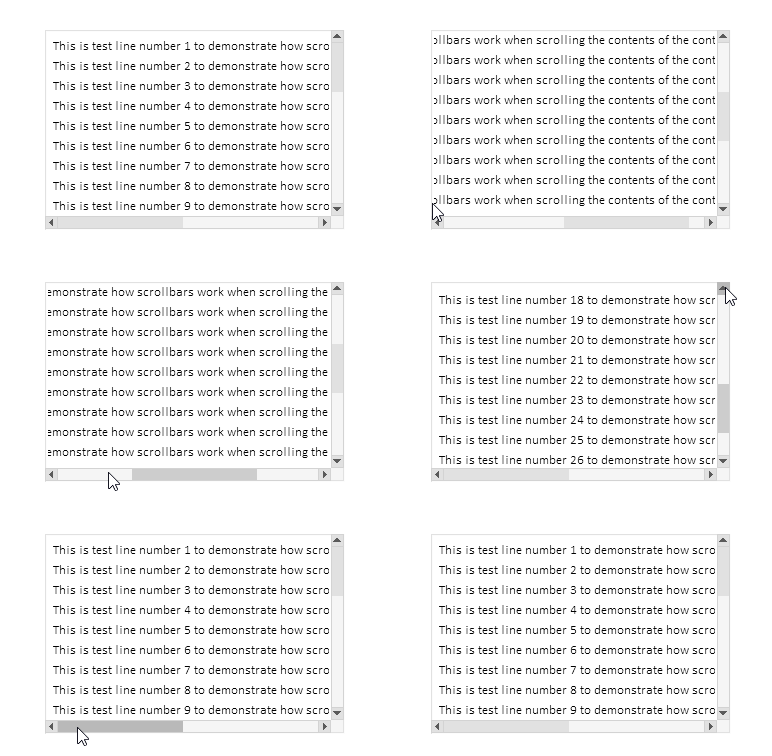
トラックをクリックしたときの1画面スクロールは動作し、ボタンをクリックしたときのスクロールも動作します。ボタンを押し続けたときのイベント自動繰り返しも機能し、ホイールスクロールも動作します。
すべてのコントロールが作成された後、作成されたすべての要素の説明がログに出力されます。
Container (ContainerBG, ContainerFG): ID 1, Group -1, x 100, y 40, w 300, h 200
   [2]: Groupbox "Attached Groupbox" (ContainerFG_GRBX2BG, ContainerFG_GRBX2FG): ID 2, Group 1, x 100, y 40, w 620, h 610
      [0]: Label "TextString1" (ContainerFG_GRBX2FG_LBL0BG, ContainerFG_GRBX2FG_LBL0FG): ID 0, Group 1, x 108, y 48, w 587, h 20
      [1]: Label "TextString2" (ContainerFG_GRBX2FG_LBL1BG, ContainerFG_GRBX2FG_LBL1FG): ID 1, Group 1, x 108, y 68, w 587, h 20
      [2]: Label "TextString3" (ContainerFG_GRBX2FG_LBL2BG, ContainerFG_GRBX2FG_LBL2FG): ID 2, Group 1, x 108, y 88, w 587, h 20
      [3]: Label "TextString4" (ContainerFG_GRBX2FG_LBL3BG, ContainerFG_GRBX2FG_LBL3FG): ID 3, Group 1, x 108, y 108, w 587, h 20
      [4]: Label "TextString5" (ContainerFG_GRBX2FG_LBL4BG, ContainerFG_GRBX2FG_LBL4FG): ID 4, Group 1, x 108, y 128, w 587, h 20
      [5]: Label "TextString6" (ContainerFG_GRBX2FG_LBL5BG, ContainerFG_GRBX2FG_LBL5FG): ID 5, Group 1, x 108, y 148, w 587, h 20
      [6]: Label "TextString7" (ContainerFG_GRBX2FG_LBL6BG, ContainerFG_GRBX2FG_LBL6FG): ID 6, Group 1, x 108, y 168, w 587, h 20
      [7]: Label "TextString8" (ContainerFG_GRBX2FG_LBL7BG, ContainerFG_GRBX2FG_LBL7FG): ID 7, Group 1, x 108, y 188, w 587, h 20
      [8]: Label "TextString9" (ContainerFG_GRBX2FG_LBL8BG, ContainerFG_GRBX2FG_LBL8FG): ID 8, Group 1, x 108, y 208, w 587, h 20
      [9]: Label "TextString10" (ContainerFG_GRBX2FG_LBL9BG, ContainerFG_GRBX2FG_LBL9FG): ID 9, Group 1, x 108, y 228, w 594, h 20
      [10]: Label "TextString11" (ContainerFG_GRBX2FG_LBL10BG, ContainerFG_GRBX2FG_LBL10FG): ID 10, Group 1, x 108, y 248, w 594, h 20
      [11]: Label "TextString12" (ContainerFG_GRBX2FG_LBL11BG, ContainerFG_GRBX2FG_LBL11FG): ID 11, Group 1, x 108, y 268, w 594, h 20
      [12]: Label "TextString13" (ContainerFG_GRBX2FG_LBL12BG, ContainerFG_GRBX2FG_LBL12FG): ID 12, Group 1, x 108, y 288, w 594, h 20
      [13]: Label "TextString14" (ContainerFG_GRBX2FG_LBL13BG, ContainerFG_GRBX2FG_LBL13FG): ID 13, Group 1, x 108, y 308, w 594, h 20
      [14]: Label "TextString15" (ContainerFG_GRBX2FG_LBL14BG, ContainerFG_GRBX2FG_LBL14FG): ID 14, Group 1, x 108, y 328, w 594, h 20
      [15]: Label "TextString16" (ContainerFG_GRBX2FG_LBL15BG, ContainerFG_GRBX2FG_LBL15FG): ID 15, Group 1, x 108, y 348, w 594, h 20
      [16]: Label "TextString17" (ContainerFG_GRBX2FG_LBL16BG, ContainerFG_GRBX2FG_LBL16FG): ID 16, Group 1, x 108, y 368, w 594, h 20
      [17]: Label "TextString18" (ContainerFG_GRBX2FG_LBL17BG, ContainerFG_GRBX2FG_LBL17FG): ID 17, Group 1, x 108, y 388, w 594, h 20
      [18]: Label "TextString19" (ContainerFG_GRBX2FG_LBL18BG, ContainerFG_GRBX2FG_LBL18FG): ID 18, Group 1, x 108, y 408, w 594, h 20
      [19]: Label "TextString20" (ContainerFG_GRBX2FG_LBL19BG, ContainerFG_GRBX2FG_LBL19FG): ID 19, Group 1, x 108, y 428, w 594, h 20
      [20]: Label "TextString21" (ContainerFG_GRBX2FG_LBL20BG, ContainerFG_GRBX2FG_LBL20FG): ID 20, Group 1, x 108, y 448, w 594, h 20
      [21]: Label "TextString22" (ContainerFG_GRBX2FG_LBL21BG, ContainerFG_GRBX2FG_LBL21FG): ID 21, Group 1, x 108, y 468, w 594, h 20
      [22]: Label "TextString23" (ContainerFG_GRBX2FG_LBL22BG, ContainerFG_GRBX2FG_LBL22FG): ID 22, Group 1, x 108, y 488, w 594, h 20
      [23]: Label "TextString24" (ContainerFG_GRBX2FG_LBL23BG, ContainerFG_GRBX2FG_LBL23FG): ID 23, Group 1, x 108, y 508, w 594, h 20
      [24]: Label "TextString25" (ContainerFG_GRBX2FG_LBL24BG, ContainerFG_GRBX2FG_LBL24FG): ID 24, Group 1, x 108, y 528, w 594, h 20
      [25]: Label "TextString26" (ContainerFG_GRBX2FG_LBL25BG, ContainerFG_GRBX2FG_LBL25FG): ID 25, Group 1, x 108, y 548, w 594, h 20
      [26]: Label "TextString27" (ContainerFG_GRBX2FG_LBL26BG, ContainerFG_GRBX2FG_LBL26FG): ID 26, Group 1, x 108, y 568, w 594, h 20
      [27]: Label "TextString28" (ContainerFG_GRBX2FG_LBL27BG, ContainerFG_GRBX2FG_LBL27FG): ID 27, Group 1, x 108, y 588, w 594, h 20
      [28]: Label "TextString29" (ContainerFG_GRBX2FG_LBL28BG, ContainerFG_GRBX2FG_LBL28FG): ID 28, Group 1, x 108, y 608, w 594, h 20
      [29]: Label "TextString30" (ContainerFG_GRBX2FG_LBL29BG, ContainerFG_GRBX2FG_LBL29FG): ID 29, Group 1, x 108, y 628, w 594, h 20
記載した機能は正しく動作しています。細かい不具合はいくつかありますが、これはTableViewコントロールのさらなる開発により解消される予定です。
結論
本日は、開発中のControlsライブラリにおいて、比較的広範で必要な機能を実装しました。
CContainerクラスは、ユーザーインターフェースにおけるスクロール可能な領域を作成するための、強力で便利なツールです。スクロールバーの操作を自動化し、大きなコンテンツの管理を容易化し、スクロール可能領域との直感的なユーザー操作を提供します。柔軟な構造と他のインターフェース要素との統合により、コンテナは複雑なグラフィックソリューションの一部としても簡単に使用可能です。
次のステップでは、ヘッダの作成をおこないます。たとえば、テーブルの列ヘッダ一覧を配置できるようにします。各ヘッダセルのサイズ変更機能も実装され、テーブル列のサイズが自動的に調整されるようになります。
以下は本稿で使用されているプログラムです。
| # | 名前 | 種類 | 詳細 |
|---|---|---|---|
| 1 | Base.mqh | クラスライブラリ | コントロールの基底オブジェクトを作成するクラス |
| 2 | Controls.mqh | クラスライブラリ | 制御クラス |
| 3 | iTestContainer.mq5 | テストインジケーター | コントロールクラスの操作をテストするためのインジケーター |
| 4 | MQL5.zip | アーカイブ | クライアントターミナルのMQL5ディレクトリに解凍するための上記のファイルのアーカイブ |
MetaQuotes Ltdによってロシア語から翻訳されました。
元の記事: https://www.mql5.com/ru/articles/18658
警告: これらの資料についてのすべての権利はMetaQuotes Ltd.が保有しています。これらの資料の全部または一部の複製や再プリントは禁じられています。
この記事はサイトのユーザーによって執筆されたものであり、著者の個人的な見解を反映しています。MetaQuotes Ltdは、提示された情報の正確性や、記載されているソリューション、戦略、または推奨事項の使用によって生じたいかなる結果についても責任を負いません。

 FXにおけるスワップ差裁定:合成ポートフォリオの構築と一貫したスワップフローの生成
 MQL5における取引へのコンピュータビジョンの統合(第1回):基本関数の作成
 ニューロボイド最適化アルゴリズム2 (NOA2)
 初級から中級まで:インジケーター(II)

- 無料取引アプリ
- 8千を超えるシグナルをコピー
- 金融ニュースで金融マーケットを探索
何が起こったのかわかりませんが、オリジナルのコードをビルドして実行すると、記事の一番下に記載されている内容とは異なる表示になってしまいます。
インジケータをチャートから削除します。Ctrl+Bを押し、開いたグラフィカル・オブジェクト・リスト・ウィンドウで「All」をクリックし、すべてのオブジェクトを削除します。その後、インジケーターを再度起動してください。
オブジェクトの構築時にエラーが発生した可能性が高いです。