One4Allassistant

One4Allassistant: Your All-in-One Manual Trading Assistant for MT5

Version 2.2

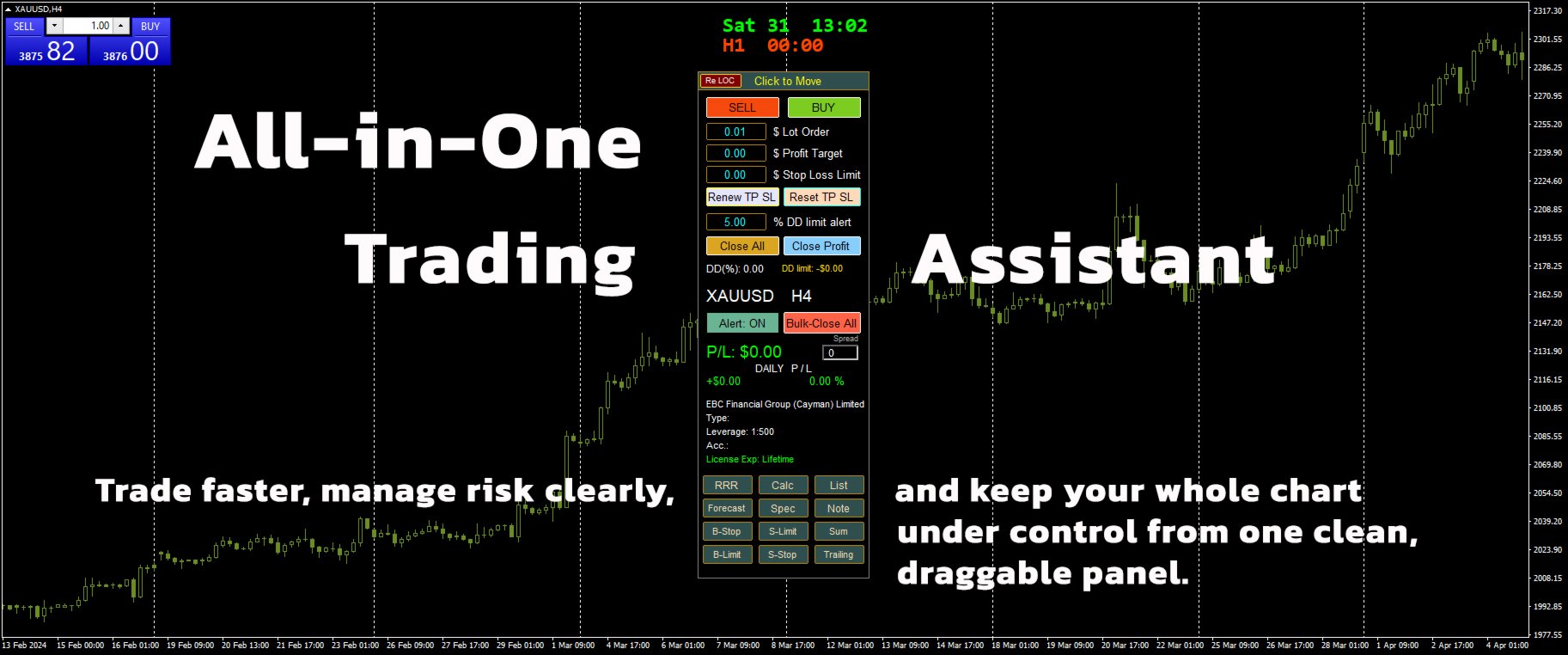
Trade faster, manage risk clearly, and keep your whole chart under control from one clean, draggable panel.

::What you get::
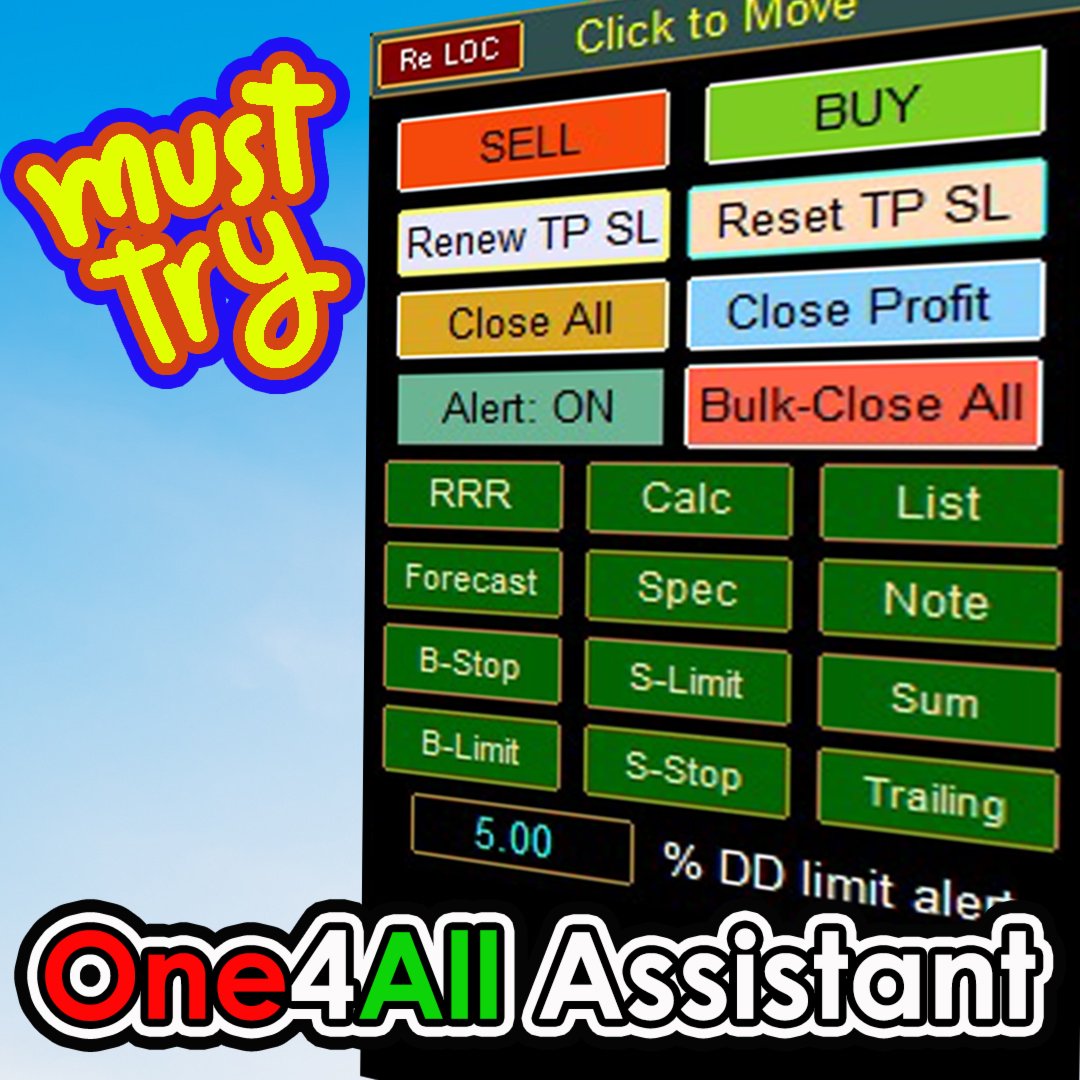
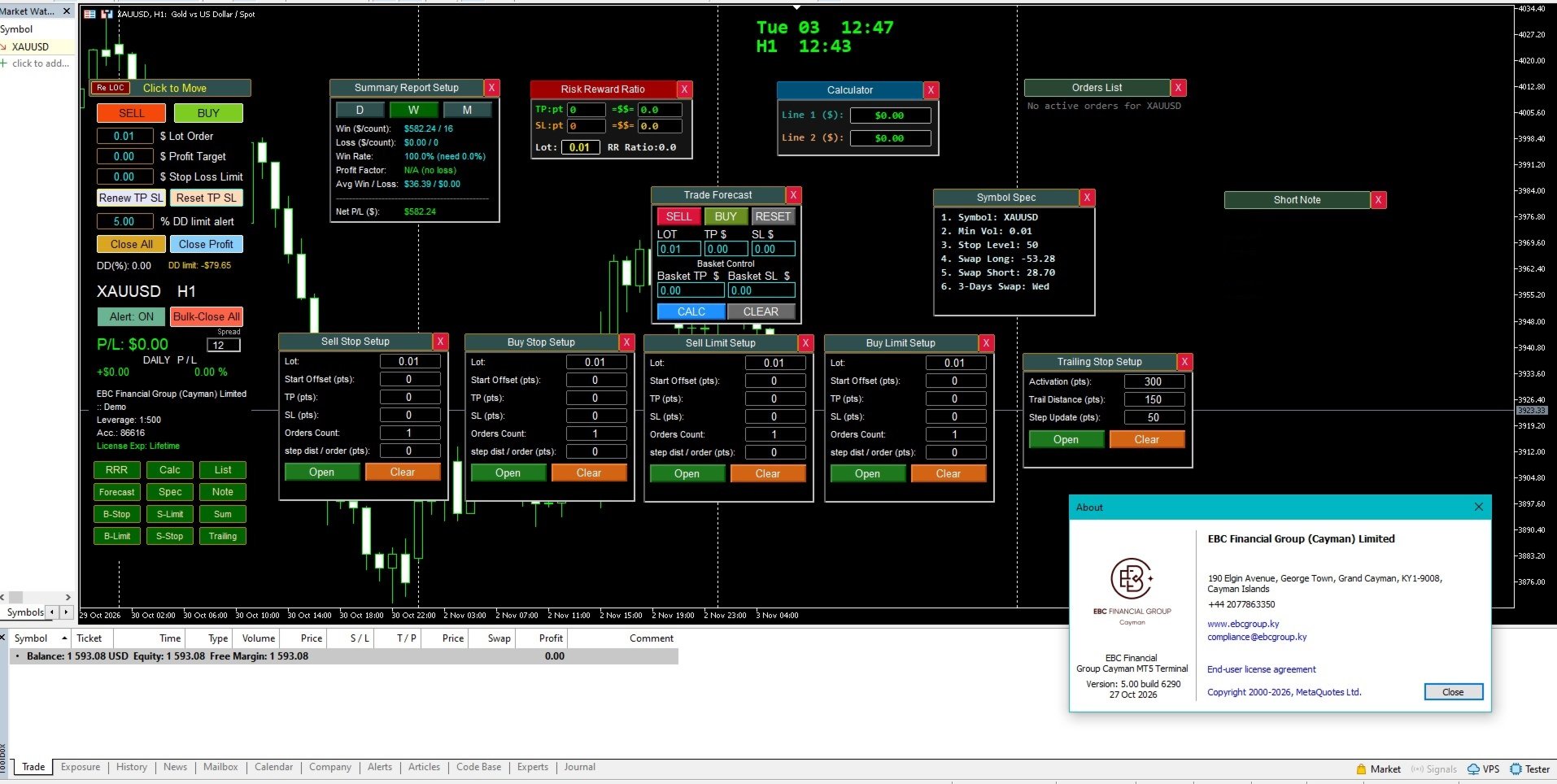
  • One-click trading: Set your lot size, enter your target profit and stop loss in USD, and press BUY or SELL. TP and SL are calculated for you.
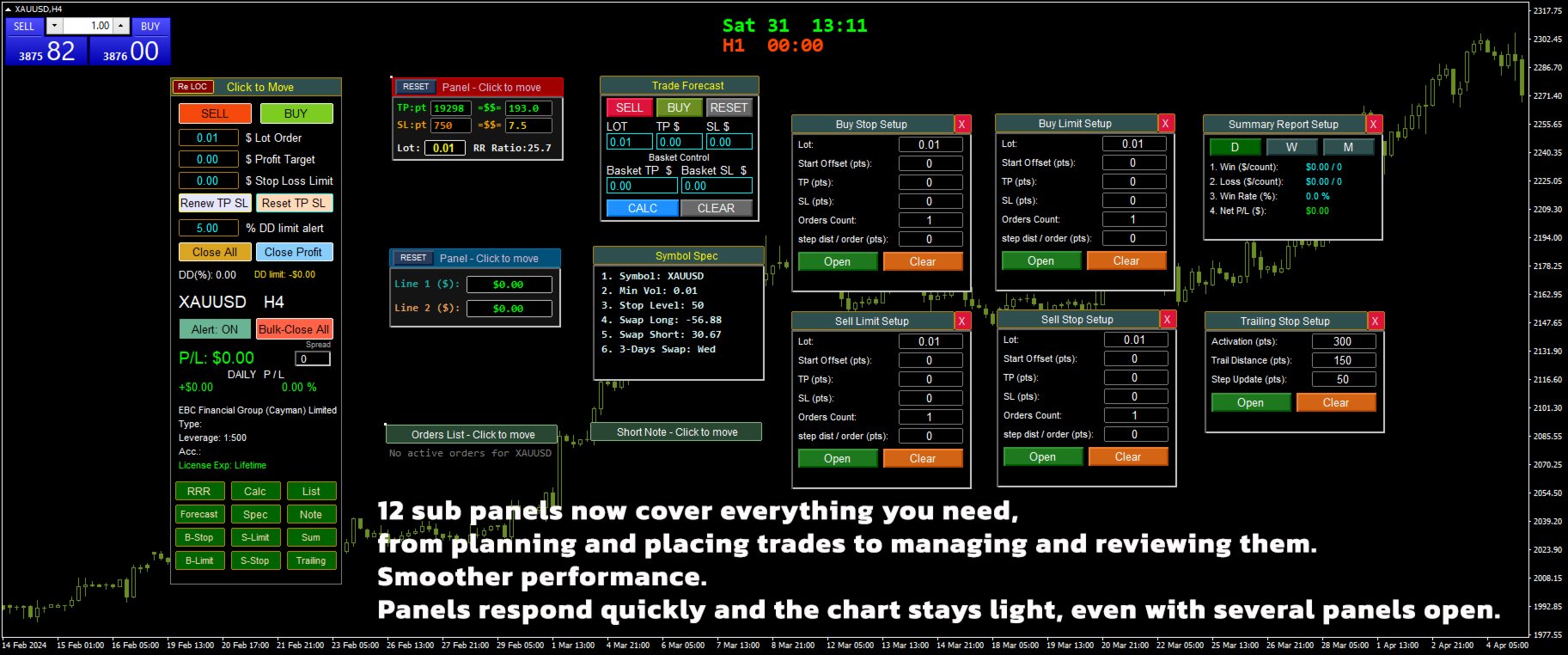
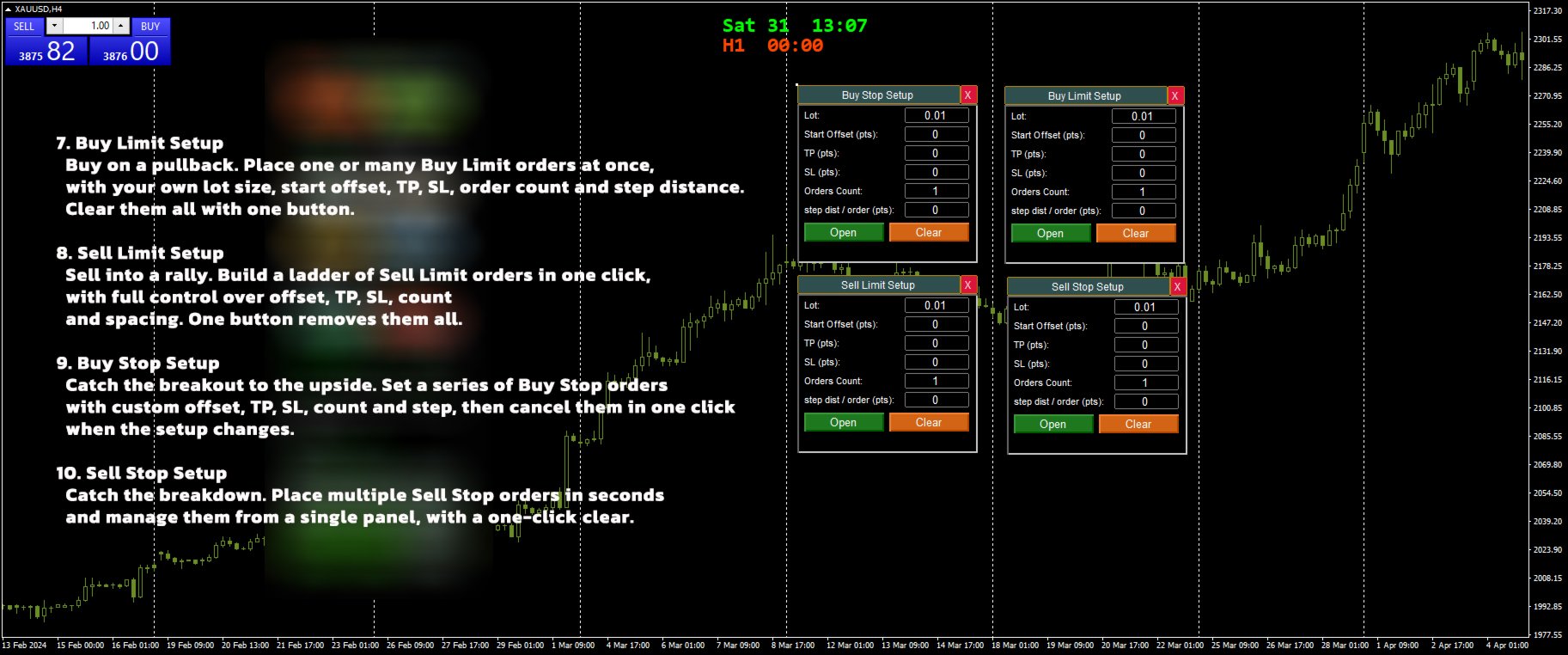
  • Pending order ladders: Buy Limit, Sell Limit, Buy Stop and Sell Stop panels let you place many orders at once. Set the start offset, TP, SL, order count and step distance.
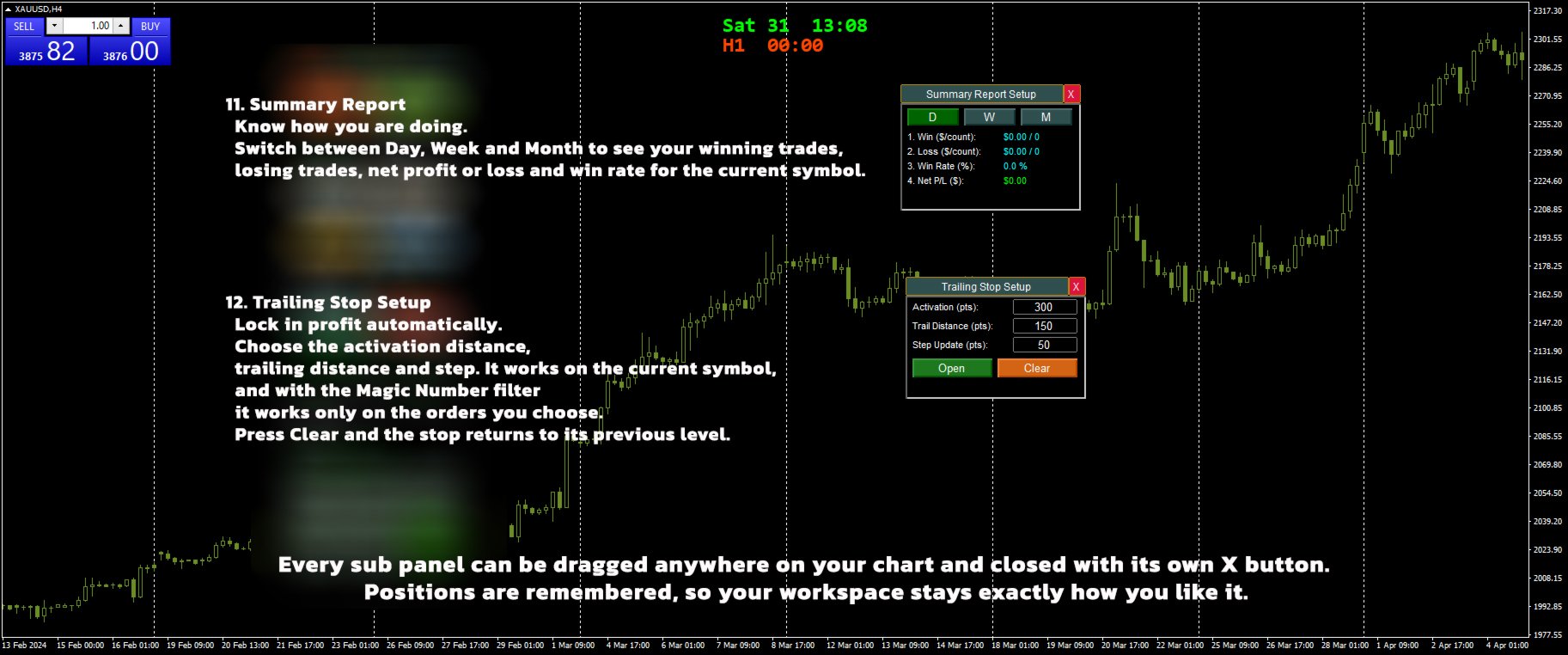
  • Trailing stop: Choose the activation distance, trailing distance and step. Press Clear and the stop returns to its previous level.
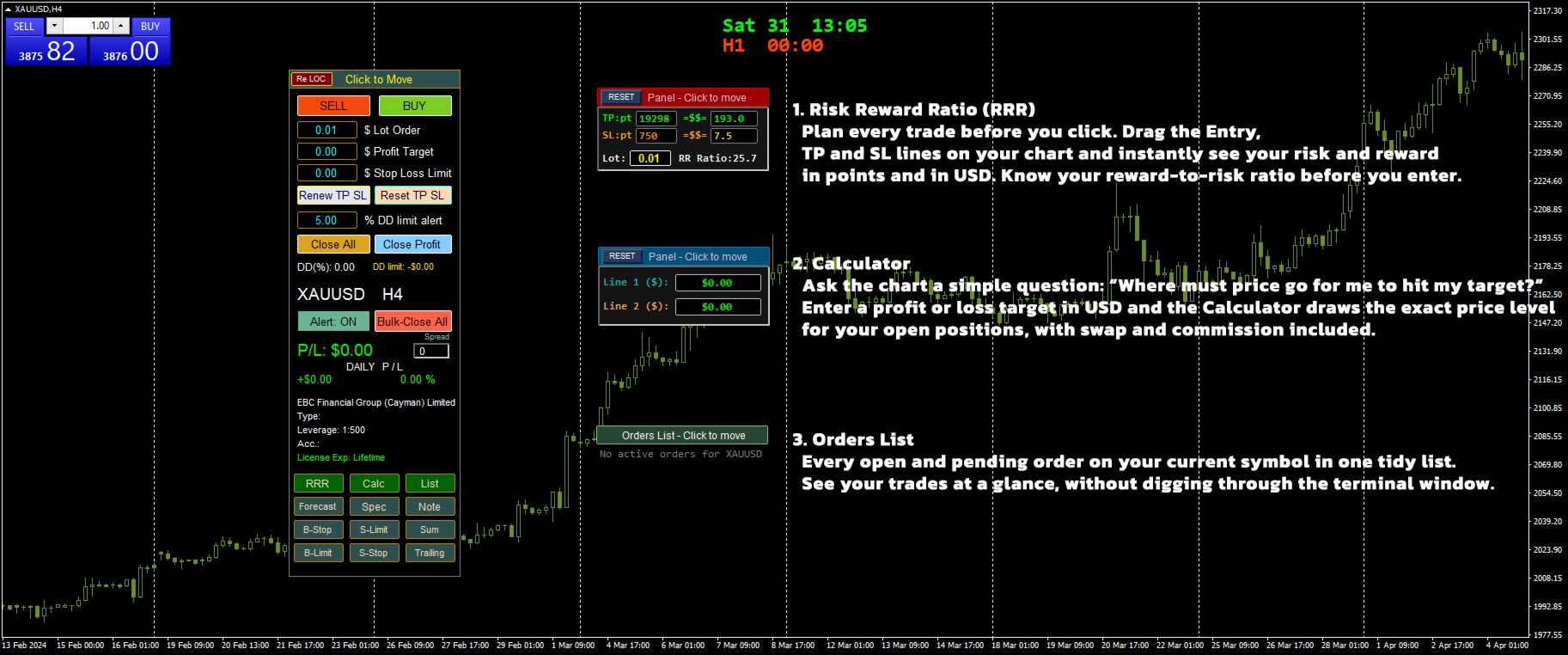
  • Risk Reward panel: Drag Entry, TP and SL lines on the chart and see risk and reward instantly in points and in USD.
  • Calculator: Find the price at which your open positions reach a target profit or loss.
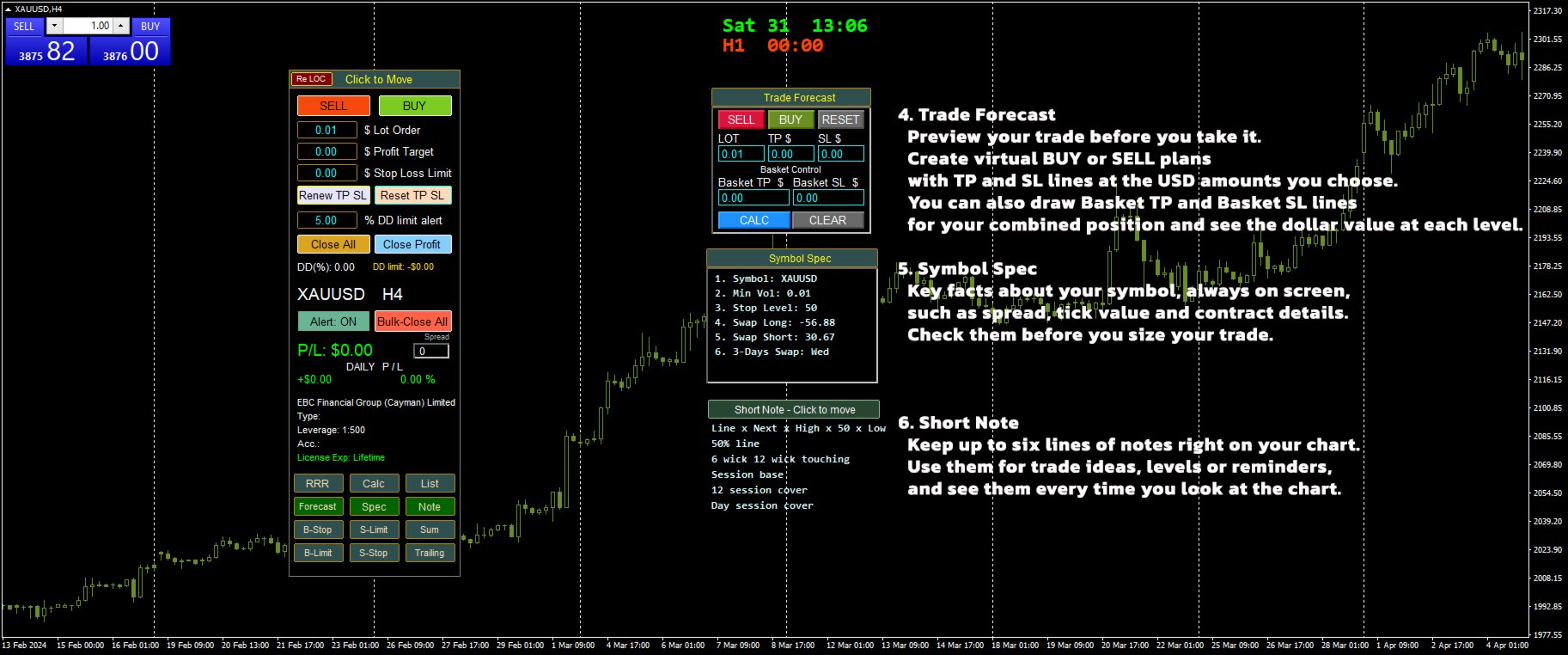
  • Trade Forecast: Preview TP/SL lines before you trade, and draw basket TP/SL levels for your combined position.
  • Symbol Spec and Short Note: Check spread, tick value and contract details, and keep notes on the chart.
  • Orders List and Summary Report: See your open orders and your results at a glance.
  • Live dashboard: Track floating P/L, daily P/L, drawdown % and the candle countdown timer.
  • Smart alerts: Get notified on drawdown level and when a position closes. You choose how many times each alert repeats.
Built for control and safety

  • Close All and Close Profit act only on the current symbol, with an optional Magic Number filter, so your other EAs and manual trades on other symbols stay untouched.
  • Bulk-Close All clears every order and pending order in the account with one button when you need it.
  • Renew or reset TP/SL for all your orders in one click.
  • Automatic retry on temporary server errors, adjustable slippage, and stop-level and freeze-level checks.
  • Margin check before each order.
Designed for a clean workspace

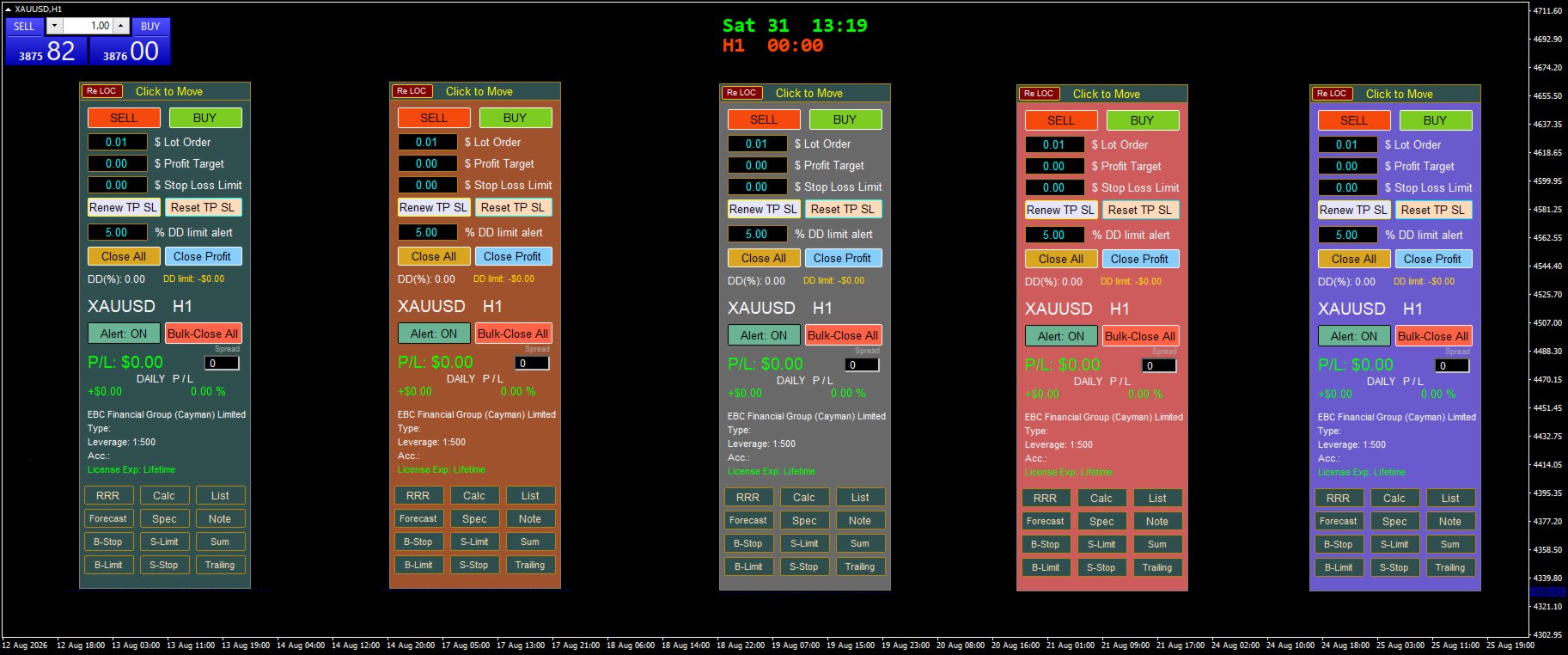
  • Every sub panel can be dragged anywhere and closed with an X button.
  • Panels stay on screen and remember their positions.
  • Panel state survives timeframe changes.
  • Fast, light updates, so your chart stays smooth.
  • Whether you scalp, swing trade, or manage a grid of pending orders, One4Allassistant puts the tools you use most in one place, so you spend less time clicking and more time making decisions.
  • Trading involves risk. This tool assists manual trading and does not guarantee profits. Please test on a demo account first.

PC , Laptop , Pocket PC
Minimum Requirements:
OS: Windows 7 SP1 or later
CPU: 500 MHz processor (Pentium IV or comparable)
RAM: 512 MB
Hard Disk: 20 MB free space

_______________________________

Thank you for your support
Subscribe & Follow to stay updated on new gadgets.
_______________________________
Recommended products
TradeManager Control Suite Manual trading with structured planning and controlled risk TradeManager Control Suite is a comprehensive trading panel for MetaTrader 5. It helps you prepare trades directly on the chart, calculate position size, place orders and manage open positions according to a plan defined in advance. You remain responsible for every entry. The application does not trade independently and does not use an automated trading strategy. It performs the calculations, sends the orde
Trade Copilot - Semi-Automatic Risk Management Panel for Gold (XAUUSD) and any instrument Trade Copilot is a semi-automatic trading panel built for manual traders who want an EA's discipline without giving up control of their own entries. You decide the direction and the level - the panel handles risk sizing, stop-loss placement, take-profit management, and trade protection automatically. KEY FEATURES - Risk-based lot sizing - choose Risk %, Risk $, or Fixed Lot; the panel calculates positio
HedgeSafe Trade Assistant A risk-first manual trading panel for MetaTrader 5. HedgeSafe helps you prepare, validate and manage a trade directly on the chart before you press BUY or SELL. HedgeSafe is not a signal service, market predictor, AI bot or automatic strategy. It does not choose trade direction and does not promise profit. You remain in control of every trading decision. Main capabilities Lot calculation from a percentage of account balance or a fixed amount in account currency. Stop Lo
TradingManagement
Christian Ishmael Calienta Magallon
TradingManager is a comprehensive trading panel designed to streamline your trading workflow in MetaTrader 5. It combines order management, risk controls, and market analysis into one intuitive interface. Key Features 1. Trading Panel Market Order Entry   - One-click BUY/SELL with automatic SL and TP line placement on chart Fib Limit Orders   - Draw Fibonacci-based limit orders with visual SL and TP levels Risk Management   - Choose between Lots, % Risk, or $ Risk modes Take Profit Split   - Dis
Advance Trade Manager
Jose Rodrgues Chaves
ADVANCE TRADE MANAGER A complete, tabbed trade-management dashboard for MetaTrader 5 that puts every routine trade operation on one compact panel. No more hunting through menus — open, protect, scale and manage positions from a single interface. The panel is a pure GUI overlay . It never touches your existing chart objects, indicators, arrows or manual lines. All chart objects it creates use the dedicated EGF_Z_ (zones) prefix, and trigger lines use the panel's own object names — so nothing else
Capital Management EA – Smart Risk Management & Profit Optimization for MT5 Take control of your trading capital with smart, automated strategies — fully optimized for MetaTrader 5 (MT5). Looking to protect your capital and maximize profits through automated money management strategies ? Capital Management EA is the all-in-one Expert Advisor for MetaTrader 5 (MT5) that helps you trade smarter, not harder. Core Features: 5-in-1 Capital Management Strategies – Built-in versatility Gr
TradersOS
Mario El Kallab
TraderOS – Professional Trading Operations Dashboard for MetaTrader 5 Overview TraderOS is a comprehensive trading operations dashboard designed to help discretionary traders monitor the markets, organize trading decisions, and manage risk from a single intuitive interface. Instead of placing trades automatically, TraderOS acts as your trading command center by combining market scanning, technical analysis, trade monitoring, and risk management into one professional workspace. Whether you are a
Trade Panel Pro — Professional Risk Management & Order Execution Terminal for MetaTrader 5 Trade Panel Pro is an advanced, all-in-one utility for MetaTrader 5, designed for active day traders and professionals. It combines precise risk calculation with lightning-fast order execution, helping you protect your capital and manage multi-target trades with ease. Main Advantages and Key Features Automated Lot Calculation: Forget manual volume calculations! The panel instantly calculates the exact
DDKiller Pro
Njaratahiry Michael Randrianiaina
Stop Blowing Your Account. Once and For All. DDKiller Pro is the MT5 risk guardian that runs silently on your chart and shuts down trading the moment you hit a limit — whether you're grinding a prop firm challenge or managing your own CFD account. The problem every trader knows: You set your rules. You break them anyway. One revenge trade. One overleveraged position. One session that erases a month of gains. DDKiller Pro removes that decision from your hands entirely. What it does: The second yo
Trading Assistent is a multifunctional trading panel that combines all necessary tools for professional trading. The panel provides complete control over positions, in-depth risk analysis, and fast order execution. MAIN FUNCTIONAL BLOCKS Position Management: - Real-time viewing of all open positions - Sorting by symbol, profit, volume, and type - Visual indication of profitable and losing positions - Bulk closing operations - Breakeven function for profit protection Trading Operations: - I
Expert TP SL v04
Mikhail Ostashov
Expert TP SL v04 - Professional Trading Assistant with AI Motivation System Advanced manual trading tool with automatic risk management, overtrading protection, and intelligent psychological support for disciplined trading. PRODUCT OVERVIEW Expert TP SL v04 is a comprehensive trading assistant designed for manual traders who want to maintain emotional discipline while automating risk calculations. This isn't just another order placement tool - it's a complete trading psychology system that pr
Overview Mirror Signals Service EA (Text only)   is a powerful monitoring Expert Advisor that automatically sends   real-time Telegram notifications   for all important trade events on your MetaTrader 5 account. It is engineered specifically for   signal providers ,   trade-copier operators ,   auditors ,   educators , and   professional trading services   that require immediate, detailed, and reliable reporting. Everything from   entries, exits, SL/TP changes, comment changes, trailing sto
LotCalculatorPro
Reynaldo Jr Audencial Pascual
LotCalculatorPro + Smart Trading Panel LotCalculatorPro is a powerful all-in-one trading assistant designed to simplify risk management, lot size calculation, and trade execution directly from your chart. This tool helps traders control risk, calculate precise lot sizes, and manage trades automatically with smart features like break-even, partial close, and daily profit/loss protection. It is ideal for Forex traders, prop firm traders, and risk-focused traders who want a clean and efficient trad
Trading Utility for Forex Currency Pairs Only not for Gold  Functions Auto Lot Calculation based on Risk Auto stoploss  Auto TakeProfit Breakeven Auto Close Half % Close in percentage with respect to the PIPs Pending Orders BuyLimit Sell Limit with distances BuyStop Sell Stop    with distances Trading Informations Risk in percentage For Multiple trades Combine Takeprofit and Combine Stoplosses
CosmiCLab SMC FIBO CosmiCLab SMC FIBO is a professional trading indicator designed for traders who use Smart Money Concepts (SMC), market structure analysis and Fibonacci retracement levels. The indicator automatically detects market swings and builds Fibonacci levels based on the latest impulse movement. It also identifies market structure changes such as BOS (Break of Structure) and CHOCH (Change of Character), helping traders understand the current market direction. CosmiCLab SMC FIBO also pr
RSI Currency Strength Meter is a powerful and elegant multi-currency indicator that measures the real-time relative strength of the 8 major currencies using RSI logic. By calculating the smoothed performance of each currency across its major pairs and applying the RSI formula, it delivers clean and responsive strength lines that make it easy to spot which currencies are truly strong or weak at any moment. This indicator is particularly useful for visualizing currency correlations and divergence
Veron Link Slave – Synchronized Grid, Martingale & Breakout Management Short Description Advanced synchronization tool designed to manage Grid, Martingale, and Breakout EAs. Automatically sends close-basket signals to the Master account upon profit target completion, minimizing slippage across different brokers. Full Description Veron Link Slave is a specialized utility developed to enhance the execution efficiency and risk management of multi-account or multi-broker trading setups. It is desig
Bastion is a monitor-and-close-only risk manager for prop-firm traders. It watches your account against your firm's daily-loss and maximum-drawdown limits in real time and force-closes your open positions BEFORE you cross a line. It never opens a trade of its own, so it stays fully within the tools allowed by FTMO, FundedNext, The5ers, FTUK and FXIFY. Why traders fail challenges A large share of failed evaluations end on a single daily-loss breach: a moment of inattention, a news spike, one tra
Overview RealCost Risk Governor MT5 is an account and trade-risk monitoring utility for MetaTrader 5. It does not predict price movement and does not provide buy or sell signals. It watches configured risk limits and shows a compact on-chart panel for daily P/L, floating P/L, equity drawdown, trade count, open positions, pending orders, total lots, and chart spread. The default mode is alert-only. If the trader explicitly enables protection actions, the utility can close scoped positions, del
Your stop is already on the MT5 chart. What lot size keeps your loss within the risk you chose? Easy Trade Executor (ETE) shows the lot, loss at the stop, profit at take profit and required margin. After entry, you set the rules: move to breakeven, Close 50% or start a trailing stop. The panel carries out each action according to your rules. Open it and go from sizing the lot to closing the trade in a few clicks on your MT5 chart. See the lot and key order numbers before you click Send Lot from
TradeArchitect Grid Manager  is a chart-based manual trading utility for MetaTrader 5. It combines visual trade planning, risk-based position sizing, market and pending order execution, position management, and optional martingale or anti-martingale progression. The utility does not generate trading signals and does not decide when to buy or sell. The trader chooses the direction, Entry, Stop Loss and Take Profit. GridPlan Trade Manager performs the calculations, checks the plan and manages th
Prop Calculator Assistant Stop blowing Prop Firm accounts due to bad math. Let the Assistant handle the risk. Prop Calculator Assistant   is the ultimate trade management panel designed specifically for traders attempting to pass funding challenges (FTMO, etc.) or managing funded capital. It replaces mental math and manual order dragging with a precision visual interface that keeps you strictly within your rules. This is   not   an auto-trading bot that guesses the market. It is a professional  
Inverted_Chart_EA Utility Expert Advisor Inverted_Chart_EA creates and maintains a mirror-inverted chart of any symbol and timeframe. It automatically generates a custom instrument (e.g. US30_INV ) and keeps its price history updated in real time, with bars mirrored around a chosen pivot. This utility gives traders a new way to analyze the market from a different perspective by flipping the chart upside down. Why use an inverted chart? Highlight hidden patterns – price formations that look ordin
INTRODUCTORY LAUNCH OFFER: $139 • Exclusive introductory price for the first 10 copies only. • Price will be permanently adjusted to $279 after the first 10 activations. • Next price step: $199 -> Final price: $279. Fortress Risk Manager is an institutional-grade, all-in-one Capital Protection and Risk Management Cockpit built natively for MetaTrader 5. Engineered specifically for prop firm challenge accounts, funded trader programs, and discipl
TradeControl Pro – Advanced Trade Manager for MetaTrader TradeControl Pro is a trade management tool for MetaTrader that enables structured and efficient management of trading positions directly on the chart. The application combines a clearly designed user interface with automated calculations and flexible control options for different trading approaches. The integrated on-chart panel is organized in a tabular layout and divided into three main sections (tabs): Execution , Close , and Info . Th
Auto Stop Loss and Target Enforcer watches every new position. If one opens without a stop loss or a take profit, it adds them a few seconds later. It covers trades opened by hand and trades opened by other Expert Advisors. How stops and targets are set - Stop loss: a multiple of the typical market move (Average True Range), a fixed number of pips, a set share of the account, or beyond the nearest support or resistance level. - Take profit: a multiple of the typical market move, a fixed number
TradePilotmt5
Hossein Khalil Alishir
TradePilot Expert Advisor (EA) for MetaTrader 5 TradePilot is a professional and user-friendly Expert Advisor (EA) for MetaTrader 5 (MT5) . It simplifies automated trading , risk management , and trade execution with a smart trading panel . Perfect for beginners and experienced traders looking for a reliable trade manager EA with automated lot size calculation and smart position management. Key Advantages User-Friendly Trading Panel: Customizable panel with buttons and hotkeys for fast ex
Fast execution utility for manual traders. Drag-and-drop visual trading, split take-profits, and single-ticket management system. Speed, Precision, and Risk Control. KAB Trade Manager is built for traders who need to execute fast but keep risk tight. It integrates all essential tools into floating, collapsible windows. Core Functions: Instant Order Execution:   Market and Pending orders with automatic Lot sizing based on SL distance. Focus Ticket Manager:   A dedicated window to monitor and mana
TApro
Farid Abolfazl Honarvar
**Trade Assistant is an on-chart trading panel for MetaTrader 5.** It is a trade-execution and trade-management tool for discretionary traders: you decide where the trade is wrong, the EA does the maths, sends the order and manages it afterwards. It never starts a trade on its own, except for the optional automations you switch on yourself (reverse after stop loss, loss averaging), and it does not promise any result. **How a trade works** 1. Drag the SL line to where your idea is invalid. 2. P
Bober Real MT5
Arnold Bobrinskii
4.88 (16)
Bober Real MT5 is a fully automatic Forex trading Expert Advisor. This robot was made in 2014 year and did a lot of profitbale trades during this period. So far over 7000% growth on my personal account. There was many updates but 2019 update is the best one. The robot can run on any instrument, but the results are better with EURGBP, GBPUSD, on the M5 timeframe. Robot doesn't show good results in tester or live account if you run incorrect sets. Set files for Live accounts availible only for cu
Buyers of this product also purchase
Trade Assistant MT5
Evgeniy Kravchenko
4.43 (216)
It helps to calculate the risk per trade, the easy installation of a new order, order management with partial closing functions, trailing stop of 7 types and other useful functions. Additional materials and instructions Installation instructions - Application instructions Line function -   shows on the chart the Opening line, Stop Loss, Take Profit. With this function it is easy to set a new order and see its additional characteristics before opening.   Risk management  - The risk calculation
Forex Trade Manager MT5
InvestSoft
4.98 (689)
Trade Manager MT5 is an advanced position size calculator and trade management tool for MetaTrader 5, designed to help traders plan trades faster, control risk more precisely, and manage open positions directly from the chart. It combines order placement, risk based lot calculation, Stop Loss and Take Profit management, Break Even, Trailing Stop, Partial Close, Equity Protection, and external trade management in one panel. Whether you trade forex, indices, metals, commodities, crypto, or future
FarmedHedge Pair Trading Dashboard
Tanapisit Tepawarapruek
5 (7)
Farmed Hedge Yield Farming | All Markets (Manual - Hybrid - Semi/Automated EA) VERIFIED TRADING RESULTS - Farmed Hedge Yield Axi Copy:  https://www.mql5.com/en/signals/2356376 - Farmed Hedge Yield Exn Copy:   https://www.mql5.com/en/signals/2356404 - Farmed Hedge Yield V Copy:  https://www.mql5.com/en/signals/2357156 IMPORTANT NOTICE: FarmedHedge is a MANUAL-FOCUSED TRADING UTILITY ,not a fully automated EA. Results shown on this Signal include manual trades and overall strategic management.
Telegram to MT5 MultiChannel Copier
Sergio Marquez Uroz
4.68 (22)
Telegram to MT5 Multi-Channel Copier   automatically copies trading signals from your Telegram and Discord channels straight to MetaTrader 5. No bots, no browser extensions, no manual copying. A signal arrives in Telegram or Discord and the EA opens the trade in your terminal within seconds. And before you copy a channel, the built-in backtester shows you what that channel would have done in your account. The product has two components: a Windows application that listens to your Telegram channel
TradePanel MT5
Alfiya Fazylova
4.88 (170)
Trade Panel is a multi-functional trading assistant. The app contains over 50 trading functions for manual trading and allows you to automate most trading tasks. Application instructions: https://www.mql5.com/en/blogs/post/756482 Trial version of the application for a demo account: https://www.mql5.com/en/blogs/post/750865 How to install the application: https://www.mql5.com/en/blogs/post/756239 How to test the application in visual mode: https://www.mql5.com/en/blogs/post/770277 How to install
Copy Telegram signals with your own trading rules Telegram to MT5 Signal Trader automatically copies text-based trading signals from public and private Telegram channels and groups into MetaTrader 5. Manage multiple providers and MT5 accounts from one desktop app, with individual risk and trade settings for each provider . No Telegram bot or API setup needed for copying. Simply sign in with your own Telegram account by phone or QR code and select the channels or groups you have already joined. Y
================================================================================ POC BREAKOUT - V20.72. Full Professional Grade Toolkit ================================================================================ POC Breakout is a full MetaTrader 5 trading dashboard for discretionary traders who want breakout signals, Point of Control (POC) context, volume profiles, order flow, market structure, news, alerts, and advanced trade planning in one professional workspace. Attached directly to you
REVDEN AI Desk: Run Your Trading From One Conversation With Your Own AI, on REVDEN's Market Context Imagine running your trading from one conversation. REVDEN AI Desk brings it into MetaTrader 5: you ask your own AI how it reads the market, and it answers from REVDEN's full context on the symbols you trade, with their state, their risk picture and the releases ahead. Its proposals arrive with entry, stop, target and risk, and you approve the ones that fit. Your rules change the same way: write w
The product will copy all telegram signal to MT5 ( which you are member) , also it can work as remote copier.  Easy to set up, copy order instant, can work with almost signal formats, image signal,  s upport to translate other language to English Work with all type of channel or group, even channel have "Restrict Saving Content", work with  multi channel, multi MT5 Work as remote copier: with signal have ticket number, it will copy exactly via ticket number. Support to backtest signal. How to s
News Trade EA MT5
Konstantin Kulikov
4.55 (11)
Present to you the useful robot that I have been using for several years. It can be used in both semi-automatic mode and fully automatic mode. >>> Chat <<< The program contains flexible settings for trading on the news of the economic calendar. It cannot be checked in the strategy tester. Only real work. Download the latest archive of settings: https://www.mql5.com/en/blogs/post/747929 Signals monitoring: https://www.mql5.com/en/signals/author/test-standart When creating your own sets of setti
The Patch
Mian Rameez Ali
The Patch It never opens a trade. It walks behind the ones that did. Every open position, every pending order — checked twice a second for the one thing that's easy to forget: a stop, a target. Found bare, it doesn't ask. It writes the missing number in, measured in points from wherever the position began, and moves on to the next. No strategy, no opinion on direction. Just the quiet assumption that nothing should ever sit on the market unprotected — not because someone decided it shouldn't,
EA Overfitter
Stephen J Martret
5 (3)
That backtest looks great. But will it still be making money tomorrow, next week, next month? EA Overfitter re-runs your EA on 100 price histories it has never seen. One score tells you if the edge is real. A backtest tells you what an EA did on one price history — the one that happened to occur. What you cannot tell from it is how much of that result was the strategy and how much was the particular path. EA Overfitter answers that. It builds up to 100 synthetic price histories your EA has n
RETAILBERG FOOTPRINT CHART PRO — Order-Flow Workspace for MetaTrader 5 Version 7.00  |  Professional System  |  31 tools  |  One chart A full 150-page illustrated User Manual is included. Please read the full manual to understand this feature packed footprint chart elements and ui. https://www.mql5.com/en/blogs/post/777982 DEMO / STRATEGY TESTER — PLEASE READ FIRST
Trade Indicator Assistant   is a powerful MT5 utility designed to turn indicators into automated trading systems. Its main feature is the ability to automatically detect an indicator’s   BUY and SELL signal buffers , without requiring you to know the buffer numbers, search through indicator settings, or modify the indicator source code. Bonus Indicator:   After purchasing Trade Indicator Assistant, contact me to receive   Trade Signal Pro   completely free as a bonus indicator. [Download Demo V
Floor Watch
Syed Tauqeer Hussain Shah
Floor Watch One number, watched every thirty seconds: how far equity has fallen since the day began — or since its highest point, if it's told to trail the peak instead of the open. Cross the line and it doesn't argue. Every open position closes, every pending order vanishes, and anything that slips through afterward gets shut the moment it appears. Not asked. Removed. The floor holds until the clock turns 5 AM Pakistan time — then, and only then, does the day start over. One rule. No except
New Update — Version 2.52 is Now Available  / [ You can access the complete user guide on the product blog via the link below.] We hope you enjoy using the latest version. We remain committed to continuously developing and improving our tools to provide you with an even better experience.  Thank you all for your continued support TRADE OVERVIEW DASHBOARD CONFLUENCE AT ZONE STRONG & WEAK HIGH/LOW OPTIMAL TRADE ENTRY  —   OTE PERFORMANCE OPTIMIZATION 1. TRADE OVERVIEW DASHBOARD A dashboard tha
MT5 Professional Copy Trading System Industrial Grade Ultra Fast Local Trade Copier for Serious Traders The MT5 Professional Copy Trading System is a powerful and ultra fast local trade copier built for serious traders, signal providers, account managers, and advanced multi terminal setups. If you need fast execution, stable synchronization, flexible lot control, and reliable long term performance, this system is designed for exactly that purpose. Unlike many basic retail trade copiers, this sol
Anchor Trade Manager
Kalinskie Gilliam
5 (8)
Your EAs cannot see each other, but Anchor can. Anchor gives you one place to coordinate your EAs, manage risk, and decide when trading is allowed. It works alongside the trading bots you already use without any changes to them. The Problem One EA opens a trade. Then another starts trading. The next thing you know, you wake up to multiple grids built across your account. Each EA may be doing exactly what it was designed to do, but together they can place far more risk on your account than you in
Master Your Trading Discipline   Stop losing your hard-earned gains to overtrading and emotional decisions. The Discipline Tool is your ultimate trading assistant, ensuring strict risk management in real-time. Key Protection Features: Advanced Drawdown Defense : Automatically halts trading if your daily drawdown exceeds a preset threshold (percentage or dollar amount). Real-Time Equity Lock : Safeguard profits by referencing peak equity, ensuring drawdown stays within control. Hard Profit Target
Power Candles Strategy Scanner - Self-Optimizing Multi-Symbol Setup Finder Self-optimizing settings work one chart at a time, and finding where they pay off right now means opening chart after chart. Power Candles Strategy Scanner runs the same self-optimizing engine as the Power Candles indicator on every symbol in your Market Watch, side by side. One panel ranks where it pays off: the winning strategy per symbol, its optimized Stop Loss and Take Profit. An alert fires the moment a fresh signal
Grid Manual MT5
Alfiya Fazylova
4.74 (23)
Grid Manual is a trading panel for working with grid strategies. The utility is universal, has flexible settings and an intuitive interface. It works with a grid of orders not only in the direction of averaging losses, but also in the direction of increasing profits. The trader does not need to create and maintain a grid of orders, the utility will do it. It is enough to open an order and the "Grid manual" will automatically create a grid of orders for it and will accompany it until the close. F
Dealer Panel
Mian Rameez Ali
Dealer's Panel No signal decides anything here — a hand does. One click, and the panel calculates what's underneath: lot size from risk, target from a 30-step balance ladder that remembers exactly how far an account has climbed. Toggle between market and pending without touching an input field. Set a stop, and the take-profit can write itself — a fixed share of the balance, translated into price with no arithmetic left for the trader to get wrong. One trade live at a time; it won't let a seco
My Chart Generator
Trade The Volume Waves Single Member P.C.
5 (1)
What if your chart adapted to the market instead of the clock?   THE PROBLEM IT SOLVES   Instead of trying to find the best indicator that fits your timeframe chart, build a chart and find the most appropriate indicator.   My Chart Generator is a MetaTrader 5 background service that builds  live, fully historical three types of custom charts :1. Range/Volume Balanced chart, 2.  Range/Volume Absorption chart and 3. Constant Volume chart from any symbol — Forex pairs, crypto, indices, commodities,
Auto DCA EA
Truong Giang Hoang
5 (1)
All new interface and function Add telegram notify (you have to get Telegram bot API and chat ID). With this ea, you can earn 10-40% even more profit/month! 1. This EA is used to automatically take profit or DCA your orders on MT5 according to the parameters you set. You can enter first order on your phone or MT5 terminal on your computer and it automatically take profit or DCA your orders. 2. Enter buy/sell limit-stop price * Buy limit price/ Sell limit price/ Buy stop price/ Sell stop price:
Kontrol01 Manager
Andrei Koval
5 (1)
EA Portfolio Control & Cloud Monitoring for MetaTrader 5 Your EAs manage trades. KONTROL_01 manages your EAs. A control system for traders running multiple Expert Advisors on the same account. Coordinate EA activity, manage trading risks and monitor your setup remotely. A detailed User Manual is available via DM after purchase. IN PRACTICE Multiple EAs. No coordination. Your EAs trade independently, unaware of each other's activity. KONTROL_01 coordinates them, limits simultaneous activity a
Copy Cat More Trade Copier MT5 is a local trade copier and a complete risk management and execution framework designed for today’s trading challenges. From prop firm challenges to personal portfolio management, it adapts to every situation with a blend of robust execution, capital protection, flexible configuration, and advanced trade handling. The copier works in both Master (sender) and Slave (receiver) modes, with real-time synchronization of market and pending orders, trade modifications, pa
Buy once. Get all my MT4 and MT5 indicators and trading robots (EAs) - available now and released in the future - at no extra cost. Contact me after purchase for instructions to receive them. The price is planned to rise by 50$ after every 10 purchases, up to 999$. The Market price at checkout applies. Keep the indicator you trust. Automate the work around it. Your signal. Your rules. Your execution. Already have an MT5 indicator you rely on, but still need to watch the chart, wait for a signal
Quant AI Agents
Ho Tuan Thang
5 (1)
Quant AI Agents are independent trading Expert Advisors. Instead of trading using a fixed strategy like other conventional EAs, Quant AI Agents   is a   multi-agent AI trading framework   that turns natural-language strategy prompts into live.  WANT THE SAME RESULTS AS MY LIVE SIGNAL?   Use the exact same brokers I do:   IC MARKETS , IC TRADING   .  Unlike the centralized stock market, Forex has no single, unified price feed.  Every broker sources liquidity from different providers, creating un
EasyInsight AIO MT5
Alain Verleyen
4.92 (12)
EASY Insight AIO – All-In-One Power for AI-Driven Trading Want to skip the setup and start scanning the entire market – Forex, Gold, Crypto, Indices, and even Stocks – in seconds? EASY Insight AIO is the complete plug-and-play solution for AI-powered trade analysis. It includes all core Stein Investments indicators built-in and automatically exports clean, structured CSV files – perfect for backtesting, AI prompts, and live market decision-making. No need to install or configure indicators manu
YuClusters
Yury Kulikov
4.93 (43)
Attention: You can view the program operation in the free version  YuClusters DEMO .  YuClusters is a professional market analysis system. The trader has unique opportunities to analyze the flow of orders, trade volumes, price movements using various charts, profiles, indicators, and graphical objects. YuClusters operates on data based on Time&Sales or ticks information, depending on what is available in the quotes of a financial instrument. YuClusters allows you to build graphs by combining da
More from author
Drawdown Alert
Sakda Prempreenon
4.5 (2)
Drawdown Alerts Free ! Meta Trader 4 Indicator. Please leave a review about this product to help other users benefit from it. This Drawdown Alerts indicator shows the drawdown percentage in real time and alerts you when the limit you specify is reached. Calculation of drawdown depends on the amount of the trade balance. ! New version upgraded ::  + Drag & Drop  + Symbol  + TF  + Alert On Off Button  You can customize Drawdown Alerts for Corner - Left , Right , Up , Down X Y Color Number of deci
FREE
Export Order History Free ! Meta Trader 4 script Please leave a review about this product to help other users benefit from it. Export trades history into a CSV file ( Excel sheet ) The summary is saved into a file in MQL4\Files folder. Choose  /  A ccount history  /  C ustom   period from your MT4  Select period Click OK to Export file directory  Open MT4 data folder CSV file ( Excel sheet ) Order  >  Open time  >  Close time  >  Type  >  Symbol  >  Size  >  Entry price  >  Exit price  >  T/P  >
FREE
Candles Size ( Points ) Please leave a review about this product to help other users benefit from it. This simple tool provides crucial insights into current and historical market conditions, helping traders make informed decisions. Identify the longest candlestick over a customizable historical period. This information helps you spot significant price movements. See on YOUTUBE for key features This indicator is compatible with MetaTrader 4 The indicator   is easy to install and use, making it
FREE
Open Popup Notification Please leave a review about this product to help other users benefit from it. " Free " Script to turn on pop-up notifications to view past trading alert messages including displaying account information. This script is compatible with MetaTrader 4 The script is easy to install and use, making it suitable for traders of all experience levels. There's nothing to worry about, including a freezing screen and any kind of effects on other chart windows. Disclaimer: This script
FREE
Close Pending Active chart. Closing - Deleting, all pending orders For only the window you selected Please leave a review about this product to help other users benefit from it. Key Features: Effortless Order Management: This script streamlines your trading by allowing you to close all pending orders on the active chart with a single click. Comprehensive Order Handling: It's not just about market orders! Our script closes Buy Limit, Sell Limit, Buy Stop, and Sell Stop orders, ensuring a thorough
Close All Selected Chart Overview: This is one of the smart choices to help you make your trading management a lot easier. Especially when you have to manage a large number of orders. This utility will work like a helping hand to close all the unrelated order windows in less than no time, plus without making any kind of unwanted effects. :: 3 simple steps to use :: 1. Select your chart window.  2. Click "Close All" 3. Click "OK" Note: For the better understanding on how this utility works, plea
Modify  TP SL  Multi-Order Selected chart. Please leave a review about this product to help other users benefit from it. Looking for an easy-to-use multiple trading helper? This is the right choice! Why? + User-friendly utility + Help adjusting Stop Loss & Take Profit for all your running orders automatically + Compatible with orders Sell , Buy , Sell Limit , Buy Limit , Sell Stop , Buy Stop + Easily edit all orders with appropriate new P&L values + The indicator works only on the select
Modify TP SL Pending Orders Selected chart. Please leave a review about this product to help other users benefit from it. This script avoids modifying existing BUY and  SELL ( TP & SL ) orders. + User-friendly utility + Help adjusting Take Profit and Stop Loss points for all your running orders automatically + Compatible with orders Sell Limit , Buy Limit , Sell Stop , Buy Stop + Easily edit all orders with appropriate new P&L values + The indicator works only on the selected window. There's no
BSRRRpanel
Sakda Prempreenon
TRADE  ASSISTANT  PANEL Updated to version 2.2 Trade faster, manage risk clearly, and keep your whole chart under control from one clean, draggable panel. ::What you get:: One-click trading: Set your lot size, enter your target profit and stop loss in USD, and press BUY or SELL. TP and SL are calculated for you. Pending order ladders: Buy Limit, Sell Limit, Buy Stop and Sell Stop panels let you place many orders at once. Set the start offset, TP, SL, order count and step distance. Trailing stop:
Panel AccSummary
Sakda Prempreenon
Account Summary Panel: Your Trading Results at a Glance Stop digging through the History tab. This indicator puts your daily, weekly and monthly performance on your chart in one clean dashboard, updated automatically as you trade. Your capital, your rules Set your own Initial Balance, whether that’s your full account or just the amount assigned to this month’s plan. Every percentage is measured against the number you choose. Built-in goal tracking Enter one Weekly Goal % and the panel does th
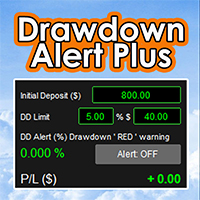
Drawdown Alert Plus: Know Your Drawdown at a Glance Drawdown comes first Live drawdown, always visible. The panel shows your account’s floating loss (profit plus swap, all open orders) as a percentage of your Initial Deposit, updated with every price move. Three-level colour warning. Green when risk is low, orange when you pass your warning level, red when you reach your drawdown limit. You choose the colours and the warning level. Set your limit your way. Type the limit in % or in $, and the o
Panel AccountSum
Sakda Prempreenon
Account Summary Panel: Your Trading Results at a Glance Stop digging through the History tab. This indicator puts your daily, weekly and monthly performance on your chart in one clean dashboard, updated automatically as you trade. Your capital, your rules Set your own Initial Balance, whether that’s your full account or just the amount assigned to this month’s plan. Every percentage is measured against the number you choose. Built-in goal tracking Enter one Weekly Goal % and the panel does th
Drawdown Alert x Plus: Know Your Drawdown at a Glance Drawdown comes first Live drawdown, always visible. The panel shows your account’s floating loss (profit plus swap, all open orders) as a percentage of your Initial Deposit, updated with every price move. Three-level colour warning. Green when risk is low, orange when you pass your warning level, red when you reach your drawdown limit. You choose the colours and the warning level. Set your limit your way. Type the limit in % or in $, and the
Filter:
No reviews
Reply to review