Agent Jin ORB
- Experts
- Version: 3.10
- Activations: 5

Developer: Jin
EA Version: 3.10
Platform: MetaTrader 5
Primary Trading Instrument: NAS100 (Nasdaq-100 Index)
Broker Symbol Example: USTEC
Main Timeframe: M15 (15 Minutes)
Strategy: Session Opening Range Breakout (ORB)
Overview
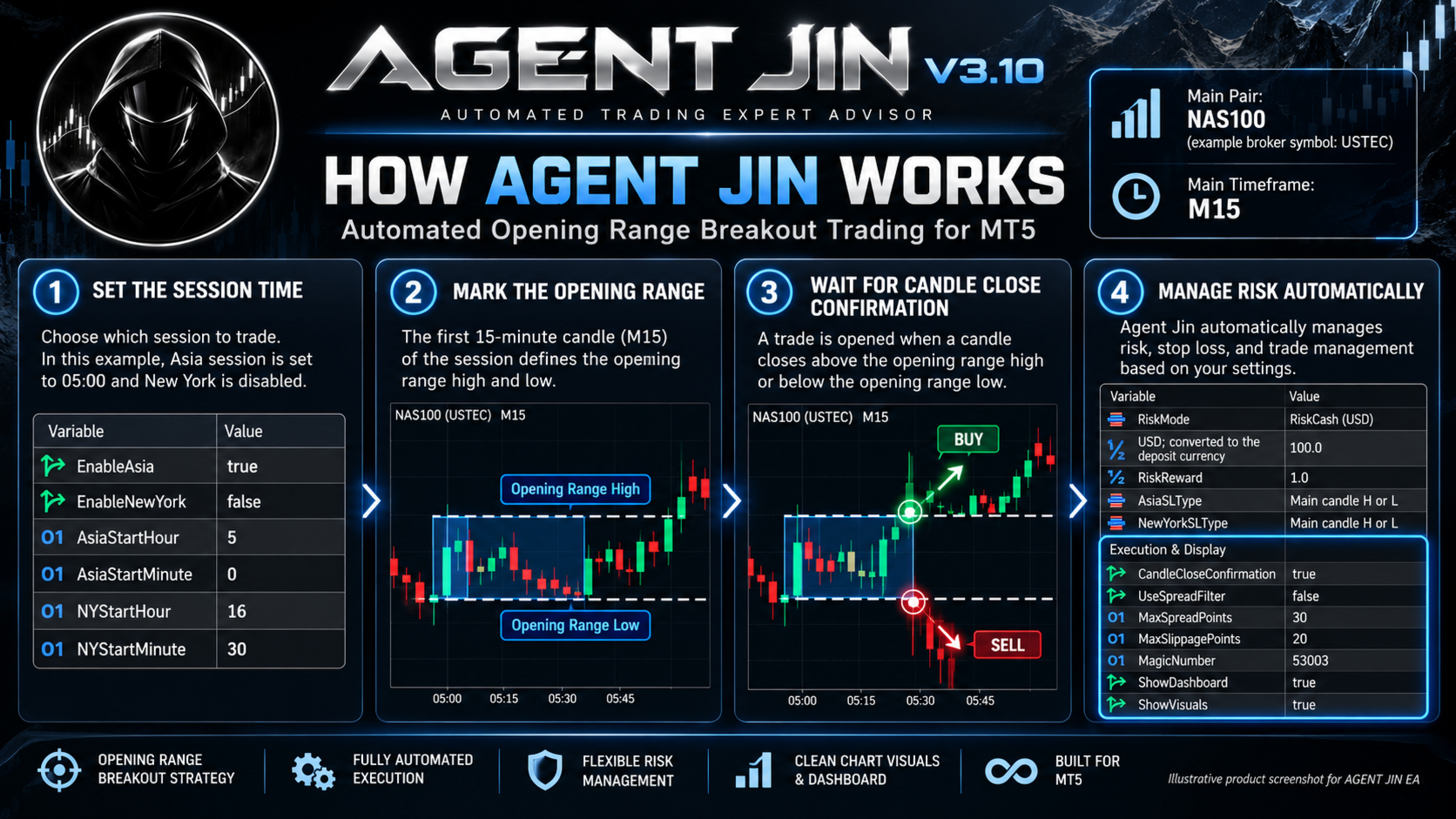
AGENT JIN is an automated MetaTrader 5 Expert Advisor designed to identify and trade session-based breakout opportunities using the Opening Range Breakout (ORB) trading model.
The Expert Advisor focuses primarily on the NAS100 index and uses the 15-minute timeframe to identify opening range levels and confirm breakout opportunities.
The system combines opening range analysis, candle-close confirmation, configurable stop-loss placement, risk-based position sizing, and automatic trade management.
1. How AGENT JIN Works
Step 1 – Session Opening Range
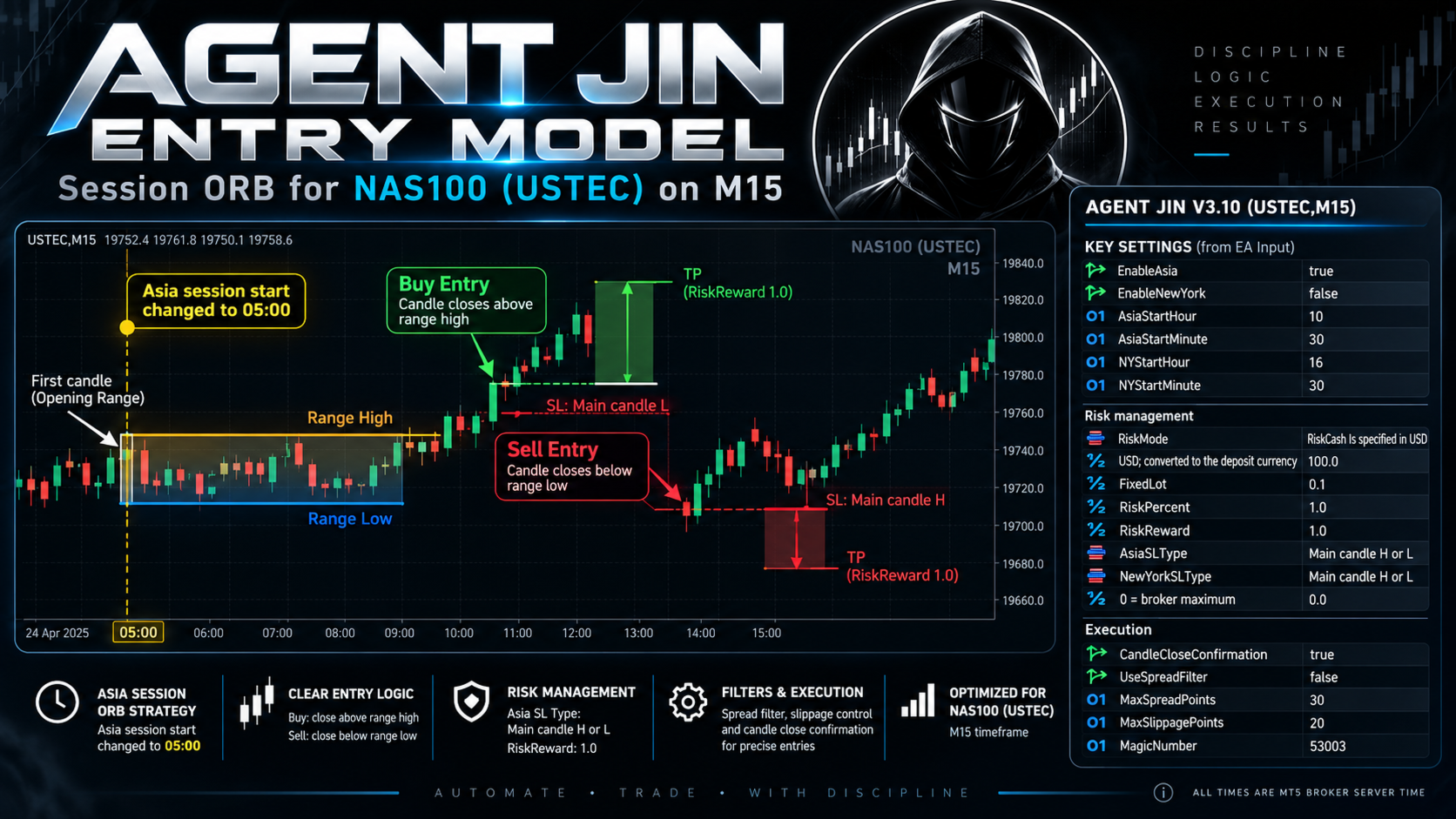
At the configured session opening time, AGENT JIN identifies the main 15-minute candle and its High and Low.
These levels form the reference range for potential breakout entries.
Step 2 – Breakout Confirmation
The EA monitors price movements around the opening range.
-
BUY: A bullish breakout above the main candle High, subject to the configured candle-close confirmation.
-
SELL: A bearish breakout below the main candle Low, subject to the configured candle-close confirmation.
The EA uses its internal entry conditions before executing a trade.
Step 3 – Stop Loss Placement
AGENT JIN supports configurable Stop Loss placement.
In the displayed configuration, both sessions use:
Main Candle High or Low
The relevant main candle boundary is used to determine the protective Stop Loss according to the trade direction.
Step 4 – Take Profit
Take Profit is calculated using the selected Risk-to-Reward ratio.
The current configuration uses:
Risk-to-Reward = 1:1
Example:
-
Risk: $100
-
Target reward: $100 before trading costs
This is a mathematical example, not a guaranteed trading outcome.
2. Main Trading Instrument and Timeframe
Recommended Primary Instrument: NAS100
AGENT JIN is primarily configured for the Nasdaq-100 index.
Depending on the broker, this instrument may appear as:
-
NAS100
-
USTEC
-
US100
-
NAS100.cash
The screenshot example uses the broker symbol USTEC.
Main Timeframe: M15 – 15 Minutes
Attach the Expert Advisor to the intended NAS100 instrument's 15-minute chart.
Other instruments and configurations should be evaluated separately using the MT5 Strategy Tester.
3. Trading Sessions – Indian Standard Time
AGENT JIN provides independent trading-session controls.
Asia Session
-
Intended opening time: 10:30 AM IST
-
EnableAsia: true
-
AsiaStartHour: 05
-
AsiaStartMinute: 00
New York Session
-
EnableNewYork: false
-
NYStartHour: 16
-
NYStartMinute: 30
The New York session is disabled in the provided configuration.
Important Time Zone Information
The Expert Advisor's session inputs are based on MT5 broker server time, not automatically Indian Standard Time.
Indian Standard Time is UTC+05:30.
To start the Asia session at 10:30 AM IST, users must convert this time to their broker's MT5 server time and configure AsiaStartHour and AsiaStartMinute accordingly.
Broker server time zones may differ, and daylight-saving changes can affect the required conversion.
4. Risk Management
AGENT JIN offers multiple position-sizing methods.
Available Risk Modes
-
Fixed cash risk
-
Fixed lot size
-
Percentage-based risk
Current Risk Configuration
| Parameter | Value |
|---|---|
| RiskMode | RiskCash specified in USD |
| RiskCash USD | 100.0 |
| FixedLot | 0.10 |
| RiskPercent | 1.0% |
| RiskReward | 1.0 |
| AsiaSLType | Main candle H or L |
| NewYorkSLType | Main candle H or L |
Cash Risk Example
With RiskMode set to cash risk and RiskCash set to 100 USD, the EA calculates the trade volume using the configured cash-risk amount and Stop Loss distance.
The cash-risk value is converted into the account deposit currency according to the EA's implementation.
FixedLot and RiskPercent are alternative configuration values and are not simultaneously applied when cash-risk mode is selected.
Actual losses may differ from configured risk because of slippage, spreads, commissions, gaps, and execution conditions.
5. Complete EA Input Settings
The following settings reflect the provided Agent Jin V3 3.10 configuration.
Session Settings
| Input | Value |
|---|---|
| EnableAsia | true |
| EnableNewYork | false |
| AsiaStartHour | 5 |
| AsiaStartMinute | 0 |
| NYStartHour | 16 |
| NYStartMinute | 30 |
All session input times use MT5 broker server time.
Risk Management Settings
| Input | Value |
|---|---|
| RiskMode | RiskCash specified in USD |
| RiskCash | 100.0 USD |
| FixedLot | 0.10 |
| RiskPercent | 1.0 |
| RiskReward | 1.0 |
| AsiaSLType | Main candle H or L |
| NewYorkSLType | Main candle H or L |
| Broker maximum field | 0.0 |
The field described as "0 = broker maximum" is set to 0.0 in the provided configuration. Its exact purpose should be checked in the EA's parameter documentation.
Trade Execution Settings
| Input | Value |
|---|---|
| CandleCloseConfirmation | true |
| UseSpreadFilter | false |
| MaxSpreadPoints | 30 |
| MaxSlippagePoints | 20 |
| MagicNumber | 53003 |
CandleCloseConfirmation
When enabled, the EA uses its programmed candle-close confirmation instead of relying solely on intrabar price movement.
UseSpreadFilter
The current configuration has the spread filter disabled.
MaxSpreadPoints becomes relevant when the spread filter is enabled.
MaxSlippagePoints
Configures the trade execution deviation tolerance where supported.
Dashboard and Display Settings
| Input | Value |
|---|---|
| ShowDashboard | true |
| ShowVisuals | true |
These settings enable the EA's chart dashboard and trading visuals.
6. Main Features
-
Automated Opening Range Breakout trading
-
15-minute main trading timeframe
-
NAS100-focused configuration
-
Asian and New York session controls
-
Main candle High and Low detection
-
Candle-close breakout confirmation
-
Configurable Stop Loss selection
-
Adjustable Risk-to-Reward ratio
-
USD cash-risk position sizing
-
Fixed-lot and percentage-risk alternatives
-
Optional spread filtering
-
Configurable execution deviation
-
Magic Number identification
-
On-chart dashboard
-
Trading visuals
7. Installation Guide
-
Open MetaTrader 5.
-
Select the NAS100 instrument offered by your broker, such as USTEC.
-
Open the M15 chart.
-
Attach the AGENT JIN Expert Advisor.
-
Enable Algo Trading.
-
Open the Inputs tab.
-
Configure the session start times according to your MT5 broker server time.
-
Select the preferred RiskMode.
-
Configure RiskReward and Stop Loss settings.
-
Review spread and execution settings.
-
Confirm the dashboard is functioning.
-
Test the strategy on a demo account before live trading.
8. Important Risk Disclosure
Trading NAS100 and other leveraged financial instruments involves significant risk.
The $100 cash-risk configuration is an example setting and is not suitable for every account size.
Risk-based position sizing does not guarantee that actual losses will be limited to the selected cash amount.
Market volatility, slippage, spread widening, price gaps, and execution conditions may result in larger losses.
The EA does not guarantee profitability, a particular win rate, or successful execution of every trading signal.
Users should perform independent testing using the MetaTrader 5 Strategy Tester and a demo account before live trading.
Past performance does not guarantee future results.
9. Product Support
For installation assistance, trading-session configuration, parameter-related questions, and technical support, please use the MQL5 product comments section or the MQL5 messaging system.
AGENT JIN – Automated NAS100 Opening Range Breakout Trading
Developed by Jin