Dashboard Assistant Trader MT5
- Utilities
- Version: 14.0
- Activations: 5

Benefits of using this assistant
1 - Closing all positions upon reaching your desired dollar profit amount.
2 - Set take-profit levels for your positions at your desired price with lightning speed.
3 - Trailing Break-Even
4 - Remove all take-profit levels with a single click.
5 - All stop-loss orders will be removed with a single click.
6 - With a single click, all positions are set to break-even.
7 - Close all positions with a single click.
8 - This assistant takes up very little space on your monitor
9 – Automatic calculation and display of the break-even price on the chart.
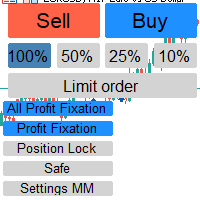
10 – Displaying vital and useful information in the assistant box.
Display account profit in the assistant box
Display total lots of sell positions in the assistant box
Display total lots of buy positions in the assistant box
Further details regarding each item
1 - Closing all positions upon reaching your desired dollar profit amount.
( See more details in the screenshots section. )
When trading amidst rapid price movements in the market, you need an assistant to handle tasks quickly. This assistant performs incredible almost magical feats for you in under a second— tasks that would otherwise consume a great deal of your time and divert your focus from the market. It handles many of your tasks with speed, quality, and high precision.
Tip: This feature is extremely useful for
quick trading amidst market volatility and fast-paced action.
With this assistant, you no longer need to constantly
keep an eye on your account's profit level;
the assistant handles that for you.
2 - Set take-profit levels for your positions at your desired price with lightning speed.
Enter the price value you have selected And check this box
( See more details in the screenshots section. )
Then, the take-profit level for all open positions—as well as any new ones you open—will be
automatically set to your desired priceIt is fast, saves you time, and allows you to focus more on the market.
By enabling this feature, the Take Profit for all open positions—as well as any new positions you open— will automatically be set to your desired price level.
Your assistant handles the placement of Take Profit orders, saving you time and allowing you to focus more on the market ; the assistant performs this task with high speed and precision. the assistant handles that for you.
3 - Trailing Break-Even
Many traders seek a feature that allows all positions to trail simultaneously from the break-even point, rather than trailing each position individually. Essentially, the trailing process would apply to all positions at once.
In short: use a trailing break-even.
( See more details in the screenshots section. )
Enter the number of pips in box by which you want the break-even point for all your positions to be offset from the live price, and at which the trailing mechanism should engage as the price moves.
By enabling this option, all your positions—whether in profit or loss—will begin to trail once the
break-even point is reached.The number of pips you specify determines the distance maintained
from the break-even point.
By enabling this option you will never incur a loss if the price reverses your trades will close in profit
The assistant handles that for you.
For example, suppose you have 10 open buy positions: 7 are in profit and 3 are in loss, and you have a specific break-even point for the aggregate of these trades. Let "X" represent the break-even price for all these trades on the chart. By enabling this option, once the current market price moves 60 pips beyond that point (as described in Step 1), all stop-loss orders are set to "X + 60 pips." As the price rises further, your stop-loss orders will trail the current price, maintaining a 60-pip gap and moving upward accordingly
4 - Remove all take-profit levels with a single click.
( See more details in the screenshots section. )
all take-profit settings will be cleared; the take-profit values for your trades will be edited, and the take-profits will be removed and set to zero.
5 - All stop-loss orders will be removed with a single click.
If you click on this "Remove SL" option, all StopLoss settings will be cleared
( See more details in the screenshots section. )
6 - With a single click, all positions are set to break-even.
If you click the "BEF" (Break-Even) option, all your positions—whether currently in profit or in loss—will be set to break-even.Their stop-loss and take-profit levels will be aligned at the same price point; should the market reach that level, all positions will close simultaneously, allowing you to exit the market with neither a profit nor a loss.
( See more details in the screenshots section. )
7 - Close all positions with a single click.
If you click the "Close All" option all your positions will be closed. All positions are closed rapidly
( See more details in the screenshots section. )
8 - This assistant takes up very little space on your monitor
( See more details in the screenshots section. )
9 – Automatic calculation and display of the break-even price on the chart.
( See more details in the screenshots section. )
When you have this assistant active on the chart and open positions, a white line appears indicating the break-even price for the aggregate of your positions; this line updates with every tick. A single line appears for buy positions and another for sell positions; if you hold both types, two lines will be displayed.
10 – Displaying vital and useful information in the assistant box.
Display account profit in the assistant box
Display total lots of sell positions in the assistant box
Display total lots of buy positions in the assistant box
( See more details in the screenshots section. )
With these features, you no longer need the Toolbox window and have a larger screen area at your disposal.
In closing, I wish you days of profitable trading.
Every successful trader needs a powerful, useful, and intelligent trading assistant.
This is that very assistant. Wishing you success and profitability.