Gold Beast EA
- Experts
-
Deepak
 Welcome to Deepak Fx Trader. I’ve seen countless people step into the trading world with big dreams, only to get lost without a clear path or the right technical guidance. I build advanced Expert Advisors, Indicators, and Trading Utilities to give you that exact direction. True success in trading
 - Version: 1.11
- Activations: 5
GOLD BEAST EA
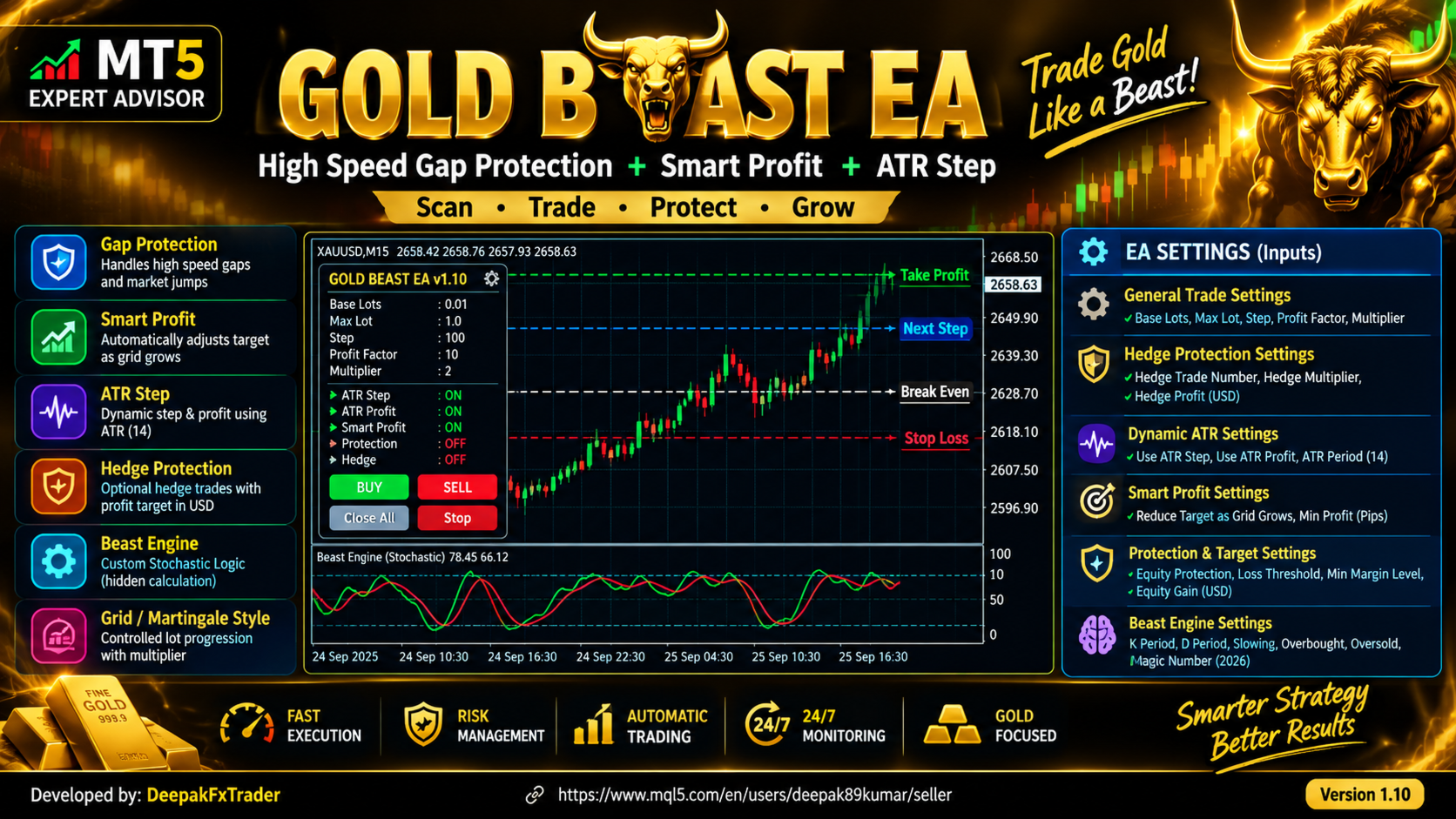
GOLD BEAST EA is an automated trading Expert Advisor designed primarily for Gold and XAUUSD trading. The EA combines a custom Beast Engine entry model with basket-based trade management, dynamic step control, Smart Profit logic, optional hedge protection, and equity-based protection settings.
The system is designed to manage trades as a basket rather than relying only on individual position take-profit levels. This allows the EA to calculate weighted average prices, monitor the overall basket condition, and manage subsequent entries according to the configured parameters.
"Purchase the Gold Beast EA and comment below to receive your set file, plus enjoy free lifetime upgrades!"
MAIN FEATURES
Custom Beast Engine
The EA uses a built-in calculation based on price high, low and close data. The Beast Engine calculates a primary value and a signal value and uses their relationship with the configured upper and lower levels to determine the initial Buy or Sell condition.
No external indicator is required for this entry calculation.
Basket and Weighted Break-Even Management
When multiple positions are active, the EA calculates the weighted average entry price separately for Buy and Sell positions.
The basket information includes:
Buy position count
Sell position count
Total Buy volume
Total Sell volume
Weighted average Buy price
Weighted average Sell price
Total floating basket profit
The calculated basket levels are used by the Smart Profit and exit management logic.
Dynamic Step Management
The EA can operate with a fixed step distance or an ATR-based dynamic step.
When ATR Step is enabled, the current ATR value is used to calculate the live step distance. This allows the spacing between additional positions to adapt to current market volatility.
The ATR period is configurable by the user.
Smart Profit Management
Smart Profit can automatically reduce the target distance as the number of positions in the basket increases.
The target is calculated from the current base target and is subject to a user-defined minimum target.
This feature is intended to provide a basket-based exit mechanism when multiple positions are active.
Position Scaling
The EA includes configurable position scaling through the lot multiplier.
When price moves against an active Buy or Sell basket and the next configured step is reached, the EA can add another position using the configured multiplier.
The initial lot size and multiplier are user configurable.
Because position scaling can increase exposure as additional trades are opened, users should select the lot size, multiplier and step settings according to their own risk tolerance and account conditions.
Optional Hedge Protection
GOLD BEAST EA includes an optional hedge mechanism.
The user can specify the position count at which a hedge may be opened. The hedge volume is calculated from the existing basket volume using the configured hedge multiplier.
When both Buy and Sell positions are active, the EA monitors the combined basket condition. The hedge basket can be closed when the configured hedge profit condition is reached or when the defined pullback condition is detected.
The hedge feature can be disabled by setting the corresponding hedge parameter to zero.
Equity Gain Target
The EA includes an optional equity gain target.
When enabled, the EA monitors the floating basket result and can close the positions managed by the EA after the configured target is reached.
The feature is disabled when the equity gain value is set to zero.
Loss Protection
An optional loss protection mechanism is available.
When enabled, the EA monitors the account floating profit and can close the positions managed by the EA when the configured loss threshold is reached.
This function is disabled by default and can be enabled through the input settings.
Chart Information Panel
The EA displays important trading information directly on the MetaTrader 5 chart, including:
Current step size
Current base target
Buy position count
Sell position count
Distance from the latest Buy or Sell position
Current basket target information
Hedge status
Equity target status
Floating basket information
The EA also displays calculated Buy and Sell management levels on the chart to help the user understand the current basket state.
CONFIGURATION
General Trade Settings
Lots
Base Step / Multiplier
Initial Base Target
Position Multiplier
Hedge Protection Settings
Hedge Trade Number
Hedge Lot Multiplier
Hedge Basket Profit Target
Dynamic ATR Settings
Use Dynamic ATR Step
Use Dynamic ATR Profit Target
ATR Period
Smart Profit Settings
Enable Smart Profit
Minimum Profit Target
Protection and Target Settings
Enable Equity Protection
Maximum Loss Threshold
Equity Gain Target
Beast Engine Settings
Beast Primary Period
Beast Secondary Period
Beast Slowing
Beast Upper Level
Beast Lower Level
Magic Number
TRADING LOGIC
When there are no active positions managed by the EA, the Beast Engine evaluates the current market data and can generate an initial Buy or Sell entry according to its configured conditions.
When a position or basket is already active, the EA switches to basket management mode. It monitors the latest position price, calculated step level, basket count, weighted average price and floating basket result.
If the configured step level is reached, the EA can add another position using the configured lot multiplier.
If hedge protection is enabled and its configured condition is reached, the EA can open an opposite-direction hedge position.
When the basket reaches its applicable exit condition, the EA closes the positions managed by its Magic Number on the current symbol.
IMPORTANT RISK INFORMATION
GOLD BEAST EA uses position scaling and can optionally use hedge-based basket management. These methods can increase trading exposure when additional positions are opened.
The EA does not guarantee profits and should not be considered a guaranteed-income system.
Trading results can vary depending on broker conditions, spread, execution speed, slippage, symbol specifications, leverage, account balance, market volatility and the selected input parameters.
The default settings are provided as starting parameters and should be tested and adjusted by the user.
Before using the EA on a live account, users should evaluate it in the MetaTrader 5 Strategy Tester and on a suitable demo account under conditions similar to their intended trading environment.
The EA is designed for automated trade management, but no automated trading system can eliminate market risk.
SUPPORTED ENVIRONMENT
Platform: MetaTrader 5
Product Type: Expert Advisor
Primary Market: Gold / XAUUSD
Trading Mode: Automated
Symbol: Attach the EA to the desired trading symbol
Magic Number: User configurable
FINAL NOTE
GOLD BEAST EA provides a configurable basket-management framework combining the Beast Engine entry calculation, position scaling, Smart Profit, optional ATR adaptation, hedge protection and equity-based protection.
Users should understand the available parameters and associated trading risks before enabling automated trading on a live account.
(You can view my seller profile on MQL5 for more trading tools and utilities).