Pivot Stop Gold
- Experts
- Version: 1.11
- Activations: 20

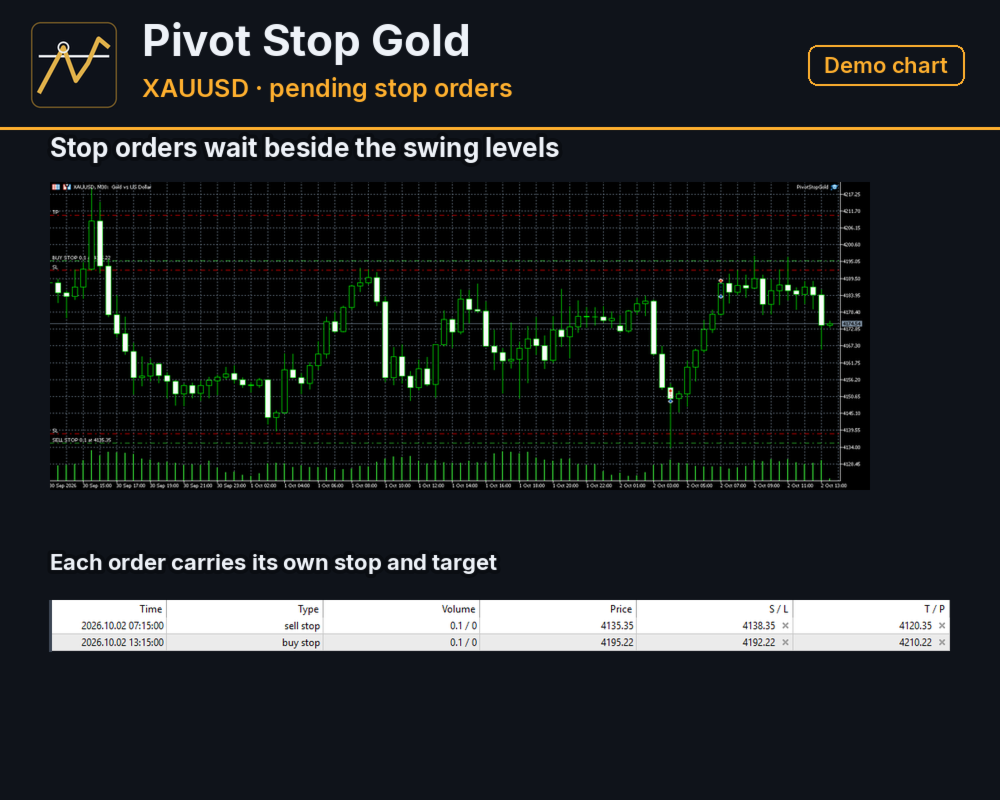
Pivot Stop Gold is built around one situation on gold: price turns at a swing and then moves through it. The EA does not chase the move. A pending stop order is already waiting near the swing, with its stop and target attached, before price gets there. Positions are short: in the report below the average one lasted five minutes.
The Pivot Level
On every new bar of its working timeframe the EA builds a ZigZag from the last 300 bars and takes the two latest pivots, never counting the bar that is still forming. If the older of the two is a high, a Buy Stop is placed just below it. If the older one is a low, a Sell Stop is placed just above it. The distance is a fixed offset that belongs to the profile. No order is placed once price is within 0.10 of the level or already beyond it, and the EA keeps at most one order or position per side. A pending order lives for a set number of hours, and the EA removes it by itself at the first tick after that time.
Seven Profiles
A profile fixes the working timeframe, the ZigZag depth, the entry offset, the stop, the target and the trailing. Distances are in USD per ounce of gold, that is 100 points of a two-digit quote per dollar. Scalp is the default.
- Calm: M30 bars, depth 18, entry 1.85 in front of the pivot, stop 4.25, target 17.50, trailing from 5.30 at a distance of 1.50, order lifetime 8 hours.
- Rapid: M15 bars, depth 20, entry 1.75, stop 3.00, target 15.00, trailing from 1.30 at 0.50, 8 hours.
- Scalp: M15 bars, depth 18, entry 1.60, stop 3.00, target 15.00, trailing from 1.40 at 0.50, 12 hours.
- Swing: M15 bars, depth 12, entry 0.50 beyond the pivot, stop 25.00, target 45.00, trailing from 15.00 at 5.00, no lifetime limit.
- Guarded: M15 bars, depth 18, entry 1.50, stop 3.50 and target 25.00 (doubled during the first two minutes), trailing from 1.65 at 0.40, 12 hours.
- Balanced: M30 bars, depth 18, entry 1.75, stop 3.25, target 22.50, trailing from 5.75 at 1.65, 12 hours.
- Custom: every distance is an input.
Managing A Position
Stop and target are attached to the pending order, so the broker holds both before the fill. Once the price has moved the trailing start distance from the entry in the direction of the position, the stop follows the price tick by tick at the trailing distance and never moves back. An optional rule, off by default, moves the stop to the entry plus a small lock after the price has moved 0.80 in the direction of the position in Calm, Rapid, Scalp and Custom. Nothing is added to a losing position and nothing is doubled. Optional extras, all off by default: a random shift of the entry price, a wide placeholder stop with the real stop set after the fill, and a stop measured from the fill price instead of the order price.
Daily Break And Friday Cut-Off
On the broker's server clock the EA places no orders from 21:15 to 01:15, removes its pending orders and closes its positions at 21:15. On Friday the same happens from 15:25, or five minutes before the end of the Friday trading session if that session ends earlier. Both windows are inputs and can be switched off. A close or a stop change that the broker would refuse, because the stop or target is inside the broker's freeze zone or the trading session is closed, is held back and sent again on the next tick that allows it.
Lot Size And Risk Controls
- Three ways to size the lot: by default 1% of equity risked to the stop, a fixed lot, or 0.01 lot for every 100 of balance.
- The order is skipped if free margin would not cover it.
- Optional and off by default: a cap on the spread, a stop once the day's result reaches a set level, a stop after a daily loss, and a stop after a drawdown of equity within the day.
- On by default, on a live account only: a pause of new orders around scheduled US news releases, and during a speech of the Fed Chair. The tester has no calendar, so the report below does not include this pause.
- Magic number and order comment are inputs, so the EA can sit beside other robots on the same account.
Strategy Tester Figures
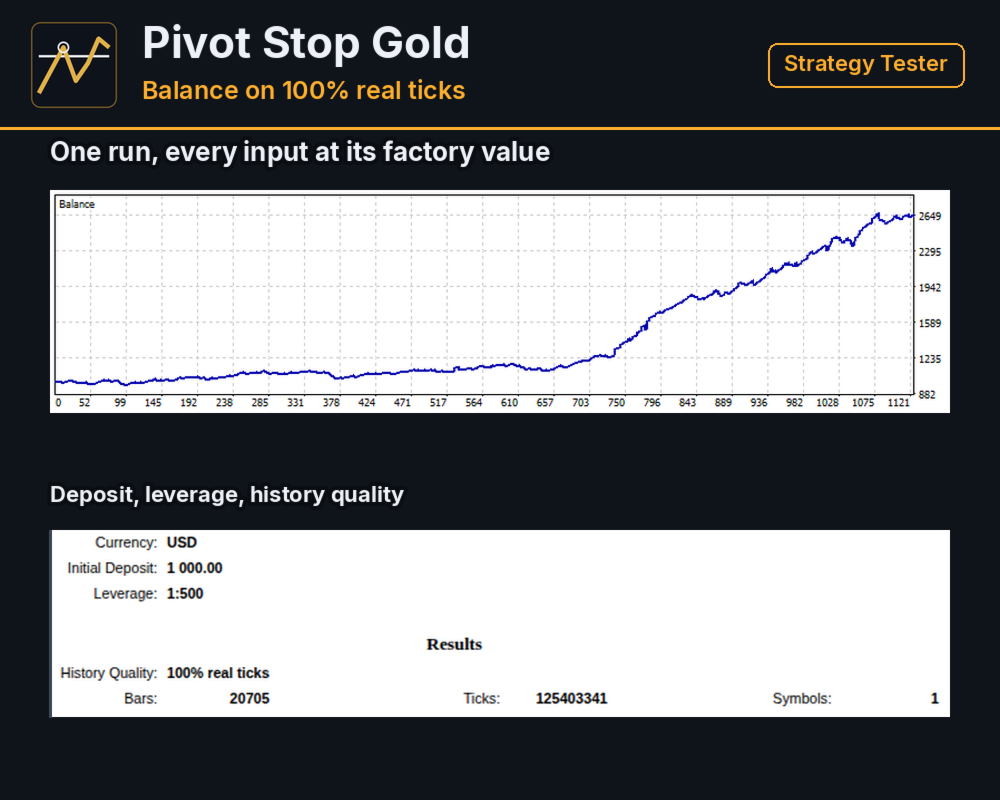
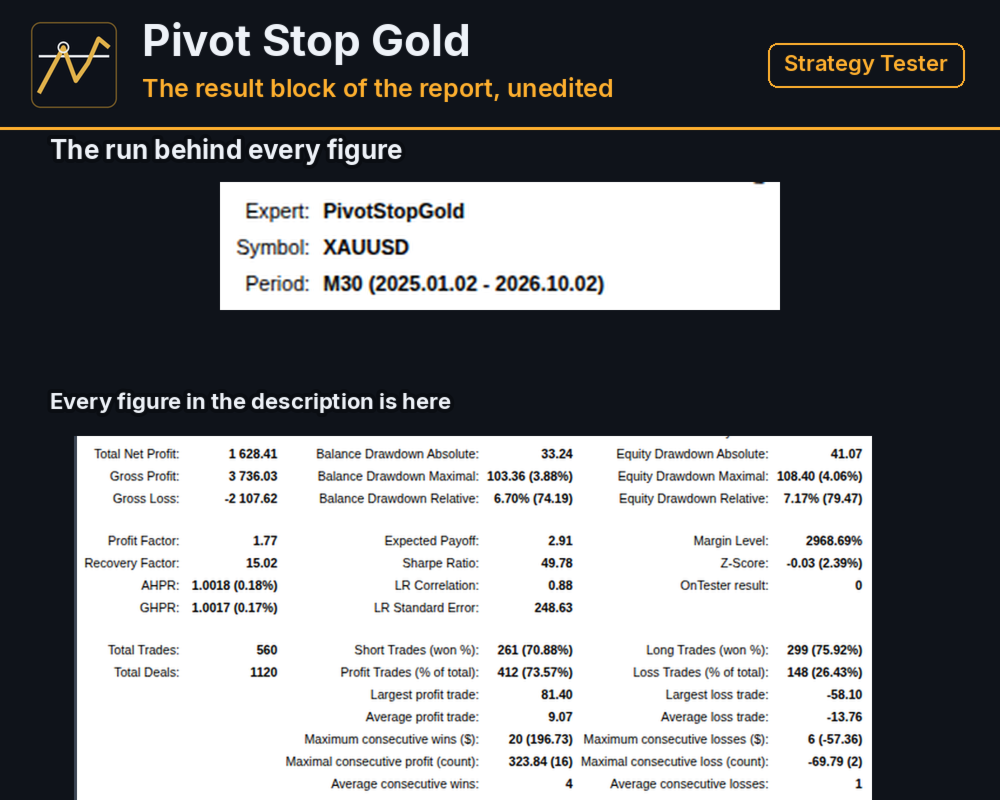
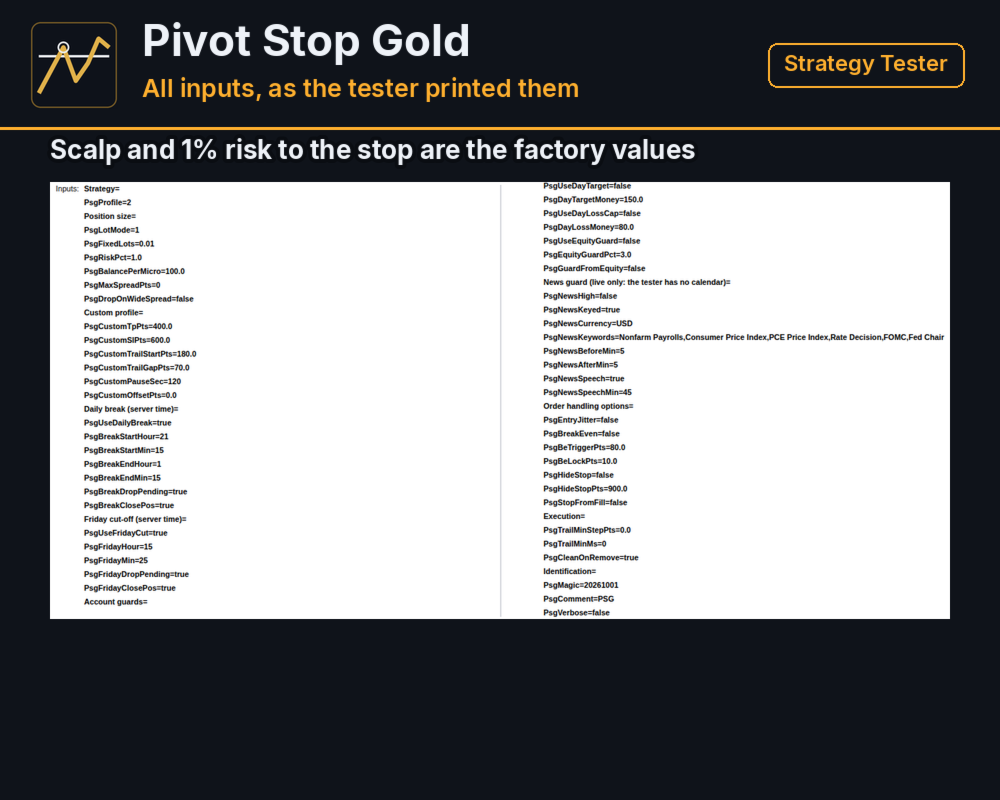
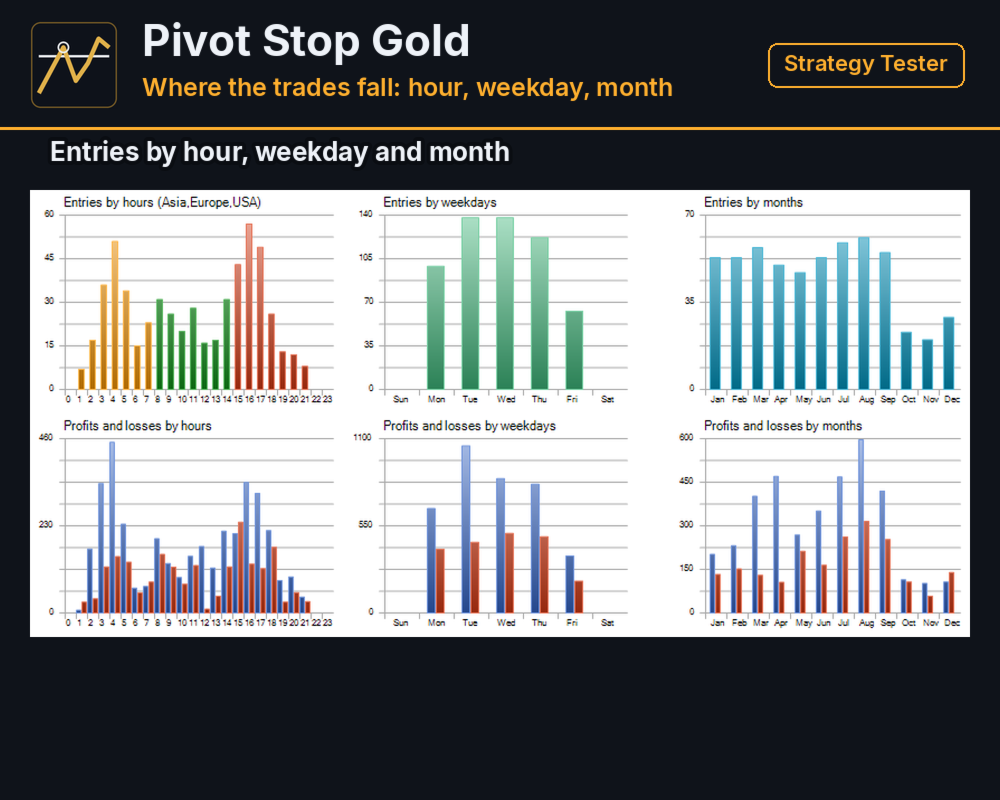
Strategy Tester, XAUUSD, 100% real ticks, the period 2025.01.02 - 2026.10.02 (the earliest date with real ticks at the broker used for the test), starting deposit 1000, leverage 1:500, every input at the value it ships with:
- net result 1628.41
- gross positive divided by gross negative: 1.77
- 560 trades, 73.57% of them positive
- average positive trade 9.07, average negative trade -13.76, largest negative trade -58.10
- longest run of negative trades in a row: 6
- largest balance drawdown measured in percent: 6.70% (74.19 in USD)
- largest balance drawdown measured in USD: 103.36 (3.88%)
- largest equity drawdown measured in percent: 7.17% (79.47 in USD)
- largest equity drawdown measured in USD: 108.40 (4.06%)
The result includes the commission of the broker used for the test, taken from its specification of today for the whole period; another broker charges differently and gets a different result.
What The Figures Do Not Show
The Scalp profile was picked after comparing three profiles on March to September 2026, a stretch inside this period, so the period is not an independent test of the settings. The result is uneven: 2025 added 12.97% to the balance, 2026 up to 2 October added 132.66%, and March, April and July 2026 together gave about half of the whole result. On its own, the 2025 result cannot be told apart from zero.
There is no live track record: every figure above comes from the Strategy Tester.
The tester has no delay. A stop order fills at its price, or at the first tick after a gap when price jumps over it. A real account adds a delay and slippage to that. The average trade in this report was worth about 0.59 per 0.01 lot, so a delay or slippage of that size takes away the whole result. How large the delay is for this EA on a live account has not been measured yet. The only comparison of live execution with the tester that exists for this way of trading was made on another account and broker, and its gap per trade was larger than this average.
The risk of 1% is measured to the stop. When price jumps over a stop the loss is larger than that: in this report the worst trade lost 2.79% of the balance.
What It Needs
XAUUSD on a hedging account; the distances above are written for gold. With the default risk of 1% the smallest lot of 0.01 needs an equity of about 300 USD: below that the EA places no orders. Run it on a server close to the broker's and prefer a broker with a low gold spread. Check the broker's server time against the break and Friday settings. The EA works on any chart timeframe, because it builds its own bars from the profile.
Settings
The inputs are grouped as Strategy (profile), Position size, Custom profile, Daily break, Friday cut-off, Account guards, News guard, Order handling options, Execution and Identification.
Questions
Send a private message on mql5.com if the EA behaves differently from this description, with your broker, the server time shown in the terminal and the settings you use.