GhBreak
- Experts
- Version: 1.31
- Activations: 20

GhBreak is built on one idea about gold: a break of a swing high or low that has held since it formed can run far enough to pay for the breaks that fail. The EA does not chase the break. A pending stop order is already waiting at the level, with its stop and target attached, before price gets there. Positions are held briefly: in the report below the average one lasted 22 minutes.
The Swing Level
Each set of rules builds its own bars - H2, H4 or D1 - from hourly data and looks for the latest swing: a high that stands above a set number of bars on its left, is confirmed by a set number of bars on its right, and has not been broken by any bar since. The nearest such high above the price becomes the buy level, and the nearest such low below the price becomes the sell level. When a new swing forms or the old one is broken, the pending order is moved to the new level instead of waiting for an expiry date.
The order sits a little in front of the level, so it fills as price arrives rather than after price has gone through.
Four Rule Sets
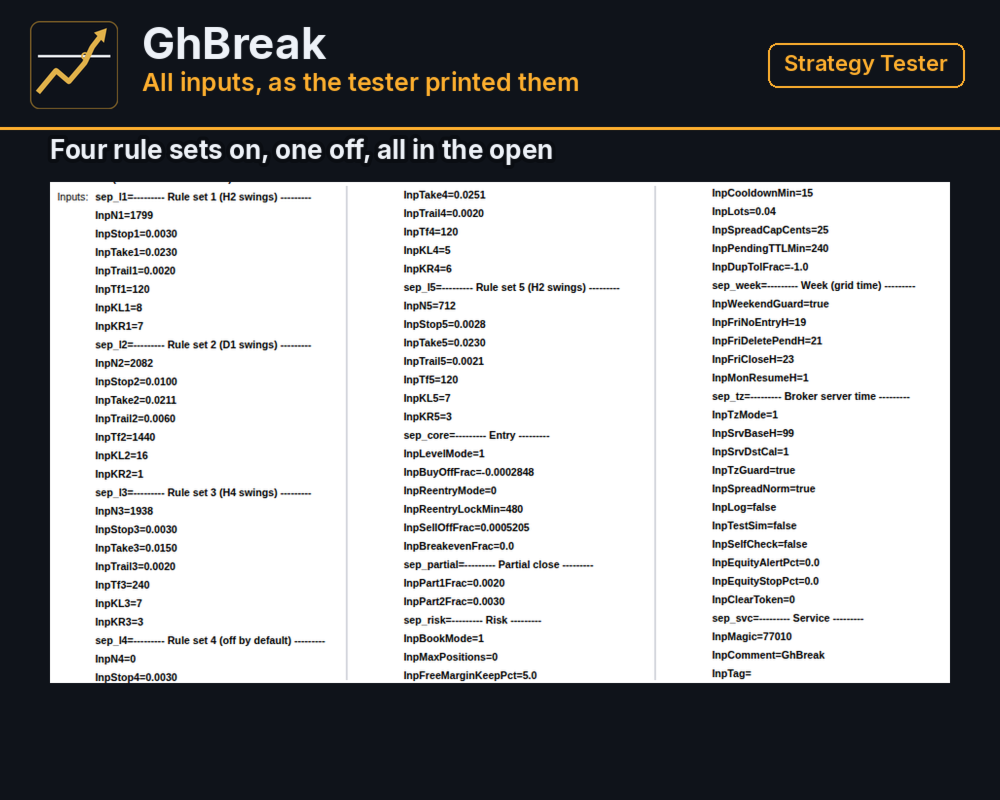
Four sets are on by default: two read swings on H2 bars with different confirmation, one on H4 and one on D1. A fifth set is available and switched off. Each set keeps at most one pending order per side and does not place a new one on a side while its own position there is open. Each set carries its own magic number, so positions of different sets never mix.
Stops and targets are fractions of the entry price: the stop is 0.28% to 1.00% and the target 1.50% to 2.30%, depending on the set. Because they scale with the price, the same settings keep the same proportions whatever gold is trading at.
Managing A Position
The stop and the target reach the broker together with the order. After the fill:
- half of the lot is closed after a move of 0.20% of the entry price, and a quarter more after 0.30%;
- the stop follows the price at a fixed distance, 0.20% to 0.60% of the entry price depending on the set, once that is tighter than the original stop;
- a set that has just left a trade waits 15 minutes before it places a new order.
A losing position is closed by its stop. Nothing is added to it and nothing is doubled.
One Clock For Every Broker
The H2, H4 and D1 bars and the week rules are built on one clock whatever the broker's server time: New York time plus seven hours, that is UTC+2 in winter and UTC+3 during US summer time. On Friday the EA places no new orders from 19:00, deletes its pending orders from 21:00 and closes its positions from 23:00 on that clock, and it resumes on Monday from 01:00.
On a live account the EA reads the broker's time zone from the terminal clock and checks it every minute. If the time zone stops matching the settings, the EA deletes its pending orders and places no new ones until the setting is corrected. The Strategy Tester has no live clock, so there the time zone is taken as UTC+2 in winter with US summer time. If the history of your broker uses another zone, set InpSrvBaseH and InpSrvDstCal before a backtest.
Risk Controls
- A fixed lot per order, 0.04 by default. The report below used 0.04 on a 2000 USD deposit.
- A new order is placed only if free margin would stay above 5% of equity with all pending orders filled.
- A spread cap for new orders, 25 cents on gold.
- An optional alert and an optional emergency stop by equity drawdown from its peak, both off by default.
- Before each request the EA checks the trade session, the freeze and stop levels and the account limits, and does not send a request the broker would reject.
Strategy Tester Figures
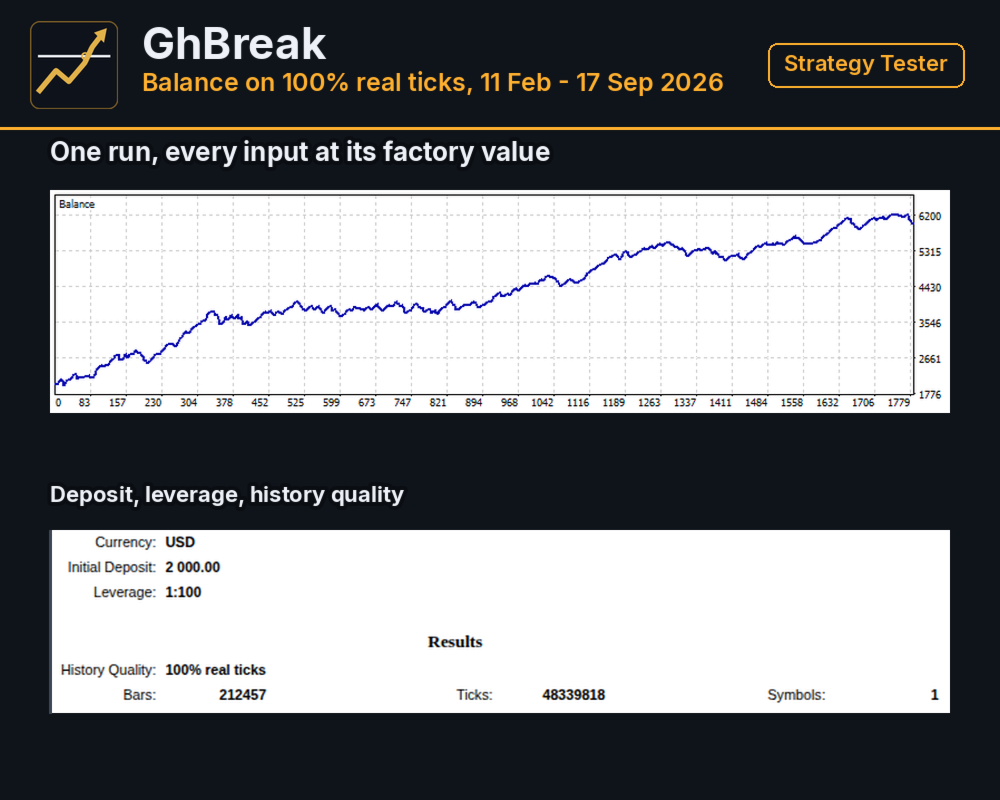
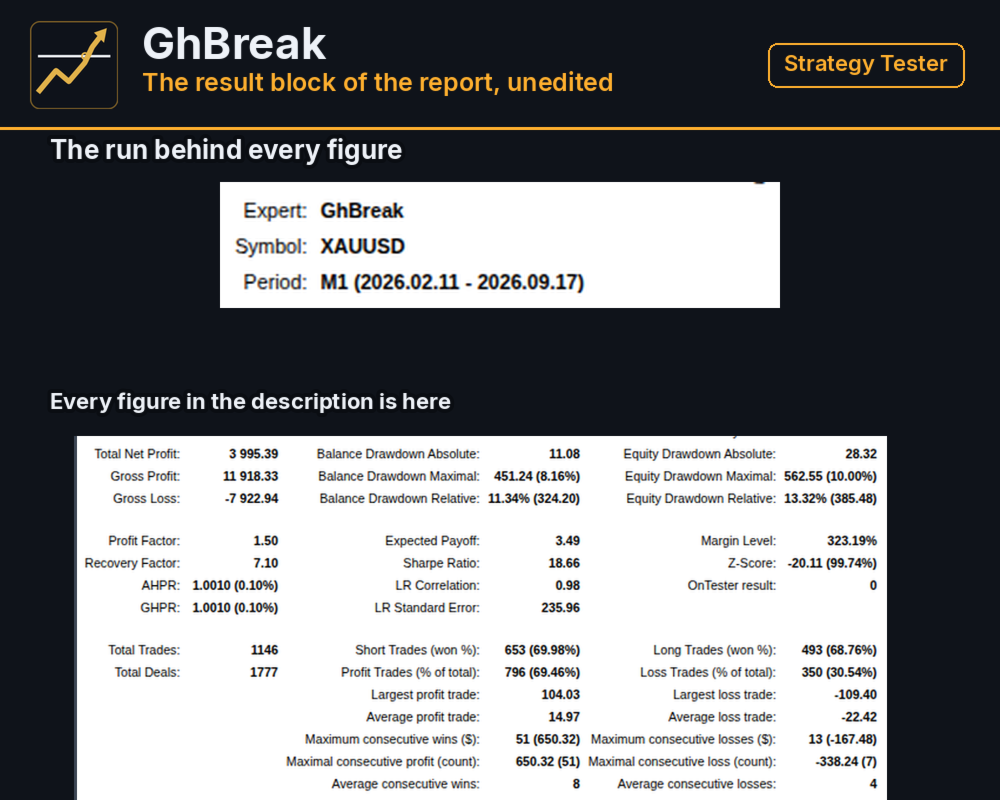
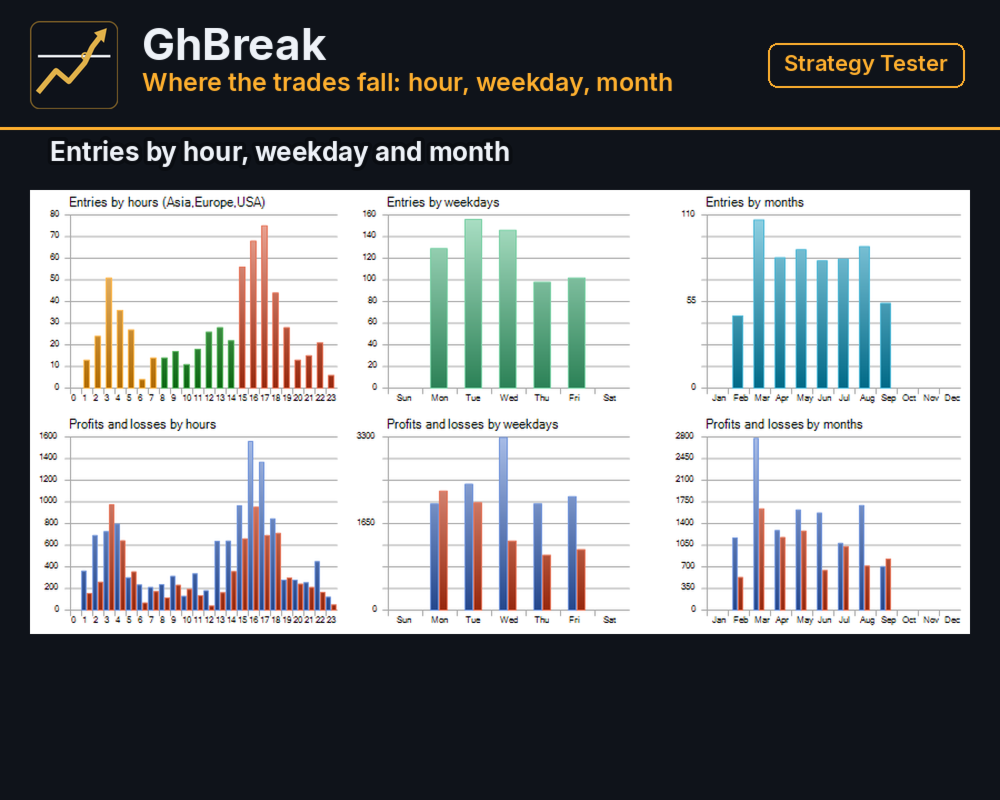
Strategy Tester, XAUUSD, 100% real ticks, the period 2026.02.11 - 2026.09.17, starting deposit 2000, leverage 1:100, every input at the value it ships with:
- net result 3995.39
- gross positive divided by gross negative: 1.50
- 631 positions opened; the tester counts 1146 closing trades, because each partial close is a trade of its own, and 69.46% of those closing trades were positive
- 322 positions, about one in two, were closed by their stop before the first partial close
- average positive closing trade 14.97, average negative closing trade -22.42, largest negative trade -109.40
- largest balance drawdown in percent 11.34%, largest equity drawdown in percent 13.32%
- deepest fall in USD: 451.24 on the balance, 8.16% of the balance at that moment, and 562.55 on equity
What The Figures Do Not Show
The result rests on the partial closes at 0.20% and 0.30%, which pay for the positions that stop out. The trailing distance of one rule set was read off this same period before the run, so the period is not an independent test of the settings.
Run on its own from 2000 USD, the stretch from 15 June to 17 September 2026 reached an equity drawdown of 19.25%. Four more real-tick windows from January 2025 to February 2026, each run separately from the same deposit, all ended above the starting balance, with equity drawdowns of up to 16.81%.
The tester fills a stop order at the order price. On a real account a breakout often fills with slippage, which lowers the result, and a different broker, spread or lot will give different figures as well.
Demo Forward Run
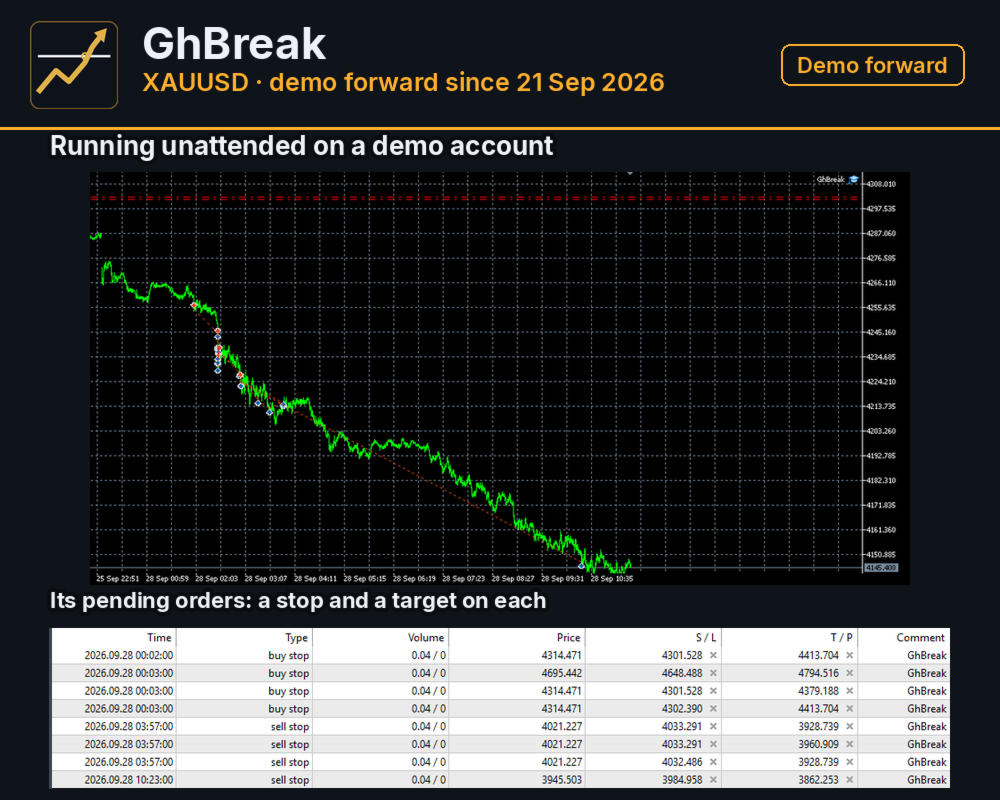
The same trading rules have been running unattended on a demo account of another broker since 21 September 2026, see the first screenshot. The run is young and is there to check whether the entries carry over to a different broker's server clock. It is not a measure of results.
What It Needs
XAUUSD on a hedging account. The chart timeframe does not matter, the sets build their own bars. On a live account the EA refuses any symbol other than gold, and a lot below the symbol minimum. A tight spread on gold matters here, because the smallest stop is 0.28% of the price. If your broker has no summer time or follows the European calendar, set InpSrvDstCal to 0 or 2; otherwise the EA pauses new orders in the weeks when the clocks change.
Settings
Each rule set has a switch, a stop, a target, a trailing distance, a bar size and the swing confirmation. The general groups hold the entry offsets, the partial close steps, the lot, the margin reserve, the spread cap, the week hours and the server time zone.
Questions
If something does not work as described, send a private message on mql5.com. Please include your broker, the server time shown in the terminal and the set file you use.