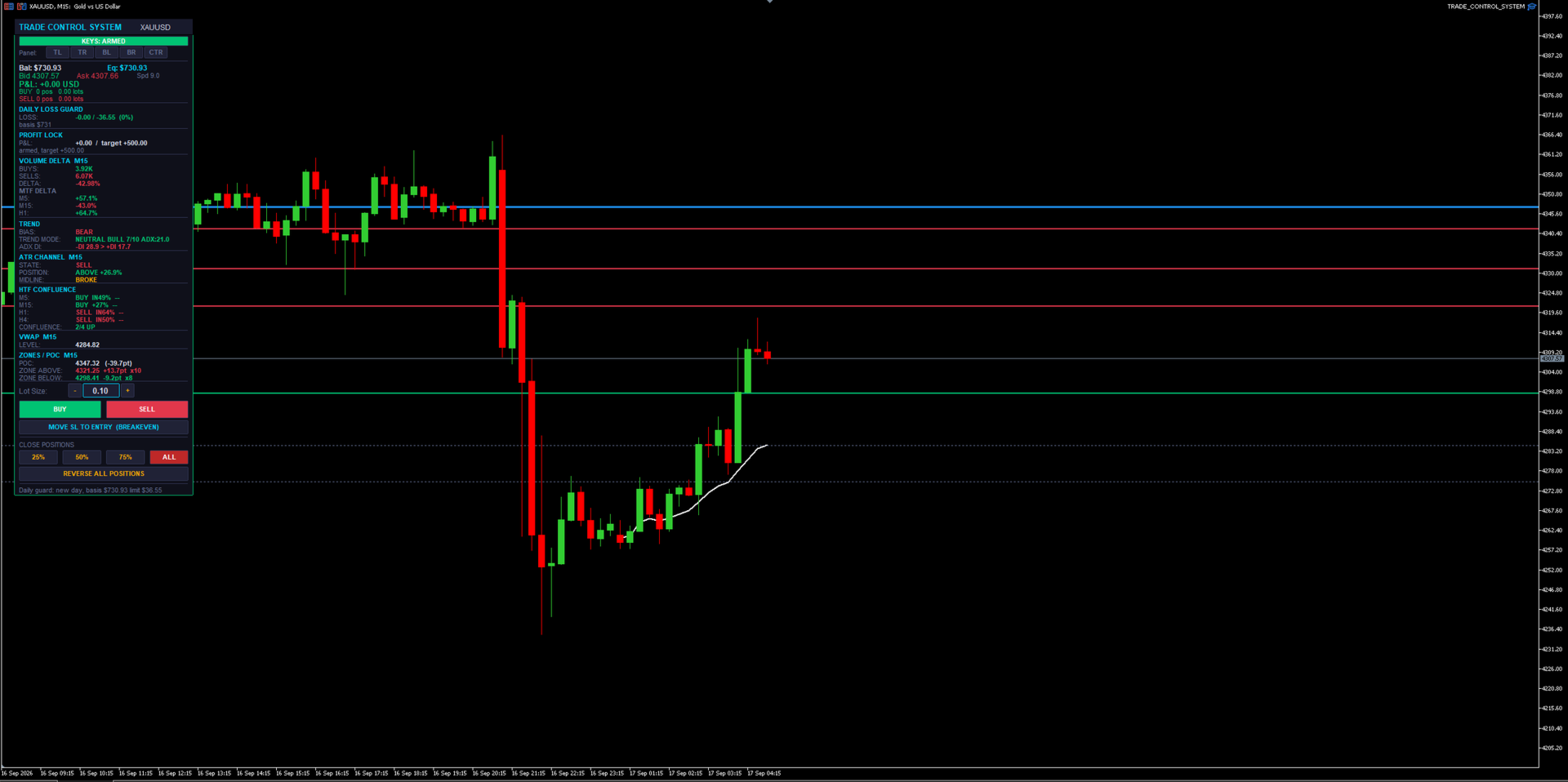
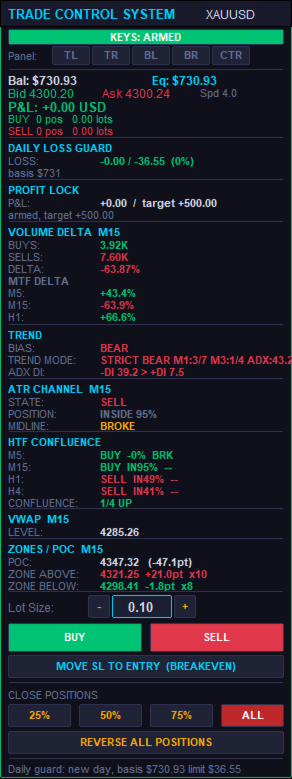
Trade Control System
- Utilities
- Version: 1.20
- Activations: 5

Trade Control System — Complete Feature List
A manual trade-management panel and market-context dashboard for MT5. It never opens a trade by itself — every entry is a human click or keypress. Everything below either helps you execute faster, protects what you already have open, or shows you market context without ever pulling the trigger for you.
1. The Panel Itself
- BUY / SELL buttons — one-click market entry in either direction at the current lot size.
- Lot Size box — type a lot size directly, or use the + / − steppers next to it; steps in 0.01 lot increments and clamps automatically to the symbol's min/max/step rules.
- CLOSE 25% / 50% / 75% / ALL — partial or full close of every open position on the symbol with one click each.
- REVERSE ALL POSITIONS — closes everything currently open and immediately opens the opposite direction at the same total volume. One click to flip your whole position.
- MOVE SL TO ENTRY (BREAKEVEN) — manually forces every open position's stop loss to its own entry price in one click, skipping any that are already there.
- Draggable + snap-to-corner — drag the panel by its header anywhere on the chart, or snap it instantly to Top-Left, Top-Right, Bottom-Left, Bottom-Right, or Center with one button each.
- Self-healing z-order — the panel detects if something else got drawn on top of it and automatically redraws itself back in front, without wiping out its own state (typed lot size, etc.) or your other chart objects.
- Compact mode — a tighter layout option that shows the same information in less vertical space when you want more chart visible.
2. Position Management (works on any open position, not just ones it opened)
- Manage-all-magic toggle — choose whether the panel manages every position on the symbol (including ones opened manually from your phone, or by another EA) or only trades it opened itself.
- Dollar-based Breakeven — once a position's floating profit hits a $ trigger you set, its stop moves to lock in a specified $ amount of profit.
- Breakeven Trailing Ladder — beyond the initial breakeven trigger, the locked-in profit keeps stepping up automatically every additional $X of profit gained, so it keeps ratcheting in your favor as a trade runs.
- Half-Close — automatically books 50% of a position's size once it reaches a $ profit target you set. Fires once per position.
- Basket Stop / Target — closes every position on the symbol together the instant the combined floating profit or loss across all of them crosses a $ threshold, regardless of how any individual trade is doing.
- Combined Stop (shared virtual line) — draws one draggable stop-loss line per direction (one for all buys, one for all sells) directly on the chart. When price touches it, every position on that side closes together as a group. An optional wide "backstop" stop-loss stays quietly attached in the background in case the terminal ever goes offline.
- Auto SL/TP on entry (ATR-based) — every trade opened from the panel automatically gets a stop loss and take profit sized as a multiple of current ATR, no manual calculation needed.
- DCA Inherit SL/TP — when you scale into an existing position at a better price, the add can inherit the original trade's shared stop/target instead of getting a separate one, so a stack of adds still shares one risk line.
- Auto-Protect — continuously watches for any new position that has no stop or target attached (e.g. one you opened manually from a phone app) and automatically attaches protection to it within moments.
- Same-direction scale-in guard — blocks adding to a position in the same direction unless the new entry is actually at a better price than your first entry in that direction. Stops "revenge" averaging into a loser.
- Max positions per direction — a hard cap on how many same-direction positions can be open at once on the symbol. Opposite-direction trades still net/cancel normally.
- Per-position trade timers — an optional on-panel countdown showing how long each open position has been running.
3. Capital-Protection Systems (prop-firm oriented)
- Daily Loss Kill-Switch — tracks your account's loss for the day against a basis balance (either a rolling day-start balance or a fixed static balance), in $ or %. Once the limit is hit, it automatically flattens every open position on every symbol and blocks new entries until the next trading day resets. State is saved so a VPS reboot or terminal restart mid-day can't accidentally clear a triggered stop.
- Daily Profit Lock — once floating profit for the day reaches a target you set, that level locks in as a floor (it doesn't trail higher). If profit dips back below the locked floor, everything is flattened and new entries are blocked for the rest of the day. Shares the same basis/reset logic as the loss guard.
- Push/sound/popup warning at a configurable percentage of the daily loss limit, before it's actually hit.
- Stale-quote protection — cross-checks the terminal's live bid/ask against the actual last bar close. If they disagree by more than a threshold (a real failure mode seen on live feeds), the quote is treated as stale and new entries are refused rather than risking a trade that can't be properly protected.
- Real broker minimum-stop-distance handling — works out the actual minimum stop distance a broker will accept (often wider than what the terminal reports), automatically widens and retries a rejected stop several times, and only falls back to a bare, protect-after-the-fact entry as an absolute last resort.
- Spread Guard — warns (without blocking) when the spread is unusually wide at the moment you're about to enter.
4. Chart Dashboard — Market Context (read-only, informs your decision, never acts on it)
- Volume Delta — a VIDYA+ATR-band-based buy/sell volume delta reading on the chart's own timeframe, plus up to 5 additional timeframes shown side-by-side.
- ATR Channel — shows trend STATE (bull/bear flip-latch), POSITION (how far price sits inside, above, or below the channel), and MIDLINE behavior (holding as support/resistance in-trend, or broken against it).
- HTF Confluence — up to 4 higher timeframes at once, each showing its own ATR Channel state plus ADX DI direction, with a running tally of how many agree.
- Trend Mode — a strict, ADX-gated M1/M3 supermajority trend read for high-confidence signals, automatically falling back to a looser M5 chop/trend/neutral classification when the strict gate isn't active.
- Session VWAP — a live, properly sloped volume-weighted average price line for the session, built bar-by-bar from real volume — not a flat, evolving straight line.
- Liquidity Zones — genuine swing-pivot clustering (not order-flow) that finds and draws support/resistance zones, tracks how many times each has been touched, and visually dims a zone once price has swept through it.
- Volume POC — builds an actual price/volume histogram from bar data and marks the highest-volume price level (Point of Control).
- Higher-Timeframe Direction Bias — a sticky EMA-gap bias reading on a timeframe you choose, which only flips once the gap clears an ATR-scaled threshold, cutting down on noisy back-and-forth flips.
- ADX DI readout — a simple, always-visible +DI vs. −DI comparison for raw directional strength at a glance.
5. Hotkeys / Macro Pad
- Fully remappable keys (chart must have focus) for BUY, SELL, CLOSE ALL, BREAKEVEN, CLOSE 75%, and CLOSE 50% — built for a stream-deck or macro-pad setup, not just a keyboard.
- ARM / SAFE toggle — buy and sell hotkeys are gated behind an explicit "armed" state, so a stray keypress can never fire a live trade by accident. Close and breakeven hotkeys always work regardless of arm state, since those only ever reduce risk.
- Persisted arm state — survives VPS reboots, terminal auto-updates, and disconnects, so you're never caught out by hotkeys silently resetting (or staying live) without your knowledge.
- Key-debug mode — prints raw key codes to the log, making it painless to remap to an unusual keyboard or a dedicated macro pad.
6. Alerts
- Bias-flip and ATR Channel state-change alerts — sound, popup, and/or push notification to your phone, with an optional minimum-seconds throttle so you're not spammed.
7. Engineering / Reliability (why it holds up on a live, unattended VPS)
- Every stop and target is anchored to the position's real entry price or the actual server fill price — never to a live quote that might be stale or have already moved.
- Rejected stops are automatically widened and retried before ever falling back to a temporarily-unprotected entry.
- Stops are reconciled against the true executed fill price after every entry, correcting them if they were computed off a bad quote in the first place.
- Chart objects (VWAP segments, zone lines) are lifecycle-managed with hard caps, so the chart never accumulates thousands of leftover drawings and starts lagging over a long session.
- Daily guard basis, profit-lock status, and hotkey arm state all persist through EA restarts, terminal auto-updates, and VPS reboots — so a disconnect never silently loses track of where you are in the trading day.
- A configurable refresh throttle keeps the panel from causing chart lag on fast-ticking symbols.
Bottom line: you make every trading decision — this handles the execution speed, the risk management, and the market-context reading so you can focus on the one thing that actually matters: when to click buy or sell.