Trade Control System

Trade Control System — Complete Feature List

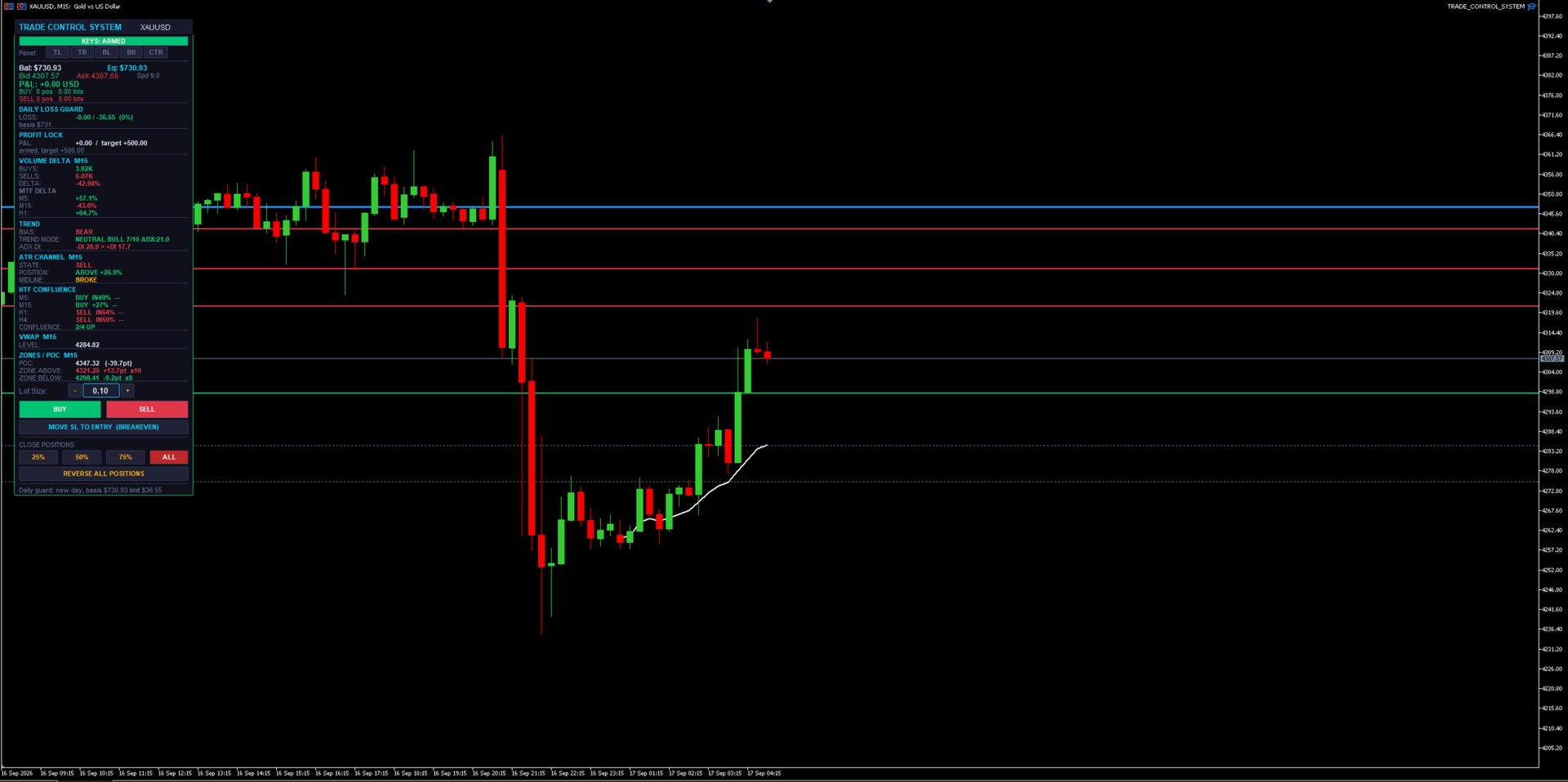
A manual trade-management panel and market-context dashboard for MT5. It never opens a trade by itself — every entry is a human click or keypress. Everything below either helps you execute faster, protects what you already have open, or shows you market context without ever pulling the trigger for you.

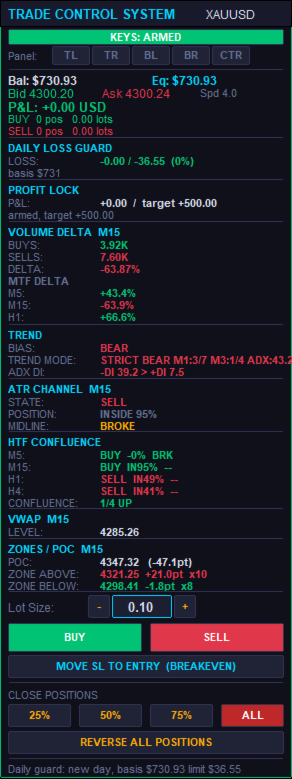
1. The Panel Itself

  • BUY / SELL buttons — one-click market entry in either direction at the current lot size.
  • Lot Size box — type a lot size directly, or use the + / − steppers next to it; steps in 0.01 lot increments and clamps automatically to the symbol's min/max/step rules.
  • CLOSE 25% / 50% / 75% / ALL — partial or full close of every open position on the symbol with one click each.
  • REVERSE ALL POSITIONS — closes everything currently open and immediately opens the opposite direction at the same total volume. One click to flip your whole position.
  • MOVE SL TO ENTRY (BREAKEVEN) — manually forces every open position's stop loss to its own entry price in one click, skipping any that are already there.
  • Draggable + snap-to-corner — drag the panel by its header anywhere on the chart, or snap it instantly to Top-Left, Top-Right, Bottom-Left, Bottom-Right, or Center with one button each.
  • Self-healing z-order — the panel detects if something else got drawn on top of it and automatically redraws itself back in front, without wiping out its own state (typed lot size, etc.) or your other chart objects.
  • Compact mode — a tighter layout option that shows the same information in less vertical space when you want more chart visible.

2. Position Management (works on any open position, not just ones it opened)

  • Manage-all-magic toggle — choose whether the panel manages every position on the symbol (including ones opened manually from your phone, or by another EA) or only trades it opened itself.
  • Dollar-based Breakeven — once a position's floating profit hits a $ trigger you set, its stop moves to lock in a specified $ amount of profit.
  • Breakeven Trailing Ladder — beyond the initial breakeven trigger, the locked-in profit keeps stepping up automatically every additional $X of profit gained, so it keeps ratcheting in your favor as a trade runs.
  • Half-Close — automatically books 50% of a position's size once it reaches a $ profit target you set. Fires once per position.
  • Basket Stop / Target — closes every position on the symbol together the instant the combined floating profit or loss across all of them crosses a $ threshold, regardless of how any individual trade is doing.
  • Combined Stop (shared virtual line) — draws one draggable stop-loss line per direction (one for all buys, one for all sells) directly on the chart. When price touches it, every position on that side closes together as a group. An optional wide "backstop" stop-loss stays quietly attached in the background in case the terminal ever goes offline.
  • Auto SL/TP on entry (ATR-based) — every trade opened from the panel automatically gets a stop loss and take profit sized as a multiple of current ATR, no manual calculation needed.
  • DCA Inherit SL/TP — when you scale into an existing position at a better price, the add can inherit the original trade's shared stop/target instead of getting a separate one, so a stack of adds still shares one risk line.
  • Auto-Protect — continuously watches for any new position that has no stop or target attached (e.g. one you opened manually from a phone app) and automatically attaches protection to it within moments.
  • Same-direction scale-in guard — blocks adding to a position in the same direction unless the new entry is actually at a better price than your first entry in that direction. Stops "revenge" averaging into a loser.
  • Max positions per direction — a hard cap on how many same-direction positions can be open at once on the symbol. Opposite-direction trades still net/cancel normally.
  • Per-position trade timers — an optional on-panel countdown showing how long each open position has been running.

3. Capital-Protection Systems (prop-firm oriented)

  • Daily Loss Kill-Switch — tracks your account's loss for the day against a basis balance (either a rolling day-start balance or a fixed static balance), in $ or %. Once the limit is hit, it automatically flattens every open position on every symbol and blocks new entries until the next trading day resets. State is saved so a VPS reboot or terminal restart mid-day can't accidentally clear a triggered stop.
  • Daily Profit Lock — once floating profit for the day reaches a target you set, that level locks in as a floor (it doesn't trail higher). If profit dips back below the locked floor, everything is flattened and new entries are blocked for the rest of the day. Shares the same basis/reset logic as the loss guard.
  • Push/sound/popup warning at a configurable percentage of the daily loss limit, before it's actually hit.
  • Stale-quote protection — cross-checks the terminal's live bid/ask against the actual last bar close. If they disagree by more than a threshold (a real failure mode seen on live feeds), the quote is treated as stale and new entries are refused rather than risking a trade that can't be properly protected.
  • Real broker minimum-stop-distance handling — works out the actual minimum stop distance a broker will accept (often wider than what the terminal reports), automatically widens and retries a rejected stop several times, and only falls back to a bare, protect-after-the-fact entry as an absolute last resort.
  • Spread Guard — warns (without blocking) when the spread is unusually wide at the moment you're about to enter.

4. Chart Dashboard — Market Context (read-only, informs your decision, never acts on it)

  • Volume Delta — a VIDYA+ATR-band-based buy/sell volume delta reading on the chart's own timeframe, plus up to 5 additional timeframes shown side-by-side.
  • ATR Channel — shows trend STATE (bull/bear flip-latch), POSITION (how far price sits inside, above, or below the channel), and MIDLINE behavior (holding as support/resistance in-trend, or broken against it).
  • HTF Confluence — up to 4 higher timeframes at once, each showing its own ATR Channel state plus ADX DI direction, with a running tally of how many agree.
  • Trend Mode — a strict, ADX-gated M1/M3 supermajority trend read for high-confidence signals, automatically falling back to a looser M5 chop/trend/neutral classification when the strict gate isn't active.
  • Session VWAP — a live, properly sloped volume-weighted average price line for the session, built bar-by-bar from real volume — not a flat, evolving straight line.
  • Liquidity Zones — genuine swing-pivot clustering (not order-flow) that finds and draws support/resistance zones, tracks how many times each has been touched, and visually dims a zone once price has swept through it.
  • Volume POC — builds an actual price/volume histogram from bar data and marks the highest-volume price level (Point of Control).
  • Higher-Timeframe Direction Bias — a sticky EMA-gap bias reading on a timeframe you choose, which only flips once the gap clears an ATR-scaled threshold, cutting down on noisy back-and-forth flips.
  • ADX DI readout — a simple, always-visible +DI vs. −DI comparison for raw directional strength at a glance.

5. Hotkeys / Macro Pad

  • Fully remappable keys (chart must have focus) for BUY, SELL, CLOSE ALL, BREAKEVEN, CLOSE 75%, and CLOSE 50% — built for a stream-deck or macro-pad setup, not just a keyboard.
  • ARM / SAFE toggle — buy and sell hotkeys are gated behind an explicit "armed" state, so a stray keypress can never fire a live trade by accident. Close and breakeven hotkeys always work regardless of arm state, since those only ever reduce risk.
  • Persisted arm state — survives VPS reboots, terminal auto-updates, and disconnects, so you're never caught out by hotkeys silently resetting (or staying live) without your knowledge.
  • Key-debug mode — prints raw key codes to the log, making it painless to remap to an unusual keyboard or a dedicated macro pad.

6. Alerts

  • Bias-flip and ATR Channel state-change alerts — sound, popup, and/or push notification to your phone, with an optional minimum-seconds throttle so you're not spammed.

7. Engineering / Reliability (why it holds up on a live, unattended VPS)

  • Every stop and target is anchored to the position's real entry price or the actual server fill price — never to a live quote that might be stale or have already moved.
  • Rejected stops are automatically widened and retried before ever falling back to a temporarily-unprotected entry.
  • Stops are reconciled against the true executed fill price after every entry, correcting them if they were computed off a bad quote in the first place.
  • Chart objects (VWAP segments, zone lines) are lifecycle-managed with hard caps, so the chart never accumulates thousands of leftover drawings and starts lagging over a long session.
  • Daily guard basis, profit-lock status, and hotkey arm state all persist through EA restarts, terminal auto-updates, and VPS reboots — so a disconnect never silently loses track of where you are in the trading day.
  • A configurable refresh throttle keeps the panel from causing chart lag on fast-ticking symbols.

Bottom line: you make every trading decision — this handles the execution speed, the risk management, and the market-context reading so you can focus on the one thing that actually matters: when to click buy or sell.
おすすめのプロダクト
News Risk Guard は、経済指標の発表が近づいたときに、すでに持っている建玉を 守るためのリスク管理ツールです。方向を予測しません。自分から仕掛けません。 利益の主張も一切しません。 日程は商品に内蔵しています (15指標・4,101件)。インターネット許可も DLL も 外部ファイルも不要で、ストラテジーテスターでも実チャートでも同じに動きます。 できること 1. 保護窓    発表の指定秒前に、管理対象の建玉を引き取り、発表後に返します。動作は選べます    — 警告のみ / 建値へ移動 / ストップを詰める / 数量を割合で減らす / 決済。    本ツールが動かしたストップは、窓が閉じるときに元の位置へ戻します。 2. ストップの無い建玉    発表を無防備で迎える建玉は、口座が抱える最大の単一リスクです。ATR から算出した    緊急ストップを自動で付けます。戦略ではなくシートベルトです。 3. ロットの自動計算    数量ではなくリスクを入力します。ロットは「失ってよい金額」と「ストップまでの    距離」から、ブローカーが実際に返す tick v
Protect your equity and trade stress-free with the Smart Risk Manager EA ! Designed as an all-in-one risk management and account protection utility, this EA guarantees that no trade is ever left unprotected . Whether you trade manually or run multiple EAs simultaneously, this tool automatically manages your Risk-to-Reward, secures profits, and protects your capital from bad entries, market spikes, slippage, and high-impact news events. It is the ultimate solution for Prop Firm traders (FundedNex
Forex Diamond EA MT5
Lachezar Krastev
4.67 (3)
BLACK FRIDAY SPECIAL: 70% OFF + FREE GIFT! Massive savings on our top automated systems: Buy Forex Diamond EA: Only $197 (Save 70% — Regular price: $547) BONUS EA: Get Crypto Master EA 100% FREE (Regular price: $497) Total Value: $1044 — Yours today for just $197! How to claim: Direct message (DM) us your purchase confirmation to unlock your free Crypto Master EA license! Full offer details & live performance stats: https://www.mql5.com/en/blogs/post/778315 Live Results:   https://www.mql5.com/
Account Protection Suite protects the whole trading account from one chart. It covers trades you open by hand and trades opened by other Expert Advisors. Protection modules - Stops and targets: adds a stop loss and a take profit to any trade opened without them. The distance can follow the typical market move (Average True Range), be a fixed number of pips, risk a set share of the account, or sit beyond the nearest support or resistance. Stops can be moved clear of nearby levels. - Daily loss
Binance Grid Pro offers an alternative to the built in Grid systems Binance Platform offers. This utility let you define a grid parameters for interact with your Binance account using an Isolated Margin account. This is, similar to Spot Grid in Binance. This is not for handle with derivatives contracts, is for handle with Spot through Isolated Margin Account. But obviosly this utility offers a different approach than built in Binance Grid to handle the Grid, which I have found useful based on
SmartZone Sentinel — Multi-Symbol Smart Money Concepts EA Trade Smart Money Concepts across multiple symbols at once — with confluence-gated entries, automatic risk management, and real-time Telegram alerts. SmartZone Sentinel scans as many symbols as you choose, in parallel, looking for institutional-style setups: break of structure, liquidity sweeps, fair value gaps, and order block mitigation. It only acts when multiple signals line up — not on a single indicator firing — and once a trade is
| Fully-automated Smart Money Concept (ICT) inspired trading solution with multi-strategy capabilities | Built by a grid trader >> for grid traders.  This is MT5 version, click  here  for  Blue CARA MT4  (settings and logics are same in both versions)     Real monitoring signal  -->  Cara Gold Intro Blue CARA EA   ('CARA') - short for  C omprehensive  A lgorithmic   R esponsive   A dvisor is a next-gen  multi-currency    multi-timeframe  EA base on the widely known (and perhaps the most popul
Vix Golden Harmony
Lefika Raphel Sebatane
5 (1)
Vix Golden Harmony Vix Golden Harmony is a fully automated Expert Advisor for MetaTrader 5. Once attached to a chart it handles everything on its own — identifying its own entries, managing each position while it is open, and closing it when its conditions are met. Every order is checked against your broker's trading requirements and your account's available margin before it is sent, and an internal protection layer monitors the account while a position is running. No manual intervention, no con
FREE
MT5からTelegramに完全にカスタマイズ可能なシグナルを送信して、シグナルプロバイダーになりましょう!この製品は、使いやすく視覚的に魅力的なグラフィカルインターフェースで提供されています。設定をカスタマイズして、数分で製品を使用開始できます! ユーザーガイド + デモ  | MT4バージョン  | Discordバージョン デモを試したい場合は、ユーザーガイドをご覧ください。 MT5からTelegramへの送信者は、ストラテジーテスターでは動作しません。 MT5からTelegramへの機能 多数のオプションを使用して、シグナルを完全にカスタマイズします シグナルの前後に独自のカスタムメッセージを追加します。これには、タグ、リンク、チャンネルなどが含まれます シグナル内の絵文字を追加、削除、カスタマイズします。また、すべて削除することもできます。 シンボルまたはマジックナンバーで送信する取引をフィルタリングします 特定のシンボルの送信を除外します 特定のマジックナンバーの送信を除外します シグナルと一緒に送信する取引の詳細をカスタマイズします シグナルと一緒にスクリーンショット
RSI Grid MT5
Joseph Anthony Aya-ay Yutig
他のEAを無料で入手!!!他のEAを無料で入手!!!他のEAを無料で入手!!!他のEAを無料で入手!!!他のEAを無料で入手!!! RSIグリッドはRSIの買われ過ぎと売られ過ぎの条件に基づいており、取引が市場の負け側にあるときにグリッドを開きます。 RSIはテクニカルトレーダーに強気と弱気の価格の勢いに関するシグナルを提供し、多くの場合、資産の価格のグラフの下にプロットされます。資産は通常、RSIが70%を超えると買われ過ぎと見なされ、30%を下回ると売られ過ぎと見なされます。 パラメーター: タイムフィルター 月曜日 火曜日 水曜日 木曜日 金曜日 土曜日 日曜日 始まる時間 終了時間 RSI設定 RSI期間 買われ過ぎ 売られ過ぎ 時間枠 資金管理 Autolot 最大ロット 利益を得る グリッドサイズ 乗数 トレーリングオプション トレーリングストップ トレーリングステップ トレイルオフセット ファイルを設定する v1.8GBPUSDセット1 https://youtu.be/a7PfCr1jYXQ htt
Magic EA MT5
Kyra Nickaline Watson-gordon
Magic EA is an Expert Advisor based on Scalping, Elliot Waves and with filters such as RSI, Stochastic and 3 other strategies managed and decided with the robot smartly. Large number of inputs and settings are tested and optimized and embedded in the program thus inputs are limited and very simple. Using EA doesn't need any professional information or Forex Trading Knowledge. EA can trade on all symbols and all time frames, using special and unique strategies developed by the author. The EA w
KAA BB Grid   is a basket grid Expert Advisor for MetaTrader 5. It opens the first trade at the edge of the Bollinger Bands, only in the direction of the higher-timeframe trend. It adds positions at ATR-based distances and closes the whole basket together at a profit target that grows with the basket. The EA was designed for   XAUUSD (Gold)   and also works on other symbols, because all distances are set in points or come from ATR. How it works Trend filter   – An EMA on a higher timeframe (defa
# VectorAnchor (v1.05) VectorAnchor is a multi-pair grid Expert Advisor for **AUDUSD, EURUSD, and NZDUSD on H1**, built around controlled grid recovery and basket-level profit management. Version 1.05 adds two major upgrades: a **built-in regime filter** that keeps the EA out of the market conditions that break grid systems, and **equity-scaled position sizing**. The EA automatically applies the validated configuration for whichever of the three pairs it is attached to — no manual setup of the
SMC OTE Gold Pattern — OTE Zone Expert Advisor for MT5 SMC OTE Gold Pattern is an Expert Advisor for MetaTrader 5 designed to identify and trade Fibonacci Optimal Trade Entry (OTE) zones using market structure, trend, volatility and confirmation filters. The EA identifies completed swing movements and calculates the 61.8%–79% Fibonacci retracement area as a potential OTE zone. A 70.5% reference level is also displayed within the zone. OTE Zone Detection The EA monitors swing highs and swing lows
Mir Station MT5  it is a Secure Automated Software for trade Forex market and indices.    The architecture is a Fully Automatic Autonomous Robot Expert capable of independently analyzing the market and making trading decisions      Mir Station MT5   Have neurals nets to used the correct algoritm in the correct market situation   Mir Station MT5         It is an advanced trading system. This is a fully automatic Expert Advisor.      Mir Station MT5   is a plug and play system Mir Sta
ISS Station MT5      it is a Secure Automated Software for trade Forex market and indices. The architecture is a Fully Automatic Autonomous Robot Expert capable of independently analyzing the market and making trading decisions ISS Station MT5       Have neurals nets to used the correct algoritm in the correct market situation ISS Station MT5           It is an advanced trading system. This is a fully automatic Expert Advisor.        ISS Station MT5       is a plug and play system   ISS Stat
Viking Alpha DAX Ivar Edition
Valdeci Carlos Dos Passos Albuquerque
Viking Alpha DAX — Germany 40 Expert Advisor for MetaTrader 5 LAUNCH PROMO Only 10 copies at launch price. Price increases with each sale. Launch price: $297 Next price: $497 Final price: $997 Live Performance: FX Blue — Vikingtradingbots What Makes Viking Alpha DAX Different Most DAX robots fail for one simple reason: they treat the Germany 40 like a forex pair. It isn't. The DAX has a heartbeat — a specific rhythm tied to the Frankfurt Stock Exchange opening, the European session structure, an
TECTONIC GOLD — INSTITUTIONAL MULTI-STRATEGY GOLD SYSTEM LIMITED LAUNCH OFFER : Introductory price is only $149. Final price: $499 . The price increases automatically with every batch of sales. Secure your lifetime license at the lowest price! Real-Account Track Record: MQL5 Signal , Showmytrades Track Record Verified Backtest Report: Backtest Results Official Setup Guide and Preset Files:  Setup Guide , Set files PROFESSIONAL GOLD TRADING BUILT FOR CONSISTENCY Gold (XAUUSD) is one of the mo
Parameters Explained Algorithm Settings: magicNumber (int): Unique identifier for trades managed by the EA. Default value: 0 (manages manual trades). Note: Set this to the corresponding magic number of trades opened by other EAs or set it to 0 for manually executed trades. BreakEvenInPoints (bool): Activates the breakeven strategy based on profit in points. true: Moves Stop Loss to breakeven when the trade reaches the specified ProfitPointsForBreakeven . false: Disables this function. ProfitPoin
RetraceX Scalper MT5
Mazhar Ul Hassan Noorul Hassan Noor Ul Hassan
Overview RetraceX Scalper is an advanced pullback scalping bot that utilizes Support & Resistance levels to identify high-probability retracement entries. It ensures precise trade execution with minimal risk and maximum reward, making it an ideal tool for traders who focus on quick pullback opportunities. Key Features Support & Resistance Detection: Identifies strong market zones for accurate trade setups. Pullback Entry Optimization: Scans for high-probability retracement entries to maximize
Phantom Circuit Breaker Triple Shield Account Protector for MetaTrader 5 Your account is under constant threat. One bad news event, one EA going rogue, one overnight gap — and your balance can be wiped out in minutes. Phantom Circuit Breaker- is a military-grade defense system that wraps your entire account in 3 layers of real-time protection. It doesn't trade — it guards. Attach it to a single chart and it will monitor every position from every EA, automatically closing trades and halting o
Boost your forex profits with Blues Protector, an advanced MQL5 Expert Advisor designed for MetaTrader 5. This automated trading bot dynamically manages your stop-loss levels to secure gains and reduce risks. Blues Protector EA - User Manual   (For MT5 - Ready-to-Use EX5 File)   1. What This EA Does    The Blues Protector EA automatically secures your profits by smartly adjusting stop-loss levels when your trade reaches a predefined profit level. It works silently in the background, protecting
Prop Firm Shield is a risk management panel for MetaTrader 5, built for prop firm traders who need control over their daily limits. You configure each limit and the tool watches the account around the clock, acting automatically when a limit is reached: closing positions, deleting pending orders and blocking new trading until the next day. Features: - Daily Take Profit - three modes: fixed USD, percent of the day-start balance, or target balance - Daily Stop Loss - three modes: fixed USD, percen
Trade Assistant 38 in 1
Makarii Gubaydullin
4.91 (23)
多機能ツール:ロット計算、グリッド注文、R/R比率、トレードマネージャー、サプライ&デマンドゾーン、プライスアクションなど デモ版   |   ユーザーマニュアル トレードアシスタント   はストラテジーテスターでは動作しません :   こちらからデモ版をダウンロード  して ユーティリティ をテストできます。 ご質問、改善のご提案、バグ発見の場合は ご連絡ください MT4版が必要な場合は こちら から入手できます トレード   プロセス を簡素化、高速化、自動化。   ダッシュボード で標準端末の機能を拡張。 トレードパネルは  あらゆる取引商品で動作:外国為替、株式、インデックス、暗号通貨など。 1. 新規トレードの実行 :ロット / リスク / R/R計算 :手動トレードのためのリスク管理 ロット計算機(リスクサイズに基づく取引量計算) リスク計算機(ロットサイズに基づくリスク額) リスクリワード   比率 グリッド注文:  + 動的間隔オプション、スプリットロットオプション 注文のアクティベーショントリガー、+ バイストップリミット / セルストップリミット 仮想SL、仮想
Triple Strategy Ingenium
Itumeleng Mohlouwa Kgotso Tladi
Triple Strategy Ingenium Unlock institutional-grade market timing with Triple Strategy Ingenium , the ultimate 3-in-1 algorithmic powerhouse engineered exclusively for the MQL5 platform. Stop second-guessing your entries and letting emotion dictate your trades. Built on a sophisticated fusion of three distinct Traders Dynamic Index (TDI) strategies , this Expert Advisor works around the clock to capture market volatility, trend direction, and momentum bursts simultaneously. When all three algo
Exclusive EA for FOREX HEDGE account The EA (FuzzyLogicTrendEA) is based on fuzzy logic strategies based on the analysis of a set of 5 indicators and filters. Each indicator and filter has a weight in the calculation and, when the fuzzy logic result reaches the value defined in the EA parameter, a negotiation is opened seeking a pre-defined gain. As additional functions it is possible to define maximum spread, stop loss and so on . Recommended Symbol: EURUSD, AUDUSD, GBPUSD, NZDUSD, USDCAD, AUD
Introducing Savage Capital Max Scaling Pro – Your Go-To EA for Trading Success! Make the most of your trading with Savage Capital Max Scaling Pro, a versatile EA for  LIVE MARKETS . Key Features: Maximize Profits Automatically:   The EA places Take Profit (TP) & Stop Loss (SL) and uses a Trail Stop (TS) technique. It even collects money from running trades, even if TP isn't reached. Developed by Pros:   Crafted by an experienced software developer & day-trader with years of EA development and
This Expert Advisor waits a position to be opened, no matter if you open manually or with the EA buttons or eventually via mobile: it creates a Grid in Anti Martingale with pending stop orders in the same direction of the first position. You can specify the number of orders, the size and the distance between the orders. You can also adjust the Monetary Target of the Grid, the monetary Stop Loss, the Intermediate Target (when reached the EA insert an order with opposite direction of the total pos
Pro Trader Assistant 1.1 - The Ultimate Trading Companion NB: DOES NOT WORK ON STRATEGY TESTER. FOR TESTING, DM ME   Trade Simple, Smarter, Safer, and More Efficiently Are you ready to transform your trading with institutional-grade risk management? Pro Trader Assistant 1.1  is your complete solution for mastering trading psychology, risk control, and execution efficiency. Built for both prop firm challenges and retail trading. Why Choose Pro Trader Assistant 1.1 Perfect for retail trading
The Gold Titan is an automated trading advisor for the MetaTrader platform, developed specifically for the XAU/USD (gold) instrument. It analyzes market data and executes trades based on predefined parameters, supporting traders in their decision-making process. Key Features: • Optimized for XAU/USD Designed with the volatility of gold in mind, making it suitable for trading the gold/US dollar pair. • Combined Market Analysis Uses a mix of technical indicators, price action patterns, and volume
このプロダクトを購入した人は以下も購入しています
Trade Manager EAへようこそ。これは、取引をより直感的、正確、そして効率的にするために設計された究極の リスク管理ツール です。これは単なるオーダー実行ツールではなく、包括的な取引計画、ポジション管理、リスク管理のためのソリューションです。初心者から上級者、迅速な実行を必要とするスキャルパーまで、Trade Manager EAはあらゆるニーズに対応し、為替、指数、商品、暗号通貨などさまざまな市場で柔軟に対応します。 Trade Manager EAを使用すると、複雑な計算が過去のものになります。市場を分析し、エントリーポイント、ストップロス、テイクプロフィットのレベルをチャート上のラインでマークし、リスクを設定するだけで、Trade Managerが最適なポジションサイズを即座に計算し、SLとTPをピップ、ポイント、口座通貨でリアルタイムに表示します。すべての取引が簡単かつ効果的に管理されます。 主な機能: ポジションサイズ計算機 :定義されたリスクに基づいて取引サイズを瞬時に決定します。 簡単な取引計画 :エントリー、ストップロス、テイクプロフィットを設定するためのド
Telegram to MT5 Multi-Channel Copier   は、 Telegram と Discord チャンネルのトレードシグナルを MetaTrader 5 へ自動コピーします。ボット不要、ブラウザ拡張不要、手動コピー不要。Telegram や Discord にシグナルが届くと、EA が数秒であなたのターミナルに注文を出します。 さらに、チャンネルをコピーする前に、内蔵バックテスターでそのチャンネルがあなたの口座でどう動いたかを確認できます。 製品は 2 つのコンポーネントで構成されます:Telegram チャンネルを監視する Windows アプリと、MT5 ターミナルでシグナルを執行する本 EA です。MT4 版もあります   こちら . 購入前にお試しください:   アプリは無料でダウンロードできます。ご自身のチャンネルを接続し、各シグナルがどのように読み取られるかをご確認ください。Backtest タブと実際の取引には、購入またはレンタルした EA が必要です。このページの無料デモはストラテジーテスターでのみ動作し、テスターでは Telegram と D
Farmed Hedge Yield Farming | All Markets (Manual - Hybrid - Semi/Automated EA) VERIFIED TRADING RESULTS - Farmed Hedge Yield Axi Copy:  https://www.mql5.com/en/signals/2356376 - Farmed Hedge Yield Exn Copy:   https://www.mql5.com/en/signals/2356404 - Farmed Hedge Yield V Copy:  https://www.mql5.com/en/signals/2357156 IMPORTANT NOTICE: FarmedHedge is a MANUAL-FOCUSED TRADING UTILITY ,not a fully automated EA. Results shown on this Signal include manual trades and overall strategic management.
自分の取引ルールで Telegram のシグナルをコピー Telegram to MT5 Signal Trader は、Telegram の公開・非公開チャンネルやグループから、テキスト形式の取引シグナルを MetaTrader 5 へ自動でコピーします。1つのデスクトップアプリで複数の配信者と MT5 口座を管理し、 配信者ごとにリスクと取引設定を個別に指定 できます。 シグナルのコピーに Telegram ボットや API 設定は必要ありません。 電話番号または QR コードでご自身の Telegram アカウントにログインし、すでに参加しているチャンネルやグループを選ぶだけです。ボットの作成や、Telegram API トークン、API ID、API hash の入力は不要です。 ポジションサイズを選び、複数の利確水準に分けて決済し、建値へのストップ移動やトレーリングストップを自動化できます。配信者のシグナルを受け取りながら、実際の取引方法は自分で管理できます。 本製品は、この MT5 エキスパートアドバイザ(EA)と、必須の Windows 連携アプリで構成されます。 インス
TradePanel MT5
Alfiya Fazylova
4.88 (170)
Trade Panelは多機能なトレーディングアシスタントです。アプリには手動取引用の50以上のトレーディング機能が搭載されており、ほとんどの取引作業を自動化することができます。 アプリの説明書: https://www.mql5.com/en/blogs/post/756482 デモ口座用アプリの試用版: https://www.mql5.com/en/blogs/post/750865 アプリのインストール方法: https://www.mql5.com/en/blogs/post/756239 アプリをビジュアルモードでテストする方法: https://www.mql5.com/en/blogs/post/770277 VPSのMetaTraderにアプリをインストールする方法: https://www.mql5.com/en/blogs/post/770190 取引。 ワンクリックで取引操作を行うことができます: リスクを自動計算して指値注文やポジションを開く。 複数の注文やポジションをワンクリックで開く。 注文のグリッドを開く。 保留中の注文やポジションをグループごとに閉じる
================================================================================ POC BREAKOUT - V20.72. Full Professional Grade Toolkit ================================================================================ POC Breakout is a full MetaTrader 5 trading dashboard for discretionary traders who want breakout signals, Point of Control (POC) context, volume profiles, order flow, market structure, news, alerts, and advanced trade planning in one professional workspace. Attached directly to you
REVDEN AI Desk:あなた自身の AI との一つの会話で、REVDEN のマーケットコンテキストをもとにトレードを運営する トレードのすべてを一つの会話で運営する姿を想像してみてください。 REVDEN AI Desk はそれを MetaTrader 5 にもたらします。あなた自身の AI に相場をどう読んでいるかを尋ねると、AI はあなたが取引する銘柄について REVDEN の完全なコンテキストをもとに答えます。銘柄の状態、リスク像、今後の指標発表まで含めてです。AI の提案はエントリー、ストップ、ターゲット、リスクとともに届き、合うものをあなたが承認します。ルールの変更も同じ方法です。変えたい点を書けば、AI が新しいルールブックの草案を作り、採用するかどうかはあなたが決めます。会話の周りには、マーケット全体が一つの画面にまとまっています。 デスクとセットアップガイドをご覧ください。 すべての画面、すべての設定、そしてあなた自身の AI との最初のステップ: stein.investments/products/revden-ai-desk AI との一つの会話、マーケッ
News Trade EA MT5
Konstantin Kulikov
4.55 (11)
僕自身が数年間使っている便利なロボットをご紹介します。半自動モードでも完全自動モードでもお使いいただけます。 >>> Chat <<< 当プログラムは経済指標カレンダーで発表されるニュースをもとにした取引の柔軟な設定が可能です。戦略テスターでは確認不可です。実際の取引のみです。 最新の設定アーカイブをダウンロードしてください: https://www.mql5.com/en/blogs/post/747929 シグナルモニタリング: https://www.mql5.com/en/signals/author/test-standart 当該エキスパート・アドバイザーのためのカスタマイズ設定セットを作る場合は、ブログの全パラメータの説明を参照してください :   https://www.mql5.com/en/blogs/post/748545 。 基本的なデフォルト設定について 一つのチャートからGBPとの通貨ペア(GBPUSD、EURGBP、GBPJPY、GBPCAD、GBPAUD、GBPCHF)で取引をします。GBPは最もボラティリティの高い通貨のため、取引が成功するチ
EA Portfolio Control & Cloud Monitoring for MetaTrader 5 Your EAs manage trades. KONTROL_01 manages your EAs. A control system for traders running multiple Expert Advisors on the same account. Coordinate EA activity, manage trading risks and monitor your setup remotely. A detailed User Manual is available via DM after purchase. IN PRACTICE Multiple EAs. No coordination. Your EAs trade independently, unaware of each other's activity. KONTROL_01 coordinates them, limits simultaneous activity a
RETAILBERG FOOTPRINT CHART PRO — Order-Flow Workspace for MetaTrader 5 Version 7.00  |  Professional System  |  31 tools  |  One chart A full 150-page illustrated User Manual is included. Please read the full manual to understand this feature packed footprint chart elements and ui. https://www.mql5.com/en/blogs/post/777982 DEMO / STRATEGY TESTER — PLEASE READ FIRST
The Patch It never opens a trade. It walks behind the ones that did. Every open position, every pending order — checked twice a second for the one thing that's easy to forget: a stop, a target. Found bare, it doesn't ask. It writes the missing number in, measured in points from wherever the position began, and moves on to the next. No strategy, no opinion on direction. Just the quiet assumption that nothing should ever sit on the market unprotected — not because someone decided it shouldn't,
次回アップデート — バージョン 2.52 近日公開!【新機能】 市場分析とトレードワークフローを強化する、4つの主要な新機能にご期待ください 皆様のトレードニーズに応える4つの新機能により、市場分析を次のレベルへと引き上げます。新機能をご紹介します: 1. TRADE OVERVIEW DASHBOARD 2. CONFLUENCE AT ZONE 3. STRONG & WEAK HIGH/LOW 4. OTE 1. TRADE OVERVIEW DASHBOARD 市場全体の状況をより簡単に把握できるダッシュボードです。トレード判断をサポートするガイダンスを提供し、市場分析とトレード計画を体系的に行えるよう支援します。すべてを1つの画面で確認できます。 マルチタイムフレーム市場概要(Multi-Timeframe Market Overview) 市場の方向性と価格構造をより明確に把握 市場状況をすばやく確認 体系的な市場分析とエントリー計画のためのガイダンス 2. CONFLUENCE AT ZONE 価格が重要なゾーンに入るとき…いくつのサポート要因が一致しているかを確認で
Your EAs cannot see each other, but Anchor can. Anchor gives you one place to coordinate your EAs, manage risk, and decide when trading is allowed. It works alongside the trading bots you already use without any changes to them. The Problem One EA opens a trade. Then another starts trading. The next thing you know, you wake up to multiple grids built across your account. Each EA may be doing exactly what it was designed to do, but together they can place far more risk on your account than you in
The product will copy all telegram signal to MT5 ( which you are member) , also it can work as remote copier.  Easy to set up, copy order instant, can work with almost signal formats, image signal,  s upport to translate other language to English Work with all type of channel or group, even channel have "Restrict Saving Content", work with  multi channel, multi MT5 Work as remote copier: with signal have ticket number, it will copy exactly via ticket number. Support to backtest signal. How to s
Floor Watch
Syed Tauqeer Hussain Shah
Floor Watch One number, watched every thirty seconds: how far equity has fallen since the day began — or since its highest point, if it's told to trail the peak instead of the open. Cross the line and it doesn't argue. Every open position closes, every pending order vanishes, and anything that slips through afterward gets shut the moment it appears. Not asked. Removed. The floor holds until the clock turns 5 AM Pakistan time — then, and only then, does the day start over. One rule. No except
Power Candles Strategy Scanner - 自動最適化型マルチシンボル設定ファインダー パワーキャンドル・ストラテジー・スキャナーは 、パワーキャンドル・インジケーターを駆動するのと全く同じ自己最適化エンジンを、マーケットウォッチに登録されているすべての銘柄に対して並行して実行します。1つのパネルで、現在統計的に取引可能な銘柄、各銘柄で勝率の高い戦略、最適なストップロス/テイクプロフィットの組み合わせが表示され、新たなシグナルが発生した瞬間に通知が届きます。 このツールは、Stein Investmentsのエコシステムの一部です。  18種類以上のツールをすべて閲覧し、AIを活用したセットアップの推奨を受け取り、  https://stein.investments でコミュニティに参加しましょう 市場動向を網羅。銘柄ごとに3,000件以上の自動最適化。2種類のアラート。ワンクリックでチャートを切り替えて即座にアクション。 なぜこれが必要なのか 多くのマルチ銘柄スキャナーは、 価格の動き (ボラティリティ、変動率、銘柄ごとのRSI)を表示するだけです。それ
MT5 Professional Copy Trading System(MT5版) MT5 Professional Copy Trading System は、工業レベルの超高速 LOCAL トレードコピア であり、プロトレーダー、シグナル提供者、機関レベルのマルチアカウント運用のために設計されています。一般的なクラウド型やリテール向けコピーシステムとは異なり、本システムは同一 Windows 環境で動作することを前提とした LOCAL アーキテクチャに基づいて構築されています。 工業級 LOCAL アーキテクチャ LOCAL 設計により、同一 PC または同一 Windows VPS 上で稼働する複数のターミナル間で、低遅延かつ高い安定性を実現します。不要なネットワーク依存を減らすことで、より高速な同期、正確な約定、Master と Receiver 間の高い一貫性を確保できます。これは高頻度取引や 24/7 無人運用に適した環境を提供します。 Master / Slave / Self-Copier + Cross Copy(MT4 ↔ MT5) MT5 版は Master
Grid Manual MT5
Alfiya Fazylova
4.73 (22)
「Grid Manual」は、注文のグリッドを操作するための取引パネルです。 ユーティリティはユニバーサルで、柔軟な設定と直感的なインターフェイスを備えています。 それは、損失を平均化する方向だけでなく、利益を増やす方向でも注文のグリッドで機能します。 トレーダーは注文のグリッドを作成して維持する必要はありません。 すべてが「Grid Manual」によって行われます。 注文を開くだけで十分であり、「Grid Manual」は注文のグリッドを自動的に作成し、非常に閉じるまでそれに付随します。 完全な説明とデモバージョン ここ。 ユーティリティの主な機能と機能 ユーティリティは、モバイル端末から開かれた注文を含め、あらゆる方法で開かれた注文を処理します。 「制限」と「停止」の2種類のグリッドで機能します。 グリッド間隔の計算には、固定と動的(ATRインジケーターに基づく)の2つの方法で機能します。 オープンオーダーグリッドの設定を変更できます。 チャート上の各注文グリッドの損益分岐点を表示します。 各注文グリッドの利益率を表示します。 ワンクリックでグリッドから収益性の高い注文を閉じるこ
YuClusters
Yury Kulikov
4.93 (43)
Attention: You can view the program operation in the free version  YuClusters DEMO .  YuClusters is a professional market analysis system. The trader has unique opportunities to analyze the flow of orders, trade volumes, price movements using various charts, profiles, indicators, and graphical objects. YuClusters operates on data based on Time&Sales or ticks information, depending on what is available in the quotes of a financial instrument. YuClusters allows you to build graphs by combining da
DrawDown Limiter
Haidar Lionel Haj Ali
5 (23)
DrawDown Limiter v5.0 — 高度な口座保護コントローラー DrawDown Limiter v5.0 は、取引口座を監視し、設定されたリスク、利益、ニュース、スケジュール、ロールオーバー、またはポジション数の制限に達した際に自動的に対応する、クライアント側で動作する口座保護コントローラーです。 1つの専用チャートから、 手動取引、自動売買戦略、複数のExpert Advisor、指値・逆指値注文、保有ポジション を監視できます。口座全体を保護することも、Magic Numberを使用して特定のEAまたは複数のEAのみを監視することもできます。 DrawDown Limiter の目的は、単にドローダウンを表示することではありません。 設定した取引ルールを積極的に適用し 、保護条件が有効である限り、そのルールを継続的に実行することを目的としています。 DrawDown Limiter v5.0 は、損失額だけを監視するのではなく、戦略がいつ取引を継続できるのか、どのエクスポージャーを維持できるのか、いつ取引を停止すべきか、そして自動売買環境をいつ安全に再開できるのかま
Master Your Trading Discipline   Stop losing your hard-earned gains to overtrading and emotional decisions. The Discipline Tool is your ultimate trading assistant, ensuring strict risk management in real-time. Key Protection Features: Advanced Drawdown Defense : Automatically halts trading if your daily drawdown exceeds a preset threshold (percentage or dollar amount). Real-Time Equity Lock : Safeguard profits by referencing peak equity, ensuring drawdown stays within control. Hard Profit Target
Dealer's Panel No signal decides anything here — a hand does. One click, and the panel calculates what's underneath: lot size from risk, target from a 30-step balance ladder that remembers exactly how far an account has climbed. Toggle between market and pending without touching an input field. Set a stop, and the take-profit can write itself — a fixed share of the balance, translated into price with no arithmetic left for the trader to get wrong. One trade live at a time; it won't let a seco
Auto DCA EA
Truong Giang Hoang
5 (1)
All new interface and function Add telegram notify (you have to get Telegram bot API and chat ID). With this ea, you can earn 10-40% even more profit/month! 1. This EA is used to automatically take profit or DCA your orders on MT5 according to the parameters you set. You can enter first order on your phone or MT5 terminal on your computer and it automatically take profit or DCA your orders. 2. Enter buy/sell limit-stop price * Buy limit price/ Sell limit price/ Buy stop price/ Sell stop price:
サポートが必要ですか?設定方法は?ご質問は?こちらでお客様の言語でどうぞ、迅速に返信します: https://www.mql5.com/en/market/product/139088/comments 動作デモ版ダウンロード Copy Cat More (コピーキャット・モア) MT5 トレードコピー (Trade Copier) は、ローカルのトレードコピーであり、今日のトレード課題のために設計された完全なリスク管理・執行フレームワークです。プロップファーム (prop firm) のチャレンジから個人のポートフォリオ管理まで、堅牢な執行、資金保護、柔軟な設定、高度なトレード処理の組み合わせによって、あらゆる状況に適応します。 このコピーは、マスター (Master、送信側) とスレーブ (Slave、受信側) の両モードで動作し、成行注文・指値注文、トレードの変更、部分決済、両建て決済 (Close By) 操作をリアルタイムで同期します。デモ口座と実口座、トレード用ログインと投資家ログインの両方に対応し、永続的トレードメモリ (Persistent Trade Memory
Trade Indicator Assistant   is a powerful MT5 utility designed to turn indicators into automated trading systems. Its main feature is the ability to automatically detect an indicator’s   BUY and SELL signal buffers , without requiring you to know the buffer numbers, search through indicator settings, or modify the indicator source code. Bonus Indicator:   After purchasing Trade Indicator Assistant, contact me to receive   Trade Signal Pro   completely free as a bonus indicator. [Download Demo V
一度の購入で、現在提供中および今後リリースする私のすべての MT4・MT5 インジケーターと自動売買ロボット(EA)を追加料金なしで受け取れます。 購入後、受け取り方法について私にお問い合わせください。 10 件の購入ごとに 50$ ずつ、最大 999$ まで値上げする予定です。購入手続き時に Market に表示される価格が適用されます。 信頼するインジケーターをそのままに。周辺の取引作業を自動化。 あなたのシグナル。あなたのルール。あなたの取引執行。 信頼する MT5 インジケーターはあるのに、チャートの監視、シグナル待ち、ロット計算、発注、各ポジションの管理を手作業で行っていませんか? Stratiora Signal Engine MT5 は、これらの作業をつなぎます。対応する買い・売りバッファのシグナルを、エントリー、取引量計算、Stop Loss、Take Profit、フィルター、ポジション管理、口座保護までの自動処理に変換できます。 インジケーターや取引アイデアを変えるたびに別の EA を依頼する代わりに、柔軟な一つのエンジンで各シグナルの取引方法を決められます。 あ
Quant AI Agents are independent trading Expert Advisors. Instead of trading using a fixed strategy like other conventional EAs, Quant AI Agents   is a   multi-agent AI trading framework   that turns natural-language strategy prompts into live.  WANT THE SAME RESULTS AS MY LIVE SIGNAL?   Use the exact same brokers I do:   IC MARKETS , IC TRADING   .  Unlike the centralized stock market, Forex has no single, unified price feed.  Every broker sources liquidity from different providers, creating un
EASY Insight AIO – スマートで手間いらずな取引のオールインワンソリューション 概要 数秒で市場全体——FX、ゴールド、暗号資産、指数、さらには株式まで——を、手作業のチャート確認や複雑なセットアップ・インジケーター導入なしにスキャンできたらどうでしょうか? EASY Insight AIO はAIトレードのための究極のプラグ&プレイ型エクスポートツールです。市場全体のスナップショットを、クリーンなCSVファイルで一括出力。ChatGPT、Claude、Gemini、Perplexityなど、さまざまなAIプラットフォームで即座に解析できます。 ウィンドウの切り替えやグラフのごちゃごちゃしたオーバーレイはもう不要。自動エクスポートされる純粋で構造化されたインサイトだけで、無駄なチャート監視に悩まされず、スマートなデータ主導の判断に集中できます。 なぜEASY Insight AIOなのか? 本当のオールインワン • セットアップ不要、インジケーターのインストール不要、チャートへのオーバーレイ不要。インストールして起動し、エクスポートするだけです。 マルチアセット対
Daily Trading Limiter
AL MOOSAWI ABDULLAH JAFFER BAQER
5 (8)
• Please test the product in the Strategy Tester before purchasing to understand how it works. • If you face any issues, contact me via private message—I’m always available to help. • After purchase, send me a screenshot of your order to receive a FREE EA as a gift. Daily Trading Limiter — the rule you cannot break Every trader knows the number. Three trades. Two percent. One bad day and stop. And every trader has watched themselves take the fourth trade anyway. The problem was never knowing th
EA Overfitter
Stephen J Martret
5 (1)
That backtest looks great. But will it still be making money tomorrow, next week, next month? EA Overfitter re-runs your EA on 100 price histories it has never seen. One score tells you if the edge is real. A backtest tells you what an EA did on one price history — the one that happened to occur. What you cannot tell from it is how much of that result was the strategy and how much was the particular path. EA Overfitter answers that. It builds up to 100 synthetic price histories your EA has n
フィルタ:
レビューなし
レビューに返信