TendenciaPrecioFecha2

TrendLinesFromFiboAndTrend2 — Proyección Dinámica de Tendencias en Niveles Fibonacci

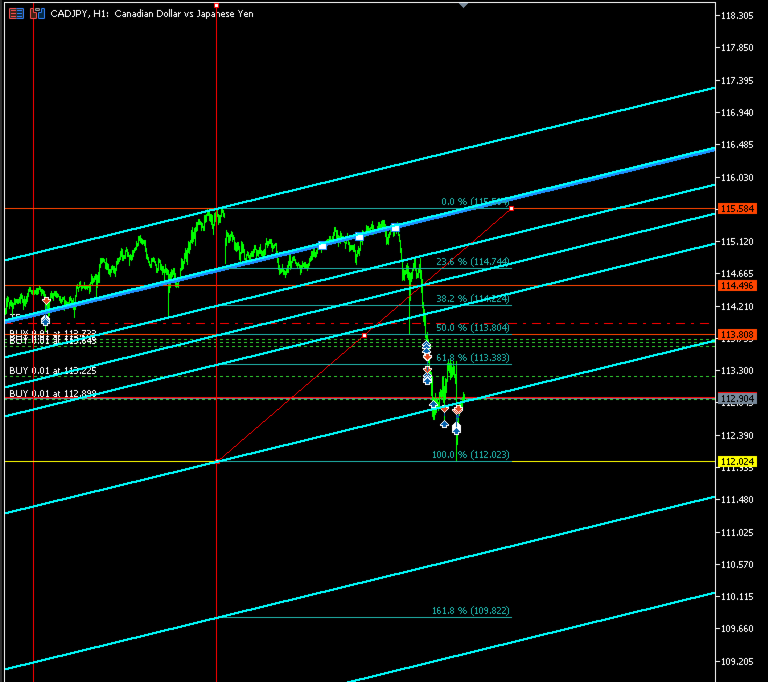
Descripción general: TrendLinesFromFiboAndTrend2 es una herramienta para MetaTrader 5 diseñada para clonar el ángulo y la velocidad de una línea de tendencia existente y proyectarla automáticamente a través de todos los niveles clave (retrocesos y extensiones) de un objeto Fibonacci dibujado en el gráfico.

Ventajas principales:

  • Proyección geométrica exacta: Mantiene la inclinación y duración exacta de la línea de tendencia de origen.

  • Proyección completa: Traza 9 líneas de soporte/resistencia dinámicas en niveles clave (0.0%, 23.6%, 38.2%, 50.0%, 61.8%, 100.0%, 161.8%, 200.0% y 261.8%).

  • Soporte multidireccional: Permite seleccionar la orientación del Fibonacci (Alcista o Bajista) para calcular correctamente las extensiones fuera del rango 0-100%.

  • Estilo personalizable: Configuración de color, estilo y grosor para diferenciar fácilmente los canales creados.

  • Ejecución ultra-rápida: Al ser un script de un solo paso, no consume recursos ni ralentiza el gráfico.

Cómo funciona:

  1. El script toma los puntos temporales y de precio de una línea de tendencia seleccionada para calcular su pendiente.

  2. Identifica el origen y los niveles de precio del Fibonacci especificado.

  3. Genera y dibuja automáticamente 9 líneas paralelas proyectadas desde el tiempo inicial del Fibonacci a lo largo de cada nivel.

Parámetros de entrada:

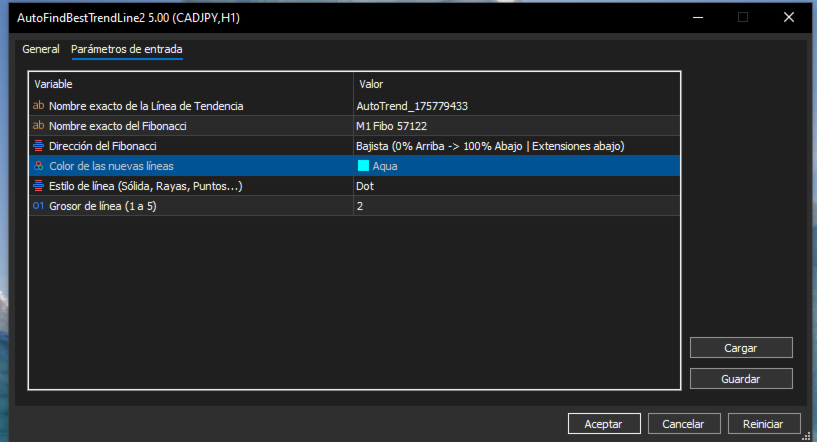
  • InpTrendName — Nombre exacto del objeto línea de tendencia en el gráfico (ej. AutoTrend_175779433).

  • InpFiboName — Nombre exacto del objeto Fibonacci en el gráfico (ej. M1 Fibo 57122).

  • InpFiboDirection — Orientación del Fibonacci (FIBO_ALCISTA o FIBO_BAJISTA).

  • InpLineColor — Color de las líneas proyectadas.

  • InpLineStyle — Estilo visual de la línea (sólida, puntos, guiones).

  • InpLineWidth — Grosor de la línea (1 a 5).

Uso recomendado: Combínelo con AutoFindBestTrendLine (o cualquier línea de tendencia manual) y un retroceso de Fibonacci para proyectar estructuras dinámicas de canales, tomar beneficios en extensiones y detectar confluencias clave en el gráfico.

//+------------------------------------------------------------------+

//|                                   TrendLinesFromFiboAndTrend2.mq5 |

//|                                  Copyright 2026                  |

//|                                                                  |

//+------------------------------------------------------------------+

#property copyright "Copyright 2026"

#property link      ""

#property version   "5.00"

#property script_show_inputs


// Definición de la dirección del Fibonacci para el panel de propiedades

enum ENUM_FIBO_DIR

{

   FIBO_ALCISTA = 0, // Alcista (0% Abajo -> 100% Arriba | Extensiones arriba)

   FIBO_BAJISTA = 1  // Bajista (0% Arriba -> 100% Abajo | Extensiones abajo)

};


// Parámetros de entrada configurables

input string          InpTrendName     = "AutoTrend_175779433"; // Nombre exacto de la Línea de Tendencia

input string          InpFiboName      = "M1 Fibo 57122";       // Nombre exacto del Fibonacci

input ENUM_FIBO_DIR   InpFiboDirection = FIBO_ALCISTA;          // Dirección del Fibonacci

input color           InpLineColor     = clrDodgerBlue;         // Color de las nuevas líneas

input ENUM_LINE_STYLE InpLineStyle     = STYLE_SOLID;           // Estilo de línea (Sólida, Rayas, Puntos...)

input int             InpLineWidth     = 2;                     // Grosor de línea (1 a 5)


//+------------------------------------------------------------------+

//| Script program start function                                    |

//+------------------------------------------------------------------+

void OnStart()

{

   string trendName = InpTrendName;

   string fiboName  = InpFiboName;


   // 1. Validar que la línea de tendencia exista y sea correcta

   if(ObjectFind(0, trendName) < 0)

   {

      Print("Error: No se encontró ninguna línea de tendencia con el nombre: ", trendName);

      return;

   }

   if((int)ObjectGetInteger(0, trendName, OBJPROP_TYPE) != OBJ_TREND)

   {

      Print("Error: El objeto '", trendName, "' no es una Línea de Tendencia.");

      return;

   }


   // 2. Validar que el objeto Fibonacci exista y sea correcto

   if(ObjectFind(0, fiboName) < 0)

   {

      Print("Error: No se encontró ningún objeto Fibonacci con el nombre: ", fiboName);

      return;

   }

   if((int)ObjectGetInteger(0, fiboName, OBJPROP_TYPE) != OBJ_FIBO)

   {

      Print("Error: El objeto '", fiboName, "' no es un Fibonacci.");

      return;

   }


   // 3. Obtener y ordenar cronológicamente la línea de tendencia (Izquierda a Derecha)

   datetime t_a = (datetime)ObjectGetInteger(0, trendName, OBJPROP_TIME, 0);

   double   p_a = ObjectGetDouble(0, trendName, OBJPROP_PRICE, 0);

   datetime t_b = (datetime)ObjectGetInteger(0, trendName, OBJPROP_TIME, 1);

   double   p_b = ObjectGetDouble(0, trendName, OBJPROP_PRICE, 1);


   datetime tr_start_time = (t_a <= t_b) ? t_a : t_b;

   datetime tr_end_time   = (t_a <= t_b) ? t_b : t_a;

   double   tr_start_price = (t_a <= t_b) ? p_a : p_b;

   double   tr_end_price   = (t_a <= t_b) ? p_b : p_a;


   datetime trDuration    = tr_end_time - tr_start_time;        

   double   trPriceDelta = tr_end_price - tr_start_price;      


   if(trDuration <= 0)

   {

      Print("Error: La duración de la línea de tendencia es inválida.");

      return;

   }


   // 4. Obtener los puntos físicos del Fibonacci en el gráfico

   datetime fibTime0  = (datetime)ObjectGetInteger(0, fiboName, OBJPROP_TIME, 0);

   double   f_p1      = ObjectGetDouble(0, fiboName, OBJPROP_PRICE, 0);

   double   f_p2      = ObjectGetDouble(0, fiboName, OBJPROP_PRICE, 1);


   double baseLow  = MathMin(f_p1, f_p2);

   double baseHigh = MathMax(f_p1, f_p2);

   double fibSpan  = baseHigh - baseLow;


   if(fibSpan == 0.0)

   {

      Print("Error: El rango del Fibonacci es cero.");

      return;

   }


   // Declaración de precios de referencia para 0% y 100% según el input elegido

   double price0   = 0.0;

   double price100 = 0.0;


   if(InpFiboDirection == FIBO_ALCISTA)

   {

      price0   = baseLow;  // 0.0% abajo

      price100 = baseHigh; // 100.0% arriba

   }

   else

   {

      price0   = baseHigh; // 0.0% arriba

      price100 = baseLow;  // 100.0% abajo

   }


   Print("==================================================");

   Print(" [CONFIGURACIÓN APLICADA]");

   Print(" Tendencia Usada : ", trendName);

   Print(" Fibonacci Usado : ", fiboName);

   Print(" Dirección Fibo  : ", (InpFiboDirection == FIBO_ALCISTA) ? "ALCISTA" : "BAJISTA");

   Print(" Fibo 0.0%       -> Precio: ", DoubleToString(price0, _Digits));

   Print(" Fibo 100.0%     -> Precio: ", DoubleToString(price100, _Digits));

   Print("==================================================");


   // Niveles solicitados (incluyendo extensiones)

   double fibLevels[9]   = {0.0, 23.6, 38.2, 50.0, 61.8, 100.0, 161.8, 200.0, 261.8};

   string fibLabels[9]   = {"0.0", "23.6", "38.2", "50.0", "61.8", "100.0", "161.8", "200.0", "261.8"};


   long uniqueBase = GetTickCount();

   int createdCount = 0;


   // 5. Crear las réplicas exactas respetando la dirección especificada

   for(int k = 0; k < 9; k++)

   {

      double levelPct = fibLevels[k];

      double levelPrice = 0.0;


      if(InpFiboDirection == FIBO_ALCISTA)

      {

         if(levelPct <= 100.0)

         {

            levelPrice = price0 + (fibSpan * (levelPct / 100.0));

         }

         else

         {

            double extFactor = (levelPct - 100.0) / 100.0;

            levelPrice = price100 + (fibSpan * extFactor); // Extiende hacia arriba

         }

      }

      else // FIBO_BAJISTA

      {

         if(levelPct <= 100.0)

         {

            levelPrice = price0 - (fibSpan * (levelPct / 100.0));

         }

         else

         {

            double extFactor = (levelPct - 100.0) / 100.0;

            levelPrice = price100 - (fibSpan * extFactor); // Extiende hacia abajo

         }

      }


      datetime new_t1 = fibTime0;

      double   new_p1 = levelPrice;


      datetime new_t2 = new_t1 + trDuration;

      double   new_p2 = new_p1 + trPriceDelta;


      string lineName = StringFormat("FiboTrend_%s_%d", fibLabels[k], uniqueBase + k);


      if(ObjectCreate(0, lineName, OBJ_TREND, 0, new_t1, new_p1, new_t2, new_p2))

      {

         ObjectSetInteger(0, lineName, OBJPROP_RAY_LEFT, true);

         ObjectSetInteger(0, lineName, OBJPROP_RAY_RIGHT, true);

         ObjectSetInteger(0, lineName, OBJPROP_COLOR, InpLineColor);

         ObjectSetInteger(0, lineName, OBJPROP_STYLE, InpLineStyle);

         ObjectSetInteger(0, lineName, OBJPROP_WIDTH, InpLineWidth);

         ObjectSetInteger(0, lineName, OBJPROP_SELECTABLE, true);

         ObjectSetInteger(0, lineName, OBJPROP_HIDDEN, false);

         createdCount++;

      }

   }


   ChartRedraw(0);

   Print("¡Éxito! Se han dibujado ", createdCount, " líneas utilizando la dirección configurada.");

}
Recommended products
NivelesFibonacci
Sergio Piqueras Cuevas
NIVELES FIBONACCI 1.14 — Proyección de niveles Fibonacci personalizados Este script para MetaTrader 5 permite calcular y dibujar automáticamente niveles de Fibonacci personalizados a partir de dos precios conocidos y sus correspondientes niveles Fibonacci. La herramienta utiliza una relación matemática lineal entre los dos puntos introducidos para proyectar cualquier nivel Fibonacci que el usuario desee. ¿Cómo funciona? El usuario debe introducir: Precio del Punto A Nivel Fibonacci asignado al P
FREE
Best Market Analyser Edge
E Bahamlong Bagoudjare
Analyze Less. Understand More. Trade with Greater Confidence. BMAE (Best Market Analyser Edge) is a semi-automated trading assistant designed to help beginner, intermediate, and experienced traders analyze the markets more efficiently, identify high-probability trading opportunities, and gradually build their trading independence. Less hesitation. More structure. More confidence in every trading decision. Trading Shouldn't Be This Complicated... At first, everything seems simple. You open a char
Title: Auto Multi Support & Resistance Pro - Smart SR Lines [Description] Stop drawing manual lines! Let 'Auto Multi Support & Resistance Pro' find the most accurate pivot points for your scalping and day trading. Highly optimized for short timeframes (M1, M5, M15) and volatile assets like Gold (XAUUSD) and Indices where whipsaws are common. [Key Features] 1. Auto-Generates Multiple S/R Lines: Automatically draws your desired number of significant support and resistance levels. 2. Smart Dista
FREE
CRT Bollinger Bands
Jose Antonio Cantonero Velasco
EA CRT Bollinger Bands - Sistema CRT (Candle Range Theory) con Bandas de Bollinger Fundamento Teórico Implementación de la   Candle Range Theory (CRT)   integrada con análisis de Bandas de Bollinger para la identificación sistemática de oportunidades de trading. Candle Range Theory (CRT) Teoría del Rango : Análisis de la estructura completa de la vela (cuerpo y mechas) Proporciones Armónicas : Relaciones específicas entre componentes de la vela Umbrales Operativos : Parámetros definidos para mec
FREE
NEXA Breakout Velocity NEXA Breakout Velocity is an automated trading system based on channel breakout logic combined with momentum (ROC), volume filtering, and ATR-based risk management. The system is designed to detect volatility expansion phases where price breaks beyond recent ranges with increasing speed and participation. All signals are calculated on closed bars only. Only one position per symbol is maintained at a time. Strategy Overview The system combines the following components: Chan
FREE
Development of the previous version of the indicator ZigZag WaveSize MT4 ZigZag WaveSize - modified standard ZigZag indicator with added information about wave length in points, levels, and different alert logic General Improvements: Code adaptation for MetaTrader 5 Optimized work with graphical objects New Features: Horizontal levels at extremes Selection of level types: horizontal/rays/segments Filter for liquidity levels (not broken by price) Buffer for breakouts: adjusting sensitivity to f
FREE
Gold Session Levels Pro MT5 is a manual MetaTrader 5 indicator designed to display relevant intraday reference levels for XAUUSD. The indicator automatically calculates and draws the Asian range, its midpoint, the daily open, the London and New York opens, the previous trading day's high and low, and targets derived from the size of the Asian range. FEATURES - Dynamic Asian range while the configured session is active. - Range freezing after the configured Asian session close. - Asian range
FREE
MultiTimeframe Trend Pro shows you the market direction across 7 timeframes at a glance. Clear colors, no repainting, fully customizable. Perfect as a quick filter for any intraday or swing strategy. Key Features Supports M1, M5, M15, H1, H4, D1 and W1 Colors MediumSeaGreen when the close is above the MA, and Red when below No repainting → always based on the last closed candle for each timeframe Fully customizable: MA period (200 by default) font, size and colors X/Y offsets, spacing
FREE
TendenciaPrecioFecha
Sergio Piqueras Cuevas
AutoFindBestTrendLine — Detector Automático de Líneas de Tendencia Descripción general: AutoFindBestTrendLine es una utilidad para MetaTrader 5 que analiza el historial del gráfico y detecta automáticamente la mejor línea de tendencia posible, ya sea de máximos (resistencias), mínimos (soportes) o ambos. El script identifica los dos puntos más relevantes y dibuja una línea óptima basada en el número de toques reales sobre el precio. Ventajas principales: Detección automática de líneas de tendenc
FREE
Modify and update SL or TP
Hossam Mohamed Sayed Sayed Ebid
The Manual Adjust SL/TP EA streamlines your risk management by enabling you to manually specify new SL and TP price levels for your open positions. The Levels is Price value and is NOT a pips or points distance from the Entry Levels. The EA automatically validates your inputs against the broker’s stop-level requirements (minimum distance) to prevent order adjustment rejections. It offers filtering options so you can choose to apply adjustments only to Buy orders, Sell orders, or both. Key Featur
FREE
QTS Gold Guardian AI Backtest from 2015 - 2025 Institutional-grade Gold Scalper powered by Neural Network. Features Smart Hedging, Equity Protection, and Volatility Adaptation. No dangerous Martingale. QTS Gold Guardian AI is the ultimate solution for XAUUSD (Gold) scalping, designed to survive volatile market conditions. Unlike traditional scalpers that blow accounts, QTS focuses on Capital Preservation first. Key Features: Neural Network Logic: Uses advanced logic to detect micro-trends on
Free automatic Fibonacci is an indicator that automatically plots a Fibonacci retracement based on the number of bars you select on the BarsToScan setting in the indicator. The Fibonacci is automatically updated in real time as new highest and lowest values appears amongst the selected bars. You can select which level values to be displayed in the indicator settings. You can also select the color of the levels thus enabling the trader to be able to attach the indicator several times with differe
FREE
Oneshot mcr
Ruben Ardenas Torres
MCR OneShot Anti-Martingala — descripción para MetaTrader 5 Script de ejecución única para ADAUSD. Aplica una progresión anti-martingala: utiliza una exposición objetivo de 5.000 USD como base y la eleva hasta 10.000 USD solo si la última operación propia cerró con beneficio; tras una pérdida, vuelve al nivel base. La compra o venta requiere confirmación expresa. Antes de enviar la orden, el script verifica la cuenta, el servidor, la cotización y las condiciones de volumen del bróker, y calcula
The jcoworld OTE EA is an automated trading bot for MetaTrader 5 built on Smart Money Concepts (SMC) . It accurately identifies market impulse moves and automatically enters trades within the Optimal Trade Entry (OTE) zone (61.8% – 79.0% Fibonacci) as soon as a confirmation candle closes. Optimized for: XAUEUR, XAUUSD, and Major Forex Pairs Features: Automatic risk management, dynamic lot sizing & automated Stop Loss/Take Profit. Try for free: This demo version is 100% free! Pricing Plans for Fu
FREE
Boleta Global Lab
Thiago Rabello Albino
Boleta Global Lab v1.1 Pensando em proporcionar uma experiência operacional mais intuitiva e eficiente, desenvolvemos uma boleta exclusiva para MetaTrader 5 (MT5) com interface inspirada na boleta do Profit, amplamente utilizada por operadores da B3. O objetivo é oferecer uma adaptação mais rápida para quem já está familiarizado com o ambiente operacional do Profit, tornando a execução das ordens mais prática, organizada e confortável. Principais características * Interface inspirada na bol
FREE
Algo Trading Indicaor MT5 The ATC ALGO indicator has been developed to work on the MetaTrader 5 platform. It has the same specifications and zones as the MetaTrader 4 version. There may be slight lag, which we believe is due to differences in MetaTrader 5 programming. We will work on improving it, God willing. MT5 Version                    https://www.mql5.com/en/market/product/170028 MT4 Version                    https://www.mql5.com/en/market/product/88034 With this indicator , you’ll have
UMNi-CMND MT5 Remote Command & Trade Control System UMNi-CMND turns Telegram into a full remote control panel for your MetaTrader terminal. Send commands from your phone to open trades, manage positions, query account status, and receive complete trade telemetry — all without touching the platform. KEY FEATURES Full remote trade execution via Telegram Open, close, and manage positions by command Move SL/TP, set breakeven, partial close Live status, account, and position q
Snipper ZZ
Rudianto Spdi Mhi
Sniper ZZ — Precision Entry. Clean Signals. Sniper ZZ is a lightweight MetaTrader 5 indicator that automatically draws Fibonacci retracement levels 0.382 and 0.618 from confirmed ZigZag swings. No more manual Fibonacci drawing — every time a new swing is confirmed, Sniper ZZ instantly calculates and displays the exact 0.382 and 0.618 retracement levels with price labels. WHAT MAKES SNIPER ZZ DIFFERENT? Most Fibonacci indicators alert you on EVERY touch — flooding you with false signals. Snip
FREE
BreakoutMatrix Pro
Nadjib Amari
5 (2)
BreakoutMatrix Pro — Institutional-Grade Breakout System BreakoutMatrix Pro is an automated, institutional-grade breakout trading system designed to capitalize on market momentum. While it is highly optimized as a Gold (XAU/USD) trading machine, its universal architecture allows it to adapt to any major symbol. Forget endless optimization. The core strategy relies on a single master input: The Volatility Scale Factor . Backtest Highlights (Jan 2025 – March 2026) - XAUUSD 1H - Screenshots atta
Crow Rango Indicator
Cristobal Hidalgo Soriano
CROW RANGO INDICATOR – Session Range Tool for MT5 Identify key market ranges clearly and automatically, and trade volatility with greater precision. CROW RANGO INDICATOR is designed for traders who focus on market sessions, range breakouts, and impulsive price movements , helping to visualize consolidation zones and potential entry points. MAIN FEATURES Draws up to 3 independent ranges per day Fully customizable start and end times Displays key levels: Range High Range Low Midline (eq
FREE
— Ultra-Short-Term AI Decision Tool integrated with the dedicated chart indicator Super Fast Second Chart — This product is an AI auto-decision system fully integrated with a dedicated chart indicator . Simply save a screenshot of your chart and the AI will return, within seconds, multi-timeframe analysis + direction + confidence level + reversal conditions + next opportunity . When combined with the dedicated chart indicator, the AI also receives CSV data (10–20 bars of numerical information) t
FREE
Trend Alignment Scanner Lite The Essential Volatility Direction Tool for MetaTrader 5 Looking for a reliable way to gauge market direction without cluttering your charts? Trend Alignment Scanner Lite delivers our core, powerful mathematical engine to your terminal for free. This version is designed for retail day-traders who want to experience the accuracy of our Volatility Direction Score (VDS) on major pairs before scaling up to institutional-grade multi-asset scanning. Pro vs. Lite Compari
FREE
IAMFX offers the ultimate solution to make trading easier and more flexible on IAMFX Web  using IAMFX Agent . With our exclusive IAMFX-Agent and IAMFX-Center, you can effortlessly manage your trading anytime, anywhere through web and mobile interfaces. Fully compatible with both web and mobile environments,   IAMFX allows real-time multi-account management and monitoring with a simple installation. IAMFX Benefits Manage multiple MT5 accounts Easy orders with market, stop and limited Manage orde
FREE
Aurum Engine
Piotr Stepien
Aurum Engine: Institutional Black-Box Quantitative Scalper Trading Gold requires far more than lagging retail indicators. Aurum Engine is an institutional-grade quantitative EA designed exclusively for XAUUSD, powered by a proprietary mathematical black-box that operates completely independent of standard technical indicators (no RSI, MACD, or Moving Averages). Instead of following delayed chart signals, the engine executes advanced statistical formulas derived from classical mathematical princi
Mean reversion EA with AUD,CAD,NZD Trading Camp MT5 Trading Camp is an EA that focuses on three currencies (AUD, CAD, and NZD) with strong mean reversion tendencies and performs a contrarian strategy. Although a grid is used as the trading technique, it is designed with a security feature with straddling of the trade, making it difficult to get stopped out. Various filters are also available to carefully select entries (therefore, the entry frequency is not high). In addition, various input para
Fibonacci Moving Averages
Brendan Jonathan Stoyanowski-campbell
2 (1)
OVERVIEW The Fibonacci Moving Averages are a toolkit which allows the user to configure different types of Moving Averages based on key Fibonacci numbers. Moving Averages are used to visualise short-term and long-term support and resistance which can be used as a signal where price might continue or retrace. Moving Averages serve as a simple yet powerful tool that can help traders in their decision-making and help foster a sense of where the price might be moving next. The aim of this scrip
FREE
This indicator automatically identifies liquidity levels using swing fractals and tracks when price sweeps through them. Works on any symbol and timeframe with full multi-timeframe support. Features: — Detects swing highs and lows via a fractal method (configurable bars left & right) on a selected timeframe. Active levels are displayed as rays extending to the right; swept levels turn into dashed lines ending at the sweep candle. — Plots Previous Day (PDhigh / PDlow), Previous Week (PWhigh / PWl
FREE
CandleBot
Mithlesh Kumar Mandal
Introducing CandleBot - Your Ultimate Free Tool for Identifying and Trading Candlestick Patterns! With CandleBot , seize the advantage in the markets by effortlessly recognizing bullish and bearish engulfing, morning and evening star, and hammer signals. Candlestick patterns, derived from open, high, low, and close prices over a specific period, serve as visual representations of price movements, aiding traders in analyzing market sentiment and predicting potential reversals or continuations. U
FREE
Quantum Atlas
Manuel Fernandez Barranco
5 (2)
Ecosistema analítico institucional para MT5 que integra 7 sistemas de Volume Profile, Heatmap, Order Flow y sentimiento en un solo indicador modular. Ideal para análisis de liquidez y confluencias. busca la configuración y el mercado que mas se adapte a tu operativa y disfruta de este gran trabajo . -EL PRODUCTO MAS PROMETEDOR DE MIS SISTEMAS  https://www.mql5.com/es/market/product/191004?source=Site -TODOS MIS PRODUCTOS  https://www.mql5.com/es/users/manu28487/seller Volume Profile Heatmap & Ad
FREE
Fractal Structure Auto Fibonacci This tool is designed for price action traders and structural analysts who want to optimize their charting. It automatically identifies valid market swings using fractal logic, draws clear ZigZag lines, and automatically draws Fibonacci retracement levels for the most recent trading range. Key Features Dynamic Fractal Detection: Identifies valid swing peaks and troughs based on a user-defined review period (n). It filters out market noise and visually marks
FREE
Buyers of this product also purchase
Trade Assistant MT5
Evgeniy Kravchenko
4.43 (216)
It helps to calculate the risk per trade, the easy installation of a new order, order management with partial closing functions, trailing stop of 7 types and other useful functions. Additional materials and instructions Installation instructions - Application instructions Line function -   shows on the chart the Opening line, Stop Loss, Take Profit. With this function it is easy to set a new order and see its additional characteristics before opening.   Risk management  - The risk calculation
Forex Trade Manager MT5
InvestSoft
4.98 (688)
Trade Manager MT5 is an advanced position size calculator and trade management tool for MetaTrader 5, designed to help traders plan trades faster, control risk more precisely, and manage open positions directly from the chart. It combines order placement, risk based lot calculation, Stop Loss and Take Profit management, Break Even, Trailing Stop, Partial Close, Equity Protection, and external trade management in one panel. Whether you trade forex, indices, metals, commodities, crypto, or future
Local Trade Copier EA MT5
Juvenille Emperor Limited
4.94 (149)
Local Trade Copier EA MT5 is a fast and flexible trade copier for copying and managing trades between multiple MetaTrader 5 accounts on the same Windows computer or Windows VPS. It combines local trade synchronization with Receiver-side controls for lot sizing, risk management, trade filtering, symbol mapping, trade management and account protection. Set up your Transmitter and Receiver terminals in about 1 minute and copy manual or EA trades between accounts at the same or different brokers. U
Telegram to MT5 MultiChannel Copier
Sergio Marquez Uroz
4.67 (21)
Telegram to MT5 Multi-Channel Copier   automatically copies trading signals from your Telegram and Discord channels straight to MetaTrader 5. No bots, no browser extensions, no manual copying. A signal arrives in Telegram or Discord and the EA opens the trade in your terminal within seconds. And before you copy a channel, the built-in backtester shows you what that channel would have done in your account. The product has two components: a Windows application that listens to your Telegram channel
FarmedHedge Pair Trading Dashboard
Tanapisit Tepawarapruek
5 (6)
Farmed Hedge Yield Farming | All Markets (Manual - Hybrid - Semi/Automated EA) VERIFIED TRADING RESULTS - Farmed Hedge Yield Axi Copy:  https://www.mql5.com/en/signals/2356376 - Farmed Hedge Yield Exn Copy:   https://www.mql5.com/en/signals/2356404 - Farmed Hedge Yield V Copy:  https://www.mql5.com/en/signals/2357156 IMPORTANT NOTICE: FarmedHedge is a MANUAL-FOCUSED TRADING UTILITY ,not a fully automated EA. Results shown on this Signal include manual trades and overall strategic management.
Copy Telegram signals with your own trading rules Telegram to MT5 Signal Trader automatically copies text-based trading signals from public and private Telegram channels and groups into MetaTrader 5. Manage multiple providers and MT5 accounts from one desktop app, with individual risk and trade settings for each provider . No Telegram bot or API setup needed for copying. Simply sign in with your own Telegram account by phone or QR code and select the channels or groups you have already joined. Y
TradePanel MT5
Alfiya Fazylova
4.88 (170)
Trade Panel is a multi-functional trading assistant. The app contains over 50 trading functions for manual trading and allows you to automate most trading tasks. Application instructions: https://www.mql5.com/en/blogs/post/756482 Trial version of the application for a demo account: https://www.mql5.com/en/blogs/post/750865 How to install the application: https://www.mql5.com/en/blogs/post/756239 How to test the application in visual mode: https://www.mql5.com/en/blogs/post/770277 How to install
================================================================================ POC BREAKOUT - V20.72. Full Professional Grade Toolkit ================================================================================ POC Breakout is a full MetaTrader 5 trading dashboard for discretionary traders who want breakout signals, Point of Control (POC) context, volume profiles, order flow, market structure, news, alerts, and advanced trade planning in one professional workspace. Attached directly to you
Strategy Ledger Pro
Abdullah Uygar Tuna
5 (11)
Strategy Ledger Pro is a read-only account analysis panel for MetaTrader 5. It separates account results by Expert Advisor, strategy, symbol, and magic number, so you can see what each one really contributes. The panel is available in 11 languages: English, Français, Deutsch, Español, Italiano, Português, Русский, Türkçe, 中文, 日本語 and 한국어. Before you download the demo. The Market runs the demo of any paid product in the Strategy Tester only. This panel analyses the trades on your own account, and
News Trade EA MT5
Konstantin Kulikov
4.55 (11)
Present to you the useful robot that I have been using for several years. It can be used in both semi-automatic mode and fully automatic mode. >>> Chat <<< The program contains flexible settings for trading on the news of the economic calendar. It cannot be checked in the strategy tester. Only real work. In the terminal settings, you need to add the news site to the list of allowed URLs. Click Tools > Options > Expert Advisors. Check the option "Allow WebRequests for listed URL:". Add this (de
Master Your Trading Discipline   Stop losing your hard-earned gains to overtrading and emotional decisions. The Discipline Tool is your ultimate trading assistant, ensuring strict risk management in real-time. Key Protection Features: Advanced Drawdown Defense : Automatically halts trading if your daily drawdown exceeds a preset threshold (percentage or dollar amount). Real-Time Equity Lock : Safeguard profits by referencing peak equity, ensuring drawdown stays within control. Hard Profit Target
Entry In The Zone with SMC Multi Timeframe is a real-time market analysis tool based on Smart Money Concepts (SMC), designed to analyze market structure, price direction, and key trading zones. It supports both Single-Timeframe and Multi-Timeframe Analysis, providing a clearer view of overall market structure across multiple timeframes, with real-time BUY / SELL signals designed with a strict focus on No-Repaint principles.   The signals are designed to help filter unclear setups and evaluate tr
The product will copy all telegram signal to MT5 ( which you are member) , also it can work as remote copier.  Easy to set up, copy order instant, can work with almost signal formats, image signal,  s upport to translate other language to English Work with all type of channel or group, even channel have "Restrict Saving Content", work with  multi channel, multi MT5 Work as remote copier: with signal have ticket number, it will copy exactly via ticket number. Support to backtest signal. How to s
Exp COPYLOT CLIENT for MT5
Vladislav Andruschenko
3.97 (35)
Professional Trade Copier for MetaTrader 5 Fast, professional, and reliable trade copier for MetaTrader . COPYLOT allows you to copy Forex trades between MT4 and MT5 terminals with support for Hedge and Netting accounts. COPYLOT MT5 version supports: - MT5 Hedge to MT5 Hedge - MT5 Hedge to MT5 Netting - MT5 Netting to MT5 Hedge - MT5 Netting to MT5 Netting - MT4 to MT5 Hedge - MT4 to MT5 Netting MT4 version Full Description +DEMO +PDF How To Buy How To Install How to get Log Files H
HINN MagicEntry Extra
ALGOFLOW OÜ
4.74 (19)
HINN MAGIC ENTRY – the ultimate tool for entry and position management! SIMPLE. FASTEST. INTUITIVE. MAX AUTOMATED. Place orders by selecting a level directly on the chart! full description   ::  demo-version  :: 60-sec-video-description Key features: - Market, limit, and pending orders - Automatic lot size calculation - Automatic spread and commission accounting - Unlimited partitial take-profits  - Breakeven and trailing stop-loss and take-profit  functions - Invalidation leves - Intuitive, a
EasyInsight AIO MT5
Alain Verleyen
4.92 (12)
EASY Insight AIO – All-In-One Power for AI-Driven Trading Want to skip the setup and start scanning the entire market – Forex, Gold, Crypto, Indices, and even Stocks – in seconds? EASY Insight AIO is the complete plug-and-play solution for AI-powered trade analysis. It includes all core Stein Investments indicators built-in and automatically exports clean, structured CSV files – perfect for backtesting, AI prompts, and live market decision-making. No need to install or configure indicators manu
Copy Cat More Trade Copier MT5 is a local trade copier and a complete risk management and execution framework designed for today’s trading challenges. From prop firm challenges to personal portfolio management, it adapts to every situation with a blend of robust execution, capital protection, flexible configuration, and advanced trade handling. The copier works in both Master (sender) and Slave (receiver) modes, with real-time synchronization of market and pending orders, trade modifications, pa
MT5 to Telegram Signal Provider turns your trading account into a signal provider. Every trade action, whether manual, by EA or from your phone, is instantly sent as a message to Telegram. You can fully customize the format or use a ready-made template for quick setup. [ Demo ] [ Manual ] [ MT4 Version ] [ Discord Version ]     New: [ Telegram To MT5 ] Setup A step by step user guide is available. Key Features Ability to customize order details sent to subscribers You can create a tiered subs
Telegram To MT5 Ultra
Mirel Daniel Gheonu
5 (5)
Telegram To MT5 — Signal Copier Turn the trading calls from your Telegram channels into real MT5 orders — automatically, on as many accounts as you like, with risk and rules fully under your control. Telegram To MT5 connects the VIP / signal channels you already follow on Telegram to your MetaTrader 5 terminal. A free companion desktop app reads the messages (even from channels that block bots), and this Expert Advisor executes them on your account — applying your own risk settings, symbol mappi
Signal Trading View to MT5 Pro
Mirel Daniel Gheonu
4.5 (2)
Signal TradingView to MT5 Pro  Instant professional execution between TradingView and MetaTrader 5 Automate your trading strategy with the most robust communication bridge between TradingView alerts and real execution in MT5. Designed for traders who demand speed, flexibility, and impeccable risk management, this Expert Advisor transforms any alert message into a precise market or limit order.   Install and TEST the TRIAL version HERE STRENGTHS AND ADVANTAGES Universal Parsing Engine (Propriet
Power Candles Strategy Scanner - Self-Optimizing Multi-Symbol Setup Finder Self-optimizing settings work one chart at a time, and finding where they pay off right now means opening chart after chart. Power Candles Strategy Scanner runs the same self-optimizing engine as the Power Candles indicator on every symbol in your Market Watch, side by side. One panel ranks where it pays off: the winning strategy per symbol, its optimized Stop Loss and Take Profit. An alert fires the moment a fresh signal
Trade copier MT5
Alfiya Fazylova
4.61 (57)
Trade Copier is a professional utility designed to copy and synchronize trades between trading accounts. Copying occurs from the account / terminal of the supplier to the account / terminal of the recipient, which are installed on the same computer or VPS . Before buying, you can test the demo version on a demo account. Demo version here . Full instruction here . Main functionality and benefits: Supports copying MT5> MT5, MT4> MT5, MT5> MT4, including MT5 netting accounts. * Supports copying Dem
The Patch
Mian Rameez Ali
The Patch It never opens a trade. It walks behind the ones that did. Every open position, every pending order — checked twice a second for the one thing that's easy to forget: a stop, a target. Found bare, it doesn't ask. It writes the missing number in, measured in points from wherever the position began, and moves on to the next. No strategy, no opinion on direction. Just the quiet assumption that nothing should ever sit on the market unprotected — not because someone decided it shouldn't,
VirtualTradePad One Click Trading Panel
Vladislav Andruschenko
4.59 (74)
Trading Panel for MetaTrader 5 — professional one-click trading from chart and keyboard A powerful trading panel for active manual trading, designed to open, manage, and close trades far faster and more efficiently than the standard MetaTrader interface. This panel is built for traders who want full control over positions, pending orders, profit management, and trading execution inside one professional workspace. This is not just another utility. It is a complete trading cockpit for MetaTrader
Grid Manual MT5
Alfiya Fazylova
4.73 (22)
Grid Manual is a trading panel for working with grid strategies. The utility is universal, has flexible settings and an intuitive interface. It works with a grid of orders not only in the direction of averaging losses, but also in the direction of increasing profits. The trader does not need to create and maintain a grid of orders, the utility will do it. It is enough to open an order and the "Grid manual" will automatically create a grid of orders for it and will accompany it until the close. F
Anchor Trade Manager
Kalinskie Gilliam
5 (9)
Your EAs cannot see each other, but Anchor can. Anchor gives you one place to coordinate your EAs, manage risk, and decide when trading is allowed. It works alongside the trading bots you already use without any changes to them. The Problem One EA opens a trade. Then another starts trading. The next thing you know, you wake up to multiple grids built across your account. Each EA may be doing exactly what it was designed to do, but together they can place far more risk on your account than you in
RETAILBERG FOOTPRINT CHART PRO — Order-Flow Workspace for MetaTrader 5 Version 7.00  |  Professional System  |  31 tools  |  One chart A full 150-page illustrated User Manual is included. Please read the full manual to understand this feature packed footprint chart elements and ui. https://www.mql5.com/en/blogs/post/777982 DEMO / STRATEGY TESTER — PLEASE READ FIRST
Telegram to MT5 Coppy
Sergey Batudayev
5 (10)
Telegram to MT5: The Ultimate Signal Copying Solution Simplify your trading with Telegram to MT5, the modern tool that copies trading signals directly from Telegram channels and chats to your MetaTrader 5 platform, without the need for DLLs. This powerful solution ensures precise signal execution, extensive customization options, saves time, and boosts your efficiency. [ Instructions and DEMO ] [ FAQ ] [ How atach logs properly ] [ Settings descrition ] Key Features Direct Telegram API Integrati
The News Filter MT5
Leolouiski Gan
4.79 (24)
This product filters   all expert advisors and manual charts   during news time.  It is able to remove any of your EA during news and automatically reattach them after news ends. This product also comes with a complete  order management system   that can handle your open positions and pending orders before the release of any news. Once you purchase   The News Filter , you will no longer need to rely on built-in news filters for future expert advisors, as this product can filter them all from her
Trade Indicator Assistant   is a powerful MT5 utility designed to turn indicators into automated trading systems. Its main feature is the ability to automatically detect an indicator’s   BUY and SELL signal buffers , without requiring you to know the buffer numbers, search through indicator settings, or modify the indicator source code. Bonus Indicator:   After purchasing Trade Indicator Assistant, contact me to receive   Trade Signal Pro   completely free as a bonus indicator. [Download Demo V
More from author
Ajustartplinea
Sergio Piqueras Cuevas
AJUSTAR TP SEGÚN LÍNEA DE TENDENCIA — Modificación Dinámica de Take Profit en MT5 Este script para MetaTrader 5 permite proyectar el precio actual de cualquier línea de tendencia presente en el gráfico y asignarlo automáticamente como Take Profit (TP) a las posiciones abiertas que cumplan con los criterios de filtrado seleccionados. Es una herramienta imprescindible para traders que proyectan sus objetivos de salida basándose en estructuras diagonales, canales de precio, directrices de tendencia
FREE
TendenciaPrecioFecha
Sergio Piqueras Cuevas
AutoFindBestTrendLine — Detector Automático de Líneas de Tendencia Descripción general: AutoFindBestTrendLine es una utilidad para MetaTrader 5 que analiza el historial del gráfico y detecta automáticamente la mejor línea de tendencia posible, ya sea de máximos (resistencias), mínimos (soportes) o ambos. El script identifica los dos puntos más relevantes y dibuja una línea óptima basada en el número de toques reales sobre el precio. Ventajas principales: Detección automática de líneas de tendenc
FREE
Nivelesfibonacci2
Sergio Piqueras Cuevas
NIVELESFIBONACCI2.12 — Órdenes Pendientes sobre Niveles Fibonacci Personalizados Este script para MetaTrader 5 permite colocar automáticamente órdenes pendientes de compra o venta utilizando como referencia los niveles Fibonacci horizontales previamente dibujados en el gráfico. El script está diseñado para funcionar conjuntamente con NIVELESFIBONACCI1.1 , aunque puede utilizar cualquier conjunto de líneas horizontales que siga la misma estructura de nombres mediante el prefijo configurado. La pr
FREE
NivelesFibonacci
Sergio Piqueras Cuevas
NIVELES FIBONACCI 1.14 — Proyección de niveles Fibonacci personalizados Este script para MetaTrader 5 permite calcular y dibujar automáticamente niveles de Fibonacci personalizados a partir de dos precios conocidos y sus correspondientes niveles Fibonacci. La herramienta utiliza una relación matemática lineal entre los dos puntos introducidos para proyectar cualquier nivel Fibonacci que el usuario desee. ¿Cómo funciona? El usuario debe introducir: Precio del Punto A Nivel Fibonacci asignado al P
FREE
Filter:
No reviews
Reply to review