TendenciaPrecioFecha2

TrendLinesFromFiboAndTrend2 — Proyección Dinámica de Tendencias en Niveles Fibonacci

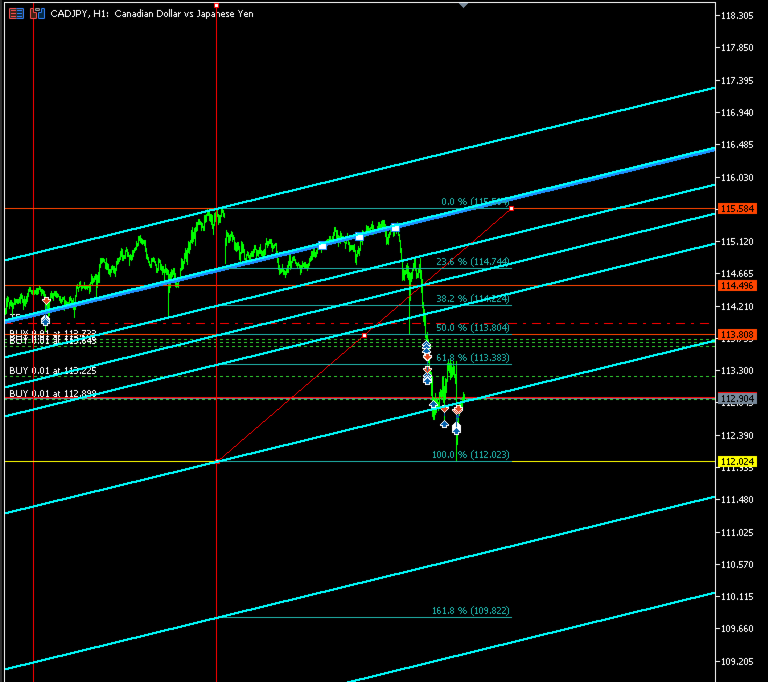
Descripción general: TrendLinesFromFiboAndTrend2 es una herramienta para MetaTrader 5 diseñada para clonar el ángulo y la velocidad de una línea de tendencia existente y proyectarla automáticamente a través de todos los niveles clave (retrocesos y extensiones) de un objeto Fibonacci dibujado en el gráfico.

Ventajas principales:

  • Proyección geométrica exacta: Mantiene la inclinación y duración exacta de la línea de tendencia de origen.

  • Proyección completa: Traza 9 líneas de soporte/resistencia dinámicas en niveles clave (0.0%, 23.6%, 38.2%, 50.0%, 61.8%, 100.0%, 161.8%, 200.0% y 261.8%).

  • Soporte multidireccional: Permite seleccionar la orientación del Fibonacci (Alcista o Bajista) para calcular correctamente las extensiones fuera del rango 0-100%.

  • Estilo personalizable: Configuración de color, estilo y grosor para diferenciar fácilmente los canales creados.

  • Ejecución ultra-rápida: Al ser un script de un solo paso, no consume recursos ni ralentiza el gráfico.

Cómo funciona:

  1. El script toma los puntos temporales y de precio de una línea de tendencia seleccionada para calcular su pendiente.

  2. Identifica el origen y los niveles de precio del Fibonacci especificado.

  3. Genera y dibuja automáticamente 9 líneas paralelas proyectadas desde el tiempo inicial del Fibonacci a lo largo de cada nivel.

Parámetros de entrada:

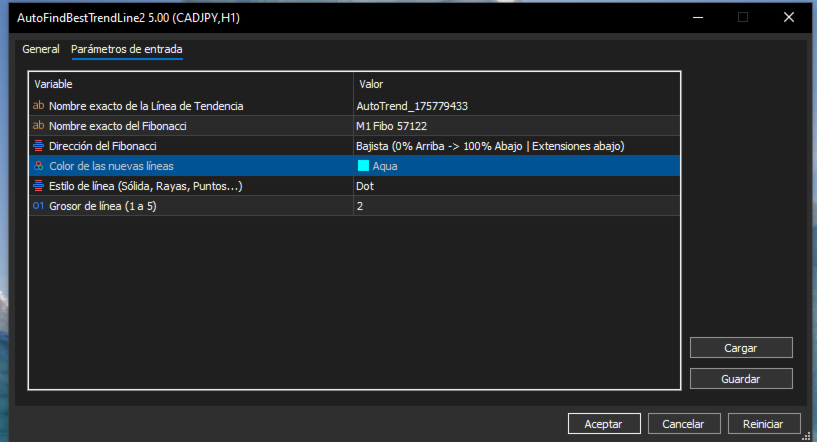
  • InpTrendName — Nombre exacto del objeto línea de tendencia en el gráfico (ej. AutoTrend_175779433).

  • InpFiboName — Nombre exacto del objeto Fibonacci en el gráfico (ej. M1 Fibo 57122).

  • InpFiboDirection — Orientación del Fibonacci (FIBO_ALCISTA o FIBO_BAJISTA).

  • InpLineColor — Color de las líneas proyectadas.

  • InpLineStyle — Estilo visual de la línea (sólida, puntos, guiones).

  • InpLineWidth — Grosor de la línea (1 a 5).

Uso recomendado: Combínelo con AutoFindBestTrendLine (o cualquier línea de tendencia manual) y un retroceso de Fibonacci para proyectar estructuras dinámicas de canales, tomar beneficios en extensiones y detectar confluencias clave en el gráfico.

//+------------------------------------------------------------------+

//|                                   TrendLinesFromFiboAndTrend2.mq5 |

//|                                  Copyright 2026                  |

//|                                                                  |

//+------------------------------------------------------------------+

#property copyright "Copyright 2026"

#property link      ""

#property version   "5.00"

#property script_show_inputs


// Definición de la dirección del Fibonacci para el panel de propiedades

enum ENUM_FIBO_DIR

{

   FIBO_ALCISTA = 0, // Alcista (0% Abajo -> 100% Arriba | Extensiones arriba)

   FIBO_BAJISTA = 1  // Bajista (0% Arriba -> 100% Abajo | Extensiones abajo)

};


// Parámetros de entrada configurables

input string          InpTrendName     = "AutoTrend_175779433"; // Nombre exacto de la Línea de Tendencia

input string          InpFiboName      = "M1 Fibo 57122";       // Nombre exacto del Fibonacci

input ENUM_FIBO_DIR   InpFiboDirection = FIBO_ALCISTA;          // Dirección del Fibonacci

input color           InpLineColor     = clrDodgerBlue;         // Color de las nuevas líneas

input ENUM_LINE_STYLE InpLineStyle     = STYLE_SOLID;           // Estilo de línea (Sólida, Rayas, Puntos...)

input int             InpLineWidth     = 2;                     // Grosor de línea (1 a 5)


//+------------------------------------------------------------------+

//| Script program start function                                    |

//+------------------------------------------------------------------+

void OnStart()

{

   string trendName = InpTrendName;

   string fiboName  = InpFiboName;


   // 1. Validar que la línea de tendencia exista y sea correcta

   if(ObjectFind(0, trendName) < 0)

   {

      Print("Error: No se encontró ninguna línea de tendencia con el nombre: ", trendName);

      return;

   }

   if((int)ObjectGetInteger(0, trendName, OBJPROP_TYPE) != OBJ_TREND)

   {

      Print("Error: El objeto '", trendName, "' no es una Línea de Tendencia.");

      return;

   }


   // 2. Validar que el objeto Fibonacci exista y sea correcto

   if(ObjectFind(0, fiboName) < 0)

   {

      Print("Error: No se encontró ningún objeto Fibonacci con el nombre: ", fiboName);

      return;

   }

   if((int)ObjectGetInteger(0, fiboName, OBJPROP_TYPE) != OBJ_FIBO)

   {

      Print("Error: El objeto '", fiboName, "' no es un Fibonacci.");

      return;

   }


   // 3. Obtener y ordenar cronológicamente la línea de tendencia (Izquierda a Derecha)

   datetime t_a = (datetime)ObjectGetInteger(0, trendName, OBJPROP_TIME, 0);

   double   p_a = ObjectGetDouble(0, trendName, OBJPROP_PRICE, 0);

   datetime t_b = (datetime)ObjectGetInteger(0, trendName, OBJPROP_TIME, 1);

   double   p_b = ObjectGetDouble(0, trendName, OBJPROP_PRICE, 1);


   datetime tr_start_time = (t_a <= t_b) ? t_a : t_b;

   datetime tr_end_time   = (t_a <= t_b) ? t_b : t_a;

   double   tr_start_price = (t_a <= t_b) ? p_a : p_b;

   double   tr_end_price   = (t_a <= t_b) ? p_b : p_a;


   datetime trDuration    = tr_end_time - tr_start_time;        

   double   trPriceDelta = tr_end_price - tr_start_price;      


   if(trDuration <= 0)

   {

      Print("Error: La duración de la línea de tendencia es inválida.");

      return;

   }


   // 4. Obtener los puntos físicos del Fibonacci en el gráfico

   datetime fibTime0  = (datetime)ObjectGetInteger(0, fiboName, OBJPROP_TIME, 0);

   double   f_p1      = ObjectGetDouble(0, fiboName, OBJPROP_PRICE, 0);

   double   f_p2      = ObjectGetDouble(0, fiboName, OBJPROP_PRICE, 1);


   double baseLow  = MathMin(f_p1, f_p2);

   double baseHigh = MathMax(f_p1, f_p2);

   double fibSpan  = baseHigh - baseLow;


   if(fibSpan == 0.0)

   {

      Print("Error: El rango del Fibonacci es cero.");

      return;

   }


   // Declaración de precios de referencia para 0% y 100% según el input elegido

   double price0   = 0.0;

   double price100 = 0.0;


   if(InpFiboDirection == FIBO_ALCISTA)

   {

      price0   = baseLow;  // 0.0% abajo

      price100 = baseHigh; // 100.0% arriba

   }

   else

   {

      price0   = baseHigh; // 0.0% arriba

      price100 = baseLow;  // 100.0% abajo

   }


   Print("==================================================");

   Print(" [CONFIGURACIÓN APLICADA]");

   Print(" Tendencia Usada : ", trendName);

   Print(" Fibonacci Usado : ", fiboName);

   Print(" Dirección Fibo  : ", (InpFiboDirection == FIBO_ALCISTA) ? "ALCISTA" : "BAJISTA");

   Print(" Fibo 0.0%       -> Precio: ", DoubleToString(price0, _Digits));

   Print(" Fibo 100.0%     -> Precio: ", DoubleToString(price100, _Digits));

   Print("==================================================");


   // Niveles solicitados (incluyendo extensiones)

   double fibLevels[9]   = {0.0, 23.6, 38.2, 50.0, 61.8, 100.0, 161.8, 200.0, 261.8};

   string fibLabels[9]   = {"0.0", "23.6", "38.2", "50.0", "61.8", "100.0", "161.8", "200.0", "261.8"};


   long uniqueBase = GetTickCount();

   int createdCount = 0;


   // 5. Crear las réplicas exactas respetando la dirección especificada

   for(int k = 0; k < 9; k++)

   {

      double levelPct = fibLevels[k];

      double levelPrice = 0.0;


      if(InpFiboDirection == FIBO_ALCISTA)

      {

         if(levelPct <= 100.0)

         {

            levelPrice = price0 + (fibSpan * (levelPct / 100.0));

         }

         else

         {

            double extFactor = (levelPct - 100.0) / 100.0;

            levelPrice = price100 + (fibSpan * extFactor); // Extiende hacia arriba

         }

      }

      else // FIBO_BAJISTA

      {

         if(levelPct <= 100.0)

         {

            levelPrice = price0 - (fibSpan * (levelPct / 100.0));

         }

         else

         {

            double extFactor = (levelPct - 100.0) / 100.0;

            levelPrice = price100 - (fibSpan * extFactor); // Extiende hacia abajo

         }

      }


      datetime new_t1 = fibTime0;

      double   new_p1 = levelPrice;


      datetime new_t2 = new_t1 + trDuration;

      double   new_p2 = new_p1 + trPriceDelta;


      string lineName = StringFormat("FiboTrend_%s_%d", fibLabels[k], uniqueBase + k);


      if(ObjectCreate(0, lineName, OBJ_TREND, 0, new_t1, new_p1, new_t2, new_p2))

      {

         ObjectSetInteger(0, lineName, OBJPROP_RAY_LEFT, true);

         ObjectSetInteger(0, lineName, OBJPROP_RAY_RIGHT, true);

         ObjectSetInteger(0, lineName, OBJPROP_COLOR, InpLineColor);

         ObjectSetInteger(0, lineName, OBJPROP_STYLE, InpLineStyle);

         ObjectSetInteger(0, lineName, OBJPROP_WIDTH, InpLineWidth);

         ObjectSetInteger(0, lineName, OBJPROP_SELECTABLE, true);

         ObjectSetInteger(0, lineName, OBJPROP_HIDDEN, false);

         createdCount++;

      }

   }


   ChartRedraw(0);

   Print("¡Éxito! Se han dibujado ", createdCount, " líneas utilizando la dirección configurada.");

}
Önerilen ürünler
NIVELES FIBONACCI 1.14 — Proyección de niveles Fibonacci personalizados Este script para MetaTrader 5 permite calcular y dibujar automáticamente niveles de Fibonacci personalizados a partir de dos precios conocidos y sus correspondientes niveles Fibonacci. La herramienta utiliza una relación matemática lineal entre los dos puntos introducidos para proyectar cualquier nivel Fibonacci que el usuario desee. ¿Cómo funciona? El usuario debe introducir: Precio del Punto A Nivel Fibonacci asignado al P
FREE
Analyze Less. Understand More. Trade with Greater Confidence. BMAE (Best Market Analyser Edge) is a semi-automated trading assistant designed to help beginner, intermediate, and experienced traders analyze the markets more efficiently, identify high-probability trading opportunities, and gradually build their trading independence. Less hesitation. More structure. More confidence in every trading decision. Trading Shouldn't Be This Complicated... At first, everything seems simple. You open a char
Başlık: Auto Multi Support & Resistance Pro - Akıllı Destek Direnç Çizgileri [Açıklama] Destek ve direnç çizgilerini manuel olarak çizmeyi bırakın! "Auto Multi Support & Resistance Pro" algoritmamızın scalping ve günlük işlemleriniz için en doğru pivot noktalarını bulmasına izin verin. Altın (XAUUSD) ve Endeksler gibi yüksek volatiliteli ve yanıltıcı kırılmaların (whipsaw) yaygın olduğu varlıkların kısa zaman dilimleri (M1, M5, M15) için mükemmel bir şekilde optimize edilmiştir. [Önemli Özell
FREE
CRT Bollinger Bands
Jose Antonio Cantonero Velasco
EA CRT Bollinger Bands - Sistema CRT (Candle Range Theory) con Bandas de Bollinger Fundamento Teórico Implementación de la   Candle Range Theory (CRT)   integrada con análisis de Bandas de Bollinger para la identificación sistemática de oportunidades de trading. Candle Range Theory (CRT) Teoría del Rango : Análisis de la estructura completa de la vela (cuerpo y mechas) Proporciones Armónicas : Relaciones específicas entre componentes de la vela Umbrales Operativos : Parámetros definidos para mec
FREE
NEXA Breakout Velocity NEXA Breakout Velocity, kanal kırılımı mantığına dayalı, ROC (fiyat değişim hızı), hacim filtresi ve ATR tabanlı risk yönetimi ile desteklenen otomatik işlem sistemidir. Sistem, fiyatın bir bant aralığını artan momentum ve işlem hacmi ile birlikte kırdığı volatilite genişleme dönemlerini tespit etmek için tasarlanmıştır. Tüm sinyaller yalnızca kapanmış mumlar üzerinden hesaplanır. Aynı sembolde aynı anda yalnızca bir pozisyon tutulur. Strateji Genel Bakış Sistem aşağıdaki
FREE
ZigZag WaveSize MT4'ün önceki sürümünün geliştirilmesi  ZigZag WaveSize MT4 ZigZag WaveSize -  noktalar cinsinden dalga uzunluğu bilgisi, seviyeler ve farklı uyarı mantığı eklenmiş değiştirilmiş standart ZigZag göstergesi Genel İyileştirmeler: MetaTrader 5 için kod uyarlaması Grafik nesneleriyle çalışmanın optimize edilmesi Yeni Özellikler: Ekstremumlarda yatay seviyeler Seviye tipi seçimi: yatay/ışınlar/bölümler Likid seviyeler filtresi (fiyat tarafından test edilmemiş) Kırılma için tampon: y
FREE
Gold Session Levels Pro MT5 is a manual MetaTrader 5 indicator designed to display relevant intraday reference levels for XAUUSD. The indicator automatically calculates and draws the Asian range, its midpoint, the daily open, the London and New York opens, the previous trading day's high and low, and targets derived from the size of the Asian range. FEATURES - Dynamic Asian range while the configured session is active. - Range freezing after the configured Asian session close. - Asian range
FREE
MultiTimeframe Trend Pro shows you the market direction across 7 timeframes at a glance. Clear colors, no repainting, fully customizable. Perfect as a quick filter for any intraday or swing strategy. Key Features Supports M1, M5, M15, H1, H4, D1 and W1 Colors MediumSeaGreen when the close is above the MA, and Red when below No repainting → always based on the last closed candle for each timeframe Fully customizable: MA period (200 by default) font, size and colors X/Y offsets, spacing
FREE
AutoFindBestTrendLine — Detector Automático de Líneas de Tendencia Descripción general: AutoFindBestTrendLine es una utilidad para MetaTrader 5 que analiza el historial del gráfico y detecta automáticamente la mejor línea de tendencia posible, ya sea de máximos (resistencias), mínimos (soportes) o ambos. El script identifica los dos puntos más relevantes y dibuja una línea óptima basada en el número de toques reales sobre el precio. Ventajas principales: Detección automática de líneas de tendenc
FREE
Modify and update SL or TP
Hossam Mohamed Sayed Sayed Ebid
The Manual Adjust SL/TP EA streamlines your risk management by enabling you to manually specify new SL and TP price levels for your open positions. The Levels is Price value and is NOT a pips or points distance from the Entry Levels. The EA automatically validates your inputs against the broker’s stop-level requirements (minimum distance) to prevent order adjustment rejections. It offers filtering options so you can choose to apply adjustments only to Buy orders, Sell orders, or both. Key Featur
FREE
QTS Gold Guardian AI Kurumsal düzeyde, sinir ağı ile güçlendirilmiş Altın Scalper. Akıllı Koruma, Sermaye Koruması ve Volatilite Adaptasyonu özelliklerine sahiptir. Tehlikeli Martingale stratejisi içermez. QTS Gold Guardian AI, XAUUSD (Altın) scalping işlemleri için nihai çözümdür ve değişken piyasa koşullarında hayatta kalmak üzere tasarlanmıştır. Hesapları batıran geleneksel scalper'ların aksine, QTS öncelikle Sermaye Korumasına odaklanır. Temel Özellikler: Sinir Ağı Mantığı: M5/H1 zam
Free automatic Fibonacci is an indicator that automatically plots a Fibonacci retracement based on the number of bars you select on the BarsToScan setting in the indicator. The Fibonacci is automatically updated in real time as new highest and lowest values appears amongst the selected bars. You can select which level values to be displayed in the indicator settings. You can also select the color of the levels thus enabling the trader to be able to attach the indicator several times with differe
FREE
MCR OneShot Anti-Martingala — descripción para MetaTrader 5 Script de ejecución única para ADAUSD. Aplica una progresión anti-martingala: utiliza una exposición objetivo de 5.000 USD como base y la eleva hasta 10.000 USD solo si la última operación propia cerró con beneficio; tras una pérdida, vuelve al nivel base. La compra o venta requiere confirmación expresa. Antes de enviar la orden, el script verifica la cuenta, el servidor, la cotización y las condiciones de volumen del bróker, y calcula
The jcoworld OTE EA is an automated trading bot for MetaTrader 5 built on Smart Money Concepts (SMC) . It accurately identifies market impulse moves and automatically enters trades within the Optimal Trade Entry (OTE) zone (61.8% – 79.0% Fibonacci) as soon as a confirmation candle closes. Optimized for: XAUEUR, XAUUSD, and Major Forex Pairs Features: Automatic risk management, dynamic lot sizing & automated Stop Loss/Take Profit. Try for free: This demo version is 100% free! Pricing Plans for Fu
FREE
Boleta Global Lab v1.1 Pensando em proporcionar uma experiência operacional mais intuitiva e eficiente, desenvolvemos uma boleta exclusiva para MetaTrader 5 (MT5) com interface inspirada na boleta do Profit, amplamente utilizada por operadores da B3. O objetivo é oferecer uma adaptação mais rápida para quem já está familiarizado com o ambiente operacional do Profit, tornando a execução das ordens mais prática, organizada e confortável. Principais características * Interface inspirada na bol
FREE
Algo Trading Indicaor MT5 The ATC ALGO indicator has been developed to work on the MetaTrader 5 platform. It has the same specifications and zones as the MetaTrader 4 version. There may be slight lag, which we believe is due to differences in MetaTrader 5 programming. We will work on improving it, God willing. MT5 Version                    https://www.mql5.com/en/market/product/170028 MT4 Version                    https://www.mql5.com/en/market/product/88034 With this indicator , you’ll have
UMNi-CMND MT5 Remote Command & Trade Control System UMNi-CMND turns Telegram into a full remote control panel for your MetaTrader terminal. Send commands from your phone to open trades, manage positions, query account status, and receive complete trade telemetry — all without touching the platform. KEY FEATURES Full remote trade execution via Telegram Open, close, and manage positions by command Move SL/TP, set breakeven, partial close Live status, account, and position q
Snipper ZZ
Rudianto Spdi Mhi
Sniper ZZ — Precision Entry. Clean Signals. Sniper ZZ is a lightweight MetaTrader 5 indicator that automatically draws Fibonacci retracement levels 0.382 and 0.618 from confirmed ZigZag swings. No more manual Fibonacci drawing — every time a new swing is confirmed, Sniper ZZ instantly calculates and displays the exact 0.382 and 0.618 retracement levels with price labels. WHAT MAKES SNIPER ZZ DIFFERENT? Most Fibonacci indicators alert you on EVERY touch — flooding you with false signals. Snip
FREE
BreakoutMatrix Pro
Nadjib Amari
5 (2)
BreakoutMatrix Pro — Kurumsal Seviye Breakout Sistemi BreakoutMatrix Pro, piyasa momentumundan kazanç sağlamak için tasarlanmış otomatik, kurumsal seviye bir breakout (kırılım) ticaret sistemidir. Bir Altın (XAU/USD) ticaret makinesi olarak son derece optimize edilmiş olsa da, evrensel mimarisi sayesinde tüm majör sembollere uyum sağlayabilir. Bitmek bilmeyen optimizasyonları unutun. Temel strateji tek bir ana girdiye dayanır: Volatilite Ölçekleme Faktörü (Volatility Scale Factor). Geriye Dön
Crow Rango Indicator
Cristobal Hidalgo Soriano
CROW RANGO INDICATOR – Session Range Tool for MT5 Identify key market ranges clearly and automatically, and trade volatility with greater precision. CROW RANGO INDICATOR is designed for traders who focus on market sessions, range breakouts, and impulsive price movements , helping to visualize consolidation zones and potential entry points. MAIN FEATURES Draws up to 3 independent ranges per day Fully customizable start and end times Displays key levels: Range High Range Low Midline (eq
FREE
— Ultra-Short-Term AI Decision Tool integrated with the dedicated chart indicator Super Fast Second Chart — This product is an AI auto-decision system fully integrated with a dedicated chart indicator . Simply save a screenshot of your chart and the AI will return, within seconds, multi-timeframe analysis + direction + confidence level + reversal conditions + next opportunity . When combined with the dedicated chart indicator, the AI also receives CSV data (10–20 bars of numerical information) t
FREE
Trend Alignment Scanner Lite The Essential Volatility Direction Tool for MetaTrader 5 Looking for a reliable way to gauge market direction without cluttering your charts? Trend Alignment Scanner Lite delivers our core, powerful mathematical engine to your terminal for free. This version is designed for retail day-traders who want to experience the accuracy of our Volatility Direction Score (VDS) on major pairs before scaling up to institutional-grade multi-asset scanning. Pro vs. Lite Compari
FREE
IAMFX offers the ultimate solution to make trading easier and more flexible on IAMFX Web  using IAMFX Agent . With our exclusive IAMFX-Agent and IAMFX-Center, you can effortlessly manage your trading anytime, anywhere through web and mobile interfaces. Fully compatible with both web and mobile environments,   IAMFX allows real-time multi-account management and monitoring with a simple installation. IAMFX Benefits Manage multiple MT5 accounts Easy orders with market, stop and limited Manage orde
FREE
Aurum Engine
Piotr Stepien
Aurum Engine: Institutional Black-Box Quantitative Scalper Trading Gold requires far more than lagging retail indicators. Aurum Engine is an institutional-grade quantitative EA designed exclusively for XAUUSD, powered by a proprietary mathematical black-box that operates completely independent of standard technical indicators (no RSI, MACD, or Moving Averages). Instead of following delayed chart signals, the engine executes advanced statistical formulas derived from classical mathematical princi
Mean reversion EA with AUD,CAD,NZD Trading Camp MT5 Trading Camp is an EA that focuses on three currencies (AUD, CAD, and NZD) with strong mean reversion tendencies and performs a contrarian strategy. Although a grid is used as the trading technique, it is designed with a security feature with straddling of the trade, making it difficult to get stopped out. Various filters are also available to carefully select entries (therefore, the entry frequency is not high). In addition, various input para
Fibonacci Moving Averages
Brendan Jonathan Stoyanowski-campbell
2 (1)
OVERVIEW The Fibonacci Moving Averages are a toolkit which allows the user to configure different types of Moving Averages based on key Fibonacci numbers. Moving Averages are used to visualise short-term and long-term support and resistance which can be used as a signal where price might continue or retrace. Moving Averages serve as a simple yet powerful tool that can help traders in their decision-making and help foster a sense of where the price might be moving next. The aim of this scrip
FREE
This indicator automatically identifies liquidity levels using swing fractals and tracks when price sweeps through them. Works on any symbol and timeframe with full multi-timeframe support. Features: — Detects swing highs and lows via a fractal method (configurable bars left & right) on a selected timeframe. Active levels are displayed as rays extending to the right; swept levels turn into dashed lines ending at the sweep candle. — Plots Previous Day (PDhigh / PDlow), Previous Week (PWhigh / PWl
FREE
CandleBot
Mithlesh Kumar Mandal
Introducing CandleBot - Candlestick Formasyonlarını Tanımlama ve İşlem Yapma İçin Mükemmel ve Ücretsiz Aracınız! CandleBot ile piyasalarda avantajı ele geçirin; boğa ve ayı tüneli, sabah ve akşam yıldızı, çekiç gibi formasyonları kolayca tanıyarak işlem yapın. Belirli bir süre içinde açılış, yüksek, düşük ve kapanış fiyatlarından türetilen mum formasyonları, fiyat hareketlerinin görsel temsilcileri olarak işlev görür ve traderlara piyasa duyarlılığını analiz etme ve potansiyel tersine dönüşleri
FREE
Quantum Atlas
Manuel Fernandez Barranco
5 (2)
Ecosistema analítico institucional para MT5 que integra 7 sistemas de Volume Profile, Heatmap, Order Flow y sentimiento en un solo indicador modular. Ideal para análisis de liquidez y confluencias. busca la configuración y el mercado que mas se adapte a tu operativa y disfruta de este gran trabajo . -EL PRODUCTO MAS PROMETEDOR DE MIS SISTEMAS  https://www.mql5.com/es/market/product/191004?source=Site -TODOS MIS PRODUCTOS  https://www.mql5.com/es/users/manu28487/seller Volume Profile Heatmap & Ad
FREE
Fractal Structure Auto Fibonacci This tool is designed for price action traders and structural analysts who want to optimize their charting. It automatically identifies valid market swings using fractal logic, draws clear ZigZag lines, and automatically draws Fibonacci retracement levels for the most recent trading range. Key Features Dynamic Fractal Detection: Identifies valid swing peaks and troughs based on a user-defined review period (n). It filters out market noise and visually marks
FREE
Bu ürünün alıcıları ayrıca şunları da satın alıyor
Trade Assistant MT5
Evgeniy Kravchenko
4.43 (216)
It helps to calculate the risk per trade, the easy installation of a new order, order management with partial closing functions, trailing stop of 7 types and other useful functions. Additional materials and instructions Installation instructions - Application instructions Line function -   shows on the chart the Opening line, Stop Loss, Take Profit. With this function it is easy to set a new order and see its additional characteristics before opening.   Risk management  - The risk calculation
Trade Manager EA’ye hoş geldiniz! Ticaretin daha sezgisel, hassas ve verimli hale gelmesi için tasarlanmış nihai risk yönetim aracı ile tanışın. Bu sadece bir emir verme aracı değil; ticaret planlaması, pozisyon yönetimi ve risk kontrolü için kapsamlı bir çözüm. İster yeni başlayan bir yatırımcı olun, ister deneyimli bir trader ya da hızlı emir gerektiren bir scalper, Trade Manager EA ihtiyaçlarınıza uyum sağlar ve forex, endeksler, emtialar ve kripto paralar dahil tüm piyasalarda esneklik sunar
Local Trade Copier EA MT5
Juvenille Emperor Limited
4.94 (149)
Local Trade Copier EA MT5, aynı Windows bilgisayarı veya Windows VPS üzerinde çalışan birden fazla MetaTrader 5 hesabı arasında işlemleri kopyalamak ve yönetmek için hızlı ve esnek bir işlem kopyalayıcıdır. Yerel işlem senkronizasyonunu, Receiver tarafında lot büyüklüğü, risk yönetimi, işlem filtreleme, sembol eşleştirme, işlem yönetimi ve hesap koruması kontrolleriyle birleştirir. Transmitter ve Receiver terminallerinizi yaklaşık 1 dakika içinde ayarlayın ve aynı veya farklı brokerlardaki hesa
Telegram to MT5 Multi-Channel Copier   , Telegram ve Discord kanallarınızdaki alım-satım sinyallerini doğrudan MetaTrader 5'e otomatik kopyalar. Bot yok, tarayıcı uzantısı yok, elle kopyalama yok. Sinyal Telegram'a veya Discord'a düşer ve EA birkaç saniye içinde terminalinizde işlemi açar. Ve bir kanalı kopyalamadan önce, yerleşik backtester o kanalın hesabınızda ne yapmış olacağını gösterir. Ürün iki bileşenden oluşur: Telegram kanallarınızı dinleyen bir Windows uygulaması ve sinyalleri MT5 ter
Farmed Hedge Yield Farming | All Markets (Manual - Hybrid - Semi/Automated EA) VERIFIED TRADING RESULTS - Farmed Hedge Yield Axi Copy:  https://www.mql5.com/en/signals/2356376 - Farmed Hedge Yield Exn Copy:   https://www.mql5.com/en/signals/2356404 - Farmed Hedge Yield V Copy:  https://www.mql5.com/en/signals/2357156 IMPORTANT NOTICE: FarmedHedge is a MANUAL-FOCUSED TRADING UTILITY ,not a fully automated EA. Results shown on this Signal include manual trades and overall strategic management.
Telegram sinyallerini kendi işlem kurallarınızla kopyalayın Telegram to MT5 Signal Trader , herkese açık ve özel Telegram kanallarındaki ve gruplarındaki metin tabanlı işlem sinyallerini otomatik olarak MetaTrader 5'e kopyalar. Tek bir masaüstü uygulamasından birden fazla sinyal sağlayıcısını ve MT5 hesabını yönetin; her sağlayıcı için ayrı risk ve işlem ayarları belirleyin. Sinyal kopyalamak için Telegram botu veya API kurulumu gerekmez. Kendi Telegram hesabınızla telefon numarası veya QR kod k
TradePanel MT5
Alfiya Fazylova
4.88 (170)
Trade Panel, çok işlevli bir ticaret asistanıdır. Uygulama, manuel ticaret için 50'den fazla ticaret fonksiyonu içerir ve çoğu ticaret görevini otomatikleştirmeyi mümkün kılar. Uygulama talimatları: https://www.mql5.com/en/blogs/post/756482 Demo hesabı için uygulamanın deneme sürümü: https://www.mql5.com/en/blogs/post/750865 Uygulamayı nasıl kurulur: https://www.mql5.com/en/blogs/post/756239 Uygulamayı görsel modda nasıl test edilir: https://www.mql5.com/en/blogs/post/770277 Uygulamayı VPS MetaT
Strategy Ledger Pro
Abdullah Uygar Tuna
5 (12)
Şimdi Türkçe dil desteği ile. Strategy Ledger Pro , MetaTrader 5 için salt okunur bir hesap analiz panelidir. Hesap sonuçlarını Uzman Danışman (EA), strateji, sembol ve magic numaraya göre ayırır; böylece her birinin gerçekte ne kattığını görürsünüz. Panel 11 dilde kullanılabilir: English, Français, Deutsch, Español, Italiano, Português, Русский, Türkçe, 中文, 日本語 ve 한국어. Demoyu indirmeden önce. Market, her ücretli ürünün demosunu yalnızca Strateji Test Cihazında çalıştırır. Bu panel kendi hesabı
================================================================================ POC BREAKOUT - V20.72. Full Professional Grade Toolkit ================================================================================ POC Breakout is a full MetaTrader 5 trading dashboard for discretionary traders who want breakout signals, Point of Control (POC) context, volume profiles, order flow, market structure, news, alerts, and advanced trade planning in one professional workspace. Attached directly to you
News Trade EA MT5
Konstantin Kulikov
4.55 (11)
Birkaç yıldır kullandığım çok yararlı bir robotu tanıtıyorum. Hem yarı otomatik hem de tam otomatik modlarda kullanılabilir. >>> Chat <<< Program, ekonomik takvim haberlerinde esnek ticaret ayarlarını içeriyor. Stratejiler test cihazında kontrol edilemez. Sadece gerçek bir iş. Terminal ayarlarında, haberler sitesini izin verilen URL'ler listesine eklemeniz gerekir. Servisler > Araçlar > Danışmanlar'a tıklayın. "Aşağıdaki URL'ler için WebRequest'e İzin Ver:" kutucuğunu işaretle. Aşağıdakini ekl
Master Your Trading Discipline   Stop losing your hard-earned gains to overtrading and emotional decisions. The Discipline Tool is your ultimate trading assistant, ensuring strict risk management in real-time. Key Protection Features: Advanced Drawdown Defense : Automatically halts trading if your daily drawdown exceeds a preset threshold (percentage or dollar amount). Real-Time Equity Lock : Safeguard profits by referencing peak equity, ensuring drawdown stays within control. Hard Profit Target
Dealer's Panel No signal decides anything here — a hand does. One click, and the panel calculates what's underneath: lot size from risk, target from a 30-step balance ladder that remembers exactly how far an account has climbed. Toggle between market and pending without touching an input field. Set a stop, and the take-profit can write itself — a fixed share of the balance, translated into price with no arithmetic left for the trader to get wrong. One trade live at a time; it won't let a seco
Exp COPYLOT CLIENT for MT5
Vladislav Andruschenko
3.97 (35)
MetaTrader 5 için profesyonel işlem kopyalayıcı MetaTrader için hızlı, profesyonel ve güvenilir bir işlem kopyalayıcı . COPYLOT , MT4 ve MT5 terminalleri arasında Forex işlemlerini kopyalamanıza olanak tanır ve Hedge ile Netting hesaplarını destekler. COPYLOT MT5 sürümü şunları destekler: - MT5 Hedge → MT5 Hedge - MT5 Hedge → MT5 Netting - MT5 Netting → MT5 Hedge - MT5 Netting → MT5 Netting - MT4 → MT5 Hedge - MT4 → MT5 Netting MT4 sürümü Tam açıklama + DEMO + PDF Nasıl satın alınır Nasıl kurul
HINN MAGIC ENTRY – the ultimate tool for entry and position management! SIMPLE. FASTEST. INTUITIVE. MAX AUTOMATED. Place orders by selecting a level directly on the chart! full description   ::  demo-version  :: 60-sec-video-description Key features: - Market, limit, and pending orders - Automatic lot size calculation - Automatic spread and commission accounting - Unlimited partitial take-profits  - Breakeven and trailing stop-loss and take-profit  functions - Invalidation leves - Intuitive, a
Get Ready for Major New Features in Our Next Update — Version 2.52 Coming Soon! [NEW]  We’re taking market analysis to the next level with 4   new features designed to meet your trading needs. Introducing: TRADE OVERVIEW DASHBOARD  CONFLUENCE AT ZONE  OTE   Strong & Weak High/Low  1. TRADE OVERVIEW DASHBOARD A dashboard that helps you see the overall market picture more easily, with key information from multiple timeframes and trading guidance to support your trading decisions, helping you an
The product will copy all telegram signal to MT5 ( which you are member) , also it can work as remote copier.  Easy to set up, copy order instant, can work with almost signal formats, image signal,  s upport to translate other language to English Work with all type of channel or group, even channel have "Restrict Saving Content", work with  multi channel, multi MT5 Work as remote copier: with signal have ticket number, it will copy exactly via ticket number. Support to backtest signal. How to s
EASY Insight AIO – Akıllı ve zahmetsiz yatırım için hepsi bir arada çözüm Genel Bakış Tüm piyasayı — Forex, Altın, Kripto, Endeksler ve hatta Hisseler — saniyeler içinde, manuel grafik incelemesi, gösterge kurulumu ya da karmaşık ayarlar olmadan analiz edebildiğinizi hayal edin. EASY Insight AIO , yapay zekâ destekli yatırım için nihai, kullanıma hazır dışa aktarma aracınızdır. Tüm piyasanın kapsamlı bir anlık görüntüsünü tek bir temiz CSV dosyasında sunar; bu dosya ChatGPT, Claude, Gemini, Pe
Telegram To MT5 — Sinyal Kopyalayıcı Telegram kanallarınızdaki işlem çağrılarını gerçek MT5 emirlerine dönüştürün — otomatik olarak, istediğiniz kadar hesapta ve risk ile kurallar tamamen sizin kontrolünüzde. Telegram To MT5, Telegram'da zaten takip ettiğiniz VIP / sinyal kanallarını MetaTrader 5 terminalinize bağlar. Ücretsiz bir eşlik eden masaüstü uygulaması mesajları okur (botlara izin vermeyen kanallardan bile), ve bu Expert Advisor bunları hesabınızda yürütür — kendi risk ayarlarınızı, sem
MT5 to Telegram Signal Provider , hesabınızı bir sinyal sağlayıcı haline getirerek belirtilen sinyalleri Telegram'ın sohbetine, kanalına veya grubuna göndermeyi sağlayan kullanımı kolay, tamamen özelleştirilebilir bir araçtır. Rakip ürünlerin çoğunun aksine, DLL içe aktarması yapmaz. [ Demo ] [ Kılavuz ] [ MT4 Versiyonu ] [ Discord Versiyonu ] [ Telegram Kanalı ]  New: [ Telegram To MT5 ] Kurulum Adım adım bir kullanıcı kılavuzu mevcuttur. Telegram API'si hakkında bilgi gerekmemektedir; ihtiyac
Power Candles Strateji Tarayıcısı - Kendi Kendini Optimize Eden Çoklu Sembol Kurulum Bulucu Power Candles Strateji Tarayıcısı , Power Candles göstergesini çalıştıran aynı kendinden optimize edici motoru, Piyasa İzleyicinizdeki her sembol üzerinde yan yana çalıştırır. Tek bir panel, şu anda istatistiksel olarak hangi sembollerin işlem yapılabilir olduğunu, her birinde hangi stratejinin kazandığını, en uygun Stop Loss / Take Profit çiftini gösterir ve yeni bir sinyal geldiği anda size bildirim gön
The Patch It never opens a trade. It walks behind the ones that did. Every open position, every pending order — checked twice a second for the one thing that's easy to forget: a stop, a target. Found bare, it doesn't ask. It writes the missing number in, measured in points from wherever the position began, and moves on to the next. No strategy, no opinion on direction. Just the quiet assumption that nothing should ever sit on the market unprotected — not because someone decided it shouldn't,
Grid Manual MT5
Alfiya Fazylova
4.73 (22)
Grid Manual, sipariş ızgarasıyla çalışmak için kullanılan bir ticaret yardımcı programıdır. Yardımcı program evrenseldir, esnek ayarlara ve sezgisel bir arayüze sahiptir. Sadece kayıpların ortalaması yönünde değil, aynı zamanda kazanç artışı yönünde de bir emir ızgarası ile çalışır. Tüccarın bir emir ızgarası oluşturmasına ve eşlik etmesine gerek yoktur, bu yardımcı programı yapacaktır. Emri açmanız yeterlidir ve Grid manual otomatik olarak ona bir emir ızgarası oluşturacak ve kapanana kadar ona
Signal TradingView to MT5 Pro Automator TradingView ve MetaTrader 5 arasında anında profesyonel uygulama TradingView alarmları ile MT5'teki gerçek uygulama arasındaki en güçlü iletişim köprüsüyle ticaret stratejinizi otomatikleştirin. Hız, esneklik ve kusursuz risk yönetimi talep eden yatırımcılar için tasarlanan bu Uzman Danışman (Expert Advisor), herhangi bir alarm mesajını hassas bir piyasa (market) veya limit emrine dönüştürür. GÜÇLÜ YÖNLER VE AVANTAJLAR Evrensel Ayrıştırma Motoru (Tescilli)
Desteğe mi ihtiyacınız var? Nasıl kurulur? Sorunuz mu var? Buradan kendi dilinizde sorun, hızlı yanıt: https://www.mql5.com/en/market/product/139088/comments Çalışan Demo İndir Copy Cat More (Taklitçi Kedi) — İşlem Kopyalayıcı (Trade Copier) MT5 , yerel bir işlem kopyalayıcı ve bugünün ticaret zorlukları için tasarlanmış eksiksiz bir risk yönetimi ve yürütme çerçevesidir. Prop firm challenge'larından kişisel portföy yönetimine kadar, sağlam yürütme, sermaye koruması, esnek yapılandırma ve geli
Your EAs cannot see each other, but Anchor can. Anchor gives you one place to coordinate your EAs, manage risk, and decide when trading is allowed. It works alongside the trading bots you already use without any changes to them. The Problem One EA opens a trade. Then another starts trading. The next thing you know, you wake up to multiple grids built across your account. Each EA may be doing exactly what it was designed to do, but together they can place far more risk on your account than you in
Trade copier MT5
Alfiya Fazylova
4.61 (57)
Trade Copier, ticaret hesapları arasındaki işlemleri kopyalamak ve senkronize etmek için tasarlanmış profesyonel bir yardımcı programdır. Kopyalama, tedarikçinin hesabından/terminalinden alıcının aynı bilgisayarda veya vps'de kurulu olan hesabına/terminaline gerçekleşir. Satın almadan önce demo sürümünü bir demo hesabında test edebilirsiniz. Demo versiyonu burada . Tüm talimatlar burada . Ana işlevler ve avantajlar: Emirlerin kopyalanmasını destekler: МТ5> МТ5, МТ4> МТ5, МТ5> МТ4. Emirlerin kopy
Telegram'dan MT5'e:   Nihai Sinyal Kopyalama Çözümü Telegram'dan MT5'e işlemlerinizi basitleştirin, DLL'lere ihtiyaç duymadan işlem sinyallerini doğrudan Telegram kanallarından ve sohbetlerinden MetaTrader 5 platformunuza kopyalayan modern araç. Bu güçlü çözüm hassas sinyal yürütme, kapsamlı özelleştirme seçenekleri sağlar, zamandan tasarruf sağlar ve verimliliğinizi artırır. [ Instructions and DEMO ] Temel Özellikler Doğrudan Telegram API Entegrasyonu Telefon numarası ve güvenli kod ile kimlik
Bu ürün, haber saatlerinde tüm uzman danışmanları ve manüel grafikleri filtreler, böylece manüel ticaret kurulumlarınızı veya diğer uzman danışmanlar tarafından girilen işlemleri yok edebilecek ani fiyat dalgalanmaları konusunda endişelenmenize gerek kalmaz. Bu ürün, herhangi bir haber yayınlanmadan önce açık pozisyonlarınızı ve bekleyen emirlerinizi yönetebilen tam bir sipariş yönetim sistemi ile birlikte gelir.   The News Filter'ı   satın aldığınızda, gelecekteki uzman danışmanlar için yerleşi
MetaTrader 5 için Trading Panel — grafik ve klavyeden profesyonel tek tıkla işlem kontrolü Aktif traderlar için geliştirilmiş güçlü bir Trading Panel; işlemleri standart MetaTrader arayüzüne göre çok daha hızlı açmanıza, yönetmenize ve kapatmanıza yardımcı olur. Bu çözüm; pozisyonları, bekleyen emirleri, toplam kârı ve işlem yürütmesini tek bir profesyonel çalışma alanında kontrol etmek isteyen kullanıcılar için tasarlanmıştır. Bu sadece sıradan bir yardımcı araç değildir. MetaTrader 5 için ger
Floor Watch
Syed Tauqeer Hussain Shah
Floor Watch One number, watched every thirty seconds: how far equity has fallen since the day began — or since its highest point, if it's told to trail the peak instead of the open. Cross the line and it doesn't argue. Every open position closes, every pending order vanishes, and anything that slips through afterward gets shut the moment it appears. Not asked. Removed. The floor holds until the clock turns 5 AM Pakistan time — then, and only then, does the day start over. One rule. No except
Yazarın diğer ürünleri
AJUSTAR TP SEGÚN LÍNEA DE TENDENCIA — Modificación Dinámica de Take Profit en MT5 Este script para MetaTrader 5 permite proyectar el precio actual de cualquier línea de tendencia presente en el gráfico y asignarlo automáticamente como Take Profit (TP) a las posiciones abiertas que cumplan con los criterios de filtrado seleccionados. Es una herramienta imprescindible para traders que proyectan sus objetivos de salida basándose en estructuras diagonales, canales de precio, directrices de tendencia
FREE
AutoFindBestTrendLine — Detector Automático de Líneas de Tendencia Descripción general: AutoFindBestTrendLine es una utilidad para MetaTrader 5 que analiza el historial del gráfico y detecta automáticamente la mejor línea de tendencia posible, ya sea de máximos (resistencias), mínimos (soportes) o ambos. El script identifica los dos puntos más relevantes y dibuja una línea óptima basada en el número de toques reales sobre el precio. Ventajas principales: Detección automática de líneas de tendenc
FREE
NIVELESFIBONACCI2.12 — Órdenes Pendientes sobre Niveles Fibonacci Personalizados Este script para MetaTrader 5 permite colocar automáticamente órdenes pendientes de compra o venta utilizando como referencia los niveles Fibonacci horizontales previamente dibujados en el gráfico. El script está diseñado para funcionar conjuntamente con NIVELESFIBONACCI1.1 , aunque puede utilizar cualquier conjunto de líneas horizontales que siga la misma estructura de nombres mediante el prefijo configurado. La pr
FREE
NIVELES FIBONACCI 1.14 — Proyección de niveles Fibonacci personalizados Este script para MetaTrader 5 permite calcular y dibujar automáticamente niveles de Fibonacci personalizados a partir de dos precios conocidos y sus correspondientes niveles Fibonacci. La herramienta utiliza una relación matemática lineal entre los dos puntos introducidos para proyectar cualquier nivel Fibonacci que el usuario desee. ¿Cómo funciona? El usuario debe introducir: Precio del Punto A Nivel Fibonacci asignado al P
FREE
Filtrele:
Değerlendirme yok
Değerlendirmeye yanıt