GOLD Cat EA
- Experts
- Version: 1.2
- Activations: 5

Gold Cat EA is an automated trading system for MetaTrader 5, designed for the XAUUSD M15 chart. The product uses a trend-following approach.
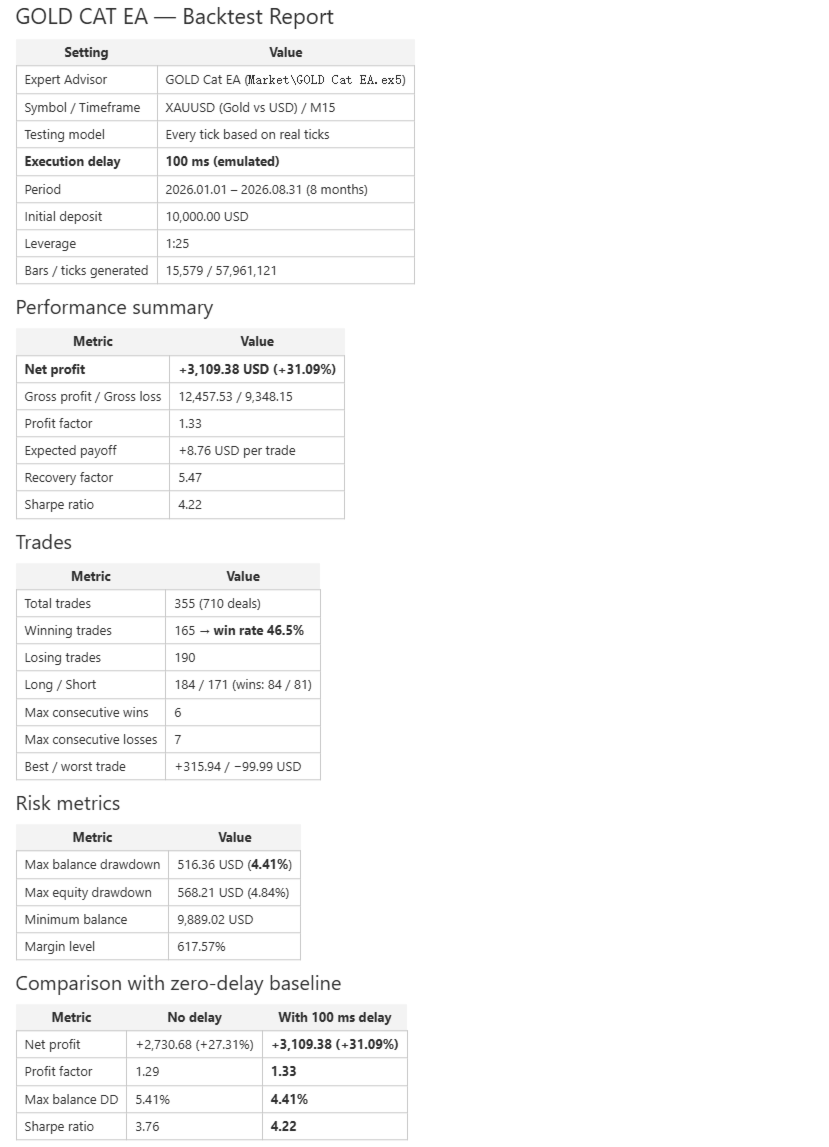
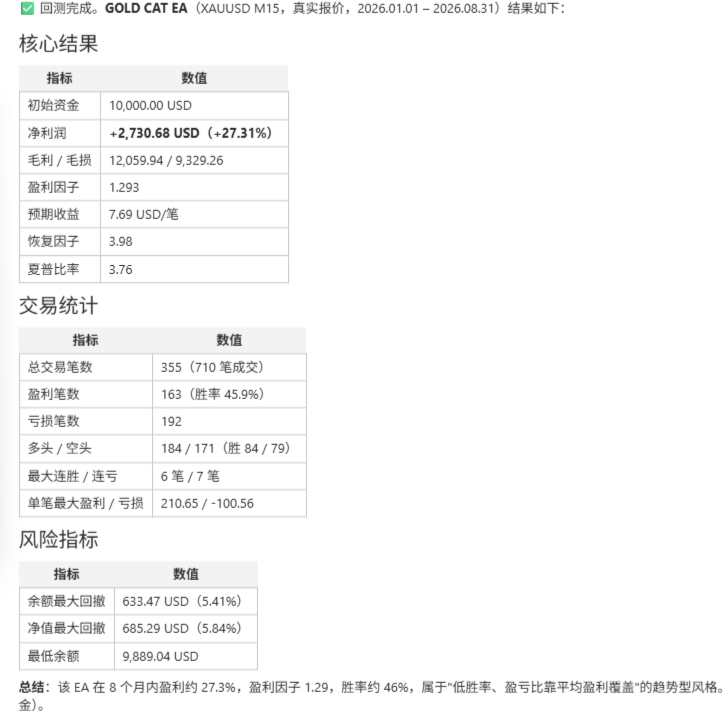
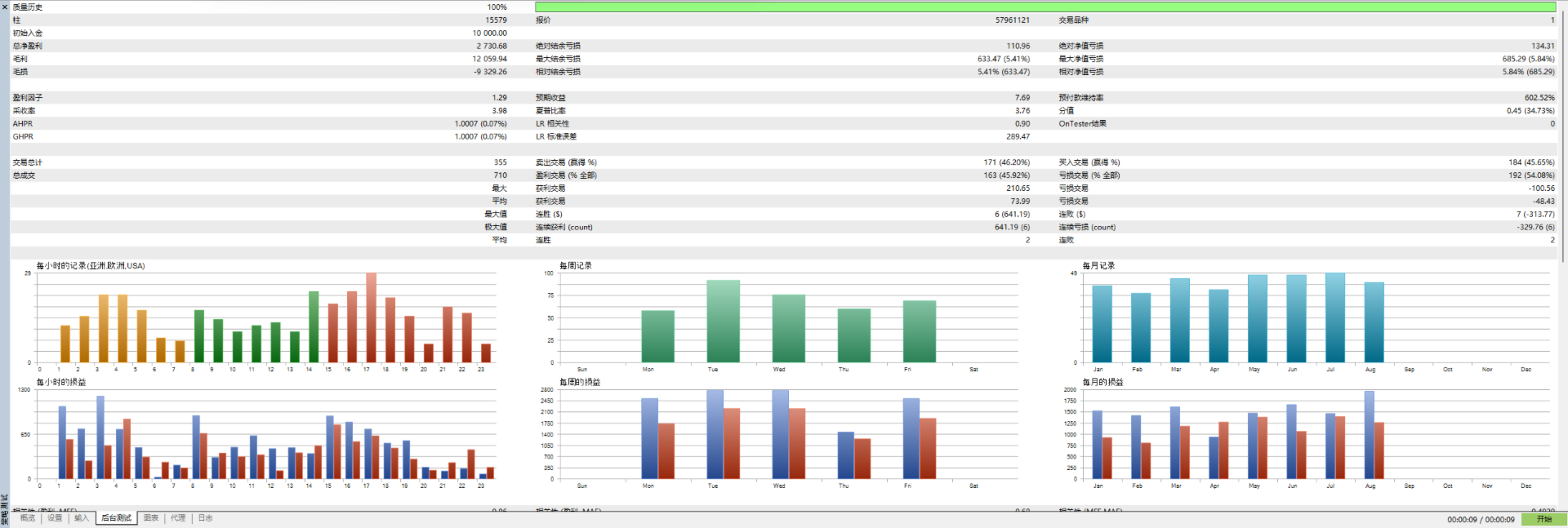
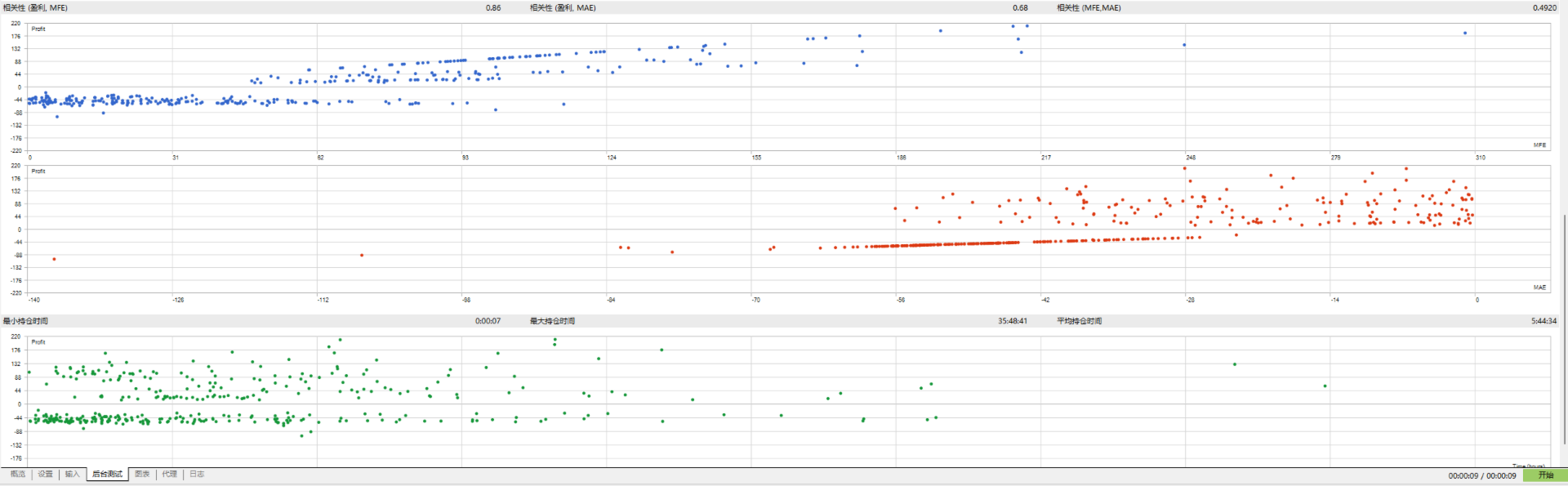
Screenshot information: The Chinese backtest screenshots use zero execution delay, while the English backtest screenshots use a 100 ms execution delay.
Risk and Position Management
The planned risk for each entry is fixed at 0.50% of the current account equity.
The lot size is calculated using the initial Stop Loss distance, the symbol's tick value, minimum and maximum trading volumes, and volume step.
Default Configuration
-
Platform: MetaTrader 5
-
Intended symbol: XAUUSD or the corresponding gold symbol offered by your broker
-
Chart timeframe: M15
-
Higher-timeframe filter: H1
-
Planned risk per entry: 0.50% of current equity
-
Long and short trading: Enabled
-
Trading session filter: Disabled
The EA uses the actual timeframe of the chart to which it is attached. To use the intended strategy configuration, attach it to an M15 chart.
The H1 filter is calculated internally. You do not need to open a separate H1 chart.
Important Risk Notice
The risk percentage is a position-sizing target, not a guaranteed maximum loss.
Price gaps, slippage, spread changes, commissions, swaps, broker execution, and differences in symbol specifications may cause the actual result to differ from the planned amount.
Historical backtests and demo results do not guarantee future performance. Before considering live trading, test the EA in the Strategy Tester and on a demo account provided by your intended broker.
This product does not promise or imply profitability.
Gold Cat EA — Quick Start Guide
-
Purchase or download the product using the same MQL5 account connected to MetaTrader 5.
-
Install the product from the Market section of the terminal. Do not manually copy a Market EX5 file between different computers.
-
Open your broker's gold trading symbol and select the M15 chart timeframe.
-
Attach Gold Cat EA to the chart.
-
Confirm that the EA initializes without errors in the Experts and Journal tabs.
-
Note that the planned risk per entry is fixed at 0.50% of current equity in this version.
-
Confirm the symbol and timeframe before enabling algorithmic trading.
-
Before considering live trading, test the EA using your broker's actual gold symbol in the Strategy Tester and on a demo account.
The EA reads the actual timeframe of the chart to which it is attached. The intended configuration is M15.
The H1 filter is calculated internally and does not require a separate H1 chart.
If the EA is restarted during a Trend Episode, it attempts to restore the number of successful entries from the trading history associated with the EA's symbol and Magic Number. If the required history is unavailable, the safety logic may prevent additional entries during that Trend Episode.
Customer support should be requested through the product comments or MQL5 internal messages.
When reporting an issue, include the MetaTrader 5 build number, broker symbol name, chart timeframe, relevant visible input values, and English Journal entries. Remove account numbers and personal information before submitting any records.