MP MegaScanner

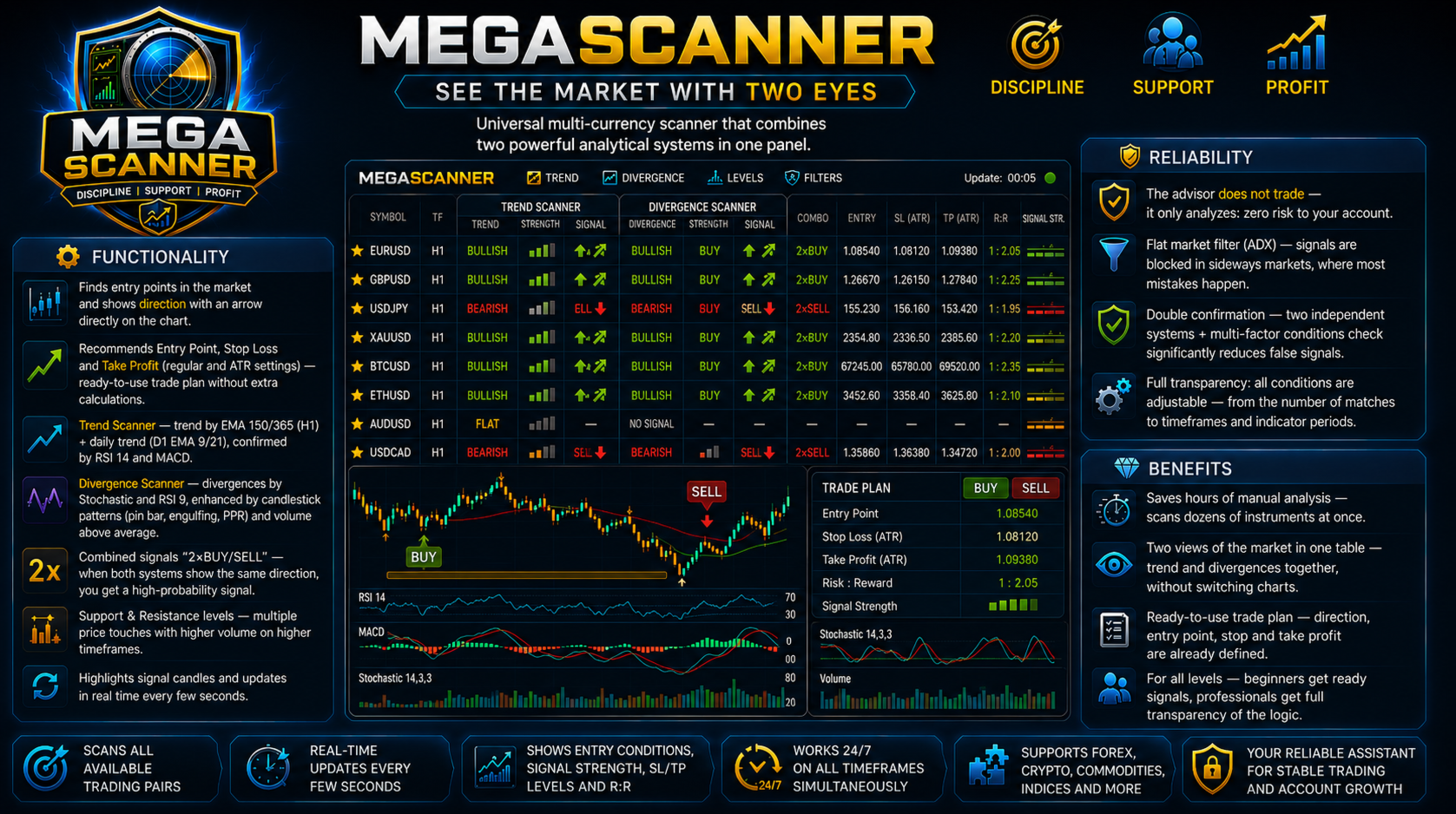
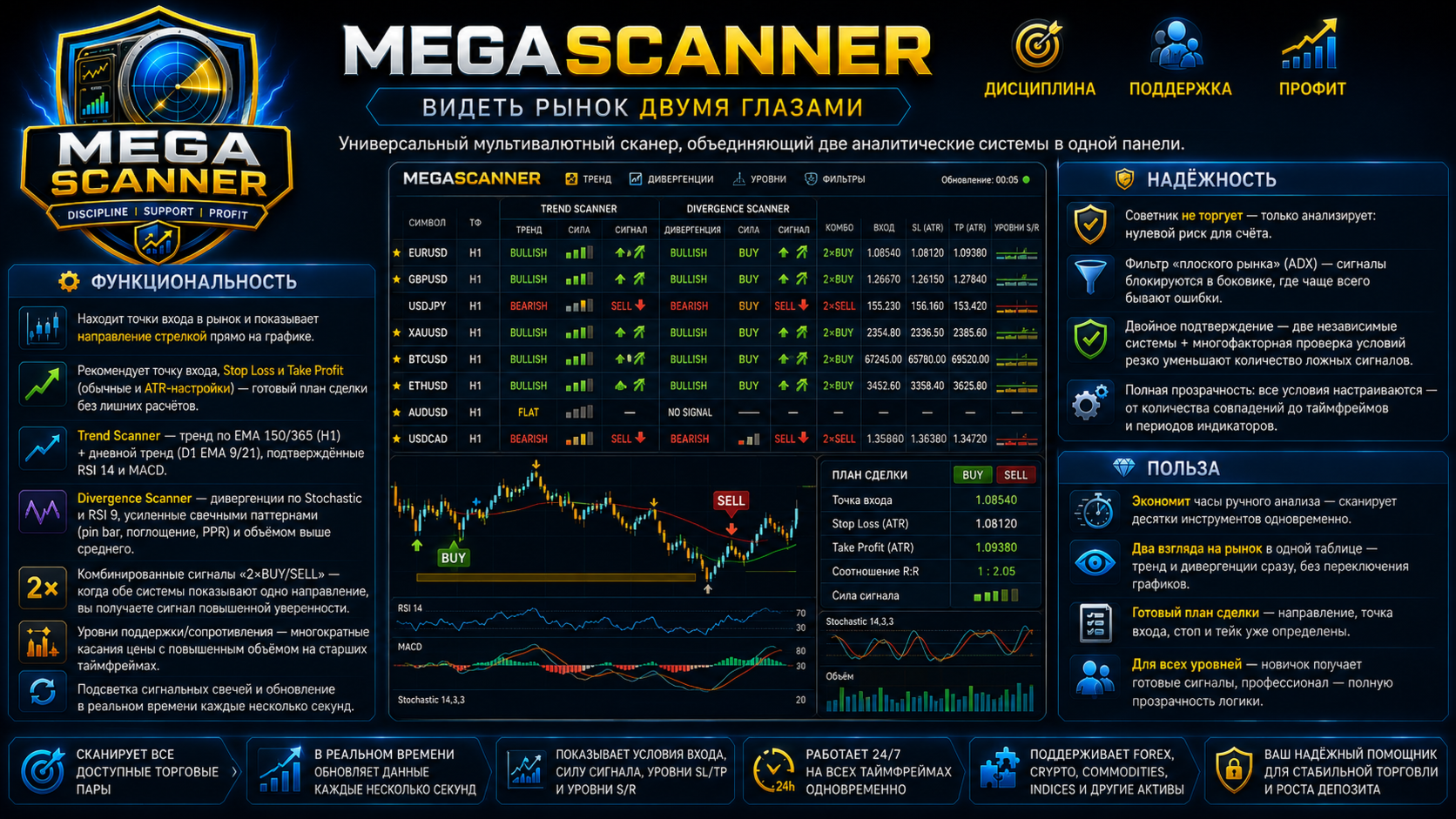
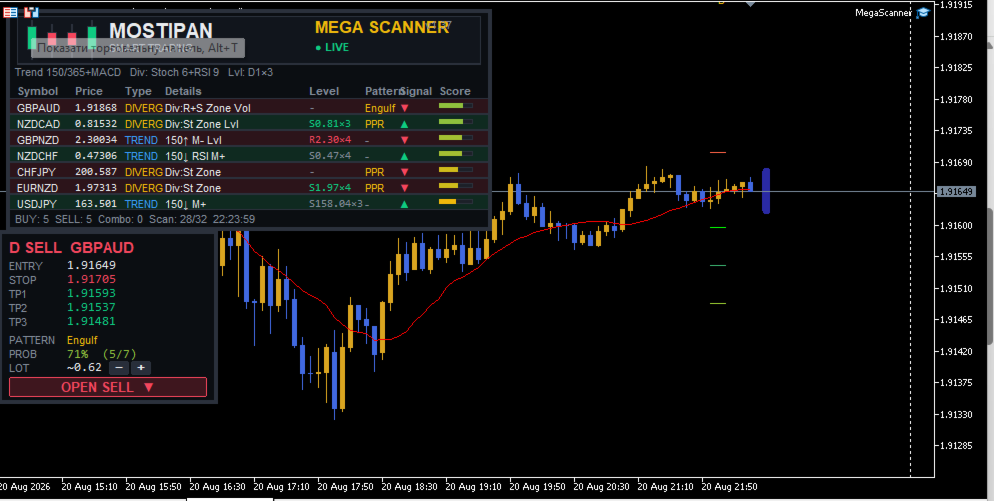
📡 MegaScanner — see the market with two eyes

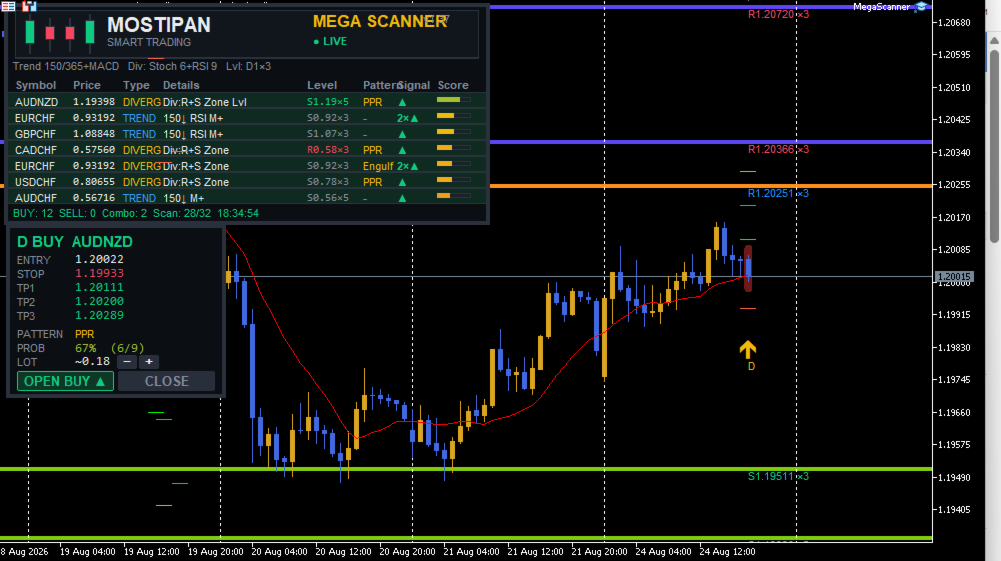
A universal multi-symbol scanner that combines two analytical systems in one panel.

⚙️ Functionality

  • Finds entry points in the market and shows the MEGA TRADER — Complete User Guide

    Version: 1.05 Type: Expert Advisor for MetaTrader 5 Purpose: automated trading of DIVERG divergence signals with a sideways-market filter, deposit-based risk management, ATR-based SL/TP and a trailing stop.

    ⚠️ Important: this is a fully automated Expert Advisor. It opens, modifies and closes trades on its own. Always test on a demo account first and make sure the risk settings match your strategy before using it on a live account.

    1. What It Is

    MegaTrader is the trading "little brother" of the MegaScanner indicator: it uses the same signal logic, but instead of displaying signals on a panel, it opens trades itself according to strict rules.

    Key principles of the system:

    Principle Implementation
    Sideways only The system is counter-trend (divergence-based) — it trades only when EMA150 is nearly flat and ADX is below the flat threshold
    Fixed risk Lot size is calculated so that the SL loss equals a set % of the account balance
    ATR-based SL/TP Stop and target scale with current volatility (ATR multipliers)
    TP 1:2 Take profit = 2 stop distances — the classic risk/reward ratio
    Trailing stop Profitable positions are managed with a trailing stop (SL follows price)
    Breakeven After the first target is hit, the position moves to breakeven

    2. The DIVERG Signal System

    The EA trades signals from the DIVERG system — reversal divergences and patterns:

    Component What it uses
    Divergences RSI(9) and Stochastic — price/oscillator divergence
    Candlestick patterns Pin bar, engulfing, PPR (pindi-push-reverse), tweezer
    Volume Signal confirmation by increased volume
    Scoring Each fulfilled condition = 1 point; entry threshold — InpMinCond (recommended 2)

    Entry filters

    Filter Parameter Purpose
    Sideways (EMA slope) InpFlatEma Blocks entries if EMA150 is tilted more than 0.10% over 20 bars — market in a trend
    Flat (ADX) InpFlatFilter / InpFlatAdx Blocks entries when ADX(14) is below 25 — too weak movement
    Max spread InpMaxSpreadPts Skips trades with widened spread (>30 points)
    Position limit InpMaxTrades / InpMaxPosPerSym One position at a time, max 1 per symbol

    💡 Why the sideways filter is critical: divergences are a counter-trend tool. In a trend they produce losing streaks; in a sideways market they produce steady profit. The EMA slope filter removes trending regimes.

    3. Risk Management

    Lot calculation

    risk money = balance × InpRiskPct / 100 loss per 1 lot = (|entry − SL| / tickSize) × tickValue lot = risk money / loss per 1 lot

    So regardless of stop width, the loss per trade ≈ the set % of the deposit:

    • narrow SL → larger lot;
    • wide SL → smaller lot.

    Protection

    Protection Parameter Description
    Max lot InpMaxLot Insurance against over-risking (default 5.0)
    Margin check — Lot is automatically reduced if free margin is insufficient
    Min lot — If the calculated lot is below the minimum — the trade is skipped
    Normalization — Lot is rounded down to the step (lotStep)

    📌 Example: deposit 10,000 USD, risk 3% = 300 USD per trade. If SL = 50 pips → lot ≈ 0.6. If SL = 15 pips → lot ≈ 2.0. The loss is ≈ 300 USD in both cases.

    4. SL / TP / Trailing

    Stop loss (ATR)

        SL = low/high ± max(10 points, ATR(14) × InpSLATRMult)
    

    The stop is placed beyond the signal bar's extreme with an ATR offset. If a support/resistance level is nearby, the stop is moved beyond it.

    Take profit 1:2

    TP = entry ± 2.0 × ATR(14) (1:2 ratio to the stop)

    Trailing stop

    Parameter Value Description
    InpTrailStart 0.5 ATR Trailing activates after +0.5 ATR profit
    InpTrailDist 1.0 ATR SL is kept 1.0 ATR from price

    Breakeven

    After the first target (1.0 ATR) is reached, SL moves to breakeven (+5 points).

    5. Installation & Setup

    1. Copy  MegaTrader.mq5  to the  MQL5\Experts\  folder.
    2. MetaEditor → Compile (F7) → should show  0 errors, 0 warnings .
    3. In MetaTrader 5, drag the EA onto a chart (e.g., EURUSD H1).
    4. Enable algorithmic trading (the "Algo Trading" button).
    5. Set  InpTradeEnable=true , configure risk and press OK.

    📌 The EA trades one symbol — the one it is attached to. The default timeframe is H1.

    6. Recommended Settings (validated on 2023–2024)

    Parameter Value Comment
    InpUseTrend false TREND branch adds noise — disabled
    InpUseDiverg true Main system
    InpMinCond 2 Optimal score threshold
    InpUseRisk / InpRiskPct true / 3.0 3% risk per trade
    InpFlatEma / Slope true / 0.10 Sideways filter
    InpFlatFilter / Adx true / 25 Flat filter
    InpTPLevel / TP2 2 / 2.0 ATR TP 1:2
    InpTrailSL / Start / Dist true / 0.5 / 1.0 Trailing stop
    InpSLATRMult 1.5 Stop multiplier

    Backtest results (EURUSD H1, deposit 10,000, risk 3%)

    Year Result
    2024 +14.6% (11,458 USD)
    2023 −40.6% (5,938 USD)

    7. Important Warnings

    1. ⚠️ The system works only in a sideways market. In trending years (like 2023) it loses money. This is normal for divergence strategies — but keep it in mind when planning.
    2. ⚠️ 3% risk is aggressive. With a 10,000 deposit that is ~300 USD per trade. In a bad year the drawdown can reach 40%+. For conservative trading, lower it to 0.5–1%.
    3. ⚠️ Past results do not guarantee future returns. Parameters were fitted on 2023–2024. A forward test and periodic review are recommended.
    4. ✅ The EA uses  InpMagic  to identify its own trades — it does not conflict with other EAs.
    5. ✅ Check your broker's conditions: minimum lot, lot step, leverage and commissions.

    8. Main Input Parameters (reference)

    Parameter Type Default Description
    InpMagic int 951357 Unique trade identifier
    InpTradeEnable bool true Trading allowed
    InpTF ENUM_TF PERIOD_H1 Working timeframe
    InpMinCond int 2 Minimum score for a signal
    InpLotFixed double 0.01 Fixed lot (if risk is off)
    InpUseRisk bool true Lot by risk % of balance
    InpRiskPct double 3.0 Risk per trade, %
    InpMaxLot double 5.0 Maximum lot
    InpTPLevel int 2 TP level (2 = double)
    InpBreakeven bool true Breakeven after TP1
    InpTrailSL bool true Trailing stop
    InpTrailStart double 0.5 Trailing start, ATR
    InpTrailDist double 1.0 Trailing distance, ATR
    InpMaxSpreadPts double 30.0 Max spread, points
    InpMaxTrades int 1 Max simultaneous positions
    InpMaxPosPerSym int 1 Max positions per symbol
    InpUseTrend bool false Trade TREND signals
    InpUseDiverg bool true Trade DIVERG signals
    InpFlatEma bool true Sideways filter (EMA slope)
    InpFlatEmaBars int 20 Slope measurement period
    InpFlatEmaSlope double 0.10 Max EMA slope, %
    InpFlatFilter bool true Flat filter (ADX)
    InpFlatAdx int 25 ADX threshold
    InpSLATRMult double 1.5 SL = ATR × multiplier
    InpTP1ATRMult double 1.0 First target, ATR
    InpTP2ATRMult double 2.0 Second target (TP), ATR
    InpATRPeriod int 14 ATR period
    direction with an arrow
     right on the chart;
  • Recommends entry point, Stop Loss and Take Profit (standard and ATR-based settings) — a ready-made trade plan without extra calculations;
  • Trend Scanner — trend by EMA 150/365 (H1) + daily trend (D1 EMA 9/21), confirmed by RSI 14 and MACD;
  • Divergence Scanner — divergences by Stochastic and RSI 9, reinforced by candlestick patterns (pin bar, engulfing, PPR) and above-average volume;
  • Combo signals "2×BUY/SELL" — when both systems point in the same direction, you get a high-confidence signal;
  • Support/Resistance levels — multiple price touches with above-average volume on higher timeframes;
  • Signal bar highlighting and real-time updates every few seconds.

🛡️ Reliability

  • The EA does NOT trade — it only analyzes: zero risk to your account;
  • Flat market filter (ADX) — signals are blocked in a sideways market, where mistakes are most common;
  • Double confirmation — two independent systems + multi-factor condition checks drastically reduce false signals;
  • Full transparency: all conditions are configurable — from the number of matches to timeframes and indicator periods.

💎 Benefits

  • Saves hours of manual analysis — scans dozens of instruments at once;
  • Two views of the market in one table — trend and divergences at a glance, no chart switching;
  • A ready trade plan — direction, entry point, stop and take are already determined;
  • For all skill levels — beginners get ready signals, professionals get full logic transparency.
推荐产品
EA Pause Manager
David Enrique Barrera Moncayo
4.33 (6)
EA Pause Manager — Your Smart Risk Guard & Scheduler (MT5) What It Does Stops conflicting trades before they happen , based on active market positions and, optionally, pending orders. Pauses or resumes your EAs automatically based on: A simple leader rule : the first EA to trade becomes the leader and blocks the rest. A time schedule you define — now configurable per EA. For example, you can run one EA during the day session and another EA overnight. Optionally cleans up after simultaneous openi
A Simple Moving Average (SMA) is a statistical indicator used in time series analysis. This indicator represents the arithmetic mean of a sequence of values over a specific period of time. SMA is used to smooth short-term fluctuations in data, helping to highlight the overall trend or direction of changes. This aids analysts and traders in better understanding the general dynamics of the time series and identifying potential trends or changes in direction.  More information you can find in Wiki 
The only drawdown guardian that stops your other EAs from digging you deeper. PropMarshal monitors your account equity in real time and instantly closes all positions the moment a drawdown or profit target threshold is breached. But it doesn't stop there — it closes every chart on your platform too, cutting off any other Expert Advisors before they can open new trades and compound the damage. The Problem PropMarshal Solves Most prop firm traders run multiple EAs across multiple charts. When a dr
FREE
COPYLATOR – MT5 Trade Copier Key Highlights Multi-Sender / Multi-Receiver Trade Replication – supports one-to-many, many-to-one, and many-to-many configurations, with complete real-time copying of market orders, pending orders, SL, and TP. Advanced drawdown protection – closing, blocking, pending-order deletion, manual and automatic reset mechanisms. Automatic symbol mapping – finds correct symbols, alerts if missing, allows manual override. Hedging & Netting support – auto-detected, no manual s
Welcome to Smart Algo Trade Panel Manager MT5 - the ultimate   risk management tool designed to make trading more effective based on user needs.  It is a comprehensive solution for seamless trade planning, position management, and enhanced control over risk. It does not matter weather you a beginner or an advanced trader, or a scalper needing rapid executions, SmartAlgo Trade Panel  adapts to your needs offering flexibility across all markets of your choice. You can put SL, Lot and TP of choice
A ticker that shows the average bitcoin price of the selected currency and keeps updating it at regular intervals. PRO version updates more often and displays details about the price change! Make sure you have added the API address http://metakod.com/mk/api in the list of allowed URLs on tab Tools → Options → Expert Advisors. All of the supported currencies and the API address are listed in the screenshots below. Inputs Logging level - Controls the amount of details written to the log (default:
GoldCrusher V7 - Orbital Adaptive Breakout Grid Engine GoldCrusher V7 is an institutional-grade, high-precision automated breakout trading system specifically engineered for GOLD (XAUUSD) on MetaTrader 5. Powered by an advanced Orbital Channel Lookback Algorithm, GoldCrusher V7 dynamically identifies high-probability breakout boundaries and couples them with an Accelerating Fluid Sweep Trailing Engine to capture explosive market moves while strictly safeguarding capital. Key Performance & Arc
Smart UI Pro — 智能手动交易助手 Smart UI Pro 是一款专为所有交易者设计的智能辅助工具,无论新手还是专业人士都适用。所有核心功能全部整合在单一控制面板中,界面现代美观、操作简单、效率极高。 主要功能 美观易用的仪表盘 现代化界面,配色主题可自由自定义 实时显示:买价/卖价、余额、净值、点差、本地时间 多时间框架信号 同时分析 M1、M5、M15、M30、H1、H4 趋势方向 综合 RSI、Stochastic、MACD、CCI、ADX、WPR、ATR 等指标计算 图表直接显示清晰买卖箭头,辅助决策更有把握 完整订单管理 一键开仓平仓 手数、止盈 TP、止损 SL 自由调整 自动计算每笔交易风险 智能双向网格系统 非常适合震荡与波动行情 网格间距与倍率完全自定义 最大层数限制,严格控制风险 高级分析工具 6 条移动平均线 SMA / EMA 完整枢轴点支撑阻力位 合理价值缺口 FVG 检测,定位高价值交易区域 全品种兼容 外汇、黄金、原油、指数、加密货币 100% 兼容所有经纪商的 MetaTrader 5 平台
MQL5 博客: https://www.mql5.com/en/blogs/post/761446 MT4 版本: https://www.mql5.com/en/market/product/136790 MT5 版本: https://www.mql5.com/en/market/product/136791 Time Wizard 是一款专业的交易助手,专为需要在简洁的控制面板上实现速度、时机和执行控制的交易者而设计。 这款智能交易系统 (EA) 专为事件驱动交易、定时执行和快速半自动订单管理而设计。它允许您提前准备订单、定义精确的执行时间、设置分层挂单、通过止损和止盈管理风险,并通过图表上的简洁界面监控所有信息。 无论您是围绕经济事件、开盘、突破点还是您自己的自定义计划进行交易,Time Wizard 都能帮助您以结构化和纪律性的方式执行交易。 主要功能 1. 基于时间的订单执行 设置具体的执行日期和时间,EA 即可在需要时精准下单。 此功能非常适合: 新闻交易 突破交易设置 预先计划的市场执行 定时下单 2. 挂单阶梯 创建多层挂单,层间距和
Telegram to MT5 Coppy
Sergey Batudayev
5 (10)
Telegram 到 MT5: 终极信号复制解决方案 使用 Telegram 到 MT5 简化您的交易,这款现代化工具可直接从 Telegram 频道和聊天室复制交易信号到您的 MetaTrader 5 平台,无需 DLL 文件。这款强大的解决方案可确保精准的信号执行、丰富的自定义选项,节省时间并提高您的效率。 [ Instructions and DEMO ] 主要特点 直接 Telegram API 集成 通过电话号码和安全码进行身份验证。 通过用户友好的 EXE 桥轻松管理聊天 ID。 添加、删除和刷新多个频道/聊天以同时复制信号。 使用高级过滤器进行信号解析 跳过包含异常词(例如“报告”、“结果”)的不需要的信号。 支持灵活的 SL 和 TP 格式:价格、点数或点数。 自动计算指定点而不是价格的信号的切入点。 订单定制和灵活性 使用多种模式配置订单大小:固定手数、动态手数(% 风险)或特定符号手数。 使用信号数据或自定义参数调整 SL/TP。 设置滑点限制、挂单到期时间和重试参数,以实现无缝执行。 综合符号管理 排除特定符号或映射到特定经纪人的符号。 自定义信号和经纪商符号之间
Binance Quotes Updater
Andrey Khatimlianskii
5 (1)
This service is designed to stream online cryptocurrency quotes   from the Binance exchange to your MetaTrader 5 terminal. You will find it perfectly suitable if you want to see the quotes of cryptocurrencies in real time — in the Market watch window and on the MetaTrader 5 charts. After running the service, you will have fully featured and automatically updated  cryptocurrency charts in your MetaTrader 5. You can apply templates, color schemes, technical indicators and any non-trading tools to
Gold Scalping Matrix MT5
Mohamed Abdulmohsen Mohamed Saeed Ali
The Gold Scalping Matrix is an advanced trading algorithm designed to capitalize on market action and price reversals in the gold market. This innovative bot employs real time market behavior trading strategy, intelligently placing buy and sell orders at predetermined intervals around the current market price.  All Configuration Set Files for back-test and live accounts   All Experts for back-Test find the new free versions before change to paid Recommended Broker Support group   or DM for any
Limiter Drawdown EA – Automatic Account Protection for MetaTrader 5 Description Limiter Drawdown EA is a lightweight risk management tool for MetaTrader 5. It monitors your account drawdown in real time and will automatically close all open trades once the threshold you define is reached. This provides a reliable safeguard for any trading strategy. Main Functions Monitors equity versus balance continuously Closes all positions when your chosen drawdown percentage is reached Optionally removes
FREE
TerminatorTrades
Uriel Alfredo Evia Canche
"Terminator Trades " EA robot, built on the powerful MQ5 code,  is designed to simplify the process of closing your positions and pending orders. You can adjust if you want close all the trades or by specific symbols. With just a single click on a button, you can efficiently manage your current positions, ensuring that you never miss an opportunity to terminate a trade.  Close Trades , Delete Pending Orders with Terminator Trades. 
FREE
Trading Calendar — 查看您最盈利的交易日 将您的交易历史转化为清晰的每日交易表现分析,使用 Trading Calendar 轻松掌握盈利规律。 Trading Calendar 是一款强大的 MT5 分析工具,帮助交易者通过交互式盈亏热力图直观查看每日交易表现。无需翻阅冗长的交易记录,您可以快速发现自己的最佳交易日、最差交易日,以及连续盈利和亏损的规律。 按天、按周或按月分析交易表现,精准了解您的交易策略在哪些时间段效果最佳。 核心功能 • 每日盈利热力图 通过颜色区分盈利和亏损交易日,快速掌握表现。 • 胜率追踪 实时监控您的交易准确率和稳定性。 • 盈利因子分析(Profit Factor) 评估交易策略整体质量和效率。 • 平均盈利与平均亏损统计 清楚了解您的风险回报比。 • 最佳与最差交易日识别 快速找出表现最强和最弱的交易日。 • 每周交易总结 一目了然查看每周整体表现。 • 夏普比率监控 评估风险调整后的收益表现。 • 交易量分析 了解交易频率与盈利之间的关系。 • 月度与年度视图 支持多时间周期切换,深入分析交易数据。 为什么选择 T
FREE
Trading Calendar — 查看您最盈利的交易日 将您的交易历史转化为清晰的每日交易表现分析,使用   Trading Calendar   轻松掌握盈利规律。 Trading Calendar   是一款强大的 MT5 分析工具,帮助交易者通过交互式盈亏热力图直观查看每日交易表现。无需翻阅冗长的交易记录,您可以快速发现自己的最佳交易日、最差交易日,以及连续盈利和亏损的规律。 按天、按周或按月分析交易表现,精准了解您的交易策略在哪些时间段效果最佳。 核心功能 •   每日盈利热力图 通过颜色区分盈利和亏损交易日,快速掌握表现。 •   胜率追踪 实时监控您的交易准确率和稳定性。 •   盈利因子分析(Profit Factor) 评估交易策略整体质量和效率。 •   平均盈利与平均亏损统计 清楚了解您的风险回报比。 •   最佳与最差交易日识别 快速找出表现最强和最弱的交易日。 •   每周交易总结 一目了然查看每周整体表现。 •   夏普比率监控 评估风险调整后的收益表现。 •   交易量分析 了解交易频率与盈利之间的关系。 •   月度与年度视图 支持多
Telegram EA Manager
Ebunoluwa Abimb Owodunni
All in one Multipurpose Telegram Trade Management , Manage and Copy Trades on the go From Telegram Pro Version MT5:  www.mql5.com/en/market/product/95742 Pro Version MT4:  www.mql5.com/en/market/product/85691 Execute Trades on mobile with fast execution When away from desktop MT5, or scalping the market with mobile device, or needed to copy trades from telegram groups while away, or doing some other activities, Telegram EA Manager is an effective tool to perform any trade operation with swift
FREE
Binance Futures Risk Calculator Binance Futures Risk Calculator is a free utility for calculating position size and trade risk for Binance USD-M Futures. The calculator helps you estimate the key parameters of a futures trade before opening a position manually. Binance Futures Risk Calculator — Setup and Usage Guide Main Features Long and Short trade calculation Position size calculation Risk calculation in USDT or percentage Entry, Stop Loss and Take Profit planning Risk/Reward calculation Adj
FREE
News With Sessions
Muhammad Jawad Shabir
News With Sessions Professional Session Tracker with Integrated Economic Calendar for MT5 News With Sessions is a professional trading intelligence indicator for MetaTrader 5 that combines live market session tracking with the MT5 economic calendar on a single chart. It shows when institutional sessions are active and which news events are driving price , without external websites, manual time-zone work, or extra tools. Built for traders who rely on time, liquidity, and fundamentals , this indic
Teaching TINN
Andriy Sydoruk
1 (1)
The Teaching T-INN utility was created to train architecture neural networks (T-INN) Target-IntelNeuroNet adapted to the currency market. The utility file must be placed in the scripts folder and run on the chart and timeframe on which you want to train the neural network. The result of the training will be recorded in a file, and the entire training process is displayed in the console on the chart and an additional log file. Before starting the script, it is necessary to download all the stori
FREE
DAX Quant Range MT5
Manuel De Huerta De La Cruz
DAX Quant Range MT5 is a fully automated Expert Advisor for MetaTrader 5 , specifically designed to trade the DAX index (GER40) during the European session , targeting institutional volatility at market open. The EA combines two professional trading strategies : Opening Range Breakout and EMA Pullback continuation , enhanced with volatility, momentum, and ATR-based risk management. This system is built for traders who value discipline, risk control, and consistency , avoiding aggressive or depen
Institutional Flow Sentinel
Denis De Oliveira Ramos
The Institutional Flow Sentinel (Net Sentiment Volume AKA NSV) SEE VOLUME HAPPENING ON THE GO!!!!!!! Overview Retail traders look at price. Institutions look at order flow . The Institutional Flow Sentinel is a high-precision algorithmic system designed to decode the hidden battle between buyers and sellers. By analyzing real-time volume delta and identifying supply/demand imbalances, this system allows you to stop guessing and start trading with the "Smart Money." Why Order Flow? Price charts
Quant Signal Indicator Panel The Indicator Panel displays the internal state of the system in real time. It allows the user to monitor how signals are generated, filtered, and validated before execution. Important Notice Before using the system, make sure to correctly configure the input symbols according to your broker specifications. The default symbol names in the inputs are examples only You must replace them with the exact symbol names used by your broker Symbols must also be added and visi
Institutional Structure Pro 是一款适用于 MetaTrader 5 的指标,专注于市场结构、Order Blocks、Fair Value Gaps 以及多周期共振分析。 Institutional Structure Pro 旨在帮助交易者更清晰地观察市场结构。该指标结合了机构价格行为分析中的常见概念,例如 BOS、CHoCH、Order Blocks、Fair Value Gaps、Premium 和 Discount 区域、Equal Highs 和 Equal Lows、RSI 背离、HMA 趋势背景、市场交易时段以及 Volume Profile 参考水平。 该指标不会自动交易,也不会替用户做出交易决策。它的作用是将重要的市场信息直接整理并显示在图表上,使交易者能够以更清晰、更有结构的方式评估潜在市场情景。 Institutional Structure Pro 适用于使用主观分析、Smart Money Concepts、流动性区域、回调、趋势延续以及多周期确认的交易者。 主要功能: 基于 BOS 和 CHoCH 的市场结构分析 内部和波段 Or
Market View MT5
Kyra Nickaline Watson-gordon
Definition : Market View is a dashboard (scanner) to view price graphs of all symbols and all timeframes at a glance. The utility is designed user friendly and added a wide range of customization options. Main features of Market View : Visual settings window on the chart Customizable list of symbols and timeframes Different shapes : Real Candles, Schematic Candles, Arrows Customizable number of candles Changeable size of dashboard (scanner) Highlight timeframes with gaps on candles Open approp
Risk Manager Optimum
Freedom Uzochukwu Nnadi
5 (1)
RiskManagerOptimum for MetaTrader 5 – Your Ultimate Trading Safety Net! RiskManagerOptimum is the most advanced and professional trade and account risk management Expert Advisor for MetaTrader 5. It does not open trades. It monitors and manages existing positions in real time to control risk, drawdown, and exposure across all symbols. The EA is designed for manual traders, algorithmic traders, and portfolio traders who require strict and automated risk control across Forex, metals, crypto, indi
SMG Guard Pro
Tanawut Wongmanee
Smart Money Guardian The Ultimate Trade Manager & Equity Protection Expert Transform your manual trading with professional-grade discipline. Smart Money Guardian is not just a tool; it is your "Digital CEO" that manages every trade with mathematical precision, protecting your capital from emotional decisions and unexpected market volatility. ️ Why Choose Smart Money Guardian? Most manual traders fail due to a lack of exit discipline and poor risk management. This EA solves that by automating
Smart Murrey Math Octave Map is a professional-grade institutional indicator that brings the legendary T.H. Murrey Math trading system into the modern era — enhanced with an intelligent Frozen Octave engine , real-time Exhaustion State Machine , and a sleek HUD dashboard . Unlike conventional Murrey Math indicators that redraw every tick and make extension levels impossible to reach, this indicator introduces a dual-mode engine that solves the classic "chasing levels" problem — allowing traders
使用革命性的交易时间管理器轻松控制您的交易程序。这个强大的工具可以在指定时间自动执行订单,从而改变您的交易方式。 为不同的交易行为(从购买到设置订单)制定个性化任务列表,所有这些都无需人工干预。 交易时间管理器安装和输入指南 如果您想获取有关 EA 的通知,请将我们的 URL 添加到 MT4/MT5 终端(参见屏幕截图)。 MT4版本     https://www.mql5.com/en/market/product/103716 MT5版本     https://www.mql5.com/en/market/product/103715 告别人工监控,拥抱精简效率。直观的界面允许您设置精确的参数,包括交易品种、执行时间、价格、止损 (SL)、止盈 (TP) 点和手数大小。 该工具的灵活性通过与市场行为相匹配的适应性重复选项来凸显。通过视觉主题个性化您的体验,并减少长时间交易期间的眼睛疲劳。 摆脱手动交易程序,拥抱“交易时间管理器”的强大功能。提高交易的准确性、组织性和自由度。简化您的日常工作并重新体验交易。 主要特点: 自动订单执行:按指定时间间隔无缝自动执行订单,从而节省您的
该产品的买家也购买
Trade Assistant MT5
Evgeniy Kravchenko
4.43 (216)
它有助于计算每笔交易的风险,容易安装新的订单,具有部分关闭功能的订单管理, 7 种类型的追踪止损和其他有用的功能。   附加材料和说明 安装说明   -   应用程序说明   -   模拟账户应用程序的试用版 线条功能  - 在图表上显示开仓线、止损线、止盈线。 有了这个功能,就可以很容易地设置一个新的订单,并在开仓前看到它的附加特性。   风险管理  - 风险计算功能在考虑到设定的风险和止损单的大小的情况下,计算新订单的成交量。它允许你设置任何大小的止损,同时观察设定的风险。 批量计算按钮 - 启用 / 禁用风险计算。 在 " 风险 " 一栏中设置必要的风险值,从 0 到 100 的百分比或存款的货币。 在 " 设置 " 选项卡上选择风险计算的变量: $ 货币, % 余额, % 资产, % 自由保证金, % 自定义, %AB 前一天, %AB 前一周, %AB 前一个月。   R/TP 和 R/SL - 设置止盈和止损的关系。 这允许你设置相对于损失的利润大小。 例如, 1 : 1 - 这决定了 TP = SL 的大小。 2 : 1 - 这意味着 TP 是 SL 的两倍。 RR -
欢迎来到 Trade Manager EA——这是一个终极风险管理工具,旨在使交易变得更直观、精准和高效。它不仅仅是一个下单工具,而是一个用于无缝交易计划、仓位管理和风险控制的全面解决方案。不论您是新手交易员、资深交易员,还是需要快速执行的剥头皮交易员,Trade Manager EA 都可以满足您的需求,适用于外汇、指数、大宗商品、加密货币等各种市场。 借助 Trade Manager EA,复杂的计算已成过去。只需分析市场,在图表上用水平线标记入场、止损和止盈,设置您的风险水平,Trade Manager 就会立即计算出理想的头寸规模,并实时显示以点、账户货币计价的止损和止盈。每笔交易都得以轻松管理。 主要功能: 头寸规模计算器 :根据定义的风险瞬间确定交易规模。 简单的交易计划 :在图表上用可拖动的水平线直接计划交易,设置入场、止损和止盈。 实时显示 SL 和 TP :以账户货币、点或分显示止损和止盈,便于分析。 高级保护工具 盈亏平衡选项 : 基本盈亏平衡 :当您的交易达到设定水平时自动保护利润。 多级盈亏平衡 :设置多达 4 个级别以逐步保护利润。 尾随止损选项 : 基本尾随
================================================================================ POC BREAKOUT - V20.72. Full Professional Grade Toolkit ================================================================================ POC Breakout is a full MetaTrader 5 trading dashboard for discretionary traders who want breakout signals, Point of Control (POC) context, volume profiles, order flow, market structure, news, alerts, and advanced trade planning in one professional workspace. Attached directly to you
Telegram to MT5 Multi-Channel Copier   可将您 Telegram 频道中的交易信号自动复制到 MetaTrader 5。无需机器人、无需浏览器扩展、无需手动复制。信号一到 Telegram,EA 几秒内就在您的终端开仓。 在复制某个频道之前,内置回测器还能告诉您该频道在您的账户上会有怎样的表现。 产品包含两个组件:一个监听您 Telegram 频道的 Windows 应用程序,以及在 MT5 终端执行信号的本 EA。同时提供 MT4 版本   点此 . 设置指南与应用下载:   https://www.mql5.com/en/blogs/post/768988 了解如何 回测任何 Telegram 信号频道 。 当前价格将来会上调。 工作原理 应用通过您自己的 Telegram 账号连接,因此能看到您关注的所有频道、群组、话题和机器人,包括私密和 VIP 频道。信号到达时,应用读取它,EA 按您的手数和设置在终端中开仓。 整个过程全自动,无需守在电脑前。专为 24/7 无人值守运行设计:Telegram 连接断开时,应用会自动重连。 打开应用并登录
TradePanel MT5
Alfiya Fazylova
4.88 (170)
交易面板是一款多功能交易助手。该应用包含超过50种手动交易功能,并允许您自动执行大多数交易任务。 应用程序说明 : https://www.mql5.com/zh/blogs/post/761102 用于模拟账户的应用程序试用版: https://www.mql5.com/zh/blogs/post/762579 如何安装应用程序: https://www.mql5.com/zh/blogs/post/762580 如何在可视化模式下测试应用程序: https://www.mql5.com/zh/blogs/post/770278 如何在VPS MetaTrader上安装应用程序: https://www.mql5.com/zh/blogs/post/770196 贸易. 只需单击一下即可执行交易操作: 打開掛單和頭寸,並自動計算風險。 一鍵打開多個訂單和頭寸。 打開訂單網格。 按組別關閉掛單和頭寸。 反轉頭寸方向(關閉買入>打開賣出,關閉賣出>打開買入)。 鎖定頭寸(通過開啟缺少的頭寸,使買入和賣出頭寸的數量相等)。 一鍵部分關閉所有頭寸。 將所有頭寸的止盈和止損設置在同一價格水平。
按照自己的交易规则复制 Telegram 信号 Telegram to MT5 Signal Trader 可将 Telegram 公开及私密频道和群组中的文字交易信号自动复制到 MetaTrader 5。通过一个桌面应用管理多个信号提供者和 MT5 账户,并为 每个提供者单独设置风险和交易参数 。 复制信号无需 Telegram 机器人,也无需配置 API。 只需通过手机号或二维码登录您自己的 Telegram 账户,然后选择您已加入的频道或群组。您无需创建机器人,也无需提供 Telegram API 令牌、API ID 或 API hash。 自行选择仓位大小,将平仓分配到多个止盈价位,并自动执行保本止损和移动止损。在跟随信号提供者的同时,掌握信号的实际交易方式。 本产品由这款 MT5 EA 和必须配合使用的 Windows 桌面应用组成。请参阅 安装指南及应用下载 。 管理多个信号提供者和账户 为每个提供者单独设置: 为每个频道设置专属的仓位计算方式、入场规则、止损、止盈和交易管理参数。 灵活分配至不同账户: 将同一提供者的信号复制到多个已连接的 MT5 账户,并为每个账户使用不
Grid Manual MT5
Alfiya Fazylova
4.73 (22)
Grid Manual是一个交易面板,用于处理订单网格。 该实用程序是通用的,具有灵活的设置和直观的界面。 它不仅可以在亏损方向上设置订单网格,还可以在盈利方向上设置订单网格。 交易者不需要创建和维护订单网格,实用程序会这样做。 打开一个订单就足够了,Grid manual会自动为它创建一个订单网格,并伴随它直到非常关闭。 完整说明和演示版 此處 。 该实用程序的主要特性和功能: 伴隨以任何方式打開的訂單,包括從移動終端打開的訂單。 適用於兩種類型的網格:“限制”和“停止”。 使用兩種方法計算網格間距:固定和動態(基於 ATR 指標)。 允許您更改未結訂單網格的設置。 顯示圖表上每個網格的盈虧平衡水平。 顯示每個網格的利潤率。 允許您一鍵關閉網格中的盈利訂單。 讓您一鍵關閉每個訂單網格。 允許您對訂單網格應用追踪止損功能。 允許您在訂單網格上應用將訂單網格的止損轉移到盈虧平衡水平的功能。 相對於訂單網格的盈虧平衡水平自動重新排列止盈(僅在限價網格模式下,距離取決於所選的計算類型:“保守”或“激進”)。 最多可管理 20 個訂單網格,每個網格最多可包含 100 個訂單。 計算初始手數時,
Power Candles 策略扫描器——自优化多符号设置查找器 Power Candles策略扫描器 采用与Power Candles指标相同的自优化引擎,可同时扫描您“市场观察”中的所有交易品种。一个面板即可显示当前哪些品种在统计上具备交易价值、每种策略的最佳应用方向、最优止损/止盈组合,并在新信号触发时立即向您发送提醒。 本工具是 Stein Investments 生态系统的一部分 - 18+ 款工具,加上 Max,您的一对一 AI 交易导师。  随时在线,深入了解每一款指标,在您需要梳理思路的那一刻就在那里。  立即认识他: https://stein.investments 您的全面市场监控。每个交易品种超过3,000次自动优化。2种警报类型。一键切换图表并采取行动。 为何您需要此工具 大多数多标的扫描器仅展示价格 波动 。每只股票的波动率、百分比变化、RSI。您仍需自行摸索正确的策略、合适的止损位以及理想的入场阈值。Power Candles策略扫描器针对每只股票自动解答这些问题,仅在数学验证过的交易设置中触发实际入场信号时才会向您发出提示。这就是全部卖点。 自动
Footprint Chart Pro — Professional OrderFlow EA for MetaTrader 5 Version 6.34 | Professional tool for real traders | Institutional-Grade Visualization DEMO USERS - PLEASE SELECT EVERY TICK / REAL TICK WHEN TESTING AND YOU HAVE DOWNLOADED HISTORICAL DATA. IF YOU SEE A WAITING SCREEN AND IT IS NOT DOWNLOADING, IT MEANS YOU HAVE LOW HISTORICAL DATA. TRY 1 MIN AND 5 MIN FIRST ON 1 DAY DATA. ONE DAY DATA SHOULD BE THE NEWEST AND MOST CURRENT DATE. PLEASE WAIT UNTIL THE MARKET HAS ROLLED OVER PERIOD.
Exp COPYLOT CLIENT for MT5
Vladislav Andruschenko
3.97 (35)
适用于 MetaTrader 5 的专业交易复制器 快速、专业、稳定可靠的 交易复制器 ,适用于 MetaTrader 。 COPYLOT 可在 MT4 和 MT5 终端之间复制 Forex 交易,并支持 Hedge 和 Netting 账户。 COPYLOT 的 MT5 版本支持: - MT5 Hedge → MT5 Hedge - MT5 Hedge → MT5 Netting - MT5 Netting → MT5 Hedge - MT5 Netting → MT5 Netting - MT4 → MT5 Hedge - MT4 → MT5 Netting MT4 版本 完整说明 + DEMO + PDF 如何购买 如何安装 如何获取日志文件 如何测试和优化 Expforex 的所有产品 您也可以将交易复制到 MT4 终端(MT4 → MT4,MT5 → MT4): COPYLOT CLIENT for MT4 COPYLOT 是一款专业的交易和持仓复制器,可同时与 2、3 甚至 10 个终端协同工作。 支持从 模拟账户和投资者账户 复制,也支持同时在多个终端上运行。 您可以使
HINN MagicEntry Extra
ALGOFLOW OÜ
4.74 (19)
HINN MAGIC ENTRY – the ultimate tool for entry and position management! SIMPLE. FASTEST. INTUITIVE. MAX AUTOMATED. Place orders by selecting a level directly on the chart! full description   ::  demo-version  :: 60-sec-video-description Key features: - Market, limit, and pending orders - Automatic lot size calculation - Automatic spread and commission accounting - Unlimited partitial take-profits  - Breakeven and trailing stop-loss and take-profit  functions - Invalidation leves - Intuitive, a
Signal TradingView to MT5 Pro Automator TradingView 与 MetaTrader 5 之间的即时专业执行 使用最强大的桥梁,将 TradingView 警报与 MT5 中的实际执行连接起来,实现交易策略的自动化。这款 Expert Advisor 专为要求速度、灵活性和完美风险管理的交易者设计,可将任何警报消息转化为精确的市价或限价订单。 优势与特点 通用解析引擎(专有): 先进技术,能够自动识别并提取任何警报格式中的数据。您不再受限于单一的死板格式;系统会自动理解交易品种(Symbol)、操作(Action)、价格(Price)、止损(SL)和止盈(TP)。 实时执行: 极速轮询技术(低于 1 秒),经过优化可将延迟降至最低。接收到信号后,订单将在毫秒内执行。 机构级风险管理: 基于以下方式自动精确计算手数: 净值/余额百分比(% of Equity/Balance): 每笔交易承担固定账户百分比的风险。 风险金额(Risk Amount): 设定在触发止损时损失的固定货币金额(例如:100 美元)。 固定手数(Static Lots)
MT5 to Telegram Signal Provider 是一个易于使用且完全可自定义的工具,它允许向 Telegram 的聊天室、频道或群组发送 指定 的信号,将您的账户变为一个 信号提供商 。 与大多数竞争产品不同,它不使用 DLL 导入。 [ 演示 ] [ 手册 ] [ MT4 版本 ] [ Discord 版本 ] [ Telegram 频道 ]  New: [ Telegram To MT5 ] 设置 提供了逐步的 用户指南 。 不需要了解 Telegram API;开发者提供了您所需的一切。 关键特性 能够自定义发送给订阅者的订单详情 您可以创建分层的订阅模型,例如铜、银、金。其中金订阅获得所有信号等。 通过 id、符号或评论过滤订单 包括执行订单的图表截图 在发送的截图上绘制已关闭的订单,以便额外核实 延迟发送新订单消息的可能性,以便在发送前对位置进行调整 订单详情完全透明: 新的市场订单*带截图 订单修改(止损、获利) 已关闭的订单*带截图 部分关闭的订单** 新的挂单 修改的挂单(进场价格) 挂单激活(作为新的市场订单附加) 已删除的挂单 历史订单报告
Farmed Hedge Yield Farming | All Markets (Manual - Hybrid - Semi/Automated EA) VERIFIED TRADING RESULTS - Farmed Hedge Yield Axi Copy:  https://www.mql5.com/en/signals/2356376 - Farmed Hedge Yield Exn Copy:   https://www.mql5.com/en/signals/2356404 - Farmed Hedge Yield V Copy:  https://www.mql5.com/en/signals/2357156 IMPORTANT NOTICE: FarmedHedge is a MANUAL-FOCUSED TRADING UTILITY ,not a fully automated EA. Results shown on this Signal include manual trades and overall strategic management.
Copy your MT5 trades to Interactive Brokers You keep using MT5. Every order you open or close is sent to your IB account. In real time. No coding. No changes to your strategy or EA. Try it first Rent 1 month: $30. Test on a live or paper account. What it does Real-time copying: same direction, reverse, or one side only. Map any MT5 symbol to any IB symbol. Set a lot ratio for each. Forex, Futures, Stocks, CFDs, Metals and Crypto. Position sync: both accounts checked, any difference fixed. Optio
Trading Chaos Expert
Hennadii Stanilevych
5 (11)
世界上没有本软件的同等产品,它代表一个覆盖交易信号的通用交易 "控制台",自动入场,设置止损和止盈,还有在单一窗口里同时进行多交易尾随终止。EA 的 "三次点击" 直观控制,确保在不同计算机上全方位使用所有功能,包括平板电脑。 与附加的信号指标交互来标记图标,给出实际市场的全貌,EA 令您做出正确的选择,以及在大多数情况下成为胜者一方。内置资金管理算法, 还有自动计算手数, 虚拟订单交易, 以及一些其它从崩溃账户里挽救交易者的 "诀窍"。它不是一个 "黑盒子"。而是一个深思熟虑的交易员的不可或缺的助理, 至少要尝试一次它的动作。 注,在面板上形成的 EA 不能在策略测试员中测试。可以在您的模拟账户里以实时模式检查它, 您可以下载本 EA 的免费版 - 混沌交易 EA 演示 。 EA 表现为一个面板,带有内置功能的交易机器人的,自动基于交易者可直观检查的交易信号入场,完全按照比尔·威廉姆斯的策略“混沌交易:第二版”和“新贸易维度”。在单独的窗口里,EA 识别价格走势的导向,用于指定品种和时间帧的全自动交易模式,也可以多品种并发。 它同时分析 MetaTrader 5“市场观察”窗口中显示
Anchor Trade Manager
Kalinskie Gilliam
5 (9)
Your EAs cannot see each other, but Anchor can. Anchor gives you one place to coordinate your EAs, manage risk, and decide when trading is allowed. It works alongside the trading bots you already use without any changes to them. The Problem One EA opens a trade. Then another starts trading. The next thing you know, you wake up to multiple grids built across your account. Each EA may be doing exactly what it was designed to do, but together they can place far more risk on your account than you in
The News Filter MT5
Leolouiski Gan
4.78 (23)
这个产品在新闻时间过滤所有的专家顾问和手动图表,因此您不必担心突然的价格波动会破坏您的手动交易设置或其他专家顾问输入的交易。此产品还带有完整的订单管理系统,可在任何新闻发布前处理您的持仓和挂单。一旦您购买了   The News Filter ,您将不再需要依赖以后的专家顾问内置的新闻过滤器,因为这个产品可以从此过滤它们所有。 新闻选择 新闻来源于Forex Factory的经济日历。 选择可以基于任何一种货币,如USD,EUR,GBP,JPY,AUD,CAD,CHF,NZD和CNY等。 选择也可以基于关键识别,例如Non-Farm (NFP),FOMC,CPI等。 能够选择新闻影响级别的筛选,从低、中、到高影响。 自动模式只选择与图表相关的新闻。 新闻来源每小时自动刷新,以确保最新的新闻数据。 为每个新闻影响级别提供单独的输入,以确定您要过滤掉的新闻发布前后的分钟数。 订单管理选项 在新闻发布前关闭未平仓头寸的选项,并在新闻发布后恢复它们。 在新闻发布前删除挂单的选项,并在新闻发布后恢复它们。 在新闻发布前移除止损和止盈水平的选项,并在新闻发布后恢复它们。 在新闻发布前移动止损和
保留您信赖的指标。 让围绕指标的交易操作自动运行。 您是否已有信赖的 MT5 指标,却仍需盯盘、等待信号、计算手数、下单并手动管理每个持仓? Stratiora Signal Engine MT5 旨在衔接这些步骤。它可将兼容的 Buy 和 Sell 缓冲区信号转化为完整的自动化流程:入场、交易量计算、Stop Loss、Take Profit、过滤、持仓管理和账户保护。 每当更换指标或交易思路时,您无需重新定制一款 EA;同一套灵活的执行引擎即可按您的规则处理各类信号。 您的信号。您的规则。您的执行方式。 上线优惠 当前价格:199 美元。  购买 Stratiora Signal Engine MT5 后,您将 获赠 10 款指标。 计划每售出 10 份提价 50 美元,直至价格达到 999 美元。下单时以 Market 页面显示的价格为准。 为什么开发 Stratiora 许多交易者已有自己熟悉并信赖的指标,却仍需盯盘、等待信号、计算手数、下单和手动管理持仓。 Stratiora 将这些步骤连接起来。 指标负责产生交易信号。Stratiora 按您设定的执行和管理规则处理信号。
Trade Copier Ultimate
Janitha Sandaruwan Amaradasa Wickramasingha Arachchilage
5 (5)
Trade Copier Ultimate - Telegram 到 MT5 信号复制器 Trade Copier Ultimate 可将 Telegram 交易信号自动复制到 MetaTrader 5。EA 能读取信号消息,识别交易品种、订单类型、入场价格、止损、止盈目标以及部分更新指令,然后根据您设置的手数和风险参数,在 MT5 中执行或管理交易。 它不只是一款基础的 Telegram 到 MT5 跟单工具。TCU 还支持 Telegram Bot API 和用户账户 Bridge 工作流程、Discord 信号路由、本地 MT5 到 MT5 跟单、将 MT5 交易广播到 Telegram 或 Discord、图片信号识别、最多 TP5 的多止盈执行、TP OPEN 跑单仓位、虚拟多止盈模式、入场区间处理、挂单、经纪商交易品种匹配以及 Prop Firm 风险控制。 其他资料与使用说明 下载免费演示版  -  快速设置与使用手册  -  下载 NTS Bridge    点击这里测试您的信号格式 --->>> 免费演示版:   购买前可在模拟账户上测试完整的 EA 和 Brid
EA Overfitter
Stephen J Martret
5 (1)
回测看起来很漂亮。但它明天、下周、下个月还能继续赚钱吗? EA Overfitter 让您的 EA 在 100 段它从未见过的价格历史上重新运行。一个分数告诉您这个优势是否真实。 回测告诉您的,是 EA 在某一段价格历史上的表现——那段恰好发生过的历史。您无法从中判断,这个结果有多少来自策略本身,又有多少只是那一条特定路径带来的。 EA Overfitter 回答的正是这个问题。它构建最多 100 段您的 EA 从未交易过的合成价格历史,让策略在全部这些历史上重新运行,并展示它所产生的完整结果区间。您得到的不再是一条幸运或不幸路径上的单个数字,而是一幅真实的图景:策略在陌生数据上多久能赚钱、典型结果是什么样(而不是最好的那一次),以及您的回测离它有多远。 这些世界是由您自己的近期历史重建而成,因此这不是预测——任何从历史数据出发的检验都不可能是预测。它告诉您的是:这个优势是否依赖于价格的某一种特定排列,以及回测数字距离典型结果有多远。在投入资金之前,这才是值得回答的问题。 三个步骤 1. 构建。在图表上选择时间区间和世界数量,然后按 Build。EA Overfitter 会
Trade Indicator Assistant   is a powerful MT5 utility designed to turn indicators into automated trading systems. Its main feature is the ability to automatically detect an indicator’s   BUY and SELL signal buffers , without requiring you to know the buffer numbers, search through indicator settings, or modify the indicator source code. Bonus Indicator:   After purchasing Trade Indicator Assistant, contact me to receive   Trade Signal Pro   completely free as a bonus indicator. [Download Demo V
Welcome to ENTRY IN THE ZONE AND SMC MULTI TIMEFRAME  SPECIAL BENEFIT / FOR OUR MQL5 CUSTOMERS FREE ACCESS TO THE NEW TOOL  — COMING SOON — Learn more on our official website  : https://www.fableedge.net Entry In The Zone and SMC Multi Timeframe is a real-time market analysis tool based on Smart Money Concepts (SMC), designed to analyze market structure, price direction, and key trading zones. It supports both Single-Timeframe Analysis and Multi-Timeframe Analysis, providing a clearer view of th
Quant Panel
Kevin Craig E Gittins
量化面板专业版 量化交易者的终极多EA性能仪表盘 无需再在多个图表或外部工具之间切换来监控您的算法策略!Quant Panel Pro 通过一个简洁专业的界面,为您提供机构级的投资组合监控体验。 核心功能 触手可及的量化分析 所有智能交易顾问(EA)的实时盈亏汇总 带有交易频率指标的胜率统计分析 高级回撤跟踪(已实现和未实现) 风险回报分析——最佳盈利与最大亏损对比 连续亏损监控及警报 专业量化界面 无限滚动——同时监控无限制策略 彩色编码性能矩阵——即时可视化投资组合健康状况 完全可定制布局——适应您的分析流程 现代金融风格设计——专为专业交易者打造 机构级功能 实时数据流——毫秒级精准更新 魔术编号策略筛选——按算法类型组织 多品种性能跟踪——跨市场分析 投资组合级统计——全面的绩效总结 完全可定制 专业配色方案和排版 可调整的刷新率和显示行数 可配置的列布局和指标 个性化仪表盘偏好 改变您的交易操作方式 之前: 手动表格、分散的MT4窗口、延迟分析 之后: 实时投资组合仪表盘、自动化分析、专业报告 “我的量化交易系统中缺失的一环——终于有了机构级的监控工具!” 简单设置流程 将
YuClusters
Yury Kulikov
4.93 (43)
Attention: You can view the program operation in the free version  YuClusters DEMO .  YuClusters is a professional market analysis system. The trader has unique opportunities to analyze the flow of orders, trade volumes, price movements using various charts, profiles, indicators, and graphical objects. YuClusters operates on data based on Time&Sales or ticks information, depending on what is available in the quotes of a financial instrument. YuClusters allows you to build graphs by combining da
Trade Dashboard MT5
Fatemeh Ameri
4.94 (135)
疲于复杂的订单下达和手动计算?Trade Dashboard 是您的解决方案。凭借其用户友好的界面,订单下达变得轻而易举,只需点击一下,您就可以开设交易、设置止损和止盈水平、管理交易手数,并计算风险回报比,让您只需专注于您的策略。告别手动计算,使用 Trade Dashboard 简化您的交易体验。 立即下载演示版本 。 您可以在这里找到仪表盘功能和特性的详细信息 。 加入 Telegram 频道 。 购买后请给我发消息以获取支持。如果您需要添加更多功能,可以在产品的评论区留下您的想法,我愿意听取任何建议,希望您能在使用我的产品时获得最佳体验 。 这是 MT4 版本。 风险管理:使用 Trade Dashboard,可以将您的风险设置为账户余额或权益的百分比,或将风险设置为总金额。在图表上直观地定义您的止损,让工具准确计算每个货币对的适当手数。该工具还可以根据您期望的风险回报比自动设置止盈水平。它甚至可以在手数计算中涵盖佣金和点差费用。此外,您的止损和止盈可以转变为虚拟水平,隐藏于经纪商。通过 Trade Dashboard 的高级风险管理功能,掌控风险,保护您的资本。 交易线
Premium Trade Manager - 内置交易导师的图表面板 Premium Trade Manager 将一位交易导师嵌入您的图表,并在其下搭载完整的执行引擎。像往常一样建立交易,然后让您的 AI 交易导师 Max 读取这笔具体的交易,结合您的实时账户给出直接判断,再由您决定是否下单:止损是否符合纪律化交易的要求、风险规模是否合理、高影响新闻事件是否即将发布、您是否接近资金盘限额。其下是完整的执行引擎,负责点击之后的一切:一键按风险下单、您在图表上拖动规划且交易进行中仍可随时调整的计划、最多四个分批止盈级别、七种移动止损方式、实时资金盘合规检查、新闻屏蔽保护,以及对自身成本进行评级的点差功能。决策由您做出。Max 给出第二次审视。面板负责此后的一切。 购买前先亲手体验。 直接在浏览器中点击实时面板,这是在购买前感受其工作方式的最快途径。 stein.investments/products/premium-trade-manager Max 是您的一对一 AI 交易导师,他直接内置于面板之中。  他了解您的账户、您的设置和您的规则,用您自己的语言回答,并在每笔交易下单前进
MetaTrader 5 专业交易面板 —— 图表与键盘一键交易的高效控制中心 一款面向主动交易者的专业 Trading Panel,可让您比标准 MetaTrader 操作方式更快、更直观地完成开仓、平仓、修改、管理与控制。 这不是一个普通的小工具,而是一个为高频手动操作、仓位管理、挂单控制与利润管理而设计的完整交易工作台。 通过这套面板,您可以直接在图表上一键执行交易,通过键盘快速触发核心操作,并借助自动参数计算、图形提示、信息标签以及可视化管理功能,大幅减少重复性操作,让整个交易流程更加流畅、高效且专业。 使用我们的交易面板,您可以直接从图表上一键下单,执行交易操作的速度可比标准 MetaTrader 控件快约 30 倍。 全新高级版本现已推出: 使用 VirtualTradePad PRO SE 升级您的交易流程 — 适用于 MetaTrader 5 和 MetaTrader 4 的新一代专业交易面板。 MT4 版本 | 完整说明 + DEMO + PDF | 如何购买 | 如何安装 | 如何获取日志文件 | 如何测试与优化 | Expforex 的所有产品 为什么交易者会
Smart Stop Scanner – 多品种结构化止损扫描系统 概述 Smart Stop Scanner 为交易者提供跨市场的专业止损结构监控。系统基于真实市场结构、关键突破点以及价格行为逻辑,自动识别最有意义的止损区域,并在统一的、高度清晰、DPI 自适应面板中展示所有信息。 适用于 Forex、黄金、指数、金属、加密货币等多种资产。 止损如何计算 本系统并未使用传统指标或任意公式,而是通过纯价格行为识别 突破、更高高点、更低低点 等结构事件。 止损位置基于这些结构节点生成,因此更加真实、自然,并与实际市场行为紧密吻合。 核心功能亮点 • 多品种精准兼容 完整支持外汇、黄金、指数、金属、加密资产及其他工具,自动处理不同的点值和小数位。 • 即时结构识别 实时检测新的、失效的和当前有效的止损结构,并提供方向、形成时间、距离等关键信息。 • SL %ADR – 自适应止损质量评估 每个止损都会与该品种历史的结构性止损事件进行统计对比。 自适应颜色区间清晰显示止损是 极紧、紧、适中、宽、非常宽 。 基于真实波动率,而非固定阈值。 • Dist % – 实时止损距离
Mentfx Mmanage mt5
Anton Jere Calmes
4.25 (8)
The added video will showcase all functionality, effectiveness, and uses of the trade manager. Drag and Drop Trade Manager. Draw your entry and have the tool calculate the rest. Advanced targeting and close portions of a trade directly available in tool (manage trades while you sleep). Market order or limit order on either side with factored spread. Just draw the entry, the tool does the rest. Hotkey setup to make it simple. Draw where you want to enter, and the stop loss, the tool calculates al
作者的更多信息
MP Trend Scanner
Pavlo Mostipan
5 (1)
TREND SCANNER Stay With the Trend. Trade With Confidence. Trend Scanner analyzes the market to determine trend direction and strength using a combination of technical indicators. The system combines EMA 150/365, EMA 9/21, RSI, MA to confirm market direction and filter out weak or sideways conditions. Key Features: Bullish and bearish trend detection; EMA 150/365 and EMA 9/21 analysis; RSI confirmation; MACD momentum analysis; ️ ADX ranging-market filter; Trend strength measur
FREE
️ SMART PANEL TESTER — 测试策略,控制风险。 SMART PANEL TESTER 是主版本 SMART PANEL 的精简版,专为在 Strategy Tester 中方便、高效地测试交易策略而设计。 该面板的核心功能是 风险管理 。交易策略不仅仅取决于入场信号,其长期表现同样取决于您如何控制每一笔交易的风险。 ️ 内置风险管理器 您可以将风险设置为 账户余额的百分比 ,确定 Stop Loss ,并按照明确的资金管理规则测试您的交易策略。 面板支持快速使用自动 Risk/Reward 比例: 1:1 • 1:2 • 1:3 选择所需的风险回报比,系统将帮助您自动确定相应的 Take Profit 目标。 回测所需的一切功能 BUY / SELL — 快速执行市价交易; STOP / LIMIT ORDERS — 测试不同的入场场景; 灵活调整 Stop Loss 和 Take Profit ; 根据账户余额设置 风险百分比 ; 内置 Risk Manager ; 自动 Risk/Reward:1:1、1:2、1:3 ; 在测试过程中方便地管理交易。
FREE
MP Risk Manager
Pavlo Mostipan
5 (1)
️ RISK MANAGER — Risk Management Indicator Indicator version:   1.70 ·   Style:   QuikTrade ·   Position:   bottom-left corner of the chart 1. What it is Risk Manager   is an informational indicator for MetaTrader 5 that shows the   daily risk budget   in real time and helps calculate the   recommended lot , taking into account: risk per single trade (% of balance); daily risk (% of balance); losses and profits already realized today; risk of open positions (based on their Stop Loss); distance
FREE
MPDirection Strength
Pavlo Mostipan
5 (1)
DIRECTION STRENGTH is an indicator designed to analyze the current market movement. It helps you understand not only where the price is moving , but also how strong the movement is, how long the current series has lasted, and how likely it is to continue based on historical matches. What do you see on one screen? DIRECTION → where the market is moving STRENGTH 0–100 → how strong the movement is SERIES → how many candles the movement has continued TIME → how long the current series has lasted H
FREE
DIVERGENCE SCANNER Find Divergences Faster. See What Others May Miss. Divergence Scanner is a specialized tool designed to automatically identify potential divergences across multiple trading instruments. It analyzes Stochastic and RSI , detects bullish and bearish divergences, and presents the results in a clear, structured table. Key Features: Automatic divergence detection; Stochastic analysis; RSI analysis; Bullish divergences; Bearish divergences; MOSTIPAN SMART TRADING
FREE
️ MPSmartPanel — 您可靠的交易助手 MPSmartPanel   是一款适用于 MetaTrader 5 的紧凑型交易面板,它将手动交易的便利性与严格纪律和全面风险控制相结合。该面板 保护您的资金免受损失 ,并帮助您按照自己的系统有意识地交易。 交易系统检查清单(由程序控制) 您 自行填写 自己的检查清单(4 个条件块,例如:趋势、新闻、形态、信号),面板会在每次交易前 自动检查   — 若未确认所有条件,您将无法开仓。这排除了冲动和随机的交易。 ️ 风险管理器 — 资金保护 内置的风险管理器会在 至少违反一项条件时自动阻止新交易 :   当日亏损 达到设定限额(例如 500 美元)   当日盈利 达到目标水平   每日交易次数 超过限额(例如 10)   连续亏损 超过允许的限额(例如 3)   未平仓交易的总日风险 超过限额(每日风险限额) 同时进行 每日风险核算 :面板显示已用风险与剩余风险,防止您超过设定限额。 ️ 时间与交易时段控制 内置的 交易计时器 (START/FINISH 按钮)记录您的工作时间,自动将其分配到
One click to open. One click to protect. SMART PANEL is a minimalist panel for disciplined trading:   no extra noise   — only what a trader really needs every day: order placement, risk control and profit protecti 1. Fast order placement BUY / SELL   buttons with   MARKET / LIMIT / STOP   menu. Entry, stop and take-profit   lines — draggable right on the chart. Ready ratios   1:1 · 1:2 · 1:3   — one click, risk is already set. −% / +%   buttons — risk per trade adjusted in a second. 2. Built-in
MP TGAlert
Pavlo Mostipan
One job, maximum flexibility:   the expert watches all activity on your trading account and sends you a Telegram message and/or chart screenshot for any chosen event type. Every event, message template and filter is user-configurable. What it is for You trade manually and want to   know instantly about your trades   in Telegram (openings, closings, TP/SL, trailing, breakeven, partial close). You run   EAs   — have a single notification channel for every trade on the account without opening t
SMART PANEL FULL The most complete version of the trading panel, combining trade management, risk control, trading activity analysis, automated trading journaling, and professional market scanning tools in one integrated solution. The panel provides full control over all types of orders and positions. Open, modify, and close trades directly from the panel, keeping all essential trading operations in one workspace. Full Telegram integration turns the panel into an automated trading journal. Scree
筛选:
Filimon
97
Filimon 2026.09.21 18:11 
 

用户没有留下任何评级信息

Pavlo Mostipan
814
来自开发人员的回复 Pavlo Mostipan 2026.09.21 18:19
дякую за відгук, допрацюємо. в описі ж написано що мега сканер, ріск менеджер Тг інтеграція і решта радників і індикаторів, це складові панелі)
Oleksiy
76
Oleksiy 2026.09.18 17:03 
 

用户没有留下任何评级信息

回复评论