Varko Switch EA
- Experts
-
Anton Zverev
 ⬛🟪 VARKO
Building Intelligent Software.
Varko Technologies
Intelligent Trading. Engineered.
Professional algorithmic trading solutions.
Built with precision.
Tested with discipline.
Designed for consistency.
Safety First. Consistency Always. - Version: 1.16
- Updated: 7 September 2026
- Activations: 10
Varko Switch EA is an automated Expert Advisor for trading XAUUSD in MetaTrader 5. It combines two independently managed strategies: Night and Breakout.
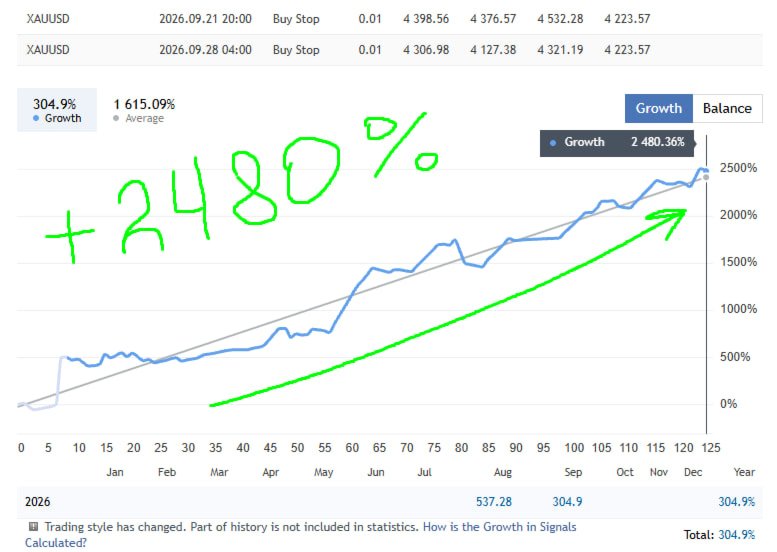
Public real-account monitoring
https://www.mql5.com/en/signals/2387435
Two Strategies in One Expert Advisor
Varko Switch EA includes two trading strategies based on different market conditions:
- Night;
- Breakout.
Each strategy uses its own Magic Number, opens and manages its positions independently, has separate settings and maintains its own performance statistics.
The user can enable Night, Breakout or both strategies simultaneously. Disabling one strategy does not stop the other.
Night Strategy
Night analyzes the market and searches for trading opportunities within its configured operating time.
The following position-management mechanisms are used:
- Take Profit;
- algorithmic exit conditions;
- maximum spread filter;
- protective maximum drawdown limit;
- existing-position control.
In the current version, a separate server-side Stop Loss is not placed for Night. The position is closed according to the strategy conditions, Take Profit or the protective drawdown limit.
Night supports a fixed lot size and step-based lot calculation according to the account balance.
Breakout Strategy
Breakout analyzes price levels and opens a position after its programmed breakout conditions and additional filters are satisfied.
The following position-management mechanisms are used:
- Stop Loss placed when the position is opened;
- dynamic Stop Loss management;
- maximum spread filter;
- trading-time control;
- position-count limit;
- protection against repeated entries at the same level.
Breakout supports a fixed lot size and automatic volume calculation based on the selected risk percentage and Stop Loss distance.
Independent Strategy Management
Night and Breakout are separated through:
- individual Magic Numbers;
- separate trade comments;
- independent entry conditions;
- separate position management;
- individual settings;
- separate and combined statistics.
In the recommended configuration, each strategy maintains one position of its own. When both strategies operate on a hedging account, the Expert Advisor can hold two XAUUSD positions: one Night position and one Breakout position.
Hedging and Netting Accounts
A hedging account is recommended when both strategies are enabled.
Hedging allows each strategy to maintain its own position with a separate Magic Number and independent management.
On a netting account, MetaTrader 5 combines all trades for the same symbol into a single position. Therefore, fully independent management of Night and Breakout is not possible on a netting account. If a netting account is used, enabling only one strategy is recommended.
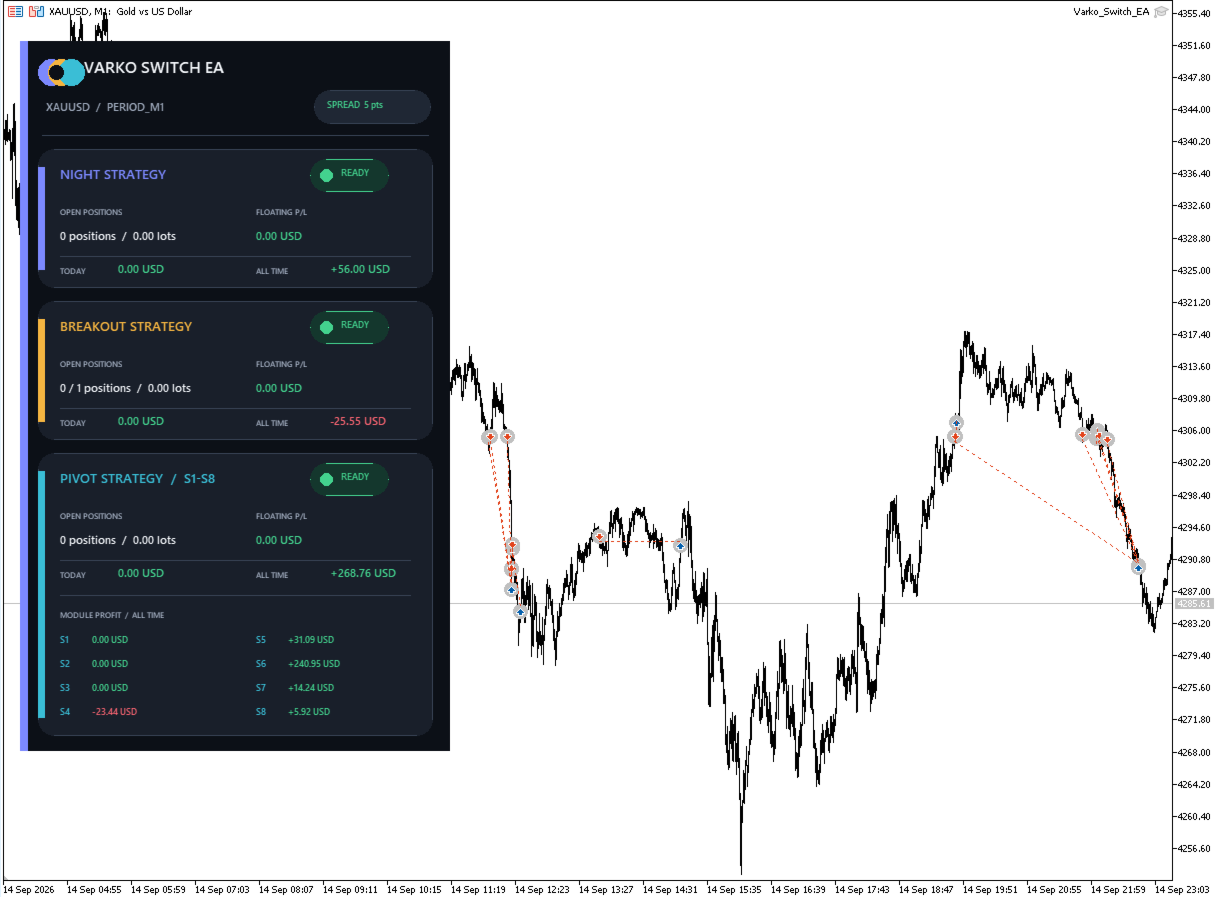
Information Panel
The Canvas panel displays the main Expert Advisor information directly on the MetaTrader 5 chart:
- Night and Breakout status;
- current symbol and timeframe;
- current spread;
- number and volume of open positions;
- current floating result;
- current-day result;
- separate strategy statistics;
- combined Expert Advisor statistics.
Recommended Trading Environment
Platform: MetaTrader 5
Instrument: XAUUSD / GOLD
Chart timeframe: M1
Account type: Hedging
Recommended broker server time: GMT+3
Minimum recommended deposit: 500 USD
Position limit: One position per strategy
VPS: Recommended for continuous operation
The minimum recommended deposit does not guarantee account safety. The appropriate account balance depends on the selected trading volume, leverage, risk settings and broker conditions.
Supported Symbol Names
The Expert Advisor operates on the symbol of the current chart and supports broker symbol names containing XAU or GOLD, including names with prefixes and suffixes.
Examples:
- XAUUSD;
- XAUUSD.a;
- XAUUSDm;
- GOLD;
- GOLD.pro.
Before starting the Expert Advisor, check the selected symbol specifications provided by your broker.
Risk and Volume Management
The Expert Advisor supports fixed and automatically calculated trading volume.
Varko Switch EA does not use:
- Martingale;
- order grids;
- averaging into losing positions;
- recovery sequences with increasing lot sizes.
Increasing the trading volume increases both the potential financial result and the potential losses.
Installation
- Install Varko Switch EA through MQL5 Market.
- Open an XAUUSD or GOLD chart.
- Set the chart timeframe to M1.
- Attach the Expert Advisor to the chart.
- Allow algorithmic trading in MetaTrader 5.
- Select the required strategies.
- Configure the trading-volume calculation mode.
- Check the Expert Advisor status on the Canvas panel.
- Use a VPS if continuous operation is required.
Testing
The demo version can be tested in the MetaTrader 5 Strategy Tester.
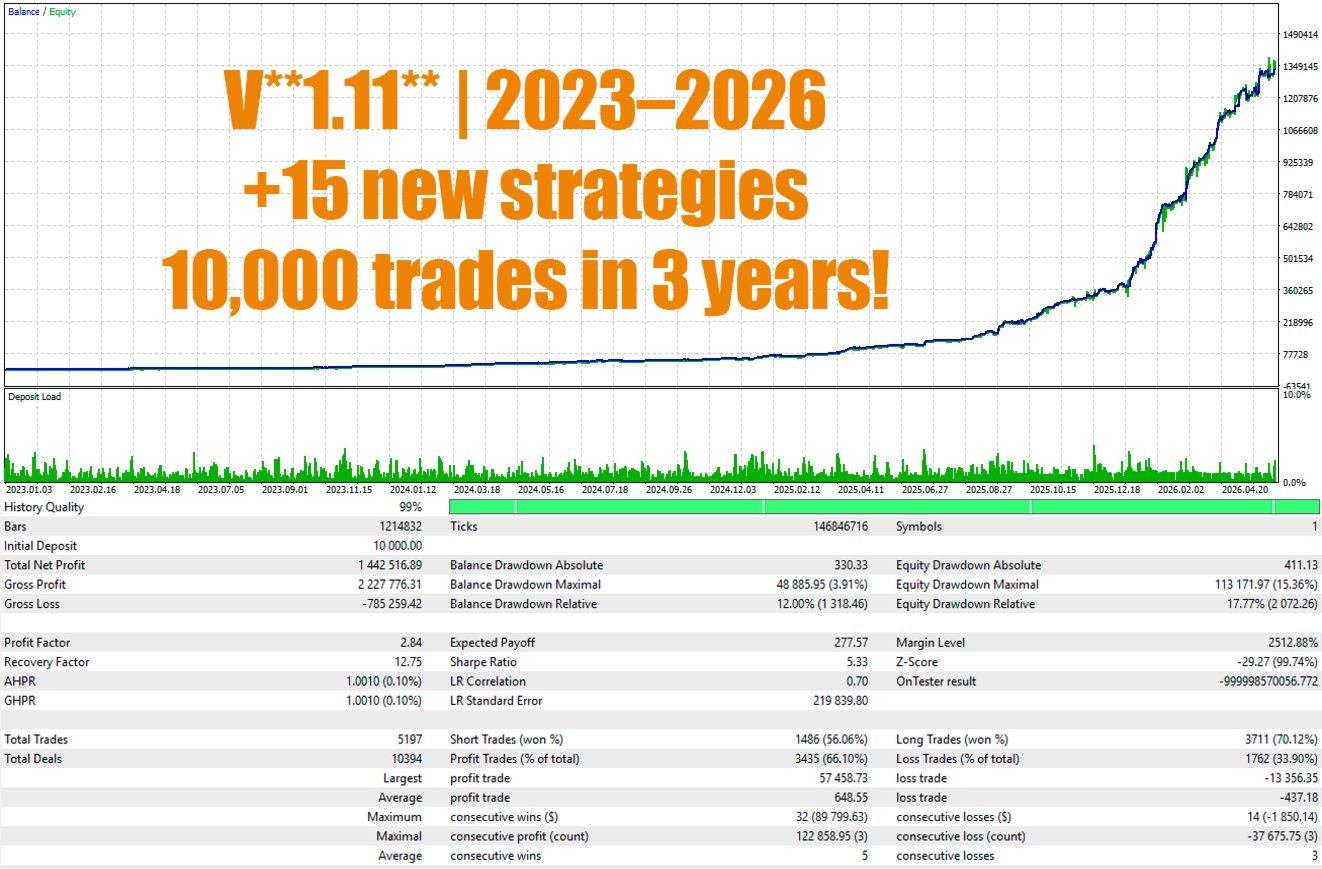
To reproduce the published tests, use the conditions shown in the product screenshots: symbol, timeframe, testing period, modeling mode, initial deposit, leverage and the standard Expert Advisor parameters.
Results depend on historical price data, trading conditions, symbol specifications and Strategy Tester settings.
Important Information
Varko Switch EA is a trading automation tool and does not provide personalized investment advice.
Using the Expert Advisor involves market risk. Losing trades, consecutive losses and account drawdown are possible.
Historical test results and public monitoring do not guarantee similar results in the future.
The user is responsible for selecting the broker, account type, position size and risk level, as well as for maintaining the trading terminal and testing the product before live use.