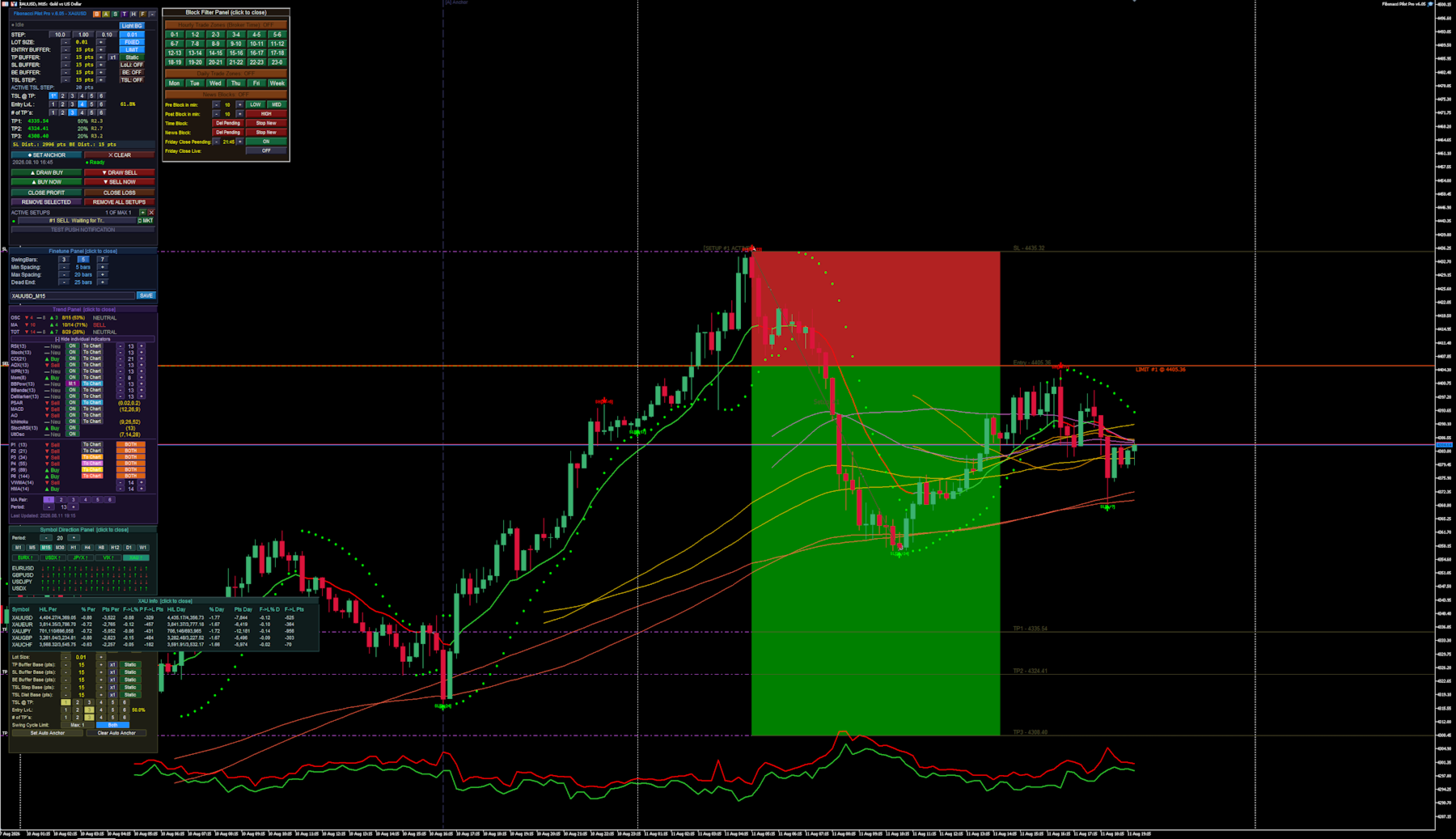
Fibonacci Pilot Pro

Fibonacci Pilot Pro Overview

The EA functions as a comprehensive, panel-driven Fibonacci trading ecosystem designed to bridge the gap between manual chart analysis and fully automated algorithmic execution.

  1. Dual Execution Modes: It operates as both a visual trade assistant for manual trading and a fully autonomous robot. In manual mode, you plot Point A and Point B on the chart to instantly visualize risk/reward zones and limit entries before executing. In auto mode, it scans for market structure shifts to place trades without intervention.
  2. Algorithmic Swing Detection: The engine identifies market swing highs and lows using an adjustable N-bar fractal logic, complete with gap filtering and "dead-end" resets to ensure it only anchors to valid market impulses.
  3. Advanced Trade Management: Once a setup is live, the EA takes over position management. It scales out of positions across up to 6 custom Take Profit (TP) extension levels, automatically moves the Stop Loss to Break Even, and deploys Trailing Stops.
  4. Dynamic Volatility Buffers: Instead of relying solely on static point distances, all entry, stop-loss, and trailing buffers can dynamically expand or contract based on live market Spread or Average True Range (ATR).
  5. Multi-Indicator Trend Filtering: The EA houses an internal scoring engine that polls up to 15 different oscillators (like RSI, MACD, and Bollinger Bands) and 8 moving averages (including VWMA and HMA). It aggregates these into a master "Trend Score" to permit or block automated trades.
  6. Environmental & Time Blocking: It features a built-in economic calendar and time matrix. You can program the EA to sit out during specific hours, days, high-impact news spikes, or force a total square-off before the Friday market close.
  7. Modular Graphical Interface: Everything is controlled directly on the chart via a network of interactive, floating UI panels (Main, Trend, Auto, Block, Symbol, and Finetune). You rarely need to open the native MT5 input dialog to make adjustments.
  8. It is a highly flexible EA, fit to run many different strategies and on various assets. The panel driven mode makes it easy to adjust strategies on the fly, while also including a built in "Backtest" mode, that automatically disables most of the visuals when running test, speeding up the test´s.

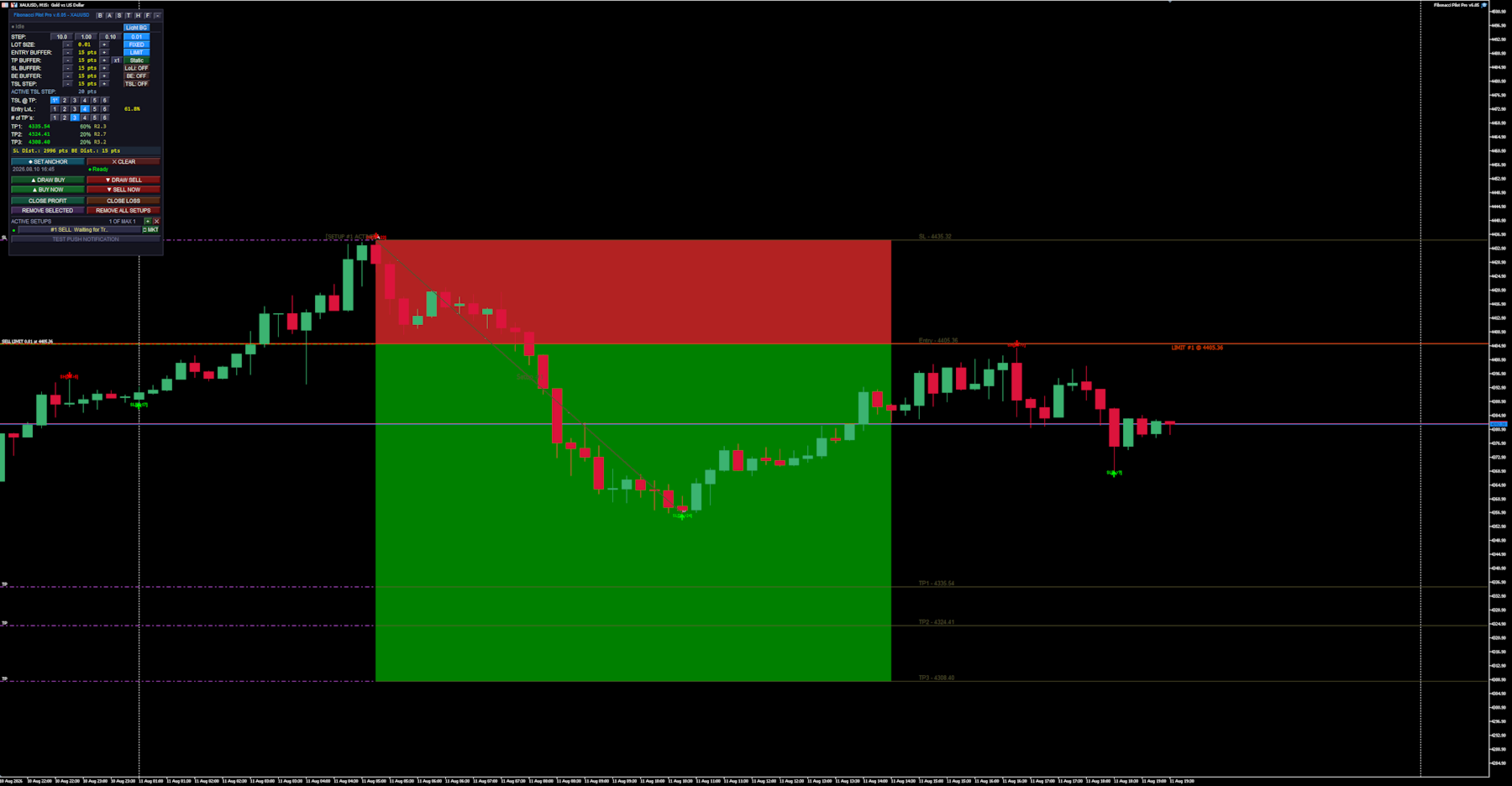
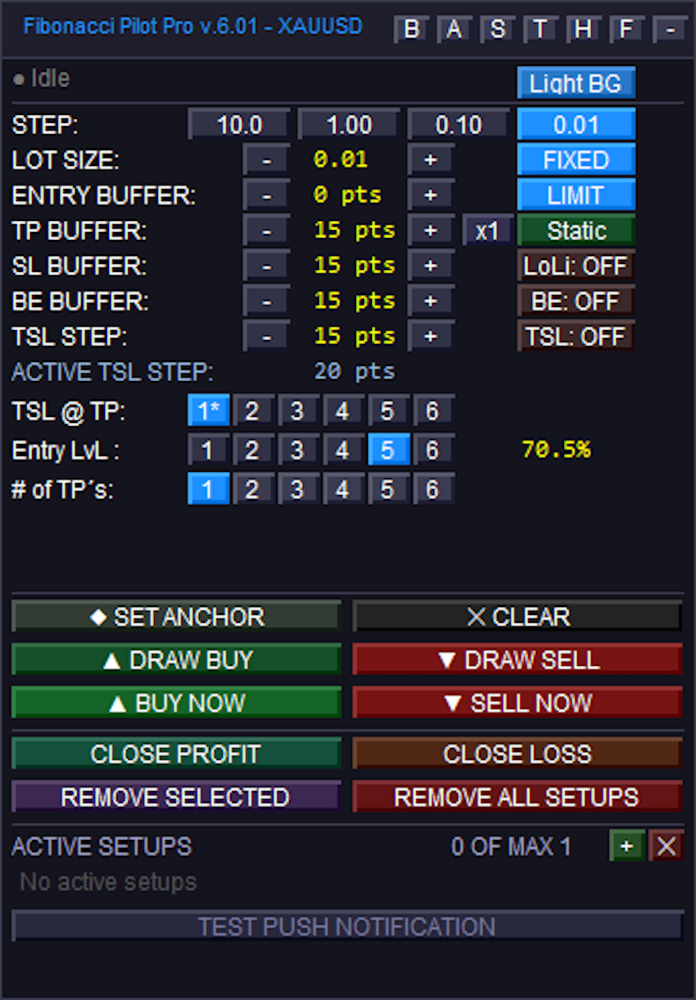
Main panel:
### Top Navigation & General Settings

Sub-Panel Toggles: The top right features small buttons to open or close specific sub-panels and modes. These toggle the Block Panel (`B`), Auto Panel (`A`), Symbol Panel (`S`), Trend Panel (`T`), Hover Info (`H`), Finetune (`F`), and Minimize (`-`).
Color Schema: Toggles the panel's visual theme. Its states alternate between "Light BG" and "Dark BG".
STEP: Four buttons used to set the increment amount for the `+` and `-` adjustments below. The states represent the point values: "10.0", "1.00", "0.10", and "0.01".

### Trade Parameters (Modifiers and Toggles)
LOT SIZE: Uses `+` and `-` to adjust volume. The adjacent toggle button switches the calculation mode, transitioning between "FIXED" lots and "Risk%".
ENTRY BUFFER: Uses `+` and `-` to adjust entry buffer distance. The adjacent toggle switches the execution mode between "LIMIT" and "INSTANT".
TP BUFFER: Uses `+` and `-` to adjust the Take Profit buffer distance. It includes a multiplier button (cycling from `x1` to `x5`) and a mode toggle that switches between "Static", "Spread", and "ATR".
SL BUFFER: Uses `+` and `-` to adjust Stop Loss distance. The adjacent toggle button controls the line extensions drawn to the left on the chart, switching between "LoLi: ON" and "LoLi: OFF".
BE BUFFER: Uses `+` and `-` to adjust Break Even locking distance. The adjacent toggle button enables or disables Break Even logic, switching between "BE: ON" and "BE: OFF".
TSL STEP: Uses `+` and `-` to adjust the Trailing Stop Loss step amount. The adjacent toggle button activates the trailing stop, switching between "TSL: ON" and "TSL: OFF".

### Fibonacci Targeting Rows
TSL @ TP: Six buttons numbered "1" to "6" used to designate which Take Profit target milestone will activate the trailing stop. The active selection will append an asterisk (e.g., `1*`) if the TSL toggle is currently active.
Entry LvL: Six buttons numbered "1" to "6" used to select which Fibonacci retracement level will dictate the entry price.
# of TP's: Six buttons numbered "1" to "6" used to select the total number of Take Profit extension levels to deploy for the setup.

### Drawing, Action, and Execution
Anchor Buttons: The "◆ SET ANCHOR" button activates manual anchor placement, changing its text to "● Click Chart..." while awaiting the user's chart click. The "✕ CLEAR" button deletes the manual anchor.
Drawing Buttons: The "▲ DRAW BUY" and "▼ DRAW SELL" buttons begin a manual drawing sequence. During the drawing process, they combine into a single button that changes states to indicate the current step: "— Awaiting Point A — CANCEL", "— Awaiting Point B — CANCEL", or "↺ RESET" (if the setup is fully drawn but unplaced).
Execution Buttons: When idle, these function as instant execution triggers, reading "▲ BUY NOW" and "▼ SELL NOW". If a limit setup has been successfully drawn on the chart, they transition to "▲ PLACE BUY" and "▼ PLACE SELL" to arm the pending limits.
Close Conditions: The "CLOSE PROFIT" and "CLOSE LOSS" buttons are used to force-close the currently selected active setup, provided the market is in the corresponding profit or loss state.
Removal Actions: "REMOVE SELECTED" deletes the highlighted setup, while "REMOVE ALL SETUPS" wipes all active setups from the chart.

### Setup Management List
List Controls: The green `+` button initializes a new blank setup slot, and the red `✕` button clears away all closed, cancelled, or inactive setups from the list.
Active Setup Rows: Clickable rows that select a specific setup and display its state (e.g., "Idle", "Limit Active", "Running"). If the setup is currently a pending limit order, an inline execution button appears reading "▶ MKT", which allows the user to immediately force the limit to execute at market price.
Test Push: The "TEST PUSH NOTIFICATION" button manually triggers a test alert to confirm mobile terminal notifications are configured correctly.


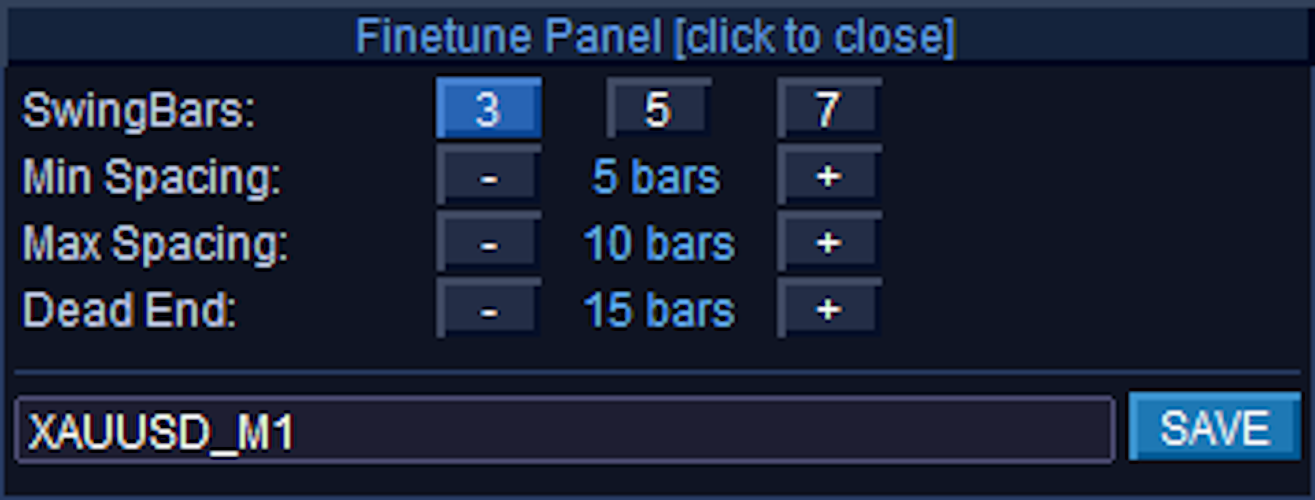
Finetune Panel:
### Finetune Panel Controls
Finetune Panel [click to close]: The entire top header bar functions as a button to minimize/hide the panel from the chart.
SwingBars: Three toggle buttons labeled "3", "5", and "7" that determine the fractal sensitivity (N-bar dominance) for detecting swing highs and lows. The currently selected mode is highlighted in bright blue, while the inactive options remain dark.
Min Spacing: Uses the `-` and `+` buttons to adjust the minimum number of chart bars required between opposite swings (e.g., from a Swing High to a Swing Low). The middle label displays the current value in bars, and changes to read "off" if the value is reduced to 0.
Max Spacing: Uses the `-` and `+` buttons to adjust the preferred maximum gap between opposite swings. Like Min Spacing, the label displays the value in bars and shifts to "off" if set to 0.
Dead End: Uses the `-` and `+` buttons to set the maximum allowed distance before a "dead end" warning is triggered, which reinstates the nearest suppressed swing if a gap gets too large. The label displays the current value in bars and shifts to "off" if set to 0.
Preset Name (Text Box): This is an editable text input field (showing "XAUUSD_M1" in your image) rather than a standard button. It automatically defaults to the current chart symbol and timeframe, but allows you to type in a custom filename.
SAVE: Clicking this button takes the current SwingBars, Min Spacing, Max Spacing, and Dead End values and writes them to a `.set` file in your terminal's `Presets\` folder, using the exact name typed in the text box next to it.


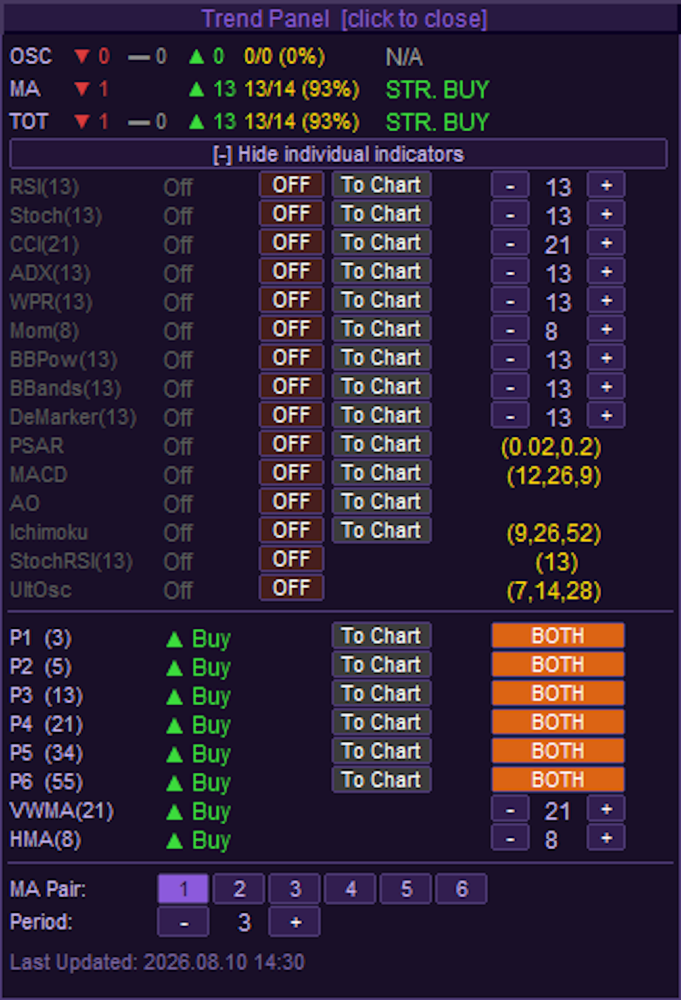
Trend Panel:
### Header & Layout Controls
Trend Panel [click to close]: The top header bar acts as a button to completely hide the Trend Panel from the chart.
Expand / Collapse Toggle: The full-width button just below the score summary toggles the expanded view. It switches states between "[-] Hide individual indicators" and "[+] Show individual indicators".

### Individual Oscillator Controls
ON/OFF State Toggles: The column of buttons currently displaying "OFF" in brown/dark red controls whether that specific indicator contributes to the overall Trend score. When clicked, they switch to an active "ON" state (green).
Note on BBPow: The Bull/Bear Power indicator has a special 3-state toggle instead of a standard ON/OFF. It cycles between "OFF" (red), "M:1" (purple), and "M:2" (magenta) to dictate different visual color modes when plotted.
To Chart: Injects the indicator visually onto your main chart or into a sub-window. When inactive, the button is grey; when active, it highlights in bright blue. *(Note: StochRSI and UltOsc do not have "To Chart" buttons)*.
Period Steppers (`-` and `+`): For the top 9 basic oscillators (RSI through DeMarker), these buttons dynamically adjust the lookback period, which updates the number in the middle. The bottom 6 complex oscillators (PSAR through UltOsc) use fixed parameters configured in the EA settings, represented by the static gold text instead of buttons.

### Moving Average (MA) Grid Controls
MA Mode Toggles: The column of buttons on the far right of the MA list (currently showing "BOTH" in orange) cycles the specific moving average calculation type for slots P1 through P6. Clicking them rotates the state between "OFF" (dark red), "EMA" (green), "SMA" (blue), and "BOTH" (orange).
To Chart: Renders the active MA pair directly onto the price chart. When activated, the button color changes from grey to explicitly match the color of the corresponding lines drawn on the chart (e.g., DeepSkyBlue, LimeGreen, Orange, etc.).
VWMA & HMA Steppers (`-` and `+`): These buttons adjust the lookback periods specifically for the Volume Weighted MA and Hull MA.

### Bottom Configuration Panel
MA Pair (1 through 6): These six buttons select which specific MA Pair slot (P1-P6) you want to configure. The currently selected slot is highlighted in bright purple/blue, while the others remain dark.
Period (`-` and `+`): These steppers directly alter the lookback period for whichever MA Pair is currently highlighted in the row above it.


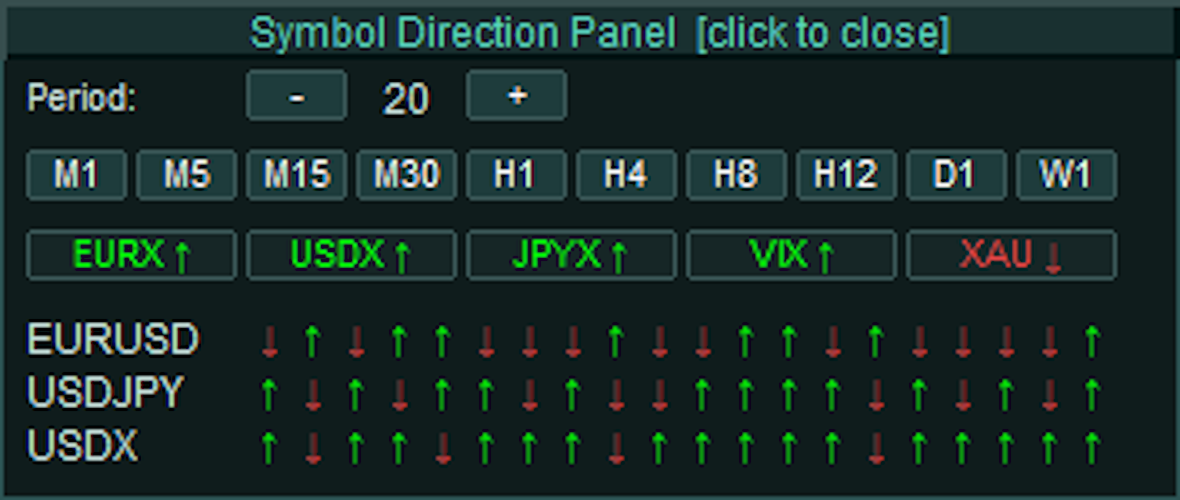
Symbol Direction Panel:
### Header & Layout Controls
Symbol Direction Panel [click to close]: The top header bar acts as a single, full-width button to completely hide the Symbol Panel from the chart.

### Timeframe & Period Controls
Period (`-` and `+`): These stepper buttons adjust the number of historical bars evaluated for the directional arrows. Clicking them increases or decreases the value displayed in the center, ranging from a minimum of 3 up to a maximum of 20 bars.
Timeframe Quick-Select (M1 to W1): A row of ten buttons used to select the active timeframe for the panel's data calculation, operating completely independently of your main chart's timeframe.
State: The currently selected timeframe (e.g., "M30" in your image) highlights with a brighter teal background, while inactive timeframes remain a darker muted teal.

### Highlight Basket Slots
Basket Buttons (e.g., EURX, USDX, XAU): A dynamic row of interactive buttons representing user-defined individual indices or multi-symbol baskets parsed from the EA's settings. Clicking one of these buttons opens a secondary "Highlight Info HUD" to provide a detailed statistical breakdown of its internal components.
Text & Arrow State: The text and directional arrow on the button dynamically change color to reflect the aggregate momentum of the basket's members over the selected period. Green with an up arrow (↑) indicates bullish dominance, Red with a down arrow (↓) indicates bearish dominance, and Grey with a right arrow (→) indicates a neutral or invalid state.
Background State: When actively clicked to display its Info HUD, the button's background highlights in bright teal. When closed/inactive, it remains a dark slate color.
(Note: The bottom section displaying specific symbols like EURUSD, USDJPY, and USDX alongside their respective red and green arrows are non-interactive informational text labels, not clickable buttons. They visually map the close-versus-open direction of the most recent bars based on your specific Period and Timeframe settings).

Symbol Direction Panel - Highlight Info HUD:
The data is split into two halves: **Period** statistics and **Day** statistics.

### Period Statistics (Per)
These calculations are dynamically based on the exact Timeframe and Period limit you set on the main Symbol Panel (e.g., the last 20 bars on the M30 chart).
Symbol: The individual asset within the basket (e.g., XAUUSD, XAUEUR).
H/L Per: The absolute highest price and lowest price reached during your defined period.
% Per & Pts Per: The total range of movement between that period's High and Low, measured in both percentage and raw points.
F->L% P & F->L Pts: Stands for "First to Last". This measures the net momentum by comparing the opening price of the *first* bar in your period to the closing price of the *last* bar, displayed in percentages and points.

### Daily Statistics (Day)
These calculations completely ignore your panel settings and look strictly at the current daily candle (`PERIOD_D1`) to give you a macro perspective of today's price action.
H/L Day: The absolute highest and lowest prices reached today.
% Day & Pts Day: The total range of movement between today's High and Low, measured in percentages and points.
F->L% D & F->L Pts: The "First to Last" net change for the current day. This directly compares today's Daily Open price against the current live price, telling you exactly how far the asset is up or down on the day in both percentages and points.
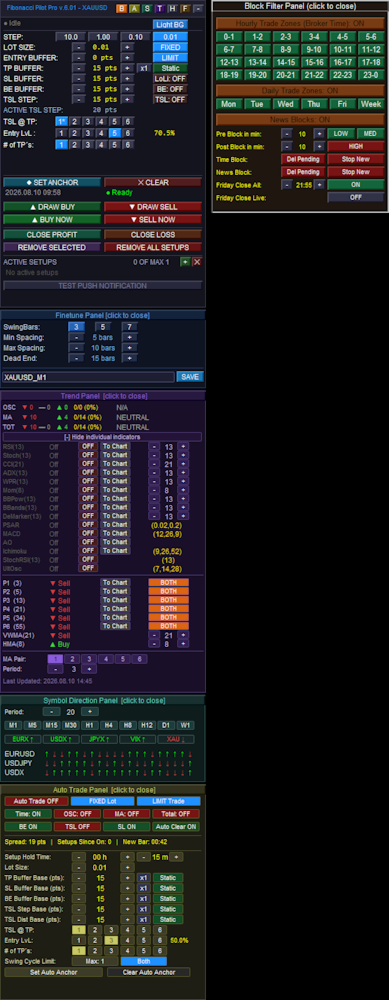
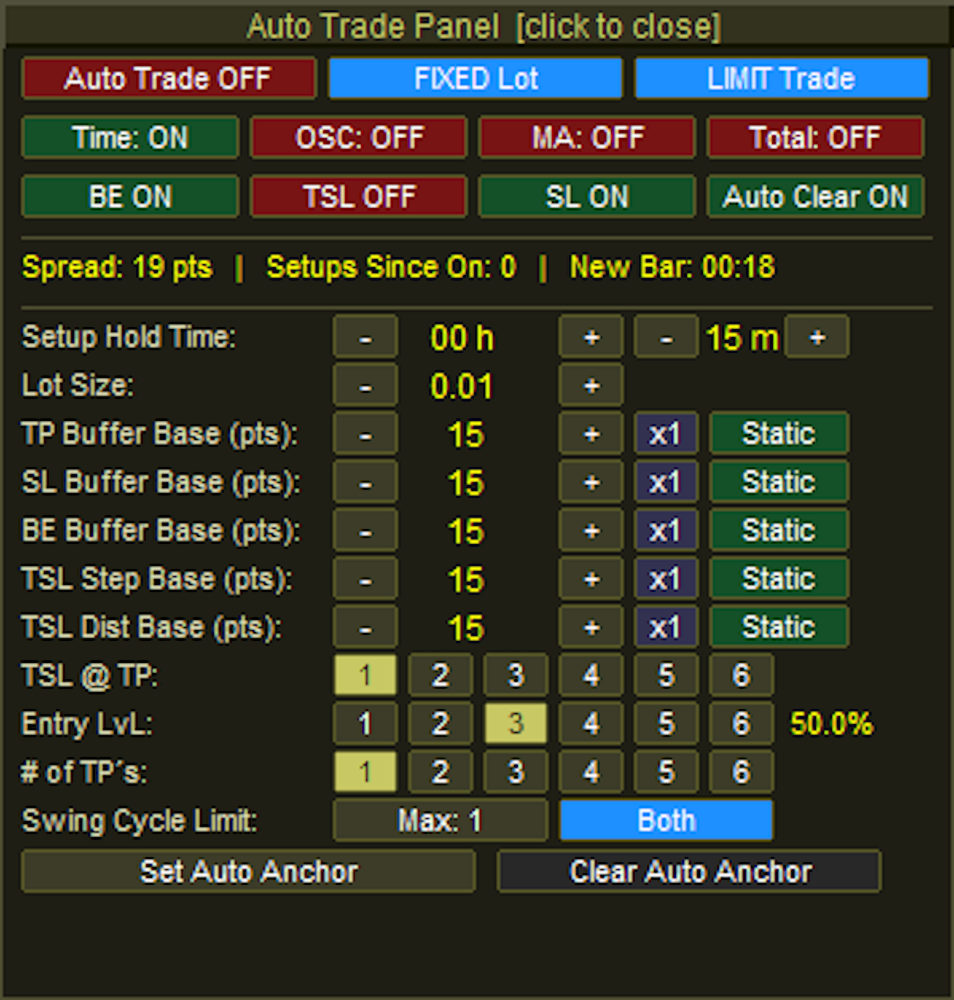
Auto Trade Panel:
### Header & Top Execution Controls
Auto Trade Panel [click to close]: The top header bar acts as a full-width button to minimize and hide the Auto Panel from the chart.
Auto Trade Master Toggle: Enables or disables the entire automated trading engine. The button switches between "Auto Trade OFF" (Red) and "Auto Trade ON" (Green).
Lot Type Toggle: Switches the volume calculation method between "FIXED Lot" (Blue) and "RISK %" (Orange).
Order Mode Toggle: Cycles through the execution methods the EA will use when a setup is detected. It rotates between "LIMIT Trade" (Blue), "INSTANT Trade" (Orange), and "BREAKOUT" (Purple).

### Filter & Management Toggles
Filters Row (Time, OSC, MA, Total): Four independent toggle buttons that enforce specific entry conditions before an auto-trade is allowed. Each button flips between an active "ON" state (Green) and an inactive "OFF" state (Red).
Management Row (BE, TSL, SL, Auto Clear): Four independent toggles managing the lifecycle of the auto-trade. They control whether Break Even, Trailing Stops, and Master Stop Losses are applied, as well as if closed setups are automatically removed from the screen. Like the filters, they alternate between Green ("ON") and Red ("OFF").

### Inputs, Steppers, & Dynamic Buffers
Setup Hold Time: Two pairs of `-` and `+` stepper buttons. The first pair adjusts the expiration hours (e.g., `00 h`), and the second pair adjusts the expiration minutes (e.g., `15 m`). If a pending limit order is not triggered within this window, the EA cancels it.
Lot Size / Risk %: Uses `-` and `+` buttons to adjust the trading volume. The text label dynamically changes based on the Lot Type toggle in the top row.
Buffer Base Rows (TP, SL, BE, TSL Step, TSL Dist):
Base Steppers (`-` and `+`): Adjusts the raw point value for the respective buffer.
Multiplier Button: A clickable button (e.g., `x1`) that cycles from `x1` up to `x5`. This multiplies the dynamic volatility value if a dynamic mode is selected.
Mode Toggle: Cycles the calculation method for the buffer. It rotates between "Static" (Green), "Spread" (Red), and "ATR" (Blue). *(Note: The TP Buffer has a fourth option: "TP+Sprd")*.

### Targeting Matrices
TSL @ TP: Six buttons numbered "1" to "6" used to designate which Take Profit target milestone must be reached to activate the trailing stop. The active selection is highlighted in khaki/yellow, while inactive slots are dark grey.
Entry LvL: Six buttons numbered "1" to "6" that dictate which Fibonacci retracement level the pending order will be placed at. A text label to the right automatically displays the corresponding percentage (e.g., `50.0%`).
# of TP's: Six buttons numbered "1" to "6" that determine the total number of Take Profit extension levels to deploy for the auto-setup.

### Cycle Limit, Direction, & Anchors
Swing Cycle Limit: A button that increments the maximum allowed consecutive setups the EA will trade off the same Point A anchor. It increments up to your global `MaxSetups` limit before resetting to 1.
Direction Toggle: Cycles the permitted market direction for automated entries. It rotates between "Both" (Blue), "Bullish" (Green), and "Bearish" (Red).
Anchor Buttons:
Set Auto Anchor: Initiates the manual selection of the auto-trade starting point. When clicked, the button turns a muted gold and the text changes to "Click Chart..." while awaiting the user's input.
Clear Auto Anchor: Wipes the active automated anchor line from the chart and halts the auto-scanning engine.


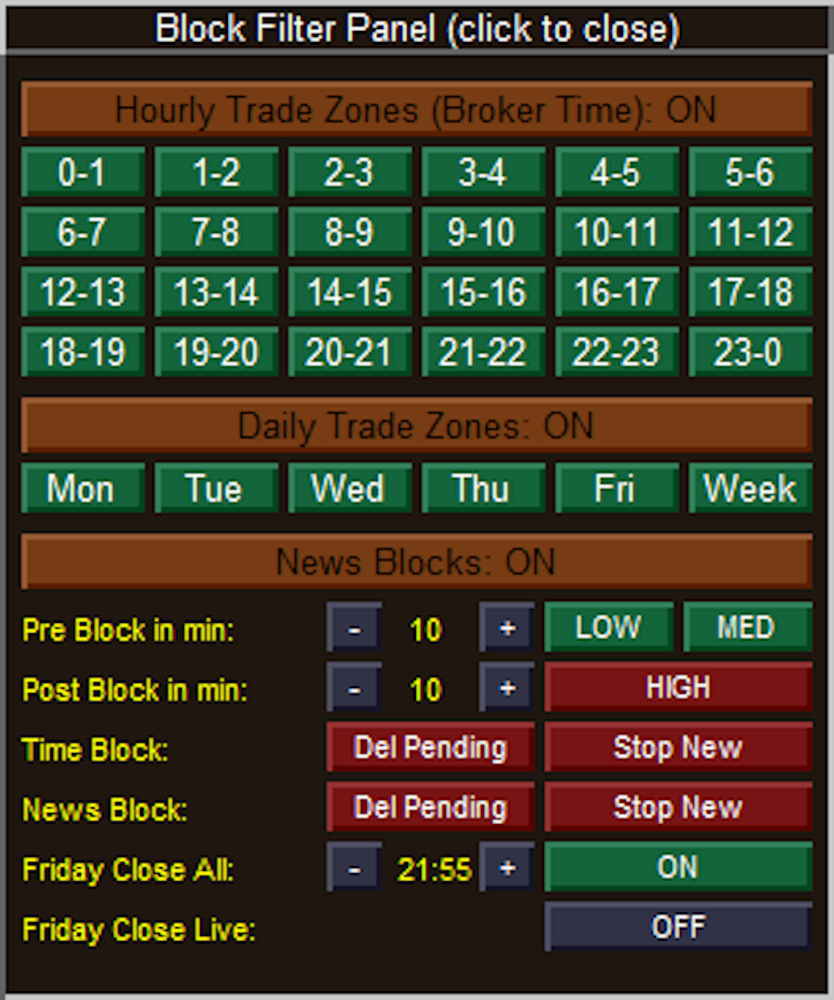
Block Filter Panel:
### Header & Master Toggles
Block Filter Panel (click to close): The topmost header bar acts as a full-width button to minimize and completely hide the Block Filter Panel from the chart.
Hourly Trade Zones (Broker Time): A master toggle header that enables or disables the entire 24-hour time-blocking matrix below it. The text dynamically updates between "ON" and "OFF".
Daily Trade Zones: A master toggle header that enables or disables the specific days-of-the-week blocking matrix below it.
News Blocks: A master toggle header that enables or disables the entire economic calendar filtering engine.

### Matrix Controls (Hourly & Daily)
24-Hour Matrix (0-1 through 23-0): Individual toggle buttons for every hour of the day.
State: Green indicates trading is Allowed during that hour. Red indicates trading is Blocked.
Daily Matrix (Mon through Week): Individual toggle buttons for specific trading days, where "Week" represents the weekend (Saturday/Sunday).
State: Green indicates trading is Allowed on that day. Red indicates trading is Blocked.

### News & Safety Filter Settings
Pre & Post Block in min: Uses `-` and `+` stepper buttons to define the safety window (in minutes) surrounding an economic news event.
Impact Toggles (LOW, MED, HIGH): Three separate buttons to determine which levels of economic news impact will trigger a trading suspension.
State: Green means the block is inactive (the EA will ignore news of this impact level). Red means the block is active (trading will be suspended for these events).
Time Block Actions: Two action toggles dictating what the EA should do when a scheduled Hourly or Daily block begins.
Del Pending: If Red (ON), un-triggered pending limit orders will be deleted. If Green (OFF), pending orders are left alone.
Stop New: If Red (ON), the EA is forbidden from calculating and placing new trades. If Green (OFF), new trades are permitted.
News Block Actions: Two action toggles dictating what the EA should do when an active News event hits its pre- or post-block window. They function exactly the same as the Time Block Actions, turning Red when active and Green when inactive.

### Friday Close Options
Friday Close All: Enables the failsafe to halt Friday trading based on a specific cutoff time.
Time Steppers: The `-` and `+` buttons adjust the cutoff time (displayed in the center) in 15-minute increments.
Toggle State: The rightmost button switches the feature between "ON" (Green) and "OFF" (Dark Grey).
Friday Close Live: Dictates whether the EA should aggressively force-close actively running, live trades when the Friday cutoff time is reached. The button switches between "ON" (Green) and "OFF" (Dark Grey).


Hover Panel:
SH 2026.08.10 10:24:** Identifies the type of swing and its exact timestamp. **SH** stands for **S**wing **H**igh (a market peak), whereas a trough would display **SL** for **S**wing **L**ow. The red color corresponds to your bearish/high settings.
Price: The exact price level of that specific swing point (the absolute high of that candle's wick). If this swing point was currently being used as Point A or Point B for an active setup, an extra tag would appear here to let you know.
Left spacing: Shows there are 10 bars between this swing high and the previous swing point recorded on the chart. The text is green because 10 bars passes your EA's minimum spacing filter.
Right spacing: Shows there are 7 bars between this swing high and the *next* swing point that formed after it.
Status (Confirmed): This means the swing has fully passed your "SwingBars" fractal requirement (e.g., if set to 5 bars, it successfully formed the required lower highs on both the left and right sides). If a swing was still forming on the live edge of the market, this would read "Pending", and if it was brought back by your Dead End filter, it would read "Rescued*".
▲ 2463 pts from current: This is a live distance tracker. It tells you that this specific swing high is exactly 2,463 points *above* (indicated by the up arrow) the current live market price.


Symbol Direction Panel - Highlight Info HUD:
The data is split into two halves: **Period** statistics and **Day** statistics.
### Period Statistics (Per)
These calculations are dynamically based on the exact Timeframe and Period limit you set on the main Symbol Panel (e.g., the last 20 bars on the M30 chart).
Symbol: The individual asset within the basket (e.g., XAUUSD, XAUEUR).
H/L Per: The absolute highest price and lowest price reached during your defined period.
% Per & Pts Per: The total range of movement between that period's High and Low, measured in both percentage and raw points.
F->L% P & F->L Pts: Stands for "First to Last". This measures the net momentum by comparing the opening price of the *first* bar in your period to the closing price of the *last* bar, displayed in percentages and points.

### Daily Statistics (Day)
These calculations completely ignore your panel settings and look strictly at the current daily candle (`PERIOD_D1`) to give you a macro perspective of today's price action.
H/L Day: The absolute highest and lowest prices reached today.
% Day & Pts Day: The total range of movement between today's High and Low, measured in percentages and points.
F->L% D & F->L Pts: The "First to Last" net change for the current day. This directly compares today's Daily Open price against the current live price, telling you exactly how far the asset is up or down on the day in both percentages and points.
おすすめのプロダクト
This is the official version of Opal EA, a powerful tool using cutting-edge algorithms and AI-driven calculations. This fully automated EA encompasses the exceptional qualities we associate with the opulent gemstone: proper decision-making, prudence and strong protection. Be aware of cracked versions/unofficial copies that either work only on demo accounts or are sold at suspiciously low prices. These reportedly lead to rapid account losses.   Opal also takes into account the study of psychol
MOMENTUM MASTER EA: The Pinnacle of Momentum Trading Master the Markets with Precision and Power The Momentum Master EA is a cutting-edge Expert Advisor built to capitalize on the power of momentum indicators for exceptional trading outcomes. By seamlessly integrating top-tier technical tools like MACD , Bollinger Bands , RSI , and the Momentum Indicator , this EA offers a dynamic and comprehensive approach to trading in today's fast-paced markets. Features That Set Momen
Meta Quant Grid Master Telegram:  t.me/rajjthealgotrader   Meta Quant Grid Master is a next-generation algorithmic trading system designed to intelligently navigate market cycles using adaptive position management and precision-based execution. Built for traders who demand consistency, control, and performance , this EA combines structured trade sequencing with advanced risk management to deliver optimized results across varying market conditions. Core Concept (Smart but Protected) The sys
Phoenix Midas
Alvaro Albillos Gutierrez
Phoenix Midas is an order-flow Expert Advisor built specifically for XAUUSD (Gold) on the M15 timeframe. It reads market structure through synthetic order-flow analysis — volume delta, volume profile (POC / value area) and liquidity behaviour — to time entries on two complementary setups, and it manages every trade with a fixed, pre-defined risk. Built-in news filtering and prop-firm risk controls make it suitable for both personal accounts and funded-challenge environments. WHAT IT IS NOT
Aurum Apex Gold trades one instrument -- XAUUSD -- with one idea: institutions fill large orders where retail stops sit, and the reversal that follows is tradable when, and only when, price confirms it. How a trade is built 1. Liquidity sweep. A tracked pool of resting orders (previous day/week    high or low, session extreme, equal highs/lows, untapped swing) is    penetrated and then reclaimed. Penetration and reclaim are both measured in    ATR, never in fixed points, so the logic scales w
The Official Automated Version of the Reliable Indicator PipFinite Breakout EDGE EA Breakout EDGE takes the signal of PipFinite Breakout EDGE indicator and manages the trade for you. Because of numerous financial instruments to consider, many traders want the signals to be fully automated. The EA will make sure all your trades are executed from entry to exit. Saving you time and effort while maximizing your profits. The Edge of Automation Effortless price action trading is now possible acros
Extended Round 1 Special Pricing for Early Adopters | Current Price: $299 - Only 10 copies left at this price | Next Price: $399 Aureus MT5 is a cutting-edge Expert Advisor designed exclusively for trading Gold. Combining the precision of a price reversal trading strategy with advanced machine learning, Aureus MT5 provides traders with a reliable tool to navigate the complexities of the Gold market. Strategy Aureus MT5 employs a multi-faceted approach with three distinct price reversal strat
Self-learning core – scans the last 500 candles, extracts RSI + MA-slope patterns and builds its own database—no Python, DLLs or external files. Real-time adaptation – each bar updates accuracy scores and votes on the most similar patterns before opening a trade. Volatility-aware risk – every position starts with a stop-loss equal to ATR(14) × 1.5 , automatically wider in fast markets and tighter in calm ones. Ultra-light, 100 % MQL5 – minimal CPU load, works on any broker, any symbol. Full sou
ProTrade EA
Jim Ariel Camarce Ignao
Key Features   Automated Candle Pattern Recognition 10 Professional Patterns : Detects Bullish/Bearish Engulfing, Hammer/Shooting Star, Morning/Evening Star, Piercing/Dark Cloud, and 6 additional professional candlestick patterns Smart Filtering : Combine multiple patterns with configurable confirmation logic Volume Confirmation : Optional volume filter to validate pattern strength Multi-Timeframe Analysis : Separate execution and bias timeframes for better timing   Trading Dashboard Int
Short Description Swing Timing Breakout EA is a smart Expert Advisor for MetaTrader 5 that combines trend filtering, momentum timing, and dynamic risk management to capture high-probability swing and breakout opportunities. Full Description Swing Timing Breakout EA is a professional trading robot designed for MetaTrader 5, suitable for traders who want a balance between automation, control, and disciplined risk management. This EA uses a trend-following and momentum confirmation approach ,
Trend & Grid V36 Instant Trend & Grid V36 Instant は、 トレンドフォロー (Trend-Following) ロジックと高度な グリッド管理 (Grid) システムを組み合わせた高性能ハイブリッド型自動売買ツール (EA) です。M5チャートの EMA 25 および 50 を使用して相場の方向性を的確に判断し、独自のリカバリーメカニズムによって価格の逆行にも柔軟に対応します。 特別プロモーションおよび価格改定のお知らせ: 戦略の希少性とサポート品質を維持するため、 5本売れるごとに価格が「2倍」に引き上げられます。 現在の最安値で今すぐ手に入れてください! 主な特徴: ダブルレイヤー戦略: EMAのクロスオーバーとプライスアクションにより、トレンドが確定した時のみエントリーする順張り設計。 ダイナミックグリッドシステム: 市場のボラティリティに合わせて自動調整される高度なリカバリーアルゴリズム。 M1 ショック保護機能: M1チャートでの急激な価格変動(スパイク)を検知し、リスクの高い局面での不必要なエントリーを抑制します。 リア
Scalping bot for the gold/dollar pair (XAU/USD) — a powerful and versatile solution for traders, designed to deliver maximum efficiency in a dynamic market. This bot is specifically engineered for scalping: it analyzes price changes and places trades even before significant market movements begin. This allows it to secure advantageous positions early and capitalize on even the smallest market fluctuations. Key Features: Flexibility: Adapts to any market conditions and suits your trading strategy
Bober Real MT5
Arnold Bobrinskii
4.88 (16)
Bober Real MT5 is a fully automatic Forex trading Expert Advisor. This robot was made in 2014 year and did a lot of profitbale trades during this period. So far over 7000% growth on my personal account. There was many updates but 2019 update is the best one. The robot can run on any instrument, but the results are better with EURGBP, GBPUSD, on the M5 timeframe. Robot doesn't show good results in tester or live account if you run incorrect sets. Set files for Live accounts availible only for cu
BTC Smart Hunter
Puguh Andrie Setia Aji
BTC Smart Hunter for MetaTrader 5 Overview BTC Smart Hunter is an automated breakout trading Expert Advisor (EA) designed specifically for BTCUSD on MetaTrader 5 . The EA focuses on identifying significant breakout opportunities while avoiding many common false signals through multiple built-in market filters. Instead of opening trades randomly, BTC Smart Hunter continuously analyzes recent price action, detects important breakout levels, and places pending orders only when predefined market con
Eldan
Danail Palhutev
Swing Trading Expert Advisor - a reliable tool for efficient market trading. This Expert Advisor is designed to automate swing trading strategies in financial markets. It uses proven indicators such as Moving Average (MA) and Average True Range (ATR) to identify the most suitable entry and exit points. This allows you to follow current market movements and trade in the direction of the trend. The advisor works with a fixed volume and also has flexible parameter settings for risk management, i
| Fully-automated Smart Money Concept (ICT) inspired trading solution with multi-strategy capabilities | Built by a grid trader >> for grid traders.  This is MT5 version, click  here  for  Blue CARA MT4  (settings and logics are same in both versions)     Real monitoring signal  -->  Cara Gold Intro Blue CARA EA   ('CARA') - short for  C omprehensive  A lgorithmic   R esponsive   A dvisor is a next-gen  multi-currency    multi-timeframe  EA base on the widely known (and perhaps the most popul
Disruptive Edge EA is an innovative Expert Advisor developed from the concept of disruptive technology. It incorporates technical analysis strategy based on the various price movements, patterns, trends, retrenchments and reversals which are carefully coded into the system. It use s a flexible and dynamic execution trading algorithm which depends on price action/ movement to execute very high precision trades. All trades are protected with a hard stop loss. Very good risk management is an integr
Classic Market Surfer EA - A Timeless, Proven Strategy for Gold Trading For years, this powerful trading strategy has been hidden from the public-reserved for a select few. Now, for the first time, the Classic Market Surfer EA is available to traders like you.   Built on pure, time-tested trading principles, this EA doesn't rely on trendy gimmicks like AI or machine learning. Instead, it harnesses a classic, robust strategy that has consistently delivered results over the years. This is not a "g
KK STRIKER is a professional automated trading system built to dominate Gold (XAUUSD) with intelligent momentum entries and advanced capital protection. Designed for traders who want consistent performance without emotional trading . Why AKK STRIKER Works Trades only high-probability momentum moves Smart recovery system to manage market pullbacks Individual profit trailing on every trade Built-in risk control and drawdown protection Fully automated – no manual trading needed Smart
Gold Liquidity Master Pro is a high-precision algorithmic trading system designed exclusively for Gold (XAUUSD). Unlike conventional bots that use lagging indicators, this Expert Advisor (EA) operates based on Price Action and Institutional Liquidity Taking, identifying false breakouts on 4-hour (H4) candles where large banks typically "clean up" weak hands before a major move. Recommendations Symbol: XAUUSD (Gold) Timeframe: H4 Minimum Deposit: $500  Account Type: ECN / Raw Spread with low
This Expert Advisor can be applied to many markets because It exploits basic supply/demand and price action concepts. It identifies the major rotation zones (PRZ), supply and demand zones and supports and resistances within major price trends. It buys at discount zones and sells at premium prices. It can and should be optimized through the Metatrader tester to find the best parameters to use for current market conditions. This is not a fixed strategy rather a full trading algo that will find whi
PipFinite EA Trend PRO MT5
Karlo Wilson Vendiola
3.67 (9)
The Official Automated Version of the Powerful Indicator PipFinite Trend PRO EA Trend PRO trades the signal of PipFinite Trend PRO and manages the trade depending on the user's preference. The EA includes many customizable features that can further enhance the Trend PRO trading strategy. Features like Entry and Exit Filters, Higher Timeframe Filter, Stoploss, Takeprofit, Breakeven, Trailing Stop, News Filter and MORE! The Innovative Solution EA Trend PRO was created to make your trading more
ICONIC BTC AI+ | SYNAPSE.PHENOTYPE S6 ENGINE(バージョン 15.00) 発売価格 現在価格:599 USD。 残りライセンス数:10。 次の価格帯:699 USD。 最終価格:1699 USD。 早期アクセス価格は製品リリースの現在のフェーズを反映したものです。現在のライセンス枠が終了し、次の価格帯が開放されるにつれて価格は段階的に引き上げられます。現在の価格が終了する明確な予定日は設定されていません。 ビットコインは為替通貨ペアではありません。ゴールドのような値動きをせず、株価指数のようにセッションの境界を尊重するわけでもなく、ボラティリティの特性は一時間の取引の中でさえ変化することがあります。落ち着いた値動きの通貨向けに作られた汎用の自動売買システムは、BTCUSDが安定して示さない市場の挙動を前提としているため、ここではしばしば機能しません。 ICONIC BTC AI+ はBTCUSD専用に設計されています。エントリー条件の検証からAIによる意思決定のルーティング、リアルタイムのリスク調整に至るまで、アーキテクチャのあらゆる層がこの市
EMA256 Fourier Cycle Trader EMA256 Fourier Cycle Trader is an advanced MetaTrader 5 Expert Advisor combining a long-term EMA or TEMA trend model, causal Fourier cycle analysis, configurable averaging and a unified basket take-profit system. The Expert Advisor is designed primarily for CENT accounts and for traders who understand basket recovery strategies, geometric lot progression and the risks associated with trading without a mandatory Stop Loss. RECOMMENDED STARTING CONFIGURATION Recommended
グリッドなし、マーチンゲールなし、ナンピンなし!!! リアルティックによるバックテスト、99.9% モデリング精度。 Prop Firm チャレンジ(FTMO、The5ers など)を突破するために設計。 FTMO SMC Pro は SMC(Smart Money Concepts)とプライスアクションに基づき、マーチン・グリッドなどの危険な手法を完全排除。トレンド方向に沿った FVG を利用し、RR 1:2.5+ の高品質エントリーに集中します。 主な特徴: **Prop Firm 安全設計:**デイリーマックスロス用ハードストップ。 **論理的エントリー:**マーケットストラクチャー + FVG ミティゲーション、EMA トレンドフィルター。 **リスク管理:**全ての取引に SL + スマートブレークイーブン。 **HFT/アービトラージなし:**全てのブローカーで安全。 推奨設定: 通貨ペア:EURUSD 時間足:M15 セットファイル:1 回のトレードリスク 0.5–2% 用
GUESS WHO'S BACK. THE LEGENDARY BLACK BOX SELF-OPTIMIZING EA — REBORN FOR 2026. Award-winning. Ranked top 20 overall for a DECADE on MT5. No. 1 in the world. Three times. The original self-optimizing multi-module engine traders still talk about today — now rebuilt from the ground up. BBSO – BlackBoxSelfOpt. Plug & Play. Self-Optimizing. Multi-Strategy. Trades currencies, metals, indexes. THE HONEST MACHINE While a generation of "money-printer" robots quietly stacked hidden grids and martingale b
Edge EA Pro MT5
Aleksandr Zheltikov
4.67 (3)
Edge is a fully automated trading system that finds trading opportunities and places trades by combining technical indicators, price action analysis, wave analysis and all-day market pattern analysis using Fibonacci areas. Based on historical market data, the system's thinly layered multilayer neural network is trained to identify patterns and relationships that can be used to predict future price movements. The neural network processes various inputs, including price data, technical indicators

Alpha Bullish Engine MT5 Overview Alpha Bullish Engine(No Martingale, no Grid) is a professional Expert Advisor for MetaTrader 5 designed to identify and trade high-quality market bullish opportunities while maintaining a strong focus on risk management and capital preservation. Built with a combination of trend analysis, momentum assessment, and intelligent trade management, the EA is designed to operate in favorable market conditions while avoiding unnecessary exposure during less suitable env
XAU Velocity Pro XAU Velocity Pro is an automated Expert Advisor for MetaTrader 5 developed for short-term XAUUSD trading. It combines price-action breakout analysis with RSI momentum filtering to identify trading opportunities following periods of price consolidation. Trading Approach The EA monitors recent price structure to identify relatively narrow consolidation ranges. These areas provide reference boundaries for subsequent breakout detection. When price moves outside the identified stru
このプロダクトを購入した人は以下も購入しています
The Gold Reaper MT5
Profalgo Limited
4.45 (108)
小道具会社準備完了!( セットファイルをダウンロード ) 警告: 現在の価格で販売できるのは残りわずかです! 最終価格:990ドル EAを1つ無料でゲット(3つの取引アカウント分)→購入後ご連絡ください 究極のコンボセット   は   こちらをクリック 公開グループに参加する: こちらをクリック   ライブシグナル クライアントシグナル YouTubeレビュー 最新マニュアル ゴールドリーパーへようこそ! 非常に成功を収めたGoldtrade Proをベースに開発されたこのEAは、複数の時間枠で同時に動作するように設計されており、取引頻度を非常に保守的なものから極めて変動の激しいものまで設定できるオプションを備えています。 このEAは、複数の確認アルゴリズムを使用して最適なエントリー価格を見つけ出し、内部で複数の戦略を実行して取引のリスクを分散します。 すべての取引にはストップロスとテイクプロフィットが設定されていますが、リスクを最小限に抑え、各取引の潜在的な利益を最大化するために、トレーリングストップロスとトレーリングテイクプロフィットも使用されます。 このシステムは、非常に人
Quantum Queen X MT5
Bogdan Ion Puscasu
5 (64)
伝説は続く。女王は進化する。 Quantum Queen Xへようこそ。これは、Quantum Queenの実績ある成功を基盤とした、伝説的なゴールド取引システムの次世代版です。 Quantum Queen Xは、Quantum Queenと同じ実績のあるコアエンジンをベースに構築されており、トレーダーがどの戦略を有効または無効にするかを正確に選択できる強力な新しいカスタムモードが導入されています。 すべての戦略は個別にレビュー、改良、最適化され、さまざまな市場状況においてさらに優れたパフォーマンスと適応性を発揮します。デフォルトのプリセットも強化され、7つの戦略ではなく厳選された9つの戦略を組み合わせることで、より広い市場範囲とより多くの取引機会を提供すると同時に、Quantum Queen XをMQL5で最も成功したGOLDエキスパートアドバイザーにした規律ある取引哲学を維持しています。 IMPORTANT! After the purchase please send me a private message to receive the installation manual
Quantum Commander
Bogdan Ion Puscasu
4.75 (16)
クォンタム・エコシステムは新たな戦場へと突入し、新たな司令官が指揮を執ります。US30指数専用に開発されたクォンタム・コマンダーは、世界で最もダイナミックな市場の一つである米国市場向けに構築された、完全自動化されたエキスパートアドバイザーです。 数多くのゴールドEAが溢れる世界において、Quantum Commanderは際立った存在です。 これまでGOLDに特化したリリースを何度か行ってきた後、私たちはUS30という新たな領域へと踏み出します。これは新しい金融商品であり、異なる戦略に基づき、量子エコシステムに真の多様化をもたらす強力な機会となるでしょう。 発売記念特別割引価格。最終価格1999ドル。 ライブ信号:   こちらをクリック Quantum Commander MQL5 公開チャンネル: こちらをクリック ***Quantum Commander MT5 を購入すると Quantum Emperor、Quantum King、Quantum Bitcoin、Quantum Baron、Quantum OmniGold、Quantum Athena X、Quan
Quantum Titan MT5
Bogdan Ion Puscasu
4.79 (39)
Quantum Titanは、Quantumエコシステムに機関投資家レベルの取引機能をもたらし、精度、規律、そして実績のあるライブマーケットパフォーマンスにおいて新たな基準を打ち立てます。 GOLDエキスパートアドバイザーにさらなる性能を求めるトレーダーのために開発されたTitanは、Quantumトレーディングテクノロジーの次なる進化を象徴するものです。 全世界で生涯ライセンスは1,000個限定です。 1,000部すべてが完売次第、Quantum Titanは入手できなくなります。 発売記念特別割引価格。最終価格1999ドル。 初期投資5万ドルでLive Signalに参加しよう:   こちらをクリック Quantum Titan MQL5 公開チャンネル:   こちらをクリック ***Quantum Titan MT5 を購入すると、Quantum Emperor、Quantum King、Quantum Bitcoin、Quantum Baron、Quantum Valkyrie、Quantum OmniGold、Quantum Athena X、Quantum
Aikon MT5
William Brandon Autry
5 (9)
AIKON — 自動売買。対話によるコントロール。 AIKON は、MetaTrader 5 用の AI 搭載エキスパートアドバイザー(EA)です。設定して有効にすると、選択した設定とリスク管理の範囲内で、市場分析、取引の開始、ポジション管理を自動で行うことができます。 Ask Aikon を使えば、普段の言葉で自分の取引システムを直接理解し、操作できます。 取引設定を作成する。ある市場で取引が行われた理由、または行われなかった理由を尋ねる。エクスポージャーを確認する。パソコンから、またはスマートフォンの Telegram から変更を準備する。 会話を続けたり、通常の自動エントリーを毎回承認したりする必要はありません。AIKON は、有効にしたルールに従って取引します。Ask Aikon を通じて依頼した運用上の変更は、確認のために提示されます。 自動売買と継続的な監視には、必要な取引権限を有効にした状態で、MetaTrader 5 を起動し、接続を維持する必要があります。 あなたの戦略。あなたの資金。あなたのルール。あなたがコントロール。 私のAIKON活用法:リアル口座のシグナル、
MoonDog EA
James Vito Armin Bianchini
4.39 (38)
MoonDog EA は、MetaTrader 5 上の XAUUSD 向けに特別に開発された、複数戦略型のブレイクアウト Expert Advisor です。 このシステムは、異なるブレイクアウト条件や価格拡大の局面を検出するために設計された、5つの独立したブレイクアウト戦略を組み合わせています。 MoonDog は、マーチンゲール、Recovery モード、Grid Recovery、ロット倍率の増加、損失ポジションのナンピンを使用しません。 すべての取引は、あらかじめ設定された独自の Stop Loss と Take Profit を持って開始されます。損失が発生した後に、より大きなロットで回復を狙う取引を行うことはありません。 Break-even、Trailing、MoonLock は、既存ポジションを保護するための管理機能です。これらは保護レベルを調整できますが、ロットサイズを増やしたり、過去の損失を回復するための追加ポジションを開いたりすることはありません。 公式ライブシグナル MoonDog の実際の取引状況は、公式 MQL5 Signal で確認できます。 https
My AI Gold
Vitalii Kosov
5 (4)
AI駆動型ゴールドトレーディング革命 -------------------------------------------------------------------------------- My AI Gold は単なる自動売買ツールではありません。高度なニューラルネットワーク技術、独自のカスタムアーキテクチャ、そして実際の市場環境における厳格な最適化を結集して開発されたシステムです。GitHub 上の最先端リポジトリと最新の機械学習フレームワークを活用し、ゼロから構築された My AI Gold は、ディープデータ分析によって XAUUSD(ゴールド)市場の複雑な動きを解析します。 十分な検証を行わずに急いでリリースされた製品とは異なり、My AI Gold は実際の市場サイクルを通じて徹底的なテスト、検証、改善を重ねています。安定し、検証可能なパフォーマンスを確認した後にのみ正式リリースされています。 リアル運用実績 +1000% https://www.mql5.com/en/signals/2389616 IC Markets ライブモニタリング — 10,000
重要 : この商品は、ごく少数の数量のみ、現行価格で販売されます。    価格はまもなく1999ドルになります!   300 以上の戦略を収録 !さらに追加予定! ボーナス : 私の他のEAの中から5つ  を無料で 選んでください!   すべての設定ファイル + 完全なセットアップおよび最適化ガイド ビデオガイド ライブシグナル レビュー(第三者による) 新登場 - 44種類の戦略ライブシグナル 究極のブレイクアウトシステムへようこそ! この度、8年の歳月をかけて綿密に開発された、洗練された独自のエキスパートアドバイザー(EA)である「アルティメット・ブレイクアウト・システム」をご紹介できることを嬉しく思います。 このシステムは、MQL5市場で高いパフォーマンスを発揮するEAの基盤となっており、その中には高く評価されているGold Reaper EAも含まれています。 7か月以上にわたり1位の座を維持したほか、Goldtrade Pro、Goldbot One、Indicement、Daytrade Proもランクインした。 Ultimate Breakout Systemは
Scalping Robot Pro is a professional trading system designed specifically for fast and precise scalping on XAUUSD using the M1 timeframe. The system is built to capture short term market movements with accurate execution and controlled risk management. It focuses on real time price behavior, momentum shifts, short term volatility, and selective grid based trade management techniques to identify high probability trading opportunities in the gold market. Scalping Robot Pro is optimized for traders
Smart Gold Hunter
Barbaros Bulent Kortarla
4.05 (75)
No Grid / No Martingale / No Recovery / No Hedging / Single Entry with SL / One Shot Smart Gold Hunter は、MetaTrader 5 上で XAUUSD / Gold を取引するための Expert Advisor です。グリッドなし、マーチンゲールなし、本物の Stop Loss と Take Profit のロジック、そして管理されたリスク管理を好むトレーダー向けに設計されています。 決定を下す前にライブシグナルを確認できます: Live Main Signal : https://www.mql5.com/en/signals/2365400?source=Site Smart Gold Hunter はグリッド EA でもマーチンゲール EA でもありません。無制限のリカバリーポジションや損失後のロット倍増には依存しません。主なアイデアは、危険な平均化ではなく、管理されたロジック、保護設定、そして本物の取引管理で Gold を取引することです。 この EA は主に XAUUSD
Ghost Scalper MT5
Thomas Christoph Lipka
3.93 (15)
Ghost Scalper MT5 4.0 は、 MetaTrader 5 の XAUUSD / ゴールド 向けの完全自動エキスパートアドバイザーです。 Ghost は、ゴールド市場の ブレイクアウトとモメンタムの動き を選別して取引するために開発されました。4 つの独立した戦略の条件が整うまで待機し、常に取引を行うわけではありません。 バージョン 4.0 では、複数のトレーリングプロファイル、Dynamic Fast 用の自動 Auto Offset システム、約定とブローカーの監視機能の拡充、ダッシュボードの追加分析機能が導入されています。 ライブシグナル Ghost の運用状況は、複数のブローカーの複数のリアル口座で公開されています。 ライブ運用の結果は随時変化する可能性があり、将来の結果を保証するものではありません。 Ghost Scalper MT5 TMGM – ライブシグナルを見る Ghost Scalper MT5 VT Market – ライブシグナルを見る Ghost Scalper MT5 Vantage – ライブシグナルを見る Ghost Scalper MT
Quantum Athena X
Bogdan Ion Puscasu
5 (17)
よりスマートな制御。洗練された精度。 Quantum Athena Xへようこそ。Quantum Athenaの精度、効率性、そして規律ある実行力を基盤とした、次世代の集中型金取引システムです。 Quantum Athena Xは、Quantum Athenaと同じ合理化されたコアエンジンと、厳選された6つの戦略に基づいて構築されています。各戦略は、現在の金市場の状況に合わせて個別に改良および最適化されており、新しい強力なカスタムモードでは、トレーダーがどの戦略を有効または無効にするかを正確に選択できます。 完全に準備されたプラグアンドプレイ体験を好むトレーダー向けに、最適化された元の構成は引き続き利用可能です。一方、カスタムモードでは、独自の戦略の組み合わせを作成したいトレーダー向けに、より高い柔軟性が提供されます。 IMPORTANT! After the purchase please send me a private message to receive the installation manual and the setup instructions. 割引価格
ThunderGold Scalper
Jorge Luiz Guimaraes De Araujo Dias
4.25 (24)
ThunderGold Scalper ThunderGold Scalperは、MetaTrader 5でゴールドを自動売買するために開発されたエキスパートアドバイザーです。 このEAは、M15時間足のXAUUSDおよびGOLD向けに設計されています。独自の多要素意思決定エンジンを使用して、条件を満たした取引機会を検出し、ポジションを自動管理します。 市場構造、トレンド方向、ローソク足の品質、出来高、モメンタム、約定条件を組み合わせて分析します。常に取引するのではなく、適切な市場条件を待つように設計されています。 Live Signal — TMGM 主な機能 XAUUSDおよびGOLD向け 推奨時間足:M15 完全自動売買 グリッド戦略を使用しない 自動Stop LossおよびTake Profit ダイナミックトレーリングストップ リスク率または固定ロットによるポジションサイズ計算 トレンドおよびモメンタムフィルター ローソク足品質および出来高フィルター 重要経済指標ニュースフィルター 祝日および市場休場時の保護 スリッページ調整システム 1日の取引回数制限およびクールダウン 情
GoldenShot
Adam Hrncir
4.71 (28)
10 LICENSES LEFT AT   $ 249  / $ 299  NEXT /   $ 399 final price. The earlier you decide, the less you pay. Check the live signal   /   Read the manual  / Why are the back-test numbers that good - is it real or over-fitted? One shot. One target. Zero recovery. GoldenShot is a single-position gold EA built for controlled, long-term trading. It waits for a qualified setup, takes one clean shot with a real stop loss, and if the idea does not work, it manages the trade instead of rescuing it. No
Philosopher
Michael Arthur Schorr
5 (5)
LIVE SIGNAL SPECIAL PROMOTION: PRICE WILL INCREASE to 499 $ on 01.10 . 22 Gold Trading Strategies. One Coordinated System. PHILOSOPHER is the flagship XAUUSD Expert Advisor in my Roman EA Series, developed for MetaTrader 5. Gold can trend, consolidate, break out and reverse within the same trading session. PHILOSOPHER brings together 22 specialized strategy models to evaluate different types of opportunity, with shared rules for execution, position sizing and basket management. Choose a broker
De Moore
Benicanoko
3.86 (7)
Now $499 — Only 10 Copies Available Secure your copy at $499 before the next price increase to $699. DeMoore Expert Advisor is a high-precision scalping Expert Advisor developed exclusively for XAUUSD (Gold) on the M5 timeframe. The De Moore Expert Advisor performs market analysis based on trend-following and price action concepts. The analysis is also based on multi-timeframe analysis. Live Signal        How De Moore EA Works for You Buy the EA on MQL5 Market Install on MetaTrader 5 Run on a 24
更新情報:次期価格:699ドル、最終価格:999ドル もしあなたが、誠実さと、単に見た目は完璧な直線的なバックテスト結果だけで口座を破綻させるようなものではなく、実際の取引のために構築された真のトレーディングシステムを重視するなら、これはあなたにぴったりかもしれません。 マーチンゲール法なし/グリッド法なし 22ヶ月間ライブ信号 ライブ成長率+300% 【ライブシグナル】    |  【FTMO実績】    |  【メインポートフォリオ】  |  【バックテストガイド】 Range Breakout EAがこれほど安定している理由とは? Range Breakout EAは、よく知られた市場の動向、すなわち取引セッション間のボラティリティの変化に基づいています。 通常、アジアセッション中はボラティリティが低く、価格レンジが狭くなります。ロンドンセッションが始まるとボラティリティが上昇し、価格はこのレンジを突破して ブレイクアウト方向に動き続けることがよくあります。 このシステムはこのブレイクアウトをトレードし、ボラティリティが低下し始めた時点でポジションを決済します。
AXIO Gold EA
Shengzu Zhong
4.2 (10)
AXIO GOLD EA MT5 MQL5 ライブシグナル参照 https://www.mql5.com/en/signals/2378982?source=Site+Signals+My AXIO GOLD EA MT5 は、MetaTrader 5 上の XAUUSD ゴールド向けに開発された自動売買システムです。 この EA は、MQL5 上で確認できる検証済みライブシグナルと同じロジックおよび執行ルールを使用します。推奨される最適化済み設定を使用し、 TMGM のような信頼性の高い ECN/RAW 原始スプレッドのブローカーで運用する場合、この EA のライブ取引挙動は、ライブシグナルの取引構造および執行特性にできる限り近づくように設計されています。 ただし、ブローカー条件、スプレッド、執行品質、銘柄仕様、スリッページ、通信遅延、VPS 環境、口座設定の違いにより、個別の結果が異なる場合があります。 AXIO GOLD は、危険なマーチンゲール、過度なグリッド拡張、または損失ポジションへのナンピンを使用しません。 現在の製品価格は MQL5 Market ページに表示されている
Cepheus
Thierry Ouellet
5 (2)
LAST 72H  249$ | 399$ FINAL PRICE User manual Live signals Cepheus Loyalty Cepheus Ultimate (both breakout engines Cepheus Discipline Two Synergistic Engines. Zero Grid. Zero Martingale. Defined Risk. Cepheus is a dual-engine algorithmic trading system developed specifically for XAUUSD (Gold) . Instead of relying on a single trading model, Cepheus combines two independent strategies designed to identify different types of market opportunities. Each engine has its own entry logic, filters, exe
Adaptive Gold Scalper Important Pre-notice: This strategy requires a long period of practical verification, and favorable trading returns cannot be guaranteed in the short run. Traders must select brokers with ultra-low order latency, minimal slippage and zero/low stop level requirement; poor broker conditions will lead to disastrous trading results. I have over 14 years of professional trading experience. With proper brokerage conditions and sufficient running time, this fully automated scalpi
Iron Stops
Fajar Dicky Firmansyah
4.01 (73)
100K Real Signal:  https://www.mql5.com/en/signals/2386516 ギミックなし。空虚な主張なし。 Iron Stopsは、1つの重要な側面に焦点を合わせたトレーダーに対応しています:一貫性。プロップチャレンジに取り組んでいるか、顧客資金を管理しているかに関わらず、このEAは設定された境界内で活動し、信頼性のある結果を提供します。 ポジションは 36 時間 以内に決済。 一つのチャートで実行: XAUUSDにM30タイムフレームを使用して適用するだけです。それが必要なすべてです。一つのチャート。一つの強力なツール。 正しい設定が正確なバックテストに不可欠です! 詳細な指示とともに、私の.iniファイルを取得するために連絡してください。 注意:このEAの現在の価格は580です。30ライセンスが購入されると、価格は629に上昇します。現時点で29部が販売されています。価格変更の前にお見逃しなく。 ブログリンク =  https://www.mql5.com/en/blogs/post/763583 チャンネルリンク =  https:
弱いエントリーを巨大な STOP LOSS で救うべきではありません。 GHOST XAU はまったく異なる考え方で設計されています。グリッドなし、ナンピンなし、 TP = SL — 正真正銘の 1:1。 この EA は ブローカー中立(broker-neutral) を重視して開発されており、特定のブローカーの条件ではなく、市場そのものに基づいて判断することを目指しています。 すべてのエントリーは、 3つのモデル、620本の決定木、120以上の市場特徴量 によって評価されます。 必要な品質がなければ、取引は行われません。 見えるのは取引だけではありません — その判断プロセスまで見えます GHOST MODE — 実際の注文を出さず、仮想残高上で実取引と同じロジックを動作させます。 GHOST X-RAY — EA がどこでエントリーしたかだけでなく、なぜ取引候補を見送ったのかも表示します。 DECISION REPLAY — 完了した取引について、市場分析からエントリー、決済までの判断プロセス全体を確認できます。 GUARDIAN — 必要な場面でエントリー品質を追加確認
ライブシグナル: https://www.mql5.com/en/signals/2382857 ライブシグナル-2: https://www.mql5.com/en/signals/2390825 ライブシグナル用セットファイル  (1トレードあたりリスク2%) 重要 — モード選択前にお読みください: 全11モードの完全バックテスト → https://www.mql5.com/en/blogs/post/775822 ゴールドが一直線に1500ポイント急騰するのを見て、胃がキュッと締め付けられた経験はありませんか——方向を間違えたからではなく、スマホを見ていて、クリックするのがほんの一瞬遅れただけなのに。明確なプランを持って損切りラインを設定したのに、「今回だけは」と動かしてしまい、戻ってくると信じた。しかし戻ってきませんでした。月への階段のような美しいバックテスト曲線を持つEAをダウンロードし、実弾で稼働させたところ、誰も警告してくれなかった重要ニュースの発表と同時に、マーチンゲールでそのままロスカットまで突き進んでいくのを目にした——そんな経験もあるはずです。 それはあな
Quantum King EA
Bogdan Ion Puscasu
4.96 (222)
Quantum King EA — あらゆるトレーダーのために洗練されたインテリジェントパワー IMPORTANT! After the purchase please send me a private message to receive the installation manual and the setup instructions. 発売記念特別価格 ライブ信号:       ここをクリック MT4バージョン:   こちらをクリック クォンタムキングチャンネル:       ここをクリック ***Quantum King MT5 を購入すると、Quantum StarMan を無料で入手できます!*** 詳細についてはプライベートでお問い合わせください! 正確さと規律をもって取引を管理します。 Quantum King EA は、 構造化グリッドの強さと適応型マーチンゲールのインテリジェンスを 1 つのシームレスなシステムに統合します。M5 の AUDCAD 用に設計されており、安定した制御された成長を望む初心者とプロの両方のために構築されています。
SixtyNine EA
Farzad Saadatinia
4.33 (6)
SixtyNine EA – MetaTrader 5向けのゴールド専用エキスパートアドバイザーです。6つの統合戦略レイヤーを搭載し、すべての取引に事前設定されたStop Lossを適用。マーチンゲール、リカバリーシステム、グリッドトレードを使用しない、クリーンなトレード構造を提供します。 公開ライブシグナル:$500スタート、固定0.02ロット、500%以上の成長、20週間以上の実績 公開ライブシグナルは、 SixtyNine EA の主要な実績証明です。口座は $500の残高 から開始され、各取引で 固定0.02ロット を使用し、20週間以上にわたり実際の市場環境で稼働しています。この期間中、 500%以上の総成長率 を記録しました。 また、このシグナルでは実際の市場環境におけるリスク特性も確認でき、約 20%のドローダウン も表示されています。$500という比較的小さな口座で固定0.02ロットを使用しているため、より低いリスクを希望するユーザーは、市場状況やブローカーの約定環境に応じて、より小さいロット設定や保守的なセットファイルを選択できます。 ライブシグナルはこちら 価格
リアルトレード口座 — LIVE SIGNAL | IC MARKETS: https://www.mql5.com/en/signals/2339082 GoldWave Ultra は、上記の MQL5 上で公開されている検証済みライブシグナルと同じコア取引ロジックおよび執行フレームワークを使用しています。 推奨される最適化設定を使用し、信頼性の高い ECN / RAW スプレッドブローカー( 例:TMGM )で運用する場合、EA のライブ取引動作は、ライブシグナルで確認できる取引構造、リスク管理、執行特性に可能な限り近づくよう設計されています。 ただし、ブローカーごとの価格配信、スプレッド、スリッページ、約定速度、流動性、サーバー所在地、VPS 環境などの違いにより、個々の取引結果には差が生じる場合があります。 現在、GoldWave Ultra は 厳格な数量限定販売となっており、USD 699 で残り 2 本のみ です。 購入後、プライベートメッセージでご連絡いただければ、 完全版ユーザーマニュアルおよび推奨最適化設定 をお送りします。 過剰なグリッドなし、危険なマーチンゲー
Dynamic Liquidity Intelligenceは、市場構造を分析し、待機注文(Pending Orders)を使用して取引を実行するように設計されたエキスパートアドバイザー(EA)です。このシステムは、市場のボラティリティに基づいて直近の高値と安値を計算し、ブレイクアウトの可能性があるレベルにBuy Stop(買いストップ)およびSell Stop(売りストップ)注文を配置します。 このEAは各ポジションを個別に管理します。グリッド、マーチンゲール、またはナンピン(ポジションの平均化)戦略は使用しません。すべての注文は、厳格に事前定義されたストップロス(損切り)とテイクプロフィット(利確)とともに実行されます。 ライブモニタリング Live Signal Fix 0.01 Live Signal $2000 (300=0.01) Live Signal $5000 (500=0.01) Live Signal $10000 (1000=0.01) すべての製品はこちらでご覧いただけます 500ドルでの提供は残り 3 本のみです。10本売れるごとに価格が50ドル上がりま
Quantum Emperor MT5
Bogdan Ion Puscasu
4.84 (506)
ご紹介     Quantum Empire EA は 、有名な GBPUSD ペアの取引方法を変革する画期的な MQL5 エキスパート アドバイザーです。 13年以上の取引経験を持つ経験豊富なトレーダーのチームによって開発されました。 IMPORTANT! After the purchase please send me a private message to receive the installation manual and the setup instructions. ***Quantum Emperor EAを購入すると、Quantum StarMan が無料で手に入る可能性があります!*** 詳細についてはプライベートでお問い合わせください 検証済み信号:   こちらをクリック MT4バージョン:   ここをクリック 量子EAチャネル:       ここをクリック 10 回購入するごとに価格が 50 ドル上がります。最終価格 1999 ドル 量子皇帝EA       EAは、1つの取引を5つの小さな取引に継続的に分割する独自の戦略を採用しています
TITANFORGE EA MT5 XAUUSD H1 専用アルゴリズム・インパルススイングシステム TitanForge EA は、ゴールド(XAUUSD)の H1 時間足専用に開発された自動売買システムです。 この戦略は、方向性のあるモメンタム、ボラティリティの拡大、そして管理されたポジション運用を重視しています。常に市場に参加するのではなく、条件が整った局面を選択してエントリーします。 グリッドなし。マーチンゲールなし。無制限のナンピンなし。 すべてのポジションには事前設定された保護機能が適用され、ハード Stop Loss が設定されます。また、利益が出ているポジションは内蔵のダイナミック・トレーリング機能によって管理することができます。 検証済みライブモニタリング — 23週間 実際の取引口座は MQL5 Signals を通じて公開モニタリングされています: https://www.mql5.com/en/signals/2388935 成長率: 約 +296% 純利益: +$14,803.70 初期入金額: $5,000 最大エクイティドローダウン: 約 14.1%
TheYenMaster
BKapital Holding B.V.
The Yen Master The Yen Master is an Expert Advisor for USDJPY that runs twelve independent breakout strategies on one chart. Each strategy has its own levels, stop loss, take profit and trade management. Live monitoring: the Expert Advisor runs on a public signal , so you can compare its live trading with the backtest. Prise will be raised while demand grows the final price is: 999$ How it trades The Expert Advisor trades breakouts of support and resistance levels on USDJPY. It finds swing h
作者のその他のプロダクト
News Markers Description Version: 1.13Type: MetaTrader 5 indicator (chart window) Purpose: Plots economic-calendar news events as color-coded vertical lines on the chart, with optional currency tags and an upcoming-news HUD panel. Before you start — three things that always apply Live connection required. The data comes from MT5's built-in economic calendar via your broker's feed. It returns nothing in the Strategy Tester, and nothing if your broker doesn't serve calendar data. If no lines appe
FREE
What Is Fibonacci Pilot Mini? Fibonacci Pilot Mini is a semi-automatic Expert Advisor for MetaTrader 5. It assists the trader in placing Fibonacci-based trades by automating the mechanical steps after the trader has identified the swing. The trader performs the analysis; the EA handles lot sizing, entry price calculation, stop loss, take profit levels, and order placement. Mini is the streamlined single-setup edition of Fibonacci Pilot Pro. It runs one trade setup at a time with a clean, minima
FREE
The Simple Manual Trading Panel (v2.11) Is a professional trade management tool designed with a clean, movable UI to streamline manual execution and automated exit strategies. Core Features Dynamic Visual Interface: A movable GUI panel that provides real-time information including a bar countdown timer, live spread, and advanced volume analysis. Flexible Lot Size setting, with 2 decimals (If broker supports it). Multi-Stage Take Profit: Supports three distinct Take Profit (TP) levels in either
Trend Matrix Panel is a multi-timeframe technical indicator for MetaTrader 5 that compresses an entire trading session's structural picture into a single panel. Rather than flipping between charts to read M1, M15, H1, and D1 separately, the panel shows the trend state of three configurable moving averages across twelve timeframes simultaneously, with a heatmap that draws your eye to the genuinely strong signals and away from noise. The core idea is simple: every cell in the matrix tells you how
This script is an Intelligence Gathering Utility designed to give you full control over your data exports from MetaTrader 5. It allows you to synchronize up to three different symbols into a single file with precise timestamping. 1. Setting the Data Range (Range) You can define exactly which historical period you want to capture: Date Mode : If Last N bars (0 = use date range above) is set to 0 , the script will export all data between your chosen start and end dates. Bar Mode : By entering a nu
The primary function of this script, Tick Data Exporter , is to efficiently extract historical tick data. Tick data represents the most granular level of market data, capturing every single price change. The script downloads this data from a broker and formats it into CSV files for external quantitative analysis. Five things tick data shows that bars permanently hide: Spread microstructure: Bars give you one spread number per period (typically the spread at bar close). Ticks show you the sprea
FVG Multi TimeFrame Levels — Indicator Overview What it is A multi-timeframe   Fair Value Gap   detector and analysis tool for MetaTrader 5. It scans price action across up to four configurable timeframe "slots" simultaneously, identifies gaps that meet a configurable significance threshold, draws them as boxes on the current chart, and tracks how each gap behaves over its lifetime — whether it gets tested, how deeply, how often, and ultimately whether it gets filled or swept beyond. It runs alo
フィルタ:
レビューなし
レビューに返信