Fibonacci Pilot Pro

Fibonacci Pilot Pro Overview

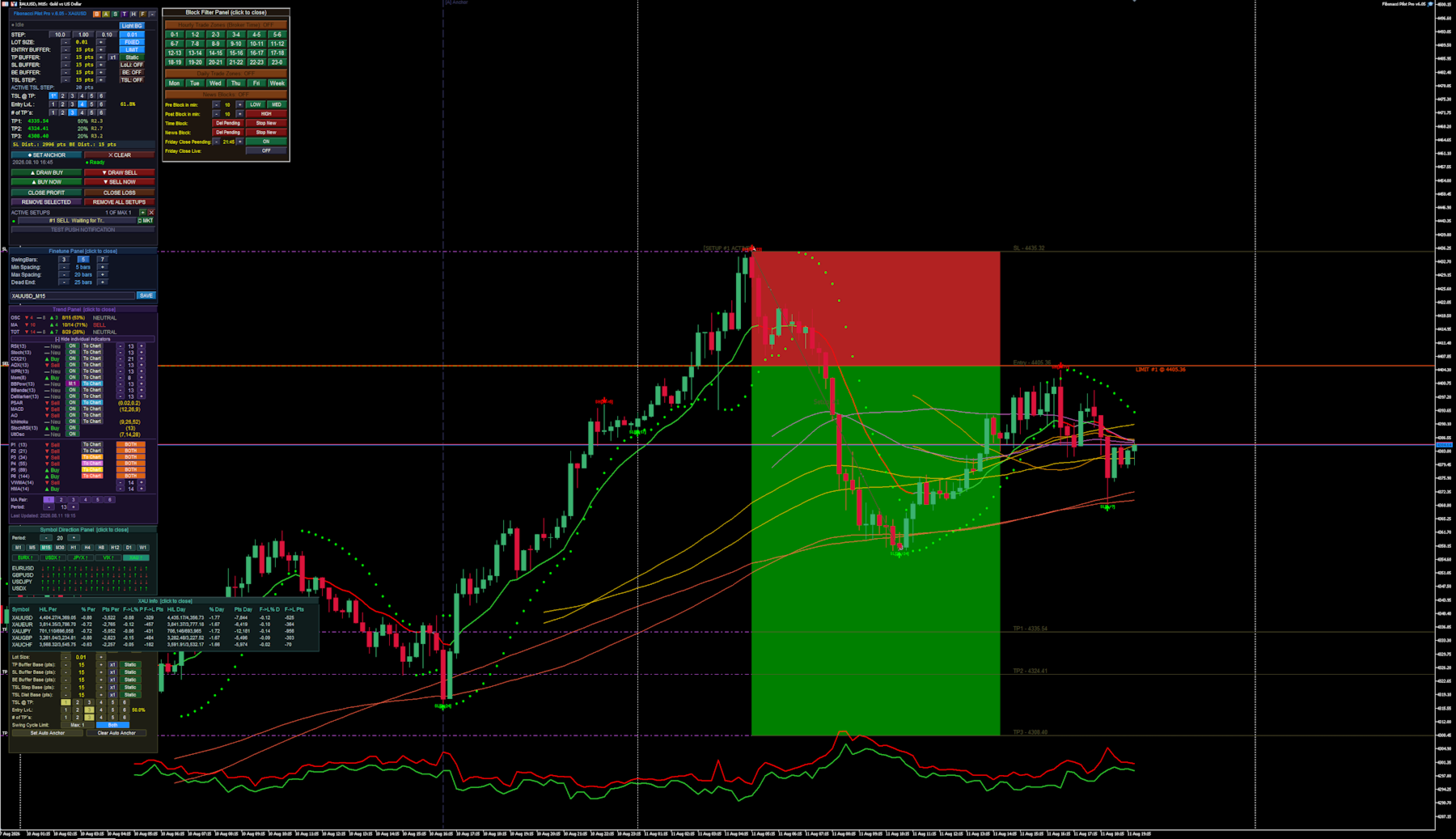
The EA functions as a comprehensive, panel-driven Fibonacci trading ecosystem designed to bridge the gap between manual chart analysis and fully automated algorithmic execution.

  1. Dual Execution Modes: It operates as both a visual trade assistant for manual trading and a fully autonomous robot. In manual mode, you plot Point A and Point B on the chart to instantly visualize risk/reward zones and limit entries before executing. In auto mode, it scans for market structure shifts to place trades without intervention.
  2. Algorithmic Swing Detection: The engine identifies market swing highs and lows using an adjustable N-bar fractal logic, complete with gap filtering and "dead-end" resets to ensure it only anchors to valid market impulses.
  3. Advanced Trade Management: Once a setup is live, the EA takes over position management. It scales out of positions across up to 6 custom Take Profit (TP) extension levels, automatically moves the Stop Loss to Break Even, and deploys Trailing Stops.
  4. Dynamic Volatility Buffers: Instead of relying solely on static point distances, all entry, stop-loss, and trailing buffers can dynamically expand or contract based on live market Spread or Average True Range (ATR).
  5. Multi-Indicator Trend Filtering: The EA houses an internal scoring engine that polls up to 15 different oscillators (like RSI, MACD, and Bollinger Bands) and 8 moving averages (including VWMA and HMA). It aggregates these into a master "Trend Score" to permit or block automated trades.
  6. Environmental & Time Blocking: It features a built-in economic calendar and time matrix. You can program the EA to sit out during specific hours, days, high-impact news spikes, or force a total square-off before the Friday market close.
  7. Modular Graphical Interface: Everything is controlled directly on the chart via a network of interactive, floating UI panels (Main, Trend, Auto, Block, Symbol, and Finetune). You rarely need to open the native MT5 input dialog to make adjustments.
  8. It is a highly flexible EA, fit to run many different strategies and on various assets. The panel driven mode makes it easy to adjust strategies on the fly, while also including a built in "Backtest" mode, that automatically disables most of the visuals when running test, speeding up the test´s.

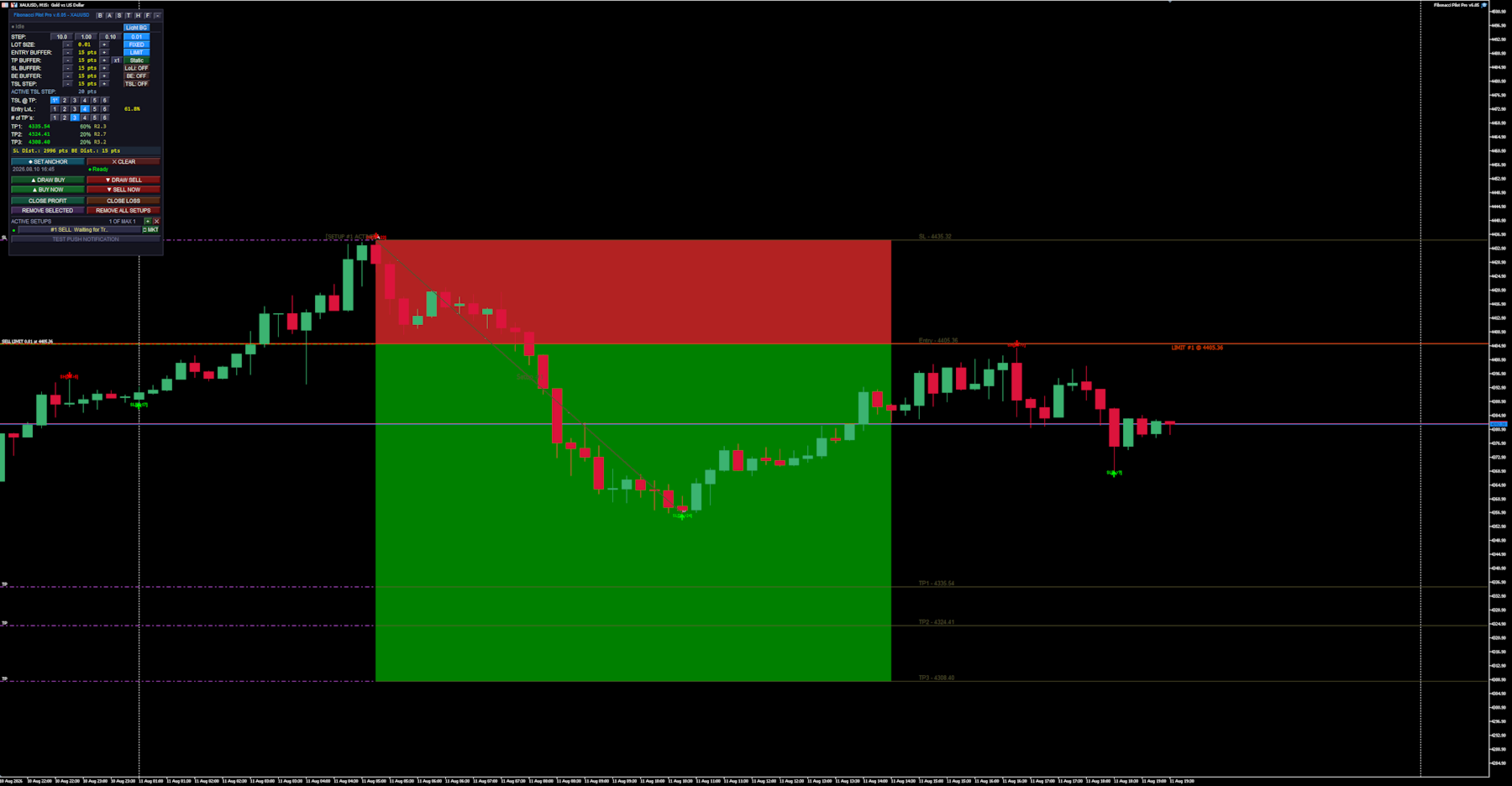
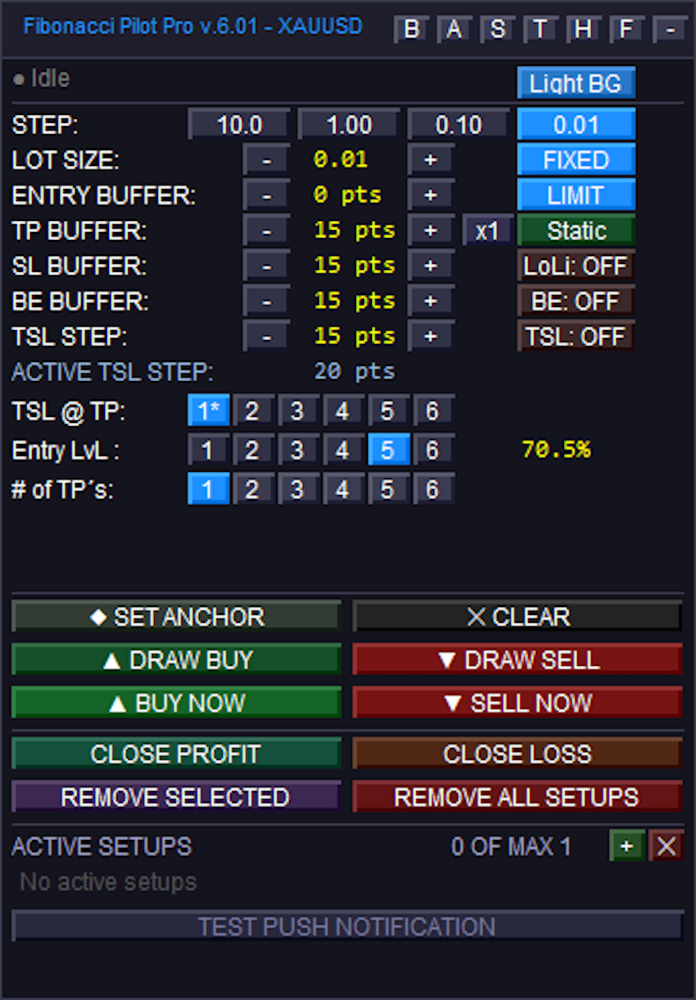
Main panel:
### Top Navigation & General Settings

Sub-Panel Toggles: The top right features small buttons to open or close specific sub-panels and modes. These toggle the Block Panel (`B`), Auto Panel (`A`), Symbol Panel (`S`), Trend Panel (`T`), Hover Info (`H`), Finetune (`F`), and Minimize (`-`).
Color Schema: Toggles the panel's visual theme. Its states alternate between "Light BG" and "Dark BG".
STEP: Four buttons used to set the increment amount for the `+` and `-` adjustments below. The states represent the point values: "10.0", "1.00", "0.10", and "0.01".

### Trade Parameters (Modifiers and Toggles)
LOT SIZE: Uses `+` and `-` to adjust volume. The adjacent toggle button switches the calculation mode, transitioning between "FIXED" lots and "Risk%".
ENTRY BUFFER: Uses `+` and `-` to adjust entry buffer distance. The adjacent toggle switches the execution mode between "LIMIT" and "INSTANT".
TP BUFFER: Uses `+` and `-` to adjust the Take Profit buffer distance. It includes a multiplier button (cycling from `x1` to `x5`) and a mode toggle that switches between "Static", "Spread", and "ATR".
SL BUFFER: Uses `+` and `-` to adjust Stop Loss distance. The adjacent toggle button controls the line extensions drawn to the left on the chart, switching between "LoLi: ON" and "LoLi: OFF".
BE BUFFER: Uses `+` and `-` to adjust Break Even locking distance. The adjacent toggle button enables or disables Break Even logic, switching between "BE: ON" and "BE: OFF".
TSL STEP: Uses `+` and `-` to adjust the Trailing Stop Loss step amount. The adjacent toggle button activates the trailing stop, switching between "TSL: ON" and "TSL: OFF".

### Fibonacci Targeting Rows
TSL @ TP: Six buttons numbered "1" to "6" used to designate which Take Profit target milestone will activate the trailing stop. The active selection will append an asterisk (e.g., `1*`) if the TSL toggle is currently active.
Entry LvL: Six buttons numbered "1" to "6" used to select which Fibonacci retracement level will dictate the entry price.
# of TP's: Six buttons numbered "1" to "6" used to select the total number of Take Profit extension levels to deploy for the setup.

### Drawing, Action, and Execution
Anchor Buttons: The "◆ SET ANCHOR" button activates manual anchor placement, changing its text to "● Click Chart..." while awaiting the user's chart click. The "✕ CLEAR" button deletes the manual anchor.
Drawing Buttons: The "▲ DRAW BUY" and "▼ DRAW SELL" buttons begin a manual drawing sequence. During the drawing process, they combine into a single button that changes states to indicate the current step: "— Awaiting Point A — CANCEL", "— Awaiting Point B — CANCEL", or "↺ RESET" (if the setup is fully drawn but unplaced).
Execution Buttons: When idle, these function as instant execution triggers, reading "▲ BUY NOW" and "▼ SELL NOW". If a limit setup has been successfully drawn on the chart, they transition to "▲ PLACE BUY" and "▼ PLACE SELL" to arm the pending limits.
Close Conditions: The "CLOSE PROFIT" and "CLOSE LOSS" buttons are used to force-close the currently selected active setup, provided the market is in the corresponding profit or loss state.
Removal Actions: "REMOVE SELECTED" deletes the highlighted setup, while "REMOVE ALL SETUPS" wipes all active setups from the chart.

### Setup Management List
List Controls: The green `+` button initializes a new blank setup slot, and the red `✕` button clears away all closed, cancelled, or inactive setups from the list.
Active Setup Rows: Clickable rows that select a specific setup and display its state (e.g., "Idle", "Limit Active", "Running"). If the setup is currently a pending limit order, an inline execution button appears reading "▶ MKT", which allows the user to immediately force the limit to execute at market price.
Test Push: The "TEST PUSH NOTIFICATION" button manually triggers a test alert to confirm mobile terminal notifications are configured correctly.


Finetune Panel:
### Finetune Panel Controls
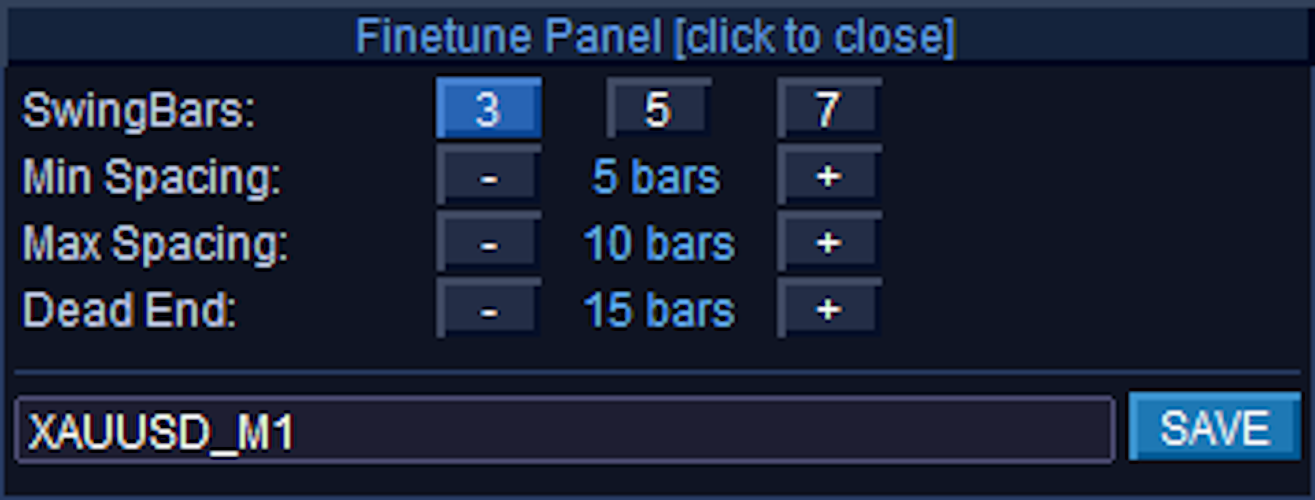
Finetune Panel [click to close]: The entire top header bar functions as a button to minimize/hide the panel from the chart.
SwingBars: Three toggle buttons labeled "3", "5", and "7" that determine the fractal sensitivity (N-bar dominance) for detecting swing highs and lows. The currently selected mode is highlighted in bright blue, while the inactive options remain dark.
Min Spacing: Uses the `-` and `+` buttons to adjust the minimum number of chart bars required between opposite swings (e.g., from a Swing High to a Swing Low). The middle label displays the current value in bars, and changes to read "off" if the value is reduced to 0.
Max Spacing: Uses the `-` and `+` buttons to adjust the preferred maximum gap between opposite swings. Like Min Spacing, the label displays the value in bars and shifts to "off" if set to 0.
Dead End: Uses the `-` and `+` buttons to set the maximum allowed distance before a "dead end" warning is triggered, which reinstates the nearest suppressed swing if a gap gets too large. The label displays the current value in bars and shifts to "off" if set to 0.
Preset Name (Text Box): This is an editable text input field (showing "XAUUSD_M1" in your image) rather than a standard button. It automatically defaults to the current chart symbol and timeframe, but allows you to type in a custom filename.
SAVE: Clicking this button takes the current SwingBars, Min Spacing, Max Spacing, and Dead End values and writes them to a `.set` file in your terminal's `Presets\` folder, using the exact name typed in the text box next to it.


Trend Panel:
### Header & Layout Controls
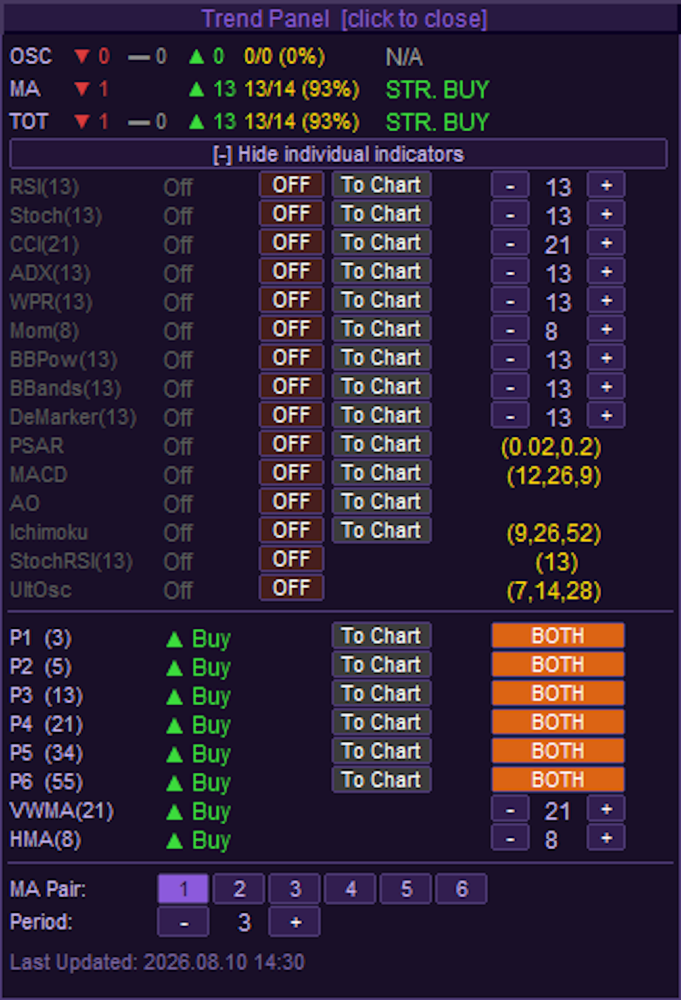
Trend Panel [click to close]: The top header bar acts as a button to completely hide the Trend Panel from the chart.
Expand / Collapse Toggle: The full-width button just below the score summary toggles the expanded view. It switches states between "[-] Hide individual indicators" and "[+] Show individual indicators".

### Individual Oscillator Controls
ON/OFF State Toggles: The column of buttons currently displaying "OFF" in brown/dark red controls whether that specific indicator contributes to the overall Trend score. When clicked, they switch to an active "ON" state (green).
Note on BBPow: The Bull/Bear Power indicator has a special 3-state toggle instead of a standard ON/OFF. It cycles between "OFF" (red), "M:1" (purple), and "M:2" (magenta) to dictate different visual color modes when plotted.
To Chart: Injects the indicator visually onto your main chart or into a sub-window. When inactive, the button is grey; when active, it highlights in bright blue. *(Note: StochRSI and UltOsc do not have "To Chart" buttons)*.
Period Steppers (`-` and `+`): For the top 9 basic oscillators (RSI through DeMarker), these buttons dynamically adjust the lookback period, which updates the number in the middle. The bottom 6 complex oscillators (PSAR through UltOsc) use fixed parameters configured in the EA settings, represented by the static gold text instead of buttons.

### Moving Average (MA) Grid Controls
MA Mode Toggles: The column of buttons on the far right of the MA list (currently showing "BOTH" in orange) cycles the specific moving average calculation type for slots P1 through P6. Clicking them rotates the state between "OFF" (dark red), "EMA" (green), "SMA" (blue), and "BOTH" (orange).
To Chart: Renders the active MA pair directly onto the price chart. When activated, the button color changes from grey to explicitly match the color of the corresponding lines drawn on the chart (e.g., DeepSkyBlue, LimeGreen, Orange, etc.).
VWMA & HMA Steppers (`-` and `+`): These buttons adjust the lookback periods specifically for the Volume Weighted MA and Hull MA.

### Bottom Configuration Panel
MA Pair (1 through 6): These six buttons select which specific MA Pair slot (P1-P6) you want to configure. The currently selected slot is highlighted in bright purple/blue, while the others remain dark.
Period (`-` and `+`): These steppers directly alter the lookback period for whichever MA Pair is currently highlighted in the row above it.


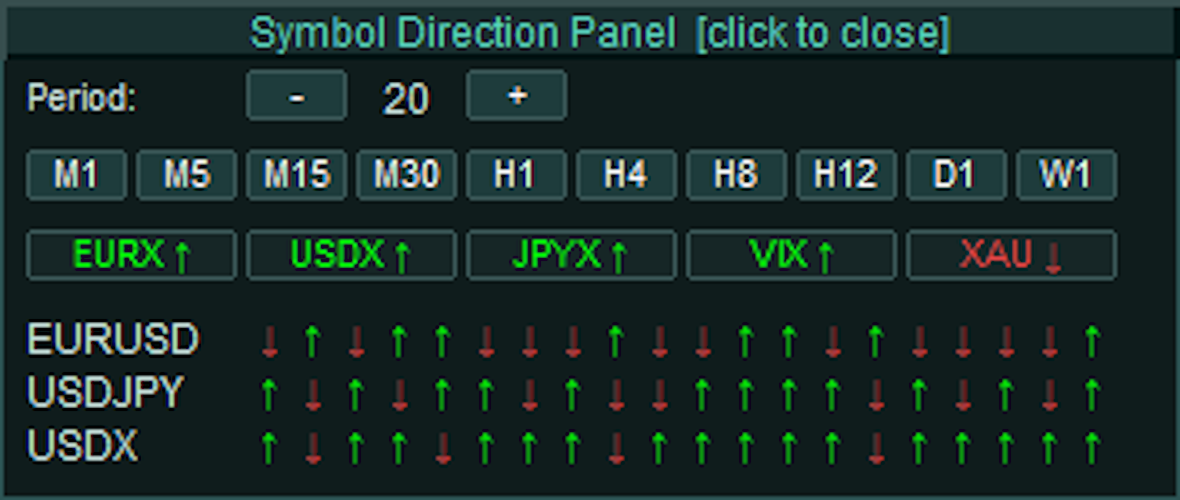
Symbol Direction Panel:
### Header & Layout Controls
Symbol Direction Panel [click to close]: The top header bar acts as a single, full-width button to completely hide the Symbol Panel from the chart.

### Timeframe & Period Controls
Period (`-` and `+`): These stepper buttons adjust the number of historical bars evaluated for the directional arrows. Clicking them increases or decreases the value displayed in the center, ranging from a minimum of 3 up to a maximum of 20 bars.
Timeframe Quick-Select (M1 to W1): A row of ten buttons used to select the active timeframe for the panel's data calculation, operating completely independently of your main chart's timeframe.
State: The currently selected timeframe (e.g., "M30" in your image) highlights with a brighter teal background, while inactive timeframes remain a darker muted teal.

### Highlight Basket Slots
Basket Buttons (e.g., EURX, USDX, XAU): A dynamic row of interactive buttons representing user-defined individual indices or multi-symbol baskets parsed from the EA's settings. Clicking one of these buttons opens a secondary "Highlight Info HUD" to provide a detailed statistical breakdown of its internal components.
Text & Arrow State: The text and directional arrow on the button dynamically change color to reflect the aggregate momentum of the basket's members over the selected period. Green with an up arrow (↑) indicates bullish dominance, Red with a down arrow (↓) indicates bearish dominance, and Grey with a right arrow (→) indicates a neutral or invalid state.
Background State: When actively clicked to display its Info HUD, the button's background highlights in bright teal. When closed/inactive, it remains a dark slate color.
(Note: The bottom section displaying specific symbols like EURUSD, USDJPY, and USDX alongside their respective red and green arrows are non-interactive informational text labels, not clickable buttons. They visually map the close-versus-open direction of the most recent bars based on your specific Period and Timeframe settings).

Symbol Direction Panel - Highlight Info HUD:
The data is split into two halves: **Period** statistics and **Day** statistics.

### Period Statistics (Per)
These calculations are dynamically based on the exact Timeframe and Period limit you set on the main Symbol Panel (e.g., the last 20 bars on the M30 chart).
Symbol: The individual asset within the basket (e.g., XAUUSD, XAUEUR).
H/L Per: The absolute highest price and lowest price reached during your defined period.
% Per & Pts Per: The total range of movement between that period's High and Low, measured in both percentage and raw points.
F->L% P & F->L Pts: Stands for "First to Last". This measures the net momentum by comparing the opening price of the *first* bar in your period to the closing price of the *last* bar, displayed in percentages and points.

### Daily Statistics (Day)
These calculations completely ignore your panel settings and look strictly at the current daily candle (`PERIOD_D1`) to give you a macro perspective of today's price action.
H/L Day: The absolute highest and lowest prices reached today.
% Day & Pts Day: The total range of movement between today's High and Low, measured in percentages and points.
F->L% D & F->L Pts: The "First to Last" net change for the current day. This directly compares today's Daily Open price against the current live price, telling you exactly how far the asset is up or down on the day in both percentages and points.
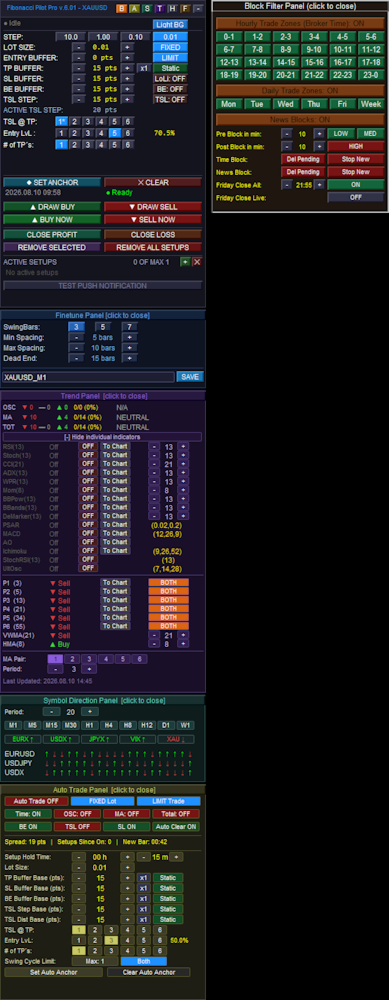
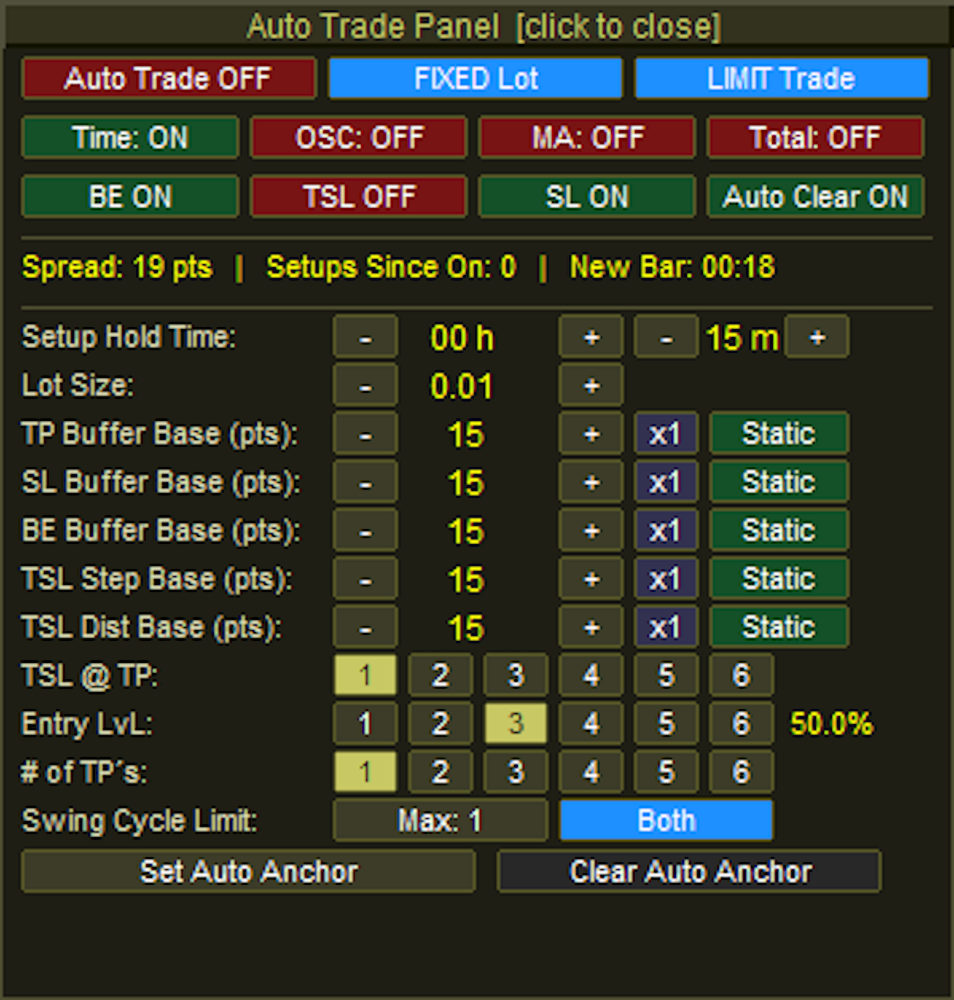
Auto Trade Panel:
### Header & Top Execution Controls
Auto Trade Panel [click to close]: The top header bar acts as a full-width button to minimize and hide the Auto Panel from the chart.
Auto Trade Master Toggle: Enables or disables the entire automated trading engine. The button switches between "Auto Trade OFF" (Red) and "Auto Trade ON" (Green).
Lot Type Toggle: Switches the volume calculation method between "FIXED Lot" (Blue) and "RISK %" (Orange).
Order Mode Toggle: Cycles through the execution methods the EA will use when a setup is detected. It rotates between "LIMIT Trade" (Blue), "INSTANT Trade" (Orange), and "BREAKOUT" (Purple).

### Filter & Management Toggles
Filters Row (Time, OSC, MA, Total): Four independent toggle buttons that enforce specific entry conditions before an auto-trade is allowed. Each button flips between an active "ON" state (Green) and an inactive "OFF" state (Red).
Management Row (BE, TSL, SL, Auto Clear): Four independent toggles managing the lifecycle of the auto-trade. They control whether Break Even, Trailing Stops, and Master Stop Losses are applied, as well as if closed setups are automatically removed from the screen. Like the filters, they alternate between Green ("ON") and Red ("OFF").

### Inputs, Steppers, & Dynamic Buffers
Setup Hold Time: Two pairs of `-` and `+` stepper buttons. The first pair adjusts the expiration hours (e.g., `00 h`), and the second pair adjusts the expiration minutes (e.g., `15 m`). If a pending limit order is not triggered within this window, the EA cancels it.
Lot Size / Risk %: Uses `-` and `+` buttons to adjust the trading volume. The text label dynamically changes based on the Lot Type toggle in the top row.
Buffer Base Rows (TP, SL, BE, TSL Step, TSL Dist):
Base Steppers (`-` and `+`): Adjusts the raw point value for the respective buffer.
Multiplier Button: A clickable button (e.g., `x1`) that cycles from `x1` up to `x5`. This multiplies the dynamic volatility value if a dynamic mode is selected.
Mode Toggle: Cycles the calculation method for the buffer. It rotates between "Static" (Green), "Spread" (Red), and "ATR" (Blue). *(Note: The TP Buffer has a fourth option: "TP+Sprd")*.

### Targeting Matrices
TSL @ TP: Six buttons numbered "1" to "6" used to designate which Take Profit target milestone must be reached to activate the trailing stop. The active selection is highlighted in khaki/yellow, while inactive slots are dark grey.
Entry LvL: Six buttons numbered "1" to "6" that dictate which Fibonacci retracement level the pending order will be placed at. A text label to the right automatically displays the corresponding percentage (e.g., `50.0%`).
# of TP's: Six buttons numbered "1" to "6" that determine the total number of Take Profit extension levels to deploy for the auto-setup.

### Cycle Limit, Direction, & Anchors
Swing Cycle Limit: A button that increments the maximum allowed consecutive setups the EA will trade off the same Point A anchor. It increments up to your global `MaxSetups` limit before resetting to 1.
Direction Toggle: Cycles the permitted market direction for automated entries. It rotates between "Both" (Blue), "Bullish" (Green), and "Bearish" (Red).
Anchor Buttons:
Set Auto Anchor: Initiates the manual selection of the auto-trade starting point. When clicked, the button turns a muted gold and the text changes to "Click Chart..." while awaiting the user's input.
Clear Auto Anchor: Wipes the active automated anchor line from the chart and halts the auto-scanning engine.


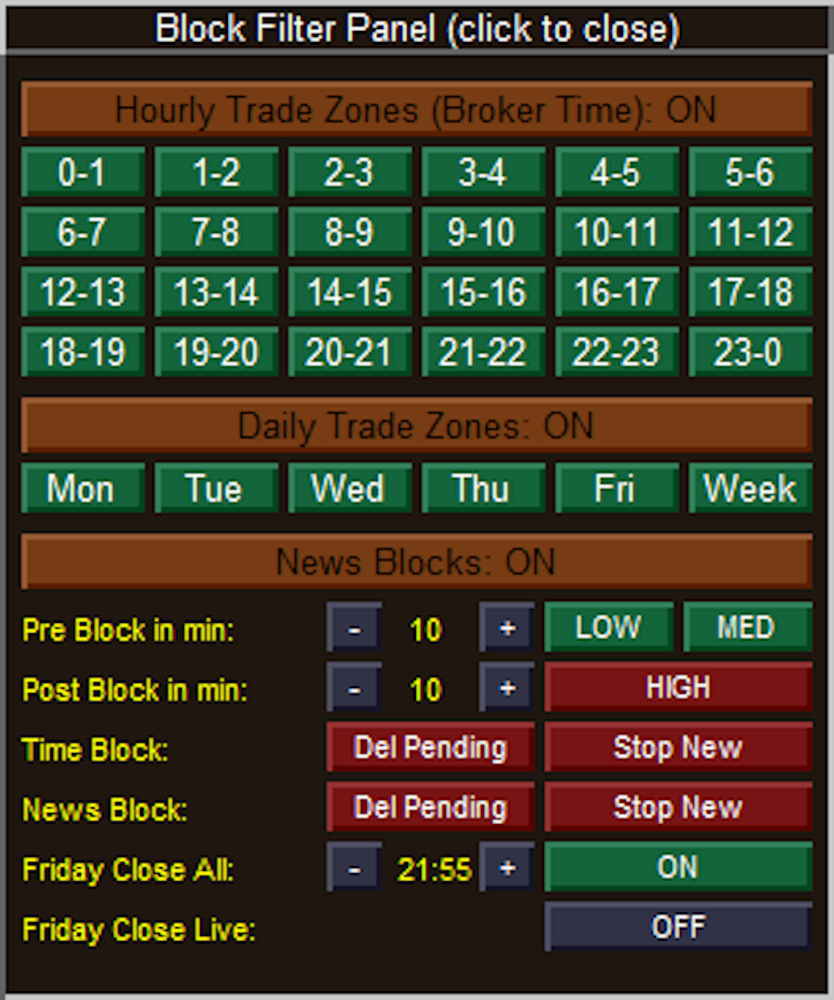
Block Filter Panel:
### Header & Master Toggles
Block Filter Panel (click to close): The topmost header bar acts as a full-width button to minimize and completely hide the Block Filter Panel from the chart.
Hourly Trade Zones (Broker Time): A master toggle header that enables or disables the entire 24-hour time-blocking matrix below it. The text dynamically updates between "ON" and "OFF".
Daily Trade Zones: A master toggle header that enables or disables the specific days-of-the-week blocking matrix below it.
News Blocks: A master toggle header that enables or disables the entire economic calendar filtering engine.

### Matrix Controls (Hourly & Daily)
24-Hour Matrix (0-1 through 23-0): Individual toggle buttons for every hour of the day.
State: Green indicates trading is Allowed during that hour. Red indicates trading is Blocked.
Daily Matrix (Mon through Week): Individual toggle buttons for specific trading days, where "Week" represents the weekend (Saturday/Sunday).
State: Green indicates trading is Allowed on that day. Red indicates trading is Blocked.

### News & Safety Filter Settings
Pre & Post Block in min: Uses `-` and `+` stepper buttons to define the safety window (in minutes) surrounding an economic news event.
Impact Toggles (LOW, MED, HIGH): Three separate buttons to determine which levels of economic news impact will trigger a trading suspension.
State: Green means the block is inactive (the EA will ignore news of this impact level). Red means the block is active (trading will be suspended for these events).
Time Block Actions: Two action toggles dictating what the EA should do when a scheduled Hourly or Daily block begins.
Del Pending: If Red (ON), un-triggered pending limit orders will be deleted. If Green (OFF), pending orders are left alone.
Stop New: If Red (ON), the EA is forbidden from calculating and placing new trades. If Green (OFF), new trades are permitted.
News Block Actions: Two action toggles dictating what the EA should do when an active News event hits its pre- or post-block window. They function exactly the same as the Time Block Actions, turning Red when active and Green when inactive.

### Friday Close Options
Friday Close All: Enables the failsafe to halt Friday trading based on a specific cutoff time.
Time Steppers: The `-` and `+` buttons adjust the cutoff time (displayed in the center) in 15-minute increments.
Toggle State: The rightmost button switches the feature between "ON" (Green) and "OFF" (Dark Grey).
Friday Close Live: Dictates whether the EA should aggressively force-close actively running, live trades when the Friday cutoff time is reached. The button switches between "ON" (Green) and "OFF" (Dark Grey).


Hover Panel:
SH 2026.08.10 10:24:** Identifies the type of swing and its exact timestamp. **SH** stands for **S**wing **H**igh (a market peak), whereas a trough would display **SL** for **S**wing **L**ow. The red color corresponds to your bearish/high settings.
Price: The exact price level of that specific swing point (the absolute high of that candle's wick). If this swing point was currently being used as Point A or Point B for an active setup, an extra tag would appear here to let you know.
Left spacing: Shows there are 10 bars between this swing high and the previous swing point recorded on the chart. The text is green because 10 bars passes your EA's minimum spacing filter.
Right spacing: Shows there are 7 bars between this swing high and the *next* swing point that formed after it.
Status (Confirmed): This means the swing has fully passed your "SwingBars" fractal requirement (e.g., if set to 5 bars, it successfully formed the required lower highs on both the left and right sides). If a swing was still forming on the live edge of the market, this would read "Pending", and if it was brought back by your Dead End filter, it would read "Rescued*".
▲ 2463 pts from current: This is a live distance tracker. It tells you that this specific swing high is exactly 2,463 points *above* (indicated by the up arrow) the current live market price.


Symbol Direction Panel - Highlight Info HUD:
The data is split into two halves: **Period** statistics and **Day** statistics.
### Period Statistics (Per)
These calculations are dynamically based on the exact Timeframe and Period limit you set on the main Symbol Panel (e.g., the last 20 bars on the M30 chart).
Symbol: The individual asset within the basket (e.g., XAUUSD, XAUEUR).
H/L Per: The absolute highest price and lowest price reached during your defined period.
% Per & Pts Per: The total range of movement between that period's High and Low, measured in both percentage and raw points.
F->L% P & F->L Pts: Stands for "First to Last". This measures the net momentum by comparing the opening price of the *first* bar in your period to the closing price of the *last* bar, displayed in percentages and points.

### Daily Statistics (Day)
These calculations completely ignore your panel settings and look strictly at the current daily candle (`PERIOD_D1`) to give you a macro perspective of today's price action.
H/L Day: The absolute highest and lowest prices reached today.
% Day & Pts Day: The total range of movement between today's High and Low, measured in percentages and points.
F->L% D & F->L Pts: The "First to Last" net change for the current day. This directly compares today's Daily Open price against the current live price, telling you exactly how far the asset is up or down on the day in both percentages and points.
추천 제품
Opal MT5
Oeyvind Borgsoe
This is the official version of Opal EA, a powerful tool using cutting-edge algorithms and AI-driven calculations. This fully automated EA encompasses the exceptional qualities we associate with the opulent gemstone: proper decision-making, prudence and strong protection. Be aware of cracked versions/unofficial copies that either work only on demo accounts or are sold at suspiciously low prices. These reportedly lead to rapid account losses.   Opal also takes into account the study of psychol
Momentum Master EA
Goyani Piyushbhai
MOMENTUM MASTER EA: The Pinnacle of Momentum Trading Master the Markets with Precision and Power The Momentum Master EA is a cutting-edge Expert Advisor built to capitalize on the power of momentum indicators for exceptional trading outcomes. By seamlessly integrating top-tier technical tools like MACD , Bollinger Bands , RSI , and the Momentum Indicator , this EA offers a dynamic and comprehensive approach to trading in today's fast-paced markets. Features That Set Momen
Meta Quant Grid Master Telegram:  t.me/rajjthealgotrader   Meta Quant Grid Master is a next-generation algorithmic trading system designed to intelligently navigate market cycles using adaptive position management and precision-based execution. Built for traders who demand consistency, control, and performance , this EA combines structured trade sequencing with advanced risk management to deliver optimized results across varying market conditions. Core Concept (Smart but Protected) The sys
Phoenix Midas
Alvaro Albillos Gutierrez
Phoenix Midas is an order-flow Expert Advisor built specifically for XAUUSD (Gold) on the M15 timeframe. It reads market structure through synthetic order-flow analysis — volume delta, volume profile (POC / value area) and liquidity behaviour — to time entries on two complementary setups, and it manages every trade with a fixed, pre-defined risk. Built-in news filtering and prop-firm risk controls make it suitable for both personal accounts and funded-challenge environments. WHAT IT IS NOT
Aurum Apex Gold
Shashvat Singham
Aurum Apex Gold trades one instrument -- XAUUSD -- with one idea: institutions fill large orders where retail stops sit, and the reversal that follows is tradable when, and only when, price confirms it. How a trade is built 1. Liquidity sweep. A tracked pool of resting orders (previous day/week    high or low, session extreme, equal highs/lows, untapped swing) is    penetrated and then reclaimed. Penetration and reclaim are both measured in    ATR, never in fixed points, so the logic scales w
PipFinite EA Breakout EDGE MT5
Karlo Wilson Vendiola
5 (3)
The Official Automated Version of the Reliable Indicator PipFinite Breakout EDGE EA Breakout EDGE takes the signal of PipFinite Breakout EDGE indicator and manages the trade for you. Because of numerous financial instruments to consider, many traders want the signals to be fully automated. The EA will make sure all your trades are executed from entry to exit. Saving you time and effort while maximizing your profits. The Edge of Automation Effortless price action trading is now possible acros
Extended Round 1 Special Pricing for Early Adopters | Current Price: $299 - Only 10 copies left at this price | Next Price: $399 Aureus MT5 is a cutting-edge Expert Advisor designed exclusively for trading Gold. Combining the precision of a price reversal trading strategy with advanced machine learning, Aureus MT5 provides traders with a reliable tool to navigate the complexities of the Gold market. Strategy Aureus MT5 employs a multi-faceted approach with three distinct price reversal strat
Smart Pattern AtrShield
Nuno Miguel Costa Tome
Self-learning core – scans the last 500 candles, extracts RSI + MA-slope patterns and builds its own database—no Python, DLLs or external files. Real-time adaptation – each bar updates accuracy scores and votes on the most similar patterns before opening a trade. Volatility-aware risk – every position starts with a stop-loss equal to ATR(14) × 1.5 , automatically wider in fast markets and tighter in calm ones. Ultra-light, 100 % MQL5 – minimal CPU load, works on any broker, any symbol. Full sou
ProTrade EA
Jim Ariel Camarce Ignao
Key Features   Automated Candle Pattern Recognition 10 Professional Patterns : Detects Bullish/Bearish Engulfing, Hammer/Shooting Star, Morning/Evening Star, Piercing/Dark Cloud, and 6 additional professional candlestick patterns Smart Filtering : Combine multiple patterns with configurable confirmation logic Volume Confirmation : Optional volume filter to validate pattern strength Multi-Timeframe Analysis : Separate execution and bias timeframes for better timing   Trading Dashboard Int
Short Description Swing Timing Breakout EA is a smart Expert Advisor for MetaTrader 5 that combines trend filtering, momentum timing, and dynamic risk management to capture high-probability swing and breakout opportunities. Full Description Swing Timing Breakout EA is a professional trading robot designed for MetaTrader 5, suitable for traders who want a balance between automation, control, and disciplined risk management. This EA uses a trend-following and momentum confirmation approach ,
Manofgold
Eakkarach Wikeng
Trend & Grid V36 Instant Trend & Grid V36 Instant is a high-performance hybrid Expert Advisor (EA) designed to combine Trend-Following logic with an intelligent Grid Management system. It utilizes EMA 25 and 50 on the M5 timeframe to identify market direction while employing a sophisticated recovery mechanism to handle market retracements. SPECIAL PROMO & PRICE UPDATE: To maintain the exclusivity and quality of support, the price will DOUBLE after every 5 copies sold. Get your copy now at the
Scalping bot for the gold/dollar pair (XAU/USD) — a powerful and versatile solution for traders, designed to deliver maximum efficiency in a dynamic market. This bot is specifically engineered for scalping: it analyzes price changes and places trades even before significant market movements begin. This allows it to secure advantageous positions early and capitalize on even the smallest market fluctuations. Key Features: Flexibility: Adapts to any market conditions and suits your trading strategy
Bober Real MT5
Arnold Bobrinskii
4.88 (16)
Bober Real MT5 is a fully automatic Forex trading Expert Advisor. This robot was made in 2014 year and did a lot of profitbale trades during this period. So far over 7000% growth on my personal account. There was many updates but 2019 update is the best one. The robot can run on any instrument, but the results are better with EURGBP, GBPUSD, on the M5 timeframe. Robot doesn't show good results in tester or live account if you run incorrect sets. Set files for Live accounts availible only for cu
BTC Smart Hunter
Puguh Andrie Setia Aji
BTC Smart Hunter for MetaTrader 5 Overview BTC Smart Hunter is an automated breakout trading Expert Advisor (EA) designed specifically for BTCUSD on MetaTrader 5 . The EA focuses on identifying significant breakout opportunities while avoiding many common false signals through multiple built-in market filters. Instead of opening trades randomly, BTC Smart Hunter continuously analyzes recent price action, detects important breakout levels, and places pending orders only when predefined market con
Eldan
Danail Palhutev
Swing Trading Expert Advisor - a reliable tool for efficient market trading. This Expert Advisor is designed to automate swing trading strategies in financial markets. It uses proven indicators such as Moving Average (MA) and Average True Range (ATR) to identify the most suitable entry and exit points. This allows you to follow current market movements and trade in the direction of the trend. The advisor works with a fixed volume and also has flexible parameter settings for risk management, i
| Fully-automated Smart Money Concept (ICT) inspired trading solution with multi-strategy capabilities | Built by a grid trader >> for grid traders.  This is MT5 version, click  here  for  Blue CARA MT4  (settings and logics are same in both versions)     Real monitoring signal  -->  Cara Gold Intro Blue CARA EA   ('CARA') - short for  C omprehensive  A lgorithmic   R esponsive   A dvisor is a next-gen  multi-currency    multi-timeframe  EA base on the widely known (and perhaps the most popul
Disruptive Edge
Jarmin Jamike Ugorji
Disruptive Edge EA is an innovative Expert Advisor developed from the concept of disruptive technology. It incorporates technical analysis strategy based on the various price movements, patterns, trends, retrenchments and reversals which are carefully coded into the system. It use s a flexible and dynamic execution trading algorithm which depends on price action/ movement to execute very high precision trades. All trades are protected with a hard stop loss. Very good risk management is an integr
Classic Market Surfer EA - A Timeless, Proven Strategy for Gold Trading For years, this powerful trading strategy has been hidden from the public-reserved for a select few. Now, for the first time, the Classic Market Surfer EA is available to traders like you.   Built on pure, time-tested trading principles, this EA doesn't rely on trendy gimmicks like AI or machine learning. Instead, it harnesses a classic, robust strategy that has consistently delivered results over the years. This is not a "g
Akk Striker
Akkhadet Vijitto
KK STRIKER is a professional automated trading system built to dominate Gold (XAUUSD) with intelligent momentum entries and advanced capital protection. Designed for traders who want consistent performance without emotional trading . Why AKK STRIKER Works Trades only high-probability momentum moves Smart recovery system to manage market pullbacks Individual profit trailing on every trade Built-in risk control and drawdown protection Fully automated – no manual trading needed Smart
Gold Liquidity Master Pro H4
Oscar Dario Murillo Delgado
Gold Liquidity Master Pro is a high-precision algorithmic trading system designed exclusively for Gold (XAUUSD). Unlike conventional bots that use lagging indicators, this Expert Advisor (EA) operates based on Price Action and Institutional Liquidity Taking, identifying false breakouts on 4-hour (H4) candles where large banks typically "clean up" weak hands before a major move. Recommendations Symbol: XAUUSD (Gold) Timeframe: H4 Minimum Deposit: $500  Account Type: ECN / Raw Spread with low
This Expert Advisor can be applied to many markets because It exploits basic supply/demand and price action concepts. It identifies the major rotation zones (PRZ), supply and demand zones and supports and resistances within major price trends. It buys at discount zones and sells at premium prices. It can and should be optimized through the Metatrader tester to find the best parameters to use for current market conditions. This is not a fixed strategy rather a full trading algo that will find whi
PipFinite EA Trend PRO MT5
Karlo Wilson Vendiola
3.67 (9)
The Official Automated Version of the Powerful Indicator PipFinite Trend PRO EA Trend PRO trades the signal of PipFinite Trend PRO and manages the trade depending on the user's preference. The EA includes many customizable features that can further enhance the Trend PRO trading strategy. Features like Entry and Exit Filters, Higher Timeframe Filter, Stoploss, Takeprofit, Breakeven, Trailing Stop, News Filter and MORE! The Innovative Solution EA Trend PRO was created to make your trading more
Iconic BTC AI
Maurice Prang
5 (1)
ICONIC BTC AI+ | SYNAPSE.PHENOTYPE S6 ENGINE (버전 15.00) 출시 가격 현재 가격: 599 USD. 남은 라이선스 수: 10개. 다음 가격 단계: 699 USD. 최종 가격: 1699 USD. 얼리 액세스 가격은 제품 출시의 현재 단계를 반영합니다. 현재 라이선스 물량이 소진되고 다음 가격 단계가 개방됨에 따라 가격은 단계적으로 인상됩니다. 현재 가격이 종료되는 확정된 일정은 없습니다. 비트코인은 외환 통화 쌍이 아닙니다. 금과 같은 방식으로 움직이지 않으며, 주가지수처럼 세션 경계를 존중하지도 않고, 변동성 특성은 단 한 시간의 거래 시간 안에서도 바뀔 수 있습니다. 잔잔한 상품을 위해 만들어진 범용 자동매매 시스템은 BTCUSD가 일관되게 보여주지 않는 시장 행동을 전제로 하기 때문에 이 시장에서는 자주 실패합니다. ICONIC BTC AI+는 BTCUSD 전용으로 설계되었습니다. 진입 조건 검증부터 AI 의사결정 라우팅, 실시간 리스크 조
EMA256 Fourier Cycle Trader EMA256 Fourier Cycle Trader is an advanced MetaTrader 5 Expert Advisor combining a long-term EMA or TEMA trend model, causal Fourier cycle analysis, configurable averaging and a unified basket take-profit system. The Expert Advisor is designed primarily for CENT accounts and for traders who understand basket recovery strategies, geometric lot progression and the risks associated with trading without a mandatory Stop Loss. RECOMMENDED STARTING CONFIGURATION Recommended
그리드 없음, 마틴게일 없음, 물타기 없음!!! 실제 틱 기반 백테스트, 99.9% 모델링 품질. Prop Firm 챌린지(FTMO, The5ers 등)를 통과하기 위해 특별 제작된 EA. FTMO SMC Pro 는 SMC 개념과 프라이스 액션을 기반으로 하며, 마틴게일/그리드와 같은 위험한 방식은 절대 사용하지 않습니다. 대신 추세 방향의 FVG를 활용하여 RR 1:2.5+의 고품질 진입만을 목표로 합니다。 핵심 기능: Prop Firm 안전장치: 일일 최대 손실 Hard Stop. 논리적 진입: 시장 구조 + FVG 미티게이션, EMA 추세 필터 적용. 리스크 관리: 모든 거래는 SL 포함 + 스마트 BE 기능 제공. HFT/차익 거래 없음: 모든 브로커 환경에서 안전. 추천: 통화쌍: EURUSD 시간프레임: M15 세트파일: 거래당 0.5–2% 리스크
Mt5 Classic BBSO
Olivier Nomblot
GUESS WHO'S BACK. THE LEGENDARY BLACK BOX SELF-OPTIMIZING EA — REBORN FOR 2026. Award-winning. Ranked top 20 overall for a DECADE on MT5. No. 1 in the world. Three times. The original self-optimizing multi-module engine traders still talk about today — now rebuilt from the ground up. BBSO – BlackBoxSelfOpt. Plug & Play. Self-Optimizing. Multi-Strategy. Trades currencies, metals, indexes. THE HONEST MACHINE While a generation of "money-printer" robots quietly stacked hidden grids and martingale b
Edge EA Pro MT5
Aleksandr Zheltikov
4.67 (3)
Edge is a fully automated trading system that finds trading opportunities and places trades by combining technical indicators, price action analysis, wave analysis and all-day market pattern analysis using Fibonacci areas. Based on historical market data, the system's thinly layered multilayer neural network is trained to identify patterns and relationships that can be used to predict future price movements. The neural network processes various inputs, including price data, technical indicators

Alpha Bullish Engine MT5 Overview Alpha Bullish Engine(No Martingale, no Grid) is a professional Expert Advisor for MetaTrader 5 designed to identify and trade high-quality market bullish opportunities while maintaining a strong focus on risk management and capital preservation. Built with a combination of trend analysis, momentum assessment, and intelligent trade management, the EA is designed to operate in favorable market conditions while avoiding unnecessary exposure during less suitable env
XAU Velocity Pro XAU Velocity Pro is an automated Expert Advisor for MetaTrader 5 developed for short-term XAUUSD trading. It combines price-action breakout analysis with RSI momentum filtering to identify trading opportunities following periods of price consolidation. Trading Approach The EA monitors recent price structure to identify relatively narrow consolidation ranges. These areas provide reference boundaries for subsequent breakout detection. When price moves outside the identified stru
이 제품의 구매자들이 또한 구매함
The Gold Reaper MT5
Profalgo Limited
4.45 (108)
소품 준비 완료! (   세트 파일 다운로드   ) 경고: 현재 가격으로 구매 가능한 재고가 몇 개 남지 않았습니다! 최종 가격: 990달러 EA 1개 무료 증정 (거래 계정 3개 사용 가능) -> 구매 후 연락 주세요 최고의 콤보 상품     ->     여기를 클릭하세요 공개 그룹 참여하기:   여기를 클릭하세요   라이브 시그널 클라이언트 신호 유튜브 리뷰 최신 매뉴얼 골드 리퍼에 오신 것을 환영합니다! 매우 성공적인 Goldtrade Pro를 기반으로 개발된 이 EA는 여러 시간대에서 동시에 실행되도록 설계되었으며, 거래 빈도를 매우 보수적인 수준부터 극도로 변동성이 큰 수준까지 설정할 수 있는 옵션을 제공합니다. 이 EA는 최적의 진입 가격을 찾기 위해 여러 확인 알고리즘을 사용하고, 거래 위험을 분산시키기 위해 내부적으로 여러 전략을 실행합니다. 모든 거래에는 손절매와 이익실현이 설정되어 있지만, 위험을 최소화하고 각 거래의 잠재력을 극대화하기 위해 트레일링 손절매와
Quantum Queen X MT5
Bogdan Ion Puscasu
5 (64)
전설은 계속된다. 여왕은 진화한다. 퀀텀 퀸 X에 오신 것을 환영합니다. 퀀텀 퀸의 검증된 성공을 기반으로 탄생한 전설적인 금 거래 시스템의 차세대 버전입니다. Quantum Queen X는 검증된 Quantum Queen의 핵심 엔진을 기반으로 구축되었으며, 트레이더가 활성화 또는 비활성화할 전략을 정확하게 선택할 수 있는 강력한 새로운 사용자 지정 모드를 도입했습니다. 모든 전략은 개별적으로 검토, 개선 및 최적화되어 다양한 시장 상황에서 더욱 뛰어난 성능과 적응성을 제공합니다. 기본 설정 또한 개선되어 기존 7개에서 9개로 엄선된 전략을 결합하여 더 넓은 시장 범위와 더 많은 거래 기회를 제공하는 동시에, Quantum Queen X를 MQL5에서 가장 성공적인 GOLD Expert Advisor로 만든 체계적인 거래 철학을 그대로 유지합니다. IMPORTANT! After the purchase please send me a private message to receive t
Quantum Commander
Bogdan Ion Puscasu
4.75 (16)
퀀텀 생태계가 새로운 전장에 진입하고 있으며, 새로운 사령관이 지휘권을 잡습니다. US30 지수만을 위해 개발된 퀀텀 커맨더는 세계에서 가장 역동적인 시장 중 하나를 위해 설계된 완전 자동화된 전문가 자문 시스템입니다. 수많은 골드 EA가 넘쳐나는 세상에서 Quantum Commander는 단연 돋보입니다. 금에 초점을 맞춘 여러 차례의 출시 이후, 저희는 US30이라는 새로운 영역으로 나아가고 있습니다. 이는 새로운 금융 상품이자, 차별화된 전략이며, 퀀텀 생태계에 진정한 다각화를 가져올 강력한 기회입니다. 특별 출시 할인 가격. 최종 가격 1999달러 라이브 시그널 :   여기를 클릭하세요 퀀텀 커맨더 MQL5 공개 채널: 여기를 클릭하세요 ***퀀텀 커맨더 MT5를 구매하시면 퀀텀 엠퍼러, 퀀텀 킹, 퀀텀 비트코인, 퀀텀 바론, 퀀텀 옴니골드, 퀀텀 아테나 X, 퀀텀 스타맨 중 하나를 무료로 받으실 수 있습니다!*** 자세한 내용은 개인 메시지로 문의하세요! 퀀
Quantum Titan MT5
Bogdan Ion Puscasu
4.79 (39)
퀀텀 타이탄은 퀀텀 생태계에 기관급 거래 수준을 도입하여 정밀성, 규율, 그리고 검증된 실시간 시장 성과에 대한 새로운 기준을 제시합니다. GOLD Expert Advisor에서 더 많은 것을 기대하는 트레이더를 위해 개발된 Titan은 양자 거래 기술의 차세대 진화를 보여줍니다. 전 세계적으로 평생 사용권은 1,000개로 엄격하게 제한되어 있습니다. 1,000개 한정 수량이 모두 소진되면 퀀텀 타이탄은 더 이상 구매할 수 없습니다. 특별 출시 할인 가격. 최종 가격 1999달러 퀀텀 타이탄 MQL5 공개 채널:   여기를 클릭하세요 퀀텀 타이탄 MQL5 공개 채널:   여기를 클릭하세요 ***퀀텀 타이탄 MT5를 구매하시면 퀀텀 엠퍼러, 퀀텀 킹, 퀀텀 비트코인, 퀀텀 바론, 퀀텀 발키리, 퀀텀 옴니골드, 퀀텀 아테나 X 또는 퀀텀 스타맨 중 하나를 무료로 받으실 수 있습니다!*** 자세한 내용은 개인 메시지로 문의하세요! 퀀텀 타이탄을 소개합니다 퀀텀 타이탄은
Aikon MT5
William Brandon Autry
5 (9)
AIKON — 자동매매. 대화로 제어하세요. AIKON은 MetaTrader 5용 AI 기반 자동매매 프로그램인 Expert Advisor(EA)입니다. 설정을 완료하고 활성화하면 선택한 설정과 위험 관리 범위 안에서 시장을 분석하고, 거래를 시작하며, 포지션을 자동으로 관리할 수 있습니다. Ask Aikon을 통해 일상적인 언어로 자신의 매매 시스템을 직접 이해하고 제어할 수 있습니다. 매매 설정을 구성하세요. 특정 시장에서 거래가 이루어졌거나 이루어지지 않은 이유를 물어보세요. 익스포저를 확인하세요. 컴퓨터에서 또는 휴대폰의 Telegram을 통해 변경 사항을 준비하세요. 계속 대화하거나 일반적인 자동 진입을 매번 승인할 필요는 없습니다. AIKON은 활성화한 규칙에 따라 거래합니다. Ask Aikon으로 요청한 운영 변경 사항은 확인을 위해 제시됩니다. 자동매매와 지속적인 모니터링을 위해서는 필요한 거래 권한을 활성화한 상태로 MetaTrader 5가 계속 실행되고 연결되어 있
MoonDog EA
James Vito Armin Bianchini
4.39 (38)
MoonDog EA는 MetaTrader 5의 XAUUSD를 위해 특별히 개발된 멀티 전략 브레이크아웃 Expert Advisor입니다. 이 시스템은 서로 독립적으로 작동하는 5개의 브레이크아웃 전략을 결합하여 다양한 돌파 조건과 가격 확장 구간을 식별하도록 설계되었습니다. MoonDog는 마틴게일, Recovery 모드, Grid Recovery, 손실 후 로트 증가 또는 손실 포지션 평균 단가 조정을 사용하지 않습니다. 모든 거래는 미리 설정된 개별 Stop Loss와 Take Profit을 사용하여 시작됩니다. 손실이 발생한 후 이전 손실을 복구하기 위해 더 큰 로트의 추가 거래를 열지 않습니다. Break-even, Trailing 및 MoonLock은 기존 포지션을 보호하기 위한 거래 관리 기능입니다. 이 기능들은 보호 수준을 조정할 수 있지만 로트 크기를 증가시키거나 이전 손실을 복구하기 위한 추가 포지션을 열지 않습니다. 공식 라이브 시그널 MoonDog의 실제 거래 활
My AI Gold
Vitalii Kosov
5 (4)
AI 기반 골드 트레이딩 혁명 -------------------------------------------------------------------------------- My AI Gold는 단순한 자동매매 도구가 아닙니다. 첨단 신경망 엔지니어링, 독자적인 맞춤형 아키텍처, 그리고 실제 시장 환경에서의 엄격한 최적화가 결합된 결과물입니다. GitHub의 최첨단 저장소와 최신 머신러닝 프레임워크를 활용하여 처음부터 새롭게 개발된 My AI Gold는 심층 데이터 분석을 통해 XAUUSD(금) 시장의 복잡한 움직임을 분석합니다. 충분한 검증 없이 급하게 출시되는 제품들과 달리, My AI Gold는 실제 시장 사이클에서 광범위한 테스트, 검증 및 개선 과정을 거쳤습니다. 안정적이고 검증 가능한 성과를 확인한 후에만 정식으로 출시되었습니다. 실거래 트랙 레코드 +1000% https://www.mql5.com/en/signals/2389616 IC Markets 실시간 모니터링
Ultimate Breakout System
Profalgo Limited
5 (52)
중요한   : 이 패키지는 한정된 수량에 한해 현재 가격으로 판매될 예정입니다.    가격이 곧 1999달러로 오를 거예요!   300 가지 이상의 전략이 포함되어 있으며   , 앞으로 더 추가될 예정입니다! 보너스   :    제가 만든 다른 EA   5   개를 무료로 드립니다 !   모든 파일 세트 + 완벽한 설정 및 최적화 가이드 비디오 가이드 실시간 신호 (제3자) 리뷰 새로운 기능 - 44가지 전략 라이브 신호 궁극의 브레이크아웃 시스템에 오신 것을 환영합니다! 8년에 걸쳐 세심하게 개발된 정교하고 독자적인 전문가 어드바이저(EA)인 궁극의 돌파 시스템(Ultimate Breakout System)을 소개하게 되어 기쁩니다. 이 시스템은 호평받는 Gold Reaper EA를 포함하여 MQL5 시장에서 최고의 성능을 자랑하는 여러 EA의 기반이 되었습니다. 7개월 이상 1위 자리를 지켰던 Goldtrade Pro, Goldbot One, Indicement, Dayt
Scalping Robot Pro MT5
MQL TOOLS SL
4.38 (165)
Scalping Robot Pro is a professional trading system designed specifically for fast and precise scalping on XAUUSD using the M1 timeframe. The system is built to capture short term market movements with accurate execution and controlled risk management. It focuses on real time price behavior, momentum shifts, short term volatility, and selective grid based trade management techniques to identify high probability trading opportunities in the gold market. Scalping Robot Pro is optimized for traders
Smart Gold Hunter
Barbaros Bulent Kortarla
4.05 (75)
No Grid / No Martingale / No Recovery / No Hedging / Single Entry with SL / One Shot Smart Gold Hunter는 MetaTrader 5에서 XAUUSD / Gold를 거래하기 위한 Expert Advisor입니다. 그리드 없음, 마틴게일 없음, 실제 Stop Loss와 Take Profit 로직, 그리고 통제된 리스크 관리를 선호하는 트레이더를 위해 설계되었습니다. 결정하기 전에 라이브 시그널을 확인하실 수 있습니다: Live Main Signal : https://www.mql5.com/en/signals/2365400?source=Site Smart Gold Hunter는 그리드 EA도 아니고 마틴게일 EA도 아닙니다. 무제한 리커버리 포지션이나 손실 후 로트 증가에 의존하지 않습니다. 주요 아이디어는 위험한 평균화가 아니라 통제된 로직, 보호 설정, 실제 거래 관리로 Gold를 거래하는 것입니다. 이 EA
Ghost Scalper MT5
Thomas Christoph Lipka
3.93 (15)
Ghost Scalper MT5 4.0 은 MetaTrader 5의 XAUUSD / 금 을 위한 완전 자동매매 EA(Expert Advisor)입니다. Ghost는 금 시장의 돌파 및 모멘텀 움직임 을 선별해 거래하도록 개발되었습니다. 네 가지 독립 전략의 조건이 충족될 때까지 기다리며, 끊임없이 거래를 여는 방식이 아닙니다. 버전 4.0에는 다양한 트레일링 프로필, Dynamic Fast용 자동 Auto Offset 시스템, 확장된 체결 및 브로커 모니터링, 추가 대시보드 분석 기능이 포함됩니다. 실거래 시그널 Ghost는 여러 브로커의 실제 계좌에서 공개적으로 추적되고 있습니다. 실거래 결과는 언제든 변할 수 있으며 미래 결과를 보장하지 않습니다. Ghost Scalper MT5 TMGM – 실거래 시그널 보기 Ghost Scalper MT5 VT Market – 실거래 시그널 보기 Ghost Scalper MT5 Vantage – 실거래 시그널 보기 Ghost Scalper M
Quantum Athena X
Bogdan Ion Puscasu
5 (17)
더욱 스마트한 제어. 더욱 정밀한 제어. 퀀텀 아테나 X에 오신 것을 환영합니다. 퀀텀 아테나 X는 정밀성, 효율성, 그리고 체계적인 실행이라는 퀀텀 아테나의 장점을 계승하여 탄생한 차세대 금 거래 시스템입니다. 퀀텀 아테나 X는 퀀텀 아테나와 동일한 간소화된 핵심 엔진과 엄선된 6가지 전략을 기반으로 구축되었습니다. 각 전략은 현재 금 시장 상황에 맞춰 개별적으로 개선 및 최적화되었으며, 새롭게 추가된 강력한 사용자 지정 모드를 통해 트레이더는 원하는 전략을 활성화 또는 비활성화할 수 있습니다. 최적화된 기본 설정은 완벽한 플러그 앤 플레이 환경을 선호하는 트레이더를 위해 계속 제공되며, 사용자 지정 모드는 자신만의 전략 조합을 만들고자 하는 사용자에게 더 큰 유연성을 제공합니다. IMPORTANT! After the purchase please send me a private message to receive the installation manual and the set
ThunderGold Scalper
Jorge Luiz Guimaraes De Araujo Dias
4.25 (24)
ThunderGold Scalper ThunderGold Scalper는 MetaTrader 5에서 골드를 자동 거래하도록 개발된 Expert Advisor입니다. 이 EA는 M15 시간대의 XAUUSD 및 GOLD에 맞게 설계되었습니다. 독자적인 다중 요소 의사결정 엔진을 사용하여 조건을 충족하는 거래 기회를 식별하고 포지션을 자동으로 관리합니다. 시스템은 시장 구조, 추세 방향, 캔들 품질, 거래량, 모멘텀 및 체결 조건을 종합적으로 분석합니다. 지속적으로 거래를 개시하는 대신 적절한 시장 조건을 기다리도록 설계되었습니다. Live Signal — TMGM 주요 기능 XAUUSD 및 GOLD용으로 개발 권장 시간대: M15 완전 자동 거래 그리드 전략 미사용 자동 Stop Loss 및 Take Profit 동적 트레일링 스톱 위험 비율 또는 고정 랏 기반 포지션 크기 추세 및 모멘텀 필터 캔들 품질 및 거래량 필터 중요 경제 뉴스 필터 휴일 및 시장 폐장 보호 슬리피지 조정 시스
GoldenShot
Adam Hrncir
4.71 (28)
10 LICENSES LEFT AT   $ 249  / $ 299  NEXT /   $ 399 final price. The earlier you decide, the less you pay. Check the live signal   /   Read the manual  / Why are the back-test numbers that good - is it real or over-fitted? One shot. One target. Zero recovery. GoldenShot is a single-position gold EA built for controlled, long-term trading. It waits for a qualified setup, takes one clean shot with a real stop loss, and if the idea does not work, it manages the trade instead of rescuing it. No
Philosopher
Michael Arthur Schorr
5 (5)
LIVE SIGNAL SPECIAL PROMOTION: PRICE WILL INCREASE to 499 $ on 01.10 . 22 Gold Trading Strategies. One Coordinated System. PHILOSOPHER is the flagship XAUUSD Expert Advisor in my Roman EA Series, developed for MetaTrader 5. Gold can trend, consolidate, break out and reverse within the same trading session. PHILOSOPHER brings together 22 specialized strategy models to evaluate different types of opportunity, with shared rules for execution, position sizing and basket management. Choose a broker
De Moore
Benicanoko
3.86 (7)
Now $499 — Only 10 Copies Available Secure your copy at $499 before the next price increase to $699. DeMoore Expert Advisor is a high-precision scalping Expert Advisor developed exclusively for XAUUSD (Gold) on the M5 timeframe. The De Moore Expert Advisor performs market analysis based on trend-following and price action concepts. The analysis is also based on multi-timeframe analysis. Live Signal        How De Moore EA Works for You Buy the EA on MQL5 Market Install on MetaTrader 5 Run on a 24
Range Breakout EA with Range Filters
Jimmy Peter Eriksson
4.67 (30)
업데이트: 차기 가격: 699달러, 최종 가격: 999달러 만약 당신이 정직함과 실제 거래에 맞춰 설계된 진정한 트레이딩 시스템을 중요하게 생각한다면, 그리고 단순히 계좌를 날려버릴 수도 있는 완벽해 보이는 직선형 백테스트 결과가 아닌 진정한 트레이딩 시스템을 원한다면, 이 제품이 당신에게 적합할지도 모릅니다. 마틴게일 없음 / 그리드 없음 22개월 라이브 신호 +300% 실시간 성장 [실시간 신호]    |    [FTMO 결과]    |    [주요 포트폴리오]  |    [백테스트 가이드] Range Breakout EA가 왜 이렇게 안정적인가요? Range Breakout EA는 거래 세션 간 변동성 변화라는 잘 알려진 시장 움직임을 기반으로 합니다. 아시아 세션 동안에는 변동성이 낮아 가격 범위가 좁아지는 경향이 있습니다. 런던 세션이 시작되면 변동성이 증가하고 가격이 이 범위를 벗어나 돌파 방향으로 움직이는 경우가 많습니다. 이 시스템은 이러한 돌파를 포착하여
AXIO Gold EA
Shengzu Zhong
4.2 (10)
AXIO GOLD EA MT5 MQL5 실거래 신호 참고 https://www.mql5.com/en/signals/2378982?source=Site+Signals+My AXIO GOLD EA MT5는 MetaTrader 5의 XAUUSD 금 거래를 위해 개발된 자동매매 시스템입니다. 이 EA는 MQL5에 표시된 검증된 실거래 신호와 동일한 로직 및 실행 규칙을 사용합니다. 권장되고 최적화된 설정을 사용하고, TMGM 과 같은 신뢰할 수 있는 ECN/RAW 원시 스프레드 브로커에서 운용할 경우, 이 EA의 실거래 동작은 해당 실거래 신호의 거래 구조와 실행 특성에 최대한 가깝게 맞춰지도록 설계되어 있습니다. 브로커 조건, 스프레드, 실행 품질, 종목 사양, 슬리피지, 지연 시간, VPS 환경 및 계좌 설정의 차이로 인해 개인별 결과는 달라질 수 있습니다. AXIO GOLD는 위험한 마틴게일, 과도한 그리드 확장 또는 손실 거래에 대한 물타기 진입을 사용하지 않습니다. 현재 제품 가격
Cepheus
Thierry Ouellet
5 (2)
LAST 72H  249$ | 399$ FINAL PRICE User manual Live signals Cepheus Loyalty Cepheus Ultimate (both breakout engines Cepheus Discipline Two Synergistic Engines. Zero Grid. Zero Martingale. Defined Risk. Cepheus is a dual-engine algorithmic trading system developed specifically for XAUUSD (Gold) . Instead of relying on a single trading model, Cepheus combines two independent strategies designed to identify different types of market opportunities. Each engine has its own entry logic, filters, exe
Adaptive Gold Scalper Important Pre-notice: This strategy requires a long period of practical verification, and favorable trading returns cannot be guaranteed in the short run. Traders must select brokers with ultra-low order latency, minimal slippage and zero/low stop level requirement; poor broker conditions will lead to disastrous trading results. I have over 14 years of professional trading experience. With proper brokerage conditions and sufficient running time, this fully automated scalpi
Iron Stops
Fajar Dicky Firmansyah
4.01 (73)
100K Real Signal:  https://www.mql5.com/en/signals/2386516 소비자 기만 없음. 빈 약속 없음. Iron Stops는 하나의 중요한 측면에 집중하는 트레이더를 위한 것입니다: 일관성. 프로프 챌린지를 진행하든 клиент 자금을 관리하든, 이 EA는 설정된 경계 내에서 운영되며 신뢰할 수 있는 결과를 제공합니다. 포지션은 36시간 이내 청산. 단일 차트에서 실행: 단순히 XAUUSD에 M30 시간 프레임을 사용하여 적용하세요. 그게 전부입니다. 하나의 차트. 하나의 강력한 도구. 정확한 백테스트를 위해서는 적절한 설정이 필수입니다! 자세한 설명서와 함께 .ini 파일를 요청하세요. 참고: 이 EA의 가격은 현재 580입니다. 30 라이센스가 구매되면 가격이 629로 인상될 것입니다. 현재 29개의 복사본이 판매되었습니다. 가격 변경 전에 놓치지 마세요. 블로그 링크 =  https://www.mql5.com/en/blogs/post/
Ghost Xau mt5
Leonid Arkhipov
약한 진입을 거대한 STOP LOSS로 살려서는 안 됩니다. GHOST XAU는 완전히 다른 방식으로 설계되었습니다. 그리드 없음, 물타기 없음, TP = SL — 진정한 1:1 비율. 이 EA는 특정 브로커의 조건이 아니라 시장 자체에 따라 판단하도록 broker-neutral 로직 을 중심으로 개발되었습니다. 모든 진입은 3개의 모델, 620개의 의사결정 트리, 120개 이상의 시장 특징 을 통해 평가됩니다. 필요한 품질이 없다면 — 거래도 없습니다. 당신은 단순히 거래만 보는 것이 아니라 — 그 결정 과정까지 볼 수 있습니다 GHOST MODE — 실제 주문을 전송하지 않고, 가상 잔고에서 실제 거래와 동일한 로직을 실행합니다. GHOST X-RAY — EA가 어디에서 진입했는지만 보여주는 것이 아니라, 왜 특정 거래 기회를 거부했는지도 보여줍니다. DECISION REPLAY — 완료된 거래의 전체 의사결정 과정을 시장 분석부터 진입과 청산까지 다시 확인할 수 있습니
Diamond Scalper MT5
Lo Thi Mai Loan
5 (4)
라이브 시그널: https://www.mql5.com/en/signals/2382857 라이브 시그널-2: https://www.mql5.com/en/signals/2390825 라이브 시그널 세트 파일  (거래당 리스크 2%) 중요 - 모드 선택 전 필독: 11개 모드 전체 백테스트 → https://www.mql5.com/en/blogs/post/775822 골드가 일직선으로 1500포인트 치솟는 것을 보면서 속이 철렁했던 적이 있으실 겁니다 — 방향을 잘못 예측해서가 아니라, 여전히 휴대폰만 쳐다보느라 클릭하기에 0.5초 늦었기 때문이죠. 명확한 계획을 세워 손절 라인을 잡아놓고도 "이번 한 번만"이라며 옮긴 적이 있으실 겁니다. 가격은 돌아오지 않았습니다. 달까지 이어지는 계단처럼 보이는 백테스트 곡선을 가진 EA를 다운로드해 실계좌에 돌려보고, 아무도 경고해주지 않은 뉴스 급변동이 터진 바로 그 순간 물타기(마틴게일)를 하다가 마진콜로 직행하는 것을 지켜본 적도 있으실
Quantum King EA
Bogdan Ion Puscasu
4.96 (222)
Quantum King EA - 모든 트레이더를 위해 개선된 지능형 파워 IMPORTANT! After the purchase please send me a private message to receive the installation manual and the setup instructions. 특별 출시 가격 라이브 신호:       여기를 클릭하세요 MT4 버전 :   여기를 클릭하세요 퀀텀 킹 채널:       여기를 클릭하세요 ***Quantum King MT5를 구매하시면 Quantum StarMan을 무료로 받으실 수 있습니다!*** 자세한 내용은 개별적으로 문의하세요! 정확하고 규율 있게 거래를 진행하세요. Quantum King EA는   구조화된 그리드의 강점과 적응형 마팅게일의 지능을 하나의 완벽한 시스템으로 통합합니다. M5에서 AUDCAD를 위해 설계되었으며, 꾸준하고 통제된 성장을 원하는 초보자와 전문가 모두를 위해 구축되었습니다. Q
SixtyNine EA
Farzad Saadatinia
4.33 (6)
SixtyNine EA – MetaTrader 5용 골드 전문 Expert Advisor로, 6개의 통합 전략 레이어, 모든 거래에 적용되는 사전 설정 Stop Loss, 그리고 마틴게일, 리커버리 시스템, 그리드 트레이딩이 없는 깔끔한 거래 구조를 제공합니다. 공개 라이브 시그널: $500 시작, 고정 0.02 Lot, 500%+ 성장, 20주 이상 실거래 운영 공개 라이브 시그널은 SixtyNine EA 의 가장 중요한 성능 증명 자료입니다. 해당 계좌는 $500 잔액 으로 시작했으며, 각 거래마다 고정 0.02 Lot 을 사용하고 20주 이상 실제 시장 환경에서 운영되고 있습니다. 이 기간 동안 총 500% 이상의 성장률 을 기록했습니다. 또한 이 시그널은 실제 시장 환경에서의 시스템 리스크 특성도 보여주며, 약 20% 수준의 Drawdown 도 확인할 수 있습니다. $500이라는 비교적 작은 계좌에서 고정 0.02 Lot을 사용하기 때문에, 더 낮은 위험을 선호하는 사용자는
Goldwave Ultra EA
Shengzu Zhong
4.5 (4)
실거래 계좌 — LIVE SIGNAL | IC MARKETS: https://www.mql5.com/en/signals/2339082 GoldWave Ultra는 위의 MQL5에서 공개된 검증된 라이브 시그널과 동일한 핵심 거래 로직 및 실행 프레임워크를 사용합니다. 권장 최적화 설정을 적용하고 신뢰할 수 있는 ECN/RAW 스프레드 브로커( 예: TMGM )에서 EA를 운용할 경우, 실제 거래 동작은 라이브 시그널에서 확인할 수 있는 거래 구조, 리스크 관리 방식 및 체결 특성과 최대한 유사하도록 설계되어 있습니다. 다만 브로커별 가격 공급, 스프레드, 슬리피지, 체결 속도, 유동성, 서버 위치 및 VPS 환경의 차이로 인해 개별 사용자의 실제 결과는 달라질 수 있습니다. 현재 GoldWave Ultra는 엄격한 한정 수량으로 판매되고 있으며, USD 699 가격으로 단 2개만 남아 있습니다 . 구매 후 개인 메시지로 연락하시면 전체 사용자 매뉴얼과 권장 최적화 설정 을 제공해 드
Dynamic Liquidity Intelligence
Sathit Sukhirun
4.38 (8)
Dynamic Liquidity Intelligence는 시장 구조를 분석하고 대기 주문(Pending Orders)을 사용하여 거래를 실행하도록 설계된 전문가 조언자(Expert Advisor, EA)입니다. 이 시스템은 시장 변동성을 기반으로 최근 고점과 저점을 계산하여, 잠재적인 돌파(Breakout) 수준에 Buy Stop 및 Sell Stop 주문을 배치합니다. 이 EA는 각 포지션을 개별적으로 관리합니다. 그리드(Grid), 마틴게일(Martingale) 또는 물타기(Position Averaging) 전략을 사용하지 않습니다. 모든 주문은 엄격하게 사전 정의된 손절매(Stop Loss) 및 이익 실현(Take Profit)과 함께 실행됩니다. 실시간 모니터링 (Live Monitoring) Live Signal Fix 0.01 Live Signal $2000 (300=0.01) Live Signal $5000 (500=0.01) Live Signal $10000 (10
Quantum Emperor MT5
Bogdan Ion Puscasu
4.84 (506)
소개       Quantum Emperor EA는   유명한 GBPUSD 쌍을 거래하는 방식을 변화시키는 획기적인 MQL5 전문 고문입니다! 13년 이상의 거래 경험을 가진 숙련된 트레이더 팀이 개발했습니다. IMPORTANT! After the purchase please send me a private message to receive the installation manual and the setup instructions. ***Quantum Emperor EA를 구매하시면   Quantum StarMan  를 무료로 받으실 수 있습니다!*** 자세한 내용은 비공개로 문의하세요. 확인된 신호:   여기를 클릭하세요 MT4 버전 :   여기를 클릭하세요 Quantum EA 채널:       여기를 클릭하세요 10개 구매 시마다 가격이 $50씩 인상됩니다. 최종 가격 $1999 퀀텀 황제 EA       EA는 단일 거래를 다섯 개의 작은 거래로 지속적으로 분
TitanForge EA MT5
Maxim Kurochkin
5 (7)
TITANFORGE EA MT5 XAUUSD H1 전용 알고리즘 모멘텀 스윙 시스템 TitanForge EA는 Gold(XAUUSD) H1 타임프레임을 위해 특별히 개발된 자동매매 시스템입니다. 이 전략은 방향성 모멘텀, 변동성 확대, 그리고 통제된 포지션 관리에 초점을 맞춥니다. 시장에 지속적으로 노출되는 대신, 특정 조건이 충족되는 구간을 선택적으로 기다린 후 진입하도록 설계되었습니다. Grid 없음. Martingale 없음. 통제되지 않은 물타기 없음. 모든 포지션은 하드 Stop Loss를 포함한 사전 정의된 보호 조건과 함께 진입하며, 수익 중인 포지션은 내장된 동적 트레일링 메커니즘으로 관리할 수 있습니다. 검증된 LIVE 모니터링 — 23주 실거래 계좌는 MQL5 Signals를 통해 직접 모니터링됩니다: https://www.mql5.com/en/signals/2388935 성장률: 약 +296% 순이익: +$14,803.70 초기 예치금: $5,000 최대 E
TheYenMaster
BKapital Holding B.V.
The Yen Master The Yen Master is an Expert Advisor for USDJPY that runs twelve independent breakout strategies on one chart. Each strategy has its own levels, stop loss, take profit and trade management. Live monitoring: the Expert Advisor runs on a public signal , so you can compare its live trading with the backtest. Prise will be raised while demand grows the final price is: 999$ How it trades The Expert Advisor trades breakouts of support and resistance levels on USDJPY. It finds swing h
제작자의 제품 더 보기
News Markers Description Version: 1.13Type: MetaTrader 5 indicator (chart window) Purpose: Plots economic-calendar news events as color-coded vertical lines on the chart, with optional currency tags and an upcoming-news HUD panel. Before you start — three things that always apply Live connection required. The data comes from MT5's built-in economic calendar via your broker's feed. It returns nothing in the Strategy Tester, and nothing if your broker doesn't serve calendar data. If no lines appe
FREE
What Is Fibonacci Pilot Mini? Fibonacci Pilot Mini is a semi-automatic Expert Advisor for MetaTrader 5. It assists the trader in placing Fibonacci-based trades by automating the mechanical steps after the trader has identified the swing. The trader performs the analysis; the EA handles lot sizing, entry price calculation, stop loss, take profit levels, and order placement. Mini is the streamlined single-setup edition of Fibonacci Pilot Pro. It runs one trade setup at a time with a clean, minima
FREE
The Simple Manual Trading Panel (v2.11) Is a professional trade management tool designed with a clean, movable UI to streamline manual execution and automated exit strategies. Core Features Dynamic Visual Interface: A movable GUI panel that provides real-time information including a bar countdown timer, live spread, and advanced volume analysis. Flexible Lot Size setting, with 2 decimals (If broker supports it). Multi-Stage Take Profit: Supports three distinct Take Profit (TP) levels in either
Trend Matrix Panel is a multi-timeframe technical indicator for MetaTrader 5 that compresses an entire trading session's structural picture into a single panel. Rather than flipping between charts to read M1, M15, H1, and D1 separately, the panel shows the trend state of three configurable moving averages across twelve timeframes simultaneously, with a heatmap that draws your eye to the genuinely strong signals and away from noise. The core idea is simple: every cell in the matrix tells you how
This script is an Intelligence Gathering Utility designed to give you full control over your data exports from MetaTrader 5. It allows you to synchronize up to three different symbols into a single file with precise timestamping. 1. Setting the Data Range (Range) You can define exactly which historical period you want to capture: Date Mode : If Last N bars (0 = use date range above) is set to 0 , the script will export all data between your chosen start and end dates. Bar Mode : By entering a nu
The primary function of this script, Tick Data Exporter , is to efficiently extract historical tick data. Tick data represents the most granular level of market data, capturing every single price change. The script downloads this data from a broker and formats it into CSV files for external quantitative analysis. Five things tick data shows that bars permanently hide: Spread microstructure: Bars give you one spread number per period (typically the spread at bar close). Ticks show you the sprea
FVG Multi TimeFrame Levels — Indicator Overview What it is A multi-timeframe   Fair Value Gap   detector and analysis tool for MetaTrader 5. It scans price action across up to four configurable timeframe "slots" simultaneously, identifies gaps that meet a configurable significance threshold, draws them as boxes on the current chart, and tracks how each gap behaves over its lifetime — whether it gets tested, how deeply, how often, and ultimately whether it gets filled or swept beyond. It runs alo
필터:
리뷰 없음
리뷰 답변