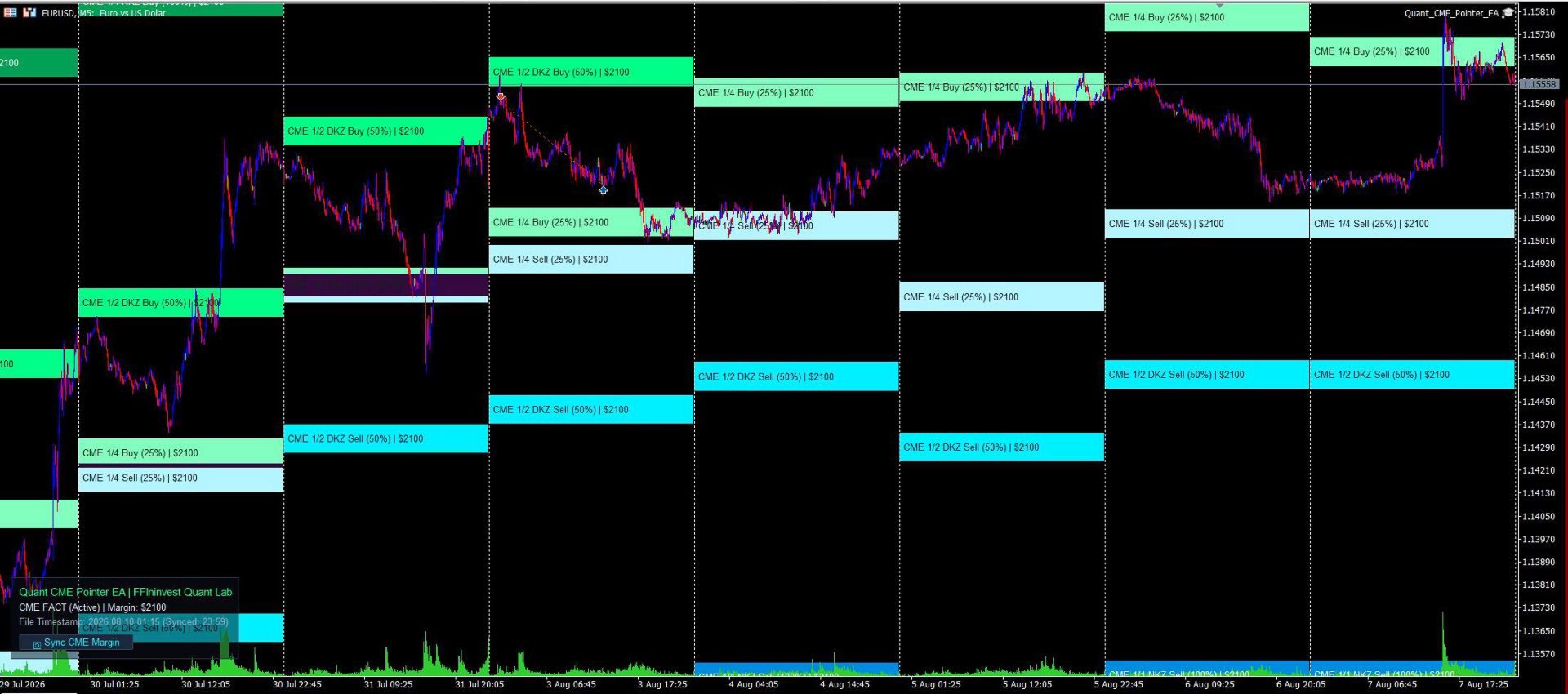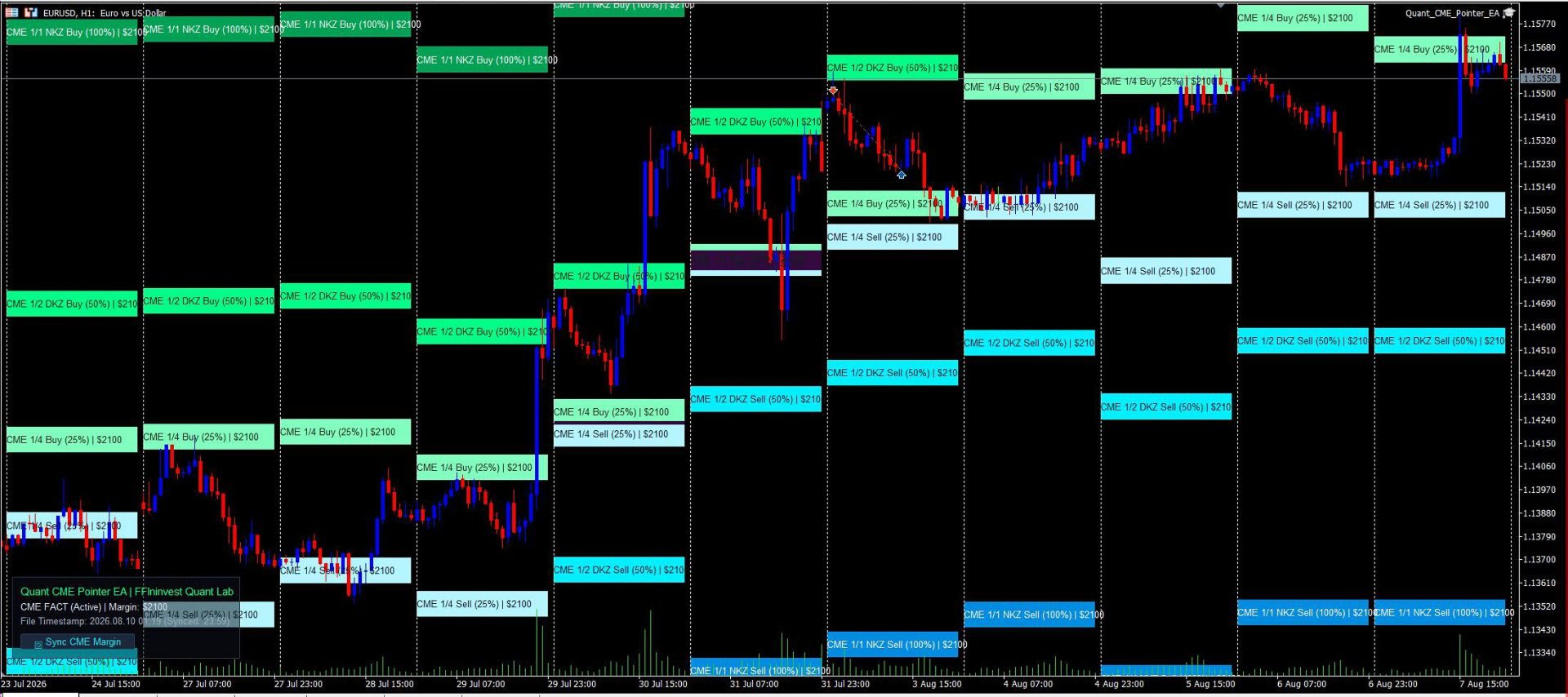
Quant CME Pointer EA

An automatic professional CME margin zones indicator for MT5. Calculates and plots key support and resistance levels (1/4, 1/2 DKZ, 1/1 NKZ). 100% non-repainting, auto-downloads exchange data, and features a Clean Chart Mode.

Allows you to trade on the real liquidity of large hedge funds and banks.

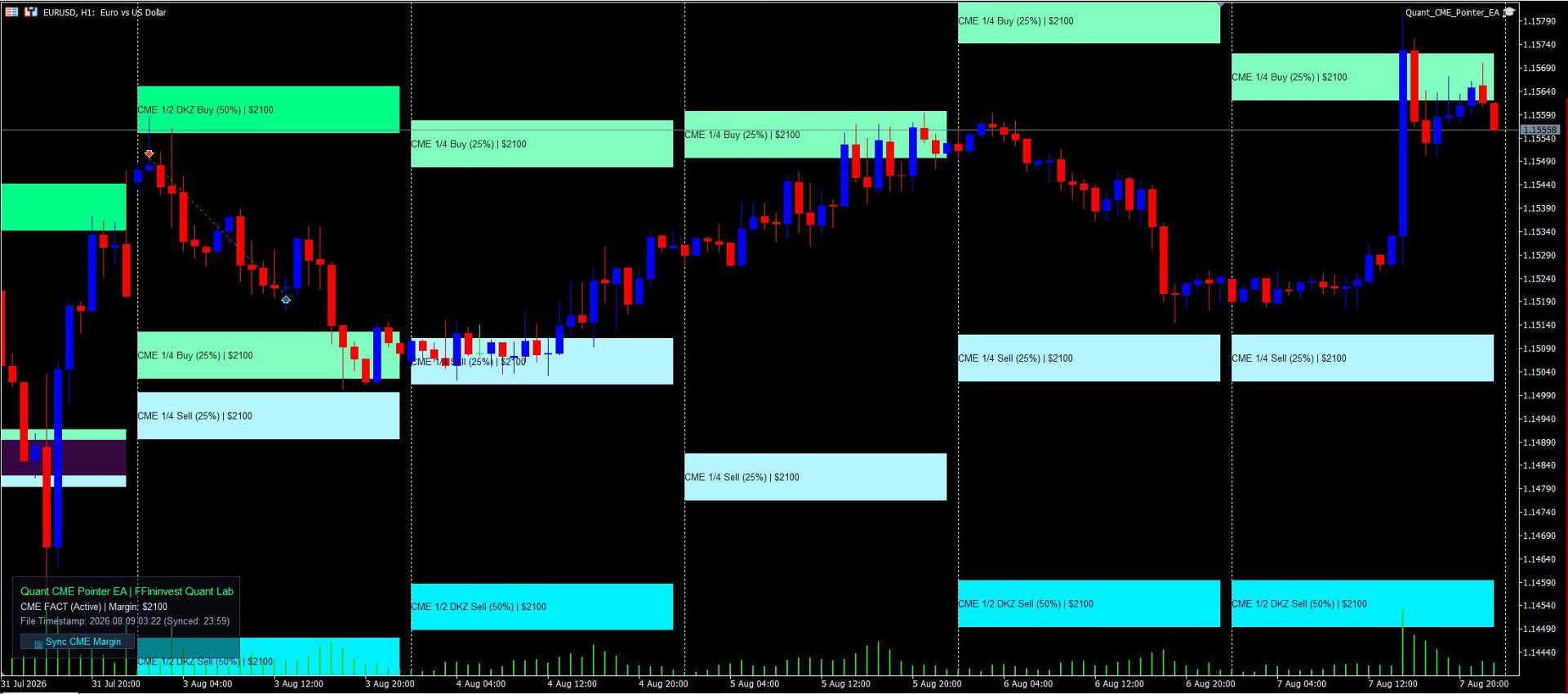
Quant CME Pointer EA is a professional visual tool designed as an Expert Advisor for MetaTrader 5 by the FFIninvest Quant Lab. The EA automatically downloads, calculates, and displays official Chicago Mercantile Exchange (CME Group) margin zones directly on your chart. It works on any timeframe and features a 1-click manual margin update button.

How It Works and Why These Levels Matter:

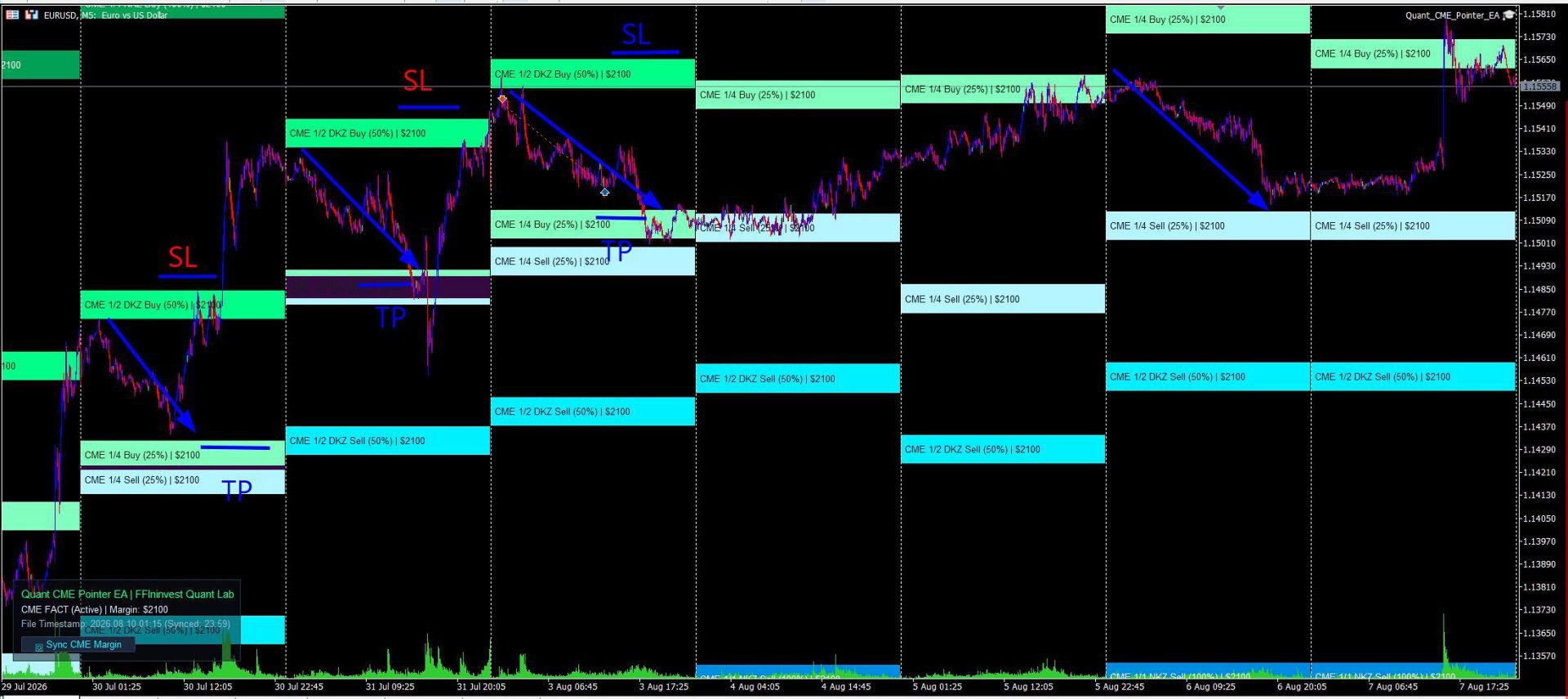
Major investment banks, hedge funds, and market makers trade currency futures under strict margin requirements set by the CME exchange. When price approaches key margin collateral zones (1/4, 1/2 DKZ, 1/1 NKZ), institutional players are forced to defend their positions, add collateral, or take profits. This creates high-probability reaction zones for momentum breakouts or sharp trend reversals.

These levels provide excellent opportunities to place trades with tight stop-losses and clear take-profit targets. In essence, the EA reveals exact price levels where big institutional money is actively working!

MAIN ADVANTAGES

  • Official CME Exchange Data: Automatic downloading of the latest margin requirements directly from CME Group servers without manual calculations or searching for CSV files.
  • Out-of-the-Box EURUSD Auto-Sync: Automatically fetches official CME Euro FX futures (EURUSD) margin in USD ($2100) on startup. Support for other currencies and Gold (XAUUSD) takes just 5 seconds to configure in inputs.
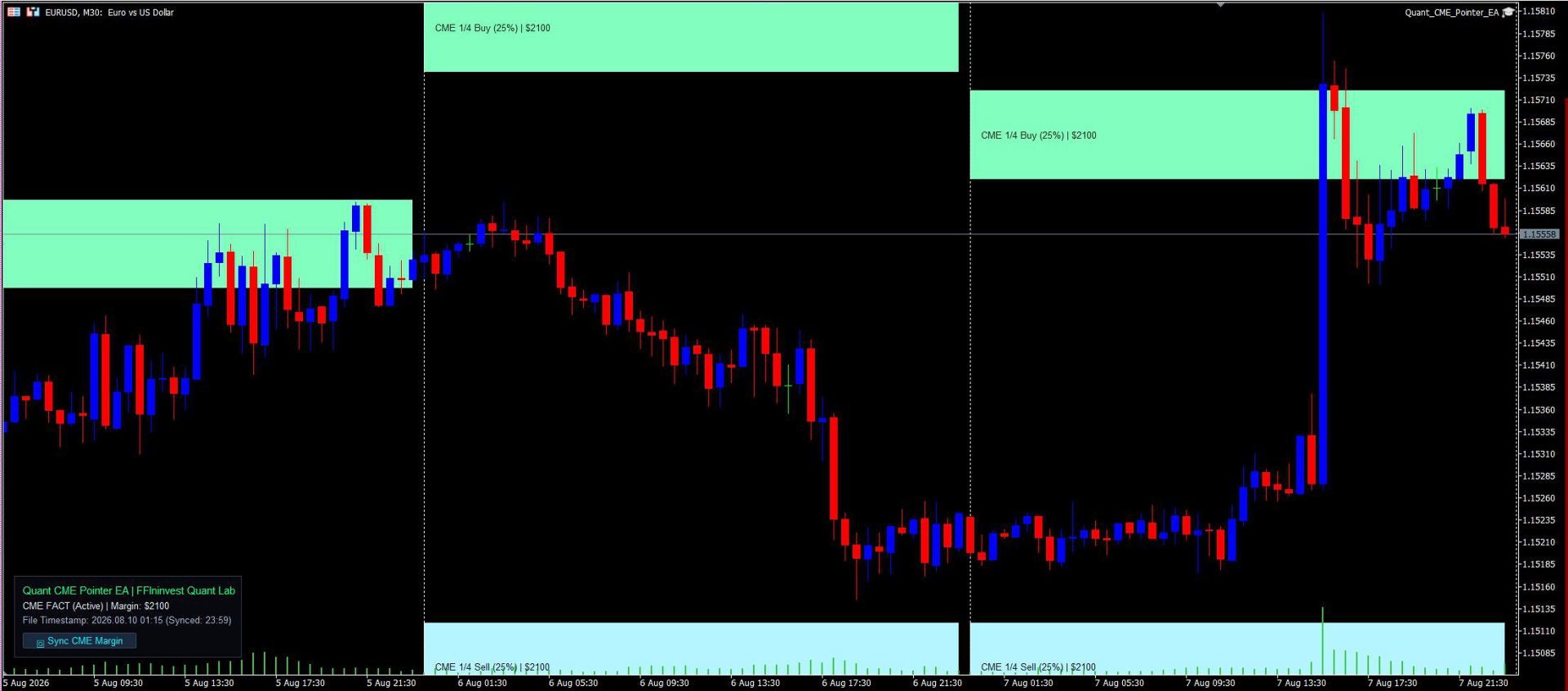
  • 100% Non-Repainting Logic: Zones are anchored to locked daily candles and remain completely static. You get a 100% reliable picture in real-time and on history.
  • Historical Margin Accounting: Unlike conventional indicators, this utility accounts for historical CME margin rate changes for past months, ensuring accurate backtesting and historical analysis. (*Historical margin data for the year is included in the code).
  • Maximum Risk-to-Reward Ratio: The 1/4, 1/2 DKZ, and 1/1 NKZ zones allow you to find entry points with tight stop-losses and risk-to-reward ratios from 1:3 to 1:5.
  • Seamless Smart Money & Price Action Synergy: CME levels align perfectly with Order Blocks, Fair Value Gaps (FVG), and Liquidity Sweeps.
  • Clean Chart Mode: Hide the entire UI panel in 1 click ( InpShowLabel = false ). Perfect for multi-chart grid layouts or clean price action analysis.
  • Informative & Visual Clarity: Every level is clearly labeled on the chart (e.g., CME 1/2 DKZ Buy (50%) ) with a distinct color shade for instant market evaluation at any scale.
  • Modern Glassmorphism UI: Elegant dark card with adjustable transparency (0–100%) and flexible 4-corner docking (Top-Left, Top-Right, Bottom-Left, Bottom-Right).
  • Ultra-Low CPU Usage: Optimized MQL5 code using CCanvas delivers instant rendering with zero terminal lag or slowdowns.
  • 100% Trade Safe: The EA performs purely analytical and visual functions, opens no automated orders, and poses zero risk to your deposit.
  • Margin update button: The Expert Advisor automatically updates the margin when first launched and when the Terminal is rebooted. The update button is only needed if the terminal works for days and weeks without rebooting.

INPUTS GUIDE

1. CME Exchange Data

  • Auto-Download CME Data (InpAutoUpdate): true — auto-downloads CME data on startup; false — reads from local CSV file.
  • Fallback Margin ($) (InpManualMargin): Reserve margin amount in USD (if offline or for non-EURUSD instruments).
  • Tick Value for 1.0 Lot ($) (InpTickValue): Value of 1 pip for 1.0 lot (default is $10.0 for Euro).
  • History Depth (Days) (InpHistoryDays): Number of days in history for zone calculation.
  • Zone Height in Pips (InpZoneHeightPips): Height of the zone band in pips.

2. Display Zones

  • Dynamic Unclosed Day (InpCalcCurrentDay): false — 100% static non-repainting zones from closed daily candle; true — dynamic unclosed day calculation.
  • 1/4, 1/2, 1/1 Zones (InpDrawQuarter, InpDrawHalf, InpDrawFull): Toggle display of corresponding margin zones.

3. Buy & Sell Palettes

  • Buy Zones Palette (InpColorBuy14, InpColorBuy12, InpColorBuy11): Individual green shades for 1/4, 1/2, and 1/1 support zones.
  • Sell Zones Palette (InpColorSell14, InpColorSell12, InpColorSell11): Individual cyan/blue shades for 1/4, 1/2, and 1/1 resistance zones.

4. Info Panel Settings

  • Show Info Panel (InpShowLabel): true — shows panel; false — enables Clean Chart Mode (panel is completely hidden).
  • Panel Corner (InpLabelCorner): Select chart corner (Top Left, Top Right, Bottom Left, Bottom Right).
  • X / Y Offset (InpLabelX, InpLabelY): Panel pixel offset from the selected corner.
  • Show Background Card (InpShowBg): Toggle dark background card.
  • Card Transparency (InpBgTransparency): Adjust background opacity from 0% (opaque) to 100% (transparent).

INSTALLATION & SETUP

  1. After purchasing, click the "Install" button directly inside your MetaTrader 5 terminal (Market tab).
  2. In the "Navigator" window, open "Expert Advisors" -> "Market" and drag Quant CME Pointer EA onto an M5 chart (e.g., EURUSD).
  3. Ensure WebRequest is enabled for https://cmegroup.com in your terminal options.

ATTENTION! WEB-REQUEST SETUP FOR AUTO-SYNC

To allow the EA to automatically download margin data from CME Group servers, enable WebRequest in MetaTrader 5:

  1. Open terminal menu: Tools -> Options -> Expert Advisors.
  2. Check the box "Allow WebRequest for listed URL".
  3. Add the URL: https://cmegroup.com
  4. Click OK.

TRADING GUIDE & RECOMMENDATIONS

The utility does not issue blind trade signals; it provides a mathematically precise roadmap of institutional price reaction levels. The most effective trading strategies focus on price behavior inside these zones:

1. 1/4 Zone (25% Margin) — Local Pullback / Scalping:

  • Purpose: First reaction point during an active price impulse.
  • Tactics: Partial profit taking (Take Profit 1) or entering micro-trend trades with a tight stop-loss.

2. 1/2 DKZ Zone (50% Margin) — Key Correction / Smart Money:

  • Purpose: 50% margin collateral boundary. The most vital level for banks and funds.
  • Tactics: Primary zone for finding reversal patterns (Price Action / Smart Money). Trades taken from the 1/2 zone offer superior Risk-to-Reward ratios (from 1:3 to 1:5).

3. 1/1 NKZ Zone (100% Margin) — Full Margin Cycle:

  • Purpose: Point of complete margin exhaustion (Margin Calls for opposing market participants).
  • Tactics: Final profit target for medium-term trades. Entering continuation trades at this zone is not recommended.

Risk Management Tip: Always use a protective Stop Loss outside the margin zone and risk no more than 1–2% of your account per trade.
Recommended products
Alpha Striker SMC KING is unique Expert Advisor that continues the Alpha Striker series of  expert advisors. Innovative methods of the programme's approach to trading, and promising performance results are possible thanks to the use of modern technologies and methods. The Alpha Striker SMC KING is a fully automated EA designed to trade currencies only. Working pairs recommended EURUSD. Expert showed stable results on currencies in 2022-2024 period. No dangerous methods of money management used,
**MT5 → Telegram & Discord Auto Post Bot** Want to automate your trading and stop wasting time on manual posting? This bot is for you. **What does it do?** It connects directly to MetaTrader 5 and automatically posts to Telegram & Discord: ️ Open trades ️ Closed trades ️ SL / TP levels ️ Profit and loss ️ Real-time signals **Advantages:** • Fully automated process • No delay – posts in real time • Perfect for signal groups and channels • Increases trust and transparency • Works
Bober Real MT5
Arnold Bobrinskii
4.88 (16)
Bober Real MT5 is a fully automatic Forex trading Expert Advisor. This robot was made in 2014 year and did a lot of profitbale trades during this period. So far over 7000% growth on my personal account. There was many updates but 2019 update is the best one. The robot can run on any instrument, but the results are better with EURGBP, GBPUSD, on the M5 timeframe. Robot doesn't show good results in tester or live account if you run incorrect sets. Set files for Live accounts availible only for cu
MT5 To Telegram Copier
Levi Dane Benjamin
2.67 (3)
Send fully customisable trade signals from MetaTrader 5 to Telegram and run your own signal channel. Configure what gets sent, how it looks, and which trades are included using an easy on-chart interface. Made for signal providers : keep messages consistent, branded, and informative without manual posting. User Guide + Demo | MT4 Version | Discord Version Main features Highly customisable signal format with many configuration options Add your own text before/after each signal (tags, links, chan
如果产品有任何问题或者您需要在此产品上添加功能,请联系我 Contact/message me if you encounter any issue using the product or need extra feature to add on the base version. There is Demo version of this panel Dashboard Super Three MA MT5 Demo in my product list, please try it out to get familiar with all functionalities for free Free version: LINK MT4 version: LINK This system basically utilizes PA and three adjustable Moving Average as the main indicator set to generate trading signal. With the feature that all MA_timefram
VORTEX — Advanced Market Intelligence Engine VORTEX is an advanced MetaTrader 5 Expert Advisor designed for high-volatility markets such as XAU/USD (Gold) and BTC/USD (Bitcoin). Rather than relying on simple indicators, VORTEX combines multiple layers of market analysis to identify high-probability trading conditions. Its decision engine is built around four core pillars: Pressure — measures the strength of buyers versus sellers. Momentum — evaluates whether market movement is strengthening or w
如果产品有任何问题或者您需要在此产品上添加功能,请联系我 Contact/message me if you encounter any issue using the product or need extra feature to add on the base version. There is Demo version of this panel Dashboard Super MA RSI CCI Demo in my product list, please try it out to get familiar with all functionalities for free, LINK . Dashboard Super MA RSI CCI is an intuitive and handy graphic tool to help you to: Have 28 pairs under control with one dashboard Monitor price movement, identify possible trend based on MA, RS
Equity Protect Pro: Your Comprehensive Account Protection Expert for Worry-Free Trading If you're looking for features like account protection, equity protection, portfolio protection, multi-strategy protection, profit protection, profit harvesting, trading security, risk control programs, automatic risk control, automatic liquidation, conditional liquidation, scheduled liquidation, dynamic liquidation, trailing stop loss, one-click close, one-click liquidation, and one-click restore, Equity P
Iconic BTC AI
Maurice Prang
5 (1)
ICONIC BTC AI+ | SYNAPSE.PHENOTYPE S6 ENGINE (Version 15.00) Launch Pricing Current price: 599 USD. Available licenses: 10. Next price tier: 699 USD. Final price: 1699 USD. Early access pricing reflects the current phase of the product release. Pricing will step up as the license contingent closes and subsequent tiers open. There is no scheduled date after which the current price remains available. Bitcoin is not a Forex pair. It does not behave like gold, does not respect session boundaries th
SMART HARVEST XAU: The Advanced Retracement Stop Grid SMART HARVEST XAU is a next-generation Expert Advisor (EA) specifically engineered to capitalize on market retracements and price corrections. Unlike traditional, high-risk Averaging or Martingale systems that blindly open market orders against strong trends, this EA employs a highly sophisticated Smart Trailing Pending Grid strategy. By utilizing dynamic Buy Stop and Sell Stop orders that intelligently trail the current market price, the EA
VadineroLab MT5 Export Master to CSV EXEL JSON - Expert Advisor for exporting and analyzing symbols, account, terminal parameters, active trades, current account state, trading history, global variables.   Generates the following report types: * Symbols Parameters — spread, tick size, min/max lot, swap, … * Account Parameters — balance, equity, leverage, currency, margin info, … * Terminal Parameters — server, version, language, date, environment, … * Trade History — orders, deals, positions, se
FREE
Swing Failure Hunter
Shingidzano Lesetedi
SFP Hunter — Swing Failure Pattern SFP Hunter is a MetaTrader 5 indicator that automatically detects Swing Failure Patterns (SFP) on any symbol and timeframe. The indicator identifies single-candle stop-hunt reversals where price wicks beyond a prior swing high or low and closes back inside on the same candle, signalling a potential reversal from that level. How the Pattern Works A Swing Failure Pattern occurs when price briefly breaches a prior swing high or swing low — triggering the stop orde
Tools for earning and research. The core of the trading signals and strategy is based on the author's algorithm for the formation of price forecasting patterns. Applicable to any instrument! Supplemented with a control system based on the MA "Nine-Tailed Fox" , updating and adjusting the signal as accurately as possible for the market, instrument and period of work. Eligible: All instruments in all markets (there are exceptions). Who it's for: hedge funds, fund and asset managers, investment
Talents ATR Scalper Utility (MT5) The Talents ATR Scalper Utility is a professional-grade trade execution and management tool built for MetaTrader 5. Inspired by the Biblical Parable of the Talents , this utility is designed to help traders multiply their potential with precision risk control, one-click simplicity, and advanced automation. Whether you’re scalping forex, gold, or indices, this tool delivers speed, consistency, and confidence. Key Features One-Click Trade Preview Click below price
SolarTrade Suite Financial Robot: LaunchPad Market Expert - designed to open trades! This is a trading robot that uses special innovative and advanced algorithms to calculate its values, Your Assistant in the World of Financial Markets. Use our set of indicators from the SolarTrade Suite series to better choose the moment to launch this robot. Check out our other products from the SolarTrade Suite series at the bottom of the description. Do you want to confidently navigate the world of inves
Galaxy Elegance
Gezani Paulus Nkuna
G.X.L (GALAXY ELEGANCE) Product Overview G.X.L is an automated trading robot for MetaTrader 5 that operates based on price action analysis. The system processes real-time market data to identify trading opportunities. It provides information and recommendations aligned with user-defined trading preferences. Core Functionality The robot analyzes price movements without relying on traditional lagging indicators. It focuses on current market structure, including swing points and fractals, to determ
Trade Protection PRO
DL TEC SOLUTIONS LTD
Trade Protection PRO – Professional Trade Manager & Protection Tool A powerful yet easy-to-use Trade Protection Expert Advisor that automatically manages your positions with advanced risk protection features. Key Features: Automatic Breakeven with customizable offset Up to 5 Partial Take Profit levels with individual percentages Modern real-time Dashboard showing all important information Clear visual horizontal lines on chart (BE trigger, entry line, and all TP levels) Two volume modes: % of In
Overview Impulsive OB Scalper Pro is a fully automated Expert Advisor for MetaTrader 5 that focuses on   institutional order blocks   and   impulsive price movements . The system identifies supply and demand zones formed after a strong impulsive candle (range ≥ ATR × multiplier) and executes trades when price retests those zones. This approach follows the footprints of large institutional players (banks, hedge funds) that create significant directional moves. Unlike traditional indicator‑based s
Description: Advanced Position Closer EA monitors your open market orders per symbol, displays the counts directly on your chart, and automatically closes orders when configurable thresholds are met. It supports both global and per-symbol settings for direction, profit/loss filtering, and whether to close all matching orders or only those that passed your filters. External Parameters: 1. GlobalMaxOpenOrders (int)    - Sets a single maximum number of open market orders for every symbol.    - 0
1. This EA is an auto take profit, stoploss, trailing stop & profit lock with exit strategy (reverse/ hedge) martingale. 2. Suitable for manual trading either on pc chart or mobile trading (when on VPS) 3. Variable input are in pips   4.   1st position will be opened manually by yourself (buy/sell). TP, SL, TS and profit lock will be set thereafter.   5. There are 2 exit strategy if your 1st manual trades (Failed) and goes against your trend.   (a) Reverse Martingale (Sell) is activated when y
Double or Nothing Daily Version MT5
Rui Fernando Pimentel De Oliveira
DOUBLEorNOTHING Daily is the version of the DOUBLEorNOTHING family designed to combine an aggressive Gold / XAUUSD trading strategy with a capital-management model focused on frequently protecting realized profits. The core idea behind the DOUBLEorNOTHING family is simple: recovery strategies may generate strong growth, but they can also experience significant drawdowns. For this reason, every version uses the same main trading concept while handling capital and profits differently. In Daily mod
Discord Notify
Aleh Piatrenka
5 (3)
Automatically sends real-time  notifications about trade opening,  closing, partial closing and modification of MT5 to Discord . The utility supports 16 languages : English, French, German, Indian (Hindi), Indonesian, Italian, Kazakh, Korean, Dutch, Polish, Portuguese, Russian, Spanish, Turkish, Ukrainian, and Vietnamese. You can also use any other language by customizing the notification text.  The product is designed for traders who need to receive Discord notifications without constantly moni
FREE
Slack Notify
Aleh Piatrenka
Automatically sends real-time  notifications about trade opening, closing, partial closing and modification of MT5 to Slack. The utility supports 16 languages : English, French, German, Indian (Hindi), Indonesian, Italian, Kazakh, Korean, Dutch, Polish, Portuguese, Russian, Spanish, Turkish, Ukrainian, and Vietnamese. You can also use any other language by customizing the notification text.  The product is designed for traders who need to receive Slack notifications without constantly monitoring
FREE
This universal advisor is based on its own Algorithm, which is an incredibly effective tool due to the simultaneous operation of a trading strategy based on our Bollinger Bands Stop Indicator. The advisor's algorithm is based on a deep understanding of technical analysis and personal experience in exchange trading, has passed the test of time, therefore it guarantees accurate signals and well-thought-out decisions. Traders are also given the opportunity to use their own risk management system wi
Delta Msnr Flex
Dely Ange Alex Dely
DELTA MSNR FLEX Intelligent MSNR Structure Analysis & Key Level Detection — MetaTrader 5 DELTA MSNR FLEX is a professional indicator designed to analyze price structure and identify important MSNR levels directly on the MetaTrader 5 chart. Its objective is simple: transform significant market reactions into clearly identifiable levels, helping traders improve their market analysis and decision-making process. AUTOMATIC & MANUAL DETECTION DELTA MSNR FLEX provides a flexible approach to market
Overview Partial Trailing Stop EA is an advanced trade management Expert Advisor for MetaTrader 5 that automatically locks in profits by performing partial position closures when price retraces from its maximum favorable movement (peak profit level) . Unlike a traditional trailing stop that closes the entire position, this EA allows you to scale out gradually. When the market moves in your favor, the EA continuously tracks the highest (for Buy trades) or lowest (for Sell trades) price reached. I
Reversal Pattern AI — an absolute breakthrough in the world of indicator development, combining artificial intelligence algorithms, multi-level market analysis, and classical methods of technical analysis. It not only detects reversal patterns but also evaluates market inefficiencies, generating highly accurate trading signals. Thanks to a hybrid model that uses price action analysis, Volumes, Volatility, VWAP, and Volume AVG %, the indicator easily adapts to any market conditions.              
Hedging Locking MT5
Agus Santoso
5 (2)
MT4 Version : https://www.mql5.com/en/market/product/99489 MT5 Version : https://www.mql5.com/en/market/product/99490 Hedging Locking — Multi-Symbol Hedging Grid EA Hedging Locking is an automated trading system for MetaTrader 4/5 designed around a hedged entry + adaptive locking/grid management concept. The EA starts a cycle by opening BUY and SELL simultaneously on selected symbols, then manages the exposure using a dynamic step distance. This approach is built to work best in ranging / osc
Ultimate Trailing Stop EA MT5
BLAKE STEVEN RODGER
4.13 (8)
This EA Utility allows you to manage (with advanced filtering) unlimited open orders (manual or EA) with 16 trailing stop methods: fixed, percent, ATR Exit, Chandelier Exit, Moving Average, Candle High Low Exit, Bollinger Bands, Parabolic, Envelope, Fractal, Ichimoku Kijun-Sen, Alligator, Exit After X Minutes or Bars, RSI and Stochastic. The trailing stop can be either real or virtual, and you can exit fully or with a partial close percent on touch or bar close.  Moreover, you can add (override
Big Boss EA
Ignacio Ramirez Aisa
Big Boss EA The Expert Advisor in the MQL5 platform is a powerful tool designed to manage multiple charts within an account. It provides functionality to set profit targets and loss limits for individual charts as well as for the entire account. Additionally, it can calculate floating profits/losses, drawdowns, and daily, weekly, and monthly profits. The utility offers a user-friendly interface that allows for easy comparison of different strategies and expert advisors. It is particularly valuab
Buyers of this product also purchase
Trade Assistant MT5
Evgeniy Kravchenko
4.43 (216)
It helps to calculate the risk per trade, the easy installation of a new order, order management with partial closing functions, trailing stop of 7 types and other useful functions. Additional materials and instructions Installation instructions - Application instructions - Trial version of the application for a demo account Line function -   shows on the chart the Opening line, Stop Loss, Take Profit. With this function it is easy to set a new order and see its additional characteristics bef
Forex Trade Manager MT5
InvestSoft
4.98 (682)
Trade Manager MT5 is an advanced position size calculator and trade management tool for MetaTrader 5, designed to help traders plan trades faster, control risk more precisely, and manage open positions directly from the chart. It combines order placement, risk based lot calculation, Stop Loss and Take Profit management, Break Even, Trailing Stop, Partial Close, Equity Protection, and external trade management in one panel. Whether you trade forex, indices, metals, commodities, crypto, or future
================================================================================ POC BREAKOUT - V20.72. Full Professional Grade Toolkit ================================================================================ POC Breakout is a full MetaTrader 5 trading dashboard for discretionary traders who want breakout signals, Point of Control (POC) context, volume profiles, order flow, market structure, news, alerts, and advanced trade planning in one professional workspace. Attached directly to you
Telegram to MT5 MultiChannel Copier
Sergio Marquez Uroz
4.59 (17)
Telegram to MT5 Multi-Channel Copier   automatically copies trading signals from your Telegram channels straight to MetaTrader 5. No bots, no browser extensions, no manual copying. A signal arrives in Telegram and the EA opens the trade in your terminal within seconds. And before you copy a channel, the built-in backtester shows you what that channel would have done in your account. The product has two components: a Windows application that listens to your Telegram channels, and this Expert Advi
TradePanel MT5
Alfiya Fazylova
4.88 (170)
Trade Panel is a multi-functional trading assistant. The app contains over 50 trading functions for manual trading and allows you to automate most trading tasks. Application instructions: https://www.mql5.com/en/blogs/post/756482 Trial version of the application for a demo account: https://www.mql5.com/en/blogs/post/750865 How to install the application: https://www.mql5.com/en/blogs/post/756239 How to test the application in visual mode: https://www.mql5.com/en/blogs/post/770277 How to install
Copy Telegram signals with your own trading rules Telegram to MT5 Signal Trader automatically copies text-based trading signals from public and private Telegram channels and groups into MetaTrader 5. Manage multiple providers and MT5 accounts from one desktop app, with individual risk and trade settings for each provider . No Telegram bot or API setup needed for copying. Simply sign in with your own Telegram account by phone or QR code and select the channels or groups you have already joined. Y
FarmedHedge Pair Trading Dashboard
Tanapisit Tepawarapruek
5 (5)
Farmed Hedge Yield Farming | All Markets (Manual - Hybrid - Semi/Automated EA) VERIFIED TRADING RESULTS - Farmed Hedge Yield Axi Copy:  https://www.mql5.com/en/signals/2356376 - Farmed Hedge Yield Exn Copy:   https://www.mql5.com/en/signals/2356404 - Farmed Hedge Yield V Copy:  https://www.mql5.com/en/signals/2357156 IMPORTANT NOTICE: FarmedHedge is a MANUAL-FOCUSED TRADING UTILITY ,not a fully automated EA. Results shown on this Signal include manual trades and overall strategic management.
Power Candles Strategy Scanner - Self-Optimizing Multi-Symbol Setup Finder Self-optimizing settings work one chart at a time, and finding where they pay off right now means opening chart after chart. Power Candles Strategy Scanner runs the same self-optimizing engine as the Power Candles indicator on every symbol in your Market Watch, side by side. One panel ranks where it pays off: the winning strategy per symbol, its optimized Stop Loss and Take Profit. An alert fires the moment a fresh signal
Premium Trade Manager - The Trade Panel With a Coach Built In Premium Trade Manager puts a trading coach inside your chart, with a full execution engine underneath it. Set the trade up the way you always do, then let Max, your AI trading coach, read that exact setup against your live account and give you a straight verdict before you commit: is the stop disciplined, is the risk sane, is a high-impact release minutes away, are you near a prop-firm limit. Below sits the engine that runs everything
EA Overfitter
Stephen J Martret
5 (1)
That backtest looks great. But will it still be making money tomorrow, next week, next month? EA Overfitter re-runs your EA on 100 price histories it has never seen. One score tells you if the edge is real. A backtest tells you what an EA did on one price history — the one that happened to occur. What you cannot tell from it is how much of that result was the strategy and how much was the particular path. EA Overfitter answers that. It builds up to 100 synthetic price histories your EA has n
Footprint Chart Pro — Professional OrderFlow EA for MetaTrader 5 Version 6.34 | Professional tool for real traders | Institutional-Grade Visualization DEMO USERS - PLEASE SELECT EVERY TICK / REAL TICK WHEN TESTING AND YOU HAVE DOWNLOADED HISTORICAL DATA. IF YOU SEE A WAITING SCREEN AND IT IS NOT DOWNLOADING, IT MEANS YOU HAVE LOW HISTORICAL DATA. TRY 1 MIN AND 5 MIN FIRST ON 1 DAY DATA. ONE DAY DATA SHOULD BE THE NEWEST AND MOST CURRENT DATE. PLEASE WAIT UNTIL THE MARKET HAS ROLLED OVER PERIOD.
EA Slipstream
Stephen J Martret
5 (1)
Your backtest filled every order at the price it asked for. Your account does not. EA Slipstream measures what execution costs your EA, using your own fills, slippages and spreads to show you the true performance of your EA. A backtest prices every trade at the level the EA named. In live trading a pending order fills at whatever price is available when it triggers, a stop closes wherever the market is when it is hit, and the spread at that moment is whatever the account was quoting. The differ
Dynamic Fibonacci Grid
Tsvetan Tsvetanov
5 (1)
Introducing the latest version of the Dynamic Fibonacci Grid Dashboard for MT5. Now packed with many new features, this new dashboard transforms your trading experience and allows you to see the market and the price action from a completely different perspective. Discover new possibilities with simultaneous analysis of multiple timeframes covering multiple symbols. User-friendly interface for manual trading and management of positions and an expanded ability to apply predefined automated strate
Trade Indicator Assistant   is a powerful MT5 utility designed to turn indicators into automated trading systems. Its main feature is the ability to automatically detect an indicator’s   BUY and SELL signal buffers , without requiring you to know the buffer numbers, search through indicator settings, or modify the indicator source code. Bonus Indicator:   After purchasing Trade Indicator Assistant, contact me to receive   Trade Signal Pro   completely free as a bonus indicator. [Download Demo V
Welcome to ENTRY IN THE ZONE AND SMC MULTI TIMEFRAME Entry In The Zone and SMC Multi Timeframe is a real-time market analysis tool based on Smart Money Concepts (SMC), designed to analyze market structure, price direction, and key trading zones. It supports both Single-Timeframe Analysis and Multi-Timeframe Analysis, providing a clearer view of the overall market structure across multiple timeframes, with real-time BUY / SELL signals that do not repaint. It is designed to help filter trading opp
Grid Manual MT5
Alfiya Fazylova
4.73 (22)
Grid Manual is a trading panel for working with grid strategies. The utility is universal, has flexible settings and an intuitive interface. It works with a grid of orders not only in the direction of averaging losses, but also in the direction of increasing profits. The trader does not need to create and maintain a grid of orders, the utility will do it. It is enough to open an order and the "Grid manual" will automatically create a grid of orders for it and will accompany it until the close. F
The product will copy all telegram signal to MT5 ( which you are member) , also it can work as remote copier.  Easy to set up, copy order instant, can work with almost signal formats, image signal,  s upport to translate other language to English Work with all type of channel or group, even channel have "Restrict Saving Content", work with  multi channel, multi MT5 Work as remote copier: with signal have ticket number, it will copy exactly via ticket number. Support to backtest signal. How to s
FUTURES ORDERFLOW FOOTPRINT CHART Professional OrderFlow EA for MetaTrader 5 Version 1.01| Professional tool for real traders | Institutional-Grade Visualization STRATEGY TESTER USERS - PLEASE SELECT EVERY REAL TICK WHEN TESTING AND YOU HAVE DOWNLOADED HISTORICAL DATA. IF YOU SEE A WAITING SCREEN AND IT IS NOT DOWNLOADING, IT MEANS YOU HAVE LOW HISTORICAL DATA. TRY 1 MIN AND 5 MIN FIRST ON 1 DAY DATA. ONE DAY DATA SHOULD BE THE NEWEST AND MOST CURRENT DATE. PLEASE WAIT UNTIL THE MARKET HAS ROL
The Expert Advisor will help you forward all alert from  MetaTrader 5 to Telegram channel/ group.  All alert must save to folder <Data folder>MQL5\Files\Alerts\ , text file with format *.txt and screenshot with format *.gif or *.png. Parameters: - Telegram Bot Token: - create bot on Telegram and get token. - Telegram Chat ID:  - input your Telegram user ID,  group / channel ID - Forward Alert: - default true, to forward alert. - Send message as caption of Screenshot: - default false, set true t
The product is used to trade base on any Alert signal in MT5 Easy to setup, simple format with custom keyword All option to management orders as trailing stop, breakeen, partial close, time filter, news filter ... Option to auto open grid orders How to setup and guide: Let read all details about setup and download indicator for auto get   Alert Signal   here Do not buy if you even can not install demo EA to your VPS ( some VPS block download EA from mql5 market) We always bring customers high q
Timeless Charts
Samuel Manoel De Souza
5 (8)
Timeless Charts is an all-in-one trading utility for professional traders. It combines custom chart types such as Seconds Charts and Renko with advanced order flow analysis using Footprints , Clusters , Volume Profiles , VWAP studies, and anchored analysis tools for deeper market insight. Trading and position management are handled directly from the chart through an integrated trade management panel , while Market Replay and Virtual Accounts provide environments for practicing trading skills and
Prop Guardian Risk Manager MT5 – Drawdown, Risk & Hedge Protection for Prop Firm and Managed Accounts Prop Guardian Risk Manager is a professional risk-control utility for MetaTrader 5, designed for prop firm traders, money managers and anyone who wants strict account-level risk protection. It does not generate trading signals, strategy entries or trading decisions. Instead, it runs in the background, monitors your account risk and can automatically block new exposure, close managed positions or
Mentfx Mmanage mt5
Anton Jere Calmes
4.25 (8)
The added video will showcase all functionality, effectiveness, and uses of the trade manager. Drag and Drop Trade Manager. Draw your entry and have the tool calculate the rest. Advanced targeting and close portions of a trade directly available in tool (manage trades while you sleep). Market order or limit order on either side with factored spread. Just draw the entry, the tool does the rest. Hotkey setup to make it simple. Draw where you want to enter, and the stop loss, the tool calculates al
EasyInsight AIO MT5
Alain Verleyen
4.92 (12)
EASY Insight AIO – All-In-One Power for AI-Driven Trading Want to skip the setup and start scanning the entire market – Forex, Gold, Crypto, Indices, and even Stocks – in seconds? EASY Insight AIO is the complete plug-and-play solution for AI-powered trade analysis. It includes all core Stein Investments indicators built-in and automatically exports clean, structured CSV files – perfect for backtesting, AI prompts, and live market decision-making. No need to install or configure indicators manu
YuClusters
Yury Kulikov
4.93 (43)
Attention: You can view the program operation in the free version  YuClusters DEMO .  YuClusters is a professional market analysis system. The trader has unique opportunities to analyze the flow of orders, trade volumes, price movements using various charts, profiles, indicators, and graphical objects. YuClusters operates on data based on Time&Sales or ticks information, depending on what is available in the quotes of a financial instrument. YuClusters allows you to build graphs by combining da
MT5 Trading Deck
Manuel Michiels
5 (2)
One button. One trade. MT5 Trading Deck is a hotkey trading panel for MetaTrader 5 that turns the platform into a keyboard-driven execution cockpit. Stop loss, take profit and lot size are pre-calculated for every key; the moment you press, a market order is live on the broker. A complete technical user manual is attached in the product Comments section. It documents every input parameter, the full hotkey map, the recommended Stream Deck XL layout, and the advanced workflows for Pre-Limit orders
VERON LINK MASTER MT5 — Real-time Multi-Account Dashboard & Sync Controller Veron Link Master is a high-performance, centralized monitoring and synchronization control center designed for MetaTrader 5. Built specifically for traders managing multiple accounts, prop firm portfolios, grid/martingale EAs, or client networks, Veron Link Master provides a seamless, ultra-modern dark-themed GUI dashboard directly on your MT5 terminal. ️ Important Requirement / System Usage: To use this system, yo
Veron Link Slave – Synchronized Grid, Martingale & Breakout Management Short Description Advanced synchronization tool designed to manage Grid, Martingale, and Breakout EAs. Automatically sends close-basket signals to the Master account upon profit target completion, minimizing slippage across different brokers. Full Description Veron Link Slave is a specialized utility developed to enhance the execution efficiency and risk management of multi-account or multi-broker trading setups. It is desig
Effortlessly manage multiple trading accounts The Local Trade Copier EA is a solution for individual traders or account managers who need to execute trade signals from external sources or who need to manage several accounts at the same time, without the need for a MAM or a PAMM account. It copies from up to 8 master accounts to unlimited slave accounts . [ Installation Guide | Update Guide | Troubleshooting | FAQ | All Products  ] 100% self hosted Easy to install and use It can copy from MT4 t
EA Auditor
Stephen J Martret
5 (5)
EA Auditor is an independent analysis tool for traders evaluating Expert Advisors and trading signals on MetaTrader 5. It audits backtest reports, reviews posted developer signals, and cross-verifies the two against each other to help traders assess strategies before committing capital. The MQL5 market offers a wide range of Expert Advisors from many developers, with varying approaches, quality, and transparency. EA Auditor provides a consistent, data-driven framework for reviewing them, answer
More from author
Murena Core IV
Dmitriy Frolov
Murena Core IV Fully automated Expert Advisor for MetaTrader 5 on EURUSD M5. Operates on the proprietary ZET-Engine core, capable of reading raw, dense tick liquidity, and Chrono-DSP spectral wave synchronization. Completely excludes martingale and grid strategies: mandatory server-side StopLoss on every trade, while the adaptive Smart Exit maximizes trend profits and cuts losses early. Profit factor above 3+ with drawdowns under 8%, stable equity growth on fixed lots with safe compounding acce
Filter:
No reviews
Reply to review