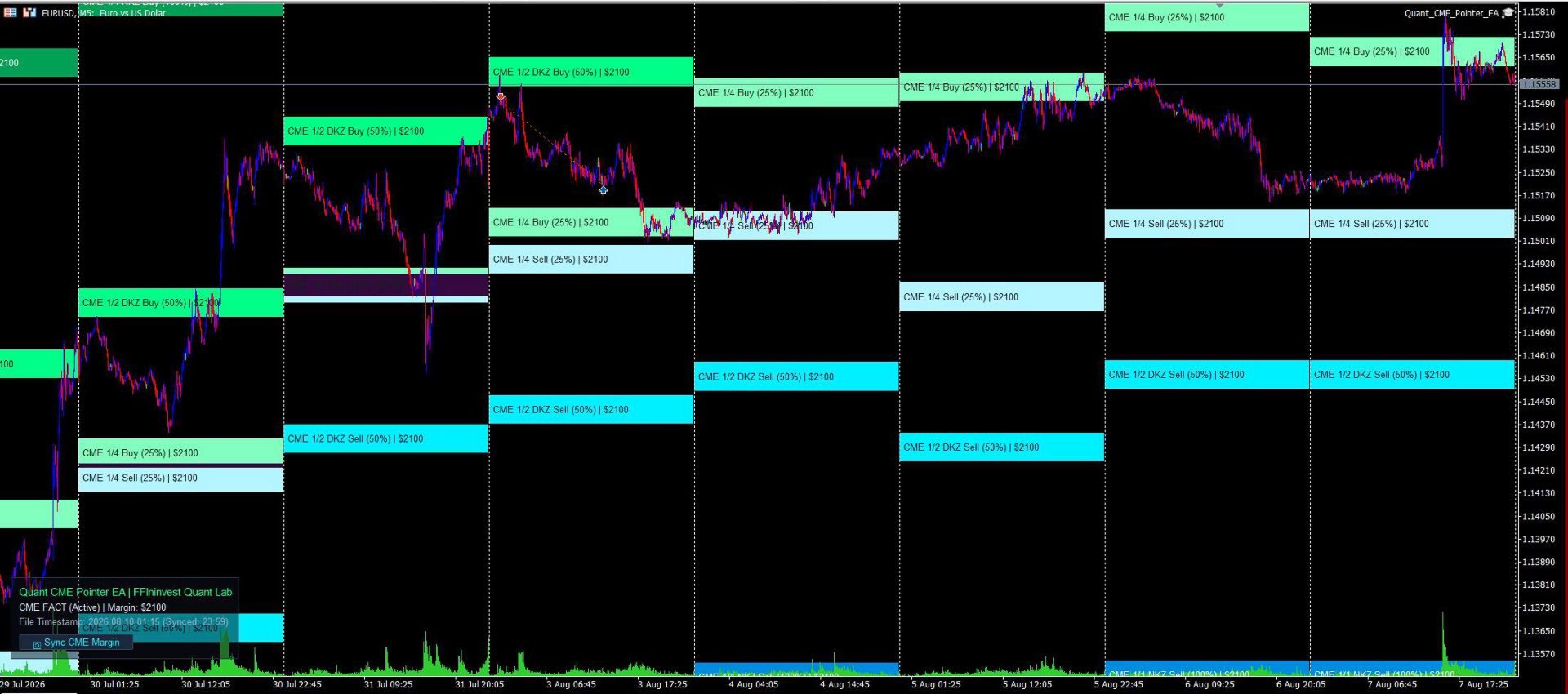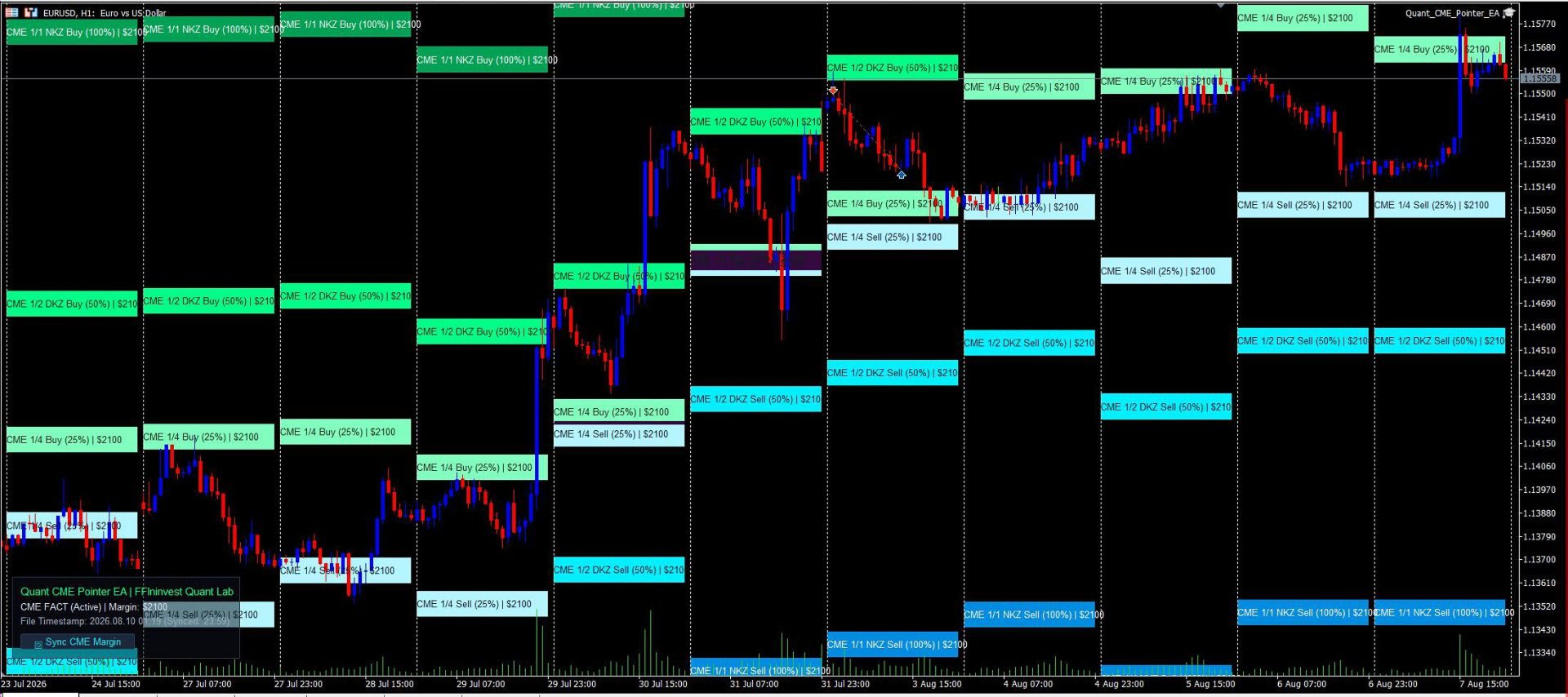
Quant CME Pointer EA

An automatic professional CME margin zones indicator for MT5. Calculates and plots key support and resistance levels (1/4, 1/2 DKZ, 1/1 NKZ). 100% non-repainting, auto-downloads exchange data, and features a Clean Chart Mode.

Allows you to trade on the real liquidity of large hedge funds and banks.

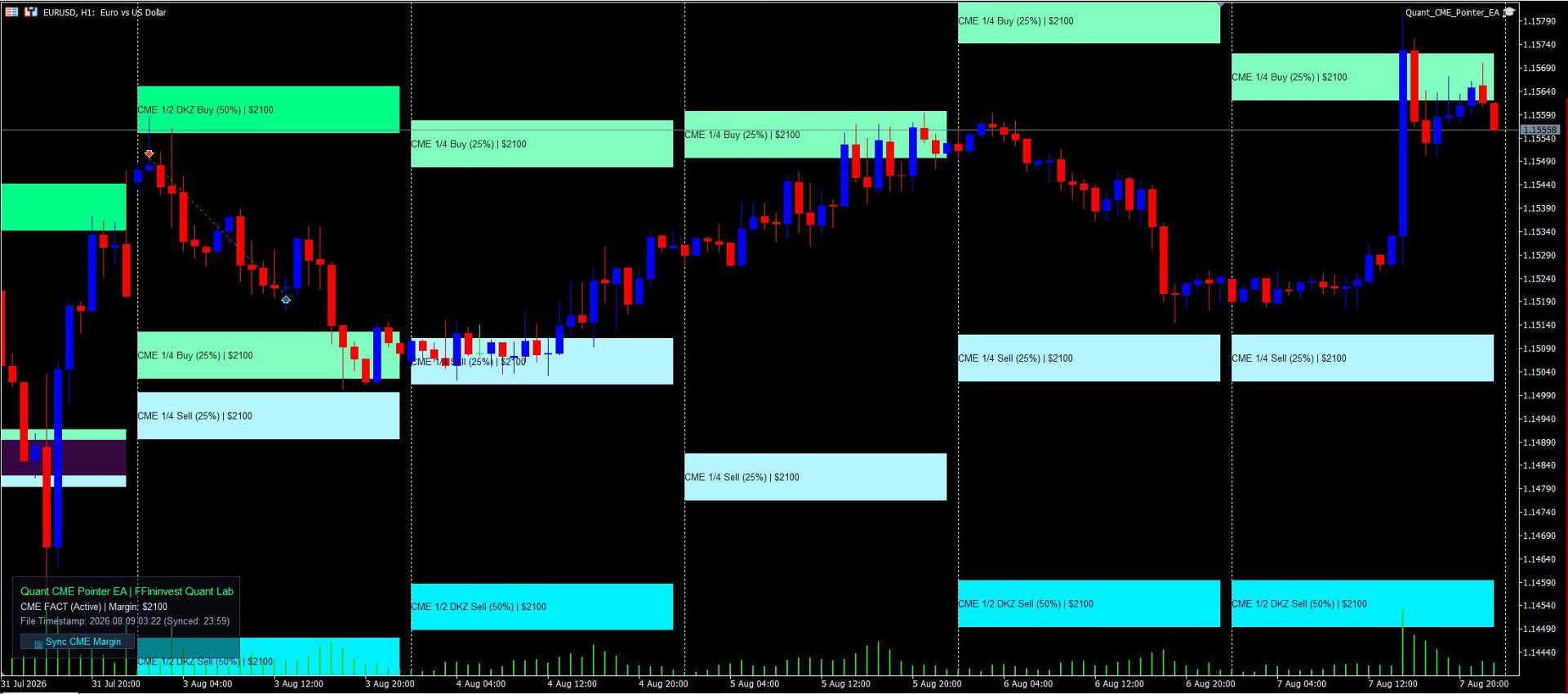
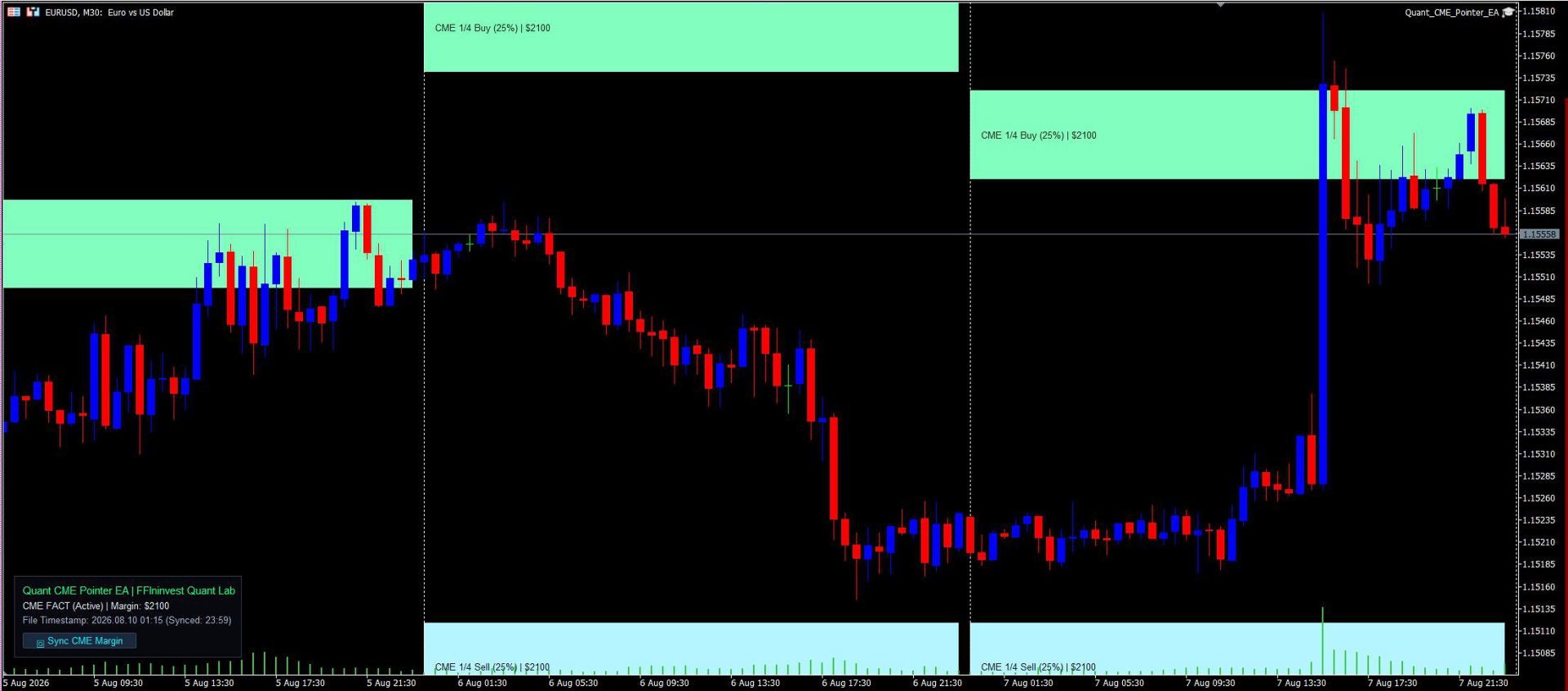
Quant CME Pointer EA is a professional visual tool designed as an Expert Advisor for MetaTrader 5 by the FFIninvest Quant Lab. The EA automatically downloads, calculates, and displays official Chicago Mercantile Exchange (CME Group) margin zones directly on your chart. It works on any timeframe and features a 1-click manual margin update button.

How It Works and Why These Levels Matter:

Major investment banks, hedge funds, and market makers trade currency futures under strict margin requirements set by the CME exchange. When price approaches key margin collateral zones (1/4, 1/2 DKZ, 1/1 NKZ), institutional players are forced to defend their positions, add collateral, or take profits. This creates high-probability reaction zones for momentum breakouts or sharp trend reversals.

These levels provide excellent opportunities to place trades with tight stop-losses and clear take-profit targets. In essence, the EA reveals exact price levels where big institutional money is actively working!

MAIN ADVANTAGES

  • Official CME Exchange Data: Automatic downloading of the latest margin requirements directly from CME Group servers without manual calculations or searching for CSV files.
  • Out-of-the-Box EURUSD Auto-Sync: Automatically fetches official CME Euro FX futures (EURUSD) margin in USD ($2100) on startup. Support for other currencies and Gold (XAUUSD) takes just 5 seconds to configure in inputs.
  • 100% Non-Repainting Logic: Zones are anchored to locked daily candles and remain completely static. You get a 100% reliable picture in real-time and on history.
  • Historical Margin Accounting: Unlike conventional indicators, this utility accounts for historical CME margin rate changes for past months, ensuring accurate backtesting and historical analysis. (*Historical margin data for the year is included in the code).
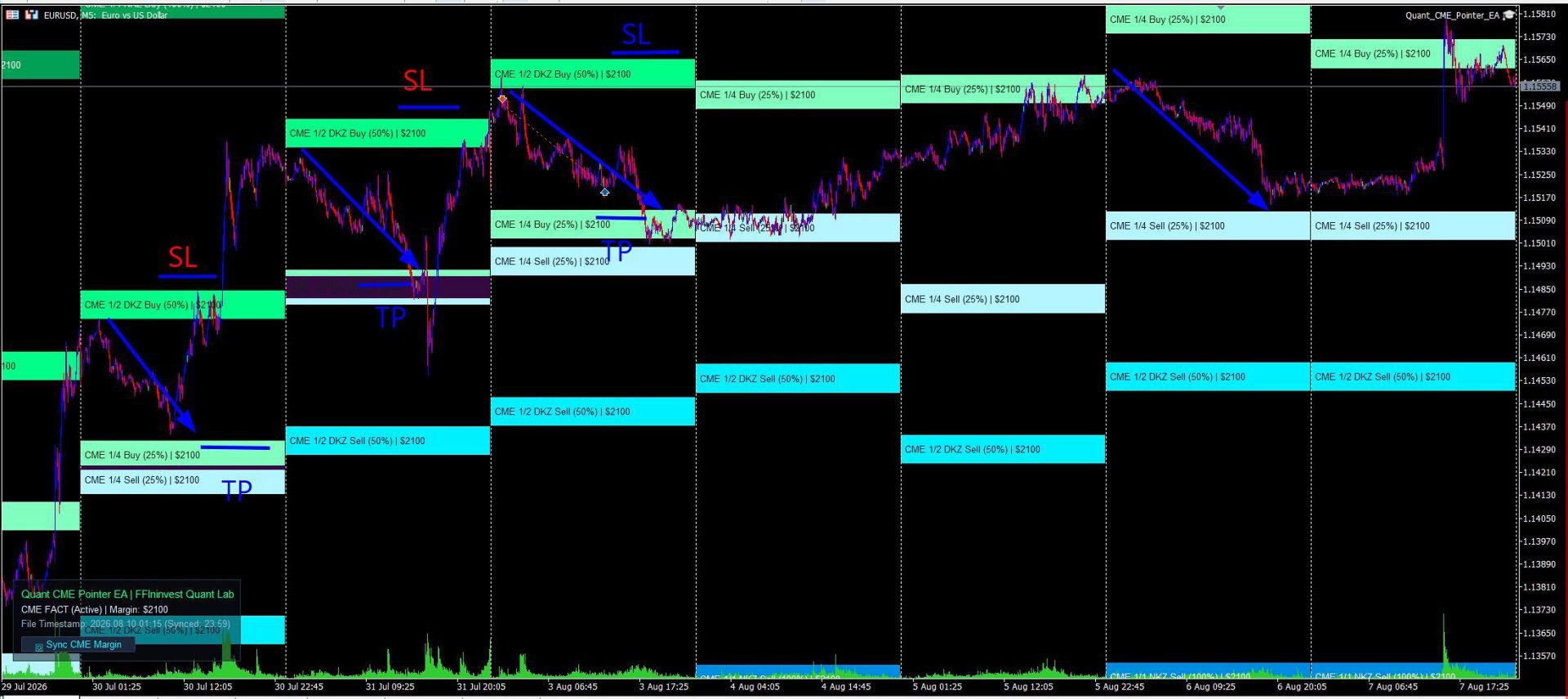
  • Maximum Risk-to-Reward Ratio: The 1/4, 1/2 DKZ, and 1/1 NKZ zones allow you to find entry points with tight stop-losses and risk-to-reward ratios from 1:3 to 1:5.
  • Seamless Smart Money & Price Action Synergy: CME levels align perfectly with Order Blocks, Fair Value Gaps (FVG), and Liquidity Sweeps.
  • Clean Chart Mode: Hide the entire UI panel in 1 click ( InpShowLabel = false ). Perfect for multi-chart grid layouts or clean price action analysis.
  • Informative & Visual Clarity: Every level is clearly labeled on the chart (e.g., CME 1/2 DKZ Buy (50%) ) with a distinct color shade for instant market evaluation at any scale.
  • Modern Glassmorphism UI: Elegant dark card with adjustable transparency (0–100%) and flexible 4-corner docking (Top-Left, Top-Right, Bottom-Left, Bottom-Right).
  • Ultra-Low CPU Usage: Optimized MQL5 code using CCanvas delivers instant rendering with zero terminal lag or slowdowns.
  • 100% Trade Safe: The EA performs purely analytical and visual functions, opens no automated orders, and poses zero risk to your deposit.
  • Margin update button: The Expert Advisor automatically updates the margin when first launched and when the Terminal is rebooted. The update button is only needed if the terminal works for days and weeks without rebooting.

INPUTS GUIDE

1. CME Exchange Data

  • Auto-Download CME Data (InpAutoUpdate): true — auto-downloads CME data on startup; false — reads from local CSV file.
  • Fallback Margin ($) (InpManualMargin): Reserve margin amount in USD (if offline or for non-EURUSD instruments).
  • Tick Value for 1.0 Lot ($) (InpTickValue): Value of 1 pip for 1.0 lot (default is $10.0 for Euro).
  • History Depth (Days) (InpHistoryDays): Number of days in history for zone calculation.
  • Zone Height in Pips (InpZoneHeightPips): Height of the zone band in pips.

2. Display Zones

  • Dynamic Unclosed Day (InpCalcCurrentDay): false — 100% static non-repainting zones from closed daily candle; true — dynamic unclosed day calculation.
  • 1/4, 1/2, 1/1 Zones (InpDrawQuarter, InpDrawHalf, InpDrawFull): Toggle display of corresponding margin zones.

3. Buy & Sell Palettes

  • Buy Zones Palette (InpColorBuy14, InpColorBuy12, InpColorBuy11): Individual green shades for 1/4, 1/2, and 1/1 support zones.
  • Sell Zones Palette (InpColorSell14, InpColorSell12, InpColorSell11): Individual cyan/blue shades for 1/4, 1/2, and 1/1 resistance zones.

4. Info Panel Settings

  • Show Info Panel (InpShowLabel): true — shows panel; false — enables Clean Chart Mode (panel is completely hidden).
  • Panel Corner (InpLabelCorner): Select chart corner (Top Left, Top Right, Bottom Left, Bottom Right).
  • X / Y Offset (InpLabelX, InpLabelY): Panel pixel offset from the selected corner.
  • Show Background Card (InpShowBg): Toggle dark background card.
  • Card Transparency (InpBgTransparency): Adjust background opacity from 0% (opaque) to 100% (transparent).

INSTALLATION & SETUP

  1. After purchasing, click the "Install" button directly inside your MetaTrader 5 terminal (Market tab).
  2. In the "Navigator" window, open "Expert Advisors" -> "Market" and drag Quant CME Pointer EA onto an M5 chart (e.g., EURUSD).
  3. Ensure WebRequest is enabled for https://cmegroup.com in your terminal options.

ATTENTION! WEB-REQUEST SETUP FOR AUTO-SYNC

To allow the EA to automatically download margin data from CME Group servers, enable WebRequest in MetaTrader 5:

  1. Open terminal menu: Tools -> Options -> Expert Advisors.
  2. Check the box "Allow WebRequest for listed URL".
  3. Add the URL: https://cmegroup.com
  4. Click OK.

TRADING GUIDE & RECOMMENDATIONS

The utility does not issue blind trade signals; it provides a mathematically precise roadmap of institutional price reaction levels. The most effective trading strategies focus on price behavior inside these zones:

1. 1/4 Zone (25% Margin) — Local Pullback / Scalping:

  • Purpose: First reaction point during an active price impulse.
  • Tactics: Partial profit taking (Take Profit 1) or entering micro-trend trades with a tight stop-loss.

2. 1/2 DKZ Zone (50% Margin) — Key Correction / Smart Money:

  • Purpose: 50% margin collateral boundary. The most vital level for banks and funds.
  • Tactics: Primary zone for finding reversal patterns (Price Action / Smart Money). Trades taken from the 1/2 zone offer superior Risk-to-Reward ratios (from 1:3 to 1:5).

3. 1/1 NKZ Zone (100% Margin) — Full Margin Cycle:

  • Purpose: Point of complete margin exhaustion (Margin Calls for opposing market participants).
  • Tactics: Final profit target for medium-term trades. Entering continuation trades at this zone is not recommended.

Risk Management Tip: Always use a protective Stop Loss outside the margin zone and risk no more than 1–2% of your account per trade.
おすすめのプロダクト
Alpha Striker SMC KING is unique Expert Advisor that continues the Alpha Striker series of  expert advisors. Innovative methods of the programme's approach to trading, and promising performance results are possible thanks to the use of modern technologies and methods. The Alpha Striker SMC KING is a fully automated EA designed to trade currencies only. Working pairs recommended EURUSD. Expert showed stable results on currencies in 2022-2024 period. No dangerous methods of money management used,
**MT5 → Telegram & Discord Auto Post Bot** Want to automate your trading and stop wasting time on manual posting? This bot is for you. **What does it do?** It connects directly to MetaTrader 5 and automatically posts to Telegram & Discord: ️ Open trades ️ Closed trades ️ SL / TP levels ️ Profit and loss ️ Real-time signals **Advantages:** • Fully automated process • No delay – posts in real time • Perfect for signal groups and channels • Increases trust and transparency • Works
Bober Real MT5
Arnold Bobrinskii
4.88 (16)
Bober Real MT5 is a fully automatic Forex trading Expert Advisor. This robot was made in 2014 year and did a lot of profitbale trades during this period. So far over 7000% growth on my personal account. There was many updates but 2019 update is the best one. The robot can run on any instrument, but the results are better with EURGBP, GBPUSD, on the M5 timeframe. Robot doesn't show good results in tester or live account if you run incorrect sets. Set files for Live accounts availible only for cu
MT5からTelegramに完全にカスタマイズ可能なシグナルを送信して、シグナルプロバイダーになりましょう!この製品は、使いやすく視覚的に魅力的なグラフィカルインターフェースで提供されています。設定をカスタマイズして、数分で製品を使用開始できます! ユーザーガイド + デモ  | MT4バージョン  | Discordバージョン デモを試したい場合は、ユーザーガイドをご覧ください。 MT5からTelegramへの送信者は、ストラテジーテスターでは動作しません。 MT5からTelegramへの機能 多数のオプションを使用して、シグナルを完全にカスタマイズします シグナルの前後に独自のカスタムメッセージを追加します。これには、タグ、リンク、チャンネルなどが含まれます シグナル内の絵文字を追加、削除、カスタマイズします。また、すべて削除することもできます。 シンボルまたはマジックナンバーで送信する取引をフィルタリングします 特定のシンボルの送信を除外します 特定のマジックナンバーの送信を除外します シグナルと一緒に送信する取引の詳細をカスタマイズします シグナルと一緒にスクリーンショット
如果产品有任何问题或者您需要在此产品上添加功能,请联系我 Contact/message me if you encounter any issue using the product or need extra feature to add on the base version. There is Demo version of this panel Dashboard Super Three MA MT5 Demo in my product list, please try it out to get familiar with all functionalities for free Free version: LINK MT4 version: LINK This system basically utilizes PA and three adjustable Moving Average as the main indicator set to generate trading signal. With the feature that all MA_timefram
VORTEX — Advanced Market Intelligence Engine VORTEX is an advanced MetaTrader 5 Expert Advisor designed for high-volatility markets such as XAU/USD (Gold) and BTC/USD (Bitcoin). Rather than relying on simple indicators, VORTEX combines multiple layers of market analysis to identify high-probability trading conditions. Its decision engine is built around four core pillars: Pressure — measures the strength of buyers versus sellers. Momentum — evaluates whether market movement is strengthening or w
如果产品有任何问题或者您需要在此产品上添加功能,请联系我 Contact/message me if you encounter any issue using the product or need extra feature to add on the base version. There is Demo version of this panel Dashboard Super MA RSI CCI Demo in my product list, please try it out to get familiar with all functionalities for free, LINK . Dashboard Super MA RSI CCI is an intuitive and handy graphic tool to help you to: Have 28 pairs under control with one dashboard Monitor price movement, identify possible trend based on MA, RS
Equity Protect Pro: 安心取引のための総合的な口座保護エキスパート 口座保護、資産保護、ポートフォリオ保護、マルチ戦略保護、利益保護、利益確定、取引セキュリティ、リスク管理プログラム、自動リスク管理、自動決済、条件付き決済、スケジュール決済、動的決済、トレーリングストップロス、ワンクリッククローズ、ワンクリック決済、ワンクリック復元などの機能をお探しなら、Equity Protect Pro が最適なプログラムです。 設定は簡単で、事前設定された条件に達すると、すべてのチャートを閉じることができ、シグナルサブスクリプションのキャンセルもサポートします(これは、すべての取引プログラムも停止することを意味します)。この時点で、新しい注文は生成されなくなり、最終的にすべての注文が閉じられ、予期せぬ損失を効果的に防止し、安心して取引できるようになります。 Equity Protect Pro (Technical Manual) Equity Protect Pro Demo Version for yo u to test   Equity Protect Pro MT4
ICONIC BTC AI+ | SYNAPSE.PHENOTYPE S6 ENGINE(バージョン 15.00) 発売価格 現在価格:599 USD。 残りライセンス数:10。 次の価格帯:699 USD。 最終価格:1699 USD。 早期アクセス価格は製品リリースの現在のフェーズを反映したものです。現在のライセンス枠が終了し、次の価格帯が開放されるにつれて価格は段階的に引き上げられます。現在の価格が終了する明確な予定日は設定されていません。 ビットコインは為替通貨ペアではありません。ゴールドのような値動きをせず、株価指数のようにセッションの境界を尊重するわけでもなく、ボラティリティの特性は一時間の取引の中でさえ変化することがあります。落ち着いた値動きの通貨向けに作られた汎用の自動売買システムは、BTCUSDが安定して示さない市場の挙動を前提としているため、ここではしばしば機能しません。 ICONIC BTC AI+ はBTCUSD専用に設計されています。エントリー条件の検証からAIによる意思決定のルーティング、リアルタイムのリスク調整に至るまで、アーキテクチャのあらゆる層がこの市
SMART HARVEST XAU:高度なリトレースメント・ストップグリッド SMART HARVEST XAUは、市場のリトレースメントと価格調整を最大限に活用するために特別に設計された次世代エキスパートアドバイザー(EA)です。強いトレンドに逆らって盲目的に成行注文を開く従来の高リスクな平均化システムやマーチンゲールシステムとは異なり、このEAは高度に洗練されたスマート・トレーリング・ペンディング・グリッド戦略を採用しています。 動的な買いストップ注文と売りストップ注文を使用することで、現在の市場価格をインテリジェントにトレースし、市場が真に反転または調整した場合にのみ新しいグリッドレイヤーがアクティブ化されます。この独自のアプローチにより、エントリーポイントの安全性が大幅に向上し、フローティング・ドローダウンを大幅に削減し、資産を保護します。 リアルタイムのニュースフィルター、多層的なアカウント保護、インタラクティブなオンチャートダッシュボードを備えたSMART HARVEST XAUは、金(XAUUSD)と主要通貨ペアの究極の自動取引パートナーです。  プレミアム機能
VadineroLab MT5 Export Master to CSV EXEL JSON - Expert Advisor for exporting and analyzing symbols, account, terminal parameters, active trades, current account state, trading history, global variables.   Generates the following report types: * Symbols Parameters — spread, tick size, min/max lot, swap, … * Account Parameters — balance, equity, leverage, currency, margin info, … * Terminal Parameters — server, version, language, date, environment, … * Trade History — orders, deals, positions, se
FREE
SFP Hunter — Swing Failure Pattern SFP Hunter is a MetaTrader 5 indicator that automatically detects Swing Failure Patterns (SFP) on any symbol and timeframe. The indicator identifies single-candle stop-hunt reversals where price wicks beyond a prior swing high or low and closes back inside on the same candle, signalling a potential reversal from that level. How the Pattern Works A Swing Failure Pattern occurs when price briefly breaches a prior swing high or swing low — triggering the stop orde
稼ぎと研究のためのツール。 トレーディングシグナルと戦略の中核は、価格予測パターンを形成するための著者のアルゴリズムに基づいています。どんな楽器にも使えます! MA「九尾の狐」に基づく制御システムが追加され、市場、機器、および作業期間に合わせて信号を可能な限り正確に更新および調整します。 対象:すべての市場のすべての商品(例外があります)。 対象者:ヘッジファンド、ファンドおよび資産運用会社、投資運用会社、投機家、投資家および利害関係者。 .................................................................................................................................................................................
Talents ATR Scalper Utility (MT5) The Talents ATR Scalper Utility is a professional-grade trade execution and management tool built for MetaTrader 5. Inspired by the Biblical Parable of the Talents , this utility is designed to help traders multiply their potential with precision risk control, one-click simplicity, and advanced automation. Whether you’re scalping forex, gold, or indices, this tool delivers speed, consistency, and confidence. Key Features One-Click Trade Preview Click below price
SolarTrade Suite 金融ロボット: LaunchPad Market Expert - 取引を開始するために設計されています! これは、革新的で高度なアルゴリズムを使用して値を計算する取引ロボットであり、金融​​市場の世界でのアシスタントです。 SolarTrade Suite シリーズのインジケーター セットを使用して、このロボットを起動するタイミングをより適切に選択してください。 説明の下部にある SolarTrade Suite シリーズの他の製品をご覧ください。 投資と金融市場の世界を自信を持ってナビゲートしたいですか? SolarTrade Suite 金融ロボット: LaunchPad Market Expert は、情報に基づいた投資決定を行い、利益を増やすのに役立つ革新的なソフトウェアです。 SolarTrade Suite 金融ロボット: LaunchPad Market Expert の利点: - 正確な計算: 当社のロボットは、高度なアルゴリズムと分析方法を使用して、市場の動きを正確に予測します。 資産を売買するのに最適なタイミングを
G.X.L (GALAXY ELEGANCE) Product Overview G.X.L is an automated trading robot for MetaTrader 5 that operates based on price action analysis. The system processes real-time market data to identify trading opportunities. It provides information and recommendations aligned with user-defined trading preferences. Core Functionality The robot analyzes price movements without relying on traditional lagging indicators. It focuses on current market structure, including swing points and fractals, to determ
Trade Protection PRO – Professional Trade Manager & Protection Tool A powerful yet easy-to-use Trade Protection Expert Advisor that automatically manages your positions with advanced risk protection features. Key Features: Automatic Breakeven with customizable offset Up to 5 Partial Take Profit levels with individual percentages Modern real-time Dashboard showing all important information Clear visual horizontal lines on chart (BE trigger, entry line, and all TP levels) Two volume modes: % of In
Overview Impulsive OB Scalper Pro is a fully automated Expert Advisor for MetaTrader 5 that focuses on   institutional order blocks   and   impulsive price movements . The system identifies supply and demand zones formed after a strong impulsive candle (range ≥ ATR × multiplier) and executes trades when price retests those zones. This approach follows the footprints of large institutional players (banks, hedge funds) that create significant directional moves. Unlike traditional indicator‑based s
Description: Advanced Position Closer EA monitors your open market orders per symbol, displays the counts directly on your chart, and automatically closes orders when configurable thresholds are met. It supports both global and per-symbol settings for direction, profit/loss filtering, and whether to close all matching orders or only those that passed your filters. External Parameters: 1. GlobalMaxOpenOrders (int)    - Sets a single maximum number of open market orders for every symbol.    - 0
1.このEAは、出口戦略(リバース/ヘッジ)マーチンゲールを備えた自動テイクプロフィット、ストップロス、トレーリングストップ&プロフィットロックです。 2. PCチャートまたはモバイル取引(VPSの場合)のいずれかでの手動取引に適しています 3.変数入力はピップ単位です   4. 1番目の位置は自分で手動で開きます(購入/販売)。その後、TP、SL、TS、プロフィットロックが設定されます。   5.最初の手動取引(失敗)がトレンドに反する場合、2つの出口戦略があります。   (a)リバースマーチンゲール(売り)は、最初の手動取引(買い)がSLに当たったときにアクティブになります。   (b)最初の手動取引(購入)がSLにヒットすると、ヘッジマーチンゲール(購入)がアクティブになります。   *最初の手動取引(売り)がSLに当たったときはその逆です。   6.トレーリングストップとトレーリングステップは、最初の手動取引がトレンドに入ったが突然逆転したときにアクティブになります。   7.利益ロックは、同じペアの現在の複数の注文の特定の金額の利益を
DOUBLEorNOTHING Daily is the version of the DOUBLEorNOTHING family designed to combine an aggressive Gold / XAUUSD trading strategy with a capital-management model focused on frequently protecting realized profits. The core idea behind the DOUBLEorNOTHING family is simple: recovery strategies may generate strong growth, but they can also experience significant drawdowns. For this reason, every version uses the same main trading concept while handling capital and profits differently. In Daily mod
MT5の取引の新規、決済、一部決済、および変更に関するリアルタイム通知をdiscordへ自動送信します。 このユーティリティは16言語に対応しています:英語、フランス語、ドイツ語、ヒンディー語、インドネシア語、イタリア語、カザフ語、韓国語、オランダ語、ポーランド語、ポルトガル語、ロシア語、スペイン語、トルコ語、ウクライナ語、ベトナム語。本製品は、ターミナルを常に監視することなくdiscord通知を受け取りたいトレーダー向けに設計されています。エキスパートアドバイザーを使用するユーザー、複数のシンボルで取引するトレーダー、vpsユーザーに適しています。 完全および部分的なポジション決済は正確に検出されます(例:0.10 / 0.30 ロット)。また、重複メッセージ防止機能も実装されています。 通知は、取引口座内のすべてのシンボル、またはこのユーティリティを適用したチャートのシンボルのみ(オプション)で送信できます。 「test discord」ボタンが用意されており、チャット機能を確認でき、設定後はチャートから非表示にすることも可能です。また、「send open positions」ボ
FREE
MT5の取引の新規、決済、一部決済、および変更に関するリアルタイム通知をSlackへ自動送信します。 このユーティリティは16言語に対応しています:英語、フランス語、ドイツ語、ヒンディー語、インドネシア語、イタリア語、カザフ語、韓国語、オランダ語、ポーランド語、ポルトガル語、ロシア語、スペイン語、トルコ語、ウクライナ語、ベトナム語。通知テキストをカスタマイズすることで、その他の言語にも対応可能です。本製品は、ターミナルを常に監視することなくSlack通知を受け取りたいトレーダー向けに設計されています。エキスパートアドバイザーを使用するユーザー、複数のシンボルで取引するトレーダー、VPSユーザーに適しています。 完全および部分的なポジション決済は正確に検出されます(例:0.10 / 0.30 ロット)。また、重複メッセージ防止機能も実装されています。 通知は、取引口座内のすべてのシンボル、またはこのユーティリティを適用したチャートのシンボルのみ(オプション)で送信できます。 「Test Slack」ボタンが用意されており、チャット機能を確認でき、設定後はチャートから非表示にすることも可能
FREE
This universal advisor is based on its own Algorithm, which is an incredibly effective tool due to the simultaneous operation of a trading strategy based on our Bollinger Bands Stop Indicator. The advisor's algorithm is based on a deep understanding of technical analysis and personal experience in exchange trading, has passed the test of time, therefore it guarantees accurate signals and well-thought-out decisions. Traders are also given the opportunity to use their own risk management system w
DELTA MSNR FLEX Intelligent MSNR Structure Analysis & Key Level Detection — MetaTrader 5 DELTA MSNR FLEX is a professional indicator designed to analyze price structure and identify important MSNR levels directly on the MetaTrader 5 chart. Its objective is simple: transform significant market reactions into clearly identifiable levels, helping traders improve their market analysis and decision-making process. AUTOMATIC & MANUAL DETECTION DELTA MSNR FLEX provides a flexible approach to market
Overview Partial Trailing Stop EA is an advanced trade management Expert Advisor for MetaTrader 5 that automatically locks in profits by performing partial position closures when price retraces from its maximum favorable movement (peak profit level) . Unlike a traditional trailing stop that closes the entire position, this EA allows you to scale out gradually. When the market moves in your favor, the EA continuously tracks the highest (for Buy trades) or lowest (for Sell trades) price reached. I
Reversal Pattern AI — an absolute breakthrough in the world of indicator development, combining artificial intelligence algorithms, multi-level market analysis, and classical methods of technical analysis. It not only detects reversal patterns but also evaluates market inefficiencies, generating highly accurate trading signals. Thanks to a hybrid model that uses price action analysis, Volumes, Volatility, VWAP, and Volume AVG %, the indicator easily adapts to any market conditions.              
MT4バージョン: https://www.mql5.com/ja/market/product/99489 MT5バージョン: https://www.mql5.com/ja/market/product/99490 ヘッジロック — マルチシンボルヘッジグリッドEA ヘッジロックは、ヘッジエントリーとアダプティブロック/グリッド管理のコンセプトに基づいて設計された、MetaTrader 4/5用の自動取引システムです。このEAは、選択されたシンボルで同時に買い注文と売り注文をオープンすることでサイクルを開始し、その後、動的なステップ幅を使用してエクスポージャーを管理します。このアプローチは、価格変動によってバスケットが回復し、利益で決済するレンジ相場/オシレーション相場で最も効果的に機能するように構築されています。 主な機能 ヘッジスタート(買い + 売り) 新しいサイクルの開始時に、シンボルごとに買い注文と売り注文を同​​時にオープンします。 方向性バイアスを軽減し、バスケット管理に重点を置くように設計されています。 価格が閾値を超えると、新しいヘッジポジションを追加しま
This EA Utility allows you to manage (with advanced filtering) unlimited open orders (manual or EA) with 16 trailing stop methods: fixed, percent, ATR Exit, Chandelier Exit, Moving Average, Candle High Low Exit, Bollinger Bands, Parabolic, Envelope, Fractal, Ichimoku Kijun-Sen, Alligator, Exit After X Minutes or Bars, RSI and Stochastic. The trailing stop can be either real or virtual, and you can exit fully or with a partial close percent on touch or bar close.  Moreover, you can add (override
Big Boss EA MQL5プラットフォームのエキスパートアドバイザーは、アカウント内の異なるチャートを最大6つまで独立して管理する強力なユーティリティです。各チャートおよびアカウント全体に対して目標利益や損失リミットを設定することができます。さらに、フローティング利益、ドローダウンの計算、日次、週次、月次の利益の追跡を行います。このユーティリティは直感的な表示を備えており、異なるストラテジーやエキスパートアドバイザーの比較が容易です。FTMO、Earn2Trade、Rebels Fundingなどの資金提供アカウントを持つユーザーには必須のツールであり、特定のドローダウンルールに基づいてトレードを停止することも可能です。
このプロダクトを購入した人は以下も購入しています
Trade Assistant MT5
Evgeniy Kravchenko
4.43 (216)
取引 ごとのリスクの 計算、新規注文 の 簡単 な 設置、部分的 な 決済機能 を 持 つ 注文管理、 7 種類 のトレーリングストップなど 、便利 な 機能 を 備 えています 。 追加の資料と説明書 インストール手順   -   アプリケーションの手順   -   デモアカウント用アプリケーションの試用版 ライン機能 チャート上にオープニングライン、ストップロス、テイクプロフィットを表示します。この機能により、新規注文を簡単に設定することができ、注文を出す前にその特徴を確認することができます。   リスク計算 リスク計算機能は、設定されたリスクとストップロス注文のサイズを考慮して、新規注文のボリュームを計算します。ストップロスの大きさを自由に設定できると同時に、設定したリスクを守ることができます。 Lot calc ボタン - リスク 計算 を 有効 / 無効 にします 。 Risk フィールドでは 、必要 なリスクの 値 を 0 から 100 までのパーセンテージまたは 預金通貨 で 設定 します 。 設定」 タブで 、 リスク 計算 の 種類 を 選択 します :「 $ 通
Trade Manager EAへようこそ。これは、取引をより直感的、正確、そして効率的にするために設計された究極の リスク管理ツール です。これは単なるオーダー実行ツールではなく、包括的な取引計画、ポジション管理、リスク管理のためのソリューションです。初心者から上級者、迅速な実行を必要とするスキャルパーまで、Trade Manager EAはあらゆるニーズに対応し、為替、指数、商品、暗号通貨などさまざまな市場で柔軟に対応します。 Trade Manager EAを使用すると、複雑な計算が過去のものになります。市場を分析し、エントリーポイント、ストップロス、テイクプロフィットのレベルをチャート上のラインでマークし、リスクを設定するだけで、Trade Managerが最適なポジションサイズを即座に計算し、SLとTPをピップ、ポイント、口座通貨でリアルタイムに表示します。すべての取引が簡単かつ効果的に管理されます。 主な機能: ポジションサイズ計算機 :定義されたリスクに基づいて取引サイズを瞬時に決定します。 簡単な取引計画 :エントリー、ストップロス、テイクプロフィットを設定するためのド
Telegram to MT5 Multi-Channel Copier   は、Telegram チャンネルのトレードシグナルを MetaTrader 5 へ自動コピーします。ボット不要、ブラウザ拡張不要、手動コピー不要。Telegram にシグナルが届くと、EA が数秒であなたのターミナルに注文を出します。 さらに、チャンネルをコピーする前に、内蔵バックテスターでそのチャンネルがあなたの口座でどう動いたかを確認できます。 製品は 2 つのコンポーネントで構成されます:Telegram チャンネルを監視する Windows アプリと、MT5 ターミナルでシグナルを執行する本 EA です。MT4 版もあります   こちら . セットアップガイドとアプリのダウンロード:   https://www.mql5.com/en/blogs/post/768988 現在の価格は今後値上げされます。 仕組み アプリはあなた自身の Telegram アカウントで接続するため、フォローしているすべてのチャンネル、グループ、トピック、ボット(プライベートや VIP を含む)を見ることができます。シグナル
TradePanel MT5
Alfiya Fazylova
4.88 (169)
Trade Panelは多機能なトレーディングアシスタントです。アプリには手動取引用の50以上のトレーディング機能が搭載されており、ほとんどの取引作業を自動化することができます。 アプリの説明書+ビデオガイド: https://www.mql5.com/en/blogs/post/772292 デモ口座用アプリの試用版: https://www.mql5.com/en/blogs/post/750865 アプリのインストール方法: https://www.mql5.com/en/blogs/post/756239 アプリをビジュアルモードでテストする方法: https://www.mql5.com/en/blogs/post/770277 VPSのMetaTraderにアプリをインストールする方法: https://www.mql5.com/en/blogs/post/770190 取引。 ワンクリックで取引操作を行うことができます: リスクを自動計算して指値注文やポジションを開く。 複数の注文やポジションをワンクリックで開く。 注文のグリッドを開く。 保留中の注文やポジションをグルー
================================================================================ POC BREAKOUT - V20.72. Full Professional Grade Toolkit ================================================================================ POC Breakout is a full MetaTrader 5 trading dashboard for discretionary traders who want breakout signals, Point of Control (POC) context, volume profiles, order flow, market structure, news, alerts, and advanced trade planning in one professional workspace. Attached directly to you
自分の取引ルールで Telegram のシグナルをコピー Telegram to MT5 Signal Trader は、Telegram の公開・非公開チャンネルやグループから、テキスト形式の取引シグナルを MetaTrader 5 へ自動でコピーします。1つのデスクトップアプリで複数の配信者と MT5 口座を管理し、 配信者ごとにリスクと取引設定を個別に指定 できます。 シグナルのコピーに Telegram ボットや API 設定は必要ありません。 電話番号または QR コードでご自身の Telegram アカウントにログインし、すでに参加しているチャンネルやグループを選ぶだけです。ボットの作成や、Telegram API トークン、API ID、API hash の入力は不要です。 ポジションサイズを選び、複数の利確水準に分けて決済し、建値へのストップ移動やトレーリングストップを自動化できます。配信者のシグナルを受け取りながら、実際の取引方法は自分で管理できます。 本製品は、この MT5 エキスパートアドバイザ(EA)と、必須の Windows 連携アプリで構成されます。 インス
Farmed Hedge Yield Farming | All Markets (Manual - Hybrid - Semi/Automated EA) VERIFIED TRADING RESULTS - Farmed Hedge Yield Axi Copy:  https://www.mql5.com/en/signals/2356376 - Farmed Hedge Yield Exn Copy:   https://www.mql5.com/en/signals/2356404 - Farmed Hedge Yield V Copy:  https://www.mql5.com/en/signals/2357156 IMPORTANT NOTICE: FarmedHedge is a MANUAL-FOCUSED TRADING UTILITY ,not a fully automated EA. Results shown on this Signal include manual trades and overall strategic management.
Power Candles Strategy Scanner - 自動最適化型マルチシンボル設定ファインダー パワーキャンドル・ストラテジー・スキャナーは 、パワーキャンドル・インジケーターを駆動するのと全く同じ自己最適化エンジンを、マーケットウォッチに登録されているすべての銘柄に対して並行して実行します。1つのパネルで、現在統計的に取引可能な銘柄、各銘柄で勝率の高い戦略、最適なストップロス/テイクプロフィットの組み合わせが表示され、新たなシグナルが発生した瞬間に通知が届きます。 このツールは、Stein Investmentsのエコシステムの一部です。  18種類以上のツールをすべて閲覧し、AIを活用したセットアップの推奨を受け取り、  https://stein.investments でコミュニティに参加しましょう 市場動向を網羅。銘柄ごとに3,000件以上の自動最適化。2種類のアラート。ワンクリックでチャートを切り替えて即座にアクション。 なぜこれが必要なのか 多くのマルチ銘柄スキャナーは、 価格の動き (ボラティリティ、変動率、銘柄ごとのRSI)を表示するだけです。それ
Premium Trade Manager - コーチ内蔵型トレードパネル Premium Trade Manager は、AIトレーディングコーチをあなたのチャートの中に置き、その下に完全な執行エンジンを備えたツールです。いつも通りにトレードをセットアップし、あなた専任のAIトレーディングコーチ Max にそのセットアップをそのまま読み取らせて、発注前に率直な見解を伝えてもらいましょう。ストップの幅が規律あるアプローチに合っているか、リスクサイズは適切か、高影響のニュースイベントが数分後に迫っていないか、プロップファームの制限に近づいていないか。その下には、クリックの後をすべて処理するエンジンが備わっています。ワンクリックのリスクサイズ計算による発注、チャート上でドラッグして組み立て、発注後も動かせるプラン、最大4段階の分割利確、7種類のトレール方式、リアルタイムのプロップファームコンプライアンス、ニュースガード、そしてコストを自ら採点するスプレッド機能。判断はあなたが下す。Max がもう一度確認する。後のことはすべてパネルが担う。 購入前に実際に触れて試せます。 ブラウザ上でライブ
One button. One trade. MT5 Trading Deck is a hotkey trading panel for MetaTrader 5 that turns the platform into a keyboard-driven execution cockpit. Stop loss, take profit and lot size are pre-calculated for every key; the moment you press, a market order is live on the broker. A complete technical user manual is attached in the product Comments section. It documents every input parameter, the full hotkey map, the recommended Stream Deck XL layout, and the advanced workflows for Pre-Limit orders
EA Slipstream
Stephen J Martret
5 (1)
Your backtest filled every order at the price it asked for. Your account does not. EA Slipstream measures what execution costs your EA, using your own fills, slippages and spreads to show you the true performance of your EA. A backtest prices every trade at the level the EA named. In live trading a pending order fills at whatever price is available when it triggers, a stop closes wherever the market is when it is hit, and the spread at that moment is whatever the account was quoting. The differ
Grid Manual MT5
Alfiya Fazylova
4.73 (22)
「Grid Manual」は、注文のグリッドを操作するための取引パネルです。 ユーティリティはユニバーサルで、柔軟な設定と直感的なインターフェイスを備えています。 それは、損失を平均化する方向だけでなく、利益を増やす方向でも注文のグリッドで機能します。 トレーダーは注文のグリッドを作成して維持する必要はありません。 すべてが「Grid Manual」によって行われます。 注文を開くだけで十分であり、「Grid Manual」は注文のグリッドを自動的に作成し、非常に閉じるまでそれに付随します。 完全な説明とデモバージョン ここ。 ユーティリティの主な機能と機能 ユーティリティは、モバイル端末から開かれた注文を含め、あらゆる方法で開かれた注文を処理します。 「制限」と「停止」の2種類のグリッドで機能します。 グリッド間隔の計算には、固定と動的(ATRインジケーターに基づく)の2つの方法で機能します。 オープンオーダーグリッドの設定を変更できます。 チャート上の各注文グリッドの損益分岐点を表示します。 各注文グリッドの利益率を表示します。 ワンクリックでグリッドから収益性の高い注文を閉じるこ
EA Overfitter
Stephen J Martret
5 (1)
That backtest looks great. But will it still be making money tomorrow, next week, next month? EA Overfitter re-runs your EA on 100 price histories it has never seen. One score tells you if the edge is real. A backtest tells you what an EA did on one price history — the one that happened to occur. What you cannot tell from it is how much of that result was the strategy and how much was the particular path. EA Overfitter answers that. It builds up to 100 synthetic price histories your EA has n
MT5 用 Dynamic Fibonacci Grid Dashboard の最新バージョンを紹介します。 数多くの新機能を搭載したこの新しいダッシュボードは、トレード体験を一新し、市場や価格アクションをまったく新しい視点から見ることができます。複数のタイムフレームと複数のシンボルを同時に分析することで、新たな可能性を発見できます。手動トレードやポジション管理のための使いやすいインターフェース、そしてあらかじめ設定された自動売買戦略を適用するための拡張機能を備えています。さらに、DFGはストラテジーテスター内でトレーディングシミュレーターとして完全に機能し、過去データを使用してさまざまな市場環境を再現できます。ビジュアルモードで手動トレードを練習したり、高速モードで自動売買戦略をテストしたりすることが可能です。 主な特徴 • Dynamic Fibonacci Bands の概念に基づく、複数タイムフレームおよび複数シンボルの高度なテクニカル分析。 リアルタイム市場監視ダッシュボードにより、これまでにない効率性を体験できます。M1、M5、M15、H1 のチャートから得られる複雑な
The product will copy all telegram signal to MT5 ( which you are member) , also it can work as remote copier.  Easy to set up, copy order instant, can work with almost signal formats, image signal,  s upport to translate other language to English Work with all type of channel or group, even channel have "Restrict Saving Content", work with  multi channel, multi MT5 Work as remote copier: with signal have ticket number, it will copy exactly via ticket number. Support to backtest signal. How to s
Footprint Chart Pro — Professional OrderFlow EA for MetaTrader 5 Version 6.34 | Professional tool for real traders | Institutional-Grade Visualization DEMO USERS - PLEASE SELECT EVERY TICK / REAL TICK WHEN TESTING AND YOU HAVE DOWNLOADED HISTORICAL DATA. IF YOU SEE A WAITING SCREEN AND IT IS NOT DOWNLOADING, IT MEANS YOU HAVE LOW HISTORICAL DATA. TRY 1 MIN AND 5 MIN FIRST ON 1 DAY DATA. ONE DAY DATA SHOULD BE THE NEWEST AND MOST CURRENT DATE. PLEASE WAIT UNTIL THE MARKET HAS ROLLED OVER PERIOD.
YuClusters
Yury Kulikov
4.93 (43)
Attention: You can view the program operation in the free version  YuClusters DEMO .  YuClusters is a professional market analysis system. The trader has unique opportunities to analyze the flow of orders, trade volumes, price movements using various charts, profiles, indicators, and graphical objects. YuClusters operates on data based on Time&Sales or ticks information, depending on what is available in the quotes of a financial instrument. YuClusters allows you to build graphs by combining da
FUTURES ORDERFLOW FOOTPRINT CHART Professional OrderFlow EA for MetaTrader 5 Version 1.01| Professional tool for real traders | Institutional-Grade Visualization STRATEGY TESTER USERS - PLEASE SELECT EVERY REAL TICK WHEN TESTING AND YOU HAVE DOWNLOADED HISTORICAL DATA. IF YOU SEE A WAITING SCREEN AND IT IS NOT DOWNLOADING, IT MEANS YOU HAVE LOW HISTORICAL DATA. TRY 1 MIN AND 5 MIN FIRST ON 1 DAY DATA. ONE DAY DATA SHOULD BE THE NEWEST AND MOST CURRENT DATE. PLEASE WAIT UNTIL THE MARKET HAS ROL
Timeless Charts
Samuel Manoel De Souza
5 (8)
Timeless Charts is an all-in-one trading utility for professional traders. It combines custom chart types such as Seconds Charts and Renko with advanced order flow analysis using Footprints , Clusters , Volume Profiles , VWAP studies, and anchored analysis tools for deeper market insight. Trading and position management are handled directly from the chart through an integrated trade management panel , while Market Replay and Virtual Accounts provide environments for practicing trading skills and
The Expert Advisor will help you forward all alert from  MetaTrader 5 to Telegram channel/ group.  All alert must save to folder <Data folder>MQL5\Files\Alerts\ , text file with format *.txt and screenshot with format *.gif or *.png. Parameters: - Telegram Bot Token: - create bot on Telegram and get token. - Telegram Chat ID:  - input your Telegram user ID,  group / channel ID - Forward Alert: - default true, to forward alert. - Send message as caption of Screenshot: - default false, set true t
The product is used to trade base on any Alert signal in MT5 Easy to setup, simple format with custom keyword All option to management orders as trailing stop, breakeen, partial close, time filter, news filter ... Option to auto open grid orders How to setup and guide: Let read all details about setup and download indicator for auto get   Alert Signal   here Do not buy if you even can not install demo EA to your VPS ( some VPS block download EA from mql5 market) We always bring customers high q
EASY Insight AIO – スマートで手間いらずな取引のオールインワンソリューション 概要 数秒で市場全体——FX、ゴールド、暗号資産、指数、さらには株式まで——を、手作業のチャート確認や複雑なセットアップ・インジケーター導入なしにスキャンできたらどうでしょうか? EASY Insight AIO はAIトレードのための究極のプラグ&プレイ型エクスポートツールです。市場全体のスナップショットを、クリーンなCSVファイルで一括出力。ChatGPT、Claude、Gemini、Perplexityなど、さまざまなAIプラットフォームで即座に解析できます。 ウィンドウの切り替えやグラフのごちゃごちゃしたオーバーレイはもう不要。自動エクスポートされる純粋で構造化されたインサイトだけで、無駄なチャート監視に悩まされず、スマートなデータ主導の判断に集中できます。 なぜEASY Insight AIOなのか? 本当のオールインワン • セットアップ不要、インジケーターのインストール不要、チャートへのオーバーレイ不要。インストールして起動し、エクスポートするだけです。 マルチアセット対
TAQ Magic Keys Trade Manager is for MetaTrader5 (MT5). It has an advanced trade management tool and Lot size calculator for MetaTrader 5.  It is designed to help traders to trades faster, precise and manage open positions directly with one click. Demo 3 Days Free Trial https://taqmagickeys.com/product/taq-magic-keys-v5-0-demo-3days-free-trial/ FN key is the best functions which automatically manage trades up to TP4 with auto partial closing and trailing SL. Define your trade strategy in FN keys
Trade Indicator Assistant   is a powerful MT5 utility designed to turn indicators into automated trading systems. Its main feature is the ability to automatically detect an indicator’s   BUY and SELL signal buffers , without requiring you to know the buffer numbers, search through indicator settings, or modify the indicator source code. Bonus Indicator:   After purchasing Trade Indicator Assistant, contact me to receive   Trade Signal Pro   completely free as a bonus indicator. [Download Demo V
Mentfx Mmanage mt5
Anton Jere Calmes
4.25 (8)
The added video will showcase all functionality, effectiveness, and uses of the trade manager. Drag and Drop Trade Manager. Draw your entry and have the tool calculate the rest. Advanced targeting and close portions of a trade directly available in tool (manage trades while you sleep). Market order or limit order on either side with factored spread. Just draw the entry, the tool does the rest. Hotkey setup to make it simple. Draw where you want to enter, and the stop loss, the tool calculates al
Ultimate Extractor - Professional Trading Analytics for MT5 *****this is the local HTML version of Ultimate Extractor. !!!!!it is not compatible with Cloud!!!! For the online version please reach out to me directly****** Ultimate EA manager also now available when you use cloud pro and above for free!! Ultimate Extractor transforms your MetaTrader 5 trading history into actionable insights with comprehensive analytics, interactive charts, and real-time performance tracking. What It Does Automa
Local Trade Copier EA は、MAMまたはPAMMアカウントを必要とせずに、外部ソースからのトレードシグナルを実行する必要がある、または同時に複数のアカウントを管理する必要がある個々のトレーダーまたはアカウントマネージャー向けのソリューションです。最大8つのマスターアカウントから無制限のスレーブアカウントにコピーします [ インストールガイド | アップデートガイド | トラブルシューティング | FAQ | すべての製品 ] 100%セルフホスト インストールと使用が簡単 インストーラー、構成ファイル、サーバー、メモリパイプ、DLLは使用されていません EAを永久に使用するための1000回のアクティベーション ローカル実行、ネットワーク遅延なし それはあなたがこれまでに必要とするすべての機能を実装します: 最大8つのマスターアカウントと無制限のスレーブアカウント すべてのブローカーおよびDD / NDD / ECN / STP実行で動作します 異なる口座通貨の口座で動作します ライブアカウントとデモアカウントの間で区別なく機能します マスターアカウントとスレーブア
EA Auditor
Stephen J Martret
5 (5)
EA Auditor is an independent analysis tool for traders evaluating Expert Advisors and trading signals on MetaTrader 5. It audits backtest reports, reviews posted developer signals, and cross-verifies the two against each other to help traders assess strategies before committing capital. The MQL5 market offers a wide range of Expert Advisors from many developers, with varying approaches, quality, and transparency. EA Auditor provides a consistent, data-driven framework for reviewing them, answer
Copy your MT5 trades to Interactive Brokers You keep using MT5. Every order you open or close is sent to your IB account. In real time. No coding. No changes to your strategy or EA. Try it first Rent 1 month: $30. Test on a live or paper account. What it does Real-time copying: same direction, reverse, or one side only. Map any MT5 symbol to any IB symbol. Set a lot ratio for each. Forex, Futures, Stocks, CFDs, Metals and Crypto. Position sync: both accounts checked, any difference fixed. Optio
作者のその他のプロダクト
Murena Core IV Fully automated Expert Advisor for MetaTrader 5 on EURUSD M5. Operates on the proprietary ZET-Engine core, capable of reading raw, dense tick liquidity, and Chrono-DSP spectral wave synchronization. Completely excludes martingale and grid strategies: mandatory server-side StopLoss on every trade, while the adaptive Smart Exit maximizes trend profits and cuts losses early. Profit factor above 3+ with drawdowns under 8%, stable equity growth on fixed lots with safe compounding acce
フィルタ:
レビューなし
レビューに返信