BuffersHunter
- Utilities
- Version: 1.40

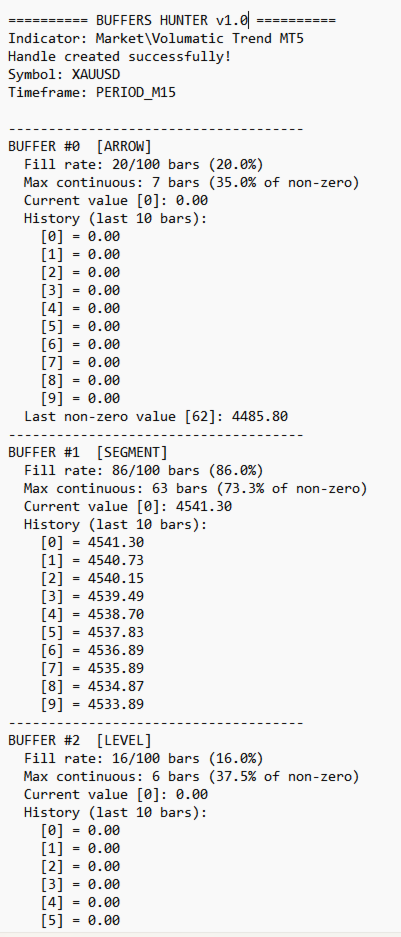
BuffersHunter is a script that reads and analyzes buffers of any MetaTrader 5 indicator. No more guessing which buffer holds buy signals, where the levels are, and which buffers contain indicator lines. Run the script — and in a second you get the complete structure of all buffers with auto-detection of their types.
Who is this script for?
For EA developers. You found an interesting indicator and want to use its signals in your robot, but you don't know the buffer numbers or what they contain. BuffersHunter shows everything in one run.
For trader-researchers. You are studying a new indicator and want to understand what data it transmits. There may be hidden buffers with useful information that you don't see on the chart.
For those who buy indicators on the Market. Not all developers document the buffer structure. BuffersHunter helps you figure it out yourself.
How it works?
-
Select the folder (Market, Examples, Indicators) and name of the indicator — exactly as in the Navigator
-
Run the script on any chart
-
The result appears in the journal and is saved to a text file in the MQL5\Files folder
The script connects to the indicator with default settings, reads a specified number of bars, and analyzes the contents of each buffer.
Important: You don't need to attach the indicator to the chart to read its buffers — the script reads everything directly: attaches the indicator, reads the buffers, and detaches the indicator.
What does the script show?
For each buffer it outputs:
-
Buffer type — auto-detected based on value analysis
-
Fill rate — what percentage of bars contain values
-
Max continuous — longest uninterrupted run of non-zero values
-
Current value at bar zero
-
History of the last N bars (configurable)
-
Last non-zero value — if the visible history is all zeros
Buffer types detected by the script:
| Type | Description |
|---|---|
| LINE | Continuous line — values on most bars, rarely interrupted |
| SEGMENT | Segmented line — frequent values but with gaps (has start and end) |
| LEVEL | Horizontal segments — identical values repeated over consecutive bars |
| ARROW | Arrows/signals — isolated values on individual bars |
| SIGNAL | Signals 1/-1/0 — typical buy/sell buffers |
| HISTOGRAM | Histogram — positive and negative values on most bars |
| LINE (filter) | Filter/strength — values in 0-1 or 0-100 range |
| UNKNOWN | Unused buffer — no values found during the entire search |
Example output
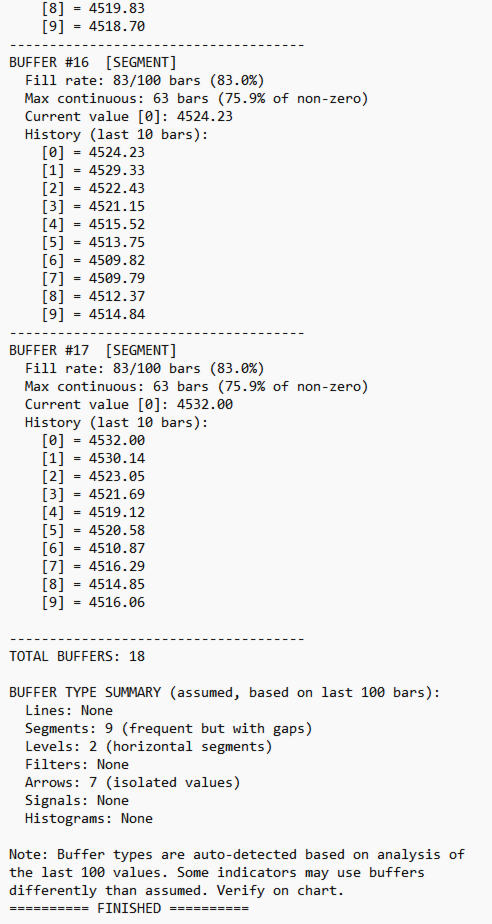
========== UNIVERSAL BUFFER READER v1.40 ========== Indicator: Market\IndicatorName Handle created successfully! Symbol: XAUUSD Timeframe: PERIOD_M15 ------------------------------------- BUFFER #0 [LINE] Fill rate: 40/100 bars (40.0%) Max continuous: 30 bars (75.0% of non-zero) Current value [0]: 0.00 History (last 10 bars): [0] = 0.00 ... Last non-zero value [37]: 4493.62 ------------------------------------- BUFFER #11 [LINE (filter)] Fill rate: 100/100 bars (100.0%) Max continuous: 100 bars (100.0% of non-zero) Current value [0]: 0.50 ------------------------------------- BUFFER #26 [SIGNAL UP/DN] Fill rate: 2/100 bars (2.0%) Current value [0]: 0.00 Signal: NONE History (last 10 bars): [2] = -1.00 DOWN ... BUFFER TYPE SUMMARY: Lines: 12 (continuous) Levels: 4 (horizontal segments) Filters: 1 (0-1 or 0-100 range) Arrows: 6 (isolated values) Signals: 1 (1/-1/0) Unknown: 7 (possibly unused buffers)
After such analysis it's immediately clear:
-
Buffers 16-25 — indicator lines (prices, levels)
-
Buffer 11 — confidence filter (values 0.50)
-
Buffer 26 — BUY/SELL signals (1 and -1)
-
Buffers 4-6, 12-15 — unused
Important notes (honest and transparent)
1. Auto-detection is approximate
The script analyzes the last N bars (default 100) and makes a conclusion about the buffer type based on statistics. This is an assumption, not an exact fact. Some indicators may use buffers in non-standard ways. Always verify on the chart.
2. Indicator runs with default settings
The script does not pass parameters to the indicator. If the indicator requires mandatory parameters at startup — the script cannot read it. In this case you will see an error.
3. Unused and disabled buffers
Zero buffers may be unused or may be disabled in the indicator settings. The script cannot read values from buffers of parameters disabled by default — they remain UNKNOWN. Increase Bars to search (e.g., to 500 or 1000) — the signals may simply be very rare.
4. Time in buffers
Some indicators store signal time (Unix timestamp) directly in the buffer. The script detects such values and displays them in a readable format.
How to use results in an EA?
Once you've identified the buffer numbers, using them in code is very simple:
// Connect to indicator
int handle = iCustom(_Symbol, _Period, "Market\\IndicatorName");

// Read signal buffer
double signal[];
CopyBuffer(handle, 26, 0, 1, signal);

if(signal[0] == 1.0)
    OpenBuy();
else if(signal[0] == -1.0)
    OpenSell();
Script settings
| Parameter | Default | Description |
|---|---|---|
| Indicator folder | Market | Indicator folder (Market, Examples, Indicators) |
| Indicator name | IndicatorName | Indicator name as in Navigator |
| Bars to show | 10 | How many last bars to show in history |
| Bars to search | 100 | How many bars to analyze for type detection |
| Show detailed info | true | Detailed or brief output |
| Save results to file | true | Save result to txt file |
System requirements
-
MetaTrader 5 (terminal)
-
Any timeframe
-
Any trading symbol
-
No DLL required
-
Does not trade itself (script, not EA)
BuffersHunter — your tool for quick analysis of any indicator. Run → Learn → Use in your EA.