Trendy Turtle EA
- Experts
- Version: 1.2
- Updated: 6 April 2026
- Activations: 5

Product Title: Trendy Turtle - Dynamic Trend & Risk Manager
A deterministic trend-following engine built on absolute capital preservation, dynamic ATR volatility scaling, and strict execution logistics.
[The Philosophy] We cannot control the chaos of the global markets; we can only control our exposure to it. Trendy Turtle is not a high-frequency scalper, nor does it employ dangerous grid or martingale mechanics. It is a highly disciplined finite state machine designed to identify established trends, strictly cap downside risk, and relentlessly protect capital once the market moves in your favor.
Built for the serious algorithmic trader, this Expert Advisor exposes its internal logic through a transparent, highly customizable control panel, allowing you to tailor the execution strictly to your broker's environment.
[Core Execution Mechanics] The engine operates on strict, bar-close logic to ensure absolute immunity to intra-candle noise and chart manipulation.
-
The Momentum Trigger: Entry signals are governed by a dual Moving Average crossover system (Fast/Slow), highly customizable to your preferred timeframes and calculation methods (EMA, SMA, etc.).
-
The RSI Gate: Crossovers are strictly filtered through a Relative Strength Index boundary check. Buys are rejected if the asset is mathematically overbought, and sells are rejected if oversold, preventing execution into exhausted momentum.
-
Dynamic Volatility Sizing: Stop Losses and Take Profits are not static pips. They are dynamically calculated using the Average True Range (ATR). As market volatility expands, the system widens its parameters; as the market compresses, the system tightens.
[The Risk Fortress (Capital Preservation)] Trendy Turtle removes the psychological burden of risk management through mathematical enforcement.
-
Strict Fractional Sizing: You define the maximum capital exposure (e.g., 1%). The EA interrogates the broker's server for the exact tick value of the traded asset and dynamically calculates the precise lot size required to ensure your maximum loss never exceeds your defined ceiling.
- Dynamic Trailing Stop: The default mode uses a dynamic trailing stop based on Average True Range (ATR) volatility. The EA will calculate the distance based on your multiplier, providing constant, adapting price protection.
[Logistical Control & Server Defense] Global markets do not operate linearly, and broker execution is not guaranteed.
-
True/False Session Isolation: Easily lock the EA to the specific global liquidity pools you want to trade. With dedicated toggles and customizable hour boundaries for the Sydney, Tokyo, London, and New York sessions, you completely bypass the chronological hazards of daylight saving time shifts.
-
The Execution Wrapper: The EA actively defends against broker anomalies. It continuously scans the physical spread and will flatly refuse to execute a valid technical signal if the spread exceeds your defined maximum. It features strict slippage deviation controls and an automated requote-recovery loop.
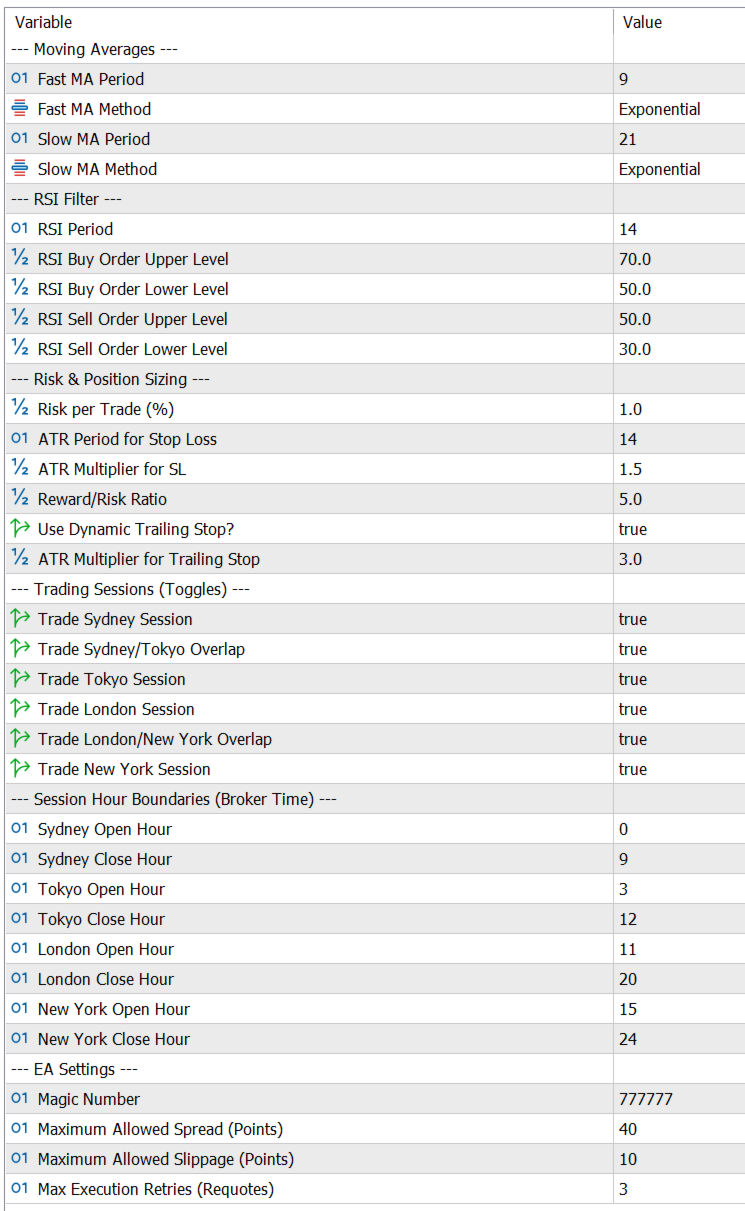
[Parameters Overview]
-
Moving Averages: Fast/Slow Periods, MA Method.
-
RSI Filter: Period, Buy/Sell Upper and Lower boundary limits.
-
Risk Settings: % Risk per trade, ATR Period, ATR Stop Loss Multiplier, Risk:Reward Ratio.
-
Dynamic Trailing Stop: On/Off toggle, ATR Trigger Multiplier.
-
Session Toggles: True/False switches for Asian, European, and US overlapping sessions with exposed broker-hour inputs.
-
Execution Defense: Max Allowed Spread, Max Slippage Points, Max Requote Retries.
[Legal Disclaimer & Risk Warning] Trading foreign exchange on margin carries a high level of risk and may not be suitable for all investors. The high degree of leverage can work against you as well as for you. Before deciding to invest in foreign exchange you should carefully consider your investment objectives, level of experience, and risk appetite. The possibility exists that you could sustain a loss of some or all of your initial investment. The past performance of any trading system or methodology is not necessarily indicative of future results.
Trendy Turtle: Standard Operating Procedure (User Manual)
Welcome to the Trendy Turtle architecture. This engine is designed for absolute capital preservation and methodical trend extraction. It does not gamble. It executes math.
To ensure the engine operates as designed, you must configure your station correctly.
1. The Installation & Terminal Setup
-
Auto-Trading: Before attaching the EA, ensure the "Algo Trading" button at the top of your MetaTrader 5 terminal is green.
-
Chart Attachment: Drag the EA onto your desired chart. The engine is entirely symbol-agnostic. It reads the physical tick value and point size of the chart it is attached to, meaning it works seamlessly on Forex, Metals, or Indices.
-
The Heartbeat: Once attached, look at the top-left corner of your chart. You will see the live "Heartbeat Monitor" displaying the broker time, the current physical spread, and the Session Active status. If you see this, the engine is armed.
2. Calibrating the Risk Engine
The core philosophy of this EA is survival combined with ruthless momentum extraction.
-
Risk Percent: Default is 1.0 . The EA calculates your current account balance and sizes the lot so that your initial Stop Loss equals exactly a 1% loss. (Note: The engine mathematically hard-caps this at 10% to prevent catastrophic fat-finger errors).
-
The Hybrid Trailing Stop: This engine does not use a standard, nervous trailing stop. It exercises extreme patience. When a trade opens, the Stop Loss remains anchored to give the market room to breathe. Only when the price moves favorably by your defined Trailing ATR Multiplier does the gate open. From that moment forward, the stop aggressively trails the price action step-for-step, protected by a massive mathematical buffer to ensure temporary broker spread spikes never falsely trigger an order modification.
3. Setting the Session Gates (Critical)
Global brokers do not use a unified clock. To avoid the chaos of global Daylight Saving Time shifts, this EA relies on the absolute truth of your specific broker's clock.
-
Look at the Market Watch window in your MT5 terminal.
-
Note the exact server hour when your preferred market opens (e.g., if you only want to trade the London overlap, note the server hour when New York opens and London closes).
-
Input those exact hours into the EA parameters and set the corresponding boolean toggle to true . Set all other sessions to false . The EA will refuse to trade outside of these physical hours.
4. The Execution Wrapper
-
Max Spread Points: Default is 40 . If the broker artificially widens the spread during news or rollover, the EA will abort any valid technical signals to protect you from entering a trade automatically in the red.
-
Max Slippage Points: Default is 10 . Limits how far the broker can slip your entry price during high volatility.
Frequently Asked Questions (FAQ)
Q: The EA has been on my chart all day, but it hasn't opened any trades. Is it broken? A: No. Trendy Turtle exercises extreme restraint. It only takes a trade when the Fast/Slow Moving Averages cross, the RSI filter confirms the momentum is not exhausted, the physical spread is below your maximum allowed limit, and the current broker hour falls within your active session toggles. Check the Heartbeat Monitor on your chart. If it says the session is active and the spread is nominal, the EA is simply waiting for a mathematically valid setup.
Q: The trade is in profit, but the Stop Loss hasn't moved yet. Is it broken? A: No. Trendy Turtle uses a Delayed-Activation Trail. It deliberately ignores the initial market chop. The stop loss will remain stationary at your original risk floor until the price completely crosses your defined ATR multiplier threshold. Once the trend is mathematically proven, the gate opens and the trailing stop snaps into action.
Q: Why does the EA sometimes pause the trailing stop even when the trend is continuing? A: The engine features a hardened validation defense. If the broker's spread artificially spikes, or if the price gets too close to the broker's minimum "Freeze Level," the EA will flatly refuse to modify the order. It yields to the boundary rather than spamming the server and risking an execution error. It will seamlessly resume trailing once the volatility normalizes.
Q: Do I need to update my session times when Daylight Saving Time changes? A: Yes. The EA uses your broker's physical server time, not a theoretical GMT offset. When US or European DST shifts occur, verify your broker's Market Watch clock against the physical market opens and adjust the hour inputs in your EA settings accordingly.