How to Start with Metatrader 5 - page 133

You are missing trading opportunities:
- Free trading apps
- Over 8,000 signals for copying
- Economic news for exploring financial markets
Registration
Log in
You agree to website policy and terms of use
If you do not have an account, please register
Hi. I have rented an indicator today for 3 months via MQL5 website but It doesn't show my indicator in my Market/Purchased to install. First I deposit my Mql5 and then rent it from mql5 website. It shows everything under my profile /Payment .I have got 2 confirmation e-mails .First deposit mql5 then purchased confirmation then it show 2 types of installations. Install on the terminal or connect Metatrader VPS and I choosed install on the terminal. So I think everything is ok. The indicator is YuClusters v6.What is the problem? Where should I look for my indicator?please help me.
Use the following procedure provided by the service desk:
Forum on trading, automated trading systems and testing trading strategies
The purchased tab is only showing the last two purchases
Alexey Petrov, 2021.01.19 11:17
Even if a Market product is removed from the showcase, those who already purchased it, can install it anytime from their MetaTrader terminal (Market \ Purchased section).
In case you don't see the product on the list of your purchases in the terminal, try the following:
Forum on trading, automated trading systems and testing trading strategies
MetaTrader 5 for macOS: ready-made DMG package and CrossOver update
MetaQuotes, 2021.04.09 16:58
We have recently released a DMG package for easy MetaTrader 5 installation on macOS computers. With this package, the platform can be installed similarly to any other application: simply drag the platform icon to Applications and wait for the installation to complete.
The package includes the 64-bit version of MetaTrader 5, which will be regularly updated up to the latest release builds. The platform will be ready to run on macOS immediately after installation, without any additional setup required from you.
MetaTrader 5 reinstallation needed on CrossOver
If you are using CrossOver instead of the DMG file, please reinstall the platform. This method previously installed the old 32-bit platform version. The updated MetaTrader 5 CrossOver package features the fully functional 64-bit version.
We strongly recommend upgrading to the more advanced 64-bit MetaTrader 5 version in order to access all the platform features. 32-bit versions are no longer supported or updated. Furthermore, they do not support VPS and Market services.About Metatrader 5 which is not supported for 32 bit Windows anymore -
Forum on trading, automated trading systems and testing trading strategies
New version of MetaTrader 5 platform build 2875: Improvements and fixes
MetaQuotes , 2021.04.09 17:07
Already fixed, today there will be a beta version.
We are disabling the remnants of support for 32-bit versions of MQL5 programs.
"Open a real account for live trading" is greyed out for me, and not available on mobile. Do I have to call customer service to open something?
You open your real account through a broker's website, they email you the account credentials (account number, password, server) and then you login through your mobile app.
Thank you, is <name removed> legit?
Broker discussion is not allowed in this forum, make your own search online, for example "is <broker name> legitimate?" or "<broker name" reviews".
Summaries :
====
MetaTrader 4 Help - Client Terminal – User Guide
MetaTrader 5 Help - Trading Platform — User Manual
Forum on trading, automated trading systems and testing trading strategies
MetaTrader 5 platform beta build 2920: Placement of MQL5 Services showcases in the main working area and updated design
MetaQuotes, 2021.05.14 10:08
The beta version of the updated MetaTrader 5 platform will be released on Friday, May the 14th, 2021. We invite traders to join the testing of the new version, to evaluate all its features and to help developers fix errors.
To update the MetaTrader 5 platform up to build 2920, navigate to Help \ Check Desktop Updates \ Latest Beta Version:
The final build of the new MetaTrader 5 platform will be released after the public beta testing.
The new version features the following changes:
In earlier versions, MQL5 Services purchasing areas were located in the small Toolbox window below the main window. The new placement enables the display of fully featured showcases with convenient purchasing options. The removal of unnecessary tabs from the lower area provides more space for other platform functions.
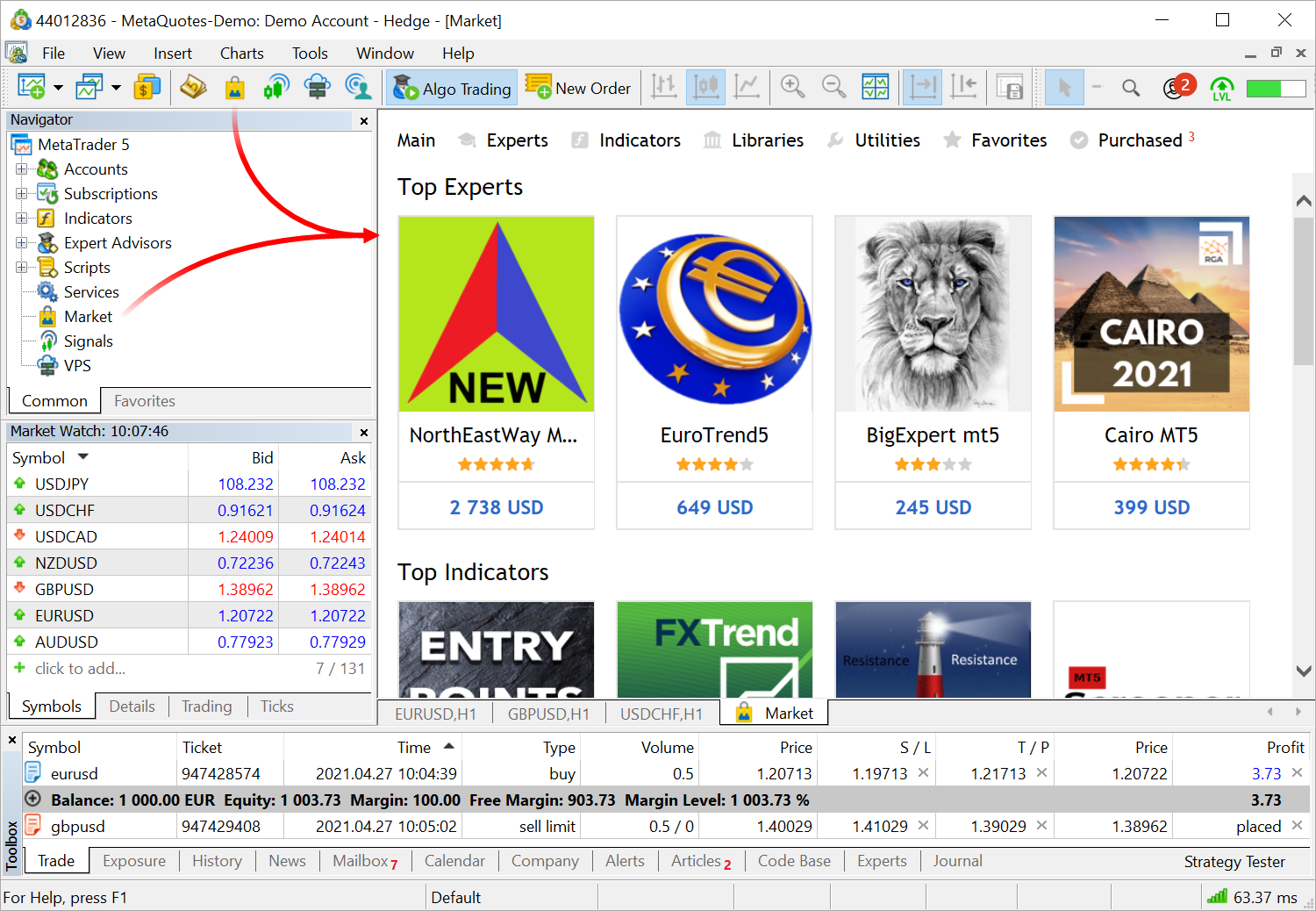
Access to additional services does not interfere with the major functions, such as trading and chart analysis.We have also completely redesigned the services. The design has become more elegant and lightweight. Signals feature additional data, which were previously available only via the MQL5.community website showcase: a polar diagram with the main characteristics, reliability and activity metrics and other variables.
IPv4 which is used in every network was created more than 30 years ago. It contains IP addresses of 32 bits, which are represented as four 8-bit numbers separated by dots. This algorithm produces more than four billion unique IP addresses. However, the rapidly growing number of users and devices has accelerated the depletion of the pool of available addresses.
To avoid the depletion problem, some products feature additional support for the modern IPv6 standard. This protocol uses a 128-bit address, represented as x:x:x:x:x:x:x:x, where each x is a hexadecimal value of six 16-bit address elements. Theoretically, this format allows 5 x 10 ^ 28 unique addresses. In addition to an extensive address space, this protocol has other advantages over the older version. For further details please refer to specialized articles.
The MetaTrader 5 platform is fully IPv6-ready. If your broker or provider switches to the new protocol, the protocol support will be seamlessly enabled in the platform, with no additional action required from your end.
The package includes additional components which enable a more stable and a faster operation. All package users are strongly advised to reinstall MetaTrader 5 by downloading the latest version from https://download.mql5.com/cdn/web/metaquotes.software.corp/mt5/MetaTrader5.dmg
Support for the 32-bit platform version was discontinued a year ago, after the release of build 2360. We strongly recommend upgrading to the 64-bit MetaTrader 5 version in order to access all the platform's features without any limitation.
The update will be available through the Live Update system.