

Trend Matrix EA MT4 version product page: https://www.mql5.com/en/market/product/107186
Trend Matrix EA MT5 version product page: https://www.mql5.com/en/market/product/107187
Please, check my other products in MQL5 Market:
- Infinity Trader EA: MT4 version | MT5 version
- Crypto Investor EA: MT4 version | MT5 version
- Forex Gold Investor: MT4 version | MT5 version
- Forex Trend Detector: MT4 version | MT5 version
- GOLD Scalper PRO: MT4 version | MT5 version
- Omega Trend EA: MT4 version
- BF Scalper PRO: MT4 version | MT5 version
- Smart Scalper PRO: MT4 version | MT5 version
- News Scope EA PRO: MT4 version | MT5 version
- Trend Matrix EA: MT4 version | MT5 version
TREND MATRIX EA LIVE PERFORMANCE
Check Below Trend Matrix EA performance on our accounts:
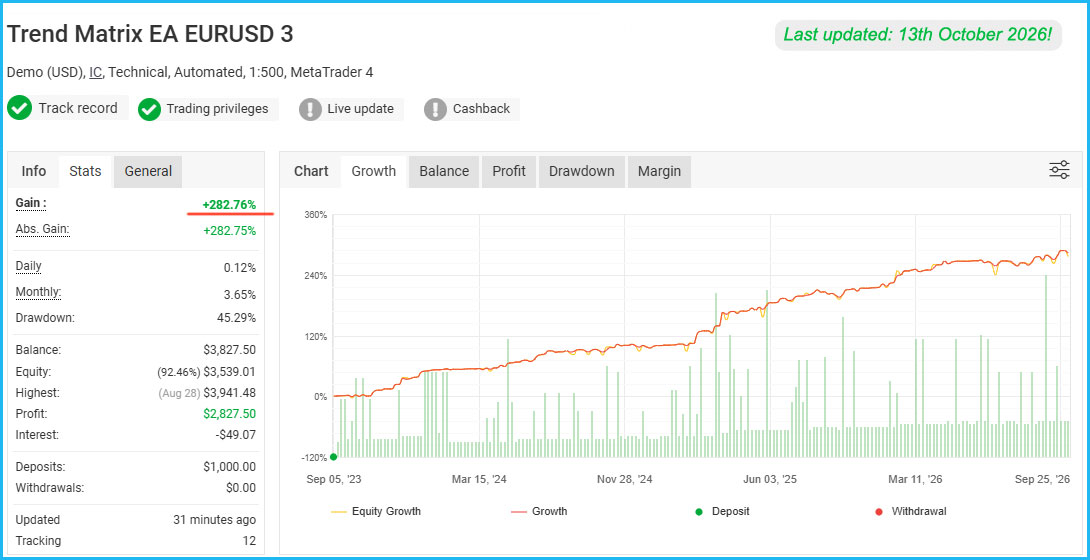
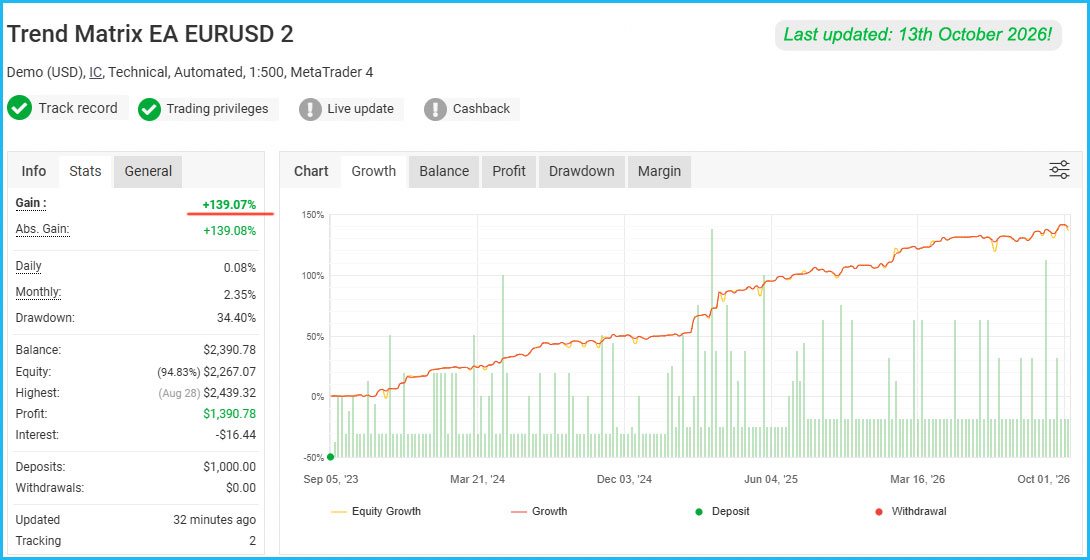
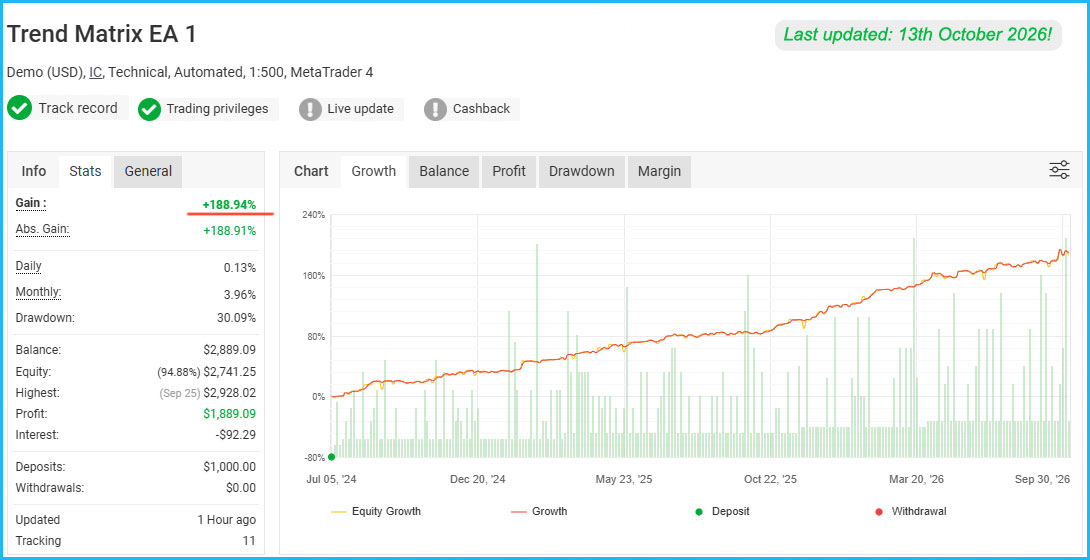
If you want to learn more about Trend Matrix EA performance contact me: https://www.mql5.com/en/users/autotrader
Trend Matrix EA Updated to Version 1.5 – Smarter, Safer, and More Powerful Than Ever!
We’re excited to announce that Trend Matrix EA has been updated to version 1.5! This new release is packed with features designed to help you trade smarter, safer, and more efficiently.
At FXautomater, we continuously keep our expert advisors up to date and fully compatible with modern trading conditions and rules.
What’s New in Trend Matrix EA v1.5
- Drawdown Protection System – ideal for prop firm and funded account trading
- Advanced News Filter – automatically avoids high-impact news events
- Time Management System – lets you control when the EA trades according to your own schedule
- Low-Risk .set files - we have prepared low-risk .set files with more conservative risk management
Trend Matrix EA Your Ultimate Forex Trading Companion
Trend Matrix EA is more than just a forex robot; it's your key to mastering the art of trend-following trading. Developed to excel in the fast-paced and ever-changing forex markets, this expert advisor for MetaTrader 4 and 5 terminals is designed to spot and capitalize on trends, ensuring you stay on the right side of the market.
The ultimate solution for traders seeking precision, expertise, and consistent profitability. Elevate your trading strategies with our advanced tools, comprehensive insights, and proven methods. Whether you're a seasoned trader or just starting, Trend Matrix EA equips you with the knowledge and tools to navigate the dynamic forex market with confidence. Transform your trading experience today and realize your true profit potential with Trend Matrix EA.
Trend Matrix EA Features:
- Strong, pure and simple trading logic
- User-Friendly Interface
- High spread, slippage and broker protection
- Multiple currency pairs support
- Next Generation Loss Recovery System
- New, improved, highly effective exit logic
- Email and Push Notification system
- 24/5 trading, without any time restrictions – no GMT shift hassles
- Solid 14-year backtest performance
- Long only and short only option
- Trend-following Trend-following strategy
- Static & Dynamic Trailing Stop system
- Compatible with MetaTrader 4 and 5
- Advanced News Fitler
- Time Management System
- Drawdown Protection System
Recommendations
Trend Matrix EA is a cutting-edge forex robot designed to identify and capitalize on market trends. With its Next Generation Loss Recovery System, risk management tools, and user-friendly interface, it offers a reliable way to navigate the forex market with confidence. Join a community of successful traders who trust Trend Matrix EA to stay on the right side of the market trend and secure consistent profits.
Recommended timeframe: H1
Recommended backtest method: H1 by every tick
Supported currency pairs: AUDUSD, EURGBP, EURJPY, EURUSD, GBPJPY, NZDCAD, USDCAD, USDJPY, XAGUSD and BRN
The default settings in Trend Matrix EA are optimized for EURUSD H1! Check below for .set files for the rest of the supported pairs!
LOW-RISK .set files are also available. For traders who want to use the EA with more conservative risk or for traders who trade on small accounts the low-risk .set files are ideal.
User-Friendly Interface
Trend Matrix EA is designed with both novice and experienced traders in mind. Its user-friendly interface makes setup and customization a breeze, allowing you to tailor the EA to your specific preferences. It is set-and-forget trading, Trend Matrix EA accommodates your style.
Comprehensive Risk Management
Your safety and peace of mind are our top priorities. Trend Matrix EA includes a comprehensive suite of risk management tools, including:
- Broker Protection: Safeguard your trades from broker-related issues to maintain the integrity of your trading.
- Spread Protection: Prevent excessive spreads from impacting your trading results.
- Slippage Protection: Minimize the effects of slippage to ensure precise order execution.
- Static and Dynamic Trailing Stop System: Optimize your exits by trailing stop losses based on either fixed or dynamic parameters.
With Trend Matrix EA, you can trade with confidence, knowing that your risk is carefully managed.
Next Generation Loss Recovery System
The crown jewel of Trend Matrix EA is its Next Generation Loss Recovery System. This groundbreaking system redefines how forex robots perform in adverse market conditions. While other EAs may falter when the market takes an unexpected turn, Trend Matrix EA thrives.
Here's how it works: The Loss Recovery System intelligently identifies early signs of a market reversal. When it detects negative trades, the EA takes swift action, closing these trades and opening new ones in the opposite direction. This ingenious technique transforms challenging market conditions into profit opportunities, ensuring that you can make money in all market scenarios.
Stay Informed with Push Notifications
Never miss a trading opportunity with Trend Matrix EA's push notification system. Receive real-time alerts on your preferred device, keeping you updated on important market developments and EA actions. Stay connected to the market no matter where you are.
Tailored Trading Options
Flexibility is key in the world of forex trading, and Trend Matrix EA delivers. Choose between "Only Longs" and "Only Shorts" trading modes to align the EA with your market outlook and strategy. Whether you're bullish, bearish, or somewhere in between, Trend Matrix EA adapts to your needs.
Trailing Stop System
Adapt to market movements seamlessly with our dynamic Trailing Stop system. Lock in profits as your trades progress while maintaining the flexibility to capture potential gains.
Compatible with MT4 and MT5
Trend Matrix EA is compatible with MT4 and MT5 terminals. You will get access to the both version and you will be able to use the EA on any terminal you wish.
.Set files
We have prepared .set files for each supported currency pairs. You will get everything in one package. You don't need to make your own optimization because we have already done the hard work for you. We also provide low-risk .set files. Low-risk .set files provide more conservative risk management. They are ideal for traders who want to trade with low-risk on small account.
Drawdown Protection System
Prop firm and funded accounts such as FTMO have become increasingly popular among traders. To ensure Trend Matrix EA remains fully compatible with such trading environments, we’ve added a Drawdown Protection System.
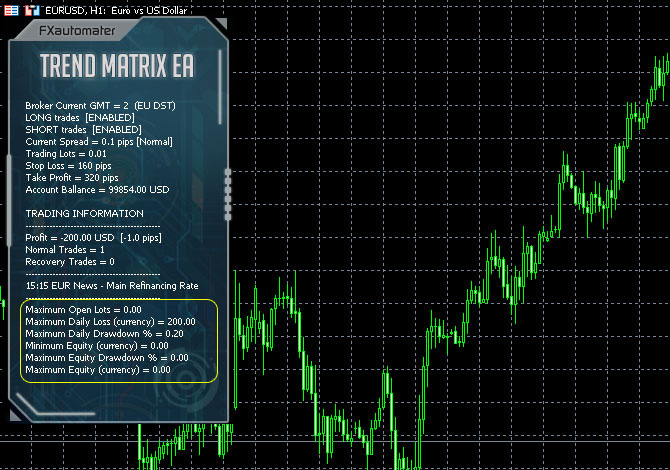
This feature includes several configurable parameters, allowing you to precisely adjust the EA according to your account’s rules and limitations. It helps you trade with greater confidence and reduced risk, especially on accounts with strict drawdown restrictions.
This smart mechanism acts as a built-in safety net, automatically pausing or stopping trading activity when predefined drawdown limits are reached — protecting both your capital and your trading psychology.
Advanced News Filter
Trading during high-impact news releases can be extremely risky. In today’s world of global uncertainty and volatile markets, this feature has become essential.
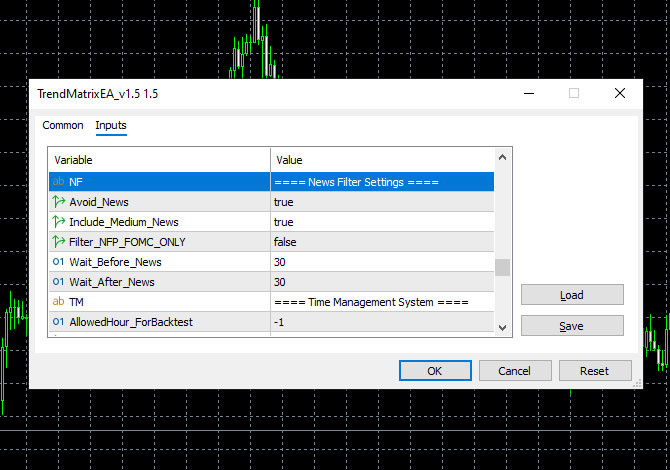
The new Advanced News Filter protects your trades by automatically avoiding periods of high-impact news or unpredictable events — keeping your account safe from unnecessary exposure.
With this system, Trend Matrix EA trades only when the market is stable and suitable for your strategy.
By filtering out volatile news periods, the EA focuses on high-probability setups, helping you maintain smoother equity growth and consistent performance over time.
Time Management System
The Time Management System gives you full control over your trading schedule.You can easily set specific trading hours or restrict trading during times of low or high volatility.
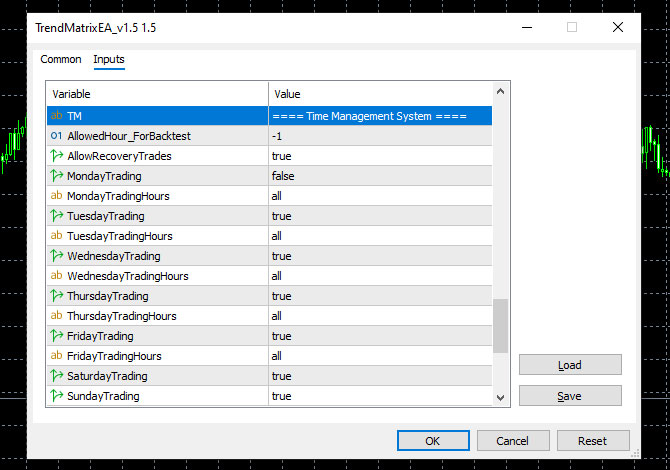
This flexibility allows you to tailor the EA to your personal preferences and market conditions — a must-have feature for professional traders who want complete control.
Whether you trade during specific market sessions or prefer to avoid certain hours, this system ensures Trend Matrix EA operates exactly when you want — maximizing efficiency and control.
With the continuous evolution Trend Matrix EA is not a static product; it's a product of ongoing development and refinement. Our team of experts is dedicated to regularly updating the EA to adapt to evolving market conditions and incorporate the latest advancements in trading technology. When you choose Trend Matrix EA, you're choosing a product that evolves with the market.
Trend Matrix EA Settings
==== Risk Management Settings ====
- FixedLots: fixed trading volume (works if AutoMM1=0).
- AutoMM: values greater than 0 (zero) activate automatic ММ (traded volume as a percentage of free margin).
==== General Settings ====
- LongTrades: true/false to enable/disable the BUY(long) trades.
- ShortTrades: true/false to enable/disable the SELL(short) trades.
- Magic: magic number - it is extremely important to keep this different for all robots.
- MaxSpread: maximal allowed spread for position opening.
- Slippage: maximal allowed slippage for position opening.
- EA_Comment: text which will be added as a comment to each trade opened by Trend Matrix EA.
- NoConcurrentTrades – true/false to enable/disable concurrent trading on all supported pairs within one account. If you set NoConcurrentTrades=true, then Trend Matrix EA will not trade if there are already open trades for any of the other supported pairs. This option is very useful for reducing risk when trading more than one supported pair because you will always have a trade with only one of the supported pairs and it will be safe enough. If you wish to use this option you need to set NoConcurrentTrades=true on all charts where you trade with Trend Matrix EA and to keep same magic number!
==== Broker Regulation Settings ====
- NFA: true/false - set "true" if your broker is NFA regulated.
- No_Hedge: true/false - set "true" if you wish to cancel all hedge trades.
==== Trading Logic Settings ====
- StopLoss: Stop Loss in pips
- TakeProfit: Take Profit in pips
- BreakOut: breakthrough over the volatility borders in pips - a trigger value which would initiate a new trade
- BreakOut_Period: the period of the volatility indicator
- MarketMaxVolatility: this is the maximum allowed value of the current market volatility.
- MA_SlowPeriod: slow moving average period value – this value is used for exit logic
- MA_FastPeriod: fast moving average period value – this value is used for exit logic
==== Trailing Stop Settings ====
- TrailingStop: if the value is greater then zero, the system will use same value as a fixed trailing stop. In this case the system will use a fixed trailing stop instead a volatility trailing stop
- TrailingStopAfter: When Fixed_Trailing is greater than 0 (zero) and the current profit of the trade is greater or equal to Fixed_Trailing_After the robot will set a trailing stop to the trade equal to Fixed_Trailing parameter’s value.
- TrailingStopStep: This is the step of the fixed trailing stop. When the difference between trade profit and the current stop loss is greater than Fixed_Trailing_Step the robot will move the trailing stop.
- DynamicTrailingStop: volatility trailing stop multiplier, in case we use
- DynamicTrailingStopStep - this is the step of the dynamic trailing stop. When the difference between trade profit and the current stop loss is greater than DynamicTrailingStopStep the robot will move the trailing stop.
- Trailing_Period: period of the volatility trailing stop indicator.
==== Next-Gen Recovery System ====
- NGRS: When this parameter is TRUE it means that Advanced Recovery System is enabled. FALSE means that it is disabled
- NGRS_After: Value in pips. When the initial trade loss is equal or greater than this parameter's value then the EA starts the recovery process. It closes the initial trade and open opposite trade. For example, if the initial trade is BUY the EA will open SELL and vice versa
- NGRS_FixedLots: Lot size of the recovery trades. Work only when NGRS_RiskMultiplier = 0.
- NGRS_RiskMultiplier: This is a multiplier. Works at values greater than 0. Example: if the lot size of the initial trade is 0.1 lot and if NGRS_RiskMultiplier's value is 2 then the recovery trades will be opened with 2 x 0.1 = 0.2 lots. When NGRS_RiskMultiplier has a value greater than 0 then the parameter NGRS_FixedLots is not used!
- NGRS_TakeProfit: Value in pips. The EA will close all opened recovery trades when their total profit is equal or greater than NGRS_TakeProfit value.
- NGRS_StopLoss: Value in pips. The EA will close all opened recovery trades when their total loss is equal or greater than NGRS_StopLoss value.
- NGRS_AddOnSignal: If its value is TRUE then the EA will open additional recovery trades based on an indicator signal.
- NGRS_AllowedTrades: Maximum allowed number of recovery trades.
- NGRS_Distance: Value in pips. The distance between each recovery trade
- NGRS_SignalLine: Border line of CCI. When CCI value crosses the border line the EA may open recovery trades.
- NGRS_SignalPeriod: The period of CCI indicator.
- NGRS_SignalTF: The time frame of CCI indicator.
==== Notifications Settings ====
- EMAIL_Notification: true/false - enable/disable email notifications
- PUSH_Notification: true/false – enable/disable push notifications to mobile phones.
==== GMT Settings ====
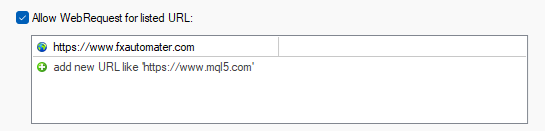
- AutoGMT_Offset - true/false - Change to false only if you want to use the ManualGMT_Offset in your live trading. In this case, please ensure that you have used the correct ManualGMT_Offset for your broker. Auto GMT works only if our website url is added on your terminal "Allow WebRequest for listed URL" configuration. To configure this: Go to MT4/MT5 Terminal → Tools → Options → Expert Advisors tab → "Allow WebRequests for listed URL" and add: https://www.fxautomater.com
- ManualGMT_Offset - For this parameter you have to set the winter GMT offset of your broker. This parameter is very important in case that you have disabled the AutoGMT_Offset=false and when you backtest the WallStreet Recovery PRO. If you set wrong value, then you may get unexpected results.
- DST_Usage - This parameter is one of the most important parameters because it tells to WallStreet Recovery PRO how to deal with the GMT offset. You can set 3 different values on this parameter. Actually, it is a drop-down list and you only need to choose the correct value for your broker.
==== News Filter Settings ====
The News Filter function is disabled by default. It is your personal choice whether, or not to activate this function. The News Filter function can increase the profit factor of the system and reduce the drawdown, but also can reduce the number of the trades and the total profit.
- Avoid_News - true/false – use or not the News Filter.
- Include_Medium_News - true/false – include, or not the medium impact news. The high impact news are included by default.
- Filter_NFP_FOMC_ONLY - true/false - when true the news filter will stop trading only during NFP and FOMC news.
- Wait_Before_News - the amount of minutes, before the news release, when the trading will be disabled.
- Wait_After_News - the amount of minutes, after the news release, when the trading will be enabled.
==== Time Management System ====
- AllowedHour_ForBacktest - this parameter is only for backtesting! It helps optimizing the Time Restriction system. Here is how you can use it. During the optimization set start value 0, end value 23 and the step 1. You can optimize only one day per optimization. For example, you want to optimize the trading hours for Monday, you have to disable other days bay settings TuesdayTrading=false ... to ... FridayTrading=false. At the end of the optimization the tester will show you the best hours for trading on Monday. You can add these best hours in the parameter MondayTradingHours separated by comma, for example: 1,4,6.
- AllowRecoveryTrades – true/false – enable or disable recovery trades when time restrictions are used. For example, if you set it true even the trading is restricted by the time management system the recovery trades can be opened if needed. Recovery trades are very important and that’s why we strongly recommend you not to disable them!
- MondayTrading - true/false - enable or disable trading on Monday
- MondayTradingHours - trading hours separated by comma. For example: MondayTradingHours=22,23,0,1,2 - only during these hours the robot will be able to trade
- TuesdayTrading - true/false - enable or disable trading on Tuesday
- TuesdayTradingHours - trading hours separated by comma. For example: TuesdayTradingHours=22,23,0,1,2 - only during these hours the robot will be able to trade
- WednesdayTrading - true/false - enable or disable trading on Wednesday
- WednesdayTradingHours - trading hours separated by comma. For example: WednesdayTradingHours=22,23,0,1,2 - only during these hours the robot will be able to trade
- ThursdayTrading - true/false - enable or disable trading on Thursday
- ThursdayTradingHours - trading hours separated by comma. For example: ThursdayTradingHours=22,23,0,1,2 - only during these hours the robot will be able to trade
- FridayTrading - true/false - enable or disable trading on Friday
- FridayTradingHours - trading hours separated by comma. For example: FridayTradingHours=22,23,0,1,2 - only during these hours the robot will be able to trade
- SaturdayTrading and SundayTrading - true/false - enable or disable trading during Saturday and Sunday respectively. Due to big GMT offset, some brokers trade during weekends and for that reason we added these parameters as well.
==== Drawdown Protection Settings ====
- Max open lots – The total allowed lot size for all open trades.
- Maximum daily loss (currency) - Set a maximum limit on the amount you can lose in a single day to protect your capital.
- Maximum daily drawdown % - Define the maximum percentage of your balance that can be lost in one day.
- Daily reset hour (terminal) – Daily reset hour. This is usually 00:00 but if your broker has different reset hour then you can set any hour. Have in mind that if you change the hour directly on the control panel it will be effective after the new hour is reached!
- Minimum Equity (currency) - Establish a minimum equity level that, when reached, triggers protective measures.
- Maximum Equity drawdown % - Limit the maximum percentage drawdown of your total equity to prevent significant losses.
- Maximum Equity (currency) - Set an upper limit on your equity to help manage gains and protect from volatile shifts.
The default values (zero) mean that the respective protection is not active.
Some traders need such protections in “Prop Firm” challenges.
We will refrain from recommending specific values. It is the responsibility of the traders to set these parameters correctly based on their broker restrictions.
We are obliged to inform you, that using such protections could decrease the overall profit in long-term.
Each trader must decide for himself whether to use these protections and at what values.
Trend Matrix EA Backtests
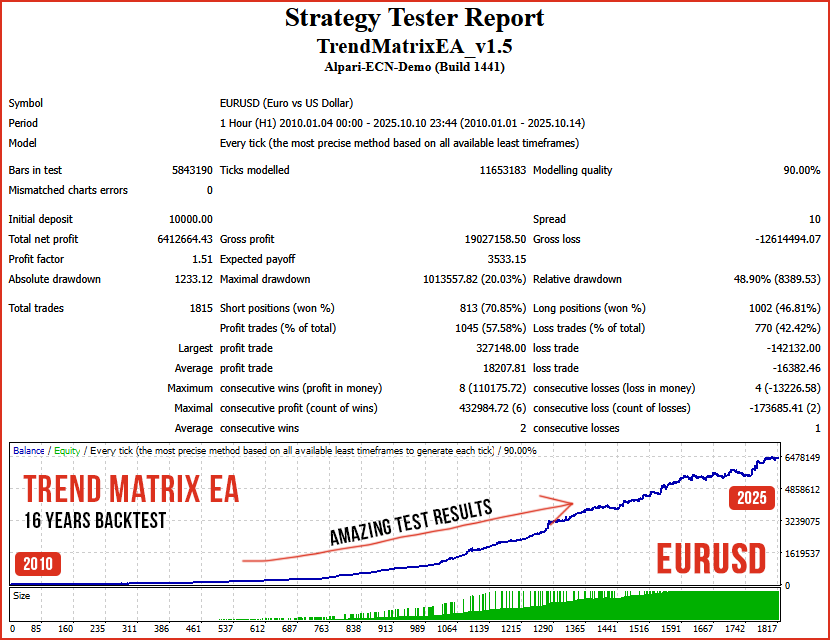
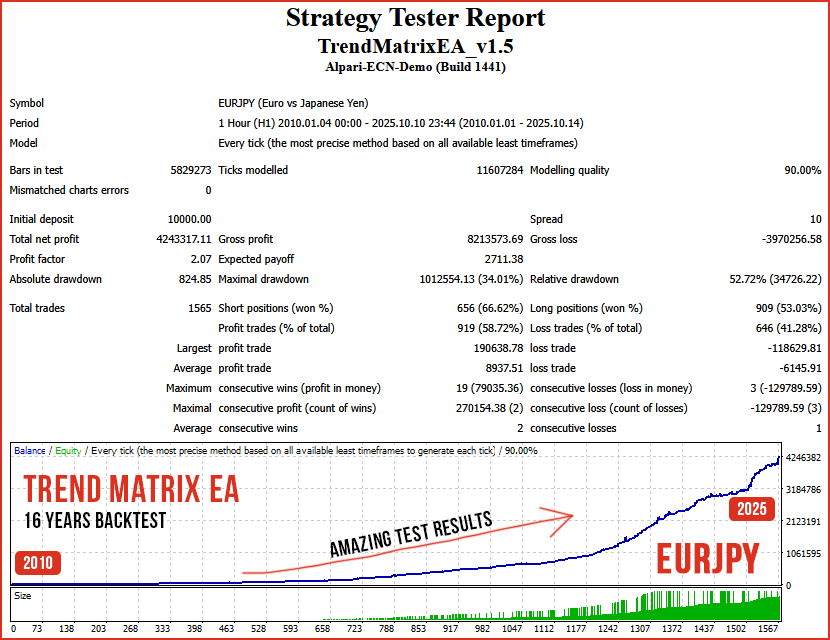
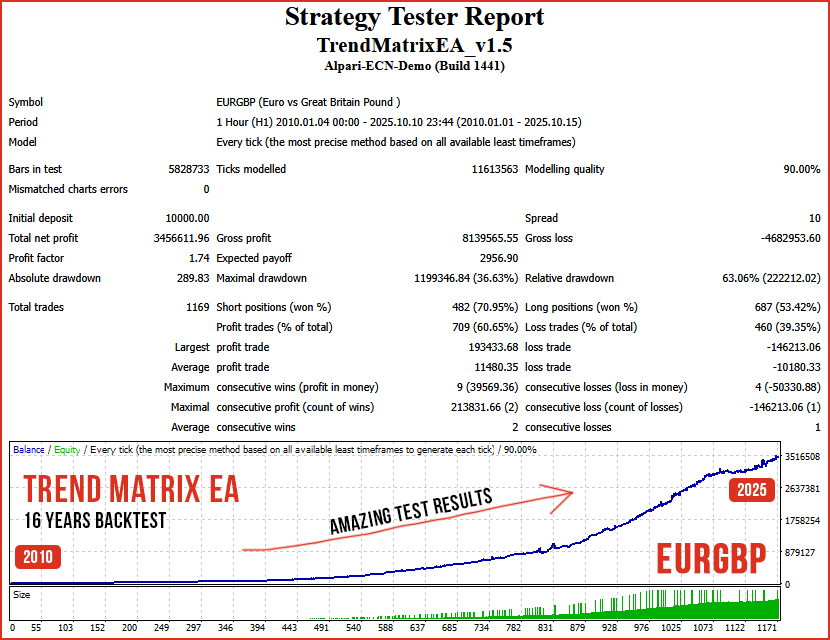
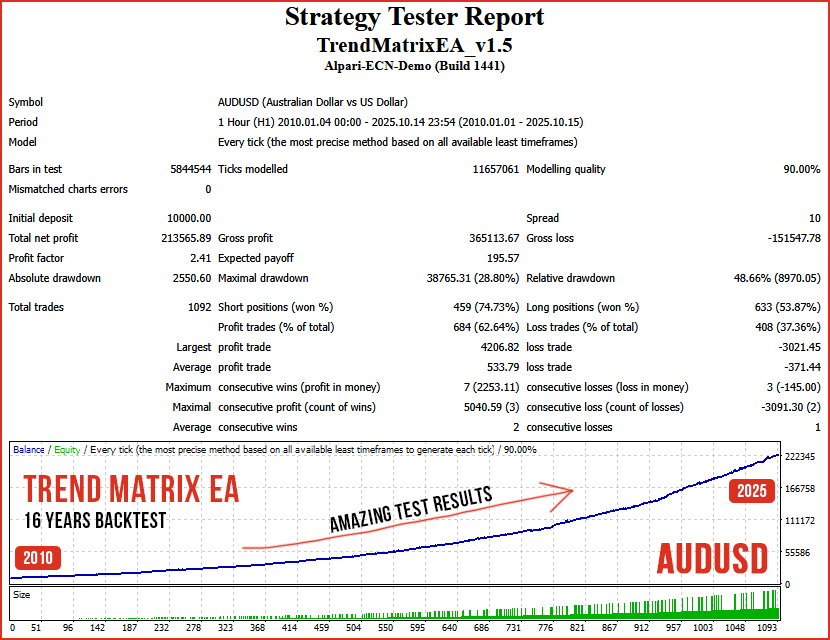
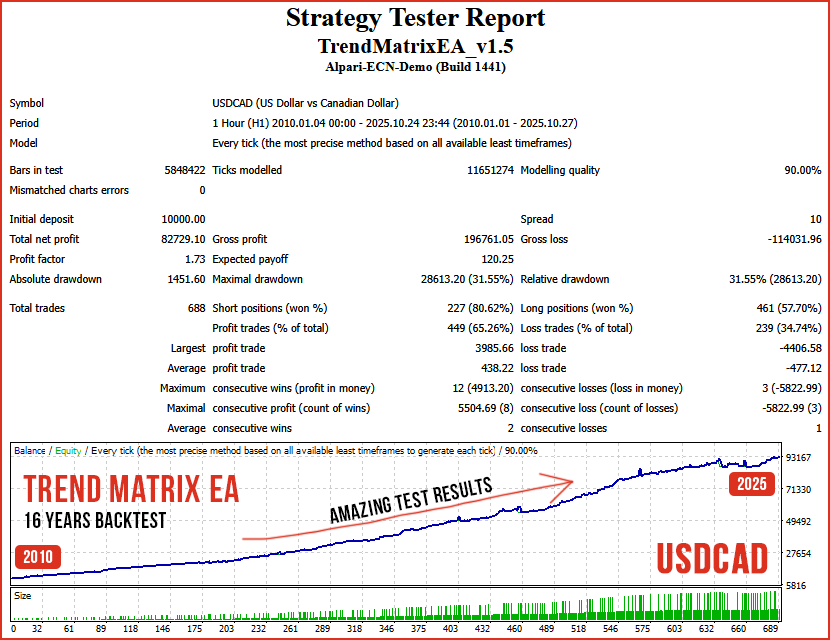

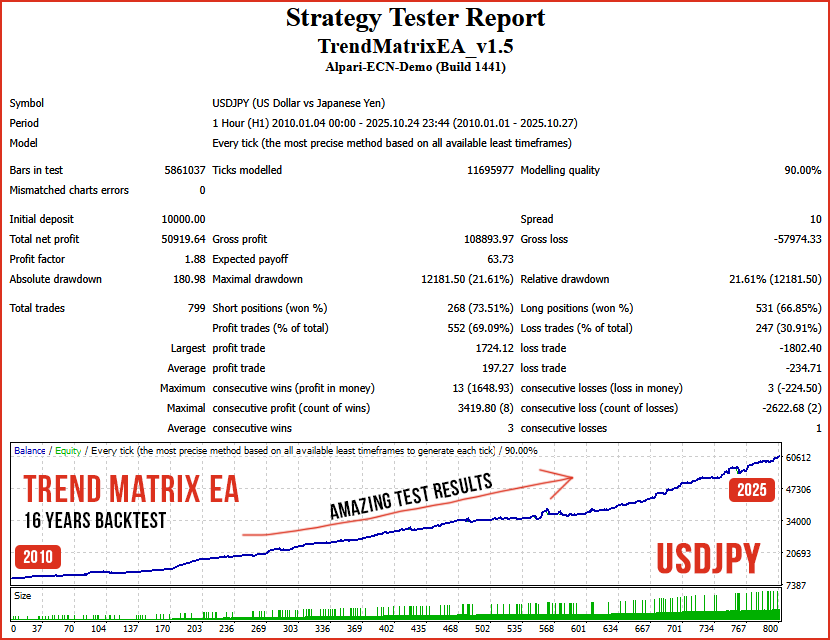
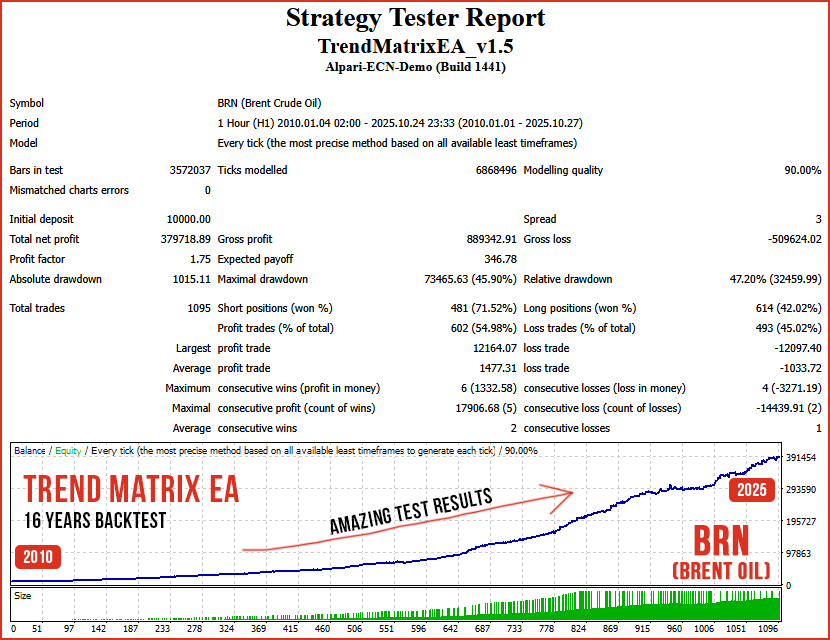

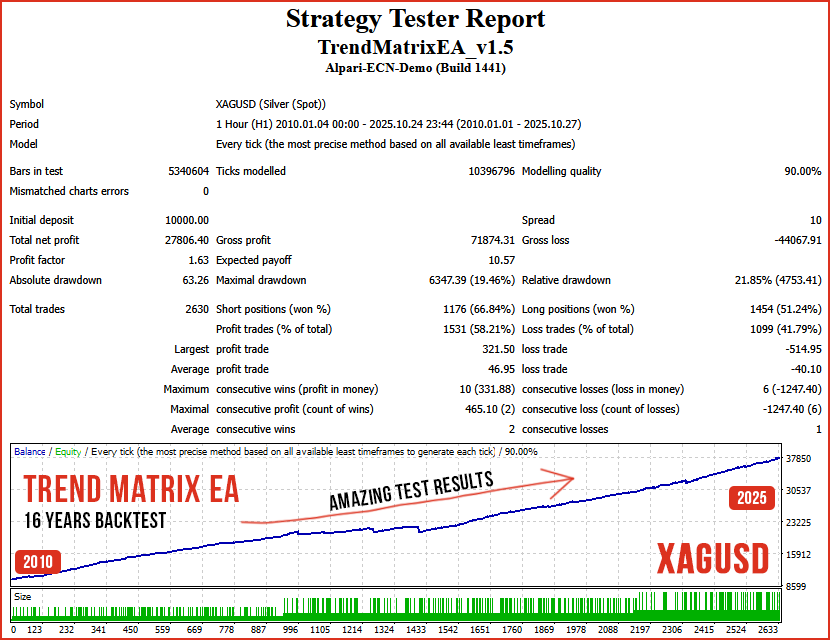
If you like my product, please write a review! I will be very grateful!
You can check out my other products in my profile! Click here to check my other products!
If you want to be notified of my new products, please add me as a friend! I regularly publish new forex robots!




