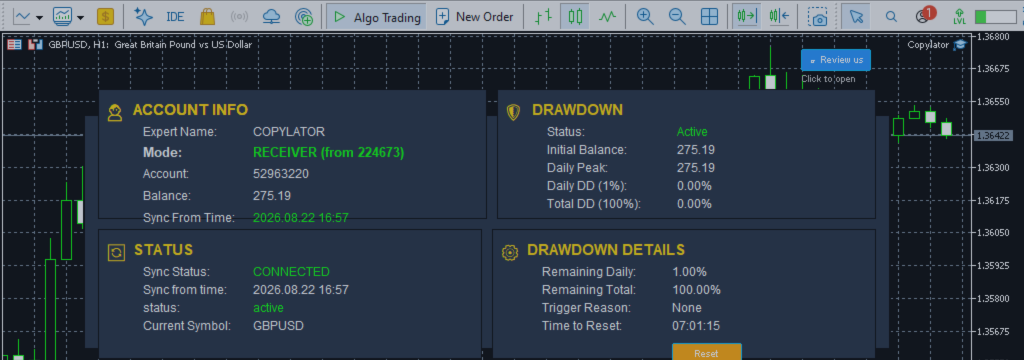

Product link:
https://www.mql5.com/en/ market/product/191385
When choosing an MT5 Trade Copier, traders often focus on features such as copying speed, lot management, symbol mapping, SL/TP synchronization, and drawdown protection. However, one important technical specification is sometimes overlooked: whether the Expert Advisor requires external DLL files.
For traders operating multiple MetaTrader 5 terminals, VPS environments, different brokers, or prop firm accounts, a no-DLL architecture can make installation and maintenance significantly simpler.
What Is a DLL?
DLL stands for Dynamic Link Library. A DLL is an external compiled software component that an application can call to perform functions outside its own native capabilities.
In the MetaTrader 5 environment, an EA that depends on a DLL may require additional files and permissions before it can operate correctly. This creates another dependency between the trading terminal and the external software component.
Although DLLs can be useful for certain applications, they also introduce additional considerations when an EA is deployed across multiple computers, VPS servers, brokers, or trading environments.
Why No-DLL Operation Matters
A trade copier that does not require external DLL files can simplify the entire deployment process. Instead of maintaining additional external dependencies, the copier can operate directly within the MetaTrader 5 environment.
For a product such as COPYLATOR – MT5 Trade Copier, this approach is particularly useful when the same copier needs to be installed across multiple Sender and Receiver terminals.
1. Simpler Installation
One of the most obvious advantages of a no-DLL architecture is a simpler installation process.
With a DLL-dependent application, users may need to install additional files, place them in the correct directories, enable DLL permissions, and troubleshoot missing or incompatible dependencies.
A no-DLL MT5 Trade Copier removes these additional installation steps. With COPYLATOR, the core copier is installed as an EA in MetaTrader 5 and can be configured on a chart using the normal MT5 workflow.
This is especially useful when setting up multiple terminals, where repeating unnecessary installation steps can become time-consuming.
2. Fewer External Dependencies
Every external dependency creates another potential point of failure.
A DLL-based system may stop functioning correctly if an external file is missing, incorrectly installed, incompatible, blocked, or changed during a system migration.
A no-DLL copier reduces this dependency chain. The fewer external components required for operation, the easier it is to identify and troubleshoot problems within the trading environment.
3. Security Considerations
Security is another important reason traders should understand whether an EA requires DLL imports.
A DLL is compiled external code. Unlike the normal MQL5 source environment, traders generally cannot inspect the internal implementation of a compiled third-party DLL.
Depending on the software and permissions involved, external libraries can potentially interact with system resources beyond normal trading functions. For this reason, traders should be careful when allowing unknown or unnecessary DLL components to run inside a trading environment.
A no-DLL architecture avoids the need to grant an EA access through external DLL imports, reducing the number of external components involved in the trading setup.
4. Better Compatibility Across Trading Environments
Traders frequently operate MT5 terminals in different environments:
- Different brokers
- Different VPS providers
- Personal computers
- Dedicated trading servers
- Multiple trading accounts
- Prop firm environments
Some environments may restrict or disable DLL imports. In such cases, a DLL-dependent EA may require additional configuration or may not be permitted to operate.
A no-DLL MT5 Trade Copier avoids this particular dependency and can therefore be easier to deploy across different environments.
However, traders should always verify the specific rules and technical restrictions of their broker, VPS provider, or prop firm before deploying any automated trading software.
5. Easier VPS Migration
VPS migration is a common task for traders running automated systems.
When moving from one VPS to another, every additional dependency must be transferred and configured correctly. Missing DLL files or incorrect permissions can create unnecessary troubleshooting.
With a no-DLL copier, the migration process is simpler:
- Install MetaTrader 5 on the new VPS.
- Install the MT5 Trade Copier.
- Configure the Sender or Receiver mode.
- Verify the account and symbol configuration.
- Enable automated trading.
- Run a controlled test before going live.
This makes the copier easier to reproduce across multiple terminals and VPS installations.
6. Easier Troubleshooting
When a trade copier does not work as expected, traders need to determine where the problem originates.
Possible causes can include terminal settings, account configuration, symbol differences, automated trading permissions, connection settings, lot parameters, filters, or synchronization settings.
A DLL introduces another potential troubleshooting layer.
With a no-DLL architecture, the troubleshooting process can remain focused primarily on the MetaTrader 5 terminal and the copier's configuration instead of investigating additional external libraries.
7. Useful for Multi-Terminal Copy Trading
One of the main use cases for an MT5 Trade Copier is managing multiple terminals.
COPYLATOR supports Multi-Sender and Multi-Receiver configurations, allowing traders to build setups such as:
- One Sender to multiple Receivers
- Multiple Senders to one Receiver
- Multiple Senders to multiple Receivers
When several terminals are involved, installation consistency becomes increasingly important.
A no-DLL design helps keep the deployment process straightforward across the different MT5 installations.
8. Single-Chart Installation
COPYLATOR is designed around a straightforward MT5 installation model with one copier chart per terminal.
The user can configure the required terminal as either a Sender or Receiver and then apply the appropriate settings.
Combined with the no-DLL architecture, this provides a clean installation process without requiring additional external software components.
9. No External DLL Maintenance
Software maintenance is not limited to the initial installation.
When an external DLL is involved, users may also need to consider its version, location, compatibility, permissions, and availability after operating-system or VPS changes.
A no-DLL MT5 Trade Copier eliminates this category of maintenance from the normal copier setup.
This can be particularly valuable for traders who operate several terminals and want to minimize repetitive maintenance tasks.
No-DLL vs. DLL-Based Trade Copier
| Consideration | No-DLL Copier | DLL-Dependent Copier |
|---|---|---|
| External DLL installation | Not required | May be required |
| Additional dependencies | Fewer | More |
| DLL permission settings | Not required | May be required |
| VPS migration | Generally simpler | Additional dependency checks may be required |
| Troubleshooting | Fewer external components | DLL can add another troubleshooting layer |
| Multi-terminal deployment | Simple and consistent | Requires dependency management |
No DLL Does Not Mean No Configuration
It is important to understand that no-DLL operation does not mean that an MT5 Trade Copier requires no configuration.
Correct trade copying still depends on proper Sender and Receiver configuration, account identification, automated trading permissions, symbol compatibility, lot management, and other settings.
For example, if a broker uses a different symbol name for gold, such as XAUUSDm instead of XAUUSD, symbol mapping may still be necessary even though the copier does not use DLL files.
Similarly, the terminals must remain active and connected if continuous trade copying and synchronization are required. A VPS is strongly recommended for 24/7 operation.
No-DLL Architecture and Risk Management
The absence of DLL requirements is primarily a technical and deployment advantage. It should not be confused with a guarantee of trading performance or profitability.
Risk management still depends on how the copier is configured and how the underlying trading strategy operates.
COPYLATOR provides tools such as:
- Drawdown protection
- Fixed lot management
- Lot multiplier
- Balance-ratio scaling
- Maximum lot cap
- Buy-only and Sell-only filters
- Day and time filters
- Maximum spread filtering
- Custom SL/TP settings
These features address trading and copying risk, while the no-DLL architecture addresses installation, dependency, and compatibility considerations.
Why This Matters for Professional MT5 Users
For a trader running one terminal, the difference between a DLL and no-DLL setup may appear relatively small.
For a trader operating multiple MT5 accounts, VPS servers, brokers, or Receiver terminals, the difference becomes much more practical.
A consistent installation model can make it easier to:
- Deploy the copier on new terminals.
- Move the setup to another VPS.
- Maintain multiple Receiver accounts.
- Reduce external dependencies.
- Troubleshoot configuration problems.
- Keep installations consistent across environments.
Recommended Checklist Before Going Live
Even with a no-DLL MT5 Trade Copier, it is recommended to verify the complete setup before using real funds.
- Confirm that the correct MT5 terminal is being used.
- Install the copier and configure one chart per terminal.
- Set the terminal to Sender or Receiver mode as required.
- Verify the Sender account number on Receiver terminals.
- Enable automated trading.
- Check symbol mapping and Market Watch availability.
- Configure the appropriate lot-management method.
- Review drawdown and other risk controls.
- Run a demo test with a complete trade lifecycle.
- Confirm opening, SL/TP synchronization, modification, and closing.
- Keep the terminals running continuously when live copying is required.
Conclusion
The absence of a DLL requirement is much more than a small technical specification. For an MT5 Trade Copier, it can contribute to a simpler installation process, fewer external dependencies, easier VPS migration, and a more consistent deployment experience.
For traders managing multiple MetaTrader 5 terminals, these advantages can become particularly important over time.
COPYLATOR – MT5 Trade Copier is designed to operate without external DLL files while providing a complete set of trade-copying and risk-management tools for MT5 environments.
When comparing trade copiers, features such as copying functionality, synchronization, lot management, risk controls, and reliability are important—but the underlying installation architecture should also be part of the evaluation.
Product link:
https://www.mql5.com/en/ market/product/191385




